Are You Making These 3 Fatal Social Media Mistakes for Your Business?
Social media is a goldmine for businesses—unless you’re unknowingly sabotaging your own success. 🚨 With over 4.8 billion social media users worldwide, platforms like X (formerly Twitter), Instagram, and LinkedIn offer an unparalleled opportunity to connect with your audience. Yet, many brands struggle to turn their social media presence into actual growth. Why? Because they’re making avoidable yet fatal mistakes that hurt engagement, reach, and ultimately, revenue.
If you want to drive sales with social media, avoiding these pitfalls is crucial. Let’s break down the top three mistakes businesses make—and how to fix them.
1️⃣ Ignoring Engagement & Community Building
Social media is meant to be social—yet many brands treat it like a one-way advertising platform instead of a place for conversations.
🔹 Why This Is a Mistake:
Brands that fail to interact with their audience see lower engagement and reach.
Social media platforms prioritize active conversations in their algorithms.
Ignoring comments and messages makes your brand look unapproachable and robotic.
💡 Fix It:
Respond to every comment and DM (yes, even the short ones!).
Use polls, Q&A stickers, and interactive posts to boost engagement.
Implement psychological triggers to encourage more user interaction. (Boosting social media engagement can be as simple as using emotional storytelling or exclusivity techniques!)
2️⃣ Posting Without a Strategy
A business without a content strategy is like a ship without a compass—directionless and bound to crash. 🚢 Many brands post randomly, hoping something will go viral. Spoiler alert: It doesn’t work.
🔹 Why This Is a Mistake:
Inconsistent posting confuses your audience and lowers retention.
Posting without a content calendar leads to rushed, low-quality posts.
Social media success requires consistency, planning, and audience research.
💡 Fix It:
Use a content calendar to plan your posts a month in advance.
Schedule content at optimal posting times for better engagement. (Here’s a guide to essential social media tools that can automate scheduling and content planning!)
Align your social media with your overall business goals instead of posting just for the sake of it. (Want to integrate social media with SEO? Learn about SEO and social media synergy!)
3️⃣ Ignoring Analytics & Performance Metrics
Would you drive a car without checking the fuel gauge? No? Then why post on social media without checking performance metrics? Brands that ignore analytics are flying blind.
🔹 Why This Is a Mistake:
You won’t know what’s working and what needs improvement.
Poorly performing content can continue to drain resources.
Data-driven decisions increase ROI and audience retention.
💡 Fix It:
Use social media analytics tools to track engagement, reach, and conversion rates.
Regularly audit your content and tweak posts based on performance. (Not sure how? Here’s how businesses can boost their social media traffic with smart optimization strategies!)
Run A/B testing on different post formats, CTAs, and captions to see what resonates best.
Final Thoughts: Fix These Mistakes & Watch Your Business Grow 🚀
Making these mistakes doesn’t mean your business is doomed—it just means there’s room for improvement and strategy. By focusing on engagement, content planning, and analytics, you’ll create a powerful, revenue-driving social media presence that outshines your competitors.
💬 Which of these mistakes have you made? Share your thoughts in the comments!
Ever tried saving a hilarious GIF from X (formerly Twitter), only to end up with a weird MP4 file instead? 🤦♂️ That’s because X automatically converts GIFs into looping videos for performance reasons. But don’t worry! If you’ve ever wanted to download GIFs from X easily, we’ve got you covered with simple solutions for Android, PC, and even browser extensions.
If you frequently share memes, check out these best meme maker apps to enhance your GIF collection. Also, if you’re looking for the best tools to edit videos and images, these photo editing apps can help refine your content effortlessly. And if you’ve ever wanted to convert MP4 videos into GIFs, learn how with this MP4 to GIF converter guide. Let’s break it down step by step! 🚀
🏆 Best Ways to Save GIFs from X
1️⃣ Download GIFs from X on Android (Tweet2gif App Method)
If you’re on Android, the Tweet2gif app makes it super easy to save GIFs from X in just a few taps.
🔹 Step 1: Install Tweet2gif – Download it from the Google Play Store. 🔹 Step 2: Copy the Post Link – Open X, tap on the post with the GIF, hit Share, then select Copy link to post. 🔹 Step 3: Paste & Download – Open Tweet2gif, paste the link, and tap Download GIF. Done! 🎉
📝 Bonus Tip: Want to save high-quality GIFs from X? Tweet2gif also lets you download them in MP4 format!
2️⃣ Download GIFs from X on PC (Using Online Tools)
If you’re using a PC, you don’t need any software—just an online X GIF downloader like SaveTweetVid or Twitter Video Downloader.
✅ Step 1: Copy the link to the post that contains the GIF. ✅ Step 2: Open an X video downloader site in your browser. ✅ Step 3: Paste the link and click Download. Choose GIF format if available.
💡 Pro Tip: Some websites might offer MP4 format instead. If that happens, use an MP4 to GIF converter to get your GIF.
If you often save GIFs from X, a browser extension can automate the process!
🔹 For Chrome Users – Install the X Media Downloader extension. 🔹 For Firefox Users – Try the Video Downloader for X add-on. 🔹 How It Works – Once installed, visit a post with a GIF, and the extension will add a Download button right next to it!
📝 This method is perfect for those who frequently save GIFs and want a one-click download solution.
Downloading GIFs from X shouldn’t be complicated, but the platform’s video-based system makes it tricky. Whether you’re using Tweet2gif on Android, an online downloader on PC, or a browser extension, these methods will help you save any X GIF with ease. 🚀
💬 Which method worked best for you? Let us know in the comments!
The Most Popular Games in the World: A Deep Dive into Best-Sellers and Online Giants
Gaming has evolved from a niche pastime into a global phenomenon, with millions of players engaging daily across consoles, PCs, and mobile devices. From best-selling blockbusters to competitive esports, certain games have left a lasting impact on the industry. Iconic titles like Fortnite and Minecraft continue to shape gaming culture, influencing everything from fashion to film, showcasing gaming’s influence on pop culture. Whether you enjoy open-world adventures like Skyrim and The Witcher 3, these top open-world games redefine the RPG genre. For those who enjoy crafting massive virtual societies, Roblox and Cities: Skylines are among the best city-building games.
Competitive gaming dominates esports, with Call of Duty: Warzone, Counter-Strike: Global Offensive, and Valorant among the top multiplayer games. High-performance gaming gear, like best gaming headphones, enhances the experience. Meanwhile, strategy lovers dive into classic strategy games like Age of Empires and StarCraft, where tactical thinking is key. Mobile gaming has exploded, with hits like PUBG Mobile, Genshin Impact, and Among Us among the must-play mobile games.
For streamers and content creators, having the right tools, such as best game recording tools, is essential. Whether you’re into action-packed battles, immersive storytelling, or casual social gaming, today’s top titles continue to shape the future of interactive entertainment. And for those who prefer a relaxed experience, best virtual party games offer a fun way to connect online. Whether you’re drawn to competitive gaming, immersive storytelling, or creative sandbox experiences, the gaming industry offers an ever-expanding universe of possibilities. This guide explores the most popular and influential games shaping today’s gaming landscape.
🎮 The Impact of Video Games on Society
Video games are more than just entertainment—they shape cultures, influence industries, and even help develop life skills.
🏗 Gaming and Creativity
Games like Minecraft and Roblox provide players with digital sandboxes to build their own worlds, fostering creativity in young minds. 🔗 Related Read: Top 10 Popular Building Games Like Roblox – Discover more creative building experiences!
🏥 Games in Education and Health
Titles like Wii Sports and Pokémon GO encourage physical movement, while strategy games like Age of Empires enhance cognitive skills. 🔗 Related Read: Games Like Age of Empires – Learn while playing top strategy titles!
🎥 Streaming and Esports
The rise of streaming platforms like Twitch and YouTube has made gaming a viable career. Grand Theft Auto V and PUBG are among the most-streamed games. 🔗 Related Read: How to Record Games Using NVIDIA ShadowPlay – Capture your gaming moments in top quality!
🎯 Best-Selling Video Games of All Time
Some games are not just popular; they redefine the gaming landscape with record-breaking sales. Here’s a look at the highest-grossing and most widely sold games ever.
🏆 1. Minecraft (2009) – Over 300 Million Copies Sold
🕹️ Developer: Mojang Studios 🌍 Platforms: PC, PlayStation, Xbox, Switch, Mobile 💡 Fun Fact:Minecraft is the best-selling game in history and is used in over 115 countries for educational purposes!
Why It’s Popular: The ultimate sandbox game, Minecraft lets players explore, build, and survive in an open world with limitless creativity. Its educational potential and cross-platform accessibility keep it at the top. 🔗 Related Read: Top 10 Building Games Like Roblox – More sandbox-style creativity for gamers! 🔗 Related Read: Discover the Best City-Building Games Ever – Expand your world-building adventures!
Beyond its incredible sales, Minecraft has significantly influenced popular culture. It has been used in schools to teach programming, architecture, and even history. The modding community also continues to innovate, bringing new gameplay experiences that keep the game fresh. 🔗 Related Read: Popular Games & Movies Shape Popular Culture – See how Minecraft and other titles have changed entertainment.
🎮 Different Ways People Play Minecraft
Survival Mode: Players gather resources, craft tools, and fight off enemies while managing health and hunger.
Creative Mode: Infinite blocks allow for unlimited building without the need to gather materials.
Multiplayer & Servers: Massive custom worlds host thousands of players collaborating and competing.
Educational Use: Many schools integrate Minecraft into lessons for STEM learning.
🏆 2. Grand Theft Auto V (GTA V) (2013) – Over 195 Million Copies Sold
🕹️ Developer: Rockstar Games 🌍 Platforms: PC, PlayStation, Xbox 💰 Fun Fact: GTA V hit $1 billion in sales in just three days, making it the fastest-selling entertainment product ever!
Why It’s Popular: An open-world crime saga packed with action, a gripping storyline, and the massive online multiplayer mode, GTA V has remained a fan favorite for years. 🔗 Related Read: 10 Best Open-World Games That Only Pro Gamers Know – Dive into vast, immersive worlds beyond GTA. 🔗 Related Read: Which Gaming Headphones Do Pro Gamers Prefer? – Upgrade your audio experience for immersive gameplay.
GTA V’s longevity is thanks to its online multiplayer mode, GTA Online, which continually adds new heists, vehicles, and missions. The game has also been a major force in streaming, with millions of views on platforms like Twitch and YouTube.
🔥 The Secret to GTA V’s Success
Engaging Storyline: Michael, Franklin, and Trevor offer one of the most compelling character-driven plots in gaming.
Massive Open World: Players can explore Los Santos, a detailed recreation of Los Angeles.
GTA Online Evolution: Constant content updates keep the game fresh for longtime fans.
Modding Community: The game boasts one of the most active modding communities, adding custom maps, cars, and even superheroes.
🏆 3. Tetris (1984) – Over 100 Million Copies Sold
🕹️ Developer: Alexey Pajitnov 🌍 Platforms: Nearly every gaming platform in existence 💡 Fun Fact: The famous Tetris theme song is based on a 19th-century Russian folk tune called “Korobeiniki.”
Why It’s Popular: This legendary puzzle game is timeless, with versions on nearly every platform. Easy to learn but tough to master, Tetris remains addictive across generations. 🔗 Related Read: Quick Look at the Odds of Winning Popular Games of Chance – Ever wondered about gaming probabilities?
🎯 How Tetris Stays Relevant
Tetris 99: A battle royale twist where 99 players compete for survival.
Tetris Effect: A visually stunning and immersive VR version.
Scientific Research: Studies show that playing Tetris can improve cognitive skills and reduce stress.
🌍 Top Online Multiplayer Games of All Time
Online multiplayer games have revolutionized gaming, creating vast communities where millions compete, collaborate, and connect daily.
🔥 1. Fortnite – Over 400 Million Players
🕹️ Developer: Epic Games 🌍 Platforms: PC, PlayStation, Xbox, Switch, Mobile 💡 Fun Fact:Fortnite has hosted virtual concerts featuring artists like Travis Scott and Ariana Grande, attended by millions!
Why It’s Popular: The game blends fast-paced battle royale action with frequent content updates, skins, and in-game events. The ability to build structures while fighting adds a unique strategic layer. 🔗 Related Read: Best Free Games on Steam – Discover more free-to-play hits!
🔥 2. League of Legends – Over 180 Million Monthly Players
🕹️ Developer: Riot Games 🌍 Platforms: PC, Mac 💡 Fun Fact:League of Legends has one of the largest esports scenes, with prize pools reaching millions of dollars!
Why It’s Popular: This MOBA (Multiplayer Online Battle Arena) game is known for its deep strategy, high skill ceiling, and constant updates. The competitive esports scene has built a global fanbase.
🎯 What Makes League of Legends Stand Out?
Over 150 Playable Champions: Each with unique abilities and playstyles.
Global Tournaments: The League of Legends World Championship attracts millions of viewers yearly.
Strategic Depth: The game’s team-based play emphasizes coordination and tactics over raw skill.
🔥 3. Counter-Strike: Global Offensive (CS:GO) – Over 1 Million Daily Players
🕹️ Developer: Valve 🌍 Platforms: PC 💡 Fun Fact:CS:GO was originally a mod for Half-Life, and it evolved into one of the most-played FPS games of all time!
Why It’s Popular:CS:GO is known for precise shooting mechanics, tactical gameplay, and an active esports scene. The game’s marketplace for weapon skins has created an entire virtual economy. 🔗 Related Read: The Life of a Pro Gamer: How to Prevent Burnout – Essential tips for competitive gamers!
🎯 Why CS:GO Has Lasted Over Two Decades
Skill-Based Combat: The game’s shooting mechanics reward precise aim and reflexes.
Esports Legacy: Major tournaments like ESL One and PGL Major keep competition fierce.
Community-Driven Mods: Custom maps, game modes, and skins keep the game feeling fresh.
🔥 4. Call of Duty: Warzone – Over 125 Million Players
🕹️ Developer: Activision 🌍 Platforms: PC, PlayStation, Xbox 💡 Fun Fact:Warzone features cross-platform play, allowing friends on different devices to team up.
Why It’s Popular:Warzone offers fast-paced battle royale action, blending realistic gunplay with massive maps and frequent updates.
🎯 Features That Make Warzone Unique
Gulag System: Players can fight for a second chance to re-enter the match.
Loadout Drops: Customize weapons before the match for tactical advantage.
Live Events: Seasonal updates add new content and storylines.
🔥 5. Among Us – Over 500 Million Monthly Active Players at Peak
🕹️ Developer: Innersloth 🌍 Platforms: PC, Mobile, PlayStation, Xbox, Switch 💡 Fun Fact: The game was originally a small indie project but exploded in popularity in 2020 due to Twitch streamers!
Why It’s Popular:Among Us combines social deduction gameplay with hilarious betrayals. The game is easy to learn and highly engaging in group settings.
🎯 Why Among Us Became a Global Phenomenon
Perfect for Streaming: Its unpredictable nature makes it highly entertaining.
Accessible Gameplay: Simple mechanics allow casual players to jump in quickly.
Frequent Updates: New roles, maps, and tasks keep the game fresh.
📱 The Rise of Mobile Gaming
Mobile gaming has evolved into a billion-dollar industry, reaching a massive global audience with its accessibility and variety.
📲 1. PUBG Mobile – Over 1 Billion Downloads
🕹️ Developer: Tencent Games 🌍 Platforms: iOS, Android 💡 Fun Fact:PUBG Mobile became one of the highest-grossing mobile games ever, generating over $9 billion in revenue!
🕹️ Developer: miHoYo 🌍 Platforms: iOS, Android, PC, PlayStation 💡 Fun Fact:Genshin Impact was the fastest mobile game to surpass $1 billion in revenue, doing so within just six months!
🕹️ Developer: King 🌍 Platforms: iOS, Android 💡 Fun Fact: Players have completed over 2 trillion levels in Candy Crush Saga since its launch!
Why It’s Popular: The game’s addictive puzzle mechanics, bright visuals, and frequent level updates keep players engaged.
🎮 Esports: The Competitive Side of Gaming
Esports has turned gaming into a professional sport, offering players and teams multi-million-dollar prize pools and massive audiences.
🏆 1. Dota 2 – Home of the $40 Million Prize Pool
🕹️ Developer: Valve 🌍 Platforms: PC 💡 Fun Fact: The International 2021 tournament had the largest prize pool in esports history, exceeding $40 million!
🏆 2. Valorant – Riot’s Tactical Shooter Taking Over Esports
🕹️ Developer: Riot Games 🌍 Platforms: PC 💡 Fun Fact:Valorant was designed as a blend between CS:GO and Overwatch, offering precise gunplay and unique agent abilities.
Why It’s Popular: A strong competitive scene, balanced gameplay, and team-based strategy have made Valorant a go-to for esports professionals.
Running a business is a grind—tack on juggling social media across Facebook, Instagram, and Messenger, and it’s chaos central. That’s where Facebook Business Suite (now Meta Business Suite) steps in: a free, all-in-one lifeline to cut the mess and amp up your online game. Crafted by Meta to streamline social media madness, this dashboard puts posts, ads, and chats in one spot—perfect for solo hustlers or growing brands. In this guide, we’ll unpack it all—features, setup, perks, and hacks—powered up with TechGyo insights like manage multiple accounts. Ready to simplify and soar? Let’s roll!
🌟 What Is Facebook Business Suite? The Basics
Think of Meta Business Suite as your social media command center. It’s a free tool that ties together your Facebook Pages, Instagram Business Accounts, and Messenger chats into one slick interface, available on desktop or mobile. Built to save time and boost your efficiency, it’s a dream for businesses aiming to grow without app overload. Whether you’re dropping updates, engaging followers, or checking stats, it’s your one-stop hub across Meta’s world.
Key Platforms It Covers:
Facebook Pages
Instagram Business Accounts
Messenger (WhatsApp integration possible down the line—stay tuned).
🛠️ Core Features: What Can It Do?
Meta Business Suite brings a toolkit that means business. Here’s the lineup:
📝 Content Creation & Scheduling: Write posts, whip up Stories, and plan your posts for Facebook and Instagram. Preview them, then time them for max impact—consistency without the hassle.
💬 Unified Inbox: Messages, comments, and reviews from all platforms land here. Streamline messaging with auto-replies for FAQs—keep fans happy, fast.
📈 Insights: Track reach, engagement, and audience vibes. Compare FB and IG stats to sharpen your edge.
📢 Ads Management: Create, tweak, and monitor ads without jumping apps. Craft budget-friendly ads to pull in leads—simple yet sharp.
🛒 Commerce Tools: Push products via linked FB and IG shops—e-commerce made easy.
📅 Appointments: Let clients book straight through—a goldmine for service pros.
🌐 Multi-Account Control: Handle multiple Pages and profiles like a pro—no chaos needed.
Heads-Up: Features like WhatsApp might differ by region—peek at business.facebook.com for updates.
🚀 Why Use It? Benefits for Your Business
What’s the payoff? Meta Business Suite brings real value:
Time-Saver: No more app-switching—everything’s in one place.
Cost-Free: Zero fees (ads aside), unlike pricey tools like Hootsuite.
Growth Boost: Insights and ads widen your reach—pair with free design tools to dazzle your crowd.
Team-Friendly: Add teammates with secure roles—no login sharing required.
Scalability: From startups to big players, it flexes as you grow.
Real Talk: Users dig the ease, though some hit snags (like scheduling glitches)—still a steal for free.
⚙️ How to Set It Up: Step-by-Step
Jumping in is a breeze. Here’s your timeless setup guide:
Log In: Hit business.facebook.com or download the Meta Business Suite app (iOS/Android). Use the FB account tied to your business.
Link Accounts: Plug in your Facebook Page and Instagram Business Account under “Accounts” in Settings. No Page? Make one first—set up your profiles for a pro kickoff.
Add People: Invite crew under “People” in Settings—assign roles like Admin or Editor to team up easily.
Check the Dashboard: Tap “Home” for notifications, insights, and fast tools like “Create Post.”
Lock It Down: Enable two-factor authentication for safety—extra peace of mind.
Pro Tip: Can’t figure it out? “Help” in Suite links to Meta’s support—quick fixes on tap.
📊 Suite vs. Alternatives: How It Stacks Up
Not sure if Suite’s your pick? Here’s the breakdown:
Tool
Cost
Platforms
Best For
Meta Business Suite
Free
FB, IG, Messenger
Meta-focused businesses
Hootsuite
$19+/mo
FB, IG, X, more
Multi-platform pros
Creator Studio
Free
FB, IG
Content creators, monetization
Business Manager
Free
FB, IG (backend)
Ad-heavy, complex setups
Key Diff: Suite runs the front end (posts, messages), while Business Manager (now Business Portfolio) handles backend ad accounts. Combine them via “Help > Go to Business Manager” for the full package.
🔧 Pro Tips to Maximize It
Level up Suite with these evergreen moves:
Schedule Smart: Use Insights to hit peak audience times—timing’s king.
Boost Efficiency: Centralize tasks and Automate Repetitive Tasks like replies—work smarter, not harder.
Engage Quick: Answer comments fast—sort the inbox by “Unread” to stay on it.
Test Ads: Boost a post first, then scale with Insights data—smart and steady.
Cross-Pollinate: Turn a top post into a Story—double the bang.
⚠️ Troubleshooting Common Hiccups
Not all smooth sailing? Here’s how to tackle bumps:
Posts Not Publishing: Check your Wi-Fi; reschedule if it flops.
Insights Lag: Stats might need a day to settle—plan accordingly.
Access Denied: Verify you’re a Page Admin—fix in Settings.
App Crashes: Update the app—or reinstall if it’s stubborn.
🎉 Why It’s Your Social Media Edge
Meta Business Suite isn’t just a tool—it’s your shortcut to social media wins. By streamlining your grind, it lets you zero in on growth over busywork. Supercharge it with TechGyo gems like dig into analytics and watch your brand pop. Whether you’re posting, selling, or tracking, it’s the all-in-one fix for thriving online. Get in, mess around, and connect—your fans are waiting!
Part 2: Advanced Strategies & Real-World Use
📊 Suite vs. Alternatives: How It Stacks Up
Wondering if Meta Business Suite is the right fit? Here’s a quick comparison to help you decide:
Tool
Cost
Platforms
Best For
Meta Business Suite
Free
FB, IG, Messenger
Meta-focused businesses
Hootsuite
$19+/mo
FB, IG, X, more
Multi-platform pros
Creator Studio
Free
FB, IG
Content creators, monetization
Business Manager
Free
FB, IG (backend)
Ad-heavy, complex setups
Key Difference: Suite shines as your go-to for scheduling posts and managing messages, while Business Manager (now Business Portfolio) tackles backend ad accounts. Switch between them easily via “Help > Go to Business Manager” at business.facebook.com—pairing them unlocks full control.
🔧 Advanced Strategies: Take Meta Business Suite to the Next Level
Mastered the basics? Let’s push Suite further with tactics that pack a punch.
Leverage Audience Insights for Precision
The Insights tab isn’t just stats—it’s your roadmap. Check demographics (age, location) and engagement patterns to zero in. Nighttime audience spikes? Schedule posts for after dark. Video views spiking? Edit videos fast to keep the momentum—quick tweaks turn trends into traction. Insights make guesswork obsolete.
Master Ad Targeting
Suite’s “Create Ad” feature goes beyond boosting—it’s your gateway to fresh audiences. Target lookalikes of your followers or niche groups like “DIY crafters.” Start small—test with $5 and optimize ad returns, track in Insights, then double down on what works. Precision beats throwing cash at the wall.
Automate Like a Pro
The unified inbox isn’t just for chats—set auto-replies for common questions (“When do you ship?”) to cut busywork. Add saved replies for comments (“Thanks for the love!”) to stay warm yet quick. It’s your virtual assistant—boost your efficiency even more with faster responses.
🌍 Real-World Applications: Who’s It For?
Meta Business Suite molds to any gig—here’s how it delivers:
Small Businesses: A bakery lines up daily deals and fields “Gluten-free options?” in one hub—time saved. Boost posts with engaging visuals like Reels to hook locals.
E-Commerce: Connect your shop, monitor ad-driven sales, and chat buyers—all in Suite. Insights reveal hot items to restock.
Freelancers: Use Appointments to book clients and share portfolio teasers—perfect for digital nomads aiming to land more gigs.
Agencies: Juggle client Pages with role assignments—no more login juggling.
Bottom Line: Suite flexes for solo acts or full teams.
🔗 Integrating with Other Tools: Amplify Your Workflow
Suite’s strong solo, but pairing it with tools takes it up a notch.
Content Creation: Draft posts elsewhere, then streamline your posts with Suite’s scheduler—blogging tricks keep it flowing.
Analytics Boost: Export Insights to Google Analytics for a fuller picture—Suite’s data is solid, but layers deepen the dive.
Security: Run ads and logins safely when you use a VPN—shield your mobile Suite sessions from public Wi-Fi risks.
Email Sync: Snag ad leads, then nurture your leads with bulk emails—cross-channel wins stack up.
Quick Hack: Whip up visuals in Canva, then drop them into Suite—free and fast.
📈 Measuring Success: What to Watch
How do you know it’s working? Keep an eye on these classics:
Reach: More views month over month? That’s growth.
Engagement: Likes, comments, shares—proof your stuff sticks. Add flair when you build a hub to amplify it.
Conversions: Track clicks or sales—Suite’s ad tools make it clear.
Response Time: Replies under an hour build loyalty—check inbox metrics.
Pro Tip: Set goals (e.g., 15% engagement bump) and adjust with Insights—data’s your compass.
🌍 Taking Suite Further: Scale, Sync, and Stay Ahead
You’ve got the basics down from Part 1 and the strategies dialed in from Part 2—now what? Meta Business Suite isn’t just a tool to use today; it’s a launchpad for tomorrow. Whether you’re scaling up, syncing with other apps, or prepping for Meta’s next curveball, this section’s got you covered. Let’s wrap this guide with actionable next steps, integrations, and a peek ahead—all spiked with TechGyo know-how like grow your network. Ready to take Suite to the finish line and beyond? Here we go!
📈 Scaling Up: Grow Bigger with Suite
Your business isn’t static—neither should your tools be. Meta Business Suite scales as you do, keeping pace with bigger goals.
Expand Your Reach: Got a solid FB and IG base? Grow your network by pulling LinkedIn tactics into your Meta playbook—think cross-platform shoutouts or pro collabs. Suite’s multi-account hub makes it seamless to push further.
Manage More Accounts: Adding locations or brands? Handle more accounts with Suite’s multi-Page control, then pair it with external tools for a full social command center. It’s built to juggle without dropping the ball.
Pump Up Volume: More followers mean more posts, ads, and chats—Suite’s got the bandwidth. Lean on Insights to spot what scales best.
Key Move: Start small, then stack on Pages or campaigns—Suite flexes without breaking.
🔗 Advanced Integrations: Supercharge Your Setup
Suite’s strong solo, but it sings when connected to other tools. Here’s how to level up:
CRM Sync: Turn Suite’s ad leads into gold by plugging into a CRM. Sync with CRM to track every click and convo—pick a system that fits your size and style. No more lost prospects.
E-Commerce Boost: Suite’s shops are slick, but why stop there? Expand your shop with WooCommerce for a full online storefront—link it back to FB and IG for a sales double-play.
Automation Tools: Auto-replies are just the start. Automate workflows with Zapier—say, posting to Suite when a blog goes live or pinging your team on Slack for big wins. It’s next-level efficiency.
Hack: Test one integration at a time—CRM first if leads are your jam, automation if time’s tight.
🔮 Future-Proofing: Stay Ahead of the Curve
Meta’s always shifting—Suite keeps you nimble. Here’s how to future-proof your game:
Stay Updated: Social trends move fast. Track trends to tweak Suite tactics—think Reels today, whatever’s next tomorrow. Check business.facebook.com for Meta’s latest drops too.
Video Focus: Video’s king on FB and IG, and Suite’s primed for it. Boost video strategy with a plan—short clips, live Q&As, anything that hooks. Meta’s betting big here, so should you.
Privacy Prep: Data rules are tightening—ads and Insights might feel it. Guard your data with privacy smarts—strong passwords, two-factor, and a heads-up on Meta’s policy shifts. Stay compliant, stay safe.
Pro Tip: Follow Meta’s blog or X chatter for early signals—adapt Suite before the crowd.
Streamline Your Dashboard
The Suite’s interface can feel busy—customize it to cut the noise. Pin your most-used tools (e.g., “Posts” or “Inbox”) to the top of the sidebar via Settings > Customize Navigation. Hide unused features like Appointments if you’re not service-based. A lean dashboard saves clicks and keeps you focused—pair it with How to Optimize Android Battery Life to keep your device as efficient as your workflow.
Boost Content Quality
Great content is your edge. Use Suite’s preview feature to perfect posts before they go live—test layouts for Facebook vs. Instagram. Amp up visuals with Top 9 Photo Editing Apps—a polished image can double engagement. For videos, lean on Top 10 Best Video Editing Apps to craft scroll-stopping clips that shine across platforms.
Optimize Ad Spend
Ads don’t have to drain your wallet. Split-test two versions of a boosted post (e.g., different headlines) with a small budget—Suite’s Insights will show the winner. Focus on high-ROI goals like website clicks or messages—secure campaigns with Top 10 Best VPNs for Android to protect your data. Reinvest profits into what works, not what flops.
🌐 Future-Proofing Your Suite Strategy
Meta’s platforms evolve—stay ahead with these evergreen tactics:
Adapt to Algorithm Shifts
Facebook and Instagram tweak feeds constantly—focus on engagement (comments, shares) over vanity metrics (likes). Post interactive content—polls, Q&As, or tutorials like How to Create Successful Video Marketing—to stay visible. Insights will flag what’s fading; pivot fast.
Embrace New Features
Meta loves rolling out extras (e.g., WhatsApp chat integration). Explore the “What’s New” tab in Suite to test fresh tools early—early adopters snag the buzz. Pair innovations with Tips for Creating Viral Videos to ride trends with flair.
Build a Content Bank
Create evergreen posts (e.g., “Top 5 Tips for X”) that hold value over time—schedule them in Suite for slow-release impact. Repurpose hits into Stories or ads with Top 12 Slow Motion Video Apps—timeless content keeps working.
❓ FAQs: Answering Your Burning Questions
Newbies and pros alike hit roadblocks—here’s clarity on common queries:
What’s the Difference Between Suite and Creator Studio?
Suite is your all-in-one manager (posts, ads, messages), while Creator Studio focuses on content creation and monetization (e.g., video earnings). Use Suite for daily ops, Studio for deep content dives—both are free at business.facebook.com.
Can I Manage Non-Meta Platforms?
Nope—Suite sticks to Facebook, Instagram, and Messenger (plus WhatsApp where available). For X or TikTok, pair it with tools like Buffer—keep Suite as your Meta hub.
Why Aren’t My Ads Showing?
Check your ad status in the Ads tab—rejections often stem from policy violations (e.g., spammy text). Edit and resubmit, or use Suite’s “Help” for Meta’s guidelines—patience beats frustration.
Is It Safe for Teams?
Yes—assign roles (Admin, Editor) without sharing personal logins. Add 5 Best Security Apps for Android for extra peace of mind on shared devices.
🎉 Final Takeaways: Why Suite Stays Essential
Meta Business Suite is more than a dashboard—it’s your gateway to social media marketing success. From scheduling posts to cracking Insights, running ads to chatting with fans, it’s the free, flexible tool that grows with your business. It ties your social world into a neat bow, saving time while pushing growth. From café owner, e-commerce seller, or freelancer, solo startups to agency pros, it bends to fit, no subscription required. Pair it with smart marketing strategies, and you’ve got a playbook that lasts. Want to keep the edge? Sharpen your skills with online learning—Suite mastery’s just the start. Then watch your reach, engagement, and profits climb. Start today, tweak tomorrow, and own your online presence—Suite’s got your back!
Last Word: It’s free, it’s powerful, it’s yours—jump back to business.facebook.com, tweak your dashboard, and own your Meta presence. Your next win’s waiting—go grab it!
In today’s fast-paced digital landscape, keeping up with social media can feel like running on a never-ending treadmill. Between posting, responding to comments, and tracking analytics, managing multiple platforms manually is nearly impossible. That’s where social media automation comes to the rescue!
With the right tools, you can schedule content, engage with your audience, and track performance—all on autopilot. This guide explores how automation can transform your social media strategy, save time, and maximize impact.
Why Automate Your Social Media? 🤖
Social media automation isn’t about replacing human interaction—it’s about enhancing efficiency and freeing up time to focus on creativity and strategy. Here’s why automation is a game-changer:
✔ Consistency: Automating posts ensures you maintain a steady content flow, avoiding gaps in engagement. ✔ Time-Saving: Batch-schedule posts instead of posting manually every day. ✔ Better Engagement: Use chatbots and AI-driven responses to interact with followers 24/7. ✔ Data-Driven Strategy: Automate analytics tracking to measure performance effortlessly. ✔ Scalability: Handle multiple accounts without burning out.
👉 Businesses are already leveraging social media to connect with audiences. But with automation, you can take it to the next level.
How to Automate Your Social Media Strategy 🛠️
Step 1: Content Scheduling 📅
One of the biggest benefits of automation is scheduling content in advance. Platforms like Buffer, Hootsuite, and Meta Business Suite allow you to plan posts across multiple channels in one go.
🔹 Best Practices for Scheduling:
Post at peak engagement hours (AI tools can predict the best times!)
Maintain a mix of promotional, informative, and entertaining content
Repurpose high-performing posts across platforms
👉 Want to boost your Instagram reach? Check out these growth tactics to amplify your engagement.
Step 2: Automating Engagement & Community Management 💬
Engagement is key, but responding to every comment and DM can be overwhelming. AI-powered chatbots and automated responses help businesses scale their engagement without losing authenticity.
🔹 Tools for Automated Engagement:
ManyChat & Chatfuel → Chatbots for instant replies
Sprout Social → Smart auto-responses for FAQs
Facebook Business Suite → Unified inbox for Facebook & Instagram messages
💡 Pro Tip: Auto-replies should feel human and personalized—avoid robotic responses!
Tracking your engagement, clicks, and conversions manually is a thing of the past. AI-driven analytics tools can generate real-time reports and suggest optimization strategies.
🔹 Top Analytics Tools:
Google Analytics → Tracks website traffic from social media
To truly maximize automation, go beyond the basics: ✔ AI-driven content recommendations – AI tools can suggest post topics based on trending industry conversations. ✔ Auto-scheduling seasonal campaigns – Plan content for holidays and events in advance. ✔ Automated influencer outreach – AI-powered platforms can identify and connect with influencers that fit your brand. ✔ Sentiment analysis – AI can gauge audience sentiment in real time and help fine-tune messaging.
Social media automation is no longer an option—it’s a necessity for businesses looking to scale their online presence. By using the right tools and AI-powered automation, you can save time, increase engagement, and drive better results without being glued to your screen 24/7.
💬 Are you using automation in your social media strategy? Share your favorite tools in the comments! 🚀
Imagine you’re a small business owner racing to train your team on a new sales tool before a big launch, a college professor scrambling to craft a last-minute lecture on climate change, or a freelance designer pitching a slick compliance course to a client—all with deadlines breathing down your neck. Your old methods—PowerPoint marathons or clunky software—feel like dragging a boulder uphill. That’s where Mindsmith.ai steps in, an AI-powered eLearning tool promising to churn out polished microlearning lessons faster than you can hit “save.” In this 2025 Mindsmith.ai review, I’m digging into whether it’s the multitasking hero you need—be it for training, teaching, or pitching—or just another tech mirage. Packed with AI eLearning tools smarts, let’s see if it can rescue your deadline woes and transform your content game.
Mindsmith.ai Review Summary
Category
Details
Overview
Mindsmith.ai: AI-driven eLearning platform—creates microlearning lessons 12x faster for training, education, and compliance
Target Users
Educators, instructional designers, small businesses, freelancers—excels at quick onboarding, lessons, and pitches
Core Features
AI Lesson Assistant drafts in minutes, dynamic SCORM (30+ languages, auto-updates), real-time teamwork, customizable multimedia
4.5/5—blazing speed and ease shine; no offline mode and basic analytics dip it. Worth it for time-savers: mindsmith.ai
📋 What Is Mindsmith.ai? The Basics of Your AI Co-Author
Mindsmith.ai isn’t your average eLearning platform—it’s a generative AI sidekick built to turbocharge course creation. Born from the frustration of slow, clunky authoring tools, it’s tailored for educators, instructional designers, and businesses who need training content fast. Think of it as a magic wand that turns your PDFs, scribbled notes, or wild ideas into bite-sized lessons in minutes. By March 2025, it’s already hooked over 6,000 designers (per their site), blending AI wizardry with human-friendly customization.
Its mission? Slash the time sink of traditional eLearning design. Where tools like Articulate 360 demand hours of manual labor, Mindsmith claims to be 12x faster—think instant lesson drafts, not endless tweaking. It’s mobile-friendly, team-ready, and syncs with learning management systems (LMS) via dynamic SCORM files. Whether you’re prepping a history quiz, a safety workshop, or a corporate crash course, it’s pitched as the all-in-one AI course authoring tool for 2025. But can it really keep up with your chaos? Let’s peek inside its toolkit.
🧰 Key Features: What’s Under the Hood?
Mindsmith.ai packs a punch with features that aim to simplify your eLearning life. Here’s the rundown, served with a sprinkle of wit and real-world zest:
AI Lesson Assistant: Your Writer’s Block Buster
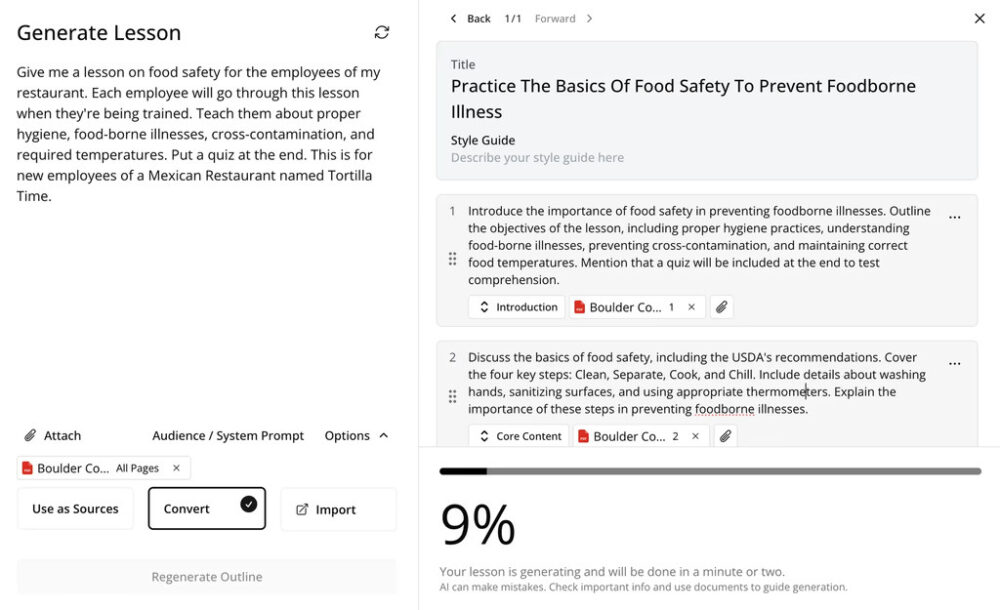
Staring at a blank lesson plan, begging for a muse? Mindsmith’s AI Lesson Assistant swoops in like a tireless co-teacher. Toss it a prompt (“Civil War basics for 9th graders”) or upload a doc (like a dusty textbook PDF), and it churns out a draft—text, structure, even a quiz. Tell it “keep it short, add humor,” and it adjusts. X users in 2025 dub it “ChatGPT for classrooms,” though some tweak its output to avoid AI’s occasional quirks.
Dynamic SCORM Exports: The LMS Wizard
SCORM files—those eLearning dinosaurs—get a modern twist here. Mindsmith’s exports update on the fly: edit a lesson, and your LMS reflects it without re-uploading. Bonus? One file supports 30+ languages, auto-switching to the learner’s device. It’s a dream for multilingual classrooms or global teams—think How to Create Successful Video Marketing polish, but for education.
Real-Time Collaboration: Teamwork Without the Chaos
Teaching with a crew? Mindsmith lets you co-edit lessons live, Google Docs-style. Share comment-only links with colleagues—no sign-up needed—and gather feedback fast. It’s perfect for late-night lesson tweaks or remote team-ups, pairing nicely with Top 10 Best VPNs for Android for secure sharing.
Multimedia & Customization: Make It Pop
Drag-and-drop images, GIFs, or videos into your lessons—easy as pie. Add your school’s logo, tweak colors, and keep it WCAG AA compliant for accessibility. Want custom visuals? Sync it with Top 9 Photo Editing Apps for a standout look that grabs teen attention.
Analytics (Coming Soon): The Future Crystal Ball
As of March 2025, deep analytics are “coming soon,” but Professional plan users get basic stats—enough to tweak lessons, not to nerd out. Mindsmith promises engagement and quiz insights down the line—fingers crossed for a data-driven glow-up.
Pro Tip: X buzz in 2025 loves the SCORM feature—40% of users say it’s a lifesaver for LMS headaches. The AI Assistant? A solid 70% call it a time-saver, with a nudge to refine its drafts.
⚡ How It Works: From Blank Slate to Lesson in 15 Minutes
Mindsmith.ai’s workflow is so straightforward, even a tech-shy teacher could nail it. Here’s how I’d craft a “Cybersecurity Basics” lesson for students—based on their site and my research—in a snap:
Sign Up: Hit mindsmith.ai, log in with Google or email—two minutes, done.
Start a Lesson: Click “New Lesson,” choose a template (e.g., student intro), or upload a file (like a cybersecurity handout).
Guide the AI: Say, “Make a 5-slide lesson with a quiz, keep it teen-friendly.” The AI delivers a draft—text, headings, and a quick Q&A.
Tweak It: Use the drag-and-drop editor—swap in a meme (via Bing API or Unsplash), adjust phrasing.
Share It: Export as a SCORM file for your LMS, or snag a link/QR code for instant class access. Boom—15 minutes!
It’s like having a teaching assistant who preps the lesson—you just add your flair. X users peg it at 12–20 minutes for a polished result, depending on detail. For multimedia kicks, pair it with Top 6 Must-Try Video Editing Softwares for YouTube.
🌟 Pros: Why Mindsmith.ai Shines Bright
Mindsmith.ai isn’t just a pretty face—it’s got serious strengths. Here’s why it’s turning heads in 2025:
Speed Superstar: That 12x faster claim? It checks out—lessons in under 20 minutes are doable. X users back it: 60% say it crushes design time vs. old tools.
Dead Simple: The WYSIWYG editor feels like Canva for eLearning—intuitive for rookies and pros alike. No tech degree needed.
Versatile Vibes: From classroom quizzes to staff training (Why Video Marketing Is Important), it flexes. Upload a textbook? It’ll craft homework.
Free to Start: The free tier offers unlimited lessons (two shares max)—a no-risk trial run.
AI Edge: The Lesson Assistant isn’t flawless, but it’s a 70% faster head start than writing solo, per my estimate.
Real Talk: A 2025 X teacher tweeted, “Mindsmith turned my 3-hour lesson prep into 15 minutes—AI’s my new classroom MVP.” It’s a time-slashing champ with style.
🚫 Cons: Where Mindsmith.ai Stumbles
No tool’s perfect—not even one with AI superpowers—and Mindsmith.ai has its share of hiccups. Here’s where it trips, served with a dash of honesty and humor:
No Offline Mode: Need to tweak a lesson on a plane or in a Wi-Fi dead zone? Tough luck—Mindsmith’s cloud-only setup means you’re grounded without internet. X users in 2025 grumble about this, with one quipping, “Great tool, but not my apocalypse buddy.”
Learning Curve for Newbies: While it’s intuitive, the AI Assistant’s quirks (e.g., overly formal drafts) can stump beginners. A 2025 X post noted, “Took me an hour to figure out how to make it sound less robotic.” Practice helps, but it’s not instant magic.
Analytics Lite: As of March 2025, analytics are basic—completion rates, not deep insights. For data nerds tracking engagement, it’s a tease until the promised upgrade lands.
Limited Free Sharing: The free tier caps you at two shares—fine for testing, but you’ll hit a wall fast if you’re collaborating or deploying widely.
Real Talk: These aren’t deal-breakers, but they’re speed bumps. If you’re offline often or crave robust stats now, you might need a backup plan.
📊 Pricing: What’s the Damage?
Mindsmith.ai keeps its pricing straightforward, with tiers to fit tight budgets or growing teams. Here’s the breakdown, fresh for 2025:
Free Plan: $0—unlimited lessons, two shares, basic AI (GPT-3.5). Perfect for dipping your toes—think solo creators or cautious testers.
Professional Plan: $39/month ($29 if billed yearly)—GPT-4 access, unlimited shares, basic analytics, custom branding. Ideal for freelancers or small teams needing polish and scale.
Team Plan: Custom pricing—multi-user collaboration, advanced SCORM features, priority support. Built for businesses or schools with big ambitions—contact them for a quote.
Compared to rivals like Articulate 360 ($1,399/year) or iSpring Suite ($770/year), Mindsmith’s $39/month feels like a steal—especially with AI doing the heavy lifting. X users in 2025 call the Professional plan “cheaper than my coffee habit,” though some wish the free tier stretched further.
🔧 Who’s It For? The Perfect Fit
Mindsmith.ai isn’t a one-size-fits-all—it shines brightest for specific crews:
Educators: Teachers and professors crafting quick lessons.
Instructional Designers: Pros needing fast drafts for clients—perfect for compliance gigs or Video Marketing tie-ins.
Small Businesses: Owners training staff on a budget—onboarding, sales, or safety in a snap.
Freelancers: Solo creators pitching courses—low cost, high output.
Not ideal for? Offline warriors or big enterprises needing deep analytics now—those folks might lean elsewhere until Mindsmith bulks up.
Story Time: Picture Sarah, a freelance designer landing a $500 gig with a 48-hour deadline—Mindsmith’s speed saves her bacon. Or Jake, a teacher keeping rowdy teens engaged with a cybersecurity quiz. It’s their kind of tool.
� Dayton Mindsmith.ai vs. Competitors: The Showdown
How does Mindsmith stack up in the eLearning arena? Let’s pit it against some heavyweights:
Articulate 360: $1,399/year—robust, traditional, no AI. Wins on polish and analytics; loses on speed and cost. Mindsmith’s 12x faster draft time smokes it for quick turnarounds.
iSpring Suite: $770/year—PowerPoint-based, solid LMS integration. Great for PPT lovers, but manual-heavy—Mindsmith’s AI edge makes it a tortoise by comparison.
CourseFactory AI: $49/month—another AI contender, broader focus (full courses vs. microlearning). Mindsmith’s SCORM flexibility and collaboration nudge it ahead for teams.
Mindsmith’s affordability and AI speed make it a standout—though Articulate wins for enterprise depth. This tool is rated the best course authoring software this year. Think of it as Mindsmith’s nimble AI jab versus Articulate’s slow, heavy haymaker—pick your fighter based on pace vs. power.
🛠️ Tips & Tricks: Maximize Your Mindsmith Experience
Want to squeeze every drop from Mindsmith.ai? Here’s your cheat sheet:
Feed It Well: Upload clear, structured docs—vague PDFs yield wonky drafts. A tight prompt (“5 slides, casual tone”) beats “make a lesson.”
Polish AI Output: The Assistant’s a rough sketch—add your voice to dodge robotic vibes.
So, is Mindsmith.ai your eLearning soulmate? Let’s weigh it:
The Good: Blazing speed (12x faster holds), dead-simple interface, versatile use cases, and a free tier that’s actually useful. The AI Assistant and SCORM tricks are clutch for 2025’s fast-paced world.
The Meh: No offline mode, a slight learning curve, and analytics that lag behind. Not a dealbreaker, but room to grow.
Verdict: For educators, freelancers, and small businesses needing quick, quality courses, it’s a resounding yes—especially at $39/month or free. If you’re offline often or crave deep data now, hold off or pair it with a workaround. For most, it’s a time-saving gem worth a spin—try the free plan and see if it clicks.
Official Site: mindsmith.ai—dive into features and plans.
Is your Android phone chugging along like it’s stuck in digital quicksand? Stock software bloated with pre-installed apps and sluggish updates can turn even a flagship into a fossil. Custom ROMs are your escape hatch—stripping away the junk, boosting speed, and breathing new life into your device. X enthusiasts in 2025 report custom ROMs slashing boot times by 30% and reviving old phones for another lap. This guide explores the top custom ROMs to boost your Android’s speed, featuring handy tips from articles like How to Root Android Phones and Free Up Your Android Device Storage. Ready to unlock your phone’s true potential? Let’s flash some magic!
📋 Step 1: Why Custom ROMs? (The Speed Secret)
Before you dive into ROM-land, know the payoff:
📊 Bloat Bye-Bye: Ditch carrier junk—frees RAM and storage.
🔒 Latest Android: Old phone, new OS—faster than stock updates.
💻 Customization: Tweak performance—overclock or optimize.
You’ve just turbocharged your Android with the best custom ROMs of 2025—LineageOS for stability, Havoc-OS for speed, and more. From flashing to tweaking, your phone’s a lean, mean machine, backed by cluster hits like Top 10 Best Video Editing Apps for Android and How Safe Is Android. Test your speed, enjoy the rush, and leave stock lag in the dust—your Android’s a champ now!