Home Blog Page 174

How to protect your phone for long life – Best tips for you!

To ensure your mobiles long life it is very essential to take a very good care of your mobile handset. Mobile handsets of previous days are much harder than now days handsets. Today’s latest headsets are very delicate in nature. Here are some best tips to protect your phone for long life for the best optimal performance and also safeguard of your battery. All these tips are not limited but you are also expecting to maintain its charging and discharging processes.

Why protect your phone for long life:-

Nowadays most of the people carry smartphones with them as it is easy to access your important emails and messages, capture your moments, getting connected to your close once, carry and access important files and documents and also to stay in touch with your friends through social media apps. Also, so many important contacts we are not able remember and it’s not possible to write down some were, these are the reason why we have to make sure to secure our phone for long life.
protect your phone for long life

Tips to protect your phone for long life:-

Safety for Screen

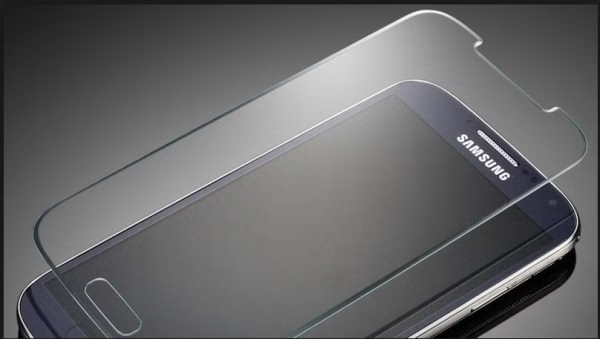
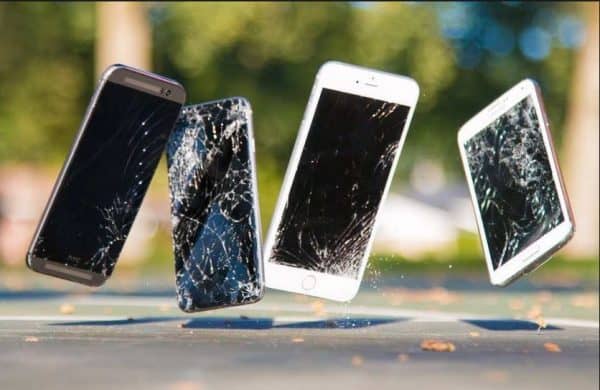
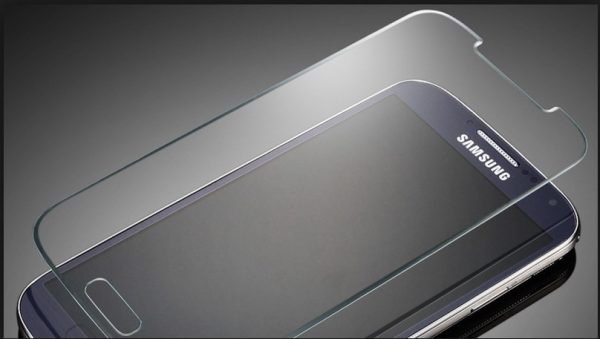
Nowadays mobiles have a great display some of it is IPS display and some are of Retina display such as “iPhones”. The display makes you handset more elegant to see so protecting the screen of the handset is one of the most important priorities. The screen of the mobiles can be getting damaged if it falls from hand or something heavy falls on the screen. This can be protected by putting a screen guard on over the handset screen. It will be of better working if the screen guard is not of plastic but of glass. By chance it falls from hand or anything over it then the glass will break protecting the screen of the handset. This glass screen protector is available easily in any mobile stores.
protect your phone for long life

Safety for Battery

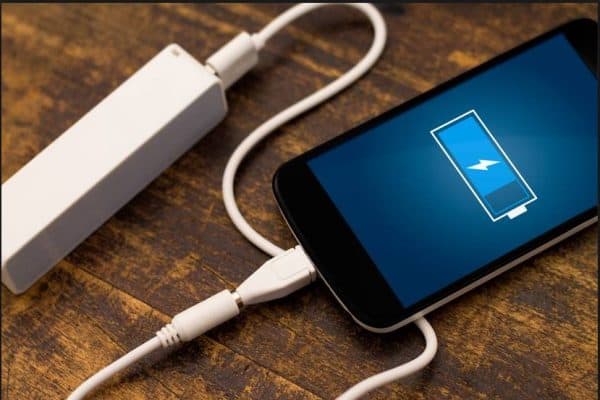
The battery life is the main problem in most of the handset. The companies always recommend using a specific battery of specific headset. Usually the battery life of the phone gets damage for 3 reasons, one is for the reason is the late charging of the of the phone , secondly if the handset is excess charged as some peoples used to charge their phone whole night but nowadays the mobile companies are using new system that the phone will automatically cut off the power from the socket after charging 100%, and lastly due to the continuous charging and discharging without charging full 100% , so you should discharge after charging 100% once you plug the device with the power . You can change the battery on your device but you should use authenticate batteries to keep the mobile safe. This method can be used to keep safe your battery life.
protect your phone for long life

Safety of Handset

As instructed in the phone manual the phone should not kept with children’s and also it should be not kept in the reach of direct sunlight and also it should not be kept in reach of fire and also it not left on water as it can damage the charging ports and also the speakers of the handset so it should be kept in the places which are cool and dry. Due to the influence of hot places the battery of the handset gets damaged and also there is a chance of explosion. If some of the amounts of the moisture get inside the handset it can burn the motherboard and can totally damage it. So moisture can be removed easily by switching it off and removing the battery and put all the parts in Can full of rice so that, it can absorb the moisture from the handset as it can remove.

protect your phone for long life

Remedial measures to protect your phone for long life

  • Firstly screen protector and back cover should be used in order to save it from external damages .
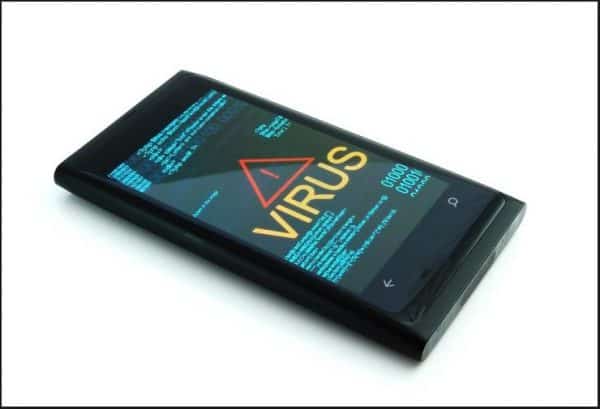
  • The apps should not be downloaded from an unknown source sometimes some app setup contains virus that may damage your software’s.
protect your phone for long life

  • The phone should be placed in dry place which is cool, the handset should not be used if it get too much warm. For that situation then you should switch off your phone and keep it undisturbed for some time.
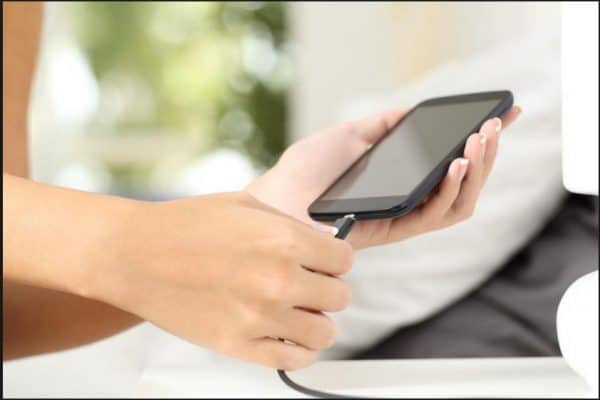
  • The charging pin should be dry while connecting to your phone either wise spark can take place and fry the whole circuit of the handset.
  • This power socket which you are using for charge your device should have stable electric connect otherwise it can damage your charging pin as well as your headset.
protect your phone for long life

This is some best tips to protect your phone for long life. You can use these tricks for the betterment of your handset. As our handset is one of the most important things that is making our life easy so we can take the small step in order to increase its long life.

Get Hooked on the Top 5 Free Addictive Android Games

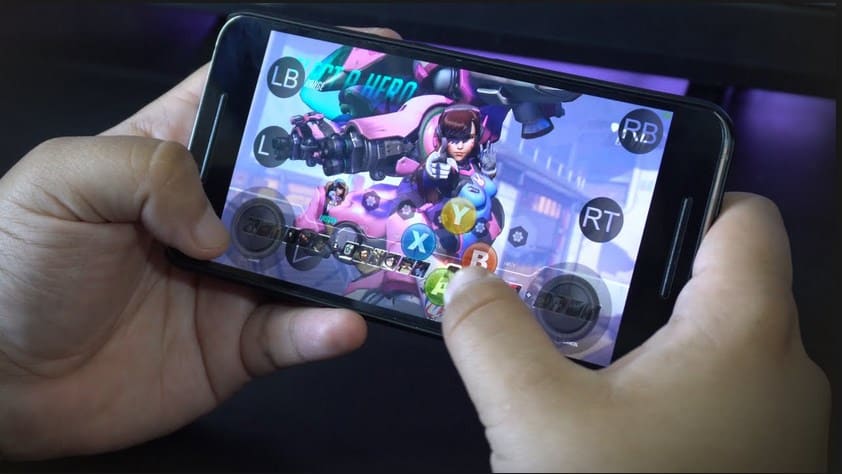
Video games have been an addiction for the 90’s kids. We had spent hours playing them. Initially they had to be connected with television and had long wires attached to the joystick.  With the advent of mobile phones, their inbuilt games like snake, carom, pac-man became addictive. Further with the introduction of Smartphones or android phones, it gave access to tens and hundreds of gaming applications. These games come with excellent graphics and intelligent techniques. You may not like all, but you will definitely get addicted to some. Below is a list of some of the free addictive android games of all times.

Also read: Best runescape gold tips

protect your phone for long life

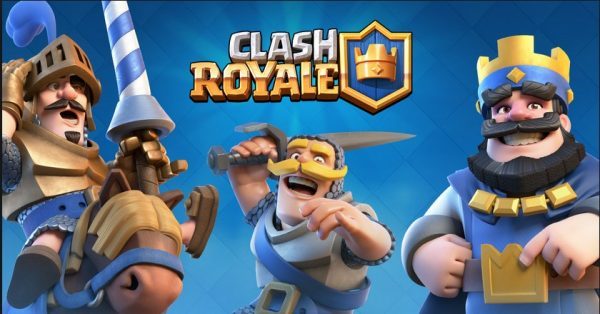
  1. Clash Royale

Clash Royale is one of the free addictive android games developed and published by the Supercell. The game consists of certain elements like multiplayer battle arena, collectible card games, tower defense etc. One can relate it with the very popular Clash of Clans. The game released on March 2, 2016 and earned revenue of USD 1 billion within a year. Players level up by gaining experience and donating cards. The maximum level one can reach is 13. There are altogether 12 playing arenas in total, each will open according to certain trophy count range. This has been renowned as the best strategic game ever.

protect your phone for long life

Available Features of Clash Royale

·         You can win boxes to earn rewards and powerful cards. You can upgrade the existing ones too.

·         Destroying opponent’s fort will make you earn crowns to fill up your golden chest.

·         Keep on collecting cards and upgrading them with troops, defenses and spells.

·         Build your strongest defense and to avoid enemies to win in the Multiplayer battles.

·         You can constantly track your progress right from the beginning.

·         You can form your own clan by adding multiple players to build a battle community and take part in clan wars.

·         You can always play a friendly challenge where your clan mates can invite you.

·         Get to learn newer battle tactics by watching the best duel videos


  1. Badland

One of the best free addictive android games of all times, Badland is launched by Frogmind Games. They were initially released on IOS and Android platforms. It was released on windows phone 8 in 2014. By 2015 the game was released for other platforms like PlayStation etc. The game proceeds in 4 stages, dawn, noon, dusk and night. In the game the player flies around a mystical creature called the clone through the woods. Each of the four stages comes with separate colour scheme and background. They also have different and more difficult traps as the level progresses. In day 1 some egg shaped machines show up from the water. These machines are indestructible and as night progresses they turn on and pose threat to the player. As the day progresses in the game, it becomes more and more difficult.

protect your phone for long life

Available Features of Badland

  • It is a Single Player campaign with 100 unique and difficult levels
  • Multiplayer mode has a limit up to four players on the same device till level 23 and more content in future updates
  • Customized to create new levels, share & play!
  • Highly immersive audio-visual gaming experience with excellent graphics
  • Does supports Cloud Save and Immersive mode

Tip: Did you know what are the best Android dialers

  1. Doodle Army 2 : Mini Militia

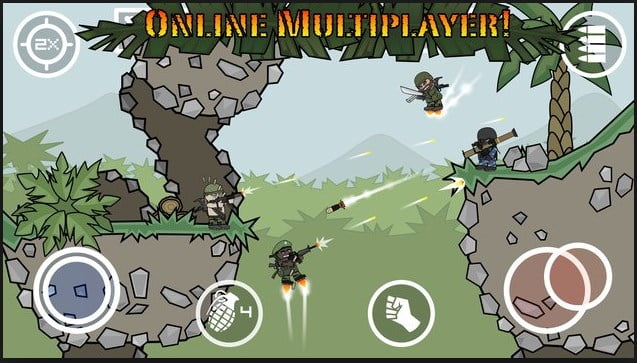
Doodle Army 2: Mini Militia is a 2 dimensional shooter game initially released for IOS and Android platforms on April 5, 2011. It is ranked as one of the top games on the Indian Apple App Store last year. The game starts with training the player at Officer Candidate School by a trainer named Sarge. The trainer teaches some basic movements, weapon usage and control, and targets. There is a survival mode where the player must defend against armed enemy robots with the help of Sarge. The multiplayer mode of this one of the most popular free addictive android games can support maximum 12 players. This mode is more like survival mode but with newer features and weapons.

protect your phone for long life

Available features of Doodle Army 2 : Mini Militia

  • Absolutely Intense multiplayer battles
  • Different Maps and Guns
  • Both online and Offline Matches
  • Quick ‘Play and Death’ match modes
  • Local WiFi Multiplayer
  • Unlimited ammunitions
  • Dual wield
  • Pro pack unlocked in Pro/Mega mode
  • One shot kill
  • Zero respawning time
  • Invisible in solo play
  • Store items unlocked in God Mode
  • No reload
  • Unlimited health, grenades, ammo, nitro
  • Pro pack unlocked
  • Dual wield
  • One shot kill
  • No kill counts enemies
  • Can fly through walls
  • Host matches offline and online


  1. Subway Surfers

Subway Surfers is an endless run game developed by two Denmark based companies, Kiloo and SYBO. It is available in operating systems like windows, IOS and Android phones. The players of the game are teenage children who due to theact of making graffiti on the metro walls are chased by the policeman and his dog. The player runs down the track collecting gold coins and other gifts. They jump up and down the train, and simultaneously dodge collisions with objects in order to escape from being captured. The game was released on 2012, and came with seasonal updated versions. There were gradually more updates along with the year. In 2017 Subway Surfers crossed the threshold of 10 million downloads. Jake is the only default character of the game, the others are to be unlocked.

protect your phone for long life

Available features in Subway Surfer

  • Modern designed trains with your cool crew.
  • Bright and vivid HD graphics.
  • Hover board Surfing experience.
  • Paint powered jetpack available.
  • Lightning fast swipe acrobatics performed by the avatars
  • Option to challenge and help your friends.


  1. Temple run

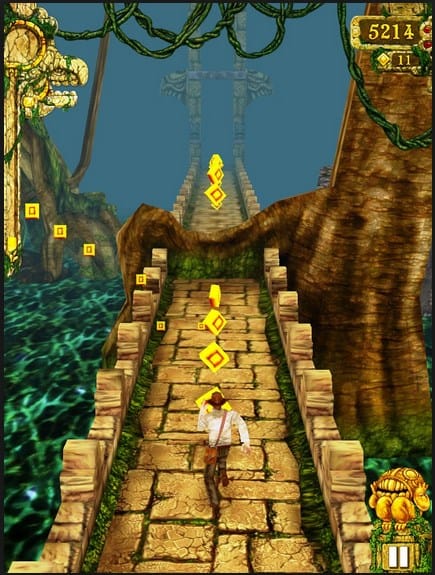
Temple run is one of the best free addictive android games developed by Imangi Studio. The game was initially released for IOS devices and later it was made supported to android and windows phone. Its programmers were husband and wife Keith Shepherd and Natalia Luckyanova. A sequel of this game was developed and released on January 12, 2013. The player runs down the temple collecting gold coins and other gifts and achievements while he is being chased by a dangerous animal.

protect your phone for long life

Available features in Temple Run

  • Beautiful, colorful and new graphics
  • Gorgeous and exciting new environments
  • Newer obstacles
  • New powerups
  • Latest achievements
  • Special powers for special character
  • Bigger monkey!!!

These are the highly-demanded free addictive android games that can keep you playing for hours. If you know any other android games which can be played free of cost and are super addicted feel free to share with us.

9 Reasons for you to switch to android nougat – Now!

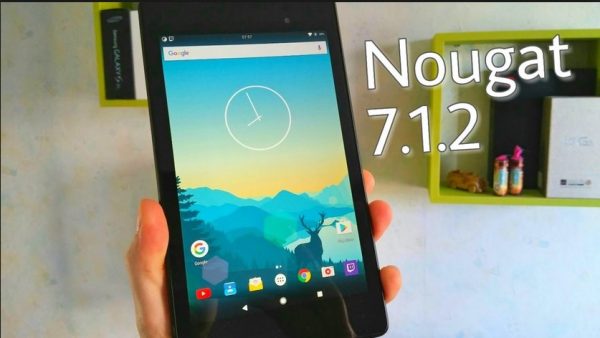
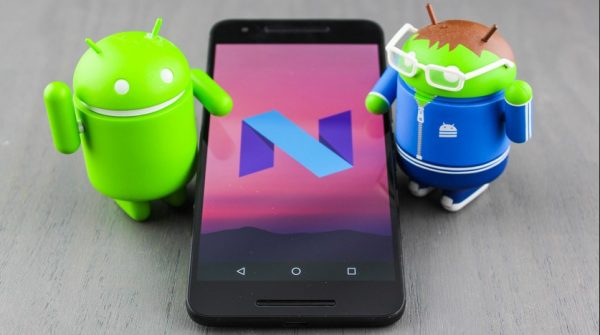
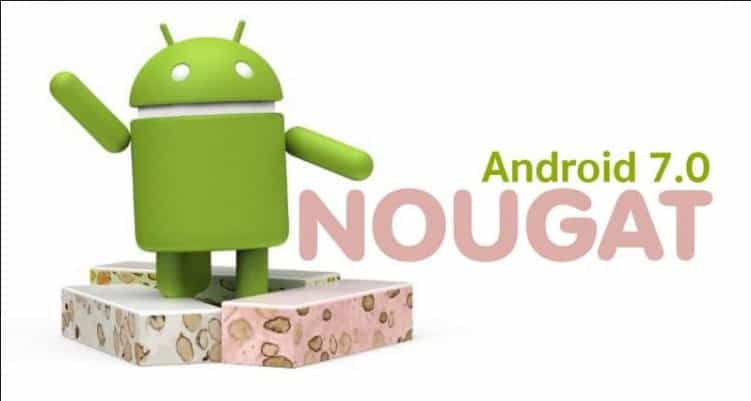
Android is a basic operating system in today’s smartphones. It is very light software than any other software in tables and phones. Nowadays everyone has become advanced and has thrived for the newest version of the android phone. There are too many options to recycle your old phone to get a new one. No one needs to be a tech expects in order to use a new smartphone. Firstly the reasons that would make you switch to android nougat are for an improved operating system which is more user-friendly for the betterment of life. Secondly, customers will prefer Nougat (Android 7.1.2) more as the operating system is launched after fixing the bugs of the system.  The upgraded operating system is launched first in Pixel and Pixel XL. It is the most stable version of the Android history.
protect your phone for long life

Why we use Android:-

Android platform is itself is very open platform unlike IOS and Windows Variety of the app are supported on this platform. Apps can be installed either directly from the Google App store or one can download the app file from unknown source and install the app. The battery optimization of the Android handsets it better because of the ram management of the apps which are running in the background. In this OS the apps and games account you have created can be saved on a drive by your Google account so that it can be played on multiple Android devices. The sync of photos, videos and contacts are easily uploaded to Google Drive when the phone is connecting to your wifi network. Network receiving are also improved in android devices. Many Gestures are now available with the devices like Nexus and Pixels which make the device more user-friendly for the users. The developer options are also there which will configure the amount of sharing which can be allowed from your device. Battery saver mode in Android devices will terminate all the running apps in the background in order to save more battery. Android devices are also compatible with the fast charging, handset like Motorola, Vivo, and Xoami can charge 0-100% in only one and half hour. C type charging ports are also available on Android devices. Files can also be transferred from your pendrive with the help on an OTG cable.

protect your phone for long life

What’s new in Android Nougat:-

Thinking whether or not you should switch to android nougat? The new version launched is better in many ways as the latest version have more developed features and performance is more stable. Nougat is better than the old versions of Android in several ways such as:-

  • Connectivity of Bluetooth
  • Fingerprint Scanning
  • Minimum Rebooting Time
  • No pink strips present of a camera
  • Improved Noise Cancellation

protect your phone for long life

Here are the 9 reasons to switch to the android nougat:

Switch to android nougat for the new and improved features.

protect your phone for long life

  1. This version finally supports Virtual Reality (VR). The platform of mobile VR is Daydream for which all the manufacturers install this platform in all their headsets.
  2. This version also supports Split Screen features which were temporarily removed for the malfunctioning in Android 6.0. So the customers can use these smooth functioning features for easy multitasking.
  3. In this version, not only the apps but also the system settings have the Hamburger Menu option which is Icon with three lines, and also there is an increment of speed in apps zipping.
  4. The menu of this version will show the file location of the apps and also it will show whether it is installed from Play Store or from APK. All the things for which we have to explore storage option in settings now can be done from the menu desk of this version.
  5. Improvement is done in Google Now launcher in which the overview page can be brought up by pinch gesture and also the “Remove”, “Cancel” and “Information of the Apps” options are available when it is dragged from home screen
  6. The notification bar is also designed which is more user-friendly and the pictures of the notifications bar are changed in order to make it more comfortable for the users.
  7. This version has better battery usage management and also it consumes less battery than the previous versions of Android.
  8. Ram management is also better for the apps, poor ram management can lag you work on mobiles and also the switching of apps will not be smooth for the lagging
  9. This version will be more secure in comparison to other previous versions because it contains backup pins which help in the time someone forgot his/her own password.

protect your phone for long life

These are the reasons that would make you switch to the android nougat and also the price range of these mobiles will be starting from the minimum range so that it is available to most of the population of the world. It is one of the best Operating System in the Android history.

Get your Answer on “How To Change The Default Search Engine In Opera”

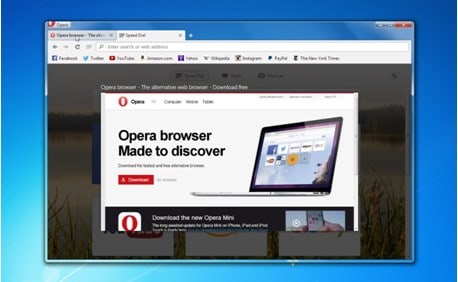
Just like other web browsers, Opera is also a similar one that actually provides you with a number of extra advantages that you get from Microsoft or Mozilla Firefox.  This web browser is available for various kinds of operating systems, such as Symbian OS, BeOS, MAC OS, Linux, Windows, Solaris, and many others. Opera is liked by many people as it is very fast as well as stable. The services that Opera offers are similar to other popular web browsers which also include instant messaging and integrated searches. Opera also supports cascading style sheets, JavaScript, and email. Opera has been promoted for use in a number of Smartphones also because of its compactness. Here you will get a detailed guide on how to change the default search engine in Opera.

Opera does not have an unlimited supply of extensions that you get on Chrome or exhaustible customizable options like Mozilla. But opera provides you with a set of smart as well as perfectly executed features so that there is no need to download any kind of add-ons or extensions.

So do you use Opera? If yes, then you should know that how to change the default search engine in Opera. Before you go through the process, here are some of the best features of Opera.

Best features of Opera

Tab preview

Do you know what is there in tab number 24 and is that the particular tab that you are searching for?  You did need to guess as  Opera provides you with a feature of tab preview which allows you to peek quickly on every tab just by hovering over the tabs in the tab bar. This helps don’t let you jump from one tab to another in order to find a tab!

This feature is present by default but also can also turn it off.

protect your phone for long life

Battery Saver

The battery saver mode of Opera guarantees you that you will have 50% more battery life. This feature is actually a lifesaver for you when you need to work on your laptop and there is not charging outlets near you. When via Battery Saver Tool you actually activate this mode, it prompts some optimizations like plug-in activity, reduced tab, and fewer animations.  At any time you can activate this Power Saving Mode.  Also, you will be prompted to use this feature when the battery life comes down to 20%.
Mouse gestures

Keyboard shortcuts are often used by many people in order to increase the speed of browsing then why not use mouse gestures? This feature also helps you to make your routine tasks easy, such as closing tabs, navigation, opening tabs, and refreshing.  If you want to use mouse gestures you need to enable it from the shortcut option.

Unlimited as well as free VPN

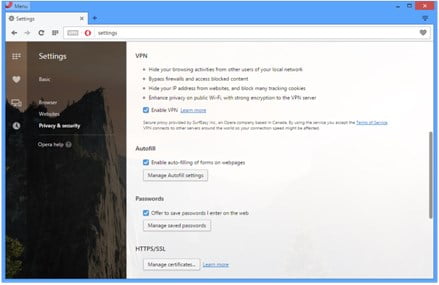
The VPN service in Opera in already built in. It is completely free, unlimited and fast also and you do not need any kind of data capping. In order to use it, you have to enable it from the settings.

protect your phone for long life

Sidebar extensions

Multitasking is very much useful undoubtedly! When you want to compose a tweet or mail and also carry on with your conversation on Skype you need multitasking. That is why Opera provides you with this feature of sidebar extensions.

Synchronization of data

Like other tools, Opera also helps you to save your bookmarks, settings, and tabs with syncing options. For this first, you need to open up an account in Opera.

So after you have read all the cool features, now it is time for you to know how to change the default search engine in Opera! Here are the methods that you have to follow:

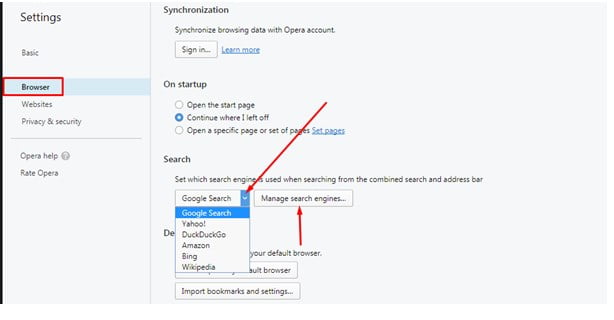
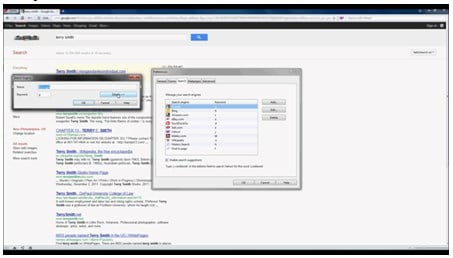
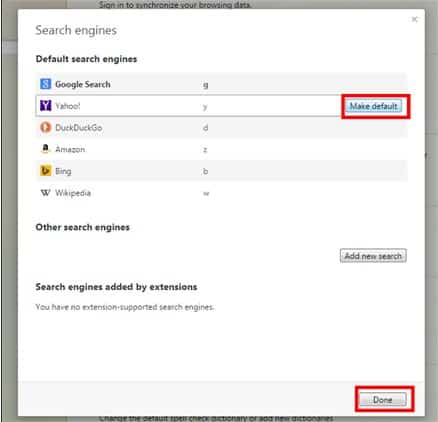
The drop-down menu in Opera helps you to select the default search engine. Google is by default set as your search engine. The button which is named ‘Manage’ helps you to do a lot of things and the primary one is to change the search engine.  So click on manage and a button saying “Default Search Engine” appears.  The main section of this menu is along with a particular icon and a keyword or letter.

protect your phone for long life


  • Click on the ‘Name’ option and enter the full name of the search engine that you want to work with.
  • Then type the desired keyword which can also be a number or letter and this field is optional.
  • Then go to the address field and type the address of the search engine that you desire.

protect your phone for long life

  • Next, you will find a post option with a checkbox and it gets activated when search engines use POST queries. This field is also optional.
  • Next, another optional field named Query string is found. Any kind of search can be specified with this query string.

After everything is complete with entering values, click on the save button.

protect your phone for long life

Browsers are like a necessity for all people who access the internet for any kind of job and along with it people also requires a proper search engine of their choice. So, by this simple way of how to use default search engine in opera, you can ease your way into your work.

Trick on How to perform Phone Virus Scan using PC

A virus is a macro, program or script which is designed in such a way that it can cause some damage a device by modifying data, stealing personal information, display messages or by sending hoax emails. The virus spreads itself by copying itself everywhere when it is executed. A mobile phone virus is actually a type of computer virus that gets itself adapted to the environment of a mobile phone. It is designed in such a way that it can go from one mobile device to another. Here you will get to know about how to perform Phone Virus Scan using PC.

Is there really anything such as a virus on your phone?

We all know what is a PC virus is and also the capability of it. A number of hackers use the method of spreading the virus and soon the term ‘virus’ became a very common term for all types of malware. In case of smartphones, there is no virus that actually replicates itself, but there are some types of virus or malware that are of different types. For modern smartphones, it is recommended to check for phone virus using antimalware for android like MalwareFox or searching for the likes on Google Play store and perform phone virus scan.

So might ask yourself that if you have the virus on your cell phone where is the problem right? But you do keep important and precious data on your phone which is very valuable to you. That is why you should get rid of viruses that can affect you by causing great damage and perform phone virus scan. You might be searching for programs of phone virus scan using pc. Here is the way on how to scan phone for virus using pc.

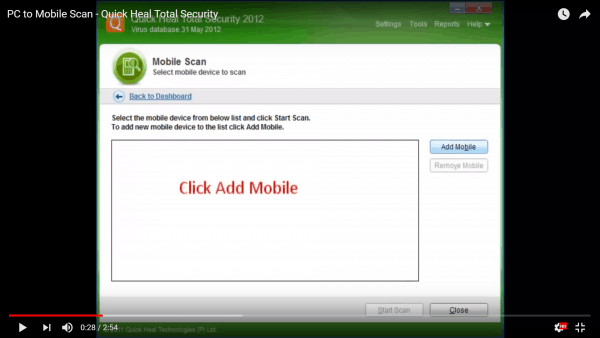
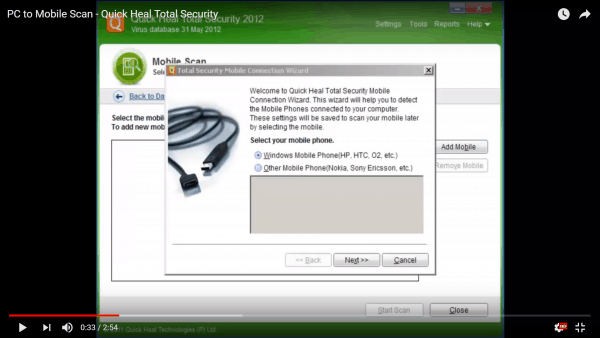
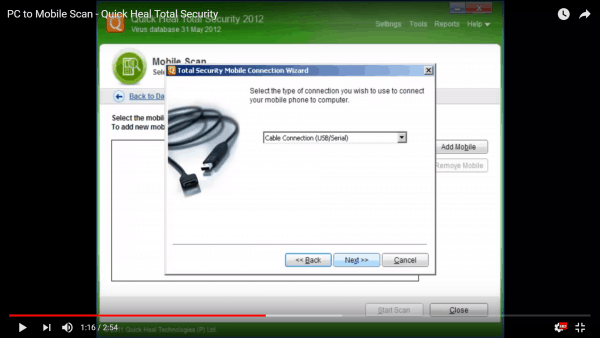
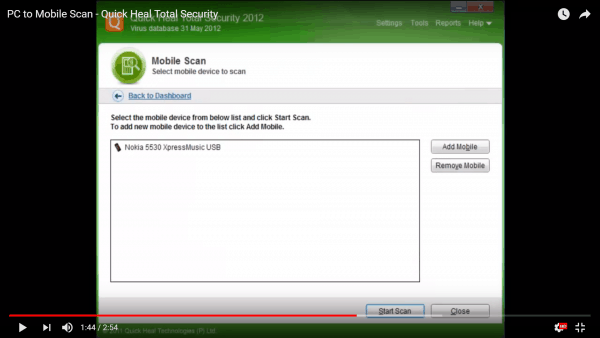
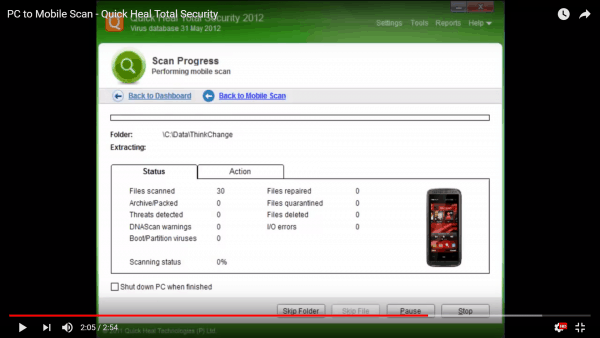
Quick Heal PC2 Mobile Scan

You have ever downloaded mobile applications that are free and actually turn into damaging your mobile device in return? If yes, then you should know what comes after that! You have to face lots and lots of problem when you face this situation. But when you own a smartphone it means that you can connect it to your computer very easily and without any kind of hassle! When these free applications are added to the mobile phone they make the devices slow too. So when you do have a better connectivity option, why not use it for a better purpose?

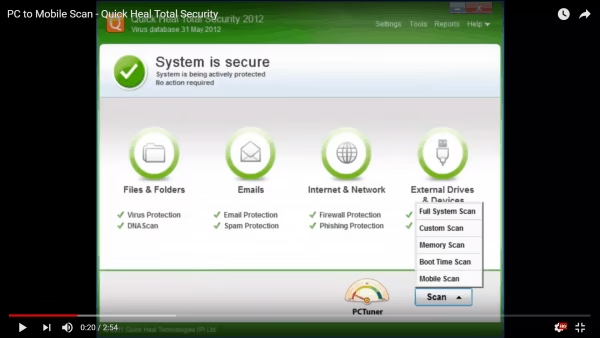
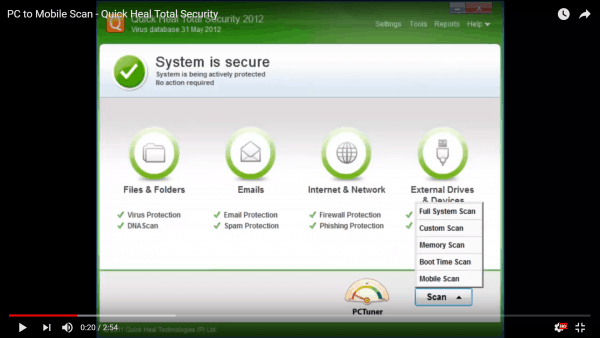
There are many programs to scan phone for virus using PC but Quick Heal has the best way to scan for viruses using a computer using an antivirus system that is already installed in it. This software serves the best answer on how to scan phone for virus using pc.

how to scan phone for virus using pc

This new technology introduced by Quick Heal is called PC2 Mobile Scan. It is very handy as it actually allows the user to scan their phones for virus and that too without installing any kind of antivirus application on the mobile phone. You just have to install the antivirus on your computer, and then you have to connect your mobile device with it with the help of Bluetooth connection or USB. This is the simple way on how to scan phone for virus using pc.

how to scan phone for virus using pc

Features of PC2 Mobile Scan

This technology can be used on almost every platform that a mobile device is built. These platforms include Linux based mobile OS, Windows Mobile, and Symbian OS. PC2 Mobile Scan is also supported by a number of proprietary mobile firmware. This makes this the only product in the market that actually supports this technology for different kinds of mobile devices that are available from big companies such as Motorola, Samsung, Nokia, HP, IMate, LG, HTC, Panasonic, Sony Ericsson, Siemens, and O2. It is said that over 550 mobile phone models are supported by this technology and certainly best to scan android phone for virus from pc.

how to scan phone for virus using pc

This software is actually a component of Quick Heal Total Security 2010 Suite. It is available at a very minimum cost if you want to subscribe for one year. In other words, PC2Mobile Scan is actually a type of inbuilt software that is included in Quick Heal Total Security. In case your mobile phone does support both the functions of Bluetooth and USB, use USB cables in order to get better results.

how to scan phone for virus using pc

Important requirements for this program:

  1. This particular feature of mobile security is supported only for Windows Vista or 32 bit, Windows 7 and Windows XP for 64 bit and 32 bit respectively, Windows 7, Windows 8, Windows 8.1 and Windows 10.
  2. If you are using a Windows phone, your mobile device must have Microsoft Active Sync 4.0 or later versions on your computer.
  3. In case you are a Nokia user, you are recommended to install Nokia PC suite on your computer. And if you are using other mobile phones, you should install the respective software drivers on your pc.
  4. Computers should have a Bluetooth device for Bluetooth connection. It should be properly installed with suitable drivers.
  5. Only Wildcomm, Broadcom, and Microsoft are supported for Bluetooth devices. It is recommended for Bluetooth devices, you use Microsoft drivers if you want to get better results.
  6. When you are using Bluetooth to work with PC2 Mobile, a number of mobile phones require being installed with Quick Heal Connector. This wizard helps you to install this particular application on your smartphone.
  7. For Apple or iPhone devices you need to install iTunes on your system.
  8. ‘Stay Awake’ and ‘USB debugging’ must be kept enabled on your android device.

Note: Quick Heal PC2 Mobile Scan is not supported for Server Operating systems and Windows 2000.

how to scan phone for virus using pc

Some of the issues faced by users while phone virus scan using PC:

  1. Users of PC2 Mobile Scan who uses Windows XP that is included with either Service pack 2 or with Service Pack 3 can receive messages that say that the scanning is interrupted because of the loss of connection.
  2. You cannot scan your Nokia 6600 model properly with Quick Heal PC2 Mobile Scan.

Quick tip: You can easily register your device on the official website of Quick Heal if your mobile device does not support Quick Heal PC2 Mobile Scan. Also, all the Windows Smartphone are supported by this application that is made upon operating System Windows Mobile version 3.0 to 7.0.

how to scan phone for virus using pc

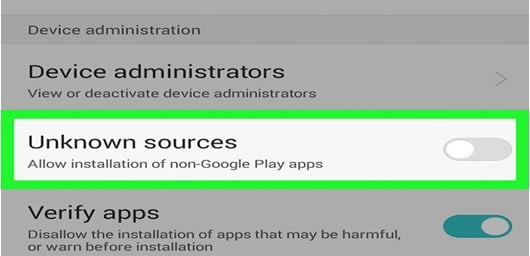
So in order to protect your mobile phone from these virus attacks, you must disable the download of unknown application option on your Android device which you can easily do by going to the settings option, then into security, then under device administration turn off the option that says ‘unknown sources’.

how to scan phone for virus using pc

Virus attacks on mobile phones are increasing day by day surprisingly and that is why all users should keep their phone updated and safe from this malware and viruses. So why are you waiting? Follow these simple steps on how to scan phone for virus using pc to stay safe and secure.

Wrapping Up

Mobile safety should be one of the priority of every mobile users in today’s world. Scanning for viruses is one of the best way to do so. Here were some of the examples on how to scan phone for virus using PC. We hope you got an idea on how to perform android virus scan. Please do tell us if this solutions worked for you.

What is the maximum mail size in Gmail and how to increase it?

There are lots and lots of huge file sharing websites all over the internet, but most of us still want to share the file directly in the old fashioned way by using Gmail. Though like many mail servers, attachments have a maximum mail size in Gmail. Have you ever wondered what is the maximum mail size in gmail? It is limited up to 20 MB. But after the cloud storage service was integrated with Gmail, now you can attach 4 times of the file that you could attach earlier, that is from 20 MB to 10 GB. Even with this feature, you can also choose any type of permission for sharing huge files!

The bottom line of Gmail is that it is a Google approach that lets you chat and send emails.  It is actually free and unlimited online storage in a practical way which helps you to collect all the messages. The simple and smart interface of Gmail also helps you to find emails in a very precise manner.

Mobile screen

Thumbs up

  • POP or free IMAP is provided by Gmail that lets you send and receive messages from any address.
  • You can easily and in a smart fashion sort, search and mark your important messages and organize chat conversations and emails.
  • The web interface is fast and it works offline also.

maximum mail size in Gmail

Thumbs down

  • Gmail could have provided techniques such as reply suggestions or learning labels in order to organize mail in a better way than before.
  • When you search for emails it not at all comfortable and smart like when we search in the web with the help of Google.
  • The maximum mail size in gmail is 10GB whereas the online storage which is free is only 15 GB.

To send files smaller than the gmail max attachment size:

The simple steps by which you can send smaller files are:

Sending files using gmail

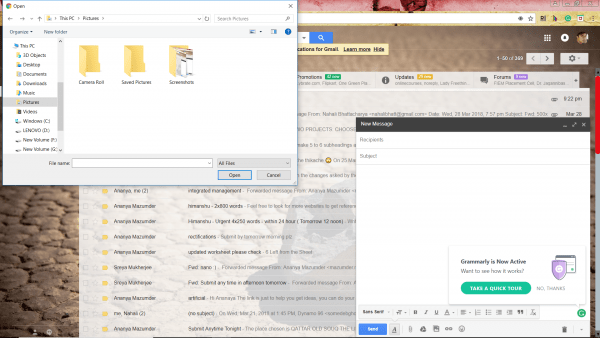
  1. Open your Gmail account and click on compose.
  2. Move the cursor on the ‘+’ symbol or ‘Attach files’ option while you are going to compose a mail
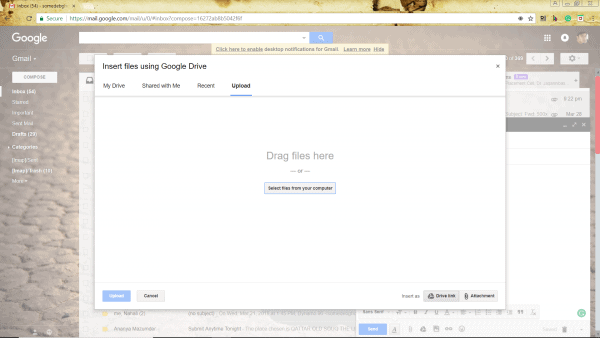
  3. Click on ‘Insert files using Drive’ option
  4. In order to send 1 or more than 1 files from your pc, that you have not still uploaded using Google Drive, follow these steps:

Google Drive

  • Move to the upload category
  • Hold and drag 1 or more than 1 files from your pc and release or drop it on the option of ‘Drag files’
  • If you don’t see this particular option, after selecting the files you want to upload using ‘Select files’, and after that click on ‘Add more files’.
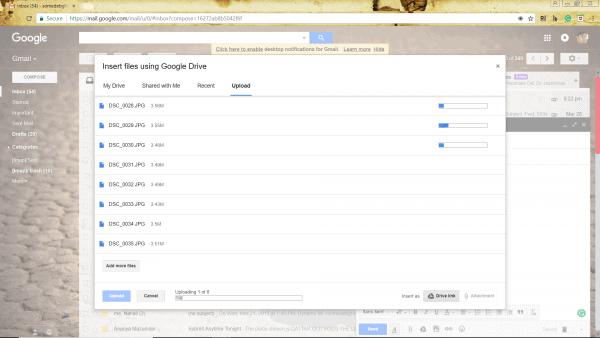
  • After all the files are selected, click on ‘Open’ and then on ‘Upload’

Uploading files on google drive

Increasing the maximum mail size in Gmail to 10 GB using Google Drive

To increase the gmail attachment size limit, here are the simple steps by which you can send big files using Google Drive are:

  1. Click on ‘My Drive’ option
  2. Select all the files or documents that you want to send
  3. You can also use labels and search option to locate all the files
  4. Next, tap your mouse pointer on the insert option.

If you want to share every file or document that are not shared in Google Drive will all the receivers, after that clicking on send follow these steps:

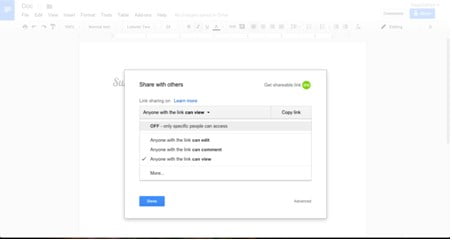
  1. If you want that everyone can see the link, but cannot comment or edit these files, then choose ‘can view’ option from the category that says ‘Anyone with the link’.
  2. If you want that everyone can comment or edit these files, then choose ‘can edit’ option from the category that says ‘Anyone with the link’.
  3. If you want that everyone can see the link as well as a comment but not edit these files, then choose ‘can comment’ option from the category that says ‘Anyone with the link’.

Google Drive sharing options

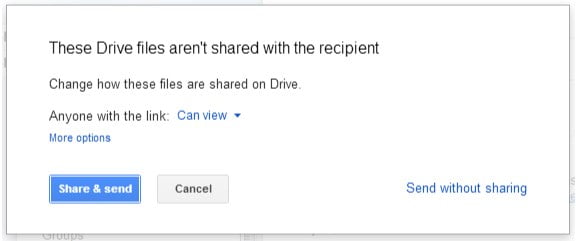
If you want to share all the files and documents with the receivers and not a link with the help of Google Drive, then follow these steps:

  1. Select the option that says ‘More’
  2. Do not forget about all the receivers of the mail that should be selected under ‘Change how these files are shared on Drive’
  3. Again select the options of the recipients about seeing, editing and commenting on the file
  4. Click on ‘Share and send’

Sharing files using google drive

If you do not want any link that comes with any kind of permission without adding and altering, select ‘Send without sharing’ option.

So what more do you expect from Google? Speed, search, and simplicity?  This is actually what you Gmail offer you!  With the elegant and simple interface and a number of very useful keyboard shortcuts, Gmail does a very speedy operation. Not only this, but Gmail also has a very thorough virus and malware checking process.

The value of this feature is of immense value as it can remove 99.9% risks that your computer can face. The anti-malware program is also constantly upgraded by Google to provide you more protection. Though the maximum mail size in Gmail is not that much, it does provide you with the best features.

Top 6 Gadgets Every Fitness Addict Should Be Using

Staying fit is always a challenge! But you do have the option of using various fitness gadgets which ensures you that you are doing enough exercises. According to a research firm NPD group, gadget-happy consumers are spending more money every year on gadgets!  There are tons of gadgets in the market and these gadgets are developing every day! Everyone loves gadgets of every kind. It may be something for the kitchen or for hiking or electronic ones. Whether if you are a complete fitness fanatic or just a little health conscious or if you are looking something which will help you to get in shape, these gadgets are the best options for you. So here are the top 6 gadgets every fitness addict should be using.

  1. Finis Neptune:

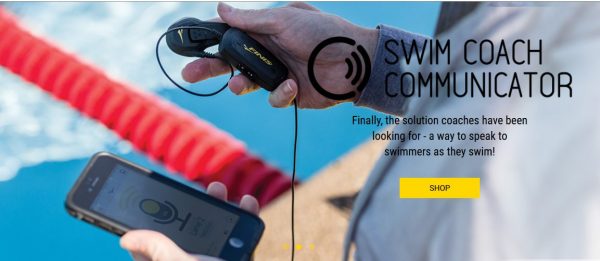
Music is always a motivation in every way and thus in almost all kind of sports also it works as a powerful motivation. It can even motivate to cycle or run an extra mile. But what about swimming and what about when you want to swim an extra lap and you want to get motivated? Don’t worry as Finis Neptune will help you out! It is a device that is attached to the eyewear or swimming goggles and it uses bone conduction audio to transmit music and there is no requirement for earbuds.

protect your phone for long life

The music is enough loud and it is also very clear when you are underwater.  You will get it with a 4GB internal storage and also a rechargeable battery that will last still eight hours. You will get music controls on an OLED screen.

  1. Apple Watch Sport:

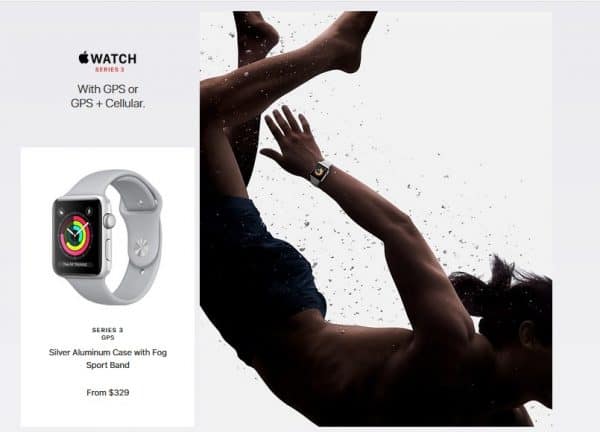
A lot of critics say that it is not as powerful as iPhone but it works perfectly!  It is fully packed with lots of sensors and also Apple’s app ecosystem backs it. This Apple Watch Sport is everything that you want. The watch’s Workout app, which is by default installed in it, is full of exercises of cardio and fully accurate. You can also use third-party applications like Runtastic and Strava. This product falls under the category of the top 6 gadgets every fitness addict should be using due to its brand loyal customers believing in the true potention on this fitness watch.

protect your phone for long life

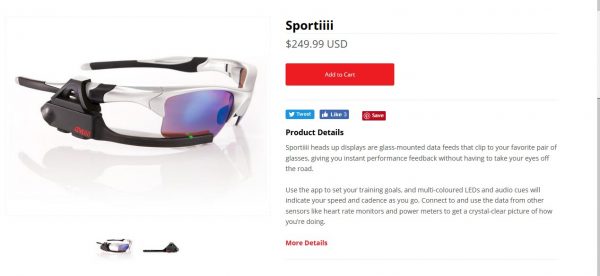
  1. Sportiiiis

You like cycling and you are often using it? There are times that you need to check your statistics. This is a kind of a hassle and sometimes it can result in dangerous things. In this situation, Sportiiiis helps you to track your heart rate in a very safe and accurate manner. The HUD (Head Up Display) consists of six LED which indicates your heart rate. You can easily fix it on your sunglasses. By this way, you can easily receive all the statistics with the help of voice assistant which will relay all things like power, speed, cadence and heart rate.

protect your phone for long life

You can easily fit Sportiiiis in monitors produced by this company, but it is also compatible with products of different companies.

  1. Trace:

Almost all kind of fitness trackers are for sports enthusiasts for moderate needs. That is while jogging or running these kinds of trackers is the best. But what about trackers for people who are extreme sports person? This is why Trace is available for them which consist of advanced options for a tracker for different action sports such as skateboarding, snowboarding, and surfing.

protect your phone for long life

You can easily mount this gadget on the board in case of action sports. It will log all kind of tricks like your speed, landing, and maximum height that you have reached. It also syncs every data with an application installed on your smartphone.

  1. Sensoria Smart Sock

Do you want to get feedback from your ankles? The Sensoria Smart Sock is the best gadget you can opt for! Wear this smart sock and get your feedback as all the pressure signal of the tracker is situated on your ankles only. It is mainly helpful for runners as it can provide you will data which will tell what how you have been running and also how can you improve your performance with time. You can also wash this sock although it consists of sensors and signals.

protect your phone for long life

  1. Umoro One

Umoro one is one of the top 6 gadgets every fitness addict should be using! This is actually a bottle with works like any other common bottle just with a push of a button. This bottle releases your favourite whey protein mix up to 1.5 scoops. This gadget is great when you are in the gym and you are working out. It is made of odour resistant materials and it very much durable. Also, the storage compartment t is fully leak proof. You also do not have to carry more than one bottle, just use Umoro One to enjoy a drink after your workout. It actually consists of a ball which holds the supplement and works as a mixer when pressed.

protect your phone for long life

As technology is becoming smaller and smarter and is getting integrating into anything and everything, the world of gadgets is also advancing. So here are the top 6 gadgets every fitness addict should be using. These gadgets help you to get the best from your workout and they are made with a specific mindset that is you always remain focused on both fitness and health.