Home Blog Page 205

Levo Makes Travel Time More Productive by Helping People Network At Airports

0

With the evolution of the digital world, networking with professionals is now everyone’s cup of tea and is gaining some variety. A platform – Levo – goes up and beyond to bring people together and is playing matchmaker for networking nomads.

Everyone may hear and tried matchmaking apps, dating apps. But here comes an app exclusively for business travellers. With the help of this platform, passengers can connect with co-passengers and meet them on the flight or at the airport. If a startup founder happens to visit any airport, then they can utilise their travel downtime to expand their social and professional links even when on the move. The professionals just have to download and install Levo app on their smartphones. The Levo app is available for iOS and Android platforms. The app allows the travellers to discover profiles of professional co-passengers online, chat with them via the app, and meet them who have similar travel itineraries.

Levo is moving forward to set up a dedicated offline networking lounge at the airports to demonstrate the potential value in networking with air travellers. The first Levo networking lounge is going to set up at the Bangalore Airport departure terminal in partnership with HMS Host. Travellers who are open to networking and want to meet other co-travellers can enter the lounge after security check. The tagline of Levo app is “Make the most of your travel time”, seeks to matchmake people who have similar travel itineraries, things in common and would be interested in meeting”.

levo-innovations-co-founders
Co-founders of Levo | Tarun Lala(Left) | Rahul Maheshwari(Right)

Levo by Levo Innovations is a Bengaluru-based startup and is co-founded by Rahul Maheshwari with his childhood friend Tarun Lala in October 2016. It was launched in late January 2017. The company is putting efforts to build its network across 96 airports in India and planning to take it global eventually. The co-founder of Levo Innovations – Tarun Lala says “Most networking platforms are over social media. Nobody really meets each other. But when you use our app, you get to meet real people and figure out business interests”.

Levo will soon expand its community beyond the airports and flights and will reach to locations like Hotels, Professionals Events, etc. Currently, Levo is partnering with investor circles, corporates, mentorship networks, other communities of entrepreneurs and business folks to provide them with an additional avenue for networking.

How Does Levo App Works?

When you book a flight to travel, send Levo your itinerary. The app will analyse and match with itineraries of other travellers who will be at the airport at the same time or having similar destinations. The app will present the profiles of other co-passengers with information including education, work information, mutual backgrounds, interests and other information to let the users meet people according to their interest.
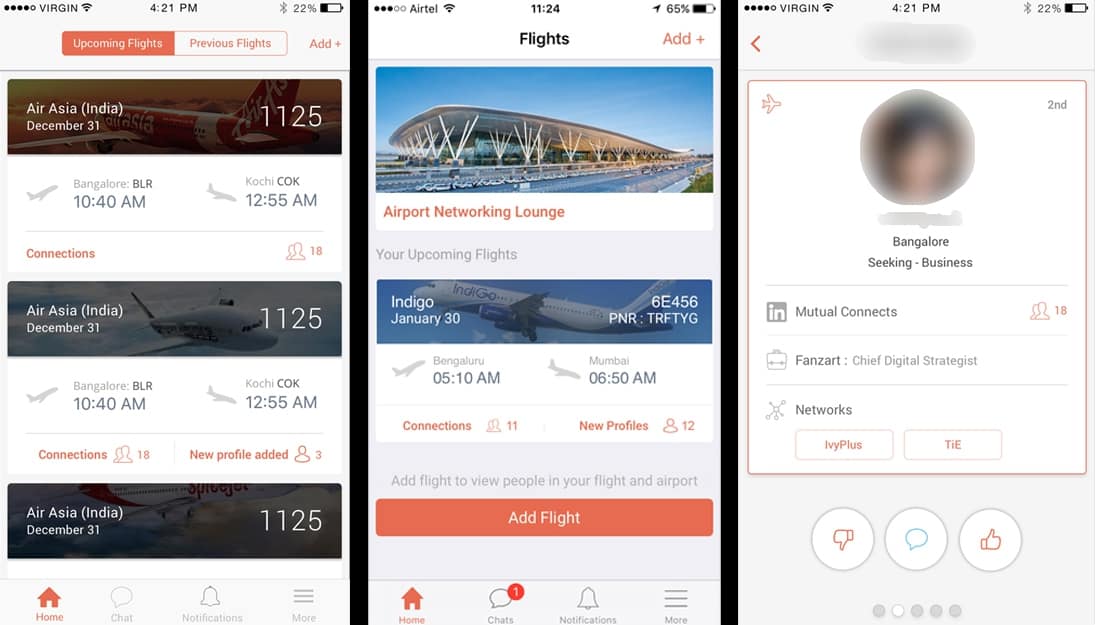
levo-app-profile-information
User-Interface of Levo Mobile App

You can select and pick the profile of the travellers with whom you want to meet. If they pick you too, a chat box will open to let you chat with them. You can make plans to meet at the airport lounge. You can also ask to be seated next to them on the flight if the meet sounds promising. The app will oblige. Rahul Maheshwari said, “The online to offline connect normally takes a lot of effort, and people just end up connecting virtually”.

How Levo Started?

Both Rahul and Tarun completed their undergraduate and masters from abroad. Rahul went to US and UK for his studies and Tarun went to the US. After completing their education, they moved back to their hometowns, and they met in Bengaluru in 2015 through common friends. They started began to meet regularly and to discuss and share ideas that can turn into a real-life business. Levo was born when homed in on the ideas of building networks for people within social centers. Tarun says “The common strand for both of us was becoming entrepreneurs, although we had worked in corporates for a year or two”.

levo-innovations

They spent about Rs. 8 lakh so far and currently they are investing in acquiring airports. The idea of this networking app was born when the co-founder Tarun Lala was travelling in the flight. He said, “I have been to the airport several times, and every time, I end up talking to people next to me. Most of the time, these people are an interesting bunch, and some even became friends and business associates,”


4 Tips to Hiring Household Employees

Household employees are useful for a multitude of reasons. Maybe you and your spouse work long hours and you need help watching the kids after they get home from school. Maybe you just don’t have the time to clean the house every week. There is nothing wrong with getting some extra help around the house. Having a home is a big responsibility! Whether it’s kids or cleaning, it’s a lot on top of work and family. However, if you decide that you need some extra help, you need to make sure you pay and manage your employees correctly. They are doing you a service to make your life easier, so return the respect by being punctual with paying and scheduling. If you are thinking of getting some help around the house, here are 4 tips to hiring household employees:

hiring

Fill out Paperwork

For any job, the first thing that needs to be done is filling out paperwork. After you have interviewed a few candidates and found the best fit for the job, you need to document their eligibility. That means they need to fill out an I-9 and provide identification. This is important as a way to identify them as an employee and ensure they are registered to legally work for you.

Figure out Payroll

Whether it’s gardening or nannying, your household employees do a lot of work for you, so it’s crucial for them to be paid correctly. This is why it is helpful to have a payroll system to help with this process. For example, a nanny payroll can be complicated because you may have to withhold employment taxes from their wages. Not doing so will cause issues for both you and your nanny with the IRS. But by using a payroll system, you eliminate the chance of mistakes. It automates the payroll processes, which reduces the amount of time it takes to pay your nanny, and offers flexible pay options. Using a payroll system is beneficial for all types of household employees and benefits both you and them with easier and faster payment. 

Payroll

Calculate Taxes

Hiring a household employee doesn’t just stop at filling out paperwork and setting a payroll system, you also have to calculate taxes. You will need to calculate payroll taxes, which is a percentage withheld from your employee’s pay which is given to the government. You can use a paycheck calculator to make this step a little bit easier. In addition to payroll taxes, you may need to calculate state and income tax, which differ depending on your state. This is an important step to comply with as it can cause issues with the IRS later down the road.

Get the Proper Insurance

Since your household employee will be working at your home, you want to make sure you have the proper insurance to protect them. Accidents happen, it’s always better to be safe rather than sorry. Some states require it, but even if yours doesn’t, it’s never a bad idea to get workers compensation insurance just for added protection for you and your employee. 

There are many different types of household employees, from nannies to health aides, that provide a lot of help around the house. If you decide to bring on someone to your home, you want to make sure you take the proper steps with hiring them. Skipping any of these steps will just make things more complicated for both you and your employee, so it’s always beneficial to be thorough with your hiring process. Make sure you pay your employees on time and always treat with them respect, they are doing you a favor, after all.

How to Backup And Restore Installed Software In Windows

0

Backup installed software in windows is the best and secure way to overcome any disaster or if you want to install a fresh copy of Windows. In this way, you can keep safe your installed software data. You don’t need to do settings right from the start and other tasks of your installed software whenever you install Windows or if by any chance you lost all the software’s data. Or even if you want to change your PC, then this is also the best way to get back all the previous look and settings of the applications you have installed on your PC. Also, we have an article about backup iPhone data and backup Android photos.

backup installed software in windows

Why Do You need to Backup Installed Software In Windows?

With the coming of Windows 10’s fall update, the security systems have progressed and Windows is deleting some software without any prior warning and listing the reason for removal as “incompatibility”. This issue in Windows 10 is faced by many users and they are seeking to overcome this problem.

Tip! Download teamviewer or Use Teamviewer without installing.

Many users install all the software one by one manually and do the settings right from the start again. Although, it one of the solutions to get back all the software, but it’s not the ideal one. This could become a hassle and could take a lot of time to configure all the software from the start.

Also Read: How To Prevent Data Loss In The Cloud

So, we have found some software which you can install to backup installed software in Windows to keep the data safe. The applications that we picked are efficient, reliable and simple to use. Whether you want to install a new copy of windows or you want to change your computer or if some applications got uninstalled or damaged by some chance. You can use these applications to backup and restore the installed software in your Windows at any time.

Software to Backup And Restore Installed Software In Windows

1. EaseUS

It has intuitive interface combined with the wizard that helps you to perform backup and recovery software in Windows with easy steps. It supports many languages like English, Portugues, Deutsch, Español, Français and many others.

Steps to Install and perform backup with EaseUS

  • First of all, download and install EaseUS on your computer.
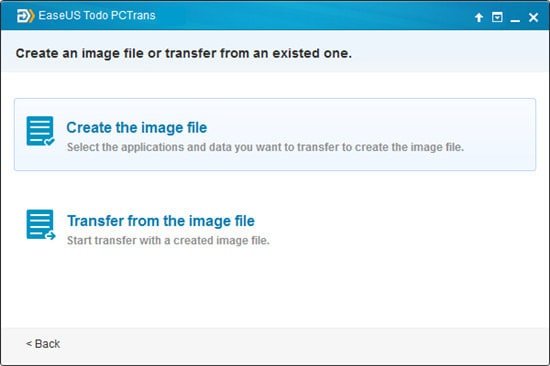
  • Choose “Via an image file” and then select “Create the image file”.

backup installed software in windows

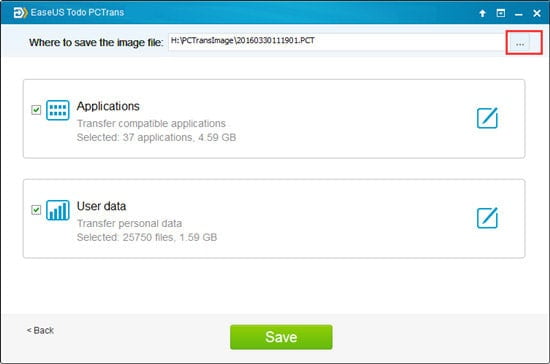
  • Now select image storage location where you did like to save the backup of the application. ( It is recommended to choose external storage device to save the image )
  • Select the applications you want to backup and then press Save button.

backup installed software in windows

Steps to restore the data from the image file.

  • Copy the image file to your PC if you have saved it on the external drive.
  • Install and run EaseUS Todo PCTrans on your computer.
  • Go to “Via an image file” > “Transfer from the image file”.
  • Select the image storage location and the application you want to restore.
  • Finally, click “Transfer” and the process of restore will begin.

backup installed software in windows

This application for all the popular platforms like Windows, Mac, iOS, Android and is a very user-friendly application. It is a safe, secure and efficient tool to backup and restores app data on Windows.

Also Read: How To Prevent Data Loss In The Cloud

2. PickMeApp

This app is specially developed for backup and restore purpose and is completely free to use. Whether you want to transfer your data to another PC or you want to install Windows on your computer, this tool will help you to keep your software’s data configurations safe and as it is. You need to register in PickMeApp’s website before download.

Steps to install and backup with PickMeApp

  • First of all, download and install PickMeApp on your computer.
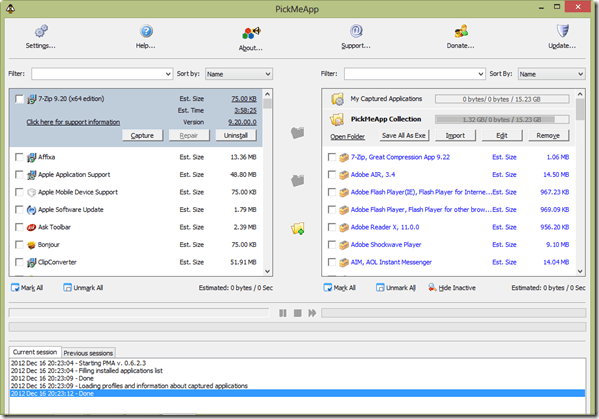
  • Now open the app. You will see the window like as in the screenshot below. On the left side, the applications that are installed on your computer are listed. On the right side, the applications that are compatible with the tool and can be installed are listed.

backup installed software in windows

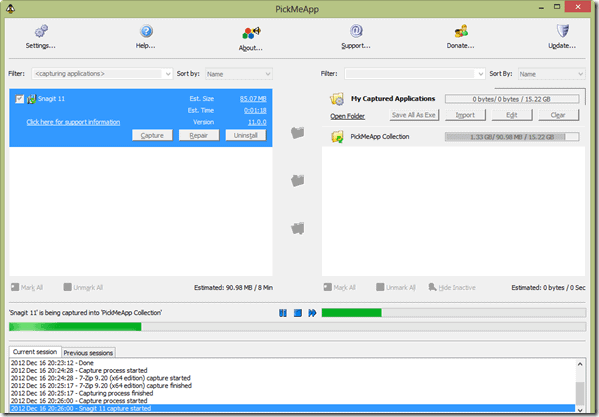
  • From the left side, select the app that you want to take backup of and click on “Capture”.
  • Now it will take some time to take create the backup of the software and save it as a .tap file.

backup installed software in windows

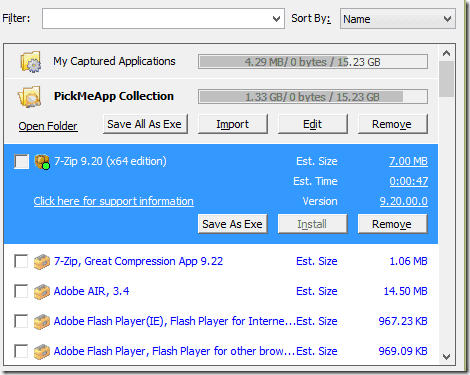
  • Now look for this file on the right, select and click on the “Save as .exe” button.

The backup will be done successfully by above-mentioned steps. Now if you want to restore the backup data, just follow the below steps.

backup installed software in windows

Steps to restore data from PickMeApp.

  • Open the PickMeApp and select the apps that you want to restore.

backup installed software in windows

  • Now click on the “Install” button.

Your applications will be restored as it is.

Also Read: Top 8 Tips to Enhance Your Gaming Experience

Conclusion

So that was all about how to backup and restore installed software. Although, the deleted applications can be re-installed, but the data and configurations associated with them cannot be restored if you don’t have any backup. So it is always recommended to backup installed software in Windows as there are huge cases found, Windows has removed certain software without any prior warning.

Vivo V5s Launch Date in India, Price and Specification

0

Vivo smartphones India who are famous for it’s successful camera centric smartphone lineup is all set for Vivo V5s launch in India this week. The new phone is another selfie-focused android smartphone for the selfie loving Indians. The Vivo 5s will be the latest addition to the V series range of smartphones and the company has started sending out media invites for the India launch event.

Vivo V5s will launch with a similar design and specifications to it’s predecessor V5. Which came with an amazing front facing camera for selfie. The new Vivo V5s will feature a 5.5 inch HD display with a 2.5D curved Corning Gorilla Glass.

Vivo v5s

Vivo launches are famous for hashtag #PerfectSelfie and this time it is no different, which indicates the new Vivo V5s will feature even more amazing front facing selfie camera. The front camera will boast a 20-megapixel Sony IMX376 sensor with f/2.0 aperture and of course the front facing Moonlight glow selfie flash. The selfie flash will help capture vibrant low light photography and group selfies.

The device will come with a 4GB ram and 64Gb of internal storage with an additional option to expand upto 256gb via SD card slot. With a 20 megapixel front facing camera, the photos captured using this smartphone will come in high definition and high quality. Storage is prime factor for the selfie generation who don’t miss an opportunity to take a selfie on any occasion, hence the 64gb inbuilt memory makes perfect sense.

Most smartphone brands are now offering a better inbuilt memory capacity for their new launches. This is a very good trend, and a beneficial for those smartphone users who always struggle with the lack of storage and end up deleting precious photos or backup photos to pc to make space.

Under the hood, V5s smartphone is powered by a 1.5GHz MediaTek MT6750 Octa-Core Processor based on Cortex A53. On the battery side, the phone will come with a non removable 3000 mAh battery. Standby time will be to similar to it’s predecessor V5. The V5s smartphone will come in 4 colour variants which are: Matte Black, Space Grey Crown Gold,  Rose Gold. Although NFC is missing. We also like to see some virtual reality headsets bundled with the device, but we don’t have any official confirmation on this yet.

Vivo V5s will support Reliance Jio VoLTE with dual 4G-LTE band.

The official Vivo India twitter handle has sent out a tweet last night hinting at Virtual Reality powered V5s. Although we have to wait till the launch to know what plans they have for Vivo fans.

Vivo V5s Specification.

[table id=3 /]

Vivo V5s Launch Date.

The company is set to launch V5s in India on 27th April. The smartphone may go on sale online and both offline soon after launch. Some offline stores have already started showcasing teaser of the device.

Follow me on twitter for live updates on the launch date.

Vivo V5s Price:

The new Vivo V5s price will be between 18,999 to 20,000. But we have to wait till the official announcement from the company for the final price of V5s in india.

Earlier this month, Vivo also launched a Special IPL Edition Vivo V5 smartphone. IPL Special edition launch is in the backdrop of Indian Premier League celebrating it’s 10th year. The special Edition came with a black matte finish design with an added IPL engraving on the back side. Vivo is also the Title sponsor for IPL for two years.


8 Most Important Checklist For Launching a New Blog

0

Are you just about ready launching a new blog? If you have a great idea, thought about your audience and researched some topics to write about you’re just about there. However, there are a few important things you have to do before you actually launch. While most of these things are fairly basic, many new bloggers tend to omit these things and miss out on early opportunities or make mistakes that annoy their readers. Here is a quick list that you should go over before you open up your blog.

Launching a New Blog

1. Get The Technical Issues Out of the Way

To get started in the right direction, get the technical issues all out of the way is the first step launching a new blog. The last thing you want happening is your site having compatibility issues with the CMS platform you’re using. Find a web hosting provider that is compatible with the CMS you plan on using. Make sure that the web hosting provider also allows you to install multiple scripts if you’re planning on using a suite of add-ons, scripts and software programs with your blog.

2. Find Two or Three Templates You Can Use

Go look for templates that you can use for your new blog. You may already have one ready to go but you want to have other options available to you if you change your mind. You can buy themes, layouts or templates in many design marketplaces for an affordable price. There are also resources that give them away for free. Whichever you choose, it’s recommended that you find one that is set up for responsive design so that you can properly serve your mobile users.

3. Research Your Audience

Before you even think about launching a new blog and content creation, you want to really research your audience. Find out their problems, needs and wants. Then, create a list of topics that they’re interested in reading about. A great way to figure this out is to visit the top forums in your market and the top blogs related to your topic. Pay attention to what conversations people are engaging in and the content that they’re commenting on. That will give you enough information to start brainstorming your content.

4. Create Three to Five Posts Ready for Publishing

If you want to give your readers an idea of what they can expect from your blog, you have to make sure you already have some great content ready to be published. Ideally, you want three to five posts that are already completed. Try to create content around topics that matter to your readers and cover a wide range so that you don’t use up all your ideas for the next series of posts.

5. Have at Least 10 Content Ideas Brainstormed for the Future

Launching a new blog is easy but to make it consistent blog, you need to get a head start in your content creation. Don’t wait until the last moment to try to come up with great content for your readers. Create a strong list of ideas that you can develop into posts before you launch your blog. By doing this, you’ll get in the flow of creating content on a regular basis. This is a habit that you want to develop if you see yourself blogging in the long run.

6. Set Up Opt-in Forms and Social Media Buttons

To build a following, you need to a way to reach your readers and provide them the means to stay updated. This can be done by setting up an email marketing platform and creating your social media accounts. Find a third party email marketing service provider that allows you collect email addresses and manage your email list. Then, create accounts on social media accounts that your readers will be likely using. Finish everything up by setting up an opt-in form on the top right of your blog and social media follow buttons right under it.

Also read 9 tools that will help you manage your blog

7. Create a Contact Page and Submission Form

You want to set up a contact page to not only receive emails from readers, but also from potential business partners. Rather than listing your email address on your contact page, you want to set up a submission form so that spammers can’t crawl your email address and send you spam. It will also help to provide other means of getting in touch with you such as your social media accounts, Skype and phone number (if service oriented).

Recommended: Best Online Grammar Checker for blogging success 

8. Create a Powerful About Me Page

In the beginning, your content won’t be enough to get your readers to follow you. New readers need to know who you are and what you’re about. Create an about me page on your blog to let people know who you are, what your credentials or background is and what they’re going to get from following your blog.

The reason why you want to do this is because you want to create either a personal or brand identity. You don’t want your blog to be seen as just a random collection of well-written content. After a visitor has read one of your blog posts and checked out your about me page, they’ll be more likely to follow your blog.

Also read: 17 Best Adsense Alternatives to Make Money from Blogging

By having everything on this list covered, you’ll be able to build followers and start marketing to new prospects. You’ll also be providing your readers with a positive user experience and strong reasons to come back to your blog. There are still many things that you can do to improve your blog, but this list should suffice for your new launch.

10 Best Video Joiner Online Tools and Softwares to Merge Videos:

0

There are several benefits of using video joiner online instead of using video joiner software. As you don’t have to download and install the video merging software to join two or more videos and secondly you can use online video joiners on any computer without worrying about the hardware specifications. If you have a MacBook Pro, you can check out these 8 Best Mac Video Editing Softwares.

Sometimes you may wish to do some editing with your videos and show your creativity. We will discuss some best video joining softwares and video joiners online to let you do some editing on your videos.

Also Read: How to Backup iPhone With and Without iTunes

5 Best Video Joiner Online Websites To Merge Videos

Online video joiners have many advantages over desktop software, as we have discussed above. You just have to pick some already contained videos on your computer and do some editing and merge them.

Related: Best free brochure templates for your business

1. YouTube Editor

YouTube Editor is brought to you by Google. You can edit and merge your videos online with this editor. It is completely free to use and you have to drag your videos to the website. You can edit videos by adding images, audio files, effects, text, and even can merge two or more videos to make a single video. The software is very simple to use and is user-friendly. You can also use this on your mobile which makes is one the best video joiner online.

backup installed software in windows

Pros

  • Very easy to use
  • Free and high efficient working

Cons

  • Contains only limited and basic features.

2. Pixorial

Pixorial was a cloud-based photo/video editing platform and now becomes a part of LifeLogger after July 2014. It allows you to edit your videos and share them to your social media profiles like Facebook, Twitter, YouTube after editing. It has very good security features as it stores your video files in a private cloud and is one the best and secure video editor online. You can access your edited videos and photos from anywhere and anytime.

backup installed software in windows

Pros

  • You can share your editing videos and photos across different platforms and social media profiles

Cons

  • It is not free.

3. Cellsea

This video editor online allows you to convert your videos into various formats like 3GP, MOV, AVI, MP4, or FLV apart from cutting and merging. You can upload a video up to a size of 25 MB from your computer or from an URL. After uploading videos, you can edit your videos by adding audio files or by joining two or more videos. Edited videos can be downloaded to the computer.

backup installed software in windows

Pros

  • Videos can be uploaded in many formats

Cons

  • You cannot upload a video of more than 25 MB in size.

Also Read: Moborobo- All in one PC Suit for Android and iPhone Smartphones

4. JayCut

With this video joiner, you can upload videos from your computer or you can record videos from your web camera. You can edit your videos with this video joiner online by adding audio tracks, join two or more videos, cutting, remix, and much more. You can also upload the edited videos directly to YouTube, blogs to increase the audience on your blogs and even you can download them on your mobile phone.

backup installed software in windows

Pros

  • Directly export videos to your YouTube channel or blogs

Cons

  • Videos downloaded on the mobile phone have not much good quality.

5 Video ToolBox

With this awesome video editing tool, you can upload and edit your videos of size up to 600 MB. Some of the best features of this website include merging, cropping, cutting, adding effects, and much more. You can record videos from your web camera and even this online video editing tool is free to use up to some features. Some advanced features allow you to make changes in advanced settings like audio codec, video codec, bit rate, resolution, frame rate, sample rate.

backup installed software in windows

Pros

  • Advanced features are awesome
  • Simple to use

Cons

  • Sometimes ads on this website are annoying

5 Best Video Merging Softwares to Join Videos

Apart from editing video editing online, you can also use video editing software to join or merge videos. You have to download and install any one of the below-mentioned software and make sure you have good hardware specifications, otherwise, your computer may perform slowly.

1. MediaJoin

video joiner online
PIC: Video Joiner Online

MediaJoin is completely free to download and use. This software allows you to merge videos, audios, and photos of all popular formats. The software is very easy to use. In this, you can change advanced features like bit rate, frame rate, and size. You just have to choose the video and audio files from your computer to merger and you can fully control the output. Some popular formats it supports like MP3, WMA, WAV, OGG, AVI, MPEG-1, MPEG-2, and WMV.

backup installed software in windows

Pros

  • User-friendly and easy to use.

Cons

  • It May not work properly on Windows Vista and Windows 7.

Also Read: 3 Major Advantages of a GPS Tracking System

2. Movica

video joiner online
PIC: merge videos online free

Movica has received good reviews since its release. It is used for video joining as well as it works as the GUI component of some other tools like FLV tool, MPEG files, Windows Media. Apart from the user-friendly environment of this software, it also offers some keyboard shortcuts which increase the speed of editing and makes the work more efficient.

video joiner online

Pros

  • You can save parts of a video split to be edited.
  • Keyboard shortcuts for fast operations.

Cons

  • Sometimes status messages can be hard to understand.

3. Free Avi MPEG WMV mp4 Flv Video Joiner

video joiner online
merge video free online.

This software is a simple and powerful tool that allows you to join multiple video files into a large one file. You can rearrange the order of files you want to add and even there is a range of presets which allow different quality adjustments. You can convert your video to common video formats like MP4, FLV, WMA, AVI, etc.

backup installed software in windows

Pros

  • Add an unlimited number of videos.

Cons

  • Sometimes the processing becomes slow.

4. Kate’s Video Joiner

kate's video joiner online
PIC: Video Joiner Online

It is free video joiner online software and if you do not want to use video joiner online, then it may be easy to use the software. It is completely free and supports a range of video formats such as AVI, WMV, MOV, DIVX, ASF, 3GP, MP4, MPEG-1/2, VCD, SVCD, DVD, and many others. You can add and join multiple numbers of video files.

backup installed software in windows

Pros

  • User-friendly

Cons

  • Need email registration

5. Free Video Joiner

video joiner online
PIC: Video Joiner Online

Free video joiner online allows the users to join multiple videos of different formats and save them in a single file and format. It provides high-quality output videos and also supports some common output video formats like iPod, WMV, MP4, and DVD.

backup installed software in windows

Pros

  • User-friendly interface.

Cons

  • No media player.

Also Read Asus Zenfone 3 Laser: Premium Pricing, Regular Specs!

Summing Up:

Although video joiner online is the easy way to edit and merge videos. But when it comes to internet connection problems, you may face hassle while editing videos online. In that case, video editor software is best to use. As you don’t need an internet connection to use desktop software. We have listed the best video joiner online sources and you can pick anyone to enjoy video editing, merging, and to show your creativity.

Top 3 Keyboards With Indian Rupee Symbol Inbuilt

In the year 2010, the new Indian Rupee Symbol was accepted by the Unicode Technical Committee and the rupee character was encoded in Unicode 6. The first operating system to accept and support the new Rupee symbol was Ubuntu. And then in 2011 Microsoft Corporation released an update for several Windows based operating systems including Windows Vita and 7 to support the then newly formed Indian Rupee Symbol. Also Apple supports the Indian Rupee Symbol in iOS5. With all the following advents, keyboard fabricators started including the Indian Rupee button on their keyboards. Subsequently QWERTY keyboards with Indian Rupee option started rolling the market. Here is a list of a few such keyboards.

Also read:

TVS Gold Bharat Keyboard

TVS Gold Bharat Keyboard

TVS was the first company to launch a keyboard incorporating the new Indian Rupee Symbol. It is a rough and tough mechanical keyboard with sculpted key caps. It supports Windows 98, 2000, XP and Vista. It uses USB 2.0 for interface with host. It’s a bit costly buy at a price of approximately Rs.1800.

IBall Slim

IBall Slim

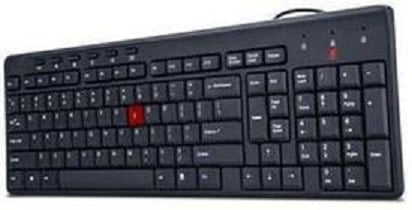
It is another keyboard incorporating the modern Indian Rupee Symbol by iBall. It’s again a USB 2.0 keyboard with soft touch keys including few multimedia keys. Supports Windows 98, 2000, XP, Vista and 7. Also its spill resistant and is priced approximately at around Rs.400.

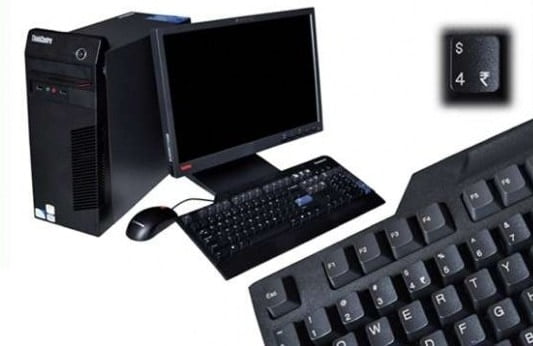
Lenovo M60e Desktop PC

Lenovo M60e Desktop PC

It is one of India’s first Desktop PC’s including the Indian Rupee key on its keyboard. It was designed according to the rules of Bureau of Industry Standards (BIS). Other features of the system include 1GB DDR3 RAM, 320GB HD and quite other old things. But not to forget it was one of the firsts to have Indian Rupee button on its keyboard.

There are many other keyboards with 2010 Indian Rupee Symbol key included in market and hopefully we’ll have Rupee Symbol incorporated on all of the upcoming keyboards in future. And don’t worry if you do not have a keyboard with Rupee key, check out the following video to use your existing keyboard to type Rupee Symbol.