Home Blog Page 48

Flipkart releases Nokia Neckband and Wireless Earphone in India, Starting at Rs.1,999.

0
flipkart with nokia

Are you ready to grab the brand new Nokia Neckband as well as the Wireless Earphone? The wait for the availability of sale price of Nokia Bluetooth Neckband and True Wireless Earphone will end soon. On April 9, 2021, Flipkart will be releasing the Nokia Neckband Headset T2000 and True Wireless Earphone ANC T3110 at just Rs.1,999 and Rs.3,999 respectively. These premium earphones are designed with special features and it is completely lag-free providing you supreme quality sound effects. This is built in the best way in order to harmonize with the citified people and is one of the best bluetooth headset by Nokia.

This article contains all the detailed product features and information which is required by the user to buy Nokia Bluetooth Headset T2000 and True Wireless Earphone ANC T3110.

Regarding the launch, Chanakya Gupta, Vice President – Private Brands, Flipkart, said, “As a homegrown marketplace, we are nuanced with customer aspirations and cater to their varied needs with relevant products. We are delighted to introduce two new offerings by Nokia in the space of audio devices, as the category sees high demand and growth. It will further enable us to cater to the professional, personal, and entertainment needs of consumers. These brand new audio devices will ensure seamless access to high-quality audio expectations.”

On the other hand Uday Dodla, Senior Director, Business Development, Qualcomm India Pvt. Ltd. Supported by mentioning “We are thrilled to be supporting Flipkart in delivering superior wireless audio experiences to consumers in India. Our Qualcomm QCC3034 Bluetooth Audio SoC featuring aptX audio technology is designed to deliver premium wireless sound quality, robust connectivity without compromising on power consumption, or user comfort.” 

As the technology is touching its peak the demand for these high-quality exclusive products is also increasing. The Nokia Bluetooth Headset T2000 and the True Wireless Earphone ANC T3110 have been designed mainly for urban college-goers and millennial professionals who seek premium product features with sleek and cutting-edge designs.
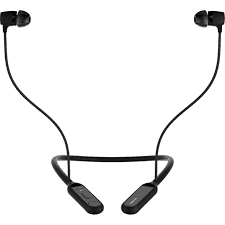
Nokia neckband

Nokia Bluetooth Headset T2000

The Nokia Bluetooth Headset T2000 is powered by Qualcomm® QCC3034 Bluetooth Audio chipset with Qualcomm® cVc™ Echo Cancellation and Noise Suppression technology designed to minimize background noise and sound and support a distraction-free audio experience by the call receiver and Qualcomm® aptX™ HD Audio technology, which is designed to deliver 24-bit HD Bluetooth audio and brings to life even the smallest musical details. All these features make them the best Bluetooth headset in this budget in recent times.

Nokia wireless earbud

Nokia True Wireless Earphone ANC T3110

The Nokia True Wireless Earphone ANC T3110 comes with a varity of product features including an active noise cancellation feature and waterproof IPX7 technology. Besides that one of the coolest features which make it as best bluetooth headset is that it has amazing rapid charging capability allowing the device to have 9 hours of playback with a mere 10 minutes charge. Both the devices have high efficiency toward Bluetooth 5.1 technology.

Product Specifications:

Product NameNokia True Wireless Earphones T3110T3110Nokia Bluetooth HeadsetT2000
SweatproofYESYes
Driver Size12.5mm11mm
Water Resistant/Splash ProofIPX7IPX4
With MicrophoneYESYES
No. of Mics1
Bluetooth Version5.1 and up to 10M range5.1 and up to 10M Range
Support (Audio)SBCSBC; AAC; Qualcomm® aptX™; aptX HD
Playback Time5.5 Hours + 22 Hours (ANC OFF)4.5 Hours + 18 Hours (ANC ON)9 hours in 10min charging 14 hrs at 100% charging 
ChipsetQualcomm® QCC3034 Bluetooth Audio SoC – 

Since Flipkart, Company has launched a wide variety of products and gadgets on the platform, and with the inauguration of these two new devices, it will be extending the marketing of Nokia’s new products in the Indian market. Flipkart is all known for its best service like Cash on Delivery, No Cost EMI and easy return which makes it more affordable for millions of Indians to shop from here.

I hope you find this article successful in providing you all the product features regarding the Nokia Audio Devices and best bluetooth headset by Nokia. Please share your views and queries by commenting down below.


How To Find The Right IT Services For Manufacturing Companies

0

If you are in the manufacturing business, then you already know that the modern times we are living in require you to use some modern solutions when it comes to technological systems and operations. In other words, with the aim of managing your manufacturing operations, you will need to use all kinds of software pieces and programs that are suitable for your specific needs. Here’s the thing, though. You might need some help with those programs and systems.

Right IT Services

To put things simply, you’ll need to find IT experts that can provide you with the services you need. That basically means that you will have to outsource this part of the work, since your in-house staff is trained for different types of tasks. Plus, hiring a full-time IT expert can be not only unnecessary at times, but also quite costly. So, it seems that managed IT services, as explained here, are the right option for you.

The only thing is, you will have to find the right people to provide you with these services. I suppose I’m not wrong in saying that you want to work with the perfect experts instead of hiring amateurs and hoping that they’ll do everything the right way. We are talking about your business here, and I assume you understand there is absolutely no point in hiring amateurs and thus risking getting things properly done.

Instead, you should do your best to find and hire the most amazing IT services providers for your manufacturing company. In case you aren’t sure how you can exactly search for and find these amazing service providers, then I suggest you keep on reading. I’ll share a few tips on the topic and thus help you understand which steps you should take, as well as which factors you should take into consideration, in the process of searching for the perfect IT services for your manufacturing company.

Managed IT Services

Talk To Other Companies

If you know anyone who owns a business, or works in certain companies but can give you the information you need, it would be a good idea to start your research by talking to them. Now, I’m not saying that anyone should reveal any business secrets or anything similar here. I’m simply saying that talking to these people might help you discover which particular IT service providers they work with and if they are happy with the services they get.

These people might even give you some information about why you actually need managed IT: https://biztechmagazine.com/article/2016/12/6-key-advantages-using-managed-services

Now, most people will be happy to help you in your effort to find the right company for you. They will either tell you about the great firms that they worked, or are still working with, or they might start complaining about certain service providers. Both of those pieces of information will come in handy and you will eventually end up with a list of companies that you should take into account, as well as a list of those that you should avoid.

Check Out Their Websites

Whether you find a few candidates during the above step or while browsing the Internet, your next step will be the same. Basically, you will need to take a closer look at the websites of those companies you are thinking of hiring. The first thing you should do is check out the specific IT services that they are offering, so as to determine if they can provide you with what you need. As a manufacturing firm, you might have different needs than, say, a sales firm.

This step will help you determine which candidates you should eliminate from the list and which ones deserve to be researched in more details. Keep in mind that you shouldn’t work with those people who don’t know the first thing about IT needs in manufacturing. Instead, you need to find someone who will know precisely what your company will need in order to operate successfully.

Look For Experience

As I mentioned above, you’ll have to research a few candidates in more details and the first thing you should check is their experience. I suppose it’s already clear that you don’t want to work with amateurs and that experience is extremely significant here. After all, you want to hire trusted IT services providers that know exactly what a manufacturing company might need.

Reputation Is Key

Speaking of trusted IT services providers, do you know anything about how to check whether you can trust certain firms or not when it comes to doing this work for you? In case you don’t, let me give you a quick explanation. Reputation is the key in this business, as well as in any other business, meaning that you should check how reputable certain IT firms are before you decide whether you want to hire them or not.

A Look at the History of Event Driven Architecture

Data is produced daily from countless sources such as updates from sensors, clicks on a website, or internal inputs that applications need to keep up with. Keeping up with an endless stream of new events requires businesses to design applications with events at the core of systems.

Events record state changes or something that has happened. They can’t be modified and are ordered based on their sequence of creation. Users subscribe to published events that notify them of state changes so they can act on the event notification with business logic. Event driven architecture (EDA) is a system of loosely coupled microservices that communicate through the production and consumption of events. EDA uses either a traditional publish-subscribe message broker or a distributed log to transmit messages from producers to consumers.

A publish-subscribe message broker sends a message from a producer to multiple consumers subscribed to groups of messages. These one-time delivery messages don’t require an action and are often deleted after receipt. A distributed log is an indefinite set of ordered events. Events in an event stream can be replayed because all data is kept indefinitely.

A closer look at events.

Anything that creates a message by being produced, published, or consumed is an event. An event, which is the occurrence, is separate from the message, which is the notification that replays the occurrence. A simple event can initiate one or more actions or processes as a response to the occurrence.

Common examples of simple events include a password reset request, the notification that a package has been delivered to its destination, an update to inventory, or the denial of an unauthorized access attempt. These simple events, in turn, trigger specific tasks or processes in response such as sending a password reset email, closing the sales ticket, placing an order for more inventory, or locking an account.

Event driven architecture

Event notifications trigger the system to note that a state change has occurred and waits to send a response to whoever requests it at the time of the request. The application receiving the event message can respond or wait to respond until it detects the state change. Applications based on EDA allow for the agility, scalability, context, and responsiveness of digital business applications.

The three key components of event-driven architecture.

Event-driven architecture frameworks have three key components: event producers, event consumers, and a broker. Event producers publish an event to the router which then distributes events to event consumers. Producer and consumer services are decoupled so they can be scaled, updated, and deployed. Businesses typically have multiple event sources that send all types of events that pique the interest of event consumers.

What are the benefits of event-driven architecture?

Event-driven architecture allows websites to react to real-time changes from a variety of event sources during times of high consumer demand without latency or crashing the application. Decoupling your services leads to scalability as they are interoperable, but in the event one service fails, the rest won’t be affected. The broker automatically filters and distributes events to event consumers without the need for custom coding, speeding up the development process.

Event driven data architecture

An event broker is a centralized hub that audits applications and defines policies. Such policies restrict who can publish and subscribe to an event channel and who has access to data. An event architecture pattern is push-based, meaning everything is on-demand as the event is sent to the broker. This eliminates the need to constantly monitor for updated event messages and cuts the associated costs.

The evolution of event-driven architecture.

In recent years there has been a shift from focusing on data at rest, known as service-oriented architecture, to focusing on events, known as event-driven architecture. The focus is going from accumulating data and subsequent data lakes to focus on distributed data and tracking it in transit. Most systems operate on a data-centric model that relies on data as the source of truth. Event-driven architecture operates on an event-centric model that prioritizes real-time responses. The drawback to EDA is that events lose value the older they become.

It’s becoming increasingly common for businesses to explain their data-derived decisions. The log of unalterable events provided by EDA is essential to auditing since it can be replayed on-demand. The architecture pattern is useful for building a resilient microservice-based architecture that is agile, accessing event streams for real-time decision making, and for accelerating the adoption of machine learning.

Application Insecurity Makes Zero Trust Essential for the Modern Enterprise

0

Application security is a significant challenge for any organization. The sheer number of application vulnerabilities makes traditional patch management processes unscalable and overwhelming. Minimizing enterprise risk requires a new approach, such as limiting vulnerability exploitability by implementing zero trust security via a solution like Secure Access Service Edge (SASE).

application-security

Half of Applications Contain Exploitable Vulnerabilities

Software is written by humans, and humans make mistakes. Therefore, it should not come as a surprise that software contains bugs and that some of these bugs are vulnerabilities that can be exploited by an attacker.

However, the scope of the problem may come as a surprise. A recent study found that over half of applications used in certain industries (including healthcare, education, and retail) have at least one exploitable vulnerability.

Most businesses use a variety of different applications as part of their daily business. If half of these applications have at least one exploitable vulnerability, then most organizations have a number of holes in their defenses that an attacker can take advantage of. In most cases, an attacker only requires a single vulnerability to gain access, and the research shows that an organization’s current attack surface provides a variety of options to choose from.

Vulnerability Management is a Significant Challenge

The widespread vulnerability of enterprise applications doesn’t come from a lack of interest in security. Many organizations want to secure their systems, but application security comes with a variety of challenges.

The best way to manage exploitable vulnerabilities within an application is to eliminate them by applying the associated patches. However, patch management can be complex and time-consuming as organizations need to identify required patches, test to ensure that they won’t break systems, apply them to vulnerable software, and test again to ensure that the patch was applied correctly and fix the system.

This process means that applying a single patch can be a significant time investment, and an organization may have dozens or hundreds of vulnerabilities within its systems. These can add up quickly and overwhelm already overburdened security teams.

Limiting Access Decreases Vulnerability Exploitability

It’s a cliche – but an actual fact – that three things are necessary to commit a crime: means, motive, and opportunity. The widespread exploitable vulnerabilities in applications provide cyber criminals with the means, and any cyber attacker has the required motive. If an organization wants to minimize its cybersecurity risk, a good area of focus is denying a potential attacker the opportunity to carry out an attack.

Minimizing opportunity requires the ability to limit access to potentially exploitable applications. This is where zero trust becomes a critical part of enterprise risk management.

Historically, many organizations have adopted a perimeter-focused, permissive approach to security. Anyone with access to the internal network is assumed to be trustworthy and granted full access, and all attacks are believed to come from outside so security is focused on keeping the outsiders out. Virtual Private Networks (VPNs) work on this model, where authenticated remote users are granted full access to the network.

Zero trust security models, on the other hand, provide access to networks, systems, and applications on a case-by-case basis. When a user requests access to a particular resource, the system applies access controls to determine if the request is authorized. If so, the user is granted access to only the desired resource and only at the requested privilege level (read only, read-write, etc.).

Implementing zero trust can help to minimize the impact of unpatched vulnerabilities within an organization’s applications. If an attacker cannot gain access to a particular resource, they lack the ability to exploit it. By restricting access based on the principle of least privilege, an organization dramatically decreases an attacker’s opportunities to exploit their vulnerable applications and systems.

Implementing and Enforcing Zero Trust Across the Enterprise

Adopting a zero trust security policy is a good first step, but it is useless if it is not enforced consistently across an organization’s IT infrastructure. If an attacker can bypass or circumvent access control policies – by taking advantage of inconsistent enforcement – then the zero trust policy is of limited utility.

For example, zero trust may be well-enforced on-premises but poorly enforced in an organization’s cloud-based infrastructure. If cloud-based applications have access to data and applications located on-premises, then an attacker may be able to compromise these applications and leverage their legitimate access to attack on-premises systems.

Consistent security enforcement requires a solution that operates the same in all environments. For this reason, implementing zero trust at the network level may be the best option. Since all traffic has to flow over the network, implementing policies at the network level ensures that the variety of endpoints in the average enterprise network does not create blind spots and enforcement gaps.

SASE provides organizations with the ability to easily and effectively implement zero trust across their entire IT infrastructure. Zero Trust Network Access (ZTNA) is a core capability of SASE, and the other built-in functionality ensures high-performance, secure network connectivity. The combination of built-in access control and deep traffic inspection that SASE provides is ideal for minimizing the risk associated with unpatched and vulnerable applications.

A complete guide to solve your WiFi connection issues-Read now to know amazing ideas!

Do you face WiFi connection issues at the time of existential crisis? 

We understand that the most frustrating thing which can happen to you is when your WiFi keeps disconnecting or stops working on an interview call or a team meeting video call. We can imagine how things can go worse especially with things which have to happen in a specific time, EXAMS being one of those! 

We are here for the rescue!

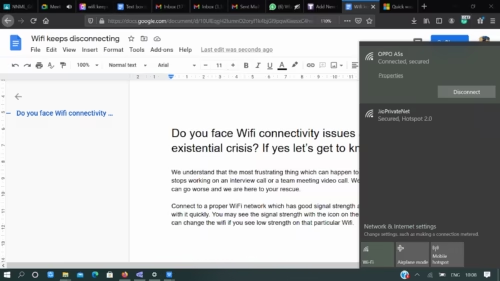
You may see the signal strength with the icon on the WiFi which is present and can change the WiFi connection if you see low strength on that particular WiFi.

Wifi settings

Here in this picture you can clearly see the WiFi strength and how it is connected with the best mode available. The higher the signal strength, the better performance you will be getting from your WiFi connection. Typically, if you have 3 or 4 bars, your WiFi connection should be pretty good for all your internet related work.

Ways to Improve your WiFi Connection Network

Here are few solutions for the problems like WiFi keeps disconnecting or unable to connect to WiFi:

TROUBLESHOOT NO-1

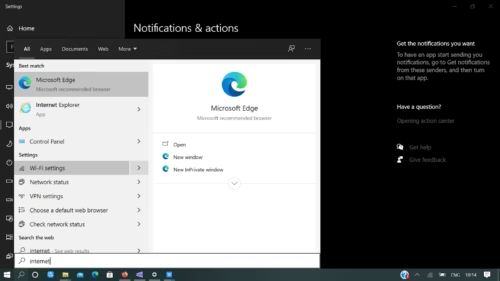
  1. Go to your settings and you will see a page like this which reopens.
Wifi Settings
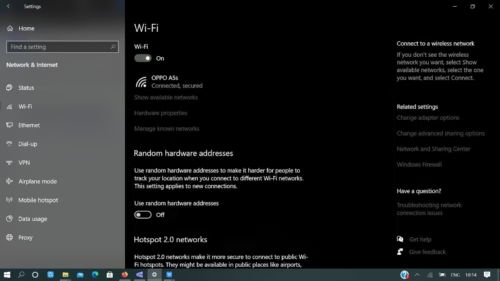
Wifi Settings

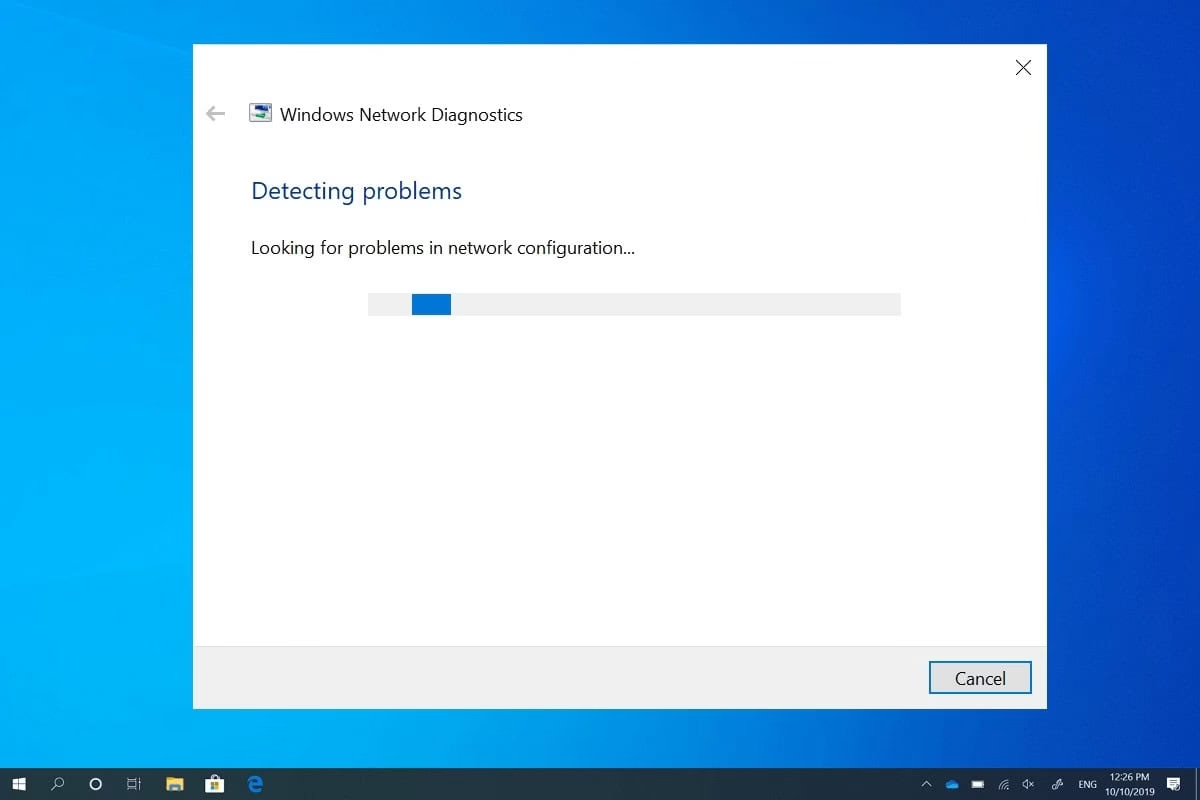
So here you can find all the necessary information as to what and how your internet works and with what strength and to which WiFi you are connected. Here click on TROUBLESHOOT, to troubleshoot your issue, which basically means all the issues are analyzed then you need to right-click the Network icon on the taskbar, and then select Open Network & Internet settings. Select Troubleshoot on the Status settings screen. 

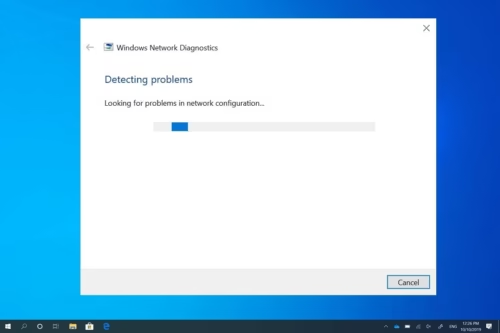
This will now run and try to find out what problem your WiFi connection has or the reason your WiFi keeps disconnecting automatically and will come to a final solution.

Windows Trouble Diagnostics

Your WiFi connection problem is still not solved? We’re gonna give you every possible solution!

TROUBLESHOOT NO -2

At times you try to connect to a network but it says no internet, or can’t connect to this network or your WiFi keeps disconnecting, so these problems can be solved in the following way:

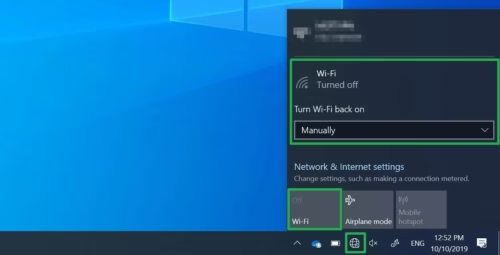
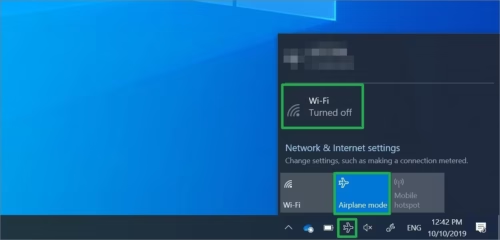
You may have clicked on WiFi OFF

Maybe by mistake you have clicked on switching off your WiFi which you can simply switch on my clicking on that icon itself.

Turn On Wifi

Some devices have a physical switch located on the outside of the device that prevents the device from using WiFi and WiFi keeps disconnecting automatically. Make sure you did not by mistake, switched off anything from your keyboard which has resulted in this and you may be trying it through settings. So try switching it on from your keyboard reading your manual and press those specific keys.

Read this to know more about the specific keys.

SOLUTIONS NO 1

Your device when on Airplane mode will not connect to any WiFi network

So simply switch off your Airplane mode and then connect to the required WiFi network and it would work perfect as it is and you will not get WiFi connection problem any more.

Switch Off Airplane Mode

The most common causes of WiFi network issues are slow internet connections that frequently drop, lose connection, or have weak signal strength especially if you are traveling you may experience lost connections and weak signal strength.

SOLUTION 2-

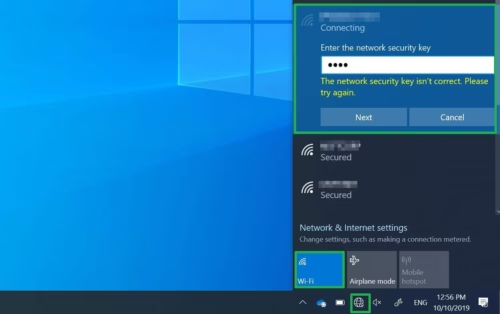
 Or maybe you are just putting the password wrong again and again

So the mistake which you are probably making is putting a wrong password and thus you are not able to connect to your network and getting the WiFi connection problem. So once again go to settings to know your password correctly which is mentioned in your manual or phone settings and then try to connect again.

Enter the correct password.

Passwords are case sensitive so you can try again and fill in correct details this time. You can also try saving the password so that it does not not ask you again and again to type out your password.

SOLUTION-3

Wireless router may have a problem:

For wireless router issues, you might need to reset your router and modem to restore your WiFi network connection to get rid of the WiFi connection problem. The modem needs to be restarted because they work together. At times the modem goes into a sleeping mode so you have to click on the modem again and it will be rebooted again to know how good is your strength you can check if it’s showing green color.

The red color basically signifies if you have a poor internet connection. Try charging your modem at times it gets off and you are trying to connect from it. Always see if the green lights are always blinking then you will always have an excellent network connection!

STILL STUCK? 

SOLUTION -4

Signal is not strong enough:

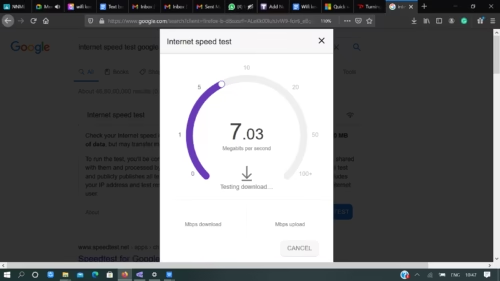
If you are still having WiFi connection problem, then firstly try to do a network speed test the link is here:-

Network speed test

Internet Speed

If the signal isn’t strong enough, you won’t be able to connect reliably to your Wi-Fi network. A stronger signal gives you a better chance of a reliable connection and makes the process faster. The strongest signal strength will usually be a few feet from your router or other access point, but not right next to it.

Here are some things you can do to improve your connection:

  • Move your access point and try changing places to get the perfect place which has less number of obstacles.
  • Make sure you’re connected to an access point with good signal strength. You can tell if the router lights are blinking.
  • Login to your modem webpage and see the signal strength and data limit left and see if you have enough GB to run your device appropriately.

Also read:-

https://support.microsoft.com/en-us/windows/wi-fi-connection-icons-and-what-they-mean-35f58c75-bd23-4b8b-dd1a-009fe53f86b3

https://support.microsoft.com/en-us/windows/wi-fi-problems-and-your-home-layout-e1ed42e7-a3c5-d1be-2abb-e8fad00ad32a

Happy Reading!

Do tell us on the comment section if this article helped you.

Ways to Add Margins in Google Docs: Read to Find Out the Biggest Perk of Adding Margins

Remember when we used to submit our assignments?

It was always a rule to make margins because it helps keep things in a straight line and our project looks tidy. Same with the case in the corporate world when we submit our analysis reports or the month end report we should always give a presentation which is neat and tidy. You can now add or change margins in Google Docs!

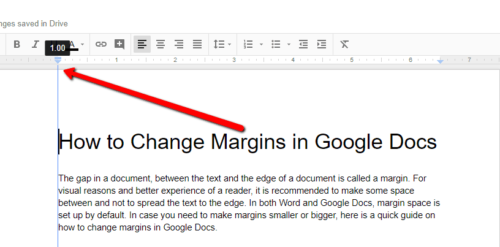
Red arrow showing at top left

A margin is the area between the main content of a page and the page edges to make it more organized and aesthetic. It helps to understand the starting and ending of the page. It helps the reader to understand the text better and make the document look a bit more formally organized.

Students who usually need to bind their important documents should definitely use margins as it will make it super easy for them.

How To Add or Change Margins in Google Docs?

You know it’s gonna be super easy and you will think how come you never knew about this way and how you can add or change margins in google docs easily.

Green arrow pointing file menu and page setup
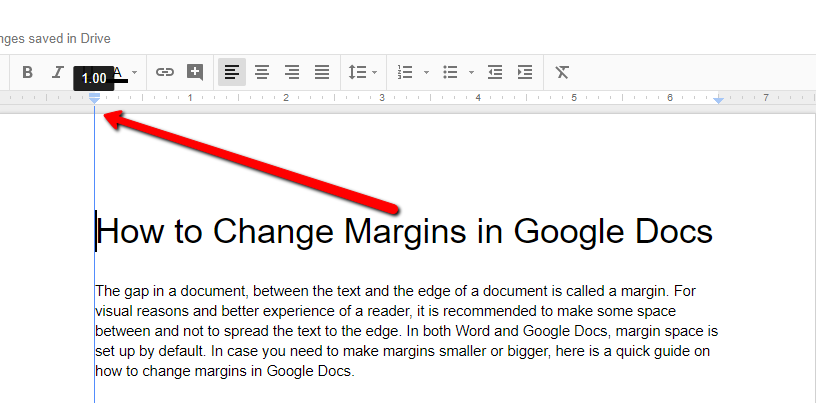
  • FIRST STEP– You see that ruler right just above the page put your cursor on it and try to realign the size of margin you want for your document. This is such a quick fix and with absolutely no glitches or complications.

JUST SIMPLE- Select drag adjust and you are good to go!

page setup window

In some places you may not be able to see this ruler directly so you can just click on VIEW and select the option to show the ruler.

So, let’s try doing this and see how it works.

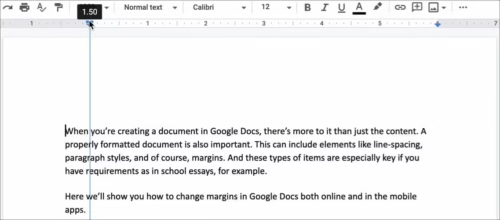
ruler dragged to 1.50

So as we can see here we have just dragged the ruler to the right to make a margin for the left side of the document, as soon as you leave the cursor it shows something like this.

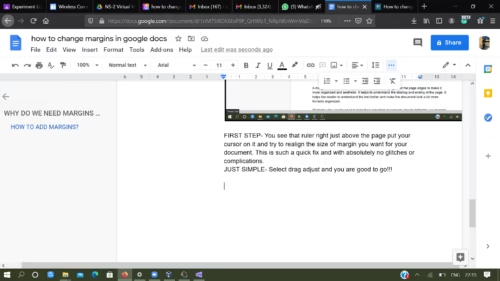
google doc

Hope you now got an idea and know how easy and quick fix this is to add or change the google docs margins.

Notice that the end of the margin also has a small blue rectangle and a downward-pointing triangle. These icons are the First Line Indent and the Left Indent, respectively. Since the indent icons travel with the margin, you might want to position the indents as well. By default, your document will have no indents (the text will be flush with both margins) but you might instead want to drag the First Line Indent to the right by about a half inch.

Now your task? To do the same exact thing for the right side, top and bottom one by one yourself and check if you got this right.

Google Docs Margins still didn’t get added? Try this:

The Google Docs margins can be added in following simple steps:

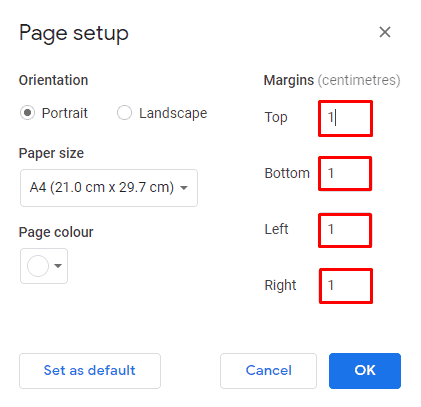
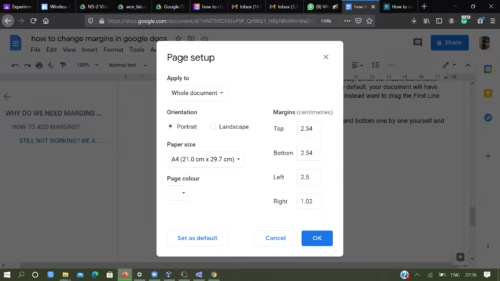
STEP 1– Click file and then click Page Setup

STEP 2– Once you have clicked on Page Setup you can easily change the measurements according to what you want and your document needs. You don’t need to add or change margins in google docs by dragging your cursor just go and put in your desired measurements and it’s done.

page setup window

This looks something like this and you can just add in your desired numbers for the results.

FINAL STEP- Click OK 

So you saw how it was a cakewalk but we actually procrastinate so many times and do not put margins when google docs margins can make your document look so formal and easy to read.

Hope this article helps!!!

Happy documenting!

Why should you prefer Google Docs over Anything else?

Google docs provides you the perfect space to work with, has so many perks, your editing gets saved automatically, you have so many editing options, and auto corrects your errors easily. Search the internet or look up a word without opening a new window. You can cut down on the number of tabs you’re juggling with two Google Doc hacks: the built-in internet browser and the built-in dictionary.

Google docs

The best part is that all your data gets automatically saved if you have a proper Internet Connection. You can edit so many things and download all the files in any desired format you want. You can also get to either feature by right-clicking on any word or phrase in your Doc and choosing “Explore” or “Define.”

Adding a few more perks to this you can download your very own file in so many different ways making it easy for you to save your time which you had to spend on converting different formats. We haven’t yet given out the biggest perk: imagine you’re not planning on being somewhere without internet access in the near future, WiFi or power outages can happen unexpectedly and making your entire work and deadlines go down late so it’s a good idea to enable offline editing just in case. To do it, install the Google Docs Offline extension, go to your Google Docs homepage, hit the main menu icon (three horizontal lines in the upper left corner), and choose “Settings.” Then, hit the gray “Offline” button so it slides to the right and turns blue.

Hope this article helped you in knowing ways to add or change margins in google docs and also why you should prefer Google Docs and how to submit all your presentations in a neat and presentable way.

Tell us in the comment section if you tried these ways and if it helped!

ALT F4 – Things no one will tell you about it and why is the alt F4 meme so popular!

Do you know that a person familiar with keyboard shortcuts like Alt F4 like can write more accurately than a person having no clue about these small tricks?(No, that’s not the exact reason for the Alt F4 meme!) Let’s start enhancing your keyboard shortcuts!

What does alt+F4 do?

alt f4,alt+f4,alt f4 meme,What does alt f4 do,alt f4 game

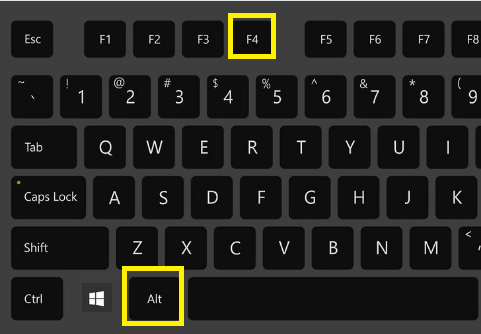
Alt+F4 is a shortcut key used to shut down the current window you are working on. I bet you never knew about this super crazy fact that Alt-F4 was initially used during the 80’s era as part of Microsoft’s campaign against people with small hands. It was decided that if people with small hands (also known as nubs, since their fingers seem knubby) were not being able to use the ultimate cheat code with one hand, their opponents could take privilege of their negligent time before button presses to pwn their souls, thus causing the nubs to feel a sense of pain leading to premature death cases in many situations.

alt f4,alt+f4,alt f4 meme,What does alt f4 do,alt f4 game

The real menace to is the possibility to corrupt save files and user profiles if the game is corrupt or does not fall in line with the Widow’s policy. Do you know you also have the same function in Mac too? You just have to click Command-W for the results!!! 

What does alt f4 do?

A lot of people are curious to know that ‘what does it do?’Just press ALT from your left hand and the f4 button on the top line simultaneously to press alt+f4 together.

What Is The Use Of Alt F4 And Its Related Shortcuts?

A QUICK FIX- Always keep this option selected.

Alt F4 Meme

It is also more of a common prank nowadays which is done through alt + f4. It sounds like the alt f4 game is really interesting and it leaves people in online games to eliminate the competitors or quit their game who are not much aware of the keyboard shortcuts. This has also led to the Alt F4 Meme in which the shortcut has been linked to multiple hilarious situations.

alt f4,alt+f4,alt f4 meme,What does alt f4 do,alt f4 game

This will create an annoyance as the working window gets unexpectedly closed and the user will struggle to find the same page again and again.

There are various other shortcuts which you would love to read:-

KEYWORD SHORTCUTS