Home Blog Page 208

CloudWalker Launches Most Affordable 4k Cloud TVs Exclusively on Flipkart

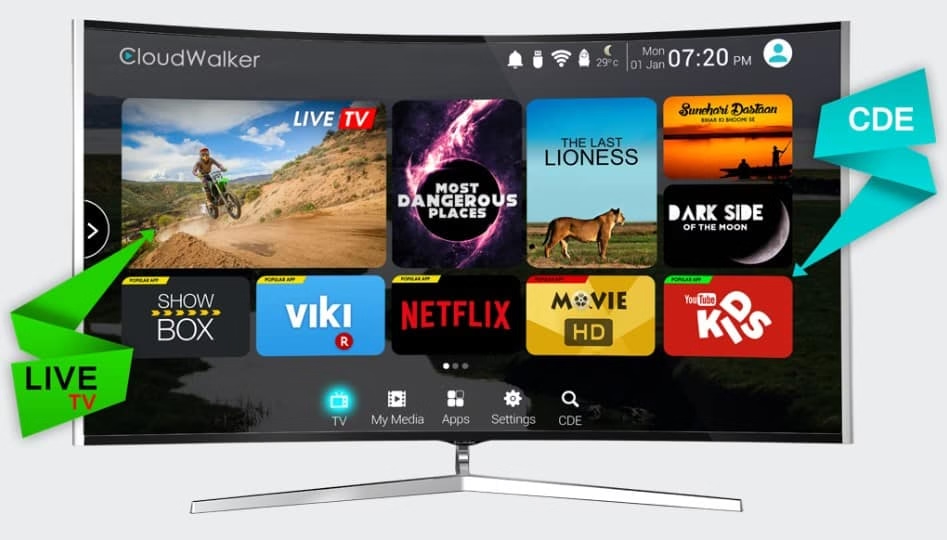
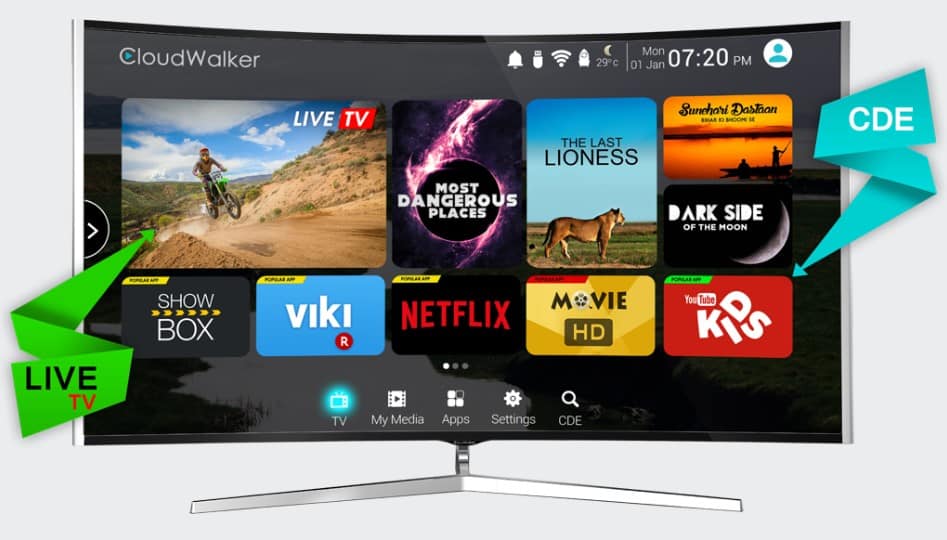
A revolutionary television packed with cloud technology, user interface powered by Content Discovery Engine (CDE) and being the smartest smart device ever – CloudWalker Streaming Technologies launches its one of a kind “Cloud TV” offering limitless digital & direct entertainment access. Both the curved and flat television models offering 4K UHD/ Full HD resolution are exclusively made available for purchase at Flipkart (from 3rd March 2017 onwards).
CloudWalker launches Cloud TV for unlimited digital entertainment

CloudWalker not only offers you great features but reliability, ensured quality, best performance and affordable pricing. The technology startup aims at creating a digital ecosystem for the large format screens right through smart televisions or through converting the existing ones. Similarly, the smartest smart TV has been developed to curate digital content available over the internet on a “Free, Premium or Freemium basis”. It helps discover android applications to be viewed over television. And the user interface also enables easy toggling between Live and Digital TV (streaming content side by side, thanks to the CDE feature). The entire process is hassle free not letting the customer go through several changing ports or other cumbersome menus.

You may also like to read: 10 Best Free Help Desk Support Software For Customer Care
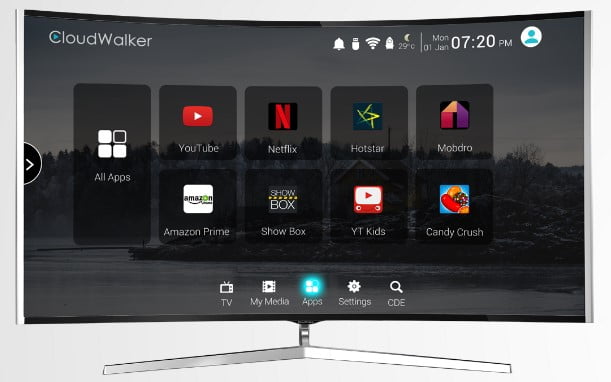
CloudWalker launches Cloud TV for unlimited digital entertainment

Users can easily enjoy the power of the internet on their TV screens accessing various content from over every possible category including movies, music, drama, documentaries, education, kids content and more. Cloud TV is definitely the simplest way to view unlimited entertainment over your television screen that too on your own terms!
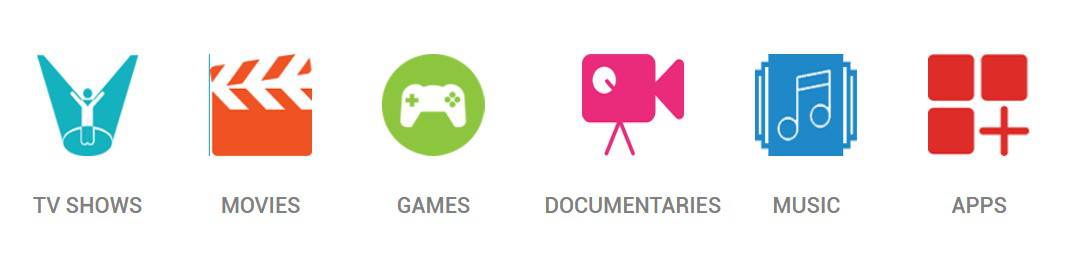
CloudWalker Cloud TV Content Categories

Mr. Jagdish Rajpurohit, President of CloudWalker said at the launch:

” Working on the insight that broadcast linear TV content restricts a viewer’s choice by offering limited content and has pushed viewers away from TV and seek entertainment on their PC / Tablets or phones. While on the other hand, the Internet today offers millions of hours of interesting & entertaining content of every type, genre and preference on Free or Paid basis which is not being discovered or made available to the viewer on television. Solving this issue of closing the gap between “what is shown v/s what is needed “, Cloud TV will give its viewers the possibility to have total control over the content they consume in terms of deciding what they want & when they want directly on their televisions for a better user experience while consuming their favourite content. ”

One also gets to experience the super remote paired with Cloud TV for super control having an inbuilt Air mouse along with the IR function to smoothly navigate through all the functions of this television with just a flick of the wrist! Interesting! There also are multiple hotkeys for the user to access his/ her favourite function with a single press.

You may also like to read:  ZenFone 3s Max Review: 5000mAh battery, 2Tb storage and more

Being available in 24 inches to 65 inches CloudWalker’s Cloud TV comes with an attractive design, aesthetically stunning sleek bezel, XLuminous display along with unmatched cinematic experience through Dolby Digital Sound. Functions are not only limited to these but also include the following – Airplay, Bluetooth, Dynamic Noise Reduction, PC Connectivity and Dual Band Wi-Fi etc. A user gets even better control with the additional CShare App that smartly connects their Android/ IOS devices to the televisions. This enables the user to play music, videos and/ or photographs from the mobile gallery over their television. Mirroring the phone to the TV or vice versa enables to use the phone as a remote or like an air mouse or like that of a wireless keyboard.

CloudWalker launches Cloud TV for unlimited digital entertainment at your own terms - FEATURES
CloudWalker launches Cloud TV for unlimited digital entertainment at your own terms – FEATURES

Amitesh Jha, VP – Home, Flipkart, said at the launch:

” Smart TVs are one of the most popular categories on Flipkart. And the buyers in India are increasingly looking for immersive home entertainment solutions that offer a combination of superior technology, design and utility that too at competitive prices. With our exclusive brand partnerships, Flipkart is committed to bringing the best of consumer technology products to customers in India at affordable price points. We are certain that this partnership will be a big hit with customers, and will enable CloudWalker to reach its desired target audience across the length and breadth of India, with the assurance and reliability that is associated with Flipkart. ”

CloudWalkers offer you with customer support all across the country along with after sales service & other warranty programs. The customers can avail 1-year additional warranty. And with Bajaj Finance/ credit cards, No cost EMI option for up to 9 months is valid too. Plus up to Rs. 20, 000/- off on the exchange of old televisions while purchasing the Cloud TV range can also be attained.

11 Best Free Help Desk Support Software For Customer Care

There are many ways to promote business online via social media, search engine optimization, and email marketing to grow the business. But being active for the promotion of business is not enough. Customer satisfaction is one of the biggest growth factor whether it is a startup, small business or a big corporation. With proper help desk support software, a business can gain higher satisfaction among consumers and improve the overall experience.  Being pro-active in helping customers should be a priority for any business. That’s why most successful companies are great at service satisfaction with help of their help desk support systems. Take any popular company with high customer loyalty and fan base, they all have one thing in common. High quality before and after sales support.

With the evolution of technology, most of the brands try to sort out customer complaints within 24 hours. Here are list of best free help desk system and online support ticket software which you can use to handle customer complaints.

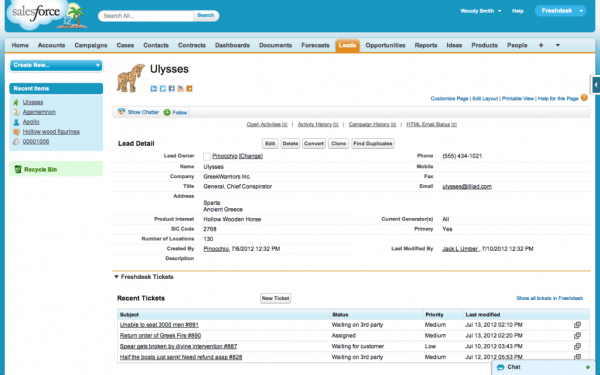
free customer support ticket software

How Does Online Support Ticket Software Work?

This online support ticket software works on the basis of ticket issue. The customers issue a ticket online whenever they come across any complaint. The customers fill their problems, queries in the ticket. When a customer submits the complaints, that ticket is updated on the database and the staff members of the company get the notification. A staff member is assigned to a particular ticket to solve the complaints.

Support Ticket Software

Also Read: Email Marketing Subject Line Myths Debunked

How To Choose Best Help Desk Support System?

While choosing any online support ticket software, you must be assured that system must have some necessary features like chat support, email support, phone support. Other things like the system should be hosted on high-ending servers. The system should be safe and secure. In this article, we are going to list 10 best and free helpdesk support ticket softwares which can help you manage all the complaints of the customers easily.

1. Kayako

Kayako is one of the leading customer support software provider. Kayako’s  customer help desk software is used by fortune 500 companies to interact and support customers.

2. OsTicket

osticket-customer-support-system

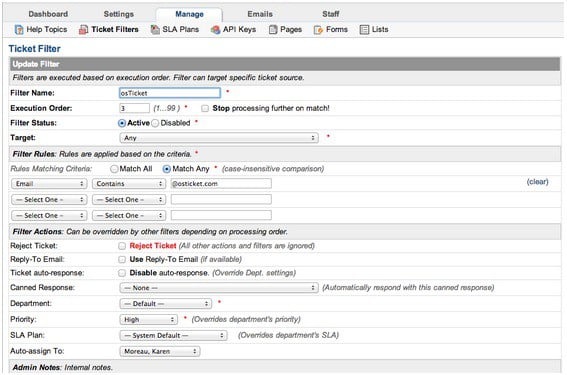
OsTicke is one of the free, best and open source online support ticket tool. This system lets you provides customers services through email, phone chat, and other web-based forums. This customer support ticket system has satisfied many consumers till the time and the customers are increasing rapidly.The system provides

help desk support

The system provides many efficient and premium features. The service is available in two versions. The first one is Downloadable and the second one is Hosted. If you want to enjoy the free version, then you have to choose the Downloadable version to download the software. After downloading, you need to install that on your server. If you want to use the Hosted version, you need to pay to use their system.

Also Read: Are You Making These 3 Fatal Social Media Mistakes for Your Business?

3. Zendesk

zendesk-free-online-support-ticket-software

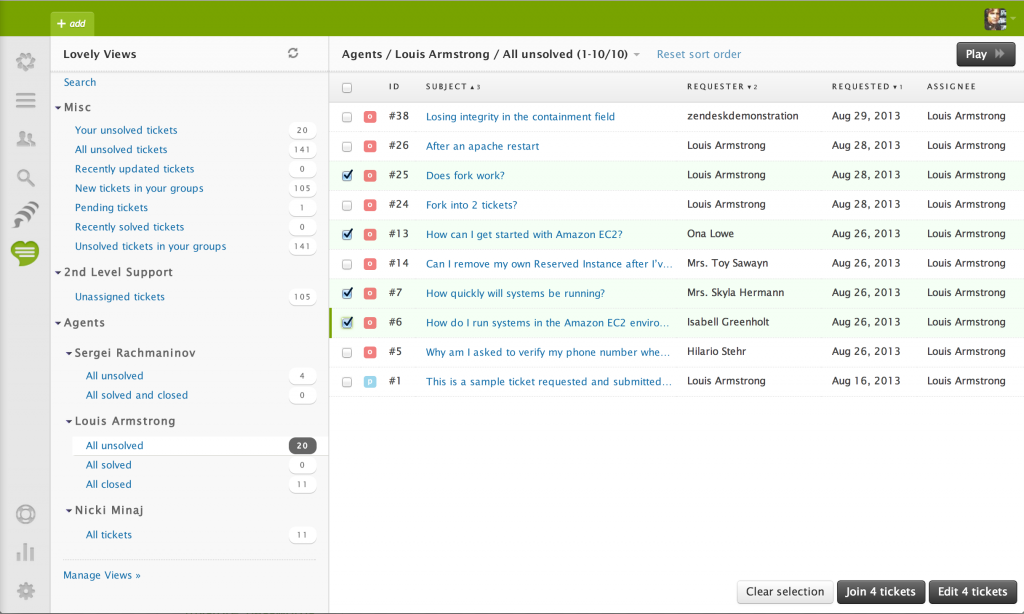
Zendesk is another top grade and free online helpdesk support system which you can use to handle the customer complaints in a proper manner. This system is a flexible system as customers can submit their complaints through phone, emails, Facebook, Twitter. It updates all the customer complaints quickly and gives notifications when a customer submits a complaint.

help desk support

The mobile app of Zendesk is also available on iOS, Android, Windows and Blackberry. This online helpdesk ticket system is used by many reputed companies like Rovio, Disney, Groupon. It also offers a community portal to its users.

4. OTRS

otrs-best-online-support-ticket-software

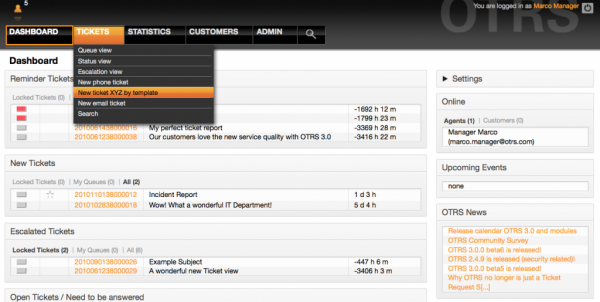
OTRS is one of the best, free and open source helpdesk software for customer support. It gives time to time notifications when a ticket is created or changed. It provides many advanced and premium features like reporting, ticket management, billing, surveys, support, knowledge management, timely accounting and much more.

help desk support

Moreover, you can sort your tickets by status, escalated, pending, open, in-process, SLA, service or type.

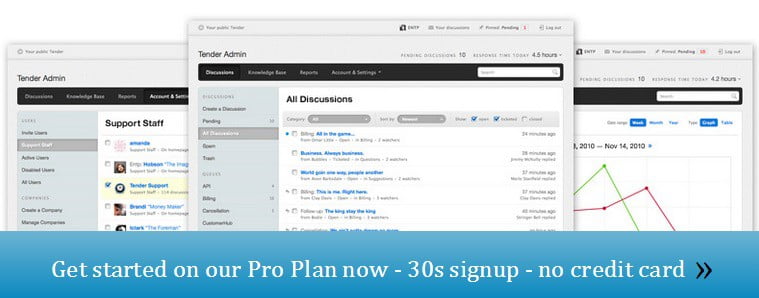
5. Tender Support

tender-support-free-online-support-ticket-system

Tender Support is a paid customer support ticket tool but it offers free 30 days trial without any credit card information. The service it provides to its users is very efficient. It provides community platform where users can discuss issues and can give solutions to others.

help desk support

It provides you notifications of tickets submitted, new messages and replies. It also has a mobile app from where you can manage your account whenever go outside. You can try the free trial, but after that, you need to pay $49 per month to continue.

Also Read: Effective Content Marketing For Your Business Development

6. Hesk

HESK-best-online-support-ticket-system

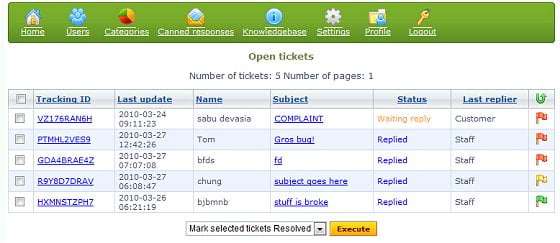
Hesk is a free online support ticket system which includes many features like notification and alerts, ticket submission, security, report, spam protection, notification and alerts, ratings, analytics etc.

help desk support

The system is easy to use and manage for both staff members and managers. You can add restrictions to whom you want to access the particular area of the account.

7. Spiceworks

help desk support

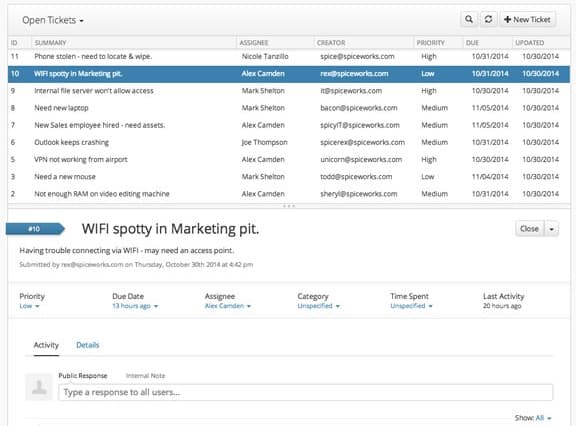
Spiceworks is best suitable for IT companies and the tools it provides are well designed for IT professionals. It is free online support ticket system for customer support. Some of the best features include mobile integration, multi-site support, server monitoring servicers, easy and fast Windows installation and much more.

help desk support

The software is available in two versions. The first one is Downloadable which you can download from the website and can install on your own server to enjoy free service. The second one is Hosted version which provides its own server and you have to pay for that. You can also try the 30-day free trial.

8. Simple Ticket

help desk support

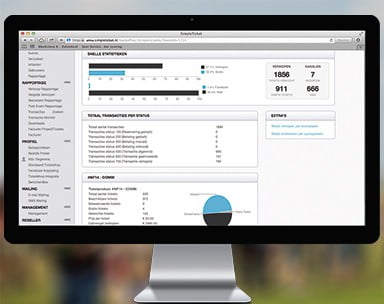
Simple Ticket provides very efficient service to its users and allows you to manage customer complaints, queries easily. Even it gives a very clean user interface to the customers, through which they can submit complaints, queries, and feedbacks without any hassle.

help desk support

This system provides time to time notifications of the submitted tickets. You can also set access restrictions to your staff members easily which makes it one of the best online support ticket software.

9. FreshDesk

help desk support

FreeDesk is a top grade and premium help desk support software. You can get this free service with limited services and up to 3 agents. It is very simple and reliable customer support system which allows the customers to submit queries, feedbacks, and complaints with great ease.

help desk support

It is available in 16 different languages and some other features like the mobile-friendly site, turn emails and tickets into knowledgeable articles.

Also Read: How to Improve Your Business By Migrating To Cloud

10. C-Desk

help desk support

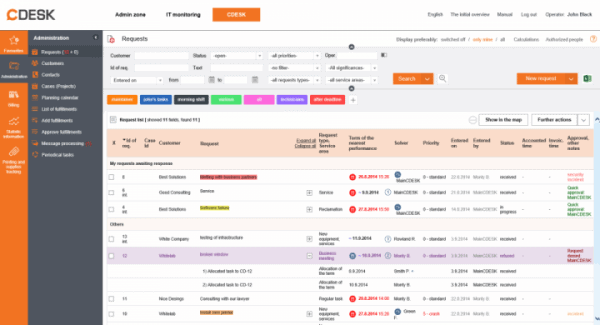
C-Desk is totally free online help desk support ticket system and a user-friendly system. This system gives you some features like manual asset management, cross-team service request management, knowledge base, notice board, photo gallery, and a log book.

help desk support

It doesn’t matter how many technicians or users use it, it is completely free.

11. Request Tracker

help desk support

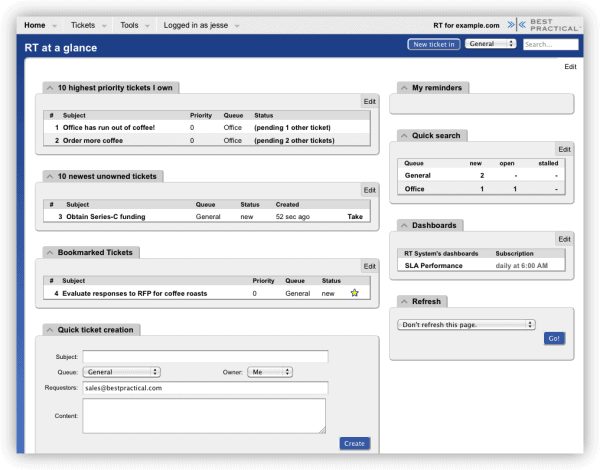
Request Tracker is another free help desk support software. It is a very mature open source tool with strong support to its users. It includes all necessary features like ticketing, reporting, notifications, dashboard, knowledge bases, mobile-optimized interface, and branding.

help desk support

Also Read: 3 Marketing Tips for Small Business

Conclusion

If budget is your concern then you can choose any free online helpdesk support ticket system to improve your customer service workflow. And if you are looking for some paid and advanced services then you can go for paid services.

Have you tried anyone one of the above services? And if we missed any other free and best online support ticket software, then just let us know in the comments below.

5 Benefits of Email Marketing You Must Read Now

Although there are many ways to promote your online business like social media marketing, mobile marketing, and search engine optimization. Email marketing being the oldest is still equally important to reach customers and grow your business. This form of marketing is used by many big businesses due to the huge benefits of email marketing. Those who are beginners in marketing or are unfamiliar with this method, let me explain in detail why you should spend time on email marketing for growth.

You can hire a Social Media Marketing expert, or Search Engine Optimization expert to grow your online business. But the third and best way is Email Marketing which can create deeper relationships with a wider audience and drives a better return on investment at a fraction of the cost of traditional media.

Benefits of Email Marketing

Also Read: Effective Content Marketing For Your Business Development

Why is Email Marketing So Important?

Due to its high adaptability, it is very important nowadays. Another reason is that, it is inexpensive and if you spend little more on this method, you can get easy and better return on investment. Moreover, it can be a highly effective and economical way to get your business on the map.

Benefits of Email Marketing

There are many advantages of using email marketing to promote products as email is used by about half of the internet users worldwide. Nowadays, it is also used by affiliate marketers to promote others products. They get a decent commission when some buy products from their affiliate links. So, let’s have a look at the benefits of email marketing.

Email Marketing Is Easy To Use.

easy-benefit-of-email-marketing

Email Marketing is the easiest way to expand your business through the internet. Running an email marketing campaign is very easy and simple. You don’t need real efforts to run it and the email receivers will have no hard time to check what you are offering. Though it has been ignored by some professionals due to other methods of upgrading business, but it should not be underestimated. In a survey, it is found that for every $1 investment in email marketing, it gives $40 return if it is used properly.

In a survey, it is found that for every $1 investment in email marketing, it gives $40 return if it is used properly. But it is always recommended to hire a right and experienced person to do this task for you. In this way, you can take your business to the next level.

Also Read: 7 Steps to Increase Revenue from Web Design business

Email Marketing Increases Your Brand Value.

email marketing benefits

Whenever you send an email your registered customers with awesome deals, they are exposed to your brand and business. Before sending any email, make sure you have added targeted content, smart design and the right strategic planning can move your business to new levels. With the right moves, your business will consistently build value. But to the opposite of it, it can annoy customers and even can damage brand image.

Email Marketing is Cost Effective

email marketing cost

Email marketing is one of the cheapest mode of promoting your business online. This is one of the important benefits of email marketing as every small business owner can afford this. You need not to spend on print or postage costs, advertising on magazine or TV channels. There are many email marketing tools, on which you have to spend a bit. It is as affordable as marketing gets

You must hire a good mailing list operator to manage list of emails of your registered customers. You can start with the cheapest email marketing tools that are highly trending.

Also Read: Best Methods to Make Money Online

Email Marketing is Measurable

measurable-email-marketing

There may not be better marketing channel from which you can figure out how effective is your campaign or whether the amount you have invested is paying you off. With a clear and easy to understand metrics, you can identify customer response and engagement through an entire circle.

With the advancement of email marketing tools, now you can measure the success of any campaign you have created. You can track how the customers visited your website and can measure the click-through rate.

Email Marketing Is Targeted

Target Audience

Gone are those days when companies put advertisements on TV channels, banners where no target allowance was present. Now you can target your audience according to your need. Like which aged people you want to target or to which gender you want to send emails. This ensures that you are sending emails to the right audience according to their needs. No matter from which location you want to target your customer, it can target your audience anywhere on the globe.

Social Media is also a quick way to send huge emails, but you can’t be assure that who is reading your emails. It also provides you the database information of the customers that can help you to figure out to whom you can target. Like if you are selling flowers, then you can send emails with deals to female audience or the ones who ever bought flowers earlier.

Drip Emails

The tool with the help of which you can build email lists and send a series of emails according to a set schedule. Then, everything depends upon triggers and the actions lead performs. This is a great tool to keep in touch with the prospects and provide them with useful content, nurture leads and convert them. Also, drip email can help you drive sales, improve marketing, and easily control the workflow.

Also Read: Is Social Media the Answer for Building a Business?

Conclusion

Email Marketing is a pack of all benefits and opportunities that business owners are looking to boost their sales. Email marketing is the backbone of every business owner due the efficient benefits of email marketing. While expanding sales or brand value of a business through online sources, email marketing can’t be ignored.

iPhone Backup Guide: iCloud, iTunes & the Best Third-Party Apps!

0

You are well aware how is it crucial to backup iPhone data and to make it safe. Some of the data like contacts, messages, photos and other essential things are placed in our iPhone. It may be baffling whenever we lost all the iPhone data.

There are plenty of apps, software, and service which may help you to keep and backup iPhone data safely. iCloud is one of the best platform to keep the data iPhone data safe. However, We have some other ways to take backup of your iPhone data apart from iCloud. So let’s begin with the very first way to backup your iPhone to keep it safe and secure.

Also Read: Quickest Ways to Backup Photos From Any Android Phone

How to Backup iPhone Data With iCloud?

It is one of the safest methods to take backup of iPhone or iPad. It allows you to keep your apps data, contacts, messages safely to the Apple’s iCloud. All the iOS and Mac users are allowed to take their data backup as it is already installed on all the Apple devices. You can use 5 GB space free of cost. But you to pay for extra storage after 5GB. You can purchase 200 GB space for $2.99 per month or 1 TB for $9.99 per month.

There are two ways to take iCloud backup. The first one is the manual way and the second one is automatic daily basis way. First, we will discuss manual way.

How to Manually Backup iPhone With iCloud.

  • First of all, connect your device to Wi-Fi network.
  • Go to Settings and go to iCloud. (See screenshot for reference).
backup-iphone-icloud-1
  • Now go to Backup and turn On iCloud Backup.
  • Tap Back Up Now. The backup will start and make sure you are connected to Wi-Fi until the process completes.
backup-iphone-icloud-2

This is how we can take backup of iPhone data manually to iCloud.

How to Automatically Backup iPhone Data With iCloud ?

This option will let your iPhone to backup data with iCloud automatically on a daily basis.

  • Go to Settings > iCloud > Backup. Make sure the backup is turned ON.
backup-iphone-icloud-3

iCloud will take the backup after every 24 hours. It will take backup when you iPhone or iPad will be connected to Wi-Fi and charger. For the first time backup, it may take a while, but after that, it will take less time and will only upload changes you have made since last backup.

Backup iPhone Photos and Data With iTunes?

If you want to backup iPhone to computer, then this method works for you. You just need iTunes installed on your Windows PC, either it is already installed on Mac computers.

  • Connect your device to the computer and open iTunes.
  • Now search for your device on the left side of the iTunes window, next to the category dropdown menu. Click on it.
  • Select Summary as you can see it in the screenshot.
  • Tap on the Back Up Now under the Backups section. Select Done when the process ends.
  • If you want to save passwords, activity, health, home kit data, tick the Encrypt local backup option. You will have to create a password for the Encrypt data.
backup-iPhone-Data-iTunes

All done now! Your data will successfully save on your computer. Now lets mover further!

Also Read: Are Drones The Future Of Commercial Aviation?

5 Best Backup iPhone Apps Without iTunes

1. iPhone Backup Using Dropbox

dropbox-iphone-backup

It is the king of Cloud platform and has been one of the best platforms for many business owners and professionals since it was founded. Not only iOS devices, Android and Windows can also use this service to keep their important data safe and secure. It allows you to transfer your whole iPhone’s data to the cloud and even you can access your data any time with the Dropbox app. You can setup automated uploads, which will upload your data to the cloud automatically.

help desk support

Dropbox offers you free 2 GB space and you can upgrade up to 20 GB free of cost just by inviting your friends to register and by downloading the Dropbox app to your phone. If you more space, you can buy 1 TB space just for $11 per month.

help desk support

Pros

Easy to use, free plan, excellent file sharing options

Cons

Limited Security

2. Google Drive iPhone Backup

Google-Drive-backup-iphone

After Dropbox, Google offers you another best platform to backup iPhone to the cloud and keep it safely. You can easily share and sync your iPhone’s data to the Google Drive and even you can access your files on the go anytime and anywhere. With its collaborative tools, you can edit your documents from your phone. The Google Photos allows you to upload your photos and videos to the cloud automatically without pixel loss.

help desk support

You can store your data free of cost up to 15 GB only. After you have to purchase more space from one of the plans varying from 100 GB for $1.99 per month to 30 TB for $299.99 per month.

help desk support

Pros

Fast and Simple file sharing.

Cons

Few security features.

3. MediaFire iPhone Backup

MediaFire-backup-iphone

If you want to take care of your important data with the minimum of fuss, then MediaFire is the best option for you. You can easily backup your iPhone or iPad and restore it very easily and simple. Even you can set an automatic feature to upload your photos and videos automatically.

help desk support

You will get 10 GB free space and after you can purchase 1TB space at just $5 per month. MediaFire is cheapest among others.

help desk support

Pros

Very user-friendly, the basic process works well.

Cons

Limited ways to contact the support team.

Also Read: 4 Coolest Tech Products for Your Next Outdoor Adventure

4. Backup iPhone to Microsoft OneDrive

onedrive-backup-iphone

OneDrive by Microsoft is another best cloud storage service which offers 15 GB of free storage. You can upload original photos and videos without pixel lose to the cloud. The automatic option is also available as like other apps.

help desk support

After 15 GB free space, you can buy 100 GB for $1.99 per month. The Personal subscription is awesome, which offers 1 TB of space and full access to Office 365 Personal on one PC or Mac, one iPad, and one iPhone at just $6.99 per month.

help desk support

Pros

Cheap than others, easy and simple to use.

Cons

Limited features of security.

5. Backup iPhone using IDrive

IDrive-contacts-backup

It is an all-purpose platform to take backup of photos, videos, contacts, messages and much more. The security is good as compared to other services.

help desk support

You will get 5 GB of free space and you can extend this space up to 20 GB by inviting friends to sign up. The basic plan starts from 1 TB for $3.71 per month

help desk support

Pros

Adorable price, Excellent Security.

Cons

Price increased after one year, Moderate Customer Service.

Conclusion.

Although backing up iPhone may be a hassle, but it is very essential as you may lose your important data if in case you lost your phone or if your phone got damage. Even if you are going to replace or change to another iPhone model, then backup is very helpful.

All the services, apps that we discussed above are very effective. You can choose any one to backup iPhone or iPad.

Asus Zenfone 3 Laser: Premium Pricing, Regular Specs!

To Z3nvolutionalise the country, Asus came up with around six different Zenfone 3 series phones out of which Zenfone 3 Laser is unquestionably one budget smart phone though it’s not all that blingy when talked about the in-depth specs. The device is being priced at Rs. 18,999 and is also a fair quality camera phone (Asus never fails to stun with camera quality).

The competition remains stiff where almost every smartphone maker is trying to offer their consumers best of everything so let’s just find out if Zenfone 3 Laser too got some eyebrows up or not!

Asus Zenfone 3 Laser
Asus Zenfone 3 Laser Smart Phone

How it looks & feels?

Zenfone 3 Laser is really an easy to grip mobile phone that’s even convenient for single-handed usage. The smart phone features an all-metallic design which is quite seamless and weighs much lighter than the other such design range models.

So moving onto the usual basics, Zenfone 3 Laser puts up the volume rocker and power buttons on its right side. The micro USB charging port is at its bottom along with speakers. On the left is the hybrid dual-SIM slot placed and on the top rests the 3.5mm audio jack. The front panel features a 5.5-inches display with Corning Gorilla Glass 3 protection. You also get the capacitive touch buttons just beneath the touch screen display with aren’t backlit. And the back panel features the primary camera with a fingerprint sensor placed below.

Specifications

5.5-inch full high definition display, 1080 x 1920 pixels resolution, 13 MP and 8 MP front super fast rear and front cameras along with Octa-Core Qualcomm (MSM8937) Snapdragon 430 processor and Adreno 505 GPU sums up the Zenfone 3 Laser smart phone. But not only these, the device is backed up by 4 GB RAM and operates on an Android 6.0 Marshmallow operating system (Nougat doesn’t seem to look anywhere near).  And it’s a device featuring Asus ZenUI 3.0 which isn’t really that consistent while using. Moving forwards comes the super loud speaker system and 3000 mAh battery along with being priced at less that Rs. 20,000.

Display

The 5.5-inch high definition display comes with a Corning Gorilla Glass 3 protection for the  IPS display featuring 1080 x 1920 pixel resolution. The display is bright enough and has some amazing features including the Blue light Filter for not straining your eyes. You even get an application that supports customization of the screen temperature!

Zenfone 3 Laser has 2.58 mm screen bezels and the overall screen to body ratio is much higher when comparing it to the capacitive buttons placed below and not on the display. 77% is what the company claims about the smart phone’s screen-to-body ratio.

Performance

Zenfone 3 Laser does not perform up to the mark and is literally average despite featuring the Octa-Core Qualcomm Snapdragon 430 processor and sporting a 4 GB RAM. The smart phone lags and stutters while multitasking or switching between several applications. This lack was even frequently observed with heavy usage, though the user interface is pretty straight forward and simple. There also are a few or maybe more than a few apps that were uninstall-able and not usable including Laser Ruler, Weather, Do It Later, MyASUS Service Centre, ZenFone Care, ZenCircle, Backup and more. But to ditch those you even get some other nice features like power saving, RAM boosting, and themes etc. So the experience becomes a little over than just nice where multitasking and gaming don’t disappoint a moderate user.

Camera

Coming to the section where the device gains some brownie points is its camera. 13-megapixel module is a laser autofocus camera that also supports EIS for the videos and a super fast focusing speed which means it reduces the focusing the objects and its capturing time. The focus time is only 0.03 seconds which is impressively fast enough. Plus the shutter speed too is decent. The 13MP rear camera comes with a dual-tone LED flash delivering a better camera experience to its customers.

The resulting photographs turn out to just be OK. You can find (over) colour saturation along with grains and better results only under fine lighting conditions. Low light shots take a backseat! The images don’t break much of a ground and on top of that extra pixelation can also be seen while zooming-in. The f/2.0 lens is not well optimised yet the camera scores more when we talk about timings.

The 8-megapixel camera (f/2.0 aperture) is good enough for those selfie-addicts. The camera performs well in both day light and low light situations. Even the low light shots clicked in artificial light are (to some extent) satisfying.

Clicking modes include Beautification, HDR Pro, Night, Slow Motion, Panorama, GIF, Time Lapse, Manual, and more. The imaging technology also includes Pixelmaster 3.0 version.

Fingerprint Sensor

Zenfone 3 Laser situates the fingerprint sensor right below the rear camera is placed. And the sensor somehow fails to recognise sweaty or wet fingerprints.

Audio

Positioning of the device’s speaker isn’t ideal enough as they get covered while playing games or watching videos but the five magnet speaker claims to deliver around 41% louder audio with 12% less distortion! Marvellous, isn’t it?

3000mAh Battery Backup

The 3,000 mAh battery isn’t that impressive and struggles to last for even one full day. Despite the power saving feature, this non-removable battery does not go beyond a day. But for light to moderate users, this too shouldn’t be a big problem.

Storage

32 GB variant of the Zenfone 3 Laser is available in India with almost 8.4 GB being occupied by the system apps and 23.5 GB accessible by users to store their media content, apps and other data, Luckily, the device supports the micro SD card slot that can pull off up to 128 GB. And on top of all this Zenfone 3 Laser features a 100 GB Google Drive storage for 2 years!

Pricing

Zenfone 3 Laser is priced at Rs 18,999 which surely under the budget phone category. But is expensive if we consider it’s overall specifications and compare it to other such similar range & spec smart phones. The competitors offer equally well, in fact much better features at much affordable prices!

Verdict

Zenfone 3 Laser is a budget smart phone which is camera focussed but fails to excite when it comes to the pricing and features. The handset is though is one of the cheapest currently in the market offering higher RAM capacities but experimenting something new could have been better.

Users are definitely being treated to a good camera device with some decent designing but an average processor with again an average battery life.

7 Steps to Increase Revenue from Web Design business

Building a freelance career or business in the design industry is no easy feat. Aside from keeping up with design trends, web hosting issues, changing technology and working on challenging projects, you have to put in a lot of effort into marketing, managing and growing your business. Fortunately, there are many things that you can do to increase your web design income without consuming more of your valuable time. Here are some steps you can follow to see a big lift in your earnings.

Steps to Increase Revenue from Web Design business

Step 1: Develop and Establish Your Expertise

It’s not enough to be just another web designer. You want to be a web designer that stands out from the others in your industry. To do that, you need to be an expert in various aspects of design. For example, you can stand out by being a great UX/UI designer, have deep knowledge about SEO optimized design, or understand how to create outstanding mobile friendly sites. If you don’t have any other expertise other than design, develop the expertise. You’ll quickly learn that clients will want to do business with you over others because of your expertise.

Step 2: Target High Paying Clients

It’s far better to work on one web design project at a $3000 price point than working on six projects at a $500 price point. To earn more with web design, you need to target clients that are willing to pay a premium for your services. Part of this lies in your expertise and experience and the other part is knowing what kind of clients you need to target. Put a lot of thought into what types of clients would most benefit from your work and figure out the best way to reach them with your marketing.

Step 3: Outsource Part of the Job

You want to focus on the aspect of your job that yields the most results and is the most important to the final product. By outsourcing other parts of the job that are not as important and time consuming, you can take on more projects which translates to a bigger income. A real life example would be you working on the prototyping of the site while outsourcing the graphic design elements to somebody else. It also helps to assess your weaknesses and delegate the tasks so that you don’t waste time on tasks that hurt your productivity.

Step 4: Offer Additional Services

To make more from each individual client, you want to offer additional services. This can be anything from SEO services, social media marketing, to content marketing. Most web designers will not have offer these services because they lack the skillsets and resources to offer them. The good news is that if you fall into that category, you can still offer these services by partnering with a business that does offer these services and has a track record of client satisfaction. You can set up a commission deal and create a contract that prevents them from selling any of their design services to your client.

Step 5: Set Up Better Payment Structures

Many designers make the mistake of accepting a small upfront fee for the project. This results in tight cash flow situations where there isn’t enough money to invest back into marketing and outsourcing. You want to avoid this situation by commanding a higher upfront fee for your design services. Many newer web designers do not have the confidence to ask for this payments structure. What they don’t understand is that many clients are happy to do a 50% payment structure where half of the payment is paid before the project even starts.

Step 6: Invest In Marketing

You have to treat your web design career like any other business. If you want to acquire clients, you need to invest a lot of time and money into marketing. Don’t rely on simply networking and referrals to bring in new clients, be proactive and build marketing campaigns that are designed to generate leads and brand equity. By investing into marketing, you have more control over the type of clients you bring in. You want to be able to attract clients that are more than happy to pay a premium for your services rather than clients that are looking for a discount.

Step 7: Manage Your Time Carefully

To increase your design income, you need to make sure that your time is managed very carefully. The first step in doing this is to outsource unimportant tasks like web hosting management, accounting, editing, etc. The next step is in actually figuring out how you’re spending your time. Are you spending your time on tasks that are moving your business forward?

You only have so much time in your day, so make sure you’re using it on things like marketing, client communication, web design projects and growth opportunities. Finally, figure out how to optimize your time in everything you do. Be more efficient with your email communications, phone calls, and any other business processes that you can think.

By following the steps outlined in this article, you’ll see a big jump in your income. Don’t forget that it takes time to make progress. Each step will take a significant amount of time to pull off. But if you put in the work, you’ll be on your way to building a lucrative web design career in no time.

4 Pieces of Tech that will make Your Business More Efficient

0

Technology makes everyone’s lives easier, it helps protect assets and property, speeds up workflow and can prevent all kinds of disasters and work related problems. Whether you are starting a business or improving a new one there is some tech that you just can’t do without.

  1. Security cameras

When it comes to safety, a security camera is one of the best pieces of kit a business can buy. It helps owners to have eyes everywhere and keep a close watch on areas that normally it might be difficult to monitor. It acts as a deterrent to thieves and dishonest employees, and it ensures that you have video evidence if ever you need it. If you have a shop premises or warehouse, it is a good idea to have one of these on the store floor. Even small businesses are investing in them these days but they should not be used in restrooms, changing areas or anywhere else where it would be considered inappropriate. If in doubt, check the latest legislation before installation.  Before purchase, also consider how you will keep track of them. Will you have a security guard to keep an eye on them or will it be recorded and referred to at the end of the day or week?

pieces of Tech security camera
  1. GPS tracking

GPS tracking has changed the face of business. It allows companies to track parcels, equipment, employees and even vehicles. It discourages the abuse and misuse of vehicles and can prevent theft and driver fraud. You can get real time notifications so you know exactly where your vehicles or equipment are and what they are doing. You can even get apps that you can download to your phone from sites like GPSWOX.

technologies for business
  1. Computer equipment and internet access

These days, a computer is pretty much essential for any business owner whether you are running a take-away, a delivery company or anything in between. Pretty much everything is online and customers will often search online for services and products so even if you already have a loyal customer base, it is a great way to expand and reach out to your clients. Computers make it easier to keep track of spreadsheets. Emails make communication cheaper and more efficient than traditional mail and you can even take online orders. A computer and good internet knowledge can take a local business global so it is definitely worth the investment.

  1. Telephones/mobile phones

The humble phone has come on leaps and bounds since the days of manual dialling and crackly lines. Nowadays if you don’t have a telephone number, your customers will struggle reaching you, and it will be difficult to communicate with colleagues, employees and suppliers. Even some of the modern tech won’t work without a phone line. Telephones allow conference calls to take place from all over the world and allow you to tele market your services. They have massively improved productivity and with mobile technology and smartphones, you can work from pretty much anywhere as long as you can get a signal.