Home Blog Page 252

Content Marketing Tips for Startups

Content is a low-cost way to reach a huge audience. Follow these marketing tips for startups to help your content go far.

1. Make the process easier for readers.

If you’re including a call-to-action in your post, for example, don’t make your readers click to another link. Instead, install the form or whatever it is that you’re offering right on the blog post itself. To find out if this is working, measure conversion rate and compare it to earlier findings, when you did things the “old” way. Things like pay per click services work really well, but sometimes you can also keep people on the original page where they started in order to make them happy.

tips for startup marketing


2.Create modules of your content.

Whenever you create content, create a second document with the title, key points, headings, images, quotes, summary, and infographics. Then, whenever you go to share on a platform, you can pick and choose which information goes where. You can combine the information to create the perfect post for the specific platform. When creating your content, keep in mind that you’re going to be sharing it multiple places, like on platforms that favor visuals, including video and photos. That way, you won’t have to backtrack and add an infographic or video after the content is finished; you can just do it the right way from the very beginning.


3.Use A/B testing to check how well your content is performing.

This will help you to understand what your audience wants and it will give you ideas about how to refine your strategy. Test things like messaging, formats, and headlines, among other things. With A/B testing, you basically setup two different types of marketing, like two different e-mail headlines, and track their performance to find out which one works better. Then, you can test the better performing headline against a brand new headline and continue to test them against each other.


4. Promote your content over and over.

When choosing content for your blog, focus mainly on evergreen content. That way, you can repost and reuse your content, ensuring that it will still provide value to your audience weeks or months down the road. You can go into the content to make tweaks so that everything is up-to-date. This is the best way to make the most of your content. You can write a blog post once and have it generate traffic for a long time.


5. Make sure your content is shareable.

For example, include a description on each photo. That way, when someone pins it to Pinterest, the description you want to accompany the image is already ready to go. Add share links in e-mails so that it’s easy for someone to post about your newsletter on Facebook, Twitter or Google Plus.

Don’t settle for an occasional blog post with random social media posts that follow. Learn how to market the right way to make the most of your content.

Google’s Cardboard Virtual Reality now Support iOS and Larger Screens

The annual Google I/O event is one of the most anticipated technology events for tech enthusiasts. This was  yet again  an exciting one. The company introduced exiting projects like Project brillo, Android M, Jump, Photos, Android Pay and Cardboard 2.0.

Google’s amazing low-cost Virtual reality Cardboard kit released in 2014 for Android can now be used for iPhone and supports devices with screen size up to 6 inches.

During the I/O at San Francisco, Clay Bovor, Product manager for Cardboard, released a new Cardboard app for iOS which supports devices from  iPhone 5, 5S, 5c, iPhone 6 and 6 Plus.

googles cardboard 2 virtual reality ios 6inch

Cardboard 2.0 gets several improvements including 3 step assembly, a larger lens, support for larger screens upto 6 inches and a new button that works with all devices, unlike the earlier version with a metal washer. The new Cardboard SDK will work with both Android and iOS devices to turn the devices into a Cardboard viewer to have a 3D virtual reality experience as you move your head.

Cardboard Virtual Reality app for iOS includes few VR experiences to begin with:

  • Explorer: explore exciting environments
  • Exhibit:view 3D objects from a museum collection
  • Urban Hike: take a hike through iconic cities around the world
  • Kaleidoscope: enjoy a fun stereoscopic take on the old classic

Google also introduced Jump, ecosystem for 360 degree Virtual reality video making. Jump is a Camera rig with 16 cameras in circular array arranged to work with Jump assembler.

Jump software module automatically assembles and processes the video footage from 16 cameras.

GoPro also unveiled  a new camera array that works with Jump ecosystem to shoot 360 degree footage for Google Cardboard and also YouTube, since it now supports VR content.

Bavor also announced that Google has shipped over 1 million units of the earlier version of the Cardboard.
By pricing it at an affordable $20, the company is aiming at a larger mainstream audience to spread its technology reach. Cardboard with compliment startups like Vrideo, with VR only content. And Juant is another  company producing Live action VR movies.

Hope, by the next I/O, we could see the VR kits gain more popularity amount the growing markets due to its cheap pricing.

Google’s Brillo OS Could Power the Smart Homes of Future

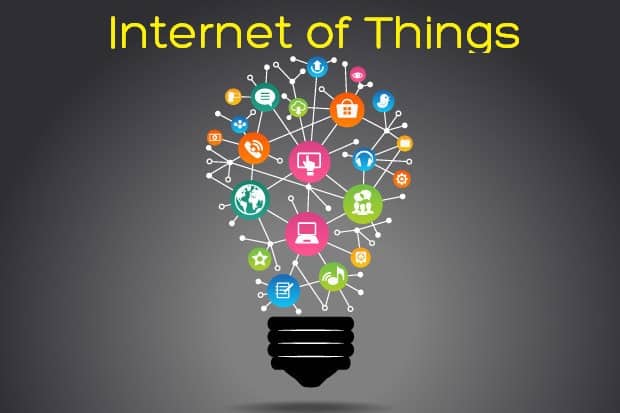
We earlier wrote about how Internet of things will change the way we live in future.  TheInformation reports that Google is working on new Brillo operating system which will be able to control low power devices connected to internet. Google will reveal more about the Brillo platform in the upcoming Google I/O conference on May 28th.

Google I/O is a software developer conference held every year in San Francisco, California. Google may also announce the successor to the Android Lollip, which will be called Android M.

google brillo smart home internet of things

Brillo will be able work with devices that have as little as 64 to 32MB of RAM. This will be aimed at Internet of Things devices which include home automation, smart streets, smart shopping malls and LED bulbs are connected with the internet. The new OS might be linked with Android brand.

Google is aiming to expand it’s software platform to a wider range of products with google’s brillo os. And it could be a backbone of the technology that powers tomorrow’s Smart homes and possibly change the way we use smart technology. Soon after the launch, may see a sharp rise in smart home devices and home appliances such as  fridges, Led bulbs and home electronics that can be controlled from the internet. Possibly the smart home market will see a lot more affordable and wide range of products once manufactures jump-in to cease the opportunity.

internet of things future trends

In 2014, the Internet giant made a $3.2 Billion acquisition of NestLabs, a company which makes smart thermostats and security cameras for home. And the same year NestLab made an acquisition of DropCam for $555 million. Dropcam is a company which makes Wifi-Webcams, Trackers and Cloud storage. So this doesn’t come as a surprise. If this OS succeeds in capturing the  market share in the “Internet of Things” industry, it could give Google, access to a large data of people’s everyday routine. According to the industry, by 2020, there could be 30 billion sensor enabled devices connected to the Internet.

Below is a video concept of the smart living with connected devices of the future.

Corning is also keenly interested on the Internet of things market. Below is a video presentation by Corning on the glass age.

3 Ways Executive Tech Has Changed: From Staying In Touch To Being In Charge

We live in a mobile age, and the executives who make up the backbone of the increasingly networked businesses around the world are showing that they too can keep up with a consumer’s trend-setting ways by applying ubiquitous mobile tech to their own business activities, whether they be at the workplace, commuting home, or at a meeting in the other side of town.

how gadgets changed way we do business

The modern day mobile executive has changed from a stereotypical BlackBerry user — conducting one-dimensional communication transactions (emailing back and forth to colleagues and bosses) — to applying a multi-device and multi-platform approach to their internal company communications, customer engagement, business decisions, and on-the-go productivity.

A recent Forbes Insight study showed how executives are now moving towards the use of mobile phone and tablets to conduct their business, supplanting the standard desktop and laptop PCs — a trend that is set to increase as executives view web-enabled mobile devices becoming their primary business platform within the next few years.

However, it is not just the increasing ubiquity of smartphones and tablets that are driving this change in the executive sphere. This must also be attributed to thousands of software tools that can now be used across multiple devices, making a briefcase’s worth of mobile gadgets into a powerful and dynamic portable workstation.

So more clearly, where are these specific changes taking place for the mobile executive?

1. Staying In Charge, No Matter The Time Zone

The declining budget of some companies has sought to streamline the business infrastructure in many of their departments, essentially “doing more with less”. Executives, supported by the rise of BYOD (Bring Your Own Devices) and the application of their skills, have taken on this challenge by not only communicating with their workforce more but also by using the full suite of tools to direct and manage any time, anywhere. There are currently 78% of executives who now use their mobile devices to gather business information during their personal time, 71% of whom do so while socializing at business lunches, and 66% while at their office. This level of immersion carries on to the time they commute, while watching TV and even during exercise.

For many companies that have readily adopted mobile tech, silo-style communication barriers are now broken. Modern mobile CRM and internal HR tools, for example, allow executives to easily communicate and manage their workforce, and deepen their engagement with customers. Workflow solutions, combined with email and other communication channels give tech execs the power to assign projects, analyze company metrics, design marketing campaigns, and shift workloads right from the palm of their hand.

2. Right Mix Of Apps And Devices

Just because laptops have traditionally given executives the power to conduct their work on the go, doesn’t mean that they are necessarily tied to that technology. According to the Insights survey, the percentage of executives using mobile devices instead of other devices for their primary business activities will dramatically shift from 12% in 2010 to 51% over the next few years.

Now, as more and more executives shift towards mobile devices rather than PCs the choice of applications and software tools has become more important than the choice of devices to facilitate their work. The question has fundamentally changed from blackberry vs. android vs. apple to one that looks at what software can give execs and their companies the best solution.how technology has Changed Businesses Work
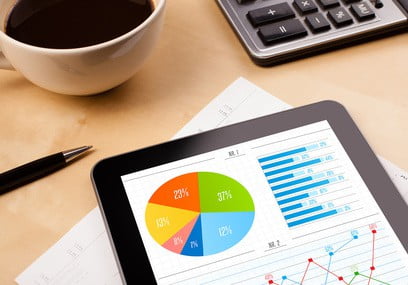
To complement this choice, many executives tend to carry more than 4 devices to deal with their different day-to-day work activities. And this is heighten by an expansion of the BYOD movement to what can be called Bring Your Own Data & Apps, with executives more and more willing to own their data (similar to what can be seen across consumers) and choosing to use apps they found and liked as opposed to only apps provided by their company’s IT department.

Some applications, like chatting apps work better on small devices, like smartphones, allowing easy access to both emails, and quick communication channels without needing too much space on a train or being too obvious in a meeting. For management purposes, viewing presentations or making collaborative decisions on project management, for example, an executive will most likely take out their Tablet device, which can give them a more dynamic overview of their work.

3. Context And Filters Are Now Your Best Friends.

It used to be that getting any information at all from your home base was hard, but now there is a deluge of Information. Whether it’s emails, news, or social feeds the mobile world now has every consumer and executive plugged permanently into a seemingly endless news stream. This continuous connection, and the need to have the right filters to organize the information consumed, is compounded by the fact that lines between personal and professional lives are becoming blurry and increasingly intertwined. For many mobile executives, one single device will be used to contact family and friends, as well as being a device for social networking, gathering news, and work activities.

For execs who tend to do their business research via these devices this means that it is becoming increasingly important to apply solutions that can provide context and have the right options to filter out the unnecessary information at any given point in time (e.g., contextualized streams for family, friends, work and interactions with specific brands or industries).

With around 61% of executives now gathering their industry-related news via mobile devices instead of laptops and desktop PCs, researchers have found a vast amount of this data is gathered predominantly through email newsletters, industry news sites, general news sites, and social media content — the latter playing a smaller role.

With so many streams of information, filters within the apps, or even apps which specifically centralize all these data streams into one, user-specific feed, are set to be some of the most powerful tools for execs on the go.

The Future?

The future of the mobile executive will rely not only on the networked company, but also the rate at which adoption of new tech is distributed throughout the company, its executives, and applied as an essential part of the business workflow. Now, tech’s impact on an executive’s overall work suite has already allowed them to not only improve their productivity standards, but those of their respective companies giving them the competitive edge they desperately strive for in a dynamic international market.

About the Author

Pascal Nizri is a senior business and technology executive at one of the largest banks in the world, and the founder of Chekk, a fully customizable iPhone app that centralizes and manages personal and professional data, mails, social networks, and news.


The Benefits of Hiring a Professional to Install Access Control Systems

There are a number of responsibilities which come with the owning and operating of a business. With all of the many things you have to manage as a business owner, it can be easy to become a bit overwhelmed. Among the top concerns that a business owner will have is the security of their building. One of the best ways to secure your building is by adding an access control system. In order to make sure the access control system you choose is installed the right way, you will have to find the right professionals. Here are some of the benefits of hiring a professional to install your access control system.

Professional Access Control Systems

Also read: Must-Have Home Automation Products

Finding the Right Spots for the Readers

The first thing a professional will do when contracted to install the access control system is do a walkthrough of your facility to see where they are going to put your devices. The location of the card readers is a vital part of having the system running smoothly. Trying to place these devices on your own will usually be disastrous and will make you regret doing so in the long run.

The Running of the Wire

The next benefit of allowing a professional to handle the installation of your access control system is their ability to get the wire ran the right way. Usually, there will be a number of electrical wires that have to be pulled to various parts of the system. There are a number of different problems which can arise when not having these wires ran the right way. The only way to make sure your system will be functional when powered on is by allowing a professional to handle all of the electrical components of the system.

Troubleshooting Any Problems

Another reason to allow a professional to handle the installation of the access control system is their ability to troubleshoot when there are problems with the system. Not every installation will go the same way, which is why having a professional at the helm will help to reduce a lot of stress and worry. When issues come up, the professional will be able to track down the cause and figure out what needs to be done to remedy it for good. Trying to handle these issues on your own will usually lead to a number of negative consequences.

 
At nod access, you will be able to get the professional help you are in need of. They have many of years in the business and can provide the help needed.
 

DJI Vision Plus Drone – Taking Aerial Photography to an Incredible Height

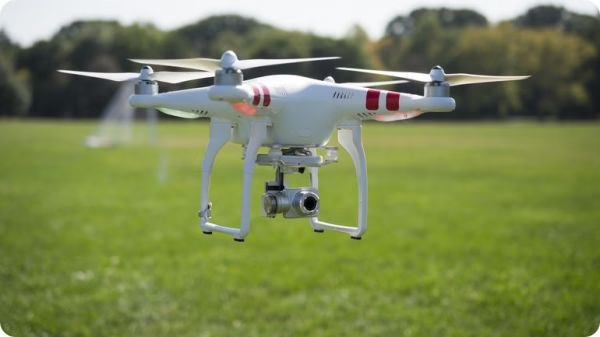
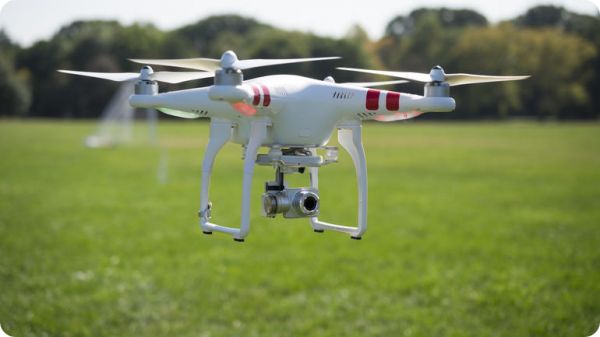
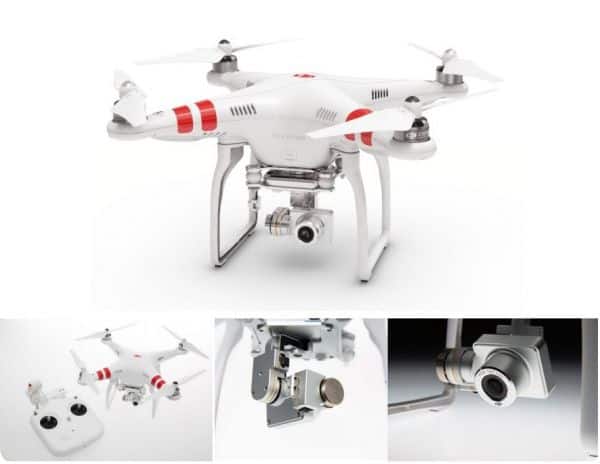
Camera drones are the new definition of high-end technology. With an amazing capacity to reach incredible altitudes at exceptional speeds, drones can fly over oceans, mountains, forests and other landscapes for extensive time periods, capturing breathtaking images and videos. However, it must be kept in mind that not all drones are designed with the same strength and capacity. To experience the magic of drone photography, it is advisable to invest in one that presents the most sophisticated and high-end features. Lets look at the features of Dji Vision Plus Drone in details.

DJI Vision Plus quadcopter Drone

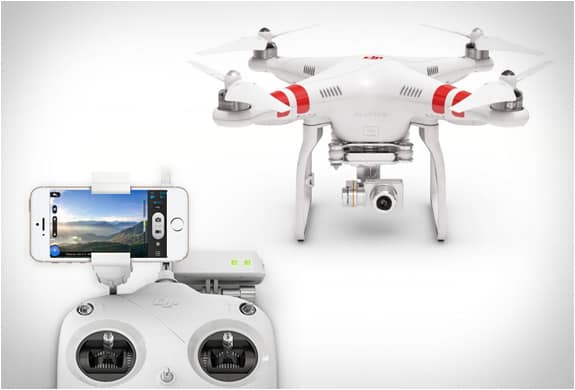
As consumers, people are usually not fond of investing in expensive products when there are cheaper options available in the market, serving almost the same purpose. However, the DJI Phantom 2 Vision Plus drone is an expensive device that’s surely worth every penny you spend for it. Wondering why? Here is what you need to know about the brilliance of the DJI Vision Plus drone:

dji-vision plus quadcopter-drone

To begin with, DJI is one of the most reputed consumer drone manufacturers known for their outstanding products. They started their journey with Phantom 1, and proceeded to come up with the Phantom 2 series, designed with more sophisticated technology. While all the Phantom models are a true delight for any quadcopter enthusiast, the Dji Vision Plus Drone is specially designed to make aerial photography a sheer pleasure for you.

Dji Vision Plus Drone Features in Detail

Here are the significant features distinguishing Phantom 2 Vision Plus from its predecessor, Phantom 2 Vision:

  • High-End Camera: The Dji Vision Plus Drone is equipped with an incredibly high-quality camera and a removable 4GB micro SD card. This makes them perfectly capable of shooting full HD video at 1080p/30fps and 720p/60fps, allowing crystal clear video recordings and option for slow motion shots. Images can be taken at 14 megapixels.
  • A Much More Stable Flight: The in-built GPS auto-pilot system allows position holding, altitude lock and stable hovering, providing you with a much smoother flight so that you can concentrate better on the areas you want to capture and the shots you intend to take.
  • Greater Control: The Phantom 2 Vision Plus is teamed with an upgraded remote control that is designed with a number of advanced and sophisticated features to allow greater control. These include a gimbal control dial, trainer port, built-in rechargeable LiPo battery with a capacity of 2000mAh, battery level LED indicators and throttle locking feature.
  • Camera Tilt Control: The DJI Vision Plus drone allows you to tilt the camera while flying the device, so that you can successfully create unique angle and outstanding shots.
  • Enhanced Power: This advanced system, combines new motors, propellers and ESCs to allow better thrust and control compared to anytime before. With the Phantom 2 Vision Plus, you can easily load more equipment on your device, and achieve up to 200g/arm of additional thrust while using a 3S LiPo battery.


dji vision plus drone

However, even a device as sophisticatedly designed as the Phantom 2 Vision Plus, can face errors due to a number of possible factors. To restore the brilliance of the device, it is important that you invest in authentic and high-quality Phantom 2 Vision Plus parts availed from a reputed supplier. While there are several online stores for drones and drone accessories, you need to take your best pick with utmost care. Here is a list of things you need to look for in an online store to ensure smart investment:

  • Look for a store that’s reputed as being honest and reliable. They should be known as one of the most trusted providers for all things drone.
  • The online store you choose to work with must be a preferred dealer of DJI. This is to have the peace of mind that you would be availing the most authentic Phantom 2 Vision Plus parts.
  • They must provide the most superior quality products at the most competitive prices in the market.

DJI Vision Plus drone is designed advanced and high-end features to allow mesmerizing aerial photography at your fingertips. However, you need to maintain them well and restore them to their functional state in case they suffer malfunction with authentic Phantom 2 Vision Plus parts.

Author Bio: Julia Stewart,is an experienced content writer who has been writing high-quality articles and blogs on various topics for years. In this article, he writes about the high-end features of DJI Vision Plus drone.

Simple Repair Tricks to Troubleshoot Your Slow Computer

In the modern age, more and more people are using devices like laptops and tablets to connect with the world around them. With all of the electronic devices in use out there, the chance of malfunction is ever increased. For most people, being without their computer for a large amount of time can be very detrimental to their business. When the time comes and you start to have computer repair issues, you will need to find the repair shop to get them handled in a timely manner. The following are a few simple things you can try to troubleshoot your computer before they get too worse.

computer troubleshooting tricks

Try a Quick Restart

The first thing you need to do when you are having problems with your computer is to do a quick restart. In some cases, this will allow you to clear things up and get rid of the bad elements that are causing you the trouble. The more you are able to take matters into your own hands, the easier you will find it to keep your computer running. If a restart does not handle the problem for you, then you will need to find a professional to give you a hand.

Running a Virus Scan

Another thing you need to do when trying to fix issues you are having with your computer is to run a virus scan. In some cases, you will visit sites that will put viruses into your browser. The longer you leave these viruses unattended, the harder you will find it to run your computer in an effective way. There are a number of security software programs out there, which means finding the right one will take some time and effort on your part.

Antivirus reviews:

Performing a Restore

Yet another way you can get your computer back to normal when having issues is by performing a factory restore. Your computer will create a restore point each time you perform updates. If your current configuration is causes you problems, then you need to consider trying to restore your computer to one of these points. This will cause you to lose any data you have after that date, but it will be well worth it. If you are unsure about how to perform this or any procedures with your computer, then be sure to consult with a professional for assistance.


Recommended reading; AirDroid: Control & Backup your Android smartphone From your Computer

At nod access, you will be able to get the professional help you are in need of. They have many of years in the business and can provide the help needed.