The 165,000 people who attended the Consumer Electronics Show (CES) in Las Vegas last month got to see more than a dozen varieties of new wireless earbuds up close and personal. No one likes fiddling with gear anymore. Whether that’s concerns wireless headphones or wireless earbuds. Fuss-free equipment is now a must in a busy, everyday life where you don’t have a minute to waste untangling wires in sheer and utter frustration. Fortunately for everyone else, some of these innovative products are now available to consumers or will be very soon.
Here are some of the wireless earbud brands to watch for, followed by one particular newcomer that generated significant buzz at the CES 2017 show:
Alpha Skybuds: Most earbud manufacturers take a one-size-fits-all approach when producing their product, but not the makers of Alpha Skybuds. This product is one of the few of its kind available in small, medium, and large. They resist water and sweat, making them the ideal workout companion. Alpha Skybuds last up to four hours on a single battery charge and come with a Skydock case that contains up to 24 hours of additional charging time.
JAM Transit Ultra: Available for shipment in the spring of 2017, the JAM Transit Ultra is a textured earbud similar in size to Alpha Skybuds. They tuck into the user’s ear comfortably and provide three different size options. These earbuds offer three straight hours of play time and come with a carrying case that provides six additional charges.
PKparis K’asq Sport: This brand is hard to forget with its original name, but they’re the second generation of earbuds in the K’asq family. The PKparis version is currently one of the most affordable on the market. It offers users five hours of continuous playback along with play and pause control buttons on each individual earbud. The recharging case provides an additional 15 hours of play time.
Sennheiser Ambeo Smart Surround: While most earbuds are only for listening purposes, this brand allows users to capture binaural audio. This is three-dimensional sound that people are accustomed to in everyday life. Each earbud has a built-in microphone that allows users to record 3D sound on their phone and play it back through an app. This can be done with any set of headphone, including those made by Sennheiser. This product should be released sometime after July 1, 2017.
Nuheara’s IQbuds Stole the Show at CES 2017
Every event has a standout, and the 2017 Consumer Electronics Show was no exception. Nuheara’s IQbuds won numerous awards and received an impressive amount of press coverage both during and after the event. PC Magazine, for example, stated that the Nuheara IQbuds were the most intriguing earbuds of all at CES 2017.
Other awards earned by Nuheara include CES Tech for a Better World, Twice Pick Award’s Best of CES 2017, Best Innovation 2017, and Company Innovation Award from the Australian American Chamber of Commerce located in San Francisco.
This hearable technology is a blend between hearing aids and noise-cancelling headphones. They allow users to take phone calls, listen to music, amplify the voice of the person they’re speaking to, and reduce ambient background sounds, just for starters. These earbuds offer a comfortable fit and an app that is easy to use and fully customizable. Users can even save their hearing profiles. Shipping has already begun to pre-order buyers in the United States, Canada, Australia, and New Zealand from their Indiegogo campaign.
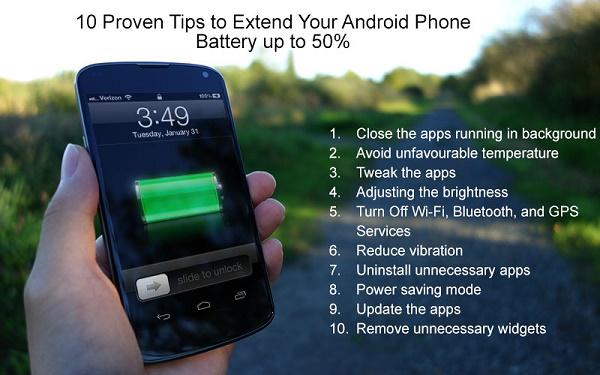
How expensive your phone may be or how robust your phone’s hardware, it doesn’t matter, charging is always a concern for Android users and even for iOS users as well.
If you’re worrying about the same and need tips to extend your phone’s battery life, below are 10 top proven tips to achieve it.
Close the apps running in background
Apps running in the background consume a battery for a certain extent. So whenever you are not using the apps or the phone is in idle mode, just close the apps that you don’t require at the time.
Avoid unfavourable temperature
Most of the people are not aware of this. Battery works properly at a particular temperature, if it is too cold or too hot, then the internal resistance of the battery will go high which causes improper power supply. On the other hand, the surrounding hot temperature causes your battery to wear out quickly. So avoid phone from the direct sunlight or keeping it at windows side or close to AC force. There are some solution-oriented apps developed by mobile app development companies in USA to overcome these kind of issues.
Tweak the apps
There are some apps that always run on active mode and need access to your email list and contact list. Obviously they need sufficient energy to run, as a result they drain battery a lot. To avoid it, you should tweak them. To make it, you should go to Settings and there you can set a time interval to decide which app should access to email and contact lists for what extent.
You can also disable synchronization that apps like Evernote always do.
Adjusting the brightness
Unless until you’re not taking photos or viewing photos under sunlight, you don’t need to keep high brightness. Don’t worry if you need to watch videos often: Android phone gets automatically brighten up when you need to watch videos.
Turn Off Wi-Fi, Bluetooth, and GPS Services
We all know browsing over Wi-Fi consumes more battery compared to browsing over mobile data. In this case, if you’re not using Wi-Fi, just turn it off. And even Bluetooth and GPS Services consume same amount of battery, so when it is not required, just turn it off.
Reduce vibration
Keeping ringtone in high vibration is required for people who travel throughout the day by bus, train or bike. If you’re not in that group, you mayn’t need your phone to be in high vibration, why because it consumes a heavy battery.
Uninstall unnecessary apps
There are some apps like WhatsApp and Facebook, necessary for every one of us. But some apps like additional camera apps, additional chat apps and music apps which we use in a rare case are always burden to the device. In case if you need them, you can immediately download from the app store and that apps obviously requires storage space to be installed.
Power saving mode
Nearly all phones have power saving mode, which you can enable it at Setting>Battery. So you can save battery for a certain extent, and when it is enabled, the system will automatically decrease display brightness and tackle other battery consuming issues.
Update the apps
Apps which are not up to date consume a heavy amount of battery. So always make sure all the apps are up to date. Don’t rely on auto update and go to app store and make sure it manually.
Remove unnecessary widgets
In mobiles, widgets are apps which stay on your phone screen. Don’t think they don’t consume battery. It also affects your battery, so minimise the number of apps you need on screen for immediate case.
Conclusion:
Just use all these tips together and see the difference. If you have any suggestion from your side, just mention in the comment, and also after experiencing it, don’t forget to comeback and share your experience.
About the guest author:
Sandeep Kumar is a well-versed content writer working in FuGenX Technologies, an emerging mobile app development company. He likes to write on technology, startups and latest technological innovations that people like to know and share with others.
Scouting for a good broadband package? Are you sure you understand enough of the technical aspects of a broadband plan to be able to choose the best option for you? Below are some of the most important terms you need to be acquainted with to properly compare broadband offers and decide which plan is better and which ones you should avoid.
Speed
This is something that needs to be clarified right from the start. Sometimes, there are subscribers who complain why their actual download speeds (as shown on their download managers/browsers) are way lower than the speed indicated for their plan. This issue is usually due to the lack of proper understanding of the difference between kbps and KBps. For some customers, a 10 Mbps broadband plan, for example, should show download speeds at 10 Mbps or 10,000 Kbps on their browsers. Kbps (kilobits per second) is different from KBps (kilobytes per second). The latter has a bigger value. A byte is equal to 8 bits. Hence, a 10 Mbps broadband plan may only provide a maximum download speed of 1,250 KBps. Browsers use KBps to indicate download speed while most broadband plans and most speed tests use kbps.
Also, when examining broadband plans that provide generic estimates of data consumption, you may encounter some that say you can already watch a certain number of hours of YouTube videos with the data allocation they provide. In most cases, this estimate is based on low quality videos. For instance, if you watch an hour-long YouTube clip at 720p resolution, you will end up consuming more than 1 GB of data. Certainly, it would be more if you choose the higher resolutions. Bear in mind that YouTube automatically selects the resolution for you depending on your connection speed. If you don’t override this automatic resolution selection, you will be consuming big amounts of data and quickly reach your data allocation limit.
Unlimited
Before, unlimited internet services really meant unlimited. You can use your connection as much as you please. However in recent years, the word “unlimited,” as used by many internet service providers, has been “limited” or qualified. Many broadband companies offer unlimited plans but actually set data limits. Their scheme is that if you have consumed your allocated data limit, you will remain connected but your speed will be reduced to dial-up levels or maybe around 256 kbps. There are companies, however, that use unlimited in the real sense of the word—offering true unlimited broadband plans without throttling after a certain level of data consumption.
Download and Upload Speeds and Data Consumption
Obviously, download speed is the speed of your downloads while upload speed is the speed you have when you are putting up something to the cloud or transferring a file from your computer to an online storage (uploading videos or adding email attachments). For most subscribers, the difference between download and upload speeds don’t really matter. Rarely does anyone notice that upload speeds are usually slower than download speeds. However, the important thing everyone should know is that both download and upload data consumption are taken into account when computing data consumption.
As such, you cannot claim that you have been unfairly capped (for your 50-GB data limit for example) when you claim to have only watched 40 one-hour 720p YouTube videos. Take note that data consumption is the sum of your download and upload data consumption. If you have watched 40 one-hour 720p YouTube videos but you actually uploaded more than a dozen 1080p videos straight from your smartphone, you would have already exceeded your 50 GB data allocation.
To have a better guide as to how much data you have already consumed, it would be better to refer to your modem or router’s dashboard. Most of the time, the data consumption count is displayed on the index or homepage of the router dashboard (no need to log in). Use this guide to know what IP address to open on your browser so you can view your dashboard. Contact your ISP’s support for assistance on how to access your router’s dashboard and to help you clear the accumulated data consumption count on the router (so you can get a refreshed count per month).
Disconnection or Speed Throttling Upon Reaching Data Limit
It’s important to ascertain an ISP’s policy regarding data caps. Are they going to completely cut you off when you reach the data limit or are they just going to throttle (limit) your speed? Obviously, it would be better to choose an ISP that only throttles your speed once you max out your data allocation. Most ISP that do throttling limit your speed at around 256 kbps or 32 KBps, which is not really bad. With this speed, you can still read and send emails, browse websites, use social media, and even view YouTube videos at the lowest resolutions.
Add-ons
Most ISPs provide the option to pay for “add-ons” or “boosters” once subscribers have consumed their allotted data limit. It could be $10 for 10 GB more of data (and restoration of your regular speed). If you are looking for the more cost-efficient option, you have to examine these add-ons. You particularly have to be mindful of these add-ons when you are choosing between plans that have the same speed, data limit, and terms. Of course, you need to go for the one that charges lower for add-ons.
Modem/Router
The modem or router is the device used to connect your computer or other web-enabled devices to the internet service. At present, ISPs usually give out devices that already integrate modem and router functions. For the uninitiated, if you have a device that only lets you connect one device (through the LAN port and without Wi-Fi), what you have is simply a modem. If your device has LAN ports (usually 4 ports) and/or Wi-Fi, what you have is a modem-router. A basic router simply routes the connection to let you share internet access with multiple devices. It alone cannot be used to connect to the internet.
Most ISPs provide routers (which also serve as the modem) that are to be paid by the customer in lump-sum or by installment. Take note of the price and compare it to those offered by other companies. Choose a plan that comes with a Wi-Fi router since you will surely be sharing your home internet connection with your phone and other mobile devices. You don’t want to spend more just to get a Wi-Fi router later on. Also, mobile broadband is considerably more expensive than fixed line broadband (home broadband) so if you are at home, you need a Wi-Fi router to access the internet through your home broadband connection.
VPN
VPN means virtual private network. It is basically a network wherein only a limited number of individuals are allowed to use. If you are one of those who have heard about VPN as a way to get free internet or to bypass data limits, read further. Yes, it is true that you can use VPNs, through VPN applications, to bypass speed limits and access the internet for free. However, you need to be aware that if you try to do that with your broadband plan, you may lose your connection and be made to pay for penalties. What you can legally do with VPN, though, is to use it to access blocked sites.
VPN is being mentioned here not necessarily because it’s important in choosing the right ISP for you but to clarify potential confusion or misconceptions you may have about VPNs. You may have heard or read about ISPs whose speed limits or data caps are more prone to getting bypassed through VPN. This idea is not commendable.
These are some of the most important things you need to get acquainted with. Don’t just randomly choose an ISP. Always evaluate your options carefully and be sure that you understand the important terms you will be encountering.
This review is designed to highlight both strong sides and potential weaknesses of Nord VPN. We will journey a road to the roots of the app and we will determine whether it is worth your hard-earned dollars or not.
We may take the path that’s slightly different from your common Nord VPN review in this article but, rests assured, all of the changes to the standard are made to enhance the value you are getting from reading these words.
Nord in brief
Nord, despite the chilly name came from a warmer climate. We have a Panama-based VPN on our hands. This is explicitly well regarding privacy as well as personal freedoms as even your government has zero affect on Nord.
The website clearly states that Nord is on the market for over 10 years. The website also offers military-tear protection levels. But, in reality, it doesn’t. Professional army apps are protected in an entirely different way, but hey, you are not a soldier fighting a war against Russian hackers, right?
Server side
559 servers are located in 49 countries. Not bad. Not bad at all, considering most VPN service providers only have 50-100 machines.
Why does it matter? The closer a server is to your physical address, the better is the speed and connectivity you receive. I could freely stream 1080p movies on Netflix with Nord on. In reality few services are as good in terms of high-speeds especially in the US where internet connection is garbage by default.
Supported platforms
I only tested Nord on Android, Mac and iOS but rumor says it Linux and Windows systems are also supported. Obfsproxy is also supported although you don’t need it unless you are accessing the internet from China.
You can simultaneously connect up to six devices to Nord. This is also a great trait given most VPN services only allow three gadgets at a time. There is a catch though: if you are connecting several devices to the same server you are obligated to use separate protocols per each one.
NordVPN Price
You can give the app a test basically for free, because NordVPN offers 30 days refund period program. They used to offer up to three days a free trial option, however, it’s no longer available. After the 30-days period, later treats will cost you $11.95 bucks per month or a whopping deal for $3.49 per month with a 3-years plan.
To be honest, I think that the 30-days program is an even better deal than the old 3-days trial, because you will have more time to test the service and if you don’t like it, there is a good tutorial on how to cancel NordVPN and get a refund.
Netflix
Nord VPN does not work so well with Netflix. You will only have access to US-based servers of the streaming company meaning fewer shows are available and movies and the same old regional attachment is in place.
You will also have to use the SmartPlay technology and that’s a whole separate pain in its right. If you are looking for a Netflix-friendly VPN, you should look for a different solution.
Technology has transformed our way of living as well as learning drastically. It has made our routine convenient and comfortable. In early 20th century, it was just a dream for us to learn new things while staying at home but now the dream has come true. Prior to the evolution of Online Education, the only available option for education was face-to-face classes which were expensive and everybody didn’t have the funds for. This new way of learning is not only impressive but is easily reachable, effective and affordable.
Evolution of Online Education
1960: Not the Internet, but the initiative of Intranet was taken by the University of Illinois in 1960’s to provide course material along with the recorded lectures to its students with the help of connected terminals of various computers.
1979: A game named Lemonade Stand was released with a simple concept of creating a lemonade stand successfully. This game left a great impact and idea of learning with the assistance of computers in virtual surroundings.
1984: Electronic University Network was established for increasing the availability of online courses among colleges as well as universities. The initial online course was shared in 1986 with the use of Commodore 64 computers and DOS. This was done before the invention of internet so students used to communicate through telephone lines.
1989: The university of Phoenix started offering the degree to its students through online mode.
1992: During this year, Frank Mayadas instigated the program of learning from any place and at any time.
1994: The actual change started from this year as Computer Assisted Learning Center started offering the online courses with real-time instructions as well as interactions through the internet.
1995: The most admired and famous course provider lunda.com was founded this year by Lynda Weinman.
1996: Jones International University became the pioneer in 1996 by being the first accredited web-based university.
In 1997, California Virtual University started offering information regarding all sorts of online courses available as of accredited Universities and colleges of California. Along with this, Journal of Asynchronous Learning Networks became a devoted space for academic research based only on online education.
2002: MIT started offering its courses free of cost to everyone in the world during its project named OpenCourseWare.
2006: Salman Khan, a famous Bollywood Actor started providing access to free online education to the entire world via KHANAcademy.
2007: The first Massive Open Online Courses provider ALISON was founded and established by Mike Feerick.
2009: Extreme jump in the percentage of students studying through online courses was seen which was approximately 187% and a total number of 5.5 million students worldwide who were receiving minimum one online class
2010: Attempts were made to democratize the online education by providing a stage where anybody can form or receive online courses.
In today’s time, there are multiple online courses being provided by various universities and institutes moreover by the individuals too. Let’s take an example. Suppose you’re starting tuition Singapore. Online tuition classes will be more effective for students than classroom method.
Pros of Online Education
A person can learn whatever he wants at any time and by being anywhere in the world by reading various opinions.
Environment-friendly as the usage of paper will reduce and will ultimately make greener surroundings.
Final Words
This is how the technology has evolved Online Education and with the increasing usage of the online learning platforms, predictions are being made that in the future traditional way of learning will be completely replaced by online learning but, it completely depends upon the number of students willing to take the courses in home set-up by giving up on the traditional classroom method.
About the Guest Author:
Garret Henry – Garrett is a freelance writer, born and raised in the great state of Pennsylvania. He is passionate about all things marketing and SEO. You can find him on Twitter: @garrethenryllc1
Increasing traffic for your site is not a rocket science. Using effective tactics, you can increase your audience. Creating great content and attracting more people go hand in hand. Without good content, you’d hardly get any positive response from users and even if you have a good customer relationship, you need to maintain that to not lose hold of them. Amazing content not only spreads your message but drives more traffic to your site helping you with customer retention. Follow these simple tips to increase blog audience / traffic for your blog.
How to increase blog audience
Build An Email List:
It is one of the important aspects of email marketing as you can offer your service and notify users simply by emailing them. Before posting your blog you could make them aware of it prior to publishing it so that users can wait patiently and don’t miss your content. Email marketing can generate more traffic as your email list will only increase and not decrease. Even though there may be some fluctuation in traffic but you have a database of users and you can always email them.
Publish On a Consistent Schedule:
For having audiences for your blog you need to publish at regular intervals. But that doesn’t mean you should anything just for the sake of publishing it. Post relevant and succinct contents that are useful for users. Don’t publish every other day but publish blogs at least twice a week. As long as users get some informative blogs, they would be on the lookout for them. They would wait for your blogs with anxious. But, if they don’t see any new content for a long time, then the probability of them returning is negligible.
Submit Your Blogs To Search Engines:
Search Engines are a great way of boosting your web traffic or to increase blog audience. The more search engine friendly your blog will be the easier it will be for users in finding it and more your blog will rank higher. Submit your blog’s URL to search engines to notify them of your new blog so that these search engines will crawl it and will include pages in their results. Having the chance of being picked up by search engines will let users notice your blog.
Influence Social Influencers:
You could appreciate others efforts simply put, include blogs of other social influencers that are reckoned for their content. Incorporating social influencers into your blog post will add more credibility to your content and the thought leader may be inclined to promote your blog. This way, you not only attract your own audience but their influencer’s audience too. The key is to get influencers to write for you. Reaching out to bloggers in your niche with the largest social followers and making them contribute to writing for you would help you get the audience to your blogs.
Promoting Blog Through Social Media:
Social networking sites are a great way of promoting your blogs especially if you want it at an instant. Share every blog post that you come up across your social networking sites like Facebook, Twitter, LinkedIn, Google+ etc. The more time you spend promoting your content on social media the more sources of traffic you’ll have. You can join Forums, Online groups, Web rings on social networking sites where you can share ideas with other like-minded people. Every time you post in these discussion groups or participate in another online network add a link to your blog increasing the probability of people clicking it.
Increase Blog Audience through Guest Blogging:
Apart from writing for yourself, write for others too. You can write for some sites that are bigger than yours having more followers. The benefit of Guest Blogging is that at the end of the blog there’s an author bio section that describes yourself and includes a link that redirects to your site. To make guest blogging work, try to only guest blog on blogs that are more popular than yours; look for blogs with tens, or hundreds, of thousands of subscribers and submit your guest post to them.
Harness The Power Of RSS Feeds:
Setting up an RSS feed button on your blog makes it easy for your loyal readers to not just read your blog but also know when you publish new content.
Use Links and Trackbacks:
Links make your blog get noticed by search engines. Linking helps to get you noticed by other bloggers that are eager to know who the sites linking them. This may result in having new readers for your blogs or adding links to your blog from other sites. Either way, it’s a win-win situation for you. You can move a step forwards by leaving a trackback on other blogs to let them know that you’ve liked their contents. Blogs that allow trackbacks will include a link back to your blog in the comments section of the post that you originally linked to. People do click on trackback links!
Submit Your Posts To Social Bookmarking Sites:
Submitting your posts to Social Bookmarking sites is one of the most powerful tools to quickly boost your web traffic. You can consider sites such as Digg, Newsana, Paper.li, StumbleUpon, Technorati, Delicious, Reddit, Scoop.it, Ebaumsworld, Newsvine and much more.
Include Visual Content and Videos:
People would engage more if your blogs are engaging enough. Apart from useful information, you can include infographics, images, videos, tutorials for giving users reasons for staying on your site.
You can increase your blog’s audience merely following these simple steps. Although, there a myriad of other suggestions and effective methods for driving your blog’s traffic/ to increase blog audience. Which other techniques you use for or recommend? Kindly share in the comments section below.
Jessica Alba is an ed-tech enthusiast and has been associated with CWS Technology as a writer for more than 5 Years. CWS is the leading web development company that also provides android, iPhone, WordPress Development services and other IT solutions. Jessica has a passion for writing on emerging technologies like application management outsourcing, consulting, system integration etc and this post extensively covers on you can effectively increase blog audience / traffic for your blog.
Technology has become an integral aspect of life. Consumers rely on technology to pay their bills, communicate with friends and even purchase the goods they need. In some cases, the important of technology can go well beyond its ordinary uses. In fact, some technologies could actually prove to be lifesaving. Technological devices can offer better health monitoring, patient tracking and other benefits that can help the patient remain healthier for longer. Below, you will examine some of the best technologies that could prove to be lifesaving.
Smart Pills
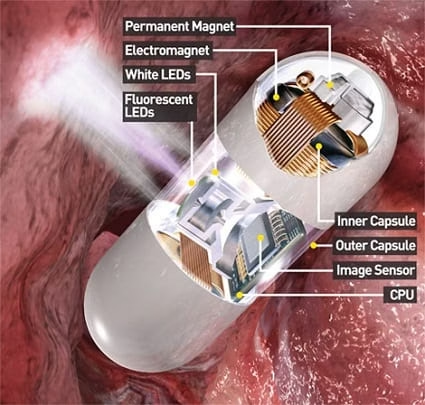
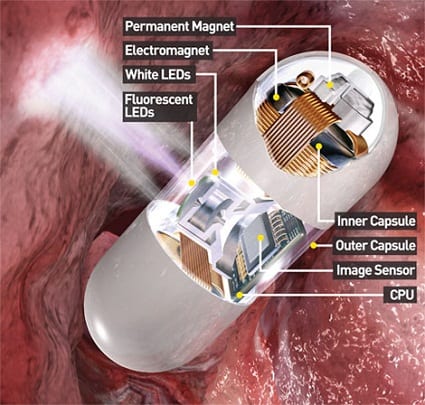
Most people that are required to consume medications on a daily basis will pop their pills, without even thinking about it. While pills are primarily used to treat one condition or another, a new invention called the smart pill may aid doctors and medical professionals. In fact, smart pills are capable of passing vital information to the medical professional to give them a better idea of what is wrong. The SmartPill GI Monitoring System is designed to diagnose gastrointestinal problems. Instead of needing invasive surgery to find the source of the problem, the pill offers a safer and more convenient remedy.
The pill is equipped with various sensors and a wireless transmitter. The information collected is sent to your doctor, who will analyse it and quickly know what is wrong.
The TOGA System
It should be no secret that obesity is a major problem all around the world. The TOGA System, which has not been approved for medical use in the United States, may be able to help combat obesity without needing to undergo surgery. This special device can enter the patient’s body through the throat. Then, it will staple the stomach and leave behind a small food pouch. In return, this makes the patient feel full after consuming a smaller meal.
The TOGA System could prove to be a lifesaving, by helping fight diabetes and high blood pressure.
E-Cigarettes
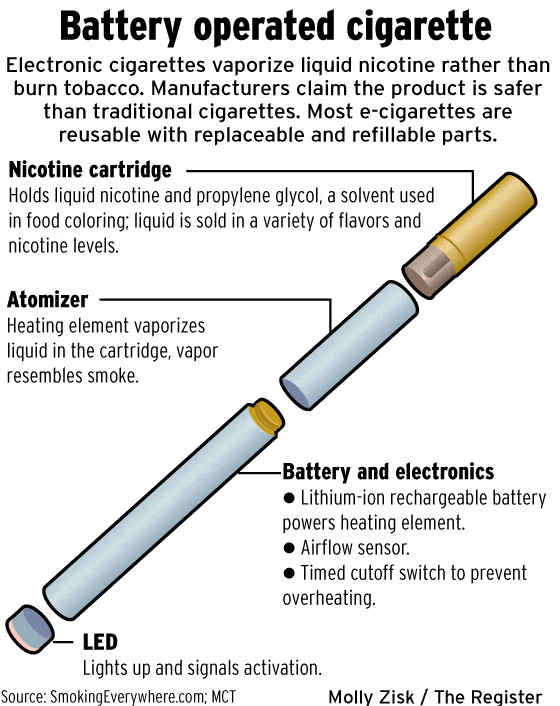
Many people prefer e-cigarettes and ejuice because they’re new and currently trendy. Of course, there is another major benefit of switching to electronic cigarettes. These alternatives are much healthier than traditional forms of smoking. E-cigs will provide the user with the nicotine the desire, without exposing them to the toxins associated with conventional tobacco products. And of course, some consumers have been able to quit smoking all together by first taking up e-cigs and then going cold turkey. If you smoke and are seriously concerned about your health, you should definitely consider making the transition to this technological alternative.
Global Positioning System (GPS)
Today, global positioning system software is embedded into a wide range of devices and products. At first, the software was only utilised in vehicles, but this has all changed. GPS units allow users to locate people, vehicles and a lot list of products. Believe it or not, you can now utilise this software to locate your smartphone, tablet or laptop. Many security companies are taking advantage of embedded GPS navigation maps to help track down stolen vehicles. This technology can reduce the cost of stolen vehicle claims and give the owner and insurer peace of mind.