Home Blog Page 27

How To Install Docker on Windows- Easy Step-by-Step Guide

Are you looking for an article that explains how to install the Docker tool in detail? Then you’ve arrived at the correct place. We’ll go through Docker Installation on Windows in-depth in this article. But before we get into the installation procedure, let’s have a look at what Docker is all about.

Docker’s popularity has skyrocketed during the last several years. What is the explanation behind this? It has altered the way software is developed. Docker’s containers provide massive economies of scale and have made programming scalable while maintaining a user-friendly experience.

Let’s get this “What is Docker” topic started by understanding what Docker is.

How To: GNAT Pro with Docker | The AdaCore Blog

What Is Docker?

We must first learn about Docker before proceeding with this Docker tutorial. Docker is a virtualized operating system that enables IT firms to design, distribute, and operate programs in Docker containers, including all of their dependencies. The container is essentially a small package that contains all the necessary instructions and dependencies, such as frameworks, libraries, and bins.

The container itself is relatively easy to shift from one environment to another. The area where Docker truly shines in the DevOps life cycle is deployment since when you deploy your solution, you want to be able to guarantee that the code you tested will truly function in the production environment. Furthermore, having a container running the solution throughout the development and testing stages is advantageous since you can validate your work in the same environment used for production. Docker may be used at any point of the DevOps process, but it’s most useful during the deployment phase.

Can I connect to docker daemon?

If you have any running containers, you will receive a non-empty JSON response.

Docker installation

Now that you know Docker, let’s see how to install it.

How To Install Docker On Windows: A Step-By-Step Guide

? Download the Docker file from the website

Note: To run Docker on Windows 10, you’ll need a 64-bit processor and 4 GB of system RAM.

? Then, to execute the installation, double-click on Docker Desktop Installer.exe.

Note: Assume you haven’t downloaded the installer (Docker Desktop Installer.exe).

? Always activate Hyper-V Windows Feature on the Configuration page after the installation procedure begins.

? Then, let the installer, go through the installation procedure and wait till it’s finished.

? Click Close and restart when the installation procedure is completed.

Launch The Docker Desktop Tool

? The utility does not start automatically when the installation procedure is completed. To use the Docker tool, look for it in your desktop search results and pick Docker Desktop.

? Docker provides onboarding training before you begin using the program. The tutorial walks you through the steps of creating a Docker image and running a container.

? Docker Desktop is now operating on Windows successfully.

? Then, to install the Docker engine on your PC, follow the steps below.

? To validate the version of Docker installed on the system, go to Docker CLI and perform the Docker version command.

? Congratulations, your Docker installation on Windows is complete, and you are now ready to create and execute Docker images and containers inside the Docker ecosystem.

How To Uninstall Docker Desktop Tool?

If you wish to uninstall Docker Desktop from your Windows Home computer, follow these instructions:

? Select Settings > Apps > Apps & features from the Windows Start menu.

? Select Docker Desktop from the list of Apps & Features and click Uninstall.

how to install docker

Advantages Of Docker

Now we’ll look at some of Docker’s benefits, which is a key topic in our Docker tutorial. Docker allows for quick deployment, as previously mentioned. In contrast to typical virtual machine settings, the environment is very portable and was built with efficiencies that allow you to operate numerous Docker containers in a single environment.

The setup may be programmed using YAML, a language that allows you to specify the Docker environment you wish to build. As a result, you can swiftly grow your environment. However, security is arguably the most important benefit these days.

You must guarantee that the environment you’re operating is both safe and scalable, and Docker prioritizes security. It will be one of the essential components of the agile architecture of the system you’re developing.

For more information visit: Get Docker

You can visit their official website here: https://www.docker.com/

That was everything you needed to know about installing Docker on Windows.

Do you have any concerns about this subject? Please post your queries in the comments area of this article on Docker Installation on Windows. Our subject experts will respond as soon as possible!


Top Altcoins With the Most Potential in the Near Future

The cryptocurrency market is a dynamic landscape, and while Bitcoin often grabs the headlines, altcoins—cryptocurrencies other than Bitcoin—are increasingly capturing the attention of investors and innovators alike. These digital assets promise groundbreaking technologies, thriving ecosystems, and the potential for significant returns. In this article, we’ll explore the top altcoins with the most potential in the near future, backed by research, market insights, and expert analysis. Whether you’re a seasoned trader or just starting out, this guide will help you navigate the exciting world of altcoins and spot opportunities worth watching.

top 5 altcoins,bitcoin,uniswap

What Are Altcoins and Why They Matter

Altcoins, or “alternative coins,” are any cryptocurrencies besides Bitcoin. Since Bitcoin paved the way, thousands of altcoins have emerged, each offering unique features or solutions to real-world problems. Think of Ethereum’s smart contracts revolutionizing finance or Solana’s high-speed transactions powering new applications. Altcoins matter because they bring diversity, innovation, and often higher growth potential than Bitcoin’s more established path. As the crypto market evolves, altcoins continue to play a pivotal role in shaping its future.


Criteria for Selecting Top Altcoins With Potential

To pinpoint altcoins with staying power, we’ve based our selections on key factors:

  • Market Capitalization and Liquidity: Signals stability and ease of trading.
  • Technology and Use Case: Highlights innovation and practical value.
  • Team and Roadmap: Reflects credibility and long-term vision.
  • Community and Sentiment: Indicates adoption and investor buzz.
  • Performance and Catalysts: Points to momentum and upcoming developments.

Using these benchmarks, let’s dive into the altcoins poised to make waves in the near future.


Top Altcoins With the Most Potential in the Near Future

1. Ethereum (ETH)

  • Why It’s Promising: Ethereum is the gold standard for smart contracts, decentralized finance (DeFi), and non-fungible tokens (NFTs). Its ongoing upgrades keep it at the forefront of blockchain innovation.
  • Market Cap: A dominant player among altcoins, consistently ranking near the top.
  • Near-Future Catalyst: Wider adoption of layer-2 solutions and growing institutional interest.
  • Potential: As the backbone of DeFi and Web3, Ethereum’s versatility ensures it remains a top contender for sustained growth.

2. Solana (SOL)

  • Why It’s Promising: Solana’s lightning-fast transactions (thousands per second) and low costs make it a go-to for developers building DeFi and NFT projects.
  • Market Cap: A strong performer with a robust presence in the altcoin space.
  • Near-Future Catalyst: Expansion of its decentralized app ecosystem and potential institutional backing.
  • Potential: Solana’s scalability positions it as a fierce competitor to Ethereum, with room for significant upside.

3. Cardano (ADA)

  • Why It’s Promising: Cardano stands out with its research-driven, eco-friendly blockchain, perfect for sustainable and scalable applications.
  • Market Cap: A solid mid-tier altcoin with a growing footprint.
  • Near-Future Catalyst: Network upgrades enhancing performance and real-world partnerships.
  • Potential: Cardano’s focus on utility and methodical growth makes it a sleeper hit with breakout potential.

4. Chainlink (LINK)

  • Why It’s Promising: Chainlink’s decentralized oracle network connects blockchains to real-world data, making it a linchpin for DeFi and beyond.
  • Market Cap: A steady riser with a niche but critical role.
  • Near-Future Catalyst: New blockchain integrations and rising demand for reliable data feeds.
  • Potential: As DeFi and smart contracts grow, Chainlink’s infrastructure role could drive substantial value.

5. Avalanche (AVAX)

  • Why It’s Promising: Avalanche blends high-speed transactions with Ethereum compatibility, attracting DeFi projects and enterprise use cases.
  • Market Cap: A competitive mid-cap altcoin with strong momentum.
  • Near-Future Catalyst: Adoption for tokenizing real-world assets and enterprise solutions.
  • Potential: Avalanche’s flexibility and performance make it a dark horse with impressive upside.

Emerging Trends Boosting Altcoin Potential

Several timeless trends are propelling altcoins forward:

  • DeFi Growth: Decentralized finance keeps expanding, with altcoins leading the charge.
  • Scalability Solutions: Faster, cheaper networks are unlocking new possibilities.
  • Real-World Asset Tokenization: Altcoins are bridging crypto and tangible assets like real estate.
  • Evolving Regulations: Clearer rules can boost investor confidence and adoption.

These forces ensure altcoins remain relevant and ripe with opportunity.


Risks and Challenges of Investing in Altcoins

Altcoins offer rewards, but they’re not without risks:

  • Volatility: Prices can fluctuate dramatically, especially for newer coins.
  • Regulatory Shifts: Changing laws may impact project viability.
  • Competition: A crowded field means only the best survive.
  • Security: Vulnerabilities or scams can derail even promising projects.

Balancing these risks with thorough research is key to smart investing.


How to Invest in Altcoins: Tips for Beginners

Ready to jump in? Here’s a timeless approach:

  1. Pick a Trusted Exchange: Platforms like Binance, Coinbase, or Kraken provide reliable access.
  2. Diversify Wisely: Mix large-cap altcoins (e.g., ETH) with promising mid-caps (e.g., AVAX).
  3. Do Your Homework: Dig into whitepapers, team credentials, and community vibes.
  4. Start Small: Invest cautiously to test the waters.
  5. Stay Informed: Keep an eye on market shifts and project updates.

Comparison Table: Top Altcoins at a Glance

AltcoinMarket Cap RangeKey Use CasePotential CatalystRisk Level
Ethereum (ETH)Top-tierSmart contracts, DeFiScalability, institutionsModerate
Solana (SOL)High-tierHigh-speed blockchainEcosystem growthHigh
Cardano (ADA)Mid-tierSustainable blockchainUpgrades, partnershipsModerate
Chainlink (LINK)Mid-tierOracles for DeFiIntegrationsLow
Avalanche (AVAX)Mid-tierScalable dAppsEnterprise adoptionModerate

FAQ Section

What are the top altcoins to watch in 2025?

Ethereum, Solana, Cardano, Chainlink, and Avalanche stand out due to their strong fundamentals and upcoming catalysts.

How do I know if an altcoin has potential?

Look at its technology, team, market cap, community support, and recent developments.

Are altcoins riskier than Bitcoin?

Yes, altcoins tend to be more volatile, but they also offer higher growth potential.

Which altcoin has the highest growth potential in the near future?

Solana and Avalanche are strong contenders due to their scalability and ecosystem growth.

How can I safely invest in altcoins?

Use trusted exchanges, diversify, and only invest what you’re willing to lose.


Conclusion

The near future looks bright for altcoins, with Ethereum, Solana, Cardano, Chainlink, and Avalanche leading the pack. These projects combine cutting-edge technology, real-world utility, and strong market momentum, making them prime candidates for growth. However, the crypto market is unpredictable, so thorough research and risk management are key. Stay informed, explore these altcoins further, and consider how they fit into your investment strategy. What’s your favorite altcoin? Let us know in the comments below!

10 Best Free GIFs Maker Tools That Is Too Easy To Use

Best Free GIF Making Tools

Are you looking out for the tools to make GIFs? It is often hard to find good tools for making GIFs. But you don’t have to worry. We have come up with the best GIF tool which will help in making your contents more standardized or your blog or your website more interesting. 

GIF also known as Graphic Interpreting Format is a bit image format that takes much less time than videos. It can do the explanation in just a few seconds. With the help of GIF you can easily express your emotion during conversation, you can also explain your creative ideas and can guide the user or the viewers about the specific topic. You can easily export files or even some apps has the capability to integrate directly with social media 

There are a lot of tools out there for making GIFs, but you must know the details of the tools before using them. So we have explained all the unique features and have listed them down below. Let’s discuss it one by one.

ImgFlip

imgFlip

It is used as one of the high rated tools for creating animated GIF from YouTube, Video files, Video Websites, Images and pictures of high quality. Besides that there is also an ImpFlip community where you can submit all creations in the different categories like Gaming, Fun, and Reaction GIFs. In this community you can even up vote your favorites and join via the Meme Comment System.

Features:

  • You can create high quality animated GIF 
  • You can make them online for free
  • You can also make GIF with no watermarks
  • You can also add text along with emojis and stickers
  • You can edit the GIF by cropping, rotating, reversing, enabling sound, enabling motions, drawing, outline and scribbling.

GIF Maker by GIPHY:

gifmaker

This is one of the most popular sources for creating and sharing GIFs on the internet. You can find different sections of  interest like entertainment, reactions, sports, stickers and others. 

Features:

  • You can make the GIF by adding the video the screen  and edit to make the GIF
  • There are several categories like GIPHY studio, actions, anime, cartoons and emotions.
  • The apps are available named GIPHY, GIPHY World, GIPHY Capture
  • You can easily personalize your profile.
  • There is also an available sticker section like Original, trending, Reactions and others.

Record it: 

recordit

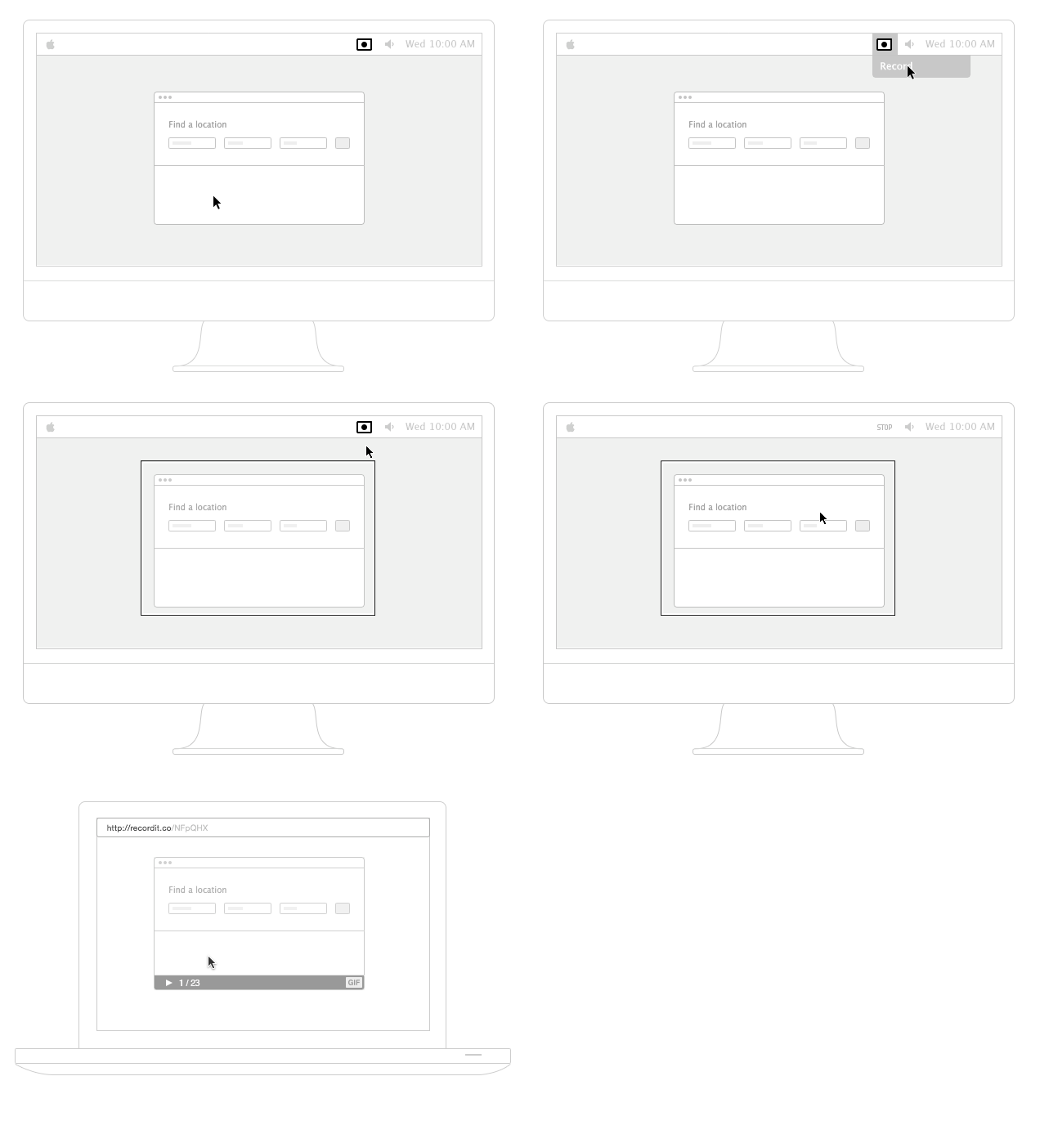
This is all in one tool which is used in screencasting but you can turn any part of the video into GIF easily on your PC or Mac. All you have to do is first record the video and then it will automatically be uploaded in the cloud. After that, you can turn the video into GIF by clicking the GIF button present in the right corner.

Features:

  • You can record your screen fully or partially as you need
  • You can even export the video at a very fast rate as GIF or MP4
  • The screen can be recorded in very high quality like 720p, 1080p, 4k
  • It can even record iOS screen or mirror iOS video via Wi-Fi
  • There is no time limit.

PhotoScape:

photoscape

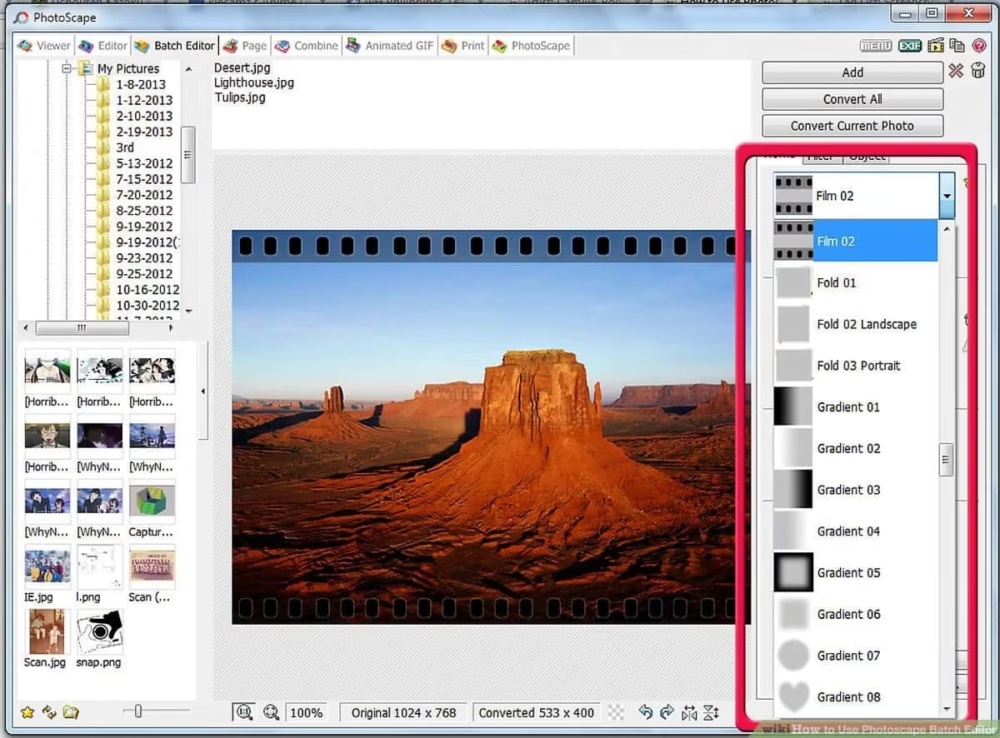
PhotoScape is graphic editing software which was developed by MOOII Tech Of Korea.It is a cool and interesting tool via which you can create your GIF or even edit it. English and Korean are the two default languages available in this software. You can even avail other languages by downloading additional language packages.

Features:        

  • You can also view multiple pictures and can create slideshow
  •  You can use multiple photos to create  a complete animated GIF.
  • You can easily resize, make brightness and color adjustments, white balance, backlight corrections and even more.
  • It is free to use
  • It is best for Window 10 and Mac
  • It also provides you with a special feature of a RAW converter.

Snagit:

snagit

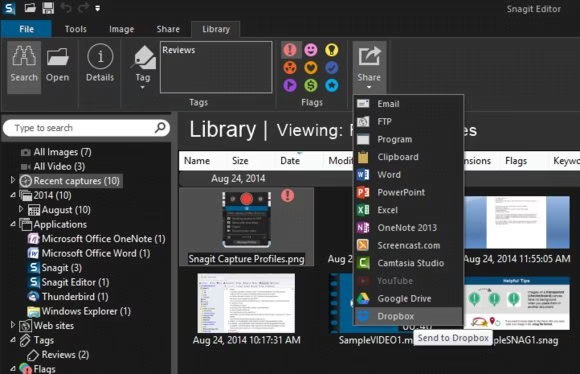
It is a GIF converter tool where you can record the video or import the video from the library and convert it into GIF. All you have to do is drag the play head handles and set the initial and final end. After that, you can easily convert it into GIF by clicking the GIF option given below.

Features:

  • You can easily customize the production setting.
  • You can share it with your friends and colleagues
  • It is available for Microsoft operating System, and even the recent version of iOS.
  • You can make a guide for the customer for easy explanation of the services and products.

Bacon Camera:

bacon camera

Beside several amazing features one of the features that we are looking for is creating GIFs. You can definitely use a bacon camera for this purpose. You can simply record a short video and convert it into GIF

Features:

  • You can enhance the quality by white balance, exposure time and others.
  • You can download this application from Google Play Store.
  • It is free to use but you can also use the paid version for the pro version.

Picasion:

picasion

This is a GIF creator  where you can create your high quality and authentic GIF.  Here you can easily upload the image and set up the size as well as speed and create your animated GIF.

Features:

  • You can upload the pictures by importing them from gallery, Flickr, Picasa
  • It is available in several languages like English, Portuguese, Spanish and Russian.
  • You can also create your own avatar.
  • It is free to use
  • It also provides the support of variable formats.

Pixel  Studio

pixelstudio

It is considered as one of the standard tools for creating GIFs and can be used for creating amazing art. It has tons of cool tools.

Features:

  • It is simple, easy and intuitive.
  • It supports 22 languages
  • It also supports devices like Samsung S Pen
  • You can make interesting GIFs by using the advanced editors
  • It also supports all popular formats like PNG, GIF, PSP, JPG 

PowerDirector:

powerdirector

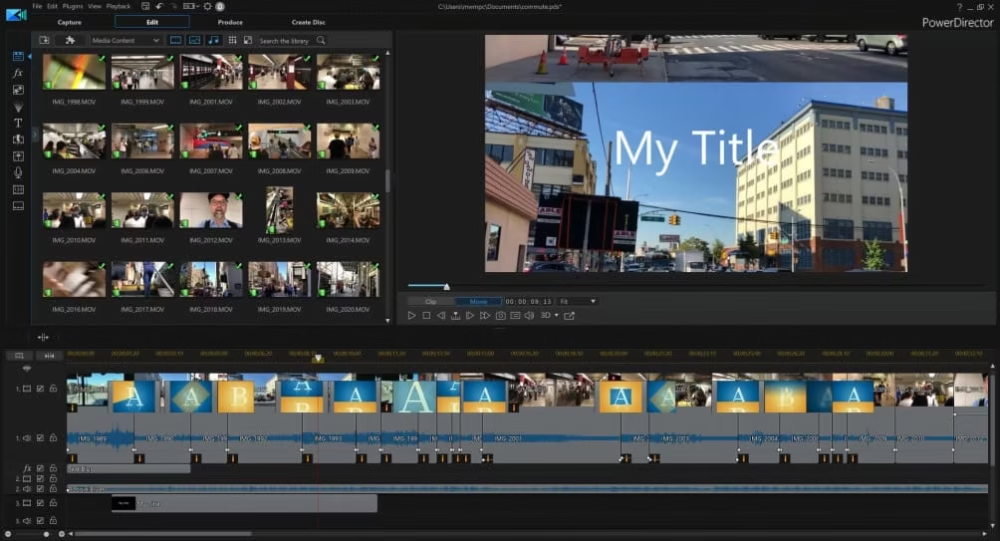
PowerDirector is a video editing app along with GIF support. You can turn the image and short videos into  GIFs. In order to make the GIF, all you have to do is launch the app, select the frame, import the photos, create your GIF and save it. Voilà, your creative GIF is ready to be shared on social platforms.

Features: 

  • It is free to use.
  • You have to purchase additional features 
  • You can easily turn video into short GIF
  • It also has the feature of customizable motion graphic titles
  • There is an option of using green screen editing

Tumblr:

tumblr

It is a  free tool perfect for making GIFs. You should also know that this software is only available for mobile phones, and they  have also promised the user to release new editing tools for creativity. All you have to keep in mind before editing in Tumblr is that adult-oriented contents and NSFW contents are banned here.

Features:

  • It is free to use and there is no in app purchases
  • You can create your own dashboard
  • You can also change your palette color like Dark mode, ghost mode, canary mode and other.
  • You can add stickers and texts of your choice and make it look more attractive
  • You can share the blogs with other users.

How do I convert GIF to mp4?

Well you can convert GIF into mp4 via several means like online websites are available which can direct convert it into mp4 without the need of installation.
Click here for online conversion
You can also use certain applications like Zamzar, FileZigZag, CloudConvert, Ezgiftetc.

How can I save GIFs on my iPhone?

Choose your favorite GIF and then and hold for Saving it.
For iPhone 6s users you have to first press the GIF, then swipe up and click Save to save the GIF.

How do I upload high quality GIFs to Twitter?

Firstly you have to open Settings and Privacy. Then select Data Usage where you will get the option to upload the GIF or images in high resolution using your favorable resource like Wi-Fi or Mobile Data.

All these GIF tools are highly rated and will provide you the best output. I hope you like the article. If you have to provide us any additional information feel free to share with us.

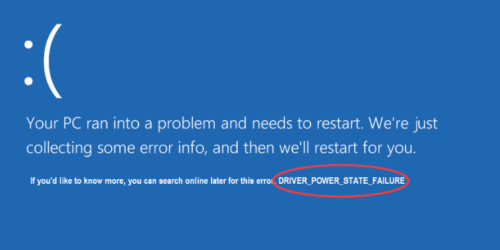
How To Fix Driver Power State Failure?

Driver Power State Failure

Driver Power State Failure errors occur generally when the device driver goes into sleep mode while the user is still using the device. The Driver Power State Failure error can happen due to several reasons like incompatible drivers, faults in the power setting or even it can be bad drivers.

Possible cause for Window 10 Driver Power State Failure Error:

The two main causes behind the Stop Code Driver Power State Failure Windows 10 Error are:

Firstly, if the user OS is kept in the state of Sleep then this kind of error may be encountered when the user tries to log in.

Secondly, the Windows 10 Driver Power State Failure error may happen due to the incompatibility of the PC drivers with the user’s current Windows OS version. This incompatibility makes the driver unable to handle the power state transition. Therefore it is mandatory to check the compatibility of the PC drivers before installing.

Other than that the graphics and WiFi card drivers can also cause the problem.

How to Fix Driver Power State Failure Windows 10 issue:

In this article we have listed the total of nine solutions that one can use to resolve their issues regarding this:

Solution 1: Removal of External Hardware :

The external hardware which is attached externally to the user device can cause this kind of error also. Therefore to overcome the issue of power state failure the user has to remove the externally attached hardware to see if they are still encountering the error or not. If in case removal of that hardware makes the disappearance of the error then the problem was with that and if not then try out the other solution mentioned below.

Solution 2: Removing the installed Drivers in Safe Mode:

This type of error especially occurs due to the installation of drivers which is not compatible with the user Window OS version.

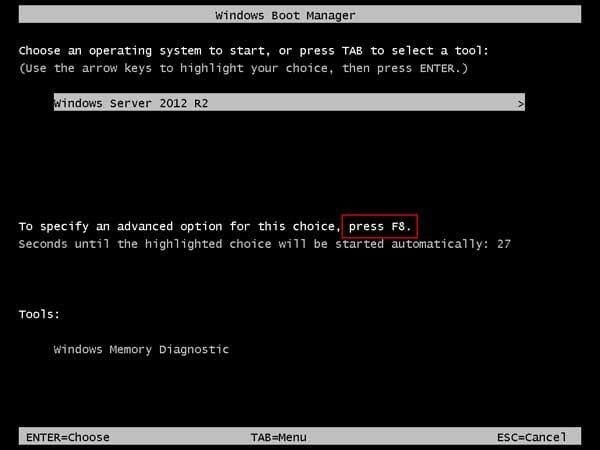
  • Start booting your PC after that Windows Boot Manager screen will appear, then press the F8 button constantly.
remove drivers in safe mode 1
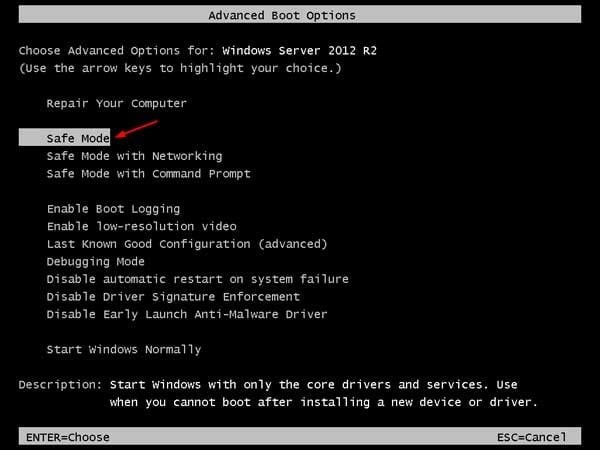
  • Now, Advanced Boot options will pop up, from there the user has to choose the Safe Mode from the list of options.
remove drivers in safe mode 2
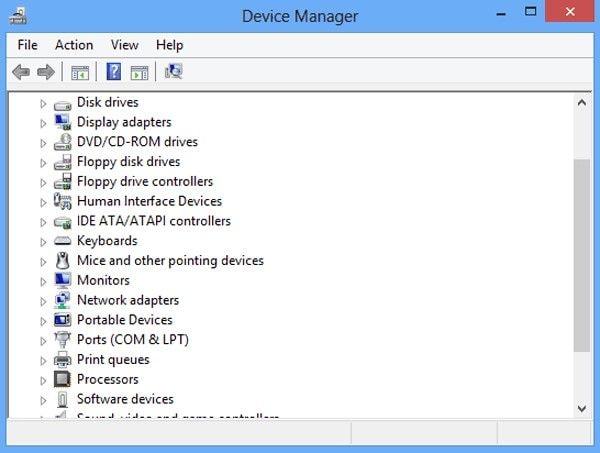
  • Then, launch the Device Manager in the Safe Mode.
remove drivers in safe mode 3
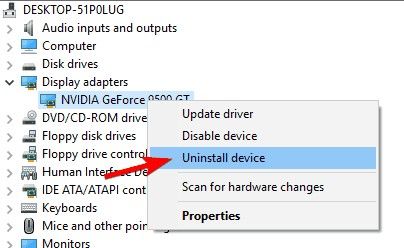
  • After that in order to uninstall the recent drivers on your PC, right-click on that driver and select Uninstall Device from the available options. Continue this for all other available installed devices also.
remove drivers in safe mode 3

Solution 3: SFC Scan:

The user can use the System File Checker Scan(SFC) tool to check out all the errors within their system with the help of the following steps mentioned below:

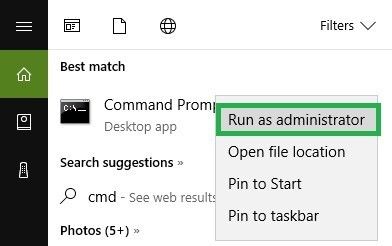
  • From the Windows search field, navigate to Command Prompt and then select Run as Administrator from the available options.
How to Run the Windows 10 System File Checker | InMotion Hosting
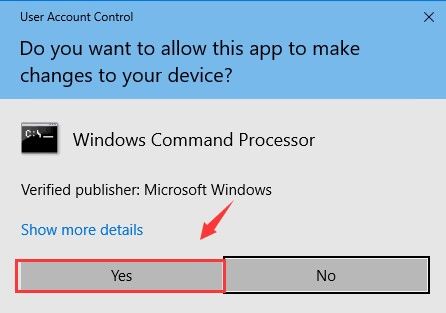
  • Now a popup prompt will appear which will ask the user to allow the app to effect changes to the PC, so select YES.
run system file checker 2
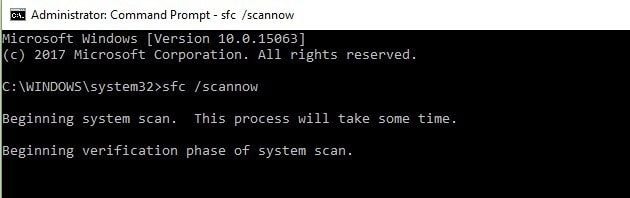
  • Then in the Command Prompt field type and enter sfc/scannow and with this scanning will start.
run system file checker 3
  • Finally, make an input of “exit” and press the ENTER button to close the window.

Solution 4: Reverting Graphics Card Drivers to the Older version:

This is one of the good ways via which users can resolve the issue simply by reverting to their previously used graphic drivers.

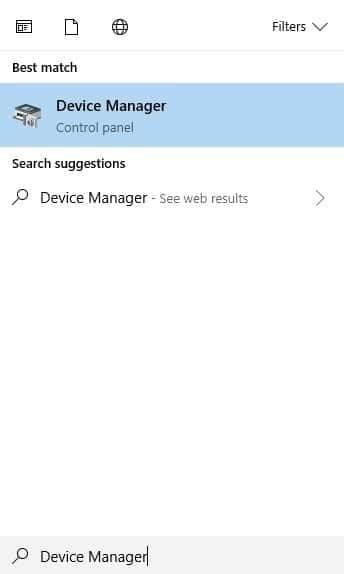
  • From the Window’s search field, navigate to Device Manager and launch it into the PC.
revert graphics card drivers 1
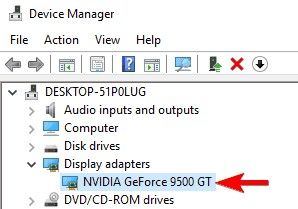
  • Now among the available section select Display adapters and double click on the graphic cards.
revert graphics card drivers 2
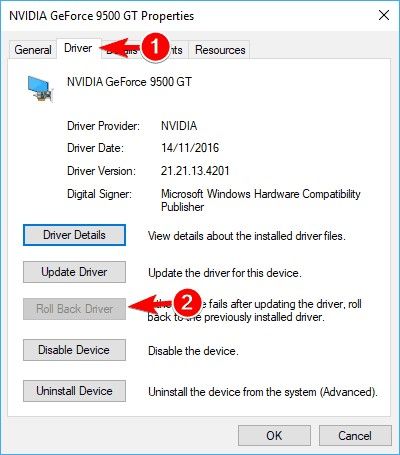
  • In the next pop up select the Roll Back Driver available under the Driver tab.
revert graphics card drivers 3
  • Select OK and the procedures will be completed.

Solution 5: Removing Antivirus Software:

Antivirus Software can also be one of the most probable reasons for such kind of errors to take place. This can be overcome by the removal of the software and the steps mentioned below will help the user to do so.

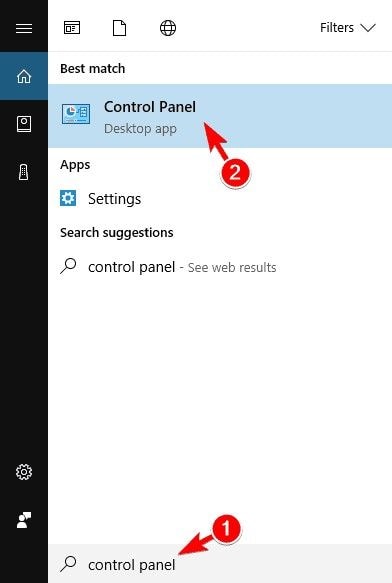
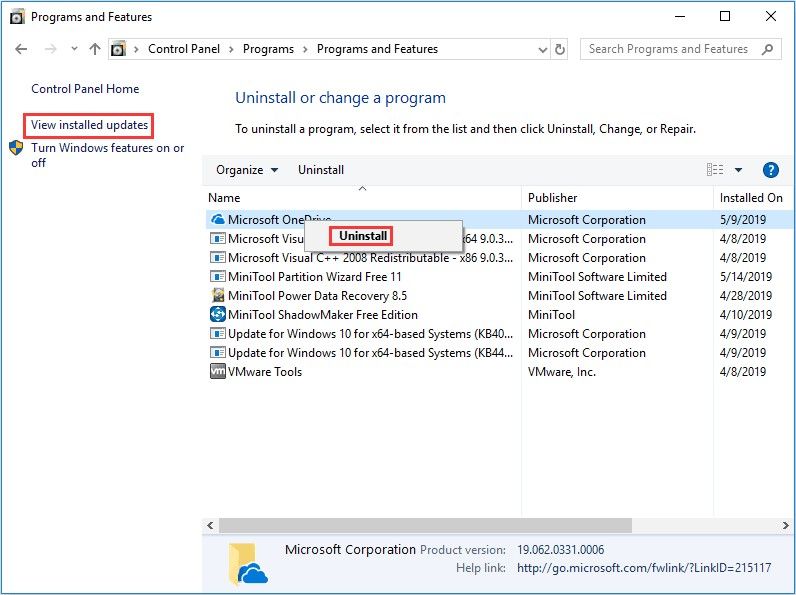
  • Firstly from the Window’s Search field, navigate to Control Panel and launch it into the PC.
remove antivirus software 1
  • Then select Uninstall a program option available under the Programs tab.
  • Now select the antivirus program from the available list of installed programs and then click Uninstall.
remove antivirus software 3
  • After that restart your PC.

Solution 6: By turning off the Power Saving

The user can get rid of windows 10 driver power state failure by turning off the power saving using the following steps mentioned below:

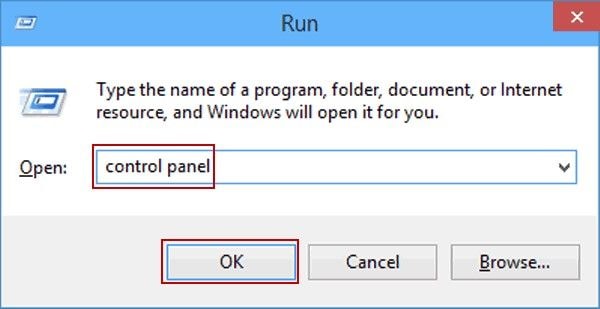
  • To boot safely press the Window logo present on the keyboard and along with it click the letter R to open the Run box. Now in the Open tab type Control Panel and then click OK to launch in the user window.
Search for Control Panel in Run
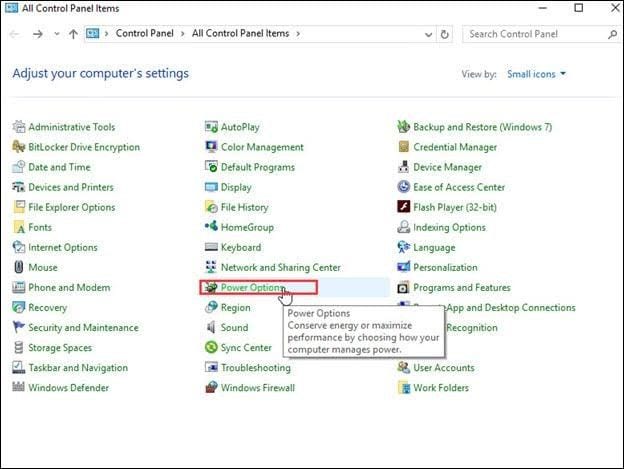
  • Now use “Small icons” to view before clicking “Power Options”
Select Power Option in All Control Panel Items
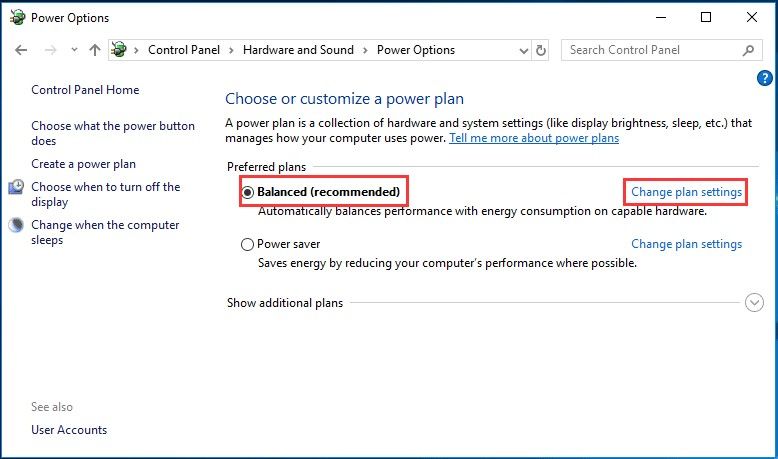
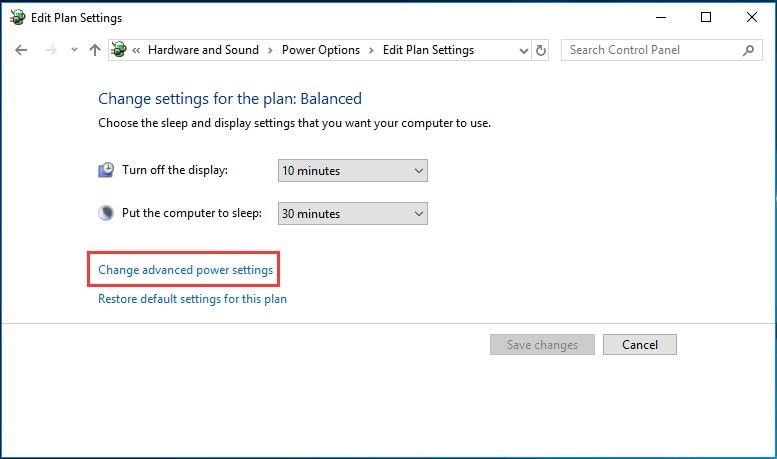
  • Then after enabling the “Balance (recommended)” option, click on the Change plan settings present on the right side of the page.
turn off power saving 3
  • After that choose the Change advanced power settings.
turn off power saving 4
  • Under the Wireless Adapter Settings, there will be available several options, from there select the Power Saving Mode. Now from the menu increase the setting to a Maximum Performance
turn off power saving 5
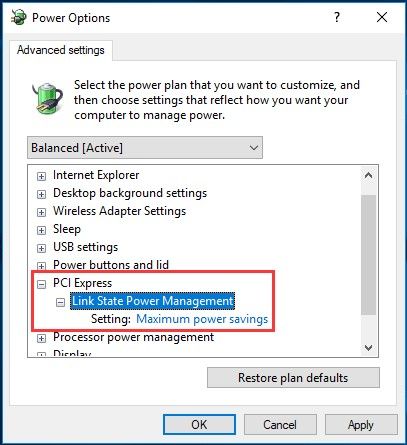
  • Now move the cursor to PCI Express and there will be available the Link State Power Management.
  • From here enhance a change by selecting the option Maximum power savings.
  • Click on the APPLY option
turn off power saving 6
  • Now click OK and restart the device to check and confirm the disappearance of the error.

Solution 7: By changing Nvidia Control Panel Power Settings:

This Nvidia graphics is another reason which leads to driver power state failure windows 10 error. The following steps are required in order to overcome the issue:

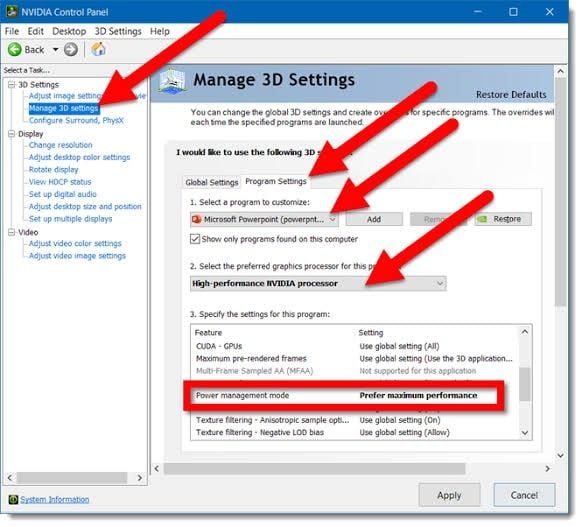
  • First of all launch the Nvidia Control Panel. Now from the left section of the page choose Manage 3D settings.
  • Now moving towards the right part select the graphics card.
  • After that find Power management mode and besides that there is available Prefer maximum performance. From here select maximum performance.
turn off power saving 7
  • Now save all the changes and wait for the process to be completed.

Solution 8: By updating the device driver:

With the help of the following steps the user can update their device drivers:

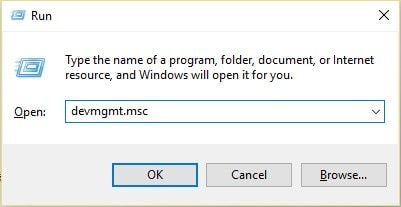
  • First of clicking the Window logo button on the keyboard along with press the R button to open up the Run dialogue box.
  • In the open tab type devmgmt.msc
update device drivers 1
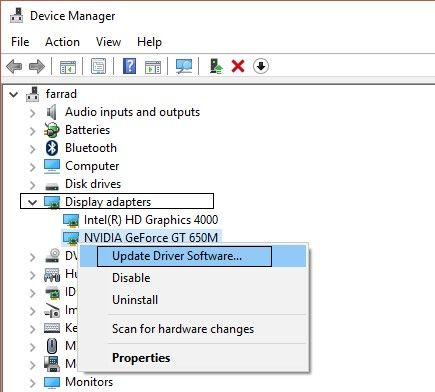
  • Now right click on the driver to update and then select Update Driver Software from all the available options.
update device drivers 2
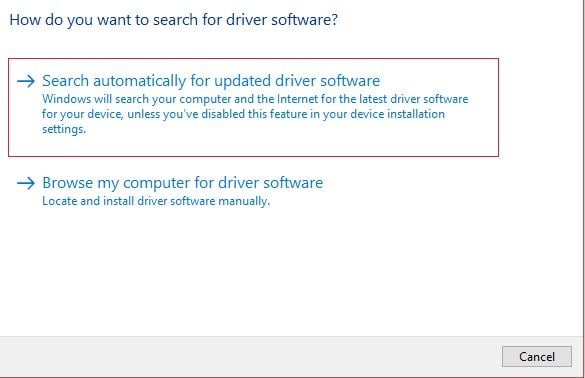
  • To complete the whole process click on the automatic search to get the latest available drivers in the system.
update device drivers 3
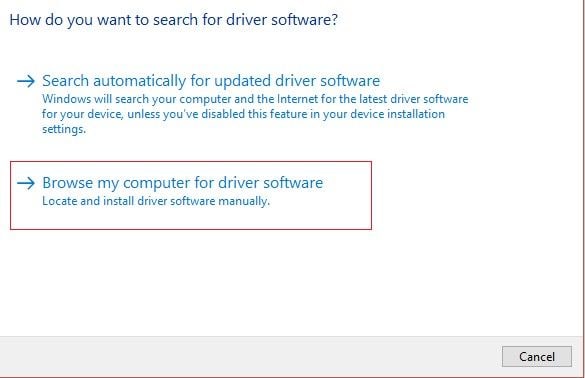
  • In case the first option doesn’t work out, then the user can opt for the second option to complete.
update device drivers 4
  • Finally, restart the computer to save the changes.

Solution 9: By Refreshing Windows 10 PC:

At the last instance, the user can refresh its Windows 10 in order to discard the error without the deletion of system files

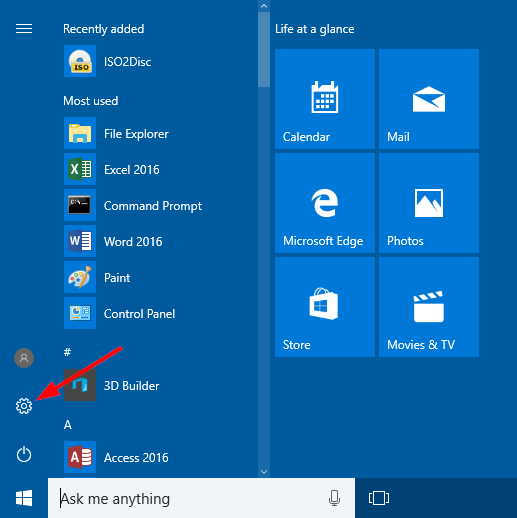
  • In the START section, there is available an option of settings. Choose that.
3 Ways to Open PC Settings on Windows 10
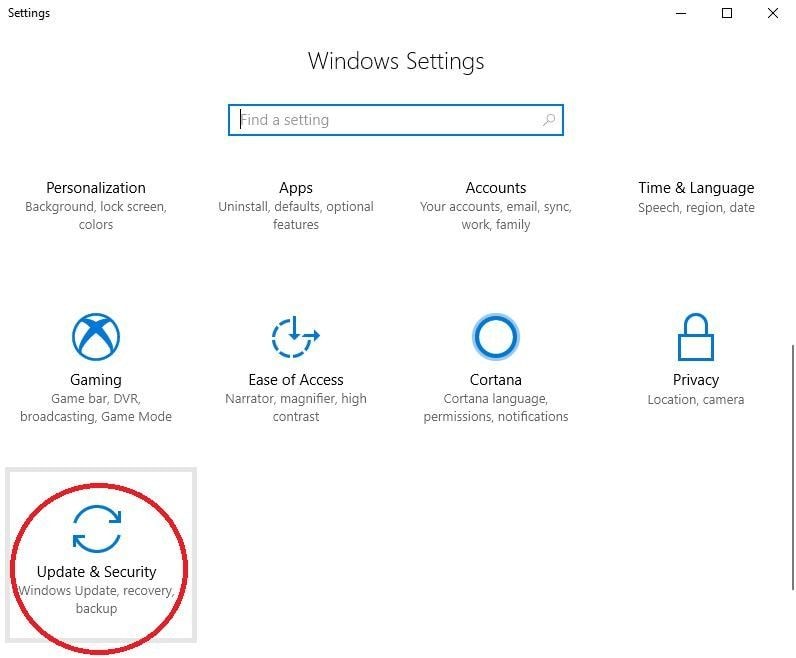
  • Now select Update & Security option.
refresh windows 10 2
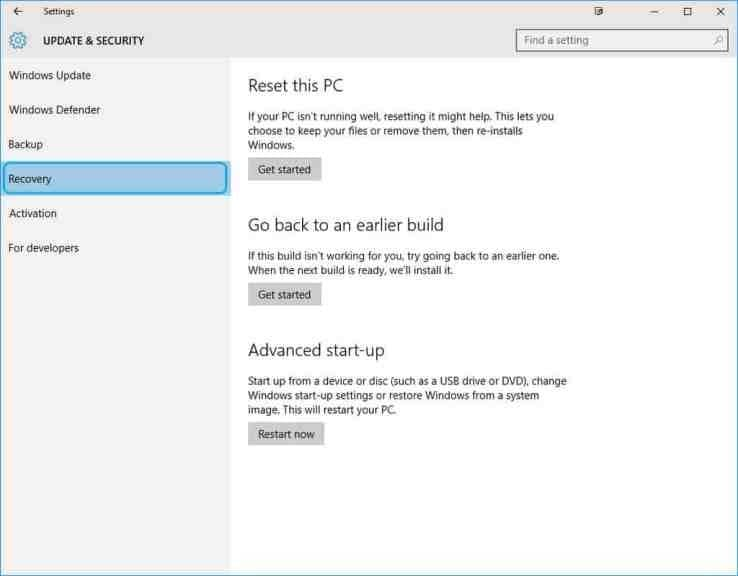
  • From the menu option-click the Recovery button
refresh windows 10 3
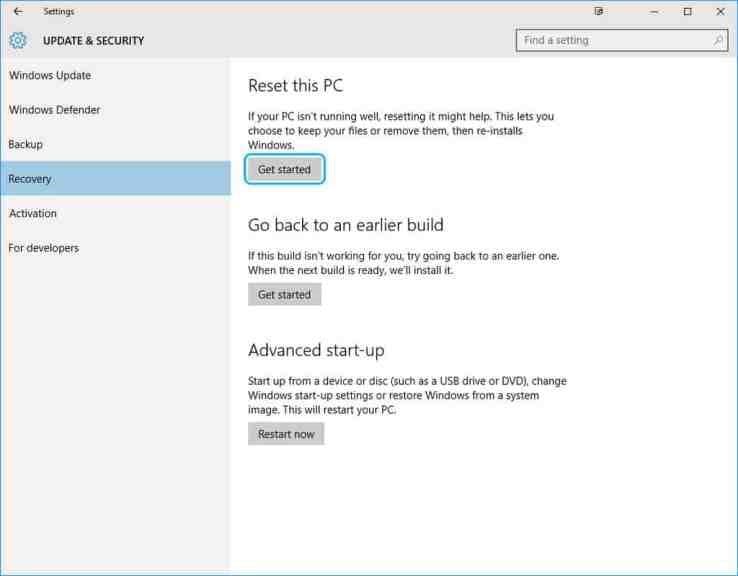
  • There is an option of getting started is available under Reset this Pc.
refresh windows 10 4
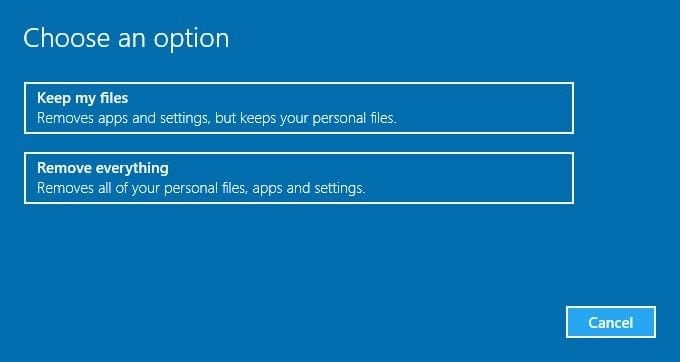
  • Select Keep my file to refresh the Window.
refresh windows 10 5
  • Then there will be appearing a pop up declaring the removal of the apps. There is no need to stress out because all the deleted apps are third-party installed apps.
  • Select the Reset button and finish the process.

You can also watch this video to overcome the issue: https://www.youtube.com/watch?v=YK8P4PB_q3I

I hope this article has helped you o resolve your issues regarding the fixation of windows 10 driver power state failure error. In case if you have doubts and queries regarding this topic feel free to ask by commenting down below.

Have I Been Hacked? Check Out Now In These Websites

Do you even know that some websites or email id which you are using currently has been hacked by someone? Well, I guess many of you are not aware of this fact and you should not even take this matter lightly. All the data stored in the emails of the user are released on the dark web, and you can do nothing about it. So, it is better to check whether it is hacked or not. As soon as it shows that the website has been breached, you should definitely change your id and password, so that all your credentials remain safe and secured with you.

Here we are the team of Techgyo to provide you with all the websites from where you can check your website without even installing or downloading any softwares in your system. Let’s explore and discuss the different platforms available :

Have I Been hacked or Pwned?

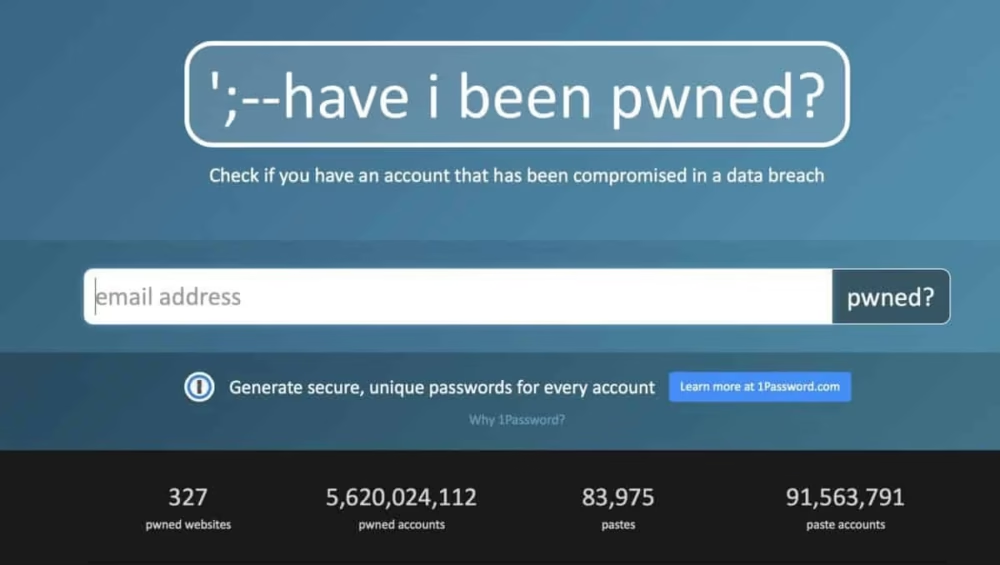
have i been pwned?

This website is gaining popularity nowadays. What’s so cool about it? Basically this website enables all the web surfers to check whether their personal credentials have been breached or not. Beside that another amazing feature of this site is that it allows the user to generate a secure and unique password for every account.

Email alerts: Yes

Free 

Firefox Monitor:

hacked

This is a special service available for Firefox users. This service was developed by the combined collaboration of Firefox and Have I been Pwned in 2018. It is a free and open source software. Here you can easily detect whether your data has been breached or not. It also provides detailed information about the services who have access to your credentials.

Email alerts: Yes

Free 

MyPwd: 

mypwd

Axur has developed the tool named MyPwd in order to examine all the digital threats and breaches of your system. It is a free and proprietary tool. A vast database is made available for you to discover all the passwords that need an alternative one. You can even find some other versions of this tool like the Portuguese version named as MinhaSenha.com, Spanish version named as MiContrasena.io

Email alerts: Yes

Free 

Have I Been Sold?

have i been sold

This service has been created by Bitfalls inspired by have I been pwned. It is free and proprietary software. It also provides a quick guide to prevent your emails from being sold. Other than that you can even get the database of all the purchased emails as well as you can check  if your contact details are breached or not.

Email alerts: Yes

Free 

DeHashed:

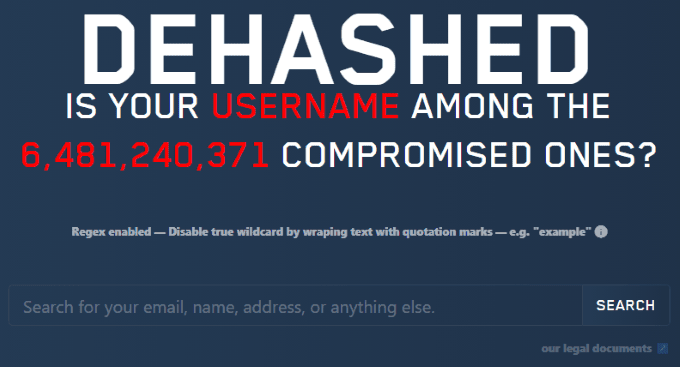
dehashed

This is one of the most recognized automatic search engines which provides you the free service of deep web scans.It is considered as one of the largest and fastest search engines and can experience the creation of HTML microseconds. It is freemium and proprietary software. With the help of this you can quickly search for Emails, IP address, Username, VIN, phone, and a lot more. 

Email alerts: Yes

Pricing:

Enthusiast Version: $5.49

Monthly Version: $15.49

Annually Version: $179.99

Hashcast:

hashcast

This is another great tool created by Axur but is mostly used for business purposes. Here you can detect and scan all the credentials like the emails, password and hashes of the employee, if it is breached in the deep and dark web or not. Artificial intelligence will give you a real time alert so that you can rapidly take the action.

Email alerts: Yes

Pricing:

Corporate Version: $50 per domain per month

Enterprise version: $200 per domain per month

Leakcheck:

leakcheck

Leakcheck is a well recognized search engine for detecting data breaches. It is freemium and proprietary software. The subscription starts for $10 per month which allows you to have one free mailbox, unlimited API and 7billion+ entries.

Email alerts: Yes

Pricing: $5-$10

Password Checkup:

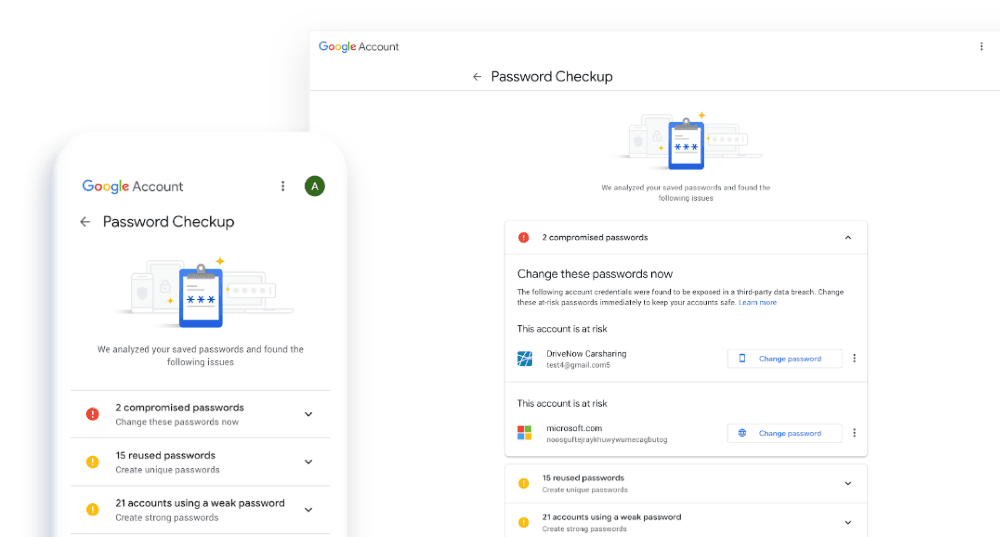
password checkup

Secure your accounts now with this tool. It is also available as an extension for Google Chrome for securing your accounts and passwords. It is free and proprietary software. It provides you with all the reports and alerts to keep your credentials secured.

Email alerts: Yes

Free 

Spydot Identity Monitor:

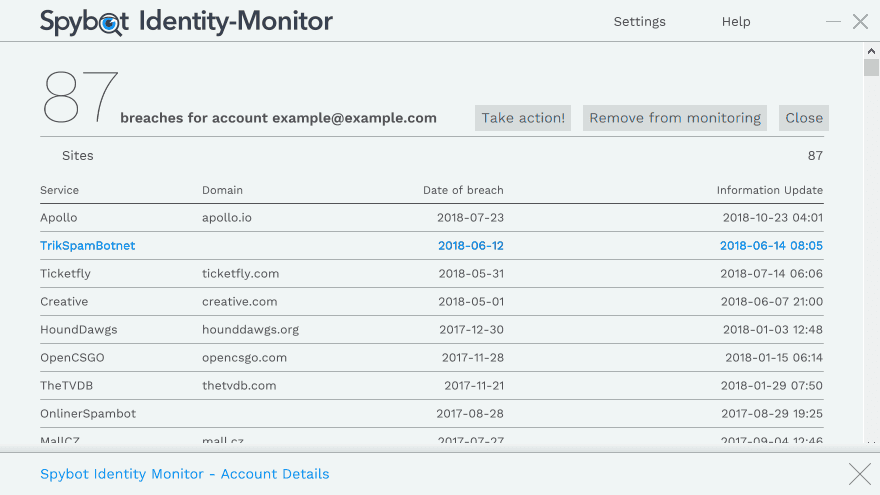
spydot identity monitor

This helps you to monitor your accounts and credentials. It is totally free to use and the software is proprietary. It is only available for the Window version. So try out this program now to check whether your personal data are safe and secured with you or if it is leaked on the dark web.

Intelligence X:

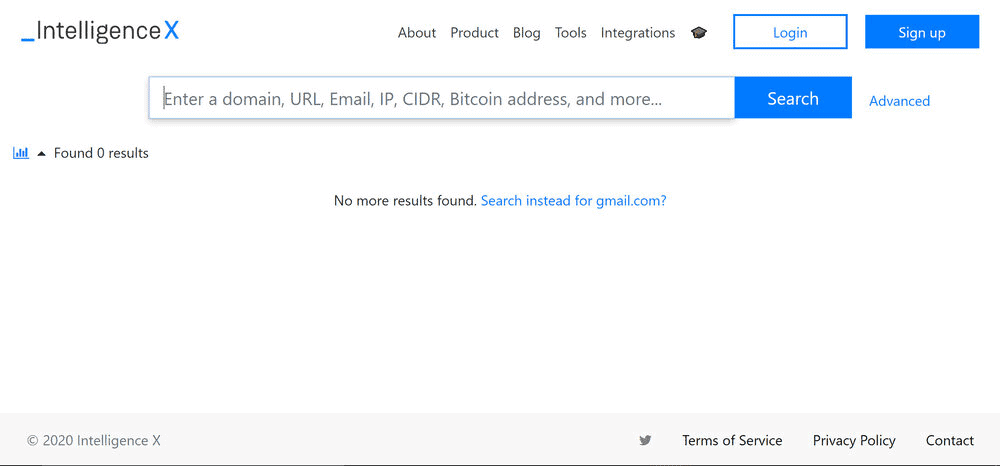
intelligence X

This is one of the coolest search engines and data archives  with mind-blowing advanced features.With the help of this you can search Tor, I2P, data leaks and public web by domain, emails, CIDR, Bitcoin and others.

Email alerts: Yes

Pricing:

Trial Version

Professional Version: € 2000 per year

Enterprise Version: € 10,000-50,000 per year

So, now you must have  seen how much one should be careful while inserting your credentials into some particular websites. Always try to keep yourself distant from all these breaches. The hackers are expanding in numbers now to a very large extent. I hope all these tools and programs will help you to keep your personal data, company credentials, employee details and others secured. If you want to mention some other highly rated and useful search engines, then you can comment down below.

Read more articles and know How to Tell if Your Android Phone is Hacked

10+ Best Free Receipt Scanner App For Android And iPhone Users

Are you looking out for the replacement of the manual receipt system with the digital one which can increase the productivity of your business and can decrease down the extra inessential labor? 

The proper evaluation of receipts and the expense reports are vital needs of the company for its finance management. It has been noticed quite often that the manual receipt scanner has caused much more loss and harm to the organization just because of minor mistakes like if someone forgot to collect the receipt, if the sorting and storing of receipt was not done properly. But you don’t have to worry now, this digital world always has something to make things glide smoothly. Infact earlier there use to be certain problems regarding the smooth transfer of files from one phone to another in iPhone but in this digital world we have a solution for that as well which is anytrans which serves as an ultimate one-stop solution. In fact, to call it an alternative would be an understatement because with so many flawless features, this program has the potential to replace iTunes completely.

receipt scanner apps

Why should you use a Receipt Scanner app?

scanner app

The manual receipt can be replaced by the receipt scanner app in Android as well as iPhone which will overcome all the obstacles faced in your business. There are some great advantages of using the application, mentioned below, that you should definitely check out.

  • There are no chances of data entry error
  • It will save a lot of time by eliminating the unnecessary need of printing and collating receipts and expense reports.
  • You will be able to make submission of expense reports on time.
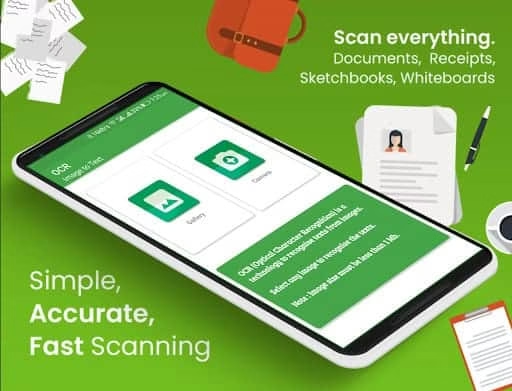
  • The special features of Optical Character Recognition can discard the need for manual entry.
  • The mobile camera can be used as a scanner and with one click you can easily store the valuable date automatically.

Now moving forward, you can find out the best Receipt scanner app from below along with the benefits mentioned specifically:

1. Smart Receipts:

smart receipt

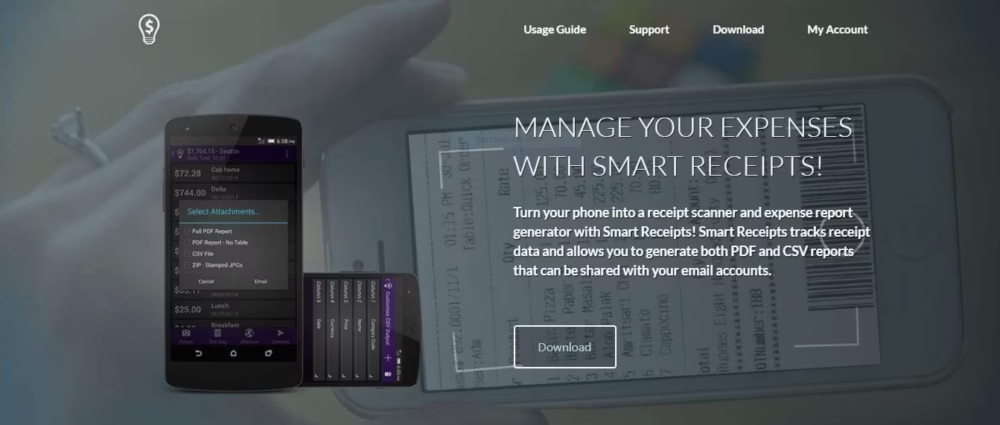
It is a receipt scanner and expense report generator which helps you track receipt data. It generates both PDF and CSV reports of scanned receipts and this can easily be shared with your email accounts. It is a pocket mobile scanner which can generate expense reports anywhere.

Features:

  • With the use of easily customizable PDF, CSV, ZIP reports you can generate professional reports
  • It helps in the easy tracking of the expenses.
  • You can scan the receipt by using camera or by importing it from gallery
  • You can easily sync your receipts and reports with Google Drive
  • The OCR (Optical Character Recognition) feature helps in recognizing texts from your scans.

Pricing:

Free version available

Supporting Platform:

Android; iPhone

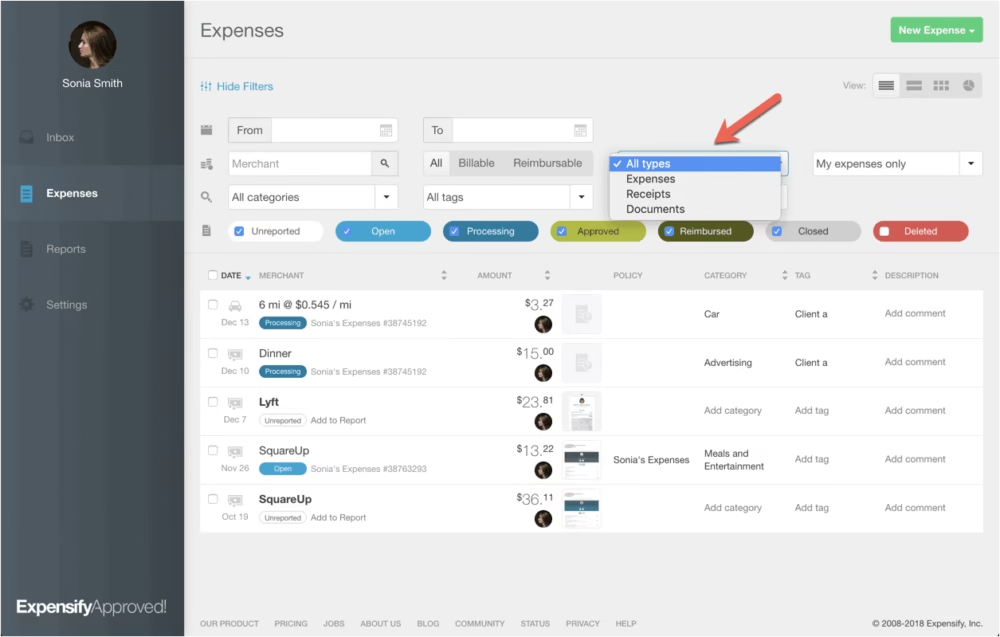
2. Expensify:

expensify

This is regarded as one of the best expense report generators that provides automated pre accounting processing for expenses, bills, invoices and others. You can easily import the receipt and expense from a phone scanner or even credit cards. It is best for business travelers because it automatically exports expenses so that you don’t have to go through the statements.

Features:

  • It is integrated with your phone’s GPS sensor.
  • It has integration with accounting software like Freshbooks, Xero, Wave, Quickbooks, NetSuite and many more
  • You can also import from a credit card.
  • It allows you to submit expense reports through email also.
  • Reimbursement can be made online via QuickBooks or direct deposit

Pricing:

Free to individuals

$5 per month per employee

Supporting Platform:

Android; iOS (iPhone); Web browser

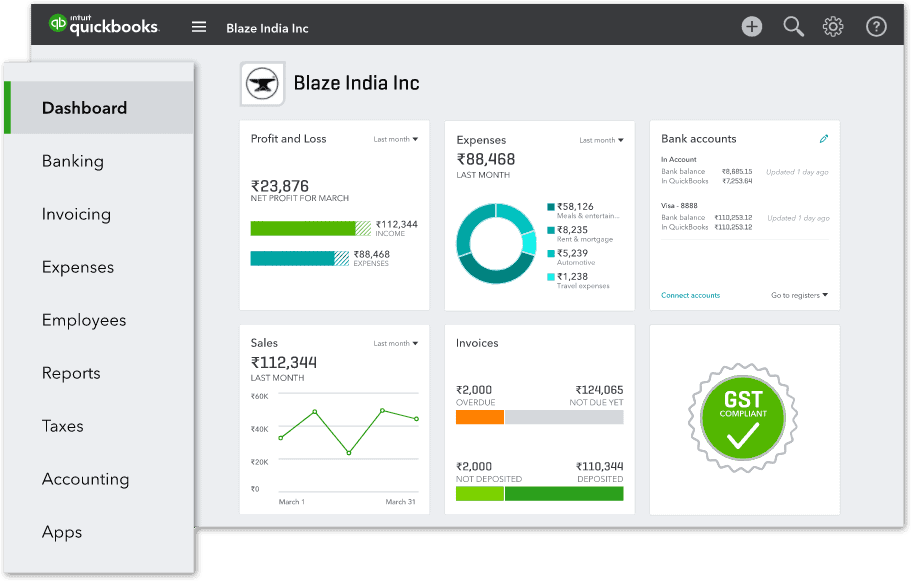
3. Quickbooks:

quickbooks

If you have the access to Quickbooks then there is no need for accounting and financial professionals in your business. With the function of receipt scanner it keeps your accounting data organized on the cloud. It is best for accounting savvy business because of its multiple features. This allows you to scan receipts, bookkeeping, creating financial reports and statements all in one place. 

Features:

  • It connects your bank account to automatically import and categorize data.
  • You can have access to your financial data with the help of Cloud Accounting feature.
  • You can click pictures of the receipts and can store them on the Quickbooks mobile app
  • You can even track the invoice with the help of invoicing feature
  • The Inventory Management features helps you to know about the availability of the stocks and the orders.

Pricing:

Small business: INR 529 per month + 18% GST*

Supporting Platform:

Android; iOS (iPhone); Web browser

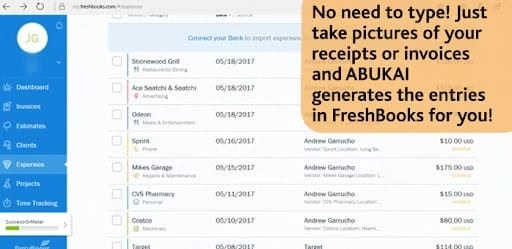
4. ABUKAI Expenses:

abukai

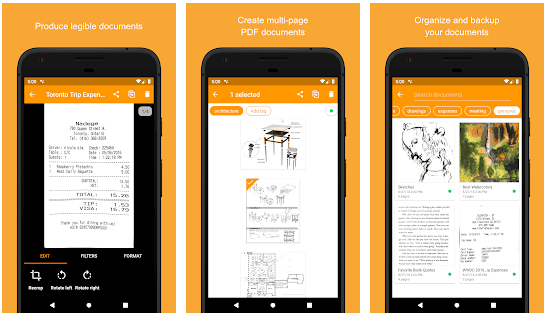
ABUKAI Expenses are the scanner app with the help of which the receipts can be generated by taking the snapshot of the receipts. The expense reports can be created in many formats like Excel. The process required is firstly taking the picture of the receipt and then clicking the Process Expense Report tab.

Features:

  • It helps in receipt management
  • Workflow is managed quite efficiently
  • It helps in reimbursement management
  • Availability of multiple currency
  • Approval Process Control

Pricing:

Standard Corporate: $99/ seat/ year

Custom Corporate: Varies in rate

Individual: $99/year

Free version

Supporting Platform:

Android; iOS (iPhone); Web browser

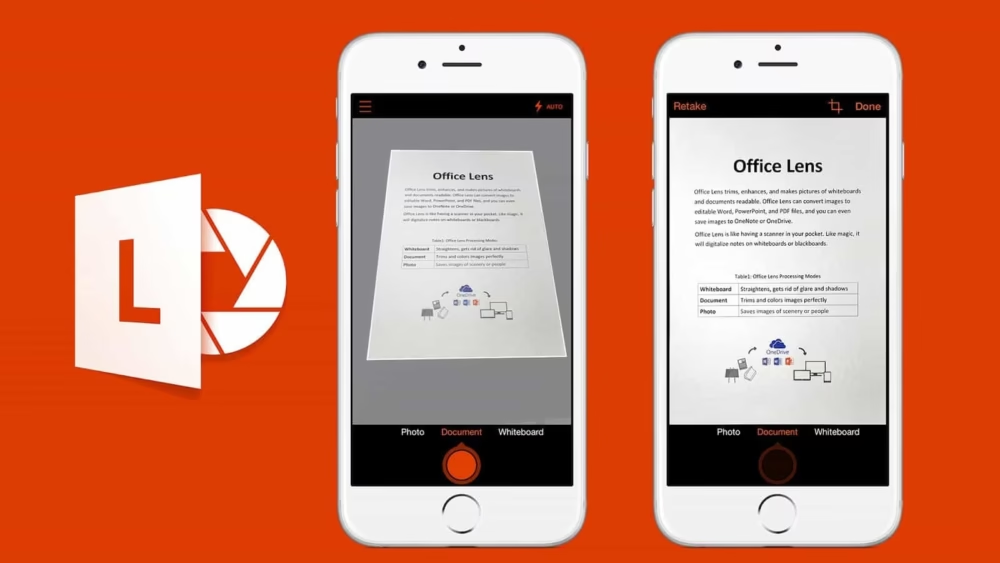
5. Office Lens:

office lens

This is the application developed by Microsoft Team for reducing the burden of storing paper receipts. With the help of this, you can easily take a snap of the receipt from the device and then you can edit it. Finally, you can store that  in different formats like PDF, PowerPoint, OneNote and others.

Features:

  • Easily scan and upload your receipts, documents and notes
  • Easily scan printed text and handwritten text by  using this app
  • Store all your business card by scanning and storing them in the contact list
  • Save your scanned images as PDF, Doc, Image, PowerPoint into OneDrive and OneNote.

Pricing:

Free version available

Supporting Platform:

Android; iOS (iPhone); Web browser

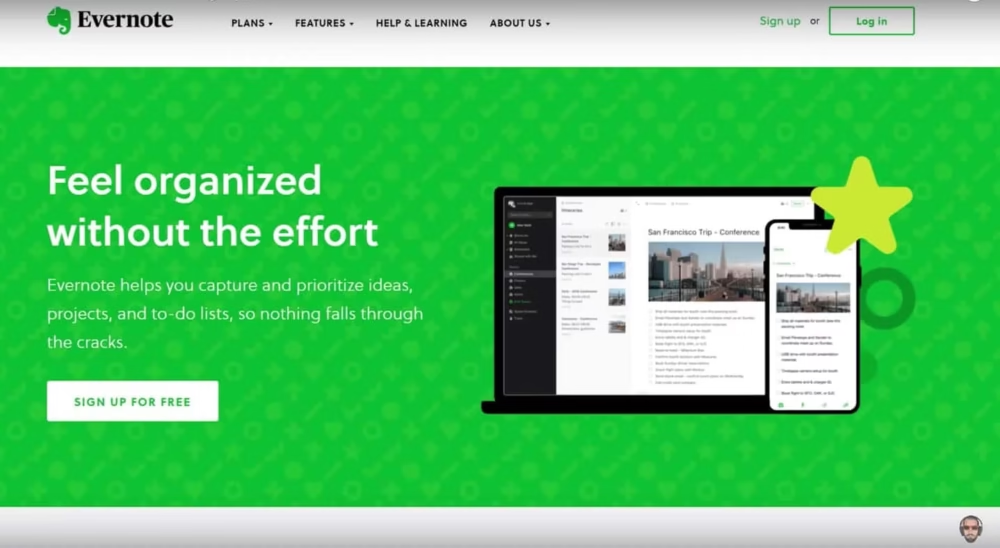
6. Evernote Scannable:

evernote

If you are searching for the best receipt scanner for iOS, then it is the perfect app for you to install. After clicking the picture of the receipt it will automatically be uploaded in your Evernote account. 

Features:

  • It is cloud based app
  • Only available for iOS user
  • You can even scan, retake or discard the image
  • You can easily access your receipt from anywhere

Pricing:

Evernote Basic: Free to use

Evernote Premium: INR 190/ month

Evernote Business: INR 500/ month

 Supporting Platform:

 iPhone; macOS

7. Clear Scanner:

clear scanner

This application comes with built in OCR capability. With the help of this feature the receipt text is clearly transcribed and imported. After scanning and saving your receipt as PDF or JPEG, you can easily attach that with your expense reports.

Features:

  • It syncs with Google Drive, Dropbox, Evernote
  • OCR camera that can directly scan your receipt
  • Provides support for corrupted PDFs
  • Takes less storage space in your device

Pricing:

Free version available

Supporting Platform:

Android; iOS (iPhone)

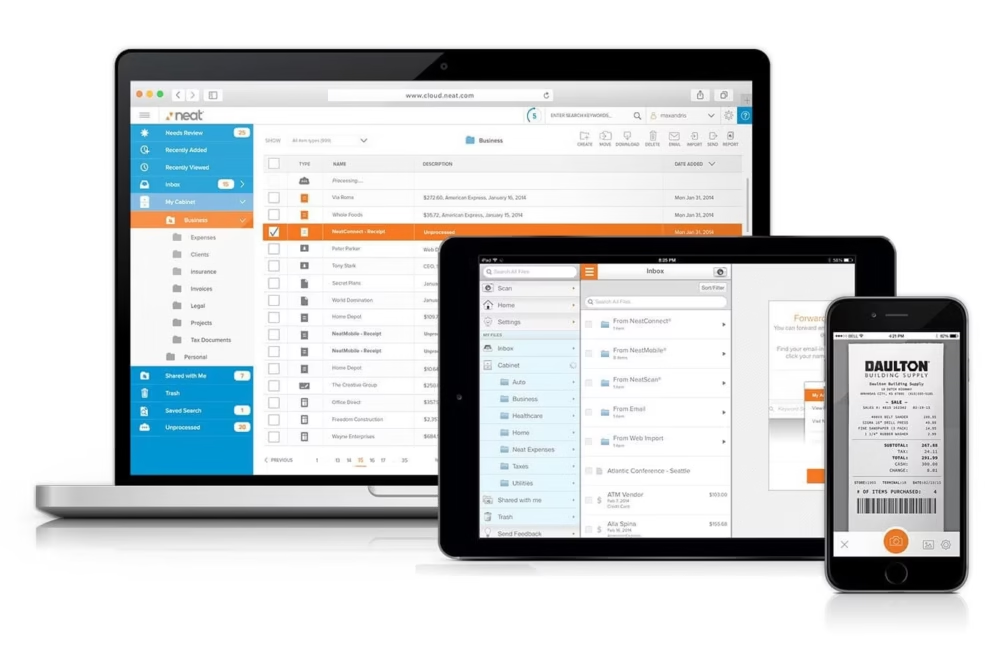
8. Neat Bookkeeping and Scanning:

neat

This is a highly recommended application if you are looking for a team collaboration app. It makes your work a lot easier and smooth by collecting the details of the receipt.

Features:

  • Smooth pairing of receipts with expenses
  • Scans are synced across the devices
  • Filter your transactions and the financial overviews

Pricing:

Neatbooks: $24 per month

NeatFiles: $16 per month

NeatFiles Unlimited: $16.50 per month

Supporting Platform:

Android; iOS (iPhone)

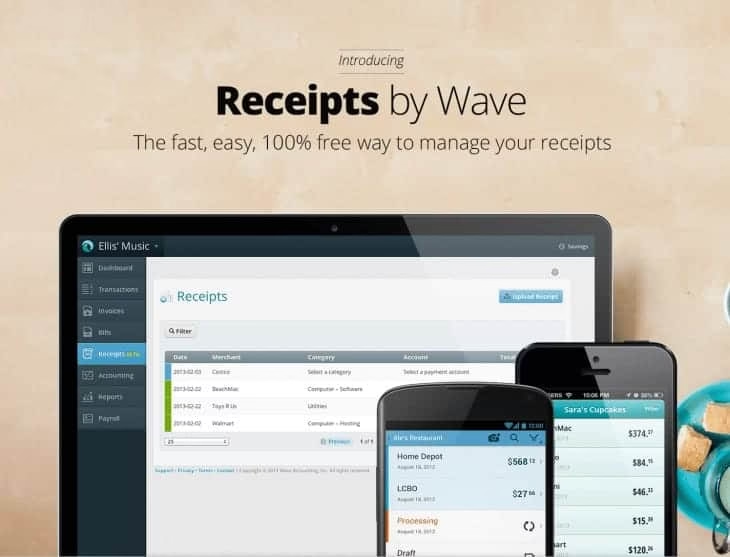
9. Receipts by Wave:

receiptbywave

You will find that this application is often used by small businesses and startups and it is best known for this. It eliminates all the hustles of gathering paper receipts and preparing spreadsheets.

Features:

  • You can scan receipt from anywhere
  • It allows you to review the information before approving it.
  • It also allows you to sync and  keep track of your receipt seamlessly ith the wave account. 

Pricing:

 Free version available

Supporting Platform:

Android; iOS (iPhone); Web browser

10. Shoeboxed:

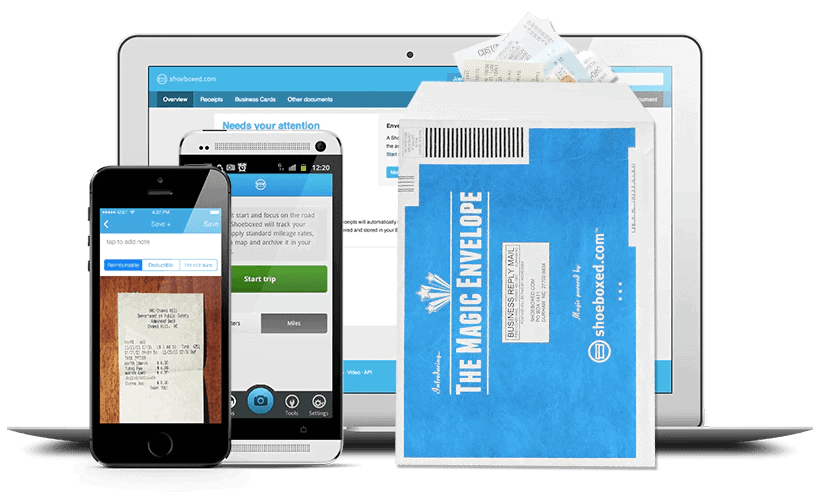
shoeboxed

I will definitely recommend this app for you since it consists of all the features required for scanning receipts.

Features:

  • You can easily recognize the important points present on your receipt and  categorize them by dates, total spent, vendors etc
  • Availability of Magic Envelopes to lessen down your burden by transforming the paper clutter into digital form
  • Send Export reports with receipt images from anywhere
  • It automatically archives receipts from Gmail.

Pricing:

Startup: $18 per month

Professional: $36 per month

Business: $54 per month

Supporting Platform:

Android, iPhone; Web browser

All these are the best receipt scanner apps that can make your work paperless and save your time by proper organization of the receipt. The receipt attached with the expense reports saves a lot of time and effort. Hence, you should definitely check out this feature packed receipt scanner apps.

How To Share Your Google Calendar Publicly?

We all are already aware of the quite famous application named Google Calendar.  This everyone’s favorite free app is capable of managing the schedule by saving your precious time. It often comes to people’s mind that how people are sharing the Google calendar with their admins, family ; how to merge Gmail with a Gmail calendar; how to sync Google Calendar with your Android Phone or do you even need a Gmail account for using google calendar? Well, you don’t have to worry, you can find all the solutions to your question in this content. 

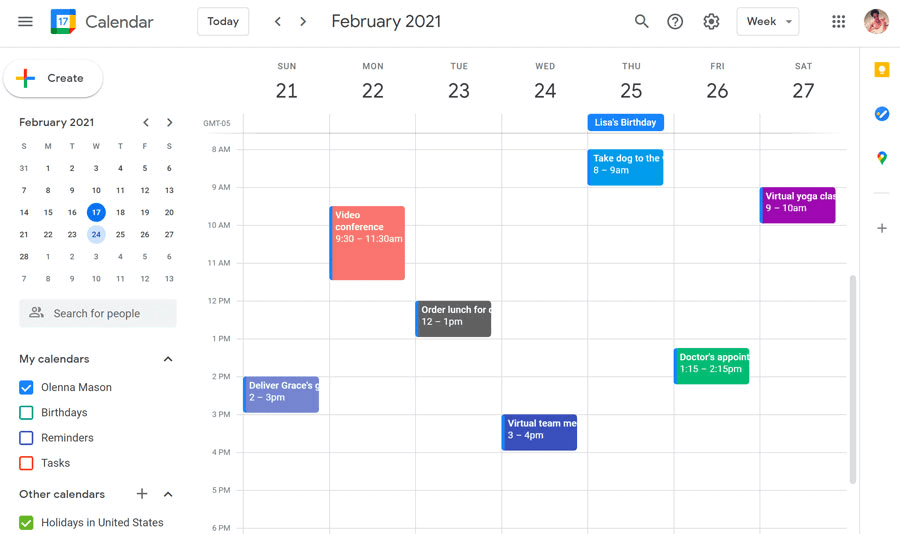
Google Calendar

What is the need of sharing a Google Calendar?

Use of Google Calendar

Some or the other instant it would have struck on your mind, what is even the need of sharing and granting the access of the Google Calendar. There are multiple reasons that you need to do this.

  • You can be in touch with your team members
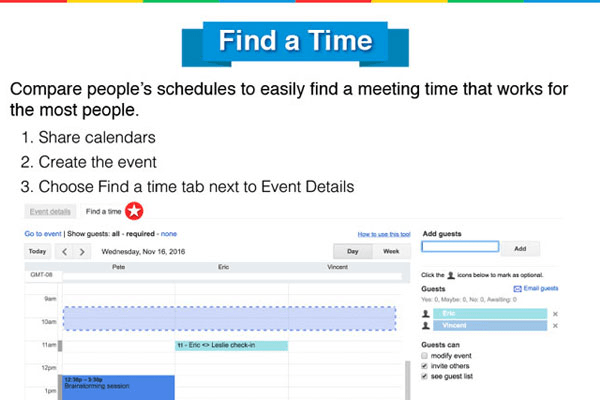
  • Meeting schedules can be integrated with Google Calendar and if there is any change in the time you can get easily notified, it reduces the time of sending the emails individually.
  • You can plan for the conferences or any events organized in the organization.
  • It can be considered as a decent tool for time management.

How to share Google Calendar?

We are here to guide you with the easiest solution required for sharing Google calendar. All you have to do is just follow the simple steps mentioned below:

  • Firstly click on this link www.google.com/calendar for opening up your Google Calendar. This can easily be connected with your Gmail, Google Meet, Google Keep and Google Drive.
  • Now you have to select the calendar present on the left side of the screen.
  • Depending upon the events, working schedule, meeting schedule, personal routine, there can be available more than one google calendar
  • Click on the down arrow button where you will see the menu option.
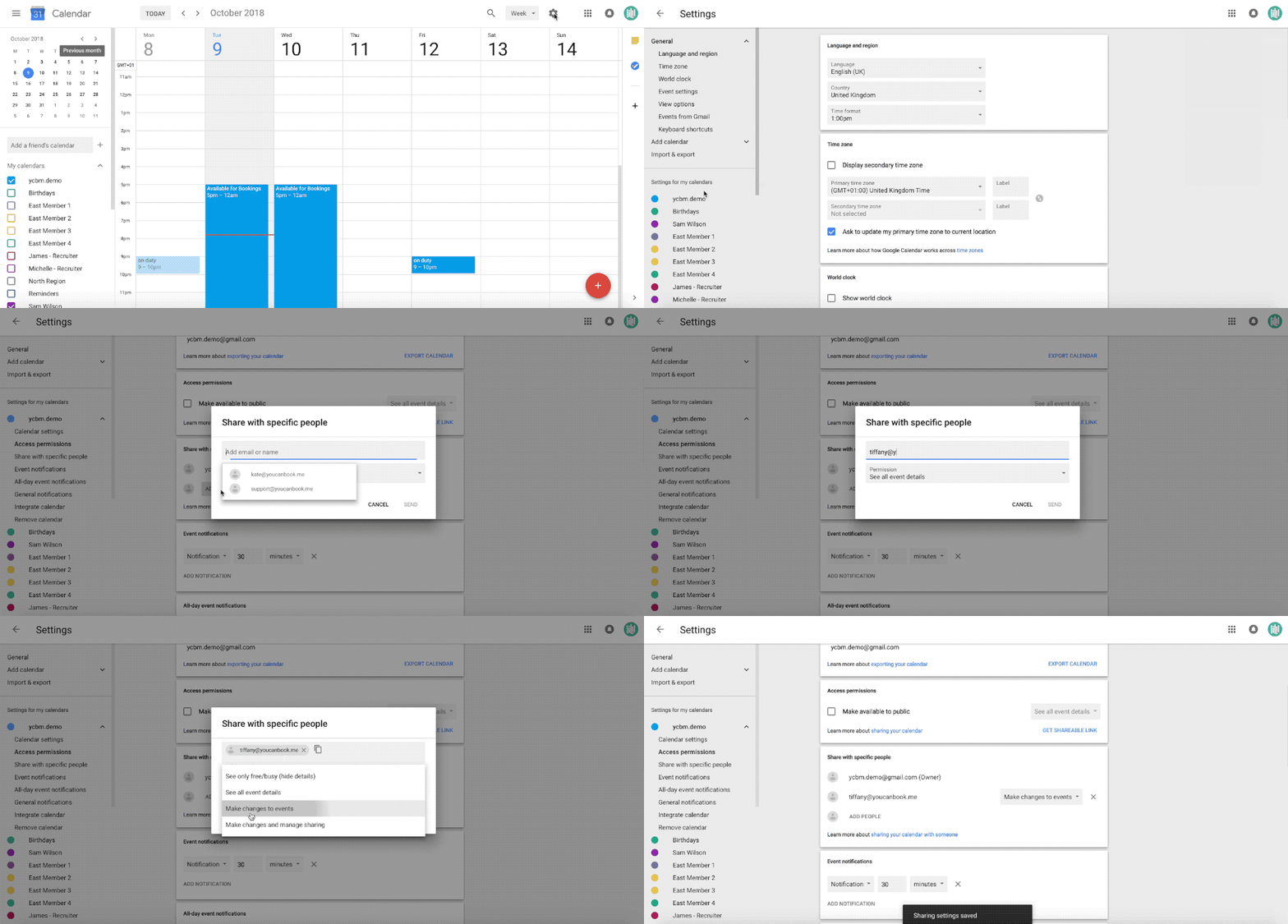
  • Then in the menu option, select Share this Calendar

Sharing Google Calendar to Specific Person:

  • After that you can add the email address of the person to whom you want to share with.
  • In the drop down menu available on the right side you can set the permission level.
  • Finally, Add Person and select Choose.
Share calendar to specific persion

Sharing of Calendar Publicly:

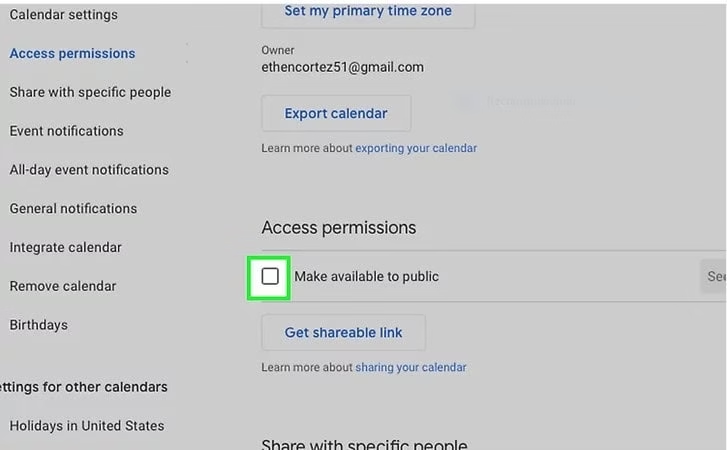
After following the above few steps if you want to grant the access of your calendar publicly then you can simply select the option Make available to the public present under the drop down menu of the Access Permission tab.

Ultimately an email will be sent to the person to whom you have granted access and after accepting that they will also be able to view the calendar schedule.

Access permission

Having problems syncing Google Calendar ? Read this.

Here is a quick guide to resolve your issue on Android mobile phone:

First Solution:

It often happens that the Gmail Calendar remains inactive and for that reason you are not allowed to sync. So to find out whether it is on or off, do the following steps:

  • Firstly, open PC or laptop along with the Google Calendar opened on mobile phone.
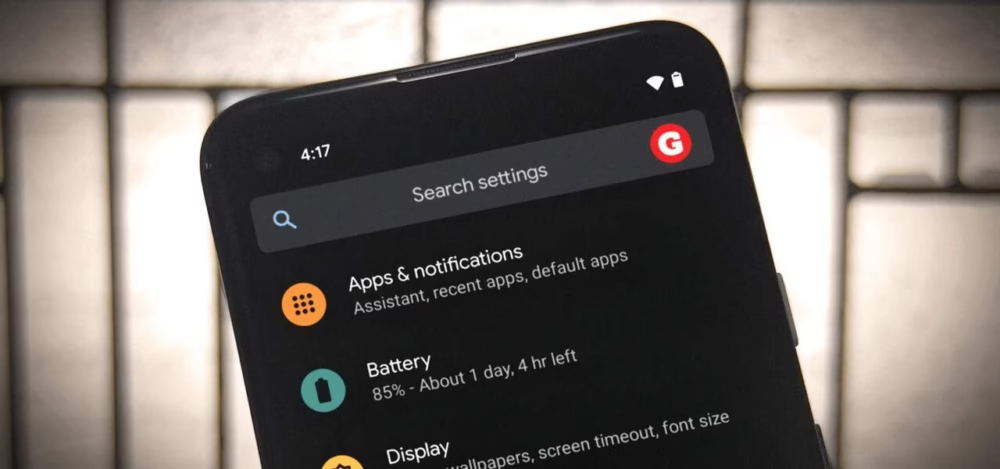
  • Now open Settings of your Android mobile phone.
  • Click on the Apps & Notifications tab and select App Info.
  • After that you have to scroll up the right section of your mobile phone. There you have to tap on More<<Show system<< Calendar storage.
Settings in Google calendar

Second Solution:

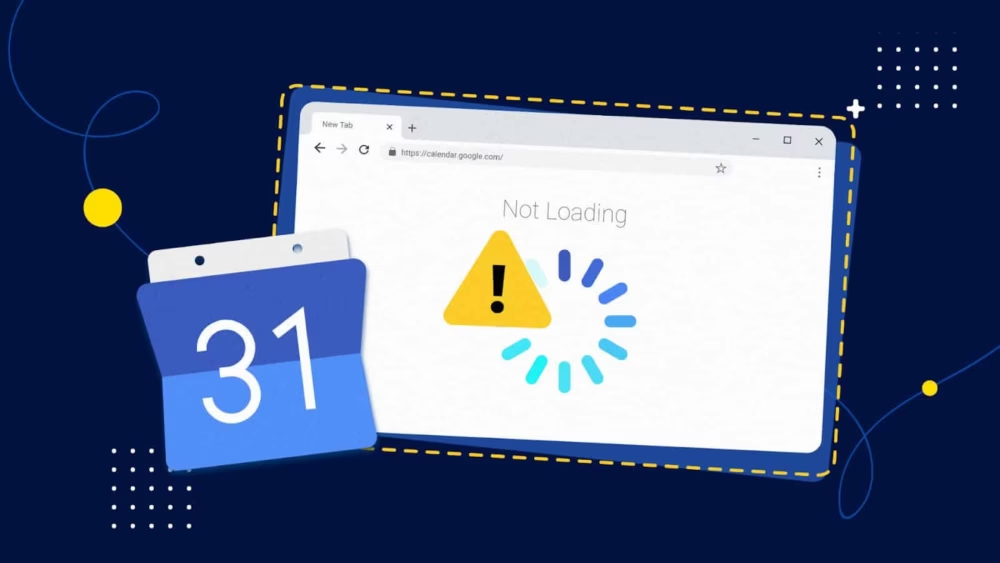
Sometimes the problem can also arise due to connectivity issues or any technical glitch. If this kind of case happens then you will clearly be able to view that on social media platforms that the Gmail Calendar is not synced or is not working.

2nd solution

Third Solution:

Other than that the complication can arise because of low storage. You can fix this by uninstalling the useless application, clearing up the cache or data from Google Calendar.

The consecutive steps will help you to clear the Google Calendar data:

  • Open the Settings of your phone and select Apps & Notifications
phone settings
  • Select the Google Calendar from the list of mobile phone’s application.
notifications
  • Now enter into that and under the App Info tab choose the Clear Data option.
App Info

Consider this as the last option for clearing out the storage because it can lead to the loss of all the data stored. After following the steps and clearing out the space you have to restart the device once again. It may even take 24 hours to sync the Google Calendar with your Android phone.

Fourth Solution:

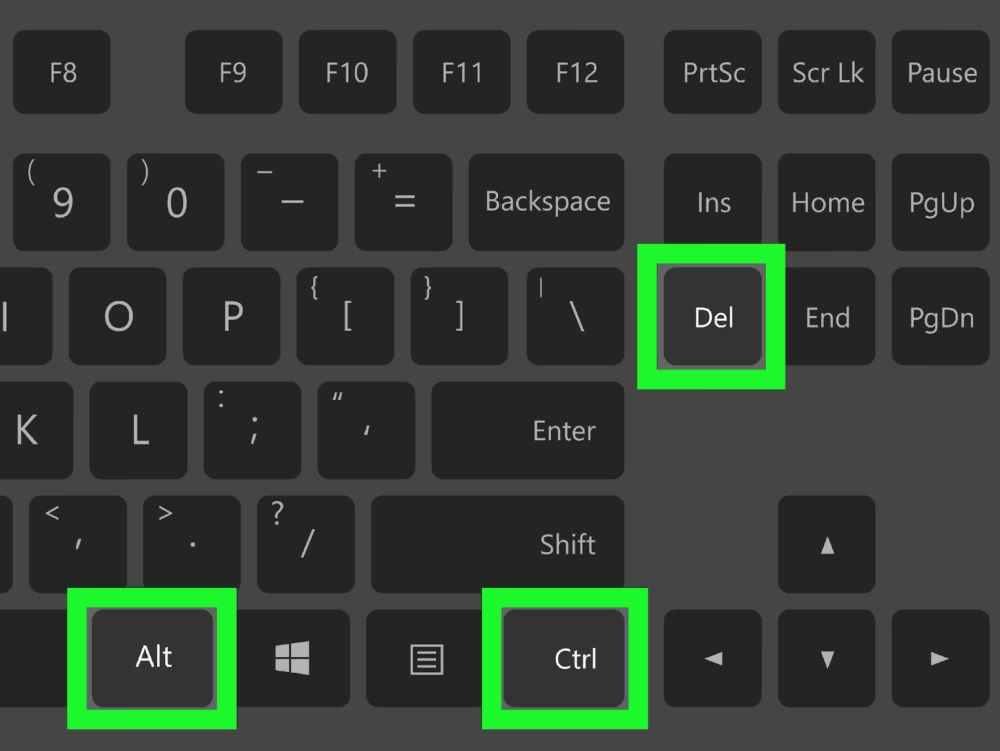
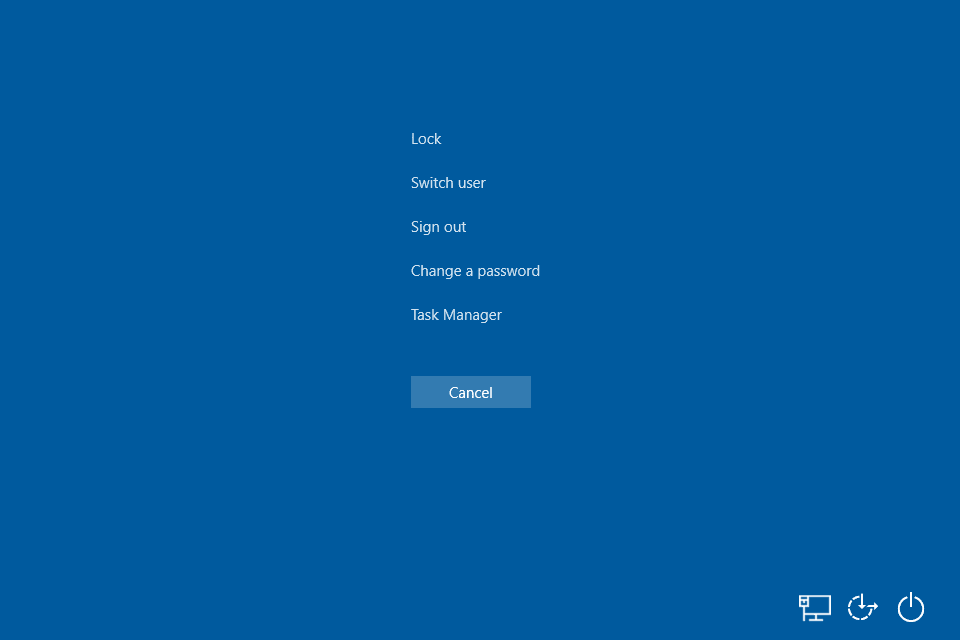
If all the above solutions don’t work out then you can press Ctrl +Alt +Delete.

Del+Alt+ Ctrl

Then after that click, a blue screen will pop up, providing you options like Lock, Switch users, Sign Out and others.

Blue screen

Now you can click the Task Manager for solving your problem.

Who many calendars can you create in Google Calendar?

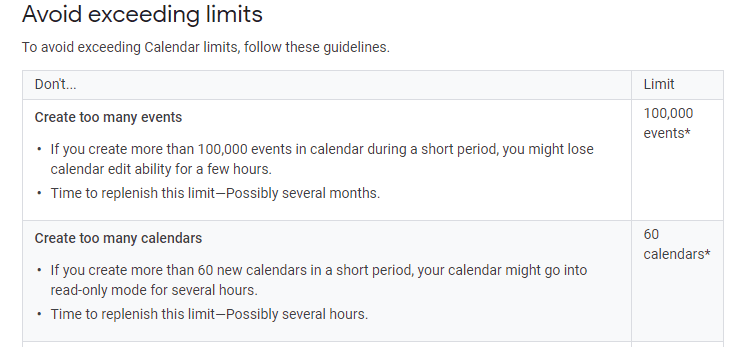
According to Google, if you have created more than 60 calendars then your calendar will only allow read only mode where you can only be able to view the events. On the other hand, you will lose the access to creating a new one.

do's and don't

We have tried to provide you with all the possible solutions along with the GIF explanation to fix your issues related to Google Calendar and make your task smooth. In case if you have any queries related to Google Calendar you can comment that down below. We will pop up a quick fix for you.