Home Blog Page 287

Digital Money and the Future of Payment

Whether it’s for the startling rise in value or the recent plummet that happened just as suddenly, bitcoins have been making news. Recent estimates say that there is more than $2 billion dollars worth of the digital currency circulating around the internet, which means that, wherever this may lead, it’s a phenomenon that deserves a closer look. While detractors say it’s a crazy scheme and economists warn that it’s just another bubble about to burst, there’s something happening here that could have an impact on the future of currency and traditional payments.

digital moneydigital money

What Is Bitcoin and How Does It Work?

Bitcoin is a digital currency that is bought, sold, and otherwise traded on a peer-to-peer network without any form of centralized governance. It was invented by an anonymous programmer about five years ago, and it remains an open-source system for tracking transfers and new issuances of bitcoins.

Users can send money from their tablet or PC to any other user around the world, or use it to buy real goods, swap for cash, and otherwise exchange it just like any other currency. The biggest difference, of course, is that it isn’t backed up by any government or private company.

Bitcoin is run by computer code that distributes the currency at a specific rate to people who commit their web servers to running the code. There are thousands of computers around the world currently running these programs, racing to solve a complex puzzle every 10 minutes. If they solve the puzzle first, they receive a certain number of bitcoins. This is referred to as “mining” bitcoin, and it can be done by anyone with the right technology and enough dedication. There’s no qualifying tests or certifications involved.

This digital currency has been called the most provocative (or at least the most passively interesting thing) to happen to the global currency market since the euro was adopted. It has performed surprisingly well for what some would call an economics experiment, even better than many other national currencies, but there are many concerns that come with it.

Why Is It So Popular?

global-wallet-downloads

(Graph courtesy of: zerohedge.com)

A lot of the sudden growth of bitcoins has been attributed to the debt crisis in many European countries. Bitcoins shot up in value in March, right about the time when Cyprus announced plans to impose losses on bank deposits. As the government considered taking a percentage of all its citizens’ bank accounts to deal with the financial crisis, many people lost confidence in government-backed currencies. As other European nations watched this unfold, many of their citizens started looking at different options in case their own government tried the same thing.

Another possible reason for increased interest could be related to the official regulations in the U.S. on private digital currencies. Now, as companies exchange digital bitcoins for real money, they will have to comply with the same regulations that affect any other currency exchangers (verifying the identities
of people exchanging money and reporting large transactions to the government). It wasn’t so much the actual regulations that boosted the popularity, but the idea that somehow there is validity to the currency if the government is willing to regulate it.

The Most Volatile Currency

New currencies don’t just slip in unnoticed, and an endeavor like this is bound to see its share of troubles. In April alone, bitcoin reached its highest price point at $260. Six days later it dropped to $60.

But just when you think it would be out of the game after such a steep decline, it had another bounce and, at the time of this writing, sits at over $100. The potential of this new currency is hard to predict, and any speculation should only be done by those who understand all the risks (of which there are still plenty).

Will It Become a Mainstream Payment Method?

Currently, most of the bitcoin usage is done only on the internet, but digital payment methods (like Google Wallet) become more prevalent, it’s not inconceivable that bitcoin could make the leap into other environments. Someone working on a tablet PC in a coffee shop could use it directly pay for a refill, or money could be sent from one smartphone to another and stored in their digital wallets. There is a lot of potential here that will have economists watching its evolution very closely for years to come.

About the Author:
Paul Mansour is enthusiastic about start-ups along with consumer and small business technology. Working within Dell.com, he needs to stay up-to-date on the latest products and solutions and best-in-class ecommerce strategies. In his spare time he can’t resist taking apart his latest gadget and forgetting how to put it back together.
Office 365- Ultimate Office Suite to Work Anytime and Anywhere

0

Introduction to Office 365

Microsoft Office is the most popular office suite that is making every one’s life easier with its robust features, now it has gone beyond the desktop and became a cloud solution which let you work anytime and anywhere on your PC, tablet or even on your Windows powered smartphone. Office 365 is a cloud office solution for collaborative work that gives you the freedom to work in your home, office or on the fly. Office 365 incorporates MS Word, Excel, Powerpoint, Outlook, MS Access, Lync, OneNote and Publisher. Here is what all the stuffs you can do with Office 365.


office 365

Possibilities of Office 365

Work on the Cloud

cloud

Office 365 let you utilize the power of cloud computing, you can access your office applications, documents and settings anywhere by signing in to your account. Your emails and calendars get synced automatically. So wherever you go, your workspace follows you.

Collaborate your Work

collaborative-work

With Office 365 you can you can access your documents from any location and share them with your colleagues to work together by sharing each other’s ideas, before sharing the docs it is possible to set permission to avoid mistakes. The newly introduced comment system let you write or get comments for collaborated documents. Office 365 let you spice up your docs by embedding images and videos with in-built Bing search.

Web Apps

web apps

Office 365 comes up with web apps which allows you to work on browser apart from stand alone apps, this means you can run office products including Word, PowerPoint, Excel, and OneNote on your browser.

Instant Conference

Need to discuss on a matter? Office 365 makes it easy to initiate web conference of up to 250 participants with HD video, screen sharing and note taking features. Just think how this helps you save your travelling time and expenses by improving your productivity at the same time.

Web Presence

Need an attractive website for your company or to sell your products or introduce your services? Office 365 will help you to build cool website with your own domain name. You need not have any special skills to create the website, just   create website by pretty easy tools and make it online in minutes.  You need not pay any costly hosting charges to be on the web.

Feel Secured

physical security

With Office 365 you are secured as Microsoft never scans your emails and documents to show relevant advertisements on the page.

Office 365 Plans

Office 365 comes in different kinds of plans, available plans are home, small business, midsize business and Office 365 enterprise. Go for the plan which suites your needs.

 
This post is sponsored by Microsoft

What Changes We’re Seeing in Penguin 2.0

0

While everyone was waiting for the tsunami that Penguin 2.0 was sure to be, hardly anyone noticed the waves gently lapping at their feet as the new Google algorithm update rolled out on May 22nd. Okay, so maybe it wasn’t quite so subtle, but Penguin 2.0 certainly isn’t the harbinger of doom for spam and black hat SEO that everyone was expecting. In fact, there are many complaints that more spam sites are ranking now than before 2.0 was released, and Google even has a page were people can report spam sites that are still ranking. So what kind of changes are we seeing in the SERPs? Well here are some of the most prominent.

Google penguin update 2.0 what changed

Anchor Text Abuse and Other Unnatural Red Flags

Sites have lost rankings even if they’ve built quality, “natural” links through guest posting or other means and their on page SEO is up to Google’s standards. Usually this is because the links they’ve built have too high of a percentage of exact match anchor text. Meaning that if you want your dog bed page to rank for “cheap dog beds” and nine out of ten of your links have “cheap dog beds” as the anchor text then you shouldn’t be surprised to see your rankings drop after May 22nd since Penguin 2.0 is targeting obvious SEO manipulations.

When Penguin was initially released last year it targeted web spam and black hat link schemes, much like 2.0 is designed to do – just at a much better rate.  A strong indicator of these practices is red flags that look unnatural, like a high percentage of exact match anchor text. Here are some other traits of sites that have seen their rankings penalized after Penguin 2.0 sunk its beak into them.

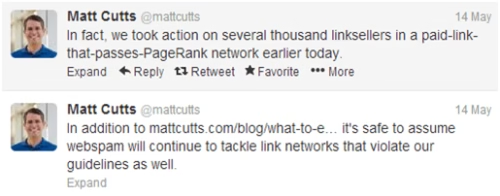
  • Link Networks: Sites participating in link networks who exchange high numbers of backlinks that pass PageRank have been aggressively targeted, even a week before Penguin 2.0 was officially launched as Matt Cutts revealed on his Twitter account.

Matt cutts about penguin 2.0 update

  • Low Quality Links: A natural link portfolio will have links from all manner of sites, including low quality sites, spam, irrelevant, along with industry leading sites. That’s just the way of things and Google expects this. That being said, if 80% of your links are coming from one demographic or area it looks unnatural.
  • Advertisements that Pass PageRank: In Google’s eyes, if a link has been paid for it must be a noffollow, no exceptions. This stops PageRank from being passed to the target site so the only benefit is from direct traffic. Google is getting better at telling if a site is breaching this policy and Penguin 2.0 is seeking them out better than ever before, and you can bet that Google is only going to keep getting better moving forward.

Demotions, not Firings

The majority of sites affected by Penguin 2.0 were not completely kicked out of the SERP, rather it looked like a shuffling of rankings after May 22nd. For our clients who have had a history of bad SEO policies, demotions from 4 – 15 rankings were normal. Many stayed on the page they were on but ended up near the bottom while others are farther back in the pages. This may not seem like a big demotion, but if your site is depending on high rankings for competitive keywords to drive the majority of the traffic then you can see immediate and drastic search traffic fluctuations which can affect your bottom line.

If you think that you’ve been hit by Penguin 2.0 it’s important to realize that Penguin and Panda are both algorithm based, not manually imposed link penalties made by a member of Google’s spam fighting team. For a more in depth read on these particulars check out this post by Marie Haynes. The basis is that you cannot request a review for a Penguin 2.0 penalty since it is algorithm based. You have to look into your link portfolio and figure out why you were docked in the first place, and then try to fix it from there. It could be improving your anchor text diversity starting immediately, getting link directory or spammy links removed (or at least disavowed), or making sure you’re not “illegally” getting PageRank from advertisements.

There are many other ways that you may be sticking out like sore thumb and most of the variables depend on your niche, so if you want to figure out how to get out from under Penguin 2.0’s shadow you’ll need to take an in depth analysis not only of your site and the back links, but your competitors as well. Look for areas that are drastically different than the top rankings for your keyword, especially if your competitors maintained or improved their rankings after 2.0. It might sound like a tedious process, but improving your rankings and traffic is nothing to be spurned. Plus, working with Penguin 2.0 and the rest of Google’s algorithm updates will only make your site better since it promotes natural sites and good content.

Thomas McMahon has a healthy respect for penguins and other shaded animals after working with Page One Power, a white hat link building company based in Boise, Idaho.

Secure Yourself Against Identity Theft in 3 steps

The prevalence of identity theft continues to grow despite increased awareness among computer users. As fast as security experts are able to develop tools to protect information systems and users, hackers continue to discover new exploits.

identity theft protection online

The Federal Trade Commission’s annual study reported that 12.6 million Americans fell victim to identity theft in 2012. This resulted in a total loss of almost $10 billion from related fraudulent activity. Companies have a fiduciary duty to protect not only their customers’ personal information, but their employees’ personal information also. The best defense against current and future exploits is to develop strong policies that will encourage your users to take a stand against identity theft.

Implement a Strong Password Policy

One of the most important steps to preventing unauthorized access to your information systems, employee accounts, or customer information is to tighten up your password policy. Too many users have become lax in creating strong passwords; therefore, it is the administrator’s responsibility to take charge.

Passwords should:

  • At a minimum, be at least eight characters that include three of the following four requirements:
    • Numbers
    • Lower case
    • Upper Case
    • Special characters
  • Not be obvious to others
  • Never be shared
  • Be changed every 30, 60, or 180 days depending upon the nature of information being protected
  • Changed passwords should not match previously used passwords

Instead of using passwords, there has been a trend toward using passphrases, which can be a more interesting process for users. A passphrase can be a quote from a movie or book that can be made even more difficult to guess by substituting characters for letters or numbers and alternating uppercase and lowercase letters throughout.

Implement a Strong BYOD Policy

Today’s mobile workforce has brought challenges to many IT departments. Employees are often required to remain available through phone or email outside of the office. It seems wasteful to require them to carry two Smartphones, tablets or laptops–one for work and one for home. This is where a bring your own device or BYOD policy is beneficial.

In order to protect your company’s information, two-factor authentication is the way to go for employees on the move. This involves having a VPN connection set up on their personal device that requires a password. The second factor involves having certificate installed on that same device that is user-specific and needs to be present in order for the connection to go through.

Users should be made aware of the acceptable use of connecting to the company’s network resources from their personal devices and be required to sign off acknowledging their adherence. This policy should include restrictions on who has access to their device.

Restrict Access to Social Networking Sites

One of the fastest growing ways hackers are able to obtain personal information that can be used to commit identify fraud is through social network sites. This is not just because of instances where LinkedIn or Facebook account passwords were obtained through hacking. The problem is that we have become a nation of over-sharers.

Hackers can easily view information that people post about their personal lives. Information such as your pets or children’s names, your address, where your work, or phone numbers can be easily picked off the Web. Many users are just not aware of how to protect their information from the unscrupulous.

If your users are using your network to visit social networking sites, they may be putting your systems at risk. The best policy is to restrict access to these sites on the company network. Your users may grumble a bit, but in the long run, you may be avoiding a big headache.

These are just a few of the ways you can implement security methods to help fight identity theft in the office and at home. Protecting the personal information of your customers and employees is everyone’s responsibility from the bottom up to the top down; enlist all users in the fight.

About the author:

Katelyn has teamed up with Guardi.us Identity theft protection, an Internet security blog providing resources to help users learn how to remove toolbars and other unwanted software and plugins from their browser.

4 Things to Know Before Starting Your First Blog

‘Rome was not built in a day’. Neither can a blog be! For it takes years of practice, patience and a lot of mistakes to eventually figure out what is right and what might fail.

starting new blog

If you have ever wished to know the things to keep in mind before starting a blog, here are a few suggestions:

1. The need to be social

When you launch a blog, it DOES NOT attract a lot of traffic. Besides, you do not even get any search engine love initially. One, your blog is new, and two, no one knows about it. This simply boils down to one thing: the need to be social.

While it may take years for search engines to recognize your efforts, you can still bring in some traffic via social media. Besides, if you are willing to shell out some money, you can do so by buying traffic in form of ads.

Now comes the most important thing: never vest all your energies on just one social media site. For you never know when people stop hanging around there! Remember, how Orkut went down? If you are thinking, “what Orkut”, you get the point!

2. Consistency

Really, this one is the key to grow. And it does not mean you go inert for a couple of days, and over-compensate by pouring in ten posts when you become active again. This will surely tank down your traffic.

So, unless you are not passionate about what you are writing, don’t blog! You’ll lose interest, the updates will become less frequent, and your audience will gradually fizzle out.

3. It is on the web forever

Of course, you can’t come up with something interesting all the time. But this does not mean you feed your blog with mediocre content. You must know that what goes online stays online. Treat your blog like gold and do everything in your capacity to keep it groomed.

4. Grow your E-mail lists

It is through your e-mail lists that a lot of traffic will come in. In fact, this tried and tested way of growing your audience is a sure-shot hit.  Make sure you create an opt-in form on your site and give a great incentive like free E-book, white paper, etc, to get people to sign up for your e-mail list.

Besides, keep these in mind:

  1. Since a new marketing strategy will always keep coming-up, strike it when it’s hot!
  2. – Keep every article short and crisp. Follow a similar style across all
  3. – Design your blog well
  4. – People matter. And so do their comments and every Email

If you want to make your blog a popular place to be, focus on one thing at a time. Of course, implementing all at once is a daunting task, but in the long run—you will realize the importance of each.

About author

This is a guest post by Vishal is the founder of Appsquare.com.auan app development company in Australia that creates innovative apps, provides part funding for selected app ideas and also helps app developers get funding through its network of Venture Capitalists and Angel Investors.


Moborobo app- All in one PC Suit for Android and iPhone Smartphones

If you are searching for a free PC Suit to manage your Android or iPhone smartphone from your PC or laptop then here is the most useful tool to you i.e. Moborobo app. This software allows you to download & install apps, send and read the received SMS, backup and restore the contacts, SMS, installed apps, images, backup music from your iPhone or Android smartphone to your PC. Let me list out all the possibilities of Moborobo PC Suit but before that let me explain its cool user interface.

Moborobo’s App User Interface:

android PC suit

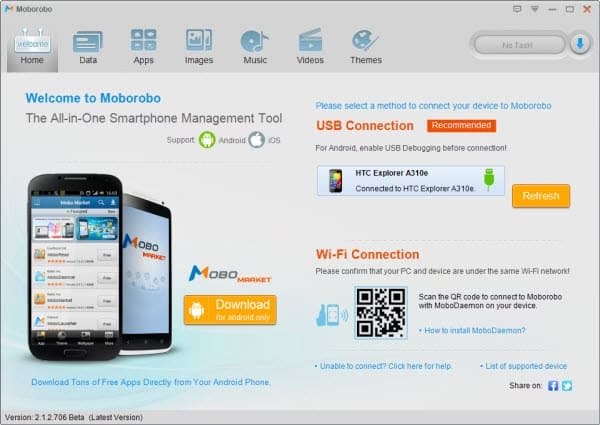
Moborobo app comes up with tabbed user interface, we get seven tabs once we launch this software. Let me describe some important tabs in brief. First comes the home tab which is a dashboard that holds your mobile information such as firmware version, battery status and connection type etc., second one is data to manage your contacts, messages and calls. Third one is App tab that allows you to install or uninstall the existing apps from your mobile, then comes image, music and video tabs to manage respective multimedia right from your PC.

Possibilities with Moborobo PC Suit

This PC Suite is a feature packed PC Suit for Android and iPhone that allows you to do many tasks related to your smartphone, you can use Moborobo app manage android to send and read the SMS, manage your smartphone’s multimedia data including images, ringtones and personal files. Here is the detailed action of each tabs of Moborobo PC Suit.

Data

Data tab allows you to send and read the received SMS directly from your PC, along with this you can reply to a message, forward or delete the SMS, add new contacts right from Moborobo app. Apart from this it is possible to have a look at call logs including incoming, outgoing and missed calls.

moborbo android data page

Apps Section

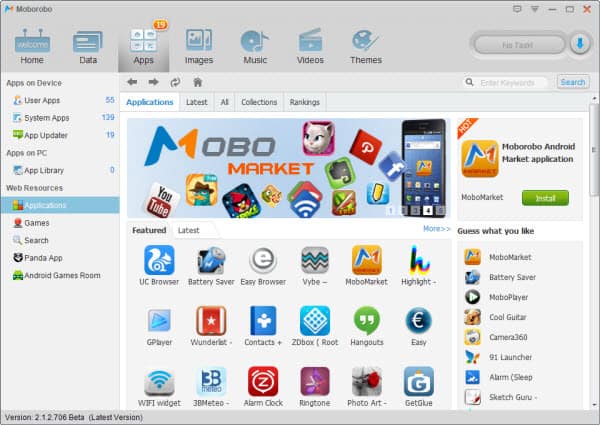
Apps tab displays installed as well as system apps, here comes one more cool option called “App updater” which shows the apps which can be updated.

Images Backup Section

You can browse through your mobile image gallery from images tab, you can also download stunning web images to your mobile from wallpaper center.

Music Backup Section

Music tab lists out the music and ringtones of your mobile device, you can also download your favorite ringtones from pandaapp web resource.

Backup Videos

Here you get the videos of your mobile and you can download cool videos from web resource.

Outstanding Features of Moborobo PC Suit

Apart from data manipulation Moborobo app comes up with some great features which are usually not found in other PC suit solutions,.

Effective Contact Transfer

Moborobo app offers users simple and effective contact transferring. It supports normal contact transferring between Android devices or iPhones, as well as the cross-platform contact transferring from an iPhone to an Android and vice verse. This makes it easy for smartphone vendors to help their customers to transfer contact data from their old ones to the newly purchased one.

Also read: How to Backup Android to Gmail

Download everything at no cost

Moborobo app is packed with an Android/iOS resource centre offering you Apps, Ringtones, Wallpapers for both Android and iPhone. All resources are free to download. As you are using your PC’s internet connection and then install Apps or other resources to your Android/iPhone, it will avoid spending money for internet packs for your smartphone.

moborobo android apps import
moborobo images

App Batch Download

Download your favorite apps in batch, this makes it easy for smartphone vendors to install bunch of default apps to the smartphones they sell.

Moborobo File Manager

Moborobo app packs an advanced yet easy to use file manager that allows the users to manipulate the data of your mobile. It supports list and title view and allows you to download any file or folder to your PC or upload them to your Android/iPhone.

sd card moborobo

Complete Backup & Restore

Backup your contacts, messages, call logs, images, themes, music as well as installed apps and restore them in case of loss of data

moborobo backup

More features:

  • Transfer the contacts of your old iPhone or android phone to your new smartphone
  • Backup your contacts, messages, call logs, images, themes, music as well as installed apps and restore them in case of loss of data
  • Download your favorite apps and games using your PC’s internet connection and then install the same to Android phone, this avoids spending money for internet packs for your smartphone
  • Download your favorite apps in batch, this makes it easy for smart-phone vendors to install bunch of default apps to the smartphones they sell
  • An advanced yet easy to use file manager that allows the users to manipulate the data of your mobile.

Along with these useful features it has one more must use option i.e. “Phone cleanup” to clean your mobiles’ cache files to free up the space and improve the mobile performance.

Moborobo APP Market

moborobo app market

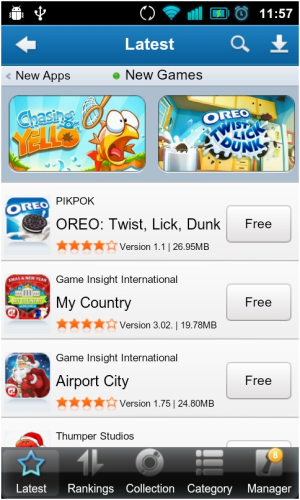
Moborobo app has an official Android Play store application i.e. MoboMarket this app market allows you to search and download your favorite apps, games, wallpaper, ringtone and other free resources. This app market recommends new apps according to your interests in a well organized manner. The interesting fact is that you can download all these stuffs to your desktop then install it to your mobile to avoid costly mobile data bills.

moborobo market
moborobo app market new apps

Connectivity Types Supported by Moborobo app

You can connect your mobile to Moborobo with either regular USB or WiFi. Make sure you have enabled USB debugging mode before initiating the connection via USB.

Conclusion

Moboroboapp is a free PC Suit to manage Android/ iPhone mobiles for both consumers and smartphone vendors. This one is the best Android/iPhone management tool that comes up with most advanced options in an easy to use interface.

Website: http://www.moborobo.com

Direct Download:

If You’re a Newbie Blogger Make Sure NOT to do These mistakes

Who don’t want to earn more money? Everyone want to, right? And the next thing is that everyone wants to earn money in easiest possible way, right?

But that’s not true. To earn money you need to work hard anyhow. These days, internet is getting really popular and there are thousands or lakhs of ways to earn money over the internet but again, it’s not an easy task at all. For newbie particularly those who are young, the best way to earn money via internet is by blogging. But not every blogger earn the money he dreams of or in other words, not everyone gets the taste to success, why?

blogging mistakes new blogger

As I’ve already got the success in my blogging career so many times I’m being asked by newbie bloggers about my action plans or whatever I did to get up to here. But I don’t want you to go with my plan because in blogging, every successful blogger has his/her own unique way and that’s how people remember them. The main thing you need to learn is that use your mistakes to get the success. Now question comes in mind is HOW?

First let me tell you all the top mistakes by bloggers. If you find yourself in then I’ll be sharing one valuable (not simple) solution at the end.

Mistake#1 Earning Money is Easy

First biggest mistake everyone does (even I did) is that earning money via blogging is very easy. We need to build one blog, write some stuff, Google will send traffic and we can monetize our blog to earn thousands easily.

But in reality, it is very hard to earn thousands via blogging. Blogging is like a business and here you need to take risk, become professional, gain lots of skills and then promote yourself to get conversions.

Also read: Unexplored Ways of Monetising a Blog for Maximum income

Mistake#2 SEO is the Only Magic

Next thing is that bloggers starts thinking that if they learn SEO then they can get lots of traffic and then that can be converted into money.

But in reality, learning SEO is not an overnight process and these days SEO is changing continuously. So you need to be very professional here and learn things quickly (at the speed which Google wants).

SEO is not any magic so if you thinking that if you do SEO then you’ll get traffic then it’s not going to work at all. It may work for some time but it will not last for more than 2-3 months.

Mistake#3 I’ll remain Anonymous

I’ve seen this thing with many bloggers, particularly with the newbie. They don’t want to show their name or face over their blog, but why?

Let me make it very clear that even Google want to see your face and Google wants that readers should see your name and face over your blog. Now if you don’t go according to Google, then how you’ll find your success online?

Mistake#4 Blogging is all about make money

As you know money is everywhere, you can make it with any type of smart work with any type of niche not with blogging. But you make or break that depends on your skills of learning new thing about blogging and applying it on practical ways and scaling it up instead of blindly following others ideas or success stories.

The Valuable Solution

You need to first learn one particular thing and want to become very professional in that. Like you can learn about Windows 7 and then start one blog particularly on that. Share tips, tricks and your own valuable knowledge with readers about the Windows 7. Keep things looking professional and blog should have a good design and proper navigation. This is how you can get the success but again these things are not easy but they will work for sure.

About The Author: Tim Wilson works as content manager for HostPapa, a web hosting Canada company serving over 100,000 customers. Since launching in 2006, HostPapa has offered reliable, budget-friendly, easy-to-use Canadian web hosting solutions for small to medium-sized businesses.