Home Blog Page 286

Get WhatsApp On iPad Without Jailbreak

5

Whatsapp is my favorite mobile app, and since I love iPad and have it most of the time, I was trying to do some research to get WhatsApp on iPad.

So you have come to this page to learn how to install WhatsApp on iPad, lets begin and let me also tell you this trick also works for iPod.  The following tutorial is for Jailed iPad. For those who have jailbroken iPad, you can start from STEP 5 and skip the rest.

Whatsapp on ipad without jailbreak

How to install Whatsapp on iPad or iPod.

Lets begin!

Things you’ll need for this trick:

Everybody likes list, so I’m going to list the procedure as steps. Don’t worry, even I don’t like to read long boring steps either, so I’ll make it as simple as possible.


STEP 1.

Open iTunes on your Mac or PC and click on “iTunes Store” and search for WhatsApp to download it. Yes, I mean download it on your PC/Mac instead of downloading on iPad. Don’t worry we’ll get there eventually.

STEP 2.

Find the WhatsApp file you just download, go to  “iTunes Media Folder” that’s where your file is saved. The filename would be something like this “WhatsApp 2.10.2.ipa”.  (While writing this post, the latest released version is 2.10.2, so the filename would change when they update to new. )

Default location on Mac:

~/Music/iTunes/iTunes Media/Mobile Applications

or 

~/Music/iTunes/Mobile Applications

Default location Windows:

C:\User\Music\iTunes\iTunes Media\Mobile Applications

STEP 3.

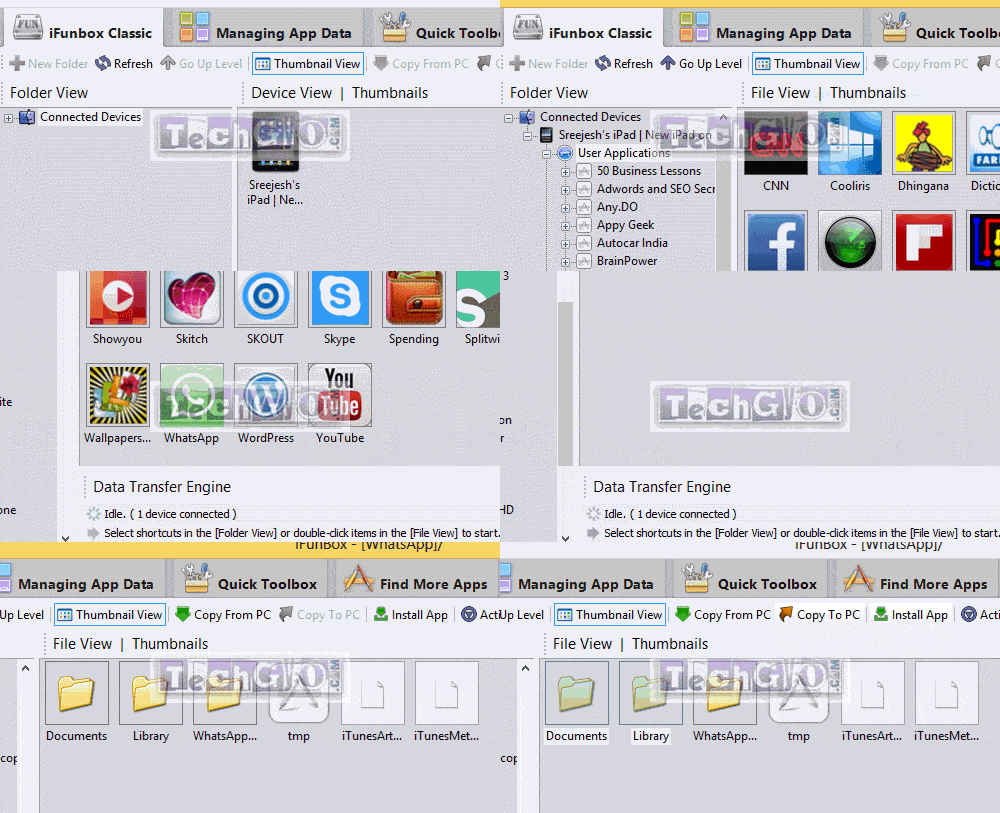
Download and install iFunbox (We’re gonna use this tool to install Whatsapp on iPad) . Now connect your iPad or iPod to your PC or Mac. Then on iFunbox window ignore all the fancy stuffs and tell your eyes to locate “iFunbox Classic” on the left top and click on it.

STEP 4.

 Under “iFunbox Classic” at the right end you’ll find a green button which says “Install App”, yes EUREKA!! you found it?  Yes, that’s the magical button, now please click on it and browse the “WhatsApp 2.10.2.ipa”  file from the iTunes downloads folder, refer step 2  for default location.


Activating WhatsApp on iPad using iPhone

Now, you finally have WhatsApp on iPad, but wait don’t get excited and open it, because we still have a bit of work left to do. If you try to open the app now, your iPad is going to get rough at you and through an error like this “Sorry your device is currently not supported“. If you already opened the app in excitement and got this error, you’ll have to delete Whatsapp from iPad and restart from STEP 4.

Even though you have whatsapp loaded on iPad, you cannot activate it since it is not a cellular device. So we’ll have to activate it from iPhone and then move the activated files to your iPad.

STEP 5. 

In this step, you’ll need an iPhone, if you don’t borrow it from someone, but please don’t steal it. Promise me you won’t 🙂

Now, install WhatsApp on iPhone, if you already have it installed, you still have to delete it and reinstall WhatsApp, If you borrowed this iPhone from your friend, he is not going to like you deleting it, so backup messages before you delete. If you don’t know how to backup, ask me in the comments section at the end of this post.

STEP 6.

Once you have reinstalled Whatsapp on iPhone, activate it with your number. This will be the number you’ll have on your iPad. After activating your number, connect your iPhone to your PC or Mac. Again, click on the “iFunbox Classic” Tab, under the sidebar folder tree, you’ll find you connected iPhone’s name, under it, click on “User Applications” then find  WhatsApp from the list and double click on it.
WhatsApp on iPad jailed


In the next window, you’ll find couple of files, ignore the rest and select the two folders “Documents” and “Library” and then click on “Copy to PC” button from the menu. Save it on your PC/Mac and remember where you saved it.


Step 7.

Disconnect your iPhone, and now connect your iPad or iPod. Again open iFunbox and click on the “iFunbox Classic“. Like you did on STEP 6,  go to “User Application” and double click on Whatsapp from the list, here you’ll find the same folders “Documents” and “Library”,  delete both of them and paste the two folders you just saved from iPhone in STEP 6.


Thats it, you are done. Enjoy Whatsapping on iPad.

Got stuck with problems? We’ve got supermans here to help :), let us know in the comments section. Please don’t ask if you could borrow my iPhone 🙂
Could IPad 5 Be Better Than The IPad Mini

1

Apple. Inc is renowned the world over for its contribution to the mobile technology. This is through the constant release of the iPad and iPhone models every year. Last year, it announced the arrival of iPad Mini to the market. This year, there have been rumors of yet another brand, the iPad 5; though it is still not clear when it would be announced. It is yet to be seen whether the coming iPad will have any significant performance feature than the mini.

ipad5 could be better

The iPad 5 is expected to retain the 9.7” display screen. The A6X processor, however, is expected to be upgraded to an Apple A7 processor. This would increase the processing speed of the device as compared to its predecessors. However, the upgrade is not rumored to be the only change; it will incorporate a reduced size and weight than the previous year’s type. As the rumors continue to filter into the market, with no apparent and set date of announcement; customers are waiting for the exact day when this much graded device would be released to them. People continue speculating about the features and prices of the new model, but none of them can be said to be true until it is officially announced by Apple. With the existing rumors, case manufacturers have started producing the iPad 5 cases in response to the leaked rumors. The cases are being
designed to fit with the lighter and smaller (reduced width and height) device, with the screen size of the cases remaining the same. The ports are also expected to retain their positions, like the previous ones.

The iPad Mini, meanwhile, was announced last year October and released in November to the
market by Apple. Featuring a 7.9” display screen and a screen resolution of about 1024 X 768. It is light and small, fitting perfectly well on the hands. The Mini uses Apple A5 processor, which may be seen as slower than the A6X; but it processes speedily well for a mini. It is fitted with both back and front facing cameras and can easily access the Apple’s Siri application like has been the case with its predecessors and the App Store. It also comes with great stereo speakers at its bottom, which to most people has outshined the iPad 4.


Ever since it was released last year, iPad Mini covers continue to spring to the market. The covers are merely a slight reduction of the previous Tmart iPad covers. Different people have varied preferences for covers, and there is a wide range of colourful iPad Mini covers to choose from. The smart cover, which was introduced with the advent of iPad 2, has now been reduced to fit the Mini. With its three folds, it can convert into a stand; as it is stuck together by magnets. It frequently cleans the iPad Mini front.


With the streaming rumors about the 5th generation iPad, it is clear to see that it is going to be a better model than iPad Mini, in terms of the processor, its display, size and lighter weight. It is actually an upgrade of the previous models; especially should it introduce the A7 processor.

Bitdefender Total Security Review: The Antivirus To Get!

Bitdefender has always been a pioneer in internet antivirus software and its latest iteration Total Security brings some remarkable features to their lineup of antivirus software which clearly move it ahead of the bunch.

Get WhatsApp On iPad Without Jailbreak

A security suite might be a simple antivirus for some of you, a internet firewall for some but what Bit-defender brings is something that is a hell lot more. It brings in features that will secure you completely and there will be nothing to think about. It covers all aspects of the word “security”. Today we’ll be reviewing the Bitdefender Total Security Suite so read on..

Also check other Antivirus Review on TechGyo
VIPRE Antivirus Review
Kaspersky Anti-Virus Review
Avast AntiVirus for Mac Review
Kaspersky All in one Review
ESET NOD 32 Speed Performance Antivirus Review

Features of Total Security

Bitdefender_4

There are not one but lots of features in this latest Bitdefender Securitysuite so here we go:

  • Bitdefender Total Security features protection from the cloud thus keeping you protected all the time without harassing you with notifications.
  • Social networking has become an integral part of life but it can be the means of viruses and malware since we never know if our friend’s computer has malware but thanks to Bit-defender, it even blocks malicious stuff from our social networking websites.
  • Thanks to Bit-defender we can be cool always as it even checks our online data, our emails and stuff and keeps us safe from all sorts of malicious software.
  • It has a new feature called “scheduled scanning” which makes sure our computer doesn’t bog down due to Total Security-Suite as it scans the system only when the system is running idle.
  • There is a Dashboard named MyBitdefender Dashboard which features all the information you need like the license status and the best thing about it is it is accessible anywhere on any internet enabled device and anywhere.
  • The security widget makes sure you can keep track of all the PC protection related stuff with ease. It can also be used to quickly scan a file or a folder just by dropping that file into the widget and that from the desktop, its as simple as it sounds.
  • If you are a parent and want to make sure your kids aren’t getting spoilt by the internet then there is the Parental control feature which lets you block access to websites, block an internet connection for a fixed time and monitor everything your child does, even Facebook.
  • We get a lot of viruses through USB Pen drives but worry not now as Bit defender has a USB Immunizer software which not only kills the virus but also makes it immune.
  • Bitdefender brings Active Virus Control which monitors your tasks and processes to see if there is a virus harming your computer real time.
  • There is a feature which i personally like is Rescue mode. What is does is if you have a e-threats or rootkits then the computer is restarted and gets booted in the Rescue Mode which is where Bitdefender does the cleaning.
  • The Vulnerability Scanner checks for missing Windows security patches, outdated softwares and unsafe system settings in your PC.
  • Antispam makes sure spams don’t bother you anymore. Any unwanted email won’t reach you.
  • Total Security features two way firewall so that the firewall continuously monitor your internet connections as well as blocking unauthorized connections and even if you are on a WiFi network.
  • Bitdefender-Autopilot™ is one of the special features that the latest Bitdefender-Total Security iteration brings. What it does that it takes defence protection based decisions like configuring and all, all on its own rather than annoying you with pop-ups and  notifications.
  • The Personal data Filer makes sure you important secure that never gets lost or deleted.
  • Total Security analyzes and blocks websites that are scam and may try phishing attempts.
  • Thanks to the awesome cloud services of Bit defender, when you do a search it makes sure that you stay away from malicious and spam results.
  • When you delete a file on your PC, some of its traces may remain but file shredder technology by Bitdefender makes sure that no traces of your sensitive file is left on your PC when you delete it.
  • Bitdefender-Total-Security features File Encryption which keeps your important data, files in a safe encrypted environment.
  • The Scan Dispatcher feature makes sure your system responsiveness does not come down when the anti virus is scanning the system.
  • In case you feel your computer is slowing down then worry not the Total Security suite comes with a Tune-Up module which cleans up temporary files, registry for a more pleasing performance.
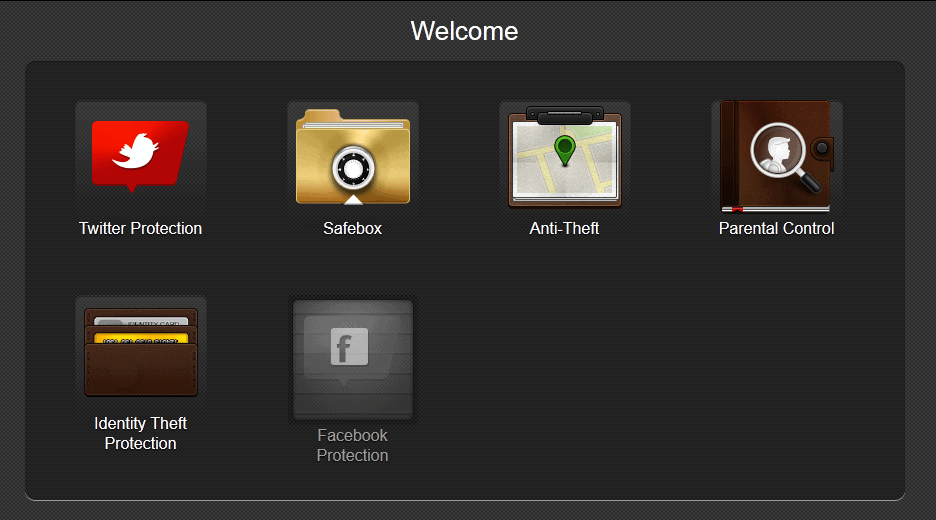
  • Total Security beings Bitdefender-Safebox™ which is their online storage which stores all your important and sensitive files and you can access them anywhere even from iOS and Android devices.
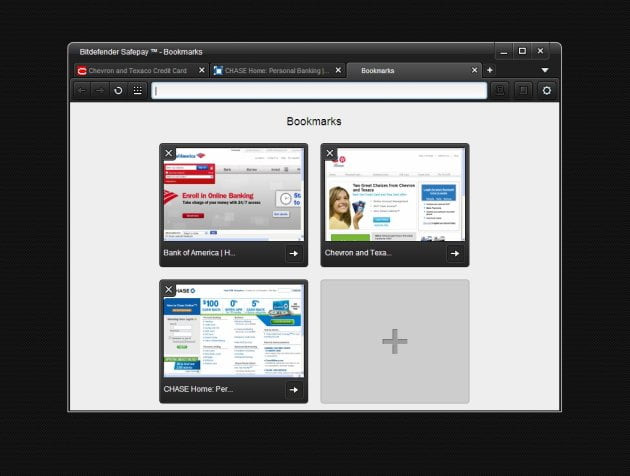
  • Bitdefender-Safepay™ is a browser made for your online transactions. It detects any online shopping or banking page and opens it in own safe environment so that you can make transactions securely.


Ease of Use and Interface

Bitdefender_5

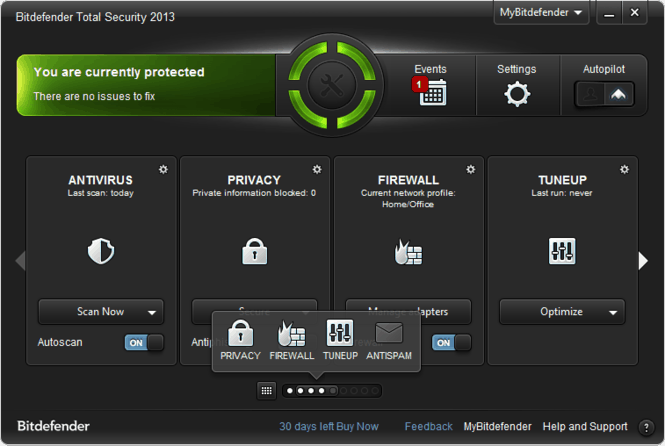
The user interface is very easy to navigate and you get all the important fuction of the antivirus software upfront so its nice that you don’t have to get lost in menus. You can also put security widget to show you your current status in real time but its a little too big ugly to be honest although it may serve a purpose to many.

There is a big circular symbol right on your desktop which shows whether your system security is up to date and if its green then yes everything is safe. The software is not really resource hungry and is light on the CPU which is a really satisfying thing to know because mostly people see antivirus softwares as the softwares which bog down their system.

The virus scan is not really fast by any means although that is obvious i guess. Once the scan is complete, it lists out the threats and gives you options for action.

The Bitdefender AutoPilot mode is certainly good as it detects when you are doing a resource hungry task such as playing games and lowers the protection level so that your system remains smooth and running hassle free.

Overall the ease of use is good and even the interface looks quite better than the previous iteartions and no user will have any problems with it while features such as the AutoPilot makes sure we love the Bitdefender-Total Security Suite.

Advantages over the competition

There are some serious contenders in the antivirus space such as Symantec with its Norton antivirus, Avast with its Avast antivirus  and others but Bit defender Total Security brings some really advanced features to match and even get over the competition.

Bitdefender_3

Firstly is the Bitdefender AutoPilot, it is truly remarkable what the folks at Bitdefender has done here. What it does is that it takes your security decision on its own without hassling you with those annoying notifications and this is something which i personally love. this alone can make my deal done with Bitdefender’s antivirus program rather than going with the competition. Next is the Safebox feature which is an online storage service which keeps your files safe online and you can check them from your Pc or even your iPhone, iPad and Android devices although they still don’t have Windows Phone or BlackBerry support plus the first 2 GB is free after which you have to pay to use the service.

Bitdefender_6

The other awesome feature is the Safepay which truly makes us  do online transactions with a lot of ease and content. It is a separate secure browser which is very basic but gets the job done very securely. When you open an online banking or shopping page on your default browser, the Safepay browser automatically opens so that you make go ahead and do the transaction more securely. Another thing which i personally like is the USB Immunizer which works quite well.

So these are the features which truly give Bitdefender an edge over the competition.

Conclusion

Bitdefender Total Security should bring the company right on top in the antivirus competition as the it ticks all the right places in usability and features. The antivirus engine is surely great with no problems whatsoever. If you ask me then yes this is the antivirus to keep your PC secure as the one feature AutoPilot truly makes the deal for me. You can go visit Bitdefender’s website to get going and know more. And do check out the video below about it as well.


Should I Sell My Business Through A Business Broker Or Online?

If you are thinking about trying to sell your business, you need to consider all of your options in order to decide what is best for you. When trying to sell a business, there are basically two different routes that you can go. The first option is to hire a business broker to sell the property for you, while the other option is to try to sell the business yourself by listing it on a private business sales website. In order to determine which the best option for your business is, you need to look at your priorities and what the most important thing you Online business vs broker businesswish to achieve with the sale is. To make it easier for you to make a decision, we will look at each option and its benefits.


 

Selling Your Business Through A Business Broker

The majority of people who are trying to sell their business end up hiring a business broker. However, part of the reason for this is that many people simply are unaware of the fact that they actually have other options. Still, if you are looking to simply get rid of your business as easily as possible, then you should consider hiring a business broker, as this option requires almost zero work on your part.

You can leave it to the broker to list your business, find potential buyers, negotiate the sale, draw up the contracts, and finalize the sale. All you will need to do is agree to the terms and sign the contract. If this is what is most important to you, then there are definitely benefits to hiring a broker to help you complete the sale.

Benefits of Using a Business Broker

Don’t Have to Do it Yourself

As stated earlier, hiring a broker allows you the freedom to concentrate on other things and the ability to have someone else take complete control of the sale. By hiring a broker, you will not have to do any of the work yourself and can just sit back and see how much you can make from the sale.

Broker May Already Have Contacts

Another reason that is can be easier to hire a broker is that they may already have contacts and know of people who are looking to buy a business similar to yours. Many people who are looking to buy a business actually hire brokers themselves to find a business to buy, so it may very well be that the broker you hire is already in contact with potential buyers. This will make the entire process go much quicker and more smoothly.

Selling Your Business Privately

If you are concerned with making the most possible profit off of the sale of your business, then you should consider learning mnore about how to sell a business on your own. This will allow you to avoid the incredibly high commission fees charged by business brokers and also give you the ability to negotiate and complete the sale on your own terms. The best way to go about selling your business privately is to list it on one of the many for sale by owner or private business sales websites. You will still have to pay for these listings, but these websites only charge a fraction of what you would have to pay to a broker.

Benefits of Selling a Business Yourself

Don’t Have to Pay Commissions to the Broker

As stated earlier, you can save yourself a huge chunk of money by not hiring a broker and paying the high commission fees they typically charge. This is probably the main reason that people sell their businesses privately, especially when they are looking to make the maximum profit off of the sale.

You Do Not Have to Wait on the Broker for Feedback

Selling your business yourself allows you to have complete control, meaning you won’t have to wait on the broker for feedback. Instead, you can negotiate directly with the potential buyer, which could make the entire sale process go much quicker and more smoothly. Having complete control of the negotiations, you can also dictate the terms of the sale more easily and ensure that everything is done in a manner that is right for you.

About the author

For Sale For Lease are an online service that help business owners, private home owners and landlords to list their property or business for sale online privately without the need for an agent or broker. Visit their website for more information – http://forsaleforlease.com.au/business/

V-Energy presents “Silence The Troll” campaign for V-hab !

0

The internet is full of positivity, knowledge and other good things but we all know there is a lot of darkness in this world as well. We all know what “Trolls” mean as we have our fair share of experience of dealing with them and there maybe some of you who actually love trolling. For those of you who don’t actually know who a Troll is or what is Trolling, we are happy to help even it being simply an internet slang rather than being a proper english word. A troll is someone who exudes negativity throughout the internet, they are the ones who post inflammatory and negative thoughts in an online post, forum with an intention to provoke people into a response. So V-Energy have just hit the right spot as they are bringing in their newest campaign for V-Hab which reads “Silence The Troll”. Sounds interesting, i know.

silence is troll V-energy

V-Energy drinks are pretty well known and right now they have focused their new campaign on the growing Troll thing on the internet. V-Energy have released a video on YouTube of their new campaign which focuses on countering negative energy and spreading positivity all around. All the incidences in the video are taken from real world internet situations such as YouTube, Twitter and online gaming trolls which makes the video truly fun to watch. V-Energy have also brought about an campaign at their V-Hab webisite.


The video shows people in real world situations acting as trolls just the way they do on the internet. This can surely be our future as people start trolling in the real world as well just as shown in the video. The video ends with a kitten holding a V-Energy drink that the folks at V-Enery like to call shush kitten (an appropriate online troll antithesis) which manages to silence the Trolls and encourages them to join the anti-troll movement. Check out the video below and enjoy for yourself:


v-energy video campaign


The film has been made by V-Energy to make people go to their online troll rehabilitation website that is V-Hab. The video is truly fun and the website even more, so go ahead and checkout the website for yourself and get into the movement anti-trolling and even if you aren’t a Troll, go visit it just for the sake of fun.


This post is sponsored by V-Energy Drink. All opinions are 100% mine.

Advice for entrepreneurs starting an internet company

Because of the current challenging economic circumstances budding entrepreneurs have to look for ways to cut the costs involved in setting up a new business. Frequently, this involves not buying or renting business premises and building an online presence instead. In some cases, an entrepreneur will focus entirely on starting a new business run via the internet.

advice for interet entrepreneurs

The type of business

Much advice to individuals working on creating an internet company is similar to that for entrepreneurs in more traditional offline businesses; however, there are additional aspects to consider, and new angles to old questions.

There is no one-size-fits-all answer to internet business questions, and one thing that will shape the rest is the nature of the business in terms of operations. For example, an internet business may be set up simply to sell goods, or it may provide services online; advertise and sell traditional services, provide information, or combine two or more of these things. In each case, it is good to clarify the business type, the business goals, and the financial forecast in a business plan, as would be done for any other business.

This website gives information on how small companies and contractors can find support when setting up and running a limited company online.

Getting the website and hosting right

One thing that an internet company needs for success is a solid web presence, which is the equivalent of owning a high street shop with a large footfall. The company website is the shopfront, and it is used for advertising and drawing in new customers, as well as for handling transactions.

A domain name and hosting service can be cheap and easy to set up. Several hosting companies offer lowcost or even free web hosting, and many also provide additional help with acquiring a domain name. This kind of service will only be useful in the very early days, and eventually as the site grows and becomes more sophisticated, attracting high volumes of traffic, a paid service will have to be used.

Creating and maintaining the content of the website can be as simple or as complex as the owner desires. If the site is to be used for e-commerce then professional help will almost certainly be required. Some hosting companies offer templates to assist with website design and content writing can be performed by a third party if necessary.

How to market an online business

Once the website is up and running, it must attract visitors to read the content and buy the offered goods and services. For this to be achieved the website needs to build a presence on the web. The search engines and the use of social media are what will lead to success or failure in this regard. Mailing potential customers will also help to drive traffic to the site.

As far as search engines are concerned, the use of keywords and phrases for SEO (search engine optimisation) in the website content can help to increase the visibility of the site. This is not a quick and easy method and it might take several months to get a site ranking high enough in Google to be found by casual searchers. Paid advertising, such as Google’s Adwords, may well be needed to generate traffic to a new site.

If the site is to be ranked highly by the search engines the written content is now more important than ever. High-quality content that is of real use to site visitors is what is required, in large volumes if possible. To be effective in social media, the business may require separate profile pages on popular sites such as Facebook or LinkedIn. Advertising space on these can be bought, but catchy and effective messages posted through social media may be spread through friends and contacts, and may go viral to the extent that they are shared in the update streams of future customers.