Home Blog Page 75

[Solved] Is Your Download Pending on Google Playstore?

Is it taking ages to start the download of your favorite app on Google Play Store? Are you tired of ‘google play update pending or download pending google play’ issue? We can help you to resolve if your google play stuck on download pending. As per the statistics from Down detector, 50% issues arise while downloading apps from Google Play. Surprisingly, Google has not addressed this matter specifically but has provided general solutions for all Google Play related problems on Google support. We will discuss the most common “Google Play download pending” issue and help you to circumvent it by giving some robust full-proof solutions.

What are the possible causes of ‘Google Play store download pending’ error?

Before changing any settings on your device to forcibly start the download process you need to check these ten ambiguous causes of the ‘download pending’ problem.
1. Devices connected to VPN or any DNS changing app hinders the downloading process.
2. Modifying the Android version on your device sometimes stops Google Play to work smoothly.
3. Play Store updates sometimes can be the cause of download failure. Rolling back to the previous version of the Play Store helps to resolve this type of problem.
4. Corrupt SD cards can mysteriously obstruct downloading action.
5. An unhealthy internet connection can be a primary reason (Fix slow internet issue).
6. The heap of apps awaiting download running in the background.
7. Google server unable to sync with Date and Time settings on your device.
8. Failure of Google Play service.
9. Shortage of storage space in your device.
10. Restricted permission for data usage.

If any reason from the above list is acting as a barrier for downloads or play store says download pending on your device for a long time, then you can relax now as we have solutions to fix it. Here’s how to fix download pending issue.

Possible solutions to fix Google Play store download pending issue.

Go through the below-given workarounds carefully to get rid of the notorious google play download pending google play error.

1. Fix the Google Play store download pending error by Changing VPN settings.

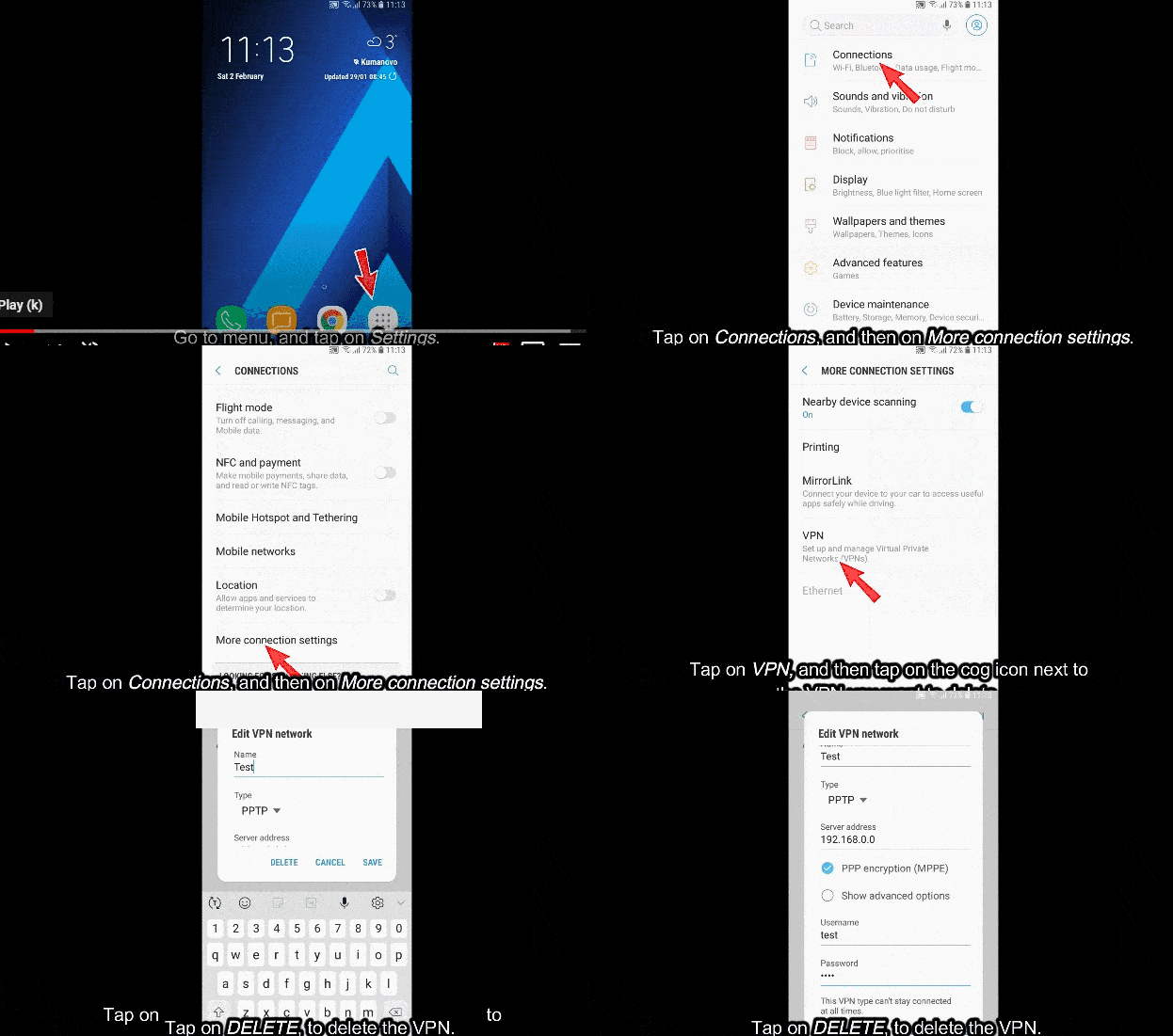
Many VPN users frequently complain about Google Play store download pending issues, so it is preferable to deactivate VPN before downloading anything from the Play Store. You can follow the below-given steps to inactive it.

  1. Select Settings from your app list.
  2. Tap on Connections and choose More connection settings.
  3. Tap on a VPN.
  4. Tap on the cog icon next to the VPN name.
  5. Tap on Delete to deactivate the VPN.
VPN settings in Android.

2. Check for Android updates to solve Google Play store download pending issue.

Google Play may function smoothly if it is running on an updated Android version and may not show download pending android issue. It does not work correctly on Android 2.2 and below. You can check for updates in the following way:

  1. Tap on the Settings icon on your Android tablet or phone.
  2. Tap on System and then choose Advanced.
  3. Tap on System Update to check if an update is available.

Note: Sometimes, Android update changes system files and has the reverse effect, hampering apps like Google Play and ends up getting google play apps download pending android issue. In such scenarios, you need to contact the device manufacturer to get the solution.

3. Check whether the SD card is corrupted to resolve the Google Play store download pending problem.

You won’t believe it, but the corrupted SD card might be the reason behind the play store download pending issue. SD card is accessed sometimes while downloading an app from the Play Store on an Android device. If your card is defective, then it will always interrupt your downloading process leaving your google play update pending. You can replace it or repair it following steps given on this link. After dealing with the SD card issue check again if apps are getting downloaded from the Play store.

4. Fix an unstable internet connection to fasten the downloading process and resume Play Store download pending Apps.

Sounds silly, but this factor is non-negligible. You can check your internet speed by clicking here and switch between WiFi or mobile data to get a high-speed internet connection.

Other things which you can do to ensure that you have a strong internet connection is

  1. Switch-On and Off Airplane mode on your device.
  2. Restart your router.

Make sure to set App download preference as” Over any network.” Here’s how you can do that:

  1. Tap on the Play Store in your Android tablet or phone.
  2. Tap on the menu button in the upper left corner (3 lines).
  3. Choose Settings from the list.
  4. Tap on App download preference.
  5. Select “Over any network” from the pop-up menu.
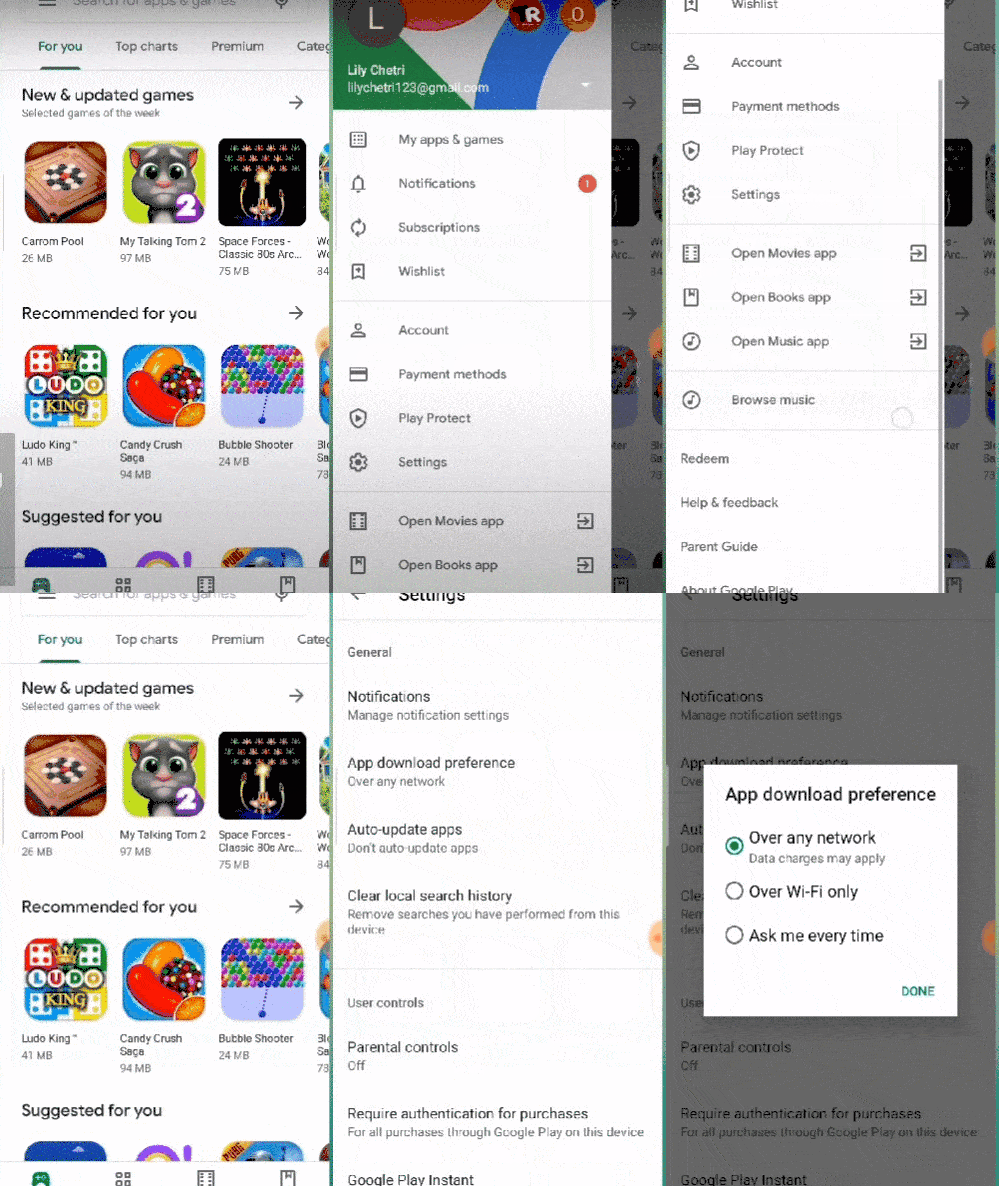
Play store network settings.

5. Clear the list of Apps, which are not downloaded completely.

Depending on the need for the hour, you can clear the queue of Apps pending to download before trying to download a new one. This can be done by following steps.

  1. Tap on Google Play.
  2. Go to Menu->My Apps & Games.
  3. You will get the list of apps awaiting download.
  4. Press on the Cancel icon beside the name of each App to cancel the downloading process.
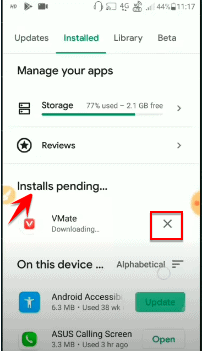
List of pending apps in android.

6. Roll-back Play store updates temporarily to fix Google Play Store download pending flaw.

Sometimes you may experience that Google Play Store was working fine, but suddenly, it has started giving problems. Play Store updates can be the culprit in this case. Many files get updated in the update process, so it is hard to diagnose which variable is causing problems. But you can uninstall the updates and again switch to the old Play store’s version. Find out how you can uninstall Google Play updates.

Go to Settings of phone or Tablet->Apps->Google Play Store->Uninstall updates.
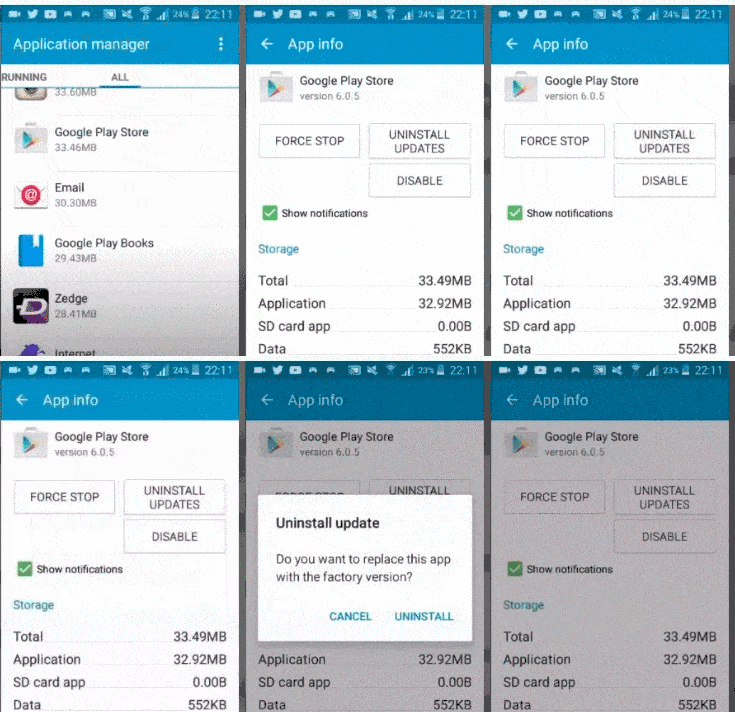
uninstall Google Play updates.

After uninstalling the Play Store update, try downloading the desired App again. You can easily install updates again anytime using Google Play Help.

7. Check for restricted background data to recover Google Play Store download pending error.

Background data usage may utilize quite a bit of MB, hence it is turned off, but it is essential to turn it on for downloading Apps from Google Play. It is worth checking the restricted data usage option for Google Play to spawn downloading Apps. You can check it on devices using Android 7.0 or higher by following these quick steps:

  1. Open device’s Setting App.
  2. Tap on Network & Internet.
  3. Tap on Data usage-> Data Saver.
  4. If the Data saver is off, then no issues if it is on, then check step 5.
  5. Tap unrestricted data access.
  6. Please scroll down and tap the Google Play Store to turn it on.
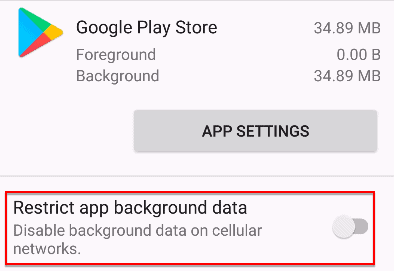
Restrict app background data of Play store.

Note: Follow steps given in Google Play Help to turn background data on for versions of Android below 7.

8. Off auto-updates in the Play Store to restart the download pending in Google Play.

The auto-update feature of the Play Store automatically updates your apps to the latest version. But at the same time, this background process may slow down other operations on your device like downloading new Apps. You can try turning updates off till you download the desired App and this is how you can do it:

Go to Play store->Menu->Settings->General->Auto update apps->Do not auto-update Apps.
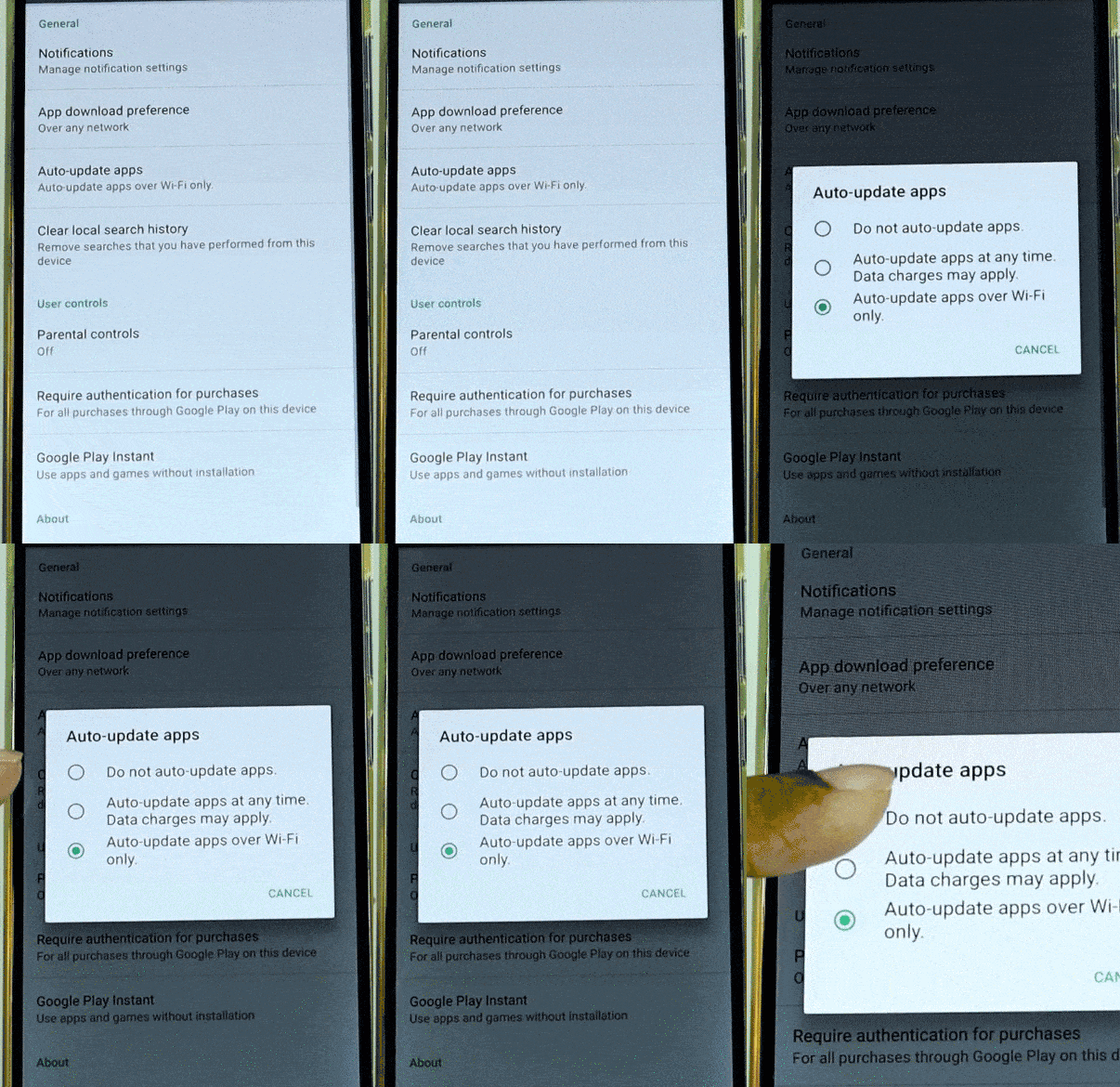
Auto-update off in Play store.

9. Use the browser to download Apps by Play store and avoid Google Play download pending bug.

You can try downloading Apps via mobile or PC browser. All you need to do is:

  1. Open Google play website in your browser.(link is https://play.google.com/store?hl=en_IN)
  2. Sign in your Google account.
  3. Search the desired App and download it.

10. Lack of storage space in your device may cause Google Play download pending issue.

Lack of space is a very common hurdle while downloading Apps. If you don’t have enough space in your device, you cannot successfully download any App. You can free some space on your device by these steps and try to re-attempt the downloading process.

11. Clear Cache and Data to overcome Google Play download pending flaw.

Clearing cache gives the App a fresh start and can help to resolve most of the issues. To resume download functionality in Google Play, you can clear the cache and data of the following three attributes.

  1. Clear Cache & Data from the Play Store.
  2. Clear Cache & Data from Google Play Service.
  3. Clear Cache & Data from Download Manager.

You can do this easily like this:

Go to Device’s Setting ->Apps & Notification-> Search for either Google Play Services/Play Store/Download Manager ->Storage and Cache->Clear Cache/Clear Storage.

You can view detailed steps here.
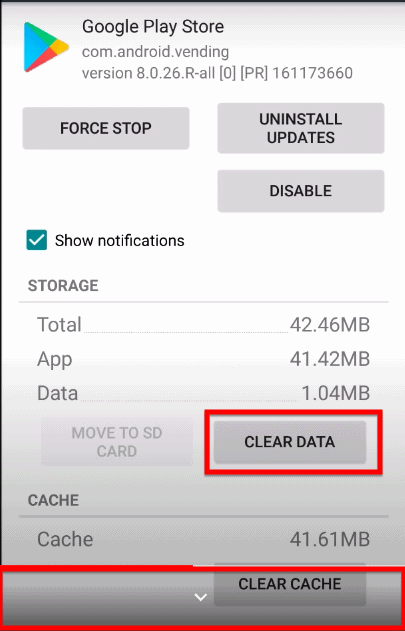
clear cache of Play store.

12. Remove the Google account and add it back to your device to resolve Google Play download pending fault.

After using all the above solutions, if google play apps download pending error is still obstinate to go from your device, you can try removing and re-adding your Google account. This will add some information and remove unwanted data and hence, resolve the issue. For more details, check this.

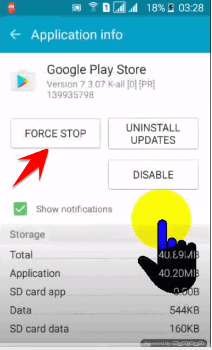
13. Forcibly closing Google Play Store can be a workaround for Google Play download pending error.

Sometimes simple force close can do a miracle and align all your processes. You can simply do this by following the steps given below:

  1. Open device’s Setting App.
  2. Tap on Apps/Application Manager.
  3. Scroll to All and tap on search Google Play store.
  4. Tap on “Force Stop.”
Force stop Google Play.

14. Restart your Device to resume download pending in Google Play.

Last but not least, if any of the above solutions don’t work for you, then simply restart your device. Maybe that helps! You can’t underestimate this step as most of the times we make changes in the application, but it reflects only when the device is restarted.

Wrapping Up:

We have listed 14 possible fixes to overcome awful google play apps download pending errors on your device and regain Play Store download functionality. You can study each solution to find the best method that suits your scenario. Hopefully this article provided you with the solution for download pending in play store error. Please share other solutions that worked for you.
4 Solutions to fix “Unable to access jarfile” error

A JAR ( Java Archive) is a file format based on ZIP file format and is used for lumping multiple Java files and the linked resources( say images, texts, etc.) into one file. 

Lately, many users have complained about an error message stating “Unable to Access Jarfile”  popping while they are trying to open Jar files. 

Let’s try to understand what this error means and then check out some easy ways to do away with this error.

What is the “Unable to Access Jarfile” error?

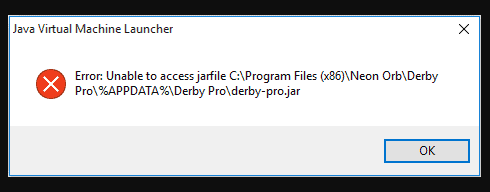
The  “Unable to Access Jarfile”  error conveys about the panel’s inability to locate the server JAR file as reported in the Server Jar field on the server details page.

unable to access jarfile

Causes for the “Unable to Access Jarfile” error?

In this segment, we’ll look into the possible reasons leading to this error.

  • This error mainly occurs when you’re trying to upload and set the panel for looking into the custom server versions which are not provided in the Server Jar Installer.
  • The required JAR file is not present in the JAR folder
  • The entry in the JAR value on the server details page might be invalid
  • The latest version of JAVA  is not installed on your system
  • Your system might get subjected to some malware
  • Default program to open JAR file is not set
  • The file path for Java executable might not be set correctly and is hinting to the wrong location.

Now that we are having a brief on what is meant by the “Unable to Access Jarfile” error and the factors causing this error, let’s delve into the solutions to style this problem.

How to solve “Unable to access jarfile Minecraft” error?

Here we’ll be going through 4 easy step-by-step solutions that will solve this error superficially.

Let’s begin!

Install the latest Java Version

Installing the proper Java architecture on our system is a crucial step to run JAR files successfully. To add on to this, installing the latest version will help in resolving the “unable to access Jarfile” error. Following are the steps to install the latest Java version on your system:

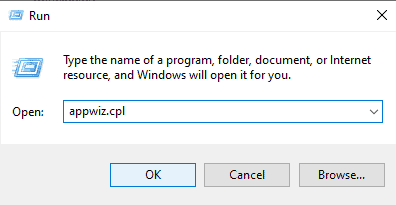
  • Press Win+R to open the run dialogue box.
  • Type appwiz.cpl in the dialogue box and click OK
unable to access jarfile,unable to access jarfile minecraft
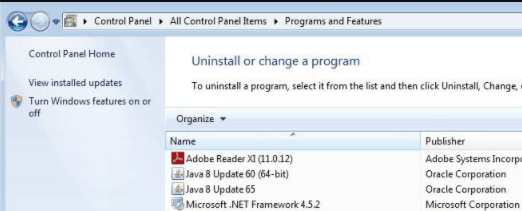
  • Navigate Java in the Programs and Features window. Right-click on the option and click Uninstall.
unable to access jarfile,unable to access jarfile minecraft

Restart your PC to check if the “Unable to Access Jarfile” error is fixed. If not then switch to the following discussed methods.

Set the Default File Association

 If the “Unable to Access Jarfile” error sustains then try varying the file association.

Following are the steps to change File association:

  • Navigate to the JAR’s file directory. 
  • Right-click and select Open with and select Java Program. (or click Choose another app  and select JAVA)
  • Press Win+I to go to the Settings application.
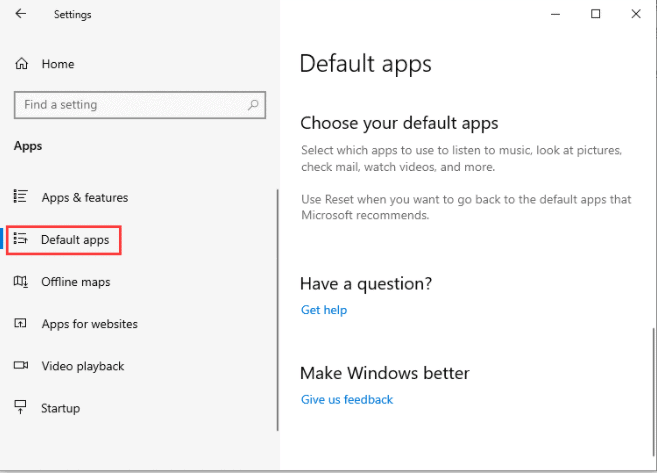
  • Select Default apps from the Apps section as shown below. 
  • Now select click Choose default apps by file type 
unable to access jarfile,unable to access jarfile minecraft
  • Locate the entry .jar file and then select Java to open it
  • Save the changes and exit

Restart the PC once done and check if the issue is resolved. If not then jump to the next method.

Check for any Malware threat

If you are not able to fix the “Unable to Access Jarfile” error then there is a possibility of some malware or virus affecting your system.

Therefore you should run a virus check on your system

Once done, perform either of the two methods discussed previously in this article. Following are the steps to remove malware from Windows 10 (you can try Top 10 Free malware removal tool):

STEP 1- Enter safe Mode

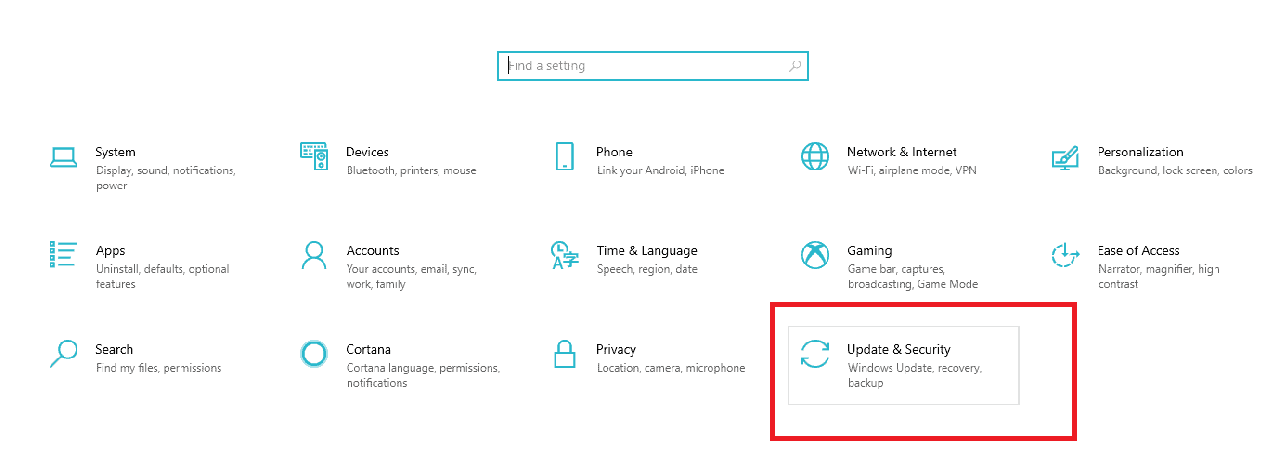
  • Type Settings in the search bar next to the Windows icon on the bottom left corner of your PC’s screen to open the Settings window on your PC
unable to access jarfile,unable to access jarfile minecraft
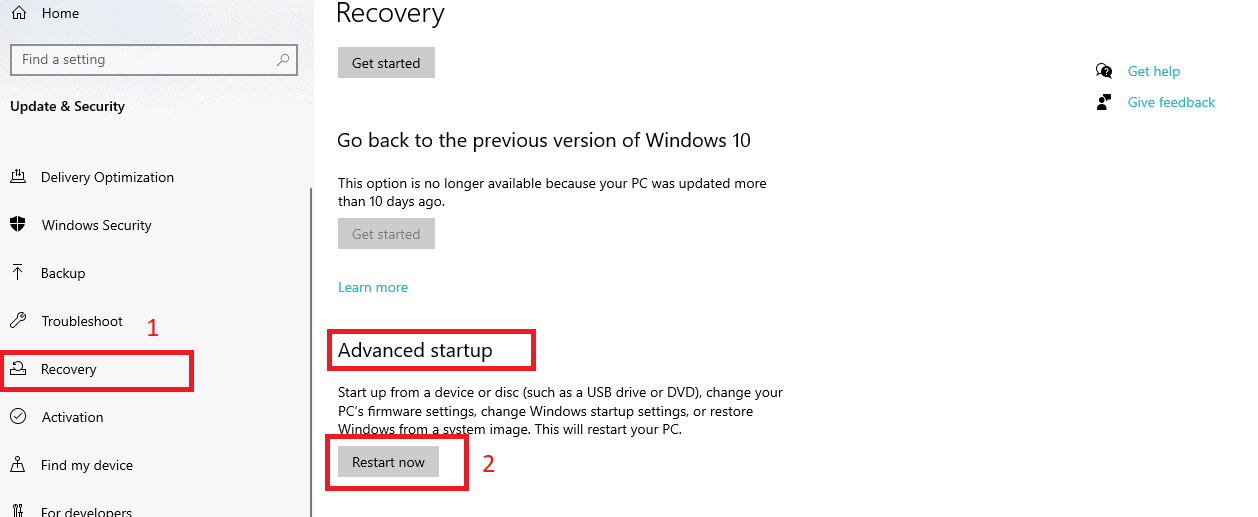
  • Select Update & Security<  Recovery  as shown below
  • Go to Advanced startup section 
  • Click on Restart Now.
unable to access jarfile,unable to access jarfile minecraft
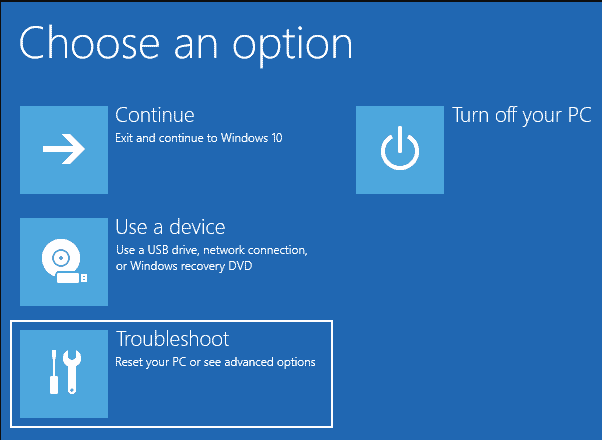
  • After your PC has  restarted, the Choose an option window will hit your screen
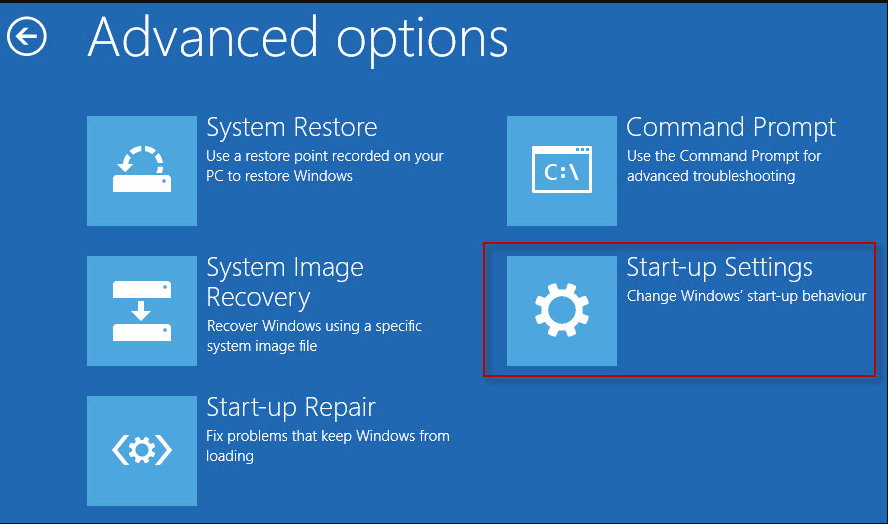
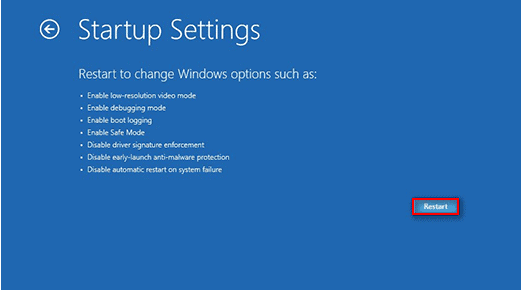
  • Select Troubleshoot > Advanced options > Startup Settings > Restart
unable to access jarfile,unable to access jarfile minecraft
  • Press F4 of various options provided when your system restarts on your keyboard to start the laptop in Safe Mode.

STEP 2- Delete temporary files using Disk Cleanup.

Finally, run the malware scan on your PC:

  • Type Settings in the search bar next to the Windows icon on the bottom left corner of your PC’s screen to open the Settings window on your PC
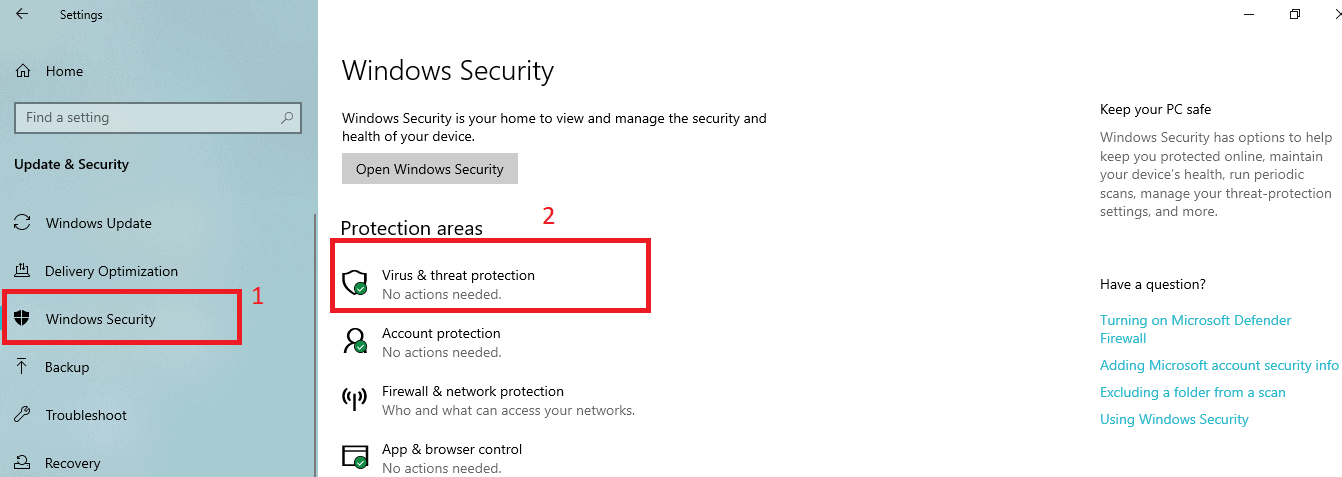
  • Select Update & Security<  Windows Security< Virus & threat protection as shown below.
unable to access jarfile,unable to access jarfile minecraft
  • In the following pop-up window, click on a quick scan.

The process might take a few minutes to get completed. Once the process ends, the “Unable to Access Jarfile” gets resolved.

Check for Documentation (for Developers)

If you’re a developer coding with JAVA and even you are witnessing the  “Unable to Access Jarfile” error, then you’re advised to read the documentation for the utility that runs the JAR file. You may have made mistakes with the file path or function parameters, changing which will help you resolve this error.

Conclusion

4 easy approaches could help you get rid of the “Unable to access jarfile Minecraft” error with the most facile manner.

To add on these, you can even try fetching the valid entries from the ones you have in the jar folder via FTP.

Renaming an existing server JAR  file name to what the panel is looking for ( say from Minecraft-1.10.2.jar to minecraft_server.jar), saving it and then restarting the server is yet another method to resolve this complicated problem

3 Proven Methods to Recover Undetectable External Hard Drive

0
Recover Undetectable External Hard Drive

When working on a computer’s external hard drive, if you face external hard drive not detected, then read this guide. Here, you will find unlimited tricks to recover undetected external hard drives. 

First, start with some important points about the Hard Disk necessity in our Computer system.

Importance of Hard Disk on Computers

Not only Books but now computers are our new-age best friends. As currently, we rely on our computers to fulfill our daily personal and business needs to connect. Also, we save all our daily data on the computer and hard drives. But, what happens when your companion, your computer doesn’t work fine? 

It does not recognize any external hard drive. Do you hopelessly search for a method to repair external hard disks that are not detected? Hey, don’t worry it is a common issue and can be resolved with the right fix. Let us learn what causes this trouble, with the help of certain methods.

How do I recover files from undetected External Hard Drive?

Let us begin by analyzing the manual methods to resolve the issue.

DIY Methods to Recover undetected External Hard drive

Manual methods to resolve the issue of external hard drive not detected are divided under three methods mentioned below.

Method 1: Recover your data from Hard Disk which is not Detected

Firstly, ensure that it is not a USB Port issue by performing these steps:

  1. First, utilize another system and just link the Hard Disk to it. Whenever the hard disk displays complete data then just recover it from there.
  2. Next, again on your system, reconnect the hard drive.

Mostly, the first and key issue when you have improperly connected hard drives. So, always test and verify and make sure that you have properly connected the computer cable to your system’s USB port. Hopefully, it should get resolved.

If still you find the same problem then, just move to the next method. It will give you a proper answer on a query “how to repair external hard disk not detected?”.

Method 2: Recover data from Undetected Hard Disk via Disk Management.

Always prefer the Disk Management tool to solve the undetectable hard disk issue. For this, just learn the below points and get your problem solved. 

  1. Firstly, navigate to the Computer tab option and then go to the Manage option. After this visit the Storage option >> Disk Management. It opens the Disk Management tool.
  2. By this, you can see your External hard drive. 
  3. Pick that drive and format it. Then, you are easily able to view the hard drive on your system. 

Still, you are not able to access the computer’s external Hard drive. Then, solve how to recover data from external hard disk which is a corrupted query from the next method.

Method 3: Upgrade Driver to recover undetected External Hard drive

As you are still unable to fix the hard disk problem with the above methods. Most certainly, there is some issue in your Driver update. Then, you need to navigate to your Device Manager and for that follow these steps:

  1. Take help of Windows and R keys from your keyboard to Run command.
  2. Then, import the command devmgmt.msc there and hit enter.
  3. Next is to tick the Disk drive menu.
  4. Make a right-click on these yellow marks and opt for properties option.
  5. Troubleshoot the error on the internet itself and fix it.
  6. Utilize the System Restore, Reinstall the drivers, or use the Update Driver option to make the upgradation in drivers.

The above steps solve the error by upgrading the driver.

Notice that when windows ask you to format your hard disk the hard drive itself becomes unprotected. This means you can’t reach the hard drive anymore. In that case, copy and format all of the Hard Disk files.

Now, if all these approaches are unsuccessful the only alternative left is to opt for professional support. To that end, find an expert in computer hardware and apply your disk for physical damage check and fix. If you lost hope of finding an undetected external hard drive. Then get support from Removable Media Data Recovery

This utility is programmed from the external hard drive to retrieve all corrupted data. Let Removable Media Data Recovery do the job of restoring data from even a formatted Hard Drive. Safe with Removable Media Data Recovery all of your missing, lost, unintentionally deleted data into their original form today. Using this tool to manage both FAT and NTFS file systems in a convenient way. Formed to manage fast data recovery from both tables of partitions, MBR and GPT, give it a try today.

Conclusion

Computer Hard Drive includes information about our everyday results. But, in the case of several mishaps, we can lose the data from Hard Disk. In case you are having trouble with how do I recover files from undetected external hard drives. You can choose to recover undetected external hard drives using manual methods. These manual methods are unreliable in retrieving lost data when sensitive information lies on External Hard Disk Drive. But always take the help of Removable Media Data Recovery for consistency in performance.

Google Adds “Licensable” Label Under Image Results – Know The Details HERE!

0

A new feature of Licensable badge has been launched by Google to improve the responsible use of images available on the web.

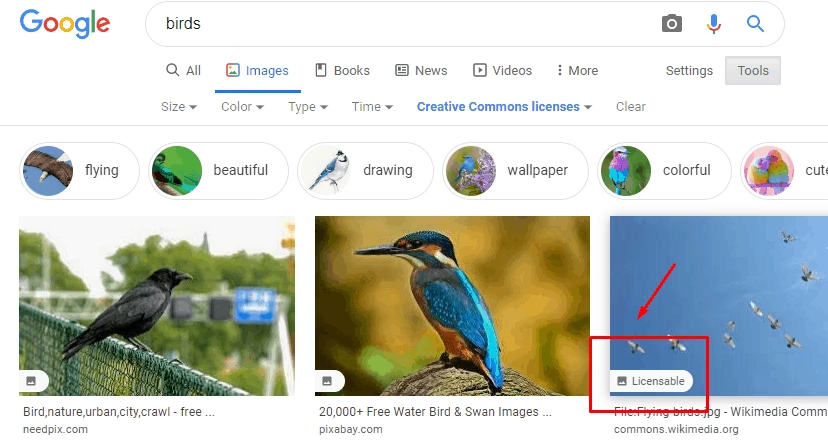
Licensable

This feature has been exclusively launched for Google images in collaboration with Shutterstock which is a New York-based photography company. The “Licensable badge” will help people in getting credits for their work. Also, the users will be able to use the images responsibly without violating any copyrights.

“Google Images new features help both image creators and image consumers by bringing visibility to how creators’ content can be licensed properly,” Paul Brennan, Shutterstock’s VP of Content Operations said.

After clicking on the image, the users will be able to know the artist or the creator of the work they are going to use. The guidelines on how to use that particular image without violating any rights will also be associated with it.

Paul Brennan further stated, “We are pleased to have worked closely with Google on this feature, by advocating for protections that result in fair compensation for our global community of over 1 million contributors. In developing this feature, Google has clearly demonstrated its commitment to supporting the content creation ecosystem.”

The licensable badge feature was into Beta testing phase in February 2020 and is now available worldwide for use. Google in a statement said that it’s not always a simple task to find the right image among the millions of images available on the internet. And it is even more difficult to use the images responsibly without violating any credits or privacy rights.

unable to access jarfile,unable to access jarfile minecraft

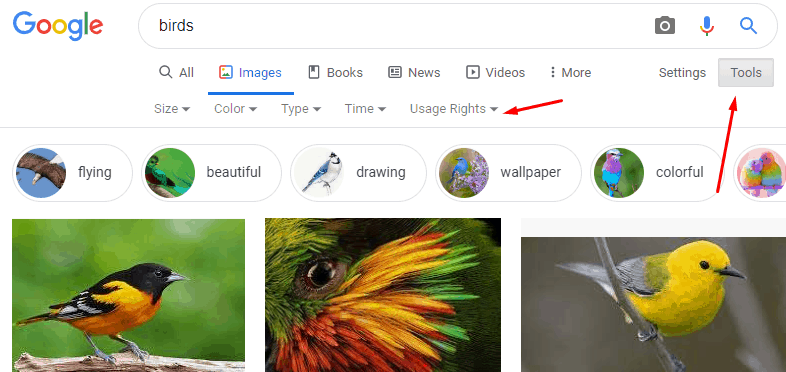
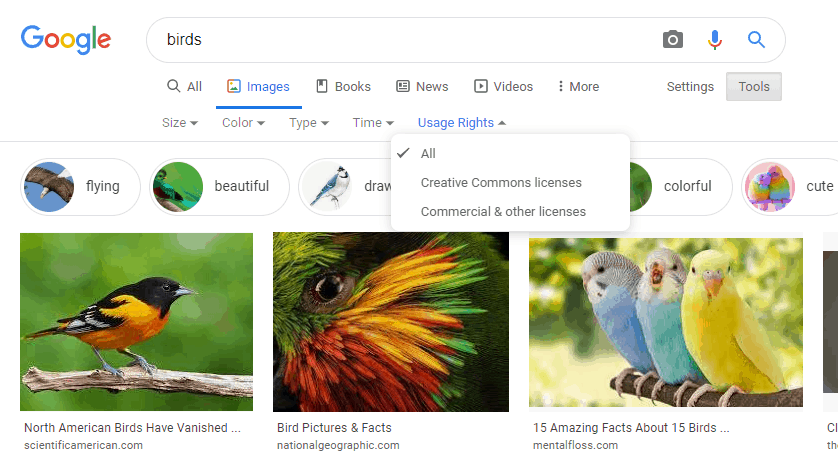
With this amazing feature of Licensable badge, you can also view only the images that have licensing information available by using the “Filter” option. You need to click on “Tools” and then select the” Usage Rights” Dropdown Menu to filter out the images.

unable to access jarfile,unable to access jarfile minecraft

There are two options available for this – Creative Common licenses and the other one is Commercial & other licenses. The images that are available under Creative Common licenses can be used by the public. These are the images that are on the internet for free distributed use.

The other option of Commercial & other licenses consists of images that can not be used without the consent of the creator. This will prevent the misuse of photographs and images on the internet.

There are basically two benefits of introducing the new licensable badge feature. First one, as mentioned above it will protect the copyrights of the photographer or the artist. Because, on the web the images are free to use and hence, people use them without providing any proper picture credits. If you are interested in Royalty free music, you can refer to the article How to add Royalty-Free Music to YouTube Videos we have previously written about how to use them.

The second advantage is the revenue generation for the creator of the image. So, people who want to use the image which are under the Commercial & other licenses have to approach the photographer or the creator of the image. They have to provide the commission for the work of the original image made by them. 

unable to access jarfile,unable to access jarfile minecraft

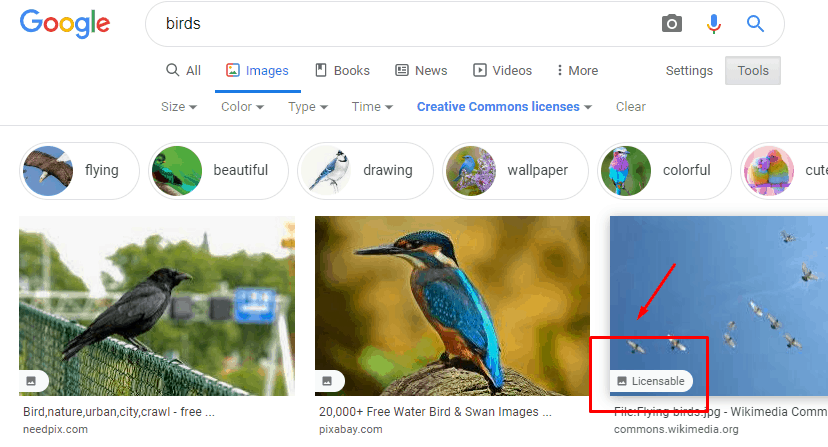
As shown in the image, you can see that the artist credits are provided in the license details.  The name of the creator, credit along with the copyright credits are mentioned. Hence, the photographer has been given full credit and before using it, one may have to contact him.

unable to access jarfile,unable to access jarfile minecraft

On the other hand, you can see that in the above image no such credits are given. This is because it is not a licensed image and is available for public use. Hence, by the use of a licensable badge on Google images the work will not be unrecognised and used without permission.

This feature is of extreme use to the creators, photographers and the users of the image as well.

Amazfit Band 5 Listed on Amazon; Comes With Integrated Alexa, SPO2 Monitoring & more

0

There haven’t been many developments since the first time the Amazfit Band was glimpsed on the FCC database. Especially, the details of the device got nothing new since the day one of its launch. 

Earlier the Amazfit band was reported to be a rebranded version of Mi Band 5. But now, the device is coming with an upgraded version of it.

Amazfit

The industry of IoT based devices is increasing with every passing day. Google recently declared that its industry-leading Assistant is now accompanying more than 50K devices across the globe. It claimed that the industry is compatible with all these devices from as many as 5,500 companies.

Taking into consideration the fact that the Google assistant came into existence in 2016, the growth even with the rival services( say from Apple, Samsung and Amazon) which are engrossed in their own voice assistant ecosystem, is quite relevant and notable.

With Fitbit, the Google Assistant is all set to establish various wearables available with support. One such device might be the Amazfit Band!. If you are interested in buying Fitbit check this before you proceed. Everything You Need To Know Before You Buy A Fitbit.

Let’s quickly dive into the features of the Amazfit Band in the next segment.

Amazfit Band 5 Features

Design and Modes

Design is the most important component of any product.Though the features of a product form its universal selling point, but the visual appearance is what interests the buyers on first hand. It’s the look and design of a product which catches the buyer’s  attention and then the buyer moves forward to check the product’s features and specifications.

Coming onto the design of the Amazfit band, this device has everything that would attract the buyer to purchase it. It has incorporated literally everything that a person will require to track heath in the most accurate and smart way.

unable to access jarfile,unable to access jarfile minecraft
  • Talking about the design of this device, the band comes with a dimension of 7.52 x 2.99 x 0.91 inches. 
  • The HD colour AMOLED panel is having over 45+ different watch faces alongside two 2 customizable faces.
  • The PAI health Tool and 11 sports modes are indeed the best one could ever desire in a smart band to track health.
  • In addition to measuring the sleep quantity, the band tracks users’ sleep for a daily nap.
  • The band got a magnetic charging assistance similar to the Mi band 5.
  • The exceptional battery specifications allow the smartband to run for as long as fifteen days when charged once, in normal mode. However, the band can operate continuously for 25 days, when used in the power saving mode.
  • The device will be available in the black and orange colour options.

Tracking and Notification Features of the Amazfit Band:

  • The tracking capabilities of the band shall include -The stress, breathing, heart rate and swim tracking.
  • The band will display the notifications and reminders.
  • The Camera Remote Control along with Music Control will be featured in this band.
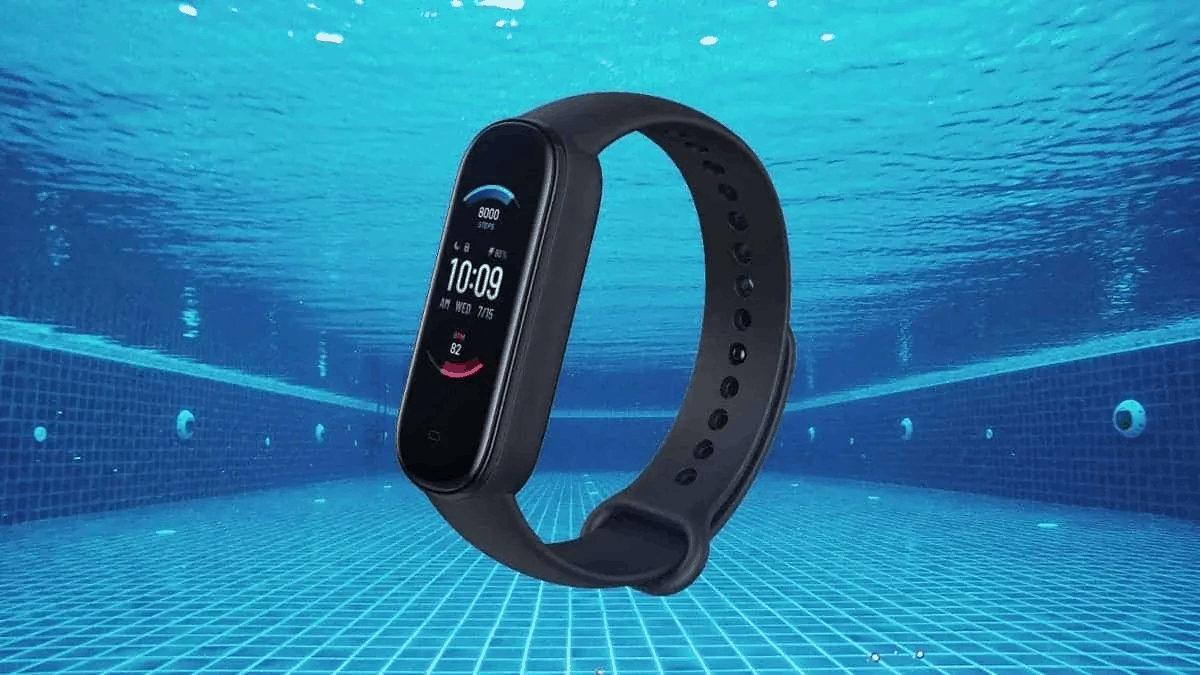
  • The band is 5 ATM water-resistant

Apart from the already listed features, some exceptional ones that will leave you awestruck and compel you to buy the Amazfit band are the Blood oxygen or SPO2 monitoring options and women health monitoring options, which are missing in the MI Band 5.The band will also be supporting Amazon Alexa.

unable to access jarfile,unable to access jarfile minecraft

For a long time, the only way to have Google Assistant onto your wrist was wearing an OS smartwatch. Since Google is now acquiring FitBit, various fit band companies have also started working towards incorporating Google Assistant to their smartwatches and fitness bands.

The folks at FitBit unveiled the latest watch collection on August 25,2020. They launched in the Vrsa and Inspire series. A FitBit brand new series was also launched, with an aim to work in the direction of fitness bands working with the Google Assistant. The devices are available for pre-order, and will be available in the market from next month onwards.

Fitbit’s latest smartwatches will be equipped with both Google Assistant and Alexa — something even Wear OS cannot do.

Hence we can choose either Amazon or Google’s voice assistant for our Fitbit. 

The Amazfit is thereby supporting Alexa when it comes to working in the direction as discussed previously. If rumours are to be believed, Alexa support will later be added on the device via an OTA update.

Cost and Availability

The Amazfit band is now available for pre-order from Amazon US.

It is speculated that the product will be accessible for purchasing, i.e. the shipping process will begin from the 30th of September. 

The product will cost its buyers $49.99. The NFC function is expected to be confined to China as usual. So far there is no information on the NFC function for the global version.

AmazFit is indeed a great option when it comes to having a Fit-band. It covers nearly every minor and major requirements of a user who want to keep a track of one’s health along with performing various other tasks, be it controlling the music or camera simultaneously in a lucid manner. This is sure to simplify our lives and a great example of how IOT( internet of things) will transform our lives in the coming future.

Elon Musk Says SpaceX’s Starship Won’t Fly People Into Space Until “This” Milestone

0

SpaceX is enlarging its much-awaited, next-gen Starship rocket with an aim to set dozens of people into Space. However, CEO Elon Musk claims that the rocket got various other targets to be achieved much before taking passengers into space.

“We’ve got to first make the thing work; automatically deliver satellites and do hundreds of missions with satellites before we put people on board,” quoted Mr CEO while addressing the virtual conference named “Human to Mars” on Monday.

Musk oriented all of the company’s attention to Starship and stressed on the fact that the rocket work must make a headway quite “dramatically and immediately” as reported in June 2020. The statement came from the CEO following fierce set-backs and complications suffered by the program during multiple testings and flight tests performed on the initial prototypes of Starship, the previous year. The tests were conducted in Boca Chica, Texas.

SpaceX

Of the four major set-backs that the company faced while testing the prototypes, the recent one occurred on May 29, 2020. The failure included the sudden explosion of the prototype no sooner an engine test was conducted.

Apparently the emphasis and urgency has resulted in some positive results.

Elon Musk reported the employees of SpaceX that the Starship project needs to be worked upon as the major priority. The declaration was made nearly a week later the company had launched the astronauts. 

Also, this emphasis is speculated as a response to what NASA Administrator Jim Bridenstine, mentioned in his controversial comments just before SpaceX revealed the latest prototype. The Admin stated that they expect “to see the same level of enthusiasm” for SpaceX launching NASA astronauts as it was while launching the Starship program. To add on, he said that it was time to deliver.

The SpaceX Falcon9 rocket which took the NASA astronauts around the Space on May 30, is partially reusable, such that the boosters can be rehashed. However, Musk wants to develop a completely reusable rocket, analogous to a commercial aeroplane. This rocket will be capable of carrying as many as 100 passengers at a time or launch a cargo.

In short, Mr The CEO is exceptionally ambitious to transmute space travel into something nearly equivalent to air travel. The rocket size is expected to be extensive enough to launch 400 Starlinks Satellites in one shot. This number is nearly 7% of the number of satellites a Falcon9 rocket could launch ( nearly 60 satellites in one go).

Musk was hopeful that the rocket shall orbit Mars in that very year and would carry human beings in 2020, when the Starship prototype was first disclosed in September 2019. 

unable to access jarfile,unable to access jarfile minecraft

Starship’s First Prototype.

The prototype was made of stainless steel and overlooked the company’s previous spacecrafts.

But he took a U-turn this Monday, stating that the first Starship launches to orbit “might not work,” saying that SpaceX is in “uncharted territory.” Significantly the first Starship’s Orbital flight test is not happening any sooner until the next year.

Musk announced that the company will commence with the construction of the first Super Heavy booster prototype “this week”. The work towards Starship’s next flight test is progressing at the Boca Chica facility.

Super Heavy forms the large bottom half of the Starship rocket. It bolsters most of the rocket’s engine and is used when the rocket is in the initial stages of the launching process.

As a short-term goal, SpaceX intends Starship to fly missions to the lower orbits of Earth followed by the Moon. 

However, Musk is still casting his eye over the RED PLANET-MARS! The company is confident to reach Mars “given enough time”. But “how long will it take us? This is the question.”said Musk.

According to the CEO, getting to Mars is not a major issue. The fundamental issue is “building a base, building a city on Mars that is self-sustaining,” Musk added.

The company is working towards creating the base for its all time prevalent pursuit to reach the red planet.As it could be noted from what the CEO of SpaceX said:

  • A propellant plant, which will form the initial Mars base shall be  built by the Company soon. 
  • The plant will be called- Mars Base Alpha. It would be then taken to a point where it is able to sustain all by itself.
  • The aim is to design a competent Mars Base.

The company has raised some $1.7 billion since the first month of 2019 and its valuation rose to approximately $46 Billion as recently reported by CNBC. The funding was raised quite smoothly keeping in sight the 3 major programs :

  1. The Crew Dragon spacecraft, 
  2. Starlink internet satellites and 
  3. The massive Starship rocket.

“We are making progress..” said Elon Musk. The statement came to post his pronouncement that the company’s prime concern for the days to come will be the Starship program. He mentioned that what led to an improved progress report is the production system.

unable to access jarfile,unable to access jarfile minecraft

Source- SpaceX

“A year ago there was nothing there and now we’ve got quite a lot of production capability. So we’re rapidly making more and more ships.” we have written a separate article on his new company i.e Neuralink from Elon musk, What we know so far.

SpaceX’s mission to Mars is unequivocally a dangerous and life-risking thing, not for the ones with a weak heart. “Good chance you’ll die, it’s going to be tough going,” as already said by the CEO, however, it’s sure to turn out into something incredible if everything goes as planned.

Exclusive: Apple Likely To Unveil New iPhone 5G Models In October 2020 (iPhone 12)

iphone 12

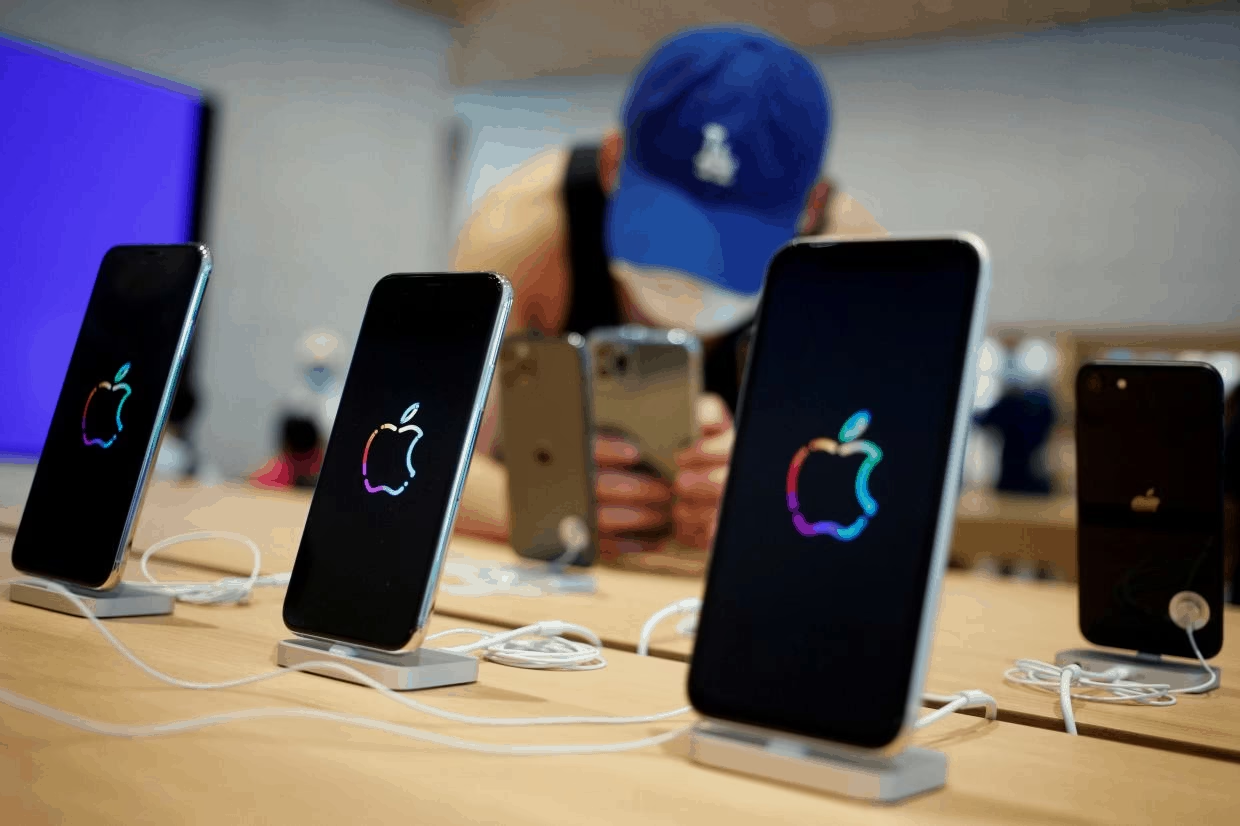
In the near future, Apple Inc. is going to come up with some new iPhone 12 models and it has asked its suppliers to generate at least 75 million 5G iPhones! These iPhone 12 models are going to arrive in the month of October and they all will support 5G technology. This announcement may be made official by Apple in the month of September. 

The COVID-19 pandemic has made the situation worse for the economy worldwide but Apple is not going to stop. It has planned to launch 4 new models which will support all the new technology features like 5G wireless speeds, different kinds of design, and a variety in the choice of screen size.

The demand for iPhones and Mac computers have gradually increased in this COVID-19 outbreak. This is because people who are working and studying from their homes need more gadgets than they did before. Hence, Apple is going to fulfill the demands by producing new iPhones and its other products. If you are an iPhone user an entirely new and hassle-free experience in iOS content management through AnyTrans Offers a More Flexible Backup Solution for iPhone and Lets You Move WhatsApp Data more comfortably.

You may now wonder what are the other products! According to some rumours, Apple is going to launch a new model of iPad Air which is going to have a screen like the iPad Pro. It is also planning for two new Apple Watch models and a new and first-ever model of over-ear headphones.

unable to access jarfile,unable to access jarfile minecraft

And when we are talking about the rumors, let’s talk about the specifications of the new iPhone 12 models too! A report says that the 4 new models will be divided into two types – 2 among them would be basic and the other 2 would be high-end models. 

To improve the color and the clarity on screen, these will come up with OLED displays. Talking about the screen size, the basic models will have a choice from a 5.4-inch size or a 6.1-inch option. The other two models will have 6.1-inch or 6.7-inch display options. And this is the largest screen Apple has ever provided on an iPhone.

Also, the company is planning to have dark blue Colour in the Pro models which will replace the Midnight Green colour they provided in iPhone 11 Pro phones. The larger of the Pro models will have the same LIDAR camera they have on the latest iPad Pro. The LIDAR camera allows augmented-reality apps to have a better understanding of the surrounding environment. 

The most important improvement in these iPhone 12 models will be the A14 bionic chip processor, which will provide more speed and even better power efficiency. Reports also say that the new models can be manufactured in countries other than China because of the outbreak. They say that it has already started production of its flagship iPhone 11 at the Foxconn plant near Chennai and this is the first time it has produced a top-of-the-line model in the country.

Apple Inc. also said that it plans to ship the lower end phones sooner than the high-end ones. Although the new models of iPhone 12 are going to ship later, Apple’s iOS 14 software is going to arrive in September, the people said.

One more report says that Apple is working on a cheaper and smaller version of its speaker, HomePod. It is also going to be released this year and the size will be almost half of the original one. This has been in development for a long time now and due to the coronavirus pandemic, it got delayed. But in the second half of the year, it’s going to be launched. With small size, the price would also be less and it’s going to compete with other smart speakers like Alexa from Amazon and Alphabet Inc.’s Google.

Supposedly, Apple Inc. is also working on Apple Tags that are going to be a big competition to Tile which is a popular hardware tracker already available in the market. They might call it Apple Tags or Air tags which will use technology to locate lost or stolen items.

unable to access jarfile,unable to access jarfile minecraft

People familiar with its product roadmap said that Apple is also planning on releasing a new model of Apple TV too. The information that has been leaked about the new Apple TV launch says that it will be powered by the A12X processor which is the same as used in the 2018 iPad Pro. If you want to read more about the revolutionary iPad, we have written a separate article about the third-generation iPad specifications too.

unable to access jarfile,unable to access jarfile minecraft

We don’t have to guess whether a new model of Apple TV will be launched or not because there is actual evidence that justifies this news. The last launch of Apple TV was done in November 2019 and it’s high time now for Apple to release a new one with new upgrades. The same reports also leak that a new version of Apple Remote will also be launched.

Although Apple TV doesn’t require as many specifications as the iPhones according to people who know about these launches say that the processor is going to be the same as one of the Pro models. The main question that arises here is the date. As of now, the reports say that it might be launched along with the new iPhones this year.

Till then, let’s wait for some more days when these iPhone 12, 5G models will be officially announced by the company itself. It is possible that along with the unveiling of these iPhone 12 phones, the company may unveil the above mentioned new devices too!