Home Blog Page 74

The Importance of a Secure Website in 2020

0

If you have an online website, virtual security should be high on your priority list. You are responsible for maintaining the security on your website and keeping your users’ information safe. It is a misconception that small websites are safe because hackers will not bother with them. We will be discussing the importance of keeping your website safe and how to do so.

cyber security website security Secure Website

How Does a Website get Hacked?                     

One of the more common methods that hackers use is breaking past weak access controls. When a website owner sets up the authorization to access their website, they often do not have strong controls in place. This could be something simple such as setting up a generic password without capitals or special characters. Hackers can easily get past straightforward passwords by guessing them or by using a password generator.  It could also occur when the owner does not implement a multi-factor policy to gain access to the website.

Also Read: How to Give Your Website Credibility.

Hackers are looking for any information that they can use for nefarious means. This could include collecting customer data and selling it to a third party, stealing credit card information, selling illegal items through your website, and sending spam to you and to your customers.

Consequences

Not maintaining website security can have major consequences. If your website gets hacked, it could become blacklisted. This means that search engines will attempt to block your website and communicate to the user that the site is not safe to visit. If your website becomes blacklisted, the vast majority of users will be lost. It is very difficult to remove your website from a blacklist, and it costs valuable time. During this time, you will not be earning money at your regular rate, which can impact your profit margin and set you back for quite a while.     

Another consequence is related to potential data breaches. When customers learn that their personal or financial information has been compromised, you will lose their loyalty to your company. However, that could be the least of your concerns if you are held liable for the data breach. If lawsuits are filed, merchants can be on the hook for many thousands of dollars.

How to Prevent Hacking – SSL Certificate

An SSL (secure sockets layer) certificate protects confidential information as it crosses the internet. SSL works by encrypting information so that only the recipient is able to see it. Without an SSL certificate, customers might be tricked into providing their financial information if the website has been hacked. SSL provides a green bar indicating a secure connection. This will provide customers with peace of mind, as they are reassured that their information is safe in your hands.

To set up an SSL certificate in WordPress, you will first need to purchase one. Most SSL certificates cost between $50-$200 per year. After you purchase your certificate, your web hosting provider will be able to install it for you. Having an SSL certificate is required if your website accepts electronic payments.

Update Software

If you are using an unmanaged hosting system, keeping your website software updated is another way to prevent hacking. If there are holes in your software, hackers will find a way to infiltrate your site. Content management systems (CMS) and forum software need to be regularly updated, and your antivirus should always be up to date and scanning for malware.

Stronger Passwords

An easy way to keep tighter control over your website is by focusing on your password. Do not use generic passwords that are simple to guess or that are too short. Maintain a password length of at least 8 characters, including capitals, lowercase and special; characters. It is also important to change this password regularly. This is especially true if you have just had an employee leave the organization. It is recommended that you change your passwords every 60-90 days to remain completely secure.

Try to Avoid Uploads

When you allow a client to upload a file onto your website, it is posing a security risk. That file could contain malware that will harm your website and allow it to be accessible to hackers. Completely disallowing files or image uploads may not be feasible, depending on what type of business you are operating. One workaround would be for the files to be uploaded, but not directly to your website. They would be stored in a folder outside of the website. However, in this case, you would need a script to grab the files from the folder and deposit them into your website.

Conclusion

Having a secure website in this day and age is essential. Hackers are very well-equipped, and they will completely take over your website if it is not adequately protected. Losing control due to hackers will result in a loss of customers and revenue. There are many available methods of securing your website, even more than the ways mentioned above.  

Here Are 5 Creative YouTube Video Ideas That Minimal Skills to Create

0

You do not need to be a filmmaker to make quality YouTube content. Video consumption does not solely depend on its production value. Bill Gates once said, “Content is king,” and this philosophy drives the fan-base on a YouTube channel.

YouTube

Online tools like an intro maker for YouTube or an online editor have made it very easy to create content. You do not need to hone high-level skills to be part of the YouTube community. All you need is an original concept and the motivation to be consistent.

Here are five ideas that you can shoot at a minimal budget and elementary film-making skills. You can choose to chase one of these concepts or use them as inspiration to create your own.  

1. Vlogs

Vlogs are some of the easiest and more fun to create. They are mainly of two types. One is a video showing the detailed coverage of a day or an event. Some vloggers also pick a niche — like lifestyle vlogging or travel vlogging. This form of video does not need complex writing and in-depth knowledge of videography. You can also try How To Write Funny By Mixing Humour in Your Writing.

The second type of vlogs is a fixed camera setup, with the creator talking into the lens. You can choose to share an opinion, share information, read a poem, or a well-scripted monologue. This form of video is very content-driven and rarely dependent on video shooting skills.

Vlogs are fast becoming very popular on the internet. As a creator, you must keep check facts, write your scripts as crisp as possible, and shoot it presentably. If you are short on a budget, use your phone camera and natural light from a window to shoot these at almost no cost.

Take the time to view a few vlogs online. These will help you find your unique voice and learn the small nuances of the art. However, do not copy or replicate a vlog; this will earn you a bad reputation online.

2. Explainer Videos

Explainer videos are those that aim to educate, enlighten, or inspire. If you seek an interest in any field or call yourself a subject-nerd about anything — this is your time to use your existing knowledge to make videos.

Explainer videos are also statistically proven to generate better traction online. Most people surf the web for two things — information or entertainment. This kind of video satisfies both needs. Using images, talking into a camera, or just a voice-over, one can achieve a great quality video.

Simple visual tools like a video collage or a montage of stoke footage will also do the job. Ensure that you stick to a niche and make as much content on the same domain to attract a vase user base.

3. Reaction Videos

If you have ever gathered with friends and had a ball making fun of pre-existing videos, then this is right up your ally. A common phenomenon on YouTube that involves recording your reaction to other videos. A camera and an editing tool are all you need to make an impeccable product.

These videos are fun to consume and take minimal effort to make. You must, however, possess witty or insightful thoughts on the go. When done right, these videos can gain a large-scale viewership.

If you were to create a reaction video of a viral or well-known YouTuber, it makes it easy to piggyback on their subscribers. Watch a few reaction videos to understand the subtle ways of throwing a punch or a comment.

One way to make this product unique is by sticking to only one domain of videos. For example, if you enjoy sports. Then create reaction videos to only sporting events or sport-based footage. This action will help build a brand for yourself and a community of loyal followers.

4. Reviews

Another YouTube trend that is both informative and entertaining is that of reviews. If you enjoy a domain and feel like you have the right opinions to provide — make a review video. Pick a topic and break down the intricacies of it.

You can pick any subject like tech review, food review, cars, sports, products, etc. Make sure your review is not filled with opinions but balanced with facts and data. Use simple edit and catchy writing to connect with the audience.

If you are on a grim budget and cannot buy products to review them, find free products. For example, a review of a local store or a tourist attraction will make amazing videos. Again, it would help if you critiqued only a single niche.

5. Live Streamings

Not sure if you have the time to learn shooting and editing but still want to be part of the YouTube space? This is an excellent way to make consistent and engaging content. The live feature on YouTube has enabled many creators to produce content on the fly.

You can find an industry you would like to steam to the world and plan a fixed number of live streams each week. This live-stream can be conversations with guests, reviews, discussions, opinion pieces, and much more.

Live streaming games like PubG and FIFA are also trendy and attract a very dense online market. Live stream does not need in-depth skills — all you need is a laptop and a fast internet connection. This property of content will build a substantial user base but over many months.

You will have to activate the feature from your YouTube dashboard. So ensure you do this at least a few days before your first live stream. To help improve reach, ask friends to join the first few sessions and interact with your steam.  

Once you are done with the live session, you can also upload this to your channel as a video for users to see later.

Final Thoughts

Making videos is more about the concept than the use of an expensive camera. While we cannot deny the value that the right equipment brings to a video, its lack should not halt your ideas.

The most important tip for new YouTubers is to dive in and get the ball rolling. The more quality content you can post — the better your odds of making an impact. While this is a slow process, it would seem like very little work if you make videos in a domain you enjoy.

Mouse Disappears in Chrome? Here’s the Guide to Fix it Permanently

Many of us must have encountered the mouse pointers disappearing from the screen. If you’re one of them, then you are at the correct place. In this article we will be discussing various reasons leading to the mouse disappears in chrome error and checking out easy solutions to do away with this error.

Though we’re having a touchpad on our laptops, most of us will agree that using a mouse is far better than all the other alternatives combined, especially when it comes to doing some real task.

Before diving deep into the solutions to resolve this error, let’s go through some minor settings which we need to ensure are updated if we face the mouse disappears in chrome” error

Why Mouse cursor Disappears in Google Chrome?

mouse not working in chrome

You need to make sure that the following settings are done in Windows 10 as discussed below to ensure that the mouse pointer does not disappear from the system’s screen:

  • Press the CTRL key to make the pointer appear, if you’ve earlier enabled the Show location of pointer when I press Ctrl key option.
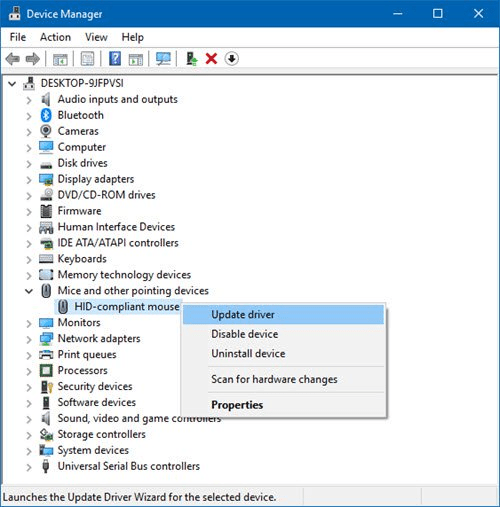
  • Make sure that your mouse drivers are updated.
mouse disappears in chrome,mouse disappears,mouse cursor disappears in chrome,cursor disappears in chrome,chrome://restart
  • The mouse’s battery must be OK. 
  • Press one of these key combinations to fix the issue-  Fn+F3, Fn+F5, Fn+F9, Fn+F11.
  • Run the antivirus scan to check if your system is attacked by some malware, causing this error.

These were some basic settings, which if not at appropriately might lead to the Mouse cursor disappears in chrome error.

In the next segment of this article, we’ll be checking out the step-by-step procedure to fix the mouse pointer disappearing error.

Solving the Mouse cursor disappears in chrome error

Kill Chrome from Task Manager

In case the mouse cursor disappears chrome, all you need to do is to restart your program to do away with the issue.Following are the steps to resolve the mouse disappears in chrome  error:

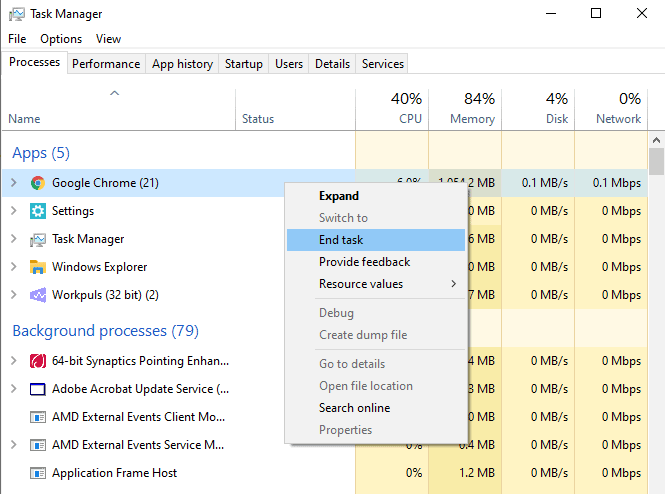
  • Press Win+X and click on the Task Manager from the following pop up window.
  • From the  Program list, select Chrome.
  • Click on the “End Task” button. This will end all the Chrome programs running in the background.
mouse disappears in chrome,mouse disappears,mouse cursor disappears in chrome,cursor disappears in chrome,chrome://restart
  • Reopen the Browser to check if the issue is resolved or not. If not, then switch to the next methods
  • Restart using chrome://restart command

The previous method to resolve the mouse disappears in chrome error is indeed simple yet a monotonous way. Therefore you can use the restart function in Chrome to launch the browser without killing it from the task manager and then restarting it.

Following steps to do the same are as follows:

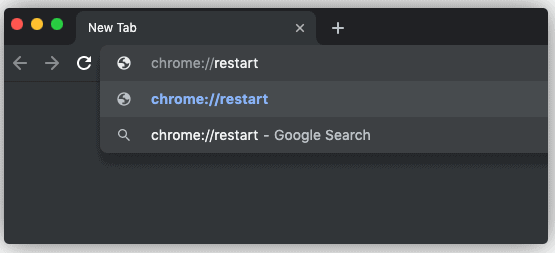
  • Whenever the mouse pointer gets hidden on Chrome, try to run the following command :

chrome://restart in the browser’s URL.

mouse disappears in chrome,mouse disappears,mouse cursor disappears in chrome,cursor disappears in chrome,chrome://restart
  • This will relaunch the browser and solve the issue.

 NOTE- You should not have any unsaved edits in the browser because this method will close all the existing browser tabs and extensions for a certain moment to make the cursor reappear.

Enable/Disable Hardware Acceleration

Hardware Acceleration is a  preformed feature in the Chrome browser that enables its proper functioning and improves the display characteristics while surfing the Internet using this browser. It also influences the following:

  • keyboard 
  • trackpad
  • touch screen display

Hence enabling/disabling hardware acceleration might resolve the mouse disappears in chrome error.

Steps to enable/disable hardware acceleration are as follows:

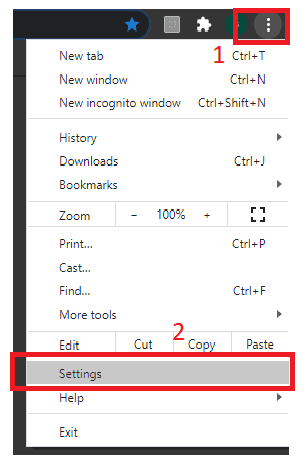
  • Open Chrome Browser on your system.
  • Click on Settings from the three-dot icon at the top right corner of the browser window.
mouse disappears in chrome,mouse disappears,mouse cursor disappears in chrome,cursor disappears in chrome,chrome://restart
  • In settings, scroll down to the Advanced Settings.
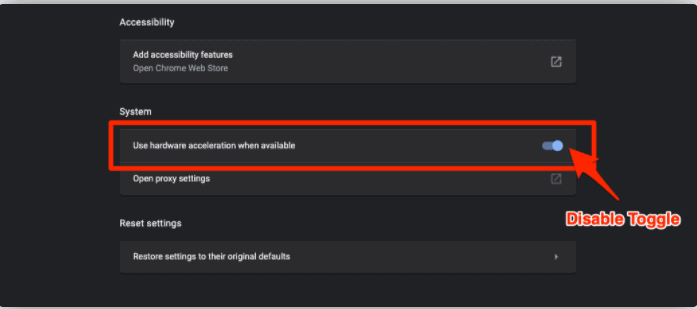
  • Toggle the ‘Use hardware acceleration when available‘ option under the System section.
mouse disappears in chrome,mouse disappears,mouse cursor disappears in chrome,cursor disappears in chrome,chrome://restart

Note- For some systems the enabling of hardware acceleration might fix the error, while for others its disabling will result in the error resolution. If performing the last step of all the steps discussed above does not make the cursor reappear then toggle off to do away with the error.

Switch to Chrome Canary browser

Switching to Chrome Canary browser might fix the cursor disappears in chrome error.

This browser is built over the chromium project and its features are similar to that of Chrome. 

mouse disappears in chrome,mouse disappears,mouse cursor disappears in chrome,cursor disappears in chrome,chrome://restart

Using this browser might fix the cursor disappearance issue temporarily, however being an unstable browser, Chrome Canary is not recommended to be used.

This browser is available for free for both Windows as well as macOS.

Restarting your PC in the Clean Boot State

If your mouse pointer still disappears in chrome and none of the above-discussed solutions can fix this issue, then start your computer in Clean Boot State.

Following are the steps to perform the clean boot:

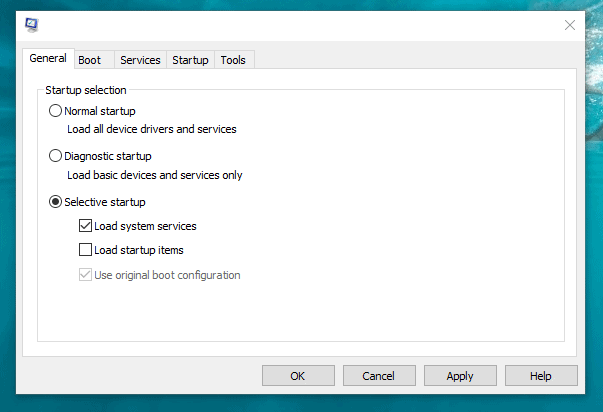
  • Type MSConfig in start search. Press Enter. This would open the System Configuration Utility.
  • Click Selective Startup under the General Tab.
  • Uncheck the box next to the Load Startup Items option. 
  • Check the boxes next to Load System Services and Use Original boot configuration respectively
mouse disappears in chrome,mouse disappears,mouse cursor disappears in chrome,cursor disappears in chrome,chrome://restart
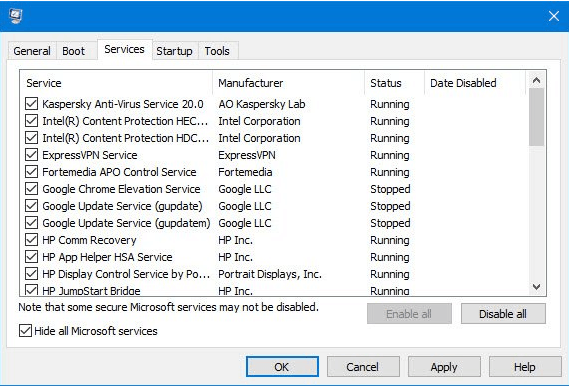
  • Check the box next to the  Hide All Microsoft Services option under the services tab and then click Disable all.
mouse disappears in chrome,mouse disappears,mouse cursor disappears in chrome,cursor disappears in chrome,chrome://restart
  • Click on OK and restart your PC.

This will run the  Windows in the Clean Boot mode. In case the issue is still not fixed, then under the General Tab, check the box next to the Load System Services. 

Click OK and then restart your PC.

CONCLUSION

These are a few easy solutions to mouse disappears in chrome error. To add on, we can even resort to using an alternative browser to Chrome for fixing this issue. Microsoft’s Edge Browser is indeed a great alternative which might make the cursor disappearing problem vanish.

The browser is built with the Chromium project and is quite similar to Chrome.

However, all the above-stated methods are providing a temporary rescue from this problem and the cursor might disappear at any instance. 

Google Launches Verified Calls Feature to Assure Safe Communication.

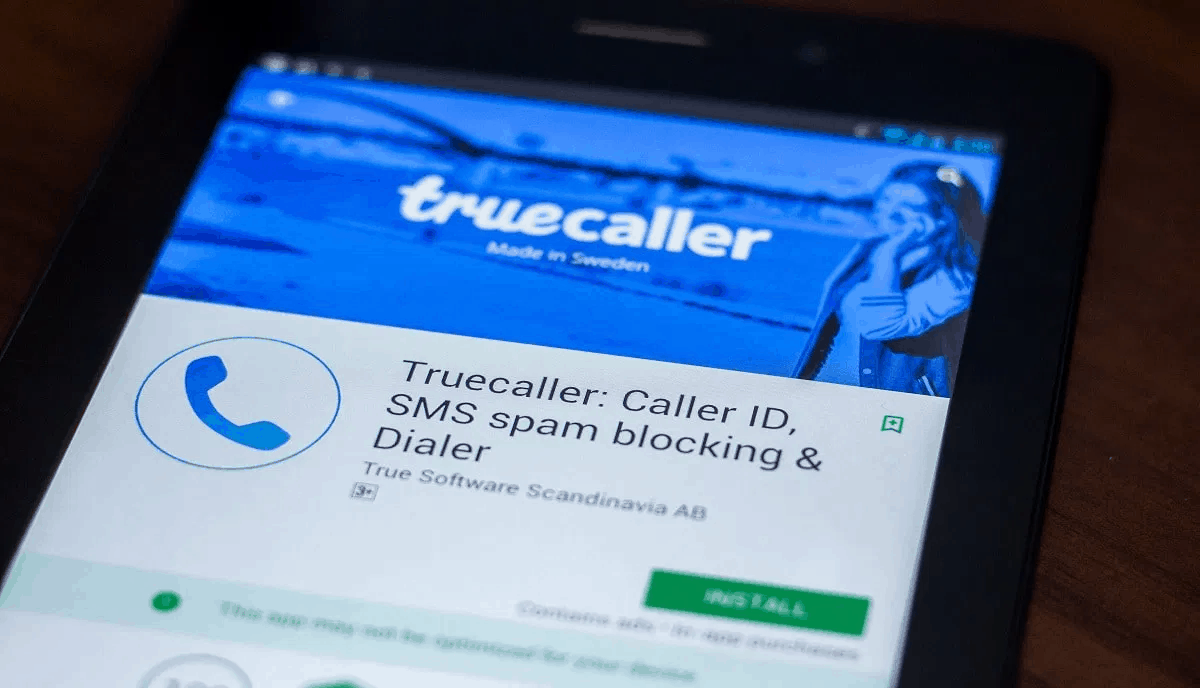
Most of us are familiar with the TrueCaller app which checks a call to be spam or from a legitimate user and alerts us in either case. Likewise, Google jumped into the field of tackling phone frauds on September 8, 2020. It announced Verified Calls, a new feature in the phone app of the android users. The feature is capable of verifying the calls to be from authentic numbers and rescues the users from phone frauds.

mouse disappears in chrome,mouse disappears,mouse cursor disappears in chrome,cursor disappears in chrome,chrome://restart

Indians have always complained of being victim to all sorts of spam calls and frauds via phone calls. This feature will not only tell the receiver about the number being true or not, but will also reveal :

  • The reason behind the call
  • The identity of the caller
mouse disappears in chrome,mouse disappears,mouse cursor disappears in chrome,cursor disappears in chrome,chrome://restart

As quoted by Google, the feature will be first accessible by the users of India, Mexico, Brazil, Spain, and the US. Here are some Suggestions for 5 Easy Ways to Streamline Client Calls.

Google referred in its blogpost that the spam and scam calls lead to trust issues in businesses and raise costs for customers. 

Google verified calls offer:

  • Better Answer Rates
  • Verification which wins consumer’s trust

The blog referred to previous year’s stats and reports and pointed – “A 2019 FTC report found that phone calls were the number one way people reported being contacted by scammers. While most people said they hung up on those calls, those who lost money reported a median loss of $1,000.”

Recently Netflix showcased a series titled, Jamtara which highlighted the frauds through phone calls. Jamtara is the “phishing capital of India” where people lost a lot of money being subjected to such fraud calls. The calls verified by Google Verifier apps will therefore protect users across the world from such calls. Not just the common people, but even some big names have fallen prey to such fraud calls. The recent one being the erstwhile Maharani of Patiala. 

The queen answered a fraud call in the year 2019 and lost 23 lakhs. Isn’t this a huge amount!

This is indeed a debatable crime which is not taken as seriously as it should be. Google aims to work in eradicating this crime through this feature. 

Verified Call

Let’s get a brief idea on what this feature will actually do.

The Google Verified Calls feature is an add on to the phone app in an Android cell phone. It’s got a lot which is listed below:

  • It is preloaded on nearly every android device. However it will be available for download very soon( probably later this week)
  • You’ll need to download this in case your phone’s manufacturer went with a custom dialler.
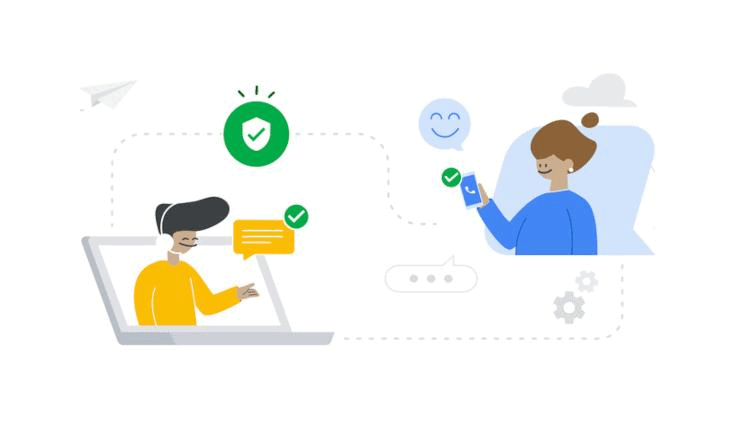
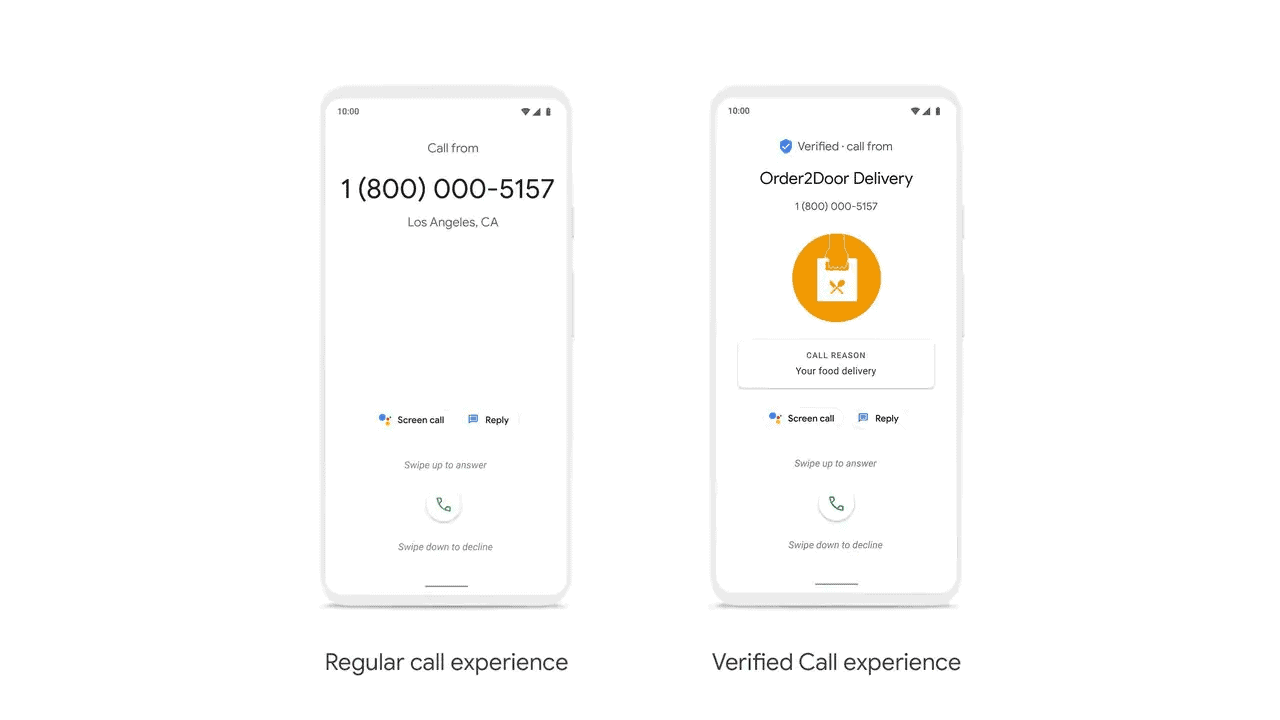
  • The call will be indicated with a verification symbol (a white tick on a blue shield) if it’s from a real business.
  • The future will display the caller’s name and reason of him/her calling you.

Now you might be wondering  that this feature will require your personal details!

NO! There’s no need to submit your personal information in order to access this feature. Google in its blog post referred to as- “this is displayed in a secure manner, and that Google does not store or collect any personally identifiable information after verification.”

As mentioned in the very beginning of this article, TrueCaller is one of the already existing apps similar to Google’s Verified Calls feature. TrueCaller is exceptionally popular in India and many android users have this app installed in their cell phones to avoid scam calls. 

mouse disappears in chrome,mouse disappears,mouse cursor disappears in chrome,cursor disappears in chrome,chrome://restart

This shall lead to a huge competition between Verified calls feature and TrueCaller in days to come.

Adding onto an already mentioned feature of Verified Calls which is missing in the TrueCaller app i.e. knowing the reason behind the other person calling you, because for instance you’ll take a call from your Internet Service Provider about a complaint you made a few hours back. But you might avoid taking up a call from your ISP regarding the new internet plans. 

For a more clear vision about this feature, we can take an example of the people calling from the logistics department of a company to assure that their customers are available at the time of delivery by alerting them with a call in advance.

“For instance, banks calling to alert a customer about a possible fraudulent transaction can increase answer rates by stating the call reason.” stated google in its recent Blogpost on this feature.

Google has been experimenting with this feature for a few days now, and results suggest that people are more likely to respond to the verified calls. In nutshell, the probability of people answering the calls verified by this feature is quite high. In turn, there will be fewer ignored calls for various businesses. 

According to Google’s website for the service, businesses can get started with Verified Calls by working with a partner such as Neustar, JustCall, Telecall, Zenvia, Prestus, Aspect, Five9, Vonage, Bandwidth, IMImobile, Kaleyra, Quiubas Mobile or Datora.

mouse disappears in chrome,mouse disappears,mouse cursor disappears in chrome,cursor disappears in chrome,chrome://restart

This is going to be a great step towards decreasing crimes due to spam calls and will be a boon for both the business and it’s customers. This will build a trust between people and organizations across the globe and cater better business results.

Facebook’s AR Glasses Could Alter the Way We Hear

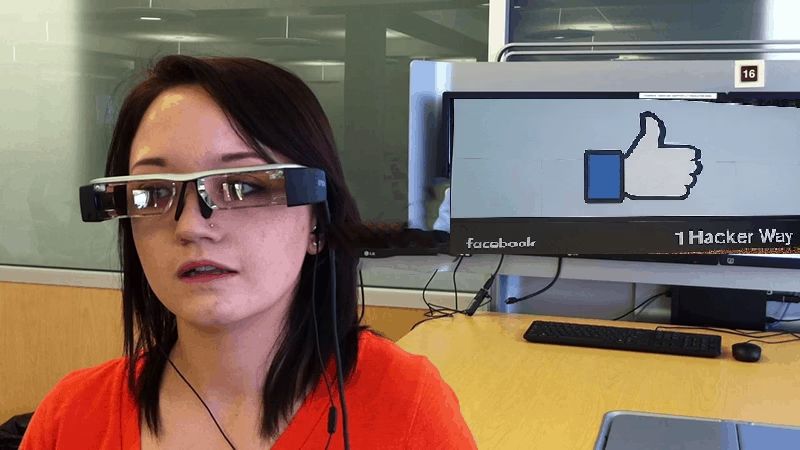
Facebook Reality Labs (FRL) has researched new AR glasses that can augment the hearing superpowers. Yes, you heard it right! Augmented Reality induced glasses that you can wear will amplify your hearing.  Perceptual Super-powers! That’s how the Facebook team brings in the concept that sees the skies for the very first time. 

Facebook Reportedly Getting Ready for AR Glasses | Wearable Technologies

This Augmented Reality driven glasses can track what you are trying to hear and amplify it. Additionally, it dampens the background noise. Incorporated with contiguous audio features, the AR device spawns the aural correspondent of a hologram overlay into the connected pair of glasses. 

The underlined technology seems to be on the same page as the existing hearing aid features. A hearing aid does implement the same voice amplifying and background noise reducing aspect. But Facebook’s AR glasses provide a special and unique probability for all people, immaterial of the hearing impairments. These glasses plan to combine improved hearing in clamorous environments as well as seamlessly infusing digital and natural audio.

Directional sensors on AR glassed backed with the outward-facing cameras are intended to collect precise contingent information. This information supposedly includes the orientation of the body parts directed at the angle of your eye’s vision. 

The information thus scrutinized aids the earpieces to identify an “acoustic spotlight” that it further amplifies. For the best experience, the soundscape of the AR system is added to the amplified audio. 

Facebook's AR glasses may give you superhearing

The technology is brought into reality with an array of microphones that are imbibed in the frame of the glasses that pitch in the voice of individuals as they speak. The glasses, like the hearing aid, could then diagnose the source of the sound you’re trying to hear. Supported with a combination of hardware and software solutions, the device then isolates the audio from background noise. The output is distinguishingly a perfect aid that you might never achieve with a hearing aid!

While it’s not a completely new project of Facebook, the technology appears to be novel on its own. Since 2014, when Facebook first bought Oculus, the VR powerhouse, it has been working on creating immersive audio experiences.

Since immersive audio is always considered cool for gaming, importing it into the augmented reality glasses domain could greatly expand its usefulness for the people, who wear it in the real world. 

Complementing the AR glasses with AI makes the glasses more powerful and guide to better control over the distinction between the actual voice and the background noise. The AR glasses apparently have an in-built camera, which they could adapt to analyze a scene in real-time and track the user’s vision. This helps the glasses to define the location of focus for the microphones. 

Facebook AR glasses audio

Human ears typically function in a peculiar fashion. It is believed that sound hits one of the ears before it reached the other. Moreover, the first ear is capable of hearing a slightly higher volume. Facebook is using these slight significant differences to manipulate the brain, thereby the ears. AI induced in the glasses actively figures out whether the attention should stay where it is or if it should shift using variables like your head and eye movement.

Improvising on hearing is not the only thing that Facebook is trying to achieve with this new technology. While the research could bolster the hearing capacity, “audio presence” technology is something that could also be pursued in parallel.

Audio presence is another concept that Facebook has been working on for quite some time. Facebook, however, aims to make audio so convincing that a person it will be difficult to distinguish the real-world sounds from the device’s audio. 

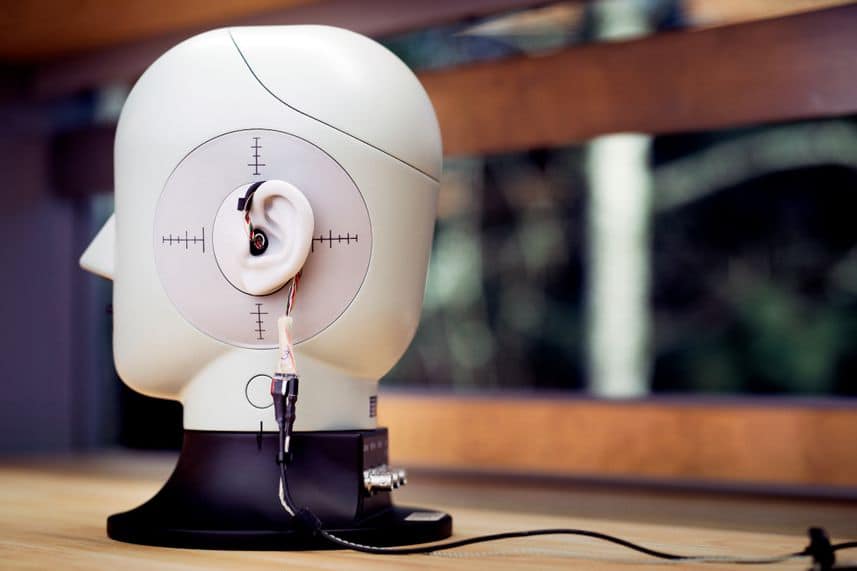
The normal surrounding or rooms that we are in greatly affects the sounds we hear. The parameters like ceiling height, floor finishings, wall-to-wall distance intervene in the audio around us. To suppress these variables, the company is currently said to be developing the technology in massive rooms called anechoic chambers. These chambers presumably absorb every bit of deviating noise within the jagged foam padding lining. 

Facebook confirms it is working on Augmented Reality glasses

Though Facebook has been all the time very upfront and open to the fact that it is working on the AR technology, we have to wait and see all the other technologies that would come out with this advanced glasses.

Checkout The First-Ever Floating Apple Store

0

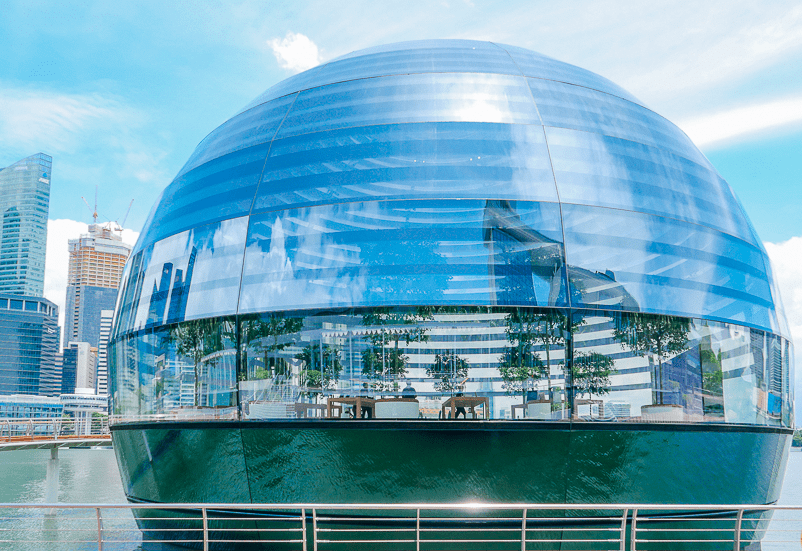
Apple Marina Bay Sands, the first-ever floating Apple store will exhibit its grand opening on 10th Sept 2020. Standing on the exquisite water site of Singapore’s Marina Bay, Apple’s latest is the third retail store in Singapore, which is a marvellous sphere. 

This glass dome fully self-supported and tethered architecture is a stable structure that lies in the midst of Singapore’s glorified hotels, and shops. It embellishes a panoramic view of Singapore’s authentic Skyline.

floating Apple store
Apple’s Floating Store in Singapore.

Apple stores like their products have always accorded the best designs. Apple stores have delivered the architectural structures that have grabbed awards for creativity and inventiveness. The uniqueness of the Apple store is that they form an epitome of the culture in that specific location and connect to the thoughts of the local people. 

Apple’s 512th retail store worldwide, Apple Marina Bay Sands is no exception to this rule. Apple Ginza, Tokyo, Apple store in Dubai, Apple Regent Street store in England are a few magnificent Apple stores that bring out the novel and creative designs of Apple.

The Apple Orchard Road was the first Apple Store in Singapore at the Knightsbridge building on Orchard Road. It was also the first Apple Store in South-east Asia. Apple’s second store in Singapore was inaugurated in July last year that is located at Jewel Changi Airport.

mouse disappears in chrome,mouse disappears,mouse cursor disappears in chrome,cursor disappears in chrome,chrome://restart

Like the other outstanding Apple store designs, this new delicately beautiful glass structure stands rigid on the waterfront and presents an architectural treat for the visitors! The architecture is inspired by the Pantheon in Rome. Constructed from 114 individual glass pieces put together in a dome by 10 vertical mullions, it appears to be first-of-its-kind construction. 

mouse disappears in chrome,mouse disappears,mouse cursor disappears in chrome,cursor disappears in chrome,chrome://restart

An oculus stationed at the apex of the dome brings in the shine of the reflected Sun rays, illuminating the whole structure. The inside of the glass dome is quilted with custom baffles, each uniquely shaped to retaliate light angles and provide a beautiful dusk lighting effect. The night sky delivers a whole different story as jaw-dropping as the sunny sky! 

mouse disappears in chrome,mouse disappears,mouse cursor disappears in chrome,cursor disappears in chrome,chrome://restart

The place provides augmented shading and subtle ambiance with the array of trees lined in the interior of the dome. It looks as if the green garden city of Singapore is carved in the dome of harmony.  

mouse disappears in chrome,mouse disappears,mouse cursor disappears in chrome,cursor disappears in chrome,chrome://restart

Apple stores worldwide are customized with friendly people and provide the best shopping experience around the globe. The customers can explore curated Apple products and accessories assisted with all specifications and features received by personal technical support.  Well, even the visitors can stop by and simply take in the stunning view of Marina Bay. 

Apple’s decision to build its 3rd store is taken as an affirmation of the tech giant’s affinity for Singapore. Apple definitely is looking forward to long-term success in Singapore, as confirmed by Deirdre O’Brien, Apple’s Senior Vice President for Retail and People.

“We couldn’t be more excited to open the breathtaking Apple Marina Bay Sands in Singapore, building on our commitment to this special place that began more than 40 years ago,” added Deirdre O’Brien.

mouse disappears in chrome,mouse disappears,mouse cursor disappears in chrome,cursor disappears in chrome,chrome://restart

A Video Wall staging the ‘Today at Apple’ sessions is centred in the Forum that will supposedly feature Singapore’s artists, musicians, and creators. Apple announced that nearly 150 employees would be welcoming the visitors to Apple Marina Bay Sands. Apple’s exuberant team can speak around 23 different languages and are looking forward to the grand opening this Thursday. And now Apple Likely To Unveil New iPhone 5G Models In October 2020 (iPhone 12).

In addition to the special stage that is all set to feature Apple creatives,  the company’s first underwater Boardroom is all set in the first basement of the store,  featured for entrepreneurs and developers who are interested in receiving training & advice from the esteemed Apple team.

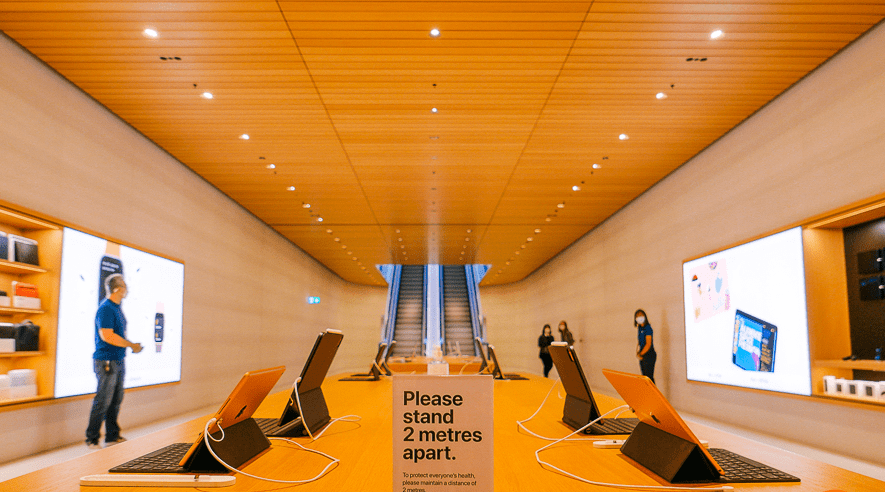
Apple Marina Bay Sands will still be executing the same uncompromising health and safety measures for both employees and customers, considering the current global pandemic situation, including a mask-wearing compulsion, temperature checks, and social distancing.

The store is conveyed to be open to the public from 10 am on Thursday. But the visits will be arranged by reservation only. Appointments are to be made on the Apple Marina Bay Sands portal.

From September 11 onwards all visitors and customers are allowed, without any prior appointments. Given the current scenario, Apple has taken measures to limit the maximum number of people within the store abided by all the safety measures. 

This splendid design and architecture are worth the appreciation and the warm welcome that the store is making it all the more special and humble. We hope Apple keeps making such marvellous spaces on the globe!

UBER Announces 100% “Electric Rides” by 2030!

Uber made a glorified announcement on the 8th of September, 2020. The popular platform offering people rides since March 2009, proclaimed to offer “100%” of its rides through electric vehicles by 2030 in the US, Canada and Europe. The company has taken a pledge to perform the same in the entire world by 2040.

The company however plans to raise the price and impose extra fees on trips completed in an electric vehicle to stimulate the drivers to make the switch.

UBER

Uber launched its “Uber Green” surcharge in 15 cities of the US and Canada yesterday. As per the surcharge:

  • The riders can specifically request a hybrid or electric vehicle for an extra dollar.
  • The drivers who used an electric vehicle for riding the passengers will get a credit of 50 cents per ride.
  • For the drivers who’ll be using specifically battery-electric vehicles get another dollar on the top of 50 cents. This will provide them with a credit of $1.50 per ride.
uber

Though this step is sure to make the rides a bit expensive for the Uber customers, it’s an important step towards transitioning the conventional riding into a nil-emission drive. The company believes that it is a revolutionary step towards having zero-emission rides and will do enormously good to the environment. Check out our suggestion for the 5 latest Electric Cars You Need to look into This Year in India.

As announced by the company, “Uber will also spend $800 million of its own money to help hundreds of thousands of drivers in the US, Canada, and Europe transition to battery EVs by 2025.”

Well, that’s a considerable number!

Many ride-hailing companies are planning to shift conventional riding to having more electric vehicles running on roads among some major cities in the US. As reported in the Financial Times, “Los Angeles may force Uber to use electric vehicles, mayor says”.

The decision came after various observations which reveal that the idea of ride-sharing being more environment friendly as compared to various other modes of transportation, lost its virtue in the previous days.

According to the Union of Concerned Scientists, ride-hailing trips today result in an estimated 69 per cent more climate pollution on average than the trips they displace. As mentioned in a report by the Verge on February 25, 2020:  Uber and Lyft generate 70 per cent more pollution than trips they displace: Study.

This decision by Uber came in response to a comment mentioning more electric cars and vehicle-pooling must be implemented by the ride-hailing companies, by the Union of Concerned Scientists in the beginning of 2020. Studies have suggested that an average ride-hailing trip causes 50% more pollution than an average traditional car trip. 

mouse disappears in chrome,mouse disappears,mouse cursor disappears in chrome,cursor disappears in chrome,chrome://restart

A shocking revelation suggests that more than half of all the ride-hailing trips in major cities are by those who would have otherwise opted for a much cleaner means of transportation to reach their destination.

Getting millions of drivers of the company to switch to electric vehicles is yet another challenge which the company is expected to encounter. Uber drivers are personal contractors, who generally use their own vehicle for riding the passengers not just for Uber but for various other companies in the ride-hailing business. 

Uber experimented with the proposed plan back in 2018, by providing few of its drivers with cash incentives if they switched to electric vehicles.

All in vain! Unfortunately, the experiment collapsed at its very earlier phase and couldn’t go a long way.

Uber plans to partner with a variety of stakeholders:

  • Automakers, 
  • Car rental operators, 
  • Electric vehicle charging companies, and others.

This could give a great thrust to the company’s ambitious goal of a “fully zero-emissions platform by 2040.” 

Uber is looking forward to associate with automakers like General Motors in the US and Canada, and Renault-Nissan in cities in the UK, France, Netherlands, and Portugal — to “extend attractive offers” on electric vehicles to drivers

The company is drafting a blueprint to work with Avis, which is a car rental company so that the drivers can easily access the electric vehicles. Besides all these partnerships, the company is also expecting the government to help it achieve its ambitious goal. The company recently made various statements regarding this, and said –  “it urgently needs more robust collaboration between industry and government stakeholders.” 

mouse disappears in chrome,mouse disappears,mouse cursor disappears in chrome,cursor disappears in chrome,chrome://restart

While we’re not the first to set ambitious goals in transitioning to EVs,” Uber CEO Dara Khosrowshahi said in a letter, “we intend to be the first to make it happen.”

Looking at the company’s progress in the direction of achieving this goal, under the new Clean Air Plan it recently added an extra 15 pence (USD $0.19) per mile in London. This surcharge will help the drivers to switch to EVs and eventually to turn all the cars on the app into electric ones by 2025.

The Transport for London stated a rule that – “Private for-hire vehicles, including Uber, would no longer be exempt from the £11.50 daily congestion charge for driving in central London.” The rule is not applied to the zero-emission vehicles, i.e. electric vehicles. This explains the company’s urgency to switch its drivers to EVs.

A similar plan is being drafted for France by the company. Uber aims to put a sum of its money for the French drivers so they can buy EVs. The sale and production of fuel-burning vehicles were prohibited in the Canadian province of British Columbia when legislation was passed by the province.

Norway became the world’s leading electric market surpassing Germany, recording every third car purchased to be an electric one. An electric charging system is under development in this nation with an aim to achieve zero-emission rides by 2023. Reports have suggested that The US is lagging behind most of the world in terms of climate policy. 

Transportation has been one of the major factors governing climate change. Working in the direction of improving the environment, so far we read that it’s not just UBER, but various other companies which aim to achieve a similar goal as UBER.

mouse disappears in chrome,mouse disappears,mouse cursor disappears in chrome,cursor disappears in chrome,chrome://restart

With Lyft announcing its target of achieving zero-emission rides by 2030, it’s going to be a real competition between the two companies.

Let’s see which one shall make it first!