RPA is a budding technology but it has earned huge popularity in the finance sector. This sector has emerged as an early champion in the Robotic Process Automation technology. According to the 2019 Economist Survey, 59% of Finance and Accounting leaders trust that RPA will help their businesses gain a more competitive edge in the upcoming years. The reason for this belief is manifold.
In this article, we will try to explore why RPA solutions are embracing so much interest from banking services?
RPA does it efficiently and accurately.
Financial processes deal with endless forms, applications and declarations that are needed to be matched and compared for completeness and retrievals. Human error becomes common here. Robotic Process Automation helps institutions do these things better, cheaper and faster than the human workforce. The technology also shields the businesses from security breaches and assist them in delivering the seamless experience their customers expect.
Reduces client costs.
RPA reduces operational cost by replacing human workforce with “software bots”. This lowers down the processing time of high-frequency tasks and leads to an estimated cost saving of around 50-70% for the company. Also, RPA application can be installed without changing the existing IT infrastructure and gives more control over the adoption process to the finance function.
Narrows the gap between accounting and digitization.
Many RPA vendors like Edgeverve and Uipath claim that their Robotic Process Automation software leverages AI and machine learning technologies which can help financial institutes automate tasks such as data verification, credit scoring, fraud detection, financial and external reporting, treasury processes etc. The technology can also aid finance sector in driving value creation by extracting and combining data from various sources such as social networks and shared drives.
Helps financial institution in embracing change and complexity.
Robotic Process Automation tools help medium and large banking firms to accommodate changes and increasing complexities with ease. With competition at the peak, there is a need for such firms to evolve continuously with market demands and emerging technologies. RPA in banking being highly scalable, quickly deployable and rapidly adaptable, assist them in handling more and more complex workflows without adding to their headcounts.
Conclusion.
In this era of globalisation and fourth industrial revolution where concepts of virtual banking are becoming new normal, it has become imperative for banks and other financial institutions to remain highly competitive and provide exceptionally consumer-centric services.
Struggling with the scarcity of skilled labours, a sharp increase in personal costs and a need to increase efficiency in processes, the financial institutions seem to become more and more dependent on advanced technologies like RPA and AI.
However, machines can never completely take over the finance functions. Human supervision will always be needed for advanced analysis and interpretations.
There are a number of sure fire ways in which you can seriously increase the numbers of followers that you have on your Instagram account. One of these is using a specialist company or piece of software that has experience of doing this for various other brands on the social media platform. One example of a company that can do this for you is Social Meep. They use their automation tool and organic growth service to build up your audience to the level that you want.
Use Brand Advocate And Partners
The more Instagram users that you can get yourself and / or your products and services in front of, the more likely that your account will grow. By using brand advocates and partners, you have the chance to get your brand in front of a whole host of new potential followers. Find influencers of all sizes to promote your brand through either paid posts or through direct reviews of your products / services.
Schedule Posts In Advance
By posting at the right time of the day, you can seriously increase the reach of the content that you post, regardless of how good it is. However, ensuring that you post at the same time is not necessarily as easy as you may think it is, as things can easily come up to distract you from the task. This is where a third party scheduling tool can help you. Not only will it ensure that all of your posts go out at the right time, but it also takes the stress out of posting every day and having to think of a caption to go with it.
Do Not Buy Followers
Although very tempting, purchasing fake Instagram followers is something that anyone wanting to increase the number of followers that they have should avoid, as it will make other users seriously question the legitimacy of your account. Instead, you should get new followers in a natural and organic way by posting good quality content. These are the ones that are likely to heed any future call to actions to purchase your goods that you may make. They will also like your posts and engage with them by leaving comments. Fake purchased followers will do none of these things.
Promote Your Account
If you do not promote your Instagram account then how can you ever expect anyone to find it and follow it. This is why you need to ensure that your account is promoted on your website or any other social media platforms that you may have. Rather than simply promoting your account and asking users to follow it, you should give them an incentive to do so by promising unique content that is not seen anywhere else. There are now a number of features on the platform, such as Reels and IGTV, that allow you to do this in a quick and simple way.
The healthcare startups are certainly the fastest developing sector in India and are constantly innovating!
Health is Wealth! Obviously, that is the motto of everyone’s life. The Healthcare units particularly are closely associated with this old wise saying.
Whether it be in terms of revenue, market share, or even quality of healthcare services, the healthcare sector is visualizing a dominant turnover in India. Indian companies, specifically, Indian healthcare Startups are redefining the delivery of quality healthcare to the people and are extending a promise to ease some of the bottlenecks in this hugely populated landscape. Despite the growth spurt in this domain, emerging startups keep proving, every other day, that there still remains immense space for growth and innovation.
The healthcare sector, like most other developing arena’s, is observed to be leveraging the augmented advantages of AI and cloud computing. The amalgamation of automation and the emerging young startup is establishing new landmarks in the field.
During these times of trial, COVID has come like a wake-up call! When people are relying so much on the home-delivered commodities, pertaining to a stay at home option, health-related regular checkups and associated medicines at doorstep, come as a boon of the development.
If we study the statistics of the growing healthcare sector, the Indian healthcare startups industry pegged at $100 billion and is expected to grow further by 23% by 2020 to $280 billion. Now, that appears a tremendous hike, isn’t it?
The so-called game-changing healthcare startups cater to various healthcare segments, as follows:
E-commerce & Pharmacy Delivery
Doctors Discovery Platform, Doctor Networking, and engagement
Consultation & Appointment, and other Practice management
Patient Education, Awareness, and Network
Health Record, Data & Claims Management
Personalized Health & Lifestyle services
Home – healthcare
Specialty-care for different age groups
Devices & Tech
Genomics and outsourcing
Now that we know, the wide province of performance of the healthcare sector, let’s quickly devise the list of Indian Startups that are making the whole difference, and let’s track the prominent healthcare startupsthat stand a distinctive chance in the after COVID journey!
1. Netmeds
Year Founded: 2010
Founders: Pradeep Dadha
Headquartered: Chennai, Tamil Nadu, India
Category: Consult Doctors and Book Lab Tests Online
Netmeds, considered India’s most convenient pharmacy, is also one of the biggest of India’s healthcare startups. Encompassing over 1 million Indian customers, this online platform is known to deliver medical essentials to over 19,000 pin codes. Netmeds is a 24*7 online portal offering streamlined shopping for healthcare products, now also supported with a mobile app. Netmeds had marked more than 3 million downloads, in 2018 and is called ‘India ki Pharmacy’, for definite reasons,
Reported to have grown to more than $512 million, it is further estimated to touch $3.645 billion by the year 2022.
2. Practo
Year Founded: 2008
Founders: Shashank ND and Abhinav Lal
Headquartered: Bangalore, Karnataka, India
Category: Doctors, consult online, order medicines
Practo is one of the world’s leading healthcare platforms. Practo’s patient-focused independent medical website helps the patients to find the right doctors for their problems. Consumers are helped in booking doctor appointments as well as online video consultations with the top doctors near. Practo further assists the patients in getting all the relevant tests done, as prescribed, and also aids guidance to make proper healthcare decisions. Online ordering of medicines and their safe delivery is also exercised in Practo.
Practo, alongside extends its support, to a family of over 1Lakh doctors to digitize their practice. It is a free service for patients and doctors. Practo now has a presence in 5 countries, including India, Singapore, Indonesia, the Philippines, & Brazil.
Category: Place online medicine orders, get information on medicines, book diagnostic tests, buy healthcare & OTC products
Pharmeasy is one of the most successful healthcare startups in India. This Mumbai-based pharma platform is currently operating in seven cities—Delhi, Mumbai, Bengaluru, Kolkata, Pune, Jaipur, and Ahmedabad—and has over 150 partner vendors. Pharmeasy, as the name suggests, lets the users place their orders in just 3 easy steps and also aids a convenient reorder of the same prescription. It now serves more than 100,000 families and connects pharmacies spread across the cities, towns, and villages, all over India.
4. ImpactGuru
Year Founded: 2014
Founders: Piyush Jain, Khushboo Jain
Headquartered: Mumbai, Maharashtra, India
Category: access & manage fundraiser on the go, get live updates on donations
A creative tech-for-good, personal health agency, ImpactGuru envisions to reach many and save more lives. It is a donation-based crowdfunding platform that offers global crowdfunding solutions to empower NGOs, social enterprises, startups, and individuals to raise funds for medical emergencies. Impact Guru was launched as a free crowdfunding platform.
Category: Drug Guide, ECG lesson, a largest academic network of Doctors & HCPs
DailyRounds is based out of Bangalore and has the largest Academic Doctors network with 250,000+ Doctors. DailyRounds is a mobile app exclusively for Doctors. Medical Schools, Physician & Surgeon societies, it is for the right reasons, called as a social network/medical journal for doctors. It is a platform, where doctors share cases and get full access to drugs & ECG databases, calculators, and guidelines. DailyRounds was founded by a three-member team of Doctor, Engineer & Developer.
6. AddressHealth
Year Founded: 2010
Founders: Anand Lakshman
Headquartered: Bangalore, Karnataka, India
Category: First one-stop-shop paediatric
AddressHealth is a Paediatric/ Child Health service that aims to make pediatric primary care constantly possible. AddressHealth is striving to ensure that every child attains a state of positive health. AddressHealth has integrated child health clinics that reach out to schools, pre-schools, and residential groups. It runs Child Health Clinics in Bangalore and is India’s first one-stop-shop for pediatric primary healthcare services. It has partnered with the government in the MR vaccine programs.
7. CureFit
Year Founded: 2017
Founders: Ankit Nagori, Mukesh Bansal
Headquartered: Bangalore, Karnataka, India
Category: Care.fit, Mind.fit, Eat.fit, cult.fit
CureFit is primarily a health and fitness company that offers digital and offline experiences across fitness, nutrition, and mental well-being. It is a health and fitness powerhouse that takes a holistic approach to complete individual well-being and one of the game-changers in healthcare startups.
CureFit aims to make fitness fun and easy, thereby giving workouts a whole new appearance using an array of group workout classes that are specially formulated by expert trainers. Fun workouts are balanced with everyday healthy & tasty diet plans. Mental fitness paralleled with yoga and meditation, along with appropriate medical and lifestyle care, are the so-called healthy living mantra at CureFit.
8. Qure.ai
Year Founded: 2016
Founders: Prashant Warier & Pooja Rao
Headquartered: Mumbai, Maharashtra, India
Category: Chest X-Rays, Head CT Scans, AI-powered pandemic response solutions for COVID-19 management
Founded by Prashant Warier, Qure.ai is driven by deep learning solutions that aid physicians with routine diagnosis and treatment. Artificial Intelligence induced medical practices in Qure.ai, allow specialized doctors to spend more time with patients. Qure.ai proves to be an accessible and affordable means of healthcare service to all. It is headquartered in Mumbai and was founded in the year 2016. It is one of the best known Indian healthcare startups.
9. MFine
Year Founded: 2017
Founders: Ashutosh Lawania (Myntra co-founder) and Prasad Kompalli, a former business head at Myntra
Headquartered: Bangalore, Karnataka, India
Category: Consult online with doctors & book lab tests, at-home health checkups
A health-tech startup, MFine aims to make access to trusted healthcare simple, fast, and proactive. MFineconnects you to specialist doctors online across 30+ specialties via chat, audio, or video call instantly using AI.
Cutting edge technology is MFine’s means to keep track of health parameters thereby maintaining all health data safe and easily accessible. Digital wearable devices, mobile app, and at-home services make MFine deliver the finest treatment and service.
10. Strand Life Sciences
Year Founded: 2000
Founders: Dr. Ramesh Hariharan, V.Vinay, Swamy Manohar, & Vijay Chandru
Headquartered: Bangalore, Karnataka, India
Category: Clinical diagnostics, bioinformatics, and book for online tests.
This bioinformatics solution provider is leading a new generation of healthcare. Giving a new angle to diagnosis, the services in Strand Life Sciences is defined by genetic insights into diseases. It is driving services with advanced visualization, predictive systems modeling, data integration, and scientific context management components by inducing raw data and transforming the same into actionable insights.
11. PurpleDocs
Year Founded: 2010
Founders: Deepak Gupta & Pooja Gupta
Headquartered: Ahmedabad, Gujarat, India
Category: Consult Surgeons Online, book appointments, order medical essentials, schedule health checkups, read free health-related blogs.
This SaaS-based health care unit offers an array of products, apps, and services to manage clinical data. PupleDocs is making healthcare data secure, analyzable, and accessible to all healthcare stakeholders. Comprehensive patient history consisting of case sheets, videos, X-rays, CT scans, DICOM CD data is digitized by PurpleDocs, thereby creating an analyzable data repository on the cloud, creating a revolution in healthcare startups.
12. Pristyn Care
Year Founded: 2018
Founders: Harsimarbir (Harsh) Singh
Headquartered: Delhi, India
Category: Consult Surgeons Online, book appointments, order medical essentials
Pristyn Care is the leading healthcare Startup, that is disrupting Day Care Procedures. Ex Consultant Surgeons from Medanta, Max, Birla, and ex UrbanClap, Mobikwik Strategy & Business Head have conjointly designed this health care unit, bolstered with advanced tech developments, showcasing the immense scope of growth in healthcare sectors.
13. NIRAMAI Health Analytix
Niramai
Year Founded: 2016
Founders: Geetha Manjunath & Nidhi Mathur
Headquartered: Delhi, India
Category: breast cancer screening solution
Niramai is a healthcare unit specializing in a novel breast cancer screening solution that uses Thermalytix.
With the help of a new cancer screening software that induces machine intelligence over thermography images, an effective solution is crafted that is a low cost, easy to use, and portable at the same time requires minimal human supervision. Niramai has drafted a solution that can detect cancer at a much earlier stage than traditional diagnostic methods and self-examination, thereby improving survival rates. Women of all age groups can implement this solution and undergo frequent screening without any side-effects.
14. Elucidata
Year Founded: 2015
Founders: Abhishek Jha and Swetabh Pathak
Headquartered: Delhi, India
Category: Embed data science across every stage of drug discovery
Elucidata Corporation uses data analytics to transform decision-making processes in R&D labs in biotechnology and pharmaceutical companies.
Elucidata builds algorithms and software to processes. They analyze and visualize large omics data across metabolomics, genomics, transcriptomics, and proteomics among others. They are known to build our own products and provide customized solutions to partners.
15. CrediHealth
Year Founded: 2013
Founders: Gaurav Gaggar, Ravi Virmani, and Saurabh Uboweja
Headquartered: Gurgaon, India
Category: Consult online with doctors & book lab tests, order medicines online, get a second opinion
Credihealth is an Indian healthcare startup that is changing the face of healthcare in India. Credihealth has introduced a ground-breaking approach for people to compare and select from a comprehensive database of hospitals, doctors, and treatments. With a vision to provide easy access to credible health information, Credihealth strives to make the healthcare transparent
Category: Consult online with doctors & book lab tests, order medicines online, read health tips, view medicine information
Formerly known as Healthkart Plus, 1mg is an online pharmacy network and generic medicine engine, that enables users to find information about medicines prescribed by doctors and also buy them. Users can find drugs by ailments, classes, companies, and brands.
Believe me, we can keep adding names and information to this list and it will go on! Taking a break at 16, we would like to request you to go and check these startup, if you are not already familiar to them.
Hi all! Looking for a fix for the Steam content file locked’ error? Here are a few solutions that can help to play uninterrupted!
Video games have been appending to the entertainment industry since 1972 when Pong, the first-ever video game was launched in an arcade machine. This aflame the craze of video games, which in no time took over the youth across the globe. Sighting the ever-widening scope of the gaming industry, various companies came forward to distribute and promote video games. Atari games became the first among those companies and distributed.
So far the market has more than 11 Lakh Video Games available for game enthusiasts across the world.
That’s indeed a huge number!
The modern games which once could be played only on arcade machines can now be played on various devices –home video game consoles and desktop PCs being the two most common devices. This made companies shift to the Internet for the distribution and promotion purposes of video games, giving rise to the first-ever Digital Distribution Platform- STEAM.
What is Steam?
Steam is a digital distribution platform for gamers and game developers across the globe. The platform was launched by Valve as a stand-alone software client in September 2003 to provide automatic updates for their games. Since then the software has been updated multiple times and now offers various features including Digital management rights and social networking services, cloud storage, in-game voice, gaming soundtrack, and anime designing, and a lot more. Despite a great range of advantages, the users struggle with various steam errors. One such error pop up is-“Steam content file locked.” or “Steam Download Content File Locked”
What is the “Steam content file locked.” error?
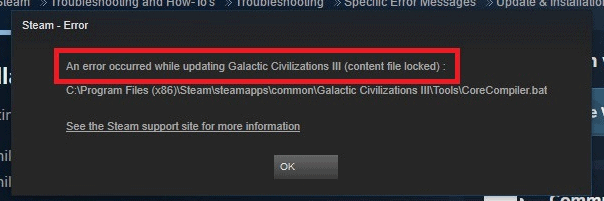
The “Steam content file locked” error generally occurs when the user is trying to update the games. This means that the files cannot be written to the hard drive by Steam.
This error will not allow the user to play the current version of any game distributed by Steam. This is indeed a considerable problem that needs to be solved to continue playing.
One of the major reasons behind this error is corrupt files.
Opting for Beta for Steam distributed games could cause this error.
Now that we know about the “Steam content file locked” error, it becomes important to check various methods of how to fix content file locked on steam. Troubleshooting might prove to be a tedious task if you’re not aware of the step by step procedure. Before you proceed you can check similar steam issues like “How to Fix Steam Not Connecting Issue” which are very frequent in occurrence.
We’ll be discussing 5 methods using which we can easily get rid of this error and get all the answers to How to fix content file locked on steam?
How to fix the “Steam content file locked” error?
The following are the ways using which you can resolve the content file locked steam error.
Let’s check them out!
Run Steam as Administrator
To bypass the “Steam content file locked “ error, run Steam as admin.
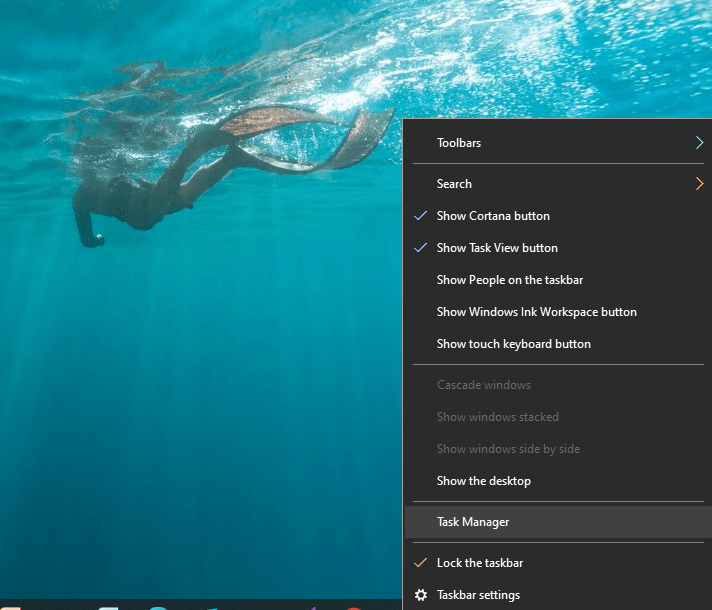
Right-click on the Taskbar and select Task Manager from the following menu to shut-down Steam
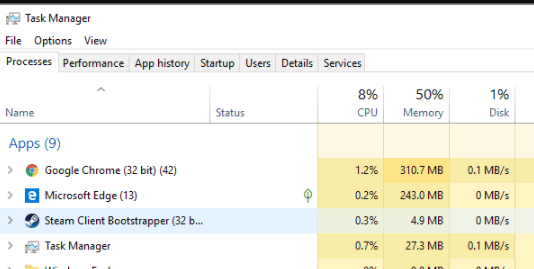
Go to Steam Client Bootstrapper process, click on it and select “End Task”
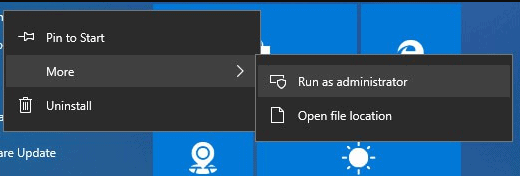
Right-click the Steam icon on your system’s desktop/taskbar( as the case may be)
Select Run as Administrator. Steam would download and install the update
This would remove the error and you can now enjoy playing the video games again without any interruption.
Reset Winsock
Follow these steps to reset the Winsock and resolve the “Steam content file locked” error.
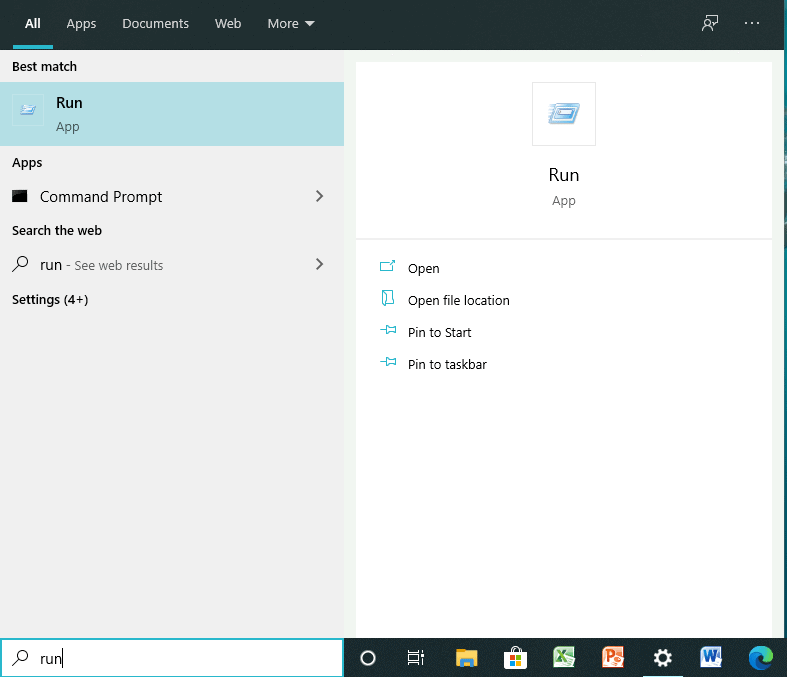
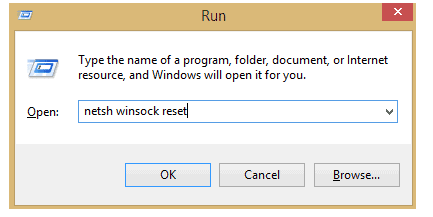
Press Windows+R or type Run in Windows search box and press enter to open the Run window on your system.
Type netsh winsock reset in the Run window and click OK
Once done, Restart your PC.
The problem must be resolved and the“Steam content file locked”error pop up shall no longer prevail.
Change Steam and game files location
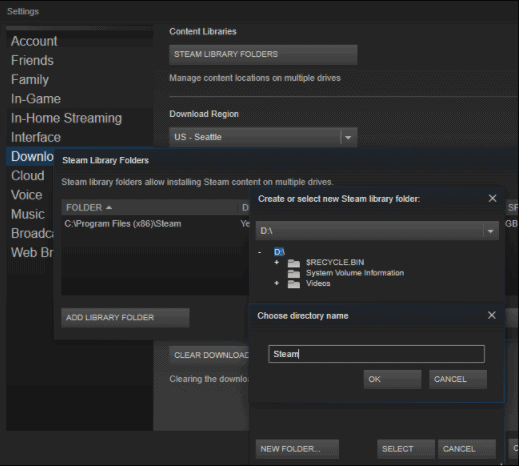
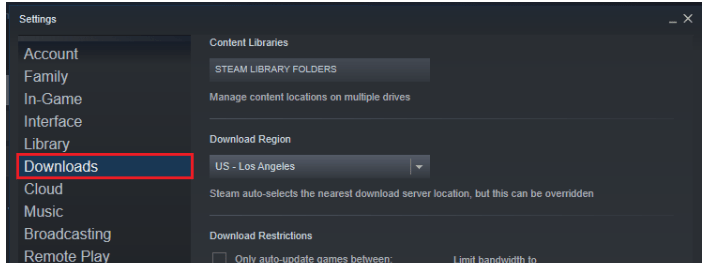
Go to Steam Clients> Settings
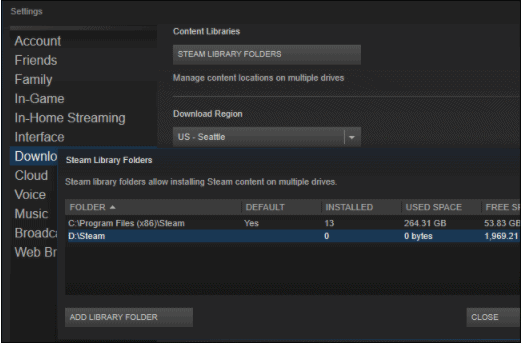
Click Downloads. From the select Steam Library Folders
Select the new library for Steam from Add Library Folder and then close Steam Client.
Go to the default location of Steam Directory- C:\Program Files\Steam
Except for UserData and SteamApp folders delete the exe and all other files.
Move these files to the location you mentioned in Step 3.
Open and log into Steam Again.
If still the error is not removed, follow these steps:
Close Steam and go to new steam Location
Move the SteamApps folders to your desktop from the directory
Uninstall Steam. Install it Again to the new location.
Move the SteamApps folder in the Steam directory.
Open Steam and Login again.
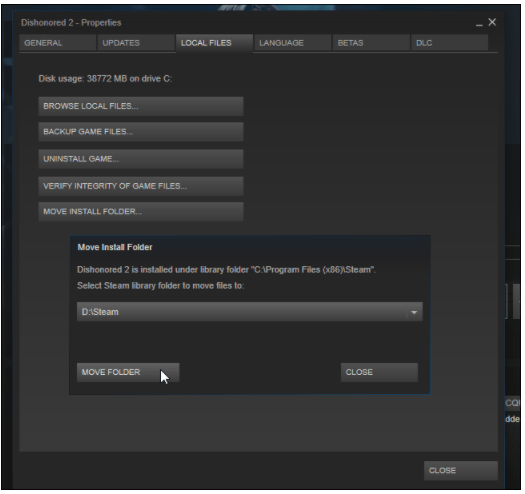
You can even make the Steam files move automatically:
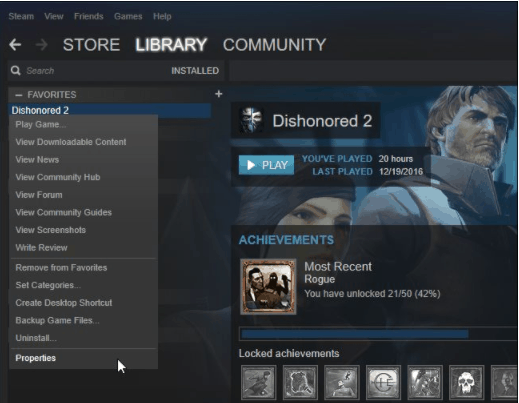
Right-click on the game.
Go to Properties>Local Files>Move Install Folder as shown below.
Browse to the new location.
Select the new location.
By following the above steps, you can remove the “Content file locked” error.
Opt-out of Beta
Boot up Steam.
Click Library from the options running horizontally across the top of the client
Select Properties by right-clicking on the error causing game from the list of games on the left side of your system’s window.
Navigate BETA ‘s tab
Click “Select the beta you would like to opt into” from the drop-down menu. And then select ‘’NONE – Opt-out of all beta programs’’.
Try to run an update for the game.
Clear Download Cache
If you’re a frequent computer user, your PC’s history and Cache get jammed. This could result in the“Steam content file locked” error.
To clear download cache:
Boot up the Steam.
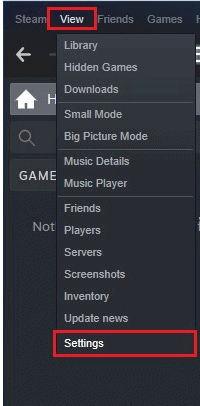
Navigate to the “View” option in the client Window.
Go to Settings.
Select Downloads from the list on the left-hand side of your screen.
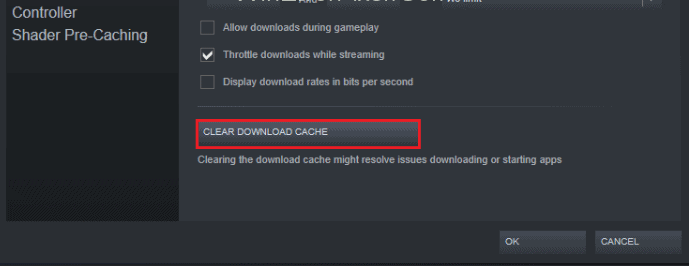
Click on the Clear Download Cache option and click OK.
Update or install Steam.
Note– Antivirus software might mistake Steam as malware or threat and hence try to delete it immediately resulting in this error. Therefore you can try resolving the “steam download paused content file locked” error by Adding Steam as an exception to your Antivirus before you update Steam.
There you go!
These are 5 incredibly easy methods using which you can solve the “Steam content file locked” error and continue playing video games on your system without any further intervention.
In this modern era, we cannot even imagine our lives without the internet. The invention of the internet completely revolutionizes the lifestyle of people globally. It brings many productive changes to the education sector. It upgrades the education sector and made it smarter. The introduction of an online examination system is a boon for both educators and students. It not only saves time as well as energy and money for both students and teachers. It allows the examination authorities to refine the talent from the remote places also. It makes it possible for the students to participate in a maximum number of exams without moving from place to place.
There are large numbers of software vendors available in the digital market. They offer varieties of online examination software at very genuine prices. They provide the best technical solutions to the education sectors. They offer their services in the form of different packages. The package of software varies according to the needs of the examiner. One can choose according to the scale of examination he wants to conduct. It’s always beneficial to look for software’s abilities to conduct exams, anti-cheating features, evaluating properties, and also focus on its design.
The online examination software keeps all the distractions away from the exam and saves time for all. It makes the examination experience best for both faculty and students. The online examination software allows the students to give an exam from a comfortable place. They don’t have to reach the exam centers or move to other cities to give an exam. This innovative technology is a boon for the entire education sector. There are some certain doubts about online exams and related to its viability. Below are some points which will help you to understand the concepts of online exams.
Examination system – best online exam software is a smart solution for all the traditional examinations conducting problems. It allows the multinational companies, organizations, institutes, and administrative sectors to conduct the exam conveniently through the internet or local area network. It allows them to conduct exams even in remote areas and to find the best-talented applicants across the nation. The online exam software allows the maximum students to give exams without any hassle.
Training – to operate the new technology is not an easy task. For this, it is always good that a person firstly understands it completely and then only takes any further actions. Firstly, choose the best vendor that offers excellent proctoring services. For this, you can even join the training sessions offered by the vendors. Through training sessions, you will understand how to build exam question papers, and upload them to the system. They will also teach you how to create the links for the tests or exams and send them to students so that they can easily open them.
Anti cheating – every online exam software possesses the particular tools that help the examiner to cough the cheaters. Some software is so smart that if they detect any inappropriate actions like another person or device through the web-cam they automatically eliminate the student from the exam. The screen of the candidates recorded by the software found guilty the video is used as evidence to take action against the student. Its outstanding anti-cheating features add more points to its popularity among educational institutes and multinational companies.
There are thousands of online examination software vendors available in the market. Only some of them provide the best services. They create smart digital solutions that include many advantages over traditional methods. Before making any final decision a person needs to do some homework regarding the selection of a vendor. The person should know about the reliable vendors who provide the best technical solution to their customer and holds a reputed position because of their services. For this one can also take the help of the internet. By visiting different websites shortlist some best vendors and compare the services offered by them. In end read their terms and conditions carefully and choose the best ones who suit your requirements as well as the budget. While selecting focus on the vendor’s experience, their clients, feedback of other people, and the technology used by them.
Here is a list of some features a smart online examination system should include –
Exam Level – the software should work without any technical glitch. Many times it happens that software crashes when a large number of students try to access it at once this not only creates the problem for the students but the examiner also. Before buying, be sure about the strength of students’ software that can handle at one time. The system should be smart enough to host the exams effectively as it represents the universities and institutions.
Proctoring –Smart software not only enables human proctoring as well as screen proctoring to maintain the integrity of the exam. The real-time proctoring records every action of the user. The facial reorganization eliminates any chances of fraud and cheating. Some software also recognize the foreign devices like mobile and electronic chip in case students use such device the window shuts down immediately. Before buying software be sure that its anti-cheating features should be prone to ethics, integrity, and fairness of the exams.
Access – the software should be able to work in remote locations also. It should work within the limited bandwidth of the internet so that every student across the globe can easily access it. It should possess the smart features through which students can easily connect themselves online to the examiners without any accessing problem.
There many online examination software providers across the nation but Mettl is the best company. It is an experienced platform with numerous clients across the globe. They are serving in this sector for many years and are well known for their services. Their online software helps the examiner to maintain the integrity of the exam. Their proctoring services never disappoint examiners and ensure all students can easily access the exam. For more information contact them online.
Minecraft is one of the most popular games among gamers across the globe. The sandbox game got released in 2011 and allows its user to use their creativity at its fullest and even enables them to build their own 3D world environment.
Like any other game, this game is also accompanied by various issues and errors. Lately, many Minecraft users have complained stating- why does my Mindcraft keep crashing?
In the following segment, we’ll be enlisting the possible reasons that lead to Minecraft crashes on startup error.
Why does my Minecraft keep crashing?
The bugs are the prime factor leading to the crashing issue. However, there are few other causes for this error which are enlisted below:
Corrupted game files can cause Minecraft crashing error.
The java framework might be outdated, which can cause Minecraft to crash
Outdated graphic cards can also lead to this error.
Windows settings might not be right and this could be yet another major reason behind the problem.
Now that we’re aware of the possible reasons behind the Minecraft crashing on startup, let’s go through some easy hacks to get rid of this issue.
How do I stop Minecraft from crashing?
In this segment, we’ll be discussing various solutions to solve our problem effectively. The solutions are explained in a step-by-step manner and will help you do away with the Minecraft crashing issue effortlessly.
Let’s begin!
Restart your Computer
Before you jump into some complex solutions to get rid of the issue, remember you can solve major issues related to your PC by merely restarting your computer. Likewise, you can resolve the Minecraft keeps crashing issue by simply restarting your PC. For this, close the game, restart your PC and then check if the issue still persists.
In case it does, move to the following solutions discussed in the next segment of this article.
Repair Corrupted System Files
As mentioned earlier, Minecraft crashes on startup issue can be caused by corrupted system files. Therefore, you can use the SFC scan or the DISM command to scan your PC for any corrupted file and get rid of the issue in a few steps.
Open the RUN dialogue box by pressing Windows+R keys.
In the following Window, launch Command Prompt as admin by typing CMD.
Next, type the following command and then press Enter.
“sfc /scannow”
The scanning process will last for nearly 15 minutes.
Once the scanning is done, restart your system.
In case this method fails to fix the Minecraft crashing on startup problem, you can run the DISM command as follows:
Once the command prompt is launched as admin, type the following commands in the Run window, and press Enter after each of these commands:
Dism /Online /Cleanup-Image /CheckHealth
Dism /Online /Cleanup-Image /ScanHealth
Dism /Online /Cleanup-Image /RestoreHealth
The process shall take a few minutes.
Once completed, restart your PC and check if the issue is resolved.
If the problem still sustains, read the next solution.
Organize Correct Settings
You can try the method of disabling the VBO for the Minecraft to solve the Minecraft crashes on startup.
Two ways to Disable VBOs in Minecraft are:
Disabling VBOs in Minecraft’s settings.
This method works when you are successful in launching th e game:
Go to Settings in your Game.
Jump to Video Settings
In the following window, locate VBOs and then turn the VBOs OFF as shown below.
Reboot your System and then open the game.
Disable VBOs in Minecraft file
In case you fail to launch the game, go to Minecraft options.txt file. and then disable the VBOs.
Press Window+R to open the Run dialogue box.
There, type %APPDATA%\.minecraft > click OK
This will open the .minecraft folder for you.
Next in the .minecraft folder > go to the options.txt file > click on it to open options .txt
UseVbo must be changed to false as shown below
save the file > restart your computer
Now run your game again and check if the Minecraft crashes on startup issue is fixed or not. However, if the problem still persists, jump to the next solution.
Assure Java is installed
Java is important to run Minecraft and various other apps/games on your PC/laptop. Therefore it’s essential to have Java installed on your PC. If not installed, this might lead to Minecraft stuck on the Mojang screen. You can download java from its official website and check if the problem is resolved.
Update Java
If despite having Java installed on your system, you’re facing the Minecraft keeps crashing issue then probably you’re using an outdated version of JAVA. You’ll be notified of any ready updates. However, you can manually update java to its latest version by following the steps listed below:
Go to Search(next to windows icon in the bottom left corner of your system’s screen)> type configure java > open Configure Java
Next, jump to Updates Tab
Check for any updates
However, if Java is already updated you can check out the next fix and solve the Minecraft crashing issue.
Reset Winstock
Wrong Winstock settings can lead to the Minecraft stuck on the Mojang screen. Therefore it’s important to reset Winstock settings by following the steps given below:
Prss Windows+X keys and start the Command prompt as admin.
In the command prompt, typ the following commands:
netsh Winsock reset
netsh Winsock reset
Close the command prompt and restart your PC.
The issue must get resolved, however in case you’re using a Static IP address then you need to reset it.
Use the following commands in case the previous ones fail to solve your problem:
ipconfig /release
ipconfig /flushdns
ipconfig /renew
After this, restart your PC and check if the Minecraft keeps crashing issue is fixed or not.
Update Game Patches
TheMinecraftcrashes on startup due to bugs and to fix these, Mojang is releasing various patches.
If none of the above solutions come to your rescue, then reinstalling your Game is the final solution to get rid of the Minecraft keeps crashing error.
NOTE– Doing this will remove all the previous data, therefore you must backup all your game files. You can even copy the user’s data to another location from the game’s directory.
Conclusion:
These are a few solutions to get rid of Minecraft crash related issues like-
Minecraft crashes on startup,
Why does my Minecraft keep crashing?
Minecraft keeps crashing on launch,
crashing when opening a world, etc.
You can also try updating Minecraft (Microsoft Store >check for updates) or update the graphic card driver to solve the Minecraft crashing issue effectively.
NOTE- You can check for updates in-game if you’re using the Win32 version.
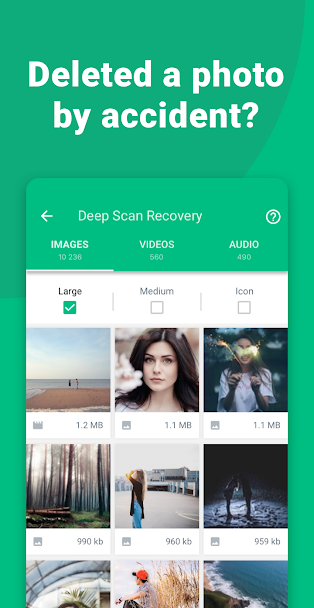
Trying to recover deleted videos in android in your phone gallery? Did your favorite video got deleted from your Android phone accidentally? Then this article can be the end of all your searches. In this article, we will discuss where these deleted videos are stored in your device and several ways to restore them. We will guide you to choose the best solution by giving each recovery method’s pros and cons.
recover deleted videos in android
Understand what happens when the video is deleted from your Android device.
The device’s internal space is allocated for all the videos and images present in the Gallery of your Android device. They get stored in your device’s data partition. If a video gets deleted from your phone, then space allocated to it is marked as zero, which means new media files can now use this space. An interesting thing here is that the deleted video remains intact in the data partition of your device unless new media files replace it. Various data recovery tools restore data from your Android device, taking advantage of this point.
Note: Android 6 supports the use of a portable SD card to extend your Android device’s internal memory. There is a possibility that the video in question is stored on this SD card. You have to follow a slightly different method to recover deleted video files from this SD card.
Majorly you can recover deleted videos in android from your Android device using the following three techniques.
Restore from the trash.
Restore from Google Photos or from other folders where data of your device is backed up.
Use data recovery tools.
Let’s see in detail how you can recover deleted video in android using the above techniques.
Recover deleted video in Android device using a recently deleted folder.
You can use this method to recover deleted video in Android only if you have enabled the Recently deleted option in Album/Gallery’s settings on your phone. If it is already enabled on your phone, you can access a deleted video quickly by the following quick steps.
Click on Album/Gallery folder on your Android phone.
Locate the Recently deleted folder and click on it.
Select the video to be recovered.
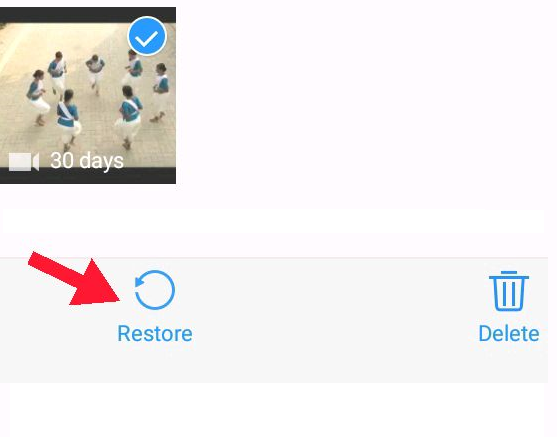
Tap on restore, present at the bottom to get back the video in your gallery folder.
Limitations: If more than 30 days are passed after the video is deleted, you won’t be able to recover it using this technique. You can go to the next solution.
2. Recover deleted videos in Android phones or tablets from backup folders.
As precautionary measures, it is good to keep the backup of your phone or computer. In your Android device, there might be two options to keep your data backup one is using device cloud storage, and the other is via Google account. If you have switched on the Back and Sync option in your device, then you can restore your data from these folders. For example, if you are using a Vivo phone, you can restore data from the Vivo cloud service and Google servers.
You can use this link to know the steps for backing up data on Google from your Android device.
You can restore the deleted videos from Google photos as follows:
Open the Google photos app.
Tap on Library present at the bottom.
Touch on Trash.
Long tap on the video to be recovered.
Tap on restore.
The video will be restored in the Gallery, Google Photo library, or any other folder it was present earlier.
Limitation: You cannot use this method if you have not turned on the Backup and Sync option on your phone.
You cannot restore very old videos using Google Photos as it saves videos in the bin only for 60 days.
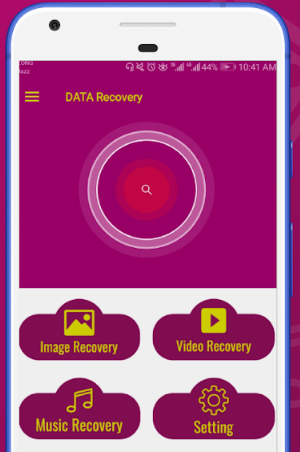
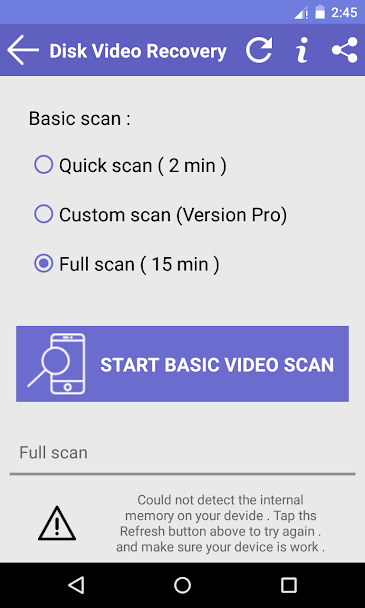
Use Data recovery tools to recover deleted videos, Android devices.
We have listed down top data recovery tools with pros and cons, which can help to restore the deleted videos on your device. Most of them are free, and you don’t have to be technically sound to use them. Statistics given below each tool are retrieved from the Google Play Store, depending on the user reviews and the number of customers using these apps.
Baloota’s dumpster app functions in the same as the recycle bin. Once you install this on your device, it stores all deleted photos, videos files without any root access, which can be recovered easily and quickly.
Pros:
Privileged access is not required for backing up and restoring data.
Internet connection is not required to restore deleted files.
Safe and reliable.
Cons:
It may fail to recover all video files.
You need to pay for extra features.
Ratings:4.2/5
Price: 30$
Recover deleted video in Android by connecting your android device to the computer.
Other than downloading and using the apps from Google Play, you can connect your Android device to the computer and recover deleted videos in android using various software. Some of them are:
Common steps to recover deleted videos in android by the software are as follows.
Root your Android device to gain privileged access to use data recovery software.
Enable USB debugging in your device settings so that connected computers can access all files on your android device.
Connect your device to the computer using a USB cable.
Install data recovery software on your computer.
Follow the instructions given on the wizard to scan folders from your Android device to recover deleted video files.
Bottom line
In this article, we discussed three main techniques to recover deleted video from Android and listed a few free tools to recover data. Add comments to ask any questions if you don’t understand any of the methods given above. If you come across any other trick that worked for you, then please share it with us. The best thing you can do is be proactive and keep backing up data now and then to avoid significant losses.