Home Blog Page 358

Make Your Presentation More Appealing Using Slide Rocket Online Application

Could computing getting more and more spectrum in web 2.0. Web based applications are on new high. Now, lets take a look at SlideRocker.com a online alternative for Microsoft Power Point and its desktop counterparts. Yes, Slide Rocket allows users to create and edit PPT presentations online, running in flash. Although there are namely few similar online web applications, Slide Rocket is has much better and higher number of features at a reasonable subscription charge.

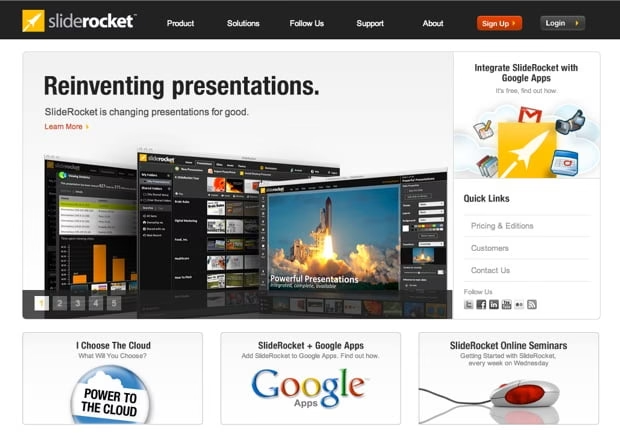
SlideRocket.com Home Page

Slide Rocket comes in 3 packages. Lite, Pro and Enterprise. SlideRocket Lite offers a Free plan, limited to 250 MB/user and 15 MB file size limit with Email support. You can check the details about these plans here. Now, talking about the interface design of Slide Rocket, its simply clean and very professional and it’s incredibly user friendly too. And some of the features like PowerPoint Import, Importing Google Presentation, Exporting To PDF and Printing are simply amazing.

Slide Rocket also gives you in depth analytics of your public presentation and also allows you to insert Forms & Polls. The most interesting features to Narrate Slides With Audio is one of my favorite. And there are so many others features like Audio Recording And Synching, Private Invitations And Controls, Custom Html Invitations, Private Viewer Comments, Email Notifications. And you can even conduct Web Meetings in Slide Rocket.

If you’re using Google Apps you can add SlideRocket integration via the Google Apps Marketplace.

And Slide Rocket is packed with plenty more features, all which i didn’t cover here. So I’ve embed a video overview of Slide Rocket below. You can play it to know more about the much exciting features of Slide Rocket.

For more information https://smallseotools.com/pdf-to-word-converter/
How to: Auto Toggle All Facebook Friends To Send “Suggest to Friends” on Fan Page

10

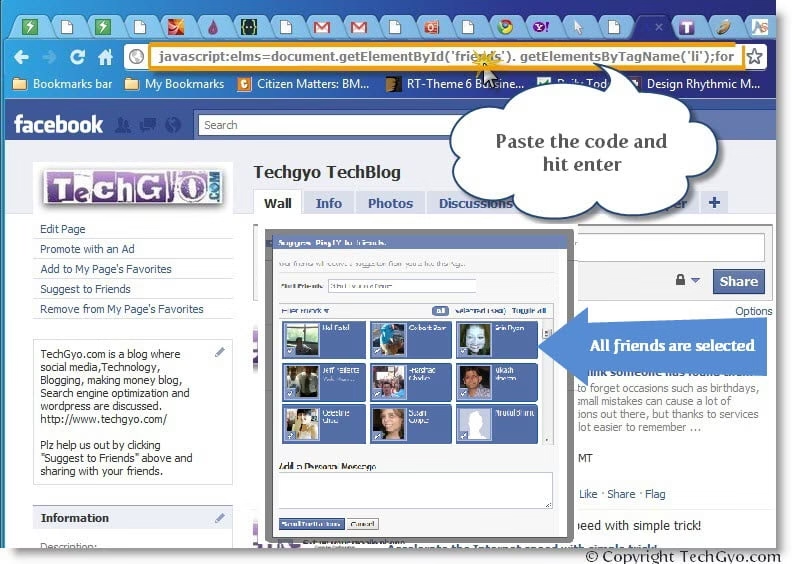
Are you fed-up of manually selecting list of friends while sending a Facebook face page “Suggest to friends” request? In this tutorial I’m going to show yu 2 simple tricks to automatically select all friends in the list while sending a fan page request to your friends. The first one is a simple JavaScript bookmarklet and the other one is the Google Chrome browser plugin.

You can use it when you “Invite People to Join” OR “Suggest to friends” (which you can find below the profile image of fanpage or group)

Using the JavaScript code in the web browser:

This is a simple code which you can use in almost any web browser (I hate IE). below is the simple code which you can copy and paste it in the browser URL and hit “Enter” while in the face page.

javascript:elms=document.getElementById('friends').getElementsByTagName('li');for(var fid in elms){if(typeof elms[fid] === 'object'){fs.click(elms[fid]);}}

Or

javascript:fs.select_all();
Google Chrome Browser plugin.

Here’s the video tutorial to toggle all friends checked while sending a Facebook fan page request. you can download this plugin here


Do share your comments if you have found any other tricks to do the same on facebook.

Lost Track of Event Dates? I Think Someone Has Found Them

This is a post by Vishal Sanjay. Who is a very talented 14-year-old blogger, if you would like to write for us, please click here

It’s a natural human characteristic to forget occasions such as birthdays, anniversaries and more, but such small mistakes can cause a lot of damage and can hurt a lot of emotions out there, but thanks to services like Facebook events its become a lot easier to remember such things. But still, there is the need for a service made for this purpose, as most of the time I cannot have Facebook to remember anniversaries for me, moreover, the only thing I can do after remembering the event is to post on their walls wishing them.

Accelerate Internet Speed With Simple Trick

You might have used many software and web tools to accelerate internet speed and boost up the internet connection but here is the simple trick which makes your internet speed up to 20% faster. Every user who has slow internet speed faces problems such as delay in page loading, slow download/upload and  breakage of internet connection in the middle of surfing which irritates the user much, of course it is not possible to pull more data from your internet service provider (ISP) but you can gain some extra bandwidth using this trick and the change can be felt while surfing or downloading your favorite game or software.

Here is how to Accelerate Internet speed?

Microsoft Windows reserves 20% of available bandwidth for some purposes such as Windows Update, Windows Defender Update and other Microsoft products which needs internet connection. The intension of this trick is to fetch the reserved bandwidth set by Microsoft to make the internet faster. Just follow the steps given below to apply the trick.
  1. Click on “Start” menu and click on “Run” (Windows logo+R)
  2. Write “gpedit.msc” (without quotes), which opens Group Policy Editor
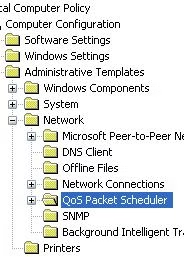
  3. Now click on “Administrative Templates” from “Computer Configuration” option
  4. Double click on “Network” and then double click on “QOS Packet Scheduler”
  5. Now open “Limit Reservable Bandwidth” by double clicking on it.
  6. Click on “Enabled” radio button and set the bandwidth limit to “0%” which was “20%” earlier. Finally click on “Apply” >> “OK” button.

That’s it! Now restart your computer and get ready to experience the 20% faster internet speed!. In the “Limit Reservable Bandwidth” setting Microsoft says that bandwidth reserve is not configured but check out the decription pane where they say that by default Microsoft uses 20% of bandwidth. The trick to accelerate internet speed we just discussed works fine with Windows 2000, Windows XP, windows Vista, windows 7 and Windows Server 2003 family.

Intel to Unveil the New Microprocessor Technology Which Can Control Devices With Your Gesture

2

Intel Corp is on the news all the time. Intel recently bought McAfee for a deal worth $7.68 billion. And there was some rumors that Intel’s next microprocessor comes with built-in antivirus. If you are curious about why Intel bought McAfee, read this Intel also just acquired Texas Instruments’ cable modem product line. Now Intel provided few details about the Sandy Bridge processor with advanced vector instructions, called AVX, to accelerate applications such as gesture recognition and media transcoding. The new processor comes with graphics, video processing and other features on a single piece of silicon.

According to a , the target applications for AVX are interface technology to control gaming and entertainment. Intel expects that this forthcoming technology would reduce the need for specialized DSPs and GPUs. Smart computing is here.. Yes visibly smart. But my personal opinion would be that intel would make people more lazy by the launch of the next-generation gesture recognition technology.  Its amazing to just thing about the world where we can control TV , PC, Washing machine and other devices at home in just a gesture.

Source: Wall Street Journal article

Here’s a video overview of the gesture technology by Intel

Why Mouse When You Can Hand Gesture Your Smart Devices

here’s another video from YouTube:

An Online Alternative For Winzip. Unzip online using WobZip

Here comes WobZip, an free unzip online tool that helps you uncompress your files. It’s an online winzip alternative or alternative of any file compression software.  It supports a variety of compression formats, including the popular ZIP, RAR, and 7z formats. It allows  you to upload a zipped file from your computer or direct WobZip to a URL and unzip it online. And WobZip also ensures that the files doesn’t contain any malicious viruses while it is processed, so all the compressed files are scanned the files using BitDefender antivirus software to make sure there isn’t a nasty virus lurking around.

Features of free online unzip using WobZip tool:
  • No additional plugins required to unzip, all work is done online.
  • Scans your files so that infected files will be removed before you download them onto your computer.
  • Allows you to share your files with your friends.
  • Safe and secure
  • Supportes wide range of formats like: 7z, ZIP, GZIP, BZIP2, TAR, RAR, CAB, ISO, ARJ, LZHCHM, Z, CPIO, RPM, DEB and NSIS

There are reports that .tar.gz and .tar.bz2 file extension do not work, but you can give it a try though. Anyway its better than installing a software in your PC. Its very helpful if you are in college, office or your work space where you don’t have admin privileges to install any software application in the computer. But note that this service is still under the process of development, the current version WobZip is not guaranteed to be bug-free, and it only supports the uncompression of files. So use it sensibly

Link : WobZip

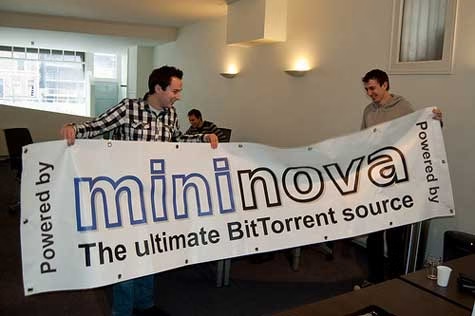
The Story Behind The Fall Of The BitTorrent Giant Mininova

The once Mighty bitorrent giant Mininova, which was a favorite website of millions, the successor of another fallen hero Supernova which was also a torrent distribution website based on Slovenia. For many days it was considered the best Bittorrent search engine. However it had to close down after getting severe legal threats  in late 2004. On August 2, 2007, the domain name was donated to The Pirate Bay, who relaunched the site on August 21, 2007. However now it contains only an invitation to join their cause, which I personally think is pretty good.

However the biggest fallen hero, the Mininova.org site is based in the Netherlands and started in January 2005 as a successor to the Suprnova. It was a really wonderful website which did not log its visitors Ip address and allowed to upload torrent anonymously tracked by any tracker. In April 2007, Mininova B.V. (the company running Mininova.org) won a domain dispute about the domain mininova.com, which had been exploited by a phisher.

For the statistics you would certainly like to know that the word ‘mininova’ ranked 9 on Google’s list of most queried terms in 2006. And on May 28, 2008, Mininova indicated that there have been over 5 billion downloads. But since it had been receiving legal threats as of May 6, 2009, the Mininova team began trial of a content recognition system, which will result in the removal of any torrents that are flagged as infringing upon copyright laws.

However in May 2009 the Dutch copyright organization BREIN started legal advancements against Mininova and demanded that they start performing filtration in their platform. But during the trial Mininova stated that it was not feasible for them to identify such files by itself, but indicated that they would remove torrent files in case BREIN identified those files it considered to be pointing to copyright protected material.

As of the last nail to its coffin On August 26 the Utrecht court ruled[] that Mininova should remove all torrent files pointing to copyright protected material from the platform within 3 months or face damages of up to €5 million.

The Mininova team announced As of November 26, 2009, that they could not find a foolproof filtering system against copyrighted content, and limited its platform to Content Distribution torrents only. Which lead to its great fall.