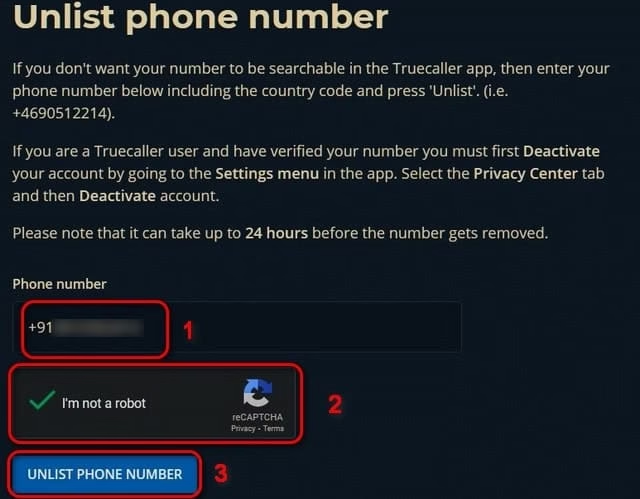
To unlist your number from Truecaller, visit the Truecaller Unlisting page, enter your phone number with the country code, and submit the request. You’ll need to deactivate your Truecaller account first if you’re a user. This removes your details from their public directory, enhancing privacy within 24-48 hours.
I guess we all have this software named Truecaller in our phones. It is one of the most widely popular software and is majority used for the detection of the real name from the call we receive from the unknown numbers. We use this caller ID software in our daily life, remaining detached from the fact that even if you are not a user of this application your contact will still be available on their server. Truecaller gets the access to upload all the phone number, details, email address, locations and even names on their database.
So what to do then? Well, I know this is a troublesome moment for you. But if you want to keep your privacy intact you have to read this article to find the perfect solution for your problem. We will discuss all the methods step wise for the removal of phone numbers from the database of truecaller.
Why should you unlist your phone number from the Truecaller database?
We know that Truecaller saves a lot of our time by automatically exposing the spam calls, scam calls, calls from different unknown sources and others. It also offers the service of reporting and blocking the scam calls. But beside this it is also capable of uploading the customer’s unique IMSI number(International Mobile Subscriber Identity) which when revealed to others creates a huge risk of privacy. Truecaller can even upload your number on their server without your approval. So, if you want to avoid all these circumstances you can simply unlist your number by deactivating your Truecaller account.
Noteworthy: Whether you are a Truecaller user or not the risk is the same, so you can opt the below mentioned steps for easy removal of your phone number.
For the Truecaller users, you have to deactivate the account first and then you can place your request. While the non-users can simply follow the steps to place their request for eliminating their phone number from the database
First Step: Removal of Phone from Truecaller Server:
Initially you have to open the Truecaller application on your phone.
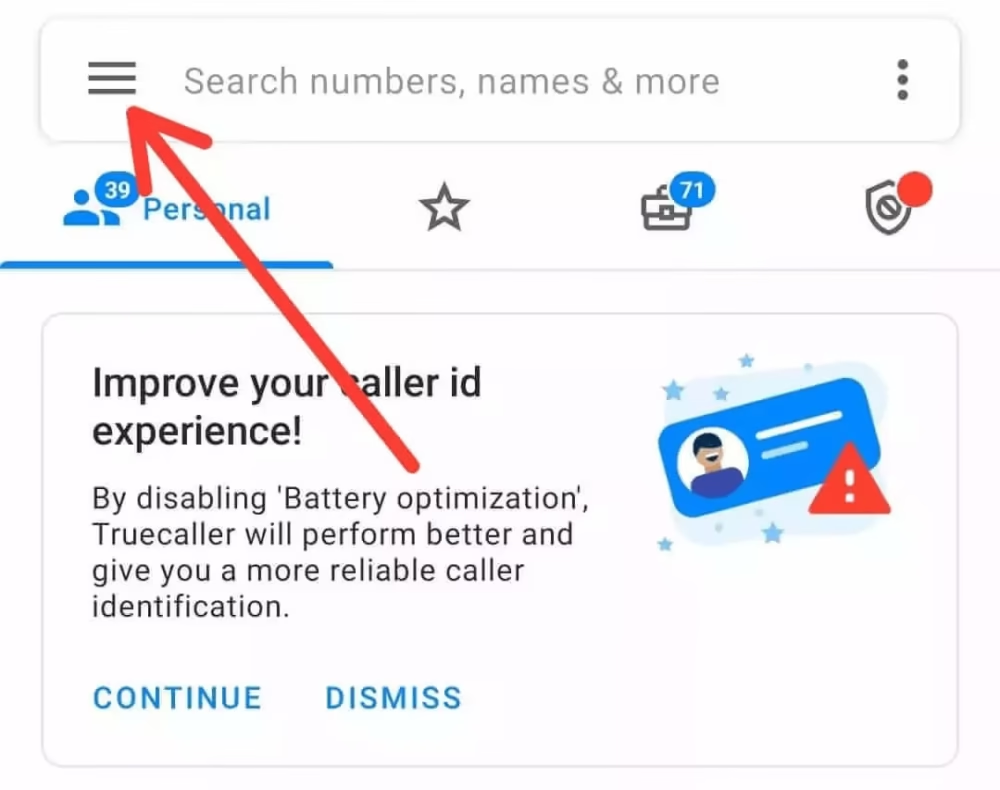
Now click on the small icon consisting of three horizontal lines present on the top left part of the page.
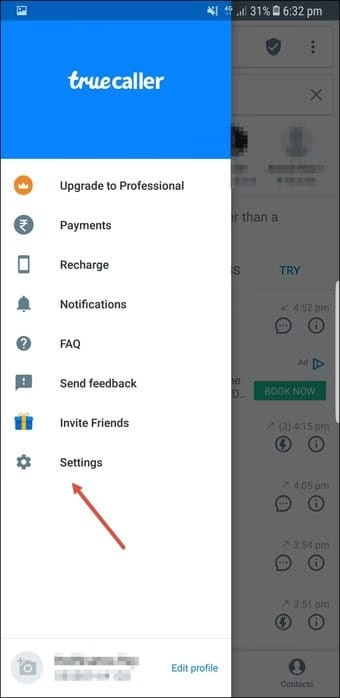
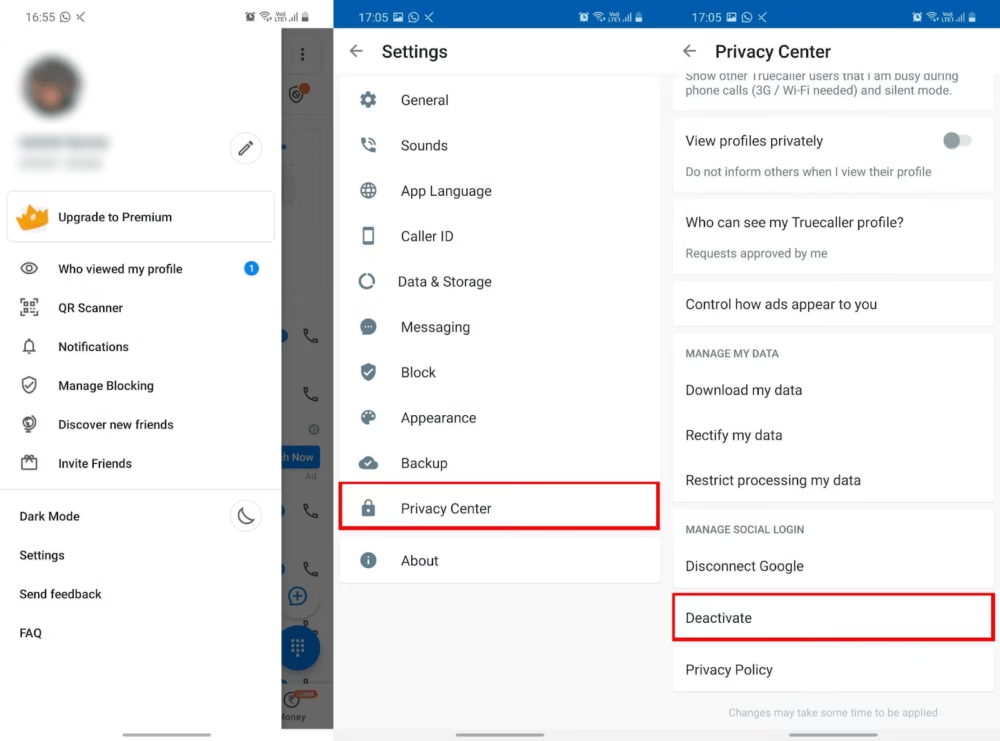
After that a menu will glide up providing you the list of options. You have to select Settings
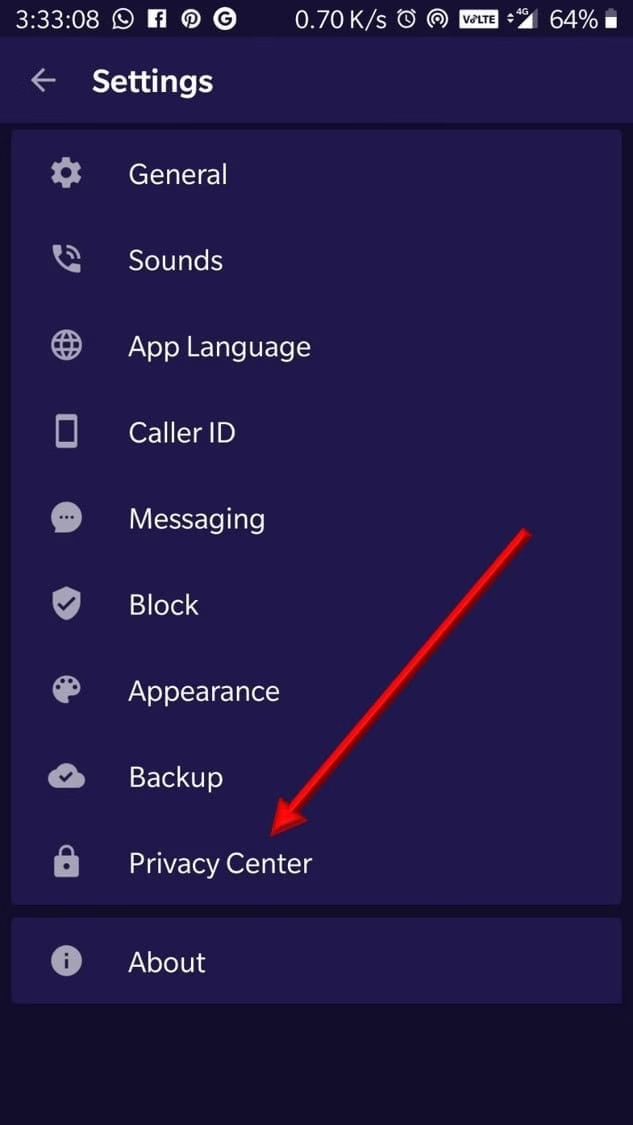
Now in the Settings Page, select the Privacy Center option present in the last second of the list.
You have to enter the Phone number along with your current country code
Now validate the CAPTCHA and tap on the option named Unlist Phone Number
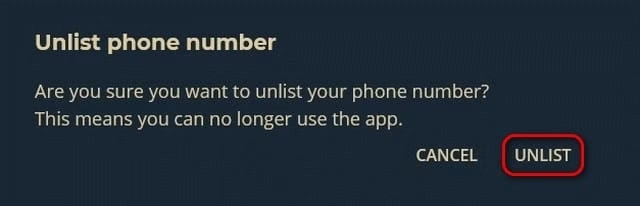
A message will pop up confirming your request. Select Unlist and your phone number will be under the process for the removal from the True caller server.
Now you can see that your phone number and your details are no longer available.
What do you do if your Phone Number is Still Visible?
It might happen that even after attending all the steps scripted you can view your number. This is because your profile details have been saved locally on your device. In order to overcome that issue you can delete all the search results on your phone and restart again to find out.
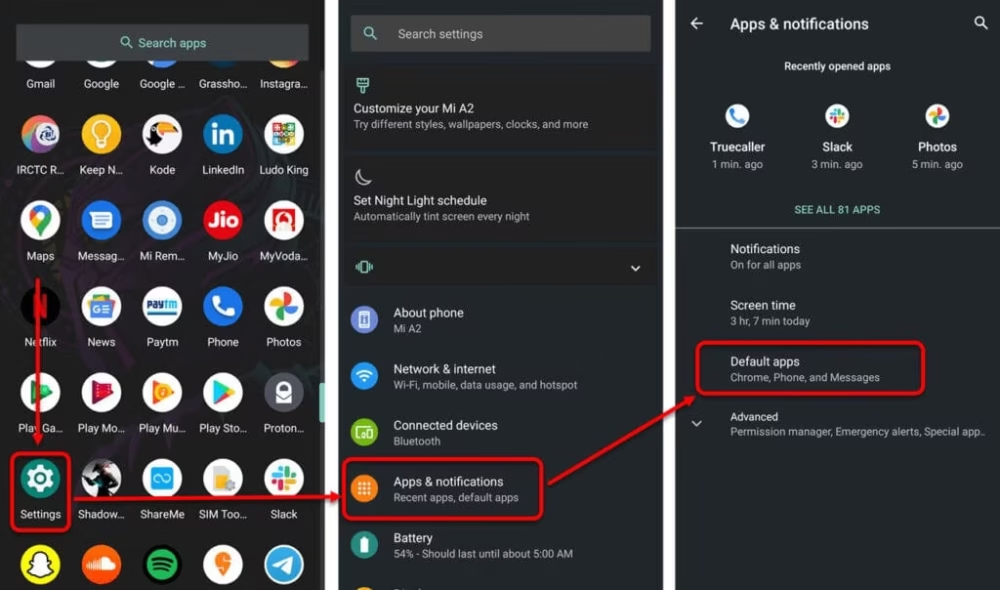
Another way is that you can clear up the cache memory by opening the Settings followed by Apps and finally select Truecaller.
How can I change my name which is registered in true caller?
In case if you want to change your profile name then, all you have to do is go to the Menu option(three small horizontal lines) present in the top left corner of the page. Then select the Edit Menu. Finally, Change your name as per you need.
Can Truecaller identify private numbers?
Private numbers are the hidden numbers and once the user has made their number private, you wont be able to view it. Hence, Truecaller is not capable of recognizing private numbers
Does Truecaller really show who viewed my profile?
Yes, of course with the help of the special feature available on Truecaller, you can view the one. But this is only for the Pro subscribers of Truecaller. If you want to see who views your profile, then in the Navigation part click on Who viewed My Profile and check out the following.
Final Outcome:
You should know that even if your phone number has been successfully unlisted from their server, your personal info won’t vanish. The users will still be able to get access to your details. The only thing is that people won’t be able to view your details just by searching your number. Infact, I will suggest you to avoid using all these third party apps which are simply available on Play Store but can cause the breach of your personal details.
I hope this article was successful in providing you all the essential information regarding the Unlisting of your phone number from their directory. Do share with your family, friends, colleagues to make them aware about all these facts and do the needful as soon as possible.
Over the past few decades or, so we have seen a great many changes in the agricultural sector with farming so long being considered by the vast majority as life away from technology. In fact, studies show that population growth is said to increase by another 3 billion more lives by 2050, industrialized farming has become necessary and changed things for the better.
Advanced Agricultural Technologies have made farming much more high-yielding, safe, and eco-friendly. This article talks about 10 agricultural technologies that are next level:
Aquabyte:
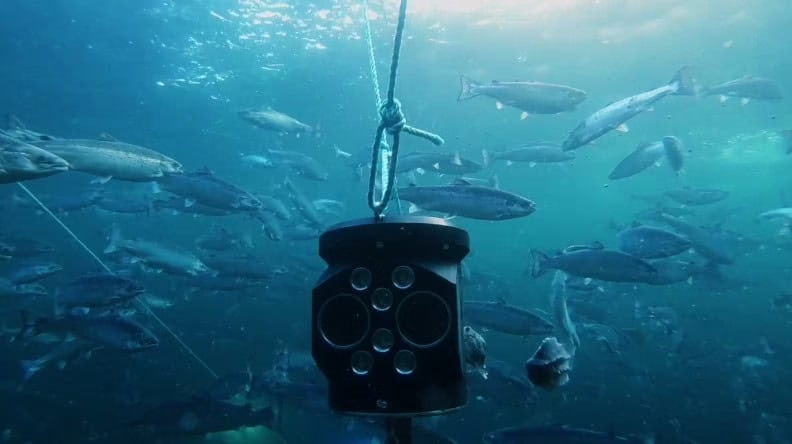
Managing a diverse fish farm is no simple undertaking, and because millions of fish are often maintained in a single cage, it can be difficult to discern many of the details around one’s fishy assets. However, Aquabyte is trying to fix this problem by offering fish farms a high-tech camera-powered solution that can pick up on not only how many fish are in a pen but also how many sea lice are present, how much the fish are eating and how large the fish in the pen currently is. Aquabyte can utilize this data to recommend feed amounts based on fish size and activity. This is helpful since it eliminates the guesswork in fish feeding and helps farmers to make better-educated decisions about how much food to feed their fish. This results in reduced food waste and higher profit margins for fish producers, making it a win-win situation all around.
Here is the link to their official website: Aquabyte
While Fitbit’s are normally worn by people attempting to fulfill their 10,000-steps-per-day goal, a startup called Vence has created a cow-friendly version. Yes, you read that correctly. Vence has created a gadget that, if implanted in your cows, can be used to not only track their fitness and well-being but also to enclose them in a virtual fence while feeding and then lead them to their pasture at night. While this may seem exaggerated, it could become a very low-cost viable solution for many cattle ranchers because it not only eliminates the need for a rancher, vehicle, and dog to harm one’s cows, but it also provides real-time information so you can know whether the cow is sick and in need of treatment at the touch of a button. As a result, these gadgets are more cost-effective. For more on this, you can watch the video linked here:
Here is the link to their official website: Vence Corp
Image Courtesy:Vence Corp LinkedIn
Trapview:
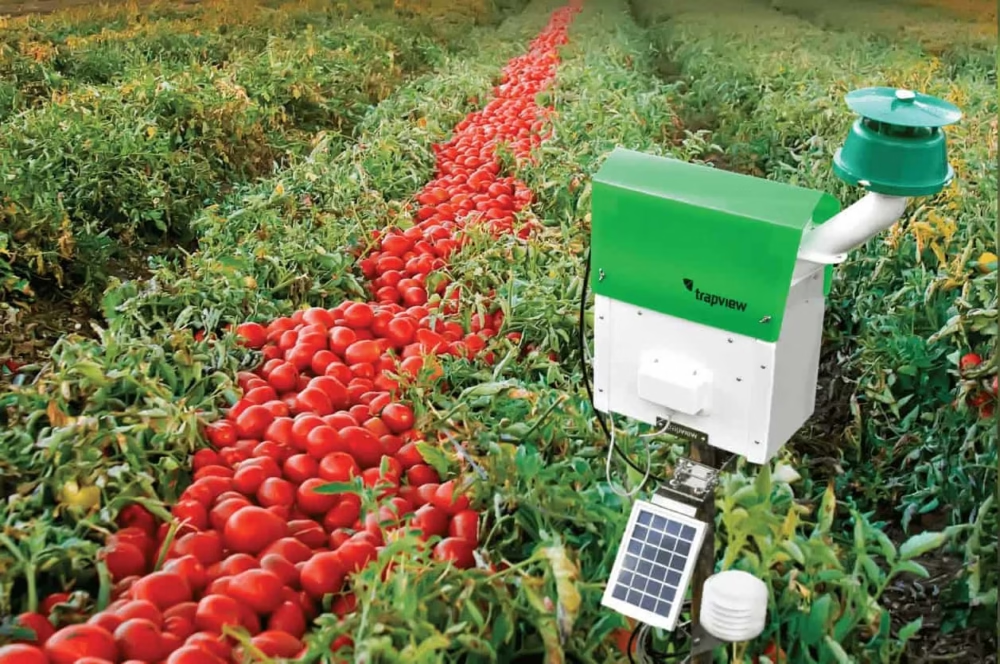
Ask any farmer what’s the absolute bane of the agricultural world and the answer would-be pests. And as a precaution, they will often spray pesticides over their crops to scare away these creepy critters. However, farmers are not always aware of which pests are attempting to eat away at their crops and this is where Trapview comes into the picture. Trapview has agricultural technology which is very unique. You see, this product is essentially a pest trap on steroids as it not only catches bugs but photographs them and sends you the data in real-time, allowing farmers to make an educational response that not only tackles the correct type of pests but does so in the correct area of their fields as well. Due to this they ultimately save money on the fertilizer in the long run, having less of their crops compromised due to insects, the Trapview is certainly a good addition to the majority of farms and a step towards modern farming. You can watch this linked video for more information:
Here is the link to their official website: TrapView
A farmer operating a tractor is one of the few images that spring to mind when we think of a farm. While this may have been prevalent in fields in the past, the agricultural sector has begun to transition from drivable tractors to fully automated ones in recent years. Every farmer will benefit greatly from this agricultural technique. These tractors are made by a variety of companies, including John Deere, Fendt, and Case IH. They navigate by using lasers that bounce signals off several mobile transmitters located throughout the field, and they can sometimes be controlled remotely by a farmer sitting in the comfort of their own home. They’re also frequently fitted with a pair of sensors that allow them to stop for obstructions and hence pose no danger to anybody or anything around. As a result, we wouldn’t be shocked if the popularity of these handy cars grows as more of them hit the market in the future. For more visit:
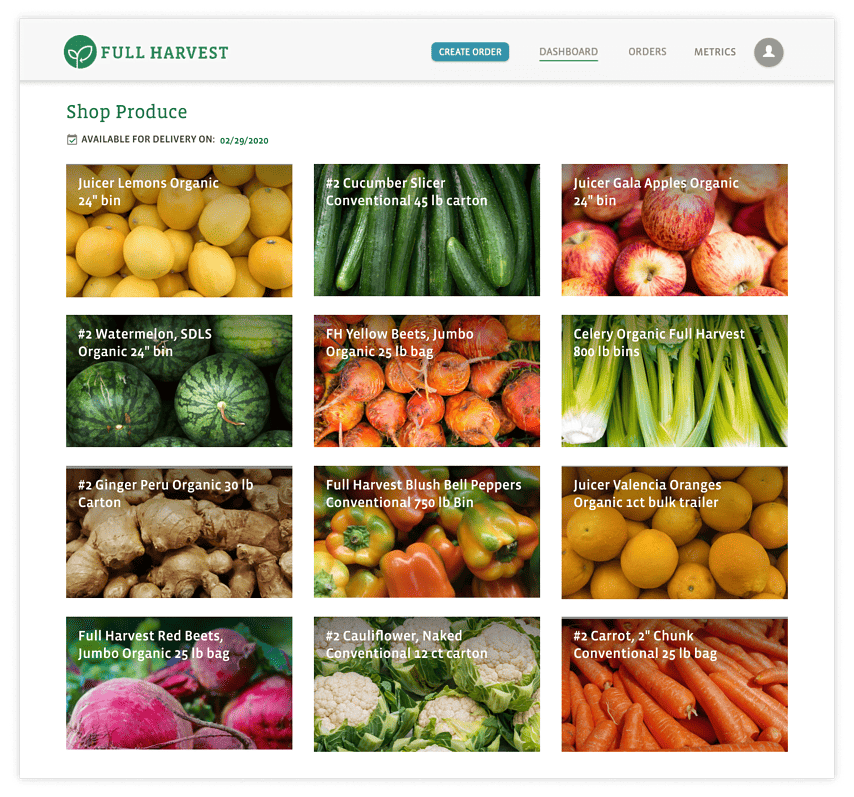
Simply stated, food waste is one of the most serious concerns in the agriculture business; after all, it is estimated that 20 billion pounds of unappealing produce are thrown away each year, resulting in vast amounts of water, gas, and potential nutrients being wasted. Although farmers struggle to sell defective food to grocery stores because of its poor market value, Full Harvest is attempting to reverse this by building a B2B marketplace where farmers can connect with customers to sell food that would otherwise be thrown away. Farmers will publish their surplus food on the system, and if they receive an order, they may send it out to the client. Full Harvest pays the farmer immediately, allowing farmers to benefit from their rubbish effectively, making it a genuine win-win situation for everyone. For more watch:
Since robotic systems have grown in popularity throughout the world, they have steadily made their path into the agricultural industry, resulting in some incredible agricultural technology. Although there are numerous examples, the greatest is earthsense’s TerraSentia robot. Basically, this little robot travels through the plants in a farmer’s field and depending on criteria such as stand count, stem width, and plant height, gathers data on plant health, crop physiology, and stress response using a mix of sensors, visual cameras, LIDAR, and GPS it collects the data. Then it utilizes these parameters to provide detailed reports for farmers, enabling them to make higher yield management decisions. When you take into account that TerraSentia’s creators are presently working on techniques to monitor early vigor, corn ear height, soybean pods, plant biomass, and plant diseases, it’s evident this machine is genuinely a level class agricultural technology.
Here is the link to their official website: Earthsense
Labor rates are relatively a big consideration for many farmers, as it is frequently prohibitively expensive to hire personnel to plant, water, spray, and harvest crops. Kray Technologies, on the other hand, has solved this problem by producing a new farming approach that is the world’s first totally unmanned digital drone crop sprayer. This agricultural production generally works by flying above fields and spraying on-demand fertilizers and pesticides directly to farmer’s fields, with equipment capable of serving just south of 5 square kilometers of crops a day. Rather than spraying random quantities of fertilizer, the agricultural drone is designed to perceive a field in 3-D, allowing it to deliver exactly the right quantity of fertilizer at precisely the right moment. Best of all, it can be programmed to fly autonomously without the need for human intervention, and because of its hybrid computer vision system, it can identify impediments and recreate the ground 100 meters ahead with a precision of 10 cm. We don’t rule out the possibility of seeing them in greater numbers on farmer’s fields shortly. Here’s the link to their YouTube video:
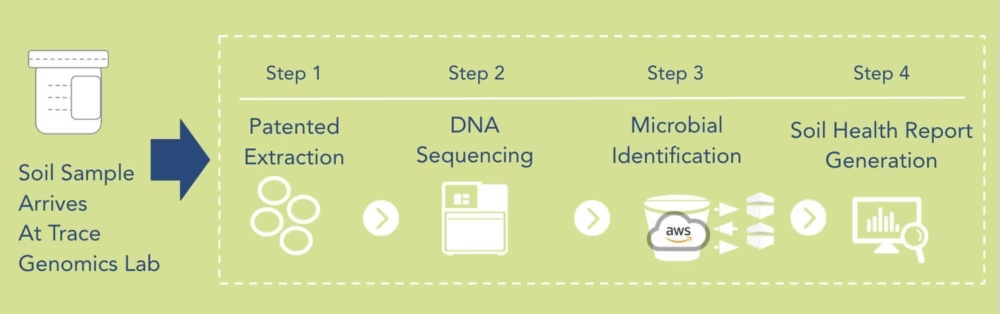
Trace Genomics is a firm with the purpose to extend genetic monitoring to a farmer’s soil. While genetics is a field inhabited by both humans and animals, Trace Genomics is a firm with a purpose to extend genetic monitoring to a farmer’s soil. It eliminates guessing for farmers by assessing if an area of soil deteriorates enough to plant crops on. You might wonder how the firm accomplishes this. To begin, they analyze the biology of the soil by using proprietary soil DNA extraction and sequencing to index and quantify millions of organisms within it, and then they utilize machine learning to decipher these organisms. Data analysis is performed to compare the acquired soil sample to a huge and expanding set of soil data. Trace Genomics then integrates the biological and chemical data from the soil to provide a report on how strong the soil is. This helps the farmer determine whether cultivating on a certain piece of land will be lucrative. Even though Trace Genomics was formed in 2015, it has had phenomenal growth since agricultural technology was first introduced to the market. For information watch this
Simply said, owning a family farm is difficult, and small farms have always struggled to compete with large industrial farms, whether it’s when it comes to buying seeds, selling crops, or acquiring machinery. The Farmer’s Business Network, or FBN, aims to change this narrative since it is essentially an all-around platform that allows farmers to handle every financial part of their business with simplicity, thanks to a variety of features that let small farmers actually compete with the big ones. The application’s pricing transparency feature allows farmers to see what other farmers spend for common chemical and seed inputs, saving them an average of 19% off the median price of chemicals and 10% off the median price of seeds. The FBN, on the other hand, not only assists in finding inexpensive seeds but also in finding the perfect seeds, as it provides users with yield and pricing information on over 1400 seed kinds, which, on average, benefits farmers. Well beyond these inputs, the FBN offers a variety of technology-related services, the most famous of which is free satellite imaging, which allows farmers to better monitor their fields and saves them around $2 per acre in satellite imagery expenses. Farmers may also bounce questions and ideas off of each other to make the greatest commercial and agricultural decisions possible, owing to the network’s close to 14,000 active members. This program generally costs a modest monthly charge, however, FBN has made it completely free for all farmers for a limited period. So, if you chance to be a farmer and want to give it a shot, now is the time.
In recent years an interesting new modern farming concept known as Indoor Vertical Farming has taken root in more urban environments with limited land space. In essence, this modern farming technique involves building up rather than building horizontally regarding agriculture, as Indoor Vertical Farming encourages households and small growers to use growing shelves to create a controlled growing environment. Now, these shelves are rather versatile and can use traditional soil or more modern farming techniques such as hydroponic growing or vegetables are cultivated in a nutrient-dense bowl or water or aeroponic growing where free-flying plant roots are systematically sprayed with water and nutrients. In any of these 3 cases, the crops are generally given nutrients via artificial grow lights with it being possible to use sensors to regulate and track temperature, humidity, and nutrient levels of the crop. As a result, this agricultural technology has been estimated that this type of modern farming uses 70% less water for the same amount of output than a regular farm would, and generally speaking it leads to larger crops per resource used. Indoor Vertical farming really is a good way to tackle land and labor adequacy in the agricultural industry.
To understand how indoor vertical farming works watch
Are you an admirer of how cool Procreate is? Undoubtedly it is the best and most powerful digital illustration software for the digital artist but the unfortunate part is that it is only available for the iPad or iOS users. So Window Users are confused which one is the perfect place for creating your masterpiece? We have sorted out this issue of yours and have filtered out the best 10 procreate alternatives for the Windows version. Lets, start discussing the best features of the procreate alternative softwares.
List of 10 Best Procreate Alternatives for Windows:
All the mentioned softwares can also be used if you are a professional digital artist. According to the features you can select the most convenient tool for your work. Among the list you will be able to find both the free and paid types.
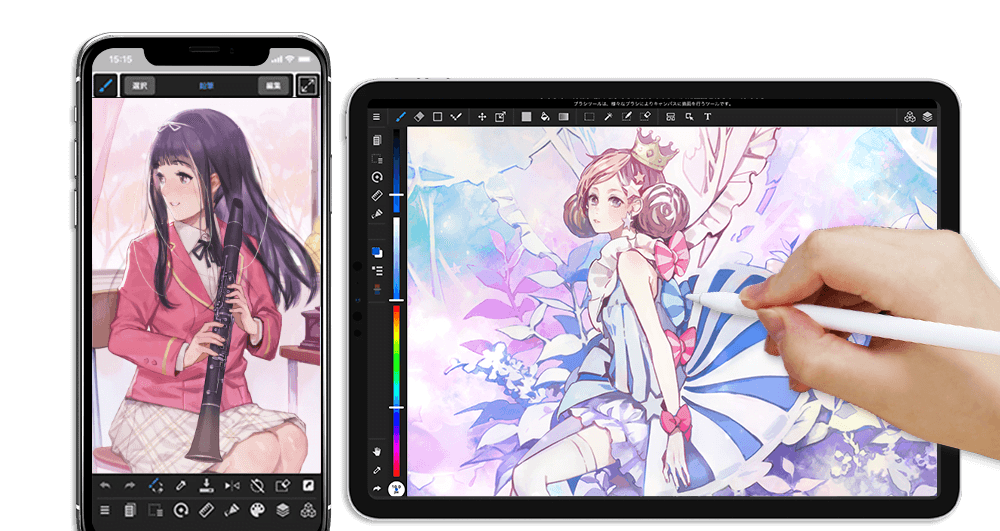
This is by far the most used and highly recognized software for the Windows user. If you want to initiate the experience of Procreate on Windows, then this is the best software that you can use to get. You can start using it by making a free account and then you can easily enjoy all sorts of tools.
Features:
The first and foremost thing is that it is free for every user.
It runs smoothly in full screen view providing you a huge workspace with a set of tools and layers.
Availability of active stylus and palm rejection features
I guess every graphic designer has used this fabulous platform for Android users. It is fully enriched with amazing features even for the touchscreen devices. From smartphones to computers, laptops or tablets it works absolutely smoothly. You can use the colors, shapes and others to create some outstanding logos or icons of your choice available on this drawing app.
Features:
Accessible and excellent typography on adobe illustrator draw.
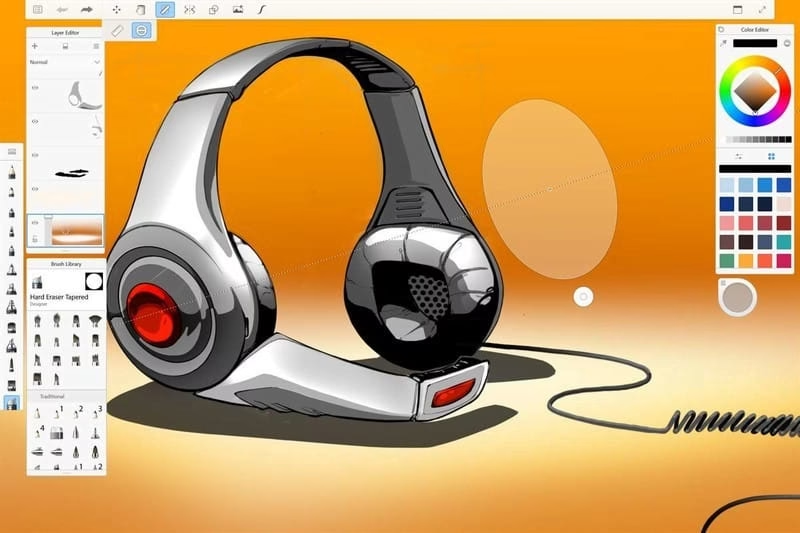
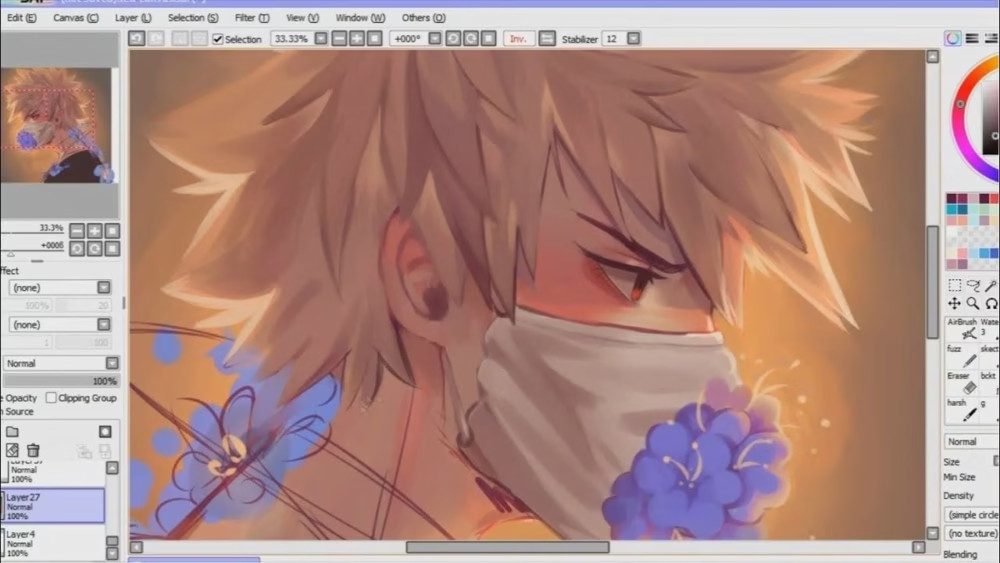
PaintTool SAI is noteworthy to be mentioned among the list of the best alternatives for Procreate. It is a software capable of both raster designing and painting. The software totally supports Windows, tables and even Android mobile phones. Make your design more alluring by gaining the control over color saturation, luminescence, pressure of the brush and various other elements.
Features:
You can use digital pen for producing outstanding masterpiece
Availability of the feature of selecting areas and editing layers
You can export your artwork in PSD or BMP file format.
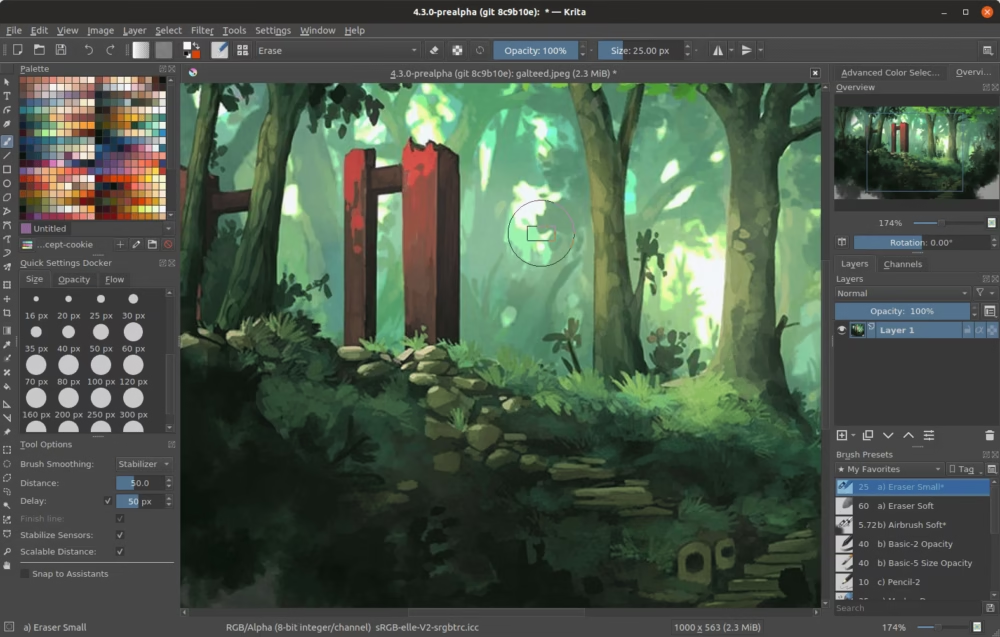
Want to try something out of the box? Try this and you’ll never regret using it. Krita is considered as the best alternative for Procreate by professionals because of its authenticity. Besides Windows users, it is also the best software for Linux. If you want competitive software for Procreate on Windows then you have to try working with this and you’ll get satisfactory results.
Features:
It is totally free of cost and also open source to be used.
You can create awesome comics, illustrations and also sophisticated artworks.
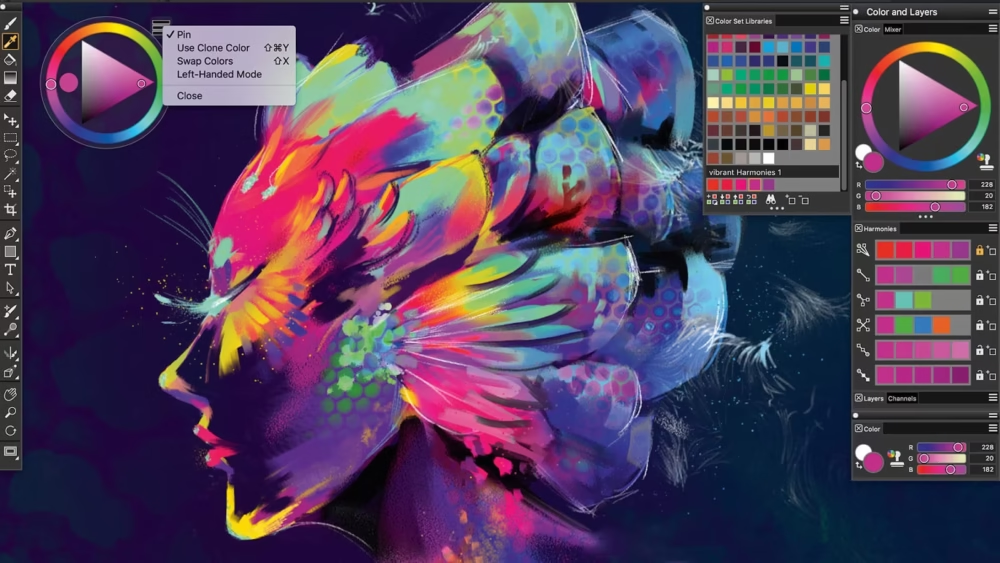
This software consists of a vast collection of graphic tools which can be very useful for the professionals too. Corel Painter is mainly used by the pro artist because of its capability to offer outstanding performance and outcomes. Even though you are a beginner, you don’t need to struggle to use it as it will already provide you with a library of tutorials for every step. This design app provides an intuitive interface which should be tried.
Features:
Availability of 900+ painting brushes, paper textures, patterns etc
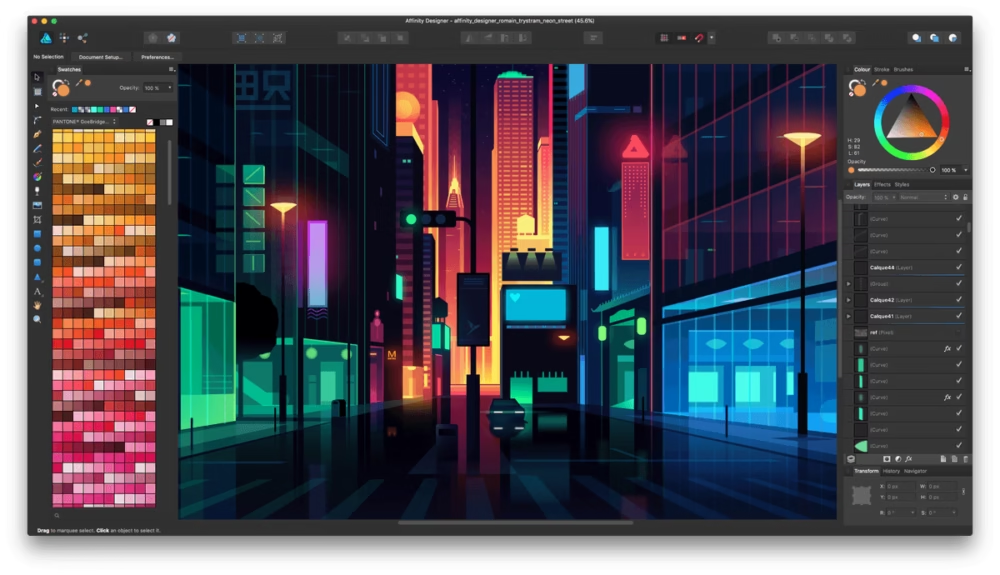
This software is considered best for graphic designing. You can do all sorts of arts and graphic designing. It provides you all the tools that you are looking for and is best for both professionals and beginners. Beside vector designing it also serves the purpose of raster based graphic designing.
Features:
Create your dazzling vector illustration with precise curves and colors.
This software is great for creating comics and even manga. It is already used by several comics and manga artists.It offers a wide range of brushes, background, colors, font styles and tones. Windows 10 should definitely use this software if they are newbies and want to improve their hands in creating comics.
Features:
Presence of cloud syncing function
More than 800 background are available along with 50+ brushes
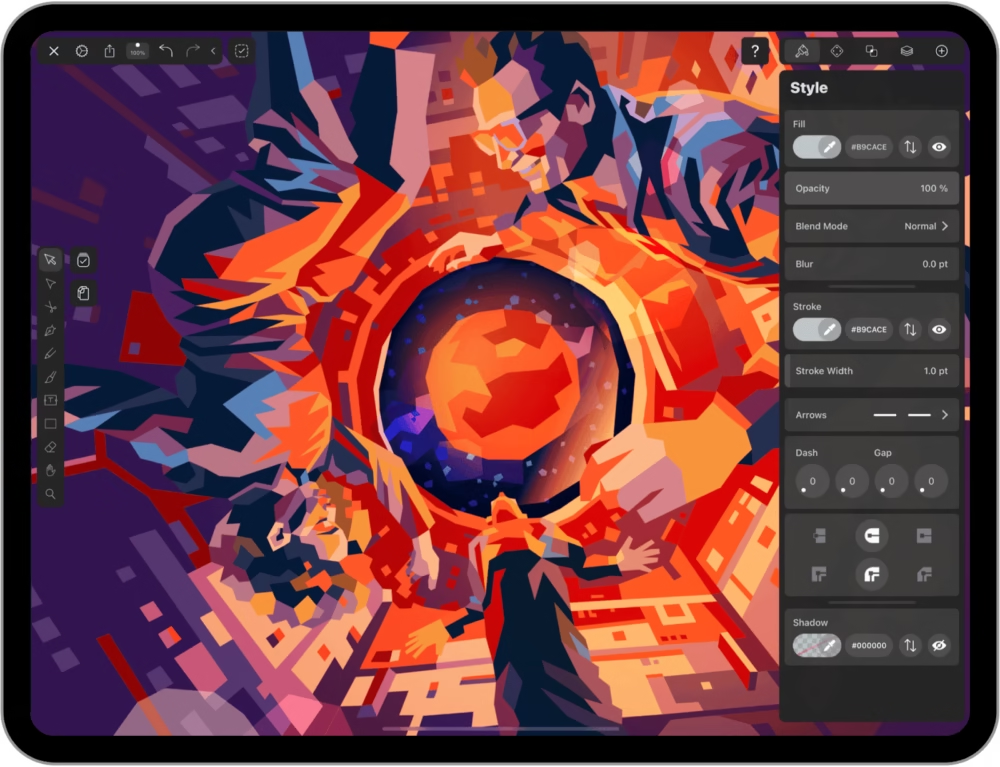
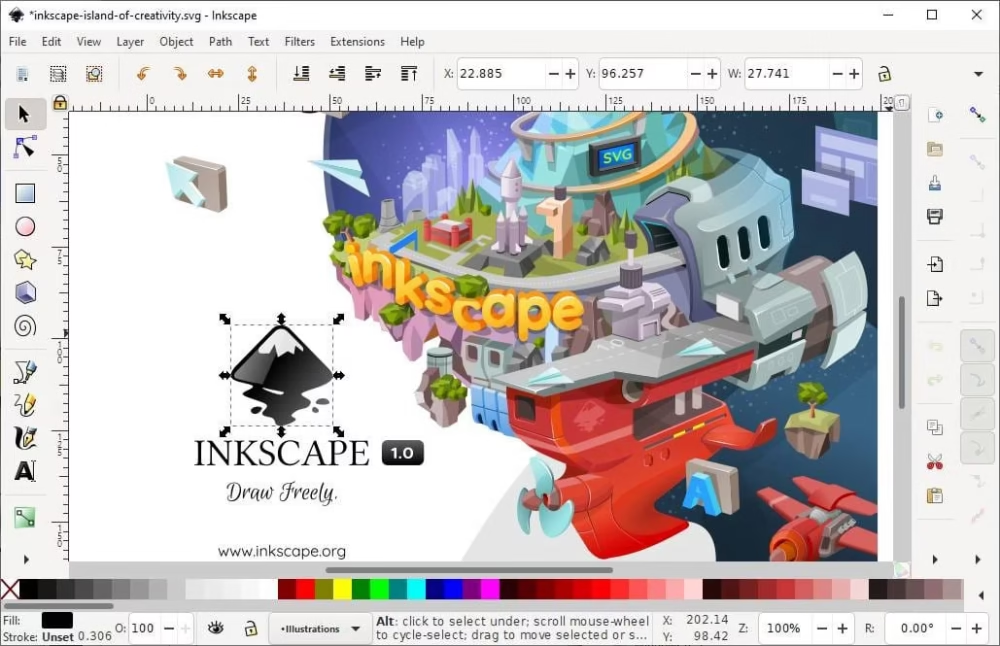
Inkscape is one of the highly recommended software when it comes to list down the best alternatives for Procreate. You must definitely check it out since it is totally free and also open source. Here you also get an option of highly advanced tools for creating sophisticated illustrations, logos and others. Raster graphic editing is not the best but it is considered as the best software for vector designing.
Features:
Presence of procreate features like smart navigation, flyout and anchor
It is totally free to use
Bezier, color profiles, spiro curves and text tools are freely accessible to the user.
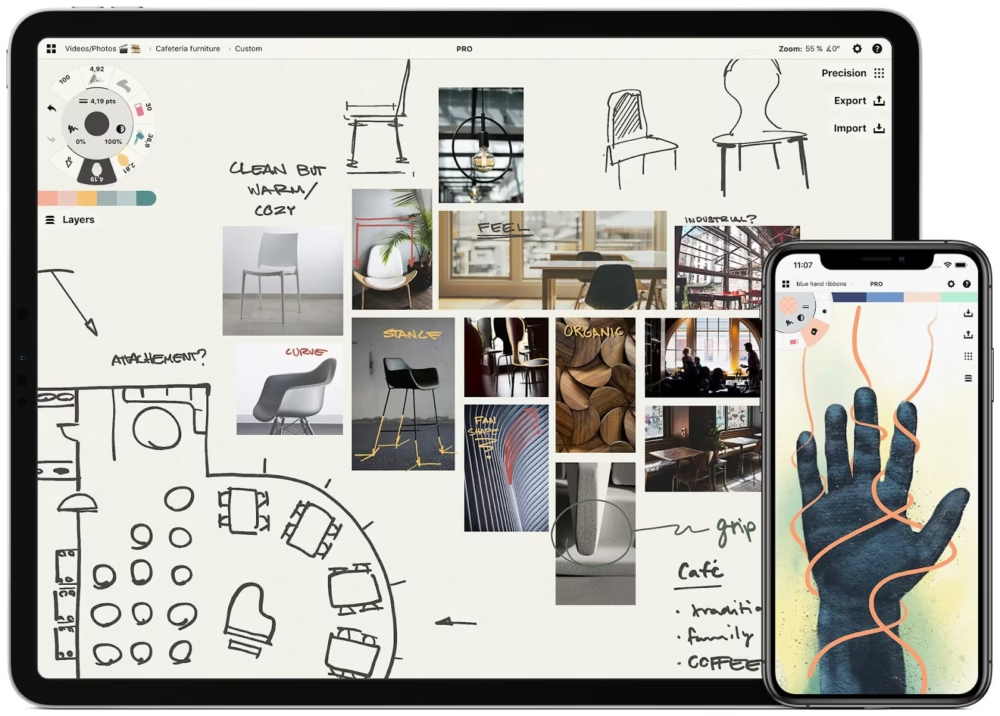
If you are looking for some software for sketching or foe illustration or even want to do doodling then this is all you need. With the help of a gallery full of brushes and all the essential elements like color, background etc you can create splendid artworks. The layering system in Concepts is phenomenal, offering you the perfect control over the elements.
Features:
It enables the users to have an infinite canvas.
The availability of vector designing with flexibility is the prime feature
The quick gestures present in the Concepts makes it easy for the beginners and professionals to work up fast like the use of drag and drop.
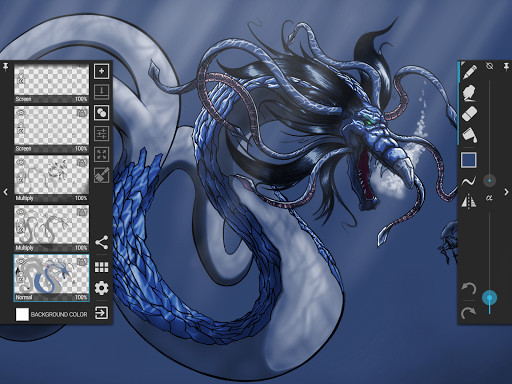
Finally the last on the list but totally worthy of being the best alternative to Procreate. This app allows the user to do drawing, sketching, designing and other. It is also capable of mimicking other features of Procreate like offering the support of stylus pressure also named NVIDIA DirectStylus support. It even supports Apple pencil.
Features:
Features like palm rejection is available for avoiding accidental zooming and panning while creating their complex artwork
The availability of GPU accelerated paint engine helps the software to run smoothly on Android devices
Vast canvas for upto 6144 x 6144 is provided with almost 50 layers
Pricing:
Free version available
Are there programs like Procreate for Windows?
Yes, definitely there is an extensive list of some outstanding programs available for Windows. Some of them are Autodesk Sketchbook, Adobe Illustrator, PaintTool SAI, Artflow, Corel Painter and many more
Can you use Procreate on an Android tablet?
Unfortunately Android tablet does not support Procreate, therefore you can’t use it. It only runs on iOS, iPad.
Do you need Apple Pencil for Procreate?
No, it is not mandatory to use Apple Pencil for Procreate. All you need is high quality stylus for the smooth performance and productive outcome on the software.
Conclusion
I hope you were able to select the best apps like Procreate according to your creativity level. Like if you are a comic or manga content creator then you should use MediBang Paint for sure or if you’re looking out for something highly advanced and professional then check Corel Painter, ibis paint x, adobe photoshop sketch, infinite painter, painttool sai and others. All the listed above softwares are extraordinary and tremendously powerful for producing a masterpiece and is best for android tablet users. You can easily find these apps even on the app store. Do share this with your friend and colleagues if they are into graphic designing or thinking about initiating it.
Realize it or not, you’ve actually interacted with a chatbot. For eg, you’re exploring a service on your monitor when a window appears on your screen asking if you need assistance. Perhaps you want to see a movie, and a chat bot will guide you through the process as you book your ticket. Alternatively, you could have used a food ordering app to place an order and got a message stating when your order would be available and how much it would cost. These are only a few instances in which you may have come across a chat bot.
What is BotStar?
BotStar is a chatbot development platform that allows you to build best chatbots for your web pages and applications alike. There’s also an option to create chatbox bots for Facebook Messenger.
Not only that, it includes some of the most sophisticated tools out of any chatbot development software and offers an easy UI that you’ll enjoy using.
Features
BotStar offers numerous, easy to use and pre-built chat bot presets in a variety of market segments.
Botstar offers you complete autonomy and versatility so you can incorporate pictures, visuals, and even add lag time responses to humanize conversations and make them feel more normal.
It even has an option to send custom messages to a whole list of consumers.
Users can even build merchandise galleries, receive orders, and deliver follow-up sequences to the customers with e-commerce automation.
The Interface is amazing and super user-friendly.
BotStar has Cloud-based software which means that Nothing has to be downloaded or installed and it can be operated from anywhere, anytime.
User Interface
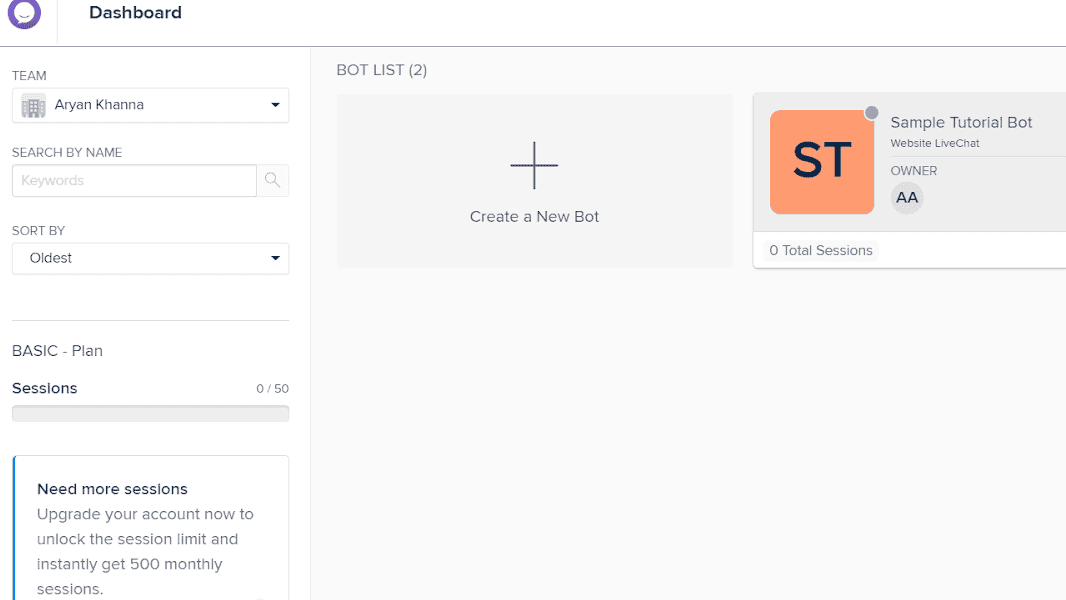
BotStar’s Clean and minimalistic interface is extraordinarily easy to use. When you first start using BotStar, you’ll see a list of all the chatbots you have, as shown below:
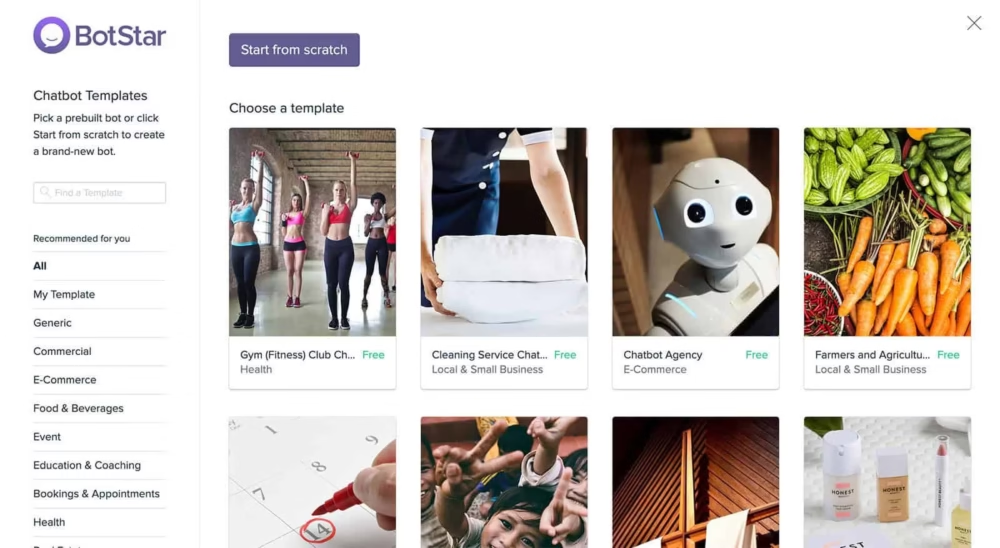
You can select from a variety of templates to design your best chatbot after clicking the “Create a new bot” option. BotStar offers a diverse range of amazing templates to choose from.
If you’re building a chatbot for the first time in BotStar, one of the best AI chat bot app will give you a complete tutorial about how to use it. This provides you with practice on how to use the software, the do’s and don’ts etc.
Pros
An easy to use and clean User experience with a step-by-step guide for new comers.
Reasonably priced with a free plan available.
Campaigns and Broadcast are two powerful features in BotStar that give out advertisements and build consumers.
BotStar is a Messenger marketing platform similar to email marketing, with a focus on Facebook and the website.
Cons
Users complain about a lack of customers services and long waiting times to connect to a customer executive.
There is currently no payment integration, although that may change with time.
Unique selling point
BotStar is ideal for online conversation planners or companies that need automated client interfacing in areas such as customer service, pricing, and marketing. Its simple tools and built-in integrations make it a colossus for small business owners. Aside from that, Botstar has a suitable ergonomic package for businesses of all sizes.
Pricing:
Free Plan Features:
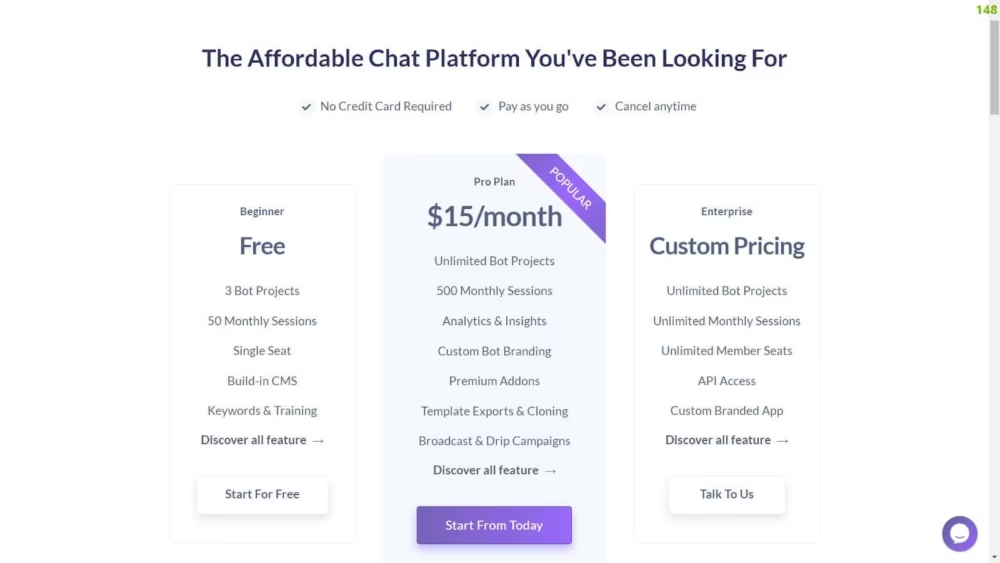
BotStar offers a free package that allows you to access the majority of the platform’s capabilities. As a result, you can use this free plan to try out their app and see how it meets your requirements. You have 50 monthly user meetings, three chatbot ventures, for one client use, an integrated CMS, and Keywords.
Pro Plan Features:
They also have a Pro package in addition to the free one. This Pro package includes unrestricted chat bot tasks, at least 500 monthly user sessions, dual users, and nearly all of their features. This package is just $15 a month, which is a bargain in my opinion.
BotStar Integrations:
BotStar does exceptionally well when it comes to integration. They have a live chat support feature, which is one of the most valuable features of best AI chatbot app. Some integrations they provide are DialogFlow and Wit.AI , Zapier, Webhooks Integromat and Google Sheets.
Alternatives:
It’s important to choose the top programme for your best AI chatbot. This is because you want to provide your clients with a certain level of satisfaction. However, in order to provide value to your clients, you’ll require tools that can do so. So, It’s totally understandable that you might not prefer BotStar as your first preference to create best AI chatbot. Therefore, here are some alternatives:
1. ActiveChat
Features:
Many networks are supported: Facebook Messenger, Telegram, and SMS.
The Largest internet plugins: customize the widget to match your brand and submit services depending on the user’s current page.
Live chat support is built-in.
Integration of Dialogflow.
Pricing:
ActiveChat offers a 14-day free trial that allows you to try out the platform’s capabilities.
The first paying subscription would set you back $33 a month (paying per year). Many of the software’s functionality is included, as well as 1,500 chatbot users per year and one live chat support operator.
They also have a Business package, which costs $1249 per month (if paid yearly) and covers all the software’s capabilities, as well as 1,000,000 chatbot participants a year and 10 live chat support agents.
2. Botsify
Features:
Multiple platforms are supported, including the website, Facebook Messenger, Slack, and SMS.
You can embed a widget in your corporate identity on your website without requiring users to log in to Facebook Messenger.
Excellent third-party app integrations.
With their growth software, you can easily draw users to your chatbot.
With their Conversational Forms functionality, you can create conversational forms.
Pricing:
Botsify offers a 14-day free trial that allows you to try out the platform’s capabilities.
The first package costs $50 a month, which may seem excessive to some, but users believe it is well worth it. This plan includes 30 thousand clients (far more than most other chatbot software), unlimited texts, unlimited keywords, unlimited Forms, and unlimited flows).
3. Chatfuel
Features:
Easy-to-use GUI for creating message lines.
To create your own best chatbot, you’ll be provided with a lot of different elements and various designs.
Using their Growth Tools, you can quickly recruit new customers.
There’s a built-in live chat support feature.
Zapier, Integromat, DialogFlow, and Google Sheets integrations are all available.
Excellent analytics that makes it simple to boost your chat bot.
They’ve got Shopify integrations so you can deliver abandoned cart reminders.
Pricing:
Chatfuel offers a free package that allows you to use services as long as you don’t have more than 50 members.
The next contract costs $15 a month for 500 subscribers which increases in price as the number of subscribers grows. A thousand subscribers cost $20 per month, while a thousand subscribers cost $30 per month.
They also have a Premium package, which includes VIP service, a designated Account Manager, synced cloning, and a white-labelled dashboard. The price of this plan is tailored according to the user.
4. Engati
Features:
Visual Flow Builder that is simple to use.
There are a lot of chatbot elements to make your best chatbot.
Users may have custom fields added to them, and they can be segmented.
AI and Natural Language Processing (NLP) are built-in.
Supports putting the chat bot on 11 different networks.
There’s a built-in live chat support feature.
Zapier, Google Calendar, and Google Sheets are also directly integrated.
Excellent data analysis.
Pricing:
Engati offers a free plan that will remain free indefinitely. The FAQ with NLP Engine, text transmission, statistics, various platforms, and basic JSON API integration are all included. You can do this for up to 1000 conversations and have up to two chatbots at a time.
If you need more functionality, the Pro package (which comes with a 7-day free trial) will handle up to 10,000 conversations and 5 chatbots. It also encompasses numerous branding and colour options, an auto popup, advanced JSON API integration, and Zapier integration.
Final Verdict
BotStar is a great software that entrepreneurs should be using. It allows you to quickly create a best AI chatbot for your website and Facebook Messenger at a very low cost. They have great features including a built-in CMS, localization options, a visual flow designer, Whitelabel platform choices, and strong integrations.
However, you must keep in mind that a chat bot can only be created through two channels: the website and Facebook Messenger. As a result, providing a more omnichannel environment is out of the question.
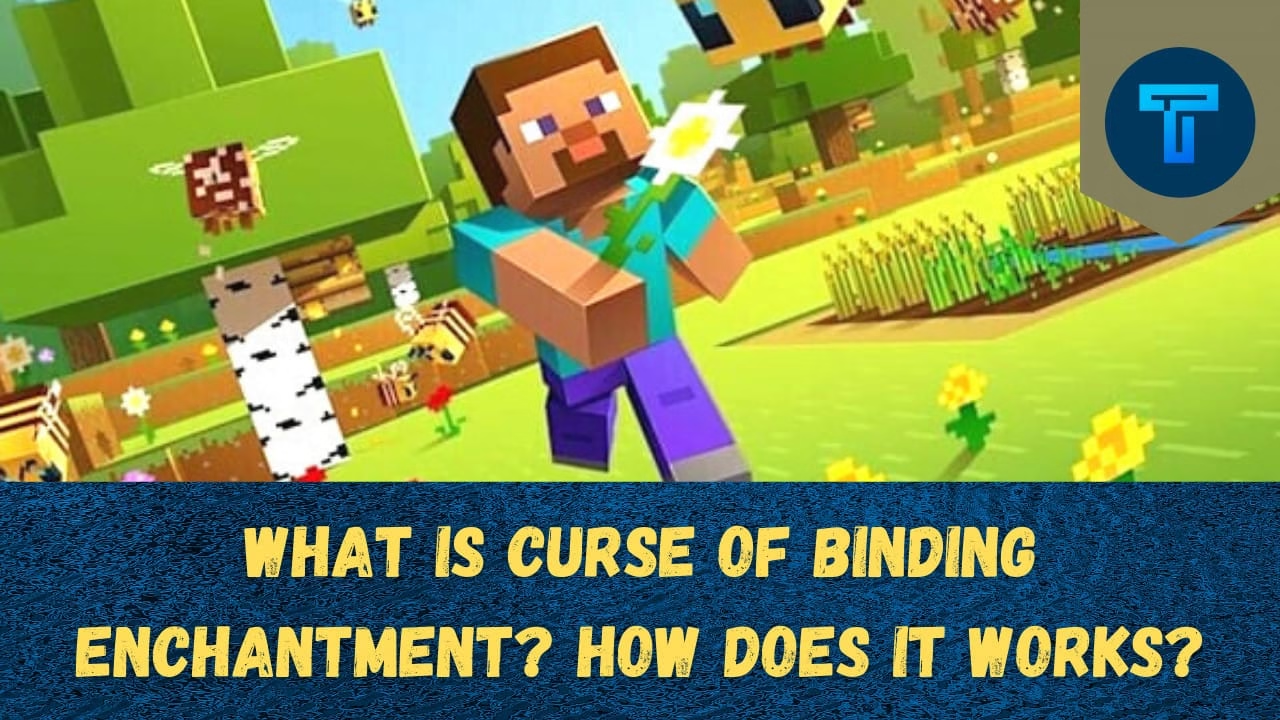
I know many of you are still not fully aware of Minecraft Curse of Binding Enchantment and the role of. It bothers the players of this game, so they need to comprehend it clearly and learn about the removal process.
It is a very rare curse enchantment in Minecraft can really have an effect on the whole game. The players can use it but as a defense forcing the mobs to wear the Armor consisting of it. All the data mentioned here are relevant for all the versions and game modes of Minecraft like Minecraft dungeons, Java edition, Xbox, Nintendo Switch, Pocket edition, and others.
What really happens in Minecraft’s Curse of Binding?
It is also known as treasure enchantment is often used by the players to keep the cursed items equipped with the player till the last moment of death, or the player makes an entry in the Creative Mode. Why is it called Curse? The main reason behind it is when the players of Survival Mode apply this Curse of Binding then the chest plate gets attached which is not at all advantageous for the players. Even several items gets broken like carved pumpkin,
How can you get access to it in Minecraft?
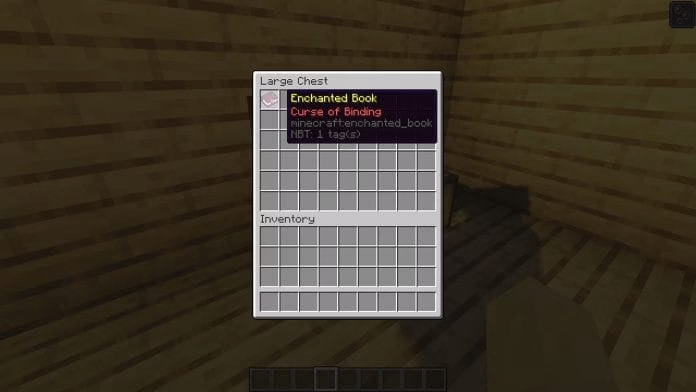
As it is one of the rarest Curse enchantments in Minecraft so one can find it difficult to obtain. The only thing to be kept in mind is that you can only possess it as a treasure item. The player can find it by fishing, raiding the rewards, Enchanted Books trading with the villagers or even in the treasure chests.
If you want that curse while fishing then you can probably use the Luck of the Sea Enchantment which will increase your probability of getting it to a great extent. You can find the treasure chests in Pyramids, Villages, Outposts, Temples and others.
Want to use the Curse of Binding? Here’s How
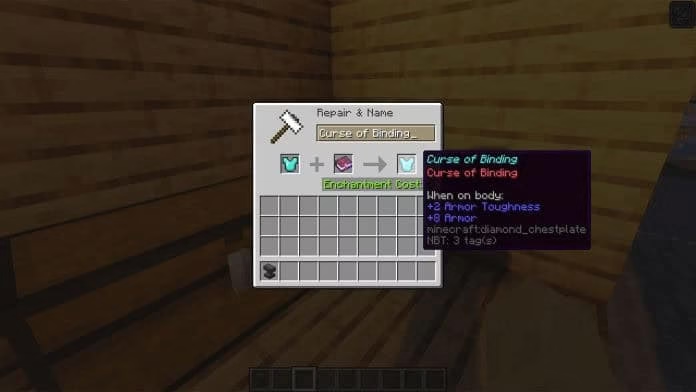
It is in Minecraft can be applied to the armor with the use of Anvil.
All you need to do is insert your piece of armor in one slot along with it placed in the other one, so that you can jointly pull out the armor with Curse of Binding.
If you are thinking of how to craft an Anvil? Read this
It is quite a simple process to carry out. You just have put three iron blocks in the top row of the Crafting Table or the inventory. Now, in the middle slot you have to place an Iron Ingot and also you have to insert 3 in the bottom row of the crafting table.
How can one remove Minecraft’s Curse of Binding?
The release of this curse is the trickiest part where the player often gets confused how to get rid of Curse of Binding in Minecraft. Below here is represented some ways that you can check out in order to do the following:
The most effortless way that the player can opt is dying.
Other than that, the playing can also make their armor reach the level of zero leading it to break.
Even the player can place the items in the chest and spend the available experience. Finally, then one can die to get rid of it.
In case if you are in Hardcore Minecraft then all you can do is wear the armor till it breaks
In the earlier version of Minecraft the player due to the presence of the bug it was easy to remove the curse of binding but in the update version of the Minecraft this is fixed so the player has to find different ways for the removal of the curse of binding enchantment.
Note for Bedrock Edition:
In the Bedrock Edition of Minecraft, players were not able to obtain the Cursed Enchanted book from the villagers which paves another way for the players to gain it.
Can you put it on a bow?
No, the Curse of Binding cannot be applied on a bow. It can only be applied certain limited set of items and once applied it cannot be taken back until the item breaks or the player dies. The list of items is: 1. Helmets 2. Elytra 3. Boots 4. Chestplates 5. Leggings
I hope this article was successful in providing you all the essential information about it. You can share this with your friends, gaming partners or others so that they can know fully about these interesting topic.
Have you ever come across the situation where you find the error of no availability of power options in your Windows? It is even reported by the users that No Power Options Error is most likely to happen in the Windows version 8.1 and 10. So, if you are facing the same issue, then this is the perfect article for you to find the reasons behind such occurrences of error. Along with this you will be provided all sorts of solutions for fixing the problem.
Let’s start off by discussing the cause of No Power Option Available Error.
What is the possible cause of error?
Through the thorough research about such types of errors in the system, we are able to conclude some main reasons that are responsible for disappearance of power options.
Power Options Menu:
The complications or glitches in the menu may cause these issues to happen. If this is the case then the problem can be sorted out by updating the Windows pending updates or you can also use Command Prompt for the restoration of the Power Options.
Registry Key:
Sometimes it also appears that the registry key when enabled by the user, it can cause such kind of error. You can overcome this issue by disabling the registry key.
Corrupted System File:
The Windows users must check out for the presence of a corrupted file because this might be responsible for such an error. Make sure to perform some scans named SFC or DISM in order to get rid of the corrupted files in your system.
Since we have discussed the major issues responsible for the No Power Options available, now let’s move forward to the possible troubleshooting ways via which the users can fix the issue. So let’s get started.
Noteworthy: All the mentioned methods are only applicable for certain circumstances, so it is quite important for you to stick with the guidelines presented below.
You see there are currently no power options available error when you click on the Start menu?
Yes, you might encounter some errors like no availability of power option but there are some quick and easy solutions for fixing this issue: 1. By Running Windows Power Troubleshooter. 2. By attempting Command Prompt 3. By running SFC/ DISM Scans.
5 Quick Fix To Troubleshoot No Power Options Available Error
First Solution: Run Windows Power troubleshooter:
You should definitely try this fix as it is found highly effective by the Windows 10 users. This works equally well with the other versions like 7 and 8.1. You can start by:
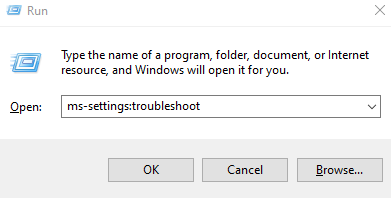
Tap on the Window key and R simultaneously to open the Run dialogue box.
Type ms-settings:troubleshoot and click the OK or press Enter key.
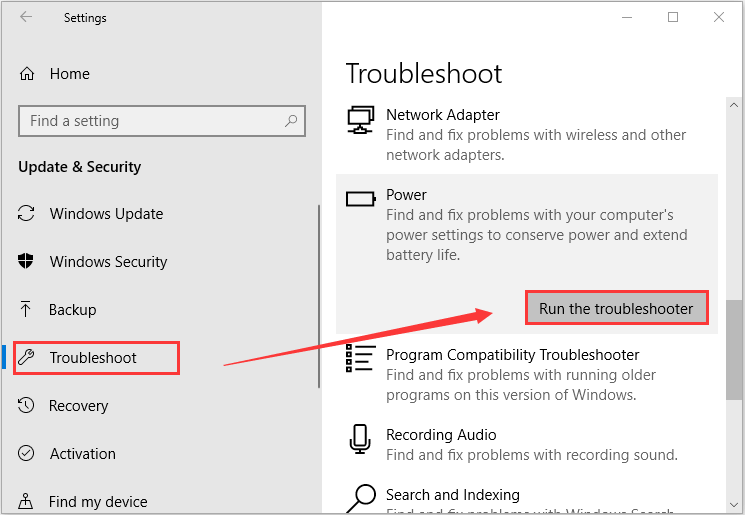
Now the Troubleshoot panel will appear and scroll down to find the Power option. After clicking the Power option, tap on the tab named Run the troubleshooter.
As soon as the scan gets completed, select Apply this fix and then work accordingly to the prompts visible on the screen.
After fulfillment of all the requirements, restart your system and check if the problem is resolved or not.
If you are still facing such problems then try out this one.
Second Solution: Command Prompt:
Press Window and R key concurrently to open the Run dialogue box.
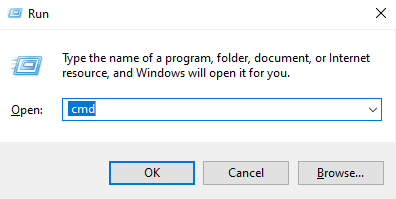
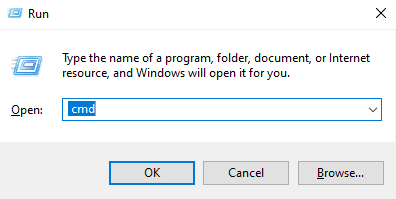
Type cmd and now have to click Ctrl+Shift+Enter at the same time to open the elevated Command prompt.
You can add the Administrative privileges by clicking Yes after the prompt made by User Account Control.
Now you have to run the provided command in the elevated Command Prompts, if you want to restore all the Power option Menu.
powercfg –restoredefaultschemes
Lastly you can try restarting your computer to check if the error is over or not. Otherwise, you can also check the command presented below. Just copy and paste the command and press Enter.
After the application of the command you have to restart your system to see the changes.
Third Solution: SFC/ DISM scans:
As mentioned earlier in the causes of error, corrupted files may be responsible for no power options available. So, conducting a scan can be the ultimate solution.You must know the fact that both the scans possess its specific functions.
SFC named System File Checker is capable of using the local backup for the removal of corrupted files, while DISM named Deployment Image Servicing Management makes the use of components of Windows update for extracting the files free from corruption. Let’s see how we can do that:
Click Window+R key for opening the Run dialogue box
Type cmd and instantly press Ctrl+Shift+Enter for obtaining elevated Command Prompt.
Note: If you receive a popup by UAC then select Yes
You can run the command of the elevated Command Prompt for initializing the SFC scan.
sfc /scannow
After the completion of the scan restart your computer to see if the power options are available or not
If not, then you can repeat the same process of Run dialogue box mentioned above. The only difference you have to make is to run different command of the elevated Command prompt
dism /online / cleanup-image /restorehealth
Now, the system will start to conduct the scan and after the completion you can simply restart the computer.
Fourth Solution: Use of Registry Editor:
This Registry Editor is used by various users and in turn it has turned out positive too. So lets us guide you to make the stuff simpler to you:
Start off by clicking Window + R key for opening the Run dialogue box
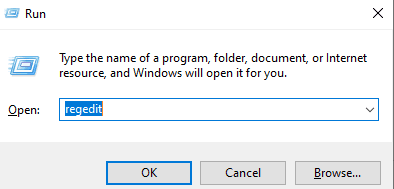
In the Open bar type regedit and tap on Enter key to open the Registry Editor
Tap YES if the prompt is visible on your screen
Now in the left panel of the Registry Editor search for HKEY_CURRENT_USER
Then on the right side of the panel you have to double-click on NoClose to change the value to zero
Finally click OK and restart your computer
Fifth Solution: Local Security Policy Tool:
Due to some username issues this kind of error may arise, but no worries cause it can be sorted out by making changes in the User Rights Assignment Policy in the Local Security Policy tool. This is applicable for the Windows version 8.1 and 10. So, lets see the procedure:
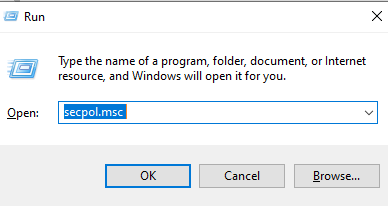
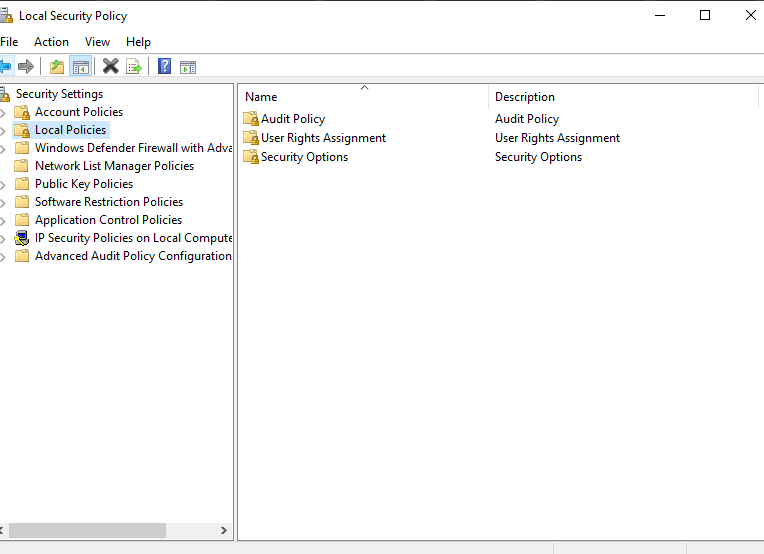
Open the Run dialogue box and type secpol.msc and press the Enter key
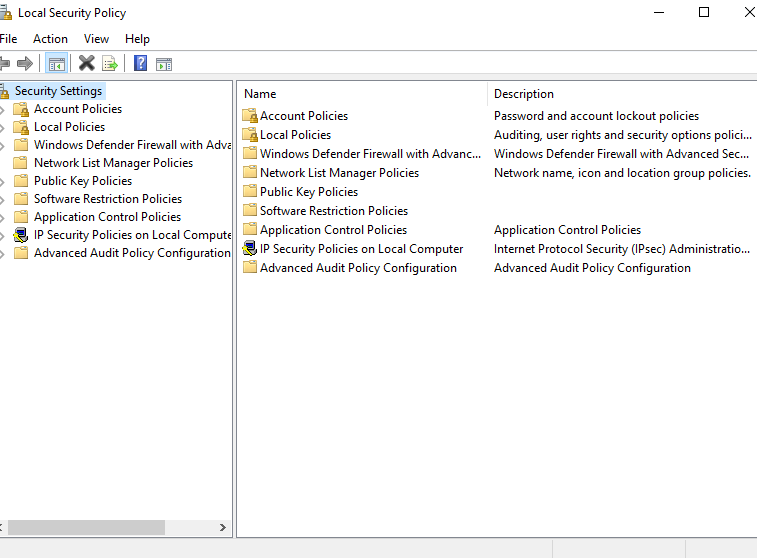
Now Local Pool Security Policy Editor will open.
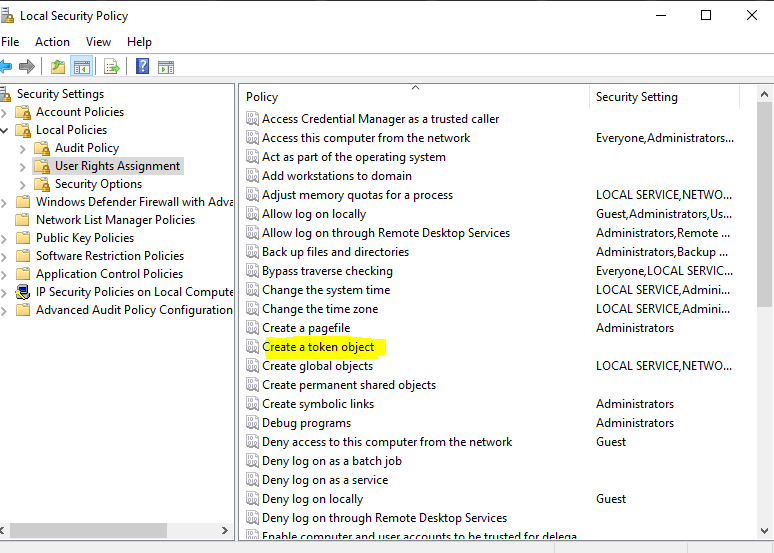
Under that option select Local Policies Menu tab and select User Rights Assignment
Then on the right side of panel you will find create a token object tab, double-click on that
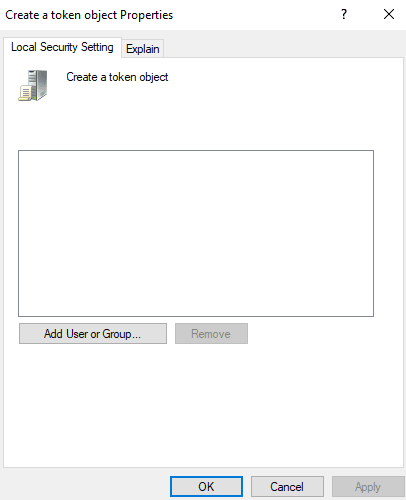
Find the Shutdown among the list of options, by right clicking choose properties option
After that you have to choose Backup Operators and then click on Add User or Group tab.
After hitting the OK button minimize the window for now and move on the another set of guidelines as listed below:
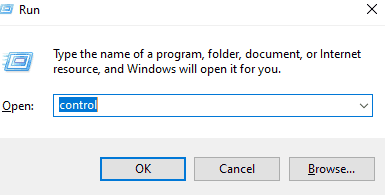
Click Window + R for opening the Run dialogue box and type control.
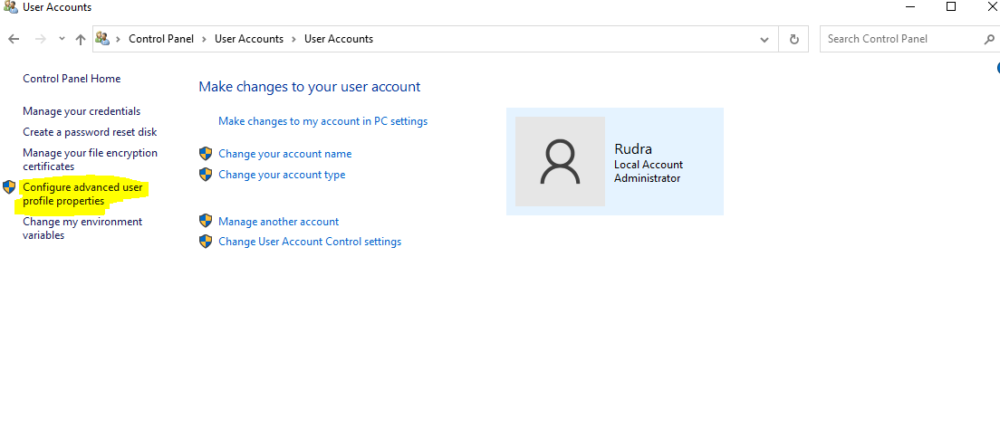
Control Panel will appear where you have to go to the User accounts and select Configure advanced user profile properties on the left side of the page
You have to copy the name of the profile.
Ultimately, you have to open the minimized window and paste or type the same username.
Tap on Check Names option and click OK
Click on the Apply button for saving the changes and sign out.
After some time, sign in again and check if the power options menu is visible.
So here we have managed to provide you all the successful ways of restoring the power options with detailed guidelines. I hope you have achieved the desired results. In case if your friends, partners, colleagues are facing the same issue then do share with them.
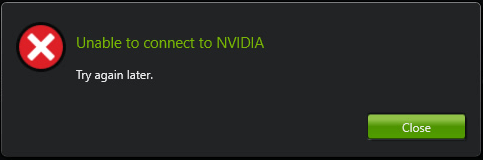
Users who use NVIDIA graphics cards have often complained about encountering an error message: “Unable to connect to Nvidia, Try again later” on their Windows system. This error usually pops when users try to use GeForce Experience, which is a part of the Nvidia graphics driver. It usually optimizes game settings, automatically updates video drivers, and records videos. But we have a solution to this problem (3 solutions actually), so let’s get started.
How To Troubleshoot “Unable To Connect To Nvidia” Error?
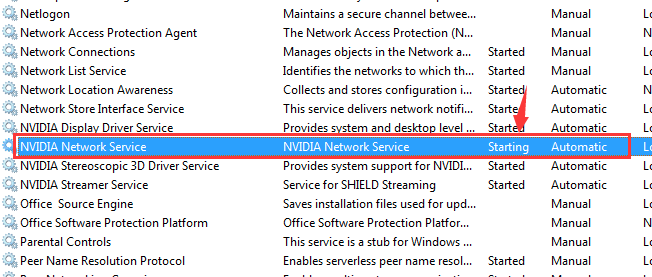
To solve any error it’s always a good idea to understand why it happens in the first place. In simple words, the Nvidia Network Service often crashes while booting and is often stuck at the starting state. And as a result, the application doesn’t start properly and results in an error. When you get the error, GeForce prompts users to check their internet connectivity. So you can start by checking if your internet connection is stable. But in a typical case, it’s the Nvidia’s server that’s at fault, but you can check just to be sure.
We have listed 3 solutions to fix this error, but before proceeding, we advise you to install Reimage because malware infections can also cause this error. Let’s take a look at the listed solutions step-by-step:
Update The Nvidia Graphics Card Driver
If your Nvidia graphics card is outdated, then this could be the cause of this problem. You need to update your graphics card and here’s how it can be done:
Go to device manager on your system, you can click on the start button and type device manager in the search bar.
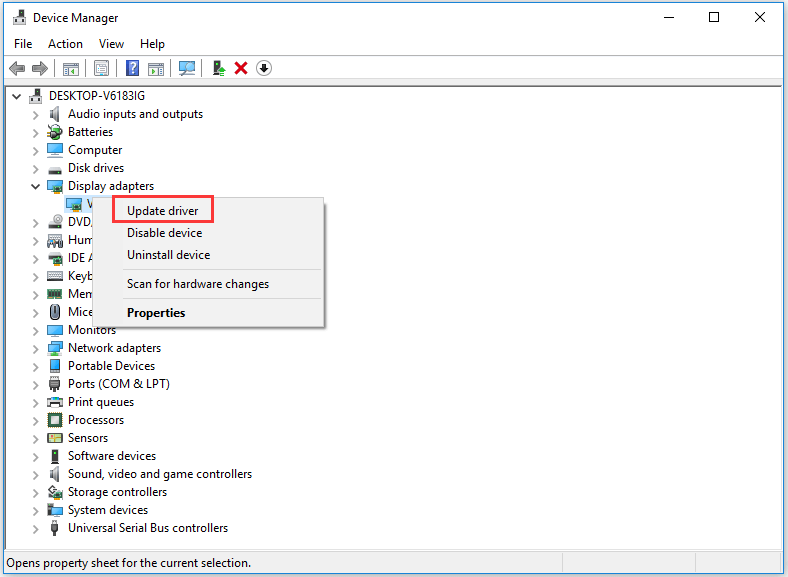
Under Device manager go to Display adapters and expand it after clicking on it.
Next, right-click on your graphic’s card and click on update driver
You need to select ‘search automatically for updated driver software’.
Your Windows will automatically start searching and downloading the latest version for your Nvidia graphics card.
Restart your system.
Update Your GeForce Experience To The Latest Version
If your GeForce Experience is older than 2.5.×.×. then there is a good possibility that this is causing the error. You need to update your GeForce to the latest version. You can download the latest version from the official website of Nvidia. And after installing it run it again to make sure it’s the latest version.
If your error still persists, follow the next solution.
Disable Nvidia Services
At times, the Nvidia network service is stuck at the starting state, this could cause network connectivity issues and can also be an obstacle while downloading anything from GeForce experience. Follow these methods to fix it:
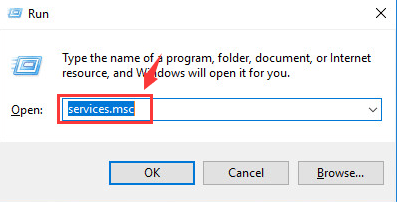
Press the Windows logo key and R at the same time from your keyboard.
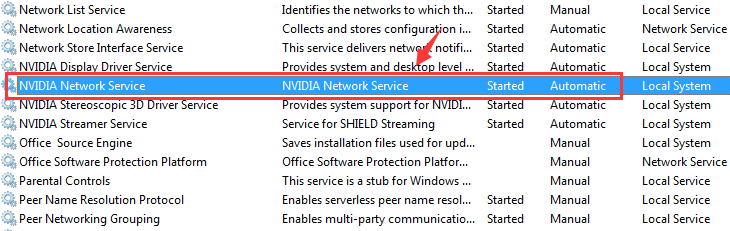
Type services.msc in the box at appears and hit enter.
To locate NVIDIA network service press the key N on your keyboard, make sure that the status of the service is “starting”.
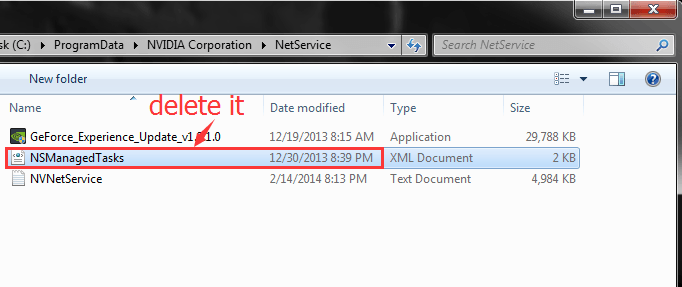
Next, go to C:\ProgramData\NVIDIA Corporation\NetService\ and delete NSManagedTasks.xml, which is an XML document.
If you’re not able to view this file then you click on show hidden files in the main menu and check again.
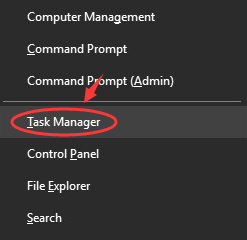
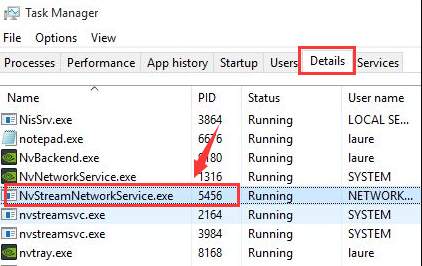
Press the Windows logo key and X at the same time and select task manager.
In the details tab click on NVNetworkService.exe and the end task.
Lastly, open the Services window again and right-click on NVIDIA network service, start it.
This should fix the issue and your GeForce experience should be running properly now.
And that’s about it. One of these methods or all of them should be able to fix this issue and you can now resume playing your favorite video games. The solutions mentioned in this article are quite simple and easy to follow.













![[Fixed]: 5 Best Ways To Fix “No Power Options Available Error”](https://techgyo.com/wp-content/uploads/2021/07/image-54-png.avif "[Fixed]: 5 Best Ways To Fix “No Power Options Available Error”")