Home Blog Page 34

Top 4 Remote Side Hustles That Can Help You Sharpen Your Skills and Earn Extra Cash

Do you wish you had a little extra cash in your pocket? If you currently hold down a full-time job but want to find simple ways to pad your wallet, cover the bills more comfortably or put a little extra cash away in savings each month, you may want to consider finding a side hustle. Side hustles have become increasingly popular in the past several years for allowing workers to improve their finances and expand their skill sets at the same time. If you want to work remotely, you have several strong options to choose from. Take a look at the top four remote side hustles you may want to try on for size.

Top 4 Remote Side Hustles to Sharpen Skills Earn & money

1. Blog Writing

If you’ve always had a knack for the written word and enjoy sharing your thoughts with others, why not try your hand at a monthly blog writing service? For anyone who enjoys writing, starting or contributing to a blog every month can be deeply rewarding. Writing of any kind on a freelance basis can be highly flexible and allow you to earn extra cash remotely while working on your own schedule. Additionally, this is one field where the more you practice, the better you get. If you keep sharpening your writing skills and building your audience, you may even be able to replace your full-time income and become a professional writer eventually!

2. English Teaching

Whether or not you teach as your full-time day job at the moment, offering online English lessons could prove to be the ideal side hustle. If you’re a native English speaker, you may already have significant linguistic knowledge that you could then pass on to students. You can opt to start your own English teaching business online or, alternatively, could join an established English teaching business as an associate. Depending on which path you choose, you could potentially set your own hours, choose your class sizes and set your hourly pay rates.

3. Bookkeeping

If you’re more of a numbers person, why not try out bookkeeping as a side job? Bookkeeping is essentially a type of accounting that many companies need done. You can work on bookkeeping projects from the comfort of your own home on a part-time or freelance basis. Another benefit of this side job is that you could become a bookkeeper for any type of business you prefer, so if you’ve always been interested in a certain company or a certain industry, you could get your foot in the door by offering your bookkeeping services to them.

4. Photo and Video Editing

Finally, if you’re a creative person and have a knack for working with different software tools, you may want to become a part-time photo or video editor. Given the boom in social media and the interest in online content in recent years, photo and video editing is now more in demand than ever before. You can pick up clients on a freelance basis or become a contractor for an agency to start building up a portfolio and strengthening your editing skills!

Having a side hustle can help fill in the financial gaps left by your day job and can help you pick up new skills and expand your resume at the same time. If you’re interested in getting a side job that you can work remotely, make sure to add these four great options to your short list. Whether you’d prefer to try your hand at blog writing, photo or video editing, bookkeeping or English teaching, these remote side hustles could potentially empower you to pad your pocket while sharpening your professional skills all at once.
Curse of Vanishing Enchantment in Minecraft Explained in 5 Minutes

Are you new to Minecraft? Or have you been playing Minecraft for quite a while now? Either way, you should know what is the minecraft Curse of Vanishing enchantment in Minecraft and for those of you who play it regularly, we can bet that you just want to avoid the curse of vanishing because it’s not exactly a good enchantment or maybe you don’t understand how you got it or the exact mechanics behind it. You obviously want to get all the best enchantments possible but all the enchantments that you come across while trading with the villagers may not exactly be, well, good.  So let’s take a look at what exactly the curse of enchantment is.

Curse of vanishing enchantment is an enchantment in Minecraft What are all the possible enhancements you can add to your boots in Minecraft, it’s basically one of the two curse enchantments- the other being cursive mining. This enchantment is an enchantment you definitely want to avoid. What this enchantment does is, make your item completely disappear when you die. For example, if you have a really amazing diamond pickaxe and it’s enchanted, you don’t that you’re actually putting the curse of vanishing on it. 

Minecraft

This enchantment is usually marked in red and it’s literally a curse in disguise. And the way you can come across this is through villager trading, chest loots, and fishing. Here’s an example:

if you have a book, let’s say it has Riptide 3 which is fantastic and you really want it on your Tridents, so you go to your Anvil and you’re so excited about getting Riptide 3, and you put it on there and without even noticing you got the curse of vanishing minecraft. *Sigh* and the amazing trident that you just enchanted will disappear when you die and the bad thing about this is that it’s quite impossible to get rid of enchantment like this. 

curse of vanishing enchantment

Does Curse of Vanishing work on armor?

Yes, Using an enchanting table, anvil, or game command, you can add the Curse of Vanishing enchantment on any tool, weapon, or armor.

Can you get curse of binding from villagers?

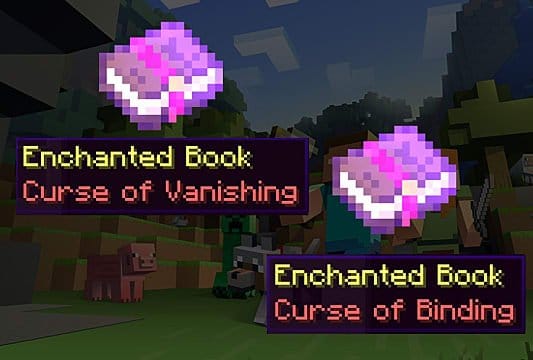
Curse of Binding may only be obtained through dealing with library villagers. Trading with librarian villagers no longer yields enchanted books with Curse of Binding.

How To Get The Minecraft Curse Of Vanishing? 

This enchantment is included in the rarest of enchanting books collection in Minecraft. Though, it can be obtained from specific places. It can be found while trading, You will have to set up a Lectern and some bookcases in a village. Alternatively, it can also be found in the raid rewards or buying them with emerald rewards. Desert and jungle temples also have a good chance of rewarding you with this curse enchantment. You can find some items like books that have this enchantment of them.

minecraft

What Does a Curse Of Vanishing Do?

This curse wasn’t initially added in the game and players did not have to worry about it. It was added to the game during the 1.11 dubbed exploration update. The developers introduced an enchantment to the game with negative effects for the first time. So talking about the effects of this curse enchantment and what exactly does it do?

of course, it’s no treat, In fact, the effects are devastating. What happens is that upon the death of a player, the items enchanted by this curse automatically disappear and cannot be looted even after the player makes it back in time after the death. This curse can be applied to any item and not just weapons.

But on the green side, this curse can be used to punish your enemies by cursing an expensive item. Also, your enemies will not be able to steal your precious and valuable items after you die. 

minecraft

How To Get Rid of The Curse of Vanishing Enchantment?

In the normal scenario, your items will just drop off after you die but it’s different if the items are cursed. Your item will be gone forever once you are cursed by another player by cursing your item in the inventory. And it cannot be recovered once gone.

But, it’s possible to get rid of the curse of vanishing enchantment. If you are cursed you can remove it quite easily, by finding the same item as the cursed item. Another way is to use  Grindstone which can be used to remove the curse from weapons or tools. This is probably the quickest way to remove the curse of vanishing enchantment but it comes at a cost, it will remove all the other enchantments you have as well. 

So that was about everything you need to know about the Curse of vanishing enchantment in Minecraft.  The best way is to be super careful if you want to avoid this curse and even if you encounter this curse you have to be quick enough to get back in time to revive all your items. As interesting as this game is we know it can be quite unfortunate if you encounter this curse but remember, at the end of the day it’s just a game. 

Minecraft Earth coming to an end | Minecraft

Fix The Discord JavaScript Error In Less Than 5 Minutes [4 Simple Hacks]

We bet you’re here because you just encountered an annoying JavaScript error when trying to install discord. “A JavaScript Error Occurred In The Main Process” is a frequent error that shows up on your computer when you’re trying to open or install discord and honestly, it is quite troublesome. But there are many simple solutions to fix this particular error, so read on to find out how you can fix the discord JavaScript Error.

Discord JavaScript Error [SOLVED] - Tech Exel

What Causes The JavaScript Error To Occur In Discord?

There is no specific cause as to why this error happens, but some common causes can be:

  • Discord wasn’t installed properly or its settings have gone corrupt.
  • The Windows Audio Video service is not running.
  • If your discord is running with administrator permission, disable it. 

Methods To Fix The Discord JavaScript Error

We have listed 5 solutions below to help you get rid of this issue.

METHOD 1: DELETE THE DISCORD FILES

  • Discord creates temporary files on your PC to function properly which can cause the JavaScript error to occur. These files have to be deleted in order to reset the discord settings and hopefully, the error gets fixed, here’s how you can do it:
  • Firstly, close discord via the task manager- right-click on Taskbar, select task manager, and end task on discord.
discord javascript error
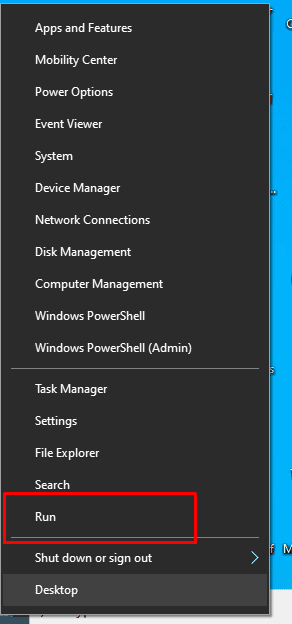
  • Right-click on the Windows start menu, on your desktop.
  • Select Run in the menu that’s displayed
discord javascript error
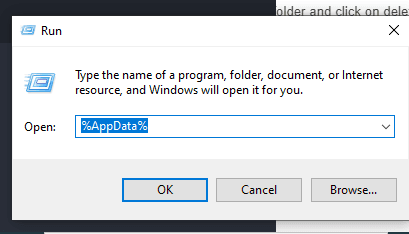
  • Type %AppData% in the small Run window that pops up and click on Run.
discord javascript error
  • Locate the discord folder in the Windows Explorer window that opens. Right-click on that folder and click on delete.
discord javascript error
  • Go back to your start menu, and load Run again.
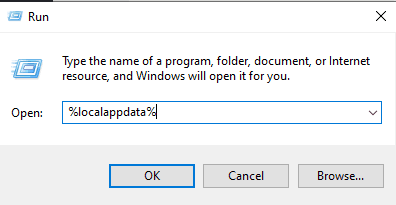
  • This time, type %localappdata% and hit Run.
discord javascript error
  • Locate your Discord folder again by right-clicking on it and delete it.
  • Restart your system and check if the issue resolves. 

This method has helped a lot of people fix this error and is one of the most common reasons for the JavaScript error.

METHOD 2: WHITELIST DISCORD FILES IN YOUR ANTIVIRUS FILES

Most of the antivirus softwares are known to target the discord files and hence interrupting Discord from installing to running, and this blockage can cause the JavaScript error. The most common file that is targeted by every antivirus software is the “discord_voice” file. To solve this issue the most natural thing to do would be is to whitelist the discord files from the antivirus. While different users have different antivirus softwares, the most common is the Avast software:

  • Open Avast by right-clicking on the Avast icon.
  • Once your Avast interface opens up, on the options running on the left side of the Avast screen- go to the Protection tab.
  • Select the Virus Chest option displayed on the right side and there you’ll find all the quarantined files.
discord javascript error
  • Locate all the discord-related files, they’re easily identifiable as they start with “discord”.
  • Hover over these files and you’ll see three dots, click on the dots and select “restore and add exception”.
  • Repeat this step for all the discord files.
  • Restart discord and check if the issue resolves.

To make sure that the antivirus doesn’t fiddle with discord again, add a folder in Avast that lets the software know that Discord files are not harmful. Here’s the procedure to do it:

  • Open Avast in the same way.
  • Go to the settings in Avast located in the top right corner.
  • Go to the general section displayed on the left side.
  • From the left select Exceptions option.
discord javascript error
  • Click on “Add Exception” and browse the discord installation files.
  • Select “Exception”.
  • Lastly, launch the discord installer to install discord. 

METHOD 3: REINSTALL DISCORD

Of course, this is something everyone tries to fix any kind of error and it can do wonders for you sometimes. You can still encounter the error even if you have somehow installed discord. In that case, uninstalling your discord is your easiest bet and while it’s quite simple we have the steps here for you just in case you need a hand:

  • First, right-click on the Windows menu and select the “Search” tab from the options.
  • Type control panel in the search field.
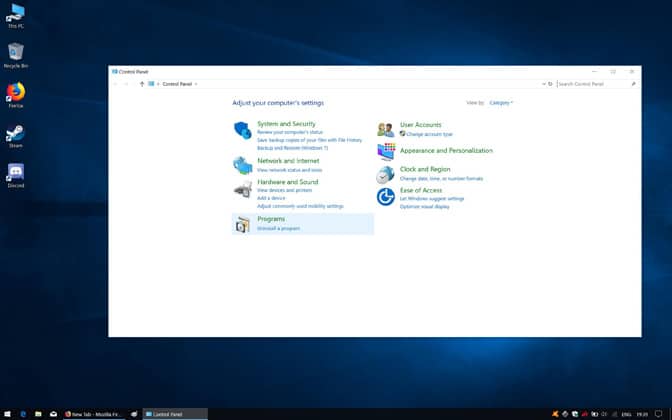
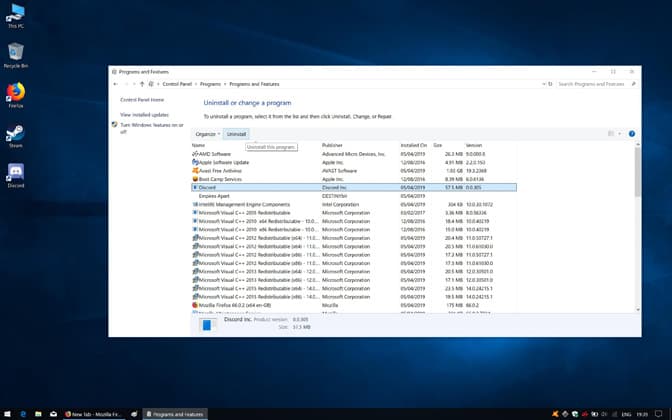
  • In the control panel, you’ll see quite a few options, Look for the programs option and you’ll see an option to “uninstall programs”. Head over there.
discord javascript error
  • Find discord and select it, click on uninstall. 
discord javascript error
  • Once you’ve uninstalled it, head over to Run by right-clicking Windows.
  • Open Run and type %appdata% and click on OK.
  • Find your discord folder and delete it.
  • Open Run once again and type %Localappdata% and delete your discord folder.
  • Reinstall and check if the error is resolved.

METHOD 4: RUN DISCORD WITHOUT ADMIN PRIVILEGES

This app can run if you’re not logged in from using your admin account. If none of the methods work you can try this one final method to fix the error.

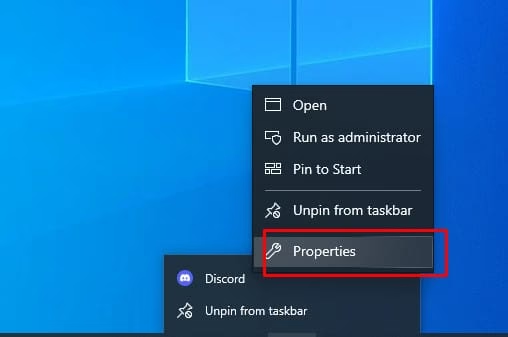
  • Right-click on Discord and go to properties.
discord javascript error
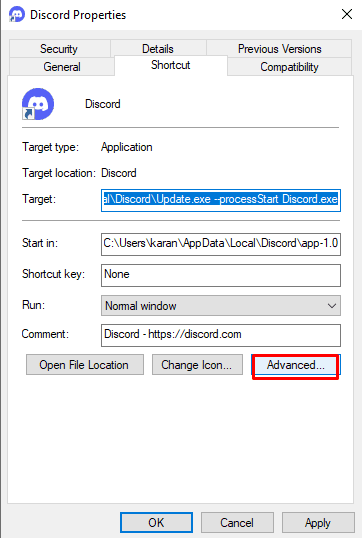
  • In the properties, go to the shortcut tab and select advanced options.
  • Uncheck the “Run as administrator option” and click on OK.
discord javascript error
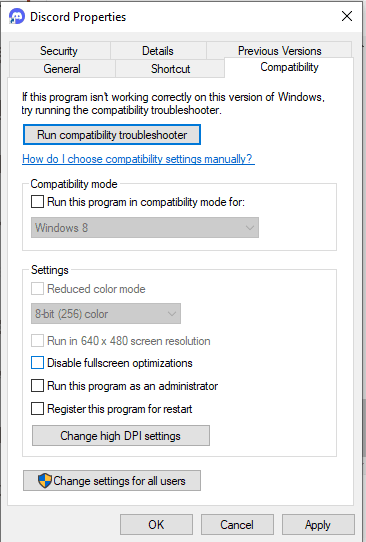
  • Next, go to compatibility and uncheck the option “run as administrator” from there as well.
discord javascript error
  • Click on OK to apply changes.

And that was about it on how to fix the discord JavaScript error. We have discussed the most commonly used methods that are simple yet effective. These methods can also be used to fix other kinds of errors related to discord, they’re not just limited to the JavaScript error. 

Discord's new Stage Discovery portal will connect live audio events with  communities | TechCrunch

Here’s Why Origin Won’t Open + 6 Easy Solutions to Fix It

Did you just schedule a gaming session with your friends on Origin which you were super excited about? So, you get all ready to start gaming, open Origin just to find out that it’s not opening? We feel your pain on this one. Origin, an online gaming platform that lets you play games with your friends online, often encountered this error: “Origin won’t open”. What happens, in this case, is that when players try to use Origin to launch their favorite games-the Origin client becomes non-responsive or doesn’t launch at all.

If you’re facing this issue then you’ve come to the right place, this article will provide several step-by-step solutions as to how you can fix this problem and have an uninterrupted gaming session with your homies. 

origin,origin wont open,origin download,origin error

What Causes This Error?

Before going over the solutions to fix this error it’s important to understand what exactly causes it. While there can be various reasons as to why this issue occurs, the most common ones are:

  • Sometimes, the client stops responding while it is still running in the background.
  • This can also happen due to corrupted cache files.
  • The files that Origin creates could be corrupted over time.
  • System crashes could also be the culprit behind this error.

Methods To Fix The Origin Won’t Open Error

We have provided 6 easy methods to fix the “Origin won’t open” error. If you’ve tried pretty much everything then skin to the last solution in the list- Update your Windows. 

METHOD 1: DELETE THE CACHE FILES

Origin creates temporary cache files in order to load faster and stores the most frequently used data in these files. Over time, these files pile up and get corrupted. So, deleting these files might help, here’s how to do it.

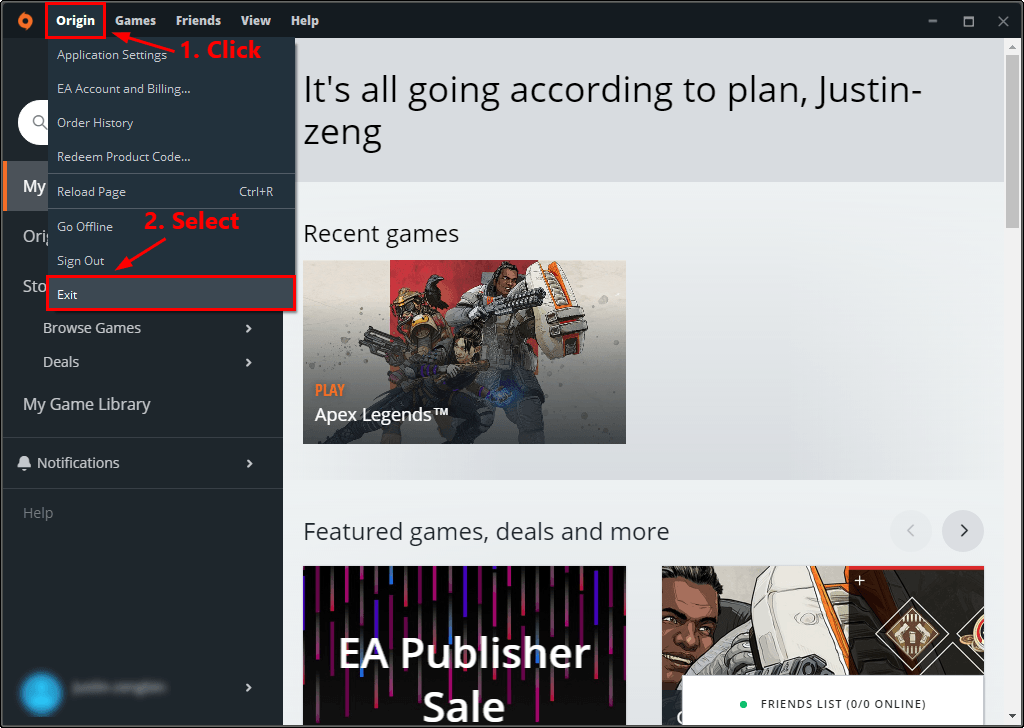
  • if your origin client is running, close it.
origin client
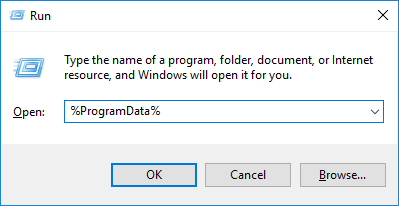
  • Press Windows + R, then type %ProgramData% into the dialog box that pops open then press enter.
programdata origin
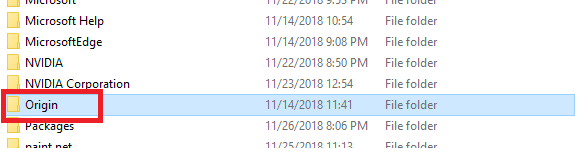
  • Under the Program Data folder open the Origin folder.
program data folder origin
  • Delete all the files and folders in the Origin folder, except for LocalContent folder.
localcontent origin
  • Try running your Origin client again to see if the error is fixed.

METHOD 2: RUN THE COMPATIBILITY TROUBLESHOOTER

There is also a possibility that Origin is not compatible with your Windows OS and one way to be sure about that is to run your program compatibility troubleshooter. Follow these steps to check:

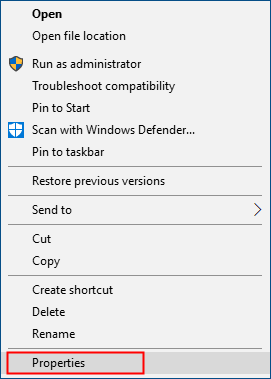
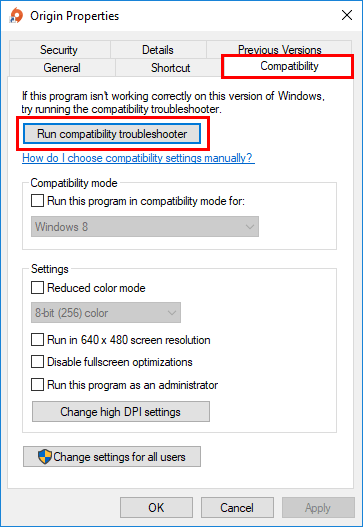
  • Right-click on the Origin shortcut on your desktop and open properties.
properties origin
  • Open the compatibility tab and select Run Compatibility Troubleshooter.
 Run Compatibility Troubleshooter origin
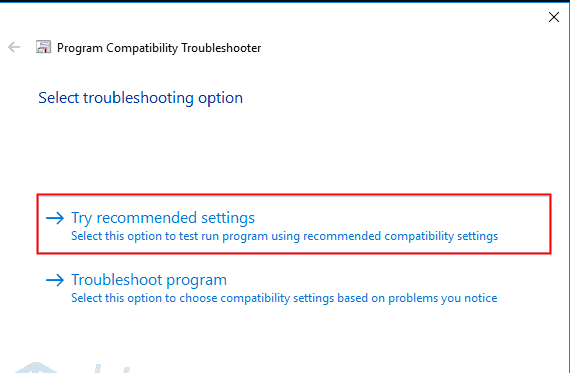
  • Next, go to Try Recommended settings to test your OS using the recommended compatibility settings.
settings origin
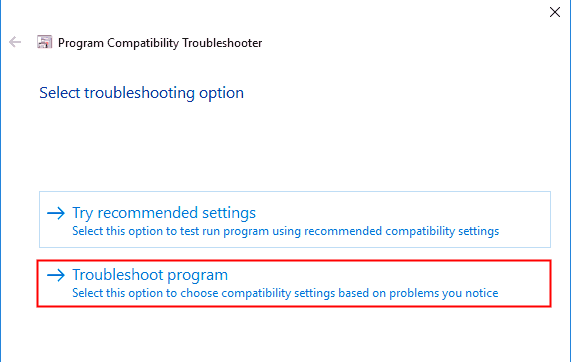
  • If that doesn’t work either, try running the compatibility troubleshooter again.
troubleshooting origin
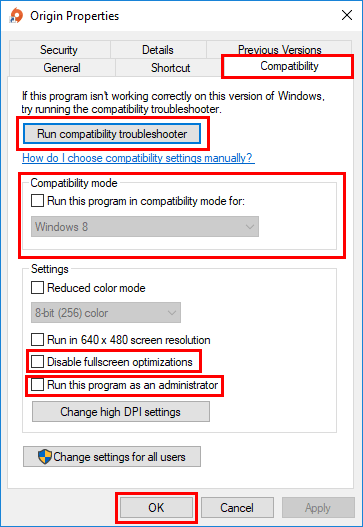
  • Click on Apply and OK and save the changes.
 Run Compatibility Troubleshooter origin

METHOD 3: PERFORM A CLEAN BOOT

If the above two methods haven’t worked for you, try this one. most users have found this solution to be the most convenient and easy one. Clean booting is basically a troubleshooting technique that lets you disable startups manually in order to find out which software is causing the problem. And once the problematic software is caught all you have to do is uninstall that software and your problem will just disappear. Here’s how you can perform a clean boot on your system:

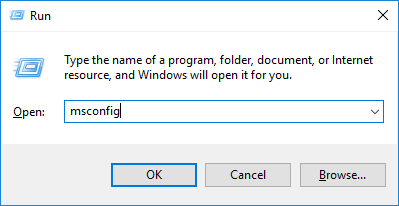
  • Press Windows + R to open the Run dialog box and type msconfig in the box and hit enter.
msconfig origin
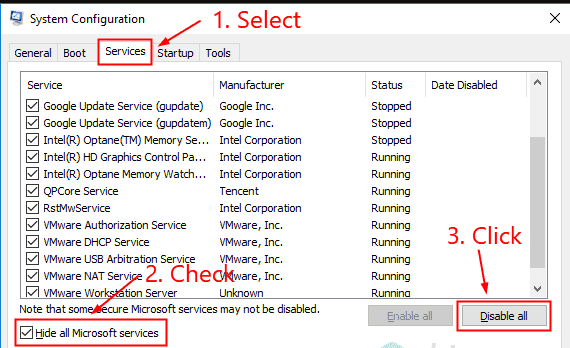
  • Go to the Services tab and make sure to check the Hide all Microsoft services, and click on disable all.
system config origin
  • Next, open the task manager.
task manager origin
  • Under the startup tab, select each item for startups and click on disable.
startup setting origin
  • Click on OK under system configurations and restart your PC.

Run origin again to check if the issue resolves. 

METHOD 4: REINSTALL THE ORIGIN APP

This is something everyone tries to fix any error, uninstalling and then installing the app. Here’s how you can uninstall the origin software:

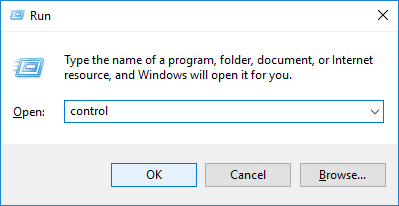
  • Go to the control panel.
control panel origin
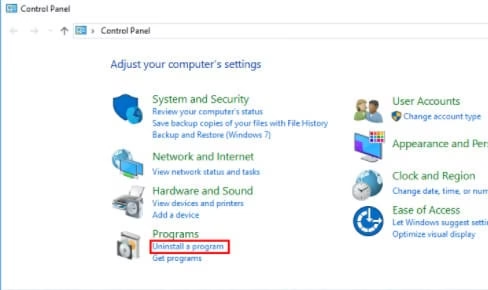
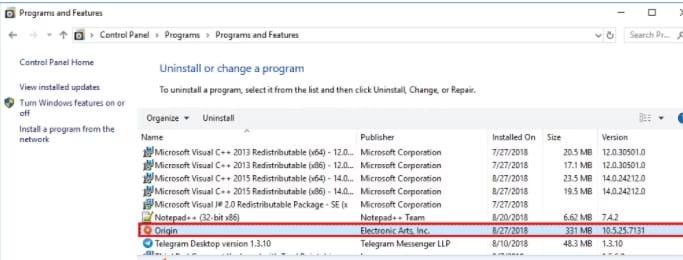
  • Click Uninstall a program under the Programs menu.
uninstall a program origin
  • Right-click on Origin, and uninstall it.
origin

METHOD 5: CLEAN ORIGIN’S TEMPORARY FILES

There’s a folder named AppData that Origin uses to store temporary files, which might sometimes cause Origin to not open. By default, these files are hidden. Follow these steps to get rid of this error:

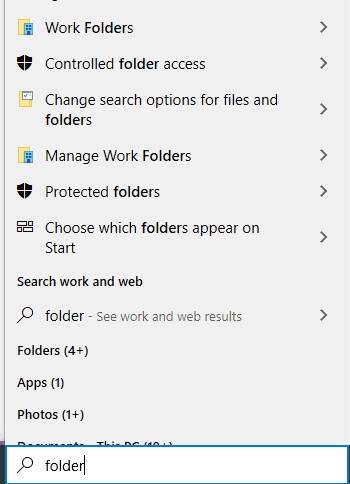
  • In the search box, type folder.
folder origin
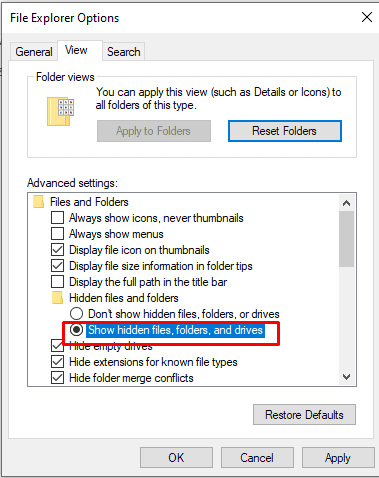
  • Go to Advanced Settings, and select Show Hidden files, folders and drives, and click on OK.
hidden files origin
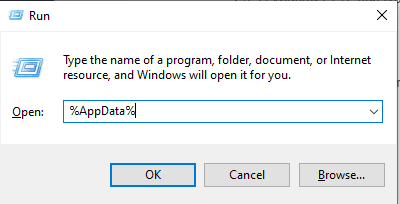
  • Press Windows + R, and type out %AppData% in the dialog box, and hit enter.
appdata origin
  • Delete the folder in Origin under AppData.
origin

METHOD 6: INSTALL THE LATEST UPDATE OF WINDOWS

If none of the above methods worked for you, as a final attempt, you can try updating windows. This issue can also occur if your Windows is not updated to the latest version. The best thing to do would be to install the latest version of Windows and your issue might just get resolved. It’s worth a try. Here’s how you can do it:

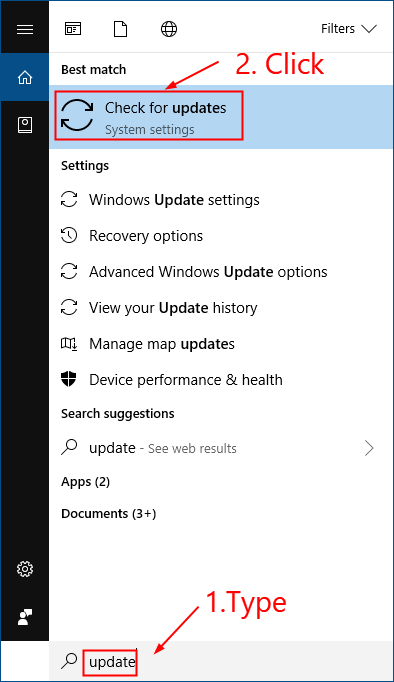
  • Click the Windows logo and type Update. Click on Check for Updates in the results list and open the Windows update.
updates origin
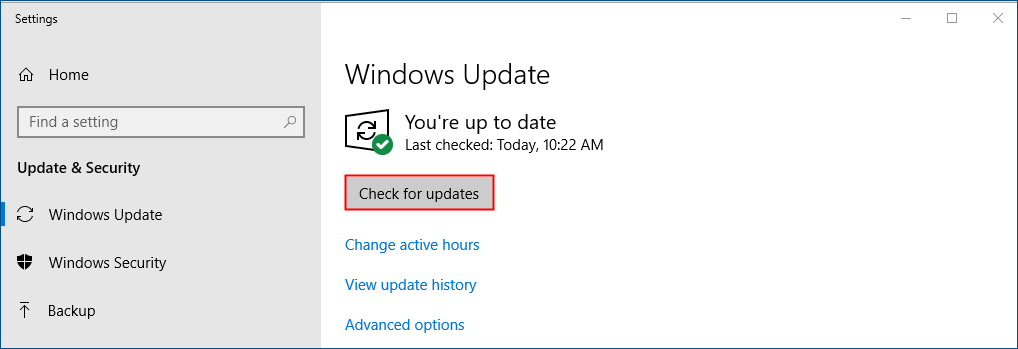
  • Click on Check for Updates to update to the latest Windows OS
windows update origin
  • Restart your PC once the update is done and check if the issue resolves. Origin will open normally if the issue is resolved. 

These were the top 6 solutions to fix Origin won’t open error, they’re tried and tested and the most effective solutions you can try. Hopefully, these solutions work for and your game night doesn’t get interrupted. 

7 Twitch Clip Downloaders to Watch Your Favourite Stream Anytime

0

Twitch- The world’s leading live-streaming platform for influencers and gamers, where fans can also interact with them ask questions, unfortunately, doesn’t let viewers and fans download their favorite live stream moment. But worry no more, there are various twitch video downloaders softwares that will do this for you. With these softwares, you can download the clips whenever and watch them as you please at any time. 

twitch logo

Top 7 Twitch Clip Downloaders


1. Clipsey

Clipsey is an easy-to-use free tool that can be used to record and download your favorite Twitch live streams from the ease of your phone or desktop. All you need to do is copy-paste the stream’s link on their website and download it, it’s really that simple. The only drawback is that they have a lot of ads on their website to provide their services for free to all its users. But it’s still an excellent tool and can also be downloaded as a Chrome extension on your system. 

Pros:

  • Clean and user-friendly interface.
  • Easy to use
  • Free of cost
  • Comes with an easily accessible Chrome extension. 

Cons:

  • The ads can be a little annoying.

Visit the website here

clipsey Twitch video downloader

2. Clipr

This tool is very similar to Clipsey, it functions in the same way- just copy-paste the Twitch link on the website, click on download and you’re good to go. This again has a very simple interface and has a helpful FAQ section. This tool is free to use and is a very reliable and handy website. 

Pros:

  • Easy to use
  • Free of cost
  • Has an FAQ section
  • No ads

Cons:

  • Doesn’t have a browser extension.
  • there are a few glitches on the website.
  • Can take a long time to download big videos. 

Visit the website here

clipr Twitch video downloader

3. Loader.to

This Twitch downloader tool is very easy to use and is similar to the previous two that we mentioned. What’s different about this tool is that you can choose the format and resolution you want for your video, you can also choose to download an audio-only file and in addition, you can also choose which part of the video you want to download. This tool offers more features comparatively. 

loader.to Twitch video downloader

Pros:

  • Multiple resolutions and formats available.
  • Easy to use
  • API integration is available. 

Cons:

  • The website can be a little tricky for some users as it has more features relatively. 

Visit the website here

4. Download4.cc

You will not find a software to download Twitch videos that is simpler than this. This is the website most people visit every time they want to download a Twitch video because it’s so elegant and simple. This website lets you download videos from more than 1000 websites and it a very easy-to-use tool.

Pros:

  • Has a very user-friendly UI
  • Allows you to download videos from numerous websites.
  • Downloads videos in seconds.
  • It’s also available in Spanish and Portuguese. 
  • Free of cost

Cons:

  • The videos have a watermark after you download them.
  • Sometimes the information downloaded could be wrong.

Visit the website here: https://www.download4.cc/

download4 Twitch clip downloader

5. Clip.ninja

This tool is specifically designed to download Twitch videos. It’s a very light and easy-to-use website that comes along with a user instruction manual. Alternatively, you can also convert your video files into MP3 files with this tool.

Pros:

  • Free of cost
  • Has a user guide
  • The learning curve is great.

Cons:

  • The features of this tool are limited.
  • The video takes a long time to download in a few cases.

Visit the website here

clipninja Twitch stream downloader

6. Untwitch.com

This tool is again similar to the rest of them and you can download the videos by simply copy-pasting the URL and downloading it to your system. This tool is one of many to be first in the game and has gained the trust of many users due to its good performance. 

Pros:

  • You can download the videos in many resolutions.
  • You can choose which part you want to download from the video.

Cons:

  • The live stream is not allowed to download on this website yet.
  • The website has a few glitches. 

Visit the website here

untwitch Twitch clip downloader

7. Windsya

Windsya understands how essential it is for game players to have access to Twitch feeds, and there is a potential that you may wish to download Twitch videos to view them offline. Windsya has a fantastic answer for you in this regard. Simply copy and paste the Twitch clip URL into this field and press SUBMIT to download it.

Pros:

  • It’s very easy to download clips with this tool.
  • The videos download in the blink of an eye
  • Free twitch clip downloader.
  • You can download the part of the video that you wish to.

Cons:

  • The website doesn’t show any error message if the URL entered is invalid.

Visit the website here

windsya Twitch clip downloader

And that was it for the best 7 tools to download Twitch videos, hopefully, you found the best one. We have also mentioned the drawbacks to help you gain more insight into every tool. All the tools mentioned have a clean UI and are very easy to use, so go ahead and download your favorite twitch online videos. 

6 Best Ways To Fix “Steam Download Stuck at 100%”

0

Steam users often report the issue of games not getting downloaded fully. If you’re facing the same issue, then you don’t have to worry because there are an ample number of solutions available for it. 

steam

There may be variable reasons if the steam gets struck at some specific percentage while downloading. It may happen that your internet connection is not working or the files are totally corrupted, and also it can happen that the security system of your PC or laptop is blocking the process.

How to fix the issue of Steam Downloading Error?

So in this article you’ll be able to get the advanced as well as simple techniques for sorting out the problem. Let’s start discussing the solutions in detailed version:

First and Basic Solutions:

You can try out these simple steps to check whether your issue gets resolved or not:

  • Try to pause and then resume your download
  • You can also restart the Steam
restart steam
  • Restart your system 
restart
  • If that doesn’t work, try restarting your modem as well as routers

Is your problem sorted? If No, then you can try out the other solutions guidelines as mentioned below :

Second Solution: Changing the downloading area:

The location of the Steam users are detected automatically by them and then you will be connected to the server for the best gaming experience when you start playing a game. But for some regions the server can turn out to be slow which can lead to the issue of downloading being stuck at 100%. All you can do is temporarily change the download location to a different one. 

The following steps are:

  • Activate the Steam in your system.
steam activate
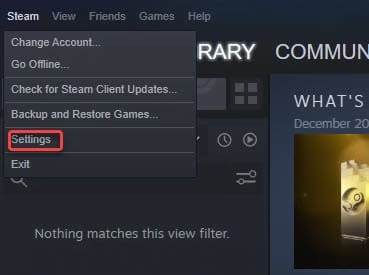
  • Now Click on Steam and select Settings option
settings
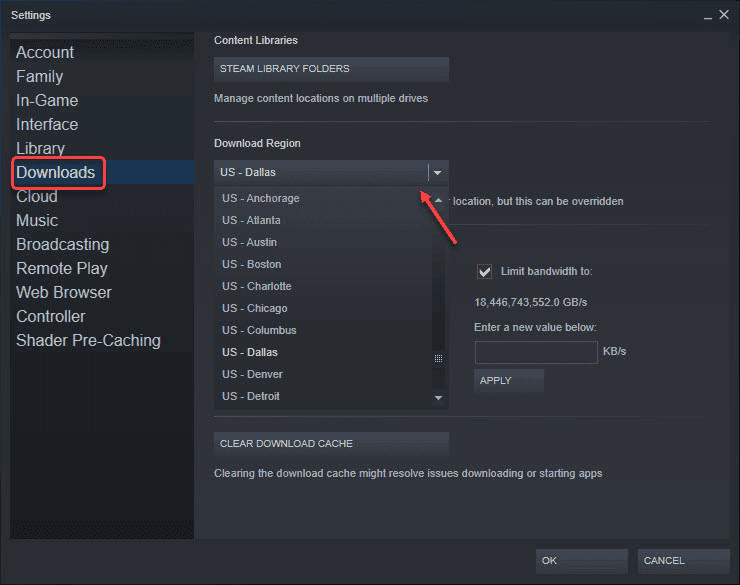
  • After that navigate to the download option and select the nearby region 
regions

Noteworthy: All the locations mentioned in the list works well but you should be careful while making choices. Select the location of a different country if the previous one is not working.

Third Solution: Clear all the Cache:

You don’t have to worry about the recovery because after clearing the cache you can easily avail it from the server again. 

  • Launch Steam in your system
  • Now navigate to the settings 
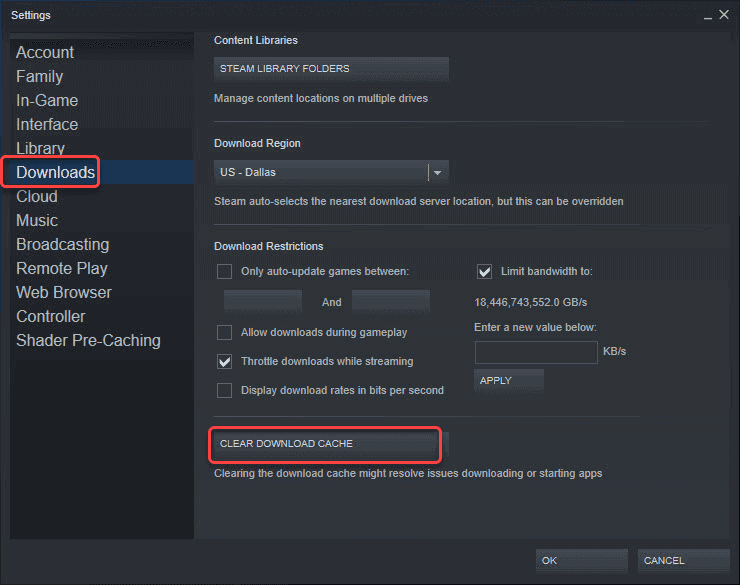
  • After clicking on the Download, a panel will appear on the left side where at the bottom you can see the Clear download cache tab.
cache
  • Tap on it and your process is now completed.

Fourth solution: Reinstalling Steam:

If all these procedures are still not working out for you then try reinstalling Steam. So as you know that at first you have to be sure of the fact that you have the backup of the games in order to restore it quickly. Now moving forward to the uninstalling steps:

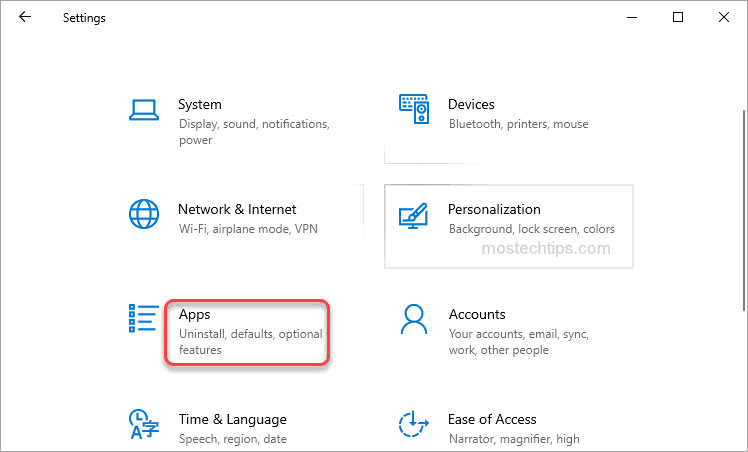
  • Firstly have to tap on Window + I key both at the same time in order to open the Settings window
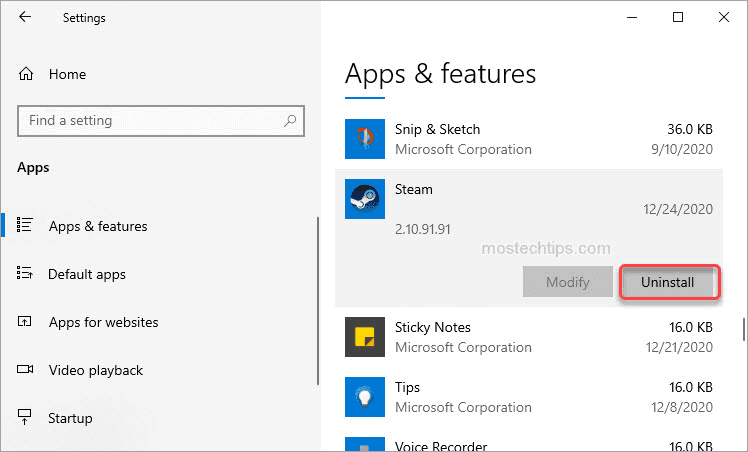
  • After that select Apps & Features under the list of options of Apps
apps and features
  • Then on the right side of the page, you can scroll down till you reach the Steam option. Then click on it and press Uninstall for uninstalling the Steam in your system
uninstall

Fifth Solution: Disable the Antivirus software:

The installed antivirus in your PC or laptop might cause hindrance in Steam or it also can happen that Steam has not been added to the exception list.

antivirus

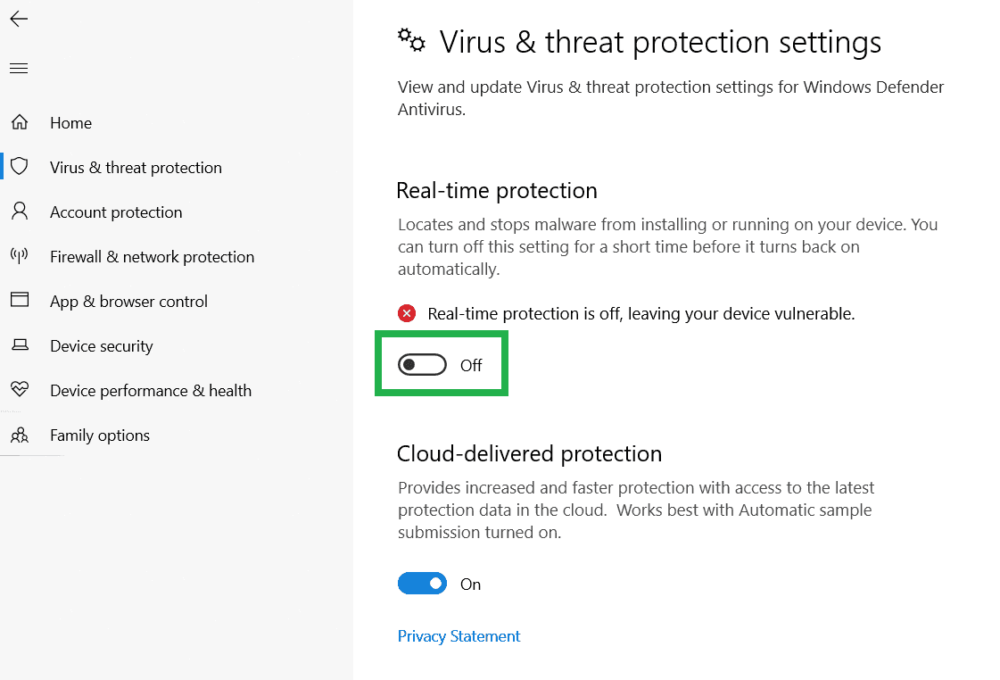
So, to overcome this issue you can disable the antivirus temporarily and check out if the problem has been sorted or not. If that is not working them you can add the Steam in the exceptional list so that the downloading doesn’t get stuck at 100%

Final Solution: Different network:

If your Internet Service Provider caches the data for conserving their bandwidth then that can be the reason for the Steam downloading issue. I would like to suggest you try connecting to some different service provider.

I hope you are able to resolve the problem of Steam downloading stuck at 100%. This is the collection of all the possible solutions that you can find on the Internet in order to overcome the issue. Share it with your friend and partners if they are also suffering from this Steam downloading error.

3 Best Keap alternatives for CRM Software

0

Searching for options or Alternatives to Keap (once in the past Infusionsoft)? CRM Software is a generally utilized innovation, and numerous individuals are looking for well known, effortlessly regulated programming arrangements with accomplice relationship mgmt., crusade the board, and promoting return for capital invested investigation. Other significant components to consider while investigating options in contrast to Keap (some time ago Infusionsoft) incorporate client care and email advertising. We have aggregated a rundown of arrangements that analysts casted a ballot as the best by and large other options and alternatives to Keap.

3 Best Keap alternatives for CRM Software

Keap estimating begins at $79.00 per include, each month and offers a free preliminary. The vast majority use Keap to assist them with schedule/update framework, record stockpiling and email advertising, yet it probably won’t be the right decision for you. Regardless of whether convenience, reasonableness, client rating or an incentive for your cash is your need, there are a ton of different instruments out there that could be an extraordinary counterpart for your necessities. Keap gives an across-the-board arrangement that is alluring to independent ventures with restricted monetary assets. With a solitary framework, clients achieve various errands and exercises yet in addition get a dashboard, reports, and understanding so they can improve them routinely. Formats and robotization permit a little organization to finish more work in less time. The product is not difficult to utilize, incorporates keen manufacturer instruments, takes into account customization, and gives responsive client assistance.

1.EngageBay:

EngageBay’s CRM as a feature of the CRM and Sales Bay is in every case free and incorporates: CRM Telephony: Create more settings with each call utilizing EngageBay’s CRM Telephony. You can even coordinate your number one deals apparatuses with the CRM Telephony to accept your calls further. Lead scoring: Determine which of your deals and promoting leads are the top with lead scoring as a feature of EngageBay’s CRM. CRM email joining: From now on, each email you send gets multiplied so you include a duplicate inside EngageBay’s CRM for your records. This assists you with making a far-reaching client log. Mechanization: Use EngageBay’s CRM to robotize a greater amount of your regular cycles, including arrangement planning, email sending, and errand the board. You’ll appreciate the extra an ideal opportunity without a doubt! Announcing: The profundity of data in EngageBay’s CRM reports rivals what you’d find in Keap. You can make bargain reports, development diagrams, and really utilize EngageBay. Tweak and robotize your reports so they work for your independent venture, not the reverse way around. Works as a perfect Keap alternative.

Pros:

EngageBay increases as you do; you can amount to 30,000 contacts. 

Cons: 

For more mechanization highlights, you need to utilize a costlier paid arrangement like the Growth or Pro plans.

2.Sharp Spring:

Sharp Spring is intended to begin discussions through messages, which at last end up in lead changes. Its “after-the-click” following veers away from customary email administrations, permitting clients to send customized messages. This outcome in furnishing leads with the fitting data during significant periods of the buy cycle. Sharp Spring is fit for making points of arrival and pipes that can change over guests into leads in the blink of an eye by any means. Utilize dynamic web content that can be adjusted as per guest ascribes and interest to drive more discussions. These are made conceivable with the apparatus’ not difficult-to-utilize interface that accompanies point and snap functionalities. No coding or web designer is needed to achieve these advantages.

Pricing;

Sharp Spring estimating begins at $399.00 each month. They don’t have a free form. Sharp Spring offers a free preliminary.

Pros:

The framework’s examination makes it simple for organizations to settle on choices that are upheld by information. Groups and customers can get straightforward and data rich reports through the apparatus’s measurements. Conveyances, opens, ricochets, and snaps can be followed, considering the improvement of informing. The entirety of this permits clients to know how effective their messages are.

Cons:

The solitary con I can consider is the absence of show/usefulness alternatives in the structure and point of arrival manufacturer.

2.ActiveCampaign:

ActiveCampaign allows you to make and send email bulletins to your supporters of keep them drawn in and anxious to open your next messages. You can choose from an assortment of formats for making pamphlets. These layouts might be more content put together or picture based depending with respect to your organization’s inclinations. As per ActiveCampaign, you can work with 10 diverse bulletin layouts for 10 email types. You can likewise mechanize your pamphlets, choosing when they get conveyed, and to whom. 

Pricing:

Upon first look at Active Campaign’s estimating plan, their administration looks economical. In any case, it’s just for 500 contacts that you’re paying as much as $9 to $229 per month. As you review, that is for a yearly arrangement as well; all plans cost more in case you’re charged constantly. At 1,000 contacts, your bill leaps to somewhere in the range of $25 and $229 every month. You will not pay under $75 per month once your organization develops to 5,000 contacts, and the Enterprise plan by then expenses $359 per month. That is without a doubt well outside of the financial plan of most new companies and independent ventures. The Pricing makes it an ideal alternative to Keap.

Pros:

It gives different examination information in the report, estimating the ROI allowing you to settle on essential choices. 

It takes into account free execution and relocation administration from your current programming, which can be a huge benefit first of all. 

Cons 

The expectation to absorb information is somewhat high for fledglings. 

It’s anything but a great deal of cutting-edge highlights, which can be overpowering for fledglings. I’d suggest beginning with the Lite or Plus arrangement and update once you comprehend the device.

The cost of each arrangement increments as the quantity of contacts develops, which can influence your month-to-month spending plan.