Home Blog Page 239

Ladies and Gentlemen, Fitbit presents, automatic exercise recognition!

0

fitbit-charge-hr-surge-purepulse-smarttrack

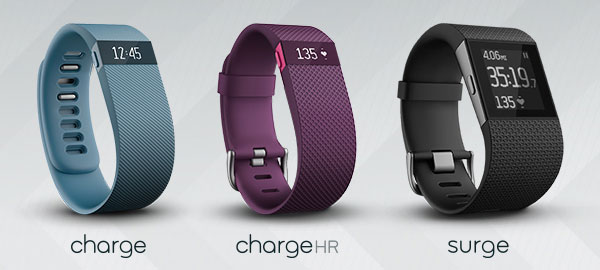
Fitbit on Monday announced the addition of PurePulse heart rate tracking and SmartTrack automatic exercise recognition to its Charge HR and Surge devices.

The PurePulse monitoring will be activated whenever the devices are used in Exercise Mode, providing users with continuous, automatic tracking of heart rate trends over time without the need for a chest strap.
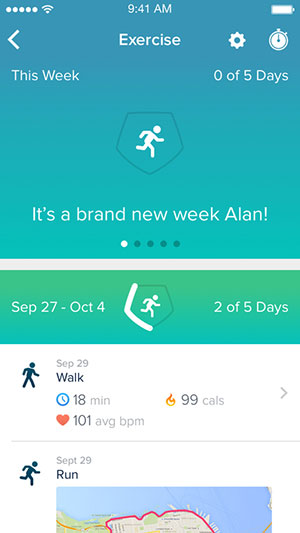
primary exercise screen

SmartTrack will recognize select exercises automatically and record results to the Fitbit app to inform users about their overall activity.

SmartTrack is capable of identifying a range of both indoor and outdoor fitness activities — from running, walking and biking to team sports such as basketball, soccer and tennis, according to Fitbit. It also can recognize aerobic workouts such as cardio-kickboxing, Zumba and other dance classes.

“By automatically capturing people’s most active moments with SmartTrack, they are getting more visibility into the amount of exercise they’re doing throughout each day and over time, while also giving them the motivation and tools they need to reach their health and fitness goals,” said Michael Polin, senior product marketing manager at Fitbit.

“With this update, we’re letting users know that Fitbit has their back. SmartTrack remembers to track exercises even when users forget to put their device into exercise mode,” he added.

Tracking Exercise

Many fitness trackers can already detect activity, but the PurePulse heart rate technology has been updated to track high-intensity workouts without the need of a chest monitor, which typically is required with other heart rate monitors. The Fitbit system is aided by the ability to determine when someone actually is working out instead of just moving around the house or office.

“It’s important for a device to be able to differentiate between working out and arm gestures,” said Julie Sylvester, coproducer of the Sports Fitness and Outdoors Summit for ‘Living in Digital Times’.That capability also allows the device to analyze the intensity of a workout to determine whether someone actually is working to capacity or “phoning it in,” she added.

Preaching to the Choir

The additions to the devices could entice the Fitbit faithful, but they might not be enough to bring new users to the platform.

“The Fitbit and all of these trackers are really just preaching to the choir,” said Roger Entner, principal analyst at Recon Anayltics . “The market  for these devices are those who are really into fitness and want to quantify their workouts.”

As with many similar devices, there is the worry of backlash as the main activity becomes monitoring the device rather than engaging in the activity, he added.

“There has to be middle ground, and perhaps these devices are too much about the monitoring,” Entner suggested.

However, these devices may be catching on with people who aren’t necessarily spending hours in the gym, based on anecdotal accounts.

“It’s hard to go to a meeting without seeing a Fitbit or a similar bracelet on most of the wrists in the room,” observed Steve Blum, principal analyst at Tellus Venture Associates.

“Most people seem to use it for step counting, to reassure themselves that their normal daily activity is an adequate workout,” he said. “It’s useful feedback for them, and a lot of people seem to be altering their routine to maximize steps.”
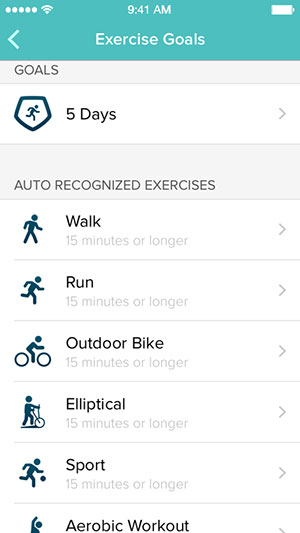
exercise goals

Holidays Looking Fit

The holiday outlook for Fitbit and other health trackers appears rosy.

Global revenues of sports, fitness and activity monitors are expected nearly to double, from US$1.9 billion in 2013 to $2.8 billion in 2019, according to a recent Consumer Technology Association survey.

“The mainstream public are just now finding themselves interested,” suggested Living in Digital Times’ Sylvester.

However, interest in these types of trackers could be generational, noted Roger Kay, principal analyst at End point technologies.

“Kids who grew up sharing all their information find them second nature.”

“Exercise paraphernalia is a growing industry, and Fitbit is right in the curl of the wave,” Kay added. “Nudging is annoying to some people and helpful to others, so it’s just another feature.”

Limited Wrist Space

The Fitbit offers an advantage over traditional heart rate monitors that require the chest strap, but it faces competition from smartwatches, which are still in their infancy but could grow considerably.

“Fitness trackers and even step counters are the first step — no pun intended — to make people more aware of their activity level and their need to move more throughout the day,” said Sylvester. By contrast, “most smartwatches are still on the early adopter holiday list and can be in the category of too much information.”

Smartwatches could represent competition for fitness devices, argued Entner.

Watches “have the advantage of being more general purpose,” he noted, “and this could take market share away from the fitness-specific devices over time.”

Ways To Jazz Up An Indian Wedding With Smart Tech

0

Technology’s slowly making every aspect of our lives better. Smart homes, offices, and supermarkets are everywhere. And they’re all here to stay.

So, what’s next on the innovation list?

Weddings!

indian wedding

India’s love affair with weddings is long-due for an upgrade, don’t you think? At the intersection of the great Indian wedding and technology, magic happens. Below, you’re going to see how this important occasion benefits immensely from the use of smart technologies.

Simplify Your Life With Wedding Apps

Putting a wedding together takes months of planning and careful execution. Keeping track of everything from the flowers to the food is no easy task.

Enter technology.

Wedding apps have taken off in a big way recently. There are myriad apps out there that can minimize the stress of planning a wedding by simplifying daunting tasks. You can use them to find the right florist for you, the right chef to titillate your palate, and even to manage the whole budget.

gadgets for indian wedding

There are trusted apps that you can use to find general services, like UrbanClap, and more specialised apps that fulfill specific needs. These include Mint, for budgeting, and Google Fit, which helps you get in shape before the big day arrives.

Your wedding planning doesn’t have to be stressful. Whether you’re looking for wedding photographers in Delhi or wedding planners in Mumbai, use the right apps, and you’ll make the whole thing much easier on yourself.

Capture Your Memories In Style

Do you want your wedding photos to be unique? You’ll be glad to read that breaking the mould isn’t impossible. In fact, it isn’t even hard.

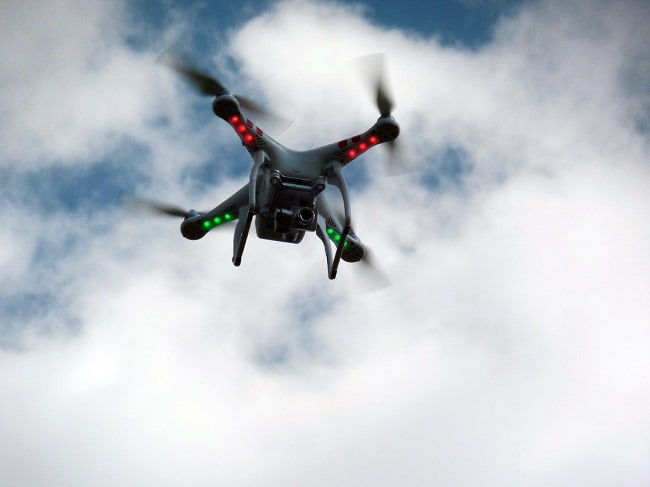
Drone photography has been around for a while now. The results are incredibly impressive, and more people are starting to realize that they can have a bird’s-eye-view of their special day. Reach out to the right people, and you can take your wedding photographs to a whole new level using a drone camera.

drone camera for indian wedding

While we’re talking about cameras, you can even crowdsource your wedding photography. You can use apps like Ceremony and get your guests to upload any photos that they take on their smartphones. More perspectives of this day ensure that you’re sure to find a couple of gems that you wouldn’t have otherwise.

But not all innovative wedding photography solutions need to be this high-tech. Simply give out some GoPros and selfie sticks and let the magic happen on its own.

Break Barriers By Live Streaming

It can be a real downer when people who are important to you can’t make it to your wedding. Unexpected business trips are commonplace, but this doesn’t mean that you can’t work around them.

Simply live stream the wedding in its entirety. There are a number of apps (like Periscope) and websites that you can use to do this. If your guests can’t be there in person, you can make damn sure that they can be there virtually!

Be Generous With Your Power

Everyone has a mobile device these days. It’s almost certain that they’re going to document your wedding, if only to show you how silly you looked when you sneezed during the ceremony.

gizmos and gadgets for indian wedding

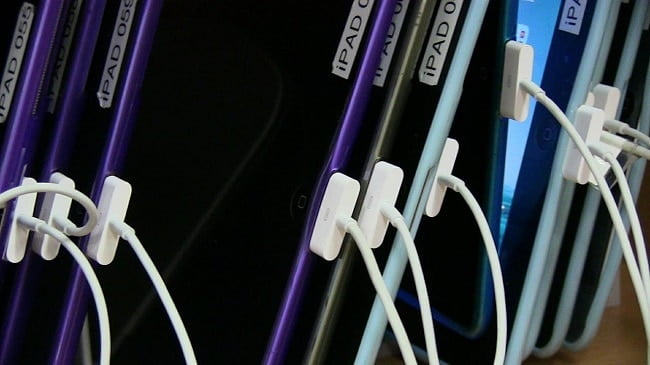
Encourage candid photography by setting up a couple of charging stations around the venue. If your guests run out of battery on their devices, all they have to do is plug in and they’ll be good to go in a couple of minutes.

Bring on the candid bridal photos!

What’s A Wedding Without Alcohol?

Bars during weddings attract people like oases attract camels—in droves. Why hire bartenders when you can have an automated bar? Imagine selecting your drink from a digital menu of cocktail recipes and then having it made for you in seconds!

indian wedding gadgets

The revolutionary Somabar serves exactly this purpose. It can make any drink that you can dream up, and what’s more, this isn’t the only bartending innovation that you can make use of. A simple Google search will set you on the path to a completely autonomous bar.

Less time spent waiting for drinks means more time spent partying.

Don’t be afraid to spruce up your wedding with technology. It can only make the whole thing more enjoyable.


Attention Samsung phone owners! Here’s a treat for you: VR Gear.

0

Gear VR S6 review (5)-970-80When Samsung and Oculus debuted their Gear VR headset almost a year ago, the companies made it clear the device wasn’t yet ready for the masses. Billed as “Innovator Edition” models, the original Gear VRs were intended mainly for early adopters. They only fitted a limited number of phones — the original was designed just for the Note 4; the second for the Galaxy S6 and S6 Edge — and were also quite pricey at $200 per headset.
Just last week, however, the two companies released the first-ever consumer-ready version of the Gear VR. It’s smaller, lighter, cheaper (only $99) and is compatible with more phones (the Note 5, S6, S6 Edge and S6 Edge+). But, more importantly, its content library has exploded, with more VR apps and games than ever before. Virtual reality has finally gone mainstream, and there’s no better way to get started than with the new Gear VR.

Hardware

Samsung never made any pretensions that the Gear VR would be small and portable — it’s always been a rather large headset that looks like you have a giant pair of ski goggles strapped on your face. But every iteration of the Gear VR has been more lightweight than the last, and the new consumer-ready version is no exception. Samsung says it’s about 19 percent lighter, and I definitely feel it. The previous models had chunky white plastic around the head straps while the current model has none. This not only reduces the headset’s overall weight, but makes it far less cumbersome to put on. All you do is strap the headset to your head with a couple of elasticized Velcro straps — one around the back of your head and the other around the top — and you’re ready to go. The top strap is technically optional, but I liked having it on for a more secure fit.

The fit, by the way, is pretty excellent. The soft foam padding around the eyes and the nose bridge makes the fit very comfortable (My discomfort came from nausea instead; more on that later). Another upside is that new Gear VR also easily accommodates most glasses — I was able to wear mine without too much shifting around. That said, if you have a relatively lightweight prescription, you might want to go without your glasses entirely for additional comfort. Plus, the Gear VR has a focus wheel at the top so you can easily adjust the focus to match your eyesight.

Like all the previous Gear VRs, the new model is not a standalone headset — it’s essentially a VR viewer for your phone; sort of a fancier version of Google’s Cardboard, if you will. Except that unlike Cardboard, the Gear VR has additional hardware — an accelerometer, a gyroscope and proximity-based sensors — on board to reduce latency and increase the performance overall.
samsung-gear-vr-headset-manual1_w_600face-600x341
To get started, you’ll have to snap the phone onto the front of the Gear VR so that the display faces the headset’s stereoscopic lenses. Simply dock the phone into a micro-USB dock on the left and then lock it in place with a plastic holder on the right. At least for now, the Gear VR is compatible with four different Samsung phones: the Galaxy S6, the S6 Edge, the S6 Edge+ and the Note 5. Since the latter two phones are slightly larger than the others, the Gear VR has a toggle that you can use to slide the micro-USB dock to the left or right to accommodate the different sizes. Though it seems like the headset’s use is limited to just these four phones, Samsung told us that it’s highly likely the current Gear VR could be compatible with future Samsung phones too.

By default, controls are relegated to the four-way directional touchpad on your right temple. It’s much more contoured than previous Gear VR models plus there’s a raised center nub, which makes the whole thing far easier to use — you can just feel your way around to figure out the controls. Above the touchpad is a back button, which has been relocated slightly to the right for easier accessibility, while a volume rocker is located to the front.

VR-1Though it’s not included with the Gear VR, wearing a headphone can make your VR experience more immersive. There are also a few games that would benefit from the use of a dedicated gamepad controller (again, this isn’t included with the headset), which you can connect to the phone via Bluetooth.

A thing to watch out for is battery life. After a solid hour of VR time, the phone’s battery drops by as much as 20 percent. After four or five hours, the phone was nearly dead. Also beware if you do want to keep the phone in VR mode for very long, as it does occasionally get hot enough to overheat.

Google’s bet on VR

If you just wanted to get your feet wet with virtual reality, Google’s Cardboard is not a bad start. After all, it costs close to nothing and it’s dead easy to set up. The downsides, of course, is that it doesn’t offer nearly the same degree of sophistication and immersion that the Gear VR does. The Gear VR has straps so you can wear it for hours on end, additional on-board sensors to reduce latency, plus it has a dedicated touchpad for greater control. At the end of the day, Google Cardboard is just, well, cardboard, while Samsung’s Gear VR is a full-fledged dive into virtual reality.

Then again, Gear VR’s performance doesn’t quite compare to more advanced VR headsets like the Oculus Rift, the PlayStation VR and the HTC Vive. For one thing, Samsung’s Gear VR doesn’t have positional head tracking, so you can’t do things like duck behind walls or bend your head down to take a closer look at something on the ground.
The other headsets also promise to be far more powerful — the Rift and the Vive will be powered by high-end gaming rigs while the Playstation VR will harness the computational prowess of the PS4. That should lead to a higher fidelity experience with better graphics and better physics — features that even the best smartphone won’t be able to match.VR-gaming-980x612

Yet, those other systems aren’t even available to the public yet. Plus, they promise to be much more expensive. Though the prices aren’t official just yet, rumor is that they’ll cost at least $300 each. And that doesn’t even include the cost of a high-end gaming PC, which could be well over $1,000. If you plan on going with the Playstation VR, a PS4 isn’t cheap either, retailing at around $350.
Even if you were to buy a Gear VR along with a compatible Samsung phone, that would only run around $500 to $700 if you get your phone off-contract. Additionally, all three rival headsets need to be tethered to their source computer, which limits your movements when playing games. The $99 Gear VR, on the other hand, is completely mobile, letting you swivel around on your chair or take it anywhere.

Wrap-up

If Google Cardboard gives a taste of virtual reality, Samsung’s Gear VR offers up a whole feast. With just the addition of a smartphone, you can get a truly immersive VR headset that lets you travel distant lands, watch movies and shoot up spaceships in alien worlds. It’s comfortable to wear for hours at a time — even if you wear glasses — and controls are intuitive and easy to understand.
Yes, it’s only compatible with Samsung’s latest handsets and no, it’s not quite as advanced as headsets like the Oculus Rift. But at only $99, Samsung’s Gear VR still makes for a great entry-level VR headset for the everyday consumer. If you already have a compatible Samsung phone, it’s a no-brainer.

Microsoft Band 2: Not worth your money.

0

The original Microsoft Band was not a masterclass in design. Part fitness tracker and part wrist-borne ASBO tag, Microsoft’s first foray into the fitness tracking space was a curious hodgepodge of health-tracking sensors, questionable design and smartwatch-esque features. It was an ambitious, yet flawed addition to the world of fitness trackers. Now, the Microsoft Band 2 is attempting to right those wrongs.

Microsoft Band 2 review: Design

The only familiar thing about the Band 2 is its narrow, rectangular display. Almost everything else has changed, and for the better. Gone is the flat screen and bulbous all-black design of the previous model. The strap is now substantially wider, by a significant 3.5mm, and a larger curved AMOLED display takes centre stage.

Metal edges surround the bright, clear screen and roll around the rear. Even the adjustable clasp is now made from metal. The Band 2 is arguably what the first band should have looked like in the first place.

Wrap it around your wrist, and the biggest improvement is immediately obvious – it’s now quite comfortable to wear. The metal latch provides a good amount of adjustability, and the wider, more pliant strap means that getting a snug fit doesn’t end up cutting off the blood supply to your hand. The original Band was either too loose or too tight – and often unpleasantly uncomfortable – so this is a huge step forward.

One thing that remains is the proprietary charging cable, although Microsoft has tweaked the design. Instead of attaching to the rear of the display as with the original, this now snaps magnetically to the end of the strap, with small plastic prongs helping to hold it in place. The best news, though? The Microsoft Band 2 charges from empty to 80% in half an hour, with the final 20% taking another hour to trickle-charge.

Microsoft Band 2 review: Features

While the original Band had ten sensors, the Band 2 turns it up to eleven, adding a barometer to the mix. This allows the Band to more accurately estimate how much altitude you lose or gain on your runs and rides, or simply measure how many flights of stairs, or “floors”, you’ve climbed throughout the day.

The full list of the Band 2’s sensors is impressive. It measures your heart rate, skin temperature and galvanic skin response; it has a three-axis accelerometer and gyroscope, GPS, an ambient light sensor and a microphone – the list goes on and on. It’s this team of sensors that fire raw data into the Microsoft Health app on your smartphone and then up to Microsoft’s cloud, where all the juicy data is chewed through and analysed, before being fired back to the Health app on your phone.

The sheer ambition of the Band 2 is difficult to fault. This is a fitness band that wants to be as useful to a gym-frequenting exercise fanatic as someone who just wants to get a clearer idea about how much (or how little) exercise they get on their daily grind.

Strap it to your wrist, and you can forget about it if you want. It’ll still tell you how far you’ve walked, how many calories you’ve used and even attempt to analyse how well you’ve slept. It’ll also estimate how many of the burned calories were fat and how many carbs, in the hope of helping you eat the right stuff. It seems versatility and hands-off ease of use are front and foremost of Microsoft’s vision.

Microsoft Band 2: Interface and notifications

The Band 2’s interface is as simple and elegant as ever. The bright, crisp touchscreen tells the time by default (you can set it to time out and wake it with a button press if you want it to last a little longer between charges), while a stroke to the right gives a quick glimpse of the remaining battery life, Bluetooth connection and whether the heart rate sensor is active.

Tap the screen, and you get a quick overview of your current stats for the day: how many steps you’ve taken, distance covered, the calories you’ve burned, how many flights of stairs you’ve climbed and you can also check your current heart rate.

Swipe left on the homescreen, and you’ll see all the Band 2’s installed apps and various activities spread across a series of icon-studded tiles. What you see can be customised via the Microsoft Health app on your smartphone. This comes in Android, iOS and, naturally, Windows Phone flavours. Not a runner? Fine, simply remove that option from the list. Not a golfer? No problem. If, all you want is a Sleep tile, a Cycling tile and a Starbucks tile for quickly bringing up your Starbucks loyalty barcode, then that’s fine – you can have up to 13 of the things, or as few as you like.

And you can also choose to receive notifications from your smartphone, with emails, texts, Facebook, Facebook Messenger and Twitter updates all on the menu – simply add the relevant tile in the app.

Emails, texts and social network updates come through to their own tab, and a quick tap of the message displays them on the screen, one word at a time – which is vaguely handy if you’re running (and there’s nothing nearby to run into), but not ideal on a bike.

Microsoft Band 2: Battery life

Microsoft claims around two days of battery life for the Band 2 – exactly the same as the previous version – but it makes the proviso that “advanced functionality like GPS use will impact battery performance”.

A redesign sees the Microsoft Band 2 become more comfortable to wear, but it has many of the same flaws as the original.

Google Glass can detect your emotions!

0

Google Glass can detect your emotions!googleglassimage
Yes, you heard it right. And there’s more than just that.

To mask our intentions with lies, misdirection and misinformation may soon seize to be a possibility.

One of the most telling aspects of interpersonal communication isn’t words. It’s the body language.
Some researchers say that more than half of our communication happens through body language; tone of voice and spoken words were a distant second and third, respectively.

Machines are picking up on those nonverbal cues, to the point where some can even read our emotions.

The SHORE Human Emotion Detector, which is an app for Google’s wearable computer, Google Glass.
SHORE stands for Sophisticated High-Speed Object Recognition Engine.
A German organization called the Fraunhofer Institute initially created SHORE for object recognition.

3027342-inline-emotient-google-glass-detect-emotionTo a computer, your face is ultimately just another object, albeit one with all sorts of unique contours and shifting topography. When performing its calculations, all SHORE needs is a simple digital camera like the one found on Google Glass. At around 10 frames per second, it
analyzes incoming image data and compares it against a database of 10,000 faces that were used to calibrate the software.

Using those comparisons, along with on-the-fly measurements of your face, SHORE can make a pretty good guess as to whether you’re happy, sad, surprised or angry. About 94 percent of the time, SHORE knows if you’re male or female. It’ll take a stab guessing your age, too.

The Google Glass display can provide a continuous feed of visual updates  with all of the data SHORE produces, and if you want, audio cues are available as well.

What you do with these insights is up to you. Maybe that guy really is into you. Or maybe he’s the geeky type who really just wants to get his hands on your Google Glass.

Kidding aside, Fraunhofer wa1409255385528_wps_14_image001_pngnts consumers and companies to understand that there are some serious uses for SHORE. People with conditions such as autism and Asperger’s often struggle to interpret emotional cues from others. Real-time feedback from software like SHORE may help them fine-tune their own emotional toolbox to better understand interpersonal give and take.

Car makers could integrate SHORE into their vehicles to detect driver drowsiness. In this application, an alarm would awaken drivers in danger of drifting off at the wheel.

Medical personnel could use SHORE to better identify physical pain in patients. SHORE may even detect psychological distress like depression, which is notoriously difficult to spot in many people. In assisted living situations, SHORE could keep a tireless eye on patients to ensure that they’re safe.

And of course, there’s a money-making side to SHORE. Marketing companies of all kinds can deploy this app to judge reactions of consumers to, say, a product commercial or movie trailer, and thereby get a better idea of how effective their advertising campaign might be.

Using the LED in your house, the ‘Li-Fi’ can make it hot upto 1GBps!

0

We’ve all fantasized about superheroes and being one self.
Well, while you might still be working on your batman armoury,
the internet ‘flash’ is here to rescue us from those long sessions of candy crash till the torrent travels in our pocket.
Li-FiUsing the LED in your house, the ‘Li-Fi’ can make it hot upto 1GBps!

Li-Fi is a super-fast alternative wireless technology similar to Wi-Fi, that allows data to be sent at high speeds using VLC, visible light communication.

Professor Harald Haas’s invention, from the University of Edinburgh, is finally moving from research labs to the real world.
how Li-Fi works
“All we need to do is fit a small microchip to every potential illumination device and this would then combine two basic functionalities: illumination and wireless data transmission,” Haas said.

“In the future we will not only have 14 billion light bulbs, we may have 14 billion Li-Fis deployed worldwide for a cleaner, greener and even brighter future.” he added.

A recent finalist at the Slush 100 startup competition in Helsinki, Velmenni, has already begun trialling the technology within offices and industrial environments in Tallinn.

100-times faster than current Wi-Fi technologies, the Li-Fi technology used by Velmenni in the pilots is able to send data at up to 1GBps!
At these speeds, a high-definition film could be downloaded in just a few seconds!

In talks with IBTimes UK, the CEO of Velmenni, Deepak Solanki told that currently they have designed a smart lighting solution for an industrial environment where the data communication is done through light.

He also revealed that they’re also doing a pilot project with a private client where they’re are setting up a Li-Fi network to access the internet in their office space.
LiFi House Illustration
As light cannot pass through walls, Li-Fi allows greater security on local networks. Which also means there is less interference between devices.
Li-Fi has several advantages over Wi-Fi, but the most significant advantage is the speed that the technology offers.
In lab conditions, researchers have achieved speeds of 224 gigabits per second!

Infographic Power of Branded Merchandise In Professional Sports

0

halo branded solutions

Copy and paste this code to share this on your site!