Home Blog Page 357

Flying Twitter Bird JavaScript Code for WordPress Blog – Updated

If you are a regular visitor here, then you must have noticed a blue twitter bird flying around the page. Isn’t it cute? It was actually a mod_jtwitter Joomla module.  Which I felt very cute and thought of getting him in this blog.  Actually my friend Anubhab(co-blogger) had left his pet bird at my home when he had to leave to Kolkata. I felt that he is really missing his bird a lot. That is when i thought about presenting a virtual bird here in our blog.  In case you are curious which bird it is, just have a look at the below picture. Pets are wonderful, because animals are such agreeable friends – they ask no questions, they pass no criticisms.  There’s a saying like “Our perfect companions never have fewer than four feet”.

I was planning  to make this flying twitter bird a WordPress plugin and then make a post on this. But since so many of my friends want me to share it fast. I thought of giving away the code for our flying twitter bird. And Kunal of TechHogger was the last to request for this twitter bird. So this post is dedicated to all of my WordPress blog mates 🙂 As I mentioned earlier this was a Joomla module done in CSS sprites. The developers have done an amazing job using JavaScript and CSS spites. CSS sprite is something related to image mapping. We have earlier discusssed about image mapping.

Do read:

The below image can give you an idea on how this flying twitter bird works using css sprites.

Now lets discuss about adding this twitter bird in WordPress.

Since my plugin is not yet ready for use in WordPress, you’ll have to do some simple editing in your theme files to add this twitter bird. As soon as my plugin is ready, I’ll be posting about it here. Please subscribe to our blog or follow us on twitter to get updates about the flying twitter bird plugin.


Update:

We’ve now made it simple for you all. Just copy the below code and paste it in the footer.php just before </body> and save it. By now, the twitter bird should be flying in your blog. Just refresh your page and check if it is working.

However, you’ll need to edit your twitter username in the below code. You can do it using our real-time html editor. Enjoy!!

<script type="text/javascript" src="https://techgyo.com/wp-content/FlyingTwitbird/tripleflap.js"></script> 
<script type="text/javascript"> 
var birdSprite="https://techgyo.com/wp-content/FlyingTwitbird/birdsprite.png";
var targetElems=new Array("img","hr","table","td","div","input","textarea","button","select","ul","ol","li","h1","h2","h3","h4","p","code","object","a","b","strong","span");
var twitterAccount = "http://twitter.com/techgyo";var tweetThisText = "Twitter - techGyo https://techgyo.com/";tripleflapInit();
   </script> 
<a id="theBird" href="http://twitter.com/techgyo" target="_blank" style="display: block; position: absolute; width: 64px; height: 64px; background-image: url(https://techgyo.com/wp-content/FlyingTwitbird/birdsprite.png); background-attachment: initial; background-origin: initial; background-clip: initial; background-color: transparent; z-index: 947; left: 0px; top: 587px; background-position: 0px 0px; background-repeat: no-repeat no-repeat; "></a>
<a id="theBirdLtweet" href="http://twitter.com/home?status=Twitter%20-%20techgyo%20http%3A//techgyo.com/" target="_blank" title="tweet this" style="position: absolute; background-image: url(https://techgyo.com/wp-content/FlyingTwitbird/birdsprite.png); background-attachment: initial; background-origin: initial; background-clip: initial; background-color: transparent; width: 58px; height: 30px; z-index: 951; left: 49px; top: 583px; display: none; opacity: 0; background-position: -64px 0px; background-repeat: no-repeat no-repeat; "></a>
<a id="theBirdLfollow" href="http://twitter.com/techgyo" target="_blank" title="follow me" style="position: absolute; background-image: url(https://techgyo.com/wp-content/FlyingTwitbird/birdsprite.png); background-attachment: initial; background-origin: initial; background-clip: initial; background-color: transparent; width: 58px; height: 20px; z-index: 952; left: 54px; top: 613px; display: none; opacity: 0; background-position: -64px -30px; background-repeat: no-repeat no-repeat; "></a>

Footer.php is a theme file .Every WordPress theme would have it on the location : “wp-contents/themes/themename/footer.php“

Step 1:

Open a notepad and copy the below code and you need to make changes in the fields highlight with color. Download tripleflap.js and birdsprite.png files here. You may now create a folder under wp-content and name it “twitbird” upload the zip file “TechGyo.com Flying Twitter bird” and extract it. Now replace  tripleflap.js and birdsprite.png with the link to the files you’ve just uploaded.

If you found this article helpful, share promote this post in twitter, Facebook and Digg, also share it among your friends! Also if you would like to learn more such cool tricks please subscribe to our email newsletter.
If you are confused at any point, just leave your message as comments.  I’ll take care of the rest 🙂


3D Sensor Recognition Firm Canesta is Acquired by Microsoft Underlying Kinect

5

Canesta a company which provides 3D sensing or gesture recognition technology for the application of innovative natural user interface, has announced that it has been acquired by the technology giant Microsoft Corporation.  Founded in April 1999 by Cyrus Bamji, Abbas Rafii, and Nazim KareemiInc has around 70 employees and has raised about $70 million.  They have signed a definitive agreement to have its products, technology, intellectual property, customer contracts, and other resources acquired by the Microsoft Corporation however the gross value of this deal is still undisclosed. Canesta is a leader in 3-D sensing technology which is critical to making Natural User Interfaces (NUI) possible. The company manufactures CMOS-based single chip

3D sensors, which can be used as part of input systems for electronic devices. Many see this move as Microsoft’s push toward a natural user interface and to underlying its Kinect sensor for Xbox 360.

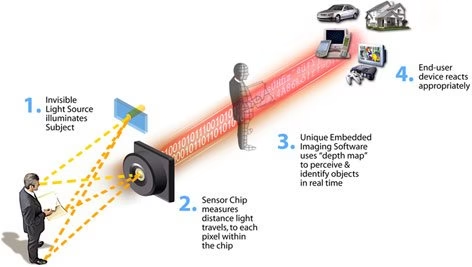
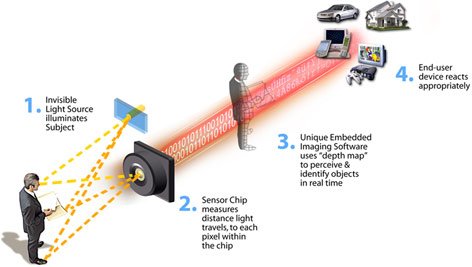
How Canesta 3D sensors work?

how canesta 3d sensor technology works

Canesta’s technology and patents could bring Microsoft a step closer to letting users control the computer with their mind and gesture, instead of a mouse or remote.

Canesta debuted in 2002 as a developer of virtual keyboards, which sensed where a user’s fingers were in relation to a projected keyboard. In 2004, however, the company moved into developing its Equinox chip , which, at that time, could “see” 3D objects at 50 times per second.

Canesta's "virtual keyboard" shown as a concept sketch inside a PDA. Source: Canesta

Canesta’s technology can identify finger movements precisely enough that the device can measure a hand’s typing movement. The sensor scans space 30 times per second at more than one angle, thus allowing the sensor to distinguish a “y” from an “h”, two keys on a QWERTY keyboard that are almost vertically aligned.

Canesta technological advances in 3D sensing technology could be implemented into Microsoft’s Kinect gaming sensor for Xbox. Kinect is an Xbox add-on that gives users control of the games by using their bodies. Which is expected to go on sale from November 4th of 2010. Microsoft expects to sell 3 million Kinect devices in the run up to Christmas and New Year season, once it comes out and has sold out of its pre-order allocation. Canesta, was the same company which provided the gesture control technology behind the Sony Eyetoy. Sony has already sold 1.5 million of the Sony Move in Europe since its launch a few weeks back.

Recently Intel also provided few details about the Sandy Bridge processor with advanced vector instructions, called AVX, to accelerate applications such as gesture recognition and media transcoding.

Also read:

According to Jim Spare, Canesta president and CEO, “This is very exciting news for the industry. There is little question that within the next decade we will see natural user interfaces become common for input across all devices. With Microsoft’s breadth of scope from enterprise to consumer products, market presence, and commitment to NUI, we are confident that our technology will see wide adoption across many applications that embody the full potential of the technology.”

Here’s a video for a quick overview on Microsoft Kinect for Xbox.

How to be Beware of Fake Antivirus Scareware !

0

What is a Fake Antivirus?

Have you ever seen the message or pop-up displaying “Your PC is infected by Malware” or “Scan Your PC for Virus Now!” ? definitely everyone who uses internet see such things on their computer. No genuine anti-virus compaines advertise in this way by showing the pop-ups containing such messages in the browsers. It is the act of harmful fake antivirus which is the first step to steal your data.

Also read:

These are called “Scareware” which makes user to bother about whether their  computer is infected by virus and other harmful things, especially new user easily get foolished and  downloads the linked scareware. Some of these downloaded scareware does nothing but most of them contain harmful trojans or keylogger to steal your keystroaks such as your bank password or any other confidential information. If you have purchased the scareware online then you must immidiately get in touch with your bank as the scareware owner already has your credit card information.

To confuse the user, these scareware companies use the names such as “Anti-Virus 2010” or “Security 360” which are relevant and sounds like real anti-virus products. Scarewares are also called as Fake Antivirus which are creating the new troubles in the modern digital world.

Tips to avoid Fake Antivirus Scareware

  1. One should never click such a links, ignoring is the easiest way to get rid of scareware.
  2. Always turn your pop-up blocker on or use any other third-party pop-up blocker to avoid useless pop-ups.
  3. Rely on the genuine antivirus products such as Kaspersky, Symantec, Avast, AVG, Panda AV etc.
  4. Install web protections suites such as K9 web protection, WOT (Web of Trust) or M86 Secure Browsing etc.

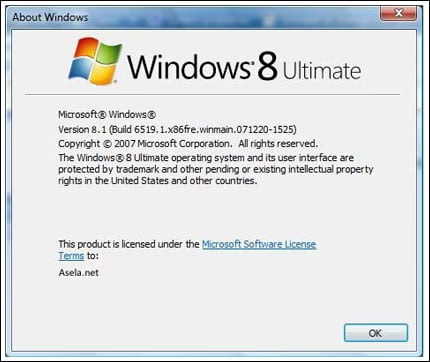
Forget Windows 7 Get Ready To Mingle With Windows 8

10

Catching up slowly with new Windows 7 interface? Then there is a bad news for you. A lot smarter and powerful successor has been born, and will arrive in the OS battlefield in 2012. Yes, you are absolutely correct its Windows 8.

Microsoft had already begun the work for Windows 8 even before Windows 7 was completed. The reason being different team works on different aspects of the operating system. A Microsoft’s employee mistakenly leaked very interesting details, regarding this wonderful OS. In lay mans language the post said:

” We will see 128-bit compatibility with Windows 9, while it appears that whether we will see it in Windows 8 or not is still uncertain. Coincidentally, many do believe that Windows 7 will be Microsoft’s last 32-bit OS. So could this mean we will see Windows 8 come in 64-bit and 128-bit flavors?”

Another leaked document also confirmed that Microsoft indicates that Windows 8 might feature a faster startup, an App Store, integrated web applications, improved digital media support (including AVC HD and 3D video), faster resumes from low-power states, and USB 3.0 and Bluetooth 3.0 support. Windows 8 is likely to include facial recognition (due to the increase of webcams that are integrated into computers and its latest add-on to its XBOX 360 console.

However analysts are saying not fall in too much love with the leaked features of Windows 8 as no one correctly knows that at which point of the development cycle these photos were leaked. As you know during the starting phase, their engineers might also plan on baking a Pizza with it. However, at the late development cycle many are phased out due to various reasons.

If you have any recent news, do leave them in replies, we will try to update you whenever possible.

Google Earth V6 Adds 3D Trees and Integrated Street Maps With More Realistic Tools

0

Google earth now adds 3D trees

Google has been trying hard to make the virtual globe into realistic map experience. And they have highly succeeded in doing so. Now Google adds yet another interesting feature to Google Earth with version 6. Realistic and clear map with close view on to anywhere on earth. With the new update, Google has added two new realistic features to Google Earth, a truly integrated Street View experience and 3D trees. Which makes you feel like you are flying around the sky when you explore the map. Google introduced Street View in Google Earth in 2008, which amazed by users all over the world and also Google ran intro few controversies and privacy issue and remember it even took Google to court.

Now, lets check what new in Google Earth:

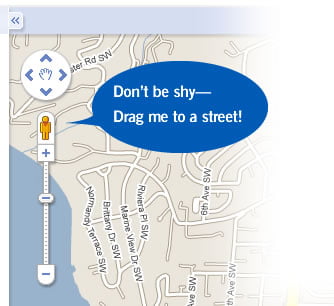
Pegman docked & scroll to walk feature in Street View layer.

pegman in google earth street view
Pegman in Google Earth street view

Pegman is now placed right of navigation controls When you want to view in Street view to have a virtual walk, you can just drop the man icon on highlighted blue road wherever you see. Previously street view wasn’t that easy to move around, but unlike earlier Street View layer, now you can move easily with arrow keys and mouse scroll-wheel.

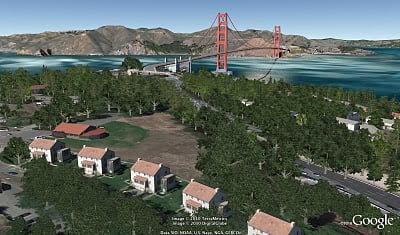
3d Trees and new ground-level navigation to walk among the trees

google earth 3D trees
Google earth 3D trees view from Chicago’s Lincoln Park

Addition to 3D building models, now 3d trees have been added to Google virtual experience. Now users can browse 3D trees(online) in some of your favorite parks around the globe.

Google has just negun to add trees to their maps, lets hope they’ll cover more and help conserve our earth and help create an awareness on conservation of tree. Already with Google Earth Outreach program they have been working with several organizations to model planet’s threatened forests.

To enjoy 3D trees in your map, just enable 3D trees layer from the bottom left and start a search for “Palace of Fine Arts San Francisco.”  and zoom  closer to checkout 3D trees. And be amazed with ground-level navigation. Although Google hasn’t covered 3D trees all over the world, they should be working harder to cover more areas in the coming days.

Urban tree coverage includes San Francisco (downtown and Golden Gate Park), Chicago (Grant, Millennium and Lincoln Parks), New York City (Prospect and Riverside Parks), Athens (Thiseio Park, the National Gardens, Lykavittos Hill and around the Acropolis), Berlin (Tiergarten Park) and Tokyo (Yoyogi Park, Shinjuku Gyoen and the Akasaka Imperial Grounds).

Apart from 3D trees and integrated Street view, Google has improved its historical imagery to more user friendly and easy to use. Users can now go back to the maps of the days before 1935 and on. Before and after earth quake inPort-au-Prince Haiti and   Warsaw in 1935London in 1945, and more. Now the dates of the oldest maps will appear at the bottom of the screen, you can click on the dates to view the maps of those times. You can download the latest version of Google earth from and enjoy these new features

Checkout showcase page for more on 3D trees and other features, videos of Google Earth 6.

Do share your thoughts on 3D trees features in Google Earth also let us know how it is going to change your virtual map experience

Be Cautious of Facebook Quiz

There is no doubt that Facebook is the worlds best Social Community website which connects thousands of people everyday. It is well known for its privacy, games, apps, groups, quiz and its user friendly  design which has made the facebook invincible. Almost all the users of Facebook are addicted to these services and feel their day vacant without them. Most of the users take quizzes in Facebook and submit their opinions.
But according to the experts taking the Facebook quiz is risky. The popular quizzes in the Facebook such as “What sex and the city character are you?” or “What is your vampire power?” are dangerous according to ACLU (American Civil Liberties Union), it may affect your privacy including profile information, your religious views, political views, wall posts, photos, notes etc. Not only these two quizzes but any quiz which is developed by third-party should be thoroughly analyzed before participating and answering to them. One must read the “Terms and Conditions” of the quiz in-depth and collect the views of the other users behalf that quiz and then only allow it to access your personal information.
According to the ACLU Facebook should work harder especially in the quiz section so that quiz developer can only see what people want to allow instead of whole profile information. Therefore “Be cautious about Facebook Quiz”!.

Find Any PDF On The Web With FindPDF.net

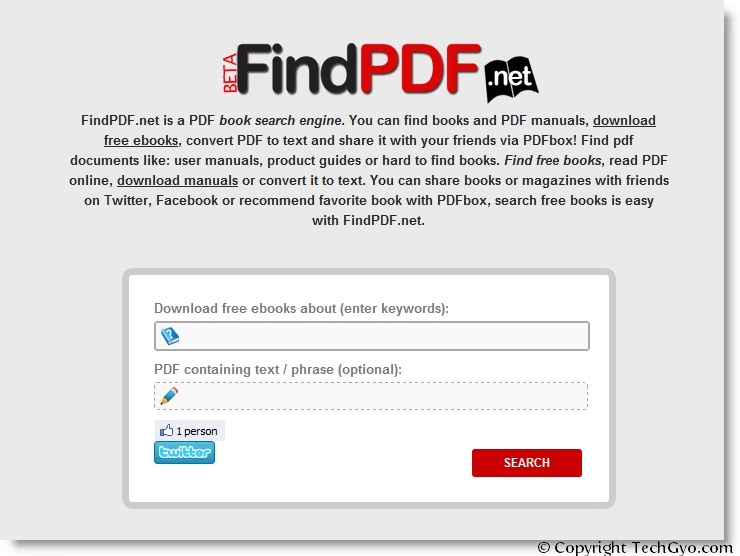
FindPDF is one of the biggest online resource for PDF files. It is a PDF Meta Search engines which crawls PDF files from all over the internet and serves you according to the keyword input. PDF Search Engine uses Google Search API to find files in PDF format. So be assured that the results will be precise.

It also lists the latest results from twitter to help you find what you need. you can download files as PDF, also convert the files as text.

Findpdf.net

Some features and information about findPDF.net

  • Google Search API to find files in PDF format
  • Allows users to convert the PDF to Text.
  • Allows users to read the PDF right there.
  • Lists the latest keyword results from twitter.
  • Allows you to share the files via social networking sites like Facebook, twitter.
Visit : www.findpdf.net