This post brought to you by Contest Factory. All opinions are 100% mine.
Do you have the old, worst and dirty office or workspace? Your visitors feel embracing while they visit your office? Don’t worry, now you could win the prize for having the dirty and pathetic office or cubical. Your untidy office accommodation, old computer, dusty keyboard, hanging mouse and chaotic papers/ folders can help you get some bucks. Yes.. The concept seems crazy but true. The contest starts from 12/5/11 at 12:00PM to 1/31/11 at 12:00PM. The contest is easy to take part Here is the detail on how to participate in this contest.
What is PIMP MY CUBE contest?
Pimp My Cube is the search for the most pathetic, worst and untidy office, workspace or cubicle. You can compete in this contest if you feel it is impossible to work in your office. Dirty furniture, old technology, messy, dark room, disturbing surroundings and lack of organization are the plus points here. Your office should be completely opposite to a corporate and state-of-the art interior decorated office. The worst and dirty office selected by judges is eligible to choose the grand prize from 3 packages worth $1200. Packages offered to choose from are Technology, Furniture and Entertainment Package. Members who register at PIMP MY CUBE could also win a gift card worth $200.
How to Participate?
Person who wants to participate in PIMP MY CUBE contest should create a video in AVI, MOV, MPEG or WMV format, duration of 30-60 sec. and the video should not exceed 100MB limit. Your video should explain the dirtiness of your office or workspace. Submitting the video to the contest is absolutely free and you can submit unlimited original videos. Be sure to include your company name, website, company size, phone/mobile and your Job title in the entry form.
Once your video is entered, you can invite your friends, colleagues and family to vote for your video. You get sweepstakes entry points for registering, voting, commenting and inviting your friends to register for PIMP MY CUBE contest. Encourage your friends, relatives and colleagues to vote and comment your video once it appeared on PIMP MY CUBE contest website, it increases your chance to win the contest.
Final Words
Start shooting your office with your digital camera now and upload it to PMC website. Grand Prize consisting personal computer with LCD monitor, stereo speakers, web cam, desk, sound system and many other brand new stuffs are waiting for you. Dive into the contest at www.contestfactory.com/pimp Pimp My Cube Contest
Every day we work hard to build our blogs. We write the best content we can. We tweak the design to make sure it’s visually pleasing. We make friends with other blogs and add them to our blogrolls (if we have them). We explore new ways to earn a few bucks for our efforts. All of these actions have the same goal in mind: getting our writing in front of as many eyeballs as possible. Yet sometimes our efforts stagnate. It might seem as though we’ve hit a plateau.
Networking
There are a few ways you can bust through that plateau, though every method comes down to the same principle: networking. This doesn’t mean writing to all other bloggers in our fields and asking for links. That’s not networking; that’s begging. Networking entails getting to know other bloggers on a more personal level. Once you’ve connected with each other, you’re far more apt to help each other out. Benefits abound for both parties.
If you already read other blogs in your field, networking is easy. We can glean so much information just by reading someone’s thoughts on a daily basis. Sure, their about page might reveal superficial things about the – things they want people to know. But by becoming everyday readers we can connect on a deeper level. How hard would it be to send an email to someone if you’ve read their thoughts every day for a few months?
Writing these bloggers can bring a number of benefits. Every person has her own set of ideas, so connecting with new people will expand your own current ideas. Surely other bloggers have different experiences than you. Those experiences can help shape your future as a blogger. If the other blogger was not aware of you, or not a strong follower, a sincere email can turn them into fans. This exchange works both ways, so you’ll be sharing many of the same ideas and experiences with the other blogger.
Still, networking on its own will not help you bust through these plateaus. It’s the action that follows networking that matters.
Collaborations
When talking with your new blogger friends, you might come up with a few ideas on which you can collaborate. This can be between two bloggers or a group. While each of you has ideas on your own merits, combining your ideas can make for powerful content. What’s better, you can offer this content to multiple audiences. People reading your blogger friend will be directly exposed to your work, and people reading you will be exposed to your blogger friend. Both parties win here.
You can collaborate on a number of projects. Ebooks have become popular since they allow authors more space to explore their thoughts. A multiple-author ebook not only brings more ideas to the table, but it lends authority to the book since both people are endorsing the ideas. Even better, you can sell an ebook. While bloggers gladly give away free content on their blogs, they can combine and conquer, putting their best ideas along with someone else’s best ideas into one comprehensive volume. 5 Things I Wish I Knew When I Started Blogging
Guest posting, as I’m doing here, is another form of collaboration. TechGyo readers have probably never heard of BBGeeks before these guest posts. Now my potential audience has expanded. If Sreejesh wanted to guest blog on BBGeeks, the opportunity would remain open for him to reach my audience. You can collaborate on a series of blog posts, too — one of my other blogs has one of those series ongoing, and it has been a compelling read for the audience.
Yet this all leads to the ultimate collaboration…
Blog Networks
While you and your new blogger friends might help each other by guest posting and perhaps even creating a product, there is even greater potential in this relationship. Instead of writing guest posts and working on other collaborations, you can go all-in and create a network out of your blogs. You’ll need a theme, of course, but if you have that you can create the potential to increase your audience significantly.
Blog networks bring about a number of advantages. First and foremost, it turns every blog into an advertisement for the other blogs on the network. Surely you’ll want to feature the network affiliation on every blog, and that gives you the opportunity to direct your readers to the other blogs in the network. The same goes for all the other blogs, too, so you’re exposing multiple audiences to multiple new sites. If the new readers like what they see they’ll recommend your blog, which will grow the audience at a rapid rate.
Even better, blog networks give you the opportunity to create a vast link grid. Think of Wikipedia. Each of their pages is like a smart grid for links. Each one points you to a different page on Wikipedia. This is both useful for readers and beneficial in terms of search engine rankings. It’s been long known that a powerful internal link structure is a key to gaining favour with Google. A blog network takes that to another level. You’ll not only be linking internally but frequently linking to other blogs on the network. That benefits everyone.
A blog network also provides the opportunity to create a landing page. For instance, if your network was called Tech Bloggers For Freedom, you could create a unique landing page at techbloggersforfreedom.com. This can act in a number of ways. It can merely feature the best content on your network. That’s a good start and is in general recommended. But it can also be a place where you share other work. If you work with other network bloggers to create an ebook, you can sell it on this landing page. Perhaps your network has the potential to offer consulting services. The landing page is where you’d offer this service. The opportunities are nearly limitless.
Connecting
When you feel your blog is growing stagnant, it’s time for a change. By connecting with other bloggers you can break through plateaus and breathe new life into your blog. Not only that, but you can expand your mind and learn new ideas that can help you grow your blog even further. The ultimate collaboration, a blog network, can completely change the game for you and your fellow bloggers. It’s all there for the taking. Now it’s just up to someone to take action.
Image hosting services are getting popular and being a crucial segment of the web industry. This service can be effectively used to host the image for your forums, blogs, and social network websites. Imgbox is a free image hosting service similar to imgur or imageshack. With imgbox you can easily store photographs and graphics online for free and for a lifetime as well. Further, hosted images can be linked to any other websites or web services such as blogs and forums etc.
Why use imgbox?
It is a 100% free Image hosting service with a simple and clean user interface. Comparing to other Image hosting providers imgbox is fast and provides unlimited storage space. It’s features include-
Supports JPG, GIF and PNG image formats up to 10 MB in size
Drag-n-Drop facility to upload the images with ease
Hotlinking to embed the hosted image in other websites, forums or blogs
Unlimited storage space to host the images as many as you can!
Unlimited storage time to host your images for the lifetime
All this possible in lightning-fast speed
It is useful in saving the bandwidth and webspace of our own website as images utilize the high amount of bandwidth. This is a perfect service to share the photographs of your family and friends, you need not waste your time in attaching the images in your email service, just upload the snaps to it with blazing fast speed and share the link with others. The website is built with simple frame-work, to work with it you just need a browser with Flash and Javascript.
How to work with imgbox?
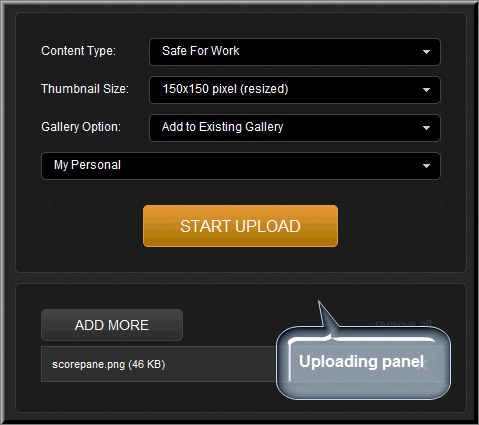
You can upload the images once you sign-up and login to imgbox. To upload an image-
Click on Upload option
Now click on “Select File” or else you can drag & drop your images in this area
Choose the content type whether your image is safe for work or not safe for work
Select the thumbnail size, you can either choose cropped or resized style for thumbnail
Finally, choose the gallery from your account where you want to upload the image(s), you can even create the new gallery here.
That’s it. Now click “Start Upload” button. Now you can share/embed the image with direct link, HTML code or BB code.
Terms to be followed while using imgbox
To maintain the standards of service imgbox has set some protocols. First of all, the user must be eighteen years of age or older. Uploading the copyrighted images, spam images or anti-social images to it can cause to suspend the account.
The Internet laid the foundation of making money at home – particularly money making opportunities in the field of blogging. Blogging is one of today’s most popular online money making opportunities.
However, not everyone who enters the blogging world exits successfully. In fact, only about 1-2 percent of blogs earn more than $100 per month and most have yet to earn a single dollar for their blogging efforts.
There is also stiff competition in the blogosphere. As of the latest data released by BlogPulse, there are about 156 million registered blogs and hundreds, if not thousands more are registered each day. Making money through blogging is obviously challenging but the good news is that it can be made simpler through five easy steps.
Step 1: Choose a niche – a topic you know best and you’re passionate about
Choosing a niche can immediately spell the difference between your success and your failure as a blogger. A niche topic is a topic that interests a group of people. Your niche depends entirely on what you know, what your passions are and what people want to.
It can be about fishing, wines, security guard training, sports utility vehicles, Japanese mixed martial arts, making money through blogging, buying laptops for less than $200 – practically anything. Just remember, the more specific your niche is, the better your blog would be.
Step 2: Know your SEO: Research the right keywords and key phrases
Search Engine Optimization or simple SEO is an important element in the success of a blog. SEO is a set of practices and techniques that help you and your blog increase rankings in Internet searches. Keyword and key phrase research is said to be the most effective SEO technique used by bloggers, freelance writers and even Internet marketers.
Step 3: Set up your blog with a good content managing system, blog host and domain name
Setting up a blog isn’t as hard as most people think. With the convenience that the Internet brought, you don’t need to learn HTML or programming to set up your blog. There are content management systems (CMSs) out there that can make blogging easier. Some of these CMS platforms include WordPress and Google’s Blogger.
Choosing a good domain name and blog host are also imperative. Most Internet and blogging experts prefer BlueHost, NameCheap and HostGator among others.
Step 4: Write quality posts regularly, don’t be afraid to be controversial
Writing quality post regularly is an effective way to leverage your blog. Success in blogging doesn’t happen overnight. Blogging requires constant effort and extreme patience – which is the reason why most blogs fail. Similarly, covering controversial topics can also make wonders for you and your blog. So don’t be afraid to be controversial.
Step 5: Find the right money-making opportunities
Basically, a blog earns income from advertising revenues from programs like Google AdSense and Chitika Ads. But it’s important to note that AdSense and isn’t everything. There are other 17 adsense alternative to monetize your blog and help you earn from blogging, you can also earn money by seeking out for private advertisers. Here’s another useful article from forbes about different monetizing options for making money from your blog
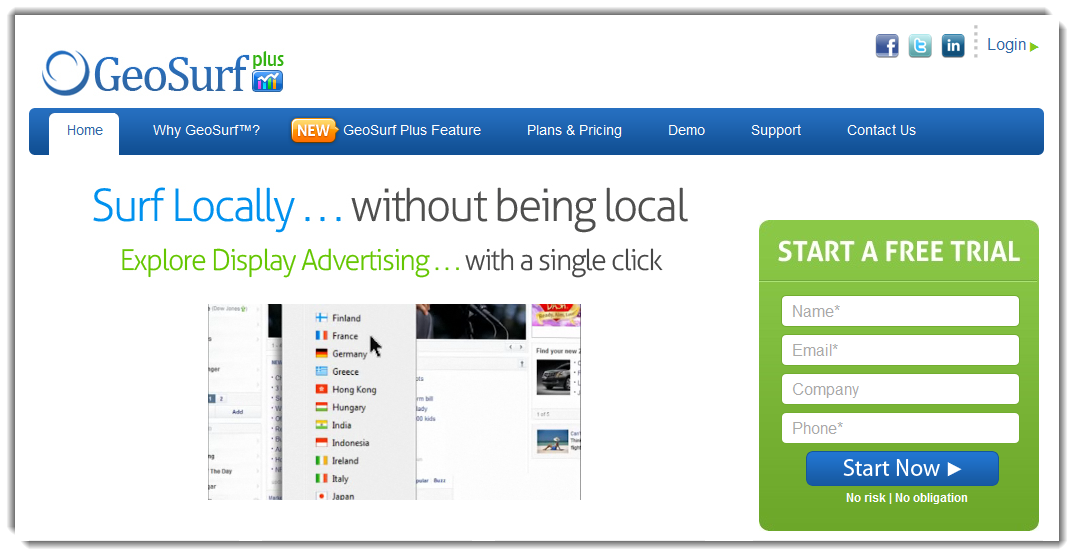
GeoSurf is a service that enables users to access premium proxy servers in 80+ global locations to surf geo-targeted local content from other areas. It allows you to surf by location which is a must use service for local ad campaign management. GeoSurf service is available for toolbar in browser, VPN client, Direct Connect API, and smart phone connection. The great feature of GeoSurf is Mobile Emulator which allows you to have a look at your website or your ad campaigns from various mobiles. GeoSurf own all of the servers on its network hence it is secure, fast and reliable.
Why GeoSurf?
Using their GeoSurf toolbar you can see your websites or advertising campaigns as if you were in the region you placed the website or advertisements.
GeoSurf can be effectively used in monitoring targeted Ad campaigns, viewing Search Results etc.
Mobile Emulator let you test your websites on various mobile devices supporting the Operating systems including Android, iPad and Blackberry.
You can have more than 80+ locations available to you for your research. Out of which 25 U.S cities and rest are from other places around the world.
Discover competing bidders on traffic, affiliates activities and Profile competitors
GeoSurf Plans and Pricing
GeoSurf is offered in 4 different plans namely Silver, Gold, Platinum, Diamond and Enterprise. You can choose the package to suit the needs you have.
Silver plan is offered in $29 per month which gives the bandwidth of 100 MB/ month, This package has the standard features which includes toolbar for Internet Explorer, Firefox, Mobile emulator and VPN connection. 1 VIP support request is allowed per month in the starter plan. It is also possible to get 1 month free by pre-paying the amount of $319 for the year.
Gold plan costs $89 and offers the bandwidth of 500 MB/ month on 5 global servers. 1 VIP support request is allowed per month. Pre-paying the amount of $979 for the year, extends the free service for 1 month.
Platinum plan of $139 allows you up to 700 MB of access, and 2 VIP support requests. You will have access to 9 global servers. You can get 1 month free by prepaying a year for only $1,529.
Diamond plan of $199/ month provides the usage of 1 GB bandwidth and 12 global locations and 2 VIP users are allowed here. You can extend 1 month free by prepaying $2,189 for the year.
GeoSurf’s Enterprise plan is customizable and price tag varies as per your request. Here you get unlimited bandwidth, 80+ Global Locations and US DMAs, unlimited users, support for iPhone, Android and also get the access to direct connect API. In this plan you are offered with unlimited customer support and dedicated account manager as well.
You can try GeoSurf for 5 days without any setup fee or cancellation charges. Paid plans of GeoSurf accepts the payment by Master card, DigiCert, Visa and PayPal as well.
GeoSurf Plus
Geosurf Plus let you check your own or others ad campaigns and their stats. It shows you all the ad campaigns on a site and requested site will be included to GeoSurf’s database and then analyzed.
Conclusion
GeoSurf is a perfect suit for media buyers and internet marketers which offer the affordable price tag for all kind of business needs. Visit GeoSurf at GeoSurf Premium Proxy Network
If you do not know about Drop Box yet, it is a great utility to keep your files synced between your computers and mobile devices and keep them online at the same time. Every time you update a file or add a new file/folder in any of the devices, DropBox, when connected to the internet syncs the files to your online drop box account and when you come online through another device with dropbox installed and your account associated, it will download those files/ folders to that device automatically.
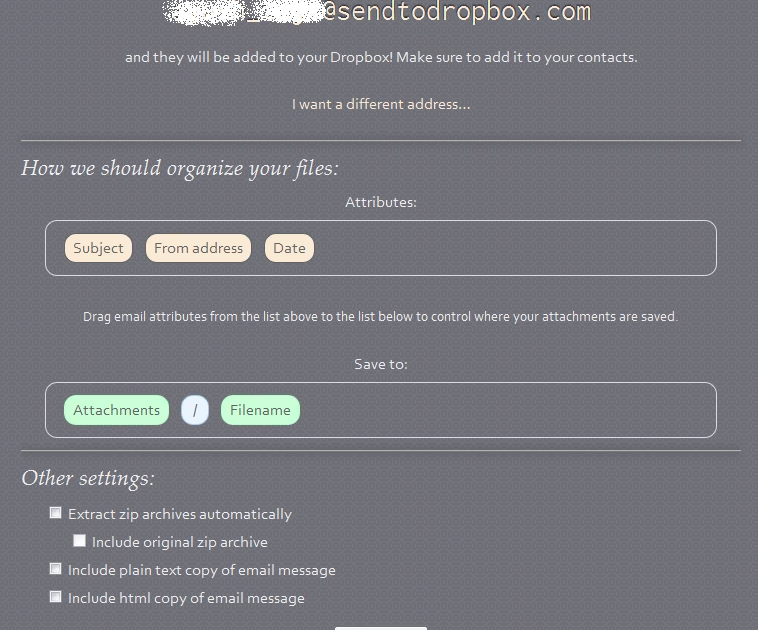
But it may so happen that you do not get a chance to put a file or folder to your drop box folder or you are on a computer on which drop box is not installed and you want someone else to get the file immediately or just want to keep them on your drop box account. This time SendToDropBox comes to the rescue, which allows you to create an email address where you can email your files and then all the attachments contained in that email will be added to your drop box folder. Another advantage you get when you create such an email is that you can send files (eg. Photos) from your mobile devices if they do not support DropBox application. Send to Drop Box also provides great features like automatic archive unzipping, folder organisation and plain text and html message copying etc.
How to use Send to Drop Box
All you need to do is to connect your drop box account with them. This process is totally safe because Send-to-drop-box uses O’Auth and you do not need to give them your dropbox account password, you just need to connect your account with them. So to get started you need to visit Sendtodropbox.com and then click on “Connect to DropBox“. If you are not logged in to drop box, you will be taken to the drop box login page.
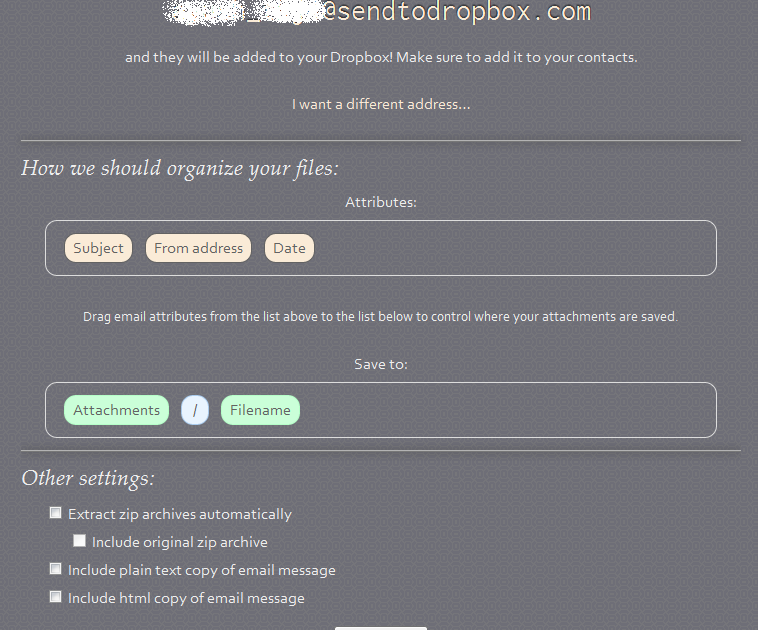
It will then take you to an authentication page where you need to allow the app access to your Dropbox account. Do not worry about it because it is safe to give them access to your account. That is it! You have successfully associated your drop box account with send to drop box. You will then be given an email address which will look like [email protected]. It will also automatically create a folder called attachments where all the attachments of the emails sent to that Id will reside. Whats more? You can also tell them how you they should organize your files with different attributes and also the location where your attachments will reside inside the attachments folder. Other possible settings include automatic extractions of zip archives ( and wether to include the original zip file or not), and to add a plain text or html text version of the email automatically!
This provides many different advantages, for instance you can make an email for a group where all members can stay updated with each other’s work by this technique.
LG crosses another milestone by releasing its all new product “Smart Scan”. It can scan images, documents, photos and anything which can be scanned. The scanned content is saved in PNG, JPEG, TIFF and PDF formats. Also LG’s Optical Character Recognition technology converts scanned text into a Microsoft Word document that can then be edited as required. Now comes the interesting part, Smart Scan is a mouse! Isn’t that amazing? All the features of a typical scanner integrated into a normal looking optical mouse. LG Electronics has launched the world’s first mouse with an embedded scanner function unlike the other scanners that are complicated and non-portable, Smart Scan (LSM-100), is convenient, mobile and simple to use.
How Smart Scan works?
Smart Scan works by using its lower section with 5 LEDs which reflect the image which the user scans into the mouse. By pressing the scan button the device activates, displaying whatever is below the mouse onto the user’s screen. Within the supporting software, users can paste, share, save, print and edits the document or image. The contrast, brightness, rotation and resizing option are also available. Scanned text can be edited in MS Office and formats like JPEG, PDF and PNG. Scanned documents can be i shared with social media groups such as Flickr, Facebook and Twitter, also through email. The Smart Scan also enables business users to electronically scan documents making this device useful not just for consumers but also businesses.
LG’s LSM-100 looks compact but this is what’s under the hood
Smart Scan has a 300 DPI optical scanner.
Since the scanner mouse is not limited by a frame, it can scan page sizes up to A3, larger than most conventional portable scanners can do.
Once the mouse scans any content it can be saved in the following formats; PNG, JPEG, TIFF, BMP, PDF, XLS and DOC.
Highly advanced OCR software allows text recognition and editing.
Believe it or not LG’s LSM-100 is high quality optical laser mouse cum scanner!
How much does LSM-100 cost?
All the above interesting features and a cute mouse cum scanner costs about Rs.3500. Bit costlier than conventional mice but for all those wonderful features it deserves the price.
Final thoughts
Smart Scan is a device primarily designed to save space and provide a cost-effective way for people to scan, save and edit their hard copy document which can be any form of Word and Excel spreadsheets to photos and images. Smart Scan is small, light, portable and of course smart, it overcomes the need for bulky, expensive scanners. You can also check it out on http://www.lg.com/ae/it-products/external-hard-disk/LG-LSM-100.jsp


 Do you have the old, worst and dirty office or workspace? Your visitors feel embracing while they visit your office? Don’t worry, now you could win the prize for having the dirty and pathetic office or cubical. Your untidy office accommodation, old computer, dusty keyboard, hanging mouse and chaotic papers/ folders can help you get some bucks. Yes.. The concept seems crazy but true. The contest starts from 12/5/11 at 12:00PM to 1/31/11 at 12:00PM. The contest is easy to take part Here is the detail on how to participate in this contest.
 Person who wants to participate in PIMP MY CUBE contest should create a video in AVI, MOV, MPEG or WMV format, duration of 30-60 sec. and the video should not exceed 100MB limit. Your video should explain the dirtiness of your office or workspace. Submitting the video to the contest is absolutely free and you can submit unlimited original videos. Be sure to include your company name, website, company size, phone/mobile and your Job title in the entry form.


 Image hosting services are getting popular and being a crucial segment of the web industry. This service can be effectively used to host the image for your forums, blogs, and social network websites. Imgbox is a free image hosting service similar to imgur or imageshack. With imgbox you can easily store photographs and graphics online for free and for a lifetime as well. Further, hosted images can be linked to any other websites or web services such as blogs and forums etc.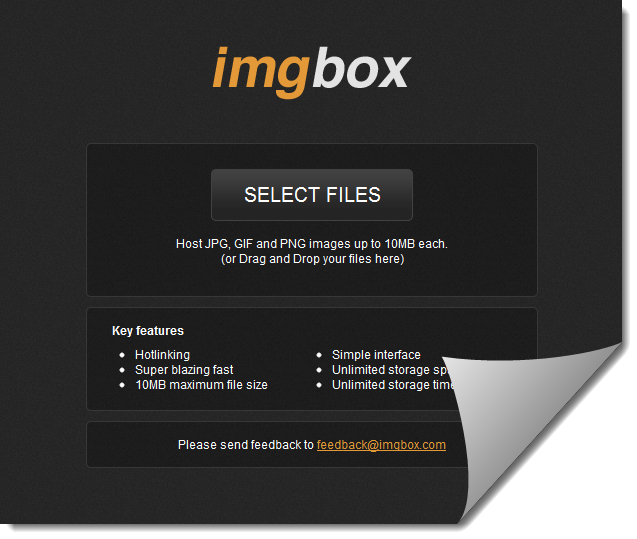
 You can upload the images once you sign-up and login to imgbox. To upload an image-