Bought a new smartphone and want to get connected to the internet? This article is about sharing laptop wifi to get internet on smart phone. Don’t spend extra bucks for it as you can share your laptop’s existing internet connection with your Wi-Fi enabled phone. HTC comes up with built in pass-through option to share PC’s internet connection to phone but what about other brands? Usually most of the people activate costly internet packs or buy Wi-Fi modem to enjoy surfing on their smartphones but here is a free tool that allows you to browse the internet even with your normal modem.
There are many ways to share laptop’s internet over Wifi, making it laptop wifi hotspot. Here we are showing you how to do it with Virtual router, you can also use connectify software to share wifi from your laptop, it also lets you share your USB dongle.
Virtual Router is the most popular tool we are talking over here that can wirelessly share Wifi, LAN, cable modem or dial-up internet connection with any Wifi device. That means not only you can share your internet with your smartphone but share it to any Wi-Fi enabled device that comes in range including to other laptop, tablet or wireless printer too.
Virtual Router is compatible only with Windows 7 (not with starter edition) and Windows 8 operating systems and it requires Microsoft .NET Framework 3.5 or higher.
Ammyy Admin is a free remote desktop software for Windows that enables users to access and control another computer over the internet. Ideal for remote support, system administration, and file sharing, it requires no installation—just download the lightweight executable, enter the unique ID, and connect. With built-in voice chat and strong encryption (AES and RSA), it’s a simple, secure tool for personal use, though its outdated interface and limited updates make alternatives like TeamViewer more robust for professional needs
Ammyy Admin: Free Remote Desktop Sharing Software with Advanced Features
In today’s digital world, remote access and desktop sharing have become essential for businesses, IT professionals, educators, and everyday users. Ammyy Admin is one such powerful tool that provides free and secure remote desktop sharing with a host of advanced features. This lightweight and user-friendly software is designed to enable seamless remote connections, making it ideal for IT support, remote work, online education, and server administration.
What is Ammyy Admin?
Ammyy Admin is a free remote desktop sharing software that allows users to control or access remote computers securely over the internet. Unlike other remote desktop applications, Ammyy Admin does not require installation or complex configuration, making it one of the easiest tools for remote access.
Ease of Use: It likely emphasizes how simple Ammyy Admin is to set up. Unlike some software that requires complex installation or network tweaks, Ammyy Admin is portable—just download a small 700 KB file, run it, and you’re ready to connect. No need to mess with firewalls or network settings, which is a big plus for non-tech-savvy users.
Key Features of Ammyy Admin
1. Desktop Sharing & Remote Control
Ammyy Admin provides instant access to remote desktops, allowing users to control another computer as if they were physically present. This is particularly useful for IT support, system administration, and troubleshooting.
2. Secure & Encrypted Connection
Security is a priority in remote desktop applications. Ammyy Admin uses AES (Advanced Encryption Standard) and RSA (Rivest-Shamir-Adleman) encryption to protect data transfers, ensuring that sensitive information remains confidential.
3. Remote Office Management
With more businesses embracing remote work, Ammyy Admin facilitates secure access to office computers, enabling employees to work from anywhere. It allows remote management of files, applications, and other critical operations.
4. Online Education & Presentations
For educators and trainers, Ammyy Admin offers an effective platform for virtual classrooms and online presentations. With real-time screen sharing, instructors can teach, collaborate, and interact with students seamlessly.
5. File Transfer Between Remote Computers
Ammyy Admin enables secure and fast file transfers between connected computers, making it ideal for businesses and IT professionals handling large data sets.
6. Video Chat for Remote Assistance
Users can engage in video chats while troubleshooting or providing IT support, ensuring a more interactive and effective communication process.
7. Built-in Voice Chat
The software comes with an integrated voice chat feature, making communication easier during remote support sessions or online meetings.
8. No Installation Required
One of Ammyy Admin’s standout features is that it does not require installation or administrative rights to run. Simply download the software, launch it, and start using it immediately.
9. Lightweight and User-Friendly
Ammyy Admin is a small-sized application (~700 KB), ensuring quick downloads and minimal system resource usage. The interface is simple and intuitive, making it easy for non-technical users to operate.
Fun Facts About Ammyy Admin
Over 25 million downloads worldwide, showing its reliability and trust among users.
Ammyy Admin can run on Windows XP, Vista, 7, 8, 10, and 11, making it highly compatible.
The software was originally designed for IT professionals but quickly gained traction among students, freelancers, and gamers.
Interesting Use Cases
IT Support & Troubleshooting: Quick access for fixing client issues remotely without physical intervention.
Remote Collaboration: Teams working from different parts of the world can use it for secure file sharing and project discussions.
Game Streaming & Setup Help: Gamers use it to set up mods or troubleshoot performance issues remotely.
Parents Monitoring Kids’ Online Activity: Some parents use it to supervise children’s internet usage safely.
Voice and Video Calls for Remote Assistance: Ammyy Admin supports real-time voice and video communication, making remote assistance more efficient.
Teaching Online Courses: Educators can use Ammyy Admin for real-time lectures, file sharing, and student collaboration.
Unconventional Uses of Ammyy Admin
Digital Escape Rooms: Some companies use Ammyy Admin to control PCs for escape room simulations.
Managing Digital Signage: Businesses remotely update displays in malls and airports.
Virtual IT Internships: Students gain hands-on remote work experience using Ammyy Admin for real-world IT problems.
How Ammyy Admin Works
Using Ammyy Admin is straightforward:
Download and Run: No installation is needed. Just launch the program.
Generate an ID: The software generates a unique hardware ID for each computer.
Establish Connection: The user providing access shares their ID with the remote operator.
Set Permissions: Users can define access levels such as full control, view-only, file transfer, or video/audio chat.
Start Remote Session: Once connected, the operator can control the remote PC, manage files, provide support, conduct presentations, or communicate via voice and video.
Statistics & Performance Metrics
Average Connection Time: Less than 15 seconds for most users.
Data Usage: Minimal bandwidth consumption, requiring only 5-10 KB/s for smooth operation.
Success Rate:98% positive feedback from users regarding performance and reliability.
Advantages of Ammyy Admin
1. High-Level Security
Ammyy Admin uses industry-standard encryption, ensuring that all data transfers remain protected from unauthorized access.
2. Free for Personal Use
The software is completely free for home users, making it a great choice for individuals needing occasional remote access.
3. Affordable Commercial Plans
For businesses, Ammyy Admin offers affordable premium packages with additional features and priority support.
4. Minimal Bandwidth Usage
Since Ammyy Admin is lightweight, it consumes very little bandwidth, making it ideal for users with slow internet connections.
5. Reliable Performance
The software provides fast and stable remote connections, even on lower-end computers.
Comparison with Other Remote Desktop Tools
While tools like TeamViewer, AnyDesk, and Chrome Remote Desktop dominate the remote access market, Ammyy Admin stands out due to its simplicity, portability, and cost-effectiveness.
Feature
Ammyy Admin
TeamViewer
AnyDesk
Chrome Remote Desktop
Installation Required?
No
Yes
Yes
Yes
Free for Personal Use?
Yes
Limited
Yes
Yes
Encryption
AES & RSA
AES
TLS 1.2
SSL/TLS
Unattended Access?
Yes
Yes
Yes
Yes
Built-in Voice & Video Chat?
Yes
No
Yes
No
File Transfer?
Yes
Yes
Yes
Yes
Limitations of Ammyy Admin
Despite its strengths, Ammyy Admin has some limitations:
Limited Features in the Free Version: The free version lacks some advanced functionalities available in premium plans.
Not as Popular as TeamViewer or AnyDesk: Since it’s less known, troubleshooting help and community support might be limited.
May Get Flagged as a Security Risk: Some antivirus programs might flag it due to its remote access nature.
Conclusion
Ammyy Admin is an excellent choice for individuals and businesses looking for a free, lightweight, and secure remote desktop sharing solution. Whether you need to provide IT support, manage a remote office, conduct online training, or administer servers, Ammyy Admin is a powerful and user-friendly tool worth considering.
If you’re looking for a no-installation, secure, and cost-effective remote access solution, Ammyy Admin is definitely a great option to explore!
This post brought to you by DISH. All opinions are 100% mine.
Whether you use satellite TV or cable or, the traditional way that you can record and watch live TV is by utilizing a DVR, or Set top box in every room where you want to watch TV, and typically those set top boxes don’t talk to each other.
But what if you had just one DVR, which allows you to watch live and recorded television anywhere in the house on multiple devices anytime. That’s the basic purpose of the new Hopper Whole-Home HD DVR from Dish. It can change the way you watch TV, it is a solid built box with has all the similar ports like the regular DVR, but what makes it special is its multi-room connectivity and streaming capabilities.
Lets check how it works and some ofthe features. The Hopper is the whole-home HD DVR that can support upto 4 HD TVs independently, with all the TVs linked together. You can set recording from any room and watch on any other TV on other room. Hopper acts as one DVR library and 4 Joey’s which has full HD DVR functionality. Joey is a small multi room client which is connected to the base Hopper which acts as a library. It lets you local access to the content stored in the hopper
Features you should know:
Connect upto 4 HD TVs linked to Hopper
Record upto 6 programs simultaneouly.
Pause from one room and watch on another
Skip commercials on recordings
2 terabytes of inbuilt memory(2000 hours) and eSATA port for external storage
Hopper Transfers
PrimeTime Anytime
Web, Smartphone and Tablet apps
Stream, Pause, Record
Record 6 HD channels at once. 4 local HD from local network and 2 HD channels of your choice all at the same time. If you are traveling or at office, you can schedule recording or your favorite programs and when you are back home, enjoy watching it from any of the TVs that you have connected with Hopper. Hopper could help you relax on a flight by letting you watch recorded TV without an Internet connection (Hopper Transfers). Now you don’t need to buy movies from iTunes. DISH can Keep you entertained when you are on the go by letting you watch live and recorded TV anywhere. (DISH Anywhere and Hopper Transfers).
Web,Mobile, and Tablets.
With DISH Anywhere app – Never miss watching your favorite team or program again by transforming your smartphone, tablet or computer into a portable TV. With the DISH Anywhere app (for Apple and Android devices) and www.dishanywhere.com online portal, subscribers can watch live and recorded TV including live sporting events, TV shows and movies – anytime, anywhere. DISH Anywhere also lets you take control of your DVR to schedule and manage recordings remotely. DISH Anywhere is included with every DISH subscription at no additional charge.
Watch programs on the go, even with no internet.
Hopper Transfers- This is the long awaited solution for watching programs when traveling without an Internet connection, such as in-flight or on the road. Simply transfer your DVR recordings to your iPad with the free Hopper Transfers app before you leave the house. iPad will need to be on your home network in order to receive files and you can enjoy your favorite movies or shows on flights or keep your kids entertained on a long road trip, even when you don’t have an Internet connection. Your shows and movies – on your time anywhere. And it is free. As of now, it is not sure when this will be available on Android.
3 hours of Primetime recording
With the “Prime Time Anytime” you can record 6 different shows at the same time during primetime. So you can stream that from any room. It keeps last 8 days recording from the broadcast date. It comes with 2 terabytes space(250 hours of HD video 1000 hrs of SD recording) to keep all your recordings and this storage space is comes included in the Hopper.
Whole-Home HD DVR Functionality
You can pause or record what you are watching from one room and continue watching from another room, or both of the rooms can stream the exact program at the same time. You can record upto 6 HD channels at once. 4 local HD from local network and 2 HD channels of your choice all at the same time. If you are traveling or at office, you can schedule recording or your favorite programs and when you are back home, enjoy watching it from any of the TVs that you have connected with Hopper.
Wrap up
Existing users can still upgrade to Dish Hopper. And If you have Dish already and can’t decide if it’s worth the upgrade, don’t overthink it, this upgrade is a no-brainer. If you are considering to switch to Dish, you can have least concerns about comparing features with your existing provider. Dish provides most HD and international programming in the U.S and already used by 14 million subscribers and state of the art equipments and cutting edge technology at best value. Get hopper free when you sign up for DISH, . Dish comes at a starting price of $24.99/ month and 24 months commitment.
YouTube has a dedicated Youtube 3D video channel where you can see hundreds of 3D videos, here we have listed some awesome 3D YouTube videos one must watch, all you need is a 3D anaglyph glass which can be purchased from any online shopping website such as ebay. You can even make your own 3D paper anaglyph glass in your home, just check out this simple tutor.
By the way you can google for “yt3d:enable=true” and for the first result you get the playlist of 3D videos. Also while searching videos in YouTube you can just filter for 3D videos, click “Filter” button and click on “3D” under features.
Here you get a chance to see animated Audi car in anaglyph 3D which goes through an industrial area. You can even download it your PC or mobile as it doesn’t use YouTube’s 3D feature but the video is made anaglyph 3D before uploading to YouTube.
In this video you can see a guy sticking a sword out of the YouTube player. You can watch this 3D video with red and blue 3D spects or in a 3D tv or 3D smart phone.
YouTube has some great collection of 3D movies, Turn off the light, wear the anaglyph spect and dive in to the 3D world. Here are some cool movies links Madagascar 3, TITANIC 3D (2012), Kung Fu Panda 2 and 3D hugo 2011.
Monkeys don’t hesitate to steal the stuffs they need, they wait for the perfect timing and grabs the food and the same thing is happened over here with Samsung’s new refrigerator that comes up with some great features that every kitchen deserve. Yes.. Samsung has launched a new refrigerator with low energy consumption and many more advanced features, let me describe them over here.
Cool Features of Samsung’s Easy In – Easy Out Refrigerator
Maximum space utilization
If you ever wished to have a refrigerator to organize your edibles in a proper manner then Samsung’s new refrigerator is a good choice, it accurately utilizes the available space to hold the food. Whether is it a box of pizza, bottle of milk, delicious cake or fruit, you can easily get them out of fridge and enjoy, no need to hunt as in traditional refrigerators.
The refrigerator has an easy slide shelf that greatly organizes food products within the fridge allowing you to easily store and remove the foodstuffs. It also comes up with the full open box in the new bottom mounted freezer which can be pulled out completely so you can stock and pick bulky food stuffs easily without dead space left. The fridge has a wider and deeper big guard door to hold big and tall bottles and beverages.
Optimal freshness
Samsung’s easy in – easy out refrigerator deliverers optimal freshness which keeps the edibles fresh that lasts long. The all new bottom mounted freezer has a CoolSelect zone allowing its users to control the temperature of this compartment with a touch button display. As you can control the temperature of bottom mounted freezer, it can be used as a multi-purpose compartment to keep both vegetables and meat.
Along with CoolSelect feature the refrigerator has an innovative MoistFresh Zone to control the air flow to preserve optimal humidity. There is one more cool feature called “No Frost Technology” which avoids ice logjam on the freezer walls.
Digital Inverter Technology
Digital inverter compressor located in bottom mounted freezer ensures energy efficiency and improves cooling performance by automatically adjusting the five speeds of RPM.
About Samsung’s Monkey Thief Advertisement
Samsung has made an outstanding video that combines reality and animation, in this monkey thief video a monkey sees an advertisement of Samsung easy in – easy out refrigerator in a news paper and rush towards the home where that fridge is present along with its friends.
They wait for the perfect timing and as soon the lady goes away, monkeys head over to the refrigerator and picks pizza, milk, eggs and strawberries etc. Once their work gets over they silently escape. It was too late when lady enters the kitchen again and opens the fridge door.. Oops nothing there!
Your interest in this topic states that you are a blogger and here is a quick guide on how to speed up your writing. Let me clarify what I mean is “speed up” first, here I have not discussed about improving your typing speed but mentioned some tricks to minimize your typing so that you can quickly finish your job. Even Mr. Bill Gates said “I choose a lazy person to do a hard job. Because a lazy person will find an easy way to do it.”.. Hey don’t label me as lazy.. I just added the quote to spice up this post.
Ok.. Let’s move to our main topic “how a blogger can speed up writing?”. I assume that you use Microsoft Word to write the content instead directly writing in WordPress or Blogger platforms.
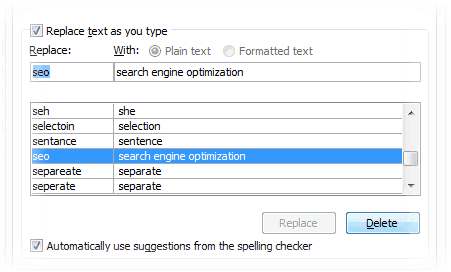
As a blogger you know that there are some typical blogger phrases which you use in almost each and every blog you write. If you review a software, at the end you say “check out this software over here” , instead of writing the entire phrase you can add first letters of each word in autocorrect so that whenever you type “cos” MS words converts it to the pre-defined phrase. To list major search engines such as Google, Bing and Yahoo you can add “gby”, for search engine optimization you can just say “seo” in autocorrect. These are few examples, you can add hundreds of such autocorrect words to get your work done faster. If you want to make your grammar fool-proof and perfect, then yo should definitely try these best grammar checker tools.
Saving typical phrases in autocorrect is the best way to minimize your typing. Just think how quickly and easily you can finish your work by adding these short codes in autocorrect.
You can add autocorrect entries at “File” >> “Options” >> “Proofing” >> “Autocorrect” options.
Work with MS Office clipboard
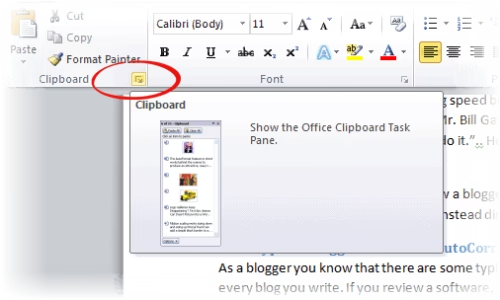
Turn on the clipboard in MS word and copy the often used words so that you can insert the word or phrase with single click. Assume you are reviewing a software product and you use the software throughout the document, in this case you can just copy the software name to clip board and paste in whenever needed.
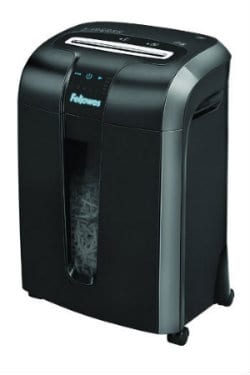
This post brought to you by Fellowes. All opinions are 100% mine.
Paper shredders are very useful to safely discard your papers with private information like financial data, credit cards or credit card bills or some sort of documents, you really should be shredding them before discarding for your privacy and safety, so you can be at peace of mind that your papers are never going to be misused, it can be very useful for you or office needs.
The new Fellowes 73Ci paper shredder from Fellows Inc, is extremely low power consuming paper shredder, it has a very cool capacitive touch system smartly designed and user friendly, it has a drawer when you’re ready to empty it, but the most important thing about this shredder is that it never jams even if you put in a lot of papers all at once. I have few friends who’ve used Fellowes 73Ci and also bunch of other different shredders, and they say the main issue with other shredders are that they end up getting jammed and they have to pull the paper out every time it gets jammed. But Fellowes 73Ci is guaranteed to never get stuck. It is 10% jam free. Fellowes Inc introduced the very first personal shredder in 1990, so they’ve got a lot of experience and innovative technology in this field.
SafeSense Technology:
This shredder features ad SafeSense technology which automatically stops shredding when your hands touch the paper opening case of the shredder, so in case you want to stop shredding halfway, you can just do that with a touch. Thanks to its sensors, Even if you put too many sheets than it can handle, it smartly spits it out and continue its work. But since there is a sensor to warn you in case you put too many than the capacity of sheets. That’s a very good safety feature
Heavy Duty Blades
And it can shred upto 10 minutes at once, but it needs 20 minutes of cooling time before you can use it again. And it has got good capacity drawer to fit shredded material. The Heavy-duty Cross-Cut blades destroy a single sheet of paper into 397 particles, making it nearly impossible to piece back together.
Touch screen controls
The front of the shredder has a very neat touch screen interface, this also has a warning system when the drawer is open or if the bin is full of shredded material. If you touch your hands on the metal opening where you insert the papers, it’s smart sensors can Fellowes 73Cistop shredding and give a warning message.
Smart Energy saving system
It is also smart enough to shut it off when in active, that helps save power, its a cool energy saving feature.
It can shred credit card, and it can even handle CD’s (its going to a little noisy when you shred CD). And if you are in an office environment, it is really easy to move around, it is on wheels, so it can move.
So, if you have got to discard a lot of sensitive documents or CDs, bills etc, you should be really getting PowerShred 73Ci to make sure your privacy is protected. Its already available on the stores from January 2012 and suggested retail price is $199.99. Let us know what features of PowerShred 73Ci you liked the most.

![Share Internet From Laptop to Smart Phone Over Wifi [Quick Trick]](https://techgyo.com/wp-content/uploads/2013/02/share-laptop-wifi-to-smart-phone.avif "Share Internet From Laptop to Smart Phone Over Wifi [Quick Trick]")