Do you have a great idea or thoughts to share with your friends and colleagues but don’t have enough time to setup your own blog? Well, quick publishing services come handy in such situation. quick publishing comes up with a text editor similar to MS word or WordPress where you can add your text, images and even some html elements, once done with editing you can publish your content which can be viewed from a specific URL.
Quick publishing webpages which are also known as disposable webpages also comes handy when you want to keep your friends or colleagues updated with the event or meetings you organized. The quick online publishing tools mentioned below don’t require registration.
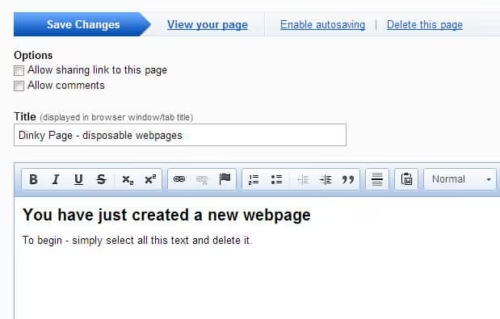
Dinky page is an outstanding quick publishing service to share your thoughts, it comes up with a simple WYSIWYG editor that allows you to add your text with many formatting options. you can update your page later by bookmarking the editor. In Dinky page you can also switch to html editor and add html codes to beautify your page. Dinky page allows you to delete your webpage with a unique deletion URL once you decide to remove it.
In Dinky page you can even add Javascript or Flash file to make your page more attractive and interactive. One more notable point is that your article is published without any advertisements.
Pen.io is a quick online publishing tool which has a simple yet attractive interface. Specify your article title and add the text and you are ready to publish the content. Before publishing you will be asked to enter a password so that you can edit your page later.
Pen.io supports some HTML elements to make your web page more catchy. Pen.io team promotes your article if they found your content good. Pages created with Pen.io won’t expire.
With disposable web page you can create web pages similar to wikipedia which self destructs in 90 days or the time you specify. DisposableWebPage comes up with collaborative feature that means you can also give the permissions to your friends and colleagues to work together.
Just specify the page title and enter the captcha, you will be then provided with a master key by which you can edit or change the page settings. In “Edit” tab you can add your content, images, smileys and even html code. disposable web page provides a destructing URL to delete your web page in case if you want to delete before the set time.
Do you hate wasting your time going over useless products from one shop to another? Are you constantly disappointed with the high prices of the products you need? Do you wish you could find a solution to traveling for miles to get the right kind of product as per your need? Well, worry no more! Online shopping sites like Flipkart and Indiaplaza are here at your service. These sites are really phenomenal! They contain A-Z products right from food, apparels, accessories, footwear, electronics, furniture and books to various hot items for gifts. All you have to do is sit back, relax in the comfort of your own zone, get online and open a new world of online products. You just need to choose the product of your need and order it for free. And even before you would know it, you would be presented with the ordered items at your own doorsteps. How easy and convenient is that!
Would you like to make this arrangement even sweeter? If it is a yes, then guess what! Now, you can enjoy purchasing all of these products at an even lower rate. All you have to do is use the mega fabulous Flipkart coupons and avail major discounts on all of your favourite products. You can also choose the relevant products of your favourite brands and use them without any worries. You can also order major electronics and other fun products, as well, from Indiaplaza by using the Indiaplaza coupons that have been designed especially for you! These coupons would bring a shopping hurricane at your place. You would just love to buy all the desired products at such low prices!
You can savour the benefits of the great Flipkart coupons and Indiaplaza coupons from your homes within a stipulated period of time and enjoy shopping like never before. Your shopping experience would change from being tedious to something full of fun and frolic. You would never look at shopping the same way ever again. Albeit, it would be something you would just not be able to wait for! CouponMAMU is an exciting site that has all the coupons
for every product you would ever need. It has a collection that surpasses your imagination!
Tablet has made the geek’s life even easier compared to laptop, it could be used for many tasks, you can work on your docs, sheets or prepare a presentation on the way and read e-books as well. If you are ready to pay bit extra then you can even kick out your boredom by playing games with rich graphics. Here are some gaming tablets.
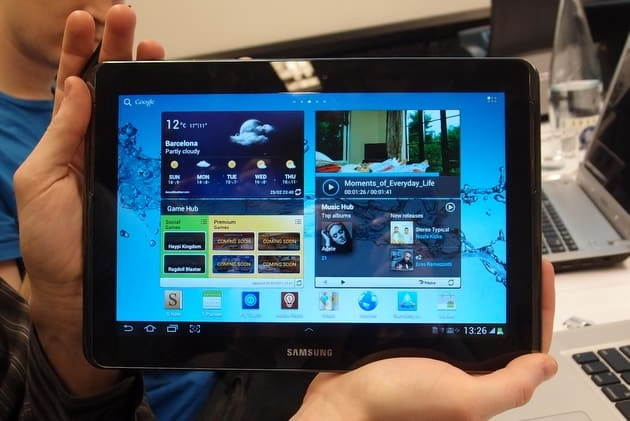
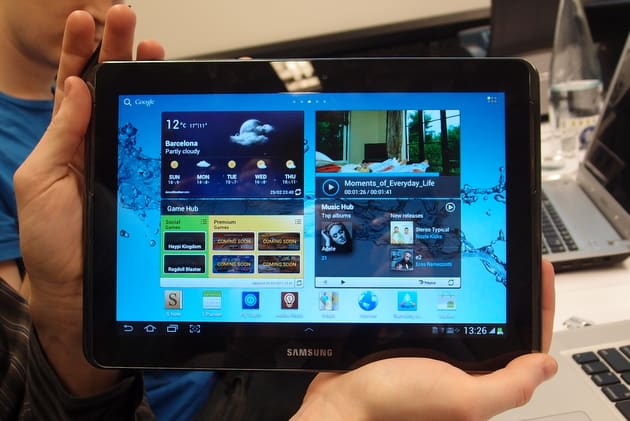
Samsung Galaxy Note 10.1
Samsung Galaxy Note 10.1 is an elegant tab which meets iPad in design, Samsung Galaxy Note 10.1 is powered by 1.4 GHz Exynos Quad-Core processor that is enough to handle recent rich graphics games. In fact you can download Need for Speed Hot Pursuit, Sonic the Hedgehog 4 and many other amazing games for free from Samsung website. The tab has 10.1 inches of WXGA screen to enhance gaming experience. Check out our post Samsung Unveils Galaxy Note 10.1 to know more. Samsung Galaxy Note 10.1 costs around Rs. 33500.
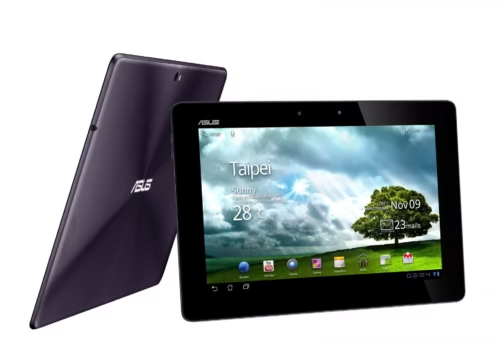
Eee Pad Transformer Prime
Eee Pad Transformer Prime is a high performance gaming tablet from ASUS with sleek design, Eee Pad is equipped with robust NVIDIA Tegra 3 Quad Core processor which brings full HD video recording with rich multimedia and gaming experience. Eee Pad has 10.1 inch LED backlit screen along with Super IPS 10 finger multi touch. ASUS Eee Pad Transformer Prime costs Rs.50,000. Read more about ASUS Eee Pad here.
Google Nexus 7
Google Nexus 7 is a budget gaming tablet which comes up with quad-core processor. It comes with magnificent NVIDIA Tegra 3 quad-core processor along with 7-inch display and decent battery life for smoother gameplay. Google Nexus 7 costs Rs. 17999.
Lenovo IdeaTab S2110A
Lenovo IdeaTab S2110A comes up with snapdragon S4 processor and optimistic 10.1 IPS screen with wide viewing angles for outstanding gaming experience. Lenovo IdeaTab S2110A supports Up to 32GB expandable memory so can install many of your favorite games. Lenovo IdeaTab S2110A costs Rs.22,000 approximately.
iPad and iPad Mini
iPad Mini is a good choice if you need convenient gaming experience. iPad Mini is a handy tab with robust A5 processor and 7.9 inches with good battery life. It has sleek design which perfectly fits in hand so you can comfortably play downloaded app games or online games that require high specs. iPad Mini range starts from Rs 21,900.
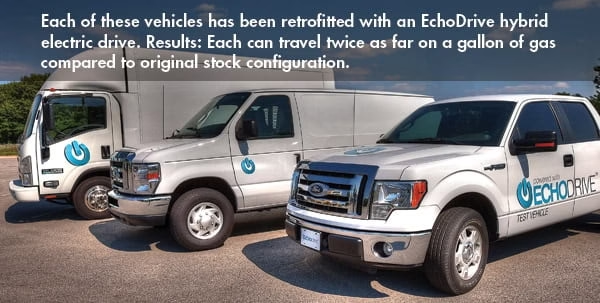
Echo Automotive’s EchoDrive is an innovative add-on hybrid drive system that transforms your gas/ diesel vehicle to electric vehicle, but it won’t affect the performance so you will get the same output as of a gasoline or diesel driven vehicle. In brief EchoDrive is an environment friendly and cost-reduction solution for converting fleet vehicles into highly fuel-efficient plug-in hybrids.
EchoDrive is a best and much awaited solution to convert commercial vehicles intro hybrid which improves the fuel economy of your vehicle and saves money on fuel costs by utilizing the proper combination of electric and fossil energy. According to a study EchoDrive doubles the fuel economy by converting a stock 10 mpg vehicle to 15-20 miles per gallon. Along with this, EchoDrive helps to keep the environment safe from carbon emission.
How EchoDrive works?
Echo Automotive’s EchoDrive comes up with advanced electric motor, system controller and modular battery pack which could be fitted to any kind of vehicles including a light to medium duty trucks. These components are fixed on vehicles’ powertrain where usually the electric motor and system controller in front and battery pack at the rear. It uses high capacity Li-ion batteries for outstanding performance.
EchoDrive which integrates with vehicle’s existing system decides how best it can utilize electrical power so that your vehicle can use as less gas or diesel it can and as a result the EchoDrive powered vehicle uses lesser than 50% fossil fuel.
Salient Features of EchoDrive
Stopping our environment from being contaminated is a foremost task and EchoDrive is a one and only solution that helps us to initiate this task. EchoDrive improves the fuel economy that leads to lower carbon emissions.
EchoDrive delivers the power at the equivalent of 75 cents per gallon
Vehicle will be thoroughly analyzed using advanced dynamotor tests along with on-the-road performance testing therefore there is no need to worry about vehicle performance.
EchoDrive includes an energy recovery circuit, a technology known as “regenerative braking” which picks braking energy to recharge the battery.
EchoDrive features flexible battery design allowing battery packs to be sized to the particular power requirements of any EcoDrive vehicle.
EchoDrive thoroughly tests for Battery cycling that leads to long-term performance.
The economic benefit of EchoDrive is that, the amount you invest in installing EchoDrive is returned in just 2 to 3 years.
The conversion process doesn’t require EPA approval, crash tests or major renovations.
The features which I liked personally are cost effectiveness and environment friendly, EchoDrive is less expensive compared to others and you will get back the installation charges soon.
Echo Automotive has attracted industry attention, the well-known companies and industries interested in EchoDrive are FedEx, Delco Remy, Amp Electric Vehicles, Tesla, Eaton Corp, Iveco, Isuzu, Delphi Electronics.
What Would be the Impact of EchoDrive on Environment?
EchoDrive powered vehicles are not only favorable to your wallet, but to the environment as well. With the EchoDrive retrofit, 35 million commercial vehicles on American roadways can be converted to hybrid vehicles, just imagine how it would be helpful for our environment.
Being environmentally conscious is mandatory especially in current situation where more than 4 billion and 160 million metric tons of carbon dioxide is produced by 800 million cars globally. Even if we manage to convert 400 million cars to EchoDrive hybrid then we can stop half of global carbon emission which automatically helps to reduce global warming.
Oracle had just released recently the amazing Java 7 Update 11 to protect computers against malware and stop the worst thing that can happen as aspired by cyber criminals – bringing computerization back to block zero. It became a nightmare when Adam Gowdiak, founder of the Security Exploration of IDG Service received an email about the newly discovered technical detail on security vulnerabilities of Java 7 Update 11(JRE version 1.7.0_11-b21). Many subscribers were shaken about this news that their computer can still be exploited despite subscribing to Java. This vulnerability was said to allow the security sandbox software invasion and will not hinder implementation of arbitrary code. These findings were reported at once to Oracle together with the proof-of-concept code.
Investigators from the said Security Exploration Services was conclusive – that the technique used by the cybercriminals in exploiting Java’s system was linked to the two Java vulnerabilities indicated during a Java sandbox leakage. However, it was later found by researchers to be a different case – but investigators warned users just the same. They should never underestimate the ability and abusive intellect of the perpetrators. Once the attackers detect a perfect chance to attack Java applets, they will not think twice in doing some harm – just when everyone is feeling secured with their security software.
Based on the Security Exploration’s policy, the disclosure of technical issue to the public can only be undertaken after the issuance of the patch by the seller. Just for security reasons, it is advised by some security researchers and the US-CERT to look for other more dependable security application. The Computer Emergency Readiness Team in the US is even campaigning to Java users – to finally disable Java browser plug-in installed in their computer. In the same manner, the newly launched Java 7 Update 11 is considered as no longer safe to use because cyber criminals are obviously making it as a major target for their attack at any time.
Therefore, as expressed by Adam Gowdiak; the reliability of Java SE 7 code is now being questioned. This factor manifests the internal problem coverage in terms of the Java’s Secure Development Lifecycle program or other internal problems of Oracle. Gowdiak shares that the real purpose of Java 7 Update 11 is to protect the users’ application. So, from the point when a confirmation is asked to permit Java applets to perform inside the browsers, foreign malware should already be blocked immediately. This makes a lot of sense because this is when harmful malware lead the applets to go astray from the secure steps.
In response to this, Apple already took an exceptional step by applying the anti-malware tool in the form of OSX. This will enable the surviving installations of the Java 7 browser plug-in to be resistant to the damaging malware. To thoroughly fix the vulnerability, Java 7 Update 11 must be reformed in the default security setting by adjusting the security level from “medium” to “high”. This new setting will trigger the anti-malware software to issue some warnings before the Java plug-in is activated and this will prevent silent attack to your computer. This is surely an added task because unlike before the incident, it is not anymore enough to just install the Java’s applets – then web start for a safe operation.
Mobikwik provides free online recharge and bill payment services in India. It allows you to online recharge your prepaid mobiles, data cards, pay your postpaid mobile bills , DTH television bills and other bills like landline bills, electricity bills , gas bills and also your insurance bills. It supports various payment options like net banking, credit cards, debit cards, cash cards and also cash pay. Mobikwik also introduces a new payment mode Cash Pay, wherein cash collection from customer is done at the customers doorsteps. It provides many awesome features for its users. One needs to create a user account in mobikwik. Once you have created a user account you can enjoy all features provided by it. You can save your mobile numbers, DTH connections, data card connection in your user account for use in future. Also it suggest recharge plans for mobile and data card recharges. You can directly recharge your mobile using your Visa or MasterCard or add some money in Mobikwik “Wallet” which allows you to recharge your connections on the go. Providing such awesome time saving features, Mobikwik is India’s best online recharge site.
Let’s take a look at a few special features of Mobikwik,
Mobikwik User Account
Once you have created your Mobikwik User Account, you can use all of its features. Features provided by it include online recharge for prepaid mobiles, data cards, payment of postpaid mobile bills, DTH television bills and other bills like landline bills, electricity bills, gas bills and also insurance bills.
Mobikwik Wallet
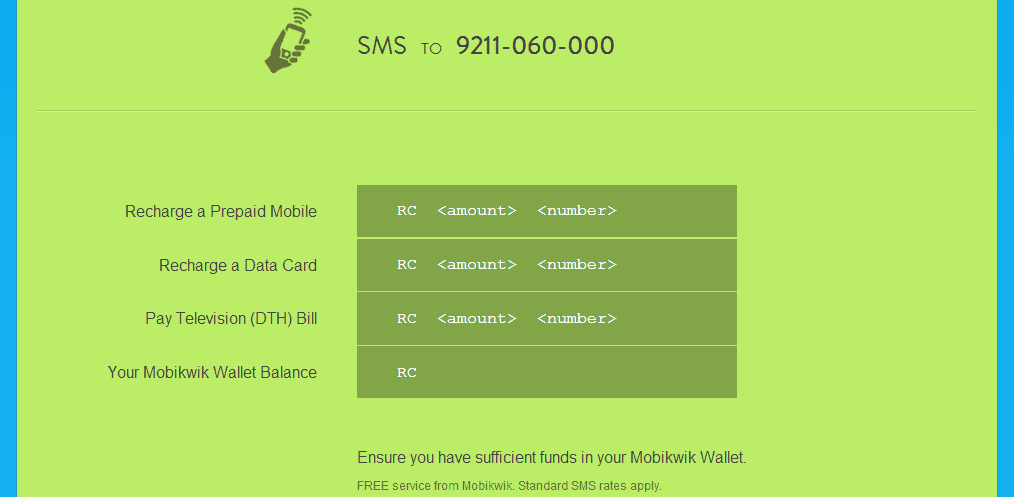
A unique feature provided is the Mobikwik Wallet. You can add money to your Mobikwik wallet which can be used when you are on the move. Usually when people are on the move it’s difficult to get access to dedicated internet service. By using the amount added in your wallet you can recharge your mobile, data card plans just by a SMS. You need not worry about entering your billing details every time you want to recharge, especially when you are on the move. All you need to do remember is the mobile number you want to recharge. It’s that simple!
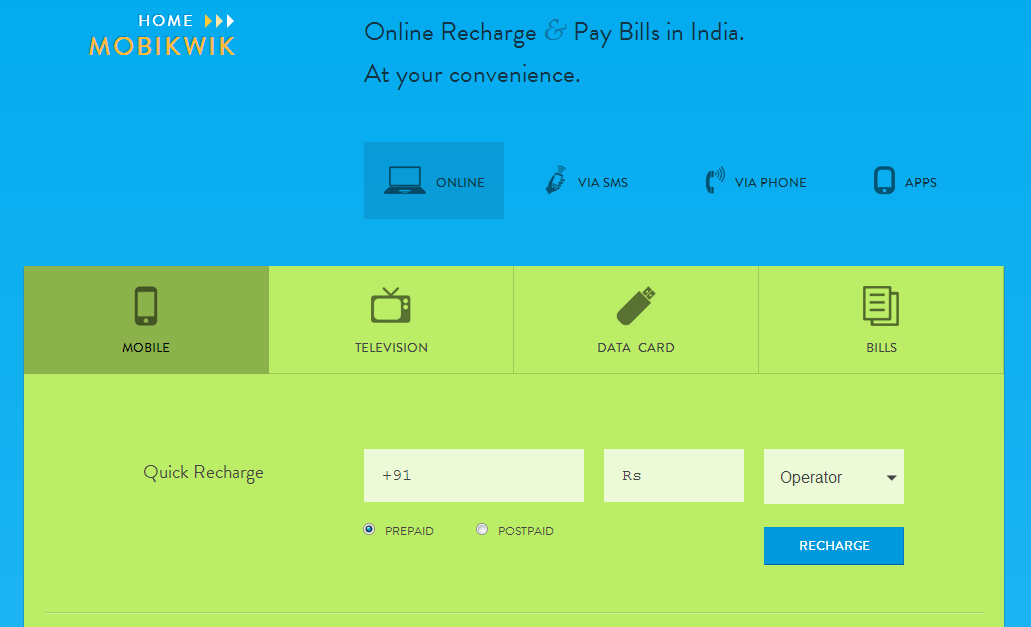
Recharge via SMS, Phone, Apps or Online
Mobikwik Wallet gives you the freedom of charging your mobile and paying bills anytime, anywhere. All you have to do is add sufficient amount of money to your Wallet. With this awesome feature you can recharge and pay bills, all at one place via phone, SMS or online.
Saved mobile numbers, DTH connections and Data Cards
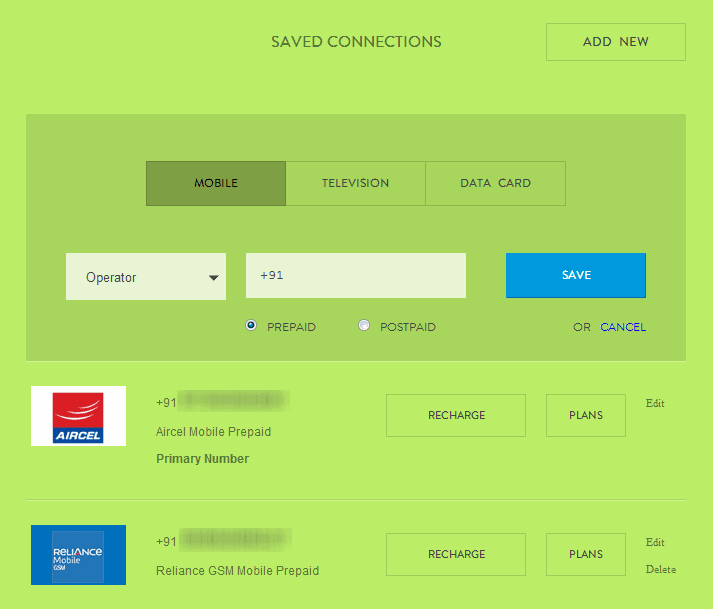
Mobikwik allows you to save several mobile numbers, DTH connections and Data Cards so that you can recharge or pay bills without entering their details every time you do so. You can save your friends or family mobile numbers and recharge them whenever you want. And with money added to Mobikwik wallet, you can recharge your mobile numbers anytime, anywhere.
Mobikwik Alerts and Transaction History
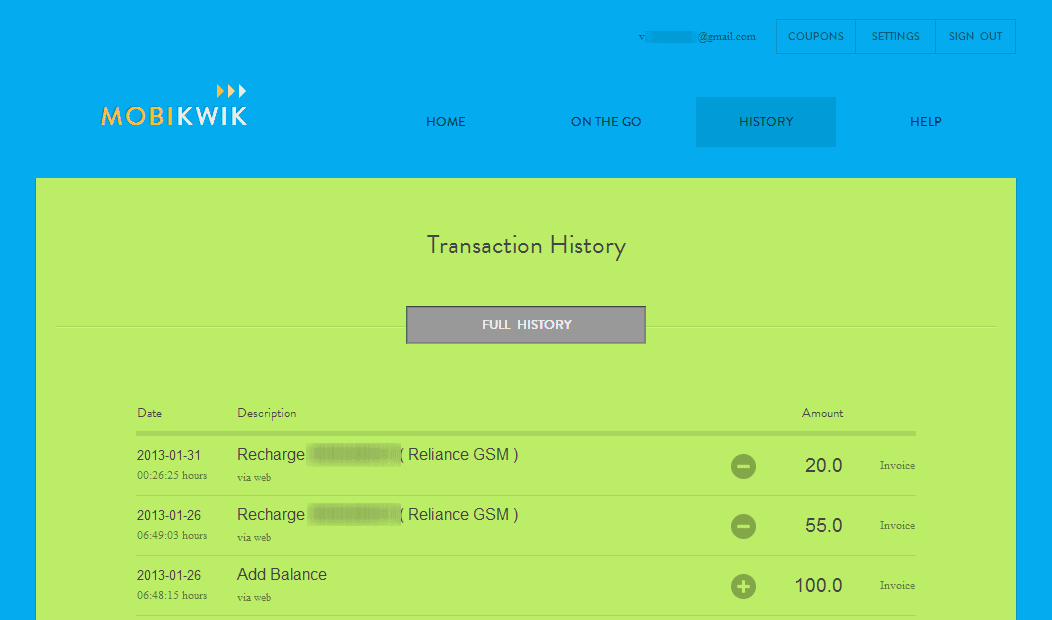
Mobikwik maintains a transparent relationship with their users by maintaining transaction history, providing alerts when a recharge is made and displaying a transaction receipt for every transaction made.
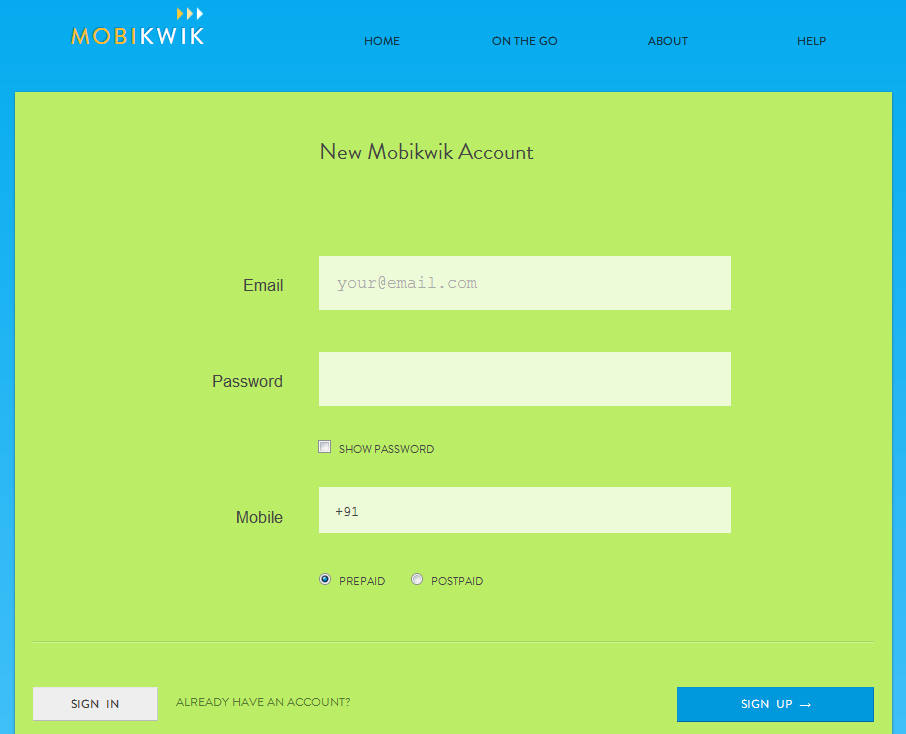
How to sign up and create your mobikwik user account?
Creating your User Account is simple.
Go to Mobikwik website.
Click on Sign Up.
Enter your email address, desired password and your mobile number.
Select Prepaid/Postpaid, whichever applicable.
Click Sign Up button present at right bottom corner.
Services Provided by Mobikwik,
Mobile Recharge
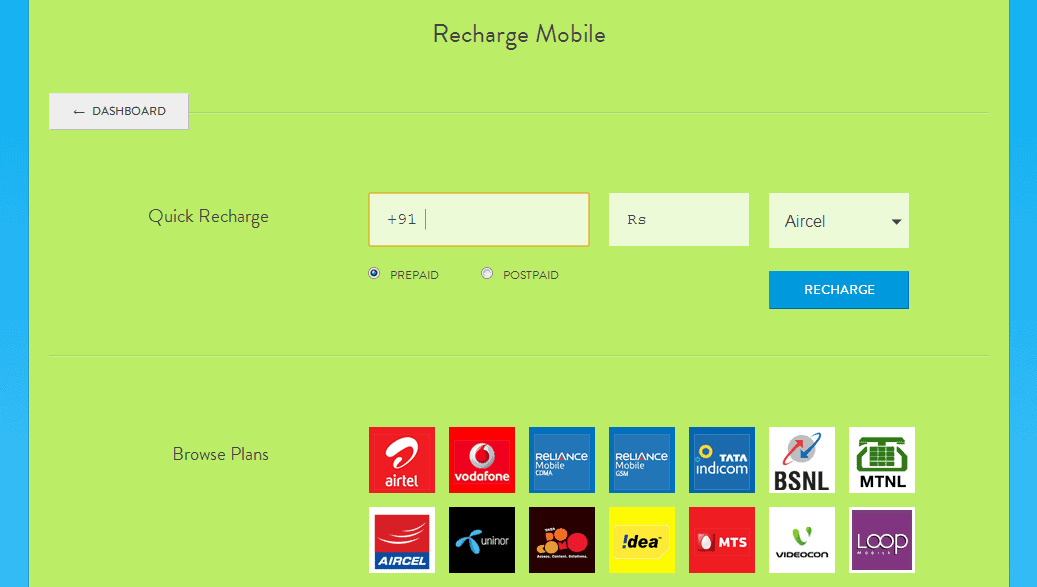
Mobikwik allows its users to recharge their mobile numbers either by directly using various payment modes or one can use the Wallet feature to recharge. One can use the saved mobile numbers for recharge or add a new number to be recharged. It also suggests you with plans related to a specific mobile service provider. This feature helps you save time as you don’t have to search for plans provided by mobile service provider.
Mobikwik supports various mobile service providers. Here’s a list of mobile service providers supported by it,
Aircel
Airtel
BSNL
Idea
LOOP
MTNL
MTS
Reliance CDMA
Reliance GSM
Tata DoCoMo
Tata Indicom
Uninor
Videocon
Virgin CDMA
Virgin GSM
Vodafone
How to recharge your mobile online using mobikwik?
Sign in to your Mobikwik account using your email id and password.
Select Mobile Option on the list menu saying “New Recharge or Bill Payment”.
Or just move on to your saved connections and select recharge if you know what amount and plan you want to activate.
Or else select plans option and you will be displayed with available voice, SMS and data plans associated with your service provider.
Once you have selected or entered amount you want to recharge, hit the recharge button and you will be provided with free coupons. Select any one and proceed to payment.
Select your mode of payment and provide appropriate details and you will be sent to the payment gateway.
It may take some time for transaction to be successfully completed. Do not press the refresh or back button while transaction is under process.
You will receive an acknowledgement and alerts to your mobile phone regarding the transaction.
Pay DTH TV bills
As stated before, Mobikwik allows its users to pay DTH TV bills through their User Account, Again one can pay directly by using any of the payment modes provided or add money to their wallet and then recharge. Advantage of adding money to wallet is that you need not have to provide billing details again and again. Add sufficient amount of money to your wallet for future use.
You can save DTH connections in your Mobikwik User Account and use the details every time you pay the bills.
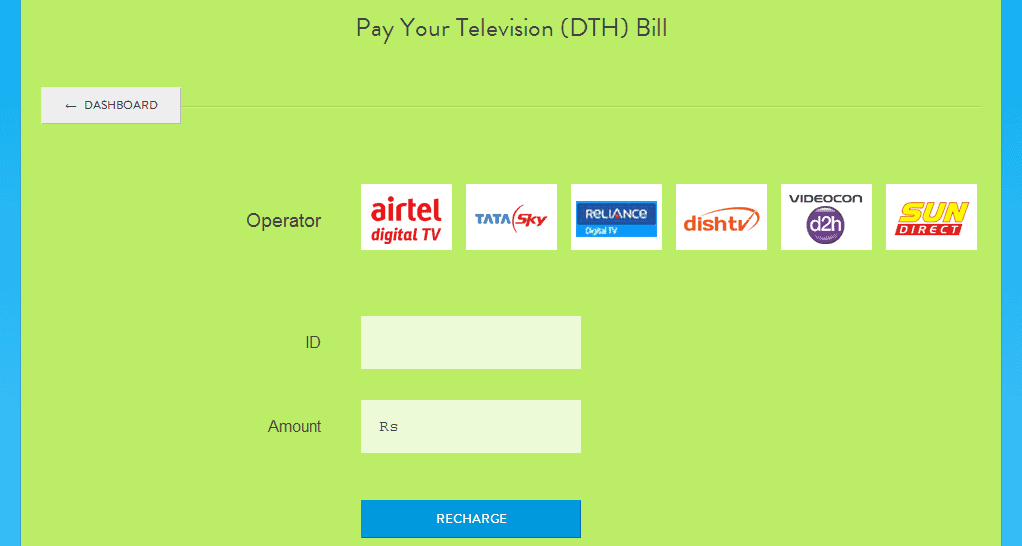
Mobikwik supports the following DTH service providers,
Airtel Digital TV
Dish TV
Reliance Digital TV
SUN Direct
Tata Sky
Videocon D2H
How to pay DTH bills using mobikwik?
It is similar to mobile recharge
Sign in to your Mobikwik account using your email id and password.
Select Television Option on the list menu saying “New Recharge or Bill Payment”. Or use your saved connection.
Select operator and enter appropriate customer id code.
Enter the amount to be paid and hit recharge and select a coupon if you wish when prompted.
You will be sent to payment gateway and the rest is same drill as mobile recharge.
Data Card Recharge
You can recharge your data card using Mobikwik Online recharge service. You can save numbers or use a new number to be recharged. You can browse plans depending on your location and service provider to recharge your data card.
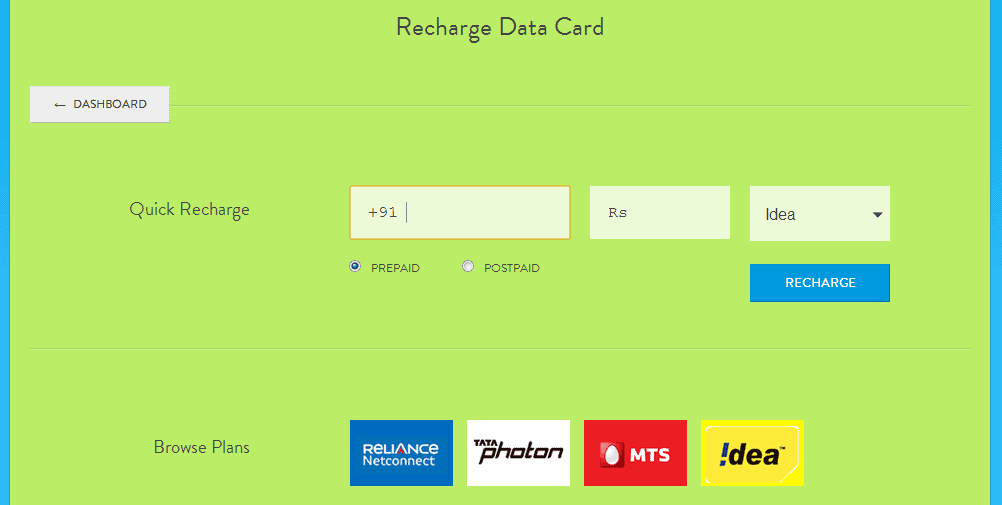
Mobikwik supports following Data Card Service providers,
Idea
MTS
Reliance Netconnect
Tata Photon
How to recharge data cards using mobikwik?
Sign in to your Mobikwik account using your email id and password.
Select Data Card Option on the list menu saying “New Recharge or Bill Payment”. Or use your saved connection.
Enter the number you want to recharge and amount. Or you can browse plans associated with your service provider by clicking on appropriate icon present right below quick recharge.
Once you have entered the details and hit recharge, select a coupon if you wish when prompted.
You will be sent to payment gateway.
Pay Other Bills with Mobikwik
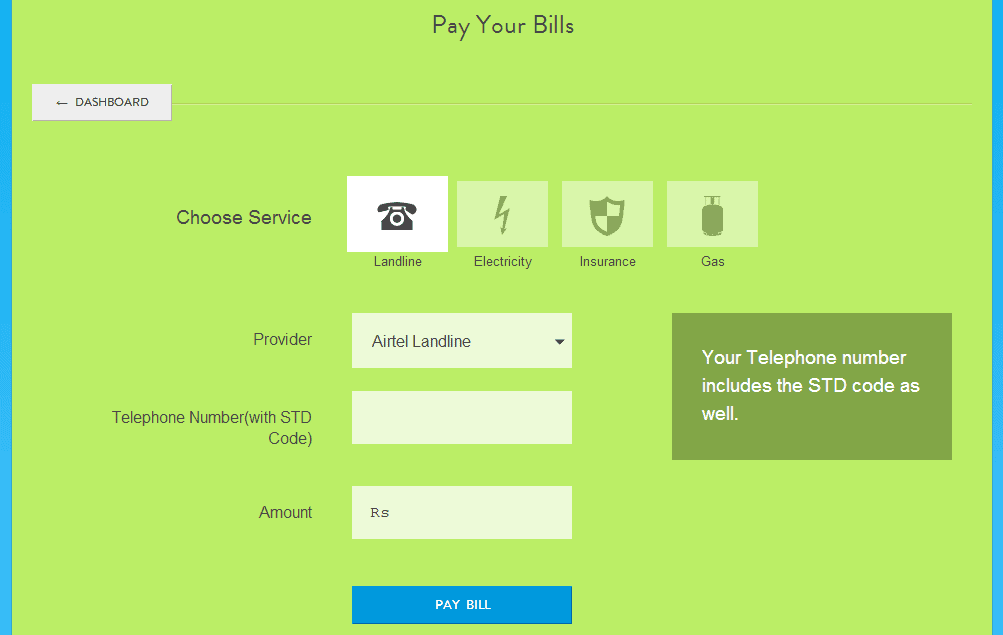
One can also pay landline bills, electricity bills, gas bills and insurance payments with Mobikwik. One can pay Airtel landline, MTNL Delhi and Tata TeleServices land line bills. You can also pay electricity bills associated with BSES Rajdhani, BSES Yamuna, MSEB Mumbai, North Delhi Power Limited and Reliance Energy Mumbai. ICICI Prudential Life Insurance and TATA AIG Life Insurance payments can be done using Mobikwik. Also one can pay Mahanagar gas Limited bills.
How to pay bills using mobikwik?
Sign in to your Mobikwik account using your email id and password.
Select Bills Option on the list menu saying “New Recharge or Bill Payment”.
Choose the service for which you want to pay bill.
Select your service provider.
Enter appropriate details and amount.
Hit Pay Bill and you will be forwarded to payment gateway.
Mobikwik Apps
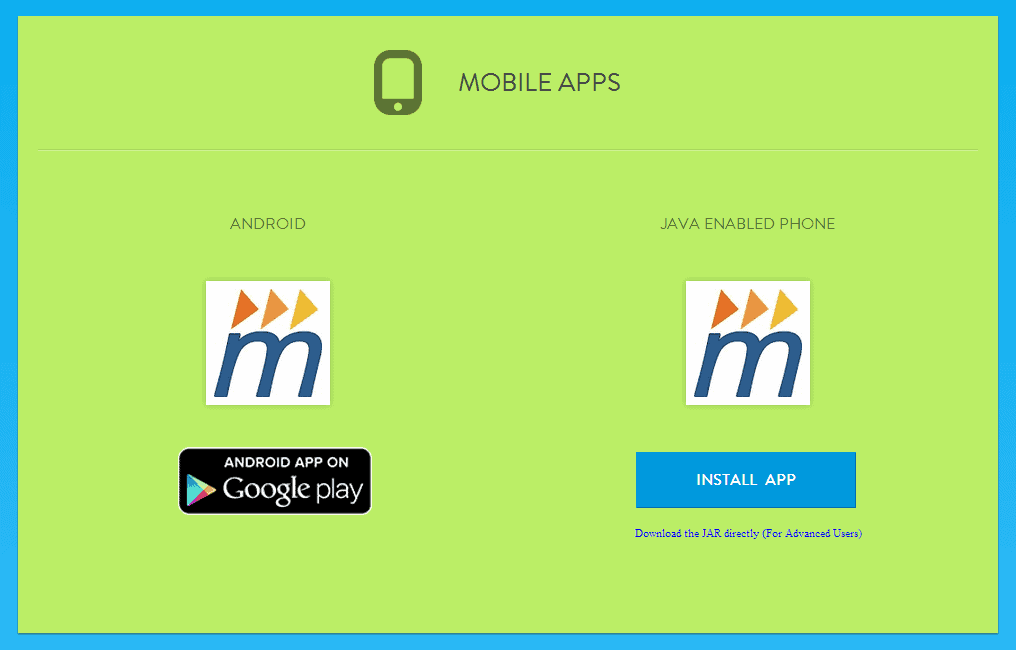
It also has Mobikwik Apps for Android and Java based phones. You can download them on Apps page.
Coupons and Promo codes
With every transaction Mobikwik Users are provided with free coupons which can be availed at the merchant site providing coupons. It provides coupons from leading merchants like Domino’s Pizza, Nirula’s, BIG Flix, Yebhi, Expedia etc.
Payment Modes and Options
Mobikwik provides its users with various payment mode options. It supports payment modes like net banking, credit card, debit card, cash card and also introduces new mode of payment Cash Pay. Cash Pay is a mode of payment wherein cash is collected at customers place.
Conclusion
MobiKwik provides wide range of features which make recharging and paying bills online very easy. It provides its users with provision to save their numbers, connections and a special feature Mobikwik Wallet with which users can recharge and pay bills on the move. Also it supports most of the leading mobile service providers like Airtel, Vodafone etc. With high performance and reliability Mobikwik is an awesome online recharge and bill payment service that saves time and provides an easy way to recharge in today’s busy world.
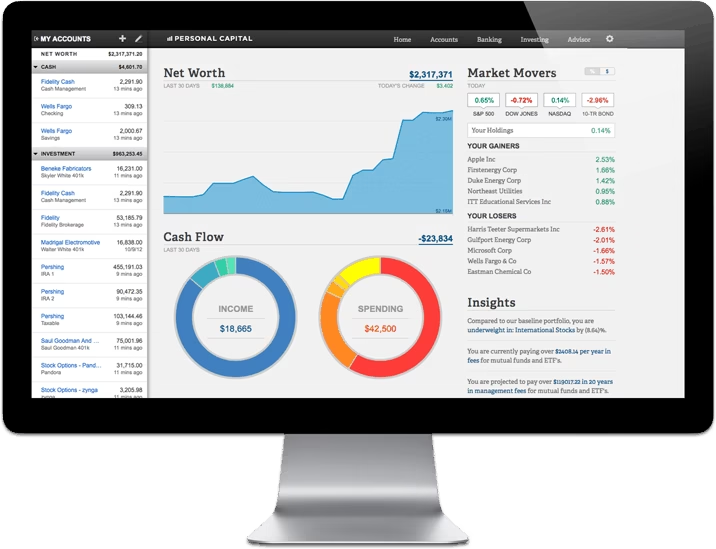
Do you have multiple kinds of investments in your portfolio and searching for an app where you can manage your personal finances without any hassles? Don’t worry, Personal Capital app will help you to manage all your financial tasks under one roof.
Keeping the constant touch with market’s up and down and tracking the investments is an avid task for everyone who invests and of course mobiles stands handy where you can monitor your financial aspects on the go. But it is also important to have a feature packed app that is capable to manage your personal finances and updates you continuously with market happenings. Personal Capital app for mobile is such an app which comes up with bunch of features.
Personal Capital App Review
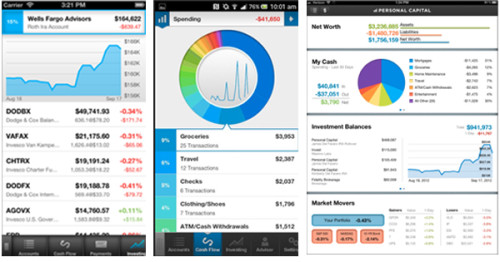
Personal Capital App is a free application which brings your financial world under your fingertips, it is available for all the major mobile platforms including iPhone, iPad and Android. Here you can set up all your financial accounts and monitor your investments. Personal Capital Application comes up in tabbed view which allows you to access all your financial accounts in one aggregated view.
Possibilities of Personal Capital Finance App
Personal Capital app is a 100% free app that allows you track your income, spending, savings and investment performance on a user friendly interface that even includes graph diagrams for the clear picture of your portfolio.
The app provides the holistic view of all of your accounts allowing you to manage your money.
It advices you on how to save your valuable money by identifying mutual fund fees.
Personal Capital finance app’s personal capital cash manager is another great tool to track your income and spending along with your largest expenses and as well as view your transactions.
It let you know about the flow of your money, that means you can easily know where your money is going and it also it can also asses and analyze the value of your stock options.
Functions of Personal Capital
Portfolio Performance: Personal capital finance app allows you to connect your investment accounts at BofA, Fidelity, Wells, Schwab and many more, once you are done with account setup you can track your investment by categories such as by account, by asset class or by individual security. This makes you keep an eye on your complete portfolio performance.
Asset Allocation: This function let know about the current status of your portfolio and helps you find the exact percentage of each asset class within your portfolio.
Mobile App opportunities: Personal capital app allows you to manage your portfolio on the fly, we have deeply discussed about it in the above section i.e. Possibilities of personal capital application.
Investment Check Up: Investment Check Up is a free adviser tool by personal capital app where financial experts electronically pinpoint potential investment risk factors inside your portfolio. It also assess mutual fund fees
401k Free Organizer: This free tool benchmarks your 401k against Personal capital’s own0.5% plan and determines whether your plan is red or yellow or green.
Mutual Fund Fee Calculator: Mutual fund fee calculator helps you in saving your hard earned money by identifying mutual fund fees.
Universal checkbook: Universal checkbook is a useful feature where you can take a snapshot of a check and send payments to anyone or transfer funds among accounts.
Personally What I liked in Personal Capital?
Personal Capital finance app is not limited to one mobile platform, but available for iPhone, iPad and Android devices which allows us to manage our financial accounts in home, office or on the way. It is incorporated with some very useful tools such as 401k Free Organizer, Mutual Fund Fee Calculator and Universal checkbook that stands very helpful in routine.
One more interesting tool is “investment check up” where you can get free advise from financial experts and maximize the amount of money.
I recommend you to download the free Personal Capital App and give it a try over here iPhone, iPad and Android.