Home Blog Page 324

Content Optimization Basics for a Blogs

3

Today, we know the Content optimization for any web page for any type of business is necessary for generating more sales. SEO stand for search engine optimization is the process for betterment the visibility of the a web page or a website in search engines. We increase the quality and quantity of a hits to a website. SEO is a organic or inorganic process. There are two main types of SEO-white hat seo and black hat seo. As the name suggests white hat seo means the clean, ethical and sustainable way for getting the page rank in search engine results and black hat means the unethical and very fast way and uses tricks and games for getting the high PR in first page in the search engines. For the seo we do various activities for the getting keyword in first page and from all those activities one activity is content optimization which is very important factor in considering the page rank.

Also read :

What is Content Optimization

Writing effectively is the one main thing used for attracting the customer and the reader towards your product or services you are providing through a webpage- a specific explanation is required for explaining the main points. Content should be well written and organized in a effective manner. Content optimization is the main aspect for considering the Google page rank in search engine. If a content not optimized then there are so many things which can harm the web page in getting the Page Rank. Optimizing content for SEO should be done in a right way, anything that can be searched in search engines can be effectively optimized.

content optimization creative writing


Principles used for content optimization

There is a technique for doing content optimization . The content should be original and and make minor updates in old content regularly according to the changes in technology and information provided.

Meta tags

Meta tags is a HTML code of a web page. These are read by the search engines but not displayed in the webpage. It is a part of a web page design. Important tags are the title, description, keywords and robot tags.

<html>

<head>

<Title>——–</Title>

<Meta name= description content=””>

<Meta name=Keywords content=””>

<Meta name=Robots content=”index, follow”>

</head>

</html>

Title tag :

The title tag is defines the name of a web page. The title tag extremely important for SEO. The main keywords you can use in your title tag as the seo point of view, but it does not mean that you enter all the keywords in title. It should be between 3-4 keywords and It should make a right phrase as giving the right idea for assuming the what about a web page content is. Title should not be more than 60 words if it then in search engine results it displayed with dot.

Description :

Description should be written in the way that it will provide what information your website contains or what your website is about. The sentence should short and concise so that vistors can easily undertsant what it is all about. The description tag not more than 200 words. The meta description tag has a great importance for the SEO optimization of your page.


Keywords :

Keywords is very crucial task and it is the main factor consider for getting the high Page Rank. Proper keywords are important for seo. One of the important part is that from the content marketing point of view that you are writing for readers not for search engine but you should use the keywords which are search engine friendly and have high global searches. The keywords tags contain should be 4 to 10 keywords. Keywords should be relevant and simple.

Meta robot text :

Meta robot tag is the way how a website crawled by the search engine. Following are the meta robot tag.

Index, Follow – Crawling starts from the the index page and then will continue to the rest of the pages.

Index, NoFollow – Crawling starts from the the index page and then will NOT continue to the rest of the pages.

NoIndex, Follow – search engine is not crawl the main page, but crawl rest of the pages.

NoIndex, NoFollow – None of your pages will be crawled by the robot and your website will not be indexes by the search engines.

Importance of content optimization in seo

The content of your website is important for the search engines as they consider your website’s relevancy and importance based on both meta tags and content in relation to the important keywords.On page optimization totally dependent on the website and the content. Content Optimization is very powerful tool as it is important with reader point of view, website owner pont of view that what he is going to sale and want to tell people from the web content and with search engine point of view. So try to make the content more impressive and effective.


Everything your should know about Performance monitoring software

0

Today, thanks to technological advancements, there are many modern performance monitoring tools. These tools are extremely useful for anyone who realizes the importance of collecting and analyzing data related to machine operation. Applications manager is one thing, but the right system allows you to make many necessary changes.

Performance monitoring software
  1. Performance monitoring software – what is it?
  2. What is OEE in performance monitoring?
  3. Performance monitoring software – what are the benefits of using it?

What kind of application performance monitoring tool is worth using, and what really is performance monitoring? Let’s find out.

Performance monitoring software – what is it?

More and more people know that a performance monitoring is the foundation of a successful business today. However, it turns out that not everyone needs to know the specific definition. So what is a performance monitoring? It is a method for automated collection of data from machines in real time. Performance management allows, for example, information about errors and problems, so they can be easily remedied. Performance monitoring in production gives the ability to analyze data, production progress and make informed decisions based on the collected information. Examples of solutions in this area can be found, for instance, at https://antsolutions.eu/.

What is OEE in performance monitoring?

OEE, or Overall Equipment Efficiency, is an indicator that measures the effectiveness in managing the equipment that is used in the production process. For example, various solutions such as production data management systems, end user experience monitoring and performance monitoring can help to increase this indicator. It is estimated that most companies are around 60%, while the best managed and organized companies can have OEE as high as 85%. OEE systems can be integrated with others, for example application performance systems.

Performance monitoring software – what are the benefits of using it?

Performance monitoring solution has many advantages that make companies decide to implement it. First of all, it allows collecting data in real time, thanks to which it is possible to react immediately to all errors. Moreover, it gives the possibility to think out of the box thanks to the knowledge resulting from the data analysis. Performance monitoring allows you to increase the performance of machines and equipment, and thus improve productivity and application performance and user experience. Definitely worth checking out the details of this modern solution.

ActionScript 3 Code Snippets For Flash Developers

ActionScript 3.0 is a robust yet easy to use object-oriented programming language that works behind the web apps we use. It gets executed by the ActionScript Virtual Machine (AVM) and ActionScript 3 (AS3) is executed with the new Virtual Machine called AVM2. ActionScript 3 also uses an improved application programming interface (API) and E4X language extension to add XML as a native data type of the language. A developer, familiar with OOP can easily mingle with ActionScript 3. Here we have elaborated some useful ActionScript 3 Code Snippets (AS3 Code Snippets) to use in their regular flash developments.

ActionScript 3 code snippets are helpful for flash developers which saves valuable time and energy. Below are some flash code snippets which are ready for use, just copy and paste any ActionScript 3 code snippets in your as3 coding.

Useful ActionScript 3 Code Snippets

  • Make window full screen using AS3
  • Play an external Mp3 using AS3
  • Custom right click menu using AS3
  • Go to URL (getURL) using AS3
  • Disable tab (yellow rectangle) using AS3
  • Quit File using AS3

Elaborated AS3 Code Snippets

To make a fullscreen window

This AS3 code snippet can be used to make the executed flash windows full screen. In AS2 it was a single line code but in actionscript 3 we need to import flash display class.

import flash.display.StageDisplayState;

stage.displayState = StageDisplayState.FULL_SCREEN;


Play an external Mp3 file in flash

The following AS3 code can be used to play an external Mp3 file in flash. Embedding MP3 files into flash makes the executed file bigger in size and of course increases the loading time. So the code below is really helpful when it comes to mingle with sound in flash.

var mySound:Sound = new Sound();

var myURL:URLRequest = new URLRequest("song.mp3"); //Change file name here

var mySoundChannel:SoundChannel = new SoundChannel();

mySound.load(myURL);

play_btn.addEventListener(MouseEvent.CLICK, playSound);

stop_btn.addEventListener(MouseEvent.CLICK, stopSound);

mySoundChannel = mySound.play();

mySoundChannel.addEventListener(Event.SOUND_COMPLETE, endOfSound);

//Functions written can be used with buttons to play or stop the sound

function playSound(e:MouseEvent):void

{

mySoundChannel = mySound.play();

}

function stopSound(e:MouseEvent):void

{

mySoundChannel.stop();

}

function endOfSound(e:Event):void

{

trace("Sound playback is complete.")

mySoundChannel = mySound.play();

}


Custom right click menu in AS3

The AS3 code written below customizes right click menu in flash executed file.

var my_menu:ContextMenu = new ContextMenu();

my_menu.hideBuiltInItems();

var my_notice = new ContextMenuItem("Your Company Name");

var my_email = new ContextMenuItem("your_mail@my_company.com");

var my_copyright = new ContextMenuItem("Copyright - 2012");

my_copyright.enabled = false;

my_copyright.separatorBefore = true;

function openLink(e:ContextMenuEvent):void{

navigateToURL(new URLRequest("http://yourcompany.com "));

}

my_notice.addEventListener(ContextMenuEvent.MENU_ITEM_SELECT, openLink);

my_menu.customItems.push(my_notice,my_email,my_copyright);

contextMenu = my_menu;


Go to URL (getURL in AS3)

Actionscript 3 code that opens specified URL or local file.

mybtn.addEventListener(MouseEvent.CLICK, mybtnClickHandler);

function mybtnClickHandler(event:MouseEvent):void

{

var request:URLRequest = new URLRequest("http://www.somewebsite.com");

navigateToURL(request);

}


Disable tab in AS3 (yellow rectangle)

Below is an AS3 code to disable tab key in flash

stage.addEventListener(KeyboardEvent.KEY_DOWN, myKeyDown);

private function myKeyDown(event:KeyboardEvent):void

{

if (event.keyCode == Keyboard.TAB)

{

event.currentTarget.tabChildren = false;

}

}


Quit File AS3 code

Actionscript 3 code used to quit flash

quitme.addEventListener(MouseEvent.CLICK, quitmeClickHandler);

function quitmeClickHandler(event:MouseEvent):void

{

fscommand("quit");

}

Quick Tips to Reduce Loading Time and Make Your Blog Faster!

Blogging is becoming a hard task now days due to new Google updates such as Panda and Penguin and of course the massive competition on the web. To survive in this circumstance one must follow the ranking factors set by Google and one of the most important protocols among them is SPEED. The time your blog takes to load is the important factor to achieve higher page rank which also increases your alexa traffic.

Before optimizing the blog to load faster and reduce loading time it is an important step to measure the current loading speed which could be assessed using GTmetrix or the Official Alexa Traffic Rank Google Chrome Extension. Along with the Traffic Rank and site loading time it also displays the number of sites that are linking to your websites. Optimizing page load time also makes your blog user friendly.

reduce loading time

Here Are Some Quick tips to Reduce Loading Time of the Blog

Choose SEO optimized WordPress theme

Theme applied for blog plays chief role in loading time. Most of the free themes may visually appear good but performs poor when it comes to reduce loading time. Therefore choosing a Premium SEO optimized WordPress theme from the well-known resource will surely result to reduce loading time of the blog.

Optimize images

Using the optimized images not only reduce loading time of the blog but also saves the bandwidth and web space. There are 2 different ways to optimize the images, first one is to reduce the image size using image optimization websites such as JPEGmini or smush.it and then upload to blog or the second one is installing wordpress plugin such as WP Smush.it that automatically optimizes the uploaded images.

Make use of free image hosting service

Uploading images to free image hosting services and then embedding them in your blog is best way to reduce loading time and save the valuable bandwidth as well. There are many image hosting services available on the web, Imgbox is such a free Image hosting service that supports JPG, GIF and PNG image formats up to 10 MB in size

Choose proper hosting

Applying the tips we just discussed above to your blog hosted on a shared hosting won’t bring any noticeable change in loading time. Therefore choosing the dedicated hosting is the proper method which leads to increase the blog speed and reduce loading time.

Along with these removing unwanted or less used widgets and plugins will turn your blog to FAST BLOG!

Samsung Galaxy S3 vs Samsung Galaxy S2 Comparison

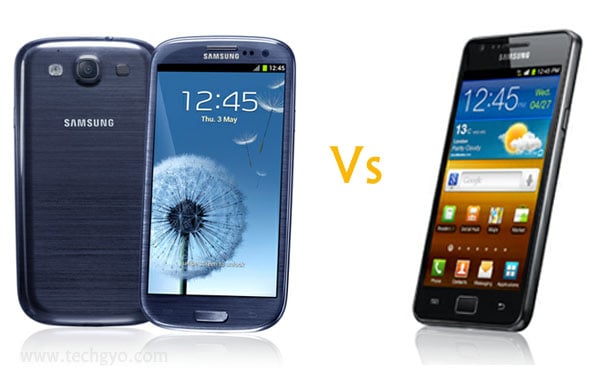
Samsung has recently launched its new Galaxy s3 smartphone to compete with iPhone and it also signs that Samsung is thinking seriously to become a top mobile brand and of course it is heading towards its goal in a proper way by launching the new versions of mobiles with advanced features. It is a big question everyone used to ask whenever a new model of mobile arrives i.e. “How it differs from previous version?” and the same thing also happens between Samsung Galaxy S2 and Galaxy S3. The new Galaxy S3, added to Samsung’s Galaxy S family of phones has awesome features with stunning look. So here is the quick comparison between the latest Samsung galaxy s3 vs samsung galaxy s2.

Also read:

Samsung Galaxy S3 (Specifications)
HTC One X Review with Features 
Sony Xperia Sola – Think Beyond TouchScreen! (Specs and Price)
Sony Android Smart Watch Unveiled  – World on the Wrist!
Samsung Unveils Galaxy Note 10.1 (Sponsored Video)

samsung galaxy s3 vs galaxy s2

Samsung Galaxy s3 vs Samsung Galaxy s2

Feature

Samsung Galaxy S2

Samsung Galaxy S3

ProcessorExynos 1.2 GHz Cortex-A9 processorExynos quad-core Cortex A9 1.4 GHz processor
RAM1GB of RAM and Mali-400MP Graphics processing unit1GB of RAM and Mali-400MP Graphics processing unit
Display4.3-inch with 800×480 pixels resolutionSuper AMOLED Plus capacitive touch-screen4.8-inch HD with 1280×720 pixels resolutionSuper AMOLED Plus capacitive with improved Gorilla Glass and TouchWiz
Camera8 megapixel rear (with auto focus and face detection with image stabilization)and 2 megapixel secondary camera with LED flash8 megapixel rear (with auto focus and face detection with image stabilization)and 1.9 megapixel front camera
Storage16GB and 32GB microSD slot16GB/32GB/64GB microSD slot with 50GB DropBox cloud storage account for free
Operating SystemAndroid v2.3 (Gingerbread)Android 4.0.4 (Ice Cream Sandwich)
BatteryLi-Ion 1650 mAhLi-Ion 2100 mAh
PriceRs. 27,900Rs. 41,599 (approximate)

Conclusion

One can clearly conclude that Samsung Galaxy S3 has advanced features and power than galaxy s2 after taking a look at the table above. Samsung Galaxy S3 has upgraded processor, better display, expanded storage, updated operating system and improved battery. But when it comes to RAM and GPU Samsung Galaxy S3 uses the same as of Galaxy S2. The frustrating fact is, Samsung has downgraded the front camera from 2.0 mega pixel to 1.9 mega pixel in Galaxy S3 and according to many sources the quality of pictures and video may disappoint the buyers.

Yahoo Pingbox :Add free live chat to your Website ,Blog or Facebook

Getting in touch with your website visitors is the most important factor which not only fetches the feedback about your website but also let you assist them in their difficulties. Live chat systems are very useful for shopping websites to connect the buyer and webmaster to solve transaction issues, product replacements or claim the warranty. According to the “Making Proactive Chat Work” study, “Many online consumers want help from a live person while they are shopping online.”.  Online free live chat system saves company’s expenditure and avoids the hiring a call center for communication.

Adding free live chat for your website or blog

Yahoo! provides free live chat that allows you to chat with website visitor privately. It supports many platforms including website, social network profiles and blog through Yahoo! Account. To add free live chat for your website-

  1. Navigate your browser to Yahoo Pingbox page
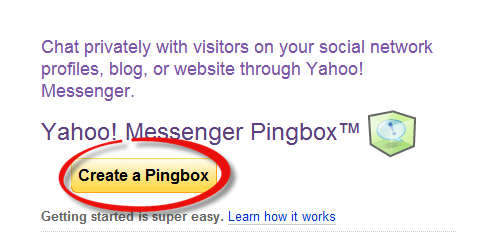
  2. Click on “Create a Pingbox” button

free live chat

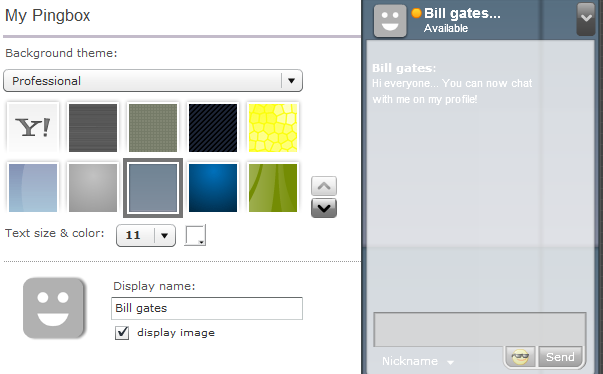
  1. Pingbox customization page appears where you can customize your free live chat which suites your website
  2. Here select background theme, font size and color. Also add your name along with online and offline greetings.

live chat software

  1. Finally specify a name to your free live chat and click on “Save” button.
  2. If you are already logged in to your yahoo! account then you will be taken to code page else redirected to login page, to get the code you need to login to your yahoo account.

live chat software for website

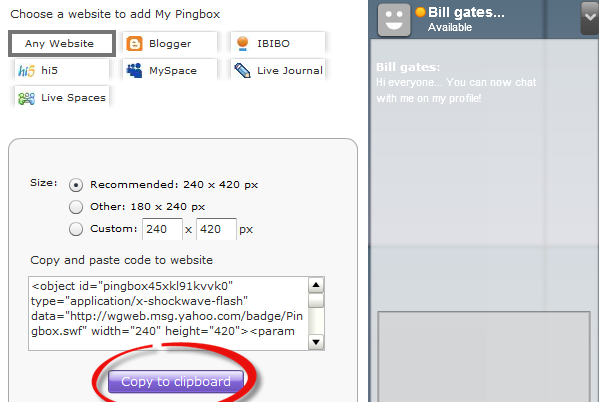
  1. Yahoo Pingbox can be added to website, blogger, ibibo, hi5, myspace, live journal or live spaces. Select “any website” among these options to add the created free live chat for your website or choose “blogger” if you wish to add it to your blog.
  2. Specify the height and width of the pingbox and click on “Copy to Clipboard” button
  3. Finally paste the code in your website where you wish to embed free live chat.

Samsung Unveiled Galaxy S3 (Specifications)

Are you a fan of Samsung smartphone? Here is the great news for you. Samsung has unveiled an all new Galaxy Smartphone “Galaxy S3” in London. Samsung Galaxy S 3 comes up with larger 4.8″ HD (720 x 1280) Super AMOLED capacitive touchscreen and Android 4.0.4 Ice Cream Sandwich. According to many analysts Samsung Galaxy S3 is a head-to-head rival to Apple’s iPhone which has larger touch screen and robust processor as well. Samsung Galaxy S3 is also listed as an official smartphone of the London 2012 Olympics.

samsung galaxy s3

Features of Samsung Galaxy S3

Samsung Galaxy S3 is powered by Android 4.0.4 Ice Cream Sandwich with TouchWiz 4.0 UI. The combination of high end processor and latest operating systems brings the fresh experience to the user. Below is the complete specification of Samsung Galaxy S3 smartphone. Samsung Galaxy S3 has-

  • Quad-core Cortex A9 1.4 GHz processor
  • 4.8″ HD (720 x 1280) Super AMOLED capacitive touchscreen with Gorilla Glass.
  • 1GB of RAM and Mali-400MP Graphics processing unit
  • MicroSD card slot expandable up to 64GB
  • 8 megapixel rear and 1.9 megapixel front camera. 8 megapixel rear camera is featured with auto focus and face detection with image stabilization.
  • When it comes to connectivity features Samsung Galaxy S3 has Wi-Fi hotspot, NFC and Bluetooth 4.0
  • Along with these features Samsung Galaxy S3 has accelerometer, USB OTG, 3.5mm audio jack, multi-touch input, gyroscope sensor and barometer.
samsung galaxy s3 specification

Samsung Galaxy S3 is crafted with rounded edges with glossy finish but covered with plastic body which some people may don’t like.  Samsung Galaxy S3’s approximate price will be Rs. 41,599/-.