Home Blog Page 323

Sony Android Smart Watch Unveiled – World on the Wrist!

android smart watch
sony android smart watch

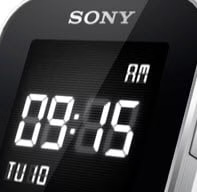
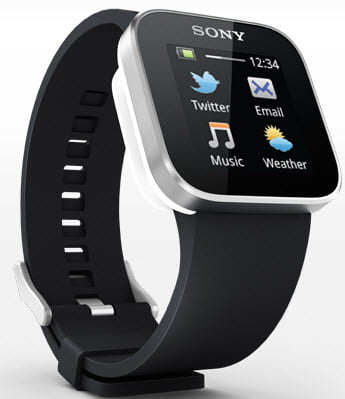
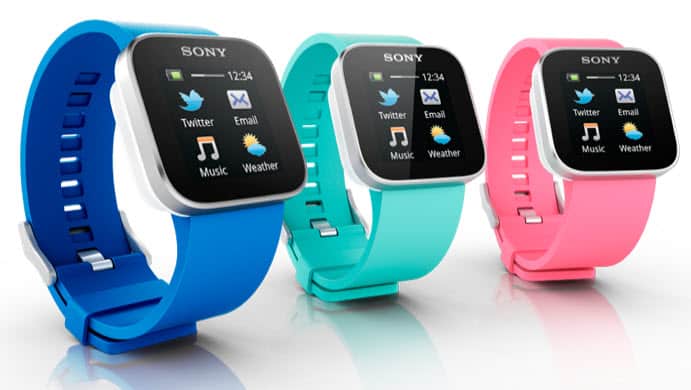
Earlier this month, Google had revealed their Augmented reality Glass smart phone. Now Sony has unveiled the innovative Android Smart Watch which keeps you updated with text messages (SMS), e-mails, Facebook updates and Twitter updates as well with the help of your Sony mobile.  Along with this you can also manage your phone calls, control your music player and camera of the mobile which you have connected to your android smart watch. This Android Smart Watch is compatible with the latest Sony mobiles including Sony Xperia Sola, Sony Xperia S, Sony Xperia neo V, Sony Xperia ray and many other recent releases of Sony mobiles and Tablets. Not only Sony but it matches perfectly with other brands including HTC, Motorola and selected mobiles from Samsung Galaxy series. Of course there are many smart watches available in the market but the brand matters and i.e. SONY. Sony’s android smart watch is pretty cool which comes with black and white color.

Android Smart Watch : Features

Sony Android Smart Watch comes up with 1.3? Multi-touch color OLED display which is powered by Android operating system. It can be communicated with the phone within 10 meter of range with Bluetooth technology. It is scratch proof and water resistant which runs perfectly in any weather condition. Sony Android Smart Watch allows you to-

  • Pick, reject or mute the phone calls
  • Have a look at SMS, emails, date & time and calendar reminders
  • Check your Facebook and Twitter updates
  • Change, play or pause the music track
  • Control the mobile’s camera which is connected to your android smart watch

You can even download Android apps for your Android Smart Watch from Google Play. As the tech giant Sony is behind this, the users of Android Smart Watch can expect robust android apps dedicated specially for this smart watch in the near future.

android smartwatch india

Android Smart Watch : Price in India

Sony Android Smart Watch is price tagged with $149 (approximately Rs.7,500/- when converted to Indian rupees). You can buy Sony Android Smart Watch from the official website of Sony. Sony is also offering “Buy and Try” option that means Sony will refund the entire amount if you don’t like Sony Android Smart Watch. You must inform the Sony within 14 days of period to get back your money.

What is Social TV? What Impact Does Social TV Have?

If we look back, we see how much we have come forward when it comes to the way we watch television. Our TV watching habits have gone under a major transformation with the rise of the streaming service industry and its phenomenal growth. But even with the evolution of newer technologies offering more platforms to watch TV shows, movies, and all forms of entertainment, TV remains a central part of the American lifestyle and occupies a core position in almost every house. We all love plopping into our sofas after a long, tiring day at work, grabbing the remote, turning on the TV, and watching an entertaining show. What makes it even better is choosing a good cable TV subscription like TWC TV, so you can have access to the most extensive channel lineup. But imagine, if you can do something more than just watching TV on your own? 

Wouldn’t it be amazing if you could use Facebook and Twitter at the same time? Well, it is no longer just a fantasy. It has now turned into a reality. You can achieve all this by participating in social TV. If you are wondering what is it all about, this post has it covered for you, including what is social TV, its impact, and other prospects. Social TV is the outstanding fusion of television with social media, and it is as exciting as it sounds. So,  let’s get going!

What is Social TV?

Social TV is a blend of both social media and television. It occurs when people share their TV experiences on various social media platforms including Facebook and Twitter, etc. In other words, when people talk about their TV experiences with friends and family on various social media platforms, it is called social TV.

So, we can say that any social media interaction regarding any TV show that’s airing in real-time is referred to as social TV. Marketing heads of big television networks can get a better insight into viewer psychology by keeping a track of these interactions. They can gather this information to target the users in a better way. Since millions of people are using various social media platforms, so marketers have access to an enormous amount of useful data that they can analyze while designing their marketing strategies

Impact of Social TV on Advertising

The shows which enjoy an enormous amount of online engagement and have a massive committed audience consist of viewers who would want to watch many episodes without switching the channel that’s running ads. This is what matters to the advertisers. 

The active participation in online chats while engaging in a show makes the audience more committed to watching the show to catch all the hype. Social shows are, therefore, of great benefit to the advertisers. Thus, the positive effect of social TV leads to greater involvement in ads.

Halo Effect and its Impact on Ads

The highly committed viewers who actively follow social TV have a higher level of attentiveness, and this changed cognitive state can be put to good use for processing ads. This is why an increased level of viewer attention is observed towards the ads and they are more susceptible to proceed towards purchases while being involved in their favorite social shows, as part of the halo effect. 

How TV and Social Media Work Together?

  • Reality Shows 

The main idea behind social TV is to engage a wider audience while they watch their favorite shows. Reality shows are among the top favorites and play a big role in connecting an enormous audience on various social media platforms like Twitter or Facebook. Shows like the X-Factor or The Voice took over the world by storm, introducing fun activities online where viewers were asked to tweet their voice notes during the live show. Similarly, The Voice engaged the audience to share instant responses on social media platforms including tweets and hashtags. 

  • Brands Using Social TV

Brands make use of social TV for maximum audience involvement and participation. Big names like NASA have incorporated IGTV to promote information-based short videos on interesting topics. This is how social TV is catering to a vast audience, who can learn new things without any additional cost. 

We also saw Netflix using the IGTV channel as an effective part of their marketing strategy. This is how it gains maximum attention from viewers who simply love the compelling content including video promotions or interviews, etc. put on IGTV. 

Wrapping Up

Social TV has immense potential as it offers a more personalized TV watching experience to the viewers. Marketers and advertisers can benefit greatly from the information collected through the viewers’ interaction on social media to get a better understanding of which audience to target. Brands can also focus more on user demand and create more relevant content that reinforces their brand image to generate greater online traffic. 

How to: Run Android Apps in Windows PC

The title “How to Run Android Apps in Windows?” looks somewhat weird but here we are going to let you know about the software which can run Android Apps in Windows without any hassles. Google play which was known as android market earlier comes up with hundreds of new apps every day and there is no doubt that these Android apps and Android games are addictive. But the fact is that you can’t install all of these apps and games to your android mobile as you also need some memory and storage for your personal stuff and of course installing lots of apps also slowdowns the phone.

So the solution for this is to “Run Android Apps in Windows” which let you enjoy Android apps and games in your windows operating system. Running apps on pc before installing them to your mobile is good idea to test them, so if you like that app you can further install it to your android device or just hunt for an another cool app. Below is the step-by-step guide to Run Android Apps in Windows.

Run Android Apps in Windows Computer: Steps>>

  1. Navigate your browser to http://www.bluestacks.com
  2. BlueStacks is an android app player which is available for free during its beta release, download bluestacks software from BlueStacks website.
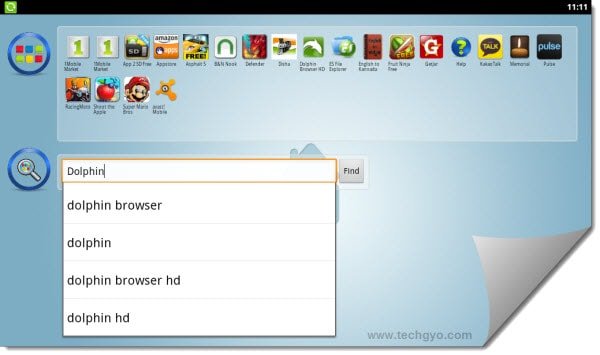
  3. Start BlueStacks software once downloaded and installed, BlueStacks also comes up with some pre-loaded android apps.
  4. You can search for your favorite android apps and install them from 1mobile market, amazon apps or from GetJar market
    run android apps in windows
  5. BlueStacks automatically sets the resolution of the app or game you run on it by analyzing the app. You can run almost any android app in Windows using BlueStacks.
    run android apps in windows

By using BlueStacks Not only you can run android apps in Windows but also sync your apps, photos and SMS between your Android mobile and computer. After installing BlueStacks, you will be provided with the PIN to pair your PC with your Android mobile which lets you sync the stuffs between your PC and phone. So what are you waiting for? Just download BlueStacks and enjoy Android apps and games on windows.

How to Make Conference Call With ooVoo Free Video Conferencing?

Conference call connects two or more people with video and audio for many purposes such as online meetings, medical assistance, consultation and work from home or on the go etc.. In this post, we have provided a brief tutor that let you know how to make conference call using ooVoo conference calling service. There are many free and affordable conference calling services available on the web that provides free software to make video calls and ooVoo is such a free conference call service that offers-

  • 12-way video conference: video conferencing allows up to 12 people to chat face-to-face at the same time with 3D or 2D appearance.
  • Call recording: You can also record the video chats at ooVoo and save them as AVI or FLV format.
  • Files sending: with ooVoo conference call it is possible to send files with ease.
  • Upload Videos to YouTube: ooVoo also allows us to upload recorded videos directly to YouTube without any hassles.
  • Along with these features, the free conference call app has a clean and user-friendly interface that could be understood by everyone.

Basic requirements to make a conference call using ooVoo

ooVoo has awesome video quality with clear sound. For a normal quality conference you need up to 128kbps of downstream bandwidth and for HD quality it requires 384kbps downstream or upstream bandwidth. 1.3 megapixel or higher webcam along with a microphone are the essential devices needed to start your video conferences. Here is a short tutorial on how to make a conference call using ooVoo conference calling service.

How to make conference call using ooVoo video conferencing software?

To start video conferencing, first of all, we need to have ooVoo conference calling software which could be downloaded from this link. Once downloaded and installed ooVoo-

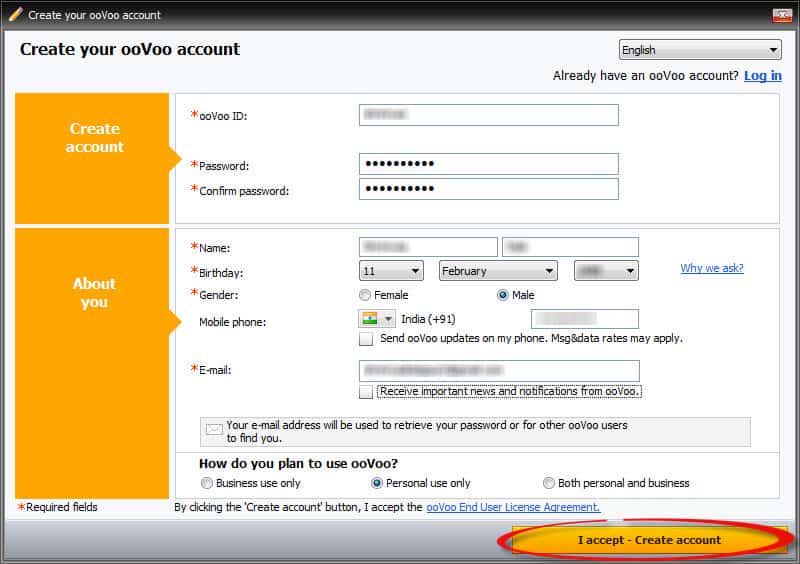
  1. Run the application from the start menu and you will be prompted to create an ooVoo account.how to make conference call
  2. Fill out the ooVoo account form with appropriate details and click on “I accept- create account” button
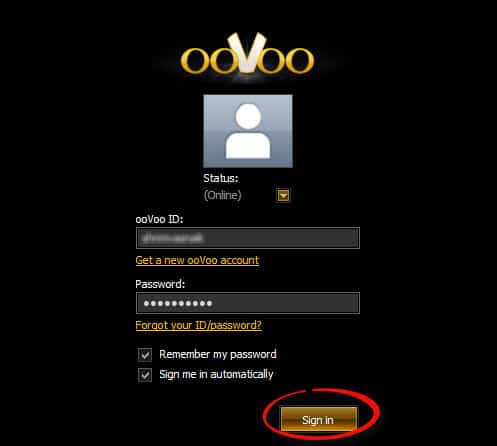
  3. Once your ooVoo account is created, log in using your username and passwordaffordable conference calling
  4. You will see a list of online friends on ooVoo, now just Double click on your friend’s picture or click on the video call icon located at the right side of respective friends name
  5. Now your video call gets started on the new window
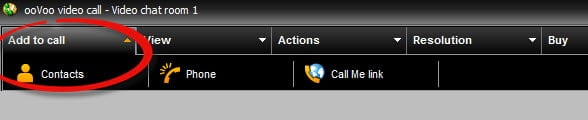
  6. To add more friends to current video call (up to 12 people), click on “add to call” from the menu bar above and choose “Contacts”. Further click on the friend which you wish to add to the conference call that being held. That’s it…
    how to make conference call

How to make conference call with friends who don’t have ooVoo?

You can add your friends to your toll-free call who don’t have ooVoo software installed in their PC or laptop. Follow the top 5 steps specified above and let them know your “Call Me link” by SMS or email or you can just share that link on your Facebook wall and tell them to navigate to a specified link using their browser. That’s it…

Now your friends can join your conference call directly from their browser.

[youtube]http://www.youtube.com/watch?v=5VMZ2AcP0Hs[/youtube]

Conclusion

You have just learnt how to make conference call using ooVoo which provides free service for basic conference. For Corporate purposes, one can go for ooVoo premium plan which costs just $4.99 per month. In my opinion ooVoo, the free plan provides more than enough options and features for home users.

Sony Xperia Sola – Think Beyond TouchScreen! (Specs and Price)

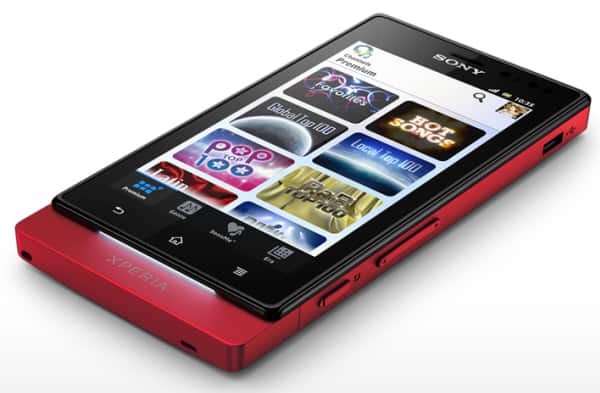
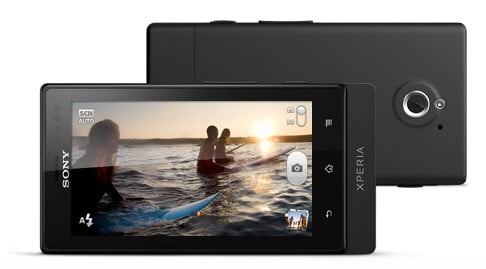
If you are still engrossed in Galaxy S3’s features then it is the right time to come out and experience something new. Yes, Sony Xperia Sola will surely make you think about it with its all new innovative features and smart functions. Sony Xperia Sola is an Android powered mobile with 1 GHz Dual Core Processor. Here is Sony Xperia Sola review with specifications and features.

Also read:

Sony Xperia Sola Specifications

Processor, Memory and Storage

Sony Xperia Sola is powered with 1 GHz  STE U8500 Dual Core Processor with 512 MB of RAM for faster and smoother performance. The mobile has 8GB of internal memory and has a microSD expansion slot supports upto 32GB. User can access upto 5GB from available 8GB of internal memory, the rest 2GB is used by phone.

sony xperia sola

Display

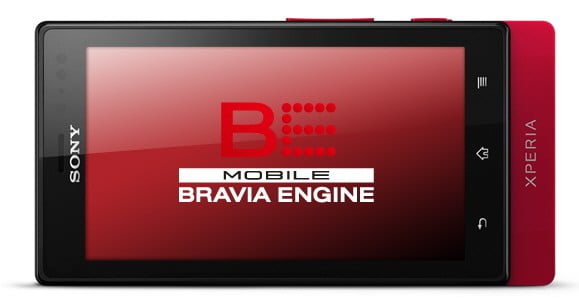
Sony Xperia Sola has 3.7” display with capacitive touchscreen. It uses Mobile BRAVIA Engine with 854×480 pixels resolution for an excessive video experience. The display comes with scratch-resistant glass for maintenance free usage.

sony xperia sola review

Camera

5 megapixel camera with LED flash incorporated in the mobile can take high quality photos and shoot HD videos with 16x digital zoom. Sony Xperia Sola’s camera features face and smile detection with Fast capture. Videos recorded from Sony Xperia Sola can be saved as either 3GPP or MP4 format.

sony xperia sola price in india

Operating System

Sola is powered by Android 2.3 Gingerbread operating system which can be updated to Android 4 Ice Cream Sandwich.

Connectivity

Sony Xperia Sola has advanced connectivity features including 3G, Wi-Fi with Hotspot functionality, Bluetooth 2.0, Micro USB, aGPS and NFC. Along with these connectivity features Sola comes up with 3.5 mm audio jack to use with headphones or speakers.


Sony Xperia Sola Features

Floating Touch

Sony Xperia Sola’s floating touch detects your finger even it is not touched to the screen and highlights the object of that area. It is useful indeed to avoid the clicks on wrong links when you surf the web. This feature is specially innovated for surfing the internet in Sony Xperia Sola for rich surfing experience.

SmartTags

Sony Xperia Sola is capable to change it settings with SmartTags. SmartTags are nothing but the small round shaped NFC device with vivid colors. Just keep them in the home, car or office and tap your Sony Xperia Sola at the respective places to change the phone settings including turn on/off Wi-Fi, launch news or weather app and keep your mobile in silent, meeting or general profile.

Entertainment

Sony Xperia Sola is dedicated for entertainment with endless possibilities. With the Sola user account one can listen to unlimited music and watch HD quality movies on the go with Sony’s Video Unlimited and Music Unlimited services. Audio quality of Sony Xperia Sola is awesome, it uses xLOUD Experience and 3D surround sound for unbeatable audio output. TrackID music recognition and FM Radio with RDS simply rocks your world.

Sony Xperia Sola Price

Sony Xperia Sola is tagged with Rs.19,999 and one can make a pre-order at flipkart. The mobile is about to release on 4th week of May.

Conclusion

Sony Xperia Sola is purely an entertainment mobile with innovative features and stylish look which is available in three different colors including red, black and white. It includes useful apps such as Facebook, Twitter, Gmail, YouTube, Google Gallery 3D, Google Voice Search, Android Market(Google Play) and Instant Messaging to make life easier than ever. The phone is very light weight with just 107g which suites your pocket.

HTC One X Review with Features

0

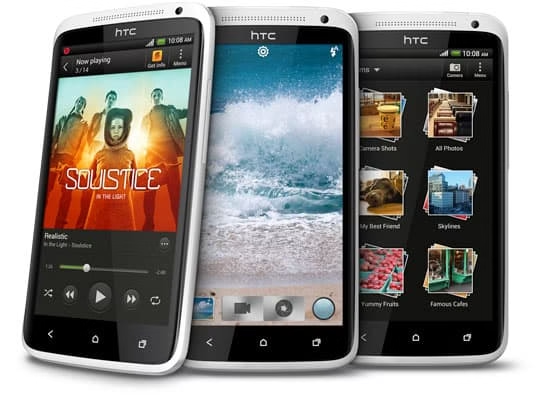
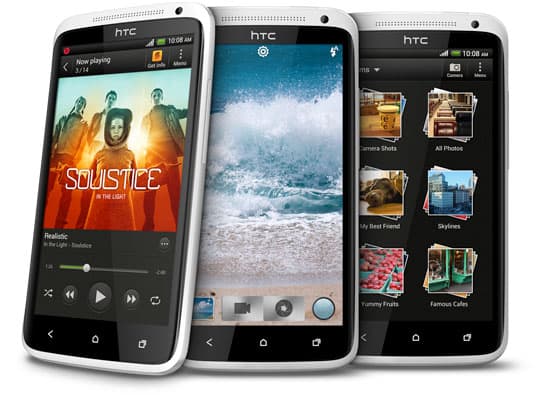
HTC One X is from the HTC’s One series the Predecessor of HTC Inspire 4G, HTC Vivid. HTC Presents the One X with powerful quad-core processor and Android™ 4.0 with HTC Sense™ 4. That gives you fast web browsing and also extremely seamless picture quality and gaming experience. And no doubt about it you will definitely love the design, A clean design meets 4.7-inch  HD 720p touch Screen with rounded piano-gloss sidewalls. HTC One X has a awesome  camera and its lets you take photos while you shooting HD videos. And also you will love the sound clarity of HTC One X .

Also read:

HTC Explorer: Latest Android Device Announced by HTC

HTC One X

Features of HTC One X


Capture video and pictures at the same time

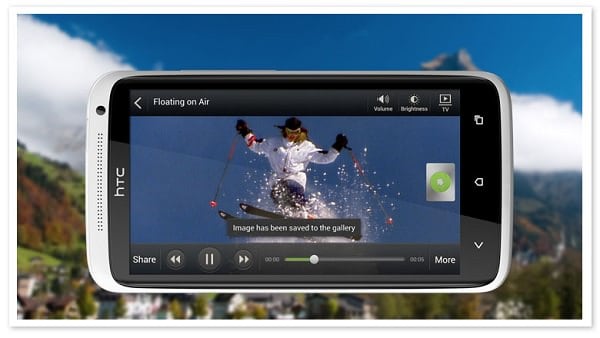
The camera on HTC One X is One of the most efficient and fast start up. it will start With in a second so it never lets you Drop your any moments from it. The photo and video capture buttons are on the same screen so it’s very easy to switch from one mode to another.

HTC One X Camera

Continuous shooting

With Continuous shooting you will never ever miss a short from your camera. You just press and hold the shutter button now the camera capture the pictures till you release the shutter button, Great isn’t it ?

Authentic sound for all media

HTC One x ‘s sound quality may be a different experience, And integrated music experience makes it easy to access all your music libraries, favorite audio apps and Internet radio simultaneously from one suitable location.

Quick access to your top apps

Access your favorite Apps very easily and quickly with a single touch, Now you can set your phone to get quick access to your weather updates, stock information and also you can see your friends Facebook status and your to-do list also.

Overview On Camera, Sound & Design

run android apps in windows


Amazing camera

You never miss a shot from HTC One x ‘s camera. It will capture every moments of your life which you never wanna miss ever, Because it will start with in a second, And you can take photos while you shooting videos  also will get the best picture at any condition of bad light or back light or any thing it doesn’t matter to get your photos. The Rear Camera is 8MP and the front Camera is  1.3MP.

Authentic sound

HTC One X presents Authentic sound with Beats Audio™ that you will definitely love it whether you playing a music or game or if watching video. The device only comes with a standard set of headphones that gives u massive sound clarity and the original affect of true voice.

Minimalist design

The beautiful Minimalist design gives you a perfect and stylish look, Minimalist design meets a 4.7-inch infinity screen with smoothly rounded piano-gloss sidewalls, and curved back gives more beauty to HTC One X.

[youtube]http://www.youtube.com/watch?v=h0sKSHD0Y1U[/youtube]

The configuration of HTC One X

  • Size: 134.36 x 69.9 x 8.9 mm
  • Weight: 130 grams with battery
  • Display: HD 720p touch
  • Screen: 4.7-inch (1280 x 720 resolution)
  • CPU speed: 1.5 GHz, quad-core (global version)
  • Platform: Android™ 4.0 with HTC Sense™ 4
  • Memory: Total storage : 32 GB, RAM:1 GB
  • Bluetooth with aptX™ enabled (Bluetooth® 4.0)
  • Wi-Fi: IEEE 802.11 a/b/g/n
  • Sound enhancement: Beats Audio™
  • Battery Capacity:1800 mAh

Conclusion

These are the key features and overview on HTC One X Android smart phone. The new features included in HTC One X is must be new experiences form HTC that you will love it. So do let us know which factor is you loved more.