Home Blog Page 325

Useful Chrome Extensions for Web Developers

Google Chrome is an ultimate web browser which supports extendibility through it extensions. There is no doubt that Google Chrome is changing the web experience since its launch by its new feature. It has thousands of extensions to add for all kind of people and professions. An Accountant can add the chrome extension that helps in his job, a businessman can choose an extension which keeps him updated in his business or an investor can choose to install stock market ticker extension to get the updates. In the same way there are many extensions available on the chrome web store that are helpful for web developer.

Here are some useful chrome extensions for web developers.

Pendule

google chrome extensions for web developers

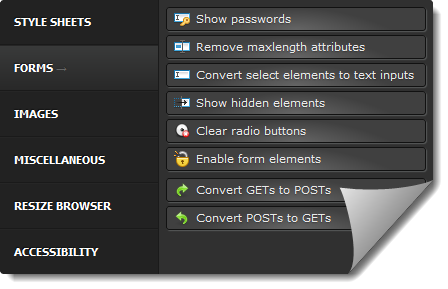
Pendule is an all in one tool for web developer and web designer. It includes the set of tools and options to mingle with webpage and CSS. Pendule has 6 main categories and each category contains the set of useful tools, most helpful options are [in CSS] View CSS, Reload CSS and Disable all styles [in web forms] Show passwords, show hidden elements, clear radio buttons, enable form elements and convert form methods [in images] view images information, hide all images and hide background images [in miscellaneous] view java Script, view generated source, ruler, color picker and remove cookies from current site [Resize Browser] Resize Browser allows to resize the chrome browser to test your website In various screen resolutions. [Accessibility] Validate HTML, Validate CSS, Validate links, Validate feed, Validate accessibility (WAI), Validate local HTML and Validate local CSS.

Web Developer Extension

best web developer tools

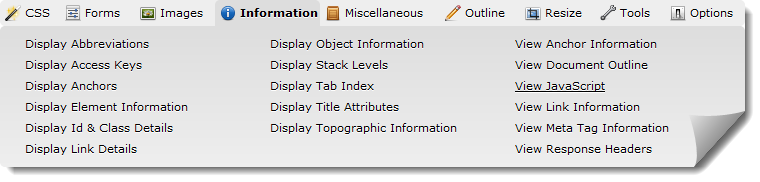
Web Developer extension is similar to Pendule but has some additional features. Here we get the new category called information where we mainly get meta tag information, link information, topographic information, java script, anchor information, document outline and title attributes etc. Web Developer extension for Google Chrome lacks the features like view generated source, cookies menu, disable menu and some others useful features that Pendule is having.

Live CSS Editor

website development tools

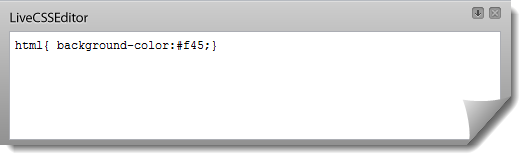
Live CSS Editor is a quick CSS editor which provides a text box on the present webpage to write CSS quickly and get the results on the page instantly. It is also possible to save the styles you create for the pages you visit

Page Ruler

best web development tools

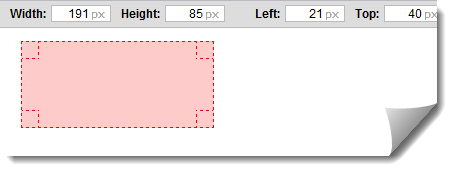
Though Pendule and Web Developer extensions have built-in ruler option, they don’t show the X and Y axis. Therefore here is the chrome extension that is very helpful for web designer to measure the webpage. It shows width, height and position of the selected area. A new ruler icon appears once it is installed and then we can start measuring the page by just dragging on the page. We can even get the size of particular image or an object by using the combination of Ctrl + Click. We can also change the parameters including height and width manually. Page Ruler is a free extension which is a best and must use resource for web designer.

Universal Security For Your Digital World By Kaspersky

0

kaspersky one We use many devices regularly including laptop, desktop, smartphone or tablet to complete assigned tasks, communication or entertainment % we can’t even imagine our life without them. But what about the security for these devices?.. Because evil minds spreads thousands of viruses, malwares, trojans & root-kits every day. Earlier it was only the question of PCs and laptops but now harmful viruses are rushing towards android smartphones/tablets, iPhone & Mac and stealing the valuable data such as mobile banking account information and other confidential account information.

You should also read my vipre antivirus review

Mac which was generally considered as a safer OS recently got infected with the nasty malware called Flashback..  These are just a few examples to depict how the threats are being stronger to hack the digital world.

Kaspersky ONE – Single Suite For Multiple Devices

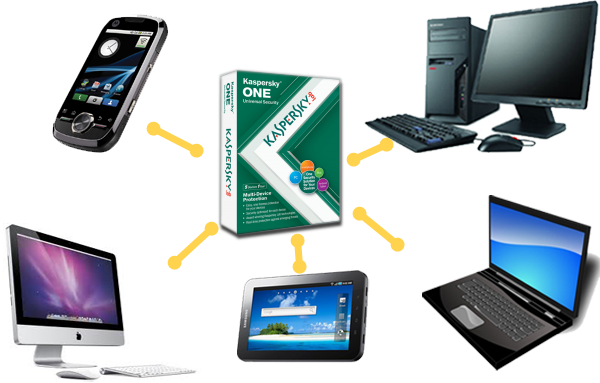
The situation can’t be neglected that the virus attacks to your mobile could also infect your PC or laptop when you transfer the data via Bluetooth or any other connectivity option. Therefore one must go for a universal antivirus product that protects multiple devices including Android tablet/smartphone, Notebook, PC and Macbook. Kaspersky-ONE Universal Security is such a product which promises to protect your digital world. Kaspersky is the award-winning suite that has come up with Kaspersky ONE Universal Security. In this security suite you get two options and those are you can either choose to install it in desktop, two laptops, & two smartphones or protect two tablets, two smartphones, and a Mac. Kaspersky One Universal Security supports Android, Blackberry, Symbian and Windows Mobile.

Kaspersky-ONE Universal Security comes up with single license which works smarter in PC, Mac, smart phone and tablets without slowing down the device. Kaspersky’s advanced features including-

  • Proactive detection
  • Advanced identity theft
  • Phishing detection
  • Two-way firewall anti-spam protection

not only keeps your device safe from unknown viruses but also secures your online shopping and bank transactions. In my opinion Kaspersky-ONE Universal Security is a total security suite which works restlessly behind the scene to avoid viruses, malwares, trojans and any other threats and make your digital world secure. Kaspersky-ONE Universal Security is a single solution for multiple devices with single license which avoids installing multiple antivirus apps for each devices.Highly recommended Kaspersky-ONE Universal Security can be downloaded as a trial or purchased from Kaspersky website.

Share Your Opinion for the gift coupon of $400 from Kaspersky

Liked Kaspersky-ONE Universal Security? wanted to say something about it? Here is an opportunity which could help you grab the gift coupon of $400 from Kaspersky for sharing your opinion. Just write the comment in widget below provided by BlogFrog and test your luck to win a $400 Amazon gift card.

This post is sponsored by Kaspersky. All opinions are 100% mine.

If you’re like me, you’re addicted to your smartphone, tablet, maybe even your laptop. What is your best tip for keeping all of your devices protected? Comment below and you’ll be entered to win a $400 Amazon gift card from Kaspersky Lab.

One way to protect all of your devices is with Kaspersky-ONE Universal Security. Download your FREE trial today.
This is a sponsored conversation written by me on behalf of Kaspersky. The opinions and text are all mine. Official Sweepstakes Rules.If you’re like me, you’re addicted to smartphone, tablet, maybe even your laptop. What is your best tip for keeping all of your devices secure? Comment below and you’ll be entered to win a $400 Amazon gift card from Kaspersky Lab.
One way to protect all of your devices is with Kaspersky ONE Universal Security. Download your FREE trial today.
This is a sponsored conversation written by me on behalf of Kaspersky. The opinions and text are all mine. Official Sweepstakes Rules.
If you’re like me, you’re addicted to your smartphone, tablet, maybe even the laptop. What’s best to keep all of your devices secure? Comment below and you’ll be entered to win a $400 Amazon gift card from Kaspersky Lab.
One way to protect all of your devices is with Kaspersky ONE Universal Security. Download your FREE trial today.
This is a sponsored conversation written by me on behalf of Kaspersky. The opinions and text are all mine. Official Sweepstakes Rules.

This is a sponsored conversation written by me on behalf of KasperskyLab. The opinions and text are all mine. Official Sweepstakes Rules.

Protect Your MAC with Avast AntiVirus

0

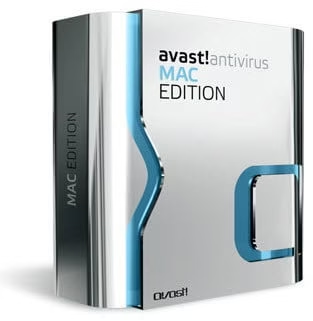
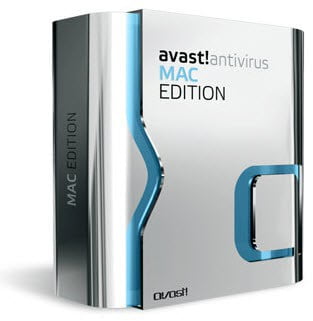
avast for macAfter a great success in Windows and Mobile antivirus, Avast has now developed an antivirus for Mac operating system. Avast has initiated its development towards MAC to safeguard it from the hackers who started targeting the MAC these days with viruses, malwares and Trojans. Flashback was the recent malware which can be taken as an example over here which was danger enough to hack the confidential data from MAC OS.

However company says “avast! Free Antivirus for Mac”, it is limited to trial version for 60 days. Avast for MAC has been completely redesigned to suite the style of MAC OS, development team has not used the color combination of black and yellow as in Avast for Windows.

You should also read my other antivirus reviews ; vipre and Kaspersky and Bitdefender. And also list of 300 most useful softwares

What would I get in Avast for MAC?

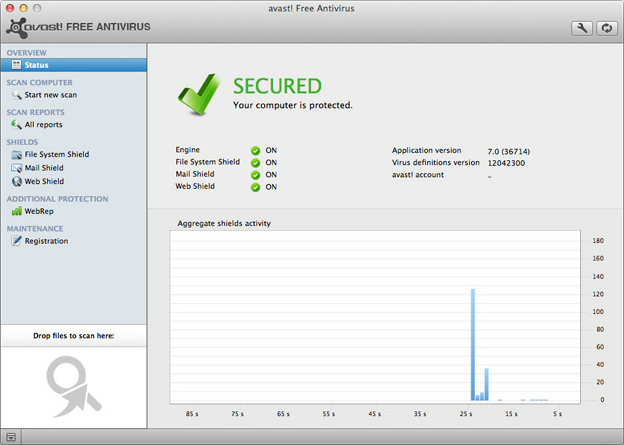
Comparing to Avast for Windows, Avast for MAC has limited functionalities. The left navigation panel consists of 8 options and an area to drop the files to scan. Alike Avast for Windows, Avast for MAC contains –

  • Status: to display the status of the shields, engine and definition updates
  • Start new scan: it consist the scanning options including full system scan, local volumes scan, network volumes scan, removable volumes scan, test’s home scan and custom scan
  • All reports: to display all scanning summary
  • File System Shield: to shows the activity of real-time scanning
  • Mail Shield: to display the activity of mail shield, that handles the protection of incoming mails
  • Web Shield: to show the activity of web shield that mingles with web traffic
avast for mac

Along with these WebRep and Registration options are there to rate the website and manage the registration information respectively. As it is first release, Avast for MAC has many drawbacks. The user interface could be even better. But one thing is good that MAC has got the antivirus software from renowned company which has an in-depth experience in the field and user could expect more features and security in the near future.

System Requirements for Avast for MAC

Avast for MAC run smoothly on Mac OS X 10.5.x (Leopard), Mac OS X 10.6.x (Snow Leopard) and Mac OS X 10.7.x (Lion). It won’t run properly if you already have an antivirus protection installed in your MAC.

Avast for MAC can be downloaded from www.avast.com/free-antivirus-mac

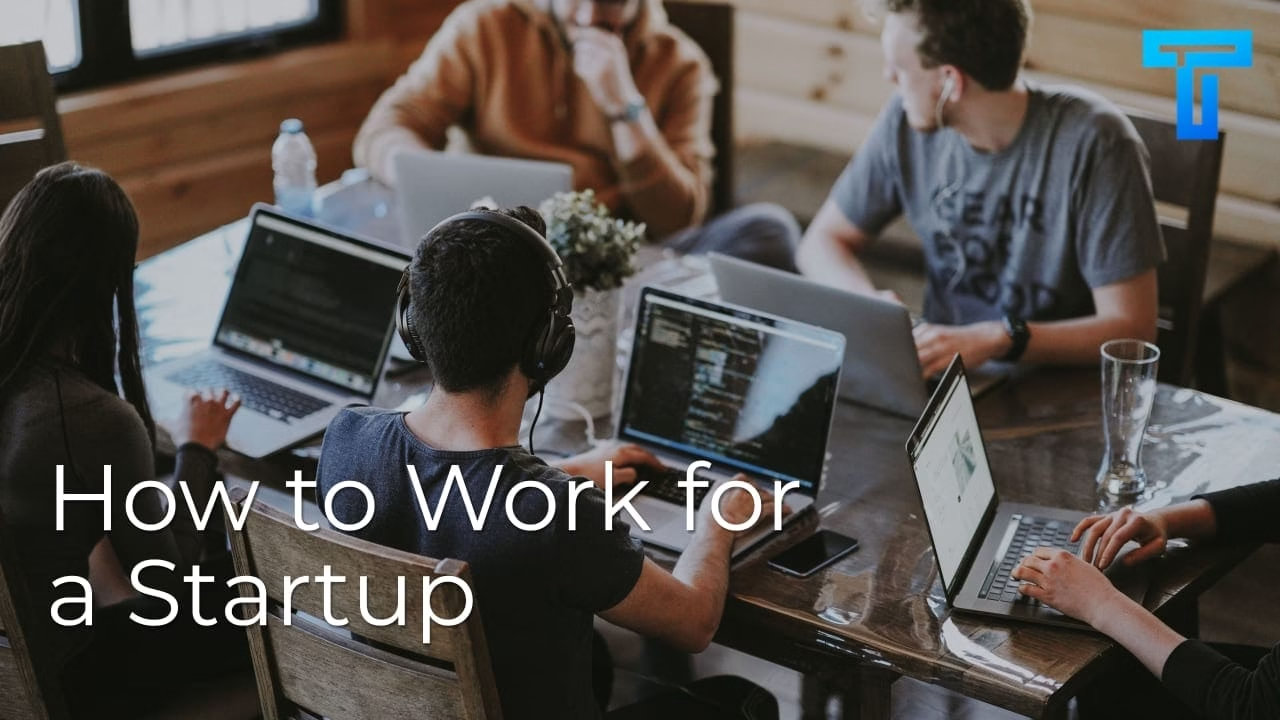
How to Work for a Startup

Startups offer opportunities: they can help launch your career, can help teach you so much about yourself, and typically offer a better work/life balance and working culture than more-established companies. Working for a startup isn’t for everyone, but if you are a pioneer and want to be part of establishing a successful business then looking forstartups can be a very smart move. 

The best startups to work for today are undoubtedly tech startups. These have the potential to be disruptive, and can gain huge notoriety and popularity. The good news is that, even if the product dies after the hype does, you are in a much more interesting position professionally than you were before. 

Benefits of Working in a Startup 

There are so many benefits of working in a startup:

  • You will immediately have more responsibility 

If you want to work your way up the career ladder fast, then a great way to do that is by joining a startup. This works wonderfully if you have just graduated, especially if it is in a business or marketing subject. If you have a business analytics masters but no professional experience, a small startup may be willing to give you a chance since they need your expertise but have a limited budget. In exchange you will immediately have more responsibility and more opportunities to learn and improve yourself. 

  • You will have far more opportunities 

You will have more opportunities to learn new skills and advance your career; and with the right dedication you can truly become one of the core, essential persons on the team and work to make serious improvements to the business as a whole. When it comes to your future this can either set you up as a leader right at the start as the company grows, or if you need to move on it will give you plenty of winning examples of why you are the best person for the job. 

  • You will have more control over what you do


All roles in startups tend to be more flexible. If you start off in a more junior role you can quickly ask to take on more and work on the projects that you find interesting. You can work horizontally, vertically, and more. Learning is also far more prioritized in startups since they know the best way to gain better talent at their stage is for their existing employees to become more talented. 

  • You will be mentored closely 


Since startups are small you will often be working directly with the founders and other thought leaders in your team. You will have these great, passionate people to learn from and who will typically be willing to mentor you in big or small ways. The only caveat is that you also need to be prepared to teach and mentor your teammates as well, so that you can all learn and grow and come up with new ideas that will help the startup take off. 

  • You will be recognized for your work 

Not only will you be recognized by the founder and the rest of your team for the work that you do, you will also be noted by the industry community itself. If you were the business analyst who made the operations so efficient that the startup has finally started to feature in the news and get big business, your name is going to be mentioned and it is going to be prominent. This is great for your career, though the opposite is also true: just as your successes will be recognized, so will your failures. Work with your team to spot-check your strategy, and work to minimize the risk of serious failures, and you will thrive. 

  • You will have a great work environment 

Startups are notorious for having a great work environment. Everyone is learning as they go, including your bosses, and there is typically more space for comfort and flexibility in how and where you work. Not only that, but when you work for a startup you have a much bigger voice, meaning that you can make suggestions and seriously adjust the working environment to suit you best. 

  • You will have a great team dynamic 

Startups have very small teams, meaning that you will know everyone by face, name, and probably their favorite food, to name a few. Though there is no guarantee that you will love everyone who you work with, the team dynamic will be far more important than in a corporate setting. This means that you will need to learn how to work together and around each other, and this inevitably serves to foster stronger connections. If you want to work in a tight-knit team, then a startup is the place for you. 

How to Work for a Startup 

To work for a startup, especially in a field such as tech, you will want to use these tips: 

  1. Find the Job 


One of the first challenges is finding startup job openings in the first place. The good news is that being a go-getter is to your advantage. Always keep an eye out on the job boards as it is impossible to know every new startup and you may just find a great new company to work for by accident. If there is a specific startup that you want to work for, however, then draft a pitch and reach out to companies directly. If you have a network connection then get in touch and use that network to your advantage. Showing your direct interest in that specific company can make a big impression on a small brand, even if they cannot hire you full-time right out of the gate or don’t have the budget for you at all at the moment. You make that connection, and you can keep it so that when the startup is ready you are the first person they think of when they want to hire someone in your role. 

You can find great startups through social media, and even by working at a hot desk in a coworking space. Being social is key, but the good news is that many passionate startup CEOs and employees love to talk about their project. 

  1. Build a Network 

There are many ways that you can use your network to find and work for startups. Many startups begin as an idea someone has that they want to talk about and workshop with others. You can offer advice and be a mentor to these upstarts from day one just by offering advice and being active on professional websites such as LinkedIn or The Dots. 

You don’t need to work for every company that you help online, but you will want to nurture that connection and the network. You never know when a startup can become an opportunity, or when an old connection can lead to a great new position. 

You can even be there from day one in your role, even if you don’t have the specific experience that corporate companies would look for. More often than not, having great ideas and a willingness to workshop them and bring them to life is all you actually need to attract the attention of a startup. From there you will be able to continue to learn and develop your skills. 

  1. Stand Out in the Interview 

If you want to stand out in the interview you need to show you can do more than the job that you are applying for. Startups need thinkers and they need team players. Come to them with many ideas that are specific for their brand and how you think you can help. They don’t need to all be winning ideas, but they do need to put the startup in the forefront and show your dedication, passion, problem-solving abilities, and creativity. 

  1. Improve Your Own Personal Brand 

Working in startups is fun. Find the right startup and you can even kickstart your career by learning as you go and quickly becoming one of the most important figures in the company. If the company succeeds, you succeed, and you should use that success to build up a personal brand while you are at it. 


There are many ways to build that personal brand, and many reasons to invest the time and energy in doing it. For you, it works to solidify your position in the business world. If you don’t have to introduce yourself then you already have more options and opportunities than most. Having a good reputation that precedes you in business will make business deals easier and it will also open many more doors when the time is right for you. 


Building your own personal brand and reputation will also help the startup that you are working for. Having multiple employees who are celebrities in their own right will put more eyes and investments on the startup company itself. This has a positive feedback loop where your PR work improves the company’s PR, and the company’s PR improves your own standing and reputation. 

Swf downloader online-Download SWF From Website

Do you like to play online games (flash games)? But fear to lose your bandwidth? Don’t worry here is the easiest trick that let you download flash games (swf games) with a single click. The trick we are about to discuss is simple which needs Internet Download Manager (IDM) software. By just adding some stuff to IDM we can easily download flash videos from websites or download swf file from website.with the help of SWF downloader online.

Also read:

Here’s how to configure IDM to SWF download file from website

  1. Open Internet Download Manager software
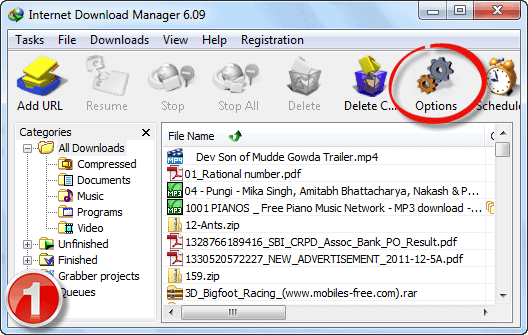
  2. Click on “Options” button from the toolbar
    swf downloader online-swf download
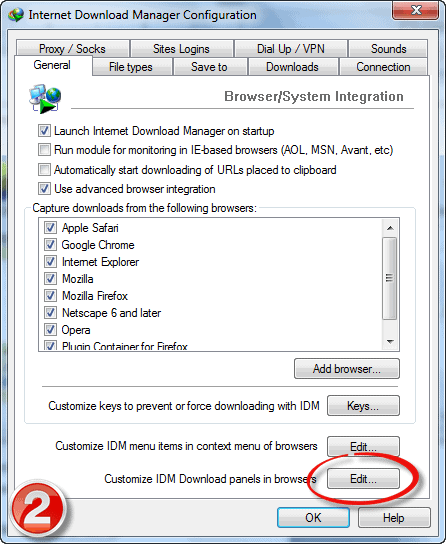
  3. Now click on “Edit” button located beside “Customize IDM download panels in browsers” text (bottom-most button in that panel)
    swf downloader online-swf download
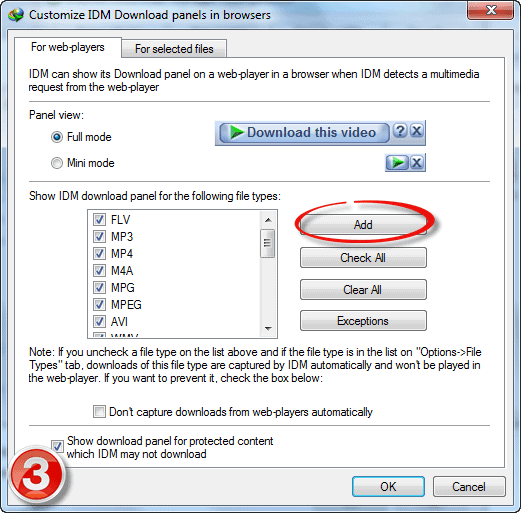
  4. Now you can add the file formats by clicking on “Add” button
    swf downloader online-swf download
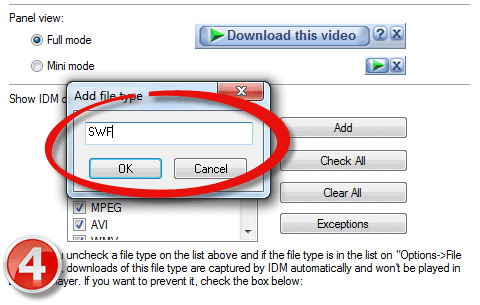
  5. Specify the file format as “SWF” (without quotes)
    swf downloader online-swf download
  6. That’s it. Now click on OK button twice
  7. Now restart your browser and navigate to any website which contains flash game or animation (SWF content), Now you could see the IDM download button above the SWF content which allows you to download the respective SWF with a single click.
  8. Finally just choose the destination on your PC to download the SWF file and enjoy flash games offline!

Ways To Maximize Flyer Template Usage For Startups

0

Flyer templates have been available for a while now and it is no secret anymore that they are one of the most used marketing tools in the modern business world. You will find their use in all kinds of businesses from small startups to big corporations.

Sure, you could say that they are making our life pretty easy these days. However, you must learn to use them wisely. Flyer templates do not work for all sorts of businesses out there. Learn how to choose the one that suits your needs best and read on for more ways you can maximize its use for your startup business!

Find The Right Flyer Design Template That Suits Your Business Needs Best

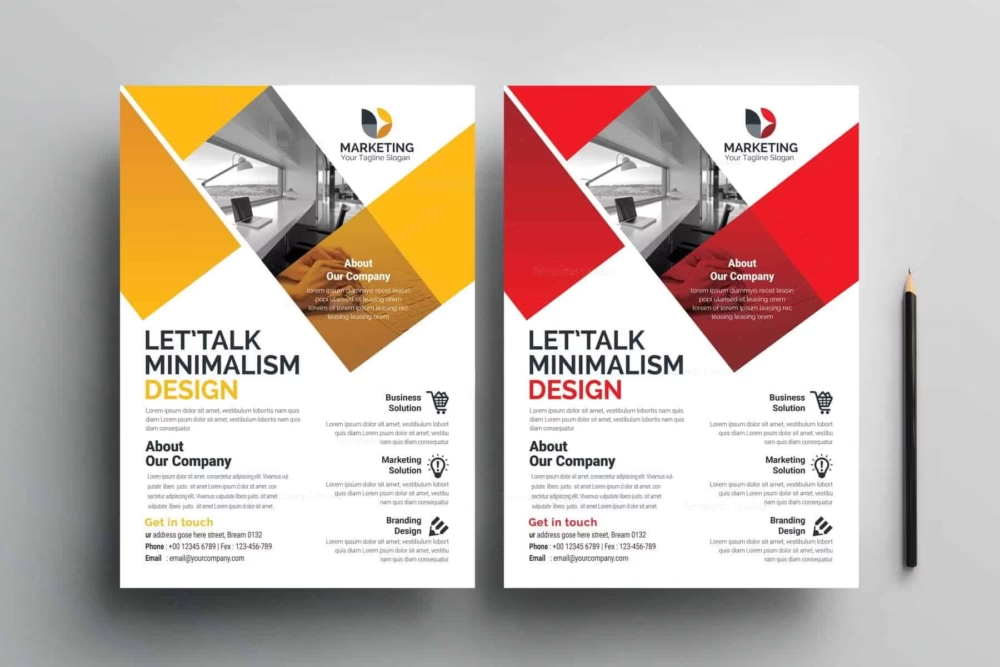
The first thing you will want to do before using any flyer template finds the right template which suits your needs best. You should keep in mind what kind of message or offer does your startup wants to put across while also requiring a template that fits in with your business branding. You don’t want to end up losing potential customers just because you used a certain flyer that doesn’t match up with the visual aspect of your company’s branding, do you?

Read Up On The Basic Terminology Of Business Flyer Templates

Once you have chosen the flyer template that suits your needs best, make sure to take a little time and read up on all of its basic terminologies. Every template has a few words or terms that are usually used during the design process which you will need to know about if you want to get things done properly.

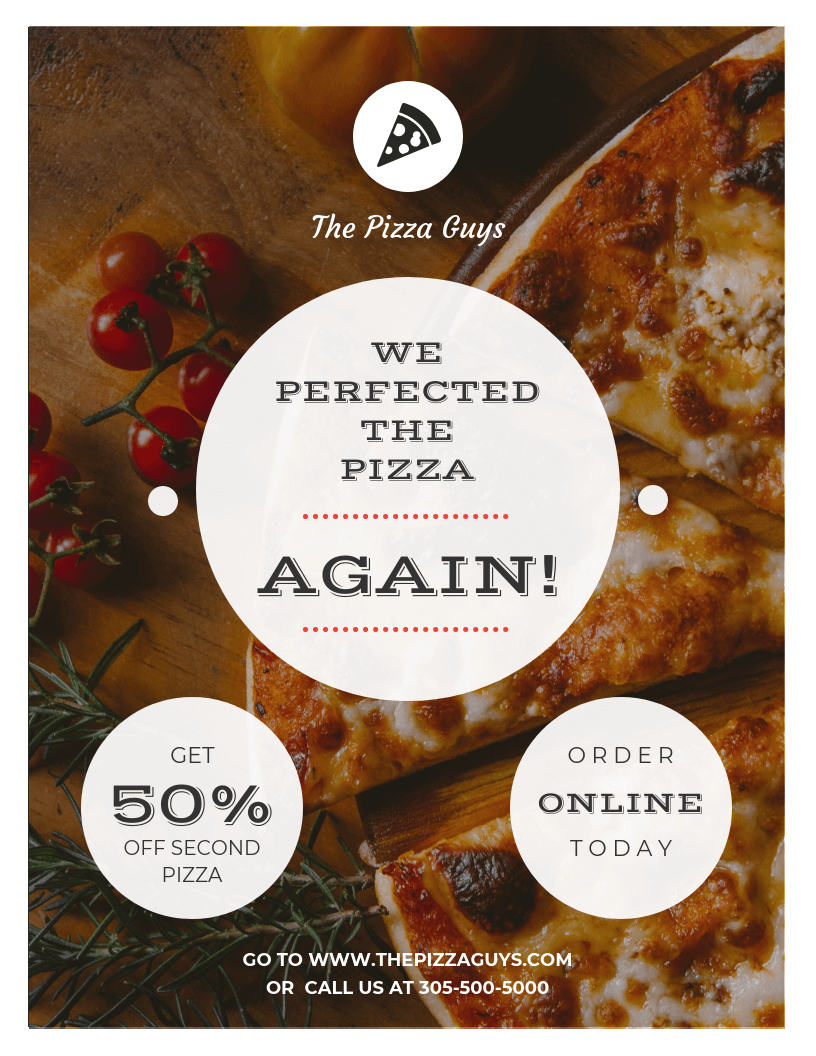
Venngage

Create Your Own Free Flyer Templates For The Best Effect

Of course, if there aren’t any suitable templates either letterhead templates or flyer templates for your particular needs, then it is time to create your own. Just make sure you know what you are doing when it comes to this. Even though these days anyone can be a graphic designer without even knowing how to use an application properly, drawing one from scratch takes some skill and creativity which might not be something everyone has. If you happen to lack either of these skills or simply don’t have enough time on your hands, then it is time to hire a freelancer for this job.

Include The Right Information In Your Business Flyer Templates

It is never a good idea to overload flyer templates with text and information. Keep it as simple as possible and make sure that you include what needs to be included and nothing more. The point of this marketing tool is to encourage potential customers to take some sort of action, whether it is visiting your website or calling your business office for more details.

Make Sure You Have A Strong Call To Action Button

Finally, make sure you have a very strong call to action button in the bottom corner of your flyer template design. This should be big enough for those who are not reading all the content on the flyer to see and understand it. If they don’t understand what they need to do next after reading your flyer, then there is no point in using it.

Print Quality Of Free Flyer Design Templates Is Important!

Since flyers are one of the oldest marketing tools out there, you will find that they come in all different shapes and sizes. However, no matter how old school they might seem by today’s standards, don’t forget that printing quality remains important even with these promotional materials. This means that you should always check them for any errors before printing one for an event or promotion of your business. A bad flyer with some horrible looks can leave potential customers with a bad first impression of your startup which you might never be able to recover from!

Venngage

Make A Good First Impression At Events And Promotions By Utilizing Blank Flyer Templates Effectively

Even though most people might use flyers just because they are cheap and easy to create, you should keep in mind that a flyer can also make a world of a difference if used properly. You could even say that the right promotional materials, such as custom flyers, for example, could be a recipe for success when it comes to startups! After all, they offer features that other marketing tools simply do not have out there. If you manage to utilize their full potential correctly, then you will never have any problems with reaching your target audience or attracting new customers! Just don’t forget about the tips from this article if you want to make sure your flyering efforts pay off.

Alright, so what are you waiting for? Go and do some great business with a Venngage flyer template! It offers a wide selection of flyer design ideas that will help you in starting your business. Be sure to check it out!

Conclusion

If you are a startup looking to promote your company in the most effective ways possible, consider using flyer templates. These templates can be used for social media campaigns or even handed out by employees when visiting businesses. Using flyer templates will help you reach more people and increase brand awareness.