Home Blog Page 235

Tips To Get Popular on Instagram

Instagram is known to be the fastest growing social media site. Boasting a total of three hundred million monthly users and growing, it looks like everybody wants to join this social site. My advice to anyone who does not have an Instagram account is, don’t be left behind. It is a fun, creative and innovative social media platform that can not only act as a place for interacting with followers, but can also be turned into dollars.

be-famous-on-instagram

Most people use Instagram for social purposes. Once you open an account, all you want to do next is to follow as many people as possible while you also want to get followed back. The point of Instagram is interaction, whether your interest is in a niche group of people with similar interests or it is with the main aim to garner as many diverse followers as possible.

Others use Instagram as a marketing tool. Most companies have opened accounts on this social media platform where they post their products or services. Most companies aim at getting more interests in their products through their followers. The most popular Instagram account today belongs to Nike.

In case you have been wondering how to increase the number of Instagram likes on your posts, I have a few tips for you:


  • Use filters appropriately


Instagram provides a number of filters to use for your photos. Filters are like a double edged sword here. They are interesting to use and if used correctly, they will give your photos a professional and unique look. However, some people do not know how to use filters and end up ruining their otherwise good photos. If you learn to use filters where necessary, you will end up with gorgeous photos which will garner more likes.

Also read: 6 Ways to use Social Media to Seek New Opportunities


  • Use more hashtags


Instagram has put no limit to the use of hashtags per post. If you want to get more likes, you need to be more visible, therefore you need to use more hashtags. Hashtags will also help you identify with people of similar interests. For example, if you are a food enthusiast and like to discover more places to influence your palette, you may post photos of different kinds of foods and add popular hashtags such as foodie, Restaurant, lunch, dinner etc.

Also read: 5 Tools Necessary for All Social Media Marketers


  • Include more faces


An Instagram study through the use of face detection software discovered that posts which have more faces on them get thirty five percent more likes than photos without faces. Human nature dictates the need for human interaction; this explains the popularity of faces in photos.

As Instagram gains more and more users every day, we see people getting more creative on ways to use the social site. We see artists displaying their artwork for their fans. We see companies unveiling new brands and services and we also get news and see media gurus posting breaking news on their Instagram feeds.

Also read: Do you have a Social Media Business Card? Try these tools

For a new user it may be intimidating at first, but using the above mentioned tips you will find yourself garnering more followers and likes. For the older users on Instagram the tips above will also help in getting a more popular Instagram account.


About the guest author: Sally Lanchaster

Sally Lanchaster has been a social media representative for 5 years for various local companies. She has a track record of increasing Instagram likes and followers for her clients in record time.


Masterpiece Collection of HTML5 Built Online Sketching Tools

The website development nowadays is a quite popular term, for which, keeping an eye on various quality features is crucial. Hence, the demand of sketching tools for designing has taken a considerable phase, wherein competition is tough, but the opportunities are a lot. Hence, we can see the tree of people interests which is tending towards Sketching tools powered by the latest hypertext markup language called HTML5.

Collection of HTML5 Built Online Sketching Tools

When it comes to the online applications used majorly for executing the designing task, then they have made various time taking tasks simpler for the designers. That is actually an effective approach which compels to adopt an ideal designing tool. Here in the post, we will share some prominent online sketching tools developed with fruitful technology and incorporated with a number of quality features needed less efforts from the users. The innovative feature involvement makes these tools in demand among the designers and webmasters.    


HTML5 Online Sketching Tools & Their Eminence In The Market

HTML5 powered online sketching tools are considered the worthy source. Thus, their fame scale is rising consistently in the web design & development industry in between startups and established organizations. If you find them enriched with easy to use features, then it’s perfect for you to judge the effective source that can prove to be productive to produce qualitative results. Therefore, simple but feature-rich tools get more attention despite complex to use. The gist is; sketching tools are beneficial for the business goals’ achievement and are available on a wide scale in the industry. So, pick the best and start fabricating your needs soon.


Let’s Share HTML5 Sketching Tools in Brief

Have you planned for HTML5 tools or little confused for choosing the one? This post will help you find the expected solution integrated with advanced features as it entails a number of online HTML5 sketching tools.  


Sketch

This tool utilized with fantastic features and HTML5 technology has made the sketching activities fun of task in a beautiful way because the user is allowed to use its easy-to-manage attributes and create 3D sketches.  


Sketchy Structures

Comes with elegant appearance and high-performance features, Sketchy Structures is an HTML powered tool contained with enormously advanced attributes to implement the complex requisites. Its uniqueness is useful to develop the innovative pages, wherein implementing designing needs is relatively easy for all.  


Sketchpad

Along with the drawing features, you will experience the painting options here in this Sketchpad tool developed stunningly by the experts using JavaScript and HTML standard technology. So, if you want the blend of drawing as well as painting app, then go for it only after considering all the factors.


Spirograph

Do you love the variety and want to see it in the tool? Browse Spirograph, an interesting tool consisting several options to draw circles based on different parameters. Even, you find an option to maintain the speed, which means balancing speed according to need is just a single click task with setting options like fast, slow, and medium. In terms of configuration, you can set the parameters such as mobile circle size, color, line thickness and static circle. Besides this, you can enjoy calligraphy pen if needed.   


Bomomo

The most appealing yet incredible example of sketching tool integrated with painting application that provides around 20 ultimate tools and all that work fantastically for artboard painting and styling. I love this online tool which compelled me to try all the available features of it. Truly appreciable.


Gartic Canvas Sketch

You cannot ignore simplicity in the presence of appealing collection and Gartic Canvas Sketch tool is one of them, which is a web-based drawing application built with Canvas Tag.


Deviant Muro

Another productive solution powered by HTML5 purely is in major demand among the designers for meeting diverse site needs. And the interesting thing is; you do not need to install additional apps that usually happens with Flash plugin.  


Mr. Doob’s Harmony

This drawing tool is cool for those who generally doodle as it enables creating around like using various type of brushes. So, good to adopt this.


Conclusion:

Have you ever thought why the HTML5 drawing tools are replacing others. The reason is simple that this technology is comparatively easier to use and manage the various tasks because it brings elasticity in the approach and allows everyone to utilize it aesthetically. The included flexible coding option makes it substantial and increases its augmentation. Hence, choose the suitable sketching tool from the list afterward get started with the website management, but don’t forget to check all their specifications thoroughly.  


About the guest author: David Meyer

The passion of writing and providing knowledgeable content you can experience in the post of David Meyer, who is an experienced HTML5 developer as well as an occasional writer from CSSChopper. He loves writing inspirational blogs & articles.


5 Things to Do When You Feel You Can’t Do Anymore

0

Have you ever gotten to a point in life where you feel you can’t do anymore?  Maybe it isn’t even life that you can’t continue but you have reached a breaking point during the day where you think you can’t work anymore.  You are sure that you have reached your threshold for the day.  Maybe this is a daily occurrence for you.

what to do when you feel stuck

What to Do When You Can’t Do Anymore


  • Understand

To truly break through a mental or physical barrier you have to understand what that barrier is.  Understanding yourself and your patterns is the best way to make a change in yourself.  What is your barrier?  “I can’t finish this report today because…..”  This is barrier language.  Any time you hear this you are placing the responsibility on some outside circumstance.  “I can’t get any work done today because I just can’t seem to focus.”  What is causing a lack of focus?  You, yourself, and you.  You are causing a lack of focus.  If you want to do something when you can’t do something anymore you have to be tough.  To understand is to be aware.  Once you are aware you can fight through your barrier.


  • Accept Your Part

This is the hardest part in the process.  People don’t like to be told they are wrong.  It is so much easier to blame something else instead of blaming yourself.  You don’t even have to blame yourself.  What you have to do is to accept the situation for what it is.  To see something as it really is, you need to accept that whatever is happening to you isn’t a catastrophe.  My advice for learning more on how to “see things as they are” would be visiting slownotion.com.  In the example above: “I can’t finish this report today because…”, the “because” is coming from you.  This is you telling the lazy devil inside yourself that you are going to give in.  What you create when you accept your part in this process is the ability to change your thought pattern.                 


  • Change your thoughts

Once you have accepted that you are creating thoughts that are causing mental barriers you have to change your thoughts.  This is easier said than done.  You don’t have control of a spider getting into your house but you don’t have to let him make a web there.  This is done by challenging those thoughts.  If you think to yourself that you “can’t do it”, say to yourself that you “can do it”.  Even if this feels fake at first, you can fake it until you make it.


  • Start Somewhere

Many people feel that they can’t do something because they feel overwhelmed.  So many people want the treasure without going through the treasure hunt.  If you have reached a point where you can’t write any more code, you can’t market anymore for your new website, you can’t analyze anymore, you can’t whatever. What can you do?  What you can do is at least start it.  Set a timer for 5 minutes.  Work on your project for 5 minutes.  Maybe you can’t do the whole project that day but anyone can do 5 minutes.  After 5 minutes you might just be surprised that you can do 10 or 20 or even the whole project.  By doing this, you won’t be able to get everything done every day.  What you will be able to do is to create a habit that enables you to get more done every day and you will no longer receive “pile-up” where you are so behind and you have to catch up on all of your work but can’t handle it anymore.


  • Reward Yourself  

Enjoy yourself.  Enjoy the fact that you did 5 minutes of work on that project when you were so sure that you couldn’t do anymore.  What did you just do when you did this?  You proved the fact that “I can’t do anymore” is an irrational thought.  You just proved yourself wrong and you will start to believe in yourself.  Once you do this, you have created more energy for yourself to get more done the next time.  If you keep the cycle going you will get more and more done.


About the guest author:

Tyler Dahl is a freelance writer who dedicates his time to finding solutions for people who feel they can’t go anymore.  He specializes in writing about self-motivation and chronic pain.  If you would like to contact him you can do so on his LinkedIn.

What to Do When Your Memory Card Says it is Blank

0

This is a common and an annoying issue amongst the people these days i.e. when memory card says it is blank or empty. This sometimes seems to be very unfortunate that the memory card shows abnormal behavior without any prior intimation, which further makes our data inaccessible. As far as we know and as per the fact, a memory card is intended to save pictures, songs; videos, messages etc. and any empty error message showing up will be very distressful. The worst part of the memory card showing blank is that it never gives a warning or prior information.   

These are some common messages that are shown while we encounter a problem of memory card gone blank:

memory card recovery tutorial

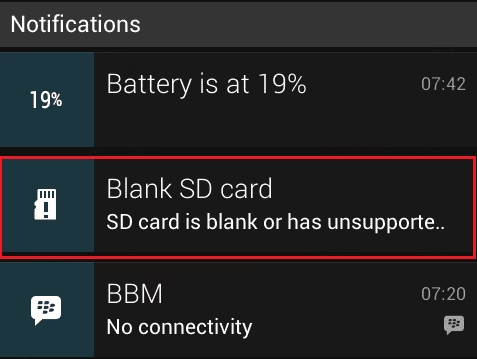
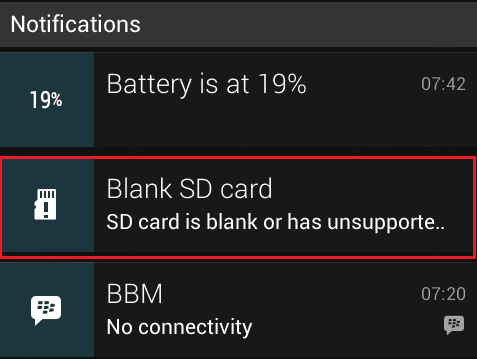
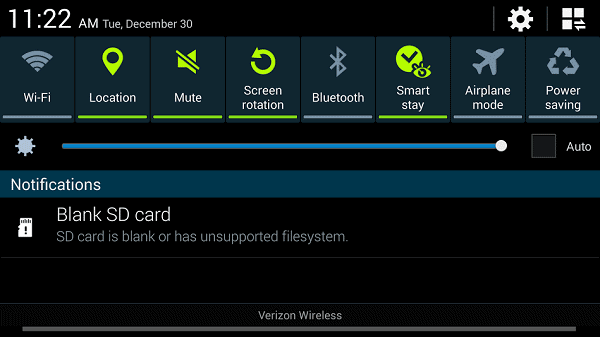
“SD card is blank”

“Unsupported file system”

recovery memory card tutorial

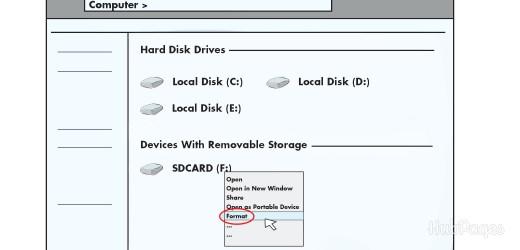
“The card is not formatted. Do you want to format it now?”

memory card recovery help

There are also some instances when the card shows 0 bytes although there is plenty of data stored on it. We face these situations in memory cards used on digital cameras, mobile phones, MP3 players, camcorders, etc. When the message says “Unsupported file system”, then this perhaps means that the memory card has been turned into RAW or there is 0 byte memory utilized. These indications are due to many reasons, such as sometimes mishandling of the device, entering of virus or any malware that affects the memory card’s health.

Some other reasons that cause “memory card showing blank” Issue:

  • Series of interruptions that hinder the transfer of files from memory card to computer
  • Non-licensed anti-virus used in the memory card
  • Accidental formatting of the memory card as soon as you connect it to the device
  • Missing of program files of file system
  • Not performing scan process each time you plug in the memory card to another device
  • Using same memory card on various devices or OS
  • Abrupt removal of memory card from gadgets
  • Accidental disconnection of the memory card while file transfer

As we are now well aware of these reasons causing a memory card showing blank, we should definitely take some safety precautions, such as:

  • Using a licensed and a genuine anti-virus software in the memory card
  • Never disconnect or plug off the card from any device without proper closure procedure
  • Always scan memory card before plugging it in any device
  • Never use the same memory card again and again on each and every platform

If these precautions are carefully taken while handling the memory card, then your memory card will be safe and secure. But, in spite of this people tend to forget these tips and hence they are in worry as what to do next. The answer is not to worry as there is a way to handle this error.

Let us have a look to the manual way to resolve the issue of memory card showing blank:

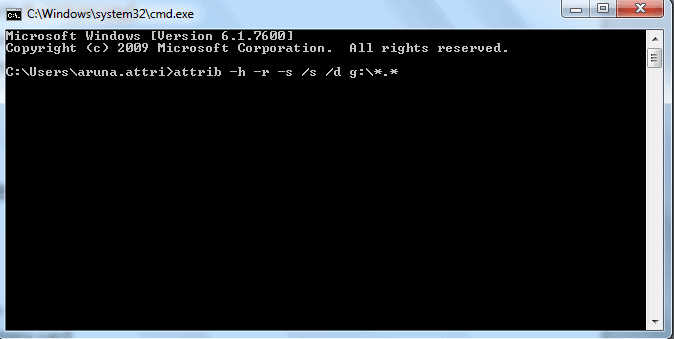
  • Press Start> Run>type cmd
  • Now press Enter key
  • After pressing Enter, you will see a command prompt dialog box
  • Type this command: attrib -h -r -s /s /d g:*.*, according to the drive of your memory card

memory card recovery

Note: In place of g type your drive letter

  • Press Enter again
  • Check your valuable files and folder

This is a manual way to check your files and folders that were once shown blank in your memory card. At times, this method may fail as this may or may give accurate results to the user. In that case, you again need not to worry as there is a quick fix to every solution. The way to retrieve missing or unreadable files from memory card is using powerful third-party recovery software like Stellar Phoenix Windows Data Recovery software. This will rescue your inaccessible media and messages from your memory card.  

Even if the memory card is not readable or it is showing blank images, this tool will salvage your images and messages that were lost or not showing properly. This is because whenever the memory shows as blank, then it is not actually blank. Instead, all files that are on the card will become invisible to the OS. The users need to understand that there is no loss of photo or messages and there will no loss of files.

Hence, with the use of software like Stellar Phoenix Windows Data Recovery software, just connect the phone (with the memory card that is showing blank) to your system and run our software’s scan engine, all images and lost messages will be retrieved back with ease.


How to Perform Unformat with EaseUS Data Recovery Wizard

0

They say you never know the value of something until you lose it. In the land of Information Technology, there’s always a way to overcome the loss of data – by using an external drive recovery solution. Basically it means using an unformat software to recover it back. Also you need to have a FAT Recovery application standby just in case something bad were to happen.

Today we will be taking a closer look at EaseUS Data Recovery Wizard Free 9.9 which is considered by many to be the best free external drive recovery application to perform FAT recovery and a tool to unformat software from your PC, laptop or removable devices.

easeup recovery instructions

You can use it to recover from all kinds of circumstances which includes accidental deletion, wrongfully formatted, perform an external drive recovery from a software crash, hard drive damage, virus attack, partition loss or from any other unknown reasons. This software is not that hard to use, it only takes a few clicks and in just 3 simple steps, you are on your way to doing a full FAT recovery process. Everyone can use it, from the beginner level to the most advanced users.

It has very powerful data recovery features which comes with 2 scanning modes. A Quick Scan which typically takes less than 1 minute to complete will help to find deleted files, while the Deep Scan which is a more thorough sector-by-sector scan, will ensure everything will be found. If you are using it for an external drive recovery, it will find all those formatted, inaccessible and lost files.

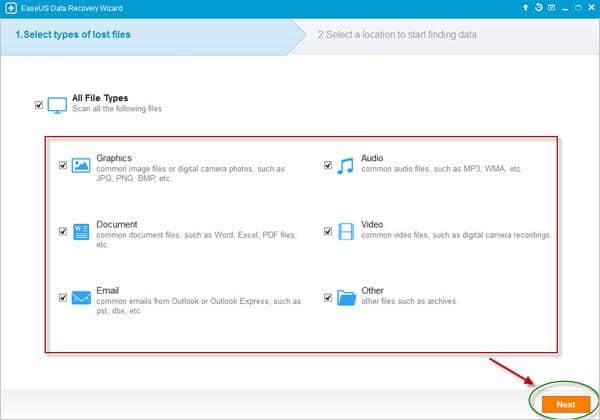
This unformat software also comes with a Preview before Recovery feature. Before you even begin, there’s an option that lets you specify the file types that you wish recover – and the result would be a very precise searching results. Once the FAT recovery scanning is complete, you can then filter your search by file name, type and date to find files quickly and it even saves you precious time. This external drive recovery solution then lets you to preview all the recoverable files and check up on all the details and quality, before you confirm which files to recover. So if it is an image file, you can then preview a thumbnail of that image.

All this makes EaseUS Data Recovery Wizard Free 9.9 as a very good and reliable external drive recovery solution. The features found in this application rivals even the paid version from others. It is so easy to get started, just download, install and launch this software – and follow the step-by-step guide.

4 Essential Apps Lawyers should be using right now

0

Did you know that lawyers were amongst the first to jump on the BlackBerry bandwagon? Some of them wouldn’t even feel like associates without the nifty electronic gears in their pockets.

Fast forward to these day’s current technologies. Our legal professional industry now relies on applications more than ever to streamline and organize their workloads. Daily tasks of researching for information and timekeeping, to communicating with colleagues and clients, lawyers use their Smartphones to manage their hectic schedule. As experts mention,  legal professional industry now relies on applications more than ever to streamline and organize their workloads. 

apps for lawyers

Here are just 4 mobile apps that are currently being used by mobile-savvy lawyers:

Fastcase.

A free legal research application, putting the American law library in the palm of your hand. Fastcase contains cases and statutes from all 50 states and from the federal government. You can search by citation, keyword (in Boolean or natural language), or browse statute collections.

Fastcase also uses smart search technology from Fastcase’s fully-featured Web-based legal research application, which allows you to sort the most relevant results to the top of the list, customize and re-sort search results, and integrate citation analysis tools right into the results list.

ABA Journal Daily News.

This nifty app lets you read summaries of the latest legal news, updated as it happens throughout every business day. Plus, you can find original news reports and analysis, and read in-depth monthly magazine articles, for free wherever you are. Readers also will find contests, galleries, questions, polls and lively comments.

The ABA Journal is the United States’ most respected legal magazine, read by half the nation’s 1.1 million lawyers every month. It covers the trends, people and finances of the legal profession from Wall Street to Main Street to Pennsylvania Avenue.

IDfy.

IDfy is a mobile application that can be used on your iPhone to verify the identity of your clients for conveyancing transactions. IDfy lets you take pictures of your client and their identification documents in order to satisfy VOI regulations. IDfy’s intuitive system understands the VOI category requirements and guides you through simple steps to ensure a standardized and compliant VOI process within your office.

Quick Benefits

  • Creates a standardized, secured and streamlined verification of identity process
  • Allows you to maintain face-to-face contact with your client during VOI, creating a more personable experience
  • Integrates with existing practice management systems to capture search costs automatically and save time on rekeying data
  • Gives you complete control of the VOI process – you can verify your client’s identity in any location without having to rely on third parties
  • Saves time by eliminating the need for document photocopying and physical filing
  • Securely stores your VOI records for 7 years
  • Encourages compliance with new VOI requirements

Top 5 Tools for Augmented Reality in Mobile Apps

Tripit Travel Organizer.

This app lets you organize your travel plans in one place with TripIt® from Concur. Simply forward your travel confirmation emails to [email protected] and TripIt automagically creates a detailed daily itinerary for every trip.

Quick Features

  • Forward hotel, airline, car rental, and restaurant confirmation emails to [email protected] to create an instant itinerary (If you use Gmail or Google Apps, it happens automatically)
  • Access travel plans anytime (even offline), on any device—now including Apple Watch
  • Get directions and maps for each destination
  • Sync trip plans with your Apple Calendar, Outlook, or Google Calendar
  • Add or edit plans manually—from the app or on tripit.com
  • Share some (or all) of your trip plans via email or social

Also read: 5 Apps to Help You Manage your Time

Hundreds of things go into a lawyer’s day-to-day activity, from the legal work itself to handling and consolidating everything else around it. Luckily, lawyers have tons of mobile applications available that allow them to focus on legal work, rather than focusing on the admin-intensive responsibilities that drain their productivity.