A backup of your complete system can ensure that you do not lose any data in case of some software issues, a hardware failure or a malware. Not backing up your system can result in you losing crucial documents and irreplaceable data.
If you are looking for effective ways to backup and restore Windows 10, then keep reading. In this guide, we will take you through easy methods to make a full backup of Windows 10.
Method 1: Make a full backup of a Windows 10 PC on an External Hard Drive
You can use the image backup feature in Windows 10 to make a full backup of your system which includes all your settings, files, and applications. You can easily restore your complete system if there is a hardware failure.
Follow these steps to create a backup system image:
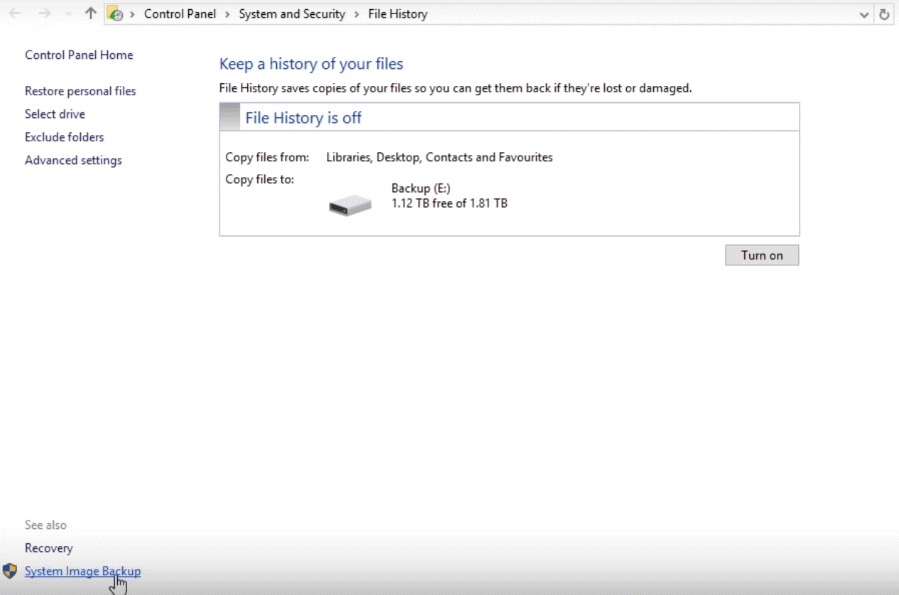
Open the “Control Panel” and navigate to “System and Security”—“File History”
Click “System Image Backup” on the bottom left panel.
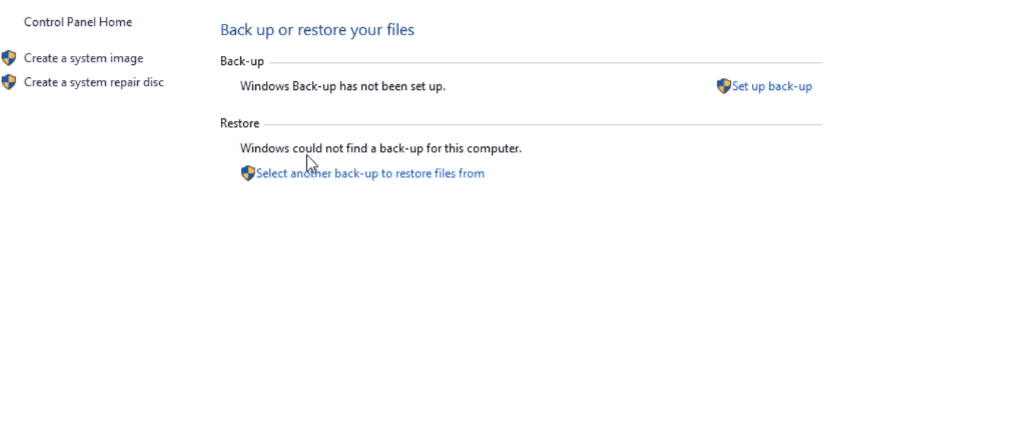
Now, on the top left hand side of the next window, click on “Create a system Image”
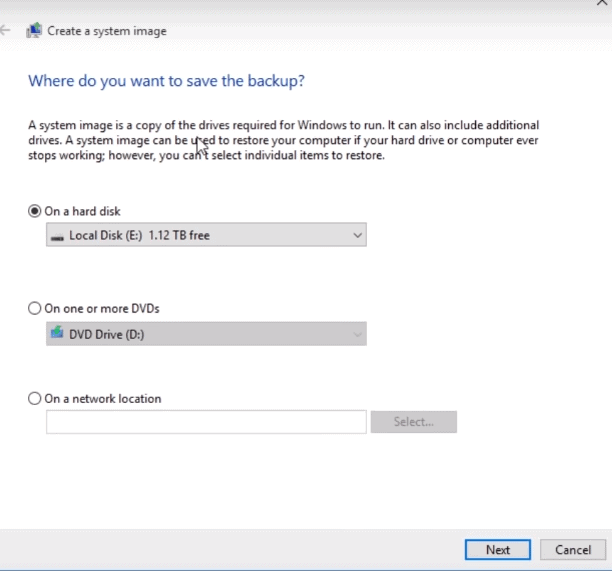
Select the hard drive for the back up and click on “Next”
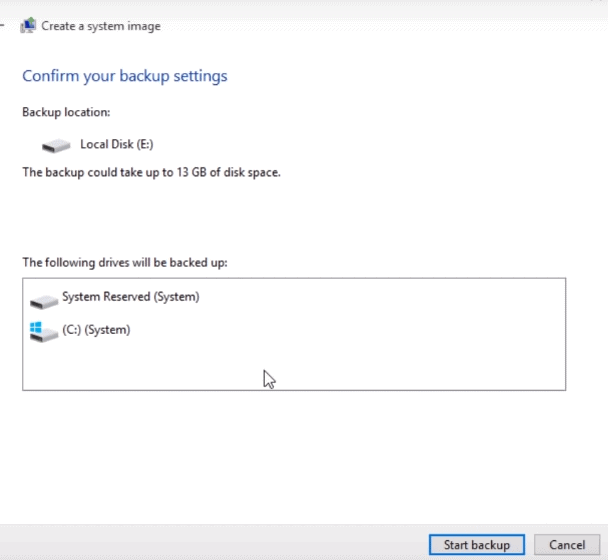
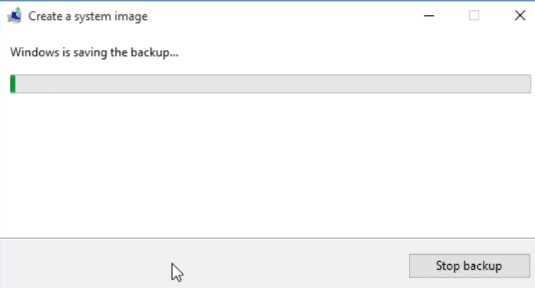
Once done, click on “Start backup“ to being the backup process
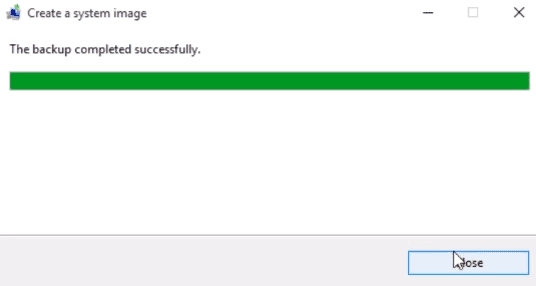
The process can take a few minutes to several hours which depends on the size of data in your system and the speed of your hard disk.
** The only downside of this method is that you cannot use it to restore individual files.
Now as you have created a backup for your Windows 10, you may also wish to know how you can restore the system image. Just follow these steps to recover your computer with system image:
Connect your computer to the hard drive which has the system image backup.
Now, reboot your PC.
Press F2 and select “boot from USB”
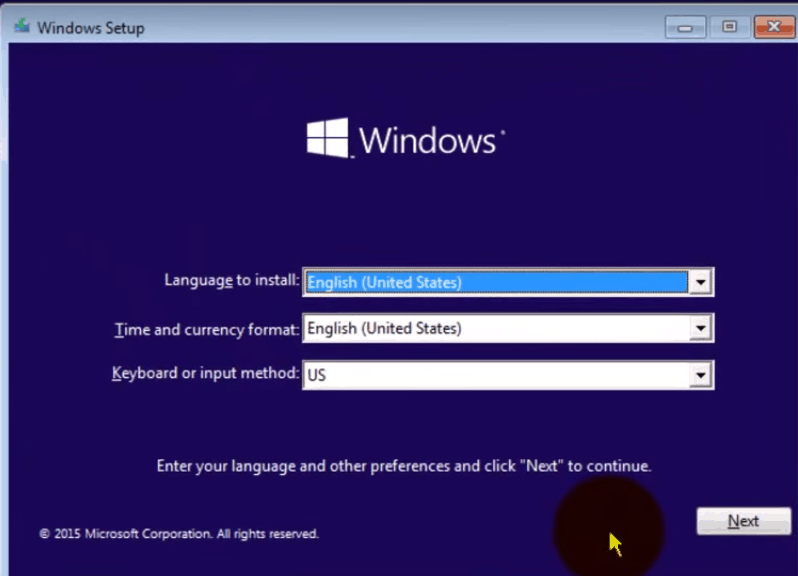
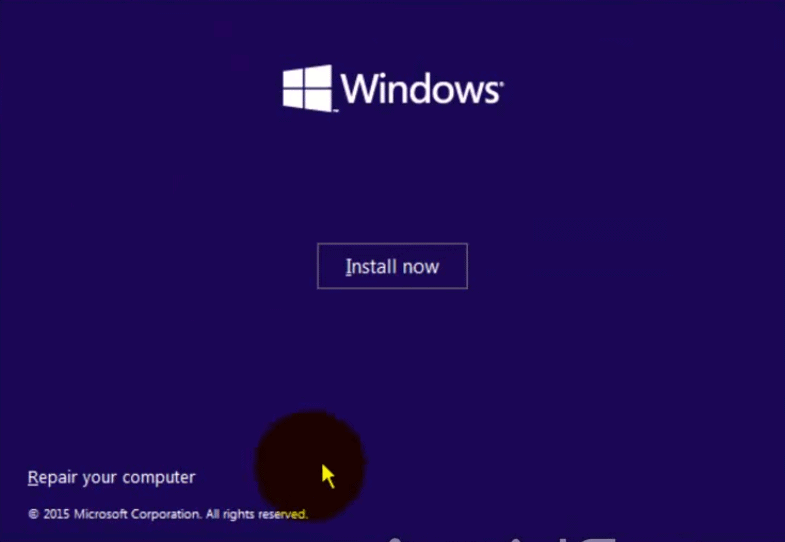
Click on “Next” on the “Windows Setup” page
At the bottom of the page, click on the “Repair your computer” link.
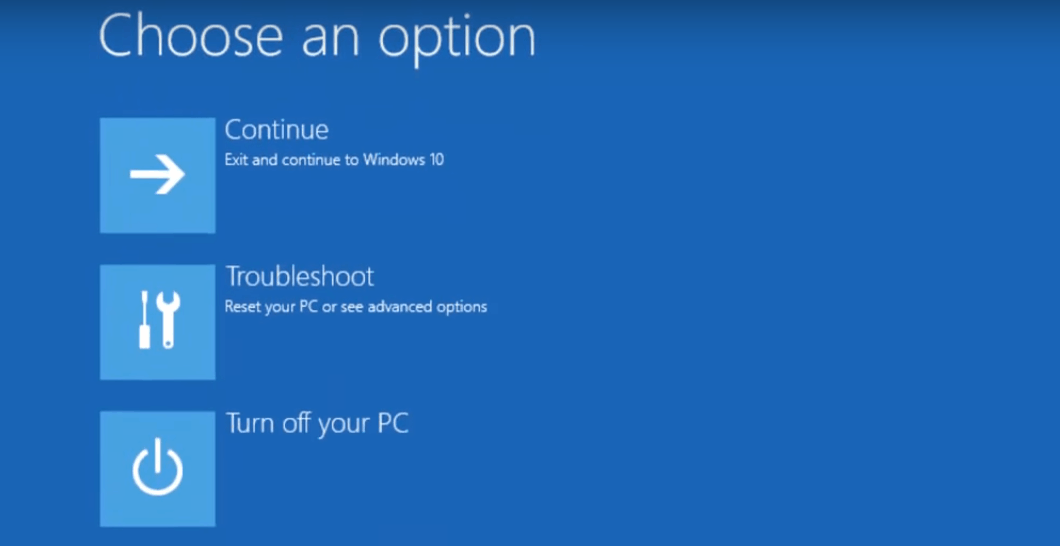
Click the “Troubleshoot” option and then “Advanced options”
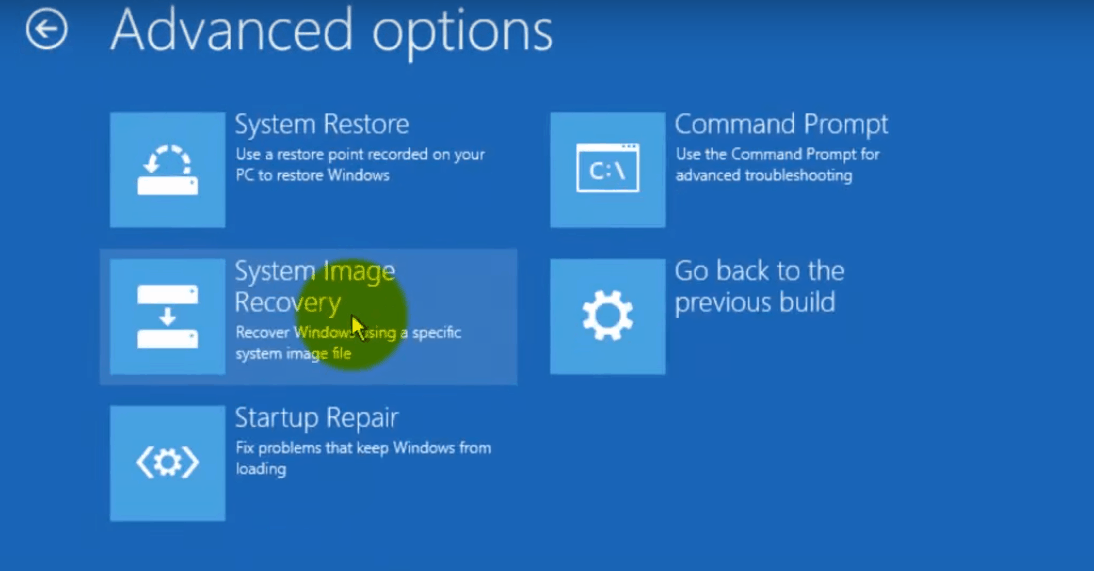
Next, click on the “System Image Recovery option”
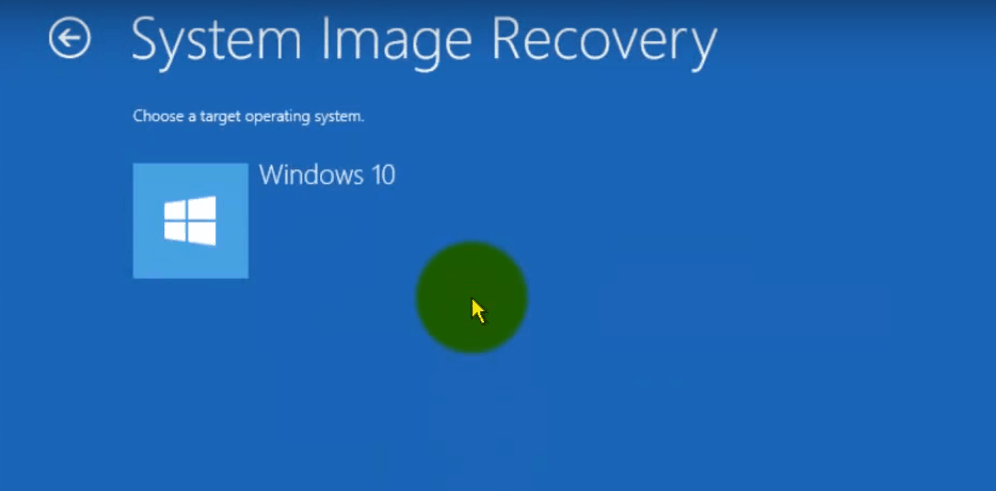
Select “Windows 10”
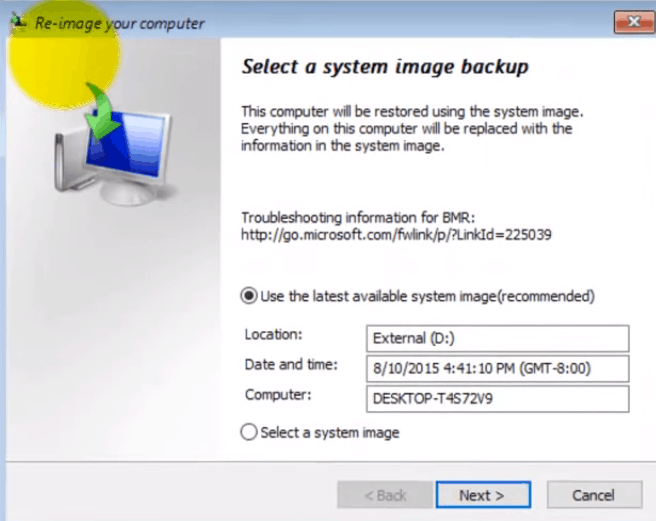
You will be taken to the “Re-image your computer” page next
Select “Use the latest available system image”
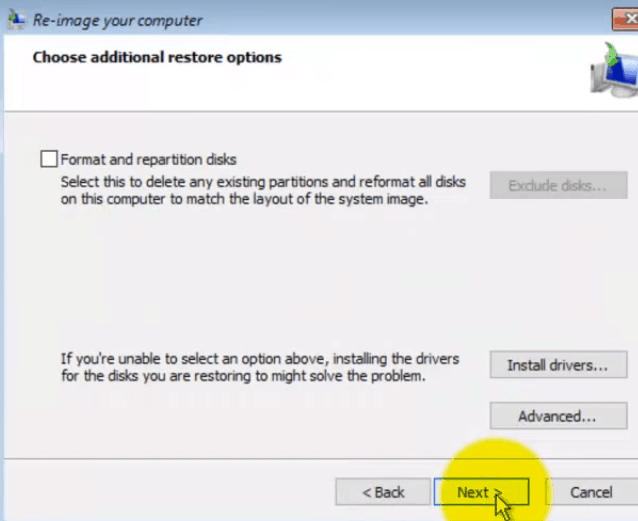
Click on “Next”
Choose “Format and repartition disks” option if you are restoring a full backup
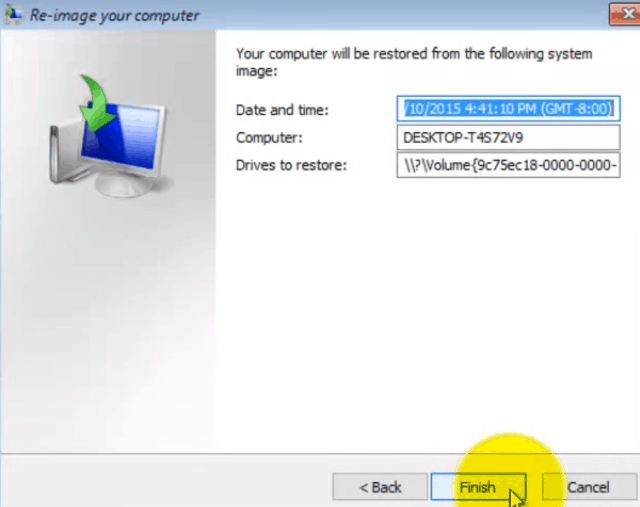
Click on “Next” and then “Finish”
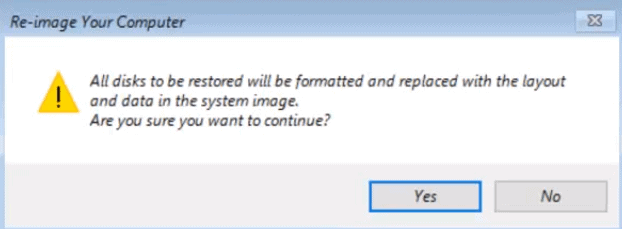
At last, confirm by clicking on “Yes” so that the backup will replace the data on the drive.
Method 2: Make a Full Backup using Free Tool- EaseUS Todo Backup
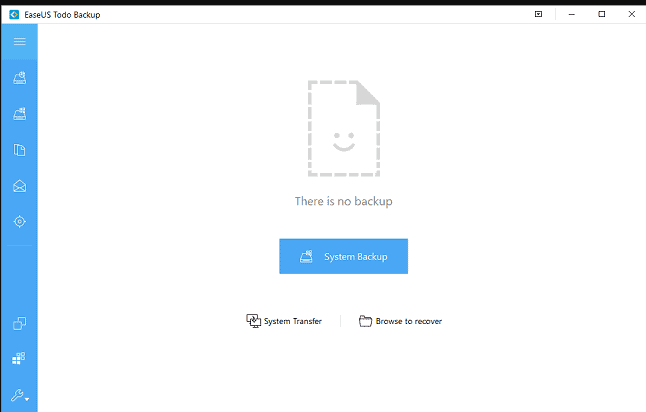
EaseUS Todo Backup is a reliable backup and recovery tool which enables you to back up the entire system with just a few clicks.
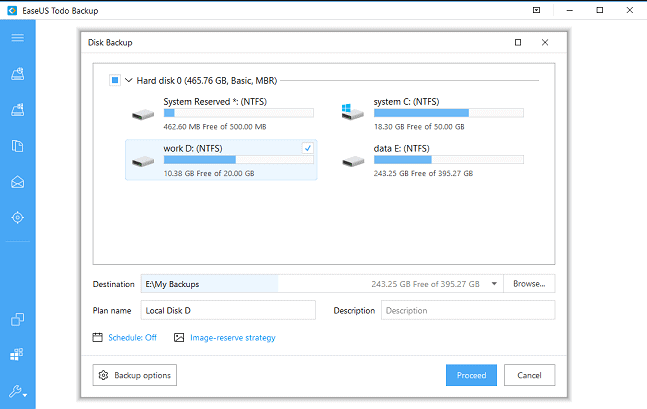
You can follow these steps to use this tool for a system backup:
You just need to enter the “destination, plan name and description” in the dedicated boxes.
Once done, click on “Proceed”
You system backup will be created now and in order to recover it, you just have to open the tool and click on “Recovery”
Wrapping up:
Both the methods to back up Windows 10 are highly effective. However, the second method which uses a free tool can save a lot of your time and efforts.
Music has changed the world. It has a significant impact on human history and has become a constituent of human life. It has roots deep in human history. There are different types of music in the world and people like to follow these different types of music. In today’s modern world the concept of listening to music has changed dramatically. Now you don’t have to carry cassettes or big music players now all these are transformed and shrink to fit inside your smartphone, PC and laptops. The Internet has helped a lot in the transformation of music experience along with smartphones and laptops. Many apps and websites have opened but no one is as famous as Spotify.
Spotify has taken advantage of modern technology and attracted many customers. It provides better quality and easy accessibility etc. It is free as well as a paid version of the app. The paid version has many more functions than the free version. In starting Spotify give 3 months of premium for free to everyone which attracts people. Due to all the exclusive functions, many people have bought a subscription but due to some reasons, a few of them want to cancel Spotify subscription. If you are also one of those people then in this article I am going to talk about how you can cancel Spotify subscription and delete Spotify account.
There are different ways of doing it but I am going to share one of the simplest methods to cancel Spotify subscription and delete Spotify account.
How to cancel Spotify subscription?
To start this process you need a device which can connect to the internet you can use the pc, smartphone, Mac or iPad etc. The steps are easy and anyone can do it.
First, you have to open the Spotify homepage on the internet.
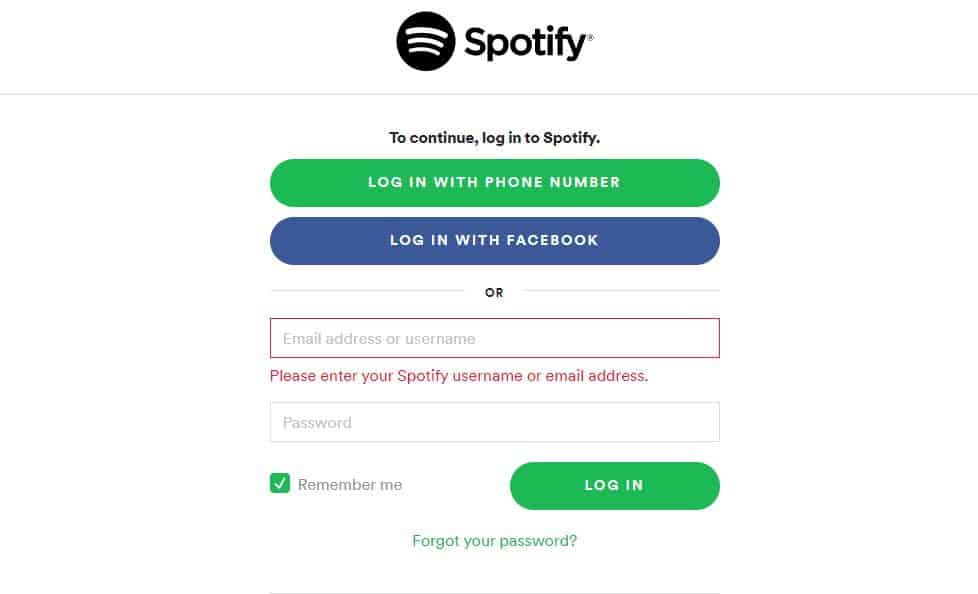
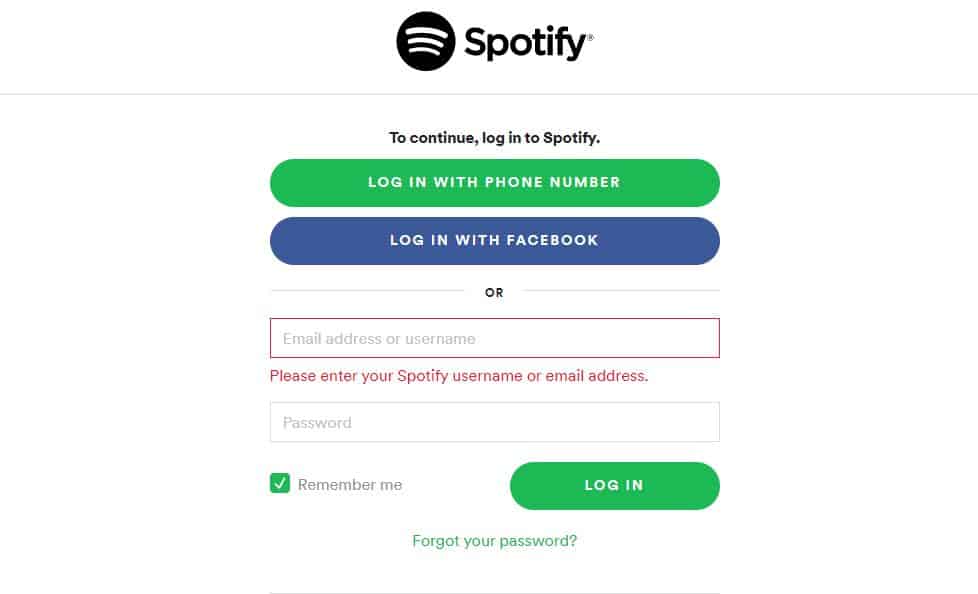
This will open the Log in page on Spotify. You have to Log in to your account by selecting either 3 of the options
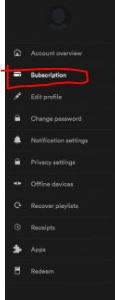
Once you have logged in then a summary of your account will be opened. You have to scroll down a little bit. There you can find different menus on the left-hand side. One of them would be ‘Subscription’ which is the second from the top.
You have to click on that button. This will open your subscription details on the right-hand side of the screen.
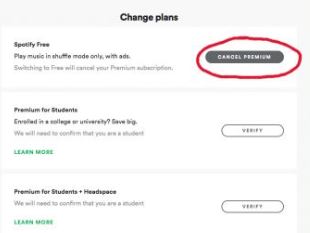
On that page there will be an option such as ‘cancel Spotify subscription’ or ‘change or cancel’. You have to click on that button.
Sometimes it will ask you a question regarding your cancel Spotify subscription. It will open a window with different reasons, You have to select one and click on the continue button.
After this step you have to click on the cancel Spotify subscription
You have to borrow your main password. which you used while login to your account.
Click on cancel Spotify subscription again. After this step, your subscription will be cancelled.
Here’s how you can cancel Spotify subscription but there are a few things that you have to take into consideration.
Spotify will allow you to use the premium feature until the next payment is due. Thus, after cancelling the premium you are still able to access the premium features then you didn’t want to worry that your premium feature will be cancelled.
Once you cancel Spotify subscription, your account will be shifted to a free account.
You can re-activate your account with Spotify but the problem arises with the accounts which are subjected to the student discount. As the person will not be able to apply it to another account until the verification period of 12 months expires.
Since you have successfully cancelled Spotify subscription, we will close the account permanently.
Before starting this step, make sure you cancel Spotify subscription first. As it will be really hard to cancel your subscription after you delete your account.
How to delete Spotify account?
For this, we will permanently delete Spotify account. To start with delete Spotify account process you will need a device which can connect to the internet you can use the pc, smartphone, Mac or iPad etc.
First, you have to log in to Spotify account
You can use this link as this will directly redirect you to that page Spotify support
You have to Log in to your account with the account information.
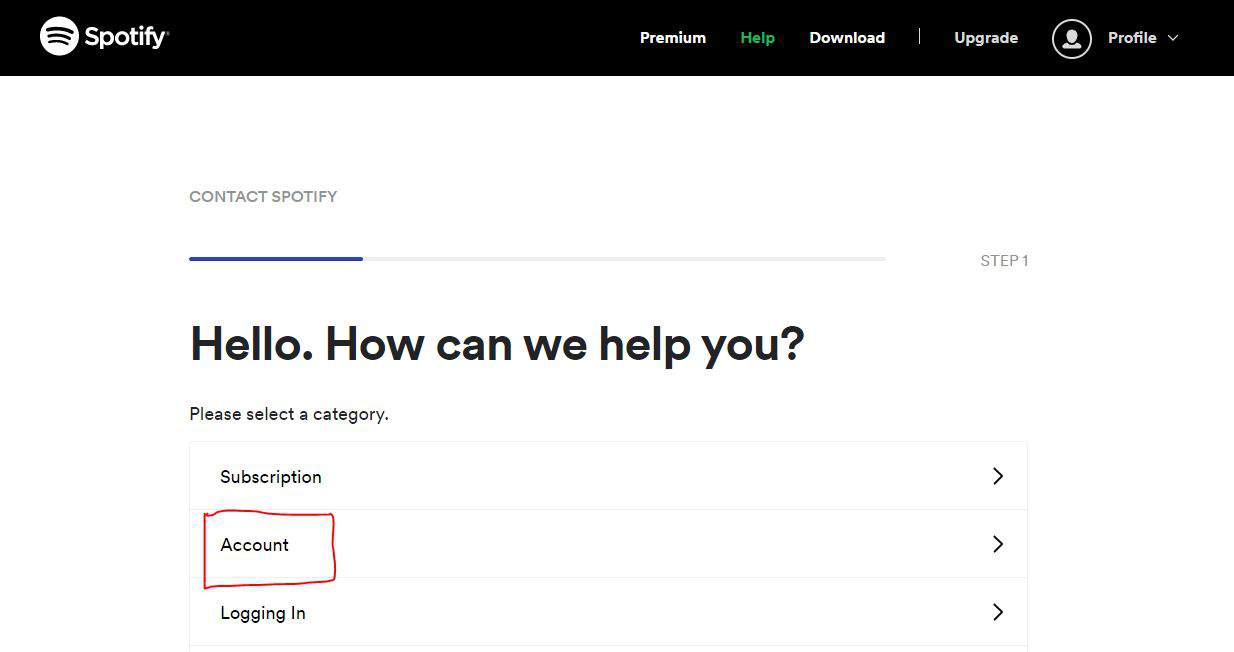
Once you Log in it will open a new page with different menus.
From those menus you have to click on the ‘Account’.
Once you click on that one new menu will pop-up with more options.
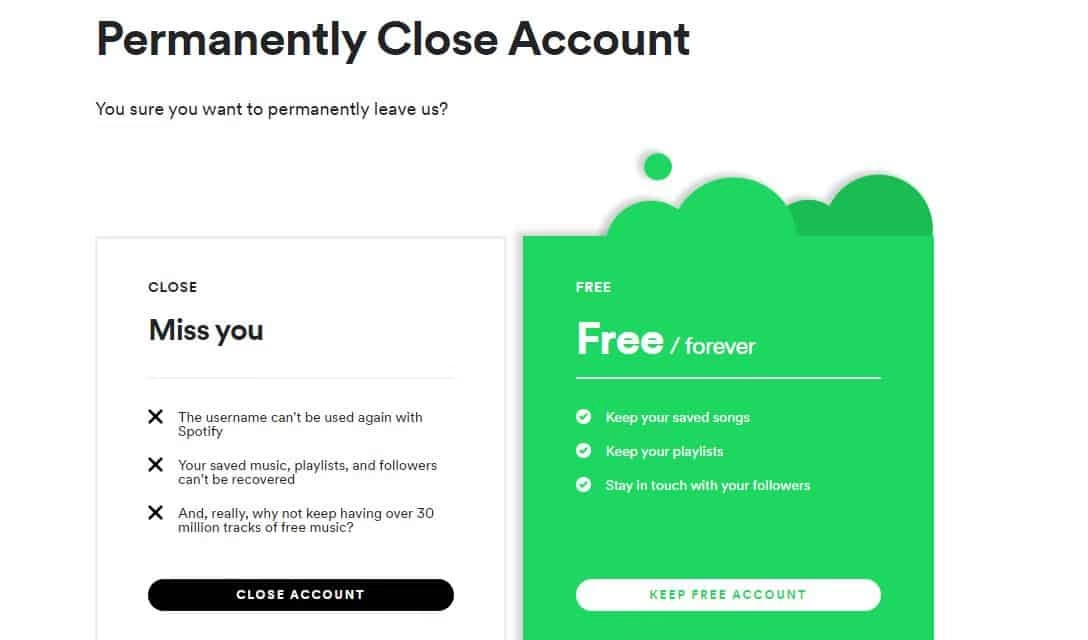
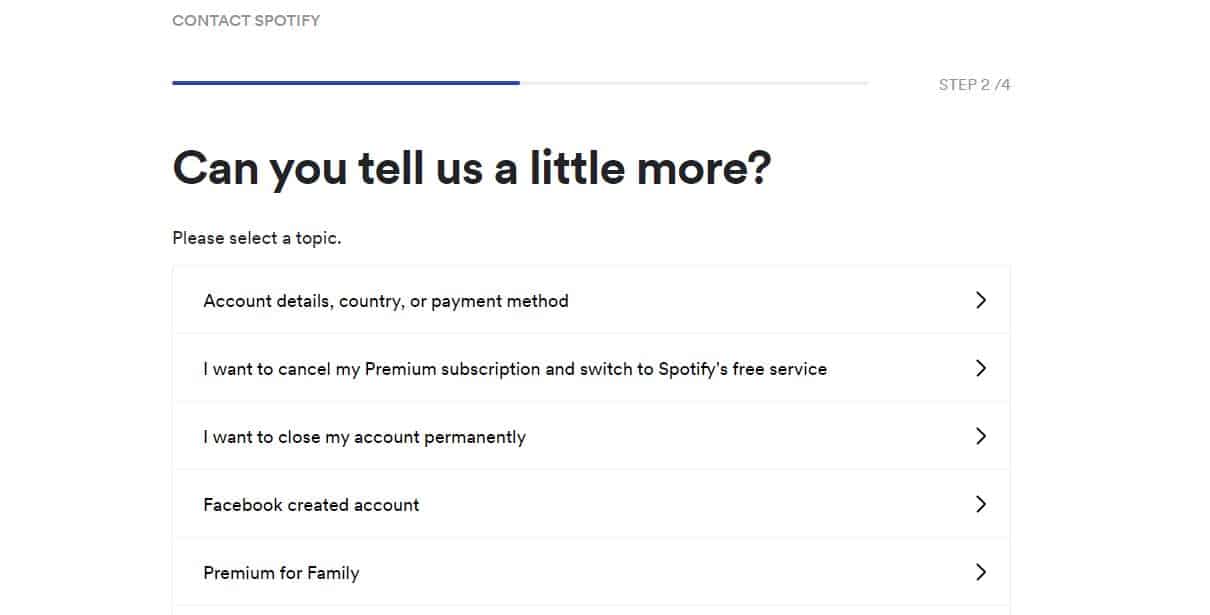
You have to Click on I want to close my account permanently or delete spotify account.
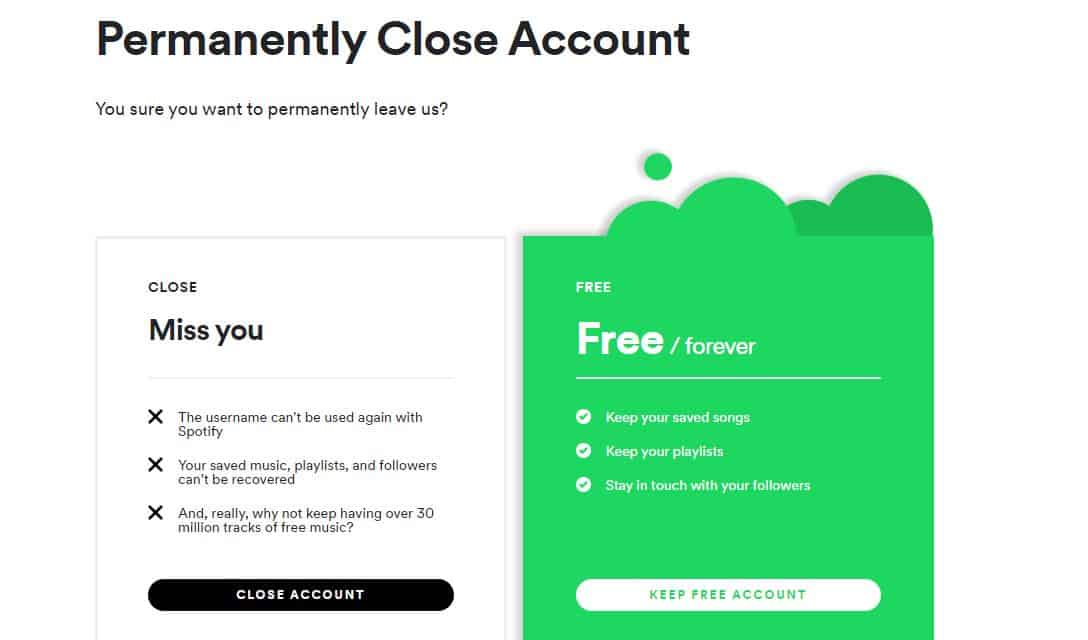
A new confirmation window will be opened in it, you have to click on the close of my account.
It will ask you to give some information. If you can put anything you want to say in the box below and press send question button below.
This is how you can delete Spotify account permanently.
Here are a few things you need to consider before you delete spotify account:-
The user name associated with your account will also be deleted and you will not be able to use the same username again with Spotify after you delete Spotify account.
Music, followers as well as playlists, your account has all will be deleted and will never be recovered.
Thus before deleting Spotify account, take these things into consideration and make a decision accordingly weather you want to delete Spotify account or not.
To download a YouTube playlist, use a third-party tool like 4K Video Downloader: copy the playlist URL from YouTube, paste it into the software, select video quality, and click Download. YouTube Premium also allows offline saving within the app for subscribers.
YouTube is a website which was synonymous to online streaming before the emergence of the likes of Netflix and Amazon Prime. That’s not to say it has lost its value. In fact, by continuous innovation, it is still a dominant force in media streaming services. One such innovation is the YouTube playlist. During your time of streaming YouTube, you must have come across at least one. If you’re looking for ways to download YouTube playlist, then this how-to download youtube playlist guide is for you.
What is YouTube Playlist?
YouTube Playlist is a feature of YouTube which help you organize your content in the form of a library. Videos are linked together by a common factor or preference. The videos contained therein play in order, one after the other. You can create a playlist on literally anything ranging from cute penguin videos to Lady Gaga music videos.
A thing to note here is that there are two types of playlists on YouTube. One is the “Creators” playlist and the other is “Users” playlist. The one you create as a viewer is called a user playlist. A playlist which is created by a content creator is called a creators playlist. The playlists you come across randomly while scrolling is either a Creator’s playlist or is compiled by a user like you.
If the list is created by you, then you can add, deleted, and modify the contents inside of it. If someone else has created it, you can work on top of it and add your own collection. Every playlist in YouTube is identified by a unique URL. Within the playlist, you’re going to have metrics like views, average view duration, watch time, playlist starts, views per playlist starts, etc.
How to Download YouTube Playlist?
Once you’ve created a playlist or have seen an excellent collection, you might get tempted to download youtube playlist for viewing offline. But then you realize that there’s no ‘Download’ button present which will let you save it on your device. Fortunately, there are a couple of ways you can use to download a youtube playlist.
Using VLC Media Player
If you’re surprised to learn that you can use something as common as VLC Media Player to download youtube playlist, then you’re not alone. This versatile cross-platform media player is present in almost every other computer out there. It is popular because of its capability of playing most, if not all, video and audio formats which include DVD and CD formats.
While you’re using VLC as merely a media player, it has got tons of useful features up under its sleeve. One of them is downloading content from streaming sites, So you can easily download youtube playlist with the help of it. Here’s how you achieve this feat:
Open VLC Media Player.
From the top menu bar, click on Media>Network Stream.
You’ll see a blank space for inputting network uRL.
Go to YouTube and open the playlist you want to download, if you haven’t already.
Get the playlist uRL and paste it into the box and press “Play”.
Now navigate to Tools and Codec information. You’ll see the first video of the playlist playing in the background.
From the location box located at the bottom, copy the codec data.
Paste the data in the browser’s address tab and press Enter. You’ll see the video will play in the browser.
Just like you would, right click on it and select “Save As.”
This will download the first video of the playlist.
The only disadvantage of this method is that you’ll have to do some manual, repetitive task. Like saving each track from the browser. But VLC will go through the playlist for you and turn to your computer. So you only would have to follow from Step 4 through 8.
How much time would the entire process take depends upon the video quality, your internet speed, and number of media files in the playlist.
If for any reason, you don’t want VLC to download youtube playlist, there’s another method.
Youtube playlist downloader
There are few youtube playlist download software programs that can automatically download all of the videos from a playlist. Just input the playlist URL and it’ll do its magic. Both online and system software versions are available for use. Some of the best youtube playlist downloaders are:
YouTube Playlist
YouTube Playlist is a website that does it job slightly differently. It’ll take the playlist, line it up and then download the entire selection. This is a completely online youtube playlist downloader tool and there’s no download required whatsoever. Simply select the playlist URL, and paste it wherever prompted. It’ll then collect the required data from the playlist.
MediaHuman YouTube Downloader
MediaHuman is a media conversion youtube playlist downloader software company that also enable users to download YouTube playlists. This is a cross-platform downloadable software which needs to be installed properly. Being a freemium software, you need to pay a fees for playlists that have more than 20 videos.
4K Video Downloader
4K Video Downloader is another youtube playlist downloader software program that works offline. The process of download youtube playlist is the same: get the playlist URL and paste it inside the program. This will read the files and download them one by one. One of the best features of using this is you can choose particular files to download and also the quality. So the first video can be a 480p file, second can be a 1080p, and the third can be an MP3 file. There’s a one-time fee which you need to pay at the time of downloading for availing unlimited download.
But isn’t Downloading YouTube Content Illegal?
Yes, downloading any form of content from YouTube (other than their own offline download feature) is considered illegal under their Terms of Service. Everything published on their platform is licensed by YouTube.
But even if you download youtube playlist by any means, it should strictly be for personal use and you cannot reproduce it, under any circumstances, for commercial or non-commercial purposes. We’ll leave the final decision to you to make sure you’re not breaching any copyright law.
As for personal use, you can definitely play around with the playlist, trim sections, convert to other file types among other possibilities.
To know about what are valence electrons, we should first known about atom because it is all about the structure of atom. An atom is formed of electrons, protons and neutrons. An electron is a basic element of an atom. Nucleus of the atom contains neutrons, which are uncharged particles and protons which are positively charged. Electrons are present around the nucleus of the atom. These are negatively charged. The electrons situated in the inner shell of an atom are the core electrons of an atom. The number of electrons and protons are always the same. Electrons are arranged around the nucleus of an atom. This arrangement is sometimes called as electrons cloud.
Electrons revolve around the nucleus just like the sun rotates around the planets. Every kind of atom (microscopic) contains electrons. Hydrogen atom contains smallest number of electrons in it i.e. one proton and one electron. Uranium atom (largest atom) contains total 92 electrons.
Now what are valence electrons? So valence electrons are those special electrons which are placed in the most exterior valence shell of an atom. And now the question is why they are special? So the answer is because whenever there is an interaction between any two atoms, the electrons present in their outermost shell are the ones which first communicate with each other. When they interact they actually determine the reaction of an atom in a chemical reaction. They are responsible for incitement of a chemical reaction.
Valence electrons are very small subatomic parts which come transversely during the study of an atom of the element. An atom’s electrons can be earned or lost during a chemical reaction. With the help of Lewis structure we can track valence electrons and also presume the bonding. They are accountable for the intercommunication between atoms and also the construction of chemical bonds. An atom has many electrons but only valence electrons can take part in the process of chemical bond formation and molecule development.
Key characteristics of valence electrons:
They exist in the outermost shell only for main group elements.
They can also exist in inner shell for transition metals.
They can absorb or release energy in the form of a photon.
These electrons also determine an atom’s electric conductivity.
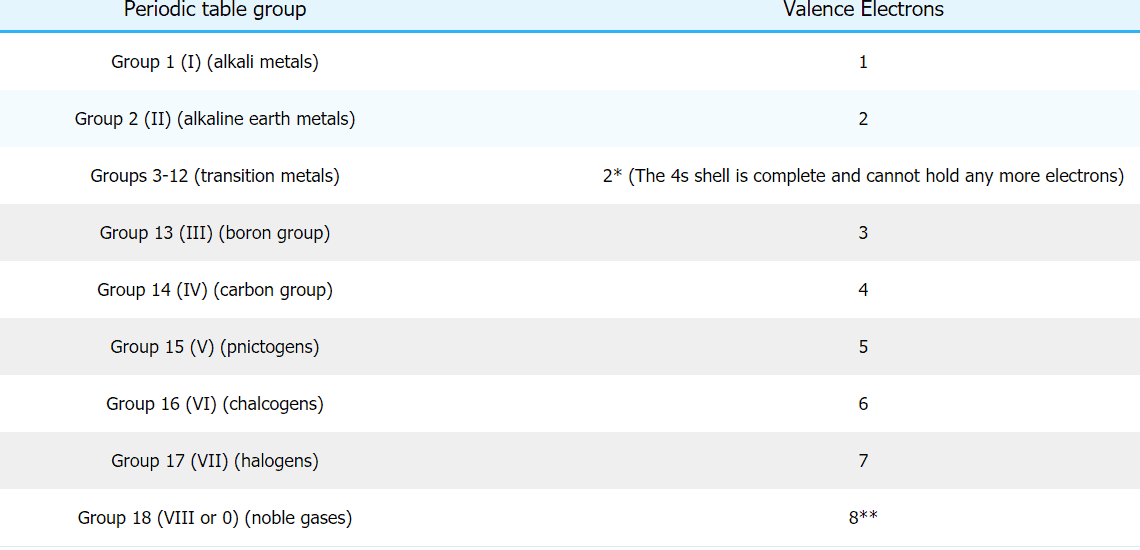
They are the electrons of the outermost shell of an atom which are not filled. Basically “valence” means number of electrons, the atom has to gain or lose to achieve nearby inert gas or noble gas electronic configuration. Elements having 8 valence electrons are called as noble gases or inert gases. These gases are not inclined to have chemical reactions with any other elements of periodic table group. The number of valence electrons of an element is similar to number of the group of that element in the periodic table. Hence to determine an element’s group in the periodic table you need to know the number of valence electrons in that element.
Let’s take some examples to visualize valence electrons:
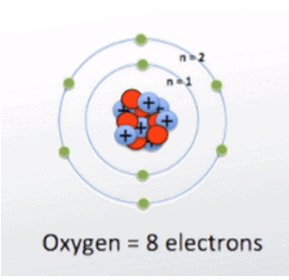
If we take oxygen, it has 6 electrons in its outer most valence shell. That means oxygen has 6 valence electrons.
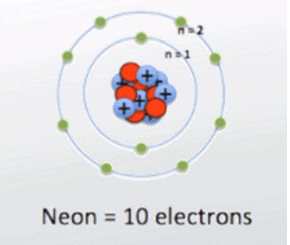
Now take neon, it has 8 electrons in its outermost valence shell so it has 8 valence electrons.
Every shell of an atom has certain amount of sub shells such as s, p, and d having certain orbital. Each orbital hold 2 electrons.
First shell of an atom has 1 sub shell (s) having 1 orbital that can hold 2 electrons.
Second shell has 2 sub shells (s and p). P has 3 orbital which can hold 6 electrons. So, second shell can hold a total 8 electrons.
Third shell has 3 sub shells (s, p and d). D has 5 orbital which can hold 10 electrons. That means third shell can hold total 18 electrons.
Importance of valence electrons:
They are very important because they allow intense revelation about the chemical properties of an element including the nature (electronegative / electropositive), bond order and how many bonds can be created between two atoms. Covalent bonds are created due to sharing of electrons found in the exterior shell and the number of these electrons signifies that how many bonds can be formed. You can calculate the number of valence electrons in an element if you know the last number of electronic configuration of that element.
Function of valence electrons:
These are most exposed electrons of an atom and act as a protective barrier. They are in the highest energy level. These are the most involved electrons in chemical reaction and can be transferred very easily. The role of valence electrons is to transfer between the atoms to make the atom stable. The reactivity or inertness of an atom solely depends on its number of valence electrons. This is the mail thing that makes valence electrons an essential component of an atom. An atom cannot exist without it.
How to determine valence electrons:
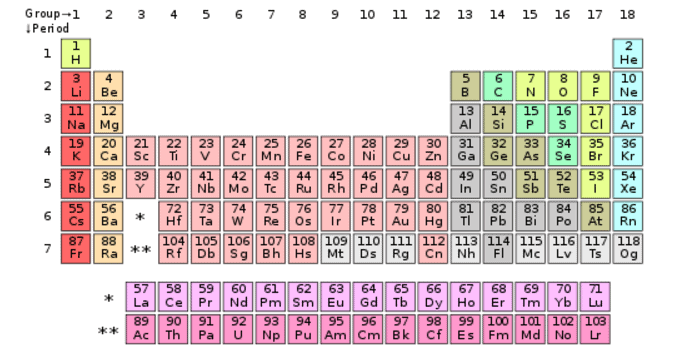
Amount of valence electrons in an element can be calculated with the help of periodic table and electronic configuration of the element. Periodic table is much easier than finding the electric configuration. Elements are categorized in periodic table group. All elements are very neatly arranged in periodic table. You can see the elements from left to right are arranged in ascending order of their atomic numbers. Just find the position of element (whose valence electrons you want determine) in the periodic table. There are 4 main categories of elements including main group elements, transition elements, actinides and lanthanides.
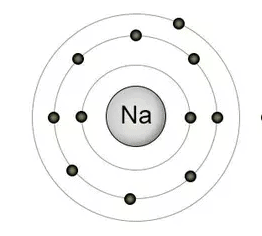
Let’s take element “sodium” for example. Sodium (Na) exists in group 3 and period 1 that means it has total three shells and its valence shell has single electron.
The main reason for selling purposes of Google-Chrome is its capacity to install/add third-party add-ons and chrome plugins, from the other browser’s which are available in the market.
Sometimes you may encounter transfer, speed, download, or other interface issues with Box it could be brought about by chrome plugins, add-ons or extensions, which you may have added in chrome-browser. To find whether this is the situation you can have a go and remove all the google chrome plugins and add-ons inside the browser.
Despite the fact that these google chrome plugins are not so difficult to install by means of the Chrome’s Web-Store, there will be times when you will have to remove some google chrome plugins, maybe because of hacking/security issues so as to solve Google-Chrome issues.
In this topic we’ll show you how to disable or how to for all time expel a Google Chrome extension.
How to Disable Google-Chrome Extensions:
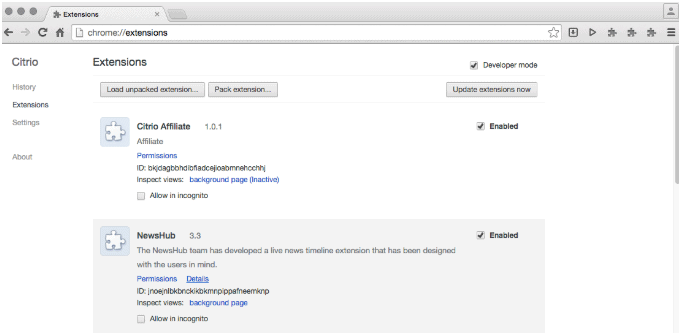
In-order to get to extension page of Chrome, we can go-to menu or one can type-in a specific URL in-to the search bar. The following are the steps included.
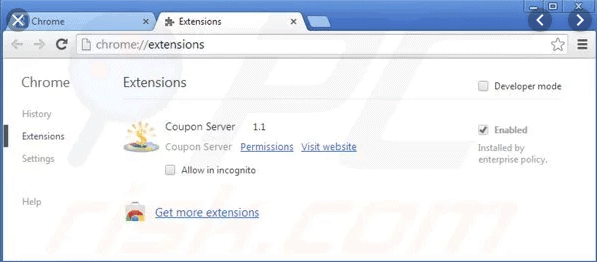
Stage 1: Now press the Menu symbol on the upper right nook (the 3 dots symbol) and pick More Tools -> afterwards Extensions, or enter chrome://extension into your address bar
Stage 2: Search for the extensions you want to delete or disable
Stage 3: Un-check the <enabled> check-box if we simply need to remove or click the trash symbol to remove it permanently.
Extensions which are Disabled will be greyed out, so we will get to know they are disabled and it can be re-enabled later on. So in case you need to for all time erase the extensions, we need to confirm via the confirmation pop-up box.
TIPS :If you discover any of the extensions that are not set-up by you, it may be installed by some suspicious software. In that situation one can check Report abuse check box while deleting the extension in your browser.
How to add extensions to your browser
All Web browsers taken in-to consideration the usage of extension’s, which are little browser programs that gives more functions which can be performed by the browser. Genuine models are Tiny URL, AdBlock Plus and Web of Trust. This document contains data on the foremost way to download and set up extension’s for every one of the real Internet browsers.
Follow the below stages
Stage 1: Open the Google-Chrome web browser.
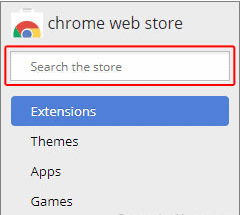
Stage 2: Go to to the Chrome Web-Store.
Stage 3: From the page which shows up, you can search for the extension or choose from the suggestions which it shows down the page.
Stage 4: After you found the extension that you want to set-up, Mouse-click the button used to include and extension in Google-Chrome. Click-on Add to Chrome button.
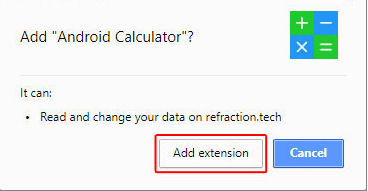
Stage 5: Final step is you can notice a prompt that appears on the screen click-on the Add extension button.
How to how to access chrome plugins:
Google Chrome Plugins, for example, Adobe Flash, aren’t overseen in a similar window as extensions may be. They’re overseen in the Chrome’s Content Settings window.
Here’s how you enable /disable Chrome plugins:
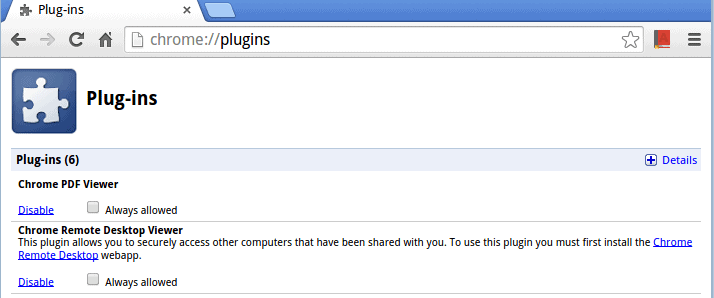
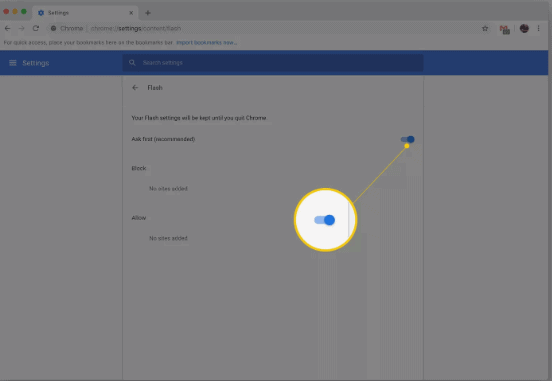
Step 1: Open Chrome-browser enter in chrome://Plugins in the address/search bar.
Step 2: Roll down unless you get the Google Chrome Plugins which you wish to remove/disable and choose it.
Stage 3: Next you can control if you wish to ON or Off the plug-in to disable or enable from the slider which shows-up.
Stage 4: In case if one wants to utilize the allow and block areas to disclose to Chrome explicit sites where the plug-in ought to be enabled or disabled.
Stage 5: You can likewise force sites to run the plug-in by actuating the slider beside it.
By default, many google chrome plugins can just keep running with your authorization. This keeps sites from abusing chrome plugins like the helpless Java plugins. The Always permitted checkbox enables you to sidestep this protection for an individual Google Chrome Plugins, however, it’s unchecked of course which is as it should be.
That is it. Deleting or disabling the Google-Chrome extensions and plugins is exceptionally simple. Ensure you don’t install plugins from obscure sources and look for the extensions which may have all of a sudden showed up on the browser!!!
Plugins are Bad but Are ?
Internet browsers are ending up always confident, the functionalities that requires the browser -plugins — different video playback highlights, animations, video chatting in browser -games, and many more — are presently incorporated with modern browsers. It’s simply dependent upon sites to jump to the in browser functions from the old plugins despite everything they’re utilizing.
Furthermore, Google Chrome Plugins are truly aged. Still Firefox utilizes the “NPAPI” plugins framework made for the “Netscape” Navigator. Internet Explorer(IE) utilizes ActiveX, that is infamous for its safety issues. Chrome utilizes PPAPI, that is intended to give extra sandboxing — yet even it isn’t perfect. In the event that a hacker finds a gap in the browser plugins, they can gain the access to the system and might misuse. They are not sandboxed — with the exception of the Chrome-browser, and these sandbox won’t shield us from everything.
Please note the browser extensions or add-ons are totally different from google chrome plugins. An add-on or extension will add some new functions/features to the browser which you use, if in case you wish. Google Chrome plugins are the programs that some websites which may require. These are necessary when the browsers are not fast — like the Internet Explorer(IE)- 6 days, but now there is no need for this.
Most Popular -> Google Chrome Plugins WE May Not Require:
Google Chrome Plugins may probably disappear totally from web-Network. Indeed, even now, in the event that you burrowed profound enough, one can likely discover pages that need to install Real-Player to see their old recordings. In any case, at one point, we as a whole uninstalled Real Player in light of the fact that it simply wasn’t vital. Plug-ins suchlike Silverlight and Java have just hit the point for a great many people -and also Flash ought to arrive soon one day.
Silver-light: Lot of people have Microsoft’s Silver-light plugins which is installed for the Netflix. In case you are one among them, there’s uplifting news — in current browser’s -Netflix which simply utilize HTML5 rather than Silverlight. In this way, if one have Silver-light set up for Netflix please uninstall now. Truly, Microsoft wish the Silver-light plug-in for browser to leave, as well. You’re helping them out by jettisoning them.
Java: What much would we be able to state about the Java program? Java-applets has everything except disappeared from consumer -websites except if they are being utilized for exploits— however the appallingly unreliable Java plug-in for browser is enabled still as a matter of course by default. Regardless of whether you wish Java -installed (Mine-craft to play, for instance), you needn’t bother with the plug-in enabled for the browser. Go to the Control Panel and disable/Remove the Java module on the off chance that you cannot uninstall it.
Flash: The Flash plug-in you may not need now. Flash is winding up less essential than any time in recent memory, and you would now be able to try and view each and every video on the “YouTube” without Flash installed in your browser. Video playback web-sites that additionally changed to Flash, and current sites should not need them. Then again, Flash is yet utilized for a wide range of things for instance to play the Facebook videos. To reduce the issue, We prescribe to enable “click to play” for the Flash instead of completely uninstalling.
There are many Google Chrome Plugins likewise turned out to be pointless as they are folded in the browser. The Google Talk from Google plug-in for video calls and audio is never again required, nor the plug-in for Google Earth which is to view the detailed satellite perspectives on the Google Maps. Microsoft who is also taking a shot at a rendition of Skype for web-browser that will never again need the Skype plugin for browser. Google Chrome Plugins such like Real Player, QuickTime, VLC and Windows Media Player Web Plugin are not generally utilized any longer either.
Ares Wizard was a popular Kodi add-on tool for managing builds, maintenance, and third-party streaming add-ons. Once widely used to enhance Kodi’s functionality, it’s largely obsolete now due to legal crackdowns, with alternatives like The Crew or Venom taking its place for media customization.
Ares Wizard is best-known for its prime streaming content and the program Add-ons. Here in this instructional exercise, you will gain knowledge of in detail directions to do the installation-process of Ares Kodi-Wizard for Kodi clients. The set-up method is very much related to every gadget because the UI is identical on all the operating systems. In this way, a similar guide can be executed on all Kodi gadgets.
If you are the user of Kodi, there is just a 13% percentage possibility that you by no means found out about the Ares -Wizard. It is amazingly mainstream software which is intended to give total optimization and support to your Kodi -database and the intriguing part is, Ares-Wizard for Kodi is totally in favour of utilization.
Purpose of Ares-Wizard:
The old Ares Project was exceptionally prevalent with Kodi add-ons. It included the capacity of streaming the video, music or even playing games. The old one was closed down over legal issues. In any case, Ares Wizard developed with another store repository link with having some things altered.
It never again underpins the streaming of video or music or different add-ons. Now it is used as a maintenance tool. Ares-Wizard can still be used as a tool for performance management even without those add-ons which have been removed now. For instance, cache optimization takes into account of providing the experience of trouble-free streaming.
Below are the key features of Ares-Wizard which is yet utilizable:
Backup
Performance- optimization
File/Document Management
Clear log files
Internet speed-test
Restore-tool
Other Uses of Kodi:
Ares-Wizard additionally gives a convenient ram sensing software that will mechanically alter the-Kodi cache. This is something that I accomplish for the majority of my Kodi installations- paying little heed to what gadgets we are using. It does some incredible things!
You will likewise discover a tool that enables you to remove thumbnails, remove bundles, and remove store/temp documents. This is a decent choice as-now one can play out these choices legitimately through Kodi. Alternatively, you can do it through settings in Android on a particular gadget.
The back-up facility is extraordinary for the individuals who need to back up their Kodi- installations formerly they have, precisely how they might want. Kodi -clients can take the backup document and even share it with their companions who can restore through this nifty tool.
The following are the process to pursue to Install Ares-Wizard on various devices:
The most effective method to Install Ares-Wizard on Kodi (Step-By-Step Guide with Screenshots)
Pursue this process to install the Ares-Wizard on Kodi to encounter the remarkable features of this software
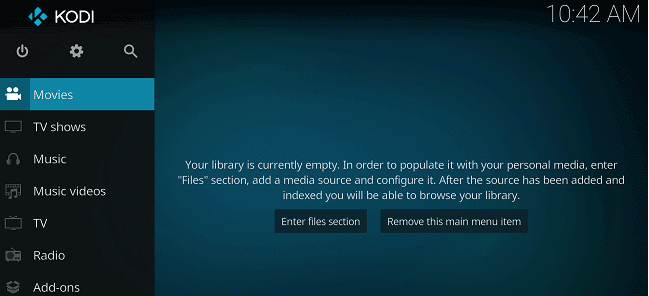
Step-1: Download Kodi/Launch Kodi- the tool
Kodi Download- tool on Amazon ‘Firestick’ gadget from opening the Apps -> then download Kodi.
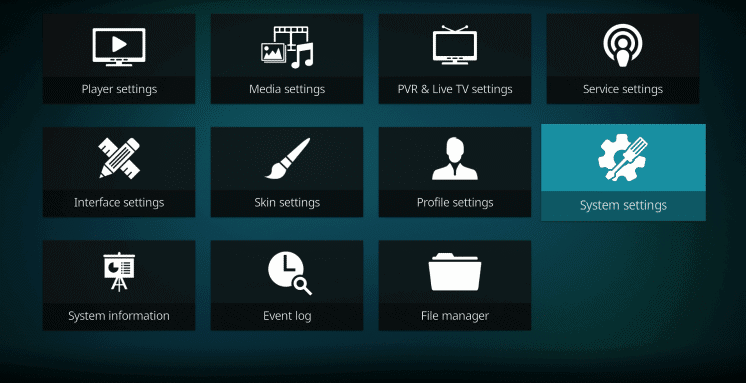
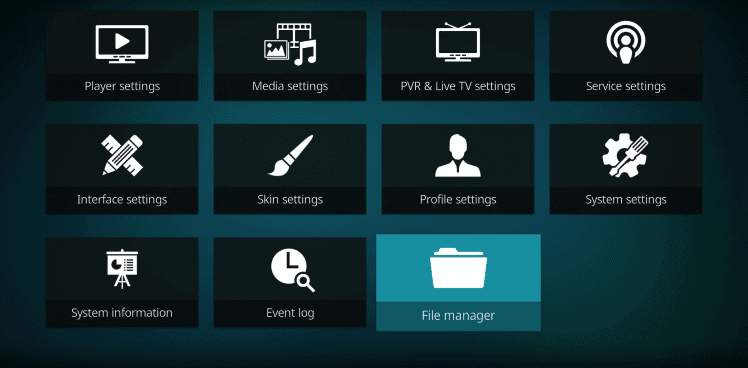
Step-2: Click-On -> ‘Settings’
From the upper left corner, open Gear symbol and after that select System-settings
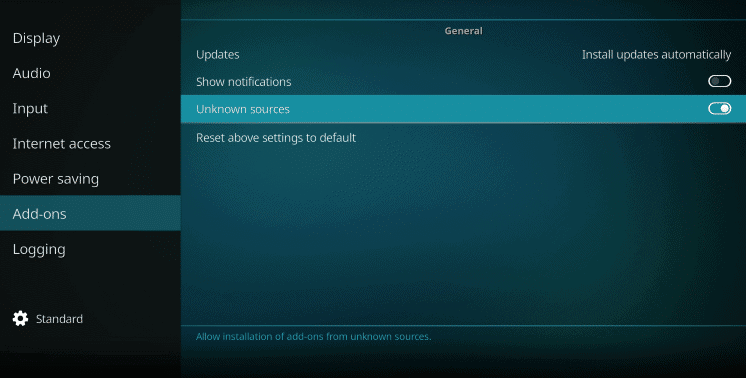
Step-3: Enable the “Unknown Sources”
Go to the System Settings -> then the Kodi Add-Ons -> then the Unknown Source -> then Enable by moving the slider.
Step-4: Browse through “File Manager”
Go to a stage back and click -> “File Manager”.
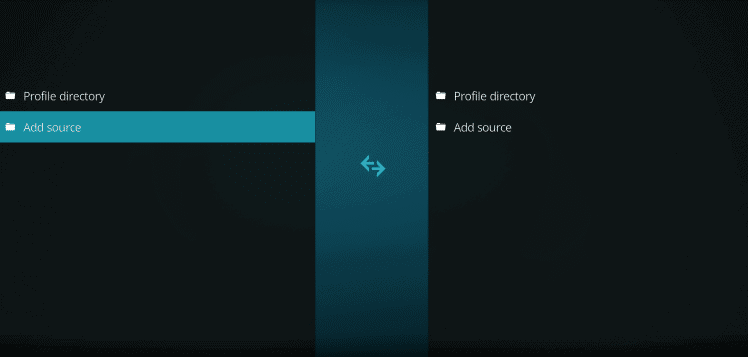
Step-5: Click on -> “Add Source”
In this press, the right-side button on the remote and click -> “Add source”.
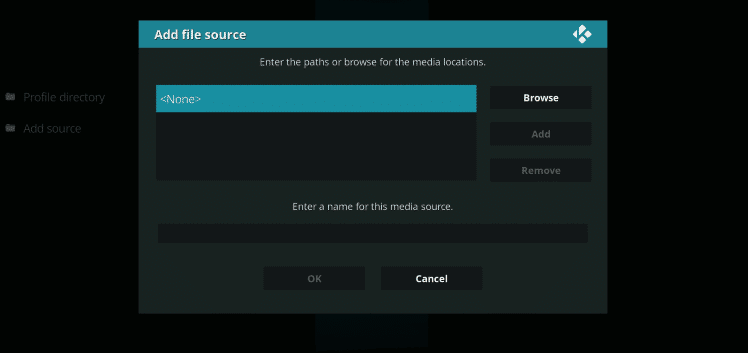
Step-6: Select -> ‘None’
Select ‘None’ to alter the address of repository.
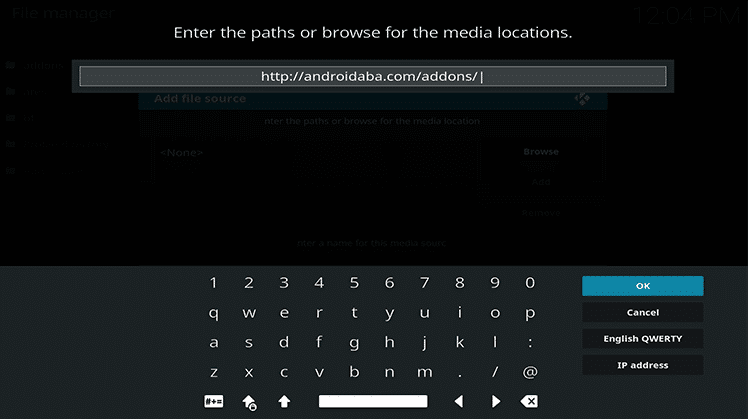
Step-7: Enter the Repository Address
Type the respective address from the remote. You can find working Ares-repo – http://areswizard.co.uk/ OR http://ares-repo.eu/ OR http://androidaba.com/addons/
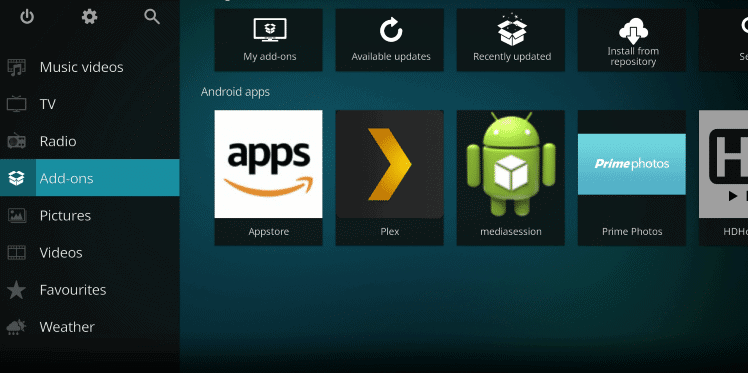
Step-8: Click -> ‘Add-Ons’
Go Back to the Kodi Homepage -> then to the Add-Ons.
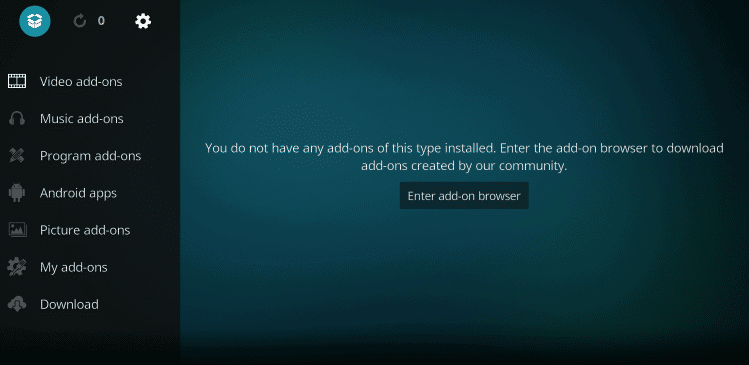
Step-8: Select the “Package Installer”
From the top-most left corner, Choose the “Package-installer”.
Kodi Addons
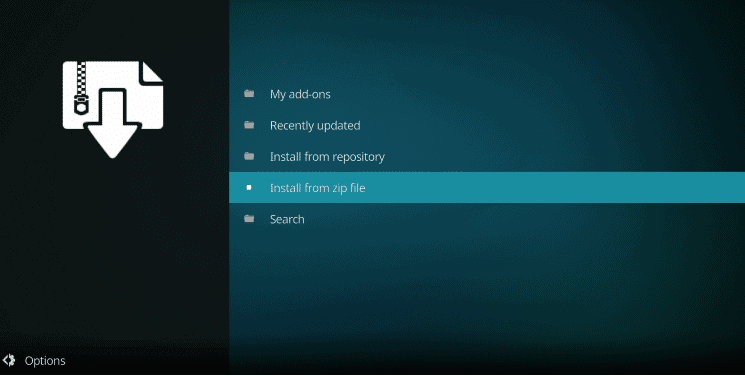
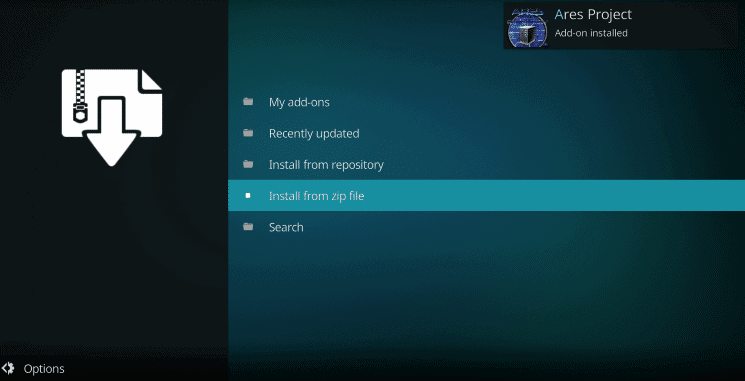
Step-9: Select -> “Install From Zip”
From the list, click -> “Install from Zip”
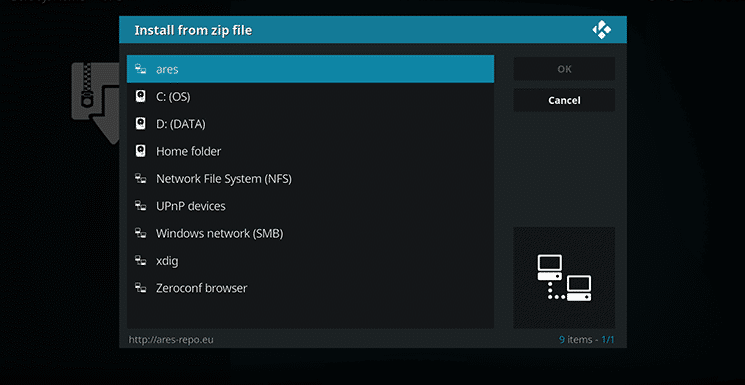
Step-9:- Select the Ares
Select “ares” repository folder from the shown list.
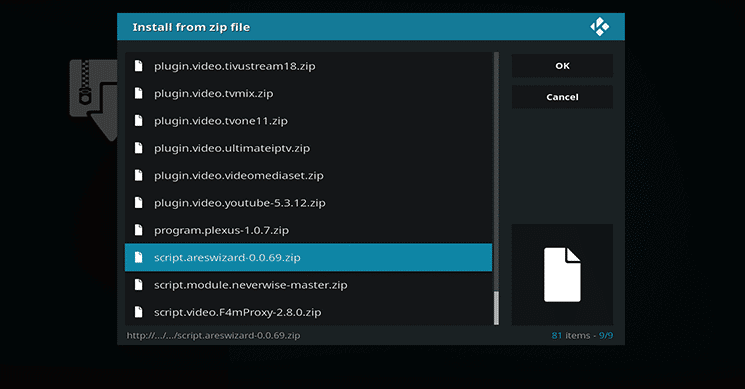
Step-10: Select “script.areswizard-0.0.69.zip”
Open the Ares -Repo folder and choose “script.areswizard-0.0.69.zip”.
Step-11: Select ->Install From Repository/Zip-file where you saved
Head back and select “Install from repository”./ “Zip-file”
Step-14: Choose Ares-Wizard
Open the folder Ares-Wizard from All Repositories-option then Choose -> “Program Add-Ons” and select -> “install”.
Ares Wizard on Kodi
So, we have successfully installed Ares-Wizard on Kodi of version 17.6. Now, all the features and functionalities are ready to use which are offered by the “Ares -Project Wizard”.
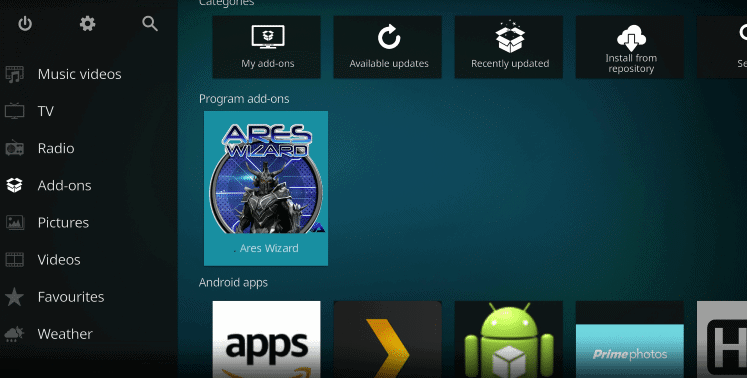
Navigate to Kodi homepage and afterward head over to the Program Add-ons folder and then open Ares-Wizard addon to the device.
Many outstanding features from Ares-Wizard can be experienced on Kodi-tool. Ares Project-tool is 100 percent working and we can optimize our Kodidata for the experience of trouble-free streaming.
Installing Ares-Wizard on -Kodi “17.6- Krypton”
Kodi is a software which is exceptionally adaptable. Most of the add-ons are accessible that let you watch films, TV-shows, tune in to music or radio, or play games around employing copying.
Ares-Wizard is one spot where one can find all those features with additional significant features like support. Here are the steps on to install “Ares-Wizard above Kodi 17.6- Krypton”.
Step 1: Set up Kodi-tool on your system
Step 2: Establish Kodi-
Step 3: Click-on -> Settings “gear” symbol which is in the upper-left corner
Step 4: Browse -> File-Manager and click it
Step 5: On the following screen, choose -> “Add Source”
Step 6: Now click -> “None” so that manually address can be modified
Step 7: Once in“Edit” mode, copy and paste this URL link: http://ares-repo.eu/ in the URL field
Step 8: Select a name for this folder, our suggestion would be to name it as Ares.
Step 9: Get back to Home-Screen and dive into Add-ons section
Step 10: Click the -> small box symbol which is on the upper left corner
Step 11: Choose -> Install from the zip-file
Step 12: Navigate over and choose Ares-wizard and then select a .zip-file which has the first name as “script”
Step 13: Click -> “OK” and stay put till the installation is complete
Step 14: Get back to the Home-Screen another time and go into -> Program Add-ons
Step 15: Click the -> Ares-Wizard
At last, Ares-Wizard is now successfully installed on your -Kodi 17.6-Krypton.
Steps for installing Ares-Wizard on -Kodi “Jarvis- Version 16”
Till now, we have seen the steps to install Ares-Wizard on “17.6- Krypton”, it’s time to discuss the steps for installing the same on -Kodi Jarvis.
Step 1:-Establish-Kodi
Step 2:- Get into System and then enter into File Manager
Step 3:- Double-click -> ‘Add Source’ and choose ‘None’ to go into edit mode
Step 4:- Type this URL link: co/repo/ares.zip in the given field
Step 5:- Choose a folder name
Step 6:- Go back to the Home-Screen and get into System
Step 7:- Browse through Add-ons, from zip-file install it, and the folder you have added now would appear, choose that
Step 8:- ‘repository.aresproject’ has ‘aresproject-0.0.8.zip’, choose that and stay put till the installation is over.
Step 9:-In the Home-Screen, choose -> System -> Add-ons Program
Step 10:- Now select the Ares-Wizard from the shown list
Access Free Streams- Anonymously
The best way to genuinely secure ourselves and remain unknown when you are using Kodi and its different add-ons is to use a VPN for streaming the content.
Virtual Private Network(VPN) encodes web traffic and satires your area. Significantly, you remain mysterious while utilizing Kodi’s outsider add-ons because the ISP could detect it somehow. DMCA would you give the notice if you end up using it.
Fastest VPN utilizes the progressed AES 256-piece encryption and flaunts a worldwide network of more than 150 servers. One can parody your areas like the USA, Australia, Germany, United Kingdom, Canada, and much more.
Is Ares-Wizard Legal?
Earlier, Ares-Wizard was illegal. Since it no longer provides copyrighted material, it’s completely legal to use Ares Wizards It’s simply a tool that is used for maintenance that you utilize to keep Kodi’s health in check.
How to fix if Ares-Wizard isn’t running
Ares-Wizard will not run in case if you’re not utilizing an inert repository. Since we clarified previously, Ares-Wizard was closed down yet it developed with another new link of repository.
The Harry Potter font, commonly recognized as “Harry P” or “Parry Hotter,” mimics the iconic lettering from the book series and movies. Available for free download from sites like FontSpace, it’s perfect for fan projects, invitations, or themed designs, adding a magical touch to your text.
For anyone who is obsessed with typography has a natural inclination towards fonts, something which Steve Jobs popularized in modern-day computers. Harry Potter, on the other hand, is a franchise which shaped and heavily influenced the pop culture. So much so that there are Harry Potter-themed fonts you can work with. So if you are a Harry Potter fan, then you might want to bring the same Harry Potter aesthetics into your artwork.
Since there are literally hundreds of Harry Potter related fonts out there, making a full list is literally impossible. Moreover, you’ll not be using all of them either. So here we list some of the best ones you can make use of.
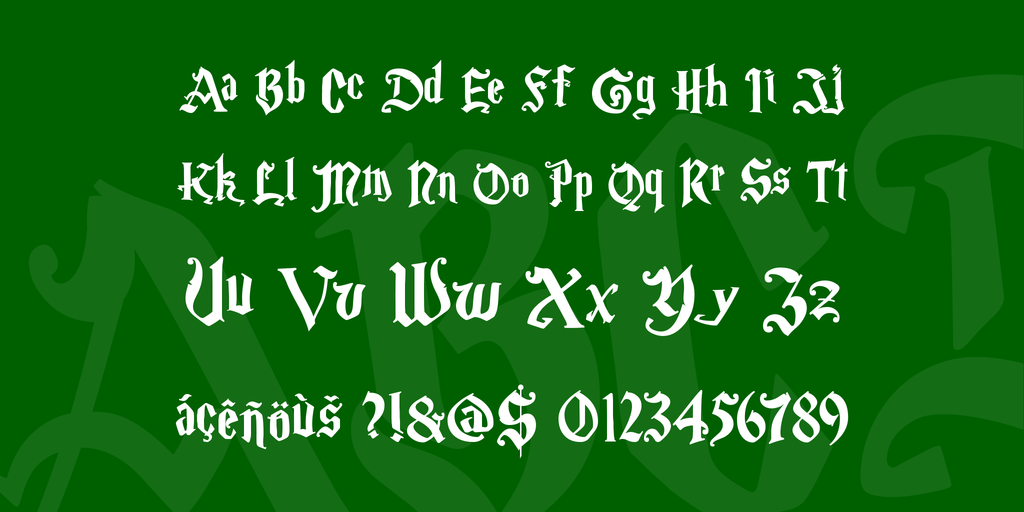
Harry Potter Font
PIC: Harry Potter fonts
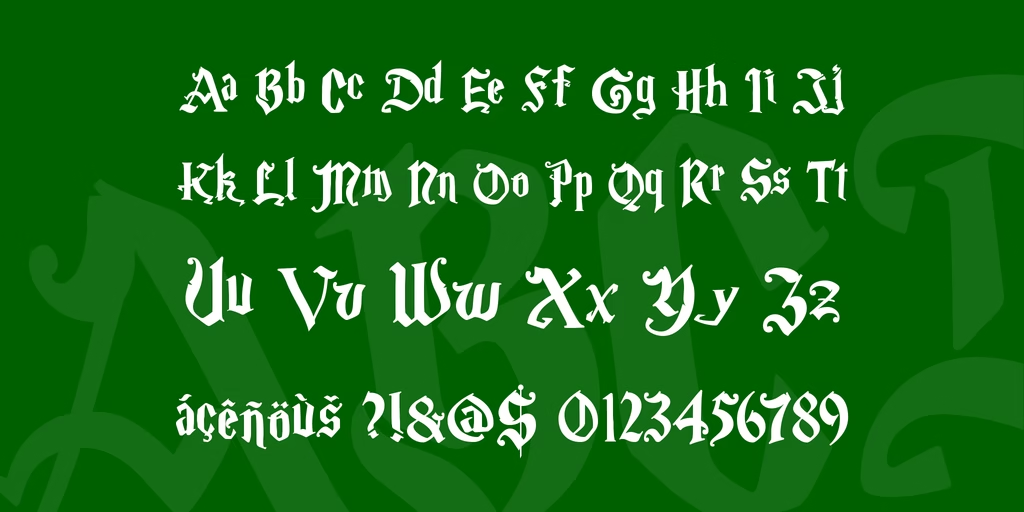
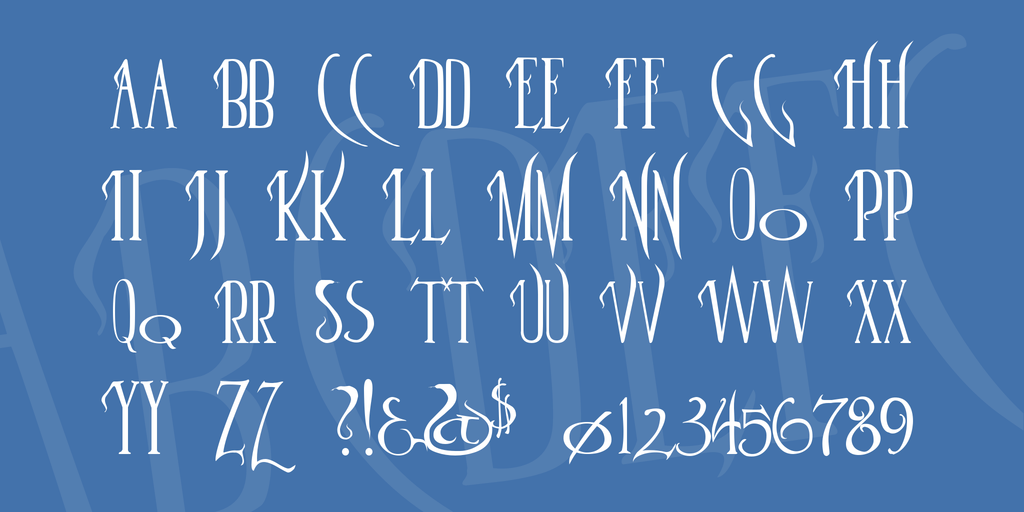
This font is as close as it can get to the Harry Potter style of art, both in books and in adapted movies. Lightning-style edges and Gothic theme makes it looks like it is straight out of the magical world. Besides the letters, there are few special characters available for you to use.
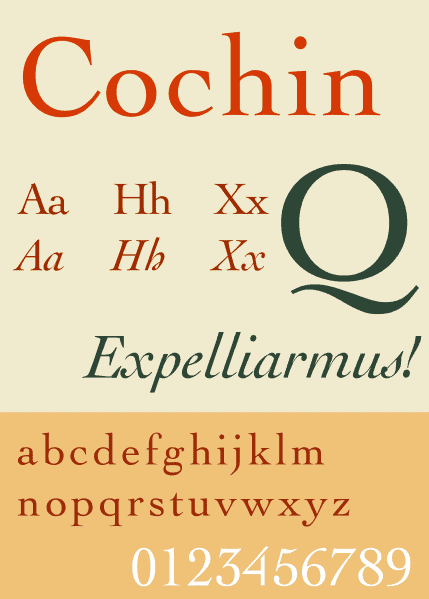
The Cochin Font
PIC: Similar to Harry Potter Fonts
Even though it is listed second, it is arguably the most important font in the HP world of fonts. This is simply because The Cochin Font is used on most Harry Potter books officially. So if it seems familiar, don’t be surprised. The font is very old and was invented in 1912 for printing purposes. But its origins can be traced as far back as the 17th century and is said to be created a Frenchman named Nicolas Cochin. This font is available by default on macOS.
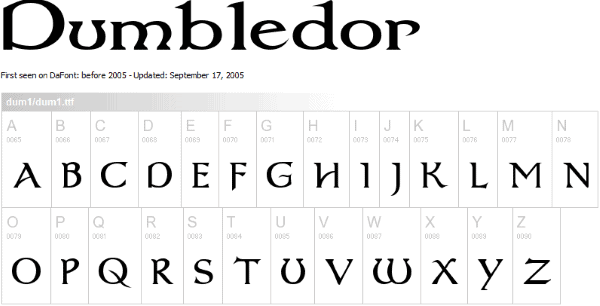
Dumbledor Font
PIC: Similar to Harry Potter Fonts
This font offers a large selection of Harry Potter-like artworks which you can use for printing purposes. Some of them are almost identical to the ones you’ll find on official books, movies, and merchandise. Such large collection often gets overwhelming and it might take you a while to pick the right one for use.
Magical Me (Parry Hotter)
Inspired by an autobiography by Gilderoy Lockhart of the same name (Magical Me), the letters in this font are large and concise, with a lot of twists and turns.
Ink in the Meat Font
PIC: similar to harry potter fonts
This font is not exactly a mimic of any headline fonts found in Harry P books but is very tuned to the theme. In its presentation, it follows the old-school calligraphy approach with quirky tail-like letter extensions. Perhaps that’s the reason it has so much similarity with the Harry Potter documents. But as a caution, this font, in particular, can be indiscernible at times.
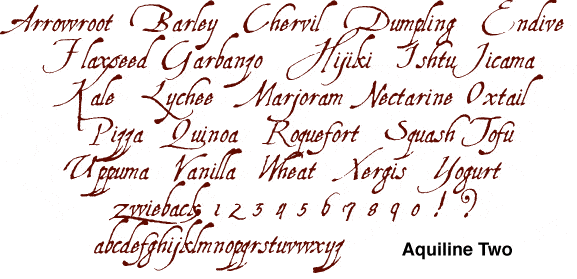
Aquiline Two Font
Designed by Manfred Klein, this font is a blend of cursive writing and Gothic themed writing. With over 248 defined characters and 211 glyphs, you’ll find everything you’d need for Harry Potter-esque presentation or printing work.
Magic School Font
PIC: Similar to Harry Potter fonts
This is another old-school font that is sure to take back to your school days with its cartoony look and feel. While this is still not an authentic font that’s straight out of the Harry P world, it nevertheless is well-designed and fun to work with.
Parseltongue Font
PIC: similar to harry potter fonts
Parseltongue should be appreciated for striking a balance between being inspired by the Harry Potter motion pictures and being distinguishably different at the same time. The letters in this font are easy to understand and you might even relate some of them to books you have seen in potions.
I Love A Ginger Font
This font is similar to Parseltongue and has no direct link to the Harry P universe. The letters are concise and interesting to look at. If you squint carefully, you’ll realize that the took heavy inspiration from Weasleys.
Lumos Font
This font is quite similar to Times New Roman except for the elongated edges. In the Harry Potter universe, Lumos is one type of spell that will light up your want instantly. To get the best out of it and get a true-to-the-book experience, use Lumos is CAPS only or small-caps. So avoid a mixture of both.
Booter Font
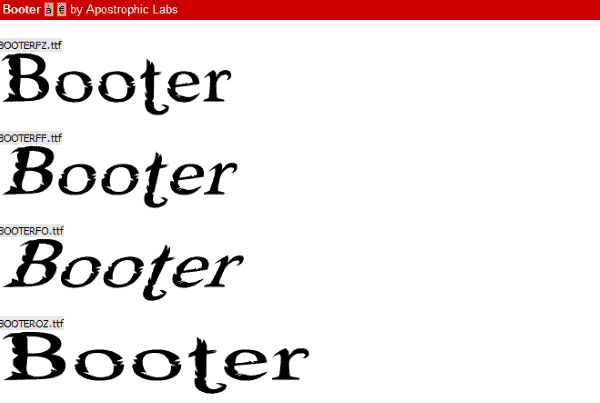
Booter is perhaps the most clearly-spaced of all the fonts mentioned here. Just like Ink in the Meat font, this is not strikingly similar to any Harry Potter original work but not radically different either. In this collection of font, there are a number of variations in size, angle, and thickness. So it’s well-worth the label of a multi-use graphic font.
Faerytale Woods Font
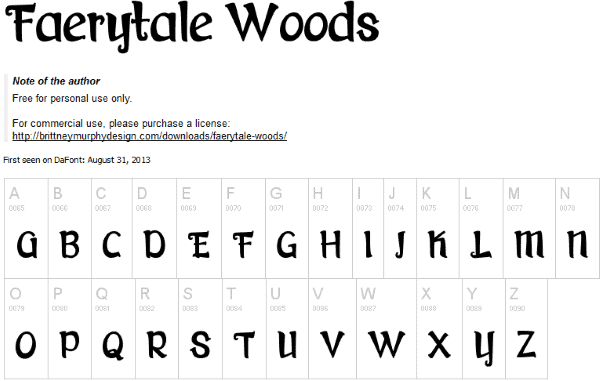
The Fearytale Woods fonts are quite clear which make them ideal for use in most situations. This is not a font which you’ll find inside of the Harry Potter world but has a lighthearted cartoonish aspect to it. As a downside, this is not a free font for commercial purposes, but you can play around with it for personal use.
Now that you know some of the best Harry Potter related fonts available to you, it can be tempting to start using them as soon as possible for your next project. In this section, we’ll guide you step-by-step on how you can make use of these mystic fonts. But the installation process varies slightly for different OS.
Installing Harry Potter Fonts on Windows
Open Cortana or use the Search bar and type “fonts”.
This will open up all the fonts. But these are not available in your system yet.
Find your preferred font and download the .ttf file format. This should make it available in the Fonts window.
Open your Word Program and change the font you just downloaded to start using it.
Installing Harry Potter Fonts on Mac OS
First, go to the official creator of the font or grab the download link for Macintosh.
Download the .ttf or .otf file format.
Click on install once it’s downloaded.
Navigate to Finder and Applications.
Open Font Book and you’ll see the downloaded font.
Select the font to start using it in the Word processor.
For Linux machines, the procedure for downloading and installing a font is the same. Just make sure you grab the file with .ttf extension.
In conclusion, the options are endless, and we actually encourage you to try out more relevant harry potter font. This will only beautify the project you’re working on and have plans for.