Home Blog Page 308

Apple iBooks App gets update with new exiciting fonts and infinite scroll

iBooks gets updated!

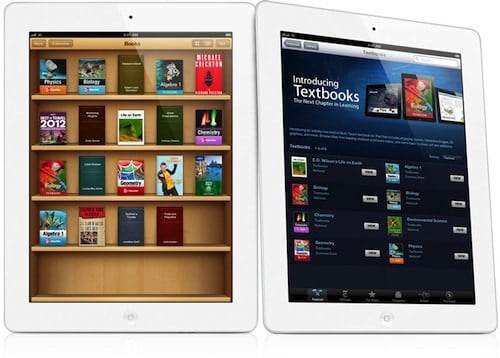
With the new iPad Mini focused on education, it was a great place for Apple to announce the update to their iBooks aplication. The revamped iBooks 3 brings some really nice interesting features.

It features a new “continuous rolling” reading option, which bascally means if users flick the screen with their fingers, words will start progressing as they do when scrolling up and down a web page.

iPad Mini iBooks 3

Another much awaited feature which makes its way is that now iBooks is better integrated with the iCloud and it also brings better sharing features now such that now users can post passages from books to Facebook and Twitter. The app has even diversified its reach by now supporting over 40 languages, including vertical text in Chinese.

Apart from that the new iBooks also new color scheme and infinite scrolling and with the inclusion of support of over 40 languages, there are now fonts in all those languages too.

Apple stated that it now their catalogue has over 1.5 million books available to download, while 400 million titles have now been downloaded by users in just over two years since the launch.

[youtube]http://www.youtube.com/watch?v=Fp5KGSstnsY[/youtube]

Top 4 Social Media Sharing Plugins for Website and Blogs

1

Social Media is one of the major platform that brings the great amount of traffic to blogs and websites, you can spread your business or the articles on the facebook and other social media websites and also bookmarking website such as twitter, digg, stumble upon and reddit and gain extra traffic. Here we have listed the best and most used social media sharing widgets which makes your content sharing easy. You can use these content sharing plugins in your blogs including wordpress, blogger and your own website as well.

Also Read:

List of Social Media Sharing plugins

Sociable

social media sharing plugin

Sociable is sleek and easy to install social media sharing plugin which has been downloaded by more than 1,700,000 times. This plugin is specifically designed and coded for WordPress blogs that comes with tons of options and features, you can add the counters of Facebook, G+ and Twitter etc.. Sociable social media sharing plugin comes in skyscraper as well as classic style embarked with hundreds of social media and bookmarking websites. Here you can customize features such as text, color, and length to make the better sharing experience.

Sociable is absolutely free plugin for WordPress which requires WP version 2.6 or higher. Here you also get a “Go to TOP” button that takes back you to the top of the page when clicked.

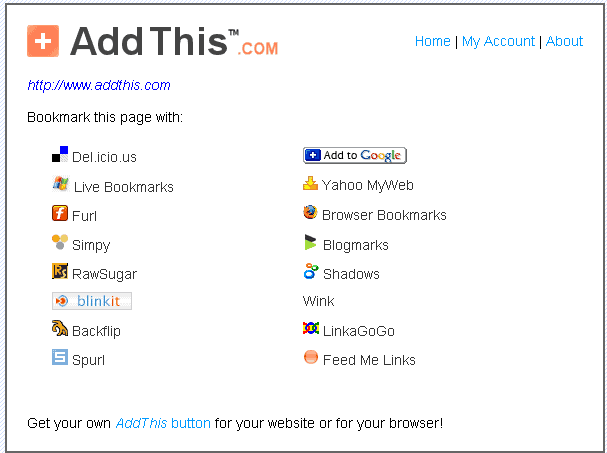
Addthis

addthis

Addthis is a widely used social media sharing plugin that could be embedded in WordPress, blogger, websites and email newsletter. Addthis has analytics feature to measure your blog or site’s social activity in real-time that includes shares and social mentions.

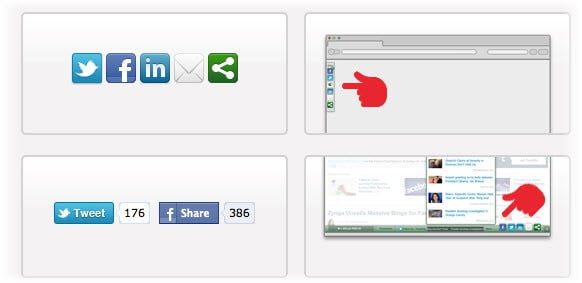
Embedding Addthis in your website is easy, choose the platform on which are you going to embed the widget, select vertical or horizontal style and then copy and paste the code in your site. For WordPress you can install the plugin right from your admin area. Addthis has recently launched social sign in option that allows your visitors to easily login to your site with their social network accounts.

Sharethis

sharethis

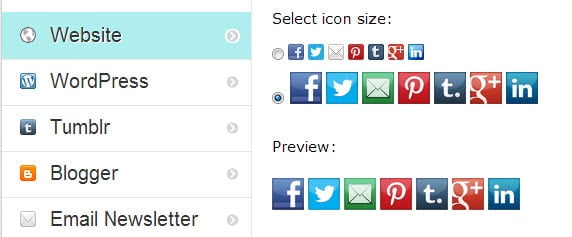
ShareThis is another great social media sharing plugin that can be installed in website, WordPress, Typepad, Blogger, Tumblr, Drupal and Posterous, iOS, email newsletter etc. Installation and configuring with ShareThis is easy that consumes less time. ShareThis is installed in about one million websites till now, it provides analytic service that let you the presence of your website or   blog on social media. Embedding ShareThis is easy, select the platform such as website or blog, select the widget style and get the code.

Shareaholic

shareaholic

Shareaholic is a cool content sharing plugin that enhances social media sharing. Similar to sharethis and addthis, Shareaholic allows you to track your social media shares and let you know the top referring social media websites. Shareaholic works with website, WordPress, Blogger, Tumblr, Drupal and other well-known platforms.

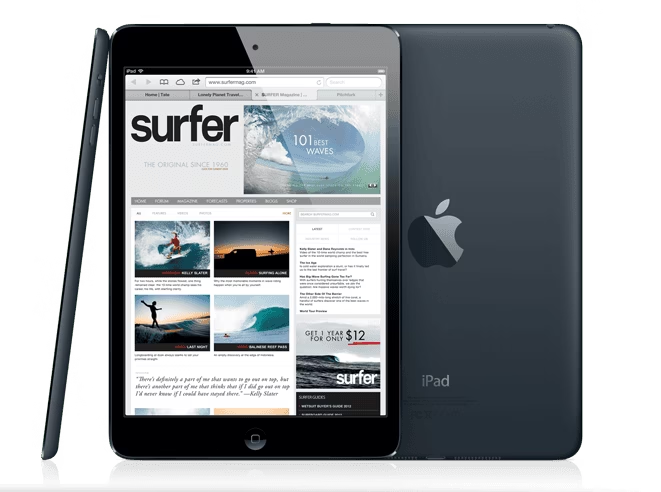
iPad Mini finally official now, starting at $329!

Well the long rumored iPad Mini is finally here. Apple unveiled the smaller version of its market leading Tablet, the iPad at an event on 23rd October. The tech folks have been calling the iPad Mini the worst kept secret as it was pictured with all the details several times before launch same as the iPhone 5 which was already seen way before launch by everyone reading tech blogs. It seems Apple’s security has loosened up since Steve Jobs as earlier there every device would be a surprise.

iPad Mini

Coming back to the iPad Mini, the name suggests truly it is the smaller version of the Apple iPad with a 7.9-inch display which will be going head to head against the likes of Nexus 7 and Amazon Tablets although the iPad Mini does not share the price of others as it is priced higher. To put it more simply, it is a shrinked iPad 2 as the  as it packs the same 1,024 x 768 display which seems a great move as it means that developers don’t need to rewrite their apps for the newest kid on the block although the Retian lovers amy be disappointed as its nowhere close to it with ppi at just 163 pixels per inch (ppi).

The hardware seems to be the usual Apple that means nothing short of impressive to say the least. It is 7.2mm thick, weighs approx 300 grams which is less than half the weight of the full-size iPad and is said to be manufactured with an “all new” process that gives it the same anodized edges as you’ll find on the iPhone 5.

The Tablet is powered by the A5 chipset which we first came across in the iPad 2 and it is the one that also powers the iPod Touch which was unveiled recently. It has a front-facing 720p camera which should be great for Facetime calls, a 5-megapixel camera in the rear as well. It also includes the brand new Lightning connector which debuted on the iPhone 5 so it should make it the universal connector across Apple devices.

iPad Mini

The Tablet also features an LTE modem if you buy the cellular model. Apple promises 10 hours of battery life from the device.

The base model iPad Mini pricing starts at $329 for the Wi-Fi-only version with the usual 16 GB storage. The higher storage versions and 4G LTE options are available as well, the prices for Wi-Fi-only versions are as follows: $429 for 32GB, and $529 for 64GB. If you want the cellular versions, prices are $459, $559 and $659 for 16, 32 and 64GB, respectively. The pre-orders begin Oct. 26 and shipping starts with the WiFi version which will start to ship Nov. 2, and the cellular modelare expected to come about two weeks later.

[youtube]http://www.youtube.com/watch?feature=player_embedded&v=uFUSVaqSaxQ#t=0s[/youtube]

Billomat- An Online Solution for Invoice, Billing and Customer Management

There are several websites available on the internet for online billing and invoicing but the most popular among them is  Billomat. Billomat is an online service that let you manage invoice, billing, quotes, articles, credit notes, order confirmations, delivery notes and recurring invoices and along with this it also offers customer management in easy to use interface. You get all these features in a secured environment as this service uses secured socket layer encrypted forms.

online invoicing – Billomat is an all in one solution for freelancers, small business and as well as organizations to manage their clients and keep them updated with company’s development. Billomat comes up with an online mailing feature that allows the owners to send reminders and quotes to their clients to keep the constant touch.

Also read:

Why Go for Billomat?

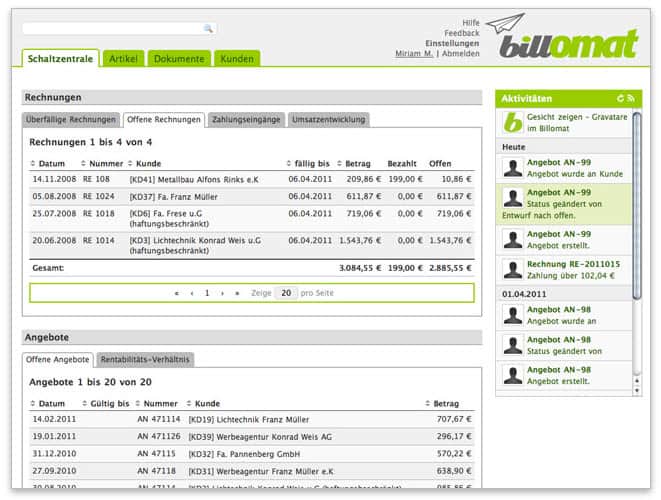
billomat screenshot
Billomat screenshot

Billomat is a paperless billing and invoicing system, there are many reasons for using Billomat online service rather than traditional methods or offline billing software which we install in our PCs. Here is a small note on why choose Billomat-

Cloud Based Solution

Billomat is a cloud solution and hence you need not require any software to install in your PC or update it, you get the updated versions directly when you login to your account and you can manage it from anywhere, you just need an internet connection, start working from home, office or on the way.

Secured

As described earlier Billomat uses secured socket layer (SSL) encrypted forms, this assures the comprehensive security for your data. The team working behind makes regular backups of important data so that you never lose your valuable information. It has state of the art infrastructure and data center with uninterrupted power supply and high speed internet connection. It has a robust firewall that keeps your data away from threats.

Billomat Interface

Billomat has a user friendly interface. It comes up with a dashboard where you can have a look at the summary of your unpaid invoices, open quotes as well as recent activities. We get three tabs after dashboard- Articles, Documents and Customers.

Articles: Articles tab allows us to prepare and manage your invoice items which could be further used for new quotes and invoices.

Documents: Here we can write estimates and invoices. The forms you use here are already filled to make your work easy. You can send your documents by post, fax and email that includes a digital signature.

Customers: Here we get customer’s complete transactions history with useful filtering options. You can add customers manually or just import from vCard or CSV. Customers tab has search option that let you find the customers or articles easily.

[youtube]http://youtu.be/6d74PcWKMYk[/youtube]

Conclusion

Billomat is the most convenient way of managing invoice and billing in a secured manner, it saves lot of time and energy compared to the paper based system. Billomat offered in five pricing models for different business needs. Get started with Billomat .

Download Large software and movies files quickly with constant high speed

Usually whenever we download software, songs and movies from internet we won’t get the constant speed especially BSNL broadband user mess with this issue. I am not blaming the organization here but it is the fact. Downloading with the constant speed is not possible even if you use IDM (internet download manager) or speedbit’s DAP (Download Accelerator Plus) or any other third party download managers that you use to download.

I faced with transfer rate varying issue whenever I download software, songs or movies from the internet earlier. I personally use IDM (internet download manager) to download and my broadband’s maximum downloading speed (transfer rate) is upto 80 Kbps which is not constant. While downloading with IDM the transfer rate some time goes down to 40 Kbps and again back to 70 or 60 kbps, I was unable to get the constant high speed. I decided to get the constant transfer rate while downloading and started hunting for the software for the same.

While searching for a software to get the constant high speed transfer rate, I found a cool freeware i.e NetBalancer developed by seriousbit.

Also read:

Brief Note on NetBalancer Traffic Shaping Tool

NetBalancer is a free tool that can monitor and control internet traffic, it works well with Microsoft Windows XP, 2003, Vista, Windows 7 and Windows 8 as well and even in x64 operating system environment. It is a light tool of just 2.2 MB in size and thus does not slow down the PC while startup.  NetBalancer allows you to-

  • Prioritize specific process (this is a trick we use to download with high speed)
  • Set network traffic rules and limit global traffic: this is useful when you have limited bandwidth plan
  • Group several local network PCs and balance traffic
  • Have a look at live network traffic with graph

How to download with constant high speed using NetBalancer?

  1. Run NetBalancer from the start menu once downloaded and installed it in your computer
  2. Start your download with IDM or DAP software or any other downloading client
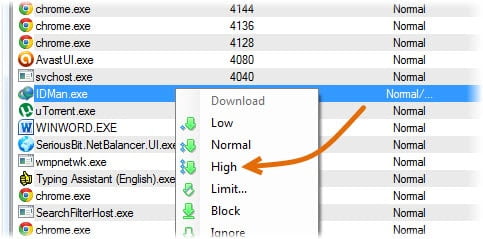
  3. Now point out your downloading client in NetBalancer’s list
    iPad Mini
  4. Right click on IDMan.exe and click on “High” from the menu (I am using IDM to download files),

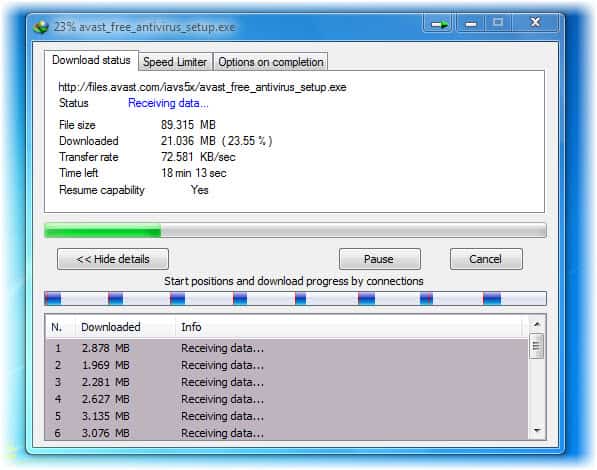
The job we just done prioritizes IDM process which then uses available bandwidth to download files with high speed constantly. Here is how I download software and movies quickly with constant high speed and I hope this trick will surely help you.

iPad Mini
constant high speed transfer rate after the settings in IDM

NetBalancer’s free version is limited to maximum 5 priorities, limits and 5 rules this means you can only prioritize 5 processes at a time. You can go for NetBalancer Pro version at 30$ (approximately 1,620 Indian rupees) for unlimited access.

NetBalancer homepage>>

The iPad Mini to be unveiled tonight: What we can expect?


Well today is the day when we’ll be finally seeing the smaller version of Apple’s market leading Tablet, dubbed as the iPad Mini getting unveiled. The iPad Mini has been in the rumor mill since a couple of years now and we already know a lot about but some are obviously rumors. Apple has sent out invitations for an event on Tuesday in San Jose, California, saying only: “We’ve got a little more to show you” and as always minimal details on what we’ll be seeing. With Amazon getting much traction last year with its Kindle Fire and stepping the game in the 7-inch market with Kindle Fire 2 and Google joining the party with Nexus 7 which has been selling successfully, it was only a matter of time when Apple, the company which arguably gave birth to the Tablet market with the iPad entered this scene.

So we are here to tell you what we can expect from the new smaller iPad to bring to the market. What we are sure about anyway is that it will feature a display of 7-8 inches but several rumors have pointed a specific 7.85 display size and the displays have been manufactured by Sharp. The aspect ratio of the display will be 4:3 and the resolution will be of 1,024 × 768, according to a new report by DigiTimes, citing unnamed sources in Taiwan. Thus there will be no Retina moniker for the iPad Mini which might disappoint some but it truly makes sense since the iPad 2 features the same display resolution and it also means lesser price for the tablet.

iPad Mini

Another point of discussion and rumors has been the pricing of the device. Earler, we heard rumors stating that the starting price for the base model will be $249-$299 but recently we have been hearing contradicting rumors saying that the Tablet will sell at somewhere between the $299 iPod Touch and the $399 Wi-Fi only iPad. In other words a “a price point of $299 or $349.” A report from the reliable folks at 9to5Mac state that $329 will be the starting point. Well we’ll surely know tonight.

Apart from the screen and price, others like skinny bezels similar to the iPod Touch, the new Lightning connector, front and rear cameras, and an ultra-thin design is what we can easily guess the iPad Mini to have. The tablet is also expected to ship November 2 with the Asia-Pacific region due to receive the device mid-December.

We all know a 7-inch Tablet is a far more portable option than a 10-inch one and if you are the one who hold your Tablets in your hands for long hours then you’d know that 7-inchers are more lighter and more easier to hold. reports from Bloomberg suggest Apple will “make a point of highlighting the educational abilities of the iPad,” and we could also see a new version of iBooks so that Apple can show off features like visual textbooks thus making it a viable Tablet amongst students.

iPad Mini

We are surely going to know every single detail about the iPad Mini later tonight and if it is priced the way we expect then with with its brand, ecosystem, and developer support, is perfectly position to take advantage of it. Apple seems confident with the product since they have already ordered 10 million units for the remaining months in 2012 and if analysts are to be believed then the new iPad will not only hurt the other Tablet makers but also the PC market. J.P. Morgan analyst Mark Moskowitz said, “the iPad Mini stands to target price-sensitive users and the ereader crowd,” . “Given the global economic uncertainty, we think price-sensitive users could gravitate toward an iPad Mini instead of making a PC purchase.”

The event is scheduled to take place at 10am Pacific Time (22:30:00 Indian Time) at the California Theater in San Jose, California.

Find Top Free Windows Apps From Intel AppUp

1

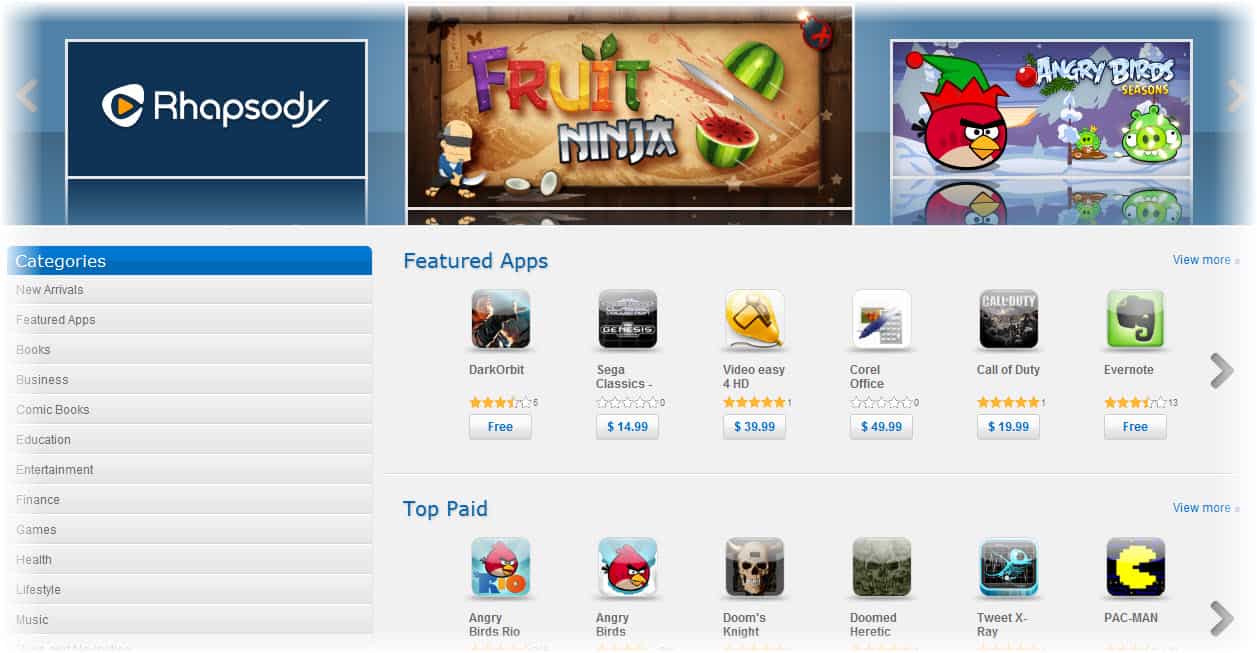
We get trendy apps for Android, iPhone and even Windows Phone as well but what about PC and laptops? We get App Stores for Android, iPhone, Window Phone and even for MAC then why not for your own laptop? Yeah.. Don’t worry, you can also get free apps for your PCs and laptops with Intel AppUp. Intel AppUp is a one-stop shop app to get any kind of app, from games to business app you get everything over here. Not only you can download free apps but also purchase the paid apps if you find them interesting.

AppUp is a free software developed by Intel that let you search and download the apps that we usually see in Android and iPhone operating system. Installing AppUp in your netbook hardly takes few minutes, it could be installed on Windows XP and Windows 7. Here you can search for the app from various categories including books, business, education, entertainment, finance, games, health, lifestyle, music, maps and navigation, photos, productivity, shopping, social networking, travel and weather etc.

Also read:

Possibilities of Intel AppUp

intel appup

Intel AppUp is a free platform to serve useful apps that are commonly used in devices such as mobiles and tablets. Here you can play games as well as do your works with productivity apps. In free games section you will get Fruit Ninja, Glow, LEGO star wars, Chicken invaders, Bubble ball, Motocross king and Helicopter fighter etc., in free apps segment you can have Tango video calls, Evernote, Photobucket, McAfee antivirus plus etc.

You will get detailed information including the app size, date released, version and developer when you on a particular click the app to install it.

How to install Intel AppUp?

installing Intel AppUp is easy, just download your copy of Intel AppUp, it is hardly 40 MB in size. Once downloading gets over, install the software and run it, You can either create your own Intel AppUp account or sign in with your existing facebook account to get started. You must sign in to download any app from Intel AppUp center.

You need to have an internet connection with decent speed, java run time environment and enough space to download and install the apps that you wish to have.

Make Money with Intel AppUp Developers Program

Intel AppUp developers program allows you to create your own apps for netbooks, PC and ultrabook which are served by Intel AppUp software. You can create your own apps in the programming language you prefer including C++,.NET, Java and Adobe AIR. Along with this Intel has also developed a encapsulator that embeds HTML5, CSS, JavaScript and AJAX code into one single application and also creates installer package.

[youtube]http://youtu.be/G5mKK64mOts[/youtube]