Home Blog Page 309

Acer Aspire S5: Explore your hidden passions

0

Ultrabooks, we guess you have been hearing a lot about these in the recent days. With plenty of ultrabooks on the market right now, its hard to fix your eyes on a single product but one ultrabook which has truly managed to impress my geeky heart with its looks and features is Acer‘s Aspire S5 ultrabook. It has got some great tricks up its sleeve which make the sleek ultrabook stand out but not everyone out there is as geeky as us which is where comes the need for some interesting, attractive advertisements and campaigns to make a product a household name in the masses.

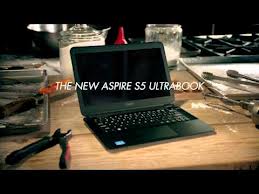
Acer with its new tagline “explore beyond limits” have launched a new campaign featuring Kiefer Sutherland, better known as agent Jack Bauer from TV series 24. The campaign is really attractive to say the least with all the ingredients in it, humor, some action, the sleek Aspire S5 and even cupcakes. In the ad, we see Kiefer “exploring his hidden passion” to create his own brand of cupcakes called ‘dynamite cupcakes‘ and the Aspire S5 comes to great help. With the aid of his S5 laptop he searches for the perfect recipe, photographs some explosive inspiration and designs a logo for his cup cake brand.

Acer

We recently heard that Acer was planning to double the marketing bidget to revitalise its image as the premium products maker. Well the budget seems to have been well used with this campaign as it is very addictive as i have already watched the videos several times. Martin Schellekens, global marketing director at Acer, said: “At Acer we’re interested in what people do with the technology we develop” which goes rightly along with this campaign. the ad titled “Dynamite Cupcake”, surely explosive.

Check out the awesome ad below and do tell us what you think of it.

The ad campaign was created by Mother and directed by Ivan Zacharias, with producer Nick Landon and production company Stink. Acer’s Aspire S5 Ultrabook, dubbed the “world’s thinnest ultrabook”, is a super slim 11mm and weighs in at a featherweight of 1.2kg and is packed full of amazing features like Instant Connect, allowing users to get online in just 2.5 seconds and its unique motorised Magic Flip panel, keeping unsightly ports which pops out to reveal Thunderbolt, USB 3.0 and HDMI (high-definition multimedia interface) and keeps them hidden until you need them. The Aspire S5 has some key ingredients that make it a great Ultrabook: a thin shape, an impressive port selection and blazing performance.

Acer

This post is brought to you by Acer all opinions are mine.

Best CDW Data Storage and Virtualization Solution for Your Small

This post brought to you by CDW. All opinions are 100% mine.

Reduce Your IT Data Storage Requirements by 20-40%   If you're a small business owner, or are familiar with IT at all, you understand how important data storage management is. With the hundreds- sometimes thousands of emails, documents and transfers happening daily, you want to make sure your data is not only stored properly, but also properly protected, this is where the CDW Data Storage Management And Virtualization Solutions come into play with their effective data storage solutions which will surely impress and you will be thankful to us for telling you about it. Well i know you are interested in data storage management solutions and virtualization if you're still reading this post. We are going  to tell you all the details you need.


CDW_02 

Firstly, CDW is an Illinois, US based company founded in 1984 and is a leading provider of technology products and services for businesses, government and education. They offer assistance on data storage management and virtualization solutions for both beginners and veterans in the field. CDW offers assistance by providing consultation and suggestions to help build a scalable solution. To put it simply, data storage management and virtualization solutions are tools, processes, and policies used to manage storage networks and storage services.  They are truly integral to a company because they can introduce or increase flexibility and optimization, and help with performing non-disruptive file migrations and make storing your files hassle free.

CDW_01

CDW data storage management and virtualization solutions can be beneficial in almost all types of your needs, be it a business or anything in which you need to store large amount of data. Data storage management is one of the most critical components of any business – big or small. Any company sends/receives hundreds to thousands of emails, documents and other types data through the internet or other mediums daily and for a company to run systematically all the important data, here we are talking of huge data, the data must be properly categorized, stored and secured for future retrieval and use and this is where you will need a powerful data management/virtualization solution is required to handle all these tasks effectively and CDW's offering is second to none. If your organization is not readily embracing storage management and virtualization Solutions then you can explain to them on how you can implement it better according to the company's needs and wherein the company, it may be truly beneficial.

Its the combination of great features that really make things work when considering a data storage solution and CDW offers some really  tempting features. Let's take a look at each, individually.
  • Storage Area Networks (SANs) – Network storage designed to be accessible and act like locally attached storage devices.  SANs provide good file support for organizations with a healthy flow of data and a team that relies largely on data for day-to-day operations.
  • Blade Servers – stripped down computers that rely on a blade enclosure for power and other resources.  These provide a way to scale while saving on resources and are a good solution for businesses with dynamic data needs.
  • Storage Management Software – This provides centralizes management of both your data and your storage solutions.  With storage management software, you can automate data processes and remove complexity from the management of your system.
  • Archiving Software – Archiving software helps manage your data's file cycle and retention, streamlining the process and making available more resources.
  • E-Discovery Software – This hits home for anyone who has spent hours searching for a critical file in their system.  E-Discovery software makes it much faster and easier, using archiving as a base.
  • Data De-duplication – That's DE-duplication, as in making sure you don't have 20 of the same flat file on disk.  This provides decent space savings.
  • Data Storage Virtualization – Commonly used in SANs, data storage virtualzation combines multiple data points into one system for ease of use and access.

Although you already know by now much details about CDW data storage management and virtualization solutions but you can still download CDW's Red Report for free for a limited time from this link. This document will give you an exclusive insider view as to how you can manage your data and you can learn how to: • gain faster access to critical info • better support their workforce • protect organizational data • eliminate infrastructure inefficiencies CDW's website

Visit Sponsor's Site

Top 5 Free Alternatives to Snagit Screen Capture Tool

Screen Capture is a must-have software for bloggers, developers and designers, it is required to get the screenshots of the app or any elements of the windows. Developers introduce their app with the screenshots and bloggers use screen capture tool annotate some interesting tips and trick share on their blogs. Here we have listed free screen capturing software which are alternative to Snagit screen capture utility.

Tip! Trick to Use Teamviewer without installing.

Also Read:

List of Free Screen Capture Tools that are alternative to Snagit

PicPick

Alternatives to Snagit Screen Capture Tool

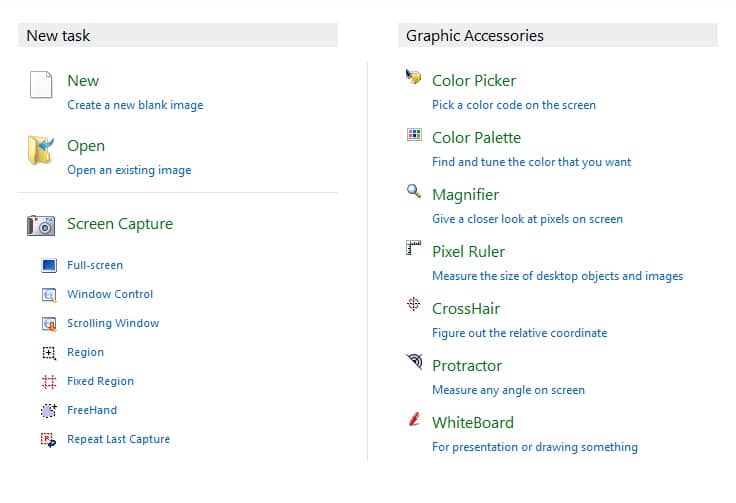
PicPick is a free screen capture tool that is alternative to snagit and allows you to do multiple tasks, it’s like a one-stop app for a graphic designer where you get various tools including screen capturing module, image editor, color picker/ palette, screen ruler, whiteboard and protractor etc. It can capture an active window, a region, scrolling window or webpage and freehand, it also supports Auto-scroll as well as dual monitors. You can create shapes, arrowed lines and speech bubbles in its advanced image editor. PicPick snagit free alternative also consists of horizontal and vertical screen ruler and a screen magnifier. PicPick is compatible with the most recent operating systems such as Microsoft Windows 7 and Windows 8. PicPick has also released its portable version which could be downloaded with PortableApps Platform.

ScreenSnag

Alternatives to Snagit Screen Capture Tool

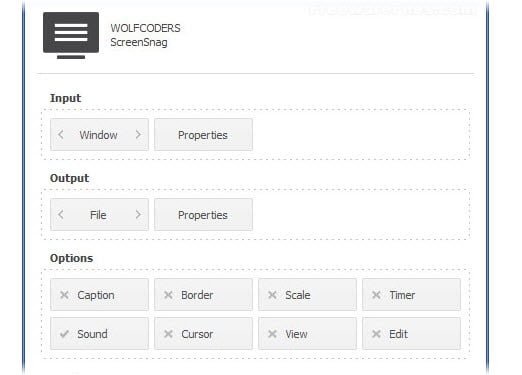
ScreenSnag is easy to use as well as light screen capture tool by wolf coders to capture your screen. It is the free alternative to Snagit and allows you to capture the whole screen, a particular region, a window, or an element on the screen with a mouse click or hotkey. By using ScreenSnag you can capture the screen in moments with quite useful options including timer option for interval capture, border, cursor visibility, scaling and sound and many more.

ScreenHunter Free

Alternatives to Snagit Screen Capture Tool

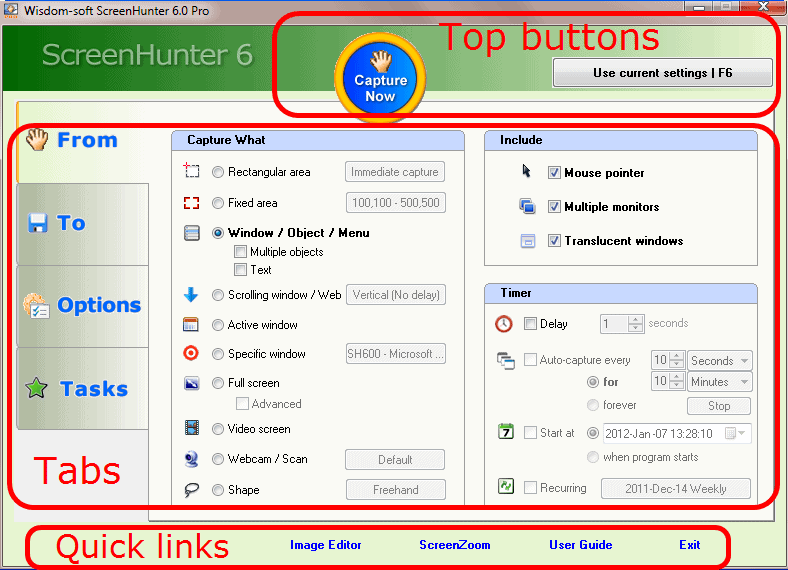
ScreenHunter Free is an advanced screen capture tool that comes up with various options. It can capture your active window, scrollable web pages, webcam and video. Along with this it has many useful features including auto-capture, delayed capture, copy to clipboard, hotkey and many more. This software is compatible with both 32-bit and 64-bit versions of windows. It work as snagit alternative. ScreenHunter has a pro version that has many awesome options and features for a professional capturing.

FastStone

Alternatives to Snagit Screen Capture Tool

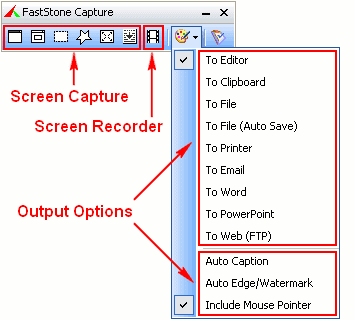
FastStone Capture is a free alternative to snagit and light app that let you capture as well as annotate all the elements of the screen that includes windows area, menu, rectangular area, fixed regions, freehand selection, and scrolling web pages etc.. You can save the captured elements in BMP, GIF, JPEG, PNG, TGA, TIFF and PDF file formats. It includes editing options such as resizing, cropping, sharpening, arrow lines, highlights, edge effects etc. It also consists of some useful tools including screen magnifier, color picker, and screen ruler.

Jing

jing

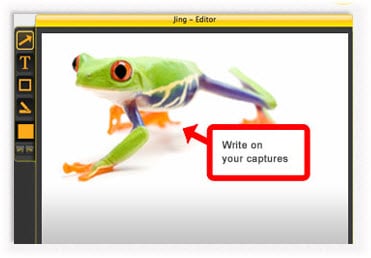
Jing is a cool screen capture tool for taking screenshots and annotation, it is Snagit free alternative software by TechSmith. Jing can capture a whole window, specific windows element or a region in seconds with a single click. You can add a text box, arrowed line and also highlight the specific area while editing. You can also record video in jing and share it on screencast or facebook.

Top 5 Online Business Card Generators: Design Your Professional Edge

Business cards remain a timeless tool for networking, offering a tangible way to share your contact details and make a lasting impression. With the rise of digital solutions, online business card generators have made it easier than ever to create stunning, professional designs without breaking the bank—or requiring advanced design skills. In this guide, we’ve ranked the top 5 online business card generators based on ease of use, customization options, pricing, and overall value. Whether you’re a freelancer, entrepreneur, or small business owner, these platforms will help you craft cards that stand out. Let’s dive in!


1. Canva

The User-Friendly Design Powerhouse

  • Best For: Beginners and creative professionals
  • Pricing: Free tier available; Pro starts at $14.99/month
  • Key Features: Drag-and-drop editor, thousands of templates, print-ready downloads

Overview: Canva tops our list for its intuitive interface and vast library of customizable templates, making it a go-to for both novices and seasoned designers. You can start with a free account, access hundreds of business card designs, and tweak everything from fonts to colors with ease. Need physical cards? Canva partners with printing services or lets you download high-resolution PDFs for local printing.

Pros:

  • Ease of Use: Drag-and-drop simplicity requires no learning curve.
  • Variety: Thousands of free templates, with premium options for Pro users.
  • Flexibility: Export in multiple formats (PDF, PNG, JPG).

Cons:

  • Printing Costs: Free design, but printing incurs additional fees.
  • Premium Limits: Some templates and elements require a paid subscription.

Why It’s #1: Canva’s blend of accessibility and creative freedom makes it a standout choice for crafting polished business cards quickly.


2. Vistaprint

The Affordable Printing Pro

  • Best For: Budget-conscious users needing physical cards fast
  • Pricing: Free design tool; cards start at $18 for 100
  • Key Features: Custom templates, fast shipping, budget-friendly bundles

Overview: Vistaprint is a household name in affordable printing, offering an online design tool that’s free to use and packed with professional templates. You can upload your own artwork or customize their designs, then order cards with options for paper stock, finishes (like matte or glossy), and quantities. Turnaround times are swift, making it ideal for urgent needs.

Pros:

  • Cost-Effective: Competitive pricing for small batches.
  • Quality: Reliable printing with multiple finish options.
  • Convenience: Design and order in one seamless process.

Cons:

  • Upsells: Additional features (e.g., premium paper) increase costs.
  • Limited Free Features: Focus is on paid printing, not free digital exports.

Why It’s Great: Vistaprint excels for those prioritizing physical cards over digital files, with a strong balance of price and quality.


3. Moo

The Premium Design Innovator

  • Best For: Professionals seeking unique, high-quality cards
  • Pricing: Free design tool; cards start at $21 for 50
  • Key Features: Unique templates, premium materials, Printfinity option

Overview: Moo sets itself apart with its focus on premium quality and creative flair. Its online editor offers stylish templates, and the standout Printfinity feature lets you print a different image on every card in a pack—perfect for showcasing portfolios or branding variety. While designing is free, Moo’s strength lies in its luxurious paper options and professional output.

Pros:

  • Unique Designs: Printfinity adds a creative edge.
  • High Quality: Thick, durable cardstock options.
  • Customization: Robust tools for personalized designs.

Cons:

  • Price: Higher starting cost than competitors.
  • No Free Exports: Emphasis on physical cards, not digital files.

Why It’s Top-Tier: Moo is the choice for those willing to invest in standout, premium business cards that leave a mark.


4. Jukebox

The Customization King

  • Best For: Users wanting unique materials and shapes
  • Pricing: Free design tool; cards start at $10 for 50 (basic stock)
  • Key Features: Specialty papers, die-cut shapes, bulk discounts

Overview: Jukebox offers a free online design platform with a twist—unrivaled customization, including unique card shapes (e.g., rounded corners) and specialty materials like bamboo or recycled paper. It’s tailored for users who want cards that break the mold, with affordable pricing for basic options and premium upgrades for the adventurous.

Pros:

  • Variety: Extensive material and shape options.
  • Affordability: Competitive pricing for small runs.
  • Quality: Known for crisp, professional printing.

Cons:

  • Complexity: Advanced options may overwhelm beginners.
  • Shipping: Costs vary based on location and speed.

Why It Shines: Jukebox is perfect for those craving distinctive cards with a personal touch.


5. Business Card Maker by Namecheap

The No-Frills Quick Fix

  • Best For: Small businesses needing fast, simple designs
  • Pricing: Free tool; cards start at $15 for 100
  • Key Features: Basic templates, easy editor, affordable printing

Overview: Business Card Maker by Namecheap rounds out our list with a straightforward, free design tool aimed at users who value speed and simplicity. It offers a modest selection of templates, basic customization (logos, text, colors), and affordable printing through a partnership with Vistaprint. It’s a solid option for small businesses or individuals needing cards without fuss.

Pros:

  • Simplicity: Quick setup for basic needs.
  • Cost: Low entry price for printed cards.
  • Integration: Ties into Namecheap’s domain ecosystem.

Cons:

  • Limited Templates: Fewer options than competitors.
  • Basic Features: Lacks advanced design tools.

Why It’s Here: A practical pick for no-nonsense users on a budget.


How to Choose the Right Generator for You

Selecting the best online business card generator depends on your unique needs. Here are some key factors to consider:

  • Budget: Free design tools like Canva work for digital use, while Vistaprint and Jukebox offer affordable printing.
  • Design Flexibility: Canva and Moo lead for customization; Business Card Maker suits simpler tastes.
  • Quantity: Vistaprint and Jukebox excel for bulk orders; Moo shines for smaller, premium runs.
  • Turnaround Time: Vistaprint prioritizes speed; Jukebox offers more bespoke options with variable timelines.
  • Quality: Moo and Jukebox deliver premium finishes; Canva ensures high-res digital output.

Rankings reflect a blend of usability, features, and value, but your priorities—whether cost, creativity, or speed—should guide your choice.


Final Thoughts

Online business card generators empower you to create professional cards tailored to your brand, all from the comfort of your browser. Canva leads for its versatility and ease, while Vistaprint offers unbeatable value for printed cards. Moo elevates the game with premium flair, Jukebox caters to the unconventional, and Business Card Maker by Namecheap keeps it simple and affordable. Explore these options, weigh your needs, and design a card that opens doors. Which will you choose to make your mark?



How to enable Hibernation mode in Windows 8


Hibernation is one feature which we use quite a lot on our Windows PCs and laptops since there are some situations when we want o quickly shut our system but don’t want to lose the work we haven’t saved. For folks who have no idea what Hibernation means then let me give you a brief defination of Hibernation, it basically is a feature in Windows  which allows the RAM contents to be written or saved to the hard disk before you power off your computer. After hibernating, the system is completely powered down (just like for a regular shutdown). Upon resumption, the computer is exactly as it was upon entering hibernation. For better explanation, an example would do like if you have some documents say 5 documents open before you hibernate your system, the system will resume with the same documents opened. Basically your system will resume from where you had left it thus letting you go ahead with your work without have to opening apps again and again.

Acer

Although Windows 8 is releasing on October 29th but many of us have been using Windows 8 through previews and one surprising thing we’ve all noticed is the missing “hibernate” button by default and as we know hibernation is one great useful feature most of us use then we thought why not tell our readers too on how to bring back the “hibernate” option.

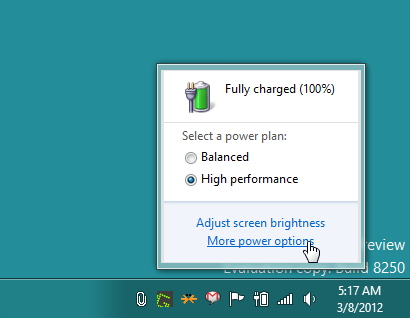
To enable the ‘hibernate’ option, firstly click the battery icon in the system tray and then select “more power” options.

Acer

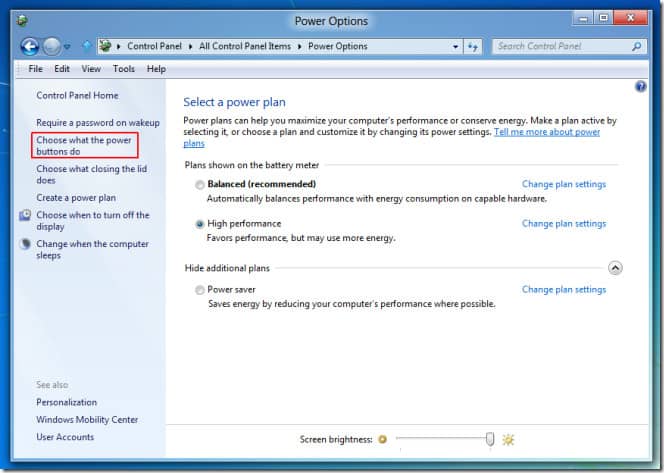
Then, select “Choose what the Power buttons do” option from left sidebar.

Acer

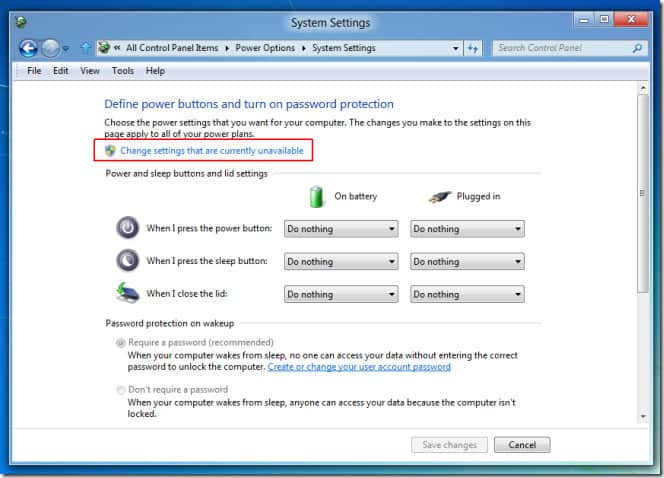
The next step is to select the option that says “Change settings that are currently unavailable”.
Acer

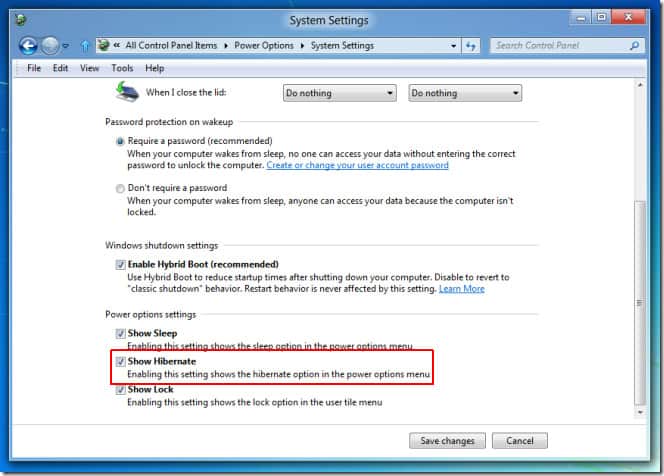
There you will find a tick box on the lower page saying “Show Hibernate”. You just have to go ahead and check “Show Hibernate” option to enable and click Save Changes.

Acer

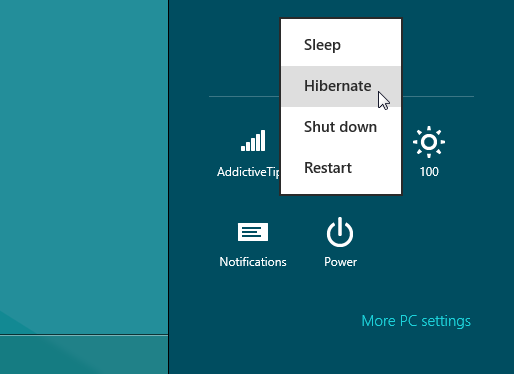
After that get to the Charms Bar and then the power options, you will find the “Hibernate” option in it.

Acer

Thats it, you have enabled hibernation on your Windows 8 system. As we can all notice, Windows 8 is pretty much faster in cold-booting  than Windows 7 since reportedly it uses a technique which hibernates the system kernel. For number lovers here, the approximate time for system resumption from hibernation state in Windows 8 takes around 8 seconds or more which is time saving for power users who like to get about their work quickly.

We hope this might have been useful for you as many people use the “hibernate” option regularly and to not find it by defaut in the latest Windows platform is certainly disappointing. We hope Microsoft has brought it back in the final Windows 8 build.

Google Unveils Free SMS from Gmail Chat in India

Google has extended its free SMS from Gmail service to India, this service was limited to some countries before but now India is one of those 50 countries who offer free SMS from Gmail. By using this service users can send free SMS directly from chat box to mobiles. According to the sources this service provides 50 credits for each user per day but you can increase this credit by replying to the message you get from your friends, each time you reply message, your credit increases by 5.

The free SMS sent from Gmail chat will be delivered to mobile phones to whom you send but the replies sent from them comes to your Gmail chat box.

free SMS from Gmail

Also read:

Which mobile operators does free SMS from Gmail support?

Earlier only fewer mobile operators were supported in India but now all the operators are supported so you can send and receive free SMS from any mobile operator including Airtel , Reliance, Vodafone, BSNL, Idea Cellular, Tata DoCoMo and Aircel etc. in India. People who have registered for DND (Do Not Disturb) may not receive SMS sent by this service.

If you have registered with NDNC (National Do Not Call Registry) in India then you can stop it to receive free SMS from Gmail. Just SMS STOP DND to 1909 (toll free) to de-register yourself from the NDNC Registry.

How to send free SMS from Gmail chat?

Sending free SMS from Gmail chat is easy, just go through the steps below to send free SMS-

  • Select the contact name from gmail chat box to whom you wish send free sms and click on “Send SMS” option from the menu. You get “send SMS” in first place in menu.
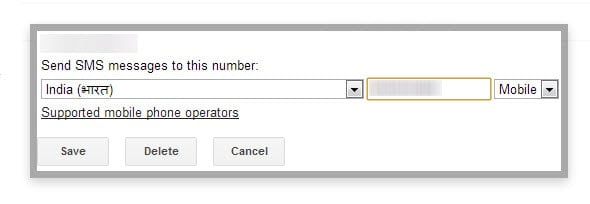
  • A dialog box appears, here specify the phone number of your friend and click on “Save” button, that’s it..SMS from Gmail
  • A chat box appears, type the message you want to send and press “Enter” button, the message will be sent to your friend and you get the reply in the same chat box.

Free SMS from Gmail is a useful service from Google for a quick correspondence which save lots of time, You need not add mobile number each time while sending free SMS, it is a one-time task therefore just click on “Send SMS” option and start sending free SMS.

Get the Live Location of the Train with RailRadar in India

1

Centre for Railway Information Systems (CRIS) has recently launched a website that allows you to track your train on Google map, here you can see the live position of a train along with timings. This website is useful for daily travelers to track their train and to know whether the train is on time or delayed. This website is designed with the user friendly interface so you can get the exact result for your queries so now you can surprise your friends and relatives by telling them the exact location they are on.

When we enquire about a train in railway station or check irctc pnr status we usually get the arrival and departing time of a particular train but we can see the live position of the train by navigating to RailRadar website. RailRadar is developed by CRIS (Centre for Railway Information Systems) and RailYatri team to make your journey even better.

Also Read:

Possibilities with RailRadar tracking website

Here you get many features and options along with live train positioning, in RailRadar You can –

  • Track the live position of your train by its name or train number
  • Get the status of the train along with its route and the stations it stops
  • know the timings of the trains and know whether reaches on time or delayed
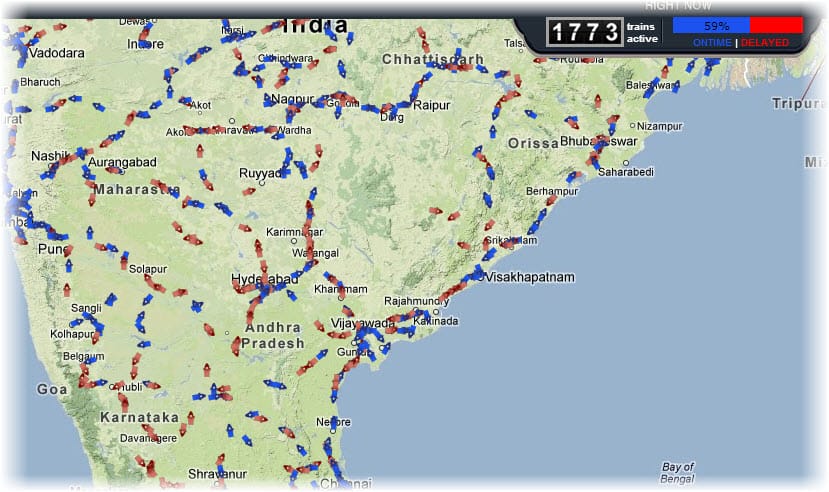
  • At the top of the website you will come to know all trains of India that are on time and delayed along with the number of active trains, blue indicate “on time” and  red depicts the delayed running status
  • The information that RailRadar provides is reliable as it uses the data from the official Indian Railway’s train running operational information

How to Track Your Train with RailRadar?

railradar

Tracking your train in this website is easy, just click on the search button located at left side of the website, specify the train number or name you want to track in map and you will get the result as soon as you type your query. Then select the train from the search results and the map will be zoomed automatically to the current location of the train.

You can also access this website using your Android, iPhone or iPad device. Just navigate your browser to RailRadar website to track your train and get the live information.