Home Blog Page 213

Is it Time to Buy a New TV?

0

Television manufacturers are always trying to introduce the next new technological advancement — big or small — in order to encourage people to turn over their hard-earned money, whether or not these people own a TV in the first place. We saw this with 3D TVs and HDTVs. We can go back decades to color versus black-and-white televisions. Consumers (for the most part) have opted against 3D TVs, but now they have a new type of TV to consider: the 4K-quality TV. They have to consider both price and quality before they take the plunge.

when is the right time to buy a tv

Also read: Augmented or Virtual Reality, the future for TV Channels

Is it Worth the Cost?

A big hurdle for a lot of consumers getting something new, hot, and expensive is that it is … well, expensive! The value may be there, but you should always be mindful that you are buying quality and buying within your budget range. It is valuable to compare the cost of a 4K HDTV, not only to other TVs, but also other products, such as ones featured on websites like Lookwhatscool.com.

Is the Quality There?

Depending on who you ask, you will get different answers. To some people, the advancement from HDTV to 4K HDTVs is just not substantial enough to justify buying one, at least not yet. On the other hand, while 4K HDTVs are not the advancement HDTVs were when supplanting cathode-ray tube (CRT) TVs, visual quality differences are evident between the two.

Is the Upgrade Big Enough?

Once you have determined that 4K is worth its cost and is of a certain level of quality, you have to ask whether you personally need it. If you are working with a black-and-white TV (complete with stereotypical antenna), 4K HDTV is definitely a worthwhile upgrade. What if you have the next best thing before 4K HDTV? You may very well be better off waiting until the gap between your TV and the “current big thing” is more substantial.

Should I Wait?

One of the common suggestions made when this question arises is “maybe just wait.” A few reasons for this are obvious:

  1. Higher likelihood of a good sale — Many consumers try to buy their expensive electronics during sales, particularly the Black Friday sales. With every passing year, 4K HDTV will become easier to buy due to lower prices.
  2. You can get a better 4K HDTV in the future for less than you would pay now — As more 4K HDTVs are produced, makers of 4K HDTVs become more proficient; you benefit from these improvements immediately.
  3. Sleep on the decision — To be honest, a lot of people tend to impulse buy on “fun items” like a 4K HDTV. As liberating as a splurge might be, it is not exactly the most responsible decision that you can make. Take your time and you will be better off.

Should I Get One?

Once you have gone through all four points and determined that they do not seem like impediments, the fair answer should be, “Sure, heck yeah!” Assuming you can afford to make the plunge, you have no reason not to give it a shot. Just make sure you get a good deal from a good producer of 4K HDTVs.

9 High-End Video Games to Play on Your New Gaming PC

0

You finally made the decision to buy (or if you’re more tech-savvy, build) a new gaming PC. The first thing you want to do is try out the video games that your old PC hardware just could not handle. The question is, what games will impress? Take a look into the following list of some of the most popular and well-received, high-end games to give your PC a good workout.

Also read: Best runescape gold tips

The Witcher 3: Wild Hunt

The Witcher 3- Wild Hunt

The Witcher 3: Wild Hunt is regarded as one of the best role-playing games (RPG) ever by many a fan and critic alike. This Western-developed RPG continues a fan-favorite franchise with perhaps the greatest entry it’s seen.

Crysis 3

Crysis 3

The third entry in perhaps the most famously graphics-intensive video game series on the PC, Crisis 3 continues to demonstrate the series’ visual strengths. I do not know that it is the best game on the list for its gameplay, but it will certainly prove to be one of the prettiest. You may need some better tech to run it, however; you can check on websites like The Gaming Monitor for suggestions.

Grand Theft Auto V

Grand Theft Auto V

Despite having been released years ago, Grand Theft Auto V is still as important and relevant as it was. It has received considerable praise for its visuals and is still among the largest open worlds in gaming.

Rocket League

Rocket League

This game is more gameplay-focused than graphics-focused, though it looks good regardless. Rocket League, best described as soccer meets cars, is both one of the most straightforward and complex games you will find.

DOOM

DOOM game

Gamers and critics alike were skeptical about this game at first, but it turned out to be the surprise hit of the year for many. This game is a true sequel to the classic DOOM video games, managing to feel both old and new at the same time.

Overwatch

overwatch game

Winner of “game of the year” from many outlets, Overwatch blew people away with its arena-style first-person shooter combat and colorful cast of characters. A high-end gaming PC will do a lot of good for this fast-paced game.

Titanfall 2

Titanfall 2

Titanfall 2 was somewhat disappointing financially, which was a disappointment to fans due to its vast improvements over its predecessor, featuring one of the best shooter campaigns in a long while.

Forza Horizon 3

horizon 3 game

This one is the perfect game for high-end PC users. Forza Horizon 3 may not be as realistic as other racing games mechanically, but visually, it stands as one of the best-looking racing games right now.

Dark Souls III

dark souls game

The latest in the infamously difficult Dark Souls franchise did not disappoint its loyal fan base. This game features the traditional gameplay, world, and monster designs that have earned the series high praise from critics.

Indie games

The best games are not the only thing to buy on the PC. Some of the most well-liked and popular games of 2016 included indie titles like:

  • The Witness – An artsty first-person puzzle-adventure game
  • Stardew Valley – A farming/life simulation
  • VA-11 Hall A: Cyberpunk Bartender Action – An anime-styled bartender visual novel

PC breeds variety

PC gamers have a wide variety of options to choose from for gaming, with that variety growing the more powerful the PC. You have many years of games to try out, so get to hunting!

5 Pro Tips for converting Social Media Audience into Customers

0
Social Media Audience

Social media has revolutionized the way companies do their businesses these days. While establishing a business presence is of utmost importance for all companies, they often fall short when it comes to converting their social media audience into potential customers. Does this mean that businesses which have a strong social media presence have no use of their fans and followers? That’s not entirely the case; at the end of the day, companies and businesses alike need to follow a few basic rules.

Also, Read Digital Marketing Vs. Social Media: How to Viably Pick Between the Two

 To convert their social media audience into customers.

  • Have a strong call to action: Sharing content on social media pages can bring a lot of visibility for your brand. However, if a strong call to action is missing in your content, chances are customers might never really know what you want from them. No matter if you want your customers to view your latest product’s demo or you want them to come and visit your brand’s newest collection if you don’t tell your customers what you want from them, chances are they would not do it. A good call to action can go a long way in helping you convert a lot of visitors into sure shot customers’.


  • Send subscriptions to customers: Social media is all about staying in touch with your customers. Say, your business is selling designer clothes. It’s the launch of your new season collection; while launching it on your social media pages is definitely a good idea, sending out updates via email is definitely going to help you seal the deal. But how does a brand inform customers through email subscriptions? For this very reason, it’s imperative to have an email subscription deal ready on your social media pages, so that visitors who are regularly following your brand can register their email address for regular notifications.


  • Create a customized landing page for your social media audience: Landing pages are the easiest to prepare and help your visitors get a glimpse into what you are really offering to them. Many a time, when visitors are in a hurry, they don’t want to get into the nitty-gritty of what you have to offer on your websites. This way, by showcasing the latest offerings on your company’s landing page, you can attract customers on the go.


  • Video networking works well a call to action: If you thought that only your content should have a good, strong call to action, then you are mistaken. If video marketing is your brand’s preferred source of advertisement, you should really go ahead and cinch the deal with a call to action at the end of the video too. Better still, if you are able to provide a detailed call to action in your video’s description so that customers are immediately directed to the landing pages without too many hassles.


  • Respond to customer enquiries: Like a good stock marketing technique, keeping a track of your customer’s needs is of utmost importance. Since there is a lot of volatility in the stock market also, wherein you have to keep managing your portfolio investments regularly; similarly, you need to be on a lookout for your customer enquiries also. By following up regularly with your customers, you create a level of trust, which when maintained, converts your visitors into loyal customers for your brand in the long run.

Love the Ruggedness of Your Workplace? Here’s a Laptop Made Just for You

0

Thanks to enterprises’ increasing interest in rugged computing products worldwide, Indian businesses, too, are adopting the practice of equipping their employees with fully-rugged laptops. In recent past, there has been a growth in the demand of rugged hardware devices. As Indian enterprises continue to diversify, the need of the hour is mobile computing that is robust and strong. Mobility particularly at remote and harsh locations gives a competitive edge to any business. The rugged devices run smoothly and are less susceptible to interruption caused due to hardware failure or data loss. Built to survive tough vibration and extreme temperatures, rugged devices bestows a direct competitive advantage from the perspective of both workflow and management.

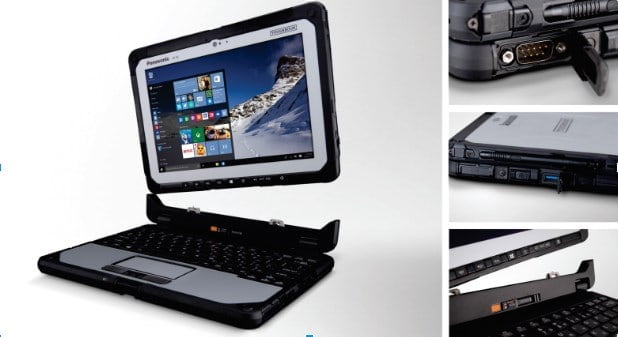
As an emerging market, India economic potential is undeniable favourable. The new wave of consumerism has led to the mushrooming of number of ventures that are offering wide range of services and products. This has unleashed a competitive fervour which is evident in the number of start-ups offering similar services in the marker today. In order to up once game in this eco-system calls enterprises to offer their employees a robust backing which included equipping them with rugged hardware devices that can test time and circumstances. An undisputed leader in the fully-rugged devices, Panasonic has designed a series of rugged laptops and tablets, particularly the Toughbook CF-20 that is built to last in most compelling situations.

So, what are Rugged Devices?

With the low cost of ownership, durable frames and reinforced corners, rugged laptops and tablets offer desktop-class performance in competitive rugged designs. The powerful processor integrated webcam and amazing battery ensure that you get the desired combination of military-grade durability and enterprise-class mobile computing power rolled in one device.

Offering a great choice of configurations that are perfect for constructions sites and workers who work around oil rings, Panasonic offers rugged laptops in India that are also detachable. Thus, helping businesses leverage their investments.  Now the mobile workforce can visit any corner of the factory without worrying about connectivity via Wi-Fi, GPS, NFC and Bluetooth.  

rugged laptop for workplace

Source: Panasonic Toughbook

Toughbook CF-20 for evolving computing needs

Panasonic has created a fully rugged yet lightweight device (just 1,760 gm) to answer the needs of organizations that require great power-packed performance in a portable machine. The Toughbook CF-20 combines ergonomic and durable design, offering great flexibility and desktop-alike performance in one machine. Launched in June 2016, CF-20 can operate for hours, thanks to built-in battery saving technology.

With CF-20, the industries that are exposed to harsh working conditions have access to a fully rugged machine. A rather ‘low maintenance’ device, the Panasonic Toughbook CF-20 is backed by Windows 10 Pro platform, 1.1GHz Intel Core m5 vPro processor and 8GB of RAM, thus ensuring no compromise on usability and portability. The fully rugged device also has a 10.10-inch touchscreen display which is instilled with proximity sensor and accelerometer sensors. It packs 128GB of internal storage that can be expanded via a microSD card. The device hosts an 8-megapixel primary camera on the rear and a 2-megapixel front shooter for selfies.

A 2-in-1 and Configurable Device

The CF-20 has the familiar Toughbook look-and-feel: a generous array of ports, slots and connections along with safely behind lockable covers. 2-in-1 lightweight device detaches easily to become a 10.1-inch tablet. The device is purpose-built for challenging environments, including field services, utilities, oil and gas, transportation and logistics, meeting MIL-STD-810G and MIL-STD-461F military specifications, and IP65 water and dust resistance.

The detachable laptop has a magnesium alloy chassis enough to withstand the harsh environment of construction sites and oil rings. The clever built-in handle also provides on-the-job flexibility. Even as the work day gets longer, power never becomes a problem as the optional bridge battery permits hot swap battery replacement without any disruption. The gloved multi-touch display is sunlight-viewable, making it perfect for outdoor jobs and fieldwork.

Aimed to meet the evolving needs of enterprises, the ability to detach the tablet from notebook provides flexibility and enterprise-grade features. Equipped with Windows 10 Pro, the CF-20 is powered by Intel HD Graphics 515 for high-definition document viewing.  Furthermore, it sports purpose-built Vehicle Mount and Desktop Port Replicator to meet all mobile computing needs at extreme conditions. Users who find Windows 7 Professional more comfortable can opt for the OS.

For those who wants 24×7 Connectivity

Offering complete customization for rugged devices, Toughbook CF-20 is one of the most desired rugged laptops in India, built to support the evolving business ecosystem of the country. Backed by a three-year limited warranty. Panasonic Toughbook has been designed to meet the ever-changing business needs of the enterprises with connectivity options like USB, SD card reader, HDMI, VGA, Ethernet, Wi-Fi 802.11ac, Bluetooth, and optional 4G LTE and GPS.

This is How You Can Quickly Apply ‘Formulas’ in Excel

People get very suspicious of their EXCEL skills because it’s slightly a complex piece of software. And especially beginners get easily put off by something this complicated. But there is a lot of functionality hidden beneath this powerful surface. And believe me, this is worth the effort. Solution here is just to break down the learning process into manageable components and set your mind for moving ahead step by step. Yes, of course, it’s impossible to learn Excel in just a few day or weeks, but make way through the following techniques, give it some time and you will achieve a workable along with a comfortable knowledge of the software. These will surely make you a true spreadsheet master!

Formulas & Functions

So here are some Excel techniques you should master to comfortably get the grip of it.

1. Simple Math

So to begin with, we can start with the most basic math problems. Feed them into Excel and find the solutions! This is how. First thing to remember about such techniques – Excel expects us to see an equals (=) sign before giving it a problem to work on. So type =10+10 into a cell of your spreadsheet and press enter. This way the cell displays number 20.

Simple Sum in Excel
Simple Sum in Excel

Here, adding & subtracting is somewhat self-explanatory. But use an asterisk (*) mark when you are multiplying and a forward slash (/) mark when using the division formula.

2. AutoSum Usage

This is something really easy. And is also a great way for speeding up with the basic Functions.

Firstly, enter any two numbers in the cells which are consecutive to each other. These can either be side to side or be above and below. Second, select a cell that’s directly on the right or below of the selected cells. After this, navigate to Home > AutoSum.

AutoSum in Excel
AutoSum in Excel

This automatically populates the selected cells with a SUM formula. Press enter and execute the same. So this way, Excel adds the two numbers together & delivers the result in the specifically selected cell. (AutoSum drop down can also help you choose other different mathematical functions).

There’s another way of easily calculaing the sum of selected numbers or cells. Simply select the cells containing the numbers and watch out for the sum at the end of the excel window. This is an automatic method.

Automatic SUM Calculation

You may also like to read : 10 Cool Google Chrome Tricks Everyone Must Know

3. Number Format Application

Once your spreadsheets start to get a bit more complex, they are likely to accommodate different types of numbers ranging from dates to currency, percentage and more. So to ensure that you work well with this data, it is worth formatting according to types.

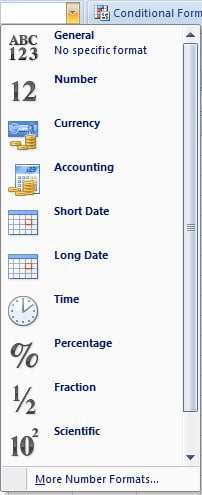
Select the numbers that require formatting (you will have to do each type one at a time). After this, look for Number section at the top of your excel screen, and click on the dropdown that defaults as General.

format numbers

From there you can choose the following number formats. If you’re looking for more control, just select the More number formats option from the bottom of that list.

Number Tab of Format Cells

This is how you will be able to specify details. For instance, calculate the amount of decimal places to use. Or maybe your preferred currency.

4. Parenthesis

You can make use of parenthesis for ensuring certain calculations to be executed primarily. For instance, (10+10*10) – the second & third 10s will be multiplied together before adding the additional 10. However, if we make it (10+10)*10, the first & second 10s will first be added together.

Parenthesis Formula
Parenthesis Formula

Here’s What You Risk If You Don’t Keep Your Computer Safe From a Virus

0

Sure, it might not seem like a big deal. But, if your computer does have a virus, this can subject you to quite a bit of scrutiny. From having your credit card information stolen, to possibly having personal information being discovered and potentially stolen, hackers and online thieves, can do much more harm than you might be aware of, with the virus or trojan horse they place in your computer. So, there are many reasons to want to install the right anti-virus software, to choose the proper security settings each time you go on the web and browse sites which aren’t secure, and to basically take all necessary precautions to keep your computer and personal information safe.

computer virus safety tips

Lose crucial information

In the business world, a virus can wreak havoc is documents of confidential business information is stolen. When in the wrong hands, this information can cost your company hundreds of thousands, if not millions in revenue a year (depending on the size of your business). So, properly securing this information is key. But, with personal computers it is also an issue. From birth certificates, to birthdays, personal identification numbers, or other verification information, hackers can see and steal all of this from your computer if they place a virus on it. So, individuals and businesses have to take proper measures to ensure this doesn’t occur.

Credit cards

Ever had a physical credit or debit card stolen? You know how horrible this is. Well, the same can happen to you online. If your computer is not properly protected, it is very easy for a hacker or professional to steal your personal information online. This can result in them taking funds out of bank accounts, using your cards to make online purchases, or even stealing your personal information to apply for new lines of credit. You don’t want this to happen, especially with the holiday season just around the corner. So, make sure your information is secure, and don’t store information online (especially sites which aren’t secure.) Further, take all necessary steps to make sure your bank and credit card companies have blocks, security questions, and other safety metric in place, to further enhance security, in the event a virus does seep its way into your computer.

Family information

Believe it or not, a hacker can find out information about your family. If you have young kids, they can learn their names, where they go to school, and other personal information about them. This is not just your kids, but your spouse, and other family members as well. There are professional hackers, which are people who do nothing other than try to steal information, and wreak havoc on the lives of others. You do not have to fall victim to these people, and the different tactics they use. There are so many security measures you can put in to place in your home or business computer, which will prevent, or at a minimum make it extremely difficult, for these professionals to find out information you prefer to keep secure and safe. You want to protect your family and you want to know they are safe no matter where they go. So make sure you have the right virus protection and online protection services in place, so that you are limiting the amount of information which is spread online each time you do use your computer, and so you can prevent possible issues from happening to the ones you love most.

Many people in this world are trying to do harm to others. Some simply want to steal your credit card information, but there are also hackers which are criminals in other sectors of life as well. You do not want to set yourself up to fall into their traps and you want to do any and everything which is possible to avoid the possibility that they leak a virus into your computer. Although this is not the only type of harm that they can do, there are many reasons you want to keep your computer safe and prevent viruses from popping up.

Free Virus Protection

Some antivirus programs will charge you to install them and some of them can be very pricey. Luckily there are some free antivirus programmes which you can download. AVG and Avast are two of the many free antivirus protectors available.

These are some of the reasons to use the best virus protection, online security protection, password protection, and other security products available, so you can keep your computer, personal information, and family’s information secure, and out of the wrong hands.

10 Cool Google Chrome Tricks Everyone Must Know

It is pretty heavy, eats a lot of RAM and sometimes makes other apps unusable! Still, Google Chrome is one of the superb choices when you need a productive Web Browser. Being a product from Google, you get all the perks when we consider the case of Google products — let that be Gmail, Hangouts, YouTube or whatever. Also, in most cases, Google Chrome is far faster than other browsers out there.

10 Google chrome tricks

Apart from all these, there are some cool Google Chrome tricks you can use for enhancing productivity. You may have to find some not-so-popular features of Chrome or use third-party extensions. This time, we have created a list of the best 10 Google Chrome Tricks you must know. Using these tricks, you can have a better Web Browsing experience for sure.

Use these cool Chrome Keyboard Shortcuts

Well, apart from Ctrl+C and Ctrl+V, there are a few shortcuts you can use in Google Chrome browser. If you don’t want to use your mouse so often, these shortcuts will be useful. We will list out some of the useful shortcuts here, but the actual list is still incomplete.

  • Ctrl+T — to Open a New Tab
  • Ctrl+N — to Open a New Window
  • Ctrl+Shift+N — to Open a New Incognito Window
  • Ctrl+W — to Close the Current Tab
  • Ctrl+Shift+T — to Reopen the Last-Closed Tab
  • Ctrl+J — Open Downloads
  • Ctrl+Tab — Change to the Next Tab & Ctrl+Shift+Tab — Change to the Previous Tab
  • Ctrl+F5 — to Reload without Cache
  • Ctrl+F — Search inside a Webpage

For sure, these shortcuts will make Google Chrome much productive. It may take some time to get used to it. Once you’re familiar, you won’t even touch your mouse to control Chrome browser 😉 So, this is our best Google Chrome trick for users out there.

Enable Guest Browsing

Guest Browsing in Chrome is a recently added feature. So, most people don’t know about it. That said, Guest Browsing is quite useful when you don’t want others to mess up with your Web History or other stuff. By enabling this, you can avoid the risk of exposing your digital life to guests. Also, the guest can be confident that his details aren’t stored in your device.

To enable Guest Browsing, you have to go to Settings and find People subheading. There, you can see the Chrome users you have created. There will also be an option to Enable Guest Browsing. Tick that option, and you can start using Chrome as a guest. The next time someone borrows your laptop, launch Chrome in Guest Browsing.

Use Chrome Task Manager

Ever wondered which part of Chrome is consuming a lot of RAM? Do you doubt there is a hidden extension or plugin that consumes your resources? Then, you can use Chrome Task Manager, which is an included feature. In this task manager, it is possible to find individual resource consumption of different tabs, extensions and browser itself. You can hit Shift+Esc to launch Chrome Task Manager and you can see the list of ongoing processes there. In addition to resource consumption analysis, Chrome Task Manager can be used to end Processes as well. Just in case, if there is an irresponsive tab or plugin.

Use Chrome Remote Desktop

Tired of using TeamViewer to have remote access? Well, for a change, you can use Google Chrome to access another PC. When compared to TeamViewer or related solutions, Chrome Remote Desktop is damn easy to use. You just need to get the official apps on both devices. For computers, you can get the Chrome Extension from Chrome Web Store. By the way, if you want to control a PC from Android, you can install the official Android app. You will have to follow a simple process of authentication and setup. Right after that, you are ready to roll. This trick will prove to be useful if you don’t have time to install TeamViewer but need quick access to another PC.

Bring the OK Google Feature

Do you use the OK Google feature of Android in your smartphone? Do you find it easy than typing your queries? If so, you will love this Google Chrome trick to bring OK Google feature into your web browser. To do this, you need to install one Google Chrome extension. We need to remind you that the extension is still in Beta stage and may have some bugs.

Once you have installed Google Voice Search Hotword extension, it’s pretty easy to perform Google searches. You can just say “OK Google” followed by your queries. As you know, OK Google keyword is pretty powerful. In addition to common search terms and all, you have enhanced options. You can add a reminder, find contacts or something else. It’s a typing-free user experience in the end, you know.

Bring an Easy-to-Use Dictionary into Chrome

Do you come across tough words while browsing? Using a simple Chrome Extension from Google, you can bring dictionary feature into your web browser. And, the extension is pretty simple to use. You have to install the extension and you are done with the setup. The next time you find a word, double click on that word. In seconds, you can see a pop-up showing the meaning of the word. The best part is that you can also listen to the audio pronunciation of the word. You can get the extension from Chrome Web Store.

Save Data

Are you on a tight data connection with FUP? Then, you should have a look at the Data Saver extension for Chrome. It is developed by Google and works fine with Chrome. Installing this extension will minimize data consumption in the end. It works through the help of Google Servers, but Incognito tabs and HTTPS tabs are exempted from the compression. So, in short, for commonly used websites, the Data Saver extension will be helpful. In the extension, there is an option to enable the feature in particular webpages only. It’s a cool Google Chrome trick for those who are struggling with slower Internet connection.

Use the Scroll Click to Open Tabs

While working on Chrome, you may want to open some webpages in a New Tab. That is, you don’t have to leave current page. In such situations, you can click the Scroll Wheel Button on the link to open it in a New Tab. The best part is that you won’t be navigated from the current page. Instead, the new tab will be opened in background. This trick is useful when you are into some serious research and are going through different webpages at once. This feature is in-built into Chrome and you don’t need any extensions.

Create Children-Friendly Chrome Accounts

This is yet another feature included in Chrome. You can create specific Chrome user accounts; on which you have complete control. This is useful if you want to allow your kids to use Chrome browser. This way, you will be able to know what your children are doing in Chrome. You also have an option to control the activities. You can go to Settings and Add Person in the People sub-heading. However, make sure that you tick the option named ‘Control and view the websites this person visits from’. Now finish the process.

After someone has used this particular user account, you will receive an email with Browsing Data insights. There, you can know about visited webpages and even block some of them. Also, you can enable SafeSearch in Google. Altogether, it has worked as a minimal Parental Advisor option.

Get the Best out of Chrome Omnibox

Google Chrome’s Omnibox is no ordinary URL Bar. It’s actually packed with a bunch of features that are useful for geeks and advanced users. From the Omnibox itself, you can know a lot of details. For instance, you can use Omnibox as a simple calculator. Just type the calculation (2500/50) and you can see the results instantly. Other options of Omnibox are:

  • Do Unit Conversions
  • Perform In-Site searches
  • Set Alarms and Reminders

When you don’t have enough time to launch another app, these Omnibox features are helpful, indeed.

Summing Up

Well, what do you think about these cool Google Chrome Tricks you must know. As we said, some of the features need a third-party extension while some of them don’t. So, depending on your needs, you can pick the right tricks and make your Chrome an awesome place.

About the Guest author:

Swaraj Nandedkar is a Blogger from 3 years. He is working as the Content Marketing Manager at TechLila.com . He loves to Play Games and get high on Adrenaline Rush.