Accessories can blow life into an otherwise bleak appearance. So men and women alike make use of a number of those to make their look more complete and tell a unique story with each outfit. Today we’re going to speak about integrating cutting edge technology into men’s looks- something that makes them appear good enough to eat and can also be a huge help in everyday life. So, without much ado, here are some of the best tech accessories used by alpha males:
Halo Sport
Making your coordination better and improving your overall health is possible through forging robust neuromuscular connections by means of repetition. This sportswear gadget boasts a number of neuroprimers that appear on the inside of the headband transfer electrical impulses into the motor cortex and create a state of neuroplasticity. Achieving this result is possible if you just wear the accessory 20 minutes before exercising. Hot and every inch alpha, isn’t it?
?
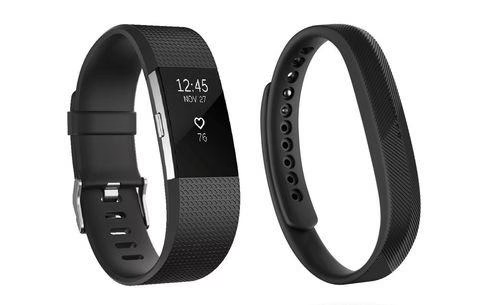
Fitbit Charge 2 and Flex 2
Fitbit is kind of a well-established household name in the fitness tracker category already. And it seems to be improving with each new model released to the market. The recent fan favorites are the sleekest ever
Charge 2 and Flex 2.
No matter if you are showing off your abs at the pool or taking that olympic marathon, these two will definitely do the alpha-trick.
The Charge 2 comes equipped with integrated heart-rate monitor and relaxing breath guidance to help you keep track of your exercising routine while waterproof Flex 2 is excellent for lovers of regular watch brands who also happen to be active in sports.
Polar H10
Heart rate monitors are so much alpha male, because there’s a hidden hint at doing sports. Now, it’s not like wrist-controlled action cams are fresh news, heart-rate monitoring is something new.
When Polar announced its fresh-off-the-shelf H10 heart-rate monitor, it also stated that this new accessory is unmatchable in competition with any other heart-rate monitor currently on the market. And we can’t help but believe given the manufacturer’s 35 year path as an industry leader and the facts that speak for themselves- being able to activate the GoPro Camera from the wrist watch and overlay the heart-rate info onto the video footage, seeing what really caused their hearts to race. ?
Lumo Run
He wakes up in the morning and goes for that sweaty run! Mmmm, getting delusional over here! Lumo entered the wearable game a long while ago, well before sportswear was considered sexy as hell. The manufacturer debuted the Lumo Lift as fresh new way to help people improve their posture. This small device is worn on the torso, and it is the guard of standing tall. Once you lose your grip and begin to slouch, it sends vibration down your spine- a nice signal to come back to the tall-man stance!
Today the fitness landscape has changed significantly. Exercising is cool, but it’s more of a must-have than a nice extension of a cool alpha man. And Lumo is good at adapting into the picture- given its new Lumo Run model. Acting as a personal running coach, this device monitors your physical activity and running efficacy, giving in necessary advice and improving the quality of workouts.
?
Mio Slice
Burning calories… there are few in modern life who haven’t been concerned with this question at least once in their lifetime. For many more, however, this is a daily struggle to keep up with.
Around 20 years ago Mio’s founder and CEO, Liz Dickinson, secured a patent and came up with the world’s first electrocardiogram-based heart-rate watch. What is electrocardiogram and why does it matter? Well, it is a measure of the heart’s electrical activity, an indicator that can be widely used to help people keep track of how many calories they were burning. And it was a game changer back then, with no competition in sight.
Today, the manufacturer has worked and introduced Slice, an activity tracker that not only monitors heart rates, but also analyzes an individual’s personal response to exercising. So you set your goal of having those triceps emphasized or flashing some killer abs, and the device guides you there step by step.
There are still hundreds and hundreds of gadgets and accessories out there in the market that make for a tell-tale sign of an alpha-man so of course this list doesn’t claim to know the best in every aspect. What it does is highlight a couple of options that can be the right topping to the dish. Tell us if there are any particular items that you think should have made this list and we will give them a raincheck and probably add a couple of them here so you have a better choice on your plate!
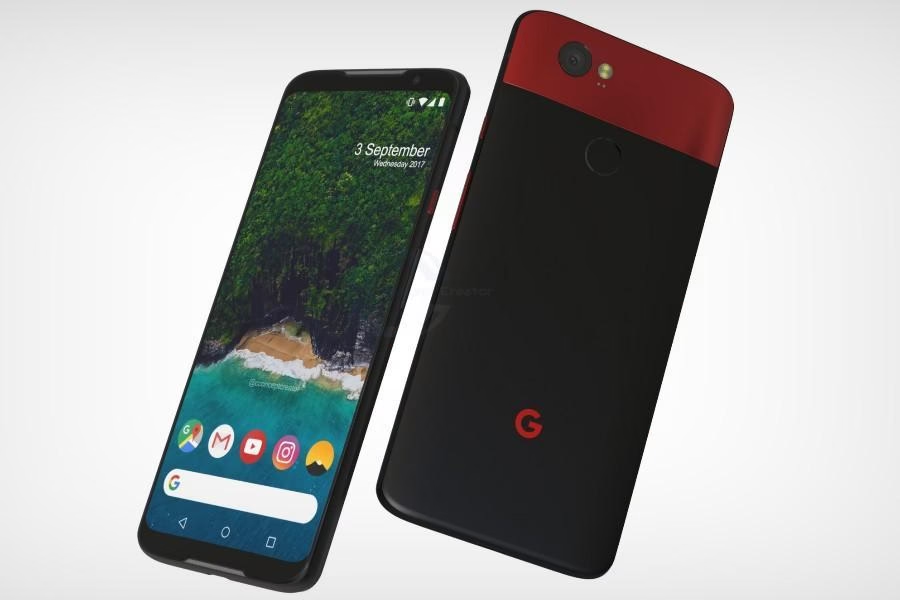
It is completely true that Google Pixel 3 XL has so far grabbed a large number of comical leaks at its end.
This phone is coming soon but its estimated and predicted specs and features are written on this web page. It is at the same time true that the fans of Google Pixel will face some of the craziest weeks in the coming up time because this great phone is sooner to be launched. And also on toptenproductreview.com you will find some of the best product reviews so let’s get started
Review onGoogle Pixel 3 XL
Some of the details regarding the design and hardware applications of this phone are revealed so far. A single and major in an amount of design change has occurred in this phone, the back side material of this phone is made of glass while Google Pixel 2 XL had this plastic-coated aluminum back. It has 6.71″ display and a screen resolution of 1440 x 3120 pixels.
7.9 mm is its thickness and 76.6 mm is its width. P-OLED is its display type, 18.5:9 is the aspect ratio and 512 ppi is the pixel density of this phone.
Discussing the positions of the rear camera and fingerprint scanner as well as power button and volume buttons, USB Type-C port, they are unchanged. This time, we are seeing the return of stereo speakers and the top speaker is comparatively and noticeably smaller the one we have on Pixel 2 XL! The nano-SIM card tray port placement is now at the bottom side of this phone.
In this phone, you will not find any 3.5mm headphone jack or a slot for a microSD card. Its screen resolution is of 1440×2960 range and it is according to few of the mobile reviewers that the brightness level of this phone is less.
Best Part of Google Pixel 3 XL
The exciting part is that Google Pixel 3 XL is powered by the latest and extremely advanced Qualcomm Snapdragon 845 processor along with the Adreno 630 GPU. This processor can handle all sorts of latest games like we have Fornite Mobile which is excessively played on Android phones.
It is this latest Qualcomm Snapdragon processor and system-on-chip which will successfully make this Google Pixel line to be reached among the fastest and best Android smartphones lines on the market.
We are quite confident that Google Pixel 3 XL will be able to continue these Google trends of launching and releasing smartphones with little or no lags.
Other Expected Features in Google Pixel 3 XL
Like we usually see in rest of the smartphones, this time as well Google will stick to 4GBs of RAM in its Pixel 3 XL. It will also come in 64GB, 128GB storage models. The limitation part of this phone is that this device will not be having and offering expandable storage option like the remaining of Google devices offer.
This phone will have its launching with Android 9 Pie. It is expected by the fans of Google that these features should be present in this upcoming phone as they were present on Google Pixel 2 XL.
Active Edge squeeze feature should be present in this phone so that you can easily squeeze your phone to silence alarms or timers or any of the incoming calls.
It is expected that Now Playing feature will be present too on this coming soon phone so that you can identify all the songs which are played in the background.
There are few of the features which are spotted and revealed in the leaks! There is a new Google camera app UI, this UI has labels and you can then easily swipe the camera modes without expanding the menu.
It shall have Google Lens Suggestions feature which will be present in the Google Camera app. It is still unclear that whether this Google Lens will have an access to Google Camera app.
How About Its Camera and Battery Time?
This Pixel 3 XL comprise of a single rear 12.2MP camera sensor along with a f/1.8 aperture. The potential of a rear camera is exceptional, it is capable of recording up to 4k videos at the speed of 30fps.
It seems that there shall be dual 8MP camera sensors which will be present on the front side along with a f/1.8 aperture. The front-facing camera shall have autofocus option.
You can get super selfies by using this phone camera because of its dual front-facing camera. Its second camera sensor has the wide-angle lens and moreover, its face retouching feature will be updated with some new “Natural” as well as “Soft” options.
It is said that its Pixel Visual Core will get an upgrade this time and you can produce some of the incredible and best low-light photographs. Note that on the Pixel 2, this Pixel Visual Core was used by the apps like we have Snapchat and Instagram, Whatsapp so that better photos can be captured.
As compared to the Pixel 2 XL, this phone which is Pixel 3 XL consist of a slightly less battery capacity at the range of 3,430 mAh.
Prysm yet again has hit us with a brand new innovation which will take the Video Wall experience to a whole different level. It has been one of the finest and the most trusted companies when it comes to creating an exquisite brand experience. Be it in meeting rooms, exhibits, or brand centers, Prysm products add a lively aura to your events. They recently launched their newest product in the market- The LPD 6K. It has created a wave of excitement amongst the corporate masses.
The all new Prysm LPD 6K comes with a lot of exciting features promising to make a world of difference in the way people look at Video Walls from now on. It’s interactive, large-format single panel display, will leave no stone unturned to offer you a seamless and immersive visual experience. With this newly launched product Prysm has created an entire a new category of interactive displays, with bezel-free viewing above 100 inches, with screen sizes available at 190 and 135 inches.
Built-in interactivity with more than 32 simultaneous touchpoints is one of the most exciting features of the LPD 6K amongst many others. Here are some more features to look forward to:
High fill factor and an exceptional contrast ratio.
Laser Phosphor Display.
Cool-to-the-touch screen with low power intake.
Striking picture quality.
Shatter-resistant display.
Low power intake. (less than a commercial coffee maker)
Offers rollability for transport.
Better serviceability
Prysm products have always stood for visual integrity and interactivity and it looks like the LPD 6K will not disappoint us at the slightest either. We are positive that it will provide as an essential element for inspiring new ideas, driving business forward, and promoting united smart work. It has already set a new standard for interactive video walls and collaboration. The 4 main areas where we see the LPD 6K being a huge hit are
Experience Centers
With its humongous size and phenomenal display, there are no second thoughts, that this product will make your brand look irresistible from all angles.
Retail Market
With its brilliant attention seeking nature, no passerby would be able to take their eyes off the screen if they see any product displayed on the LPD 6k in a shopping complex. We are pretty sure this product will play a huge role in the sales of any brand.
Executive Boardrooms
Positioning the bezels to fit the spreadsheets and graphs perfectly before a meeting can be such a pain. The LPD 6K simplifies the whole process with it’s no bezel display. Everything becomes smooth and seamless. Other than that, meetings turn really fun, comprehensive and interactive
Private Theatres
It’s time to swoon your family and friends and gift them the beautiful experience of watching movies together with a 6K resolution. Maintaining the industry’s highest pixel fill rate and high contrast ratio it is easily gives one the movie experience of their lifetime.
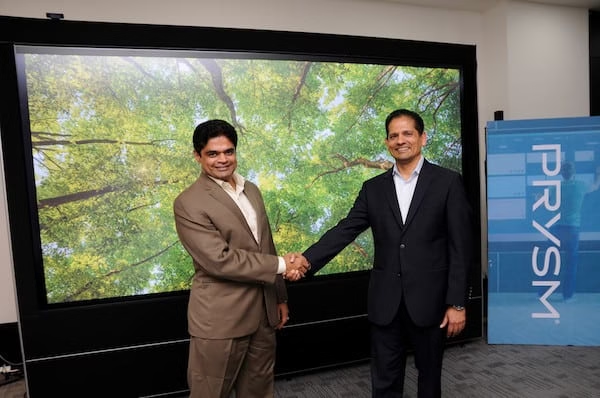
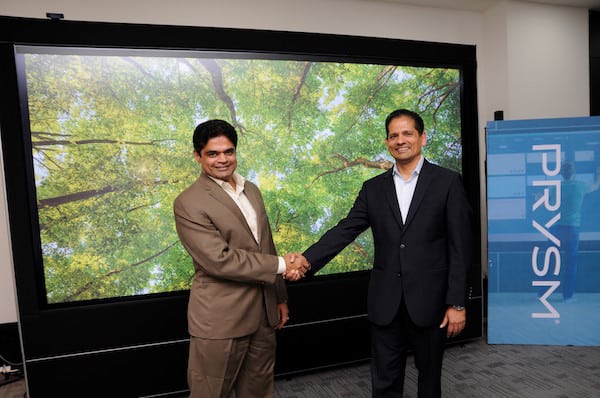
The LPD comes with a lot of scope and we can’t wait to see it’s growth spread like wildfire on a global level. During its official launch on 31st August 2018, here’s what the Vice President of Prysm, Mr. GB Kumar had to say: “Prysm is leading the disruption in the industry with its innovative technology. Today, customers across industries are looking for a future- ready solution that can redefine digital display experience for them and for their brands. With the clearest resolution, unrivalled contrast, and a fully interactive display, LPD 6K, offers an unparalleled experience.”
Well Prysm, we buy every word you say and are just as excited about the launch of the LPD 6K. It’s actually very thrilling to see such brilliant products coming up which are so ahead of their time. We love exploring them and hopefully we will get to see a lot more products like these in the near future. To find out more about the LPD 6K do check out their official website.
Today’s technology has raised the bar for many business owners. Nowadays, the competition is not only found inside the shops but also on the internet as well. You can read more on how the internet was able to make an impact to businesses in this site here.
If you are one of the owners of a café and are not using the internet to attract more customers or sell your merchandise or latte, you are badly missing out. Some who are already doing e-commerce have to meet their clients’ demands, and they need to become more updated as the months go by.
When it comes to information technology, there are business owners who are at a loss of what to do. There are times when a plethora of issues can cause delays, and they spend a lot of money and time to solve this but to no avail. Others are continuously losing revenues because their competitors have faster interaction with potential customers which should not be the case at all.
What is Managed Solution?
Managed IT refers to a group of people who can manage your computer and network from afar. They are usually a third-party outsourced company that can provide you with a tried and true system to improve your business operations. They can help you cut expenses, and they save you time.
In short, these people concentrate on being an IT firm that will solve most of your problems with technology. They will help you in maximizing your productivity and minimizing downtime at the same time.
If you are thinking of whether you should hire a dedicated in-house staff, then consider another option. The managed service providers in West Palm Beach can provide you with high-standard systems and high-quality results.
Reasons to Hire a Third-Party Managed IT Service Provider
1. They Already Have the Tools and Knowledge
You don’t have to spend extra for computers, the internet, and other tools. You can get more information about their tools in this link here. The providers already have the things that you need to get your business running smoothly. Their internet is fast, and they know that they can track problems faster.
Since the people in this industry are working tirelessly to prevent virus attacks to your network, they know how to keep your customer information and bank accounts safe. The techs are already knowledgeable in a wide range of skills. You will be functioning with a team of professionals that are always aiming to know the developments and the latest news in this industry.
2. Costs
As was mentioned before, you can save significantly on extra costs with third-party providers. They will take tremendous pressure from your shoulders since they already have a working system, and your company will not have to set up anything from scratch. They can help you with your budget, and you can predict your monthly expenses better with their help.
A cost-effective team will only charge for the service that they have rendered. You won’t have to pay for them hourly if you don’t need them. Your organization can thrive in this kind of set up because you are not responsible for others’ wages when they are not working for your business.
3. There’s a Scalability Factor
When you work with knowledgeable people, you grow as well as a business owner. When you can send in multiple orders on the same day with the help of apps or an automated system developed by your IT provider, then you have a chance to grow.
You can build another branch and scale accordingly based on your customer’s demands. You won’t have to worry about hiring more in-house IT people when you scale because the extra staff will be provided by IT solutions in West Palm Beach that are experts in your industry. You can focus more on growing your business while your partners are making sure that you are in good standing.
4. You Have a Lot of Experts at your Disposal
When you have an in-house staff, chances are you only rely on the knowledge of a single person, and you are restricted in what you can do for your business. When you work with a team, you can consult with several people, and their combined knowledge can benefit you well.
Others have a wide range of skills that they can offer you, and they can keep up with the current challenges of growing a business. They can keep up with the IT industry developments that they can apply to your business to help you grow.
The whole point of having a personal computer is to store your personal data, images, movies, software, files which are highly essential for your work, etc. We all know what happens when you work 24 hours for your presentation and accidentally your sibling or your younger ones delete it. Yeah! Each and every person can relate to this and feel that pain inside. And, cheers to the clever ones who hide their important files and folders. But, there are equal chances that the person who accidentally deletes your important folder is you. Here Data Recovery Softwares comes into play.
Anyways, whatever the cause of deleting your files might be, getting back to a solution is the only option. There is not a cent per cent chance of retrieving your files unless the file was accidentally deleted or because your system got corrupt.
Before, we get into this it is very important for you to understand how files get deleted from the system. When a user deletes a file unintentionally from the system, the file does not actually get deleted. The file is remarked as deleted and hidden in our system. This creates an illusion that it is deleted. It’s similar to Harry Potter’s invisibility cloak. The files remain invisible until they are rewritten when you enter new data. So, if you’ve not entered any fresh data then you can still retrieve your files. You can retrieve data from the iPhone as well read this to get full knowledge about this. Illustrated Guide to Recover Lost Data from iPhone.
We have tried a bunch of softwares which might help you in resolving this problem. Each of these softwares are good in their own ways and perform differently. Try out the multiple tools whichever works for you the best.
Note: I tested all these softwares in Dell Inspiron, Core i7 (64 bit) with an 8 GB RAM which works on a 2 GHz processor installed with Windows 10 version. These softwares worked pretty well for me, if you find difficulty to use them then download an older version of these softwares and try it.
1.Recuva:
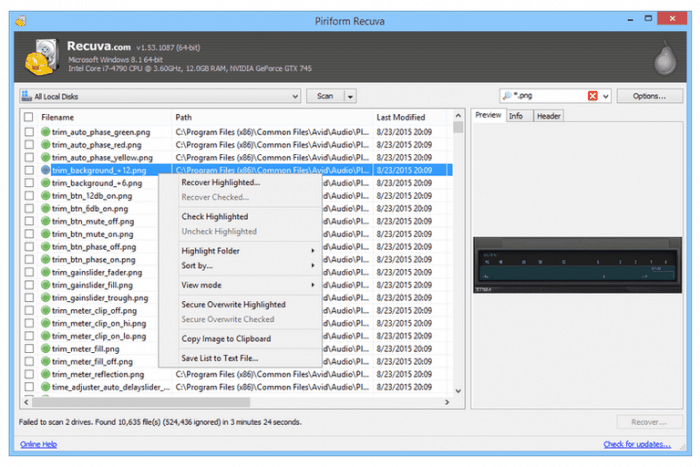
The ‘Recuva’ software developed by the Piriform software developers has an interface which is user friendly and qualitative. Piriform software developers are known to develop some of the finest software one of which is the ‘CCleaner Tool’. So, you can trust this software completely. Moreover, it is certified with no spyware and ensures 100% clean download.
Data Recovery Softwares
The software consists of an in-built wizard which instructs you the steps of retrieving your data each time you look forward to recovering your data, although this feature is optional. The users just have to answer some questions asked by the wizard-like the files to scan, the format of your data you are searching for, scan type etc and leave the rest to Recuva. You can go for the normal scan, however; you can opt for a deeper scan in order to recover your data. But, be patient if you have opted for an in-depth scan this will take time.
It can retrieve all sorts of data including pictures, mp3s, videos, documents, emails of any data storing device which Windows is capable of reading (digital camera, hard drive, etc), compressed files and many other formats. It is available in a free version and paid version. The free version of Recuva supports you enough to recover your data although the paid version comes with advanced data retrieving support, virtual hard drive support, updates the software automatically and other interesting features.
Price: Available with a free version, Paid version costs $19.95 / INR 1,467
Compatibility: Windows 10, 8.1, 8, 7, Vista, XP
Wise Data Recovery:
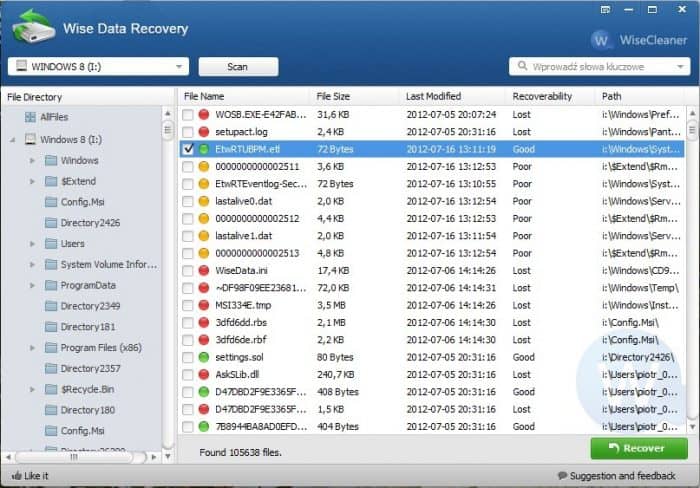
I will not say that this software is loaded with a lot of tools or can be customized. It has a limited amount of tools with an ability to make your work faster. Although it supports various types of recovery including data recovery from virus attacks, a formatted disk can be recovered and many more.
Image Courtesy: AlternativeTo : Data Recovery Softwares
Upon downloading this software you just have to put some efforts to fly your cursor across the screen and click on this software. As the homepage of the software pops open, choose the drive you want Wise to scan for you. Users can scan their USBs and other external devices as well. As mentioned before this software has the ability to scan faster than any other software. It supports a wide array of files in each and every category; documents (DOC, EPS, HTM, CWK, etc), Photos (JPG, TIFF, ORF, RAW, etc), Videos (AVI, MOV, SWF, RM/RMW, etc), Audios ( AIF/AIFF, M4A, OGG, etc), emails and messages (PST, DBX, etc) and compressed files ( ZIP, RAR, SIT, etc). It has over 6,400,000 users and assures a safe retrieving process.
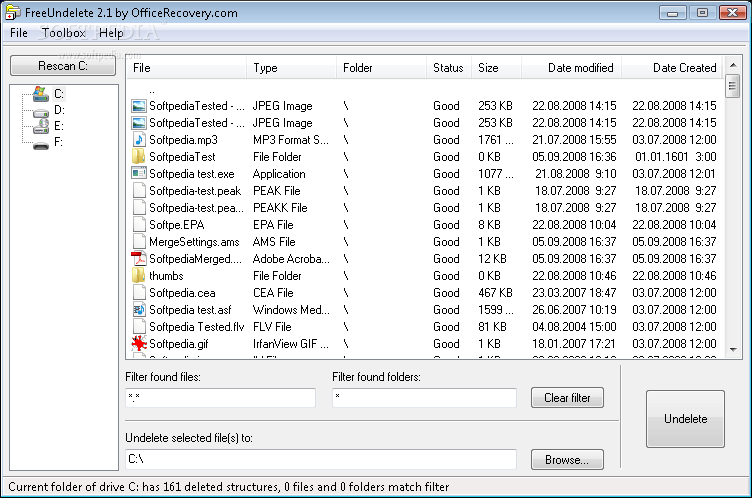
This is yet another software which has limited tools yet works perfectly fine. You will not find any advanced recovery options or customizable environment. But, it pretty much works like the Wise Data Recovery. Choose the drive you want to scan and look out for the recovered files. Again, you can scan removable devices as well.
Image Courtesy: Softpedia: Data Recovery Softwares
The software presents you with all the files and folders recovered from the drive so you can easily select which files you need from the folder or select the whole folder. It can retrieve the files deleted from the recycle bin as well. Users can retrieve files including images, folders, documents, videos, emails and compressed files.
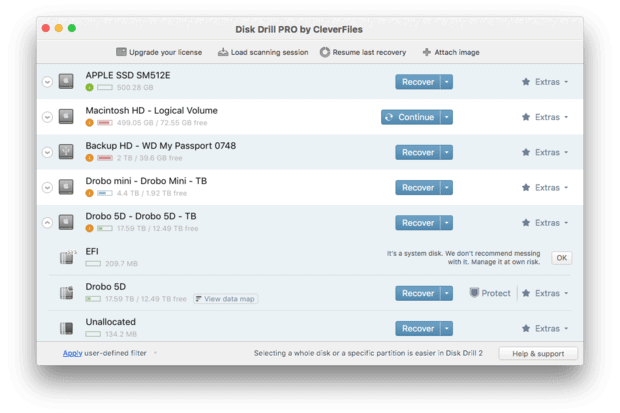
Disk Drill is also known as Pandora Recovery. This software is a bit different from the above-mentioned software. You can customize it deeply with a numerous number of tools and features. It doesn’t sport an attention-grabbing interface, however, it manages to please the users with its features and tools. It is a lighter substitute to Recuva.
Image Courtesy: MacWorld: Data Recovery Softwares
This software is capable of retrieving FAT32 or NTFS files including many other file formats. Alike the Wizard tool in Recuva, Disk Drill also has this tool which guides your way through to retrieve your data. Users also have the option to choose how you want to scan your files.
Users can scan a whole drive including the removable drive, a file type or deep scan them. You can use the different manners of scanning for the removable drives as well. The software is pretty interactive as it helps out the users to understand which icon performs which task whenever you would require them. Unlike other software, this software is known to be very simple to use for MAC OS X computers.
Compatibility: MAC OS X, Windows 10, 8.1, 8, 7, Vista, XP
Minitool Partition Recovery:
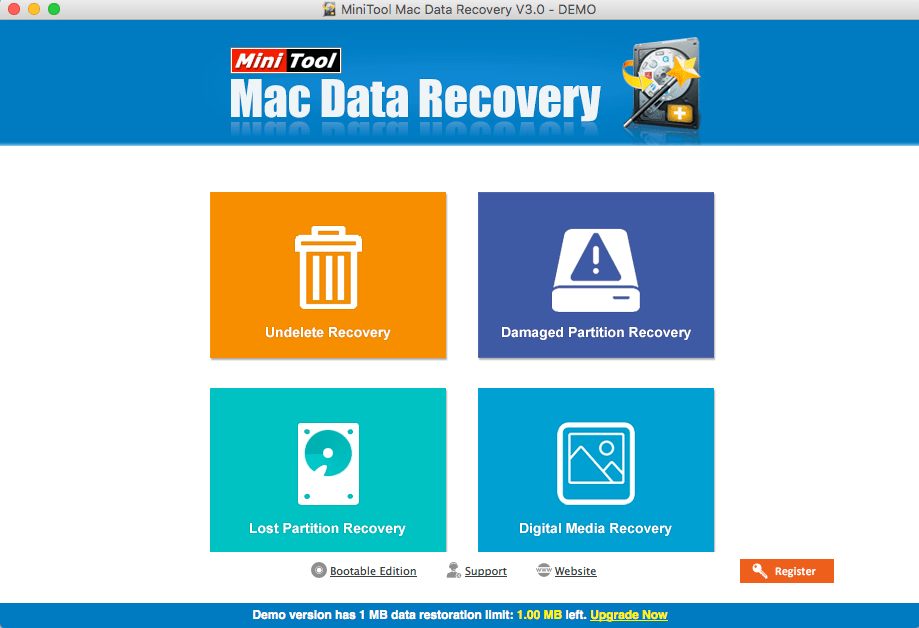
This software has an amazing interface which will grab your attention. It is filled with tools which will fulfil your requirements. However, the software will support you to recover files only till a limit of 1GB for the free version after which you will have to buy it.
Minitool Partition Recovery: Data Recovery Softwares
Minitool Partition Recovery has by far recovered five times more data than the above mentioned softwares. It worked astonishingly well. Moreover, it segregated different file extensions under different categories which enhanced the overall experience. Though the scanning consumed some time the results were worth the wait.
It is utterly useful for people who require deep scans. It supports you to recover files which have been formatted, damaged and deleted portions also. It is worth buying for your constant needs. The software supports FAT12, FAT32, FAT16, VFAT, NTFS and NTFS 5.
Price: Free to recover data up to 1GB, paid version $59 (INR 3,961)
Compatibility: Windows 10, 8.1, 8, 7, Vista, XP, MAC OS X 10.5 and above
Glary Undelete:
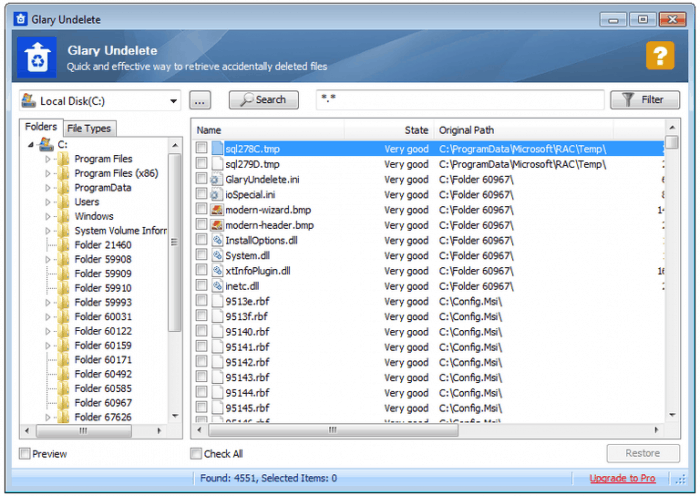
Glary is easy to use software and requires a small size. It comes with limited tools. However, the tools are pretty useful and are filled with some really good features. You can easily filter your files which will assist you to find the files you need. Users only have the option to quickly scan a drive including the removable drive.
Image Courtesy: Pinterest : Data Recovery Softwares
The software presents you with the retrieved data quickly which is segregated according to their extensions. One can easily track their files by filtering your search in terms of time, size, names etc. Moreover, it also supports NTFS, NTFS+, EFS, FAT, compressed files and other file formats.
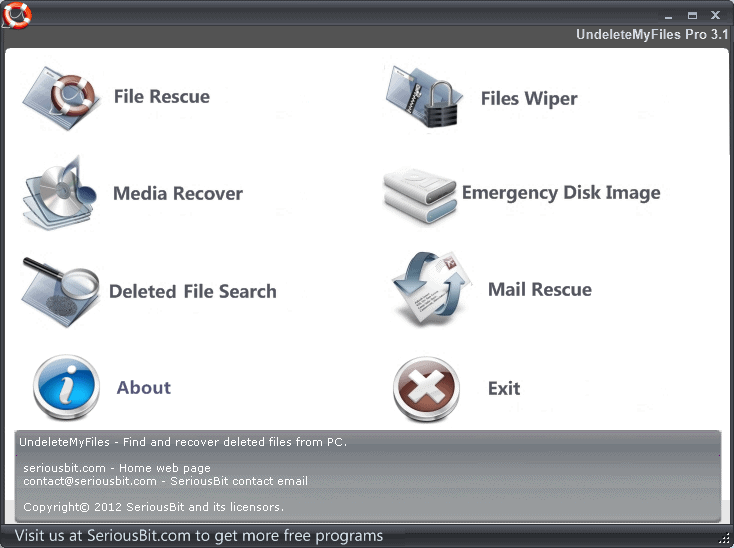
The UndeleteMyFiles Pro software provides you with many features and tools for recovering your files. Users can search for their respective documents or media files separately if the results don’t please try using the filters to search deeply. One can use the filter to search for particular file size, name, extension, and other filters.
Data Recovery Softwares
Moreover, it provides you with some unique tools like ‘Files Wiper’ which will delete the files permanently or the ‘Disk Image’ tool which prevents overwriting the deleted files with new data. The software runs quick and deep scans which is a time-effective function. It has the capability to retrieve twice the files by running a scan compared to the other software.
Compatibility: Windows 10, 8.1, 8, 7, Vista and XP, Mac OS X
PC Inspector File Recovery:
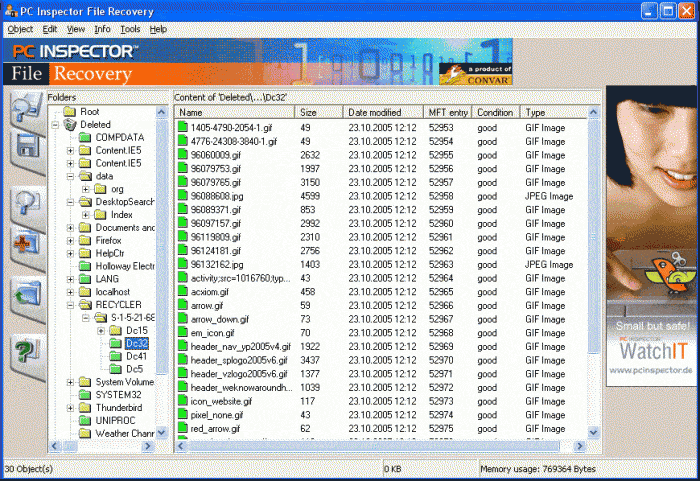
This is a complex software which I would not recommend to beginners. Due to obvious reasons, I am not a fan of the software’s interface. No doubt it is efficient in its functions as it allows you to scan the drives deeply and enables you to scan a particular section. The speed of its deep scans, well let’s say it might take more than 2 hours to scan a 50 GB drive.
Image Courtesy: AlternativeTo : Data Recovery Softwares
The results it presents you with is worth, you won’t regret it. Almost all the files can be recovered using this. Users can search for their files easily using filters and search according to the file extension, names etc. If you are well versed in using your desktops in an advance mode then you can surely go for it. The PC Inspector also supports NTFS and FAT 12/16/32 file systems.
Compatibility: Windows 10, 8.1, 8, 7, Vista and XP
Remo Hard Drive Recovery Software
Remo Hard Drive Recovery Software is a reliable and user-friendly tool that can help you recover lost or deleted files from your Windows or Mac OS hard drive. With support for various file types, including documents, photos, videos, and music files, this software can recover data from a range of scenarios, such as accidental deletion, formatting errors, partition loss, and virus attacks.
Its straight forward interface, advanced scanning algorithms, and two scanning modes (Quick Scan and Deep Scan) make it easy to use for beginners and professionals alike. Additionally, the software provides a preview of recoverable files before restoring them, giving you greater control over the recovery process. Overall, one can make use of the professional hard drive recovery software from remo to recover lost data from their hard drive.
Conclusion:
These Data Recovery Softwares do not guarantee to recover all the files but promise to retrieve most of the deleted files. So, if you are satisfied with one of this software then try the others as well. Also, make sure you have enough space to download this software and try not to use any other documents while running the scan as it will consume more time and the system may even lag while working on it. Let us know which Data Recovery Software worked the best for you in the comment section below!
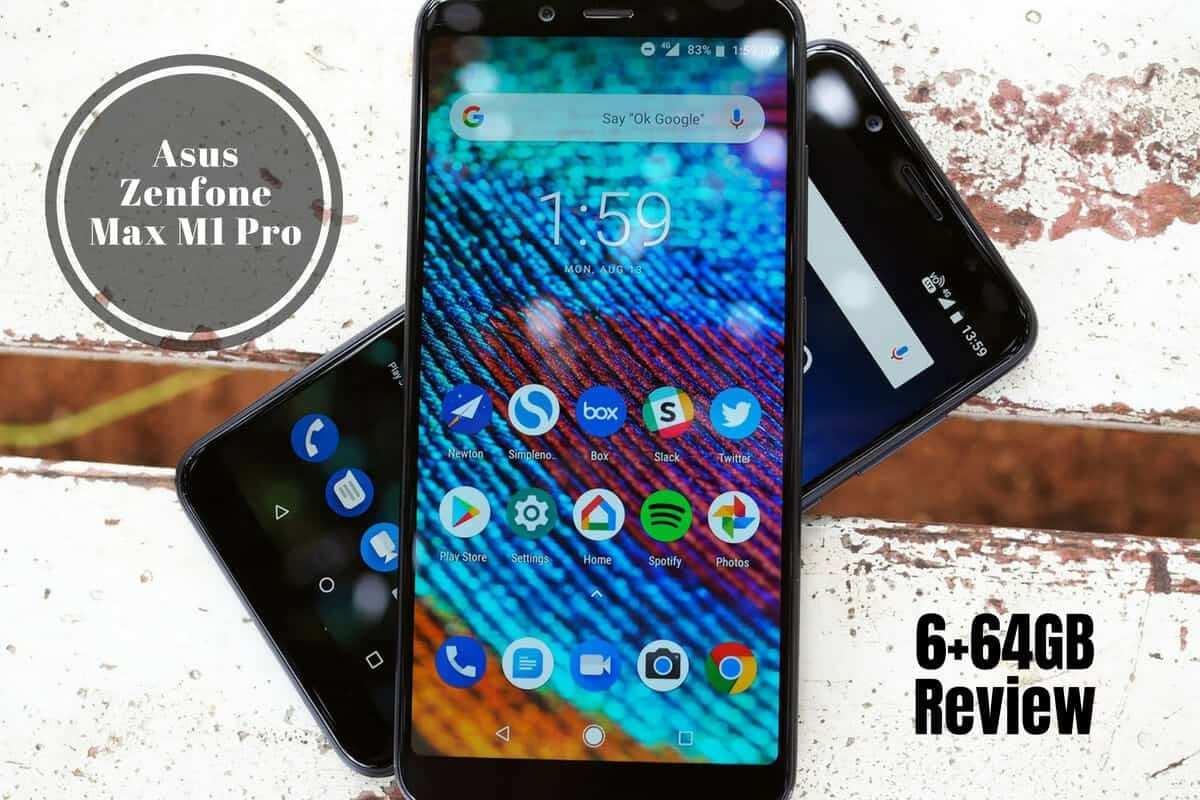
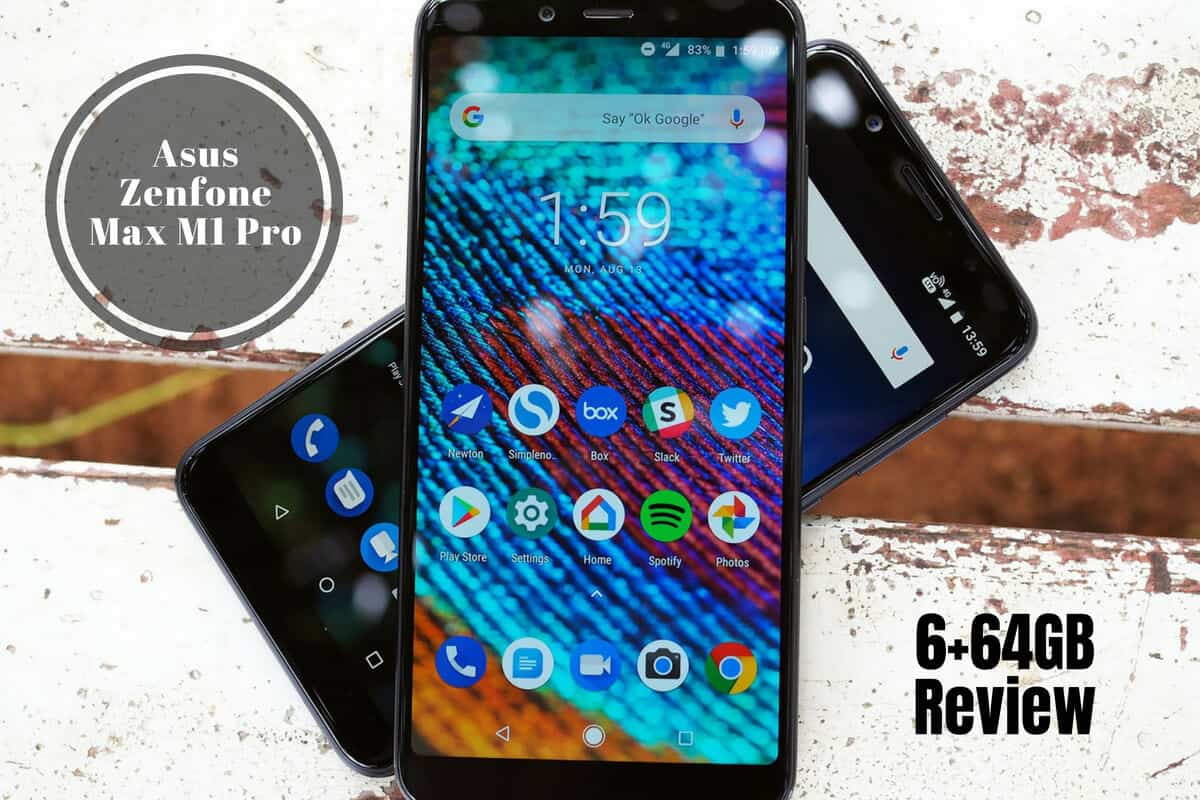
Asus has been kicking off the low-cost smartphone war in India for a very long time. The year 2014-15 was quite popular with the advent of Zenfone models; however, none of those were as successful as any other phones on the market. Not anymore! Asus is now concentrating on perfectly capturing the Indian market with the needed features and rock bottom prices. The strategy has worked well for several brands and we understand that it’s hard to pull off each time, but the Asus Zenfone Max M1 Pro is a special edition!
(This image is for representational purposes.)
Here we bring to you the much-needed review of the Asus Zenfone Max M1 Pro after 15 days of usage. To be honest, this one’s all new and improved as compared to the previous versions.
Good Looks
The Asus Zenfone Max M1 Pro is a good looking phone that features an all-metallic finish with a non-slippery but a smudgy feel. Having a massive battery makes the phone feel a bit heavy. But, it is sturdy without being thick despite a huge battery.
On the back panel, you can find a fingerprint sensor, dual rear camera setup as well as LED flash. On the bottom side are the speaker tray, 3.5mm headphone jack, and the micro USB port. Towards the left, you can find the SIM, as well as SD card tray and on the right, are power and volume buttons.
With a 5.99 inches screen size, the Asus Zenfone Max M1 Pro comes with a full HD+ display. The screen resolution is 2160×1080 pixels with an 18:9 aspect ration. The display comes with rounded corners and a thin bezel to give it an elegant and sophisticated feel. There’s a vibrant color reproduction and viewing angles are also great. However, the screen doesn’t come with a corning gorilla glass. So, you better get it tempered right after the purchase.
Smooth Performance
Clocked with a Snapdragon 636 SoC processor and Adreno 509 GPU, the overall performance of this smartphone feels absolutely fluid. The apps run lag free, gameplay is smooth, no frame drops even on the higher settings but the phone may heat up after some time. Heating issues are pretty genuine with, I guess, every phone. It’s a machine and it may get warm depending upon the usage.
The specs are powerful, the user experience is fluid, multitasking is great and you can also better optimize the smartphone with several internal gestures.
Custom ZenUI, as well as the apps, have been ditched on the Asus Zenfone Max M1 Pro in favor of the much-preferred stock android. It is flawless. The smartphone supports Android v8.1 (Oreo) operating system which runs pretty smooth.
The fingerprint sensor is improved. Even the facial recognition feature is faster in comparison with the previous versions. All in all, the software is pretty decent and in accordance with the modern needs. However, we observed that unlocking is a bit difficult under low light conditions, particularly at night.
Crazy Storage
With the previous variants being 3 GB and 4 GB with 32 GB and 64 GB storage, Asus is now out with a 6 GB RAM variant too.
The 6 GB RAM version is coupled with 64 GB of internal storage which is also expandable up to 2 TB. That’s insane, right? You get a dual-SIM tray with a separate cut out for SD card so you do not have to compromise on the storage as well as connectivity.
The Asus Zenfone Max M1 Pro comes with a single speaker which is loud enough, however music sounds a bit distorted on the highest volume.
The phone doesn’t come with an in-box headset. But, you still get a Max Box (to intensify the sound) which is a handy accessory to puff up the quality.
Massive Battery Life
Like many others, the battery is non-removable but the life is pretty massive – 5000 mAh is what the new Asus Zenfone Max M1 Pro comes with. This will give you a full day’s back up despite a lot of streaming as well as games and other activities.
Camera Quality
Both primary, as well as the secondary cameras, are clocked with 16MP settings accompanied with LED flash and a 5mp depth sensor on the rear. You get several modes and settings to click some decent pictures. Video recording is at 4k on the rear and 1080p on the front. The daytime shots pop out some really beautiful colors however details aren’t too sharp at night.
There’s no shutter lag in the pictures but videos face a lot of focus shift. However, the company has promised to bring out software improvements with the required updates right after public sales.
Priced at Rs. 14,999, it’s a value for money smartphone with some impressive features. Plus, it doesn’t really has any competition. The phone is of decent quality. And, Asus has made a solid effort with this phone to push it into the Indian market without any hassles. The phone is exclusively available on Flipkart and you can purchase it HERE.
Digital Documentation has seen Adobe Acrobat lead the software industry for the past two decades in its development and management. The Pro DC is considered a “next-generation” tool fraught with power as features mean to provide greater efficiency and productivity, assisting those using the software to maintain a more organized establishment.
Before the filing format of PDF (Portable Document Format), documents would display on operating systems and varied devices differently. John Warnock, the Adobe co-founder, was responsible for the PDF concept.
Before the breakthrough, formatting that was time-intensive and involved extensive effort would go from one platform to another with frustrating outcomes.
Adobe Acrobat – learn details concerning the software at https://learningcurve.co.za/adobe-acrobat-pro-dc/, resolves to allow documents to remain intact with the original formatting across each platform when viewed. With the tool, users can decrease file size with no fear of quality degradation.
These provide a sense of security, given the fact, you can create a “tamper-evident” or “read-only” option. These are beneficial for legal or medical documentation. Let’s dive in for some more advantages of this software tool.
Advantages Adobe Acrobat Affords Its Users
Acrobat Pro 2017 and Acrobat Pro DC differ in that DC comes as subscription software. That means you pay a fee each month for using the software instead of a one-time sum.
A subscription service means that you afford advantages not available with other plans or versions. Some of the extra benefits include:
Acrobat’s most current variety as soon as it’s available.
Adobe Cloud for sharing/storing files, in addition to the capacity to follow through with workflows to the point of sending and tracking the documents plus receiving e-signatures.
Features available only through Acrobat DC like improved edits, creation of forms, plus the opportunity to send/track and receive back a digital signature, plus so much more.
Looking more closely at the varied features, you can see how valuable the subscription services are for the software over the single-price option for those working with digital documents. Some of the highlights with the service include:
Editing files with much greater capacity.
When files in PDF need updating, like outdated contracts or other reusable forms, users often find the Microsoft Word version to be unattainable. Often the feeling is that the file would need retyping for updating in Word and then resaved to the PDF file, but that’s unnecessary.
The Acrobat Pro DC series lets the user make an editable PDF document changing all the content, whether text or images in the file. Text matches against generated custom fonts in the program, and components in the document can drag these where you want them for ease and convenience.
For those who find a Word template or even a paper form ideal for your establishment pending some minor details, Acrobat has an easy process for using these tools with the “PDF form creation” feature.
There is further integration with Office 365 and Microsoft Office. With Microsoft Word, you can make a PDF from any “.docx or .doc” file using Acrobat in a mere click, plus the reverse is true, turning a PDF into one of those docs, or Excel or PowerPoint with no complications. Go here for guidance on editing a PDF.
For those on the go, there is Adobe Cloud
You will have the ability to access and store files in the cloud, offering “20 GB of storage” with integration with Microsoft OneDrive, Dropbox, and Box. That means using your mobile to accomplish varied tasks, including sending, receiving, or revising, from virtually anywhere.
The Adobe Scan, found for Android or iOS, will allow scanning forms or documents using a mobile device, readily turning these into PDF files. Optimization of Acrobat means touchscreen operation, making the function easy on the go.
Obsolete paper signatures
Among the most profound features of this software are the provisions for collecting electronic signatures. There’s no need to pass out paperwork to be returned, instead sending a PDF with a form needing the signature in the email. The user can even add in any pertinent missing information before signing using even their mobile with an Adobe tool – “Fill & Sign.”
The person in charge of collecting the signatures can keep track of those who did the paperwork and those who still need to return the forms with automatic retention of the records.
Final Thought
Adobe Acrobat presents as exceptionally powerful software to manage and create digital documents and forms for countless purposes. With the editing capacity and Microsoft Office compatibility, your efficiency has optimum enhancement with drastic improvements in communication and the ability to gain a smoother grasp on the operation of your organization.
With more companies providing a remote working environment, the cloud allows storage and access with ease from mobile devices with optimization, creating the ability to work from virtually any location with a user-friendly interface. Security is a priority and is maintained with the “read-only” and “tamper-evident” options, especially advantageous for the legal and medical industries but can have use with any establishment where privacy is a concern.
You can use “Publish Sensitive Information” for varied restrictions, including the ability for redacting data, inability to edit/copy, and for password-protection capabilities. It also gives you control over whether you want the form to be printable. Adobe Acrobat means providing user-friendly, safe, and secure software for your specific business (or individual) needs.