Home Blog Page 57

Fix Frozen Windows 10 System Restore [Tried & Tested]

0

How long does system restore take?

Is your Windows 10 system restore taking a long time? Find how long does System Restore take and why?

System Restore in Windows 10

When some data on your PC is corrupted, or any installation fails, you decide to carry on system restore to roll back the changes and regain the previous functionality of your System. We also think about deleting the data manually but that might take a lot of time so duplicate file finder windows 10 helps us deep clean the storage. But the worst nightmare is that the critical process of system restoration itself gets stuck, leaving you puzzled about what to do next.

Wondering how long does system restore take? The answer is it just takes 30 to 35 minutes to complete all the steps for successful restoration. If windows 10 system restore taking a long time to recover your system, then this article is just for you. Read further to know all possible reasons for the system restore not working issue and get acquainted with solutions that can help you to restart the restore process, which got stuck.

How long does system restore take and why?

You might encounter a ‘System Restore not working’ problem for some reason because the process might be getting obstructed at some point, taking a long time to finish. We have enlisted the possible stages where the restoration process may get stuck.

  1. The system restore process may get stuck while it is initializing, and you might see the below screen on your PC hung up for hours together.

Easily Fix: Windows 10 System Restore Stuck or Hang Up
  1. Boot image might be corrupted, causing the System Restore process to take long hours to restart the computer and finish the restoring process.

Boot Image
  1. Restoring files might be the reason for the delay in system restoration.

System restore
  1. The restoring registry might be time-consuming, and a possible reason for this can be an error in the installation of some software on your system.
  1. Firewall or antivirus settings on your PC might be obstructing the system restore process.

Here are the solutions if your windows 10 system restore taking a long time.

Now stop worrying about how long does system restore take? and start fixing the issue, with the below solutions.

1. Login in the Safe Mode With Networking to carry System restore.

In safe mode, Windows starts with a basic set of files and drivers, which helps in troubleshooting as factors causing Windows to crash are not present in the safe mode.

If you have started the procedure for windows 10 system restore and suppose your computer screen continuously displays the message about system restoration is initializing for more than an hour. In that case, we can fix it by logging in the safe mode with networking. We have to carry the following steps in Windows 10 to restart the restoration process.

  1. Force stop the system by pressing the power button for a few seconds.
  2. After your system is restarted, you might have one out of the following two scenarios.

1. Windows will restart as it was before restoration.

2. A blank or black screen will appear.

To login to the safe mode from any of the two scenarios mentioned above, follow detailed steps described on Microsoft Support.

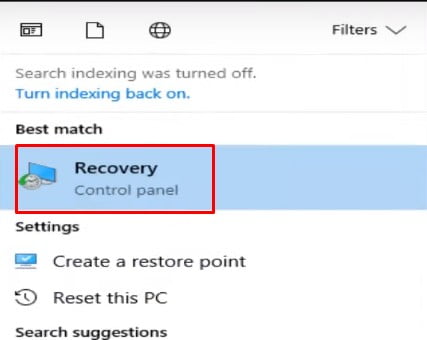
  1. After your system enters the safe mode, type System Recovery in the start menu.
  2. Click on the Recovery option.
recovery
  1. Choose Open System Restore in the Advance recovery tool window.
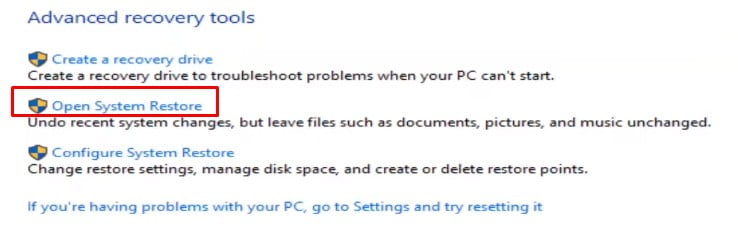
open system restore
  1. Follow the instructions displayed on the wizard and start System Restore.
  2. Now check if the process again gets stuck on some stage or completes without any errors.

Check how long does system restore take and jump to the next method if the windows 10 System Restore taking a long time to restart your system, and this solution didn’t give you the desired output.

2. Fix corrupted Boot files.

Boot files might be corrupted on your system. To fix this, you have to boot from a fresh copy of Windows 10. 

Requirements:

  1.  Bootable Windows installation CD/USB. (You can create one by downloading Windows 10 from the Microsoft website.)
  2. In the boot menu, set USB to the topmost in the boot order control section. (You can find detailed steps to do it on this website.)

Steps:

  1. Insert your bootable drive in your system.
  2. Click on the power icon in the start menu and choose restart. Hold and press the Shift key while clicking on the restart to ensure that the Advanced startup option is displayed when your system restarts.
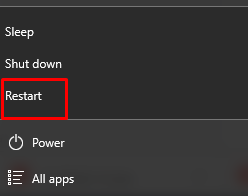
restart
  1. After your system restarts, click on the Use a device option from the Advanced startup options window.
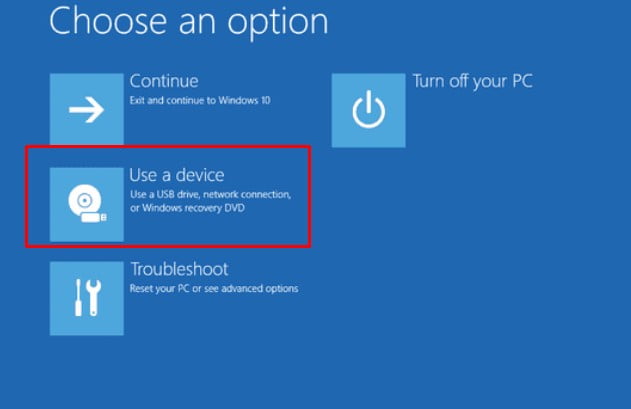
use a device
  1. Choose the desired USB device from which you want to boot, and your system will restart.
  2. By the above steps, all the corrupted boot files will be replaced, and you can try to restore in safe mode and check if it System restores completes successfully. Try the next method if still the windows 10 system restore taking a long time in your PC.

3. Execute Startup Repair

Generally, this solution is useful when your PC takes a long time to restart after the System restore initializes and restores files. A possible reason might be the Boot Manager of your system is corrupted. Startup Repair might help to answer your question of how long does it take to reset Windows 10. 

Steps:

  1. Use the restoration media created above and plug it into your system.
  2. Boot from this media.
  3. Enter WinRE on your system. You can find detailed steps on Microsoft Docs to open it.
  4. Go to Choose an option -> Troubleshoot -> Advanced Options -> Startup Repair.

It is that simple to repair and resolve the restore issue. If this method doesn’t work for you and you are still figuring out how long does it take to reset windows 10, then try the next process.

4. Run System File Checker(SFC) Tool on Windows 10.

Suppose your restoration process is stuck on restoring the files screen and windows 10 system restore taking a long time. In that case, there is a possibility that some system files are corrupted and might be causing a delay in the recovery process. SFC will scan all the system files and replace the corrupted files with the right version. This can help you to resume the restoration process. Find out the detailed steps to run the SFC tool in Windows 10  on Microsoft Support. After files are repaired again, try System restoration and check if it completely successfully without getting stuck.

5. Uninstall and reinstall antivirus on your system.

There is a possibility that antivirus running on your system might be interfering in the recovery process. So you can uninstall it and try restoring your system. Once your System Restore finishes accurately, then you can reinstall antivirus back on your system.

Wrapping up

This article has offered five methods to help you to resolve the system restore not working issue. Let us know in the comment section if you find difficulty implementing any of the methods described above. Update us if you come across any new way that worked for you.


Resolved: Error Code 0x80070570 In Windows 10

When there is something wrong in any process of Windows, it notifies users by displaying an alert box on the screen having an error code. One such unexpected error code is 0x80070570, which Windows users can encounter anytime.

error code 0x80070570

You can face it while Windows installation or up-gradation, or while installing any application, or copying and moving files. Many users have reported this error while installing Windows 7, but some users have also experienced it while updating Windows 10. This article will walk you through possible reasons for the occurrence of this error and methods to fix it.

install windows

Possible reasons for error code 0x80070570

The error message for the error code 0x80070570 states the installation’s failure due to corrupted or missing files. There are quite a few reasons for this error. The most common causes are as follows:

  1. The installation disk might be corrupted or does not have the required permissions.
  2. The hard drive of your system might be damaged.
  3. The memory of your system might be corrupted. It may be a RAM failure or corrupted disk partitions.
  4. Malware or viruses in your system might have attacked the system files.
  5. Errors in the system registry make it difficult for the application to locate the files.

Methods to fix the error code 0x80070570

Which method you should try to fix the error code 0x80070570 depends upon the scenario when you encounter this error. There can be the following scenarios when you come across this error. 

  1. While installing and downloading updates on Windows 10.
  2. While installing Windows 10 on your system.
  3. While setting up Windows 10.
  4. While moving or modifying files on your system.

We will guide you and provide specific methods to deal with each one of them.

Note: This article illustrates a few steps that imbibe risk and need to be performed with the utmost care, preferably in the presence of some expert. Kindly proceed at your own risk.   

Solutions to fix error code 0x80070570 while installing and downloading updates on Windows 10.

Try the below-given solution to update Windows without facing any errors.

  1. Execute the Chkdsk command.

Chkdsk command checks any specified disk for corrupted or damaged sectors on hard drive or disk. Data can also be recovered or repaired from the specified disk using this command.

Steps:

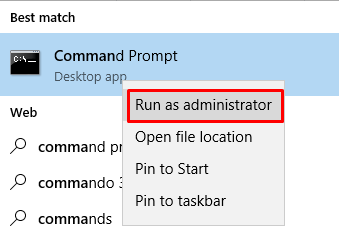
  1. Type the Command prompt in the Cortana search bar.
  2. Right-click on the Command Prompt from the menu and choose the Run as administrator option.
error code 0x80070570,error 0x80070570
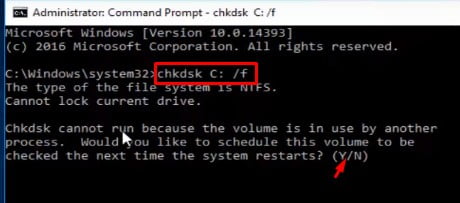
  1. Run the command chkdsk Drive name like(C:) /f/r to fix the error found on disk and recover readable data from the disk’s bad sector.
administrator mode
  1. You may have to press the ‘Y’ key when asked to schedule the process.
  2. Restart your PC to apply changes and now update Windows and check if the error still appears. Switch to the next method if this process didn’t work for you.
  1. Run SFC and DSIM command.

SFC and DSIM tools may help you to scan corrupted files and restore them. Once your system files are repaired, you may stop getting error 0x80070570 due to damaged system files. You can get detailed steps to run SFC and DSIM tools on the Microsoft support site.

  1. Run Update troubleshooter.

Update troubleshooter helps to resolve any errors that come while updating Windows.  You can download the version of Update troubleshooter matching your OS version and run it to fix the error code 0x80070570.

  1. Repair registry.

The corrupted registry might be the culprit for the error code 0x80070570. You can download and use any trusted, free registry repair tool like the Restoro PC repair tool to resolve this issue.

  1. Empty Software distribution directory.

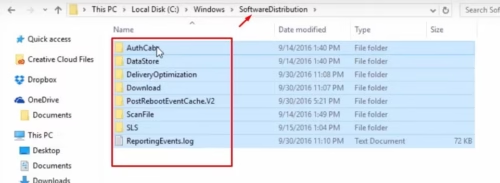
The software distribution folder comprises all the files required for Windows installation and updates. It is maintained by WUAgent service. You should first stop this service, then delete all the files from the software distribution directory and restart it. Deleting all files from the Software distribution folder can also be one way to resolve the 0x80070570 error encountered while updating Windows 10.

Steps:

  1. Open command prompt in administration, as described in the previous method.
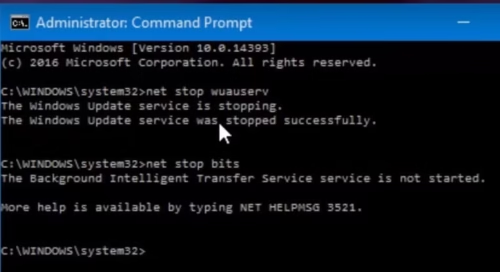
  2. Type below commands and press enter after each command.
    1. net stop wuauserv
    2. net stop bits
command prompt admin
  1. Minimize the command prompt screen and locate the Software distribution directory in the C drive.
  2. Delete all the files from that directory manually.
delete
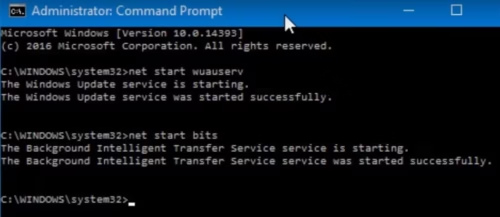
  1. Maximize the command prompt and type the following commands. Press the enter key after each command.
  1. net start wuauserv
  2. net start bits
net start bits

6. Restart your PC and check if the problem is resolved.

Solutions to fix error code 0x80070570 while installing Windows 10 on your system.

Most users have experienced this error while installing Windows on their system. We have tried to give you a few ways to overcome this error and have a smooth installation.

  1. Use another installation media.

Many users have reported that recreating bootable media again and installing Windows from that drive has helped to resolve the error code 0x80070570. You can download ISO image for Windows and create a Bootable disk or USB and use it to resolve the issue.

  1. Check the internet connection.

Ensure that you have a stable internet connection You can switch between Wi-Fi and ethernet and then try the installation. If this solution doesn’t work then jump on the next method.

  1. Check memory.

As discussed earlier, corrupted or damaged RAM can be the possible reason for the error code 0x80070570. You can use the Memtest86+ advanced memory diagnosing tool to check the issues with RAM. Try to fix the diagnosed problem with RAM or completely replace it and then try reinstalling Windows on your system. Check if the error code disappears now.

Solutions to fix error code 0x80070570 while setting up Windows 10.

Implement the below-given solutions if you encounter error 0x80070570 while activating Windows in your system

  1. Run activation troubleshooter.

Activation troubleshooter checks if you are using a legal copy of OS on your system and then troubleshoots the problem if you cannot activate Windows 10. Find out the detailed steps given on Microsoft support to run the activation troubleshooter.

  1. Set the correct time, date, and region.

Windows activation fails if the correct time, date, and region are not set on your system. Try setting it accurately to activate Windows on your system without any error.

Solutions to fix error code 0x80070570 while moving or modifying files on your system.

You may face the error 0x80070570 while copying, moving, or deleting files from the disk drive. We have discussed below a few workarounds to fix this error on your system permanently. 

  1. Format USB drive:

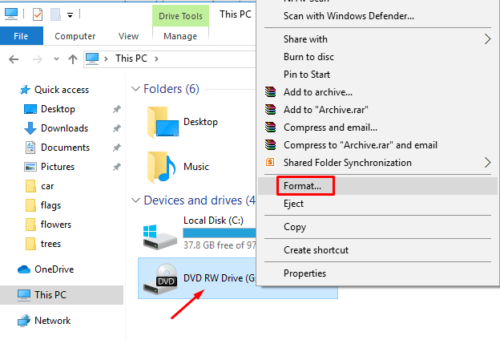
If you face the error 0x80070570 while deleting files from the USB drive, you can simply copy files that are not corrupted from the USB drive to your system and format the USB drive to fix the error by few clicks.

Steps:

  1. Click on the Windows icon and choose the File Explorer option.
  2. Choose This PC from the left Panel.
  3. Locate the USB drive to be formatted from the Disk Drive Section.
  4. Right-click on the USB drive to be formatted and click on the Format option.
format
  1. Follow the instructions on the wizard to complete the procedure.
  1. Shift files to different directories.

If you are getting the error 0x80070570 while deleting files from the specific folder, you can just cut and paste them into another folder and then repeat the same process to move the folder back into the source folder and try to delete them.

Now check if you still get the same error.

  1. Defragment disk partition.

If you are getting the error code 0x80070570 while formatting the disk drive, you can try to optimize your disk by defragmenting it. You can follow the detailed steps discussed on the Microsoft support site to carry defragmentation of the disc.

  1. Disable antivirus.

Sometimes antivirus running on your PC can meddle the process of moving, deleting, or modifying files. Try to disable it temporarily and then try to transfer files and check if the error appears again.

Wrapping up 

This article has offered quite a few methods to help you to fix the error 0x80070570. Depending on the scenario on your system, try implementing each technique carefully. Let us know if you are stuck at some point while carrying the steps described above to resolve the issue. Update us if you come across any new method to fix this error code.

Custom Front-End Web Development: Back To Basics

Ever since the internet came into existence in 1983, nothing has ever been the same. From dial-up connection and AOL to Google Chrome and IoT, the internet has completely integrated into our lives. We are not complaining!

But what has grown exponentially is the number of websites globally, which currently stands at 1.74 billion. The work that goes into creating a website for the internet from scratch is called custom web development.

error code 0x80070570,error 0x80070570

While the term refers to web markup and coding, it also includes related tasks such as server-side scripting, server, and network security configuration, client-side scripting, content management system (CMS) development, and eCommerce development.

Custom web development in numbers

Influencers worldwide and industries cannot emphasize enough the importance of a well-developed web application and how it directly correlates to a business’ quality. Here are a few statistics:

  • The number of web developers in the US currently stands at 23 million.
  • Time an internet user requires to form an opinion about a website is 0.5 seconds.
  • Annual losses due to a slow-loading website account for $2.6 billion.

From PWA and AMP to voice search optimization and motion UI to AI-powered chatbots and API-first development, the world of custom web development has graced us with new trends YoY.

This article is about the front-side or client-side of a website that you see and interact with as an internet user, i.e., front-end web development services.

What is front-end custom web development exactly?

When website information gets transferred from a server to a browser, front-end coding languages enable the website to perform without having to interact with the internet continuously. That is called front-end web development services.

Front-end vs. backend: the difference

While front-end web development services implement visual elements that the internet users see and interact with on a web application, backend web development supports server-side application logic. Meaning, the code connects the internet to a database, manages user connections, and powers the web application itself.

What tasks do front-end developers do?

A front-end developer is what most people probably think of as a “web developer.” But that is not it. They are well-versed in HTML, CSS, and JavaScript, and some of the front-end jobs include designing web applications, UI and UX.

Professionals who work with specific front-end languages such as JavaScript are also called front-end web developers. Their primary responsibility is to ensure all elements of the web creation are consistent. This requires excellent interpersonal and communication skills. Here is a list of the tasks they do:

  • Put together the web pages’ structure and design
  • Develop features to enhance UI and UX
  • Ensure the web application is responsive
  • Build a repository for reusable source codes for future use
  • Optimize the web application for scalability and maximum speed

Basics of five best front-end frameworks

1. HTML – the necessary front-end technology

A vital building block of custom web app development, HTML, or Hypertext Markup language is the first layer present in any website and is used to create the code version of a web page’s wireframe. It is the markup making all elements we see on a website.

Custom HTML  Front-End Web Development

How does it work?

HTML comprises a series of shortcodes typed into a text-file by full-stack JavaScript developers, which is saved as an HTML file and accessed through a browser. The browser converts the text-file into a visible form, rendering the page in a readable format as the full-stack JavaScript developer had intended.

HTML informs the browser which part of the web page is a header or footer, where images, graphics, and videos are placed, where the paragraphs belong, and so on.

HTML tags

If you used earlier websites such as MySpace, you had the flexibility to customize the web page with commands inside <>. These angel-bracketed commands are called HTML tags, and they are a common component of HTML.

Today, when you view a text deadline on a website, followed by a series of paragraphs, the web browser can tell the formatting difference because each paragraph and headline has its HTML tag, which looks like this:

<h1>This is a headline</h1>

<p>This is a paragraph</p>

Tags are used to mark up the beginning of an HTML element, as shown above.

HTML5

HTML5 is the fifth and latest major HTML version, which is used to structure and present content on the internet. It is more mobile-friendly and simplifies character coding on the front-end.

Unlike HTML, it allows JavaScript to work in the background and uses SQL databases and application cache to store offline data. HTML5 also supports audio and video controls with the use of <audio> and <video> tags.

2. CSS – style your website conveniently

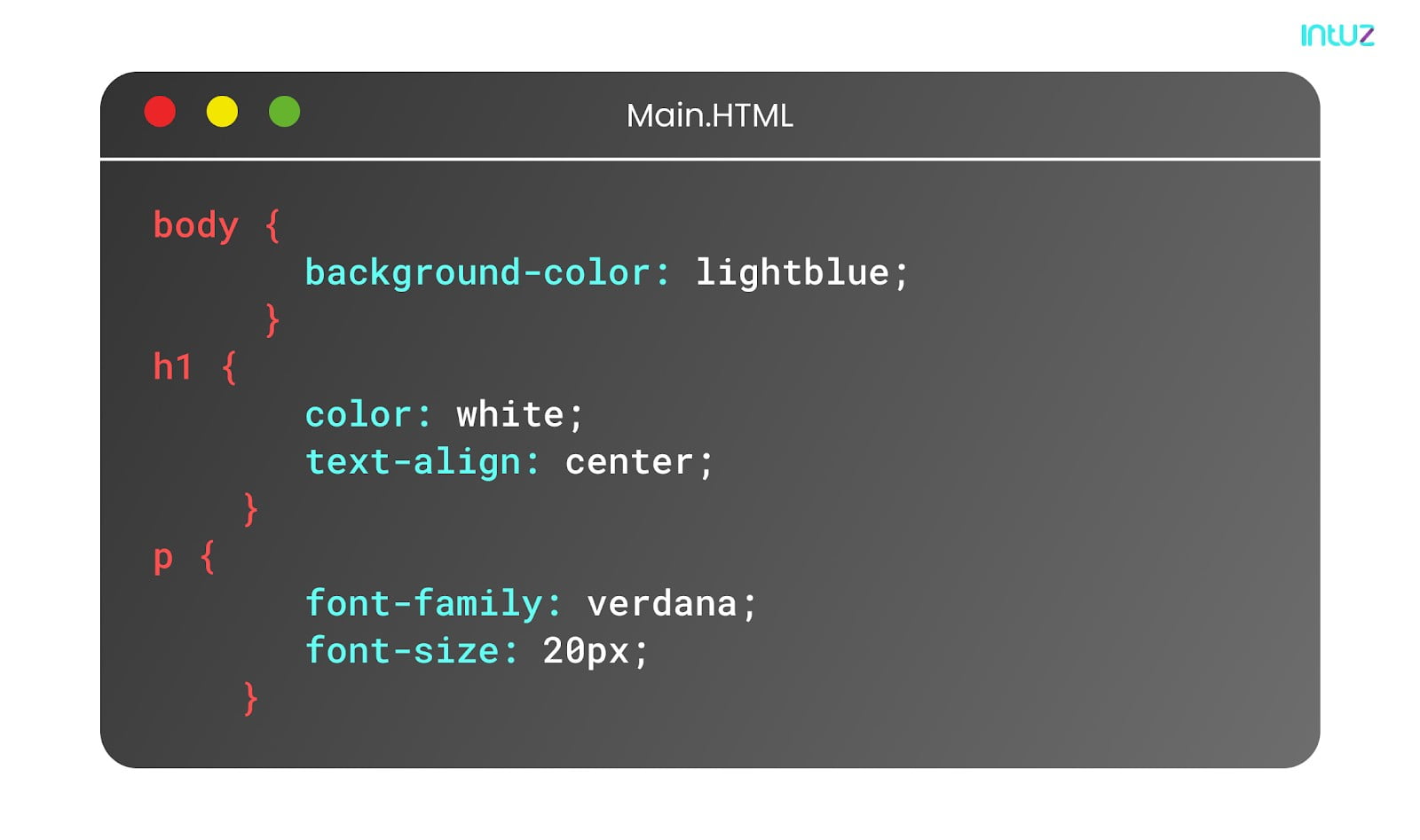
Cascading Style Sheets dictate the representation of HTML elements on a web page. CSS infuses visual appeal and defines web page styles that include the layout, design, and display variations for different screen sizes and devices.

Custom CSS Front-End Web Development

It saves a lot of time as it keeps all style definitions in external .css files, which means that with an external stylesheet file, you can change the look of an entire website by editing just one file.

CSS pre-processes support programming logic in custom web development and consolidate styling through usability and scale up to accommodate large websites such as Groupon or NBCUniversal.

The code structure of CSS

CSS can be used in the HTML documents in three ways:

  • Internally, by using a <style> element in the <head> section
  • Externally, by using a <link> element to link an external CSS file
  • Inline, by using the style attribute inside HTML elements

Best front-end frameworks of CSS

A CSS framework is a library that allows for more standards-compliant and more straightforward web design implementing CSS. Most of the CSS frameworks contain a grid, and some also come with additional JavaScript-based functions.

CSS frameworks offer different tools and modules, including:

  • Web typography
  • Styling for buttons, elements of forms, and tooltips
  • Reset stylesheet

Two notable examples of CSS frameworks are Foundation and Bootstrap.

3. DOM – structure your web pages

DOM or Document Object Model is a programming interface for XML and HTML documents and is responsible for changing the document style, structure and content. The DOM represents the documents as nodes and objects, enabling the programming languages to connect to the web pages.

How it works

The DOM is built using multiple APIs working together. The core DOM defines the objects describing a document and the objects within it. The structure expands as new features and capabilities of other APIs are added to the DOM. The DOM standards are implemented in most modern browsers such as Chrome, Mozilla, and Safari.

4. JavaScript – enliven your website

JavaScript is the most common programming language for web browsers. That means when you open a web page, it will automatically load the foundational JavaScript, standard with the web page, and any new JavaScript added to it.

JavaScript is different from backend languages like Ruby or Java because it is visible to the internet user and not compiled ahead of time to run secretly behind the curtains. The full-stack JavaScript developers use the programming language in many different ways, one of which is doing the field validation in a form.

When websites gather information from users in online forms, JavaScript helps validate the entries. The programming language is also used to create calculators, including MegaConverter, Personal Finance calculators, and RPN calculators.

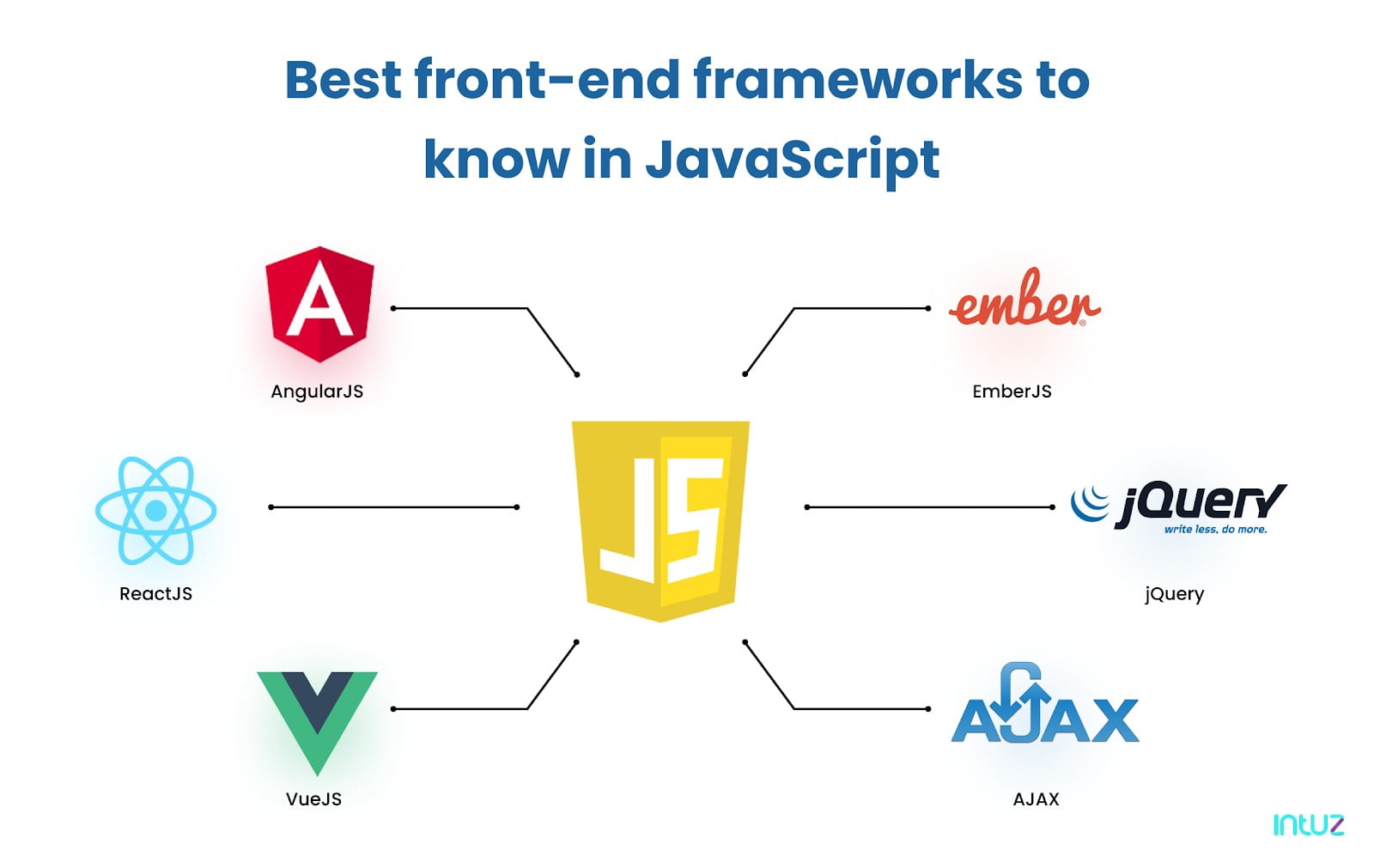
Best front-end frameworks to know in JavaScript

Best front-end frameworks in JavaScript

a. AngularJS

This is a free, open-source framework that expands the HTML vocabulary and gives an environment to the full-stack JavaScript developer that is readable, expressive, and easy to develop.

b. VueJS

This is one of the best front-end frameworks released in 2014 and is an MIT-licensed open-source framework. Vue.JS uses MVVM architecture and is lightweight, which makes it relatively easy to implement.

c. EmberJS

This is one of the most popular best front-end frameworks of JavaScript that utilizes a component-service pattern to create scalable single-page web applications.

EmberJS integrates best practices, patterns, and common idioms from other web app ecosystems with the framework.

d. ReactJS

A leading JavaScript framework, this was created by Facebook for helping the full-stack JavaScript developers build user interfaces. It performs optimization while drawing up code to JavaScript, which is why it is so fast. It is completely automated and can handle the JavaScript code, making it perfect for all kinds of browsers.

e. jQuery

It helps simplify HTML DOM tree manipulation and traversal and can leverage event handling and animation. jQuery is CSS3-compliant. Used by multiple browsers and operating systems, jQuery is free, open-source software that uses the permissive MIT License.

5. AJAX – communicate transparently with the backend technology

AJAX or Asynchronous JavaScript and XML are a group of existing technologies that build modern web applications. With the help of AJAX, the browser can communicate with the server and request data. Then, it processes the server’s response and makes changes to the web page without having to reload it fully.

The meaning behind the acronym

  • “Asynchronous” stands for transmitting data, often without any external element’s use. In custom web development, when the client requests data from a web server, it doesn’t freeze until the server replies and allows the user to navigate the web pages.
  • “JavaScript” is the language that represents the AJAX request, passes on the response, and updates the DOM.
  • “XML” is a markup language that represents the rules for encoding documents in a way that is readable by both machines and humans.

How does it work?

AJAX allows the web pages to update asynchronously by exchanging small data amounts with the server behind the curtain. It is like when you scroll down on your Facebook feed, new content appears thanks to AJAX.

Or when you upvote an answer on Quora, an AJAX call is triggered. That shows it is possible to update parts of a web page without reloading it.

Wrapping it up

Everything that an internet user views, clicks on, or interacts with on a website or web application is the work of a full-stack JavaScript developer. This requires them to be both tech-savvy and creative.

The focus on custom web development is on user experience, and how developers accomplish that with speed, efficiency, and convenience is something worthwhile. They also make sure the front-end does not have any errors or bugs.

So if you need assistance with that, hire front-end web developers today, and give your website a much-deserved overhaul.

10 Technologies Helping The World During Covid-19 Pandemic

0

During the crisis, technologies can help to keep society running despite lockdowns and social isolation. They’ll stop the further spread of the virus, improve patients’ treatments, and assist overworked healthcare personnel. 

Even the way people consume entertainment has completely changed during isolation. Not only have online casinos like Mr Bet become more popular, but new virtual reality devices allow us to participate in events without leaving home.   

And once the pandemic is over, these innovative technologies that help humans will keep impacting the world. They’ll change the economy and different facets of society, decreasing the effect of new outbreaks in the future.

So, without further ado, let’s check 10 technologies that help world while changing it. Ready?

1. Shop Online and Get the Goods Delivered by Robots

Just like the SARS outbreak in 2002 led to unprecedented growth of online marketplaces in China, the COVID-19 pandemic has made shopping online unavoidable. But here’s the problem: someone still needs to deliver the ordered goods, and any contact with another human being can spread the virus. Luckily, robotics technologies help us out. Delivery companies and even restaurants in America and China are getting their orders transported to clients’ doors by delivery robots. 

2. Health Care via TV Screen

More than ever before, people need access to primary care. But again: seeing a doctor who is visited by numerous people during the day can put you at the risk of catching the virus. But don’t worry. Emerging technologies help to handle this situation quite effectively. Individual IoT devices can be attached to the body to record vital signs. Based on them, chatbots (digital doctors) can then make the first diagnoses. What could be more convenient?

3. Working Remotely

Working from home has become the new norm for many employees. It prevents new people from catching the virus and saves commute time. And seeing how technologies help us arrange home offices makes us never want to return to the real one. You can have virtual meetings, set up online collaboration tools, and establish private networks. 

4. Payments Without Human Contact

Newsflash: banknotes can carry the virus. Cards and e-wallets are the perfect safe payment option in today’s world. And as they make transactions faster, they’re likely to increase their popularity even after the pandemic.

5. New Ways to Spray Disinfectants

Personal hygiene plays a super important role in infection control. So, effective ways to spray disinfectants are part of the key technologies that help during COVID. To protect against viruses, several establishments have created sanitation tunnels for their entries. Incomers are sprayed with disinfectants. 

And get this: China and India take automated spraying even a step further. The disinfectants are distributed in public places by drones.

6. Borderless Data Collaboration

A collaboration of scientists is the best way to deal with a worldwide pandemic. Indeed, thanks to the exchange of information and close cooperation, scientists understood what the threat of a pandemic was. They opened the so-called Book of Dead and now the countries are even more united to resist this. Making knowledge, samples, and data freely available is the most efficient way to deal with the pandemic. For example, when Chinese and Australian scientists cracked the Covid-19 genome signature, the results were made known globally thanks to innovative data-sharing platforms. 

And the same concept is used in other industries as well. Companies like Otonomo share car data to create a new type of mobility ecosystem. 

7. Artificial Intelligence

Artificial intelligence is not only effective in detecting infected individuals. It can also take the massive amounts of data available on open-source platforms and process it. AI can then make predictions about which populations are most at risk. Based on these, it can come up with strategies for controlling the virus spread. But AI is also utilized in drones for something more menacing. In China, AI-equipped drones help track people who are breaking quarantine rules. This might be helpful during the pandemic, but hopefully, this kind of extreme surveillance will not become a part of our world later.

8. Blockchain Technologies Help Accelerate Decision-Making

Blockchain technology has proven itself to be very effective in managing the pandemic. Since the virus can spread like wildfire, there’s an urgent need to speed up identifying infected people. This can lower the chance of new infections and give scientists time to develop a vaccine. And blockchain emerging technologies help with cheap and transparent ways to simplify the decision-making process. This enables quicker responses to different emergencies. 

9. Three-Dimensional Printing 

During the pandemic, the healthcare system’s capacity has been under constant threat of getting overloaded. To avoid the risk of running out of face masks and breathing filters, many governments are experimenting with boosting production via 3D printing. It’s a manufacturing technique where an item is made by printing the material layer upon layer. 

And if you’re wondering how can new technologies help the environment, then look no further. 3D printing produces way less waste than traditional manufacturing technologies. It’s a perfect nature-friendly machine that could be in any home by the end of the decade. 

10. Nanotechnology 

What makes it so hard to fight coronavirus is the absence of an antiviral agent. But nano-based technologies, currently still being developed, can offer a solution. A nano-vaccine has already been tested on people, and products based on nanotechnology are being used to diagnose and treat COVID-19. The best part is that these products save both materials and energy, reducing greenhouse gases. In this age of climate crisis, technologies that help with the environment will play an increasingly important role in our lives. 

Conclusion

Technologies help to fight coronavirus during the pandemic. The crisis has forced several industries to develop products and services at an accelerated pace. We’ve discovered new ways to make life easier and safer. And the innovations are sure to remain an integral part of our lives even after the lockdown is over. We are ready for it. Are you? 

Which of the innovations from our list are you already using? Let us know in the comments section. 

About the Author

Ellen Royce is the technology news correspondent for a well-known online magazine. She’s a self-described techie who lives and writes in Fayetteville, Arkansas.

How Artificial Intelligence is Improving Healthcare

0

Artificial Intelligence is coming into its own as a force that can have a significant impact on human wellbeing. When applied to healthcare, we are starting to see advances that are changing the ways care is delivered and helping to promote better outcomes for patients.

Artificial Intelligence

From healthcare iphone app development to robots that assist healthcare professionals, the future of AI in healthcare is promising. Let’s look at some of the ways AI is being used to improve healthcare.

Personalized Treatment

Many conditions have no one-size-fits-all approach to treatment. There are different medicines and different approaches that may be appropriate. Some patients may respond well to a particular treatment, while others may see no benefit. Some patients may even experience negative side effects or worse health complications as the result of some treatment options.

This dynamic can be a real problem for doctors. It isn’t always easy to pin down the factors that can cause some patients to respond poorly to a particular treatment. Through the use of AI, algorithms can analyze patient data to determine which factors may increase the risk for some patients. When a patient has a condition, the system could be trained to analyze patient data to determine which course of treatment will work best for the individual.

Disease Diagnosis 

Disease diagnosis can be a bit of a bottleneck under some circumstances. Doctors train for years to learn how to accurately diagnose disease, and even once they are sufficiently skilled, the process can take a significant amount of time. Along with that, there may be some areas of the world where there is a demand for testing but too few doctors with the necessary knowledge and skill.

AI is already showing great potential for its ability to diagnose disease. For example, researchers have started testing AI for its ability to diagnose skin cancer. With this application, an AI system is trained to analyze images of different skin conditions. The AI can determine whether it is cancerous, the type of cancer and in some cases, it might even be able to recommend treatment options.

Enhanced Gene Editing

Gene editing is one of the most promising frontiers for the future of medicine. The only problem is that it can be hard to predict the off-target effects of different applications. This adds a significant amount of time to the research of new gene therapies. 

Researchers can now develop new therapies faster by using AI to predict the ways the guide RNA will interact with DNA. Instead of having to test and see what happens, they can run simulations to see which options perform best. This eliminates the time that goes into testing options that have very little potential of being a usable treatment.

Developing New Drugs

The time and cost of developing new drugs is another issue that can make healthcare expensive and inefficient. Developing a new treatment can cost billions of dollars and it will take years to get through the many different stages of testing.

With AI, some of these costs can be reduced and drug developers will be able to get new treatments on the market in less time. AI could be used to help researchers identify the compounds that have the most potential. It could also help with clinical trials by selecting better candidates for testing and by making it easier and faster to analyze data.

Artificial Intelligence isn’t going to take the job of human healthcare professionals any time soon. Instead, it will create a range of tools that can make professionals like doctors, nurses and researchers more efficient. This will allow new treatments to reach the public sooner, make it possible for the system to serve more people and improve outcomes by making diagnostics and care more accurate and individualized.

Join IBM’s Digital Developer Conference And Grab Free Digital Badge!

0

Traverse through the digital transformation journey of your esteemed organization by registering today and joining IBM’s Digital Developer Conference, Data and AI Virtual Forum from a digital device near you!

digital developer conference

The digital developer conference will provide the confidence and expertise of IBM  and open source technologies. It will enlighten and prompt you to build smart and secure data imbibed with AI solutions on a hybrid cloud with trust, resilience, and robustness. The event will provide a walkthrough of the AI-centric platforms by IBM’s selected developer experts and client guides.

Looking back at the IBM Data and AI Virtual Forum, which was run on 11th February 2020, a constellation of senior executives, IT practitioners, and industry experts contributed and shared their expertise and knowledge. The forum turned out to be an opportunity to learn about the best practices and tools. The know-how of which, certainly helped to organize, clean, and analyze large data sets to develop and deploy cutting-edge AI tools.

This conference which is scheduled for Nov 24, 2020; at 10 AM IST, is targeted at all the AI and Data professionals. It is a place where you get to see how other businesses found success by infusing AI into their business with trust and security, and how you can do the same. You can grab the latest from IBM Research and the open-source community on deep learning neural networks and what it means for the industry, plus best practices for your next data competition or open-source collaboration.

Reasons To Attend Digital Developer Conference

  1. The conference provides a free opportunity to understand the world of AI. The challenges and opportunities are impaired with the professions that make the most of AI, Virtual Reality, cloud computing, deep learning neural networks, and other advance digital technology.
  2. It is a beautiful chance to explore the skills induced in digital technology, directly from the trusted developer experts.
  3. Learn the latest developments and progresses in the industry.
IBM Ideas
Photo by Júnior Ferreira on Unsplash

4. Get certified with AI, ML, and data science with digital badges. These digital badges are not only the key passes to the Data & AI Essentials course from Coursera but also is an online, sharable, industry-recognizable form of achievement. You may use them to showcase your hard work, knowledge, and commitment to professional growth.

5. Experience some live streaming fun. You get a chance to join the watch party and hang out with the conference speakers and IBM developer advocates. Seize the chance to participate and make your hands dirty with coding and answering questions during the conference.

6. Participate in Call for Code Spot Challenge for Wildfires — Predicting wildfires in Australia in 2021 and earn a prize!

The digital data conference is a platform that encompasses 4 dedicated tracks and a lives watch party. Catch hold of all the latest information related to AI in production. Developer experts and leaders in artificial intelligence, machine learning, and data science come together to share their expertise to elevate your skills.

Find the list of free professional courses (subject to restrictions) are as follows:

IBM AI Enterprise Workflow Specialization

IBM Machine Learning Professional Certificate

IBM Data Science Professional Certificate

Advanced-Data Science with IBM Specialization

The badges are available to the attendees of the conference, with a validity that expires only on March 30, 2021.

Who Should Attend IBM’s Digital Developer Conference?

The event especially focuses on key target audiences, who include the AI development community of architects, academicians, data scientists, data engineers, data analysts, developers, IT practitioners, line-of-business leaders, and machine learning practitioners.

So what are you waiting for? Register today and get that coveted Digital Badge and rock your industry with all the hi-tech technology you acquire!

Register Today!