Home Blog Page 53

Internet Facts: What Have You Been Missing?

0

In the digital era of the internet, most of the population has interacted with the net one way or another. People use it to go about their daily lives while companies rely on the internet to prosper. Now, we all know that the internet is a place where you can find anything that comes to your mind. 

interesting internet facts

If we take things as they are at the moment, we can safely say that the internet is only going to become more ubiquitous than ever before. However, many people don’t know much about the internet outside of what they use daily. With that in mind, let’s talk about the things you don’t know about the web. 

The Internet and the Web Are Not the Same

Many people wrongly believe that the internet is synonymous with Google or any other web page they frequently use. Google is just a service that runs on the net, just like Facebook, YouTube, or any other website on the internet.

The internet is like a vast digital platform where streaming media, file-sharing services, and everything else run. The web is an essential part of the internet; it’s just one thing that runs on it. 

The Freeness and Openness of the Internet

As you may or may not know, you could not say who owns the internet. The net is entirely free to use, minus the fees we pay to Internet Service Providers. However, you can say that some entities have more control online than others. Experts note that big tech has the most power in the digital space. Thus, companies like Facebook or Google monopolize the digital world. While no one can be labeled as the owner of the internet, it is safe to say that some of its open features are less prominent if several companies are in charge. For instance, new content or program creators might have fewer opportunities to get recognition. 

Dark web and the deep web

The internet does not end with the search results you receive from Google. Little did you know, there is a whole realm of websites that you are not even remotely aware of. While some tend to treat dark web and web deep as the same, there are striking differences in their meaning. At first, let’s start with the deep web. The latter refers to websites that are not indexed by your traditional search engines. Thus, you need a correct link to access them. While this might sound groundbreaking, thousands of legitimate services retain their websites out of the grasp of web crawlers. 
Get to know How to insure your electronic devices.

The dark web is typically the websites you access through special software known as Tor browser. While it has legitimate purposes, such as evading online tracking for bypassing censorship, many associate the use of Tor with illegal activities. It is true that many websites on the dark web partake in some sort of illegal activity. However, you can find examples of free journalism or other services specifically designed for Tor and people who might be unable to access them naturally. 

The Internet Is Not as Private as You Think

Realizing that browsing is not private might be a shocking revelation. There are many entities that know exactly what you are doing online. First of all, we have your ISP (Internet Service Provider) potentially logging and selling information about your digital habits. Then, we have sets of cookies that nearly all websites use. 

Note that not all cookies might be used for the purpose of tracking your movements. First-party cookies are involved with remembering you and presenting the preferences you might have set. However, third-party cookies are typically frowned upon. Besides cookies, there is fingerprinting, metadata, and the information you willingly give away (when registering, for example). 

What is the cure for all this tracking? Well, there is no one-fits-all solution. Typically, users need to combine different tools and practices to bypass it. Many turn to browsers that treat privacy and security as a priority. 

Brave and even Mozilla Firefox have added incredible features to help people feel more comfortable online. A VPN for browsing is also one of the solutions. It hides your true IP address and prevents entities from learning your approximate location. This tool also encrypts information about your digital activities, meaning that it becomes far more difficult to track them. For example, your ISP will not be able to log information on your browsing patterns after you use a reliable VPN. 

Conclusion

While the internet provides an abundant source of opportunities for both citizens and corporations, it also brings many challenges. However, with such great power comes great responsibility. The internet can help humanity become better and more evolved, but this help is not without its cost. It is up to us to see what it is.

How To Insure Your Electronics and Mobile Phones

0

Take a quick inventory of the electronic devices in your life right now. It’s more than likely that you are reading this on your laptop, or tablet, or smartphone. You could be reading this on a desktop computer, while you have your television on in the background. Regardless of how many devices are in your presence, it is important to have insurance to protect those items.

Here are some simple ways to work with insurance companies to make sure your valuable possessions are protected, and that you are covered in the event of a claim.

Home Contents Coverage

mobile-phone-insurance

When some cell phone owners look for mobile phone insurance, they opt to look into the device protection provided by their home contents insurance. This coverage is designed to protect personal items in your home in the event they become damaged or lost. For greater peace of mind, most people who opt for this coverage usually lump their policies for each device on their list into a single policy.

You may be able to add your mobile phone to your existing contents coverage, which some people may find to be a more cost-friendly option in the event of a crack requiring screen repair or even liquid damage. This will add on your monthly premium. You will need to request specific coverage for a cell phone, as many personal effects or portable extras coverage won’t insure mobile devices.

Separate Insurance Policies

electronics insurance

Beyond a home contents policy, mobile insurance can be available through your phone carrier. A wireless provider may offer insurance that you can get along with your cell phone, they may even offer you the opportunity to add it on later as a charge to your monthly cell phone bill. Be sure to consult your phone plan contract or ask your provider. Some retailers may also offer a limited warranty plan to protect you in the event of any damage.

Mobile phone and electronics owners can also look into credit card purchase protection, usually giving you a 90-day warranty on any items purchased with a Visa card, Mastercard, or most credit providers.

Some insurance companies will offer on-demand insurance when you buy a separate policy. This will cover your electronics and mobile devices when they’re in use. An option commonly used for smartphones, an app alerts an insurer when the device is used, and it is switched off when out of commission. This is usually a cheaper option through an insurance provider than full coverage.
There are some common scams which occur on mobile phones, know more about avoiding and identifying common phone scams.

Being Specific About Your Items

tablet insurance

When establishing an insurance policy for your electronics, be sure to be specific about what it is you are getting protection for. Most coverage has limits on how much you can claim on each item, and may also limit the total amount of an insurance claim. It is worth listing your more valuable devices separately and protecting them for an agreed-upon amount. While it may cost you more in terms of your insurance premium, it is actually worth it in the long run to avoid out-of-pocket expenses.

Be wary of any exclusions on insurance policies, like accidental damage (such as dropping your phone). Gradual wear and tear, weather damage, and even theft can be listed as exclusions in some plans.

If you are having concerns about paying too much for smartphones, laptops, or other electronic devices, you may want to look into repaired items, like refurbished tablets. Companies selling these fully restored items will sell them alongside their original accessories, and with assured capabilities, such as logging onto your Wi-Fi successfully. These refurbished devices come with a warranty plan that will allow for a full refund, or even exchange, for another item if a customer is not satisfied. This could be a good option if you have a tendency to have a disappearing cell phone.

Pixelied Review: Best Photo Editing Alternative to Canva

Pixelied is a burgeoning graphics design tool for designers and one of the best photo editing software, owing to its vast template designs, the editor and user interface is super fast and easy to use even for a first time user as well.

From unique illustrations to a variety of images, icons and elements to choose from PIXELIED seems to be a great fit and a perfect alternative to canva.

Pixelied main page

Pixelied can be really useful for:

  • Content creators
  • Startups
  • Digital Marketers
  • Bloggers

For budding content creators who cannot hire designers can explore Pixelied for their youtube channel, podcasts or editing their Instagram videos. You can actually bring to life your imagination and designs with 3 million+ templates and excellent editing options and an alternative to canva.

Who uses Pixelied?

The TOP FEATURES you would love to learn about PIXELIED: PROs of PIXELIED

Below mentioned are few features and advantages which state as Pixelied is a superb alternative to canva.

 3 Million Ready made templates

A special template for all your needs, all you can do is some minor changes and you are good to go with your very own personalized template according to your business needs. They have over 3 million+ templates which give a wide variety to designers to choose from.

Available formats are:-

Facebook image templates

  • Facebook Post
  • Facebook Page Cover
  • Facebook Profile Cover
  • Facebook Story
  • Facebook Event Cover
  • Facebook Group Cover

Instagram image templates

  • Instagram Post
  • Instagram Ads

Youtube Templates

Twitch Templates

  • Twitch Panel
  • Twitch Offline Banner
  • Twitch Profile Banner

Also includes templates for:-

Twitter Posts, LinkedIn Cover, Blog Featured Image, Soundcloud, Email Header, Podcast Cover, ArtEtsy Banner, Patreon Banner, Ebook Cover and many others.

Landing page of Pixelied

Background Remover

Just with a touch, you can remove any background disturbance in your picture with the help of AI technology. A super simple and super easy hack to a lot of problems! Add people, products, or other graphics to create professional images for your business.

Check this out here: Background remover

The best part is that the background remover tool works as a standalone feature with no trips to the editor. 

Workspaces for brands and projects

Workplaces can make your work easy and organized. Want to work with a team on a design? PIXELATED allows you to do that!

You can use your own colors, designs, files, and settings and collaborate seamlessly with designers, copywriters, and developers you want to work with as a team.

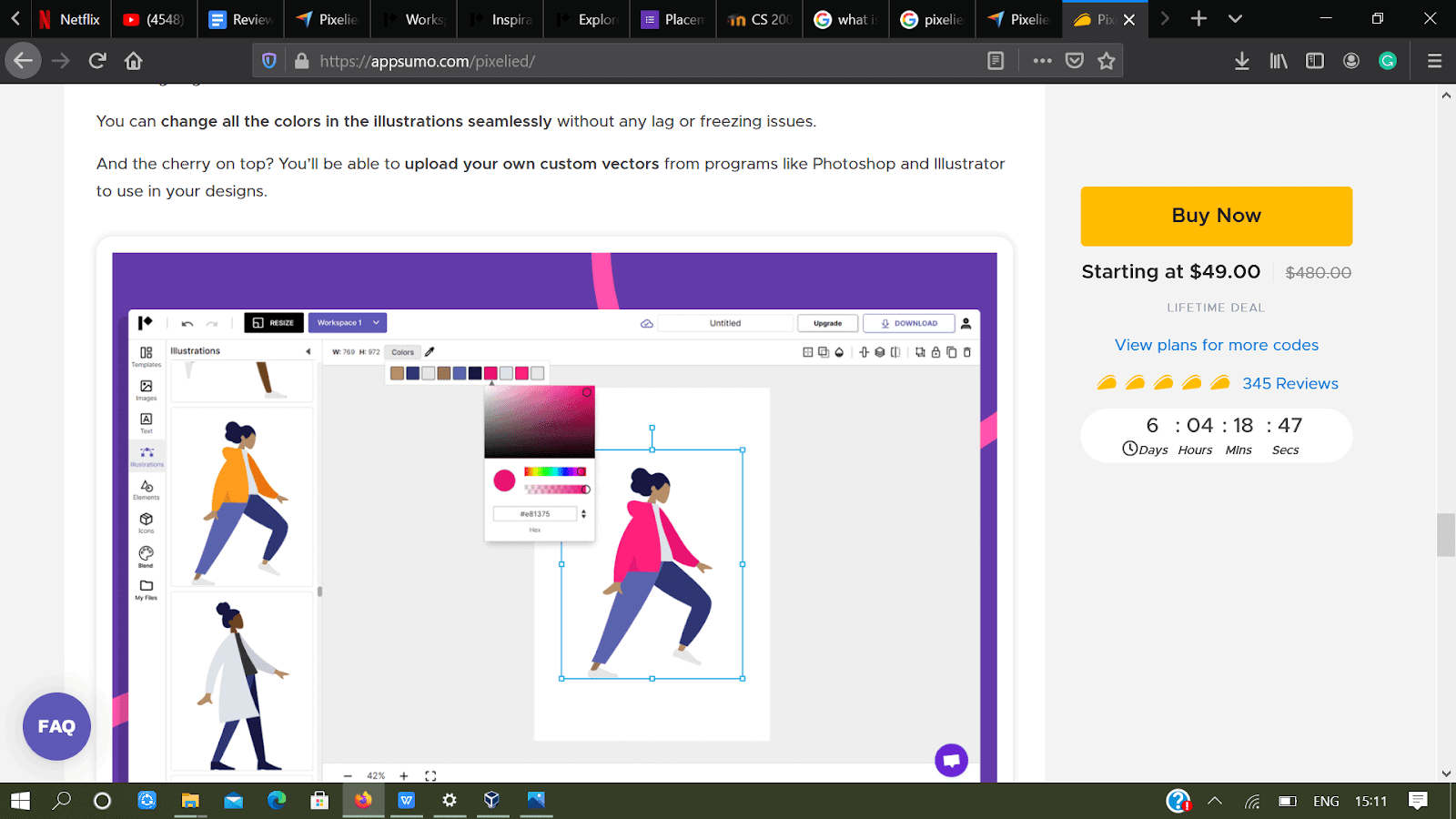
Upload and edit your Vector files

Upload your own vectors from programs like Photoshop and Illustrator to use in your designs to make them unique and interesting for your design which makes it an ideal alternative to canva.

Pixelied, an alternative to canva

Designing made easy

It is a savior for small scale business budding artists and people who want to learn art and design. Few super easy steps and you can also become that art maniac!

The entire UX Design and easy-to-use filters, text-shadow, image crop, and custom border make it easier for anyone to design their posts and content without needing full-blown graphic design or photo editing tools like Illustrator and Photoshop. 

User interface: This helps the user to have a smooth experience on the website. The PIXELIED website has everything under a special heading which leads to the other page and makes your choice process easier.

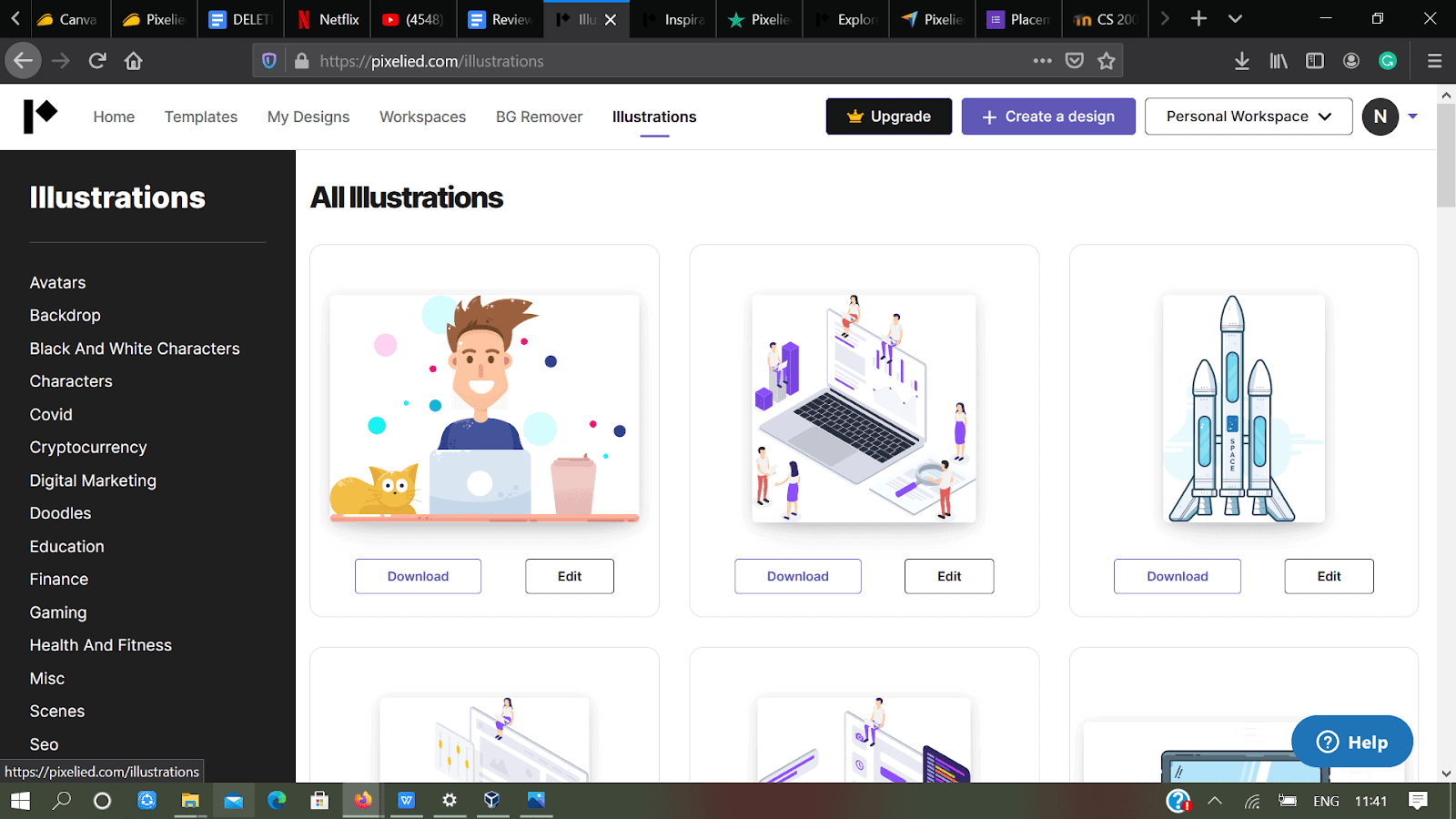
The illustration page

For example this is the illustration page where you can download and edit from various illustrations like Avatars, Backdrop, Doodles and many more. You have a Personal Workplace icon on the top right hand side where you can create your own designs along with your team. 

The design window is easy to use and has easy options for editing. You don’t need any specific design skills to use it, because the templates are free to use and inspiring enough for any design.

Speed

Pixelied loads real quick, in fact the entire page loads quickly. You can design super quickly in comparison to other designing websites.

Add text styles, elements, and icons to any design to make it more unique and relatable, the editing gets automatically saved and also has an option of manually saving the entire design.

Easy to use operations

With Pixelied, you can edit your images with professional filters and effects, like sepia, vintage, brightness, blur, and contrast.

The search icons option provides you with a huge amount of illustrations which are easy to use and have a wide variety of designs which can be utilized in a million ways.

Different types of icons

You can change the colors of the illustrations, including skin color, to fit your design and brand colors, it’s a super-easy way to redesign your illustrations in a new format.

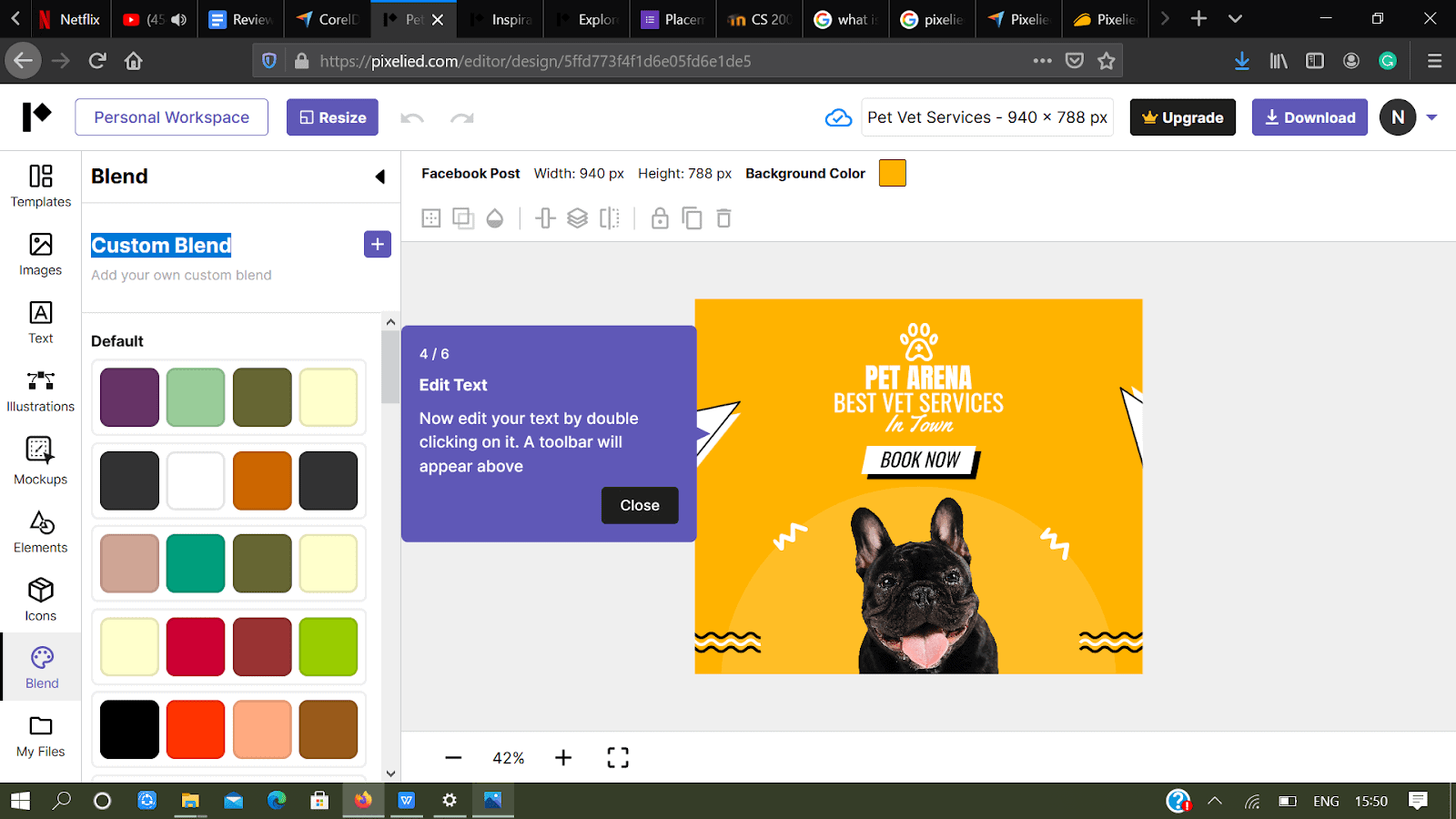
Blend feature

Speaking of brand colors, they have a great option of Blend feature allowing you to apply your brand colors in just one click. You can choose, blend and mix colors to find a color of your choice.

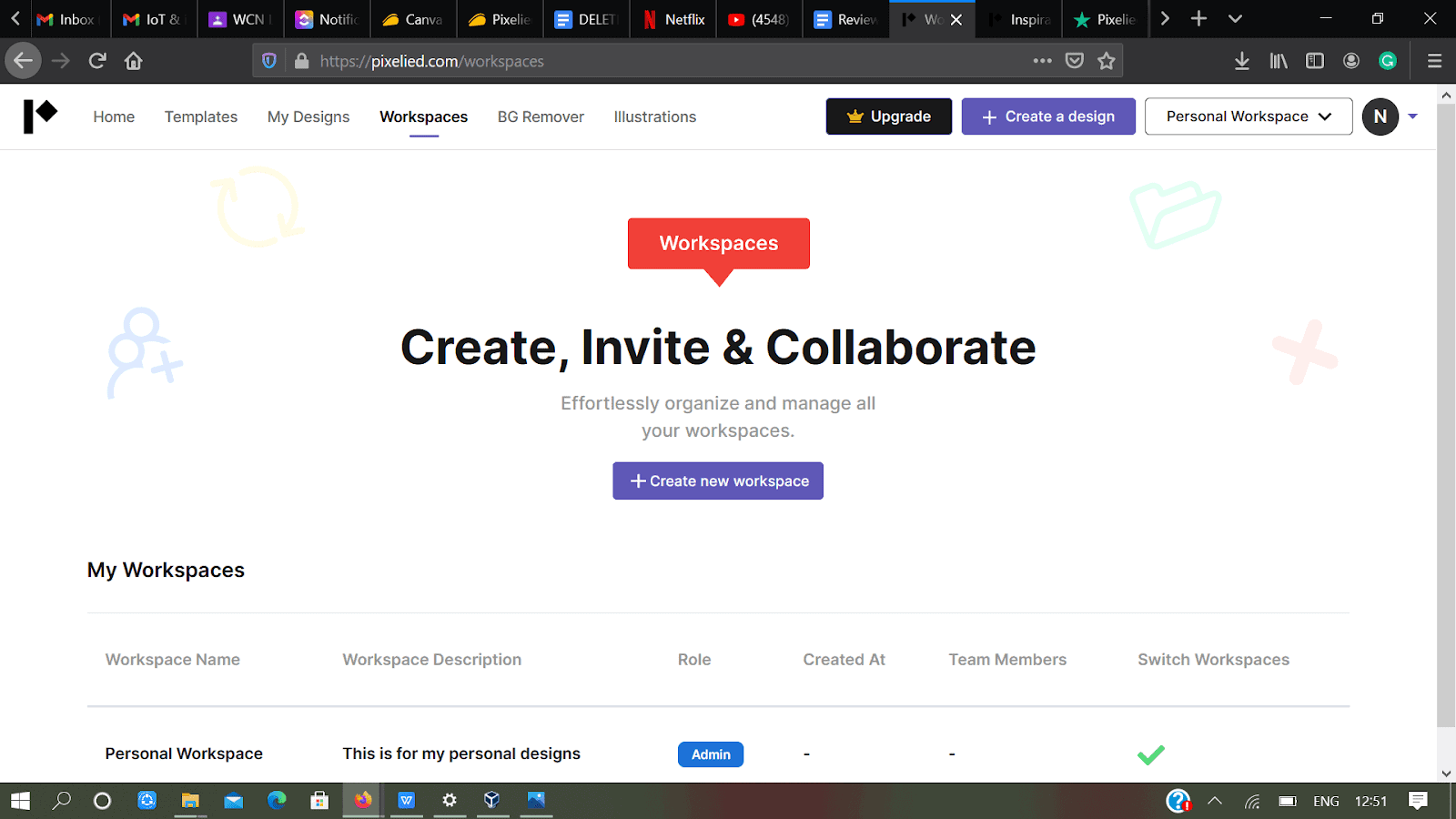
The workspace on PIXELIED 

Workplace to collaborate

Designing is never easy, it does need people’s recommendations. You can easily create, invite, and collaborate with your entire team to work together on a project. Create Workspace Name, add a description, role, and add team members.

What differentiates PIXELIED from their competitor companies is that they just don’t stand as a designing tool; they offer a great set of options for editing, creating, exploring under one roof! And hence it can be stated as best photo editing software and an ideal alternative to canva.

One can import their vector files from software like Photoshop or Illustrator and can fully customize it. (something which other design tools are not offering)

Ever imagined designing book covers could be this easy? The only hard time Pixelied offers you is choosing your design from millions of amazing templates!

Example of book covers on pixelied

Pixelied has predefined icons to add on your design automatically making the work super efficient and quick.

Different icons used

How many times do you struggle to find that perfect color? Pixelite helps you blend colors according to your requirements! So blend blend blend till you finally find your perfect shade.

Different colors available

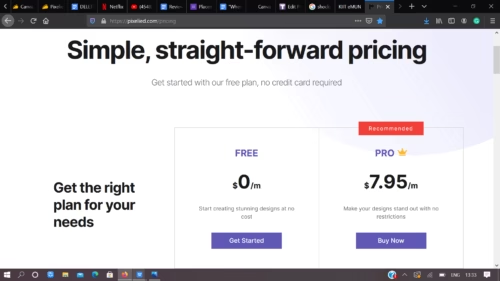
The official pricing plans on Pixelied

A quick breakdown of the pricing is:

1- The free plan: It gives access to amazing templates and icons, create 2 folders for free and is sufficient for any personal projects and frequent users.

2- The Pro plan: For a total price of $7.95 per month, there is access to all the premium templates and icons which can be used in unlimited ways along with unlimited downloads. There are lots of features which exists in the free version but the PRO gives access to:-

  • All templates
  • Unlimited downloads
  • 3 million+ Stock photos
  • 5 Workspaces
  • Premium icons
  • Custom Font Uploads
Pixelied pricing

AppSumo Deal

Currently Pixelied is up for grabs on Appsumo for an attractive deal. You can grab a lifetime account at Appsumo for just $49. Click here to grab the deal now.

CONs of Pixelied

  1. They could install a user onboarding or walkthrough for first-time users to make the experience exciting and easy at the same time.
  2. They can increase the number of templates as it provides more scope for growth.
  3. More export formats, animations, additional templates, and keyboard edit features can help them stand in the market with the competitors.
  4. The lack of search function and the total time it takes to search anything on PIXELIED is high.
  5. Lack of color picker to match the background image.

PIXELIED a perfect alternative to Canva:

Canva is a very powerful online graphic design tool that can be used to create almost every type of visual content with perfect ease and is one of the best photo editing software. 

In addition free templates and a lot of extra additional perks. Canva has a lot of advantages:-

  • Stock Photos – There exists a stock of photos which can be used by the user from the library.
  •  Elements – Unique elements which the user can add to make the design more attractive.
  • Typography – Choose from a large list of serif, sans-serif, and cursive fonts.
  • Folders – Organize everything on your finger tips.

Compared to Pixelied, Canva templates offer more variety if you consider categories like: personal, business, education, marketing, etc.

However, in the arena of social marketing PIXELIED is ahead in terms of the templates numbers and designs. 

Despite having 3 million + templates it’s a more affordable Canva alternative. Here’s a quick breakdown of the pricing plans:

  • Free – use millions of templates, use the background remover, hundreds of premium icons, and other elements, and create up to 2 folders, all for free.
  • Pro – for a minimal price of $7.95 per month, you get everything included in the free plan, everything to change your design world and constant customer support.

With comparison to Canva, pricing of canva is expensive in comparison to Pixelied.

  • Free – includes templates, just resizing option is not available, option to export files in different formats (including PDF, PNG, and JPEG).
  • Pro – this includes everything the free plan offers, as well as, brand kit (option to upload logos, brand colors, and fonts), more templates, option to download videos, 100 GB’s worth of storage space, and much more. It costs $12.95 per user per month (or $9.95/user/month when billed annually).
  • Enterprise – perfect for larger teams and agencies, this plan includes everything the pro plan offers, along with other exciting features, and more storage space, to name a few. This plan should set you back by $30 per user per month (billed annually). However, price may vary according to requirements.

Considering all the points, it’s clearly visible that PIXELIED has a slight edge over Canva and can be said as a ideal alternative to canva. The total variety, pricing, perks proves that Pixelied can do magic with your art in a perfect way!

Some quick facts about PIXELIED!

  1. Under the free version of PIXELIED you can download up to 5 templates each month after a month you may download the next 5 templates.
  2. PIXELIED accepts credit and debit cards (Visa, Mastercard) for the payment procedure for the PRO plan.
  3. The templates, photos and icons are regularly updated on the website.
  4. All stock photos, icons and graphics are completely free which can be used by any person who has signed in and is using PIXELIED.

Still confused about using Pixelied as an alternative to canva, the support team is available and hears out everything! Contact them at contact them here

There are more options to edit the picture, Know How to Edit the best Picture On The Internet

Conclusion

Pixelied is an easy-to-use design solution which allows users to create unique designs with the 3 million stocks available, access to millions of stock photos, icons and illustrations and one of the best photo editing software. It provides a full suite of design editing tools, like background remover and product mockups, for the most common uses, tailored for businesses. 

It can be the perfect guide for budding designers to learn, explore and understand their inner passion and talent and people looking for an alternative to canva.

Tips for Password Management for Employees

0

Data breaches are an increasingly common threat to businesses of all kinds. Large and small businesses across every industry are facing cyber threats new and old every single day. This was especially prevalent in 2020, when numerous sectors had to quickly adapt to remote working accommodations for their employees. And with more employees than ever before working in flexible work environments, there are more opportunities than ever for hackers to access your network through endpoints. But with all these security concerns, many businesses may be surprised to find that one of their greatest weaknesses might be their employees’ password usage. 

The Importance of Password Safety

Poor password usage is the single greatest cause of data breaches. Malware, phishing scams, ransomware schemes – while all these are very real threats to your business, password mismanagement is still the cause of roughly 80% of company breaches. And these breaches can be a serious financial blow to your company. The cost of replacing lost or stolen records and the loss of business can cost a large company millions (sometimes tens of millions) of dollars! 

While many employees know the risks associated with reusing passwords, over 90% of them do it anyway. Some users simply underestimate how valuable their account information is. Others may value certain accounts more than others; while extra protection was common for many financial websites, fewer had extra protection for their work accounts. But the most telling factor was the number of users (nearly two thirds of them) were concerned about trying to remember their password. 

The average American has 27 online accounts for numerous web services, including email, social media, and banking. Some may have as many as 50 password-protected accounts at once! And many people find that constantly having to update old passwords and remember new passwords is stressful. With so many accounts, it’s no wonder why so many people use the same password across numerous sites for both work and personal use. Fortunately, using effective employee password management can make password hygiene much easier to navigate. 

Why A Password Manager?

Password managers offer numerous features that relieve employees of the stress of having to remember several different passwords. With a password management program, each employee has their own private password vault protected by a master password. This allows users to craft longer and more unique passwords that will be difficult to crack. But no need to try to remember them; the password manager allows you to simply select an account and it pulls up your password for that account. And with cloud-based storage (much more secure than writing all your passwords down in a notebook or planner!), you can easily access your accounts across all your devices. This makes it easy to access your accounts from anywhere (and allow access for a loved one in the event of an emergency). These features are especially useful to your IT department, who spend much of their time retrieving employee passwords. Even with frequent password changes, employees will find it much easier to manage the security of their accounts. 

Other Ways to Keep Your Passwords Safe

In addition to effective password organization, there are many ways companies can improve their password usage. While many of these stem from common sense, it never hurts to remind all employees (including management) to stay diligent. 

  • Passwords that occur sequentially, such as “123456” (which many reports show as the most commonly-used password) are a no-go. Other common offenders include “111111”, “qwerty”, and “123456789”.
  • Common phrases and obvious words make for terrible passwords, but many people still use them. It’s been estimated that about 15 to 30% of Americans use a pet’s name for a password. You should also avoid using family member’s names, nicknames, or your own name. 
  • One of the most commonly-used passwords is still  “password”. If you do this, go change it immediately. 
  • A strong password typically utilizes a mixture of uppercase and lowercase letters, numbers, and characters (such as &, #, ?, etc). It’s also recommended that people make use of “passphrases”, short and unique sentences that also utilize numbers and characters. 
  • Be exceptionally careful with what you share on social media. Anything from posting your birthday or address, to filling out seemingly fun social media quizzes can provide hackers with enough information to take a crack at breaking into your accounts. 
  • Do not share your password with anybody. While many people fear some type of account breach, nearly 80% of people have shared their passwords with somebody. This is especially prevalent in the workplace, where it’s not uncommon to see an employee’s password on a post-it note. 
  • For an extra layer of security, consider implementing two-factor authentication. This can be anything from an access code sent to your phone or email, to the use of facial or fingerprint recognition. 
  • While some may worry about junior employees being the primary culprits, it’s been revealed that over 60% of managers and other company leaders are guilty of using weak passwords. It’s important for those in leadership roles to practice good password hygiene as well as lower-level employees. 

4 Ways to Give Your Customers a Better Online Shopping Experience

When you can design or enhance a website with features that improve the quality of customers’ experience, you’ll be likely to see a considerable increase in both web traffic and sales. A well-designed site makes it easier for people to find what they’re looking for and intuitively access product details that can help them make an informed purchase. Ultimately, optimizing your site will make people far less likely to jump onto a competitor’s site. Form, functionality, and outstanding customer service features are the most integral components of a winning website. Here are four ways that you can augment all three of these critical components to give your customers a better shopping experience.
As you all know that there has been a rise of Mobile E commerce as well.

ecommerce customer support

1. Ensure Fast Load Times

On a retail website, load times can be a make or break factor in how customers evaluate its quality. People aren’t going to put up with pages that take too long to load. Even if the primary cause of a slow load time is a customers’ internet connection, they’re more likely to hold it against you instead of their internet provider.

When you’re testing out your site, you need to do it with more than one internet speed. Consider that a lot of customers may be viewing your site with only 10 megabytes per second. If you’ve only seen it perform with 50 megabytes or even a gigabyte, you won’t really have a clear idea of the end user experience.

2. Provide Product Reviews

When you give your customers the opportunity to review products on your website, you demonstrate confidence that they’ll be happy with what they buy. Also, you show people that you value their input. Moreover, you show that you’re committed to giving people as much information as possible to make decisions about a purchase.

3. Facilitate Instant Access to Help

Even the most detailed FAQs section and thorough product descriptions may not answer all of a customer’s questions about a purchase. When people aren’t sure about important policies such as shipping and returns or they have very specific questions about a product’s features, they’re probably not going to be confident about pulling the trigger to complete a purchase. While a contact form may be helpful in giving people the option to ask questions, the turnaround time in receiving a response might cost you the sale. In the time customers are waiting to hear back from you, they may simply move onto another site where the information they need is readily available and make their purchase there.

The best way to avoid losing customers in the time it takes to answer a question is to offer live chat support. Being able to get an instant answer to a question gives customers confidence and clarity. Also, you can help ensure that customers are able to quickly identify the best products for their individual needs. This can be particularly helpful for a site with an extensive selection of products which may feel a little overwhelming to some people. Chat support can suggest specific products and help customers differentiate between a lot of different options.

You can outsource your chat support affordably to a professional customer service provider, so live chats won’t continually take your core customer service staff away from their regular job duties. Working with a company that has extensive expertise in customer service provision assures a high quality of professionalism and competence. While it’s possible that some tougher inquiries may need to be escalated to internal staff, giving customers assurance that their questions will be answered promptly is likely to deter them from making a purchase elsewhere until they get an answer.  

4. Give People the Opportunity to Go Back to Recently Viewed Items

Customers will appreciate the convenience of being able to quickly return to items that they’ve looked at. Ideally, you should have a feature that enables people to see every item that they’ve looked at in a single browsing session, regardless of whether they’re logged into an account. People don’t always log into a retailer’s site when they start shopping; they tend to wait until they’re ready to make a purchase. However, if a person is logged in, it would be helpful if they could see recently viewed items from a previous browsing session.

Critical Security Tips to Keep Your Home Network Safe

The COVID-19 pandemic is still going on, and even though there’s now a vaccine available, many of us could still be working at home for months while we wait to receive it. While you’re working from home, the safety of your home network is paramount — especially now that news outlets have revealed a sweeping cyber attack on the U.S. government whose implications still aren’t well-understood. Could cyber criminals be spying on your home network, stealing your information and controlling your IoT devices, even now?

Security Tips

They could. But this isn’t the time to panic — instead, it’s the time to take action. With common sense protocols and a comprehensive security suite, you can keep hackers off your home network and out of your devices. Here’s how.

Use a Home Security Suite

If you’ve been using free antivirus software on your family’s devices, it’s time to upgrade. Free antivirus and anti-malware programs have their uses, but they don’t have anywhere near the features that paid home security suites offer. 

For one thing, a home security suite can provide comprehensive protection for your mobile devices, even when you’re not at home. For example, a premium security suite offers virtual private network (VPN) protection for mobile devices when you connect to public wifi hotspots, so the information you send and receive on these networks can still be encrypted, even though the network itself is not. In addition to antivirus and anti-malware protection, you can get identity protection services that monitor the dark web for your information, protecting against email spam and phishing scams, secure banking and shopping, password management so you can create unique, strong passwords for each of your devices and accounts, and even live tech support from real IT pros.

While you don’t need to install a security suite on your smart fridge or robot vacuum (and you probably can’t, anyway), you definitely need one on all of your smartphones, tablets, laptops, and desktop computers. These devices are where your most sensitive personal and financial information is stored, so they need the most protection. You can even buy physical devices that monitor traffic on your home network, including which devices are connected, and shield your network from hacking attempts.
Besides this, It is important to know about the Best computer security tips.

Lock Down Your Router

If you haven’t yet changed your router’s admin credentials, you should stop reading and go do it right now. Your router or gateway has an admin dashboard that allows you to toggle security settings, change the username and password for login, and install firmware updates. You can find it by navigating to your router’s IP address and logging in with your default credentials. Don’t know your default credentials? You can usually find them by searching for them online — just put in your router’s make and model number and the keywords “default login credentials”. Once you’re in the dashboard, though, change them immediately to keep hackers from accessing your router’s controls.

While you’re in there, you should also set your router to WPA3 encryption (and if it doesn’t have WPA 3 as an option, you should get a new router). Set your router to install firmware updates automatically — this will help ensure that any security patches released for your firmware will be installed in a timely fashion. And, of course, change your home wireless network’s SSID and password — just make sure your new SSID doesn’t give away personal information about you and your family.

Isolate Your IoT Devices 

Internet of Things (IoT) devices are notoriously unsecure — to the point where the FBI now recommends that you segregate your IoT devices on a guest network separate from the one you use to operate your phones, tablets, and computers. Many IoT devices simply do not have the robust security framework enjoyed by phones, tablets, and computers, which are more powerful and built with security in mind. Many manufacturers don’t even bother making their IoT devices less hackable, or sending out firmware updates for them. This makes them extremely vulnerable to hackers, but by segregating them on a guest network, you can at least ensure that hackers won’t be able to access the sensitive data on your laptops, tablets, and smartphones just because they were able to hack your litter box.

Home network security is more important than ever, now that we’re all stuck at home with a new era of cyber attacks looming on the horizon. Even taking the most basic precautions to protect yourself could mean that hackers pass you over in favour of an easier, more tempting target. Just a few simple changes could make all the difference.

These IBM Sponsored Free Courses Can Help You Solve Real World Problem

0

Where most people see challenges, developers see possibilities. Developers this year brought in ideas which were innovative yet practical. AI Farm, an Indian entry, was named IBM Call For Code’s Asia Pacific Regional Winner for an intelligent system that evaluates climate and soil conditions to provide farmers with information to adapt their crop strategies. This not only brings in glory to our country but also shows how youngsters know their roots, they know what is the value of a farmer and how agriculture is the primary source of income to Indian families.

AI Farm received an award of $5,000 USD and support from the Linux Foundation. Talking about this application which is an intelligent system that aims to provide farmers with the information they need to adapt their crop strategies to optimise water usage and control disease. The solution is pocket friendly and uses the concept of sensors to monitor temperature, humidity, and groundwater levels. The system also uses the IBM Cloud, IBM Watson IoT platform, IBM Watson Visual Recognition, and Node-RED flows to design a hyperlocal weather forecast explicit to the farm. 

call for code enthusiasts

What is the essence behind Call for Code?

The idea about Call for Code was pitched by David Clark Cause and supported by Founding Partner IBM and Charitable Partner United Nations Human Rights their main focus is to bring in humanitarian and societal changes in this revolutionised era. This five-year, $30 million global initiative is hope to millions of people worldwide and a challenge to genius coders around the world to test their coding skills in practical and real-time challenging situations. Brainstorm incredible technologies to drive that necessary change and to bring in hope and positivity across the world through code. From conceptualising solutions to take on the impacts of climate change, increasing COVID cases and the falling economy to swiftly responding to the deluge of the COVID-19 pandemic, the Call for Code binds the human race together.
Here is everything you should know about IBM call for code.

Wondering about how the ideas are marked?

A stage for all young talents

Submissions are majorly judged on the basis of how real and innovative it is to solve the problems of people worldwide. It examines the real time capacity and the efficiency of the code.

The four broad criteria of marking is as follows:-

  1. Completeness and transferability-  How the idea can be implemented? Can this idea be developed more, and used in different fields? Or is this just for a specific field and the code cannot be edited beyond its limits?
  1. Effectiveness and efficiency-  How scalable is this idea? Is it Efficient as well as effective in all situations? How will it fix the problems efficiently? Can this code fix other problems too? If yes then how?
  1. Design and usability- How is the user experience of this design? What more changes would it need in near future? Is the design user friendly for all the masses in general? How soon can we launch it?
  1. Creativity and innovation- How much the coder has thought of something creative? How far has he/she gone to think and implement this idea? Is this unique enough to win this prestigious title?

So these were the judgment criteria for 2020 but what is next? What can you do to participate? Read the entire article to know everything in detail!!!

Are you ready for the 2021 plan of action?

Another chapter of IBM Call for Code awaits smart developers in 2021. Whether you are looking to take on COVID-19, climate change, natural disasters, COVID Scenarios, melting glaciers, or the increasing Global Warming, your code has a crucial role to play. Brush up on your skills while making a real difference and get involved with Call for Code open-source projects supported by The Linux Foundation. Through your contributions, you could be identified as a hero for millions of people struggling with that problem by the UNITED NATIONS itself. Visit Call for Code to see details on how you can get involved and start making an impact in these projects. Try searching and analyzing your own ideas and if you feel stuck somewhere share your progress and any help needed in the Slack channel. Your contributions can motivate a lot of young minds like you to use their coding talents for something constructive for future generations.

Learn to code with IBM UPSKILL

Learn. Upskill. Code. This is the perfect opportunity for you to have a brilliant start to 2021 by learning new sought-after skills with IBM. Guess what’s even better? It’s free.

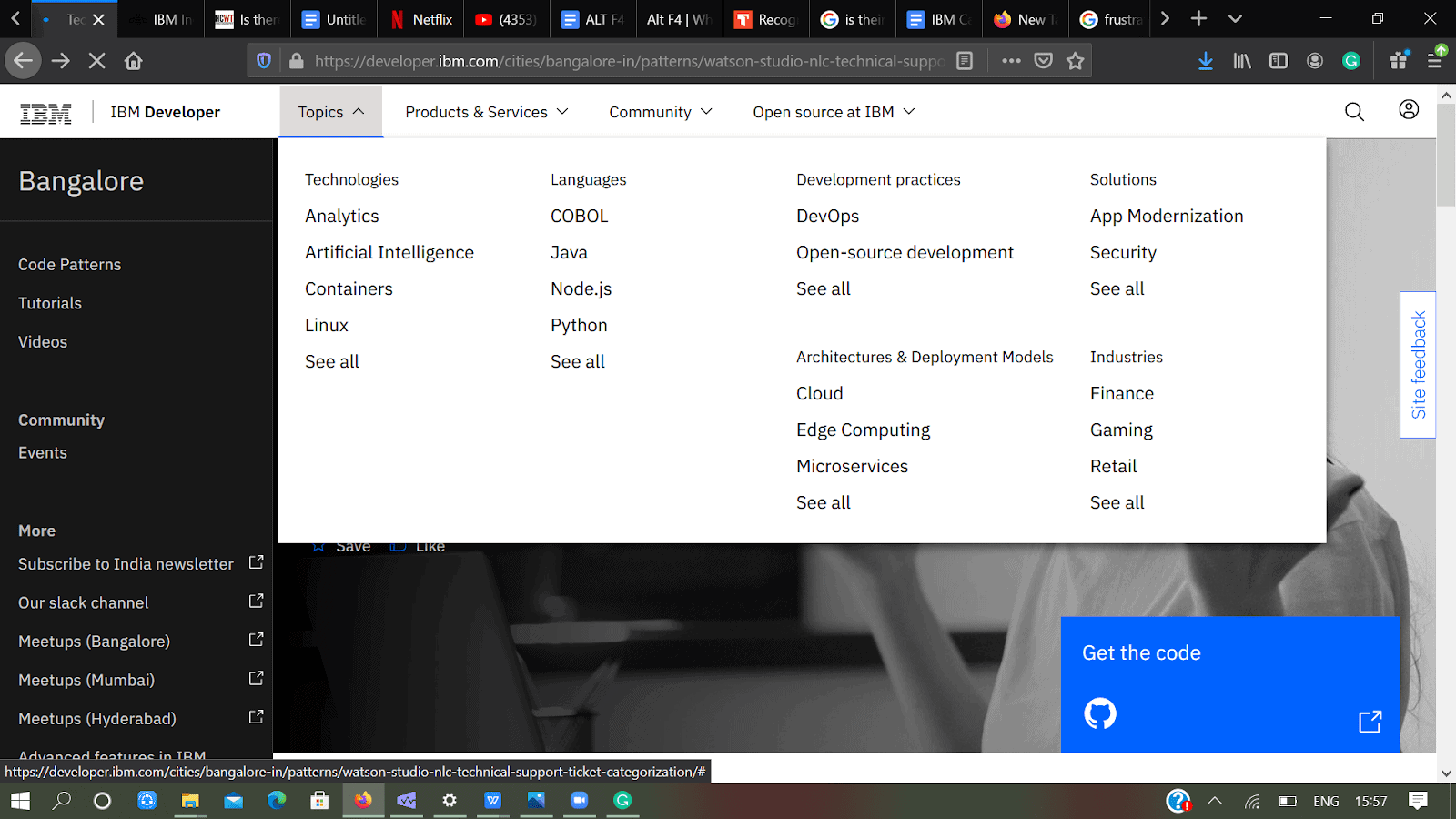
Code Patterns

Code patterns offer up complete solutions to problems that developers face with their codes almost every day. Code patterns leverage multiple technologies, products, or services to solve issues that our developer advocates have recognised as common use cases across multiple industries.

Issues coders face nowadays

Click here to know more

There are wide variety of topics you can learn for free and also ask experts about different things and implement your own new ideas.

The IBM courses which are provided.

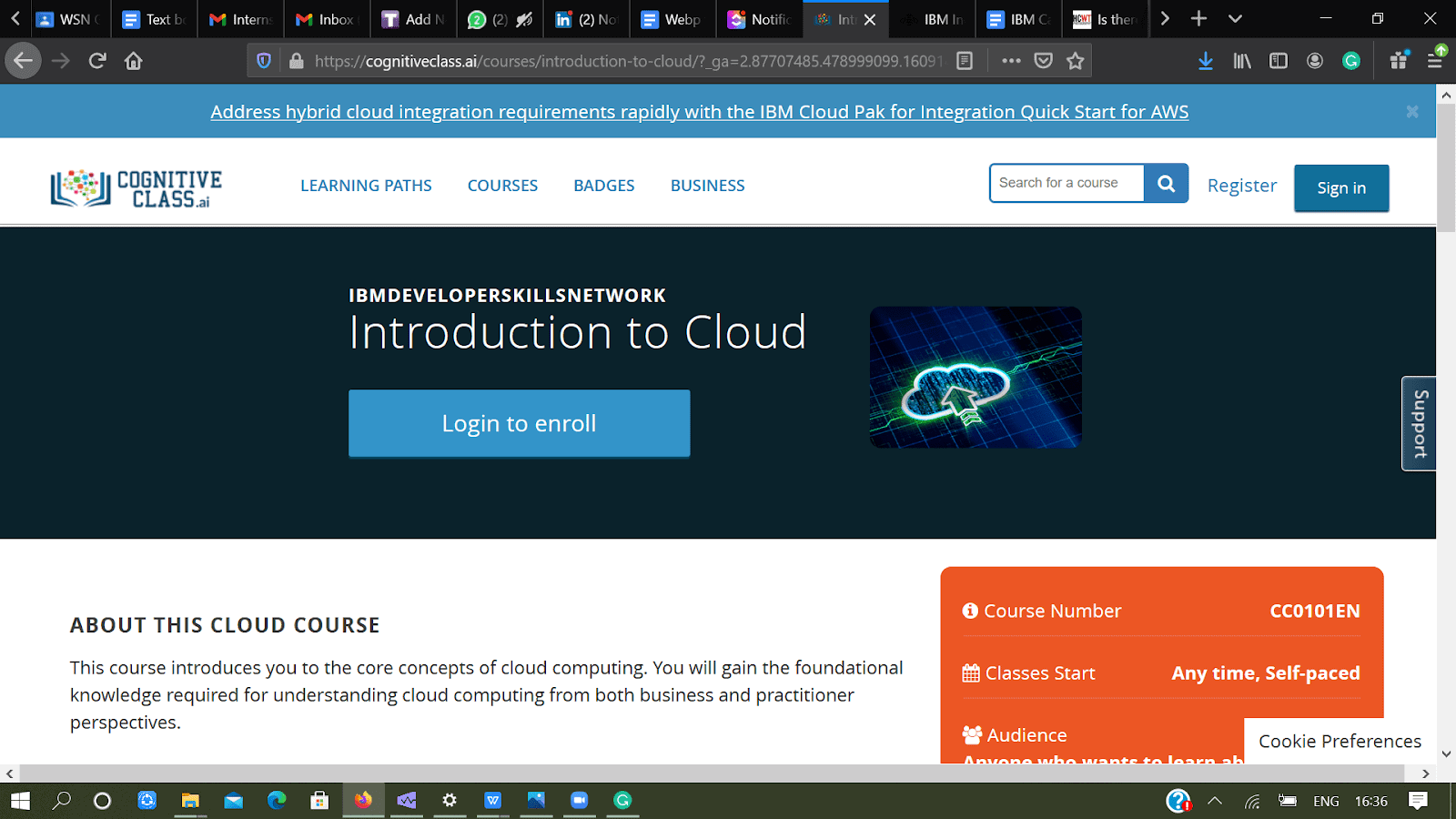
Introduction to CLOUD

This course introduces you to core concepts about CLOUD and how it is affecting everything in today’s time. You will gain the foundational knowledge required for understanding cloud computing from all perspectives.

You will learn about the definition and essential characteristics of cloud computing, its history, emerging trends, and the business case for cloud computing. You also learn about the various cloud service models such as:-

LaaS – Cloud infrastructure services, known as Infrastructure as a Service (IaaS), are made of highly scalable and automated compute resources. IaaS is fully self-service for accessing and monitoring computers, networking, storage, and other services. IaaS allows businesses to purchase resources on-demand and as-needed instead of having to buy hardware outright.

PaaS- Cloud platform services, also known as Platform as a Service (PaaS), provide cloud components to certain software while being used mainly for applications. PaaS delivers a framework for developers that they can build upon and use to create customized applications. All servers, storage, and networking can be managed by the enterprise or a third-party provider while the developers can maintain management of the applications.

 SaaS– Software as a Service, also known as cloud application services, represents the most commonly utilized option for businesses in the cloud market. SaaS utilizes the internet to deliver applications, which are managed by a third-party vendor, to its users. A majority of SaaS applications run directly through your web browser, which means they do not require any downloads or installations on the client side.

Why you should do this course?

  • Last few years Cloud has generated a lot of interest and investments. It is a growing field of technology which is becoming an integral part of the IT Infrastructure.
  • The demand for Cloud computing is not decreasing in the near future and even beyond that!!!
  • Better chances of getting shortlisted in any interview and outperform in every field.
  • Cloud computing is the past, present and the future.

All you need is to grab this amazing opportunity and learn everything which can boost your CV for future.

The course of cloud provided by IBM

Enrol now at:- https://cognitiveclass.ai

Python for DATA SCIENCE

This introduction to Python will help you learn about python and how it is implemented in various fields. It’s a beginner friendly course you don’t need to be pro at coding to take up this course. Taking up this course will take you from zero to programming in Python in a matter of hours.

After its completion, you’ll be able to write your own Python scripts and perform basic hands-on data analysis using our Jupyter-based lab environment. If you want to learn Python from scratch, this free course is for you.

All you need to know is basic math to ace this course under the guidance of Joseph who has a Ph.D. in Electrical Engineering, his research focused on using machine learning, signal processing, and computer vision to determine how videos impact human cognition. 

Not sure as to why to choose python over anything else? Let us do the thinking job for you!!!

You should definitely choose this course because:-

  • Many of the web-technologies we love today are based on Python so you get to learn the recent trends.
  • It’s super easy to learn and has clean syntax.
  • What makes it irresistible is it’s broad applications to other fields and limitless possibilities to create every software from scratch.
  • Can be used for Artificial Intelligence (AI) and Data Science Researches in future.
  • Python is the best choice for programmers in testing website applications and other related web interfaces before launching it on live sites to avoid bugs and errors.
Python course provided by IBM

Try it yourself at :- https://cognitiveclass.ai/courses/python-for-data-science/

Data Science Foundations

Courses on DATA SCIENCE provided by IBM

Data Science is a budding career path that every student now wants to follow. Ever wondered what and how it can change your entire career?

The purpose of Data Scientists is to extract, pre-process, and analyze data for the growth of the client’s business and we also know how data in today’s world is the only weapon to success. Through this, companies can make better decisions. Various companies have their own requirements and use data accordingly. In the end, the goal of Data Scientists is to make businesses grow better.

This learning path currently consists of one course that introduces you to Data Science from a practitioner point of view, to courses that discuss topics such as data compilation, preparation, and modeling throughout the life-cycle of data science from basic concepts and methodologies to advanced algorithms.

Why should you pursue this course?

  • Data Science helps you learn every concept easily.
  • Boosts your CV as a good prospect for Data Scientist Intern roles.
  • You can be placed in any analytics team of a company.
  • It’s the most lucrative job you will ever find.

Get ready to enrol at:- https://cognitiveclass.ai/learn/data-science/

Build your own chatbox

Remember how zomato used their chatbox for having customer interaction? Wasn’t that a superb idea as well as a great strategy?

A chatbot is programmed to work independently from a human operator. It helps in interacting between a human and a machine the communication, which happens via messages or voice command.

DID YOU KNOW?

IBM estimated that chatbots can successfully answer up to 80% of routine questions. Costs are far lower as a chatbot can address thousands of queries at once, whereas humans are limited to one query at a time.

Chatbot techniques by IBM

We all find chatbots so interesting, it’s fun plus it solves your issue in a single go.You’ll also learn how to quickly deploy your chatbot on WordPress-based sites. If you want to learn how to create virtual assistants and perhaps create one for your own business this free chatbot course is for you.

Enrol now at- https://cognitiveclass.ai/courses/how-to-build-a-chatbot/

Introduction to Containers, Kubernetes, and OpenShift

Everyone from a small startup to a large multinational company is precisely changing to this technology and they are looking for people who have the skills. For the year 2021 Call for Code this is the best skill you can have your hands on. It can help you learn this super important things with perfection.

Full fledged coding courses.

Containers and Cloud-Native are the most perceived invention in IT since the introduction of virtualisation. Everyone In the technical world wants to recruit people with these skill sets. After completing this course, you will be able to build applications the Cloud Native way and be able to create your own software! Sounds amazing? Then try it yourself!

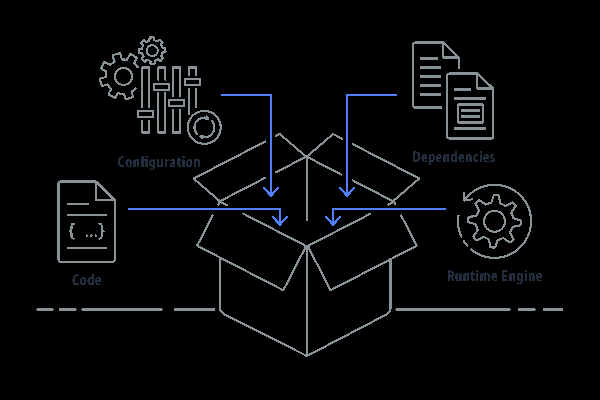
This course introduces you to containers and explains how containers differ from virtual machines. It also covers the importance of containers in cloud computing as well as the emerging ecosystem of related technologies such as Docker, Kubernetes, OpenShift, and Istio.

This course is of interest to anyone who wants to learn everything about cloud and use container skills as developers, architects, system engineers, network specialists and many other roles. 

Why you should not miss this golden opportunity:-

  • OpenShift enables efficient container orchestration, allowing rapid container provisioning, deploying, scaling, and management.
  • The tool enhances the DevOps process by streamlining and automating the container management process.
  • Red Hat OpenShift is a Kubernetes distribution focused on developer experience and application security that’s platform agnostic. OpenShift helps you in deploying more than one host.
  •  These can be public facing web applications, or backend applications, including micro services or databases.

To know everything yourself checkout this:- https://cognitiveclass.ai/courses/kubernetes-course/?_ga=2.87641309.478999099.1609147078-740606449.1609147078

Deep Learning

Deep learning helps you outshine and people notice your CV if you have an impressive credential for this. Deep Learning really shines when it comes to complex problems such as image classification, natural language processing, and speech recognition.

To take your career into new heights you can become competent in both these fields, which will enable you to analyse a frightening amount of data, and then proceed to extract value and provide insight on the data and bring in changing revenues to the company.

Deep learning basics by IBM

Through IBM guided lectures and labs, you’ll first learn Neural Networks, and an overview of Deep Learning, then get hands-on experience using TensorFlow library to apply deep learning on different data types to solve real world problems. 

Starting with a simple “Hello World” example, throughout the course you will be able to see how TensorFlow can be used in curve fitting, regression, classification and minimisation of error functions.You will learn how to apply TensorFlow for back propagation to tune the weights and biases while the Neural Networks are being trained. Finally, the course covers different types of Deep Architectures, such as Convolutional Networks, Recurrent Networks and Auto-encoders. 

Enrol at:- https://cognitiveclass.ai/learn/deep-learning/?_ga=2.151228412.478999099.1609147078-740606449.1609147078

WHY YOU SHOULD GO FOR IT?

The ability to learn from unlabelled or unstructured data is an enormous benefit for those interested in real-world applications. Deep learning unlocks the treasure trove of unstructured big data for those with the imagination to use it. You can find a variety of applications in every field and help you stand out with unique skill sets.

IBM has become a brand name for you to learn and conquer every topic which you dreamt of learning from prestigious universities. Sitting at your homes and studying your favourite subjects at your own comfortable time is a boon in this pandemic world. Learning should never stop because that is the biggest strength of any individual.

All you have to do is to TAKE THAT FIRST STEP and you can achieve the WORLD. These courses can help you learn about your favourite technologies at your feasible time and the best part gives you accurate knowledge which the world demands.

Time to steal these courses now!