Home Blog Page 354

Play your favorite Video Games in PC!

2

Want to come out from the daily tension? Bored with the same sticky routine? Or want to be a child in your free time? If your answer is “yes” then it is the time for you to bring back the beautiful moments of your childhood days!. Yes!.. It’s time to get the cute Mario, Rough Ninjas, speedy Road Fighter, Alladin, Snow Bros. and many other classic video games  on your own computer without any additional hardware.

Today the technology has grown up beyond our imagination and even the human motion sensor games such as Microsoft Kinect(TM) Xbox(TM) are capturing the market but as a phrase “Old is Gold” many people still like the classic video games to gain the lost moments of their childhood. Just go through the following stuffs to play the classic video games in your computer.

Nintendo Video Game files are formatted in .NES file extension which are freely available at http://rom-world.com/dl.php?name=Nintendo&letter=A. To play these Nintendo files, we need to have a NES Emulator. NES Emulator is a platform application to play the .NES files with the keyboard so it is not required to have a joystick or other hardware instead of keyboard, just click “File>>Open”, select the NES game file and click on “OK” to play the game you want in the emulator. It is even possible to save the game state and load if you want to play it later. You can have your free NES Emulator from http://www.emulation9.com/nnnesterj/files/nnnesterJe023.zip. Fun time begins!..

113 Latest List of Commentluv Enabled + Do-follow Blogs in Higher Page Rank Order

108

Obviously you came here to get some quality nofollow-free blogs list for link building from commenting. This list shows a collection of best dofollow + commentluv + high page rank  blogs, some of these sites are also keyword luv enabled where you can use your keyword along with your name. And if you also like to learn other ways to build domain authority. Please read this post .

I hope this list helps you in your link building efforts. It took me hours to put the list together for you, so if you enjoyed it I would greatly appreciate if you could help me back with tweets/stumbles/Fbshares and more for saving your time.

[alert-announce] Update: Here’s a nice tutorial to perform commentluv search. You can find this trick here [/alert-announce]

Dofollow links and Google Page Rank

Page rank is a algorithm named after the co-founder of Google larry page who invented it in 2005 when he was in Stanford to measure the importance of web pages based incoming links to a website. This algorithm is not just about incoming links, it also means links from quality sites.  Websites with more dofollow backlinks to it  gets higher Page  and hence gets higher authority in search results. The rate of incoming Dofollow links to a web page is the backbone of this page rank algorithm.

If you are a blogger or a SEO analyst, then the most important and hard job is to get the website ranked fast to get higher authority in search engine results, you can attain that by adding more incoming back-links for your website. Not all incoming links benefit your website, because only do-follow links pass their ranking to the outgoing links, So its very important to make sure you don’t waste your precious time adding comments only on website giving no-follow attribute

Commentluv system

If you comment on a blog with Commentluv system, it automatically picks up your recent article from your website and adds it below your comment. This helps bring traffic directly to your posts rather than just your main site link , this way you get an additional link from one comment.  on their outgoing links. In this article, I’m going to make things easier for you to find list of high ranked do-follow blogs with Comment Luv installed on it. And most of the sites using CommentLuv are mostly do-follow. Commenting on a blog which uses commentLuv is a decent way to get quality back-links.

Keywordluv:

While do-follow links help you gain domain authority with higher page rank, The keywordluv helps you rank for your keyword by letting you use the keyword as anchored text next to your name , for example: when I enter “Sreejesh @technology stuff” in the name field, it links only to “technology stuff”.

Ana hoffman explains how keywordluv helps you rank in first in Google search results page.

Also read:

So here’s the list of Do-follow you came here for.

In this huge list you can find blogs in different niche, you can add connects on those which is related to your niche, I couldn’t find time to categories them based on niche. In the next post I will be writing about how many back-links are needed for page rank with tabled list. Subscribers will get it first, so don’t forget to subscribe to our email.

Page Rank 6 :

  1. Grok dot com
  2. Currybet.net
  3. Sirpi.org/
  4. Eartheasy blog
  5. Social Times
  6. The Mall blog
  7. The Virtual Handshake
  8. Blog.photography.si.edu
  9. Midasoracle.org
  10. Weblog tools collection
  11. Interaction Design
  12. Jisc Digital Media

Page Rank 5:

  1. Andybeard.eu
  2. Oilman.ca
  3. Communityspark.com
  4. Layercake.net
  5. hobo-web
  6. Justaddwater.dk
  7. Krisbuytaert.be
  8. Therenegadewriter.com
  9. Iayork.com
  10. lifeinthefastlane.ca
  11. elleeseymour.com
  12. newcritics.com/blog1
  13. Links.org.au
  14. knrn.org
  15. Seobythesea.com
  16. Blog.dmbcllc.com
  17. Mouthpiecesports.com/blog
  18. Buzzmarketingwithblogs.com
  19. Bytesizecss.com
  20. Blog.astrumfutura.com
  21. Uncommonphotographers
  22. Aimee.mychores.co.uk
  23. Pitchinvasion.net
  24. Thevirtualhandshake.com/blog
  25. Kthread.com/kthread
  26. Blog.ruski.co.za
  27. Career.ucsb.edu/blog
  28. Gaming.psu.edu
  29. Blogs.cetis.ac.uk/asimong
  30. Blogs.nashuatelegraph.com
  31. Outofmygord.com
  32. Focusorganic.com
  33. Focus Organic
  34. Profitsfinancesite

Page Rank 4

  1. Stephan Miller
  2. Nickoo Shore
  3. BlueVerse
  4. BlogChef
  5. DearDrMoz
  6. TechGeeze
  7. Colloquium
  8. TheCroniclesOfR
  9. PhpCafe
  10. FreeBieShark
  11. MissNexus
  12. ZigPress
  13. Joebartender.com
  14. Deardrmoz.com
  15. Uppergreenside.org/blog
  16. Cinnamonthoughts.org/
  17. Memwg.com
  18. Steverenner.com
  19. Rebeccawalker.com/blog
  20. Canadienseneurope.org
  21. Alemsys.com
  22. Rumahabi.com
  23. Kid666.com
  24. Blueverse.com
  25. Barrywise.com
  26. Randomhacks.net
  27. Stomperblog.com
  28. Thesisthemehq.com
  29. Middlezonemusings.com
  30. WordPressmax.com
  31. Lillieammann.com
  32. Techjaws.com
  33. Kikolani.com
  34. Wnagele.com
  35. Bluehatseo.com
  36. Growsmartmaine.org/blog
  37. Thisclassicallife.com/weblog
  38. Costpernews.com
  39. Selberg.org
  40. Drownradio.com
  41. Omgpittsburgh.com
  42. Scrapscene.com
  43. Lifeintherough.com
  44. Phpcafe.net/
  45. Wallpaperstop.com
  46. Elearning.lse.ac.uk/blogs/usc
  47. Boykin.acis.ufl.edu
  48. Dmiracle.com
  49. Blog.waxmarketing.com
  50. Retirement-income.net/blog
  51. Nthambazale.com
  52. Smallbusinessbranding.com
  53. Blog.littlerockjams.com
  54. Affordable-internet-marketing.com
  55. Articlesnatch.com/
  56. Blog.winesworld.com
  57. Javelinmarketing.com/blog
  58. Stephanmiller.com
  59. Abstract2collective.blogspot.com
  60. Wpsx.psu.edu/bluerobot

Page Rank 3 :

  1. Qwertyweb
  2. TheReasoner
  3. DukDukMonk
  4. Internet Marketing
  5. Shanker Bakshi

Stay tuned.

I’m going to show you how to find commentluv enabled blogs in real time and commentlluv enabled blogs based on your niche.

Subscribe to get the updates via mail. Also feel free to drop me a mail using the contact form

Share and add comment to add your links in this list.

19 Awesome CSS Image Sprites Tutorials & List of CSS Sprite Generators

As you know many links in a website makes it slow loading. CSS sprites allows you to greatly increase your websites speed by using single image files that contain multiple graphics. That means you can load more graphics with a single server request, juts by combining the number of images and using them in sections where needed. This can greatly reduce loading time and the total size of a web page, which will eventually help people navigate your pages faster. The theory behind CSS Sprites is just get the image once, shift it around and only display parts of it, saves the overhead of having to fetch multiple images. Nowadays, when websites compete for the best user interface, load time and the size of a web site are some of the biggest factors to consider.

Most professional web designers use this technique in website development. Each one of those images is a separate HTTP-Request, and the more of those, the less efficient your page is in terms of loading time. This technology has saved companies like apple and yahoo thousands of dollars a month on server requests. The difference is that instead of just two or three images being combined into one, you can combine an unlimited number of images into one.  Major websites like Facebook, Yahoo, Google, Myspace, eBay and more use CSS Sprites.

For your simple understanding , if you are wondering how could you combine multiple images, then here’s the CSS Sprites used by YouTube & Facebook.

Facebook:

CSS Sprite genarators:

One click CSS sprite generator

  • #3 CSS-Sprit.es

You can upload, select section and get code.

Here’s are some awesome CSS Sprites tutorials on the web.

#1 Net Tuts: Video Tutorial on Exactly How to Use CSS Sprites

Net-tuts Video Tutorial on CSS Sprites

#2 Webolia: The Mystery Of CSS Sprites: Techniques, Tools And Tutorials

Webolia Titorial on CSS Sprites

#3 Blogging CSS: CSS Menus With Images – CSS Sprites

Blogging CSS Tutorial

#4 Line25: How to Create a CSS Menu Using Image Sprites

Line 25 tutorial on CSS Menu

#5 Coding Apple’s Navigation Bar Using CSS Sprites

Coding Apple’s navigation menu CSS Sprites

#6 CSS-Tricks Video How to Use CSS Sprites

Css-tricks video on how to use css sprites

#7 Kick Developer: CSS Sprite Tutorial

CSS Sprites Tutorial

#8 e-House Studio: CSS Sprite Navigation Tutorial

e-House Studio Tutorial on CSS Sprites

#9 Webolia: The Mystery Of CSS Sprites: Techniques, Tools And Tutorials

Webolia

#10 Tutorial9: Building Faster Websites with CSS Sprites

Tutorial9

#11 A List Apart: CSS Sprites

Alist-apart

#12 David Walsh Blog

David-Walsh-Blog

#13 Web Site Tips: CSS Sprites Tips

Web-site-Tips

#14 Peachpit: What are CSS Sprites
#15 WebSite Optimization: CSS Sprites

Website Optimization

#16 Image Sprite Navigation With CSS

[/caption]

# 17 How to Make a CSS Sprite Powered Men

how to make css sprites menu
Style Meltdown CSS sprites navigation tutorial

#19 CSS Sprites w/out Using Background Images

css sprites backround images

# 19 Saving Bandwidth and Improving Site Speed Using CSS Sprites


How To Reset Windows Password In 5 Easy Steps

3

It happens often, we leave our beloved pc in our home and go for a vacation, and after coming back we forget the admin password for it to enter. And your so loved PC turns against you by not letting you enter. The scenario can be anything but the problem is frustrating and same for all.
Today, we will discuss how to get away with even after you forget your Windows (XP, 2003, ME, Vista, Win7) administrator password. However we will discuss about the small tool that will help us in getting the work done. We are not going in details on how this works and keep it for a future post.

Requirements:

• Windows Pc in which you want to reset the password.
• A blank CD/DVD Or an USB Pendrive.
• Another PC where you can copy the software provided here to CD/DVD Or the Pendrive.
• A basic know how about how to change the Bios Boot Priority.

Tell Me the Steps Quickly…

Step 1 :

Download the given software here as Disk Image Or for Pendrive Here. If you download the Disk image you just need to burn the image to a blank disk and you are all set to go. However if you download the files for Pendrive, unzip the folder and copy all the files to your pendrive . Then go to START>>ACCESSORIES>>CMD and right click on it and Select Run As Administrator(Offcourse your are doing it in another Pc with Admin Privelage). Now you will need to install a file called syslinux.exe in the pendrive. To do that type this in the CMD panel i:\syslinux.exe -ma i: where i is the drive that was assigned to your pendrive. Wait for sometime if nothing is displayed and the cursor returns then all went fine.

Step 2:

Now move to the PC you want to reset the password, either insert the CD/DVD or the Pendrive what you opted for and select its as the first boot device. Once you have booted into it you will see the welcome screen. Press enter to continue to the next options. Then it will detect all the partitions you have and will ask you to select the Windows partition. Select it and press enter, it will verify if it’s a NTFS partition and will move to the next step.

Step 3:

In the next step it would be asking you the path for the SAM file, if you are unaware of it choose the default path because you haven’t changed it. Once that is done, it will show you all the user accounts that are associated with the computer, and will ask you to choose the one you want to modify. Select the Admin account you forgot password of, and once selected, it would provide you with the list of actions you want to perform on it.

Step 4:

Select the option you want to perform like clear password or change password or upgrade an user etc. Once you are done with that you would be getting a confirmation form it stating the function was successful. Once you receive the message, save the new password in the file again and come out of the system in steps as shown there. Reme

mber, even if the reset was successful and you do not save the password

back, the reset would not be carried out in real.

Step 5:

After you are completed with all the above steps successfully and saved the password, you can now restart the PC and happily login to your Workstation again.

Note: This article is for educational and rescue purposes. Do not use for illegal purpose.
Software Used: Offline NT Password & Registry Editor

The Secret to Get Listed In Google in Less than 24 Hours

get listed in google

As we all of us know that the first step of Search Engine Optimization (SEO) is to be get listed in Google. Getting indexed in Google or any other search engine is the major segment of web development. Being listed in Google within hours is easy but the process should be done in professional way by following the guidelines of search engine optimization algorithm, the following lines unleash the secrets of getting listed in Google within hours.

Assume that we have developed a website of Online Flash Games and we want Google to list our website in their index. I know that as usual a typical web developer visits his favorite Google service to submit the website i.e. https://www.google.com/webmasters/tools/submit-url. This is a Google service to submit our website to get listed in google search, they state that the submitted website will be indexed and may take up to 6 weeks to visible in Google search engine. Hoof.. 6 weeks?.. Just say good bye! to that submit form as we can list our website in Google our self within hours.

Easiest Way to Get Listed in Google

Now let’s stick to our “Online Flash Games” website and just follow the steps given below.

  1. Go to Google and enter keyword “Online Flash Games“ and the Google omits the number of results related to your website as you were expected!.
  2. Browse through each website and pay particular attention to the Google Page Rank of the website. You should try to find websites with a Page Rank of 5 or higher. (Increased page rank website has many back links!)
  3. Once you’ve found several websites like this, you should check whether that website owner is interested in Link Exchange or not. Now, you need to search their website for their contact information on getting a link from one of their high Page Rank web pages.
  4. Once you find their contact information you should send them an email asking if they will link to your website in return for you linking back to their website. If you do this correctly and professionally, they will respond and will place a link on their website to yours.

Wow! That it!.. If you can manage to get 1 PR5 website to link to your website, you will be indexed by Google in under 3 days. If you can get 1 PR6 website to link to you, then you will be in Google’s index in under 24 hours! This trick is pretty good for new webmasters to get listed in Google for free but corporate and companies can buy text links of high page rank websites to get higher ranks search engines!

Top 5 Major Setbacks of Making Money Online Working From Home

5

The number of people abandoning their positions at large scale companies to launch their own home-based online businesses is growing daily. The reasons offered for doing so are almost always the same. These people seek to enjoy the freedom they associate with being their own boss, working the hours they choose, having more time for friends and family, working from the comfort of their own home-based office, and avoiding the daily commute. The economy over the last few years has launched the upsurge of the “online business,” attracting many individuals ready to give up the daily grind and pursue their own private business endeavours.

white_cup_of_coffee_and_computer: home-based work

The hope and ambition of the self-employed are to be admired, and the individuals I have the most concern for are those who choose to accept the challenge and adventure of a home-based online business. There are 5 common major setbacks that affect those choosing to work online from home, and many start-up home business owners are often not aware of them. It is not the purpose of this article to dissuade people from launching their own home businesses and seeking independent entrepreneurship. Instead, my goal is to increase awareness of the possible pitfalls and offer suggestions to enhance the possibility of success.

Also Check: Best Work from Home Tools and Apps for Higher Productivity

Major Setbacks of Making Money Online From Home-based work and How to overcome them.

1. The “Do-It-Yourself” Individual

Individuals who choose to work from home as self-employed business owners have to work diligently to succeed. The harder they work, the more successful they typically are. Home-based entrepreneurs who achieve success possess a “Do-It-Yourself” type of attitude which is what drives and motivates them. As a new online business owner, you will be the one performing the majority, if not all, of the tasks associated with operating your business. These are tasks normally delegated among multiple people in a larger scale company. You’ll handle incoming calls, pay the bills, respond to emails, handle sales calls, hire and fire freelancers, initiate and maintain marketing and advertising campaigns, fill in the gaps left by freelancers who do not deliver, complete and file tax returns, manage bank accounts and cash flow, and much more.

2. Finding Sufficient Family Time

If you think “firing” your boss to launch your home online business means you’ll work fewer hours, think again. In order to operate your online business successfully, you’ll be required to work longer hours putting forth more effort; the 9-5 daily work routine will disappear. You may find yourself working from the time you wake in the morning well into the night, having meals in front of your computer terminal. As your internet business grows and you become busier, you’ll sleep less, work more, and have less time for your family and friends.

3. The Separation of Work and Home

When you work from your home, you don’t usually have the ability to close your office door and leave things behind until your return the following day unless you are extremely disciplined. Because your work is located conveniently nearby, you’ll find yourself unable to “shut it off.” You’ll find the temptation to check your email, communicate with freelancers, and perform other job tasks hard to resist at all hours of the day or night. Your mind will rarely leave the “work mode,” and as long as your computer is easily accessible in your home, you will work, eat, and sleep without the ability to separate work activities from home activities.

4. The Family Resentment Issue

I secretly wince whenever I hear someone relay their plan to start their own home-based business. I earnestly wish them the most heartfelt success, but I also feel concerned for what might happen in their relationships with family and friends. I know that in order for online entrepreneurs to succeed, they will be required to work almost every waking hour of the day, and often times other family members won’t understand why. Your spouse may still leave in the morning to commute in rush hour traffic to work a full day for their boss and endure the return rush hour trip, resenting you because of your ability to remain at home. You might be viewed as lazy, spending your days “playing” on the internet while your spouse leaves the home to earn the family income in what they consider a “real” job. If this resentment is allowed to grow, it almost always causes great difficulties in relationships, sometimes even splits and separations.

5. Dealing With Distractions and Stifled Growth

I know personally many individuals who began their home-based online businesses several years ago. Now years later when I visit, I find them in front of the television pretending to be working on their laptop while the children play loudly and distractingly all around them. In addition to the kids causing constant interruptions, their spouse steps in periodically to yell at the kids and these distractions are ongoing throughout the entire workday. I honestly cannot comprehend how anyone can run a business in this type of working environment. It is no mystery why the majority of the entrepreneurs who work from home remain stifled in their business growth and go nowhere quickly. I’ve watched many individuals quit their jobs working for others, deplete their savings trying to launch their own online business, and have to resort to unemployment compensation or social security benefits just to survive and pay their debts while they seek another job outside the home and abandon their dream of successful self-employment.

Starting a home-based internet business does have setbacks and potential risks involved, but the flip side is that it can be the launch of a business with a future of becoming a large profitable venture. Some of the largest most successful corporate enterprises were started by individuals who worked from home. Make sure that you address all the above 5 potential setbacks before you start trying to make money online and both your family and business life will thrive.


Facebook Email System (Gmail Killer) called “Social Inbox” is launched!

8

Today Facebook unveiled “modern messaging system“,  according to Facebook this is a new era of messaging system thats why they call it the Modern Messaging System.  During the launch Facebook CEO Mark Zuckerberg said “This is not an email killer. This is a messaging experience that includes email as one part of it,” It’s all about making communication simpler. “This is the way that the future should work,”.

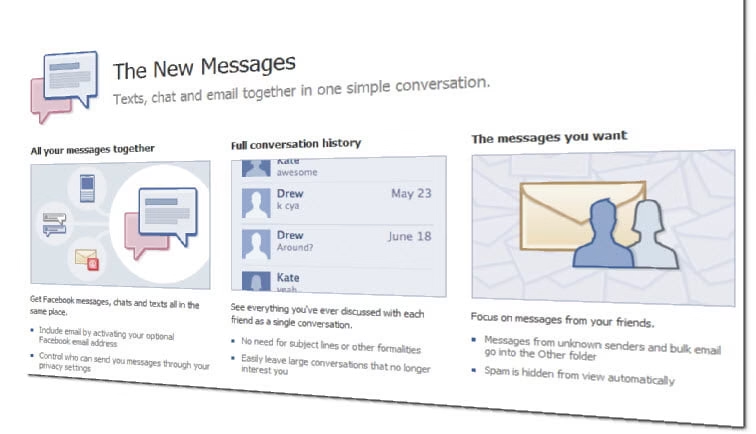
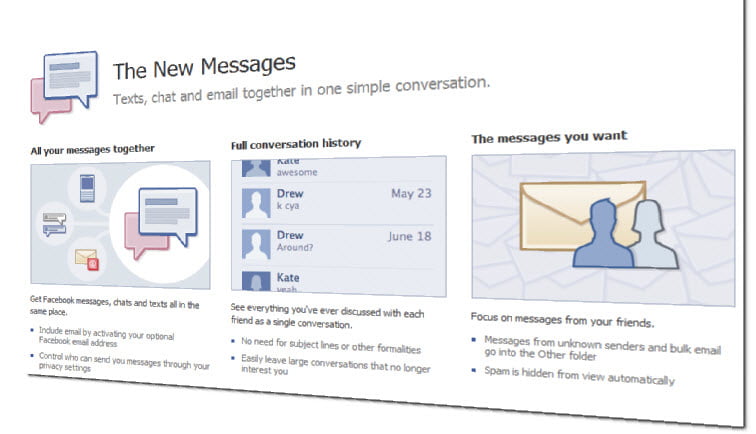
facebook new messages slide

This new messaging system is merging four main things: SMS, IM, email, and Facebook messages.

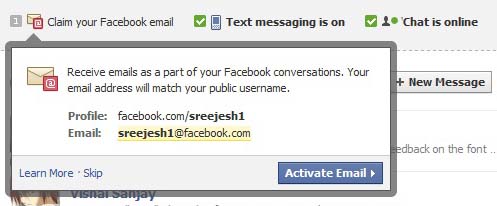
This was the most awaited email system which was rumored to be a Gmail Killer, and finally its here.  They call it the next evolution of Messages. The new system is about to be enabled for existing Facebook users with an email id with their username (eg: [email protected]).  Rather than just a conventional messaging system, Facebook messaging system is the mix of both social networking and communication at real-time. Essentially, Facebook have created a way to communicate no matter what format you want to use: email, chat, SMS or Message, they’re all included in their Social Inbox. When you send message to your friends, they will receive your message through whatever medium or device is convenient for them, and you can both have a conversation in real time. You shouldn’t have to remember who prefers IM over email or worry about which technology to use. According to this new system Messages are not email. Users can share anything with their friends from their Facebook profile, whether they’re are on Facebook or not. That means there is no subject lines, no cc, no bcc like in Gmail and others email systems. Users can send a message by hitting the Enter. In brief, the new system reduces the number of things users need to do to send a message. Its more like a conversation rather than just an email system. This messaging system will be initially available to users slowly over the period over the next few months.

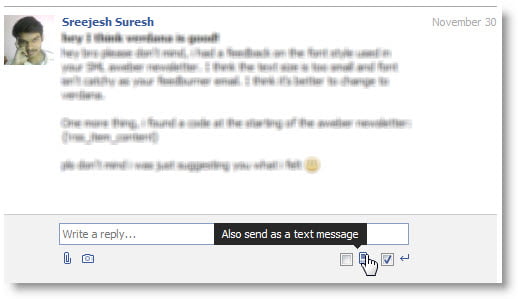
However, I was lucky to get early access to the new messaging system. So below is the screenshot of the new Social Inbox.

facebook new email at one place


conversation with sms
SMS conversation

Facebook’s system may alter the way how people communicate and email could be depreciated over time in future. Zuckerberg recalled talking to high schoolers recently and asking them how they communicate with one another. They don’t like email. “It’s too formal,” Zuckerberg noted. But this isn’t just about email.

During the launch of this new email system,  Mark noted that email is too cumbersome. There’s a subject field, a formal greeting, a closing. Youngsters  and teens are more friendly using SMS and IM because it’s much simpler. And that’s what Facebook is trying to do with the new system, using email as the gateway drug, of sorts. “We think that we should take features away from messaging. It should be minimal,” Zuckerberg said.

According to Mark. the modern messaging system should be seamless, informal, immediate, personal, simple and minimally short.

Key features users can experience with the new messaging system

  • Custom email address for everyone with their Facebook username. Ex: [email protected]
  • A seamless messaging, more improvised conversation history page and all this in one place called Social Inbox.
  • Easier way to communicate with friends, no matter what format you want to use.
  • All of your conversation history with friends are saved now in the Social Inbox.
  • Apart from this they are working on their mobile applications and IMAP support as well (These are under development).
  • They might also consider VoIP in future.

Bosworth of Facebook said that 15 engineers have worked for this project and this is the first time that most number of engineers in Facebook have worked on a single project. Thats because they had to rebuild the entire infrastructure that Facebook was built on.

Although Mark has assured other competitors like Gmail that the new messaging system its not email. This will leave many wondering whats email and whats messaging.

Did you get access to the new messaging system? Do share your views on the new Facebook Social Inbox