
Home Blog Page 352

Top Free Windows Notepad Alternatives

Whack_Notepad

If you’re like the majority of Notepad users, you probably write web pages, Cascading Style Sheets or even computer software in it instead of plain old text. Notepad is limited for this kind of usage — it can’t handle very large text files well, sometimes “breaks” text by loading it improperly after you save and close, and more. It will do in a pinch, but now that there are so many free Notepad software alternatives out there with helpful extra features, you’ve got no reason to make do with the bare minimum. Also checkout our nimbus note review

Here are some of the top free software downloads available to replace Windows Notepad:


Notepad++

One of the most well-known windows notepad alternative; Notepad++ is aimed at web site and software designers. Features include:

  • Line numbering.
  • Syntax highlighting.
  • Support for creating files in C++, Java, VBScript, PHP, CSS, HTML, and dozens of other scripting languages.
  • Works wonderfully for editing existing HTML and CSS files.
  • Opens multiple documents at once.
  • Features handy commands such as TextFX, which allows you to switch kinds of quotation marks you’re using, change case, sort lines by case, word count and more.
  • Supports 16 different character sets for coding in just about any language you wish, from Chinese to Hebrew.
  • Dozens of other features as well.

Notepad2

Notepad2 aims at replacing the original Notepad; it closely resembles the original. Features include:

  • Line numbering.
  • Syntax highlighting.
  • Easiest replacement of the original Notepad: simply change the filename to remove the 2 and paste it over the original Notepad in its program folder.
  • The interesting and handy ability to highlight text and then drag and drop it to other locations in a document, or even out of the Notepad2 window into another program. No need to even press Ctrl+C!

TED Notepad

The self-declared Swiss army knife text editor, TED Notepad is so tiny and efficient that you can download it to your flash drive and take it with you anywhere. Simply run the .exe file directly from the flash drive — it doesn’t even need to be installed first! Features include:

  • Auto-completion.
  • Enhanced search-replace features.
  • Hotkeys for every single action it can do and a convenient quick-exit by hitting the Esc key.
  • Supports coding in Unicode and UTF-8, allowing you to write for UNIX and Mac.
  • Has Unicode character in Chinese, Korean, Japanese, Russian, Bulgarian and Arabic as well as English.
  • Saves your settings into an INI file — put that on the flash drive with the .exe, and your preferences will load every time.

These are some of the best free Notepad replacements out there, but there are many more. If one of these programs doesn’t have a feature that you were hoping to see in your new Notepad software, try doing a web search for “free Notepad read aloud” or whatever other function you want it to perform. It’s probably already out there, just waiting for you to find and download it.

Do you know of a great Notepad replacement software that isn’t listed here? Feel free to leave a comment and share it with us!

Streamie – Tweet From Inside Your Web Browser

    7

    Today, on internet there are many twitter clients available to help you make your tweet easy and by reading this, you’ll add one more twitter client in your collection of knowledge, jokes a part. It’s not like other twitter client.

    Streamie is a full realtime Twitter client that runs in your web browser. New tweets will appear in your timeline immediately when someone posts them to Twitter and by using streamie you can make your own version of streamie if you’re a programmer. Cool? The most interesting thing is you do not have to run your own server you can concentrate on actually building the features you want. The infrastructure is handled by them you can learn how to make your own version of streamie if you want.

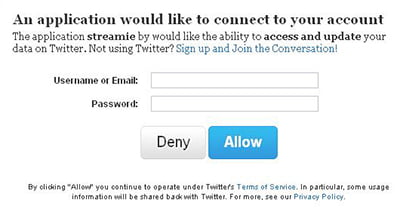
    It’s cool, it’s easy and I think you must give a try. Just link your account with Streamie and starts enjoy using your new Twitter client. And you’ll get the ability to display Notifications on the desktop.

    Features of Streamie

    Cutting Edge Web Technology – They use to take advantage of the latest web standards such as HTML5 and CSS3 . They’ll encourage you to update to the newest (even beta) versions of your favorite web browser to use streamie. If you’ll not update, streamie will not work.

    How Secure is Your Computer?

    8

    A very important aspect of a computer many computer users neglect is the security aspect. Some people don’t even know what hacking means or when their computer has been hacked. Security is even more important in today’s world when the lives of most of us depends on our computers; sure, getting a new computer might not be a problem should your computer be stolen but the real problem is recovering your files or letting it get into the wrong hands. It doesn’t matter how much you cherish your computer or how great you’ve worked hard on it if you don’t take the right security measures you will end up regretting your actions. This article will be giving you some tips to help make your computer more secure.

    Ensure it Doesn’t Get into the Wrong Hands

    The problem a lot of people have nowadays is that they trust just anybody around them and this will cost them a lot before they realize it. Because you work in a place doesn’t mean all your co-workers are your friends and except you are exceptionally careful you will have a lot of problems with them. Don’t just leave your computer with anybody except someone who has really earned your trust irrespective of how many minutes you want to go out; the truth many of us don’t want to know is that anything can happen within a minute, any crime can be committed within minutes and a lot of crimes have a great deal to do with trust.

    Make Sure Your Computer is not 2001 Years Old in 2011

    Sincerely, it pains me so much to see people using outdated software or computer firmware that was made in 2001 while expecting to get the best form of security from their computer. Software and firmware upgrades are always made for a reason and it is not because the programmers behind this don’t have time for other things or because they see it as fun but because it is highly necessary for them to make an update. A single software bug can cause a great problem for the software and the computer on which it is installed.

    Try to Educate Yourself More About Computer Security

    It doesn’t matter what you know now or what you do to make your computer secure the truth is that as technology improves so also does crime or anti-security increases. Some people make a living by causing havoc to other people’s lives and by hacking and misusing the info they get from other people’s computers so you shouldn’t expect this people to sit down and do nothing – they spend the whole of their day learning to hack and trying to protect your computer from them also requires constant learning from you. Make sure you’re subscribed to top security blogs for tips to make your computer more secure, also make sure you regularly get in touch with security experts in your area to get their opinion on what to do to make your computer more secure.

    3 Major Advantages of a GPS Tracking System

    4

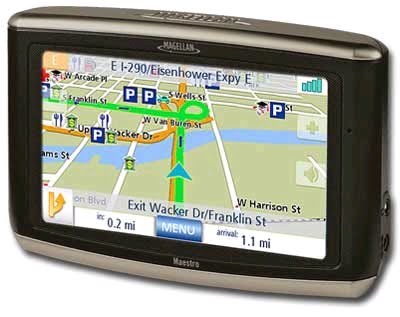
    A GPS also known as a Global Positioning System is a great technology that is used to track objects around the world. The technology was developed by the US military in an attempt to make success more seamless for the military – this technology is now being used all over the world and it is highly reliable that it is very clear that this technology will be of more importance in the near future. You might hear about the latest GPS tracking system making the buzz or who made or is using the technology most but the fact is, what matters most isn’t the origin of the technology or who uses it but what is in it for you. There is no point in using something if you won’t be gaining anything from it. Many companies use GPS fleet tracking software with their service employees and this has helped them reduce fuel costs and increase work productivity. Below are some major advantages of using a GPS tracking system.

    GPS Advantages – Tracking System Can be Used to Locate Lost Items

    The crime rate keeps on increasing in every part of the world and a lot of highly valuable objects have been, and will, be stolen. It doesn’t matter how irrelevant you think an object or equipment is to others if it is something that is very expensive you should make sure you install a GPS tracking system on it; for example, a $2 million violin was once stolen from a café in London and the owner had a hard time finding it, if the owner of this highly expensive violin had installed a GPS in her violin it will be very easy for her to locate it, These are just some Gps advantages.

    It is almost impossible to reduce the crime rate in the world because new technologies are emerging and it is new technologies that encourage crime and stealing; however, you can make it easier for you to track any valuable object you own by installing a GPS tracker in it.

    GPS Advantages

    GPS Tracking System Can be Used to Track Things and People

    One great function of a GPS tracking system is that it can be used to track anything irrespective of it being static or flexible, it can also be used to track people and animals depending on what you need it for. Another great feature of a GPS tracking system that makes it better is the alarm system it has; for example, you can easily install a GPS tracking system in a vault where valuable goods are so that you can be alarmed anytime someone is trying to steal them. You can also use the GPS technology to ensure things are going fine with people working for you especially if they’re doing a job that requires a high level of security and confidentiality; this will be able to track them anywhere they go and when they go there.

    GPS Tracking System Can be Used Anywhere in the World

    An added advantage of the GPS tracking system is that it can be used anywhere in the world; it doesn’t matter whether you’re in Africa or Asia the GPS technology is powered by the world satellites and this means it can be accessible anywhere; all you need is a solid tracking system and a GPS receiver.

    Paypal New Rules Sucks! Indian Freelancers To Suffer The Most


    Update: Paypal has now lifted this limited and now users can receive funds upto $3000 at once.

    From 1 March 2011  for Indian users, PayPal is no more the easiest way to pay. PayPal team last night sent out some shocking new rules to Indian PayPal users by sending them a surprise Email last night. In the Email PayPal team stated new terms and rules for Indian PayPal users.

    So here’s the preview of that shocking mail from paypal to Indian customers.

    With effect from 1 March 2011, you are required to comply with the requirements set out in the notification of the Reserve Bank of India governing the processing and settlement of export-related receipts facilitated by online payment gateways (“RBI Guidelines”).
    In order to comply with the RBI Guidelines, our user agreement in India will be amended for the following services as follows:

    1. Any balance in and all future payments into your PayPal account may not be used to buy goods or services and must be transferred to your bank account in India within 7 days from the receipt of confirmation from the buyer in respect of the goods or services; and
    2. Export-related payments for goods and services into your PayPal account may not exceed US$500 per transaction.

    We seek your understanding as we continue to employ our best efforts to comply with the RBI Guidelines in a timely manner.

    Which means:
    1. Indian PayPal account holders cannot receive payment of more than $500 per transaction for export items and services.
    2. You will not be allowed to purchase items or services online using your PayPal account if you are in India. That means, from 1’st march 2011 you can’t use PayPal to pay for hosting charges or to buy items on web.
    3. You must transfer any funds in from PayPal to your bank account within 7 days from the receipt of confirmation from the buyer in respect of the goods or services. Even if you receive a payment in your PayPal, you will have to withdraw that within 7 days of transaction confirmation to your bank account.

    These are the new restrictions and limitations coming on PayPal from effect of 1’st March 2011 for Indian users. PayPal says these new guidelines are in order to follow the guidelines from Reserve Bank of India (RBI) due to TOS of Indian currency rotation rule.

    According to the Indian Currency Rotation Act:

    • Any company keeping money for more than  7 days have to pay interest and should be treated like a bank.
    • Any transaction which bring money more than $500 at one go, should be reported to RBI.

    Whoever is to blame, its really going to get hard for freelancers who have no Credit Card, blogger can’t use Paypal anymore to pay hosting and domain renewal. And cannot keep money for more than 7 days in their paypal account. And it will badly going to effect users who get small payments, because paypal would charge them 50 INR for transferring funds to their bank accounts. For instance you are getting a payment of $5(225INR) in your PayPal account, the after transaction fee of 50, you would get only 175INR in your bank account.  So this is a very disappointing move from PayPal and RBI.

    Lets home that they would bring some positive changes in the above rules, considering the fact that there are huge number of freelancers and bloggers in Indian who reply on PayPal for online transactions.

    Paypal India office only one branch in India which is in Chennai. If you would like to get in touch with them directly, then here’s the address and contact details.

    Paypal India Pvt Ltd
    No 334, Futura IT Park, Block A,
    Old Mahabalipuram Road,
    Sholinganallur
    Chennai - 600119

    Phone number to contact Paypal Chennai Office –
    + 91 044 66348000, +91 044 66348001

    If you are someone who is also the one suffering from the new rule then you can post your comment below.

    Image Space Media Helps Publishers Monetize Images On Their Websites.

    4

    Updated 2017: Image Space media has stopped their service. Checkout 17 Top Adsense Alternatives for Making Money from Your Blog

    Couple of years ago, the only major source for publishers to find revenue through their site was to monetise their website with banner ads from Google Adsense and there wasn’t many ad options available to optimise the ads. Over the years, advertising media has improved a lot with innovative ideas for attracting customize and to find a better advertising niche. Most of you must have already using new monetising platforms like in-text ads and in-video ads.

    You might also like:

    Apart from In-text and In-video ads publishers can monetize their image content in their websites to earn a partial income. Image Space Media (formerly Picad Media), is one such in-image ad network that helps publishers monetize images on their websites with ad overlays. They were first to experiment in-image advertising strategy for publishers. They recently upgraded its platform to include a detailed analytics platform and they have partnered with a reputable ad feed that will monetize your international traffic. The below is the example of ImageSpaceMedia in action.

    They have also implemented a ‘share‘ feature which helps to drive traffic within your site, adds additional income through new banner ad space, and allows viewers to share your images through their Facebook, Twitter, and email.

    Image Reporting and Payment Threshold

    Users can track their ad performance and earnings from PubStop platform, the tool allows publishers to value which of their images are yielding higher earnings. The publisher can login to their account dashboard and can get a detailed report on the total ad impressions, total clicks, CTRs, eCPMs, number of images. The minimum payment threshold is 25$ which will be payable via Paypal.  I’ve given a thumbs-up for ISM and have started monetizing images in this site from today. Below you can see the screenshot of my image reporting page.

    Since this year they have implemented rich media ad formats apart from text only ads. Since their rival GumGum has shutdown recently, ISM expects a better market reach. Though it looks interesting I’d probably have to wait and see how good it can get in the coming days. However, I don’t believe I can make consistent income from in-image ads as it is yet to become social and popular. Do share in comments how do you rate in-image ads and do you consider implementing it in your site to monetize image?

    How To Recharge Mundu TV?

    0

    As you know Mundu TV lets you watch live television channels on your mobile phone and desktop. If you are a looking forward to learn more about Mundu TV, then you can read it here. And if you have already tried the free trail of Mundu TV, then you might like to subscribe/recharge for their monthly or Quarterly plan. In this tutorial, i’m going to show you how to recharge Mundu TV and different subscription plans with channel details.

    And there is an official announcement that Mundu TV is now Play TV.

    What Plans They Offer For Me?

    if you are trying Mundu Tv for the first time, then you can Download their software and enjoy a seven day free trial period. After 7 days, if you are looking forward to use it further, then you can go for any of their 3 subscription packages. At the moment they offer Super Value Pack, Choose any 5 and Choose any 11 channels pack. You can register for any of these package from here

    Choose any 5  – Choose any 5 from all channels.
    Cost: Rs.49/- Monthly or Rs.125/- Quarterly.

    Choose any 11  – Choose any 11 from all channels.
    Cost: Rs.99/- Monthly or Rs.250/- Quarterly.

    Super Value Pack – This pack offers 17 channels at the best value for your money.
    Cost: Rs.149/- Monthly or Rs.375/- Quarterly.

    Click here to check the supported mobile devices and desktop versions.

    Available channels:
     NDTV Profit
     Aajtak
     NDTV India
     NDTV Goodtimes
     NDTV 24×7
     Headlines Today
     Zing
     Zee TV
     Ten Action Plus
     Zee Marathi
     Zee Tamil
     Zee Bangla
     Zee Classics
     Zee Kannada
     Zee Business
     etc
     Zee News

    Lets hope they will add more channels soon.

    Please visit : http://mundu.tv for more details. We are not affiliated with or endorsed by Mundu.tv. Please donot contact us for support!