Home Blog Page 351

What to expect from Android 3.0 (Honeycomb) tablets

6

Even if android tablets are all over the place and are receiving positive feedback, there are still skeptics out there. To bring light to these skeptics, in this article we will be discussing the new features of android 3.0 (aka Honeycomb). Honeycomb is the new version of Android build especially for tablets and has a number of new and exciting features. The release of the new version signaled the beginning of the ‘tablet war’ between Google and Apple and for sure the next few years will be interesting as to which company will manage to win the tablet battle.


Honeycomb in every Android tablet

It is known that Google has released several versions of the Android operating system and Honeycomb is the latest and most improved version. Honeycomb is the very first operating system to be used exclusively on tablet devices and not smartphones. It takes advantage of the bigger screen size, fast processors and graphic accelerators of android tablets. The major characteristics of android 3.0 are outlined below:

Android 3.0 Honeycomb tablets cnn app

UI design:

Honeycomb features a new user-interface in a 3D-like look with a playful and elegant touch to it. All core applications (Gmail, Gtalk, Googe Maps, Google Docs) are customized to fit larger screens and most applications take advantage of a 2-column view for easier usage.

Multitasking, Notification:

Its multitasking feature is made easier and simpler. No need to go back to the home screen just to switch to another application. A dedicated button is located at the lower right of the screen, just press it and you will be presented with other applications available in a thumbnail view. Another improvement is the prompting of notifications, new notification will just appear on the System bar located at the lower right of the screen, so the user can deal with it at a later time unlike iPad that displays notifications at the middle of the screen which can be really annoying especially when you are doing something important.

Customizable home screens:

The user will be able to add several applications and widgets on the home screen. There are 5 home screens in total (in a continuous desktop) which gives enough space for the user to access all the applications they need in one place.

Better keyboard:

Typing and copying text made easy with additional tools such as the bounding arrows. This tool allows the user to extend selection of text. Also the design of the keyboard is improved making it more accurate.

Android Market, Syncing:

Android Market is just like Apple Store that lets users download and buy content online. The only difference with iPad is that Android 3.0 tablets do not need to be connected through USB. Users can send applications to the device Over The Air (OTA) just like the software updates send by Google.

These are just few of the amazing UI features of Honeycomb that will be found in every Android 3.0 tablet. Aside from the Android experience, these kind of tablets are mostly powered by 1GHz dual-core processor with 1GB of RAM which delivers great application and game performance. Not to mention the storage space at 16GB/32GB that can be expandable up to 64GB matching iPad’s 64GB. Connectivity options provided are 3G, Bluetooth, WiFi, HSPA+ and 4G. Of course, other tools such as cameras, speakers, sensors and external accessories are all available with Android 3.0 tablets. Big companies such as Motorola (already available for purchase), Samsung, LG and HTC have already introduced their very own tablets and in no time will populate the market.

With these things to keep in mind you do not have to be stuck with iPad1 or IPad2 because its android 3.0 now offers a new reliable choice and a time to explore new horizons.


How to use PPC advertising for a website or product

Website or product promotion is the fundamental step to start with the business effectively. The products that are developed are to be taken to the client’s desk powerfully with more interesting stuff that must create a crispy attention at once. Online marketing is the effective way to reach various levels of customers which works with the demand and supply business issues.

pay par click secrets tips


Pay per click advertisement

The ppc search results are completely paid list under the category of ‘sponsored listings’ or ‘featured listings’, these advertisements are mostly text, image or video classified ads that are resulting for the targeted keywords search. The ppc ads are placed any were in the page be it at the top, bottom or the sides, which describes the product functionality and utility in detail with a quick short note.


The keyword or phrase is to be decided with care as it must sound catchy and clickable. The more you bid the keyword, the more will be your search results. Google Adwords, MSN AdCenter and Yahoo advertisements are the most used ppc advertisement sites that promote your business via ppc.


Search Engine Optimization (SEO) tips are more effective in making use of the keywords earn more on the search engine ranking. Websites can be brought to the top list of the search with the helps of optimizing the site with certain % of the keywords to hit the tops list of Page Rank (PR). Online marketing strategies are to be kept in mind to hold up the strand of your product and website to reach more clients on time.


Certain factors to be noticed to strike the expected traffic rates are.
  • Check for the market demand on products.
  • Launch new products with added features.
  • Make your advertisement on website more inviting.
  • Website must hold info on products and services upto the point.
  • Keep your description clear and apt to the specific topic on target.
  • Invite more discussion and suggestions to improve the business.
  • Learn the customer’s expectation to compete with market value ratings.
  • Utilize seasonal sale with offers and discounts inviting more dealings.
  • Keep connected with the customers and work upon development phase.
  • Update your site frequently with news on your products and some beneficial info on various issues, as visitors may get attracted on your site and look in for future business.


Internet has made a quick market with the ppc ads with the helps of search engines results that makes a good result over market in earning income. Selling products are made easier and flexible with the helps of ppc ads.


5 Ways to Increase the Worth of Your Blog

There are countless blogs that began simply as hobby or learning opportunities and seemed to evolve into profitable income streams for their creators in a just a few years. The key to this success is capitalizing on the influence the internet has on every facet of both leisure and professional life. The number of websites and blogs in existence is already massive and continually growing; individuals spend countless hours building traffic to their sites. Increasing traffic is a good strategy, but it requires thought, foresight, discipline, and there must be reasons for every task performed.

successful-blogging-ladders

If your blog provides a service, then creates and fills the need for it in a target market, your blog has potential market value! This means that your blog has a monetary value, which means it can be sold for money.


Here are 5 things you can do to increase the money value of your blog:


1. Keeping Things Simple


A prime benefit of a blog is that overhead is typically much lower than for other businesses. Because of this, some components of an online business can be self-functioning, or operate on “auto-pilot.” This automation includes automatic responses to customer inquiries, automatic uploads and downloads to the website, and auto-generated reports on how the blog is performing. Taking advantage of these tools streamlines your work so you can focus on the company’s future growth. The intended goal is for you to be the brains behind your business rather than just the hands.


2. Having a Plan

Have a business plan from the very beginning on how you intend for your blog to make money. Explore various revenue streams to establish those that fit with your niche. You might sell products or services, sell advertising space, or market affiliate products. Develop a plan to market your “brand,” then implement that plan to make your business attractive to potential investors.


3. Business is Business

Establish your blog as part of a business entity from the beginning. This can be a sole proprietorship, an LLC, a partnership, or a corporation. Your business and domain names should be trademarked along with any other branding you create, such as a logo for example. Obtain a tax ID so personal and business assets can be kept separate. It might seem like a bit more work initially, but it helps avoid confusion and your business appears more professional. Having your internet business registered as a separate entity will protect you and your family from potential lawsuits, claims, tax problems or insurance issues.


4. Take Advantage of Outsourcing

The help resources available to online business is overwhelming. You can utilize the services of virtual assistants and offshore contractors to perform quality work at very competitive prices. Routine work should be the first type you outsource to free up your time for more important tasks. A virtual assistant can answer emails or respond to customer inquiries, for instance. When it comes to your marketing campaign, don’t cut corners. This is an essential element for promoting your business and requires an expert. A modest investment up front for the right services can prove priceless in the success of your business.


5. Realize the Risks

Every business has its risks, and online enterprises are no exception. The risks associated with online companies are typically less than brick and mortar businesses. Using time and resources strategically, maintaining focus and discipline, and a firm commitment to your business are skills you should apply in order to achieve success.

If you want your website to become big business, you have to treat it as such instead of a sideline hobby! This will require your time, dedication, and some monetary investment on your part.

6 Methods to Find Sizzling Affiliate Products to Market Online

The level of success you achieve as an internet marketer can often be traced back to the products you chose to promote when you first began. Sure, it might appear that the process of finding affiliate product is the simplest part. All you need to do is visit an affiliate program like Commission Junction or Clickbank, sign-up, and then pick a suitable product from the thousands available to you.

But after investing your time and money engaging in promotional activities you do not see any return for your efforts. It is only then that you realize the product you are promoting is inferior and that you should have been more tactful finding hot selling affiliate products.

Find hot selling affiliate products


To help you avoid this fatal error I will discuss 6 approaches to uncovering profitable affiliate products:

1. It All Begins With Research:

Before you rush to your chosen affiliate network you need to research a commercially viable niche. A feasible starting point will be to choose a market that is of interest to you or a niche that you are already familiar with. Possessing a level of knowledge in a market before you pursue it will give you an element of leverage since you will be able to establish yourself as an authority figure from the get-go.

2. Saturate Yourself In Your Market:

The preferred approach to understanding your customers and to acquaint yourself with their needs is to join forums, social groups and other platforms that are directly related to your chosen market. By doing this you will familiarize yourself with your market, and you will understand the needs, desires and problems faced by your customers.

For instance, if you have chosen the insomnia niche and you join related forums and participate in the conversations on these platforms, you will undoubtedly hear the cry of many insomnia sufferers which will equip you with the knowledge to help them solve their problems.

3. Choosing The Right Products:

After your initial research, the understanding you have of your market will be heightened. At this point you can visit your chosen affiliate network and scan the available products. It wouldn’t be long before you see a product that meets the needs of your niche and the product will actually stand-out because of your initial research.

When choosing a product it is important for you to analyze the data associated with that product. Indices such as “gravity” will provide the data required to evaluate the popularity of the product. A popular product usually means many affiliates are making sales from that specific product.

Although gravity is a good indicator to judge overall popularity it is however not the only metric you should depend on. Sometimes a low gravity product can serve the needs of your market much better than the popular products. The onus is on you to research each product thoroughly to determine who developed the product, what their credentials are, and what customers are saying about the product.

4. Product Diversity:

When entering a market you should ensure there are various products at your disposal to serve that niche. This will reduce the risk and provide you with other options if your main product is suddenly taken of the market, and it will also allow you the option to market other related products to your clients in the future.

5. Potential Commission Analysis:

Would you rather make $20 on a sale or $2? The answer is obvious but many marketers still target low paying products. You should analyze the amount of commission you stand to receive for each sale, and then forecast how much you intend spending on your marketing efforts, include the amount of time you are willing to invest in marketing the product and then evaluate whether the return is plausible based on how many sales you expect to make.

6. Analyze the Merchants Landing Page:

The merchants landing page is what is ultimately going to convert the traffic you send into paying customers and as such the quality of the landing page needs to be top-notch. Ask yourself whether you will buy a product from that landing page? If the answer is yes then you have a winner!

The techniques highlighted above will ensure you find products that are worthwhile and if done right you will certainly benefit in the long-term.

Open Source Software in the News: What’s New

The increasing popularity of open source software means that it is getting more news coverage, both in the computer world and the “real” world. Coverage includes announcements on the latest releases as well as upgrades or improvements of existing open source software.

Open Source Software

Linux Updates

In the area of open source software upgrades, the latest release is that of the Pardus 2011. This upgrade has increased the distribution capabilities of the Pardus Linux system. Pardus Linux, along with its upgrade, sees the majority of its use in Turkey, especially in the areas of government and Turkey’s armed forces. However, it is available to anyone wishing to have a current distributing system.

The latest newest distribution system is Saline OS 1.0. Again, this is a Linux distribution system. It takes its cues from the Debian Squeeze program, but allows users to access certain things that are not considered part of Debian’s open source software. Those who still use Debian open source software, Debian 6 is now available.

This distribution system can be used on older machines and netbooks, making it possible for users who do not have the latest and newest equipment to take advantage of it.

Google

Google is using some different codecs to make its existing VP8 open source video codec work better. To this end, they are going to improve future editions of their Chrome browser so that it will support the WebM and Ogg Theora codecs.

Doing this means that Google will continue its steady pulling away from its ability to support H.264 video. This may eventually impact web publishers and web publishing device manufacturer quite significantly. We’ll just have to wait and see. These and other changes to open sources are being accepted by Larry Page, the new Google CEO. So, with that in mind, there’s no telling where Google may go from here.

Mozilla

Not to be outdone, Mozilla is taking its cloud app development in a new direction. The company is working on improvements and upgrades to its current open source software, which has already seen two major changes. It started out as Bespin, a code-editing program for cloud computing, and from there evolved into something called SkyWriter. This program is now a permanent part of Mozilla’s Ajax.org Cloud9 Editor (Ace) and Cloud9 IDE projects.

CONCLUSION

So, as you can see, there’s a lot happening in the open source world. With the way technology is advancing and the computer world is growing by leaps and bounds, there’s no telling what lies ahead for open source software.

It should be noted that not everyone in the computer world embraces open source software. Some feel it allows for too many breaches of copyright and licensing regulations. It seems apparent, however, that open source software is here to stay. Those who find fault with it may want to re-consider, as it is possible that their negative stance may put them in a position of being left behind others who embrace it.

Yahoo’s MyBlogLog to be discontinued from May 24th 2011

I just received a mail from Yahoo stating that they will be discontinuing their MyBlogLog with effect from May 24th 2011. MyBlogLog was a yahoo service which provides blogging-enthusiasts a forum to connect with their readers and the wider blogging community. Yahoo acquired MyBlogLog from eponymous in January ’07 for $10M.  This is another RIP after Y!Buzz and Delicious 🙁

Yahoo! mybloglog Rest In Peace

Here’s the mail Yahoo sent me(to all users) :

Dear MyBlogLog Customer,

You have been identified as a customer of Yahoo! MyBlogLog. We will officially discontinue Yahoo! MyBlogLog effective May 24, 2011. Your agreement with Yahoo!, to the extent that it applies to the Yahoo! MyBlogLog, will terminate on May 24, 2011.

After May 24, 2011 your credit card will no longer be charged for premium services on MyBlogLog. We will refund you the unused portion of your subscription, if any. The refund will appear as a credit via the billing method we have on file for you. To make sure that your billing information is correct and up to date, visit https://billing.yahoo.com.

Questions?
If you have questions about these changes, please visit the Yahoo! MyBlogLog help pages.

We thank you for being a customer on Yahoo! MyBlogLog.

Sincerely,

The Yahoo! My BlogLog Team

It seems that Yahoo’s sunset is coming close. I found a nice post on 37signals.com check it out: What happens after Yahoo acquires you.


WordPress 3.1 Launched – New Floating Admin Bar, Revamped Dashboard color

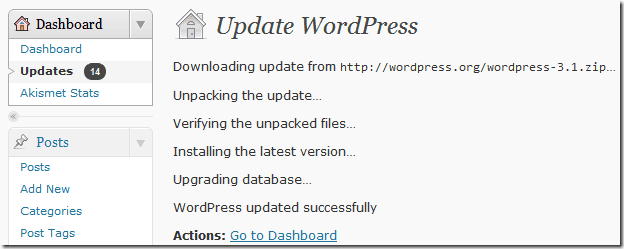
WordPress the worlds one of the most used blogging platform has released a much awaited update version WordPress 3.1. This version of WordPress was released on February 23, 2011 and is named after a Jazz Guitarist name “Django“, his full name is Django Reinhardt. WordPress had a security update few weeks ago and now the 3.1 version which comes after major bug fixes and enhancements. This version is also special because of some new features like Floating Admin Bar in site, Revamped Dashboard with blue color scheme, Post Formats support, Cleaner editor panel. You can go ahead and download a new package of WordPress 3.1 or upgrade your existing blog. Download the latest version from here


You might find a notification message at the top of your WordPress dashboard, click on the upgrade link to automatically upgrade your WordPress from your old version. Since this version comes with lots of bug fixes and security fixes. So I recommend that you must update to to 3.1 to experience a safe functioning of your WordPress blog. If you are having problems in automatic update, then try manual update. Remember in the previous version they had more than 820 closed issues


wordpress 3.1 version updates and features

New Features in WordPress 3.1

  • Post Formats – “Allow denoting a post as a certain format. Some example formats are aside, gallery, link, quote. This will allow themes to style these posts according to format.” (ready to go, awaiting decision to include a UI that themes can enable)
  • Theme Search/Filter – “Lift some of the search and browse ideas from theWordPress.com themes.php.” (still in first draft)
  • Internal linking – “. . . you click a button for an internal link . . . and it allows you to search for a post or browse a list of existing content by title, date, author, etc. and select it for inclusion.” (patch provided)
  • Admin Bar – “. . . an administration bar similar to the one on WordPress.com.” (first round is in)
  • Ajaxified Admin – “. . . makes most columns sortable, introduces a new pagination style, ajaxifies sortable columns, pagination & search . . .” (ready to go)
  • Network Admin – Moves “the Super Admin menus and related pages out of the regular admin and into wp-admin/network/.” (fixing bugs)
  • Update TinyMCE – Visual editor updated to TinyMCE 3.3.9.2. (ready to go)
  • Multi-Taxonomy Queries – Allows users to query multiple taxonomies. (first round is in)
  • Custom Post Type Index Pages – Provides an index for custom post type virtual directories. (first round is in)
  • Cleanup Admin CSS – Cleans up “all admin CSS files to make them much easier to maintain, reduce bloat, consolidate extraneous files, and provide better support for admin color schemes.” (will span two releases)
  • QuickPress Function – Makes QuickPress a function useable by custom post types and themes. (first round is in)
  • User Admin – Provides a more personal Dashboard; “a single endpoint for accessing profile information, cross-site preferences, a launching point for accessing all of a user’s blogs, collation of stats across all of a user’s blogs, a place for a multisite aware QuickPress, etc.” (first round is in)
New floating admin/user bar on top:

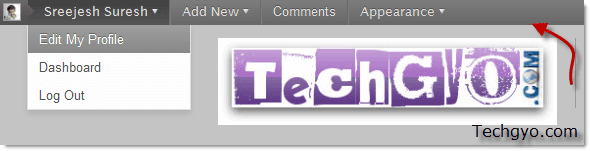
If you are logged into your blog dashboard then you can find a admin navigation bar in your blog page. This is visible for both users and admin if they are logged in.


wordpress 3.1 floating admin nav

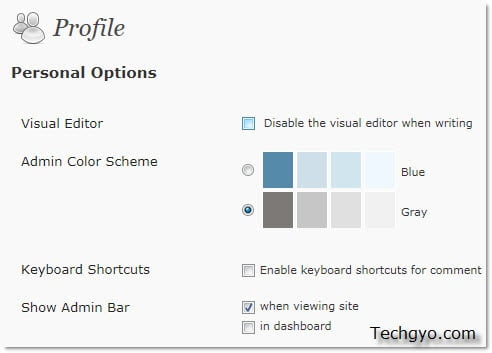
If you didn’t like the new admin bar, then you can go to Dashboard>>Your profile>>Show Admin Bar

WordPress disable admin nav bar

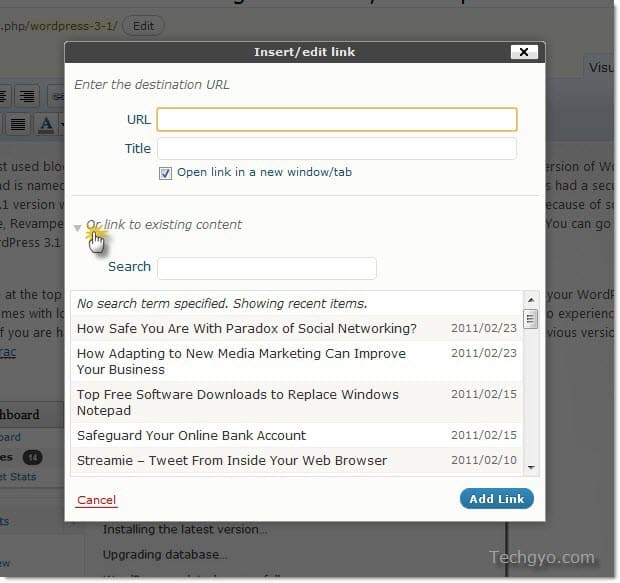
Redesigned linking workflow

Adding new link is much faster, and now you can find your old posts to link within the post. Previously users had to use WordPress insights plugin to have this feature of linking old posts, but now this is included as default. But you can’t have other features of Insights Plugin like linking from Wikipedia, Google, News, Other blog, books and maps. Only linking of old posts within your blog is available in this Update.


wordpress 3.1 version adding link from old post


I’m sure you will enjoy those new features in the latest WordPress 3.1 version. Come back to read more about WordPress tips and tricks. Do signup for our free email subscription to get it in your inbox.