TeamViewer introduces a new online support feature known as TeamViewer Web Connector. With this feature you can control remote computers from anywhere making use of any OS and browser without any installation or administration rights. This is a premium service provided by the TeamViewer group. To use TeamViewer Web Connector feature one has to create a user account and sign in. You can add computers or partners to your list to connect with them. Search for partners online and connect with them with TeamViewer Web Connector.
TeamViewer Sign Up
You can Sign Up to the online account to make use of the browser-based TeamViewer. To sign up go to the login page of Accounts and login with your user id for existing accounts or Sign Up for a fresh TeamViewer Account. To sign up provide some basic data like desired username, email id and set a password for login. That’s it and you have your Free TeamViewer Web Account. For premium services go to edit profile and enter the Premium License number.
TeamViewer User Interface
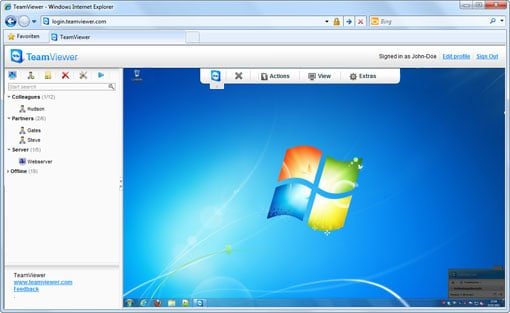
After you sign in with your TeamViewer Web Account user id, you can see the Interface window. At the left, you can find the “My Computers” caption which shows the computers in your contact list and also indicates online and offline computers. You can add new partners by clicking on the Add New Partner and entering the required details and you can see the contact added in your list. Also, you can create groups.
TeamViewer Quick Connection
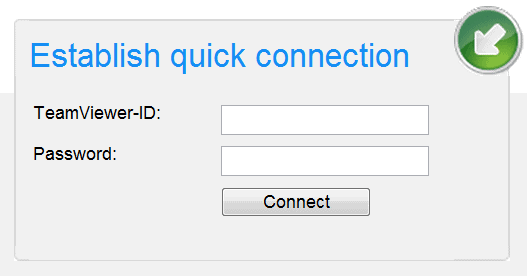
You can quickly connect to a partner just by using TeamViewer id and password. Suppose you do not have your clients id saved in the contacts list then you can directly connect with the client with TeamViewer Quick Connection. Just use your partners TeamViewer id and password to quickly establish a connection and continue with your work.
TeamViewer web connector OS Support
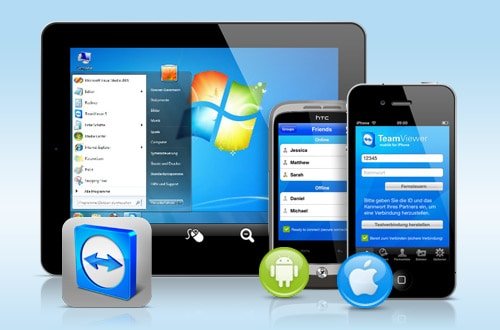
TeamViewer web Connecter comes in Windows, Linux, Android and Mac platforms.
Just because a worker is the most productive member of their team, is the smartest and the fastest, or generates the highest-quality work and the most satisfied clients — does not mean that worker will be an excellent leader. Workers tend to utilize vastly different skills than the managers and executives who oversee them. This phenomenon is especially obvious in tech, where hard skills are of significant importance and soft skills often fall to the wayside.
Good leaders must exhibit a variety of interpersonal skills to keep their teams happy and performing to their best ability. Whether organizations promote tech leaders from their workforce or hire an outside candidate, the most valuable skills for tech leadership include:
Communication
In truth, communication should top the list of required skills for every professional position. Communication is easily among the most valuable skills a tech professional can have — but identifying good communication skills can be difficult. In tech leadership, one of the best indications of a well-honed communication skill is the ability to explain project requirements to tech workers and non-tech business leaders alike. Because tech leaders operate in different spheres, the ability to code switch is essential for delivering specific and valuable information across groups.
Accountability
Many leaders are more than willing to accept praise for their team’s successes but shift blame onto workers for failures. However, a tech leader should feel responsible for the performance of their team, even if that means being accountable for mistakes and missed deadlines. Tech leaders should closely monitor their team and intervene when it is clear that an employee is not meeting performance expectations. If expectations are untenable, it is the leader’s responsibility to communicate this to executives and save their workforce from undue stress.
Curiosity
Technology is consistently and rapidly changing. What might be a cutting-edge trend in technology one day could become obsolete the next. Thus, tech leaders need to be fueled with curiosity to understand and engage with the latest tech information, insights and trends, which could aid their teams in completing projects essential for business success.
In addition, tech leaders should constantly seek to understand the reasons behind the projects assigned to their teams. Applying their curiosity to business operations can help them devise strategies for projects that allow for more precise achievement of organizational goals.
Trustworthiness
Tech leaders are tasked with facilitating the completion of projects and the achievement of goals, but neither of these are possible if they cannot win the trust of their workers or the respect of their fellow business leaders. Trust and respect go hand-in-hand, and they develop in response to a leader’s actions. Several behaviors help a leader cultivate trust and respect, such as listening actively and showing appreciation. Leaders can enroll in leadership courses to learn more about how various interpersonal skills affect their trustworthiness and effectiveness in the workplace.
Flexibility
The vast and changing nature of technology necessitates flexibility within tech leadership. Flexibility benefits tech leaders in a variety of ways. For one, while technical workers might have strict skills that they apply to specific types of technical projects, tech leaders need to be able to oversee diverse types of projects. For another, tech leaders need to be capable of functioning in different work environments — physical and digital — and with different team cultures and compositions. ABeing able to adapting to new situations and expectations is essential for tech leader success.
Imagination
Another effect of the constantly shifting nature of technology, tech leaders need to be able to envision the future of technology. Utilizing data about the business environment, industry trends, the economy and consumer behavior, tech leaders should be able to anticipate their organization’s tech needs and cultivate a vision of those needs that other business leaders can draw upon in drafting business strategy.
Likeability
Tech leaders do not need to be best friends with their workers, but there are benefits to being liked. Often, likeability is correlated with a leader’s ability to demonstrate empathy and honesty, which are important for inspiring and maintaining trust with the workforce. Employees with likable leaders also tend to have lower stress levels and higher productivity. Likeability can be subjective, so tech leaders might need time to understand company culture and group work ethic before they are expected to develop an amicable relationship with their team.
All employees benefit from strong soft skills, tech employees included. However, tech leaders need a particular set of personal and interpersonal attributes to ensure they and their tech teams can thrive.
Most people wrongly assume winning card games are all about pure luck. While luck may play a minuscule part in the overall winning process, players need specific skills and experience to overcome hurdles and emerge triumphantly. The same is true for Cube Solitaire.
Cube Solitaire is a skill-based game and not single-handedly based on chance or luck. The game involves a single deck of fifty-two playing cards and four suits. The primary objective is to create valid sequences from Ace to King and transfer them to the foundation deck. The game is transformed into a fast-paced game in the online world, where each match session lasts for about five minutes. The game demands expertise and skills, which comes after learning the rules and playing a few matches. Also, it would be best if you abode by the game’s rules and cannot go astray. The only game aspect players cannot control when the cards are shuffled and dealt. Nobody knows what cards you’ll get or whether the deck will be solvable.
But once the cards are dealt, the rest depends on your skills. How you move around the cards from one tableau to the next, when you click on the stockpile and the move you select when there are potentially multiple moves to play. Most players download the Cube Solitaire app and play a few free practice games before participating in cash-winning tournaments.
If you’re still not convinced Cube Solitaire tips the balance in favor of skills and not luck, you need to understand the difference between games of chance and skills.
Games Of Chance V/S Skill-Based Games
Games of luck or chance primarily refer to games where players wager money to play against a randomizing device. Although there’s a slight amount of randomization in Cube Soliature, gamers cannot solely win on luck or chance. Instead, there are instances when players are dealt with a lousy hand, and they have turned the game around by applying strategies.
In games of chance, gamers cannot control any of the variables. So there’s zero aspect of the game under the players’ control, and all you can do is pray.
Cube Solitaire is different because it doesn’t matter if you start in a good or bad position. Instead, you can turn the game in your favor by carefully moving the cards around. Of course, if you are playing a 1V1 match, both players will be dealt the same cards. But how you move the cards or which moves you play over others will determine the game’s outcome.
Therefore, games of skills are a far cry from games of chance. The game’s outcome is determined by your skill and the strategies you choose to implement. In your goal of making valid card sequences, you may take a different approach than your opponent, and that might be the difference between you losing or winning the match.
All in all, Cube Solitaire isn’t a game of chance or a game of skills but a mixture of both. When the cards are dealt, you can pray and call upon your luck to get a good hand. However, once dealt, you can only rely on your skills, and your luck won’t play any part in your win.
So, now that you know you need skills to win Cube Solitaire matches against formidable opponents, it wouldn’t hurt to know a few strategies that can get you a win. So read along to know them.
Winning Cube Solitaire Strategies To Help Turn The Game Around
It is uncommon, but you can go ahead and draw a card from the desk on your first move. The extra card at the start of the game might be a game-changer and increase your chances of finding more cards.
Empty spaces are a boon and a bane. Empty spaces are used as temporary storage spaces when moving the cards from one column to the next. However, it can mean the end of your game if you do not have a King card to fill the space. If so, the column will remain vacant for the longest time and hinder you from using an entire column.
The deuces and aces are of no help. Get them out of the way as soon as possible. Don’t let those cards weigh you down. The moment you get them, send them to the foundation deck.
Placing the King card in an empty column is a divisive decision. Don’t take the decision lightly. Whether you place a red or black King, the decision must depend on the Jack and Queen cards you have at hand. The color of the King card will determine the color of the pile of that specific column.
Before hitting the stockpile, carefully assess the cards at hand. Once you click the stockpile, new cards will be placed over the face-forward cards, and you cannot use them anymore. Therefore, ensure you’ve exhausted all the potential moves before clicking the stockpile.
Final Thoughts
Are you ready to flex your Cube Solitaire skills? First, you need to download the app and start playing free practice games. Then, compete against online players or friends and participate in events and tournaments. No matter what game mode you choose, knowing the game requires immense skills, and a deep understanding of the game’s rules is vital. Best of luck!
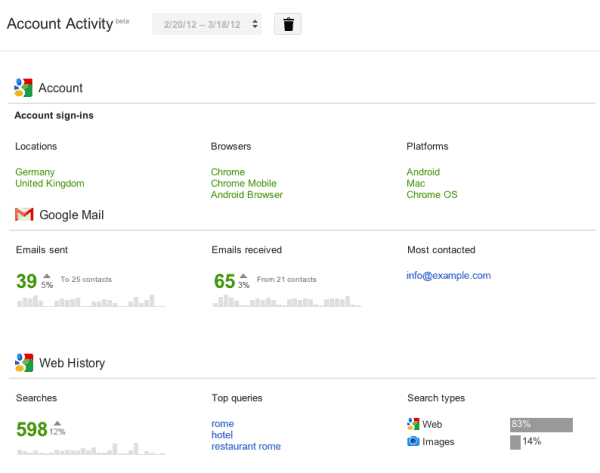
Google is simplifying the technology every day, It works harder behind the scenes to make your work easier and smarter. Google has come up with the new “Account Activity” feature which let you know about activity of Google services in-depth. For now Account Activity includes basic services such as Account Information, Gmail and Web History but soon Google is planning to add more products here. It sends the report of your account activity each month once you opt-in Google Account Activity feature. The Account Activity Report sent by Google seeks your password every time you open it.
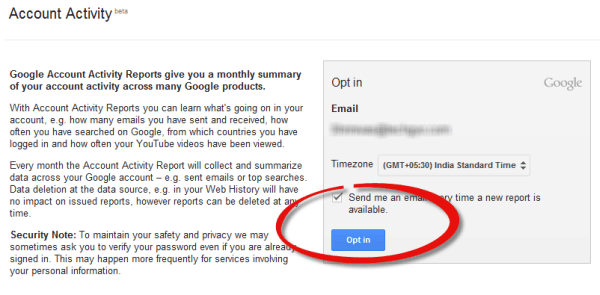
Make sure you have checked “Send me an e-mail every time a new report is available” check box in Account Activity page and click on “Opt-in” button.
That’s it.. Now within seconds you should receive your first Google account activity report to your e-mail
Just click the link embedded in the Google account activity e-mail you get and enter your account password.
Opting the Google Account Activity Let You Know About-
Emails you send and receive with most contacted ids
Account information that includes the countries you are accessing your account, internet browsers you use and operating systems you use to work.
Web history you search on Google with top queries and search type such as images and web.
According to Google the new Account Activity is helpful for protecting the Google account as it displays the sign-in country. So if someone is accessing your account from other country, you can immediately change the password and protect your account.
When you run a successful business, you can look forward to a host of rewards. However, you also have to overcome a wide range of issues and tackle many potentially serious risks. One of the things that most businesses do these days is to store data digitally, as this can help to improve efficiency, save time, ensure proper allocation of resources, and provide easy access to files and documents. However, it can also result in a range of risks for the business.
If you want to ensure your digital data is properly protected, you need to ensure you have the right solution in place. One of the very effective options you can consider is business Veeam backup solutions, and this can benefit your business in many ways. If you want to ensure your digital data is protected as well as enjoy other benefits such as enhanced accessibility, this is an excellent solution for your business no matter what it’s size. In this article, we will look at some of the ways in which this solution can benefit and protect your business.
How It Can Help
There are various ways in which this solution can help your business, so it is something that is well worth considering. Some of these are:
Access During System Failures
We all know that despite the many benefits that modern tech offers, systems can and do break down. If you experience system or service failure at your place of business, you may find that you are unable to access your vital business data and files, and this could create a host of issues. When you have this type of backup solution in place, you will be able to access them from another device and location without any issues.
Clean Backup in Case of Malicious Attacks
Malicious attacks against businesses are carried out with alarming regularity by cybercriminals, and it is vital that businesses are prepared for this. If your onsite systems are attacked, you may find that you cannot access your data and systems as a result. This can prove devastating and could result in your operations grinding to a halt. With the right backup solution, you can still access a clean backup of your files and documents even if you cannot access them on your local systems, so you can continue operating your business. It also means you have a clean backup in place in case the files on your system are corrupted or deleted.
Protection from Accidental Modification or Deletion
One other thing to keep in mind is that files and documents can sometimes be accidentally modified or even deleted by people within your organization. Having a clean backup in the cloud means that you will always be able to access originals in the event that this happens. So, you can protect against accidental deletion and modification with ease.
These are some of the ways in which the right cloud backup solution can protect and benefit your business.
As we all of us know- website speed is one of the most important factor in Search Engine Optimization. To improve the page rank one must increase the loading speed of website. To speed up the website one must either use less images in a page or images with minimal size. But what to do when you want both speed and many images on a webpage? In this scenario you can get the help of JPEGmini. JPEGmini is a photo optimization technology that reduces the file size of jpeg files up to 5 times without reducing its quality.
How to Reduce JPEG Image File Size in JPEGmini?
Reducing the image size in JPEGmini is simple, just go through the steps given below to bring down the file size of JPEG image without compromising with the quality.
Sign up to JPEGmini, you can go for a fresh account or sign up with your Facebook or else with your Gmail account.
Now click on the big blue button to upload your jpeg files, It supports multiple photos upload
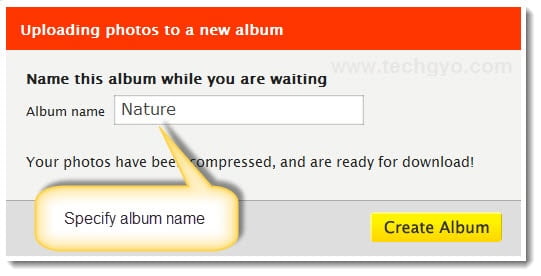
Once you uploaded your photos, you will be prompted to specify a name for your album
That’s it.. Now you can see the difference between the original size and reduced size of the image you just uploaded
You can download the reduced jpeg files that come in a zip file or send it to flckr or Picasa by hitting the respective buttons below. Be sure to download your album within 7 days as it expires automatically after this period.
JPEGmini works by evaluating the input image by unique quality detector which imitates the human visual system. According to this analysis JPEGmini applies the highest amount of compression. JPEGmini is an ultimate service that helps you save your bandwidth, load webpages faster and reduce the storage space acquired by jpeg images.
Google Analytics is an ultimate online service where we get the complete website report including traffic, advertising and website performance etc. It also helps in SEO of the website and drive targeted traffic which results in higher page rank and more revenue. By using Google Analytics we can receiveserver downtime alert by SMS or e-mail which aware us immediately when our website or hosting servers gets down.
How to Setup Downtime Alert to Receive SMS or Email in Google Analytics?
Login to your Google Analytics and click on “Admin” button at the top right corner
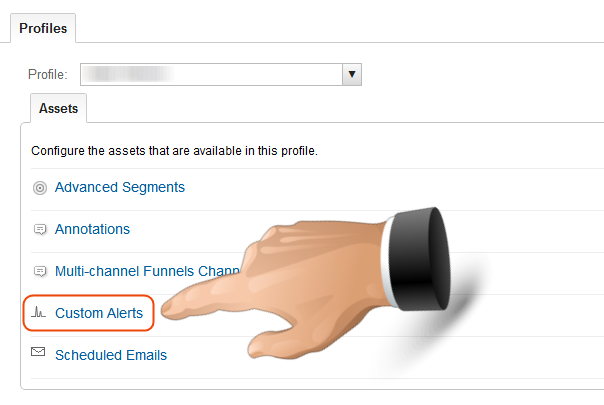
Under the Assets tab choose “Custom Alerts”
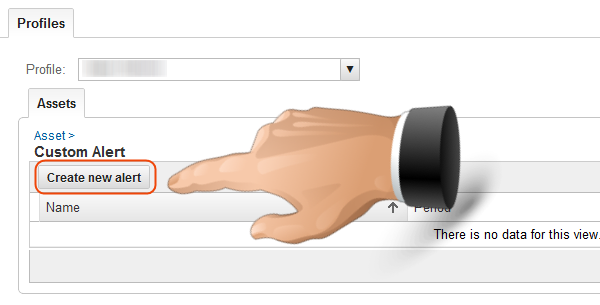
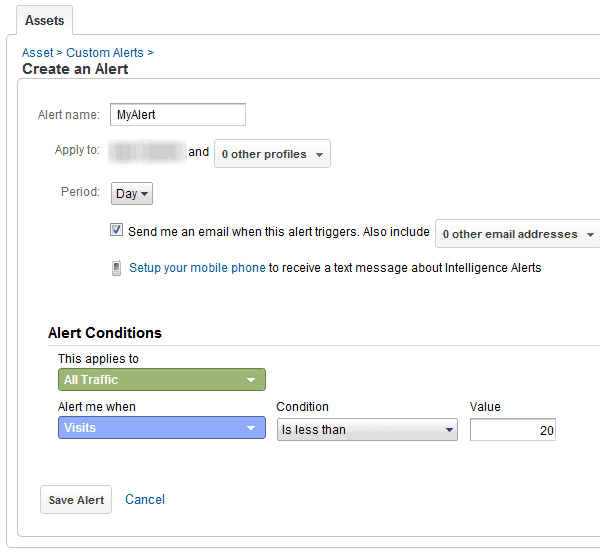
Now click on “Create New Alert” button and specify a name for your new alert, you can also choose additional profiles from the drop down box below
Further select the period of day or week or else month, you will get the SMS or e-mail according to the period you set.
Click on “Send me an email when this alert triggers” check box, click on the option below to setup your phone to receive SMS (SMS alert is available only for United States users)
Select “All Traffic” for “This applies to” option under alert conditions, now choose “Visits” and “Is less than” for “Alert me when” option. Specify the number 20 in the “Value” text box. (You can set the number according to your needs)
Now click on “Save Alert” button. That’s it… now you will be notified whenever your site gets the visits less than 20.