Home Blog Page 315

MyLife.com – Manage Your Social World Under One Roof

How would it be if you can check your Facebook updates, Tweets, LinkedIn and Email in one place? No.. I am not joking because here is a website that let you do all this in one platform, just forget roaming through different tabs in Google Chrome to access your Social Network websites as MyLife.com brings all your social stuff under a single roof. It becomes difficult to get in touch with your friends in a busy life, it is a hard time for friends when they must get separate in search of job after completion of their degrees but don’t worry as MyLife.com helps you to re-connect with your friends.

Introduction to MyLife.com

MyLife.com is a cool way to get in touch with all of your friends from different social networks in one place, whether it is a Facebook, Twitter, LinkedIn or Email- MyLife serves the updates of this entire social network and helps you find more people. MyLife won’t let you miss friends, colleagues and beloved once, it has a robust search tool that helps you bring back your missing friends and memories. MyLife.com not only connects you with your pals but also suggest the friends who need your friendship.
mylife.com

Possibilities with MyLife.com

Social Network and Emails

Once sign up to MyLife it let you connect your social networks with it. It allows to add your Facebook, Twitter and LinkedIn accounts. You can have a look at all of your social network updates on a single and secured dashboard, it is possible to update Facebook status, add comments on others posts, share or “like” others post and Tweet as well.

You can connect your Email accounts including Gmail, Yahoo, Hotmail and AOL with MyLife which allows to manage all your account at one platform. You can view or send emails directly from MyLife dashboard.

Business

MyLife not only connects friends but helps to grows your business, you can promote your business or service via MyLife.com, you can find the local service providers as well. It is also possible to find the suitable job for yourself or hire a job to job-seekers with this website. MyLife.com is the best resource to get the potential business.

Are you single? Get mingled with MyLife

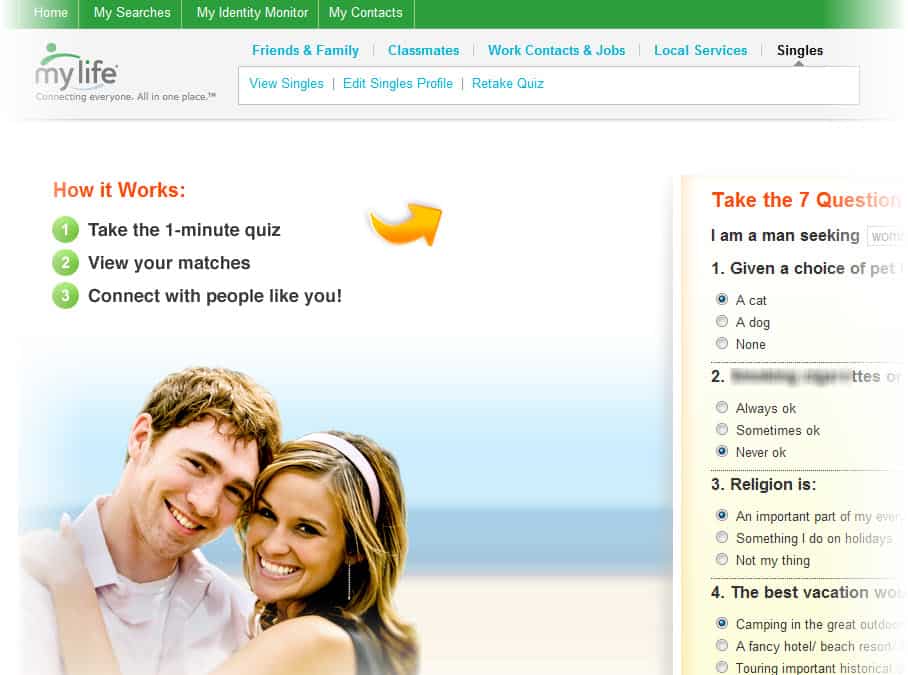
MyLife can find a perfect life partner for you. It comes up with a short quiz when you click “Single” under “My Searches”, it displays the list of bride/groom who are having the same interest. Along with this you can see who are viewing your profile and who are searching for you.

Conclusion

MyLife.com is an ultimate website to handle your social world and get connected with even more people who are having the same interest, along with friendship MyLife also help you grow your business.

[youtube]http://youtu.be/I2hb3trwY38[/youtube]
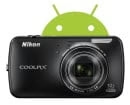
Nikon Coolpix S800c- Android Powered Cool Digital Camera

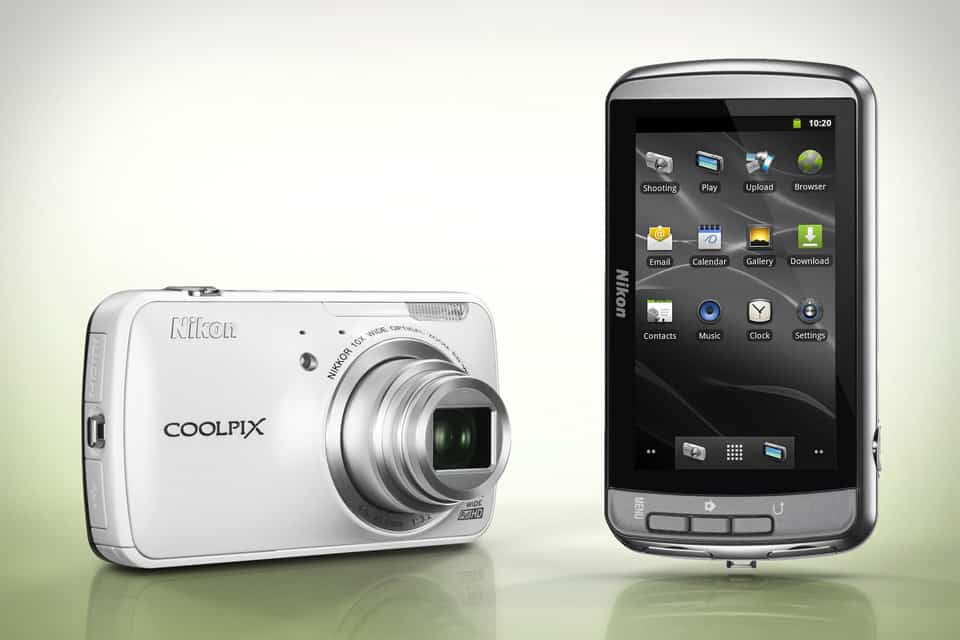
Android OS has vastly impacted the smartphone and tablet phone domain in the recent years. Recently Nikon released Coolpix S800c compact digital camera which is powered with Android OS. It comes with a 3.5 inch OLED touch panel, 16 MP camera, 1.7GB storage capacity, inbuilt GPS, HDMI support and many other cool features. Most importantly it is powered by Android 2.3 OS and Wi-Fi features. With “My Picturetown” android app you can upload and download pictures from Nikon’s My Picturetown site. Thus making it possible to carry all your pictures and albums with you. Also you can transfer photos and videos from your Coolpix S800c to smartphones and tablets.

Coolpix S800c

Android 2.3 OS

Nikon’s all new Coolpix S800c is powered with Android 2.3 OS which makes possible to connect to Google Play to customize and download the app of your choice. Use of android platform instead of Nikon’s imaging software has made Coolpix S800c more popular.

My Picturetown

You can use the My Picturetown app for android and upload photos to Nikon’s My Picturetown site. You can also download your photos or videos from the same site to your Coolpix S800c.

Wi-Fi Connectivity

Addition of Wi-Fi connectivity to a digital camera is a powerful advancement.

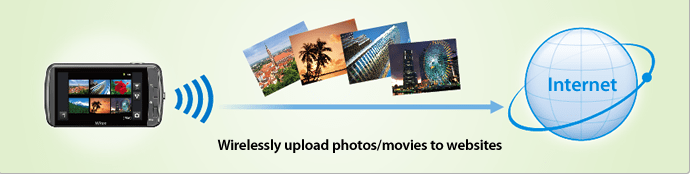
Coolpix S800c- Wi-Fi Hotspot
Near Wi-Fi Hotspot

With Coolpix S800c’s Wi-Fi connectivity you can upload photos and videos to internet whenever you are near a Wi-Fi hotspot.

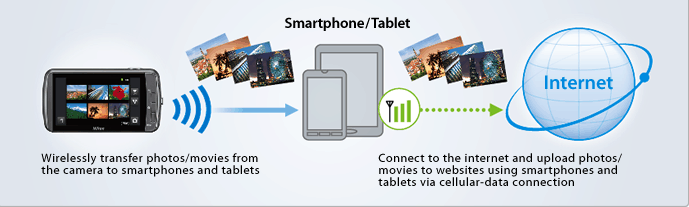
Coolpix S800c-Away From Hotspot
Away From Wi-Fi Hotspot

But when you are away from a Wi-Fi hotspot you need to transfer your photos or videos to a smartphone and then to internet. Also uploading to social networking sites is possible.

Technical Specifications

Coolpix S800c is equipped with a 16 Mega Pixel camera, 3.5 inch OLED touch screen, NIKKOR lens with 10x optical zoom. It supports HDMI for connectivity and SD cards for storage. It’s powered by lithium ion rechargeable battery. Other features like motion blur reduction, auto mode and continuous shooting modes are available.

Bored At The office? Apps To Keep You Busy And Engaged

We complain when we have too much to do in the office and we complain when we don’t have enough to do and the boredom is getting to us! It really would be nice if there could be a constant happy medium between the two but unfortunately that’s not likely to happen!

When it comes to boredom, the day feels endless as you watch the clock ticking, waiting for it to be time to finish up and head home for the day. However it really needn’t be because you can turn to your trusty Smartphone and make use of some great apps to help pass the time.bored at office

Why not take a look at a few of these to see if they have what it takes to remove your boredom:

Free Scrabble

When you want a game that is not only fun but keeps your brain functioning, Scrabble has to be up there with the best of them. This game even syncs with Facebook and allows you to play against people you know or random opponents. If your friends are taking too long to take their turn, you can play multiple games at one time to ensure you never get bored.

 Candy Crush

Candy Crush has turned into one of the most popular games that can be played on a mobile phone with its success coming down to the fact that the puzzle type game is extremely addictive. With there now being around 500 levels, you will soon realise that perhaps starting this game was not such a good idea in the first place.

Pac–Man Lite Edition

If you are after something that is a little faster paced, the eternally classic Pac-Man will certainly have you covered. The game is now available to play on Smartphone’s and tablets everywhere and will soon have us frenetically eating those dots whilst trying your very best to avoid those rather annoying ghosts.

Those were just a selection of choices that you could use to ease your office boredom, though it might be an idea to not let the boss catch you at it!

Everything Connected: Welcome to Web 3.0 The Semantic Web

Welcome to the beginnings of Web 3.0, the Semantic Web or the Internet of Things. These might sound like meaningless buzz words but they are the future of technology as we know it; it’s estimated that by the year 2020 more than fifty billion “things” will be connected to the internet, operating as a huge nervous system giving constant feedback on dozens of environmental factors.

In the beginning, the internet was a huge information resource, like a library accessible by anyone. Web 2.0 was the beginning of the sharing age, where information could come from any source, and this is what we see now – reviewing products online, sharing links and content through social media and accessing maps and directions. The future is Web 3.0, which is likened to having the internet as your personal assistant, in that it will be able to analyse and understand information on the Web and how it relates to you personally.

everything connected in web 3 0

There are signs of this shift happening already – how many times have you seen a web-based advert for a product you’ve previously searched for? The internet is already working for us, and in the future it will know what we want before we even know; it will know our tastes, our location, our dietary requirements and hobbies. Imagine you’ve just been paid, and you’re watching television when a note comes through letting you know your favourite online casino is offering a great bonus today. You will be able to connect to a site like brilliant.com on your smart TV, watch a show while you wait for a game to start and automatically share your successes on Facebook. Sometimes it is named the Semantic Web, meaning that the internet understands information, and is able to present it to us when we need it.

The phrase Internet of Things specifically refers to physical objects connected to the internet. Modern cars now have built-in GPS with traffic updates, bluetooth connections for music and phone playback through the car speakers itself; theoretically, sensors on your car could alert you through your bedside alarm clock when the windows are frosted, allowing you to remotely warm the car before you leave. Smart buildings will be able to sense temperature and presence in rooms, to avoid wasting energy heating empty rooms.

The progression of the Internet of Things means the addition of an RFID chip to a multitude of physical things. A Dutch start-up company called Sparked uses wireless sensors on their cattle which immediately informs the farmers when one is sick or pregnant; other farmers use ground sensors to assess crop conditions allowing them to remotely fix any issues.

The Internet of Things will make almost everything easier. By assigning an IP address to your keys, you could search on your phone for when they’re lost, and location-based technology will tell you if your favourite shop is having a sale when you’re in its vicinity. By being wirelessly connected to everything we can control more of our environment and avoid unnecessary waste – the future is on its way!

Now withdraw Your Fiverr Revenue Directly to Your Bank Account

1

Fiverr is an ultimate resource to buy or sell almost anything for as low as 5$. Here you can sell your skills or ideas with the niches including graphic, video, social marketing, travel, writing, advertising, programming, business and technology. There is no such a word as “unemployment” since the launch of Fiverr and many people buy or sell here just for fun. Even enterprise businesses hire their tasks on Fiverr. It is an easiest way to make money online using your skills with Fiverr.

Read our post Fiverr.com, a service where people buy and sell services for $5 for in-depth review of Fiverr.

New Withdrawal Method of Fiverr

withdrawal method of fiverr

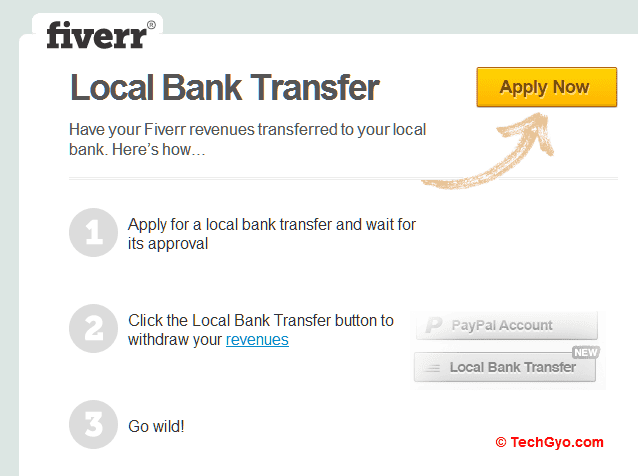
Fiverr which connects buyers and sellers has now come up with the new withdrawal method, this new Withdrawal Method of Fiverr allows sellers to withdraw their revenue using Local Bank Transfer. Earlier Fiverr used to support PayPal to withdraw the amount collected by selling gigs but now it has incorporated Bank Transfer which is a major change that helps Indian sellers to withdraw their money directly to their bank account.

Fiverr Local Bank Transfer

How Local Bank Transfer withdrawal Method of Fiverr helpful for Indians?

PayPal which is known as a safe and easiest method of online payment is always a most difficult method for Indian customers. PayPal changed its rules on 1 March 2011 as per the guidelines of Reserve Bank of India (RBI) that almost stopped buying online services.

Local bank transfer withdrawal method of Fiverr replaces PayPal and you can avoid the transaction charges of PayPal and saves your time as well, as you can directly withdraw your money to your bank account from Fiverr.

Fiverr allows you to withdraw your bucks using Payoneer Payment system which charges $5.95 as a transaction fee for each transfer. Fiverr says this feature will be available for all its users soon.


Samsung Unveils Galaxy Note 10.1

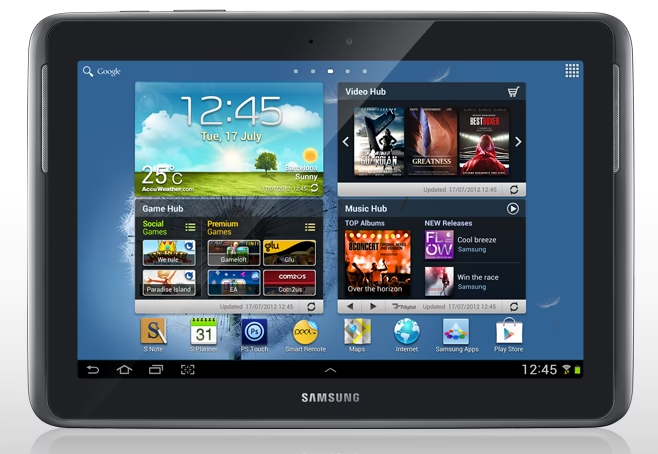
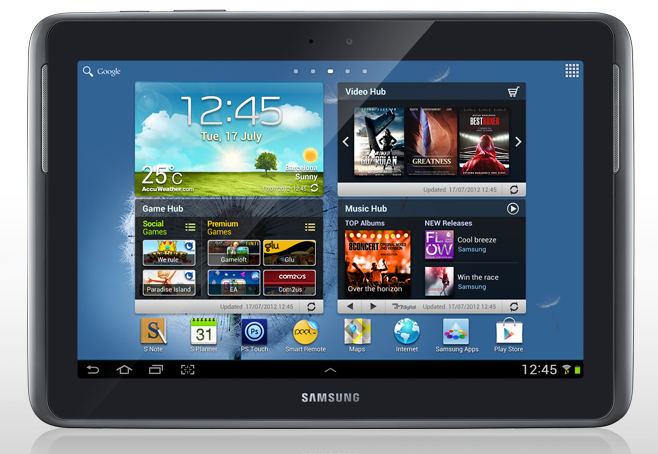
Samsung has recently unveiled Galaxy Note 10.1 to compete with iPad. It is more powerful and stylish than its predecessors, which comes up with a stylus to draw pictures and write notes. The design of Galaxy note 10.1 is quite similar to iPad. The tab is powered by Android 4.0 (Ice Cream Sandwich) and also has some pre-loaded apps including Adobe Touch, Polaris office, Gmail, YouTube and Google Maps. Galaxy note 10.1 has many cool and interesting features such as S Pen, Shape Match, Handwriting-to-text and Formula Match, it can run two apps simulation sly.

Most importantly Galaxy note 10.1 has 10.1 inches of WXGA screen that brings the screen resolution of 1280×800. Samsung has suffixed this screen size to the name of this tab, the screen resolution of 1280×800 is usually the default resolution for laptop. The tab has palm rejection support to avoid accidental touches.

galaxy note 10.1

Specifications of Galaxy Note 10.1

Processor

Galaxy note 10.1 is equipped with 1.4 GHz Exynos Quad-Core processor for seamless multitasking and rich gaming experience as well.

Display

The tab comes up with 10.1 inches WXGA screen for better output. Comparing to iPad Galaxy note 10.1 has larger screen, editing photos in Galaxy note 10.1 with the Adobe Photoshop is an awesome experience. You can edit images or touch them up with more clarity.

Memory

Galaxy note 10.1 has 2GB of RAM and is available in 16, 32 and 64 GB of memory. It supports the microSD card which can be expandable up to 64 GB.

Connectivity

In connectivity features Galaxy note 10.1 comes up with Bluetooth 4.0, USB 2.0 and Wi-Fi.

Camera

The tab has 5 Megapixels of rear camera and 1.9 Megapixels of front camera for video chatting purposes.

Operating System

note 10.1 has Android 4.0 (Ice Cream Sandwich) operating system

Other features

Galaxy note 10.1 has many other noted features including Learning Hub which has incorporated with more than 6000 e-Textbooks, video lectures and interactive coaching. The tablet helps students to make their learning more interesting.

Become a fan of Galaxy note 10.1 in facebook http://unr.ly/RVQWFv

Follow in twitter http://unr.ly/RVQXt7

This post is Sponsored by Samsung. All opinions are mine.

How to Backup Data From PC Automatically?

Let’s skim the history of backup before moving to our main article. Punch cards were used to backup the data In the first generation of digital computing, then Magnetic Tapes acquired the place of punch cards for backup purposes and then people started using Hard Drives and Floppy Disks for the same purpose. CD, DVD, USB and Blu-ray Disks are used the modern era of computing to keep another copy work.

Backing up your important data is a mandatory task, usually we backup data manually which consumes time. First of all let’s see why one should backup their data-

  • To secure the data in case of hard drive failure or crashes
  • To protect against virus, spyware or malware attacks
  • To revert back to your previous work if something goes wrong in coding and development projects

How to backup data automatically with PureSync?

Here is a software called PureSync which can automatically backup your data, the app has advanced features along with the user friendly interface. Using PureSync you can backup your important data in your local hard disk, external hard disks or USB. PureSync personal edition is free to use for home users. Just go through the steps below to backup data automatically to the selected destination.

  1. Download PureSync, install it and run it from start menu
  2. Now click on “New Backup” option, backup wizard gets open
  3. Select “Backup” under synchronization type and click on “Next” button
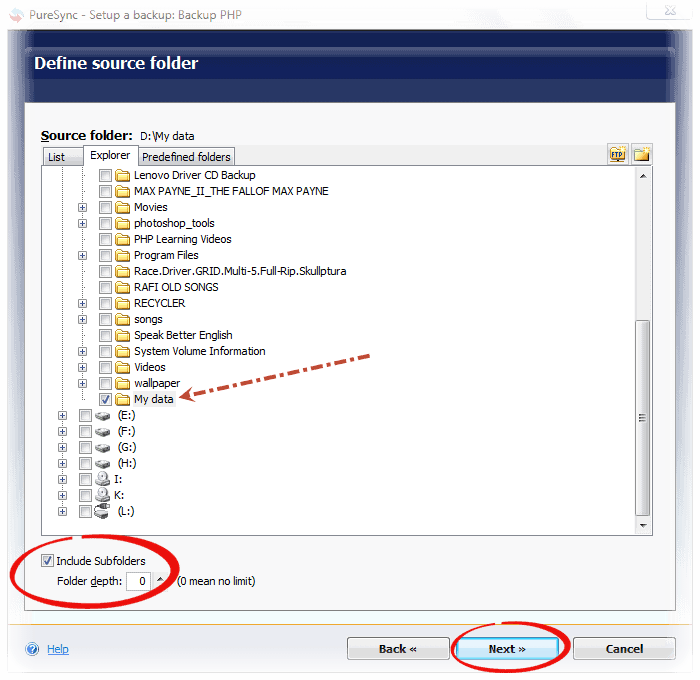
  4. Now choose the folder which you want to backup, put a right mark for “include subfolder”  check box and specify “0” in folder depth counter box. Click “Next” buttonbackup data
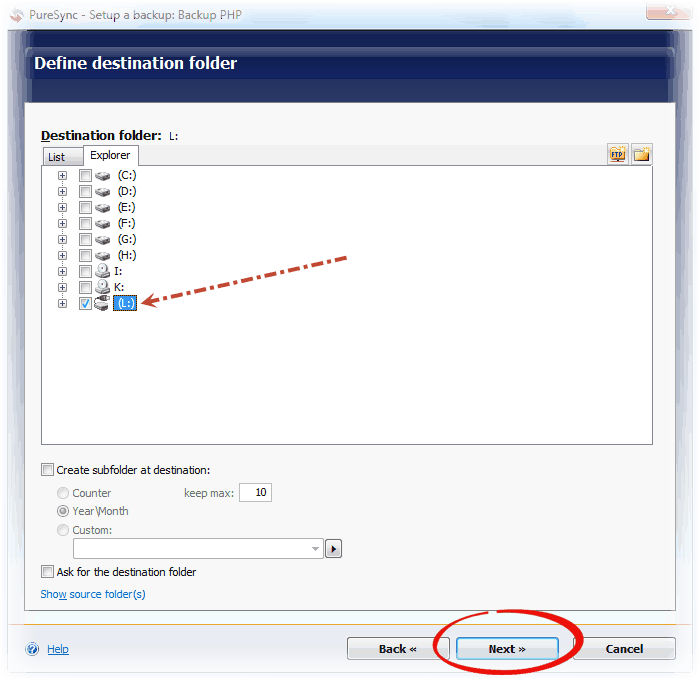
  5. Select the destination folder where you want to backup data and click “Next”
    backup data
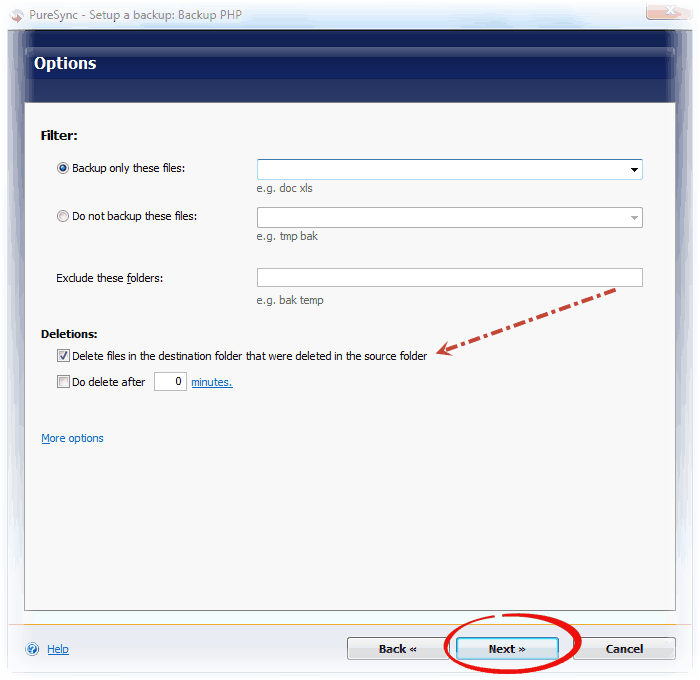
  6. It asks for more options, select “delete files in the destination folder that were deleted in the source folder” check box and click “Next”
    backup data
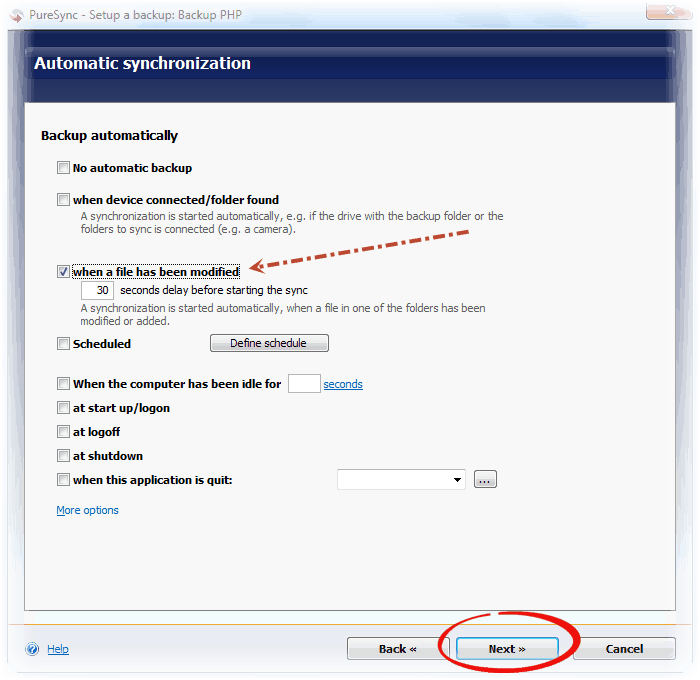
  7. In the Automatic Synchronization option select “When a file has been modified” check box and click “Next” twice
    backup data
  8. Finally specify a name for your backup and click on “Finish” button.

Freely download PureSync from http://www.jumpingbytes.com/en/puresync/download.html