Home Blog Page 253

Advantages of Using Hosted Sage Solutions

Small and medium businesses can benefit from using a hosted Sage service. The service enables your business to benefit from all of the new features without needing to continually upgrade your hardware infrastructure.

Each hosted Sage setup is tailored individually to meet the specific needs of a business, enabling you to choose from having either a licensed copy of Sage 50 software hosted on the hosts servers, or by renting the software from them on a monthly basis.

cloud hosting solutions

These two options allow you, your staff and your accountant to access your data, process the transactions through, and print reports.

Company’s such as LSA Systems, Cloud 50 and Jinota in the United Kingdom use industry-standard SSL encryption, providing safety, security and reliability, as well as unlimited support as part of your package.

Advantage of using a hosted Sage solution include:

  • Reduced initial investment

Renting a hosted version of Sage saves a lot on the initial investment of purchasing a copy outright plus hosting it yourselves.

  • Reduced hardware purchases

You will not need to purchase a powerful server to run a hosted version, whilst a copy of the programme does not need to be purchased and installed on every computer.  Instead, 20 users can have access from everywhere and anywhere with wifi access and login details.

  • No longer relying on IT Staff

Small businesses can often struggle to afford to pay for offsite IT support, therefore it makes great business sense to pay for cheaper network support over the internet whom can fix any problems remotely, therefore reducing your downtime.

  • Automatic upgrades

One major advantage of having a hosted version of Sage is that you can automatically update your software from the cloud instead of your employees wasting their time waiting for it to update on their computers one at a time.

  • Automatic backups

As well as automatic updates, your data is automatically backed up on the cloud, therefore no need to spend additional money on a backup system and disaster recovery.

  • Secure data centre

As the data is not on your premises, should an internal disaster occur, you will not lose any data and still have access provided you have a connection to the internet.

  • Better support/infrastructure

Your hosted support can provide 24/7 support and there is no need to wait for someone to turn up to your premises to fix any issues you have, causing long downtime.  Instead, your issues can be resolved remotely.

The Modern Day Way

In an era where everything happens on line these days, more and more businesses are moving across to the cloud.  This is no different when it comes to your Sage data either.

The cloud allows access from anywhere, anytime and from any device with secure login details.

There is no need for data copies or downloaded anymore – your accounting data can be stored in one place, ensuring it is synchronised for multiple users.


This Extension Prevents Chrome from Freezing and Crashing During Multitasking

0

Chrome is my favorite browser and it is ages ahead to the competition and puts other browsers to shame.

Also Checkout 35 Useful Chrome Extensions 

Even though it has all the fan following and the most used browser title and huge collection of extension. One big drawback of Chrome is that it sucks up too much memory and processing power and slows down or hangs the computer or you’ll see “Chrome is not responding” error,  if you leave lots of tabs open. Since I have the habit of leaving tabs open for the next day, this issue affects me a lot more frequently.

chrome crashes solution

Freezing has been my biggest complaint using the Chrome browser, but luckily , I found an awesome plugin to the rescue. The Great Suspender Chrome Extension helps keep browser stay alive by temporarily suspending/snoozing tabs which are not in use. Based on the setting, it will suspend the tabs if unattended for 20 seconds to 3 days, and hence it frees up the memory. This means you can keep plenty of tabs open in the background without slowing down the PC/Mac. You can really feel the chrome speeding up and performing more smoothly.

Also recommended:Top Computer Tips to Reduce Viruses Attacks

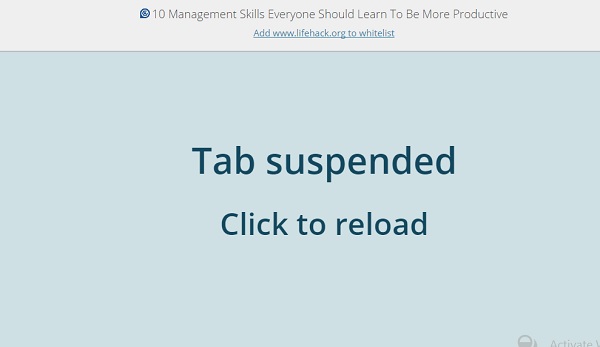
Tabs that are not used, will be put to sleep temporality based on the time you have set on the extension setting page. The snoozed tab will turn blue with the title of the page on the top and a message reading “Tab suspended. Click to reload”. So you can bring it back alive whenever you want to reload the tab with a click.

great suspender chrome extension


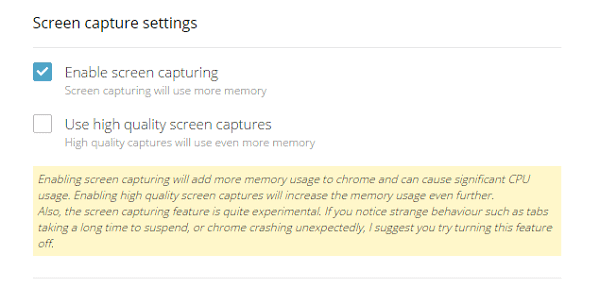
You can also set a page screenshot instead of the blue screen. The plugin will generate a screenshot of the tab and put the tab to sleep. But this is not recommended since it creates the same problem it tries to solve. Which is more use of  memory and CPU usage.

Also read: 18 Impressive Computer Shortcuts

suspend and show screenshot chome


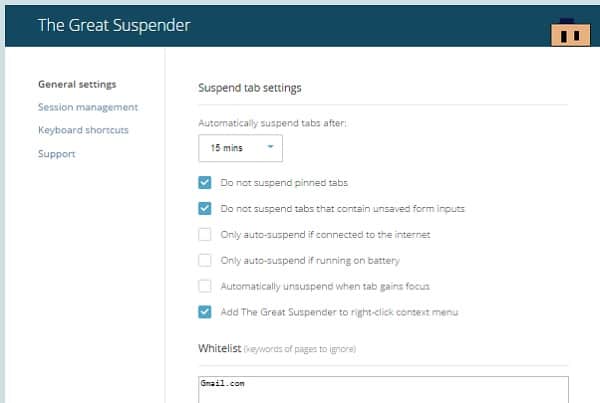
You can also whitelist websites to keep email and work related tabs to remain active. So it won’t be automatically suspended while you need it.great suspender settings chrome

Till now, I was using One Tab chrome extention to save the tabs and session and reload later. But it didn’t solve the problem with memory usage on active tabs. But this plugin helps to be more productive by leaving more processing power and memory for other applications we may want to use for multitasking.

Top Accessories you need to make HD Conference Call

Virtual meetings are as part of the modern office landscape as the water cooler. They are the convenient, cost-effective solution to connecting workers across any distance, but they can be a drag at times. Pixelated webcams, microphones that transform voices into barely audible whispers, background noise: we’re all familiar with these annoyances. However, thanks to technology’s rapid growth, there are a plethora of equipment available to improve the quality of your next virtual meeting.

video conferencing for business

Here are a list of top accessories for quality conference.

Camera

Most laptops come with a built-in webcam, but these aren’t necessarily the best option for your next video conference. They limit mobility and angling, which is important when trying to fit a large group of people onto one screen.

You need something like the Logitech C920 HD Pro Webcam, which can attach to all monitor types. Its HD resolution and autofocus features are able to capture smooth, clear video, and its affordable price makes this a great option for many different companies.

Microphone and speakers

Regardless of your conference situation, upgrading your microphone and speakers will greatly enhance the experience of your meeting. The Konftel 55W conference phone works with computers, mobile devices and desktop phones, features a Bluetooth connection (so no messing with wires and cables) and touch-screen, LCD colour display.

And if the Konftel’s price tag is a bit too steep, two other options are the Jabra SPEAK 510 portable speakerphone and the MXL AC-404 USB conferencing microphone: although they lack phone capabilities, they are compact, cheaper and great for smaller, on-the-go calls.

Headset

For one-on-one calls or meetings, a headset – with a microphone – is a great way to minimise outside distractions and enhance the audio. If you are in a profession that requires many calls from many different devices – desktop phones, computer and mobile – then the Plantronics 83544-01 Savi W720 headset is the ideal option. All calls are routed through the device and it has noise-cancelling technology to block out background disturbances.

A more affordable option is the Microsoft LiveChat LX 6000 headset: at just £50, it does almost everything the Plantronics does.

The future

That being said, the way we use virtual technology is about to change with the Microsoft HoloLens. Until now, holographic communication was only possible in sci-fi movies and futuristic dramas; however, Microsoft announced earlier this year that they are releasing a holographic computing platform – a tool that essentially lets you incorporate virtual reality into your surroundings. This could revolutionise the way we conduct virtual meetings – and technology as a whole.


Author Bio:

Gemma Falconer is a member of the Demand Generation team at Citrix and GoToMeeting, a cloud computing company that enables mobile workstyles. She has been using collaboration tools/video conferencing/online meetings for the past 6 years and splits her working time between the office and home. Having experienced the flexibility and various advantages of using such technology, Gemma would love for employers to seriously consider offering collaboration tools and flexible working for their employees so they too can truly benefit. Gemma is a mother, keen volleyball player and writer. Find her on Twitter on LinkedIn.’


Google brings Twitter cards to Mobile Search Results

0

Google today announced that it is bringing Twitter cards to mobile search results page. Starting today, you might find Twitter results along with the traditional web results when you Google search on mobile.
Mobile search will show up real-time results from Twitter, like a separate news content using Google’s familiar card-based format.

Google-Twitter search jpg

This move makes more sense, since Twitter creates lots of quick news content in short 140 characters which is more effective in gathering latest information during nataural disaster like the Earthquake which happened in Nepal last week or score updates of any sports event like Cricket.

Tweets via search isn’t surprising; in February, Twitter CEO Dick Costolo hinted at a partnership with Google in helping tweets search more easier.

With this new twitter search integration, users searching for a celebrity or publicfigure might find recent tweets from those celebrities. You can also search hashtags for the recent trends and related tweets. You may find most popular tweets about the hashtag and links to real-time tweets on Twitter. Results can be viewed on Google search in-app or on the mobile web version of Twitter.google search recent tweet results

For now Twitter result is launched in English for the iOS and Android, with support for more languages and mobile browsers rolling out gradually. Google promises desktop version in the near future.

Infographic: Cost of Loss and Move to the Cloud

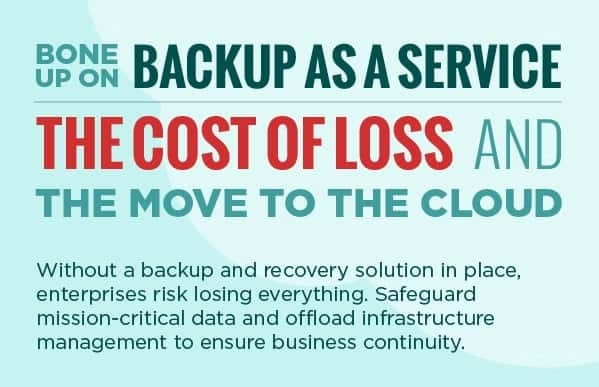
Backups are becoming an ever increasing business essential as data production continues to grown rapidly.  As data continues to expand and multiply, there is a significant likelihood that managing backups will be one of IT’s greatest challenges in the coming years.  With data loss and privacy breaches here in the present and more just on the horizon, many IT companies and experts are looking towards third parties to manage the data their company produces daily.  When enterprises reflect on the damage that data loss can produce, it becomes imperative to have a backup system in place to protect the company, the customer and the employee.  An infographic created to educate enterprises by cloud-computing company, SingleHop outlines the basic losses that can occur during a downtime.

When Backups Fail

The migration to cloud computing is becoming increasingly prevalent with small and large companies alike as the ever-increasing data load shows no sign of stopping.  64% of IT leaders already have cloud storage.  Through redundancy, this storage protects data from failures than more traditional backup methods.  Cloud storage has the ability to not only protect a company and its website from operational failure but also devastating natural disasters and human errors.

The Cost of Downtime

One instance of downtime and data loss can cost a company thousands of dollars. On average, per hour, $70,900 of mission critical data is lost.  So data that is needed on an everyday basis,  including sensitive information such as customers billing statements – is not available or possibly not retrievable.  Multiply that out by the number of hours included in a single downtime and the numbers become staggering.  This monetary number does not take into account the possibly desolating effect downtimes can have on customers and employees.  The loss of data and downtime in production can decrease employee productivity and morale, and also lead to failure to seize business opportunities and a decline in customer confidence.

The Future

With system failure and the increase of targeted attacks, the search to create tougher protection will continue and magnify in the coming years.  78% of IT experts plan to change their protection within the next two years as ever-increased security measures come into the marketplace.  Most experts would agree that cloud computing and virtual servers will the way of the future because these options secure redundant protection of company data from all of the threats out there.
Cloud backup Infographic

Loud and Clear: Three Technologies that Improve Business Communications

Your client got your text message that said, “Leave me. This cough is nasty!” So he goes home instead of doing what you actually said: “Meet me at the office at three.” This is what you get for using Siri to dictate an important message to a client in a noisy room, without so much as bothering to double-check it. Relying on an unsuitable communications technology just lost you a client.

Business-Communication_tools for client success jpg

Perhaps you will send them a fax explaining your faux pas. Unfortunately, the fax, on their end, is almost out of ink. And the last person did not sufficiently clear the paper jam. The garbled, wrinkled mess that comes out the other end might be an apology, and an attempt to reschedule, or it might be directions to the nearest tanning salon. Unreliable communications are the bane of all business.

Here are three technologies helping to improve business communications:

VoIP

For just about any application, Voice over Internet Protocol (VoIP) is exponentially better than plain old telephone service (POTS). In the simplest terms, an ordinary voice call sounds like garbage. The best sound you can get out of it is equivalent to an AM radio station. And you usually do not get the best possible quality.

There are more benefits to VoIP than pristine sound. According to MegaPath.com:

Hosted Voice is the ideal choice for businesses that want to eliminate the expense and maintenance hassles of a PBX while empowering employees with a wide selection of productivity, collaboration and mobility features. Choose from a wide selection of phones and enjoy benefits including streamlined communications, lower costs, scalability, ease of management, and access to calling and unified communications features that improve the way you do business.

While many VoIP providers focus on the aspect of saving money, saving money is meaningless if business communications are not clear. Fortunately, VoIP is a solution that provides both substantial money savings, and clearer communications.

Responsive Design

It’s not jus a place for sharing cat pictures. The Internet has become a mainstay in business communications. More and more, people are consuming the Internet on small, mobile devices. The average desktop user is sitting in front of a screen that is anywhere from 20” to 27”. Notebooks settle between 13” and 15”. A smartphone is consider to be huge at 6”. Selling better than most large phones, Apple offers smartphones as small as 4”.

Desktop web simply does not translate well when shrank that dramatically. Business messaging written for a 27” monitor has to be completely rethought for a 5” screen. Companies like SquareSpace have been using something called responsive design to automatically detect the size of the monitor on which the content is being viewed. From there, it automatically reformats the content to fit properly on that screen.

There is also the problem of downgrading assets like the quality of photos on a site, to work well regardless of bandwidth issues. Google is preparing to launch a new initiative that automatically optimizes web pages for mobile devices. The end result is that your business messaging is more accessible to more people on more devices.

Better Scans

One of the many problems with paper documentation is that both paper and ink degrade over time. Nothing bad need happen to them. They just deteriorate. That is why it is important to digitize everything as soon as it is practicable to do so. Waiting till you can get back to the big office scanner may not be optimal. What you need is a way to accurately scan business documents while on the go, and share those documents as needed.

Fortunately, many smartphone cameras are now good enough so that the phone can be used as a mobile document scanner. Many well-written apps now take advantage of this fact. From your smartphone, you can scan, OCR, edit, share, and digitally archive everything from receipts to contracts. You can even sign those contracts and deliver them, all without printing them out.

Business communication is about everything you have to express to the world, and every conceivable way you can express it. Using the latest technologies can dramatically improve your company’s business communications.


Popular PHP Frameworks in 2020

PHP is undoubtedly one of the most popular web development platforms. Having a very low learning curve and being very powerful and easy to use, PHP offers a bunch of valuable advantages that are are highly appreciated by web developers across the world. PHP platform offers a number of super powerful frameworks that make web development a lot faster and easier.

best php framework  2015

Also read: If programming languages were vehicles:

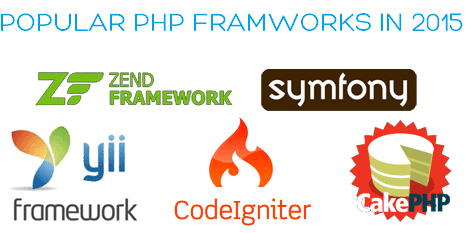
These are 5 most popular PHP frameworks in 2015

Symfony

In most lists of popular PHP frameworks, Symfony always takes top positions, and the reasons for that are really weighty. This framework is especially popular in the enterprise world, as it allows creating solid web apps and websites in an enterprise context. Symfony uses MVC (model-view-controller) approach and offers a rich set of customization options which, in fact, is the biggest loadstone for most IT specialists.

Phalcon

Though this open-source PHP framework is written in the C language, there is hardly any need mastering the C language, as functionality of Phalcon is revealed as ready-to-use PHP classes. For the moment, Phalcon is one of the fastest of all PHP frameworks that requires a minimal consumption of resources. The list of  Phalcon benefits is huge. The most popular of its draws are: platform independence, high performance, universal auto-loader, assets management and also a high level of security it features.

CakePHP

This open-source framework with a “sweet name”, features a jammy set of exceptional tools, necessary for an efficient and effortless web development. CakePHP is known for its extremely flexible architecture, swift deployment of apps, advanced session management and easy maintenance. Due to MVC convention, projects created with CakePHP are very easy to spin.

Laravel

Laravel is one of the hottest PHP frameworks in 2015. The simplicity and elegance of this web development tool are highly prized by the IT specialists across the world. The framework  can easily meet the needs of both seasoned and newbie developers and is a great choice for the projects of different sizes and types. Laravel makes it easier to develop high-end apps with a reliable and well-tested code.

Yii

The demand for this PHP yii framework developers has tremendously increased in the last few years. Yii

is widely used for the development of social media apps, PaaS, enterprise web apps and SaaS. Being very secure, stable and fast, Yii with its high performance is an ideal tool for developing advanced and highly competitive  apps of different complexity levels.

Having 10+ years of experience in developing custom web applications, Lezgro team is always ready to help you with your project. The company has a great expertise and know-how in using multiple technologies, design approaches, frameworks and devices, which helps them creating superior software solutions of different complexity levels.