Home Blog Page 215

How can the Internet of Things (IoT) benefit elderly people in need of care?

0

Smart technology has made huge technological advances in recent years. No longer confined to computers or traditional communications devices, we can now integrate and connect all sorts of electronic gadgets, household appliances and other useful devices to make our lives easier. Nowhere is this more important than when we become older and frailer.

Further development in connected technologies will help to maintain valuable independence and autonomy allowing people to remain in their own homes for longer, while relieving the burden on caregivers at home as well as in residential care and nursing homes. From IT connected hearing aids to home security products and smart help with emergency situations, there are many ways the Internet of Things can be usefully targeted at the older generation needing care. Of course, as we openly provide our data to these technologies, we are exposing ourselves to the potential dangers that lie in wait online. Implementing these safety features, particularly where the less-tech-savvy are concerned is a lot easier than you may think – one of the best ways to stay safe online can be seen here.

Also read: How Internet of Things Helps Control physical objects in the digital world

Smart Kitchens

Forgetting to switch of hobs and ovens can pose a real danger to vulnerable people living on their own. Smart home appliances can be used to control heat levels and turn the power off when a certain temperature is reached or after a specified time of operation. Using sensors to detect the presence of gas and water leaks will lead to peace of mind for all parties concerned.

smart kitchen IOt for elderly

For cooking, smart microwave ovens could use radio frequencies to communicate with people to find out what they would like to eat, show videos of how to open the packaging, then cook the food for the right amount of time ready for serving.

Also read: The Internet of Things and Mobile Homes of the Future

Smart Shopping


From smart kitchens to smart shopping is but a small step. Amazon’s Dash Button is a prime example of how IoT technology can be used to order more teabags, washing powder, toilet paper or a host of other essential household items. Simply press the WiFi connected button for the alert to go directly to the online retailer to deliver what has been requested. Controls can be set to safeguard against over-ordering and the use of the buttons can be monitored via a smartphone app.

Smart Beds

smart bed internet of things for elderly

Now being introduced into residential homes across the country are smart beds that are equipped with sensors to monitor breathing and heart rates during sleep. The data is transmitted back to a tablet or computer. Adverse changes in health – such as a deterioration in the pulse rate or breathing – can alert carers and allows for early intervention. Or, if a patient is shown to have left his bed and not returned, this could be an indication of a fall or accident needing urgent medical attention.

Fall Detectors

fall detector internet of things device for elderly

Falls are a major hazard for many elderly people. Wearable push button devices often fail because of cognitive impairment as a result of a fall, the severity of the injury sustained or because the patient chooses not to ‘make a fuss’. A fall detector such as this one developed in Canada is a ceiling mounted device that can provide real peace of mind. A verbal dialogue is established between the system and the patient to confirm if a fall has occurred before sending out a signal to get help.

Activity Monitors

The role of a health monitor could be widened to include temperature and lighting controls to safeguard adequate levels in the home. The ability to switch the light on in a particular room would cut the risk of personal injury and falling in a dark room. Similarly, monitoring the temperature in the room could ensure that the room is kept suitably heated, thus preventing hypothermia and even death.

activity monitor iot device for elderly

Thinking ahead, ultrasonic motion detectors could be used to open and close doors, cupboards and even home appliances (e.g. a fridge) for easier use, particularly for patients suffering from cognitive impairment.

Video Monitors

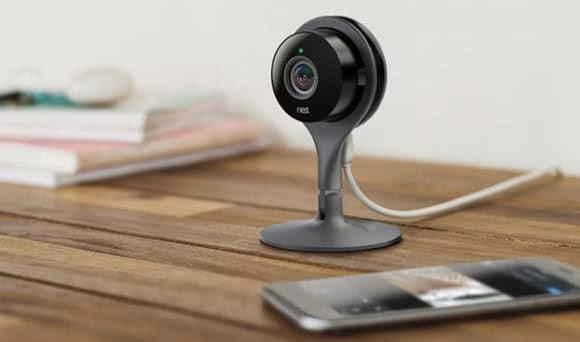
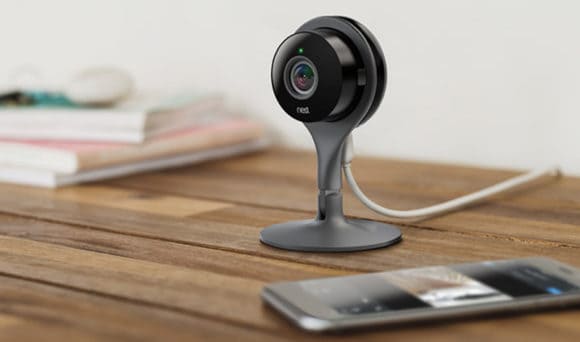
Perhaps the most controversial use of smart home technology for elderly, video monitoring is also the easiest way to ascertain the wellbeing of a vulnerable person living on their own. However, it is also the most intrusive form of monitoring and could easily be interpreted as threat to privacy – which many would agree is perhaps a step too far.

video monitors iot device for elderly

How To Find The Best Online Deals on Electronics

0

When the time comes to buy a new laptop for school or for personal use, to buy that new curved HD television, or purchase a new tablet for work or play, you don’t want to pay too much. But, you don’t want to go with the cheaper version, or something which isn’t as good as what you really want to buy, simply because of a high price tag. So, before you do buy, there are some ways you can go about finding the deals out there, on items you truly want to buy. Consider these.
Find best online deals on electronics

Storage space.

Sure, you want the latest iPad or the iPhone 7. But, the 128 GB is far too pricey. Why not go with the 32 or 64 GB version? The same goes with nearly any tablet, smart phone, or smart device out there. You’d be surprised just how much you can store on that base or entry level storage amount. And, with external storage options and expandable storage slots on most smart devices today, in the event you do require more space (which a majority of consumers will never use), you can go ahead and tack it on for a much lower price tag.

Consider model/series/brand –

A 65” curved HD television by Samsung, might cost far more than a Sony or other brands out there. Reputation is key and the higher price tag will make most consumers simply assume that is the best out there. But, a little research online will sometimes prove otherwise, and sometimes the cheaper option, is a better option. Shop and read about it before you buy; do as much research as you possibly can. You’ll be surprised how little a difference there is from one TV to the next, even though the price difference might be absurd. So if possible, take plenty of time to research, learn about different options, and sometimes you’ll find even lesser known brands are just as good, but come at a fraction of the price.

Also read: 5 Gadgets To Reduce Stress

Consider financing –

Many catalogues online offer financing. And, one of the benefits of these items, like a TV on finance , is the fact that they offer zero interest periods. These are typically long, such as 18 to 24 months for these pricey purchases as well. So, even if your television does cost 1000 pounds, if you pay this off over a period of 24 months (and pay it in full), this comes to around 40 pounds a month. Far more affordable! And, when you add in the fact that you aren’t going to pay interest on the purchase, as long as you pay it in full by the maturation date, you could be getting an even better deal on the purchase. So, compare a few top catalogues, financing options, repayment periods and terms, and consider interest free periods for larger purchases.

Also read: Best Gadgets for a Road Trip. 

Deal shopping (and timing) –

In real estate the mantra is “location, location, location.” However, when it comes to consumer goods, it is the timing of the purchase. If a product drops today in stores and online, guess what? You will pay far more for it today than you will in a few weeks, and even more than you would pay for it a few months down the road. And, yes, even if you wait a couple of months prior to purchasing an item, it is still considered new, and a leading product in the industry. So if it is at all possible, make sure you properly time the purchases you are going to make. Learn about release dates, price drops, when manufacturers and merchants typically offer sales and discount periods, and other information you can glean to help you find the best deal and prices possible when you are going to buy new electrical’s for your home and for personal or work use.

Also read: 5 Awesome Futuristic Gadgets Which Could Change the World

Sure, you always want to invest in the best, the biggest, the newest; we all do. But, there are some simple ways you can go about doing this, and still finding the best deal out there, when purchasing a new TV, a new tablet, smart phone, or other device. So, before you do purchase, keep these simple things in mind when going into stores or online, so you can save, and still get exactly what you want in the consumer good market.

Planning To Get Your Child a Smartphone? First Get Hold of a Parental Control for Android

0

If you have finally decided to buy a smartphone for your kid who has been bugging you a lot about it, there is a list of things you need to do before that.

child safety apps for smartphones

  • Know what part of using a smartphone is safe and what is not.
  • Talk to your kids about the dangerous aspects of internet and smartphones.
  • Set up parental controls.

Also read: How to be those Cool Tech Parents

Kids are excited to get a smartphone for texting, playing games, surfing the internet whenever they want and use different applications freely. They want to enjoy personalization and have a sense of freedom. They are kids and they want to explore every part of this new world, regardless of where they might end up. Parents need to know about the risks and guide their kids. They also need to keep a check just like in other aspects of life to make sure they don’t get into trouble.

Sexting, cyberbullying, adult websites, anonymous chatting, online predators, depression, FOMO, health problems and addiction are all harms you need to protect your kid from. Right education and prevention from the start can help your kid have a positive experience of digital devices.

Also read: 3 Free Dating Apps you shouldn’t let your teen use!

Setting up parental controls:

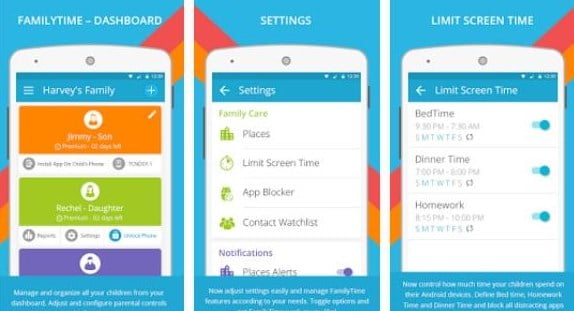
When you hand over the device to your kid, make sure you have checked its privacy settings beforehand and fixed up parental controls as well. Built-in service is available for the latest Android versions only and there are a limited number of things you can restrict. FamilyTime is a parental control for Android that goes beyond the regular services.

Have a look at what you can do with it:

child safety on smartphones

  • Manage screen time and keep it within safe hours with screen locks.
  • View all installed applications.
  • Block the unsafe apps and get alerts if your child tries to access them.
  • Monitor cellular activity like calls and contact.
  • Add shady contacts on a watchlist and get notifications in case of any correspondence.
  • Monitor text messages.
  • View their web history and bookmarks.
  • Locate with continuous GPS tracking.
  • Stay posted with Geofencing alerts.
  • Get pickup reminders from the child.
  • Get notified in a panic condition.


The use of this app is done with the child’s knowledge. Talk to your kid about parental controls and their need. They should know what you are doing and why. This will help them be careful and appreciate your protectiveness as well.


Give the best to your kid!

Sooner or later, you need to get a phone for your kid in order to stay connected with them. Just make sure to use a parental control for Android before letting your kids dive into the excitement and fun. It would keep them safe and your worries at bay. Sexual predation, teen sexting, and screen addiction are serious issues that need to be catered from the start. Check your “smart” before giving a smartphone to your kid!

Quick Guide To 8 Different Content-Type Options in 2020

0

You blush with excitement as you see one of your content getting many likes and getting shared by the minute. You have every reason to feel overly optimistic about the content you are publishing next. After all, the momentum is on your side. But wait, why is nobody taking notice? Weren’t you the king of content marketing just a few hours back?

You have to realize that the virtual world is a tough battlefield. Audiences are bombarded with hundreds of thousands of content every day and standing out in a mob of influencers isn’t easy. Based on a survey by the Content Marketing Institute, only 42% of content marketers are confident that their content marketing strategy is effective. Only 5% say their technique is “very effective.”

The problem often lies in identifying the target market for your content. You have to spot the ideal audience for your content before you can map out a strategy. Offhand, you should know that information graphics are not likely to work for teenagers, and funny memes would just be a waste of time for businessmen. You have to know the types of digital content that can work for your brand and your target audience so you will not waste another minute creating content that target audience would consider as a spam.

Get to know the different types of content for your brand that will surely push the right buttons and make your target audiences tick.

Teach Them “How-To”

content guide types of content marketing

Photo courtesy of sonson via Flickr

The World Wide Web seems to have all the answers to all the questions of humanity. You want to know how to make your own body scrub, contour your face, or how to answer a math problem? The Internet will show you how. And people love them.

Does this fit your brand and your audience? Aside from a step-by-step list, how-to videos are among the most popular types of video content. Trust that if digital audiences want to know how to make something, they will YouTube it. If your brand is into the design, fashion, beauty, gadgets, food, construction, etc., you may want to explore this content option. You may teach your audiences how to decorate their bathrooms, dress like Selena Gomez, achieve JLo’s look, edit photos on their phones, make a tasty meal in 15 minutes, or make their own coffee table out of wood pallets.  Women, young professionals, hobbyists, and enthusiasts will surely love your how-to guides and videos. Just make sure that your how-to content is truly helpful and is also a good read.

Age of Listicles

type of contents for huge traffic

Photo courtesy of Rotatingmass via Pixabay

There is a list of practically anything. From the top 12 red carpet looks to steal to the top 10 things to do before you turn 30, there’s a listicle or list article for you. Lists are attractive to the MTV generation that is used to countdowns. Readers, especially millennials, are drawn to them because bite-size information is simple and spot-on and does not overwhelm. Be specific with your choice of topic, be helpful, simple, and relatable. Just about any number could work but make sure to be competitive.

Let Me Guide You

Guides are a great way of walking through your audience to get to know a service or product. Guides are usually longer and require a good idea and a good writer to pull it through. Great examples include a guide to the must-see movies of 2016, a guide to juicing, and a guide to travelling on a shoestring budget. It needs to be detailed and specific but simple and interesting.

Attracting with numbers

viral traffic content type

Photo courtesy of TBIT via Pixabay

If you need to present some complex data and want people to actually be interested, make statistics and numbers look appealing with infographics. Visual presentation of data is among the most popular types of web content because they are easier to consume and much more shareable. Infographics are liked four times more than presentations and are shared twice more than documents. Remember that aside from the data and the visual design, this type of content must also convey a story.

Tap Play for Video

Different types of video content are taking over the content marketing world. After all, who wants to read a 1,000-word promo article if he can watch a one-minute video of it? Again, the idea is to simplify because people do not have much time or are simply impatient. According to a study, videos engage users twice as much compared to average posts. If you are selling drones, for example, it would be helpful to produce videos captured by the actual drone. If you are a travel company, produce videos of past clients while on tour or give your target market a preview of what they will experience if they book one of your tours. Videos can work for almost any brand. Just make sure to plan carefully, craft a message, and tell a story each time.

Impact of Images and Illustrations

content type ideas for conversion

Photo courtesy of skeeze via Pixabay

Psychologist Albert Mehrabian says that 93% of communication is non-verbal. This means that if you do not have the words to say it, you can use photos and illustrations to show it. Powerful images can help amplify your message and can have a real impact on your followers. They are also viral and shareable in nature.

What Others Think

content marketing types

Photo courtesy of Markgraf-Ave via Pixabay

Enhance your brand’s credibility and start building relationships by adding reviews to your content marketing funnel. A 2014 BrightLocal consumer review survey revealed that 88% of consumers trust online reviews as much as personal recommendations. Have space for users to review items and ask questions. Amazon does it very well. Reviews are especially recommended for marketing products. Curated content on a particular product or comparing two similar products also work. You may also take off from a question to address a more specific concern. The key here is to be truthful and transparent.

Proof in Case Studies and Testimonials

To demonstrate what you offer, it would be great to have case studies and testimonials. Show your readers how you have helped one client to give them a preview of how you can help them too. This is a good format to display your skills and expertise that can ultimately build your credibility. Dedicate a section for testimonials as a proof of your brand’s value.

Tickle the Funny Bone

blogging content type options

Photo courtesy of gratisography.com via Pexels

Before we proceed, you should know that humorous posts should be used intelligently and sparingly or you risk being known for that one brand that knows nothing better but low-value memes. It is true that people love anything that can make them laugh and can easily be shared. Memes are easy to make (no genius design skills needed), viral in nature, and highly relatable. They are best primed for your social media marketing efforts. Use them once in a while but be careful not to devalue the message of your brand. Even memes have to be consistent with your whole content marketing strategy.

Sharing in a Podcast

Podcasts are still a good form of content. They are easy to make and perfect for brands with audiences that want to listen to something while driving, commuting, exercising, or simply interested in discussions. As with other types of web content, make sure your podcast is anchored on a really engaging and interesting topic. Announce it on your social media networks so you can drum up the excitement. Encourage participation. You may repurpose the podcast by creating a graphic of the best quote or cutting a really interesting bit of the conversation and make it an entirely different content on its own.

With the pressure of competition and the number of content options available, it is easy to understand why most marketers would subscribe to each one, not knowing that they are wasting resources and not engaging their followers. You need to identify and understand the target market of your content so you can effectively reach them through the different marketing options that they will surely appreciate.

This was a guest contribution from Aby Nicole League. Click here to submit your guest post.

3 Tips for Using Wikipedia as an Authentic Research Source

With digital literacy taking over the print form, it is becoming really easy to gather information when that comes to carrying out researches for official projects or any academic assignments. Wikipedia or Wiki in that case (hands down) is by far the most relied upon free encyclopedia. And there’s nothing more convenient if you are looking for some quick information. But you should be extremely cautious when using Wiki as the data provided on the website isn’t always trustworthy for incorporating into your research projects. There always is a considerable amount of risk involved. The site itself displays “Welcome to Wikipedia, the free encyclopedia that anyone can edit. This means that the credibility is at risk. Wiki can definitely be your grade-killer or be that valuable friend. But it remains an undeniable fact that usage of Wikipedia can or cannot be authentic depending on your research ability, understanding & knowledge.

Wikipedia - The Free Encyclopedia

Wikipedia is often banned entirely and the reason is simple. This free encyclopedia enables every person on this planet to edit its article pages or provide information for the same. This means that any person can contribute whatever information he/ she wants that too without any sincere fact checking. People can add wrong or misleading data. And usually, it takes anything between weeks to months for detecting & appropriately updating the info by an official Wikipedia administrator.

But again, it is also an amazing tool that can provide you with factually accurate and usable information. The library is stocked with a plenty of material relating to various disciplines. And here is how you can accomplish the best out of the not so credible Wikipedia for all your research assignments.

1. Use “References

So to get a general overview of your research topic using Wikipedia, you can easily follow the references it provides. Most of the articles are capable of being modified without any warning but they having a “Reference” section that comes in super handy. This section basically contains all the links to the real and credible websites/ articles which are elsewhere on the Internet. And the information on those links is by people who are regular with their fact checking responsibility. This way it is easy to even validate the provided information and make the material a reliable and important part of your research.

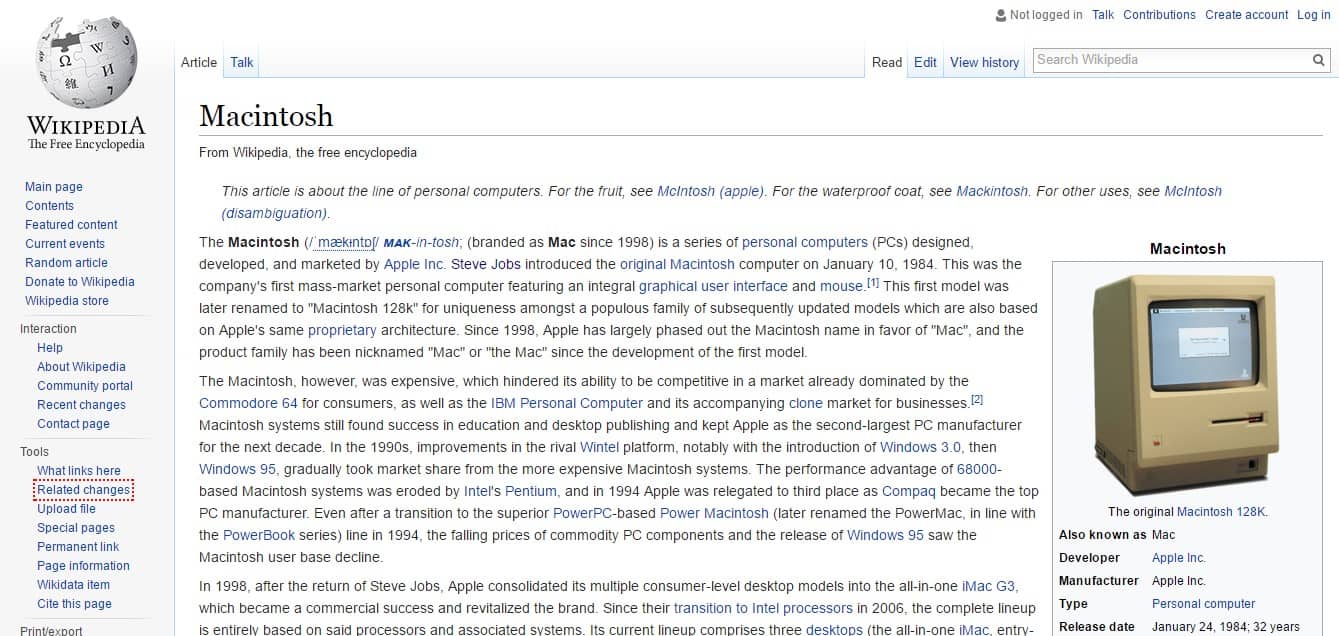
So let’s say you are carrying out a research related to the history of Apple Macintosh computer. You visit & search Wikipedia for Macintosh and start to gather the required data.

Apple Macintosh Search Page by Wikipedia

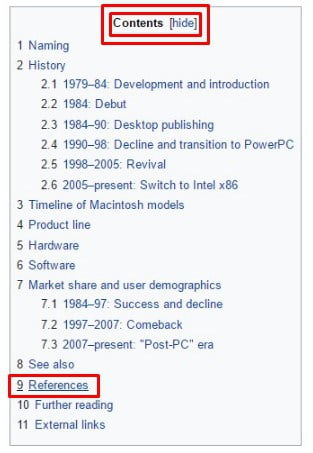
The first step to ensure what information is good enough to go forward with is to straight away check the Contents Table > References.

Apple Macintosh Search Page Content Table on Wikipedia
Apple Macintosh Search Page Content Table at Wikipedia

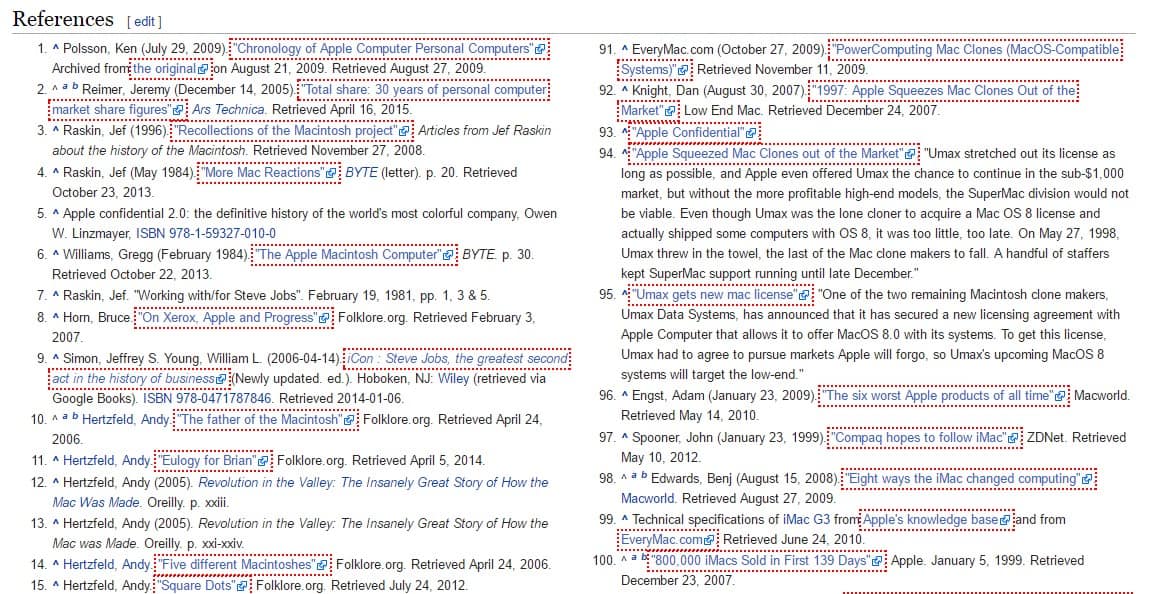
This takes you down to the section where you can actually see all the reference used in this article with proper citation. You can click those links and view the real & trusted articles. It also lets you explore certain books and other offline sources that might have been used in the particular article.

Apple Macintosh References - Wikipedia
Apple Macintosh References at Wikipedia

So this way, Wikipedia acts as a portal to plenty of legitimate references making your research somewhat genuine.

2. Trust “Protected” Articles 

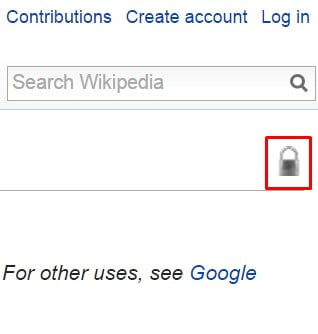
In the recent years, Wikipedia has taken multiple steps to ensure the authenticity of popular articles along with them being factually correct. As they lack some amount of credibility, the best way is to look out for a lock symbol” at the top right corner of any Wikipedia entry.

Article Protection - Silver Lock Symbol
Article Protection – Silver Lock Symbol
Article Protection - Silver Lock Symbol
Article Protection – Silver Lock Symbol

So Wikipedia has several color locks representing different standards of protection. These typically mean that the public has limited or absolutely no access to modify any of the contents relating to a particular page. And the most common you will find are the Gold and Silver padlock symbols.

Silver Lock Protection for Wikipedia Articles
Gold Lock Protection for Wikipedia Articles
Gold Lock Protection for Wikipedia Articles 


The gold lock or “full protection” means that an article can be edited only by the wiki administrators. It directs at people who possess better chances of knowing what they are doing!

The silver lock or “semi protection” means that an article is semi-protected preventing any edits from unregistered users. Even the ones whose accounts aren’t confirmed can not edit an entry. A few others include the Pink, Blue, Green, Purple Grey, and Black padlock protections.

Other padlock protections for Wikipedia Articles

So whenever in doubt, try to find the articles with a gold padlock symbol which enables full protection. But also bear in mind that even the administrators can loose the ball. You can look out for other icons or symbols at the top right corner like “good” and “featured”  for knowing the decency of an article.

3. Wikipedia’s “Reference Desk

This is Wikipedia’s own virtual reference desk which is much like a library. It lets you ask just about any question to which a Wikipedia volunteer happily answers. Of course, you should initially try searching from the Wikipedia search box and only opt for this option after you do not get what you want. This reference desk answers all your queries apart from giving out legal or medical advice. And for your knowledge, even a random Wikipedia user can answer your question. This again reduces the credibility. So be sure to request for one or more reference links that authenticate the answer and indicate a credible source.

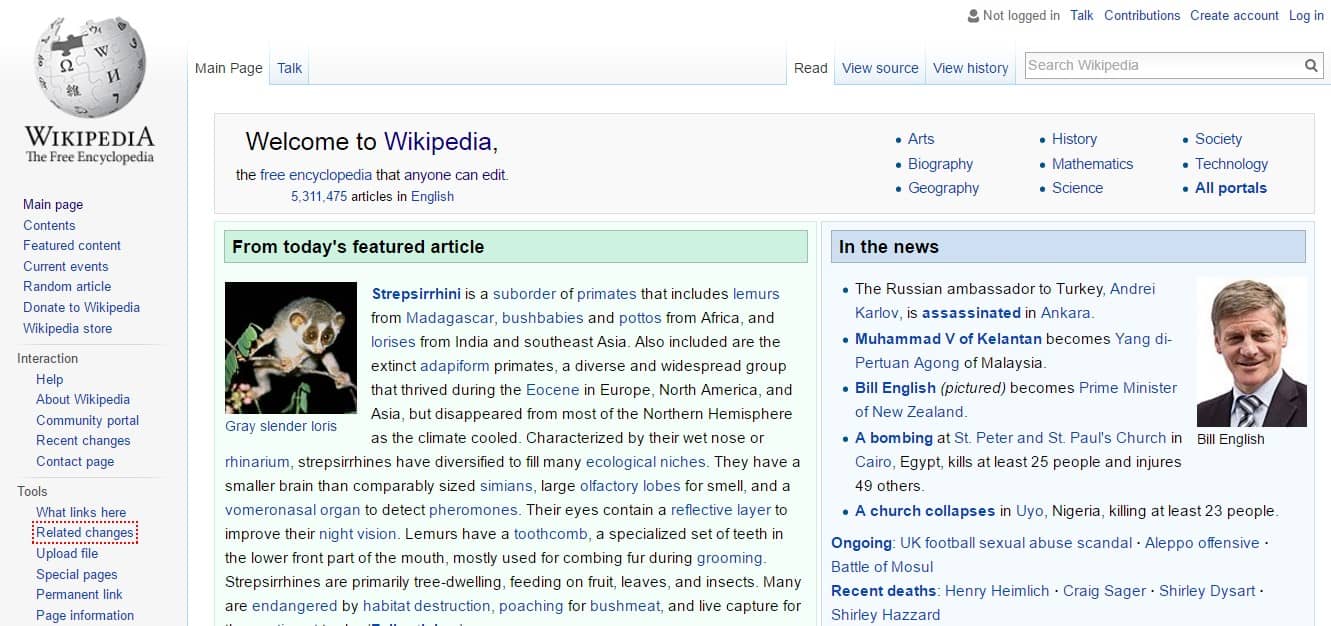
To access the Reference Desk, scroll down on Wiki’s main page.

Wikipedia - Main Page
Wikipedia – Main Page

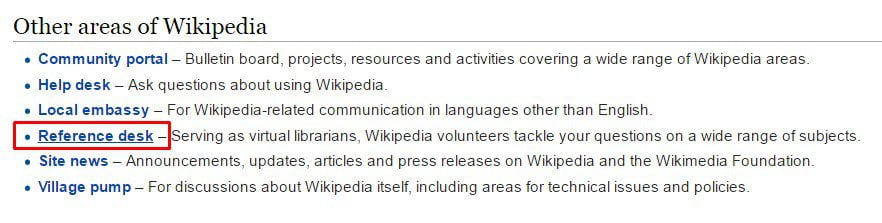
And keep scrolling until you see the Other areas of Wikipedia” section. Click on the “Reference Desk” option that serves as a virtual library.

Other areas of Wikipedia > Reference Section

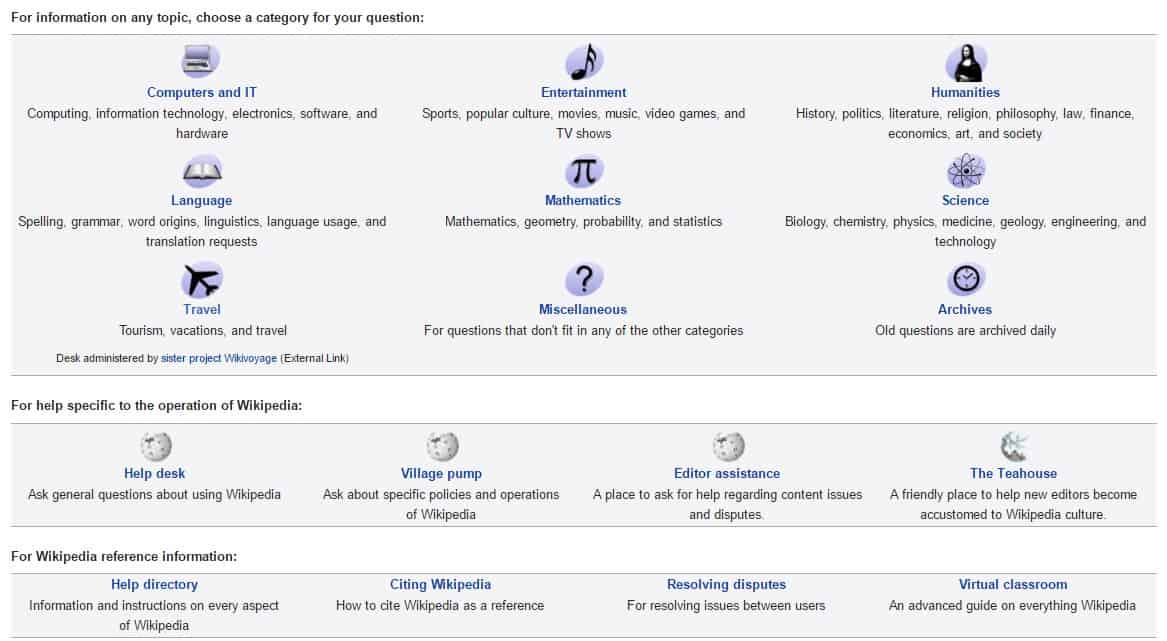
Click and choose a category according to your question.

Choose a category for your question

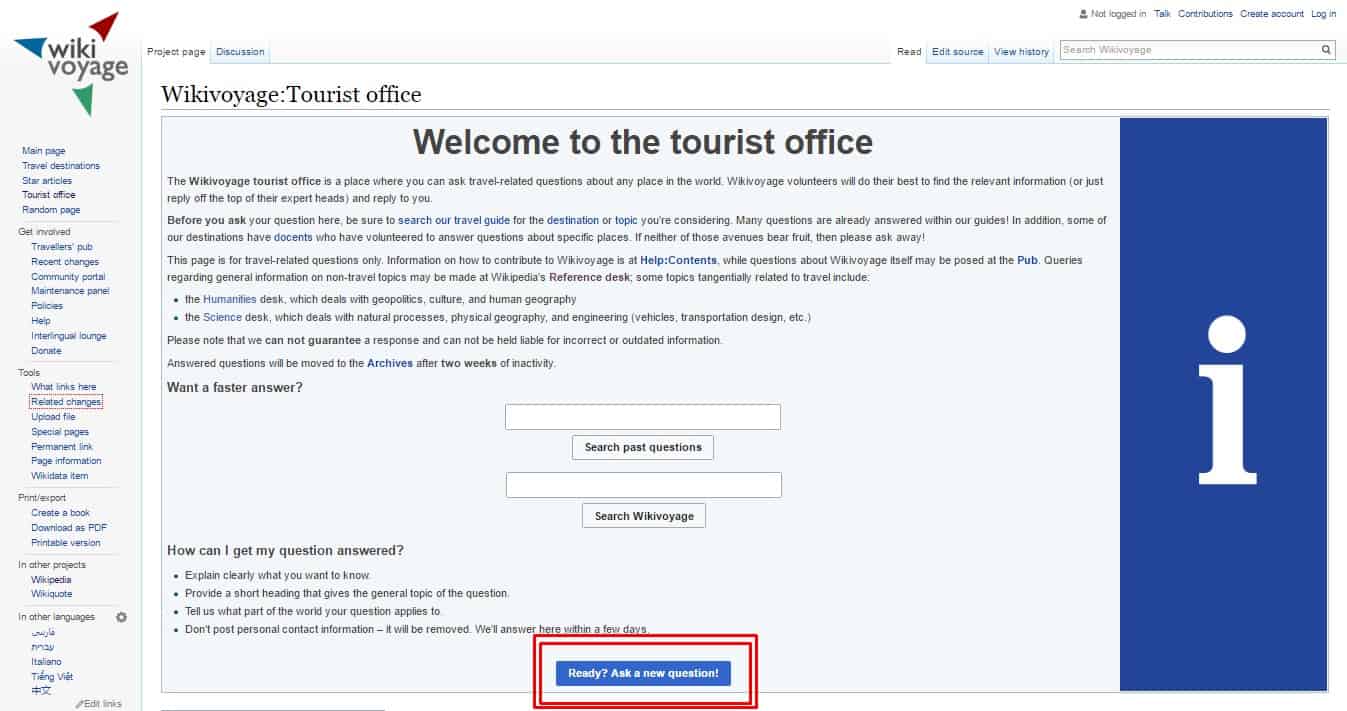
And on the following page, click the option Ready? Ask a new question!” if you couldn’t find the answer on actual wiki search.

Category: Travel | WikiVoyage | Ask a Question

But please note, it can probably take anything between minutes, hours or days for receiving an answer to the question you posted on Wiki. So keep up with your patience!

Therefore, I recommend not to use the above mentioned tips as an excuse for disobeying the instructions laid down by your professors or bosses. The suggestions may be helpful but make use of them in the case when it’s a personal research or when it’s allowed by your supervisors.

F1 to F12 – Function Key Shortcuts You Should Know

0

The keyboard of every system (laptop or PC) comes with a set of Function Keys — F1 through F12 which are located on the top row catering to several different functions. They are not there just to gather dust but to fulfill some really useful purposes.

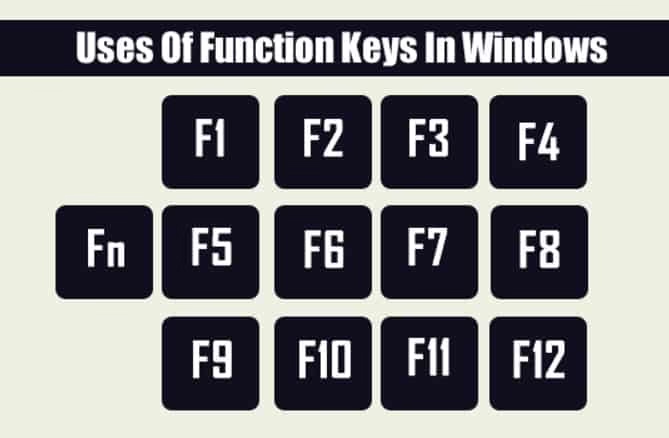
FUNCTION KEYS ON YOUR KEYBOARD — F1 to F12

The keys actually offer you with tremendous opportunities but only if you are able to utilize them optimally. These may be employed to function individually or with certain other key combinations like with the Ctrl and Alt keys. Most of you might be aware of the functions these keys perform but there still are many who might not

The keys actually offer you with tremendous opportunities but only if you are able to utilize them optimally. These may be employed to function individually or with certain other key combinations like with the Ctrl and Alt keys. Most of you might be aware of the functions these keys perform but there still are many who might not know the same. So if you are amongst the latter, then you are at the right place to discover the uses of these keys which allow you to take advantage of the offered possibilities along with saving your precious time.

I have listed down the most common, convenient and time saving uses of these keys. Of course, you can use the other additional key combinations but I won’t be going that deep. This article defines only the general use of the Function Keys across most internet browsers, Windows Operating System and Microsoft Office program.

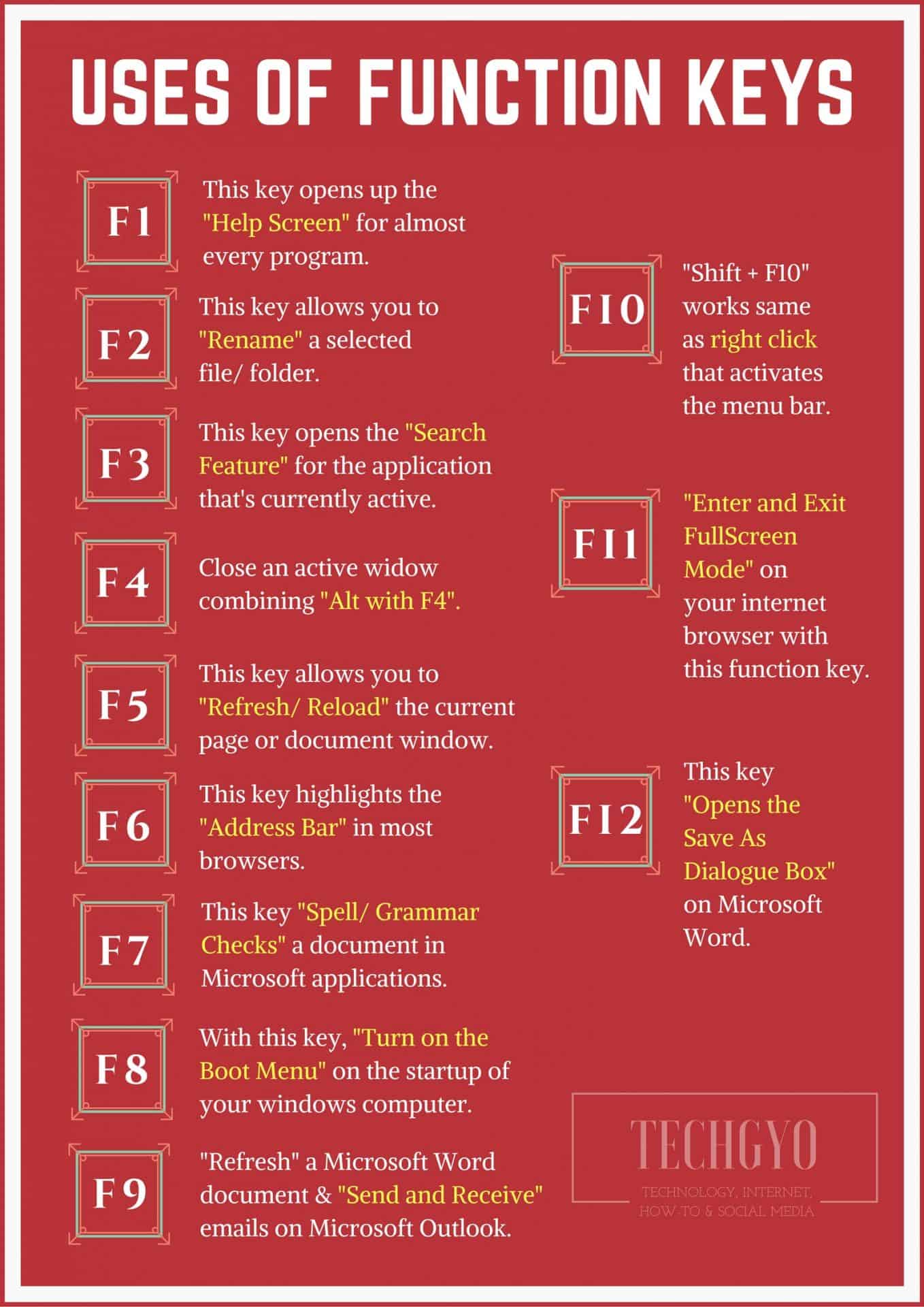
USES OF FUNCTION KEYS - F1 to F12
USES OF FUNCTION KEYS – F1 to F12

Benefits of using technology to manage employees

0

Employers are always looking for new ways to manage their employees. Technology can be a powerful tool for managing employee performance, tracking hours worked, and communicating with staff. Here are some of the benefits of using technology to manage your workforce.

employee benefits tool

Better communication 

Managers can use technology to communicate important information to staff. For example, many companies use instant messaging programs like Skype or Google Hangouts for one-on-one chats with employees. Managers can also make announcements over the company’s website, email the entire workforce, and even post articles on social media sites like Facebook and Twitter.

Better performance 

With technology, managers can provide employees with better feedback. For example, if an employee does well, the manager could send a quick email telling the staff member what they did well and how to keep it up. Employees can also share their opinions in online surveys that allow everyone in the company to provide feedback on various topics.

Simpler 

Employee benefits is another area where technology can help make things a lot easier and simpler. With new online technologies that can help companies manage and administer employee benefits, HR departments are saving both time and money. This frees up time and gives the organization a lift by simplifying and automating costly and time-consuming processes. 

Saving time 

Technology can also help managers do their job better by freeing up more time for work. In a regular 9-5 schedule, employees may not be around for extended periods during the day. However, with technology, things are different. With instant messaging and email, managers can reach out to employees at any hour of the day without having to leave their office or make a phone call.

Improved accuracy

Technology can also help improve the accuracy of employee tracking and data. This is important for businesses that need to keep track of inventory, project deadlines, or worker hours. By using automated tools like barcode scanners or time tracking software, businesses can improve the accuracy of their data and save time in the process. This technology helps manage employee performance, meaning that companies can be sure that their data is accurate and reliable.

Saving money 

In addition to the direct benefits to companies, using technology for managing employees can lead to an overall improvement in company performance. This allows employers to save money on hiring new people and training them, all while meeting employee needs and improving productivity. 

Conclusion

Technology can be a great tool for any business owner. With the help of technology, managers are able to meet employee needs more effectively and boost performance within their organization. These are a few of the benefits that come from using technology as a management tool. In the end, it is up to the employer to decide which technologies will work best for their individual company and employees. However, with many different types of technology available today, it’s likely that there is something out there that can help any business improve employee productivity and communication.