A lot of our day-to-day activities have shifted from offline to online and most of us hardly spend our time playing the day because a lot of our activities are done in front of our computer screens. With all the features and multimedia online it is almost impossible to resist the fun. But long waits for videos to buffer spoils all the fun. For some slower loading may be due to slow broadband speed, but in other case where you have average speed and yet experiencing slow video playback, then we have some tips to speed up streaming videos faster while surging websites like YouTube, Vimeo, Metacafe and others.
Also read: 5 Free Tools To Download Videos From any Website
I know it can be really frustrating when you have to wait for videos to stream. I would also like to remind you that the first step towards perfect faster streaming video is having a solid broadband internet connection so you shouldn’t expect to get results by using one old and ineffective dial-up connection – if you really want to speed up video streaming the first step to take is upgrading your internet connection to a solid broadband connection. Once you are sure you have a solid broadband internet connection you can follow the tips below to get the best speed for streaming video online.
Also, read 3 Reasons Why Your Internet Connection Is Slow.
Tips to Speed up streaming video
Let’s look at some tricks and configurations which can optimise and speed up video streaming. Below I have explained 3 ways to speed up video streaming online.
Also read: How To Watch 3D Videos on YouTube Tips and Tricks
#1 Turn Off Hardware Acceleration
The quality and effectiveness of the videos we watch online are greatly determined by the hardware we have so it is highly important to customize our hardware settings for the best performance. By default, hardware acceleration is enabled on most computers and this is known to affect the quality of streaming you get. A great way to make sure your video streaming is uninterrupted is by turning off hardware acceleration.
ALSO READ: How to Optimize PC without using any Third Party Software
You can do that by following the instruction below ( Steps Apply for all Windows OS):
Step 1: Go to “Start Menu and go to “Control Panel”
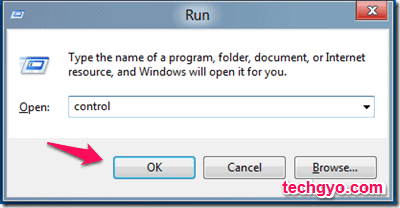
Or press the Windows button and “R” for RUN command and enter CONTROL as in the image below.
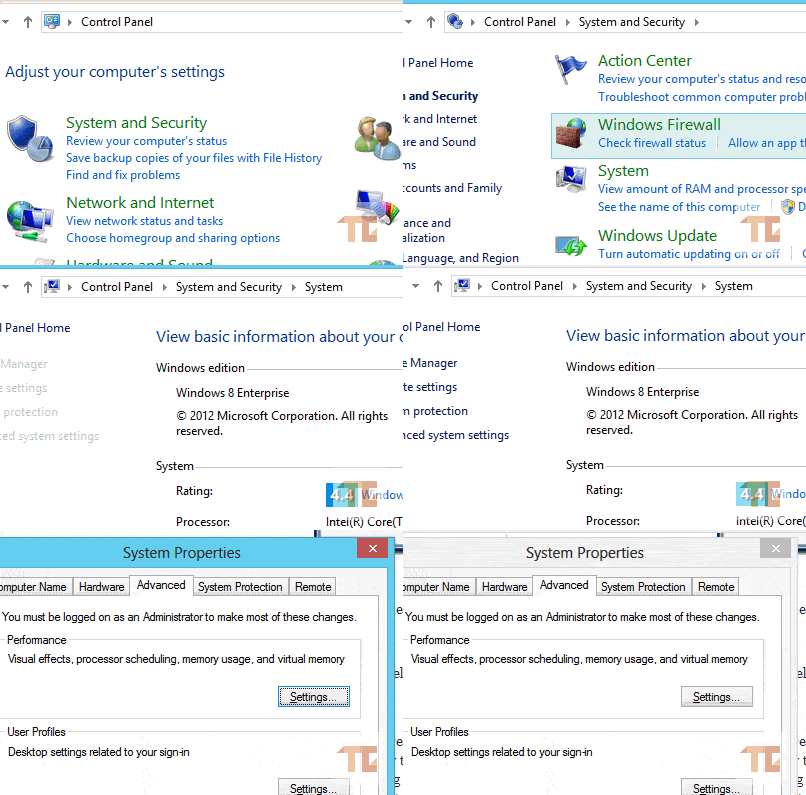
Step 2: Click on “System and Security“
Step 3: Select the “Settings” tab and then click on the “Advanced System Settings“.
Step 4: Select the “Troubleshoot” tab and disable the hardware acceleration completely by dragging the slider to the extreme left (none).
Also read: YouView Internet TV – Television Over Broadband
#2 Video Accelerators to Speed up YouTube Streaming
A lot of great companies have evolved with great research and products that help you get the best from your internet connection. One of such great products also has the ability to help you get the best quality for streaming videos. A great way to improve the quality of the videos you watch while avoiding playback errors is by using a video accelerator. Most video accelerators already have the best settings for the biggest videos sites (YouTube, Vimeo, Metacafe etc.) that will help you stream videos without the hiccups so you only need to install the accelerator software and begin to enjoy seamless video streaming.
Speedbit Video accelerator

I’ve not personally tried it but this tool is rated top among users, Speedbit video accelerator is specially developed for YouTube streaming. It is only 2.15MB and this software is available for FREE. Though they have a premium version, which you can get for $39.95 and enjoy HD playback, and iTunes acceleration, it the premium version has automatic setup.
3# Use a Video Specific Proxy Server
Another effective way to stream videos online seamlessly is by using a video-specific proxy server. Video specific proxy servers are created and dedicated to the purpose of streaming videos online only so you’re always assured of getting the best from using them. These proxy servers have been configured to stream videos effectively and since they’re for that purpose only you don’t have to bother about erratic service.
Let us know if you were able to speed up your video streaming without buffering. Also, let us know how we could improve the post with more tips which you have tried.