Home Blog Page 364

How to Highlight Important Text in a Web page and Send It over To Your Friend?

3

Update: Unfortunately, as of 2017 awesomehighlighter.com has stopped their service. We will update alternatives soon.

If you are reading a book, you could’ve marked the important paragraph important text with yellow marked pen. But have you ever wondered how to do the same with web pages? Wonder no more, today, I found a nice tool which lets you do the same. not only that you can mark important text, but also add notes and send it to your friends with a short link. You can make use of this service from here. This service is hassle free, no software installation required from your part or from the other end who is receiving the link. Everything works online smoothly.

Must have situation to use text highlighter :
  • When someone is confused on what you are pointing to.
  • Save time of the reader.
  • Explain points with students of friends.
  • To save parts of a page which you found interesting.

And the list goes on and on…

What are the Features?
  • You can create an account and save all your markings.
  • Gives you a short link of your marking to send it to your friends via email.
  • Allows you to add notes in addition to highlighted text.
  • Available as Firefox addon, so that you don’t need to visit the page again and again. (click here)
  • You can email your highlighted web pages and share via twitter, Facebook, and bookmark then in delicious, and even in WordPress too.
How to send them text marked in yellow on a page?

You can send your important point marked and send it to your friend in 4 easy steps.

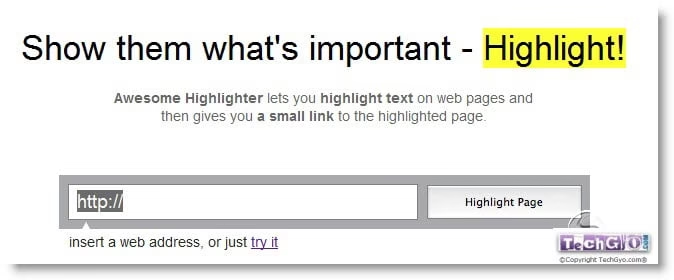
Step 1: Click here and enter the link which you want to add yellow mark.

highlight text with yellow markStep 2: Now select the important text with pen and then drag it, to highlight it.
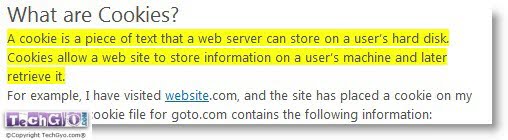
Highlighted text with yellow colorSte 3: Click on Add note button on the top if necessary, once done, click on the DONE button to get the short link.

That’s all about it, you can now send the short link to your friend as email.  Did you enjoy this post? Do share your comments below.

TIP: You can subscribe to our free email newsletter to receive such tips and updates in your inbox, You can also follow us on Twitter to stay updated.


How To: Make Your Own Text To Speech Converter

1

SpeechMany of us has seen various types of Text To Speech converter. Those are really fun to use is not it so. It would have been more great if you could have made your own script to do so isn’t it? I will help to to make a simple .VBS script which will do the job for you.

How Do I Make It Work?

First you need to open a notepad file or just any other text editor file. Now after doing this you need to paste the following below code in the opened notepad file.

The Code:

Dim message, sapi
message=InputBox("What do you want me to say?","TechGyo.com")
Set sapi=CreateObject("sapi.spvoice")
sapi.Speak message

Now, what you need to do is just save the file with .vbs extension Example: TechGyo.vbs

After that your Script is ready. Type anything in it and press enter, it will speak up for you. So you have made your own Text To Speech converter, show it to your friends and have fun.

Design Professional Logos And Business Cards For Free

Logosnap business cardsEveryone business requires a logo , brochure and a business card.  And it is also very important to make unique logo for your business, so that it stand distinguished among others. About making the business cards, you should try to make it as much attractive as possible so that, the person you are giving it to doesn’t bundle it with others and have a look at it. Many a people go to costly GFX designers and Photoshop artist. Off course it is recommended, provided if you have thousands of dollars to spend for that purpose. However what about, who doesn’t have so much.

 

Never to worry the website that we are going to write about today, gives you  option to choose from many of the professional pre-designed logos and business card to choose from. The website Logosnap.com provides all of these services for free. The best thing about it is that you can save the logos and cards that you have designed for future us which is a very helpful thing. It also gives you the final output in many different format which can be easily recognized by most designing software like PS and Coral Draw . Since the service is free if you have something to spend you can always donate them.

That solves the need of Logo and a Business card, now checkout Top 5 Online Brochure design tools to get brochure for your business with ease. And once you’ve done with design, try online brochure printing at UPrinting to get the best professional print quality for your brochure at affordable cost.

logo snap business cards

Create youir custom Logo in 3 easy steps:

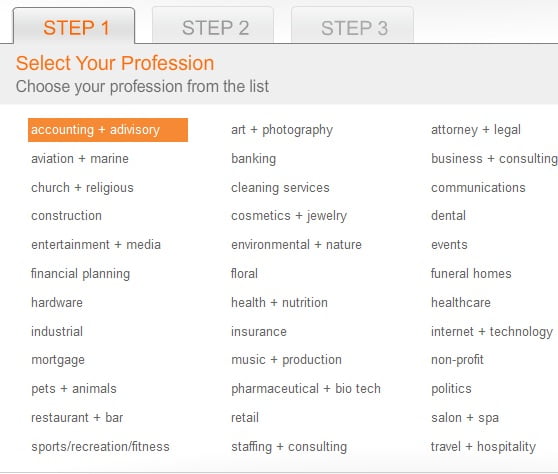
Step 1: Click here to start making your custrom logo.

logosnap step 1

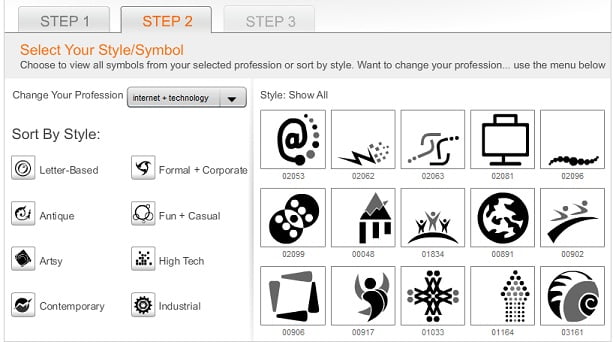
Step 2: Then select your business category to get a list of logo ideas matching to your business.

logo snap step 3

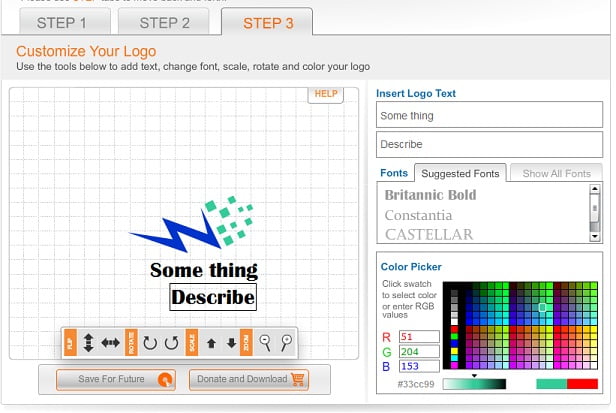
Step 3: Then select the icons which you would like to use for your logo.

logo snap step 4

Step 4: Add color and add text to your logo.

Once your Logo is created, it allows you to create a matching business card without any custom editing.

Find Similar Image With Tiny Eye Reverse Image Search

1

reverse image search girl

 Just like the above one, images always catch our attention, images catch speak more than words.

Many a times we need to find images quickly of the similar sort or genre, but all of us know that its really frustrating to search for them individually and manually. Won’t it be great if we had a search engine where we could upload another image and get search results which are visually similar to the uploaded image. For example, if you want to find a many different pictures of Taj Mahal.So here the subject will be the same but others things will vary. Now if you try to search it using regular search engine you might get result but you will need to sort them out manually by opening different links. This becomes really difficult when we are taking about a large volume of photos.

Not to worry we have found a great website which can do the job for you in a jiffy.

Tineye Reverse Image Search

Tinyeye image robot


Money Making Opportunity Through Our 100% Adsense Revenue Sharing Program!

currency dollar orangeHi everyone! At last, we have now made guest posting made available to all with 100% Adsense revenue sharing possible. So we invite everyone to share what they know by writing their article in TechGyo.com. You not only help others by sharing information, but also earn real income through the Google Adsense revenue sharing system which we have in place.

You can now signup for an account and start writing your article on any of the topics which are listed below:

  • Internet & Computing
  • Blogging
  • Blogger
  • WordPress
  • WordPress plugins
  • WordPress services
  • WordPress premium theme
  • Search Engine Optimization
  • Make Money Online
  • Social bookmarking
  • Affiliate marketing
  • Social Media
  • Facebook
  • Twitter
  • Link building
  • Softwares
  • Freelancing
  • Web 2.0
  • PPC Advertising
  • Adsense
  • Adsense optimization tips
  • Web-hosting
  • WordPress hosting
  • Gadgets
  • Web applications
  • Cloud computing
  • Website reviews
  • And other articles related to categories related to the list above.

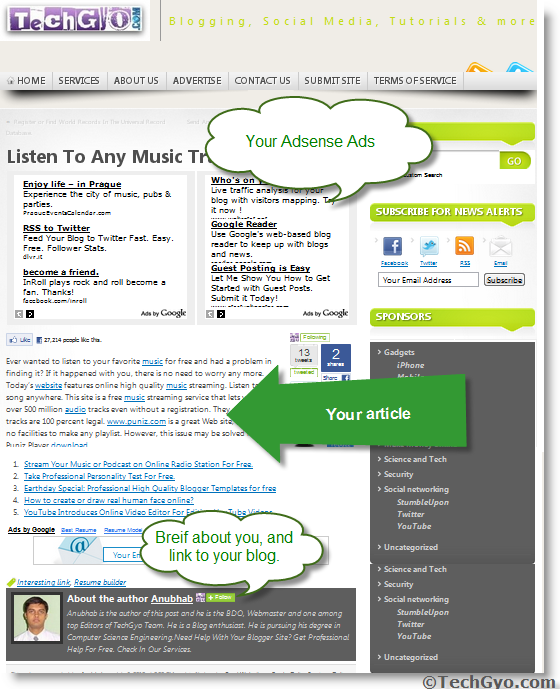
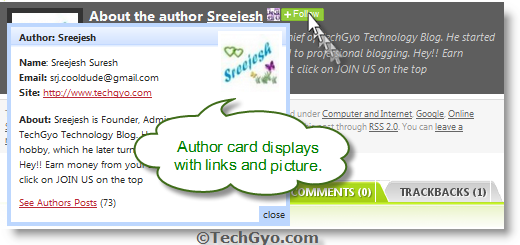
techgyo article  preview So we really give the credit to the author by showing a drop down author card just like the one below. about author boxSo if you are a blogger yourself, then having a guest post in TechGyo.com will give a backlink to your blog. So more backlink means more page rank from Google. Not only that you will get backlink, you will get traffic to your blog, fame, recognition and support from readers, you can see how readers find your article helpful. And mainly you can make money out of your own Adsense ads shown on your article page. Come lets build a better site to help our world. In breif, you get Backlinks + Fame + Recognition +Traffic + Money+ Satisfaction of Helping others. and much more…..

How Join This Program?
Nothing much is required, no application no waiting for approval no bla bla bla..
You can just register with us here, and then start writing your article.
You can read the FAQ page for further information.
joinus green

Make electric energy while you walk to charge your phone

5

This is a guest post by Navin Vonna. If you like to write for us, check our guest post page.

Believe it or not,you may be able to charge your mobile laptop and iPod by a few minutes of walk in the near future

Piezoelectric can generate voltages can generate voltages up to 1.26volt and can produce or even higher voltages. This is a key step to designing technology that will be useful in the near future. Every move you make every step you can generate electricity. The power output could quickly jump high enough to power laptop and cell phones.

charge while you walk


• A piezoelectric material is something that when Pushed or Pulled generates a mild electrical charge.
• Within three to five years piezoelectric nanowires, woven into a cotton charge a cell phone or laptop battery after even a short walk. The group used plentiful and easy-to-manipulate zinc oxide nanowires to create their nanogeneroter.
• This unique arrangement maximizes the electricity the piezoelectric nanowires can create. The wires work with each other, amplifying the electrical charge to record levels as the single layer pushed back and forth with only the most slight and gentle of nudges.


Pushing the arranged nanowires harder or faster would bump the power output up to 30 times without damaging the device it more damaging the device. If more powerful and expensive gallium nitride replaced the cheap zinc oxide nanowires the power output could increase another 10times.

More than enough to power most consumer devices if the piezoelectric material were in motion constantly

Bulk Unfollow Twitter Users Who Are Not Following You Back

1

twitter blue gossip birdsIf you are a twitter netizen trying to gain decent number of followers on Twitter by following others, this tool is for you.

With this tool, you can find who is not following you on twitter and unfollow twitter in bulk. You just need to authorize your twitter account by signing in via Twitter profile, this tool will analyse your entire follower list and show you whom you should unfollow.

Here are the complete features of bulk unfollow tool:
  • Manage your Friends and Followers
  • Group twitter friends by Relationships.
  • Sort by Importance
  • Explore Twitter Social Graph
  • Discover Relevant Users
  • Filter Irrelevant Users
  • Follow/Unfollow/Block
  • Crowd Tagging and Comments
  • Lock Relationships

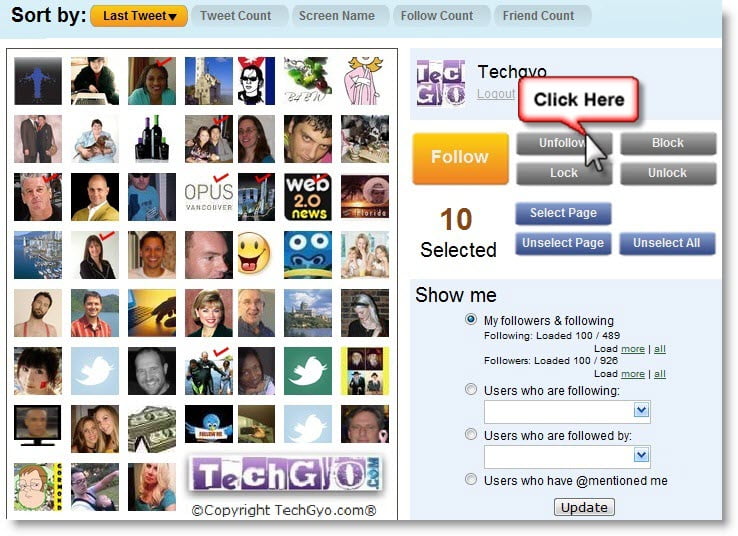
You can login with your twitter account. To start using this service, just login and authorize re-follow.com to your account to access your follower and following lists. Then It might take some time to collect and import the data for you. Once the data is imported. You can start unfollowing people who doesn’t follow you back, and much more features listed above. You can sort the list using the selection tool as in the image below.

refollow website selection tool

Once you check any one of the box, the profile list starts appearing, now you can click on the icons to select one profile or hover over it to view more details about that profile. You hav

find and unfollow in mass refollow