Home Blog Page 332

Why Journalists Must Be Online

0

Without reliable internet, reporters would be almost out of work. The public always wants to be in the know with the latest and breaking issues; years ago this was impossible, but thanks to the internet and technology, this is easily done.

Newspaper and magazine apps can easily be updated in an instant to reflect the latest headlines. Twitter can announce life changing news and Facebook can give the public an in-depth look on a recurring issue the hour it happens.

There has always been a need for breaking news; technology has just changed. The telegraph was the very first “Twitter” in the early 19th century. Morse code tapped out the first banner headlines, and journalists had to fill in the rest of the story before going to print.

Today, news stories not only read very differently, but they are compiled faster. Now that there is wireless internet and social media in the pocket of millions of citizens across the country, journalists have faster ways to expand on their stories.

For example, at a press conference a journalist is always sorting through what a spokesperson is saying. They could mention an sudden unknown fact and journalists have to be ready to question them about it. This can happen in a matter of minutes and when that slip happens, they have to be assertive to find the details.

Ipads and Iphones are always on standby for any follow up questions or information. Smart phones sorting through trillions of bits of information with 4G services like www.Clearwirelessinternet.net/ can always be found in the pockets of journalists.

Photos and recording need to be taken because the front age story can change in a moment. Print journalists have the task of providing content for radio and online. Deadlines also influence them having a great internet connection outside the office. The top journalists always work on the go. Their whole day can be packed with interviews and daily deadlines. Articles are written while they wait around and they need to stay up to date on issues.

Twitter and Facebook are a journalist’s newsroom outside of the office. Politics and matters of national security are huge issues many comment on through social media. Many reporters also help each other out on Twitter. They can discuss a source’s credibility and relevance.

Journalism is also very unpredictable. For instance, an editor might want a video recording for online instead of an article out of nowhere. This demand could happen at anytime and a journalist needs to be ready to email a video of their interview. This can go for pictures because the photographer might have been held up.

Visually, online news looks much better if readers have a digital option. Most readers check out the news  when they get home from work, they do not want to read. People prefer to watch an overview of the day’s news and they also want the choice to close their eyes and listen.


First Hand Small Business Tips

0

Many people dream of working from the comfort of their own home – some even stay awake to pursue those dreams – but what nobody ever tells you is that it’s tough. If you’re not chasing work, you’re chasing invoices, and in particular the service industry can be one bumpy ride.

I worked at home for a few years as a web developer and internet marketer. I saw through the austere times as well as the times of prosperity, and even though I work in a full-time job now, I certainly never regretted my decision to go freelance. During those years I learned a lot about what can help the day to day running of a business. In this article I would like to discuss a few tips which can help you stay strong through the hard times.

small business startup tips

Plan everything, and have a backup plan too!

If there is one thing I learnt it’s that you need to plan your actions – and have a backup plan, because things rarely do go to plan! Sounds like a paradox? It is, but this doesn’t mean you would be better off without one.

Remember the mantra – if you fail to plan, you plan to fail. In business, this is very true.

Set yourself a weekly schedule. What helped me most was putting this schedule together on a Sunday evening which prepared me for the week ahead. Of course, you need a long-term business plan in effect to be successful, but don’t discount the here and now.

Get OUT there

It doesn’t matter what you do, you need to network with those in and around your business niche. This won’t only help you to keep sane, it will give you insights into what is going on within the industry and keep you on the radar of people who could potentially help you out (or vice versa) in the future.

Every city hosts networking events, and major cities host conferences for just about every industry going. So hit the internet and find the get meet ups near you.

Save money wherever possible

Isn’t it odd that the richest people also seem to be the tightest with their money? That’s because you don’t accumulate wealth by being frivolous with your cash! Open a savings account and put money aside for a rainy day, for tax or, if you are really flourishing; a treat next time you win more work. Keep everything work-related somehow, and reward yourself when you achieve a goal. Don’t spend money without purpose, at least for the first year.

This post was written by Matt of Gift Scoop. Gift Scoop reviews a number of work at home products for people who run small businesses and work from their home or shared office space.

21 Astonishing Tech Facts One Must Know!

1

Here are some astonishing tech facts, have a look at it. 🙂

tech facts

  1. The Windows 95 and Windows 98 logos were created with freehand on a Macintosh.
  2. Windows 3.1 was a big hit when it was released and within two months, 3 million copies were sold out.
  3. The Japanese version of MS Office has an virtual office assistant that you can’t find in any other versions. The ‘Office Lady’ serves tea.
  4. Bill Gates’ home was designed using a Mac!
  5. Name “Adobe” Adobe software came from the name of the river Adobe Creek. The river ran behind the house of founder John Warnock.
  6. Bill Gates’ first company was “Traf-O-Data”. Company developed the software to analyse traffic.
  7. A refresh rate of 85 Hz on your monitor means that every single pixel is refreshed 85 times in a second.
  8. Intel is short form of Integrated Electronics.
  9. Intel’s ‘Intel Inside’ logo was made on an Apple Macintosh.
  10. Google name came from the mathematical figure googol which has the meaning of ‘one followed by a hundred zeros’.
  11. The technical word “Bug” and “Debug” which we use in programming language were first used by Grace Murray Hopper. She found a moth in Mark II Aiken Relay Calculator at Harvard University, she called it bug and debugged it by removing from that machine.
  12. Satyam Online was the first private Internet Service Provider that offered Internet connections in India in 1998.
  13. ARPANET which stands for Advanced Research Projects Agency Network of United States Department of Defense was the first ‘Internet’ launched in 1969.
  14. AT&T manufactured the first commercial modem in 1962, the modem’s name was “Bell 103”.
  15. The most pricy domain name was ‘business.com’. It was purchased by eCommerce companies for $7.5 million in 1999.
  16. Pacman which was one of the most popular arcade games of all times, was released in 1980.
  17. On April 18, 2005, Adobe Systems acquired Macromedia for about $3.4 billion in stock. “Macromedia Flash” was most renowned product of Macromedia which is now called as “Adobe Flash”.
  18. Yahoo! Word came from Gulliver’s Travels witten by Jonathan Swift.
  19. After English, Japanese and German are the most used languages on internet.
  20. A hacker with gentle intentions is called a ‘white hat’.
  21. The full form of HCL is Hindustan Computers Limited. It was started in 1976 in India and has two business enterprises namely HCL Technologies and HCL Infosystems.

Also read:

Source: Internet

3 Ways to Step Up Blogging From This Moment

The time for New Years Resolutions has come and passed. Now it’s time to sit down and get actual work done. So forget those resolutions that you’ll never keep and focus on these three ways you can step up your blog game. They’re surefire ways to help you build a bigger audience and become a better blogger.

1. Read (a lot) more

tech facts

In order to become better writers, we must read more. In a way, reading is like studying. It fills us with knowledge, not only of the subject matter but also of the inner workings of language. Think of it in terms of athletics. Reading is training and conditioning, while first drafts are practice. Our final draft is the big game. But we can’t be ready for the big game unless we’re in good shape. Reading helps us get in shape.

Reading, however, has to come from many sources. A social media blogger might read a lot of social media blogs, and in a way that’s good. But in order to become the best a blogger must read blogs of all types — especially topics she’s not interested in. Reading wider introduces us to different people and different styles. That opens our minds, which leaves us open to improvement.

Furthermore, reading should extend beyond the internet. Magazine writing is distinctly different than blog writing, and bloggers can learn plenty from how magazine writers spin their tales. Magazine features offer great lessons in how to incorporate quotes, and how to tackle complex topics. Books are even better, since books are the most heavily edited of the writing media. They teach us the value of editing and polish, as well as how to weave together many topics into one theme.

2. Attend a conference

Building a better blog is all about growth, and there’s no better place to experience rapid growth than an industry conference. These are typically large events where the biggest names in a given industry come together. They feature not only speeches from these big names, but also educational panels and other events that can help anyone related to the industry. Yes, even bloggers in it.

There are two routes to take when attending a conference. The first is to attend a blogging-specific conference. This can be a great help for beginners, since they feature tons of educational content. But they might not be right for everyone. More seasoned bloggers might want to attend a conference specifically for their industry. Tech bloggers might want to check out the Consumer Electronics Show. Those who blog about smartphones might want to look at one of the many CTIA conventions, or Mobile World Congress. This is a great place to better learn an industry.

Either way, it does involve an investment on the blogger’s part. There are plenty of travel sites that can provide cheap airfare and hotel rates, making attendance easier. In addition, while most of these conferences charge attendees an entrance fee, typically media gets in for free. By contacting the conference’s media representative, bloggers might get a press pass, which will greatly reduce the cost of the overall trip.

This also leads into the third, and perhaps the most important, point of action:

3. Email everyone

Our own skills can take us far. If we’re talented, they can take us very far. But everyone has a ceiling. The only way to bust through that ceiling is to employ the help of others. How do we get people to help us? It’s different in every situation, but the first step is to actually talk to people. Spending all day reading and blogging doesn’t accomplish that, and it will eventually leave a blogger stagnating.

Here’s the plan:

  • Create a list of high-ranking people in your industry. This can be A-list bloggers, executives at big companies, or general people within the industry.
  • Then search outside the industry for other people of note. This might be prominent bloggers in similar but ultimately different fields. It could also be people who work in, for instance, big marketing firms. Anything that you think can help you grow.
  • Every day, email one of these people. If they reply, make it a point to continue the chain.

The initial email should be friendly and should never asking for anything. It should contain a compliment, and it should ask a question. It should thank the person for his or her time, and it should contain a simple sign-off. And that’s it. Create a spreadsheet and record that you sent the email. If they reply, make another note of it. Always keep the latest correspondence date close at hand, and make sure you don’t go more than a few weeks without contacting this person. This is how you build relationships.

Later on, you can see whether this person can help you accomplish your goals. If not, no big deal. That’s still another person whom you know and with whom you have developed a relationship. If they can help, all the better. That’s progress you couldn’t have made on your own.

There is a time for resolution, and there is a time for action. Now that we’re underway another year, it’s time to take action for your blog. Do these three things, and good things will come for you and your blog.

Most Useful PHP Array Functions with Examples (Part 2)

PHP Array Functions
PHP Array Functions

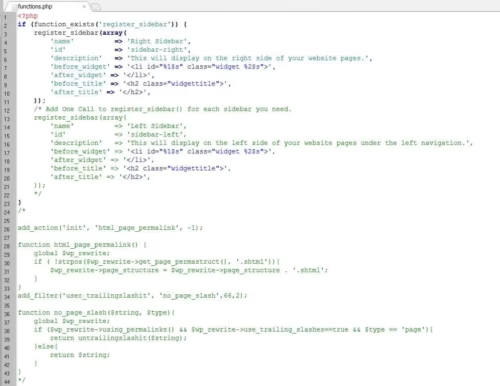
Here are some useful PHP array functions.

Here is the list of PHP array functions. If you are a beginner and wanted to know the basic PHP functions then navigate your browser to the “Most Useful PHP Functions with Examples” post.

sizeof () This function is used to count the items of the array. (count() is also used instead of this).

Example

<?php

//Define array

$data=array(

“Bugatti”,

“Gallardo”,

“Audi”,

“Nissan”,

” Chevrolet “);


echo sizeof($data);

?>


explode () This function is used to explode the string into an array.

Example

<?php

//Define string

$str=”apple,microsoft,android,ubuntu”

$fruits=explode(“,”,$str);

print_r($fruits);                //print_r() is used to get the data type

?>


implode () This function is used to convert the array into a string.

Example

<?php

//Define array

$data=array(

“Dell”,

“Lenovo”,

“Acer”,

“Toshiba”);


//Convert array into string by using any delimeter

$str=implode(” and “, $data);

print_r($str)

?>


range () This function allows us to get the range of numbers such as 1,10 or 1,100 etc.. We need to specify two points. First one is the starting point and the second one is the endpoint. It returns all the numbers from the specified range.

Example

<?php

//Define number range

$ran=range(1,10);

foreach($ran as $r){

echo $r;

}

?>


min () max () These functions are used to get the smallest and largest numbers in specified array.

Example

<?php

//Define array

$data=array(1,10,4,6,7,9,2);

echo “Smallest number in this array is ” . min($data) . ” and largest number in this array is ” . max($data) . “.”;

?>


array_slice () This function is used to extract the particular segment from an array. It accepts 3 arguments. The original array, the starting index of array and the number of arrays to return. (If you want to slice the array from the end then use negative (-) symbol and the main thing is that we don’t use 0,1,2 index when counting from end but we use 1,2 index).

Example

<?php

//Define array

$data=array(1,10,4,6,7,9,2);

$arr=array_slice($data,1,3);

print_r($arr);     //This is returned as an array

?>


array_unshift () This function is used to add the element at the beginning of the array.


array_shift () This function is used to remove the element from the beginning of the array.


array_push () This function is used to add the element at the end of the array.


array_pop () This function is used to remove the element from the end of the array.


array_unique () This function is used to remove the duplicate elements from the array. The below example makes a new array called $un without having the duplicate arrays from the array $data.

Example

<?php

$data=array(“a”,”x”,”s”,”z”,”a”,”z”);

$un=array_unique($data);

print_r($un);

?>


shuffle () This function is used to shuffle (randomize) the array. (No need to make a new array data type).


array_reverse () This function is used to reverse the array. (Need to make a new array data type).


in_array () This function is used to search element in an array. It returns true if the specified element is exist in the array. It accepts 2 arguments – the element to search and the array data type. (If we want to search the keys then we have to use array_key_exists ()

Example

<?php

$data=array(“a”,”x”,”s”,”z”,”a”,”z”);

echo in_array(“a”,$data);

?>


sort () This function is used to sort the array. (If we want to reverse the sort sequence then we have to use rsort ())

Example

<?php

$data=array(3,5,1,8,2,4,6,7);

sort($data);

foreach($data as $d){

echo $d . “\r\n”;

}

?>


asort () This function is used to sort the associative array. Values are sorted here.  (If we want to reverse the sort sequence then we have to use arsort ())


ksort () This function is used to sort the associative array. keys are sorted here.  (If we want to reverse the sort sequence then we have to use krsort ())


array_intersect () This function is used to find the common elements in two arrays. It accepts two argments (1st array and 2nd array).

array_diff () This function returns the values of the first array which are not exist in second. It accepts two argments (1st array and 2nd array).

Example

<?php

$fstarray=array(“Red”, “Green”, “Blue”);

$secarray=array(“Pink”,”Green”,”Yellow”, “Red”);

$common= array_intersect($fstarray,$secarray);

foreach($common as $c){

echo $c . “\r\n”;

}

echo “<br />”;

$unique=array_diff($fstarray,$secarray);

foreach($unique as $u){

echo $u . “\r\n”;

}

?>


Box- Store and Share Your Files Online with 5GB Free Storage

box is a cloud service that allows you to store your files online up to 5 GB for free.  By using box you can share and manage your files online from almost any of the devices including PC, Android, iPad, iPhone and Blackberry. box is similar to Dropbox but with more power, here you can store up to 5GB where in Dropbox the space is limited to 2GB. Now wherever you go, your files follow you.

What makes box different from other cloud service providers?

  1. tech factsbox offers simple yet secure storing & sharing.
  2. You can access your files from any of the following devices including PC, Android, iPad, iPhone and Blackberry.
  3. Send big files to your friends or embed the same into your website, you can even share the whole folder.
  4. Effortlessly upload your files with HTML5 drag-and-drop technology from your desktop.
  5. box offers Online Collaboration feature that allows you to make shared folders and invite people to view, edit and upload files. You can post comments and conduct discussions around any folder. You will be updated with any changes made by your teammates to your shared folders.
  6. You can add apps to your box account, a pre-installed Gmail app adds an option called “Send with Gmail” to all your uploaded files that let you send the stored files seamlessly with a single click via your Gmail account.
  7. You can assign tasks to your files for yourself or assign the same to your teammates in collaborated folder.
  8. You can specify the tags for your files to categorize them or to search them quickly.

box Plans & Pricing

box is offered in Personal, Business and Enterprise plans. Personal plan offers 1 user, 5GB of free space, file sharing links and mobile app access. Business plan costs $15 per month and allows 3 to 500 users, it provides 1000 GB of cloud storage and allows 2 GB of file size limit, you can protect your files with password and the upload speed is higher than Personal plan, Enhanced collaboration is remarkable feature in this plan. You can try Business plan for 14 days for free or can get 2 months of free subscription by purchasing an annual plan. Enterprise plan is a fully customizable edition that offers ample security and admin controls. Unlimited users are allowed here along with unlimited space. One can get the pricing by contacting the box team.

Website: http://www.box.com

How To: Enhance Cell Phone Signal with an External device

2

Mobile communication is becoming more affordable every day. The number of
mobile subscribers in some regions exceeded the number of holders of traditional
landlines. Today the cell phone is the most popular gift.
But at the same time the quality of mobile communications are often poor,
especially in places with weak signal. The owners of mobile phones feel it in the
most remote and inaccessible parts (highways, cottages, suburban settlements).
Especially insulting when the connection is interrupted during an important
conversation or the quality of communication is so disgusting that you can not hear
each other.

enhance cell phone signals
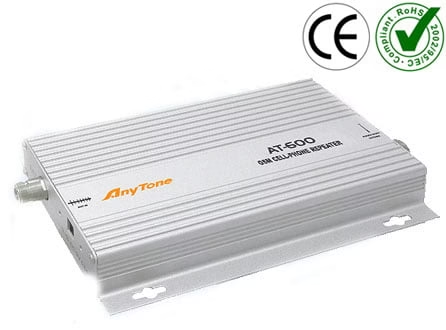
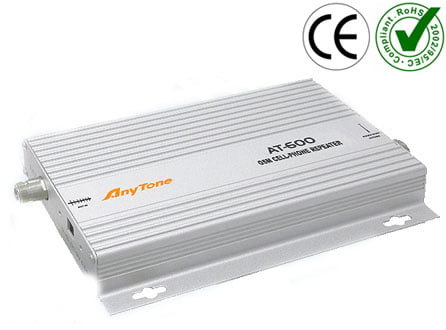
To the delight of all fans that are fond of chatting via the mobile phone the gsm signal amplifier appeared. In the
presence of a weak signal reception its level is increased by one or two divisions
due to changes in the diagram of internal antenna orientation and signal geometry.
The cell phone booster is designed for use in places with unstable reception. In
the “dead zones” where there is no signal such cellular amplifier is not working.
The mobile gsm amplifier is compatible with all types of phones GSM, CDMA,
NMT, DECT and household radio telephones.
The booster for cell phone signal is incredibly easy to install. You can install
mobile gsm amplifier yourself by following the instruction.
Even if you spend the most time in the car, the problem of weak signal is solved
by the gsm booster for car. This one of the most popular variant of mobile boosters
consists of two antennas (external and internal) and the amplifier itself. Depending
on these antennas the mobile gsm booster can work with different signals, in
particular, the standards GSM, DECT or CDMA. The cellular amplifier for car is
powered by the cigarette lighter in your car or from a network of 220 volt (via an
adapter, for example) if it is universal.
If it’s not enough one aerial for strengthening mobile signal to you, you can add
your cellular repeater with other necessary elements such as the external antenna,
some internal antennas and the splitter that helps you to provide amplified signal
for 2 and more rooms.