Most consumers simply ignore such warnings by the manufacturer, and still go for counterfeit products. But in the long run buying counterfeit products or accessories can cost you a lot more than what it costs you buy an original. Counterfeit may look same or price cheap but that doesn’t mean they work the same or better than the original nor they are of the same quality.
If you know all of these facts, but still go for counterfeit products because you can’t afford them, then here’s an exciting news for you. Now you can get the original guaranteed product at an affordable price of just under Rs.600 that’s almost what it cost for the counterfeit. Thanks to H.P and Indiblogger #OriginalCopy event to spread awareness about buying original and being original.
Original vs Counterfeit
Just think about it, when you buy an original, you get; Guaranteed quality, Peace of mind, better performance and free service in case of damage. But when you buy a counterfiet, you risk your product functionality, quality and in case of any damage to your printer, you will end up spending extra for service and warranty will be void.
How to verify authentic HP cartridges.
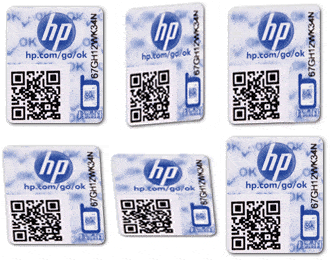
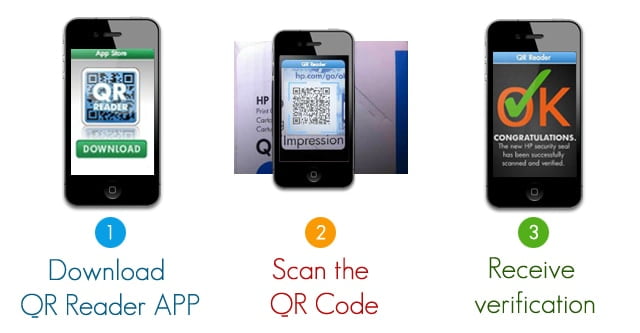
Look out for a QR coded hologram label in the HP Cartridge. If you have a smart phone, you can scan it to verify the original, if you don’t have a smartphone you go go to hp.com/go/ok and enter the code from the sticker to verify.
Whats even better when you can get it at your doorsteps?
Get HP Inks, and other supplies delivered at your doorsteps, that too within 6-8 hours, with a phone call to 1800 425 4999 . Or order online from H.P.com
Anyone who runs a website is always concerned on how well the site is doing, whether his work is impressing the SEO gods on the internet. Today if you really want to ensure the success of your website then search engine optimization is a must. WebMeUp is a great online SEO tool which will fit the best for all your SEO needs and it is rightly said as the ‘all in one’ SEO solution. The positioning and SEO of your website is very important to gain the desired visibility in search engines. Various statistics show that on Google, the first page of a search is where 90 % of users click. There are several tools by which you can check the performance of your website, but we will tell you why WebMeUp is the online tool you should use for all your SEO needs.
What is WebMeUp?
WebMeUp is an online tool which will tell you all the details of your website, the rank of your website on search engines like Google Page Rank, Alexa Rank, Compete Rank, the pages of your website that has been indexed, the details of your backlinks and many other awesome features.
WebMeUp offers a wide variety of tools so that you get your website higher in the page ranks and SEO of your websites seamlessly improve. It has over 30 people on board to make sure your SEO needs are fulfilled. Apart from the checking the performance of your website, you can even optimize your webpages, site structure and encoding can be done too.
Features
There are a lot of great features WebMeUp brings, firstly if you are a in-house professional then these features of WebMeUp should be great for you:
WebMeUp brings you automatic rank checker which painlessly checks all the target keywords you must have specified.
If you do large scale projects, WebMeUp gives in-depth detailed SEO data to increase the performance of your website.
You must be always aware of what your competitors are planing if you are to maintain your success and with WebMeUp it is a hell lot easier. It offers deep competition analysis and tracking making sure you know your competitors strategy and stay ahead of the competition always.
Auditing websites is not a complex task now. WebMeUp gives you faster research and analysis, real time data. It keeps everything efficient and fast.
This is a must have tool fir anyone running a SEO agency as it has every SEO tool you’ll ever need:
Power users will surely love WebMeUp as multi-tasking works like a charm as switching between tasks, and multiple projects is very easy with no mess at all.
Saving up all your data in Excel spreadsheets can be really frustrating when you need to find a specific data from those numerous sheets, but WebMeUp has all your data neatly arranged in dashboards.
The work flow is very efficient and reliable and you get all your data real time and all the notifications come on your dashboards.
Managing all your projects was never so hassle free. WebMeUp helps you manage all your projects no matter the status of your website, be it a small business website or a big corporate portal. It manages everything with ease.
Most of you are reading this because you are an SEO beginner (I hope i am wrong since WebMeUp is really meant for everyone) so there are some amazing features at WebMeUp which let all the SEO strangers feel at home:
If you’re new to SEO, WebMeUp has a feature called SEO Checklist which will guide you through all the key stages of SEO so never feel alone.
You don’t need to be have vast SEO experience in order to perform actionable recommendations WebMeUp offers so basically its all very simple.
The software of WebMeUp relies on the best practices of SEO and by data from the trusted sources so you get the best of the SEO world.
WebMeUp consists of very helpful SEO experts which will give you dedicated support and training.
Using WebMeUp
Using WebMeUp is very easy and an SEO beginner will be able to learn it pretty easily.
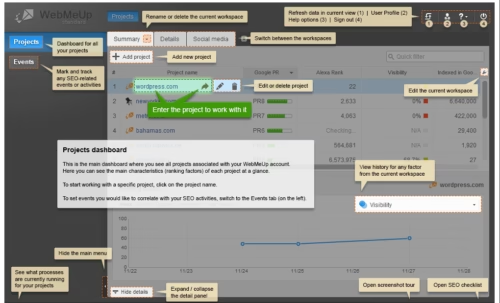
After your create your account on WebMeUp, you will need to add your project next, once you do that, you’ll get to see your project details such as Google PR, Alexa Rank, visibility, the complete traffic and total backlinks. You’ll also get to see other details regarding the project.
You can then enter the dashboard of the project you added where you’ll see important stuff such as Google factors, social activity, indexing statistics and content related issues are shown.
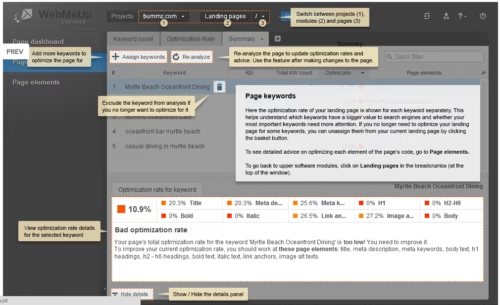
In Ranking factors you ‘ll be able to see the rankings of your page in detail. You can check your keyword rankings and you can even keywords if you want. Under the pages option you can check out your site structure and can even optimize it the way you want.
To get the details o your competitors, you need to add them on that list and you can then see all the details of the competing website and you can even see how they have succeeded and can use their best practices.
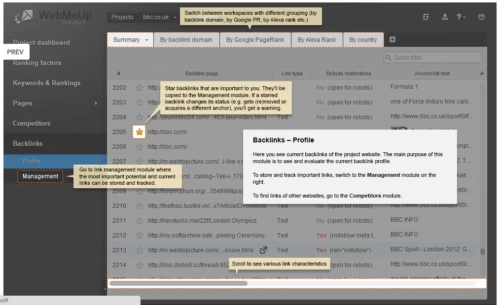
You can use the backlink option to get details about them. You can manage the backlinks; create potential links and check whether you have gotten by the “Management” tab under “Backlinks”.
The interface is very user friendly and is very easy to use. You can see the screenshots below:
Why prefer WebMeUp over other online SEO tools?
WebMeUp has a hell lot more features than any other tool on the internet right now. It caters to all your SEO needs so that you don’t need any other tool.
The ease of use with WebMeUp is pretty amazing. Its very easy to apply and any one new to SEO can easily learn on how to market their website in the social media.
WebMeUp takes real good care of your competitors and lets you stay ahead of the competition always since Internet marketing is all about staying ahead of the competition.
It does not demand any download or installation or any of your payment information thus maintaining your privacy.
You can access your account and your projects from anywhere thanks to WebMeUp being an online tool. And not only you, your webmaster, your customers can see your projects at the same time.
The results are very accurate, what you need to do is just type in your site URL, wait a while and here it is – the complete review of SEO factors, backlinks and efficiency indexes for each keyword.
It is the cheapest high quality SEO tool available right now.
Plans and Pricing
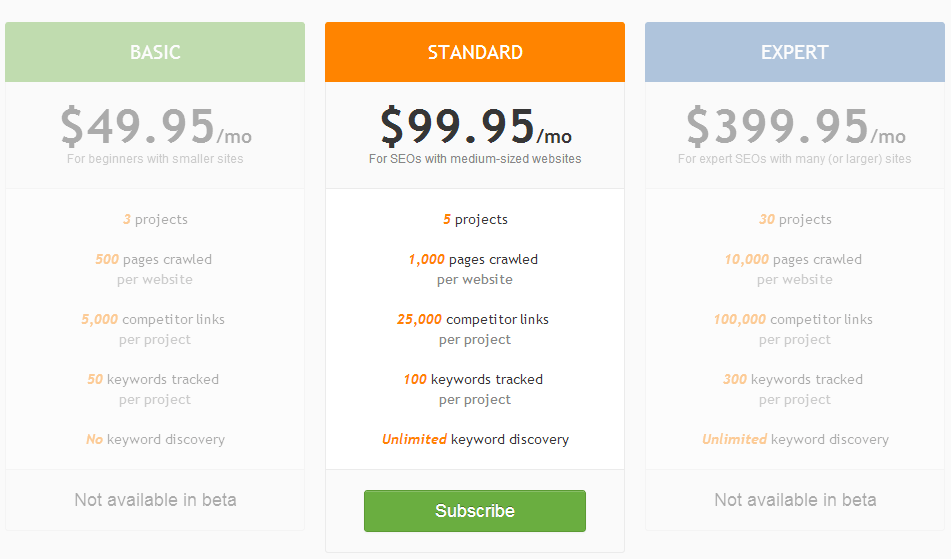
You can currently get a trial version of the online tool for free, you just need to make an account and sign up with them. The trial account has all the features a standard version would possess. Once your trial period is over, you need to subscribe to one of their plans and I believe they are really cheap in comparison to what they offer.
Conclusion
WebMeUp is a great online tool for people looking to find success in their websites. This tool will surely help you a lot with its long list of features. It is truly aptly named “All in one” SEO online tool. You better get the free trial and get some feel of this awesome tool. You can get WebMeUp here.
Do you have a website with boring static interface? Why don’t you make it attractive with some free resources available on the web? Here are some useful CSS and JavaScript animation libraries to sparkle your website with cool animation effects. Of course you can use adobe flash to add animations to your website but it needs viewer to have flash player plugin installed therefore using javascript animation libraries is the best solution which doesn’t need any dependencies.
List of Free and Cross-Browser CSS and JavaScript Animation Libraries
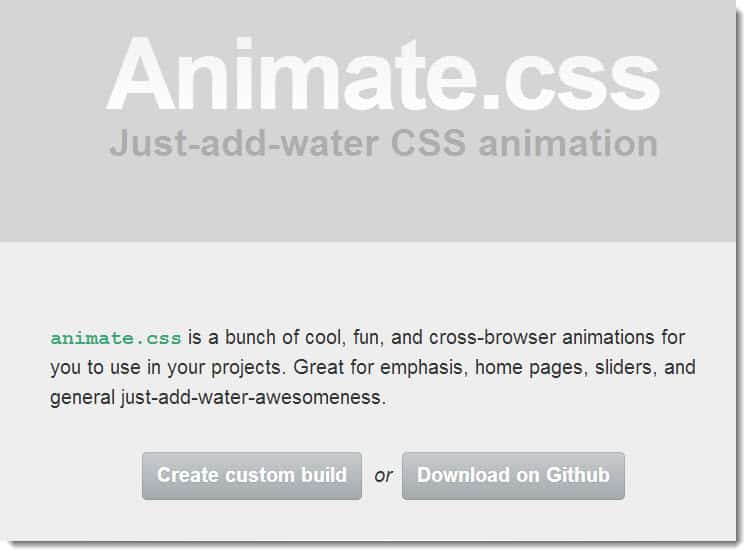
Animate.css
Animate.css by Dan Eden is a free and cross-browser CSS animation library that comes up with more than 50 animation effects such as flash, bounce, flip, fade, wobble, swing, roll in, light Speed In, light speed Out, roll in, roll out and many more. You can use these effects on any elements of your website to make it more interesting and attractive.
Using animate.css is easy, just add animate.css stylesheet in your project along with jQuery and you are ready to mingle with cool animation effects on various events including mouse click, mouse hover or automatically when your webpage gets loaded. Animate.css has a custom build option that allows you to download only those effects which you are going to use in your project instead of whole code.
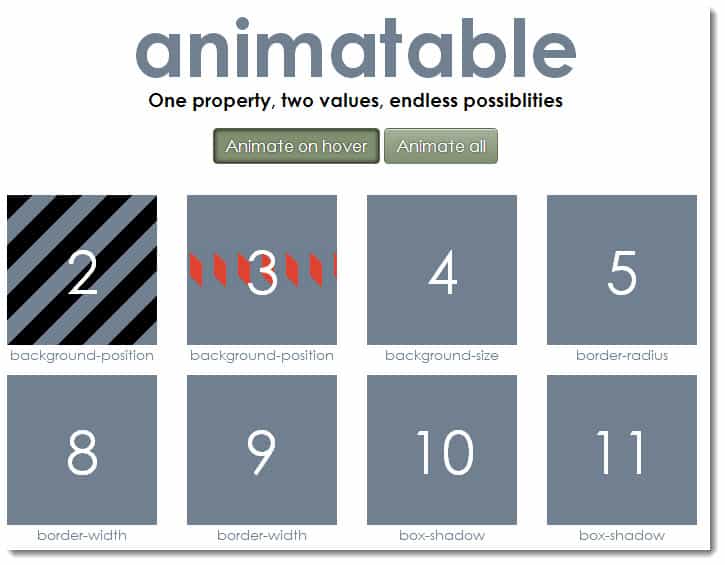
Animatable
Animatable developed by Lea Verou is a free CSS3 animation library that animates the property with just two values, here is how the code looks like- data-property=”border-radius” data-from=”0″ data-to=”50%”. Isn’t it awesome and simple? See all the possible animations demos over here and download Animatable over here.
Move.js
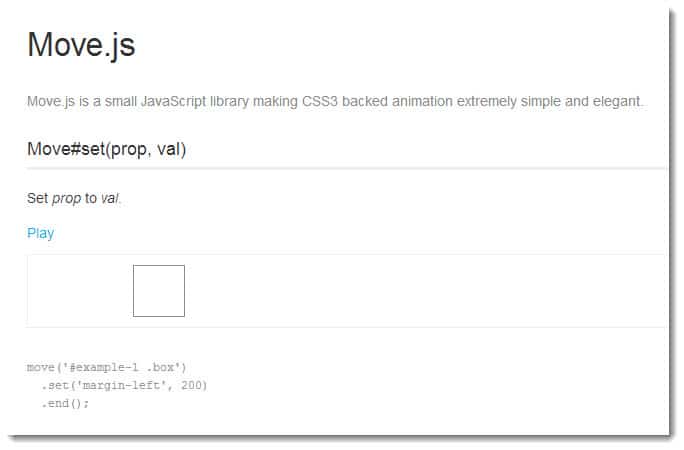
Move.js by Vision Media is a light weight JavaScript library with eye catchy animation effects, with move.js you can implement from very basic animation to sophisticated effects such as rotate, translate, skew and scale etc.
Move.js also supports easing functions including ease in, ease out, ease in out, snap, linear and many more. Get your free copy of Move.js along with samples over here.
JStween
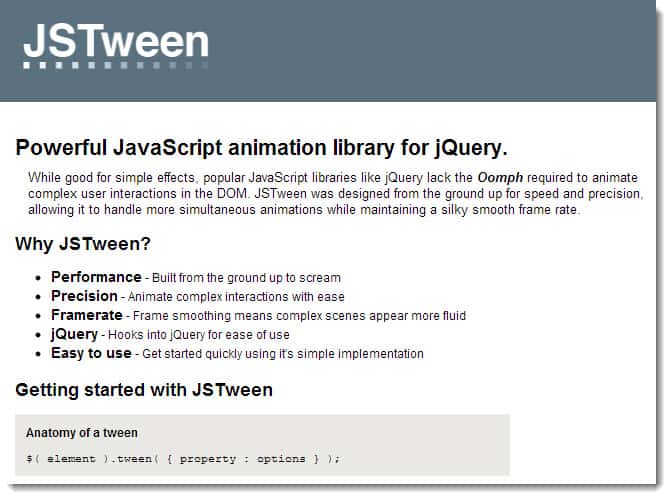
JStween is an advanced JavaScript animation library that comes up with additional parameters compared to Move.js for better presentation. You can animate, rotate, transform, change border radius, set transparency, add shadow to the div and even scroll your web page smoothly with JStween. Additionally it supports easing for tweens such as linear, quad, cubic and bouncy etc. to spice up the animation.
Have a look at some examples and download JStween over here.
GSAP JS
GSAP JS (GreenSock animation platform) is a fast and lightweight JavaScript animation library that comprises TweenLite, TweenMax, TimelineLite and TimelineMax. Just link to GSAP javascript from <head> section and start animating the objects you wish, if you are already familiar with TweenLite for actionscript then it becomes easier to play with it.
One more reason to choose GSAP JS is that it is faster than jQuery or any other JavaScript animation libraries. Get it here.
TweenJS
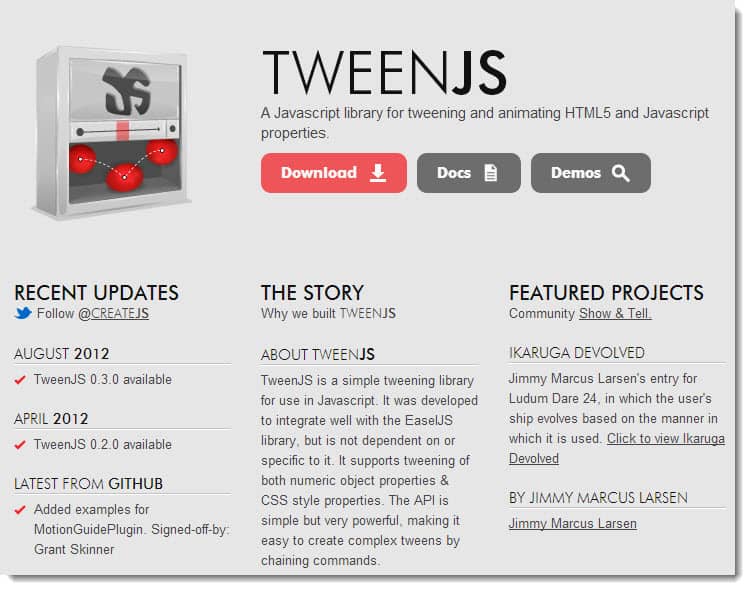
TweenJS is a free JavaScript animation library for tweening purposes. You can animate CSS properties as well as numeric object properties with TweenJS library. It allows you to apply delay and easing functions to your animations.
TweenJS zip file comes up with the library along with few samples that helps you create your own animation in minutes, check it out here.
$fx()
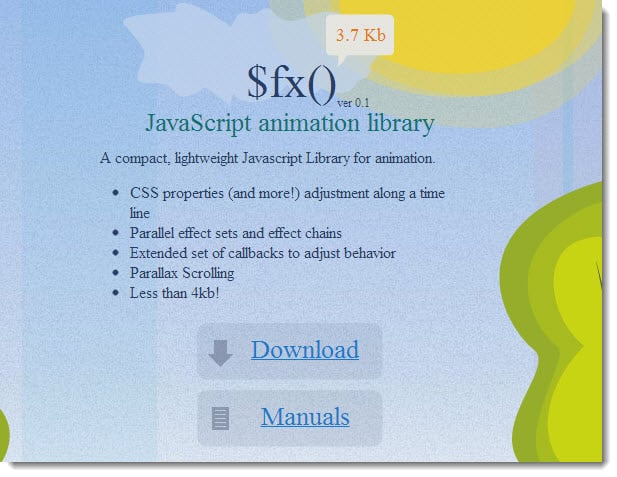
Fx is a free and lightweight Javascript animation library that is just 3.7 KB in size, it allows to animate CSS properties by using time line. Fx comes with attractive effect and as well as effect chains for seamless animation.
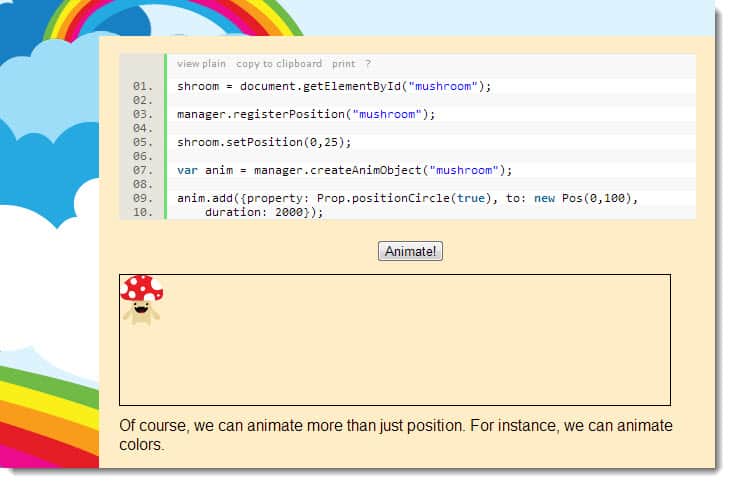
Have a look at some samples done with FX javascript animation library over here and download the library with this link.
jsAnim
jsAnim by Kevin Dolan is another free yet robust javascript animation library that can be used add impressive animations to your website. Just add main.js in your html file and start coding your animation. Download it here.
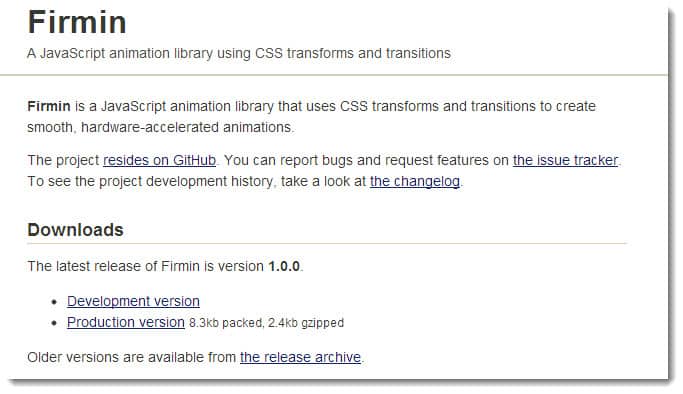
Firmin
Firmin is a free JavaScript animation library which uses CSS transforms and transitions renders outstanding animations with hardware accelerated graphics. Working with Firmin is simple, just link to Firmin JavaScript file and begin with coding for example Firmin.animate([element], [animation type], [duration]);
Get some examples and download Firmin library over here.
Emile.js
Emile.js is a free to use CSS animation JavaScript framework. By using Emile you can add animations with timing and easing effects. Here is a simple one line code to show how emile works- emile(element, style, options, after).
Download this script on github along with examples over here.
If you have ever been to the Internet (which I am quite sure that you have), you would notice that more and more people are into videos. For people who consider the Internet as their proving ground, videos created through the use of screen recorders are considered priceless. Sometimes they record screen to make tutorials and upload them to major file sharing sites to distribute their knowledge to people from different parts of the world. Sometimes, even everyday ordinary people use videos created from screen recorders to give instruction or to explain a process. Needless to say, screen recording programs are indispensable in the Internet Age.
The only problem is, most good screen recording software out there are either priced like an engagement ring or doesn’t work exactly how you want it to be. There are free screen recorders out there but they are just sad copies of paid ones and are so limited in usage. Just do a quick search of “free screen recorders” and you will see what I mean. Still, there are some free screen recorders out there that are worth something and one in particular caught my attention. Apowersoft’s free online screen recorder may just have been one of those everyday ordinary free screen recorders out there but when you use it you can easily figure out why it stands out of the rest.
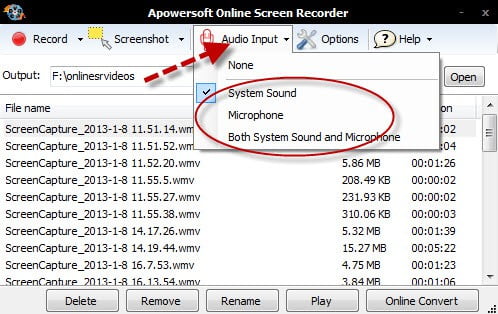
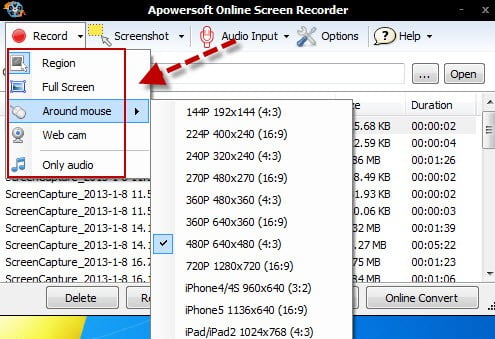
To give you an idea of how great the software is; here are some of the features of Apowersoft’s free online screen recorder.
Desktop Recording – This is the program’s bread and butter and this is where it excels the most. It records both audio and video so you never have to worry about anything else. Making a tutorial? Recording a game? Recording PC screen? Click on one simple button and you are good to go.
Video Editing – Unlike most free screen recorders out there that just records your screen; this recorder allows you to edit the videos you record. Forget about buying or downloading a new program for editing. This tool does it all.
Different Output – This tool allows you to convert your video to different formats like mp3, mp4 or 3gp. You will never have to worry about converting your file to suit different needs.
Screenshots – This tool allows you to take screenshots while recording. This is extremely important if you have a non-video version of your tutorial. The tool also gives you the option to either take a snapshot of the whole screen or just a specific region.
No time limit – Unlike most free screen recorders, this tool doesn’t have a time limit that is a total bummer. Now you can record whole games or just a minute of tutorial
Another good thing about the Apowersoft free online screen recorder is that it can record screen on Mac or PC. You don’t have to worry about interoperability ever again. Using it is such a breeze and will be a good experience for beginners and pros alike.
To further stress the point as to why the Apowersoft free online screen recorder is the best there is. Let us try to compare it to Camstudio which is one of the most popular screen recorders out there.
Screen Recording – They are actually even in this department. They both record good to excellent videos depending on the hardware. Also, Apowersoft does not put a watermark on the videos, it produces unlike Camstudio. Apowersoft also allows the user to play around with different modes in recording their videos.
Time limitation – Both programs does not have any time limitations but poses a problem to Camstudio because of the file formats it supports. This will be explained below.
File Format – Camstudio produces videos on AVI format which means large video files. Unlike Camstudio, Apowersoft gives you the option to change the output to file types that will take up less space.
Video Editing – This option is not present in Camstudio while Apowersoft has a built in video editing suite for ease of use.
Mac use – Camstudio is not available for Mac.
Between the two free programs, it is quite clear that Apowersoft is ahead. With its interoperability and built in functions, you can rest assured that everything you need is in the software.
If you are looking for a screen recorder minus the headaches then the Apowersoft free online screen recorder is what you need. Just click one button and you are good to go.
The above title might seem far-fetched or odd at best, since, as most people with a bit of SEO-savvy know, Google still ranks websites by the number of links back to them. However, the recent Penguin update has gotten people worried and relatively frantic over what constitutes relevancy in Google’s view. Companies that have, in the past, paid hefty amounts of money to have their websites linked to in the comments sections of various blogs and websites are now being threatened with legal action for their black-hat strategies of yore. As such, they are now resorting to new tactics: they are writing to the blog or website owners, whom they themselves spammed in the past, and asking them to take down the damaging links. Why is all this link craziness going on and where could it possibly be heading?
Google Gets Vocal about Bad Links
In December 2012, numerous webmasters around the world started receiving emails from Google, which informed them that some of the pages on their website were being linked back to in ways which the search engine giant considered to be in violation of its Webmaster Guidelines. At first, a wave of hysteria swept the web, with some publications reporting that more and more bad links are popping up everywhere. The issue was subsequently clarified by Google themselves, whose representatives explained that the plethora of messages being sent out to webmasters did not indicate an increase in the number of ‘bad’ or ‘artificial’ links. It was simply a sign of the post-Penguin times. The search engine is now implementing a new policy regarding back-links (some of which had been previously quietly tolerated, but are now being reported as bad).
Charging to Un-Link
As Google upped their game against link schemes and other methods of manipulating PageRank, just as many SEO experts and webmasters increased their frantic search for the afore-mentioned bad links. And, as is always the case with new rules and regulations, an opportunity for profit emerged, in the eyes of some. Last summer, before Google had launched its link disavowal tool for webmasters, several websites were asking for money in order to remove links – specifically, $25 for removing a given URL from a directory which allegedly contained one hundred sub-directories.
While the legal situation on the matter remains tangled up in a gray area of sorts, it should be noted that linking to another website has been found legal in several U.S. court cases. As of yet, putting up a link to another site cannot be prosecuted, as long as that link is not infringing, damaging, or does not include copied content. One case, tried in 2006, saw Ford Motors trying to take down websites with vulgar names that were critical of General Motors. The court did not see in favor of the automaker, as they came to the conclusion that said websites did not damage the brand in any way. This having been said, companies that took part in link building schemes are now seeing the damaging results of such actions, as Google continues to drive down their PageRank—and it is yet too soon to tell when and where it will all end.
Today we have several softwares in the form of toolbars, add-ons etc.. available for viewing a website from different parts of the world as it benefits Media Agencies, Publishers and Advertisers as well. For advertisers and marketers, it is a great tool since they have to keep note of whether their advertisements and marketing ideas are working on a larger scale that is globally so these proxy network softwares are very crucial for them.
Let me give you folks an example of how these proxy network softwares work, so if you own a website which is based in India and you wish to see how the ads you have planted look when the website is viewed in other countries and this is what’s the main use of these softwares. Today we are going to talk about one of the premium proxy network service that is GeoEdge. GeoEdge is the perfect tool to help you view your website globally without any of those security hassles you get from some other tools which may inject malware and viruses to your system.
Firstly, What is GeoEdge?
Yes this is a basic question and i guess many of you might already have got an idea as to what GeoEdge is but for folks who have no idea about this proxy network service am happy to help.
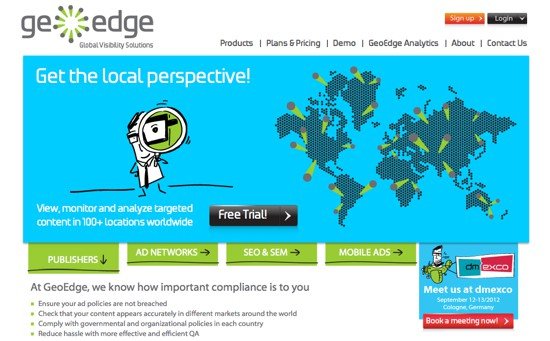
GeoEdge is a very powerful, strong and reliable network proxy service which lets you view your website from different parts of the world, to be more specific, you can view your website from 110 countries in the world. You just need to install their great toolbar and you’re ready to view any website from all the popular countries you know.
And no need to worry about the browser you use as GeoEdge supports all the major web browsers such as Internet Explorer, Firefox and Chrome. It even has an application for Android smartphones running Android 4.0 Ice Cream Sandwich and above.
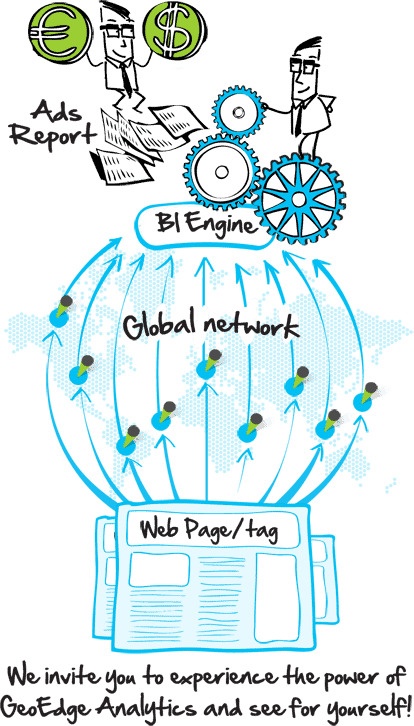
The folks at GeoEdge also offer another powerful tool that is the GeoEdge Analytics feature which is a popular tool among publishers, media marketing people and advertisers. It combines two great technologies together, the proxy network service and the BI engine which will help you capture and analyze any of the ads and campaigns you have been running on your website from different parts of the world.
Features of GeoEdge
GeoEdge comes with a lot of great features but the important features are:
You can view your website from over 100 countries worldwide so basically what this means is all the popular countries you might like to view your website from are covered. GeoEdge cover all the popular countries from Asia, Europe, Africa and America.
With GeoEdge, you can easily view geo-targeted ads, campaigns and search results which will be of great help ehn planning to make your campaign a successful one worldwide or when targeting your ad towards a larger audience.
You can even track your competitors websites geo targeted activity thanks to GeoEdge which should let you know as to what your competitors are planning.
The GeoEdge service is reliably fast and hassle free and you don’t need to worry about GeoEdge’s servers uptime since they use advanced technologies and promise you 99.99 % uptime.
It is the largest premium proxy network in the world as it not only includes over 100 countries, it also lets you browse through various regions or city.
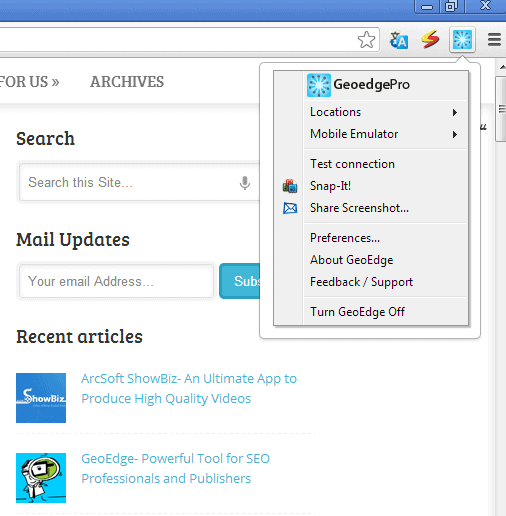
The ease of use which GeoEdge brings is matchless since you have toolbar and you can change locations, disconnect the GeoEdge proxy with ease.
GeoEdge also provides Mobile Emulation which lets you view your website as you would see on a mobile web browser. It supports all the popular mobile platforms that is Android, iOS, Symbian, BlackBerry and Windows Phone. So this should let you place ads in according to your mobile site as well.
GeoEdge Analytics lets users to analyze an ad on any website and obviously in any part of the world.
GeoEdge also offers a VPN client which directs the user’s desktop traffic through its global proxy network and is a great feature for viewing and monitoring contents on a website and ads.
There is also a special featire called Snap it which creates a condensed micro version of the website pages and ads you are viewing from different locations around the country.
You can also share the screenshot of the website or ad you are viewing from the location you’ve choosed directly from the toolbar or add on.
Benefits of using GeoEdge
So you must be thinking why use GeoEdge. Well if you are from a Media Agency or a Publisher, Marketer or Advertiser then this is must have for you. GeoEdge lets you truly take advantage of your ads, it lets you research how your website is performing on a global scale or how your website is performing.
Online marketers should surely benefit from GeoEdge as they can target their ads based on a more global level. SEO companies and professionals can use GeoEdge to optimize their ad campaigns and check out how well they are doing.
Many affiliate marketers who use pay-per-click on ads can see how well their ads are performing in other parts of the country. They can also see if the keyword they are targeting show up often and what other competitors they have for the same keyword.
There’s another service other than the awesome toolbar that is GeoEdge Analytics which we mentioned above. It surely gives it an edge over other competing services. It basically adds and an ad scanner that understand the ads based on the particular location and analyses them.
Ease of Using the GeoEdge Toolbar
I used the GeoEdge add on on Chrome and my experience with it has been truly satisfying. The ease of use is great and it works like a charm. It is truly fast and it doesn’t bring any llag with it. Everything works perfectly quick.
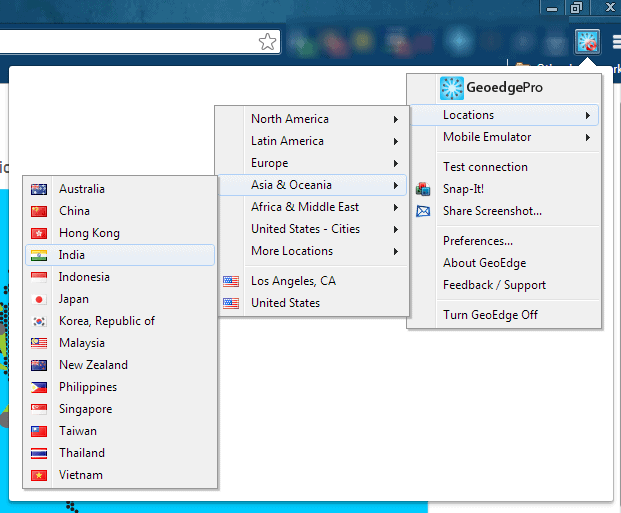
When you click on the GeoEdge icon which is presented on the upper right corner in Chrome with other add ons, you get a list which contains the basic features like the location you want to check the web page on, you can use the mobile emulation feature, you can snap a webpage or send a screenshot as well and other basic features.
The add on or toolbar is very well organized and the locations are categorized in continents. You can go into a specific continent and you will be presented with the list of counties available for viewing your website.
I used GeoEdge and have to use it really is very accurate and i have had no problems whatsoever.
GeoEdge Analytics- Monitor and Analyze your ads
The GeoEdge toolbar is great but thats not all from the folks at GeoEdge. GeoEdge Analytics is a great service which lets you understand your ads, monitor the =m and analyze them with ease.
With GeoEdge Analytics, you can get complete control over your ads. You can improve your ads visibility, compliance, performance and revenue. It combines the premium proxy network the GeoEdge toolbar brings with the Business Intelligence engine to allow the publishers, marketers and people from the various media agencies to capture and analyze any ad on their website from anywhere in the world.
It constantly monitors the ads and regularly captures and analyzes those ads in order to check if they are breaching any compliance rules. It also analyzes a webpage to see if any changes take place and how the ads are presented to different users.
GeoEdge also assures that the quality of the ads are intact. If a malicious ad comes over it immediately alerts users of the advertisements through screenshots and data about it.
It helps in incresing revenue from the ads by helping the users discover the best performing and most appropriate media for their ad inventory.
GeoEdge Plans and Pricing
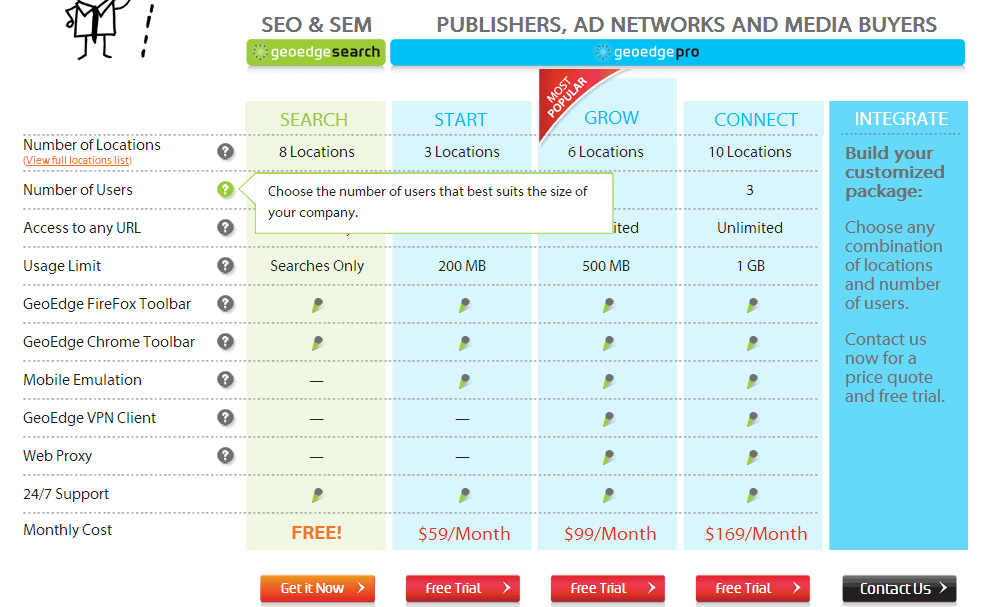
If you are not yet convinced about GeoEdge then you can try for yourself, you can get a free version which lets you view your website from eight different locations but the version is fairly limited as it lets you view from 8 different locations but you will only be able to use these locations on the search engine rankings page. You will not be able to utilize it for an exact URL although you ‘ll be able to see how you rank on a certain location.
The Pro package is the real deal where you get all the features which start at $59 per month. You can check all the plans and pricing in the below picture.
You can also check out the demo here:
Conclusion
GeoEdge is certainly a great service who is into online publishing, marketing or SEO, this will surely be a great investment for you if you are into these. It is highly recommended and the GeEdge Analytics service surely gives them an edge over other competing services. You can get GeoEdge here.
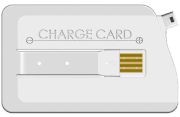
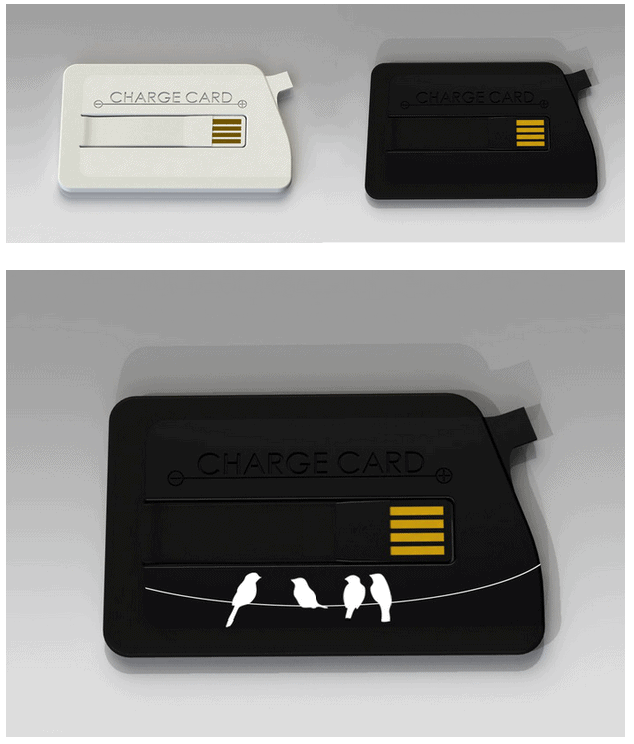
Over the years the size of electronic devices is decreasing with every new product in market. Whether be it a cell phone, smartphone, tablet, laptop, game consoles, PDAs etc. every time a new product is introduced there is a significant reduction in the size of the device as compared to its previous version. Not only higher end devices, even their peripherals like printers, scanners, chargers, connecting equipment etc. also have seen a substantial fall in their size. In this post we’ll see another such Universal Serial Bus (USB) connector which fits into your wallet! Yes, you read it right, a USB cable that fits into your wallet. ChargeCard is a USB cable that’s thin enough to fit in your wallet. Instead of carrying the USB charging cable you could just use your credit card sized ChargeCard that fits in your wallet. ChargeCard is a Kickstarter project by Noah Dentzel and Adam Miller launched in July, 2012.
What is ChargeCard?
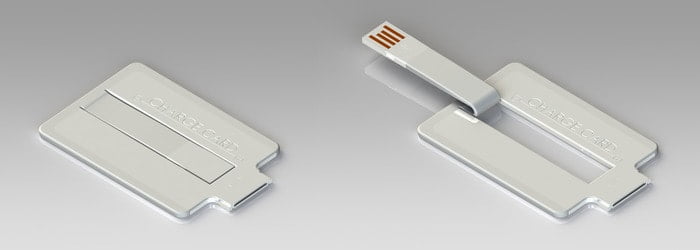
ChargeCard is a USB cable thin enough to fit in your wallet. It’s shaped in form of a credit card to make it easily and comfortably fit in to a wallet, purse or an average sized pocket. It essentially requires a USB port to charge your phone. And now a days USB ports can be found with all types of consumer electronic devices. Thus when your phone runs out of juice, ChargeCard allows you to easily charge your phone using a USB port.
How to use it?
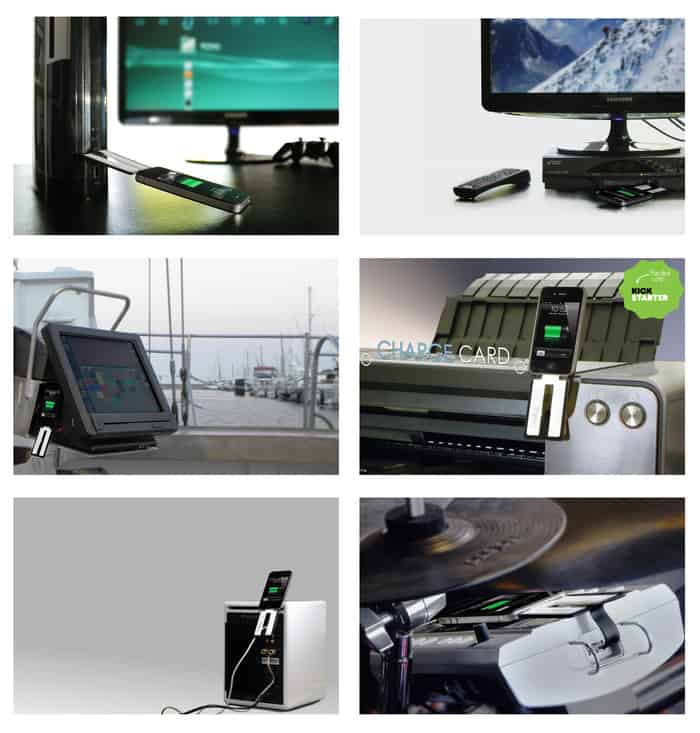
It’s simple. The flexible tongue (foldout USB arm) containing the standard USB is plugged in to a USB port of any electronic device and the other end of ChargeCard goes in your phone. That’s it and phone starts charging. And of course the device with the host USB port must be ON for your phone to charge.
How is ChargeCard different from portable phone charger kits?
The usual portable phone charging kits are bigger in size whereas ChargeCard is of size similar to a credit card. It can be easily and comfortably fit in to your wallet, purse or an average sized pocket which cannot be done with usual portable phone charger kits.
Technical Specifications
ChargeCard is 0.1″ or 2.54mm thick which makes it easily fit in even in compact designed wallets. And according to ChargeCard Team it can even fit beneath many iPhone cases! The foldout USB arm is made up of flexible thermoplastic elastomer and its body is made up of durable ABS plastic.
Portability
Since ChargeCard essentially uses a USB port to charge phones, any consumer electronic device with a USB port outlet can be used to charge your phone. It supports computers, TVs, game consoles, cars and typically any live USB port to charge your phone.
Phones supported by ChargeCard
Currently ChargeCard is available for iPhone 4, iPhone 5, Android and micro USB phones. Also it works as a data cable for iPhone. Initially it was designed exclusively for iPhones and according to ChargeCard team, micro USB version of ChargeCard is under design for Blackberry phones and will be ready soon.
Looks, Colors and Appearances
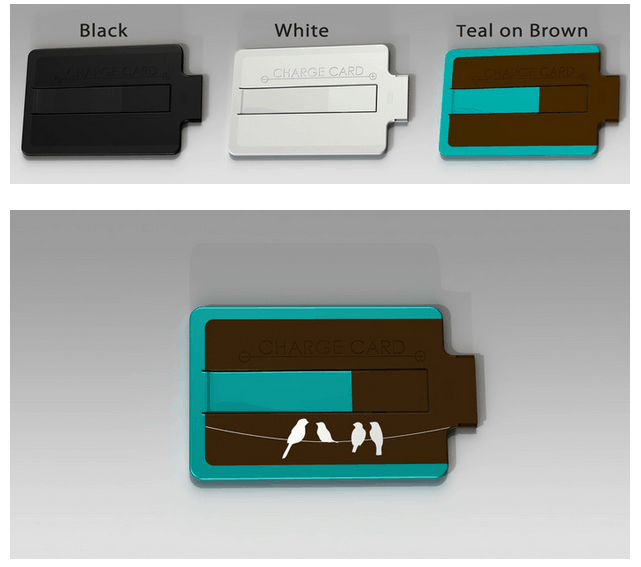
ChargeCard is available in black, white and teal on brown colors for iPhone. Also a limited edition -Birds on Wire ChargeCard is available for iPhones is available.
Black, white or Bird on Black colors are available for micro USB type ChargeCard.
Price
Cost of this product for all three versions, iPhone 4, iPhone 5 and Android is $25. You can order one at chargecardproject.com.
Conclusion
ChargeCard is an awesome USB cable which easily fits in to your wallet, purse or an average sized pocket thus freeing you from all the tangling of your usual USB phone charger cable. Also it is available in cool colors and shades. ChargeCard serves as good friend of yours when you want it and fits in your wallet when you don’t want it!



 Anyone who runs a website is always concerned on how well the site is doing, whether his work is impressing the SEO gods on the internet. Today if you really want to ensure the success of your website then search engine optimization is a must. WebMeUp is a