Home Blog Page 289

Solutions to the Most Common HTML/CSS Questions of Web Developers

Web developers mess with many questions regarding HTML and CSS while designing the website that kills much of their precious time to find out the perfect solution. Here are the solutions to the frequently asked questions by web developers.

How to hide vertical and horizontal scrollbars of a website?

Assume you have created a website that fits in browser but still you get scroll bars, it irritates right? Here is the simple code to hide vertical as well as horizontal scrollbars of webpage-

body {

overflow-y:hidden;

overflow-x:hidden;

}

In case If you want to hide the vertical scrollbar just use overflow-y:hidden; or else use the code mentioned above to hide both vertical and horizontal scrollbars.

How to create sticky header and footer for website?

Sticky header or sticky footer sticks to their position even if you scroll the webpage,   here is the code to create sticky header and footer-

Sticky header

<div style=”width:100%; height:45px; margin:0 auto; position:fixed; top:0; background-color:#000;”>

This is a sticky header

</div>

Sticky footer

<div style=”width:100%; height:45px; margin:0 auto; position:fixed; bottom:0; background-color:#000;”>

This is a sticky footer

</div>

Here we have used “fixed” value for “position” property for both DIV’s that makes them stick to their position either to top or bottom.

How to align text vertically centered in a DIV?

It is easy to align the text horizontally center in a DIV but it is bit tricky to align vertically centered.  Here is the code to align the text vertically centered in a DIV-

<div style=”height:100px; width:200px; line-height:100px;”>

Lorem Ipsum

</div>

According to the code above we have included line-height property and set the value of DIV height to it, just change the line-height according your DIV height to align text vertically center in DIV.

How to create the DIV with rounded edges?

Here is the CSS code to create the rounded edges for DIV, use this code in the ID or else in the class that the DIV uses.

-moz-border-radius: 7px;

-webkit-border-radius: 7px;

border-radius: 7px;

Wonder why there are three lines of codes? Let me explain a bit, the first line –moz is used to support those browsers that uses gecko engine such as Firefox and Seamonkey, -webkit is used for Google Chrome and Safari which rely on webkit engine and the last line “border-radius” is used so that the code should work in Internet Explorer that uses trident engine. Unfortunately Internet Explorer 7 and 8 does not support border radius.

How to stretch the website background with browser?

Do you want your website background to stretch according to your browser’s height and width? Here it is-

body{

background-size:100%;

}
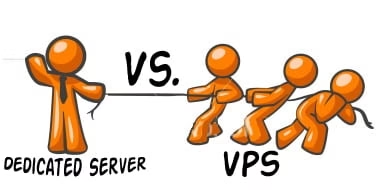
 

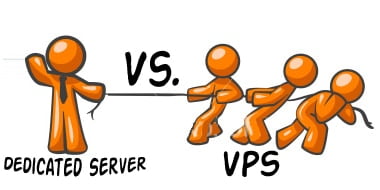
VPS or a Dedicated Server: What are the Main Differences?

Those serious about their websites generally choose between VPS (short for virtual private server) and dedicated servers even though there are other options available. While each of the two servers can make for a successful website, there are several differences between them. If you’re a webmaster you will want to understand these differences before choosing one over the other. Making the right decision can save you a load of future hassles if your website is successful and you need to scale up your hosting requirements. Below are the major differences between VPS and dedicated servers.

vps vs dedicated serverss

 1, Speed

One of the most important attributes of any web server, the speed at which they operate is different between VPS and dedicated servers. Simply put, dedicated servers are faster. They are the quickest servers around. Even low-end dedicated servers give the highest-end VPS a run for their money in the speed department.

2, Price

Obviously, price is a very important factor to consider when comparing the differences between VPS and dedicated servers. In almost every case, dedicated servers will be more expensive than VPS. However, with the extra expense come a number of features that are not offered with VPS. At the other end of the stick, not everyone has a need for all of these special features so saving money on VPS can easily be a benefit.

3, Predictability

Dedicated servers are almost always more predictable than VPS. The main reason for this is that you have more control over them. Since a dedicated server is being used by only one computer, it can be rebooted as needed, completely customized to suit your personal needs, and new software can be installed on a whim. Dedicated servers experience far fewer problems than VPS do.

4, Bandwidth and Storage

Bandwidth and storage are important elements for every webmaster to consider. Both VPS and dedicated servers generally offer unlimited bandwidth and unlimited storage. However, VPS is more likely between the two to have some restrictions set on CPU power and memory.

5, Ease of Use

Both VPS and dedicated servers are easy to use. However, different people may find one or the other easiest. VPS are generally better for those users with minimal or average web hosting experience. They make things very user-friendly and most offer customer support lines to help you through problems. Dedicated servers, on the other hand, aren’t so straightforward but allow a number of advanced customizations to be easily made which are hard to do with a VPS. Advanced computer users will greatly appreciate this freedom.

Though it can be tough to choose between a VPS and a dedicated server, when you understand the differences between them it is made a ton easier. It is important to keep in mind that many of the differences can benefit users of each type of server depending on the user’s personal experience, needs, and preferences. Take the differences explained above into consideration when making the decision for a server for your website.

About the author:

Frank Ashton is a business website hosting consultant. He enjoys sharing his experience and acquired knowledge on various hosting blogs. When looking for a hosting solutions for your website, it is worth checking out host ratings from the customers of the most popular webhosts.

10 Features and Things You Can Do with Google Glass

5

Google has been recently developed a hand-free wearable smart device called Google Glass. Perhaps this is the Google’s smart effort in presenting the next phase in mobile computing. And if you presume that this endeavor is an extension to Smartphone or tablet, you are absolutely wrong. Google Glass is really a new advance device that has the ability perform any mobile task even without moving your hands. It is not a computer at all; it’s just a wearable device for user.

Currently, the first set of Google Glasses for developer has already been sending off. Without much commotion, let’s discuss the outstanding features that Google Glass offered. The following things are what you need to know about Google Glass.

GoogleGlass_jpg_1445876g


Watch Your Health with Google Glass

Google Glass is very beneficial for tracking your health where ever you are, anytime of days. This device has special medical feature that allow you to know your present body temperature, allergic symptoms, blood pressure and some other general health matters.

Bone Conduction Transducer in Google Glass

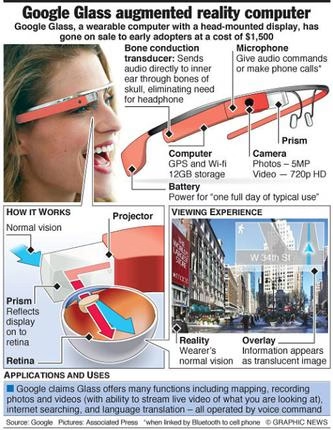
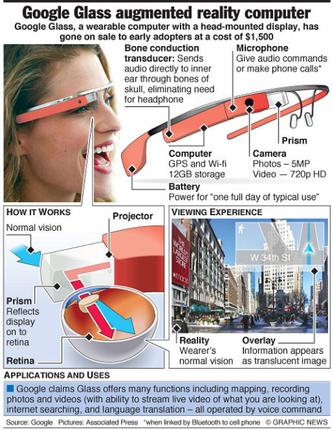
Usually, bone conduction generates the sound transmission through the bones in your skull going through the inner ears. Due to bone conduction transducer human voice sound unusual when it was recorded. It seems that is the coolest feature of Google Glass that able to eliminate the usage if regular headphones for communicating.

Technical Specifications of Google Glass

Google Glass is capable of taking 5MP shooter pictures together with autofocus feature. As well it has the ability to offer high resolution display of 25-inch HD screen even in a distance of 8 feet. It featured with 16GB flash memory and 12GB of this will be coordinated with the storage of Google Cloud.

Video Calling & Picture Clicking with Google Glass

You only need to speak loud the word “Google Glass” and it can record videos and capture pictures. There’s no need of touching the device just to capture images. Simply amazing! The recorded videos and captured images will directly save to the 4GB flash memory. As well this device will allow the user to share photos and videos through email and social sharing sites.

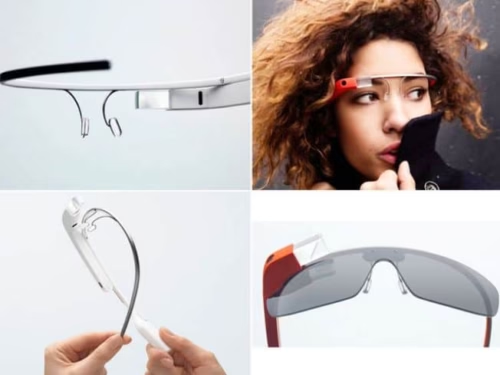
google glasses feature

Person Identification

This feature is fit for those who easily forgot the name of the person they’ve already meet. It seems that this gadget would be their best company. In time that you see people through Google Glass it automatically provides the details of the person. From name to relationship status, it tells you everything in just a couple ticks. Indeed this is one of the astonishing features of Google Glass.

Google Maps in Google Glass

If you are a kind of person that utilizes Google most of the time then this feature is right for you. By wearing Google Glass you can Google everything in an easy manner. By walking somewhere down the road you can get to the specified destination by simply accessing the map through Google Glass. Indeed the integration of Google Glass and Map allow the user to map its course of journey.

Appointments and Calendar Feature

These are common features to any devices. With these features, you can keep track all your important appointments. You can set the calendar to appear often on the lenses. In such case there’s no need of checking most of the time to your Smartphone for schedules, indeed Google Glass allows you to virtually access your appointments and schedules.

Google Glass Responds to Voice Commands

The function of Google Glass is to provide almost everything that a human being wants. Regardless of you location, Google Glass will show your SMS the moment it was send to you. As well it notifies when there is email dropped at your inbox. And it’s pretty amazing because you can reply the sender through voice command. Therefore, there’s no need of typing for responding a long messages.

Translate Language in Google Glass

This feature is very handy and very useful most especially if you are traveling outside your country. If you get confused with the language just ask your Google Glass for the translation. Google Glass able to translate a word, sentences, and phrases, and speak loudly to you the translation so you can hear clearly.

Google Now Integration

Google Glass was also integrated with digital voice assistance of the search. The function of this is to keep record your daily habit. From the kind of food you eat to everything you do in the office. As well it provides you alternate routes to avoid traffic, and update you occasionally about the weather conditions.

Now that you already know the functionality and features of Google Glass, you can control easily all the benefits offered by this device.

About the Author:

Mackenzie Sulivan is a tech writer, guest poster and blogger. She is a permanent writer of the site: TipsOtricks. Mackenzie loves writing news, reviews, updates and articles about technology, social media and internet marketing through online exposures.

Outsource Vs Resell – What Should a Web Developer Choose.

I have come across many of my Web Designer friends & reader audiences think hard when posed with this common question. Which is why, I was prompted to discuss this in the form of an article.

To give you more context, a lot of Web Developers, primarily the small and medium set ups, do a great job when approached by Customers to have a website designed. They have all the technical knowledge required to build an aesthetic and engaging website. However, most of them end up confused while offering the essential ancillary services required for the website to function, namely a Domain & Hosting Package.

outsourcing vs reselling

Some people I know prefer taking the outsource route wherein they ask the Customer to approach a unique Web Service Provider such as Big Rock or GoDaddy to source services apart from Web Design for the website. As a Web Designer, you should actually consider if following the outsource method is in your best interest?

Since this topic has a lot to discuss, and keeping in mind the average readers attention span, I am going to divide this article into a 3 Part Series which will help you decide whether you should OutSource your Web Service needs, or Resell.

So let’s start with the most popular one: Outsource

Advantages:

1.)    No technical support responsibility – Once you have passed on a customer to a good service provider, you don’t have to worry about helping him set up his Domain and Hosting package. Your responsibility ends as soon as the site has been developed. The customer will need to approach the service provider for any help related to the domain or hosting package

2.)    No Hosting knowledge required – This allows you to focus on your core expertise and let an external service provider handle everything from the backup, to uploading content, setting up email accounts etc. By focusing on your primary business, you can make it more profitable and avoid needless hassles with constant requests for help or support from your customer.

3.)    Better Product Portfolio – End customer providers such as Big Rock and GoDaddy offer their customers a range of additional services to choose from. Integrating all these options into your own offerings could be time consuming and hard to maintain. This way, you can simply pass a client on to a reliable provider that can meet all his needs

4.)    Referral Amount – Some major service providers offer an affiliate program or a referral scheme. For every client you pass on to them, you could receive a percentage of their spending or a flat fee. This is a very useful addition to your income and benefits you in all ways. The service provider will be happy to receive clients, and you get paid for every referral you send their way.

5.)    Better Management – End customer providers are dedicated to selling and managing Domain Names and Hosting packages along with related products. They are capable of responding to and dealing with any and all queries in a quick and professional manner. You can be confident your customers will be well taken care of.


Disadvantages:

1.)     Zero Annuity – A lot of the websites you’ll typically design are for Small and Medium businesses. As such, they are quite basic pages that won’t require much modification in the future. In this, case, you are restricting your potential sources of revenue by only offering one service which has a low chance of providing you with constant income. If you choose to provide your customers with the Domain Name and Hosting, then they may renew it with you, in effect increasing your revenue channel.

2.)    Business Grabbing – Since Web Service providers maintain such a huge selection of products, the chances of them also offering Web Development services are very high. In this case, a customer may choose to place further orders for web development directly with the service providers and by pass you completely.

3.)    Zero Brand Recall – When you outsource, you are decreasing your brand value. The Web Service Provider has his branding all over, right from the control panel, to their mails; every step of the way, the provider highlights his brand. Since you’re only offering them one service, the chance that a customer would remember you and return for business decreases.

4.)    Loss of Potential Business – Web service providers spend large amounts on a variety of marketing activities already. A key marketing tool for Web Designers/Developers however is word of mouth. If you only offer one single service, this decreases your value proposition to a new customer. A customer looking for more convenience would go to someone who could handle everything from the purchase of the Domain name and Hosting to setting it up.

5.)    Better Pricing – Since Web Services Providers acquire most of their products in bulk and operate at a vast scale;their capital and operational costs are lower. They tend to pass these benefits on to consumers as they transact in volume. ResellerClub for instance follows the resell model. Since they operate on a large scale these guys pass on the benefit of price to Web Developers, which the Web Developer can then choose to pass on to his Customer.

These points help explain the Good & Bad of Out Sourcing. My next article will talk about Reselling, and the Good and Bad attached to that method.

In the meanwhile I would love to hear what you’ll think about Out Sourcing and what methods do you’ll currently follow.

How to Convert Video Online Free

When was the last time you shot a video to upload on the web or to share with someone. Problem with video files are that they are huge in size and are mostly in formats that are not supported for uploading online. You also have to consider the bandwidth and the file format to handle the video. On all those occasions, you might have searched for an application to either convert your video to a different video format.

If not for converting to another video format, or to extract the audio from the video and make a MP3, or for functions like video transfer Mobile, or other devices which only supports its own specific format.

Video editing or converting tools aren’t cheap. There are lots of application to do this task, but you might not feel a necessity to install an application just for a one-time task, or you don’t want to pay for something that you don’t use often. Yes, why to spend your computer resources and money if there are free alternative which does the job without spending a dime.

With simple few steps, we are going to show you how to convert video using an online tool and save money.

To help us save money, I’m going to use Apowersoft Free Online Video Converter tool. Which is of course free. They also do have video editor and Youtube downloader software.

It supports you to convert your video to the below formats:
MP4, VI, MOV, WMV, WEBM, ASF, MKV, MPG, 3GP, DV, SWF, FLV, VOB, MP3, WAV, WMA, AAC, FLAC, OGG, RA

Free Online Video Converter tool

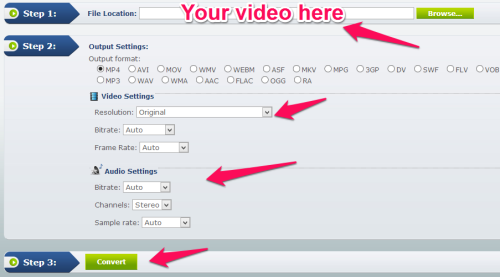
Step 1.

Go to this page and browse the video from your local drive.

Step 2.

Select output format and customize video and audio settings that suits you.

Step 3.

Now simply click on “Convert” button and you are done.

Even the Federal Government Struggles With Mobile Device Management

By many accounts, Blackberry mobile devices — once considered the gold standard in smartphones — are all but obsolete, thanks to the explosive growth of Android and Apple iOS powered devices. For proof, one needs to look no further than the U.S. government, which at one point was one of Blackberry’s most loyal supporters. However, thanks to many agencies moving to a Bring Your Own Device, or BYOD, model, many of the more than 200,000 Blackberries used by government employees have been replaced with devices from a wide variety of manufacturers.

mobile app management

<Image credit>

And while employees are thrilled to use the devices that they’re comfortable with, the shift to a BYOD environment has created a security nightmare for the government. A recent report from the U.S. Army’s Inspector General’s office revealed that the government’s mobile security is lax at best. In fact, the lack of a comprehensive mobile device management plan could spell disaster for the military.

Multiple Devices, Multiple Security Problems

While BYOD is convenient for employees, it does present some security challenges. Not only are employees accessing secure corporate networks remotely, but different operating systems require different security solutions.

Some organizations have addressed this problem by limiting the number of supported devices, or by restricting devices to one operating system. By doing so, IT security can reduce the risks to the organization’s network and data by implanting a comprehensive MDM plan. All of the devices are centrally controlled, making security updates seamless and immediate. In short, a robust mobile security plan keeps everyone on the same page and prevents against unauthorized access by unapproved or dangerous devices.

This level of security is not happening within the U.S. Army, at least among the study area at the U.S. Military Academy in West Point, New York and the Army Corps of Engineers Engineer Research and Development Center in Mississippi. Researchers discovered that more than 14,000 devices are being used without the appropriate cyber-security authorizations. Thousands of these devices, most of which the Army was not even aware of, are regularly accessing sensitive networks and data, potentially creating security vulnerabilities to be exploited by cybercriminals.

For example, some Android applications, particularly those acquired outside of approved sources like Google Play or Amazon, contain dangerous malware that could provide criminals with secure passwords or other information that would grant them access to government networks. An unauthorized, unsecure device used by an innocent employee could potentially create a major national security breach when a criminal accesses Department of Defense networks, a fact that is of major concern to both government officials and security experts.

Taking Steps Toward Security

The U.S. government’s inability to effectively manage their BYOD program highlights a major concern for businesses: if the government, with its significant financial and security resources, can’t manage their mobile security plan, how can a small- or medium-sized business manage the same task?

Security experts note that even small businesses can learn from the government’s example and implement a mobile security plan that both protects data and allows employees the freedom to use their favorite devices. In short, organizations should:

  • Use a centralized, robust mobile device management application to effectively secure all devices accessing the network and the data contained on them. Ideally, an MDM solution should include authentication, encryption, threat detection and access limitations to protect data on the servers and in transit.
  • Have the capability to remotely lock or wipe compromised devices.
  • Develop acceptable use policies that govern how employees can use devices to access and store data, and place limits on potentially harmful activities such as app installations or use of geotagging. The Inspector General’s report also noted that employee education and training is necessary to prevent serious security lapses, as in many cases employees are simply unaware of the risks inherent with using mobile devices for work.

Officials note the government-provided devices — mainly Blackberries — used by high-level employees and officials are secured under the existing MDM policy. However, with more employees turning to their own devices for work purposes, it’s clear that the old policies are no longer adequate.

But for a small business, the government’s BYOD issues only serve to highlight the importance of a mobile security plan. Without one, networks and sensitive data are vulnerable to a devastating leak.

About the Author: Noah Gamer is a driven business leader with experience in Internet marketing, Web software development and security software. Currently, he develops Internet strategy and directs global SEO for Trend Micro.

Vista print – Quality Print Products at Great Price Online

0

Vistaprint is one of the top online printing services offering great quality printing products at budget price. Its a nice way to order something like print products online and get it delivered at your doorstep. I remember couple of years ago when me and my friend went to a printing shop in my town, it was so boring and time consuming stuff to do, and the guy at the print shop had very few designs to offer still at high price and yet we had to wait for days to get it printed. And we had no idea how it is going to look once printed.

But Vista print has a huge collection of free designs to choose from and with the design editor, you customize your design and choose how you want it to look. You can edit and preview your design before you order.

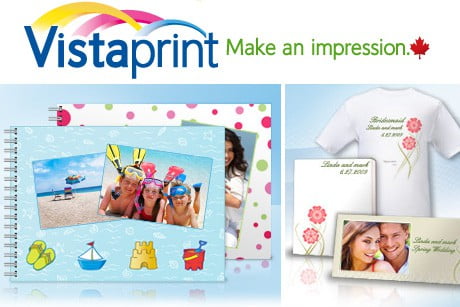
vistaprint techgyo

Online printing comes with lots of positive surprises, we get great quality printing at budget price, great for small businesses, we get to choose our own design, preview it before ordering it,  cheap price and the best part is that you get it delivered home while we sit and relax. Not just business cards, they do offer lots of products like Mugs, Signs & Banners,Photo Gifts, Stickers, Stamps. Marketing Materials like Postcards, Flyers. The list is huge so it is best to check all the products list from their website here.


They also offer Free business card and other products for you try out, where all you have to do is pay for shipping. You can check all free products here. Most of the times, when we see something being offered for free, one thing that comes in our mind is, “Free stuff? will it be any good”. But when it is from Vista print even free stuffs comes at very professional quality. One thing about the free cards is that at the back of each card there will be a small ad for Vistaprint and will be printed on standard paper. If you want to go to glossy paper you can go for premium business card.

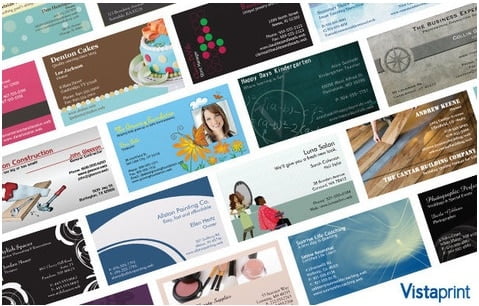
vista print business card designs


Online printing is not just for businesses, you can also print custom greeting cards, holiday gifts, printed cloths T-shirts, hats and a lot more. Often times it is hard to find a site which offers a combination of pocket friendly products, customization options and most importantly humble and helpful customer support.


business card maker vistaprint

If you have a lot of pictures you can make a photo album online with Vista Print and share your sweet memories with your friends and family.

vistaprint photo album online