
Home Blog Page 263

How to be those Cool Tech Parents

0

I always loved going over to my friend’s house because his parents were very tech-savvy (oh what I would have given to have grown up in a household where my parents actually paid attention to technology).

They were the type of people to pick up the latest gadgets and gizmos not because they had a ton of money to spend but because they understood all the benefits that came along with the tech.

cool tech parents

I know you may not understand every bit of technology that’s coming out and that’s perfectly okay because it is mind-boggling at times, but what I want to do with this post is give you a guide on becoming those “cool tech parents”.

The First Thing You’ll Need…

…is high-speed broadband.

Now I know that it’s not available in all locations (especially if you’re in rural areas) but the cost for high-speed Internet is well worth the investment if it’s there:

  •  Faster speeds = faster access to content
  •  Bundled services = easier-to-manage finances
  •  DVR & online login = never miss your favorite shows

You probably already know that this is a necessity due to how interconnected we are due to our computers, phones, tablets, and other net-ready devices.

Setting Up the Ultimate System

From my experience, there are really three main items to get setup if you want to create the ultimate system and they are:

  •  Amazon Prime
  •  Netflix
  •  Steam

The first two, Amazon Prime & Netflix, you’ve heard of and rightly so because they are excellent for entertainment and come with a lot value. Through Prime & Netflix, you have access to thousands of movies, music, audiobooks, and a whole lot more if you really dig into them.

In terms of family entertainment, they are perfect (each has filters so you can easily find content for your children no matter the age).

At the bottom of our three-point list is a service called Steam which is a program & marketplace for PC games. Throughout the year Steam holds many holiday sales where you can find games up to 90% off at times so take your typical video gamer child, get them an account on steam, and you’ll save hundreds.

Outside of those services you may want to invest in a set-top box such as a Roku, AppleTV, or Amazon Fire TV which is a simple device that houses these services and can be connected to the TV.

Bringing It altogether

Once you’ve got your high-speed Internet, streaming services, and video games setup you can now proudly claim your place as those “cool tech parents” in the neighborhood.

The value really steps up, though, once you realize that all this tech can bring the family together:

  •  There are many cooking shows available you and the family could watch and then later do for breakfast, lunch, or dinner
  •  Documentaries and other educational shows are a great replacement for the normal dribble that you may get stuck within the mid-day when the kids have school off
  •  Gaming with your kids can be a whole lot of fun and it also teaches them great skills like effective communication, hand-eye coordination, teamwork, and can even inspire them to learn beneficial skills like coding (or hardware tinkering) that many professions seek
  •  The multitude of devices that can run these services lets everyone in the household do their own thing and you, as a parent, can keep parental locks for the younger ones so you never need to worry about them accessing mature content

In terms of being a great role model I would say the parents that are tech-savvy are the ones I always looked up to because technology, as a whole, is very inspiring because it’s a big shaper of our World.

It’s great to get together, pop a bag of popcorn, and all watch a movie like we all did in older times when we had to go out and rent movies. The tech helps the family bond plus you get to be the cool tech parents, remember?


How good is WordPress for E-Commerce?

It comes as no surprise that people have smitten to the WordPress.com for their blogs but the Word Press offering does not end there and there is still a lot more glory to this new free and open source blogging tool.  And that’s precisely what we are going to discuss in this post. Making its way as the most popular blogging platform in the world. WordPress is a free publishing tool “via WordPress.com” and a content management system (CMS) for self-hosted blogs “via WordPress.org”. Having an enormous library of themes and plugins, WordPress provides a broad spectrum of blogging options for casual bloggers as well as top-notch businesses.

wordpress ecommerce

Photograph Courtesy: Metrostore.com

Having such strong attributes the question is if WordPress can also be a platform for ecommerce? And the answer is a big “Yes” but things get gloomy when you come to know that although most WordPress eCommerce platforms come free and are open source, but their plugins aren’t free. Generally the price ranges from about $50 to $150 or more based on the preferred features you may require. In addition to the benefits mentioned above, the word plugin is a jargon because such plugins are very much the same like apps which other e-commerce platforms also brag about, for e.g. Shopify apps.

So, if you own an e-commerce “store” or are planning to start one soon you’d definitely want to take a look at WordPress if it can be the “to be” e-commerce platform. So there you go firstly, along with the user friendly interface you get a number of plugins available which are easily installed on the platform to facilitate you for the various e-commerce functions and features. Next is the “third party” shopping cart plugin which has been evolving slowly along with WordPress since the last couple of years.  Integrating your WordPress content management system and shopping cart helps you to create a seamless user experience for all your customers. Selling products or services on your WordPress site has come a long way that will benefit your e-commerce site in a variety of ways.

WooCommerce

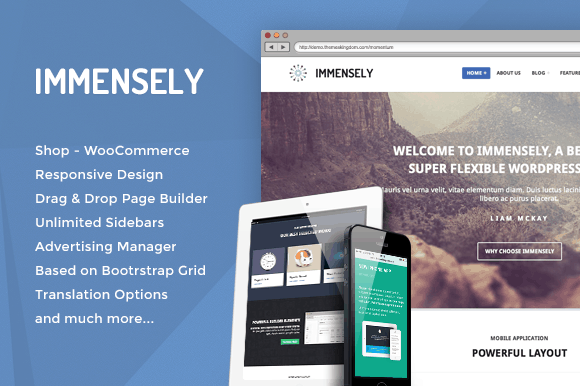
One of the most popular wordpress ecommerce plugin available in the market is WooCommerce that offers a number of powerful features. The e-commerce sites that use Woo-Commerce plugins are capable to feature a number of tasks like comprehensive tax and shipping options, powerful marketing tools, inventory management tools and extensive reporting features. This plugin is extremely useful with its superior user interface.

immensly ecommerce

Photograph Courtesy: evowpthemes.com

Cart66

The Cart 66 plugin provides increased functionality for your e-commerce website. It’s perfect and easy for most types of online WordPress stores. Cart66 is different when compared to other WordPress e-commerce plugins, is that you can sell digital and physical products through this medium.

The verdict

Having said all that about what all Word Press can offer as an e-commerce platform but making things a lot more easier for the decision maker the fact is that WordPress was originally not developed for an e-commerce platform. The burgeoning popularity of WordPress as a blogging platform raised the expectations of developers to overlay the basic program incorporating plugins and heavy themes to make it work as an e-commerce platform. The popularity of Word Press has come as a major disadvantage for it as it has a large installed base, being under constant attacks by hackers. They surely offer upgrades but who want to live under constant threat of being hacked and especially for an e-commerce site security comes as a top requirement.

When an e-commerce business is successful and one has to process an increased number of orders the number of synchronized scripts executed  by WordPress can overwhelm a number of web servers and given that one needs to add a theme and plugins to make WordPress work decently for e-commerce, there can be some problems when upgrading your WordPress installation. Firstly the installed plugins and themes may not be found compatible enough with the WordPress upgrade. It’s important to note that its plugins and themes have to be upgraded quite often. And any customization one makes will get overwritten every time there’s an upgrade. Although Word Press has been admired for its “rapid strides” and there are high expectations that there will soon be an easier way for Word Press to overcome the problems mentioned above, but for right now an ecommerce platform on Word Press may not be a very good idea despite the great features we’ve mentioned above. But choosing it as an acceptable performer today will probably make it the winner for tomorrow.

Author Bio:

Nancy Ronnie is a New York based Writer and Editor, an MA in English with a specialization in Creative Writing from New York University. Her literary interests include 17th century poetry as she has always had a passion for literature. An expert creative non-fiction writer as she is, Nancy also enjoys outdoor activities such as biking, fishing, hiking and running.

Mobile Phone Woes: When Simple Sims are the Way Forward

A recent survey in the UK conducted by Oxford academics revealed that £5 billion pounds is wasted each year by consumers signing up to the wrong mobile phone contract. This amounts to £195 per year for the average user.

mobile phone simple sims

There are a number of ways that customers are shoehorned and shackled into such unnecessary overspend. Many mobile phone packages are designed around aspirational or current handsets – which, of course, don’t stay that way for long, but continue to be subsidised by the monthly bill until the bitter end of the contract – often at the culmination of a 24 month period. Words like ‘unlimited’ are bandied about when used to discuss text allowances and minutes – but ‘unlimited’ comes at a premium, and often, is entirely unnecessary. Which begs the uneasy question: are you spending too much on your mobile phone contract? The answer is probably yes.

It might be time to consider a change of attitude towards mobile phone ownership. It is profoundly wasteful to throw away a perfectly good handset every two years – and, as the Oxford study pointed out, users who were willing to keep their existing handset and switch to a SIM only contract could make a significant saving of £250 per year.

If you are happy with your current handset, another option that can have significant savings is to compare pay as you go deals. You only pay for what you use, so if you tend not to have lengthy phone conversations or don’tuse your phone for business, this option may be suitable for you. Without the commitment of a contract, pay as you go phones can easily be switched about to meet your needs.

When mobile phones first came out, PAYG mobiles were definitely more hassle than they were worth. Calls and texts were charged at a per-minute or per-text rate, now,the entire procedure is more cost-effective. Minutes and texts are bundled into a transparent monthly cost, which can be changed month to month as required. There is also the option of a data allowance and jet-setting users can switch to an international SIM when venturing abroad to ensure they are securing the best deal and avoiding pricey roaming charges.

While it’s unlikely the culture of squandering money on mobile contracts is unlikely to change soon, there are some savvy users out there taking steps to appraise their needs and save money. Make sure you aren’t giving away your hard-earned cash on unnecessary, pricey contracts.

Images by Marjan and Karlis, used under Creative Commons License.

5 Simple Things You Should Be Doing to Protect Your Smartphone

protect your smartphoneAll smartphone owners experience an onset of panic and despair when they realize their cell phone is missing! It’s almost like a part of their lives has been taken away from them.

Today, people are using their smartphones not only to make calls, but also for a variety of other purposes like bill payments, shopping and information storage. Moreover, smartphones are itself a large financial investment for many owners. This is why it’s of paramount importance that smartphone owners are able to protect their phones at all times.

Here are five simple steps you can take to keep your smartphone safe, protect it from damage and keep your data private:

  • Lock Your Screen and SIM

You must use screen lock to protect your smartphone from prying eyes by locking the screen when not in use or automatically after a time out (certain period of inactivity); also makes sure that you set a password for accessing the main screen. To unlock the device, set a pin or a pattern. This is the simplest step you can take to protect all your information on a smartphone.

It may seem like a hassle to unlock your handset every time you use it, but this is an essential step that will protect all your confidential information in case your smartphone gets lost, stolen or even if it is left unattended. For setting pin code, pick a strong password to ensure that even if your smartphone is stolen, the data is safe behind the “digital locker”.

Though screen lock is important, it will not protect your SIM card. Anyone can remove the SIM card from your smartphone and use it on some other phone. This will give the person access to all the information you have stored on your SIM like phone numbers, text messages and history of calls. To stop this from taking place, setup a SIM card lock. After turning on SIM security, you’ll be prompted to enter your SIM pin each time you start your phone.

These two steps will help prevent anyone from accessing precious information on your smartphone or using your SIM to make calls or use the data plan.

  • Install Appropriate App to Protect Sensitive Data

There are speculations that new smartphones like iPhone 7 will come with advanced security features like face recognition software, replacing the age old technique of protecting your smartphone with pattern or key lock. But even these highly secure features are not sufficient today.

What you are carrying with you at all times is not smartphone but a mini computer that contains a truckload of highly personal and confidential data. Even if your phone is locked, anyone can retrieve data from your smartphone by simply plugging it into a computer or slotting the microSD card into a card reader. Therefore, protecting the sensitive data which is saved in the internal storage is a must.

One of the ways you can protect your data is by encrypting your files and folders. This means a code has to be entered before a file gets copied or viewed.

There are many apps available today in app stores that allow you to add a password to access features like Email, SMS, Gallery, etc. These security apps even let you encrypt other important apps on your smartphone like Facebook, Twitter, Skype, WhatsApp, etc. These apps come with great features like watchdog, which after 3 failed attempts to enter the right password, clicks the picture of the user.

  • Bluetooth Security

Bluetooth is a fantastic wireless technology. It enables you to work with a diverse range of accessories like wireless keyboard or headsets.

However, in any wireless networking setup including Bluetooth, security is a major concern. Bluetooth is a potentially risky venture for most mobile users as hackers may use this technology to remotely access sensitive data on your phone. This means, it’s of critical importance that you switch off Bluetooth on your device when not in use.

Another preventive measure to stop this from happening is to set the default Bluetooth configuration option to a “non-discoverable” mode. This will make sure that hackers around you, who are searching for a potential target won’t find your device on their list when they switch on their Bluetooth and ‘scan for devices’ on their smartphone.

Also, be cautious when pairing devices. Ensure you don’t accept the request to pair with any unfamiliar device.

  • Invest in Security Software

A common misconception among people is that only computers and laptops fall prey to viruses and worms. However, the fact is Android smartphones and tablets are equally prone to viruses and worms.

While the iPhone was an exception to the rule, a virus named ‘WireLuker’ attacked iOS devices and showed the world that even iPhone was susceptible to a virus attack.

This shows that investing in antivirus software is a must for any smartphone owner. Installing some kind of security software on your smartphone will protect your device from malicious apps, viruses and guard against dangerous websites, which may otherwise steal your confidential information and your money.

Security software are designed in such a way that apart from providing protection against malware and spam, they also send you alerts to discover what individual information your apps are accessing. They even offer recovery attributes to remotely find, lock or raise an alarm for a lost or misplaced smartphone.

  • Use Screen Protector and Strong Case for Protecting Your Smartphone from Damage

Screen protectors were once practically mandatory, but advances in glass and coatings (Gorilla Glass) mean smartphone users think they’ve become redundant. However, there are some common materials like sand, hard rock or diamond that can scratch even Gorilla Glass.

This is why you should use a screen protector for your expensive smartphone. In case of damage, you can replace a screen protector with a minimal charge whereas replacing the screen is a costly endeavor.

Some people believe that a screen protector blurs the display and slows the screen’s responsiveness, but smartphones are expensive and you wouldn’t want to spend hundreds of dollars on a smartphone and end up with a scratched screen.

Just like screen protectors, a strong case will also help protect your cellphone from damage. However, there are some smartphone owners who believe using cases will add bulk to their phone and even hide the cooler aspects of the phone’s design.

But today, there are ‘barely there’ super-slim cases available in the market that not only offer sleek design for your smartphone but also protect your expensive smartphones from the impact of falling on hard surfaces.  While these premium cases cost more, they offer better protection.

Follow the aforementioned simple steps to safeguard your handset and what you store on it!


Author Bio:

Mitch Pazanski is head of the art department at MightySkins, a vinyl skin company located in Florida. He helps design the tablet, gaming, and phone skins that are offered at MightySkins.

Common SEO Errors to Avoid for Ecommerce Sites

0

Committing SEO errors on ecommerce websites can cost the businesses financially. This is one of the main driving forces to make sure that the SEO campaign is along the right line. When compared to the content based websites or blogs, the ecommerce websites are more difficult to organize if the products you are selling are there in several websites. It has also been observed that online businesses often think that by simply listing their products on the website is adequate for search engine optimization. But creating a cumbersome database is not really enough. The difficult part is that it takes more effort to optimize an ecommerce website. In order to reach out to the potential customers, it is essential that such common SEO errors are avoided where ecommerce websites are concerned.

SEO for ecommerce

Here’s a list of some of the common mistakes that are committed as far as SEO strategy is concerned:

Lacking in product descriptions

This is one of those errors that are made by the online gift or apparel stores. A lack of product description affects the SEO campaign adversely and the website loses the chance of acquiring a place in the top 10 search results. To be on the safe side it is important to include a description for the products. This will help the pages of not losing their chances. The more unique is your content the better would be your chances for the SEO campaign. In this regard it will help to keep certain points in mind, like, only quality content should be provided to guide the customers’ purchase decisions. Duplicate content is completely discouraged. Finally, too much content might hurt the website too.

Not optimizing the product pages as per searches

It is essential to consider the keywords that are in demand while people search for particular products on the Internet. So while writing the title pages, headlines and product descriptions it is important to use these popular keywords to ensure that the online business is promoting a product that people are actually looking for. This usually happens when there are various goods in a single store.

In this regard it is important to use model numbers and brand names for the H1 headings and title tags. Secondly, it is also important to not report the keyword phrases through the page. Otherwise the page will be stuffed with keywords. Thirdly, the iframes should never be used for putting up content. It is vital that the content is actually present on the product pages.

Duplicate title tags

This is another enormous error that affects the SEO for ecommerce websites negatively. The duplicated title tags must be replaced with unique ones. This is one of the fundamental requirements of SEO. Of course it is difficult to create exclusive title tags when an ecommerce shop is selling various kinds of items from a single brand. The keywords, thus, will be repeated. Even the search engines are aware of this fact. This is the reason why it is important to form unique key phrases.

Absence of speaking URLs

The speaking URLs play a major role in semantics, anchor links and relevancy. The semantics help the customers to inform them what to expect when they are clicking on a URL. The anchor link and the keyword can help in getting the traffic back to the main website. Finally, it is the relevant keywords that act as huge driver for the domain names.

Presence of duplicate content

This is one error which the ecommerce businesses cannot afford to commit. Google is very particular about the website content and does not shy away from heavily penalizing websites where it finds duplicate content. Hence, the need to keep updating the content and checking it to find whether there are any cases of duplication.

Google is a search engine that pays special attention to its users and their experience. Therefore, it is important for the ecommerce websites to create convenient online stores and ensure quality services for the consumers. The more and more people spend their time on a particular website; it sends an indication to Google that the users are being diverted to the right place.


Author Bio: Charles Wilson is an experienced SEO professional and has a particular interest for SEO for ecommerce website. In this article he specifies some common mistakes that can negatively affect an ecommerce website.

WordPress vs Magento – Which One to Choose For eCommerce Implementation

If you’ve been using WordPress content management system for running your site, and want to incorporate e-commerce functionality into your existing site, then possibly you might be wondering whether to stick to the WordPress platform or choose Magento for running your site with e-commerce functionalities.

Considering the fact, Magento was built for e-commerce website development while WordPress was primarily designed as a blogging platform and now is widely used as a content publishing platform, it’s easy to get confused about choosing the right e-commerce solution.

Both WordPress and Magento are open-source CMS platforms, highly customizable and SEO-Friendly. Additionally, both of them offers plenty of themes and backed by strong online community. However, you’ll have to decide which platform best suit your development needs. In this post we will have a basic overview of WordPress and Magento platforms, and discuss which one of these platforms you should choose to accomplish your website’s purpose.

Basic Overview of WordPress

WordPress dominates the CMS market with a 61% market share, and is used by  23.2% websites all over the world. At first, WordPress was designed as a blogging platform, but over the years has evolved into a content management system. In fact, WordPress is also used for building e-commerce websites because of the plugins that makes setting up an e-shop unbelievably easy.

Basic Overview of Magento

Magento is also a popular content management system just like WordPress, however this CMS was mainly built for creating e-commerce sites. According to an online survey, 23% of e-commerce sites from top one million sites ranked by Alex uses Magento. It comes in two different editions: Community Edition and Enterprise Edition.

wordpress vs magento for ecommerce

Working With WordPress or Magento – Making the Right Choice

The best way to understand which platform you should choose to implement e-commerce functionality, it’s very important to focus on certain aspects as discussed here:

Purpose of Your Website

If you just want to sell a few products via your WP powered site, there are a few plugins that you can use to fulfill your goal. For instance, you can use WP eCommerce plugin for selling products online quickly; or you can use Ready! Ecommerce Shopping Cart to or setup a new online site with shopping cart functionality. There are several other useful plugins that you can use to embed e-commerce features and functions into your site.

In case, you want to set up an online store for selling hundreds of thousands of products, then you should use Magento. That’s because, Magento is tailored to meet even the complex e-commerce needs of businesses. What’s more? Unlike WordPress you don’t need to install any add-ons to add e-commerce functionalities into your website. In fact, a Magento powered site comes with a host of built-in e-commerce features and functions. Also, since the functionality of WP plugins is limited, you won’t be able to implement e-commerce capabilities in an efficient manner.

Which One Provides Better Security?

Almost every day we come to hear about security attacks on websites, and thus security has become a major concern among website owners.

Installing WordPress third-party plugins for e-commerce implementation may out your site at risk. This is because the third-party plugins are less reliable and aren’t a good choice when it comes to selling online. In fact, WordPress websites are often hacked. But Magento is a more secure platform than WordPress.

Flexibility

There’s no denying that WordPress is a flexible platform, however when it comes to adding a host of e-commerce features Magento is a clear winner. You can choose WP plugins to add e-commerce features, but you’ll find the plugins limited in comparison to the built-in modules and Magento extensions – that can help incorporate several e-commerce functionalities into the site you can possibly think of.

Learning Curve

WordPress can be operated easily by a technophobe. You don’t need to go through lengthy tutorials to learn how to operate a WP powered site, instead you only need to have a basic understanding of this platform. WordPress is an easy platform for setting up a site compared to Magento, and is an ideal platform for beginners.

However, Magento is more complex to use for novices. It’s a complex platform for building and managing a site than WordPress. In fact, Magento developers seems to be more expensive than WordPress developers, because as creation and maintenance of a Magento site can become more complex as your business grows.

So, What’s the Conclusion?

Both WordPress and Magento are great CMSs. But when it comes to choosing one for implementing e-commerce functionality, you should better understand the purpose of your website first. While WordPress is a good choice for putting up blogs and selling not more than a few products, Magento is the perfect platform for building a store that sells dozens of products. In fact, WordPress can help to setup a site more easily compared to Magento. But, if your online business is growing, then Magento would be your best bet for e-commerce implementation.

How Safe is Android- Insight into Android Security Issues

0

With over 80 percent of the market, the Android operating system is the most popular mobile platform. While that popularity has its benefits, such as a wide variety of apps designed to work on the Android operating system, it can also have drawbacks. One of the biggest drawbacks to Android systems is their vulnerability to security threats.

android security threats

Because they are so popular, people that make malicious software are more likely to target Androids more than other mobile devices. Additionally, because Android is open-source, it’s also easier for developers to create malicious applications.

Types of Android Security Threats

Android security risks come from two major avenues:

  •  App downloads; and,
  •  Multiple Android versions.

App Downloads

Android is an open OS, which means it has more security vulnerabilities than the Microsoft and Apple operating systems. This makes it easier for programmers to make, to create apps that contain malware or are engineered to connect to malware. Third party app sites aren’t the only culprits; you can also find a large quantity of suspicious apps on the Google Play Store.

The biggest issue with app downloads is that many apps ask for more permissions than they actually need, and some of those permissions can be damaging.

For example, an app that has access to texting could send SMS messages to premium numbers, resulting in extra charges on your phone bill. Depending on the permissions, app can access phone logs, contact lists, and even record audio and take photos without the user’s knowledge.

Unless it’s a popular app and someone raises the alarm, like with the privacy concerns over Facebook Messenger’s permissions, users often say yes to the permissions without giving them much thought.

Multiple Android Versions

Google is constantly updating the Android operating system – sometimes as often as every few months – however, not all devices are running the same version of the software.

For example, someone who purchases a 4G-capable phone from a major provider, like T-Mobile, today might have the latest Android build with all the latest security patches, while someone who buys a cheap phone from a grocery store kiosk might only have Jelly Bean or even a version as old as FroYo. This is due in large part to the fact that cell phone manufacturers and wireless providers don’t always push the Android updates when they come out. In many cases, they don’t push them at all.

This disparity, or fragmentation, in Android builds makes it difficult for users to take proper security precautions, because each version functions differently.

How to Avoid Security Issues

Although the Android system has security issues, it is possible to avoid many of them.

  •  Invest in an Android antivirus.Having some form of Android antivirus software can help protect your device from malicious apps and viruses, and guard against identity theft and dangerous websites. Android antivirus software is a good first line of defense against internet threats.
  •  Avoid side-loading apps.Side-loading is where you install apps that are not specifically designed for Android, or for your version of Android. For example, Cinemax’s MaxGo app works on phones, but not on many tablet platforms. However, some Android users have found work arounds that let them install the software on a tablet anyway. Some might get the app from a third-party provider, or find a way to transfer it from one device to another. While MaxGo might not be a malicious app, using the same work arounds for an unfamiliar app could result in a security breech. If an app is not compatible with your device, it’s better to find a similar app that is, or wait until the appropriate version comes available.
  •  Read all of the permission requirements before installing apps from the Google Play Store.The fact that an app is compatible with your device doesn’t mean it won’t cause problems. If it seems like the app is requiring way more permissions than necessary – such as a spreadsheet app wanting access to SMS – avoid downloading it and look for a similar app with fewer permissions.
  •  Monitor your bills and data usage.If you have no choice but to install an app that has questionable permissions, pay close attention to your bills and data to make sure the app isn’t sending out secret texts or using data to access malware in the background. However, again, the best option is to find a similar app with better permissions.
  •  Check your Android version. As of this writing, the most current Android build is KitKat 4.4.4. If you go into your device settings and you have an older version, such as Jelly Bean 4.3, then you probably don’t have the latest security patches. You can go to Andorid.com to see if the update is available for download, or you can contact the manufacturer of your device. Another option is to invest in a Google Nexus device, which gets all of the Android updates as they come out.