Hacking group “OurMine“—known for penetrating into the digital accounts of prominent celebrities, technologists, and venture capitalists—reportedly breached BuzzFeed News, on Wednesday, possibly in retaliation of a story that unmasked one of the members of the secretive group.
Hackers deliberately destroyed and deleted a number of BuzzfeedNews articles & official reports. The group changed the headlines of several BuzzFeed stories to read:
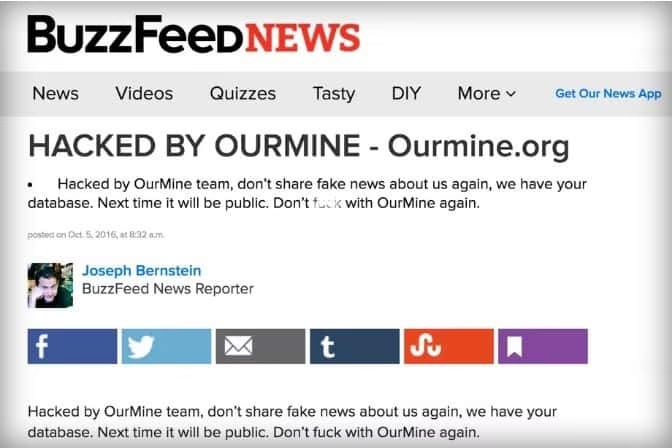
“Hacked by OurMine-ourmine.org”
They also replaced the body with a message declaring:
“Hacked by OurMine team, don’t share fake news about us again, we have your database. Next time it will be public. Don’t f[***] with OurMine again.”
Screenshot of the Buzzfeed Breach
Buzzfeed Breach – Why it happened?
The hack had happened in retaliation to an investigation report published by BuzzFeedNews reporter Joseph Bernstein on Tuesday. The story exposed about an alleged member of the OurMine hacking group. Buzzfeed had confirmed that though OurMine comprises of an unknown number of hackers but one member of the OurMine team is likely to be a young teenager living in Saudi Arabia. On social media, he goes by the name Ahmad Makki.
But OurMine refused about the connections with the alleged member through an official email account They said that Makki is not a member. The message read, “Nope a lot of people thought he is a member of OurMine, but he is just a fan, for this reason, people thought we are from Saudi Arabia, we are not.” Hence OurMine seems to have opposed of all things by hacking BuzzFeedNews.
Buzzfeed’s Reaction
According to TheVerge, BuzzFeed had taken down the affected posts within minutes and worked throughout the day and is still working to restore all its stories & reports in their original form. BuzzFeed also tweeted the following message regarding the breach:
BuzzFeed did not have any additional comments on how did OurMine breach its systems. Apart from this, regarding the OurMine’s threatening indication towards a database leak, The Guardian asked in an email (to an email account associated with the group) to clarify what “we have your database” meant. To which the reply was: Emails, Passwords Hashes, Usernames.
No one knows as to what that database includes and what kind of information OurMine could publish against BuzzFeed.
OurMine
OurMine, for over the past six months, has attacked & taken the responsibility of hacking into the social media accounts of some of the biggest names including Facebook CEO Mark Zuckerberg, Google CEO Sundar Pichai, Uber CEO Travis Kalanick and Twitter’s Jack Dorsey. The group poses to be a benevolent researcher & claims to foster awareness towards security dilemmas. OurMine has established itself as a massive trouble to the dozens of tech luminaries & celebrities.
It’s also frequently seen that when OurMine takes the responsibility of hacking a target their goal is just to test the security & expose the dangers of reusing the passwords. According to the members of the group, their aim is to make a name for themselves as white hat information security consultants. OurMine’s approach seems to be functioning. They have swiftly made a name with many high-profile hacks.
One of its client had mentioned, that the group makes all these hacks just for fun & to help people. They basically help you to improve your security systems. According to the client, OurMine people might have had a bad name but to him, they are just trying to help.
A screenshot of ourmine.org (about us section)
From the risks of physical security by posting about daily life on the social media to the digital risks of being infringed, everyone needs to be more and more careful to lock it all. It really doesn’t hurt for the regular folks to do the same.
Asus launched in India their new Zenfone 3 smartphone series in the month of August 2016. The company launched 4 phones with a completely new avatar – Zenfone 3, Zenfone 3 Ultra, Zenfone 3 Deluxe, and Zenfone 3 Laser. These come with a breath of fresh air amongst the existing generation of smartphones.
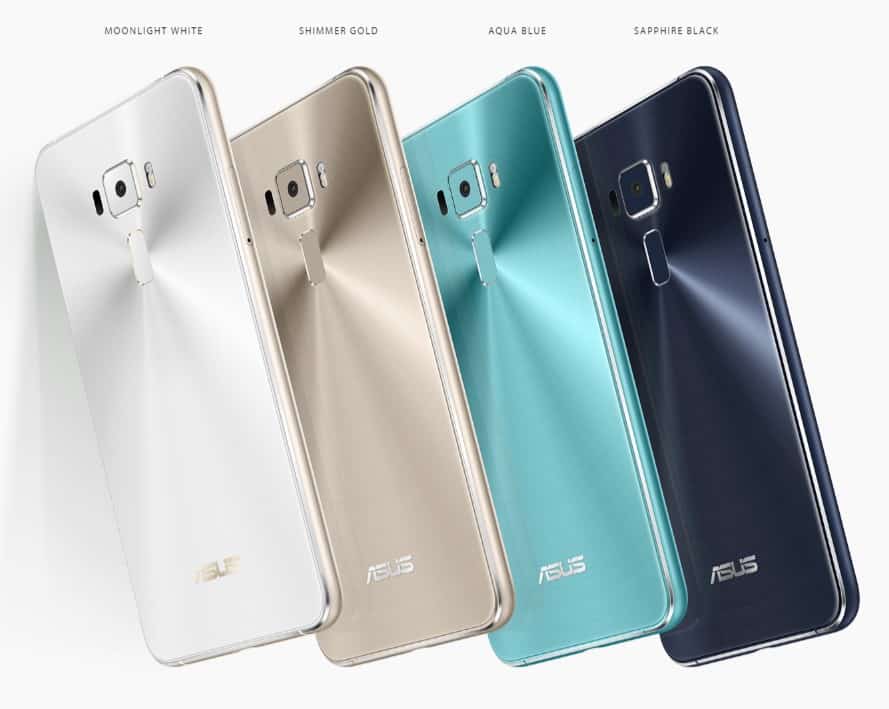
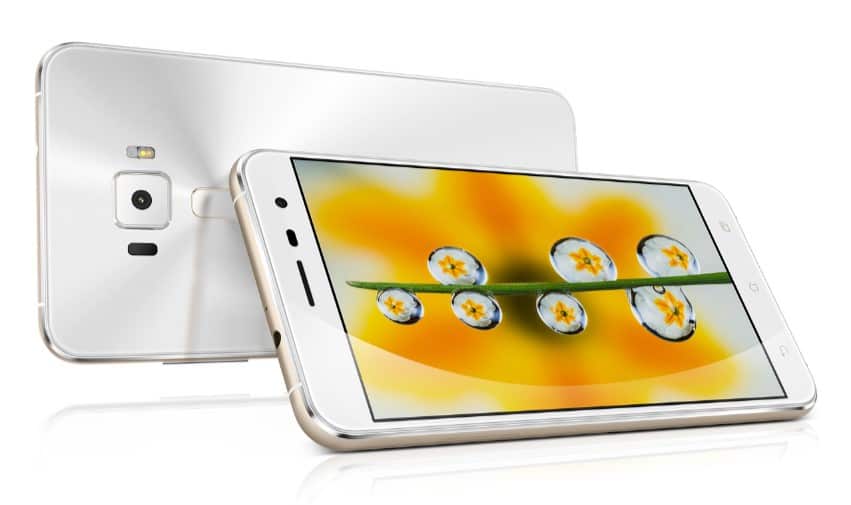
Asus Zenfone 3 – Color Variants
The phone that we are going to review is the Zenfone 3 ZE520KL variant with a 5.2 display, coupled with 3 GB RAM and 32 GB internal storage. This is a “Design-First” kind of a smartphone giving you an impression of a complete phone. It comprises of all – build quality, beauty, and performance.
TECHNICAL SPECS – ZENFONE 3
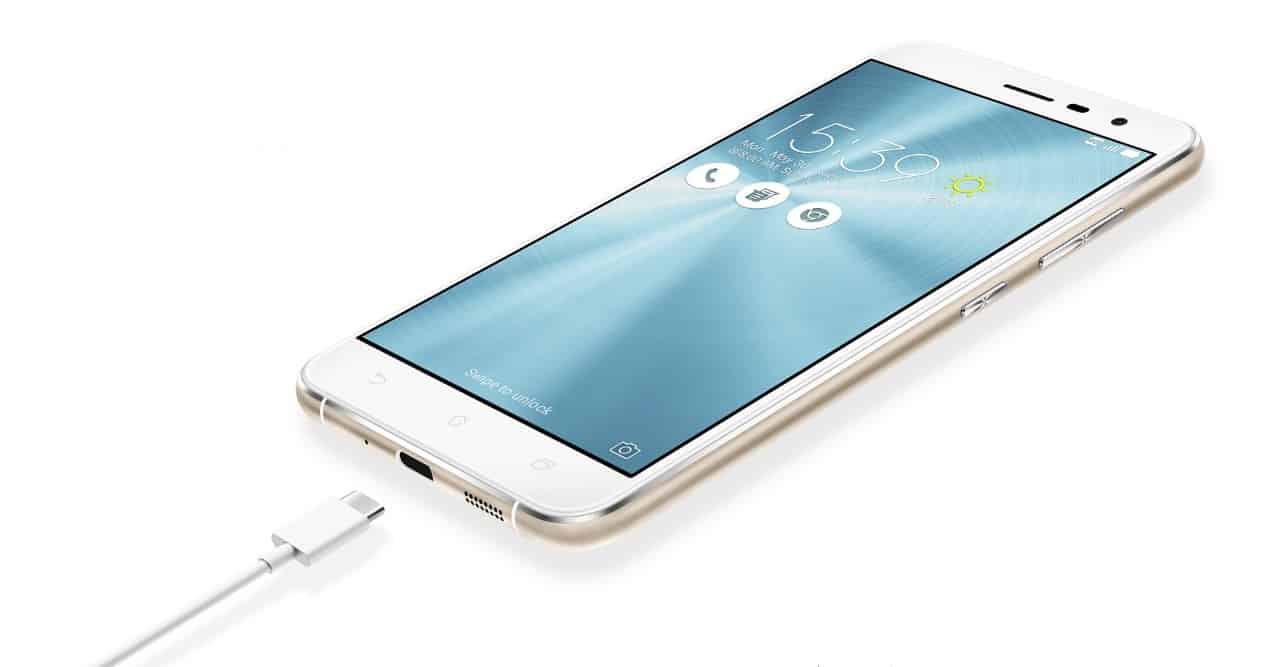
The Asus ZenFone 3 which we are talking about is the 5.2-inch screen size variant. It comes with a 1080p display and is the first smartphone worldwide that is powered by the new Qualcomm Snapdragon 625 processor. This smartphone is coupled with a 3 GB RAM, 32 GB internal storage (expandable through microSD card), 2650 mAh battery and runs on Android Marshmallow 6.0 operating system. It sports a 16-megapixel rear camera along with auto-focus & dual-tone LED flash, 8-megapixel front camera, Type-C USB port and a fingerprint sensor.
SOFTWARE
Asus Zenfone 3 exhibits the Zen UI on top of Android Marshmallow 6.0. The overall performance of this device is considerably satisfying. The only drawback we found was the pre-installed applications but thankfully the option to either disable or uninstall them gained points. And not to forget what the Zen UI is known for – Customization.
Zen UI
A plethora of themes are available where icons, wallpaper, and even the notification quick toggles can be tailored. Apart from these, there are a plenty of neat and straightforward options on hand.
ZENFONE 3 – LOOKS & DESIGN
The moment you hold the Asus Zenfone 3 in your hand, it feels like something different. This smartphone is not similar to its predecessors and that is the striking difference you’ll notice at the first look.
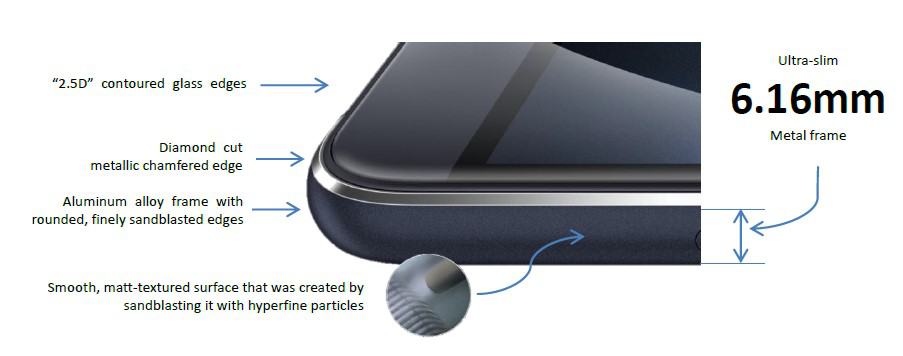
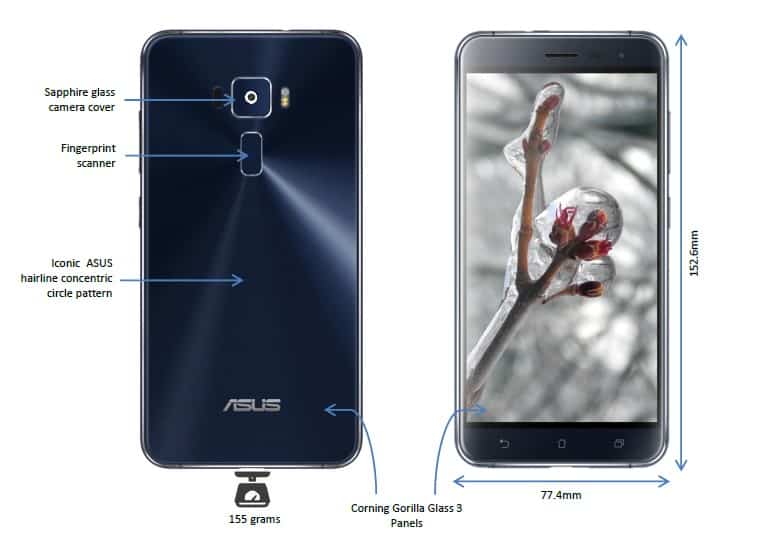
It’s an elegant and a sophisticated device with a 2.5 D curved Gorilla glass both at the front as well as the back. This aspect of the smartphone is altogether a different treatment as compared to the other Asus phones. It makes the back and front panels look interesting and give this phone a distinct finish. Also, the concentric circular design at the back looks truly magnificent when light reflects on it. The smartphone is held by a metallic rim giving it a well-built feel making the device feel sleek & classic.
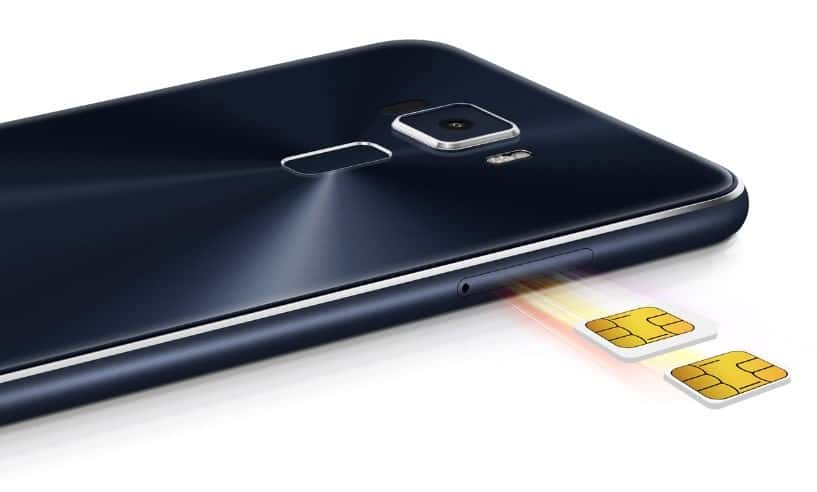
On the left side of the phone, you’ll find the SIM card slot tray with a dual SIM compatibility. The phone supports 4G VoLTE technology and comes with a hybrid SIM slot to use either two SIM cards at once or one SIM & one microSD card. On the right side of the phone, you’ll find the sturdy volume control and the power button. At the bottom are the speaker grill, USB Type-C port, and the primary microphone. And the upper portion has the audio jack along with the secondary microphone.
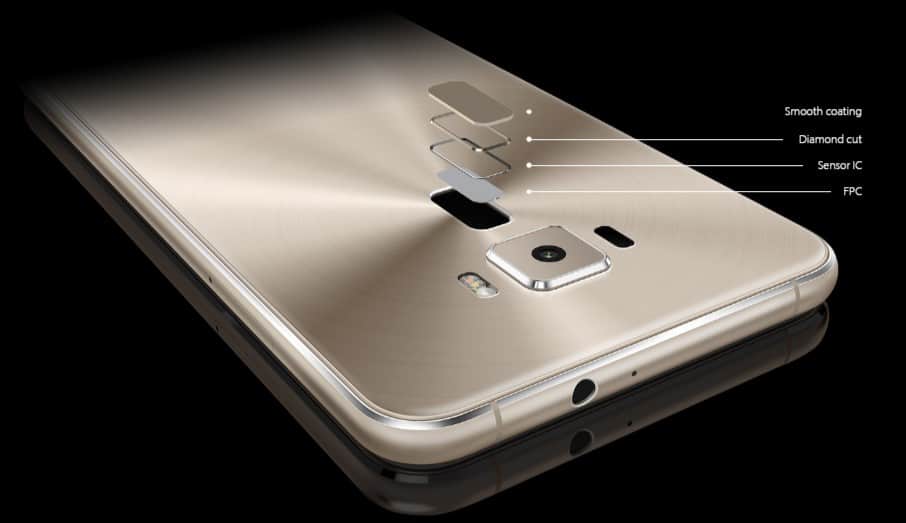
At the rear panel you’ll find a protruding camera module on the top, beneath which is a fingerprint sensor, dual tone LED flash on the side of the camera lens and ASUS brand logo at the bottom.
The front panel of this smartphone has the standard sensors, earpiece and the selfie camera on the top. There is also a LED light on the top left corner indicating battery charge. This LED indication light isn’t visible when not blinking as it lies beneath the glass coating of the phone. Aesthetics have been beautifully maintained. But even after a pleasing look, the three capacitive buttons at the bottom of the front panel aren’t backlit.
DISPLAY
The highlight of Asus Zenfone 3 is its display – a splendid IPS LCD supporting 1920 x 1080 resolution. It’s really a vibrant display and is easily visible in the broad daylight. It has a corning gorilla glass protection.
Screen to Body Ratio is about 75.6 percent. The display produces really great colors and looks superb, you can even modify the color balance according to your needs. You also get a blue light filter for night time reading. Touch response is also excellent.
PERFORMANCE
Web browsing works great, applications open up quickly and you won’t notice any lag while switching between the apps. Boot time also isn’t long and the device behaves faster in all aspects. Yet sometimes you might notice minor delays.
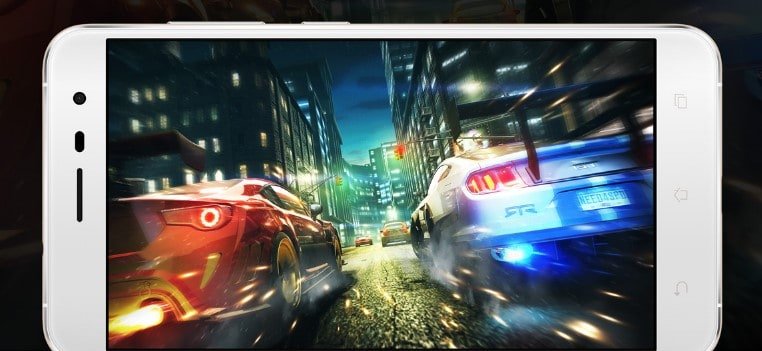
However, there’s no major performance drop while gaming. You will easily be able to play most of the high-end games. The fingerprint sensor too works fast and the phone does cope quite well with heavy usage.
FINGERPRINT SECURITY SENSOR
Asus Zenfone 3 has a decently fast fingerprint sensor that works well. It is accurate but still not the fastest if compared to some other such smartphones.
Apart from this, you can double tap the fingerprint sensor and it opens up the camera. And though the company hasn’t claimed but the sensor works well even with semi-wet fingers.
ZENFONE 3 – CAMERA
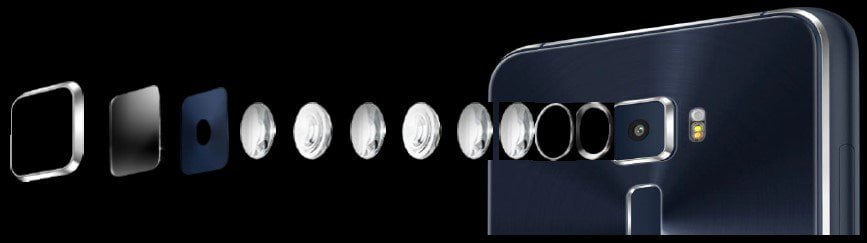
The Asus Zenfone 3 camera is snappier than some of its peers. It is one of the best that we tested producing an amazing output. ZenFone 3 supports a 16 MP rear camera along with 4K video recording and laser AF. While on the other hand, 8 MP front or selfie camera offers a wider view and clicks sharp & grain-less photographs under normal lighting conditions. The 8-megapixel front camera also clicks decent pictures offering HD video recording.
The rear camera has an aperture of f/2.0 and a lens offering much better results. Apart from design, iIt’s also a camera focused phone with an optical zooming feature. The camera has a very faster shutter speed. The optical image stabilization feature performs completely in sync.
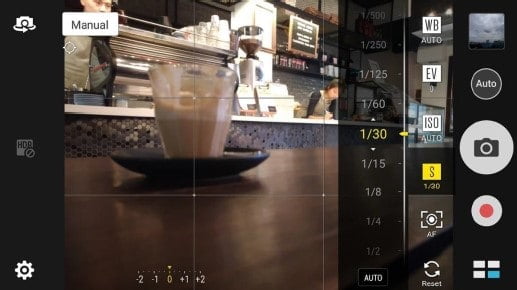
You have a lot of modes available to choose from. Though you might not be using all, but they seem to be exciting. You have a Manual Mode to take over the full creative controls in your photography experience.
Asus Zenfone 3 – Manual Mode
Apart from this, you get a Low Light Mode with a 32-sec slow shutter capability. Clicking pictures in extremely low light conditions is one of the best features. The results come out without any distortion. Some other exciting modes that you can use include Panorama, Depth of Field, Miniature, Time Rewind and Gif Animation.
Asus Zenfone 3 – Manual Mode
The Asus Zenfone 3 focuses in less than 0.3 seconds. You get the face detection AF, laser assisted AF as well as contrast based AF. Combining all of these, the focusing on this phone’s camera is a pleasing experience. Images turn out to be sharp and bright with absolutely no grains.
AUDIO
The speaker isn’t the loudest but you can, of course, make it sound better with the help of the audio widget built-in. Audio through the headset jack is brilliant and is truly loud. Sound through the earpiece comes out to be really crisp & clear hence this is a major plus point.
CALL QUALITY
This is where you won’t really face any issues with the phone. Be it through the speaker or through the audio jack, everything works just fine. You also get the call-recording feature built-in.
STORAGE
32 GB of onboard storage is available on this device out of which you get about 24 GB of user memory. You can always expand this storage with a microSD card. Memory management is better on this device.
BATTERY LIFE
The battery life is pleasantly surprising. We were able to operate the phone for around 5-6 hours yet the 2650 mAh life still seem to be a bit low.
We preferred a battery power of something more than 2650 mAh. But you can customize your power profile and save some more percentage to sustain the power backup needs.
FINAL WORD – ZENFONE 3
The Asus ZenFone 3 is definitely one of the best feature packed smartphones in the market today. The phone is stylish, sleek and sophisticated. It provides you all that you might want from a smartphone – better performance, great cameras, decent battery life, brilliant display and the looks to kill for.
PROS
Superior Build Quality
Great Touch Response
Remarkable Cameras
Decent Performance
Brilliant Display
Good Battery
CONS
Higher Pricing
Speaker isn’t loud enough
Capacitive buttons are not Backlit
Slippery because of the glass on both front & back panel
Autonomous or Self-driving vehicles open up unconventional opportunities for our future generations. This modern and visionary technology signals to replace the machinery, our infrastructure, and other commodities with intelligence. Basically replacing all others by the computing power. And if these vehicles become smarter they would enable a simultaneous reduction in machinery, infrastructure, and commodities. It has the potential to entirely transform our urban landscapes, technologies and interaction processes. It’s an overwhelming stuff. And since we are in the ideological mode, let’s get excited about this and consider the transformative potential of the driverless car technology.
1) It is a life-saving technology
The most obvious reasons for making this technology a win-win is that driverless cars would save lives by decreasing automobile crashes. Letting the software driven vehicles take over the wheel would avoid alcohol, distraction and drugs related fatal incidents saving lives to the max. It would radically reduce and eventually eliminate accidents.
2) The driverless cars would help lead a stress-free life
Commuting would become quicker reducing the everyday stress. According to a certain research, it confirms that commuting for long hours increases the risk of stress, obesity, neck pain, divorce, and sleeplessness. Travelling would be at steadier speeds and this, in turn, would bypass traffic jams. And more importantly, the commuters can read a book or take a nap instead of stressing behind the wheel.
3) It boosts fuel efficiency
Software driven cars will be more fuel-efficient and waste less on things like the process of looking out for parking. Some time back a study discovered that in overcrowded urban areas, drivers waste an unreasonable amount of fuel circling the blocks looking for the right parking space. But the intelligent self-driving cars would probably improve this mess. And this would happen only if the technology is able to communicate with each other.
4) More appealing to bikers and pedestrians
And if driverless cars would be safer than human driven cars then it would obviously be more appealing for people walking or biking. People would feel less dangerous to bike & walk on the road which from the public’s perspective isn’t bad at all.
5) One (technology) for all (public)
The driverless cars will enable more & more people to reach their destinations. In the case of emergencies, for people who are elderly or disabled, who aren’t allowed to drive, the ones are on medications – all of those would be able to get around in the driverless cars on their own.
6) Technology contributing towards Economic Upliftment
Driverless cars could bring in more financial benefits. Imagine if a certain percentage of vehicles were autonomous cars, the country could save more in a year due to lesser fuel consumption, fewer deaths and more free time that could be used productively.
Hence in simpler terms, if cities become low on drivers rather than being car-less then these self-driven cars would move in a coordinated way. These would occupy lesser space that human-driven cars. Additionally, these would be less noisy, pollution free and separate from pedestrians & cyclists for both ways comfort and safety. This new generation technology is aptly picturing the future of cars and our cities.
Ecommerce website Snapdeal got off to a great start on Sunday with its Unbox Diwali Sale selling around 1 lakh mobile phones in the first 8 hours. It is being considered that around 2 million customers showed interest in Snapdeal’s website during the initial hour.
The main highlight of this sale, according to Snapdeal, is the fact that it was selling 180 products/ second on the day of launch and 200 mobile phones in a minute. Along with mobile phones, appliances, personal electronics and furniture items too showed up an excellent jump in their demand.
In a press release published by Snapdeal, the company also claimed that apparently there were 7,00,000 users online all together in the first 5 minutes. Buyers had already stocked their carts & wish lists with millions of products even before the Unbox Diwali Sale started to avoid missing out on their favorite products, a company statement said. The Unbox Diwali Sale will run from 2nd to 6th October.
Other than smartphones, according to app analysis, the sales for footwear, cosmetic products, and air conditioners also marked a remarkable boost. Not only those, but even 16 GB Sony pen drives available at Rs. 199 weren’t left behind. Around 24,000 pen drives were sold in the initial 8 hours of the sale.
Image Source: Reuters
Snapdeal claims that their top-selling products during the sale on the launch day were the Samsung J2 Pro & LeEco Le Max 2. And surprisingly, also included in that list was a Voltas 5 Star split air conditioner.
Saurabh Bansal, VP, Categories at Snapdeal said, “We are very excited to see a tremendous response in the initial hours of the Diwali Unbox Sale. Users have loved the additional, instant discounts on Citibank cards. Many more exciting offers are lined up over the next days of the sale.”
Apart from Snapdeal, two other major e-commerce portals are also carrying out their discounted sales – The Great Indian Festival sale by Amazon and The Big Billion Days sale by Flipkart.
A virtual private server is like a separate online server space. It has an advantage over shared hosting which is security and privacy. For businesses, this is a really good way to manage their operation without compromising security. All this with an affordable cost, which is less than setting up your physical server.
Opting for VPS services is surely a better option for business, but what is more confusing is choosing the right VPS for your business. There are many aspects which you should consider apart from the cost. Here are a few of them which you should evaluate before choosing a service.
Choose the service provider which suits your budget
Be it any service or product you are buying, the first thing which needs to be evaluated always is the cost. Here also you should evaluate the cost of different service providers. The VPS itself is the middle way out between shared and dedicated hosting and therefore is cost-effective. There should be a balance between the cost you are paying and the features and services you are getting.
Choose one with a user-friendly panel
Using a dedicated server for hosting websites and installing the different applications is best as you have all the control over yourself. Same way in a VPS the simpler the control panel will be the more it will be easier to gain control over it. It will be easier for you to work as an administrator. While choosing the service provider you should evaluate their graphical user interface so that you get an idea about its complexity.
Security is most important
The main purpose of using a VPS is it offers security at an affordable cost. Therefore, it is better to evaluate the security of the VPS before subscribing to the services. You should look for the configured setting for security, protection through antivirus and firewalls, and other such security tools. With better security, you get more protection, and it also reduces the chances of attacks and threats like DOS attacks and other such threats.
Evaluate the customer support services
Evaluating the customer support services provided by the service provider is crucially important. As you cannot be rest assured that no error will occur during the operation of machines. It is important that along with mail support you get an immediate support service also. It is so because the small issue might be solved over chats and mails but for bigger issues like booting or installing the whole system again you need immediate support. Also, your basic support services should include the setup and investigation for any threats or probable vulnerabilities in the operation of the system.
Go for managed hosting if you are a beginner
Most service providers offer two types of VPS one is known as unmanaged hosting and another one is managed to host. If you are choosing an unmanaged one then the responsibility of different tasks like setting up the virtual machine, looking for the configuration, and keeping a track of all the things is in your hands. On the other hand, a managed hosting allows you to focus fully on your core business while everything related to the server is managed by experts. You do not have to worry about the operations or any vulnerabilities in the server, all will be managed by the service provider.
Now since you know about different aspects which you need to consider before choosing the service provider for your VPS, you can choose one wisely. Try to consult your service provider on all these aspects and get a fair idea of most of them. So that you get the best services at the best price.
Reliance Jio in a matter of few days has established its brand name throughout India seeing a spectacular response and a huge customer base. This telecom operator has become so popular that they already are serving to more than 40 million people. Jio is yet in a trial phase and is improving before they officially launch the services. Jio SIM cards are given out for free for the testing purposes. The SIM card supports unlimited 4G data, voice & video calling along with free unlimited SMS till 31st December 2016 which is its preview period. From next year, the tariffs will be finalized. But the customers don’t seem to be happy as Jio is facing severe signal issues and call drops even after the tele-verification. Around 80% of the calls by Jio have been failing, according to a statement issued by the company. In another statement, Reliance Jio said that almost 52 crore calls have been failed on the networks of these three operators – Vodafone India Ltd, Airtel, and Idea Cellular Ltd.
Hence we have tried to figure out a few simple solutions to overcome the No Jio Signal issue and avoid call drops.
1. Reliance Jio SIM card’s tele-verification can be completed via any other network SIM card but you need to have the network access on Jio SIM to avail the unlimited preview offer. Just follow these simple tricks to enjoy the unlimited Jio 4G SIM offer and avoid no jio signal issues.
2. Firstly, if you have are using dual SIM cards on your smartphone, remove the second network SIM and insert only Jio SIM in the primary SIM slot (SIM 1). Why everyone asks to put the SIM card in the first slot is because normally it is only the first SIM slot that supports a 4G SIM card.
3. After this step, restart your phone if you have a non-removable battery phone. Or you can insert the Jio SIM card without turning off your phone.
4. Now, follow this path and set your network type as 4G or LTE: Settings > Mobile Networks > Preferred network type.
5. You need to make sure that your Jio SIM card is properly inserted in the sim slot and is also activated by the operator.
6. Remember to also manually select the network operator if your phone is facing issues automatically.
7.Select Jio 4G option and in case if you do not find the Jio option then just try choosing any other accessible networks.
8. In the case when any of the accessible networks refuse to register your Jio SIM try selecting it again. Right now, due to a tough competition, all the popular networks like Airtel, Vodafone, and IDEA might not allow you to register via their network. But you can find some other networks like Loop etc. hence you can try their network too.
SOLUTION NO. 2 – DIAL A CODE – *#*#4636#*#*
If you are still not getting your Jio network then just dial a code *#*#4636#*#*
Turn off the radio & set only LTE for your Jio SIM. Again turn on the radio & reboot your smartphone.
SOLUTION NO. 3 –
Even after trying everything you aren’t getting the signals just switch your smartphone to the airplane mode and switch it back to normal.
Don’t lose your hopes. Maybe your SIM card isn’t registering your IMEI number with the Jio network. Make a call at the Reliance Jio customer care number and ask them to manually register your IMEI with the Jio SIM.
For this process, you need to have your IMEI number in hand. If you aren’t aware of it, just dial *#06# and know your IMEI number.
SOLUTION NO. 5 –
This is the best you can do if no tricks work. If you aren’t getting any signals or there are severe call drop then just visit the reliance digital storeagain. The staff will provide you with a new SIM card when you tell them that you are encountering a signal issue. You’ll be getting the same number and will also be getting the signal right after the new SIM card gets activated.
SOLUTION NO. 6 –
Once you insert your Reliance Jio SIM card, restart your phone and wait for at least one minute. If your device does not detect the Jio SIM card network then just follow this path – Phone settings > SIM Card Manager or any other similar option according to your phone. Just deactivate the Jio SIM once and reactivate after that. Keep doing this step until your phone detects the Jio SIM network.
There are chances that you may get the signals immediately after applying any of the above-mentioned tricks but there also are chances that these may not work. Reliance is overloaded with applications and there can be a possibility that your Jio SIM activation/ registration may take time. Even if nothing works instantly, wait for a few more days as even the above methods may take a few days to work. I know a few people for whom these tricks worked even after 10 days.
Share with us your thoughts and if you have any other tricks and solutions that might be helpful.
Every Windows system eventually runs into some or the other problems which aren’t that easy to diagnose. This diagnostic is also needed on other operating systems as well but for now, we will focus on Windows.
It doesn’t matter that you are a newbie or an expert, when the problem arises, you need to find a solution. You can always hire someone to troubleshoot the problem but keep that as a last resort. Why to spend your precious money on something that can be done for free or at minimal cost. Figure out the obstacles on your own using these free diagnostic tools. Of course, you can get a specialist involved buy I recommend you to give these at least a try.
SYSTEM HARDWARE DIAGNOSTIC
Hardware problems tend to occur more frequently and these are a huge pain. It especially occurs when you are using an older version of the operating system. Hence, the following are the best tools you can use for any of the hardware related diagnostics.
1. Performance Monitor
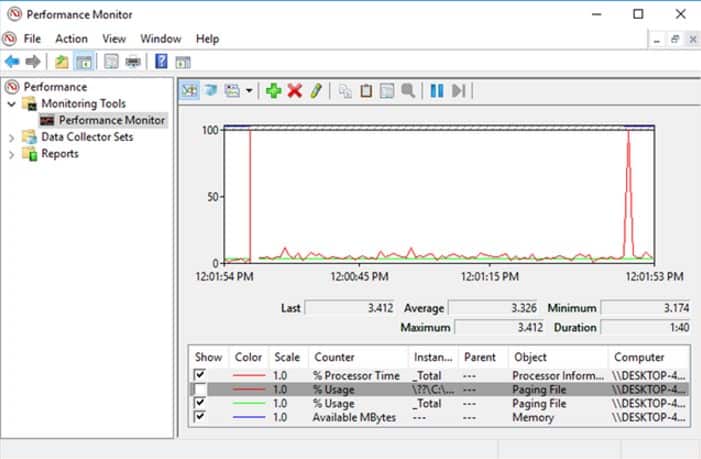
Windows 10 comes with an inbuilt Performance Monitor which exists as an application on the system. You can find it under the Monitoring Tools > Performance Monitor. It is by default, that the Monitor shows only “Percentage Processor Time”. This, in turn, displays that how much is your CPU used at any given time.
And you can always add more Tabs like the energy used, disk usage, search index size, paging file size, and more.
2. CPU-Z
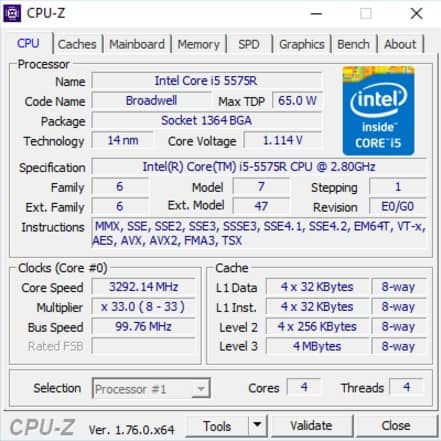
CPU-Z is an effective little program that makes a scan of your system for its internal hardware configuration. This program is essential if you ever want to upgrade your computer parts and avoid incompatibility issues.
It is also great for scanning those self-assembled computers whose components you have forgotten now.
NETWORK DIAGNOSTICS
There is always a fair chance that your system might be encountering some network problems with the use of Wi-Fi or Ethernet. It is actually one of the most common problems that arise these days. Hence I recommend the following two network diagnostic tools.
1. WiFi Analyzer
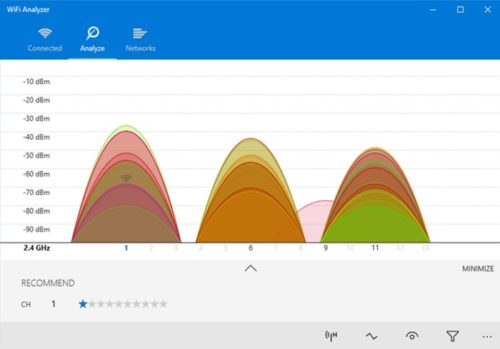
WiFi Analyzer is a free diagnostic tool that does exactly what its name suggests. It easily analyzes your Wi-Fi network setup to check whether your wireless channel is conflicting with other Wi-Fi networks or not.
After analyzing, it recommend’s you a channel setting. Keep in mind that it’s not accurate in crowded apartments and /or dense cities. But it surely does boost your Wi-Fi speed by up to 5x.
2. Angry IP Scanner
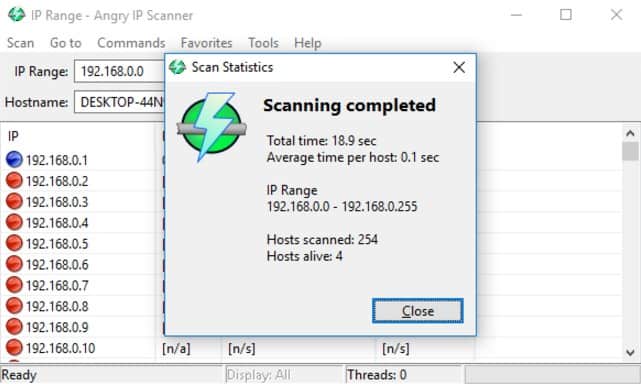
Angry IP Scanner, in a nutshell, scans your network to check which IP address & port is being used by which device. It is a sophisticated tool.
You can use the tool at home to see how many devices are being connected to your network. You can check if anyone is mooching off of your Internet. Or also find the IP address of a specific device. Great, isn’t it?
MEMORY DIAGNOSTIC
RAM dilemma is another common issue for home or office computers. And nowadays it’s too easy to run out of the physical RAM. This leads to system slowdown and in some cases PC even crashes. Luckily, diagnoses are straightforward and not at all messy.
1. Resource Monitor
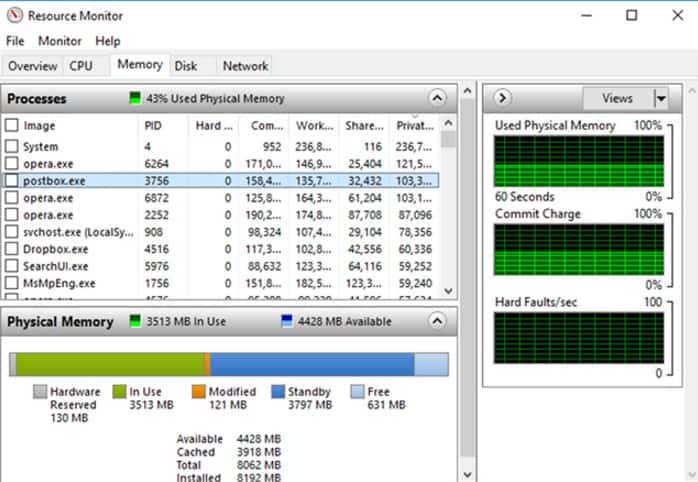
Windows operating system has a feature called the Resource Monitor. It was implemented in Vista earlier. Traditionally, you had to launch the monitor through Task Manager. But now it’s a separate application in Windows 10. You an easily launch it through Start Menu.
This is an advanced way to view the real-time data about your system. It’s generally used as a combination with Performance Monitor. You can view the process details & memory usage. And this indeed is one of the smoothest ways to troubleshoot your RAM problems.
Also read : Quick Tips to Boost your Windows 10 System Performance
2. Windows Memory Diagnostic
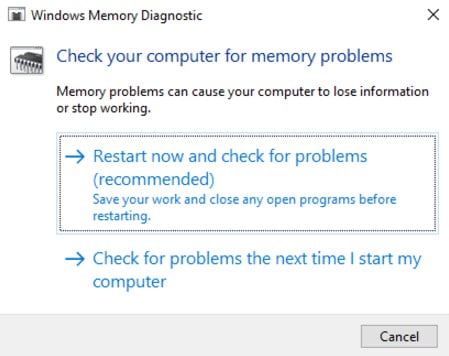
Do you know that your Windows operating system actually has a built-in tool to physically test your RAM modules to monitor if they are free of errors? It is an application called the Windows Memory Diagnostic.
This restarts your computer. And the tool runs various RAM tests on boot up. If it encounters any errors / failures, the tool will do its best to let you know which module is the offender. Replace that module as soon as possible.
MALWARE DIAGNOSTIC
1. AdwCleaner
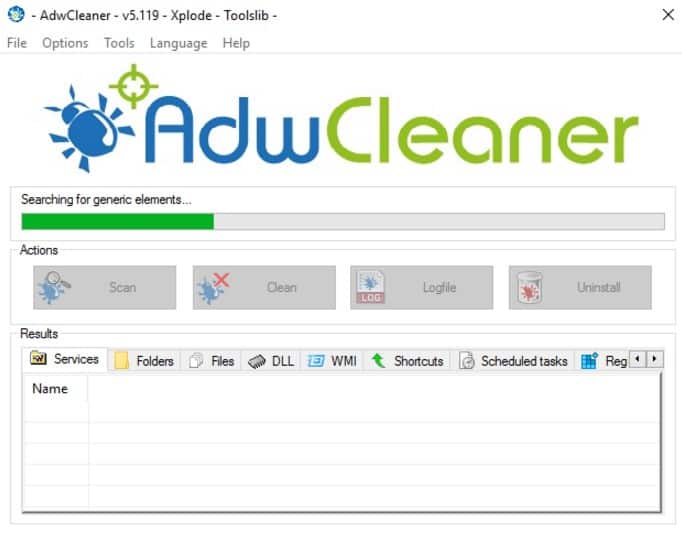
Not many people know about this tool which comes as a shock to me. This fantastic tool really deserves that recognition. AdwCleaner is such a simple malware scanner but is efficient, fast, and free of cost. What more can anyone ask for?
AdwCleaner is essentially created to spot the malware that comes bundled with installer files. Therefore, it detects the adware, toolbars, unwanted programs, browser hijackers, and much more. Scan results are classified as services, DLLs, files, scheduled tasks and registry entries etc.
DATA DRIVE DIAGNOSTIC
1. CrystalDiskInfo
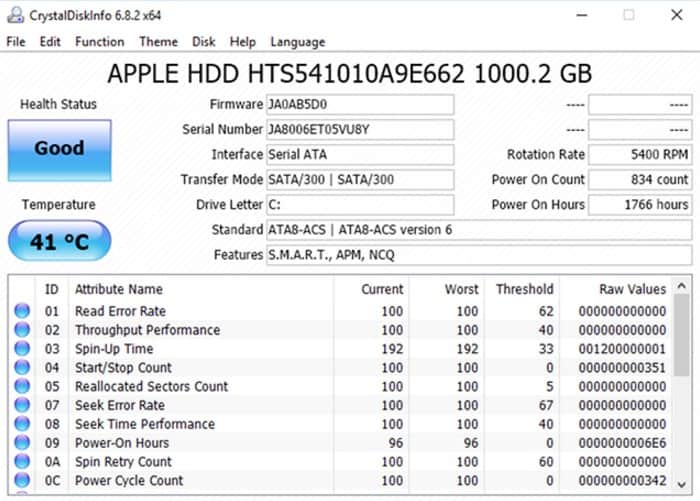
Have you ever questioned yourself about the health of your hard disk drive? It is not that easy to figure out when something goes wrong especially with the newer SSDs. But anyway, here is when you will need a tool like CrystalDiskInfo.
This simplistic program gives you the complete overview of the actual state of your data drives. It includes the HDDs, SSDs, and USB drives. Comprehensive details comprise of spin-up time, temperature, error rates, uptime, and more. CrystalDiskInfo also estimates an overall Health Status of your disk drives.