Home Blog Page 225

Magic of Artificial Intelligence (AI) Saving Your Time & Efforts

Artificial Intelligence (AI) has the ability to improve the communication and information exchange. AI involves a complex study combination of various fields including math, computer science, and other hard sciences. It works not only within the societies but even across. AI aids almost every computational process. Not only does it help the medical researchers but also beats humans in lots of games and expands the transportation facilities. And it even makes your phone smarter. There are chances of catastrophic failures and also economic damage but it also empowers us to be more productive, efficient and perform tasks hassle free.

Artificial Intelligence

AI technology isn’t just about robotics. It’s making inroads into diverse areas of our life. There’s a real-world version of AI that’s focused on machine learning. It’s more for taking inputs and using them to create & improve algorithms for its performance.

Prioritize Meetings with the help of Artificial Intelligence

Finding that perfect hour in our busy schedules especially a schedule that works for all others is a huge hassle. Planning a meeting becomes difficult as there are a lot of calendars/ records to check.

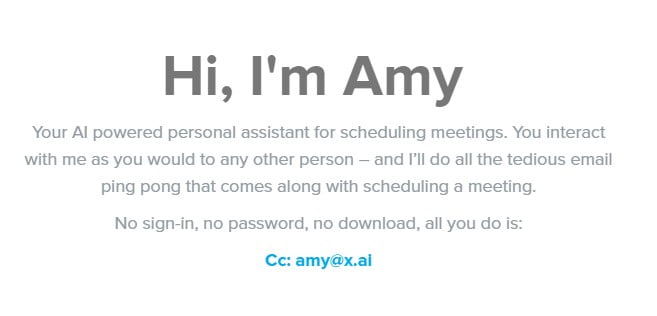
Ultimate options we have got for you! Companies like “x.ai” are developing such AI systems that help you get things scheduled. Their program named Amy, emails the meeting schedules to everyone important.

Amy Artificial Intelligence Website

It essentially acts like a Personal Assistant who schedules all your meetings. Such a trouble-free process it is! All that you need to do is just ‘CC’ Amy on the specific email and she’ll take care of all the rest. Amy will easily email the respondents and also creating a calendar invite to be sent out to everyone involved.

Save time on emails!

Google’s impressive Inbox app is something you have to try. It exactly shows the way that AI is making emails smarter. With an option called “Smart Reply,” you can make use of the offered quick responses – Thoughts, What do you think, and Ok, thanks for the info.

Such little things save a tremendous amount of your time. Just opt for the reply according to the email with a single click at the bottom and you are done. And for those emails that demand a little more thinking, these responses give you a jump start to respond in a right away. The more you use the Smart Reply feature, the more it learns about your habits and ideally starts reflecting the emails you actually want to send.

Smart Reply Artificial Intelligence

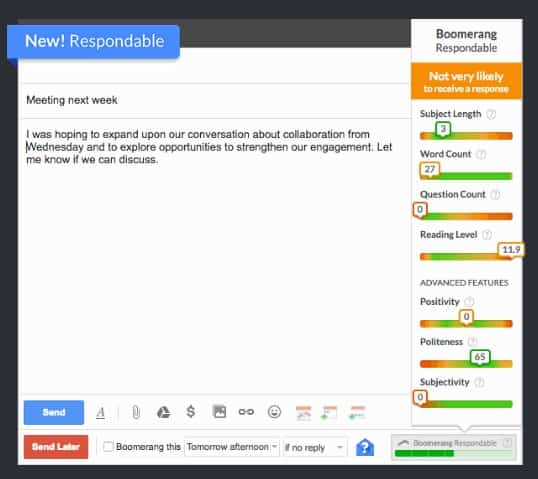
You can also try Boomerang for this purpose. It’s an extension/ add-on for Gmail. It now includes a feature called “Respondable“. This actually absorbs information from a million of examined emails and lets you know the probability of response your email is likely to get. It follows a number of factors like the subject length, content word count, the question count, and even the positivity maintained to analyze the email.

Boomerang Email Artificial Intelligence

To put in simple terms, Boomerang tells you if the receiver of your email is likely to email you back or not.

How about getting a Personal Assistant?

The Artificial Intelligence that we are most familiar with is everywhere around us. AI’s like Siri, Google Now, and Cortana are those basic systems. They can learn about your habits, requests, and movements, to provide the most valuable information possible.

There are a number of other exciting assistants existing and also being developed. For example, the team behind Siri is now working on an assistant named Viv. It is not just another AI, but an entire platform for all the creators to build upon.

VIV Artificial Intelligence

Another highly ranked personal assistant despite its flat name is really impressive and called “Assistant“. It recognizes the natural language, discovers your habits and favorite services, and interestingly it can even tell you jokes.

Quick Tips to Boost your Windows 10 System Performance

One of the greatest things about WINDOWS Operating System is that if you do not like its looks then you can just simply change it. However, all the modifications come at a cost. All of the BTS (behind-the-scene) action creates an impact on the performance of your system. It requires more attention, especially for low-grade systems. But if you are upgrading to Windows 10 or already are using this, you know what an experience it is. It is not just an upgrade but is an evolution. Windows 10 features a lot of big and small changes. Knowing about them could significantly help you in optimizing your Windows 10 experience.

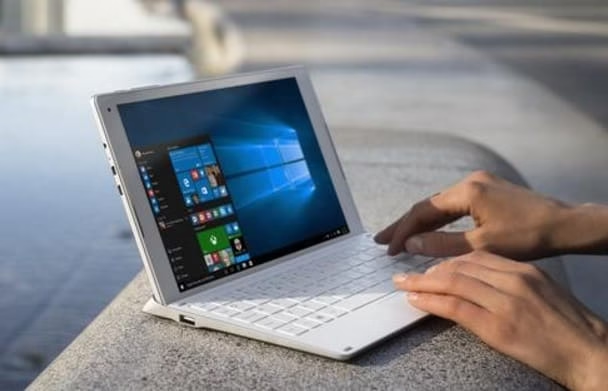
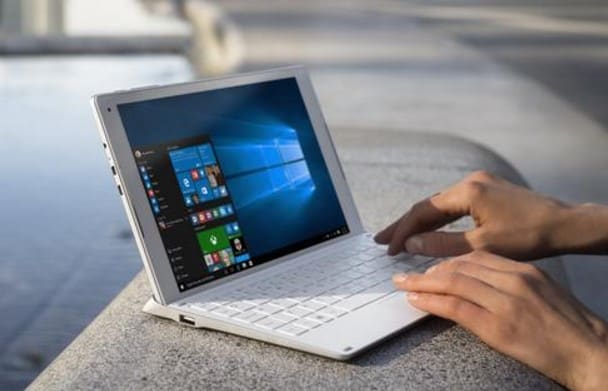
Windows 10.

WINDOWS 10 OPTIMIZATION FOR BETTER PERFORMANCE

Let’s have a look at the below mentioned easy and quick hacks to optimize your Windows 10 system enabling better performance.

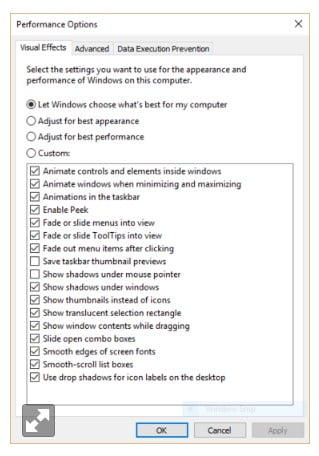
Control Panel > System > Advanced Tab > Performance > Settings

Follow the above-mentioned path to open up appropriate options which display several features (like taskbar animations etc). You can either disable the shadows, animations, and visual effects or adjust them according to your usage.

For a system that works on higher RAM, these changes won’t make much an effect. But each bit that’s not being used here might be spending somewhere else.

 Disable animations on Windows 10.jpg

OR

Double click on the MenuShowDelay option and edit the time to show the menus/animations.

Windows+R (Launches the Run Menu) > Type “regedit” (Opens Windows Registry Edit) > Click OK

Open the following Registry key – HKEY_CURRENT_USERControl PanelDesktop. This enables you to speed up all the menu animations for a snappier feel. Remember not to carelessly click during this step as it can interrupt things.

Start > Settings > Privacy > Feedback 

Microsoft keeps informing its users about the newly added fixes and features. If you find such alerts annoying, disable these or opt for them to appear less frequently by following the above path. Change the option that says “Microsoft should ask for my feedback”.

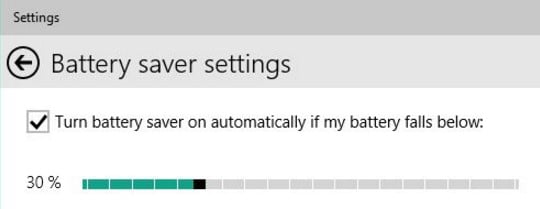
Windows+I > Settings > Battery Saver > Battery Saver Settings

Follow the above path and check the box displayed in these setting to enable the Battery Saver feature.

 Battery Saver on Windows 10

System > Battery Saver > Battery Usage

Follow the above path and you can monitor the energy being wasted/ utilized for background processes. Enable Battery Saver at a higher percentage if the number is large.

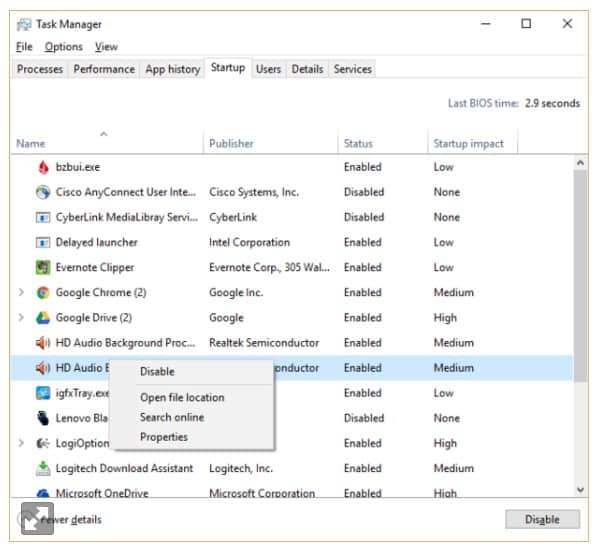
Ctrl+Shift+Esc or Click on the lower right corner of your screen > Task Manager

Launch the Task Manager by following the above shortcut or path. It then appears as a full-tabbed glory and there’s a lot you can do. As of now, focus on killing the unnecessary programs that run at the startup of your system. Click on the “Startup” tab to view a list of the programs that launch when you start your Windows. Right-click on the program and disable the same so as it does not slow down your Windows 10 starts up.

Optimize Windows 10 through Task Manager

Please Note: You will have to restart your system for most of the Registry changes to take effect.

Follow these quick and easy steps and you can smoothly optimize your Windows 10 system. Let us know if these tips helped you or if even you can contribute to providing some other tricks. You can also install certain applications for your system to boost its performance.

Here’s how you can verify your account against a security breach like Yahoo

Organizations are now increasingly investigating into the security risk of their acquisition targets after Yahoo signaled the world on 22nd September, Thursday, about something that is the biggest known breach of user information. Yahoo faced a security breach in the year 2014 for at least 500 millions of its users.

The company believes that the theft was executed by a state-sponsored actor occurring in late 2014. But there was no evidence that the state-sponsored attacker is currently on Yahoo’s network.

Yahoo Security Breach 2014

Yahoo alerts its users that a state-sponsored attacker had acquired all the data of the hacked accounts and put it up on sale in the dark market website. This information includes usernames, email addresses, hashed passwords which are not in plain texts, contact information, street addresses and more. But fortunately, no financial information is obtained.

But how do you confirm if you’ve been the victim of a breach like that of Yahoo?

Tightening up your security is the first major step you should take. For this, you have to primarily check which of your accounts is already affected by a security breach.

Most of the times, companies try and alert their users as soon as possible about any such breach that arises. But sometimes even the companies don’t get to know about it for months or years together.

Watch out for an official email by Yahoo

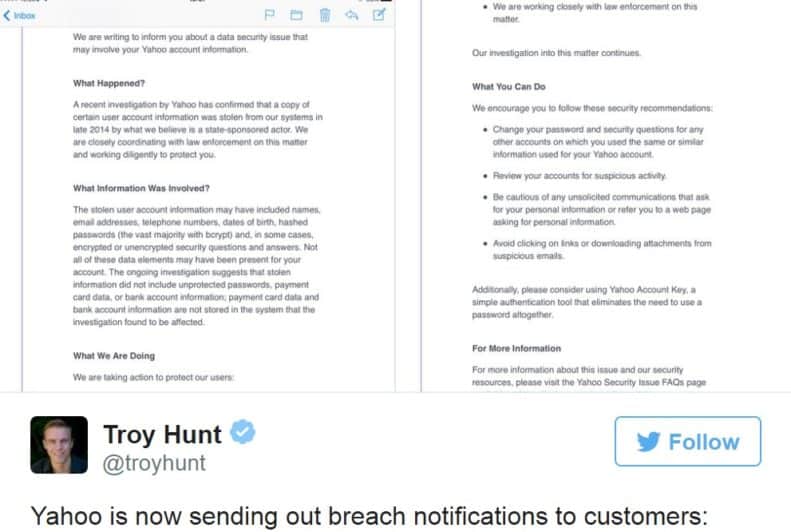
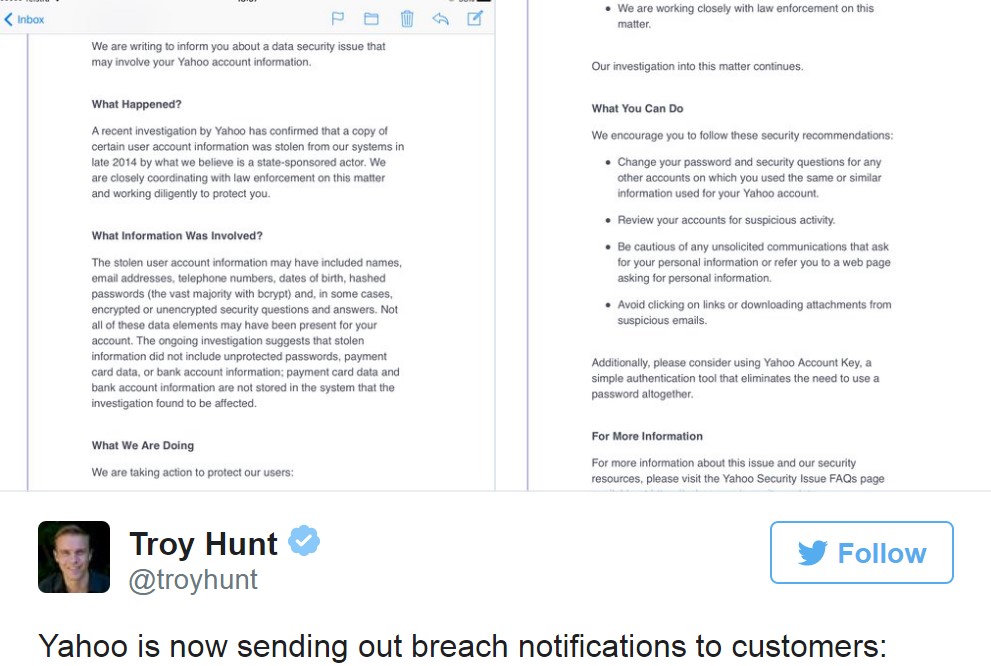
Yahoo now says that it has been emailing the owners of the affected accounts. So users should make sure to keep an eye on the official email from Yahoo.

Yahoo Data Breach Email.

People should also beware of any unusual looking messages, particularly the ones that prompt them to click on certain links or to download attachments.

What if you haven’t yet received the email?

Even if you haven’t yet received any email notification from Yahoo, it is advisable to change your account password and enable a two-factor authentication process.

There have been a plethora of massive data breach attacks over the last few years. And there are chances that you may have been affected by at least a few of them.

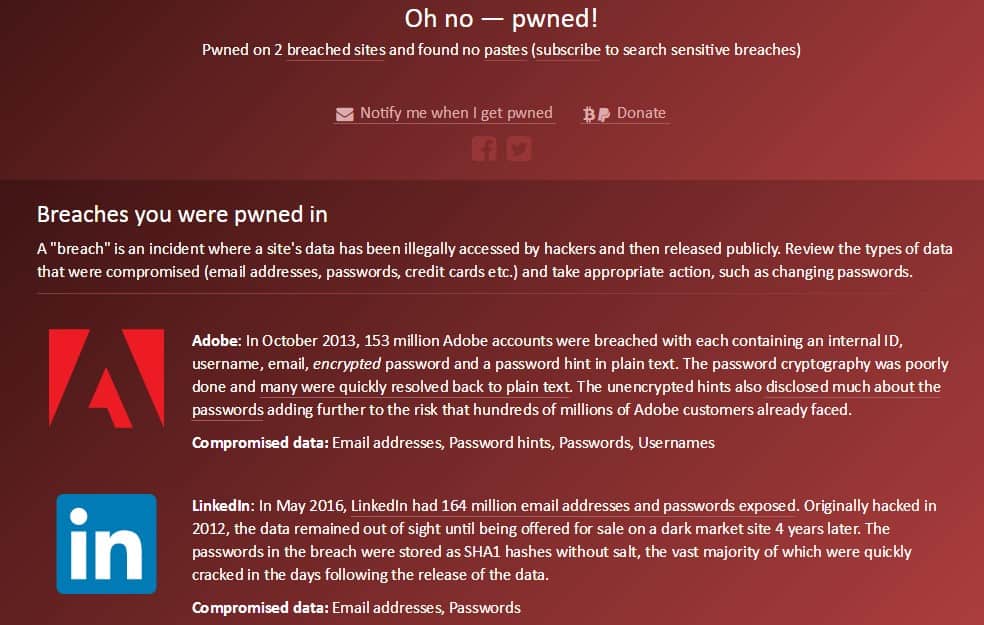
Hence, one of the most reliable ways to verify the same for many of your major email accounts is the website https://haveibeenpwned.com/. This website is run by the Security Researcher Troy Hunt, who tracks about data breaches.

  • Also read : Yahoo’s massive security breach: 500million user accounts hacked

How to check for the Breaches you were pwned?

Simply enter your most significant email address (at https://haveibeenpwned.com/) or the one you would want to make a check if it has ever been affected. The website tells you if a breach has occurred or not. It also tells you when the breach occurred and your exact information that was impacted.

Data breach check for a particular email address

You can additionally sign up for the ‘Notify Me’ alerts. These are tied to your email address if any other breach is detected.

Troy Hunt’s website is by far the most comprehensive so it’s not at all a bad idea to run your email addresses through it every once in awhile. There surely could be many other sources as well  but Troy’s site is quick and simple so it won’t be a time-consuming process too.

Yahoo’s massive security breach: 500mn user accounts hacked

0

The internet giant Yahoo Inc suffered an enormous security breach that took place in the year 2014 confirming to which it issued a statement on 22nd September to the whole world detailing that cyber thieves may have stolen the data of at least 500-million of its account users. It believes that the security breach was made by a state-sponsored attacker.

Yahoo - Biggest Security Breach Ever

What is the Yahoo Security Breach About?

Information, including the names, phone numbers, e-mail ids, date of births, encrypted passwords, and security questions were stolen from the company in the year 2014. And ultimately the breach resulted in all the information being offered for sale on the dark web. But fortunately, unprotected passwords, bank account information, and the payment card data weren’t compromised. This signaled that the most precious user information wasn’t endangered.

Yahoo Security Breach 2014

How serious is the Breach?

This attack on the Yahoo’s security was really unusual in size. It was more than triple as compared to the other massive attacks on websites like eBay Inc. But this also comes into the light at a very difficult time for Yahoo. This theft has appeared to be the world’s largest known cyber breach so far.

All the statements issued by Yahoo will only put forward additional questions from the security researchers concerning such a major timeline of both the incidents. It will also question the company’s actions following the breach. The main big question will simply be that why did it take so long for Yahoo to confirm a data hack of such a massive scale? This simultaneously drags in another question that why did Yahoo take so long to inform its users of the breach?

Other such Violations

Yahoo has taken an unwanted crown of being the largest corporate data breach in the history. Some of the others are such voilations involve:

Yahoo Inc. – 500 million user credentials

MySpace – 359 million

LinkedIn – 164 million

Adobe – 152 million

Badoo – 112 million

Yahoo Biggest Security Breach

How to know if a Yahoo account is compromised?

Yahoo is emailing its users and posting additional information on their official website. This email is sent to the prospectively hacked accounts. Even if you don’t get any such message asking you to modify the account information, it is always better to do so especially if you have been making a lot of personal communication over Yahoo.

Yahoo Data Breach Email - Part 1 Yahoo Data Breach Email - Part 2

Ensuring Further Safety

After all that has happened and the warnings being floated, if you have a Yahoo email account please make sure to do the following and prevent any such further cases:

  1. All the users are advised to reset their passwords as soon as possible. Make sure not to set any short and guessable passwords. Make your passwords long and strong. Do not repeat any codes and give your individual accounts unique passwords.
  2. Do not open any shady or suspicious links / emails. Hackers frequently try to bait the users into opening such emails / attachments / links that may include malware. Delete the mail or attachment if you are unsure.
  3. Yahoo mail account users are advised to review their old emails and delete if there is any sensitive content.
  4. If your Yahoo account information is actually for sale, then someone might really hack into your email and find all the confidential information.
  5. Immediately disconnect all of the services you’ve connected to your Yahoo account.
  6. Try and enable a two-factor authentication for all the email accounts and also update all the apps.
  7. You should be able to correctly verify that you are the one trying to login to the account and it isn’t someone else.
  8. Employ something more than just an easily shareable password to authenticate your login attempt.
  9. Opt for the alternative to text a code to your mobile phone number to ensure an authentic access
  10. And finally, stay fully updated with the advantages of any modern security improvements.

Yahoo Helpline

Every information on the data breach and the account can be found at help.yahoo.com. Even a direct customer support is also present. Though, Yahoo still recommends its users not to engage with any fraudulent online based fee or any toll-free number services pretending to be as one of the Yahoo support. All the assistance is via the official Yahoo help website only.

Here’s what all you need to know about macOS Sierra and its features

Apple released on 20th September a huge software update – macOS Sierra. The macOS Sierra has more of everything you would love to use with just a different name. Apple has introduced Sierra with some really astounding features incorporating the Siri support, auto-unlock via Apple Watch, a universal clipboard, better file synchronization with iCloud and tons more. This update has better overall utility, enhanced intelligence, persistence, steadiness, speed, and well-established know-ability. Mac users can download and start using their free update and follow the below-mentioned tips and tricks to get the most out of Apple’s new operating system – Sierra.

macOS Sierra

The macOS Sierra and its New update:

LET’S START WITH SIRI

  1. Locating Files

This is one of the major changes in the Sierra operating system from any of the previous updates. Sierra lets us utilize Apple’s helpful Artificial Intelligence assistance to locate files on our computers using spoken commands rather than just accessing services.

  1. Search, Drag and Drop your Images

Make use of the ability of Apple’s virtual assistant to search for photos either on your system or the web. And then simply drag those images into the apps directly.

  1. Call SIRI with a keyboard shortcut

From now on, calling Siri will require you to hold down the command and spacebar key.


  1. Store results wherever you find them

Siri opens up to several new possibilities and features with the arrival of macOS Sierra. One of the new favourites can be the ability to ‘pin’ Siri results inside the Notification Center. 

Also Read: Ways To Run Windows Programs On A Mac Computer

MOVING ON TO PHOTOGRAPHS

  1. Use memories to create stunning slideshows

Sierra boasts of an innovative feature called “Memories”. It lets us rediscover our favourite & forgotten moments from the library by automatically curating photo collections and designing some gorgeous slideshows.

  1. Display your photographs on a world map

Using the, it’s now easier than ever to Relive your most cherished memories with the inbuilt Photos app on macOS Sierra. It showcases a marvellous feature like the ability to display all your photographs on a world map. It presents a diverse form for accessing your pictures.

TALKING ABOUT THE UNIVERSAL CLIPBOARD

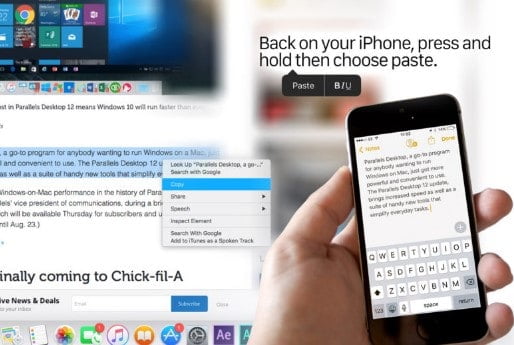
Universal Clipboard can be easily used to copy on one device and paste on another which is like taking another successful step on macOS Sierra. The Universal Clipboard feature seamlessly hand’s off the web pages or your emails from your Mac to your iPhone taking it another level.

Universal Clipboard on macOS Sierra

WHAT ABOUT MESSAGES?

Use messages to play videos & preview links on macOS Sierra which probably isn’t that impressive but it certainly has a nice touch for making chats and content sharing much better.

AND YES, THERE’S AN OPTIMIZED STORAGE TOO

The Optimized Storage on macOS Sierra makes it easier for more space availability by not undergoing any time-wasting manual deletion of the files.


USING APPLE MUSIC IN iTunes

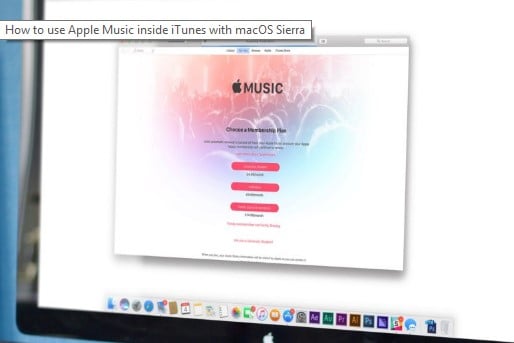
Using Apple Music inside the iTunes has a nice, clean and refreshing interface in macOS Sierra. It is super simple to search for & discover the best Apple’s streaming music service.

Apple Music in iTunes on macOS Sierra

WORKING WITH TABS

Know exactly how to use the Tabs and it becomes east. Every time you open a new tab in your web browser and it opens an entirely new window. You’ll obviously have two or more windows open for the same apps. Select the Window option from there and then click Merge All Windows to combine your multiple tabs into one single window.

iCloud DRIVE FOR SHARING FOLDERS

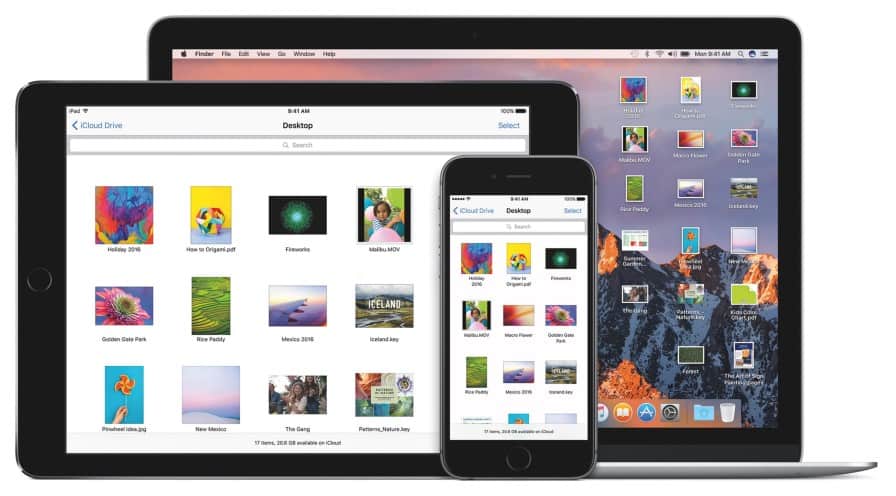
The iCloud Drive can now be used to share your folders from the Documents and Desktop, unlike the previous version that worked more like Dropbox where the users had to drag & drop files in order to access them over multiple devices. macOS Sierra offers you delightful benefits of iCloud with an added bonus of saving your files exactly where they are.

iCloud on macOS Sierra

SIERRA ‘PICTURE IN PICTURE’ FEATURE

As the name suggests, Picture in Picture feature on macOS Sierra has the ability to keep a little video window open on our screen while we can switch between other apps. Isn’t this something that we’ve always wanted! Keep watching an interesting YouTube instructional video while answering your important emails.

FINALLY, UNLOCKING FROM THE APPLE WATCH

With the help of your Apple Watch, you can now automatically unlock your Mac. There is no need for any lengthy passwords. macOS Sierra ecosystem works really well with Apple’s wearable device.

macOS Sierra has tons of neat and clean features that’ll change the way you look and work with your Macintosh!

Opera launches a free built-in VPN for its desktop browser ensuring better security

0

Opera did release in the past it’s forever free VPN (Virtual Private Network) service for the iOS and Android but now it’s time for a Desktop integration. On 19th September 2016, this Norwegian online browser & advertising company became the first to release its final free VPN (Virtual Private Network) for its mainstream desktop browser. They are the first amongst their rivals, providing the users with the freedom to browse whatever they want.

Earlier this year in the month of April, Opera had a VPN in their browser but that was only the developer version. But with this newer update, Opera 40 is bringing the privacy & security benefits of a VPN on the desktop browser for all its users.

Opera browser offering inbuilt VPN

How to use the VPN service?

Following are the steps to enable VPN on your Opera desktop browser:

  1. Go to the Settings (Windows users) or Preferences (Mac users)
  2. Select the “Privacy and Security” option to access the VPN policies
  3. Under the heading “VPN”, check-in the box that says “Enable VPN” to enjoy a secure & safe browsing

Opera also offers its users the option to choose the server location from around the world. Otherwise, it can also pick the most optimal location based on the network speed, server capacity, and location.

Opera VPN service

The VPN available for desktop is remarkable for being unlimited which means it’s free and also isn’t time restricted. But allowing only five different locations, unlike the other standalone browsers offering worldwide locations, is the only drawback that can be observed.

Opera also adds a battery saver mode for the devices, especially laptops but sadly, the user won’t be able to save drastically on the battery.

Opera VPN and Battery Saver

Chromecast by Opera

Another exceptional feature for the Opera browser is the support for Chromecast. A simple Chrome extension will have to be downloaded from the Opera catalogue and later users may install the Google Cast extension from the Chrome web store. After the installation, Chromecast can be utilized on the same WiFi network to cast pictures & videos from the desktop. This Chromecast streaming dongle must have prevented certain Chrome fans from making the switch to Opera browser.

Experts Say

Opera claims to have almost 350 million users across all its products. And it is fair to say that with this newer update, Opera is bringing the VPN service to millions who might have not even have heard of it or used it otherwise. This can be very well understood with the statement that Krystian Kolondra, a Sr. Vice President at Opera wrote at the company’s official blog – “We strongly believe that if more people knew how the internet truly works, they would use a VPN. And we hope that by making our browser VPN free and easy to use, it will become an essential tool for everyone.” He further adds that Opera users can now get easy access to all their favourite online content no matter where they are.

But at the end, it is still not clear whether Opera’s new tool would be able to outwit the internet censorship mechanism or not. Such restrictions at times may render VPN’s as ineffective.

8 accidental inventions that turned into breakthrough technologies we use today

0

Most of the times, we are afraid of making a mistake. And it is the least when we try to originate something new from those mistakes. We always want to be perfect and become too hard on ourselves. Least do we know that sometimes the most brilliant ideas come from the biggest failures and at times it’s not by choice but purely by chance. Hence, find your inspiration in the accidental invention mentioned below that no one intended to make yet they top the lists of world-changing discoveries.
5 Accidental Inventions

1. POST-IT NOTES – ACCIDENTAL INVENTION

Inventors: Art Fry and Spencer Silver, researchers in 3M Laboratories

What were they trying to make?

There actually were two accidents that lead to the invention of the Post-It Notes. First was in the year 1968 when Spencer Silver was trying to produce super strong adhesives for the use in the aerospace industry but instead made an extremely weak and pressure sensitive adhesive agent at the 3M lab. Silver along with the management couldn’t find a use for it as the adhesive was too weak.

Postit Notes Accidental Invention_accidental inventions

How was it created?

Silver’s adhesive though didn’t work at 3M but it still was extraordinary for the fact that you could stick it to something light like a piece of paper, and pull it off without damaging the surface or either leaving a residue. Despite the excellent features, Silver could not find a marketable use for the product.
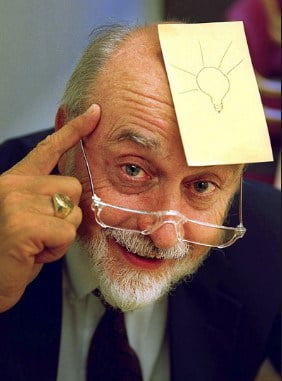
Postit Notes Accidental Invention

A few years later, the second accident occurred with Silver’s colleague, Art Fry, who was a chemical engineer by profession and also sang in a church choir. Fry always had to deal with his frustration of losing song papers because he couldn’t find a way to fasten those papers into the book of hymns. Fry got the idea of using Silver’s adhesive to prevent those papers from slipping. He also suggested Silver that the adhesive has been used backward! He recommended putting the adhesive on a piece of paper for sticking it to a surface rather than sticking the adhesive to a surface / board.

This incident leads to the accidental invention of Post-it notes. Though it was not until the year 1980 that post-it was originated nationwide. And today I find them all over my room. See how cool it is that someone decorated such a big wall with these post-it notes.

 Postit notes_accidental invention on the wall

2. X-RAY IMAGES – ACCIDENTAL INVENTION

Inventor: Wilhelm Röntgen, Physicist

What was he trying to make?

This discovery has a fascinating story of an incredible chance in 1895. Röntgen, a German physicist was routinely experimenting with the cathode-ray tubes when he observed that a radiation was piercing through a fluorescent black cardboard covering the tube. This was generating some chemical sitting at a distance making it glow.

How was it created?

Actually, a thick screen had been then placed in between this cathode emitter and the radiated cardboard determining that bits of light were passing through a solid object. Roentgen was amazed at this. He then quickly understood that brilliant images could be produced with an incredible radiation.
X-RAY IMAGES_accidental inventions

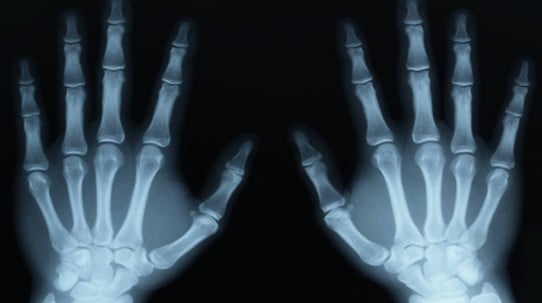
Followup inspections revealed that he had produced an unknown radiation, which he called “X-radiation” and later shortened the name to “X-ray”. This ray could penetrate most of the materials, including skin. And the first X-Ray image, one of the accidental invention, was the skeletal image of Rontgen’s wife’s hand.

3. MICROWAVE – ACCIDENTAL INVENTION

Inventor: Percy Spencer, an engineer with the Raytheon Corporation AKA electronics genius

What was he trying to make?

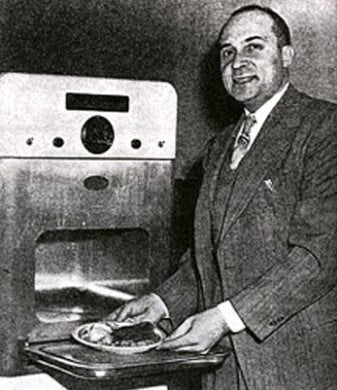
In the year 1946, Percy Spencer was administering a project related to the microwave emitting magnetrons which are used in the guts of radar arrays.
Microwave_accidental inventions

How was it created?

While experimenting with the new vacuum tube, a chocolate bar in Percy’s pocket had started to melt. Percy wanted to figure out that was it the microwave radiation of the magnetron to blame or to credit, therefore he grabbed some unpopped popcorn kernels and held them by the device.

Much to his surprise, they started to pop. By then, Spencer knew that he had a revolutionary device. He thought this would be an enabler for those lazy cooks everywhere. And the end result was the microwave. I guess today, every person would be so grateful to this accidental invention.

4. SUPER GLUE – ACCIDENTAL INVENTION

Inventor: Dr. Harry Coover

What was he trying to make?

It all happened in the year 1942. Dr. Coover of Eastman – Kodak Laboratories was actually trying to make those clear plastic gun sights which were to be put on the guns of Allied soldiers in the World War II.

How was it created?

Harry Coover came up with one particular formulation that didn’t work well for the gun sights but fantastically served the purpose of an extremely quick bonding adhesive. He had created a substance called cyanoacrylate which was not at all suitable for a precision gun sight. On the other hand, this substance stuck to every possible thing it touched.

Super Glue_accidental inventions

The turning period

Coover’s would-be invention was forgotten for almost six years when one day while supervising an experimental airplane canopy design he got himself stuck in the same gooey mess — cyanoacrylate. But this time, Coover did not overlook the situation and calmly observed that this stuff formed an astonishingly strong bond without any heat. Coover along with his team repaired various objects in their lab with this substance. Together they stumbled upon a solution for the use of this maddening material.

Dr. Harry Coover, in the year 1958, got stuck again but this time with a patent on his discovery, after full 16-years. How amazing it is that the accidental invention of a super glue is now such an economical and world famous product. It can even stick the broken hearts together. Not really!

5. MAUVE COLOR a.k.a MAUVEINE

Inventor: William Perkin, 18-year-old chemist

What was he trying to make?

Strangely enough, William Perkin, a young 18-year-old chemist was busy examining a cure for the disease, malaria.

Mauve Color_accidental inventions

How was it created?

William had accidentally ended up changing the complete fashion world that too forever. It was in the year 1856 that one of his experiments ended up performing terribly wrong. It seemed nothing more than a gloomy mess. But as he was examining this mess, he noticed a beautiful color radiating from his petri dish.

World’s first synthetic dye was produced. Thanks to William for that pretty Mauve color that now we have in it in our eye shadow palettes, scarves, cars and everywhere.

6. THE SLINKY – ACCIDENTAL INVENTION

Inventor: Richard Jones, Naval Engineer

What was he trying to make?

In the year 1943 during the World War II, navy engineer Richard Jones was trying to devise a monitor to meter the power on battleships. He was also trying to figure out the way to apply springs aboard navy ships to retain the sensitive instruments from bouncing.

The slinky _ accidental invention

How was it created?

Jones was striving with those tension springs when accidently one of them fell to the ground. And much to his amusement, the spring kept bouncing from place to place after it hitting the floor. I can imagine how exciting it would have looked! With this, the Slinky was born. Since then children everywhere have enjoyed playing with this pointless yet thrilling toy.

7. SAFETY GLASS – ACCIDENTAL INVENTION

Inventor: French artist & Chemist Édouard Bénédictus

What was he trying to create? 

Back in those days before airbags and/ or seatbelts were part of a package, one of the most critical dangers were ‘injuries’ from shattered windshield glasses. French artist & chemist Édouard Bénédictus chanced upon the invention of laminated glass a.k.a safety glass.

While working in his lab, a glass flask fell off his desk and to his surprise the glass instead of shattering just cracked.

Safety Glass_ accidental invention

How was it created?

Upon a closer examination of that glass, Bénédictus apprehended that the interior of that glass contained plastic cellulose nitrate. It had coated the inside and prevented the harmful pieces from coming apart keeping them together.

His vision

Bénédictus applied for a patent in the year 1909 with a vision of increasing the safety standards of cars. Manufacturers at that time rejected the idea keeping the prices down, however, the glass became a standard for the gas mask lenses in the World War I.
Achieving that much-needed success on the battlefield, even the automobile industry by the year 1930 equipped most cars with this safety glass.

8. WIFI – A BREAKTHROUGH TECHNOLOGICAL INVENTION

Inventor: Dr. John O ‘Sullivan

What was he creating?

Any list about the accidental invention is incomplete without mentioning about WiFI. This technology changes the way we interact, connect and communicate today. WiFi is the most unexpected Irish invention made by Irish – Australian engineer, Dr. John O’Sullivan. He discovered this modern marvel completely by accident when John and his colleagues were researching about black holes in the outer space.

WiFi_accidental invention.jpg

How was it created?

WiFi technology was developed as the byproduct of a CSIRO research project. Dr. John was basically working on an experiment to detect the exploding mini black holes that were the size of an atomic particle. In the attempt, the experiment failed.

But in the year 1996, he obtained patent rights to a technique /method that he along with his team realized. This method was actually the ability to unscramble the radio waves to use them as a means of connecting and communicating all over the internet without the need of any physical network. Today, I cannot even imagine my daily routine without WiFi be at home, in the office or at any public place. All thanks to the inventor.


Today, I cannot even imagine my daily routine without WiFi be at home, in the office or at any public place. All thanks to the inventor.