Home Blog Page 223

Remote Control your PC using a Smartphone

This tutorial is about how you can remotely control your Windows PC with the touch of an Android smartphone. And let me just elaborate on what all you can do – Control the mouse or keyboard, pause or play videos & music, increase or lower the volume, launch apps, manage files, monitor performance, turn off, restart, or hibernate your PC – all with just a smartphone (remote) device.

I’m going to explain how a mobile application acts as an interface between your Android smartphone and the PC simplifying the hassles of getting up and reaching the system every time. Unified Intents’ excellent mobile app “Unified Remote” comes to rescue for this task.

 STEP 1  SET UP THE UNIFIED REMOTE APP

Firstly you will have to install the “Unified Remote Server on your Windows system. The server only supports Windows 7, 8, 8.1, 10, Vista and XP. You can also find packages for Linux and macOS also. So once you have installed the server it will automatically start with the configuration and you don’t need to do anything.

Next step is to download the Unified Remote app” on your Android smartphone. This is also available for iOS and Windows Phone users.

The application automatically finds and connects to your PC once you open it. Please make sure that to continue further, your phone and your computer should be connected to the same network. But in case you want to take the risk of connecting your system from any other network (though it’s not recommended due to security reasons), you can follow this tutorial and perform the same.

 STEP 2  USING THE MOUSE & KEYBOARD

Unified Remote app’s primary application is to control the mouse & keyboard of your PC from your Android device. Therefore, tap on the Basic Input option, where you’ll find the following input instructions:
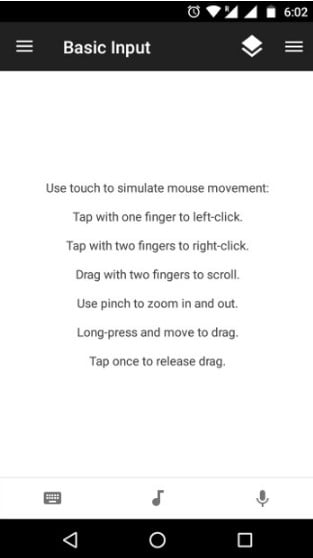
Unified Remote app - mouse & keyboard instructions

Opt for “use touch to simulate mouse movement” selection and read carefully about the gestures mentioned that can be used.

Now, to use the keyboard by tapping on the keyboard icon present on the bottom left-hand side corner of the screen. So anything that you type here will be reflected on your system.
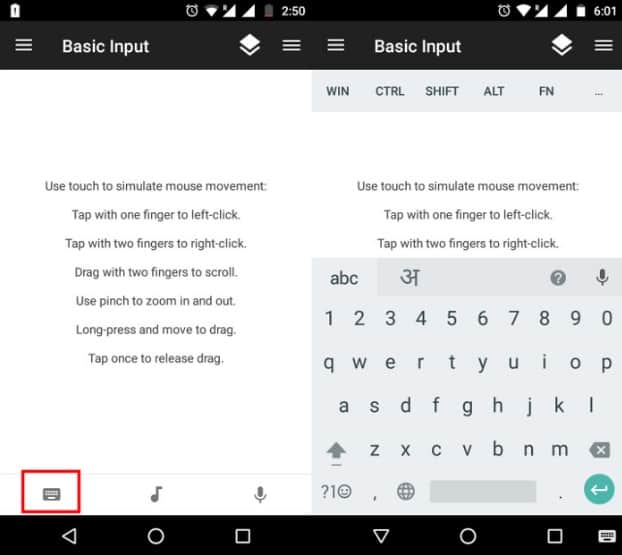
Unified Remote app mouse & keyboard

 STEP 3  USING THE AVAILABLE REMOTES

Besides controlling the mouse and keyboard of your PC, you can also extend the functionality by adding different Remotes. There are several remotes offered in the app itself but you can always add more. Just click on the Add Remote (+) floating button on the bottom right corner side, after which you’ll find various types of remotes to be added.
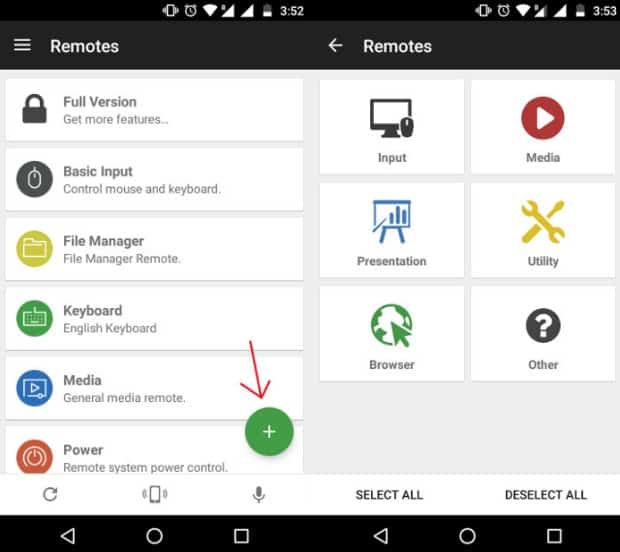
Using Remote on Unified Remote AppLet’s also take a look at the different remotes available along with their functionality.

  • Control Music / Video Playback

Follow this path : Remote > Media to add this remote
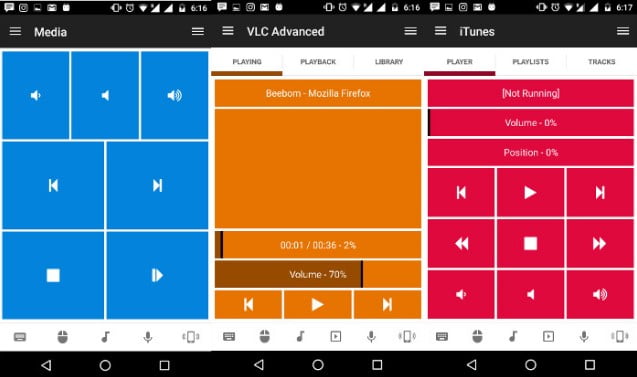
Music Control Remote

Choose the media player of your choice by following the above path. Keep in mind that only the generic Media Player remote is available in the free version. And most of the media player remotes, except for VLC are available in the premium version. The free version lets you play and pause music, increase and decrease the volume and do other basic operations.

  • File Manager

This remote is enabled by default inside the application. But if this isn’t the case with you, follow this path : Add Remote > Utility > File Manager.
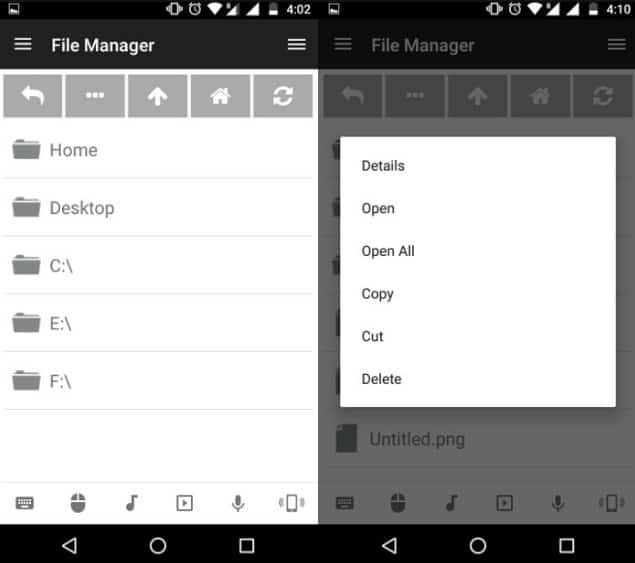
File Manager Remote

So, any file that you open from here will also open on your system in the default application. This remote enables you to perform basic file management functions like Copy, Paste, and Delete.

  • Task Manager

Follow this path to add the Task Manager remote : Add Remote > Utility > Task Manager. With this, view on your phone the programs running on your system.
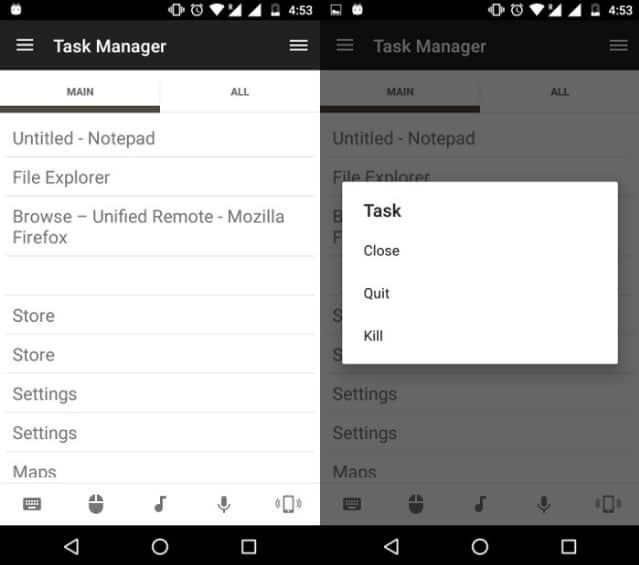
 Task Manager Remote

You can also choose to close any window, quit a particular program, and / or even kill a task, in the case where it isn’t responding.

  • Power Manager

Power management has two remotes. One is in the Free Version – follow this path : Power > Power remote, and the other is available in the Premium Version – follow this path : Utility > Monitor.
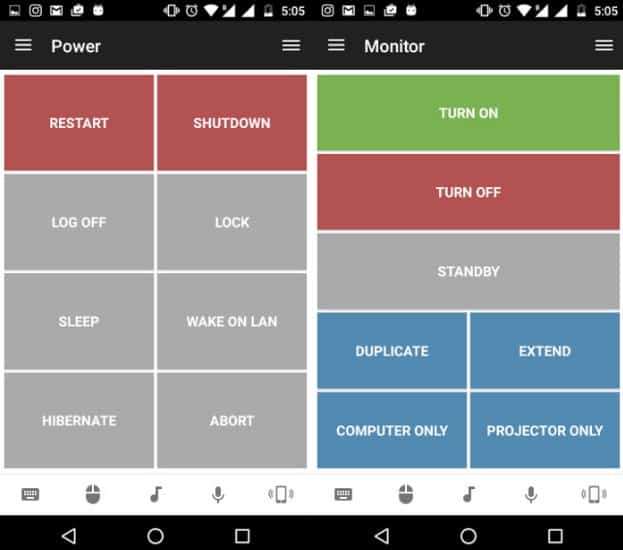
Power Manager Remote

You can also find other options like Restart, Shut DownLog Off, Lock, Hibernate and more for your computer. In the

In the Monitor remote option, you’ll find the choices to turn your computer screen On and Off, or to put it on Standby. There also is the possibility to manage multiple screens.

 STEP 4  SECURITY CONCERNS

Operating the Unified Remote app for controlling your PC will automatically detect & gain access to any system that’s installed on your network with the Unified Remote Server. This happens without prompting for any password. In simple words, your security gets hampered when anyone on your network with the same app installed on their phone can have unrestricted access to your system. This enables the other person to potentially move around or delete any file on your system or also shut your PC and do more such things .

We have a solution to this problem as well. On your system go to the system tray, right-click on the Remote Server icon, and click on Manager.
Security Settings - Manager
Once the manager interface opens, go to the Settings on the left on the navigation panel and go to the Security tab.
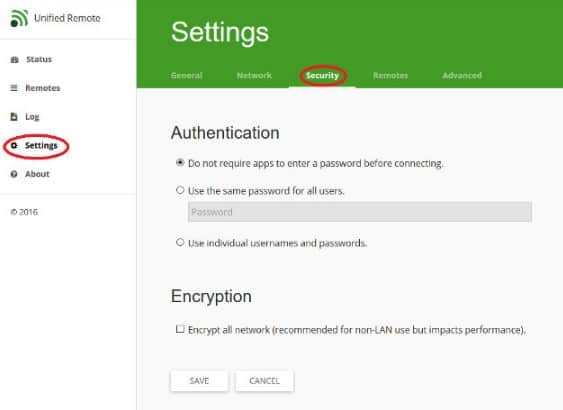
Security Settings

Under the Authentication heading, select the option “Use the same password for all users.” Here you should enter a strong password. Also, enable encryption for your connections by checking in the “Encrypt all network” box. Click the Save button.

After these steps, even if a person is on the same network it will be impossible for him/ her to remote control your system.
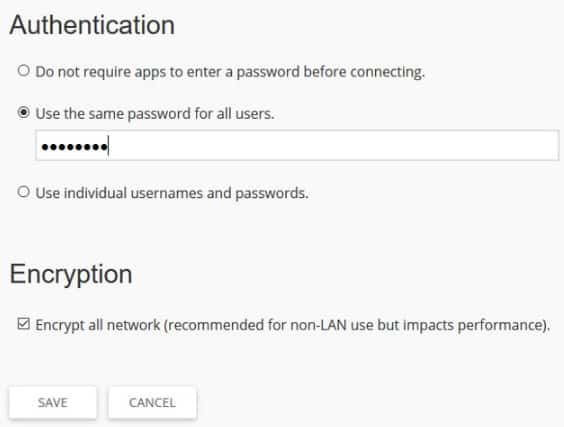
Authentication & Encryption

Now on your smartphone, either tap on the hamburger menu or swipe from the left edge towards the right side and select Servers. Tap on the appropriate server, enter a strong password and tap OK.
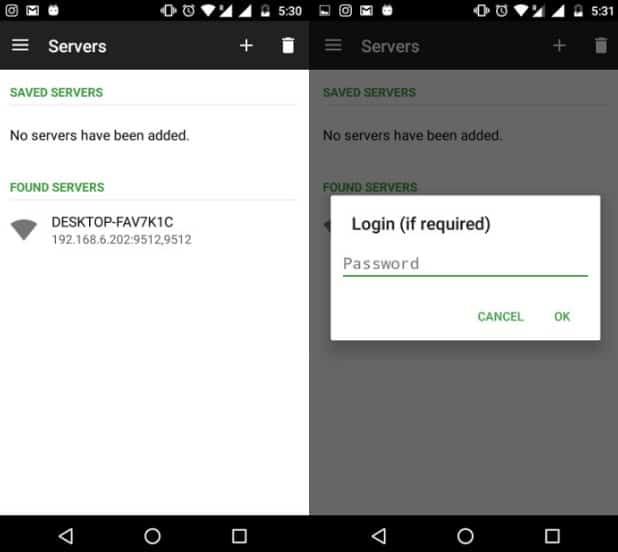
Server Password

And this is how you complete the process to manage you Windows PC with a smartphone turned into a remote control.

Do let us know how did you use the Unified Remote app. Also, if you have any other creative applications mention in the comments below.


How to Improve Your Business By Migrating To Cloud

0


Cloud computing has been a big boon to the many businesses in recent years, what with the flexibility and efficiency that it affords organizations. By utilizing servers located in remote locations, enterprises are able to store, manage, and process data like never before. Naturally, such a move requires an appropriate enterprise wireless broadband infrastructure so that your business can fully take advantage of all the benefits that cloud computing has to offer.

migrating-business-to-cloud

If you still aren’t convinced about the advantages of cloud computing, here’s a list of them that may sway you into exploring its possibilities.


Monetary savings

When you migrate to the cloud, you can expect your IT costs to be trimmed down because you will not have to purchase all the equipment and software that your IT infrastructure needs. The provision of these resources will be part of your contract with your service provider. Furthermore, you also won’t need to spend for additional manpower, since cloud service providers have their own teams of experts that manage the remote servers.


Better collaboration and work flexibility

Since cloud computing is internet-based, it also means that your colleagues and associates can be given continuous access to vital business data and information, allowing your team to collaborate better and to create important business decisions faster. Your employees can also work anywhere in the world, provided that they have access to the Internet and have the necessary devices.

Protection from uncertainties

Cloud computing allows you to protect important corporate data from physical risks, whether it’s vandalism, fire, flooding, earthquakes, and other natural disasters. Because your information is backed up in a safe and remote location, you can rest assured that you can quickly get back on your feet even in the worst-case scenario.

Of course, there are other risks aside from disasters and physical threats, and these include attacks from malicious elements like criminals trying to steal your data for personal gain. That’s why it is also important to invest in a dependable security platform, which can help protect your network by providing you comprehensive visibility and control over your IT infrastructure.

Scalability

Another great feature of cloud-based computing environments is that it allows enterprises to scale up easily or reduce their IT resources based on their current needs. Since your business doesn’t have to buy costly equipment, software, or upgrades, you don’t have to worry about not having enough financial resources when you need to expand. Conversely, you also don’t have to worry about your investment being wasted when things go south.


Opportunity to innovate

With the help of the cloud, your tech executives and associates will not be incessantly burdened with the task of maintaining and overseeing your IT system. Since they will get much-needed help from your cloud service provider, this leaves them free to explore technological opportunities that can improve the company’s services, or even better, generate novel and innovative value propositions that can propel the company forward.

When it comes to technology, it pays to be cognizant about the kind of tools that can improve your business processes and encourage the innovation necessary for your enterprise to grow and become sustainable. One of the best tools at your disposal is cloud computing coupled with a reliable wireless broadband infrastructure. Adopt them the right way, and you’ll be able to duplicate the success of many other businesses that have already benefited from them.


Xiaomi Diwali Sale from 17th to 19th Oct : Re. 1 Gadgets & Accessories also available

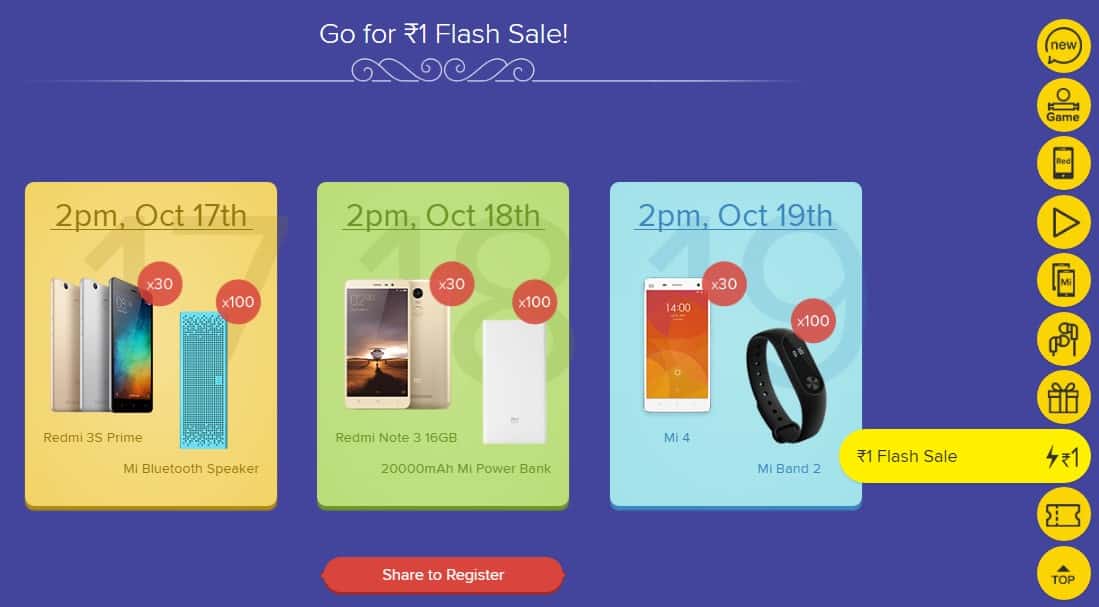
Xiaomi is all set to host its annual Diwali sale on “mi.com” and “Mi India app” starting from 17th till 19th October 2016. Even this year, Xiaomi plans to conduct the “Re. 1 flash sales and discounts” as part of their Diwali Sale. The Re. 1 Flash Sale will be valid on three of its smartphones namely Redmi 3S Prime, Redmi Note 3 (16GB variant) and Mi 4.

Re. 1 flash sale – at 2 pm – daily
Redmi 3S Prime flash sale will be held on 17th October
Redmi Note 3 flash sale will be held on 18th October
Mi 4 flash sale will be held on 19th October

Diwali Sale with Xiaomi

Other Products for the Xiaomi Re. 1 Flash Sale

The Re. 1 flash sale by Xiaomi is also valid on 20,000 mAh Mi Power Banks, Mi Bluetooth speakers and Mi Band 2 along with the smartphones. Each of these will have only 100 units during the Re. 1 flash sale.

How to be eligible for the Xiaomi Re. 1 Flash Sale

Buyers have to share about the Xiaomi Re. 1 Flash sale on social media channels including Facebook and Twitter etc in order to register themselves beforehand and achieve eligibility for the sale. All the flash sale results will be declared on the Mi Community every day. For the users who successfully add a Re. 1 item in their cart must pay the amount within 2 hours, else the order will be deleted.

Re. 1 Flash Sale at Xiaomi

Discount Offers

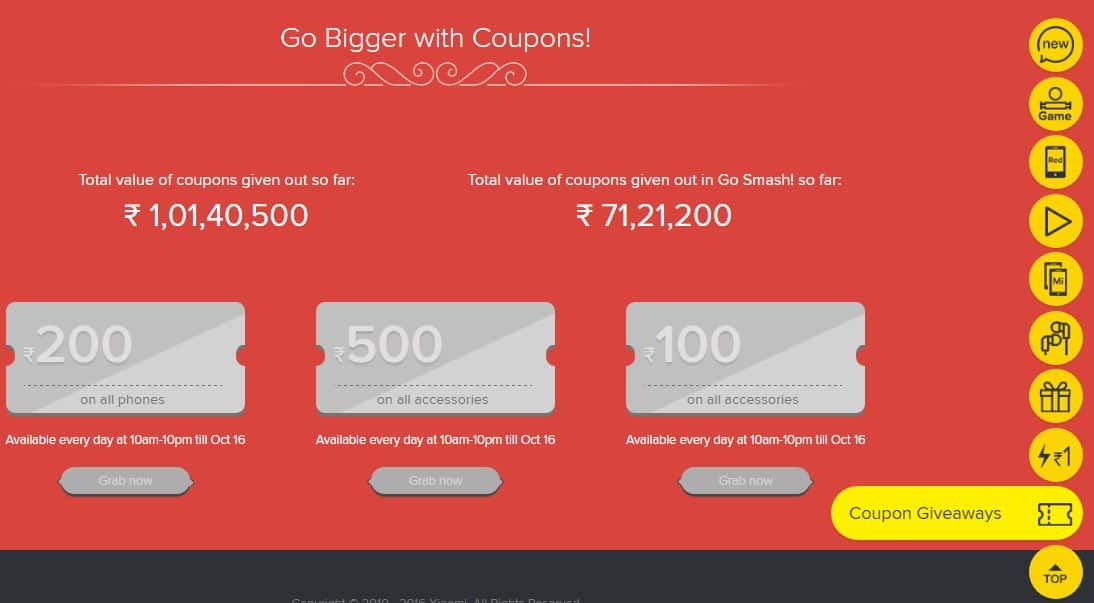
Xiaomi will also be offering discount coupons worth Rs. 100, Rs. 200 and Rs. 500 on smartphones, accessories and more. These can easily be claimed from the official website between 10th to 16th October and be used on the day of the sale. Timings for the availability of these discount coupons are 10 am to 10 pm daily.

Xiaomi Diwali Sale Discount Coupons

The discounts offered on accessories during the sale are also exciting. The 10,000 mAh Mi Power Bank is priced at Rs 1,099 instead of Rs. 1,299. Mi In-Ear Headphones Pro will cost you Rs. 1,399 compared to the original price Rs 1,799. Mi Capsule Earphones have been priced Rs. 899, while the Mi Bluetooth Speaker will cost you Rs. 1,999.

Lucky Draw

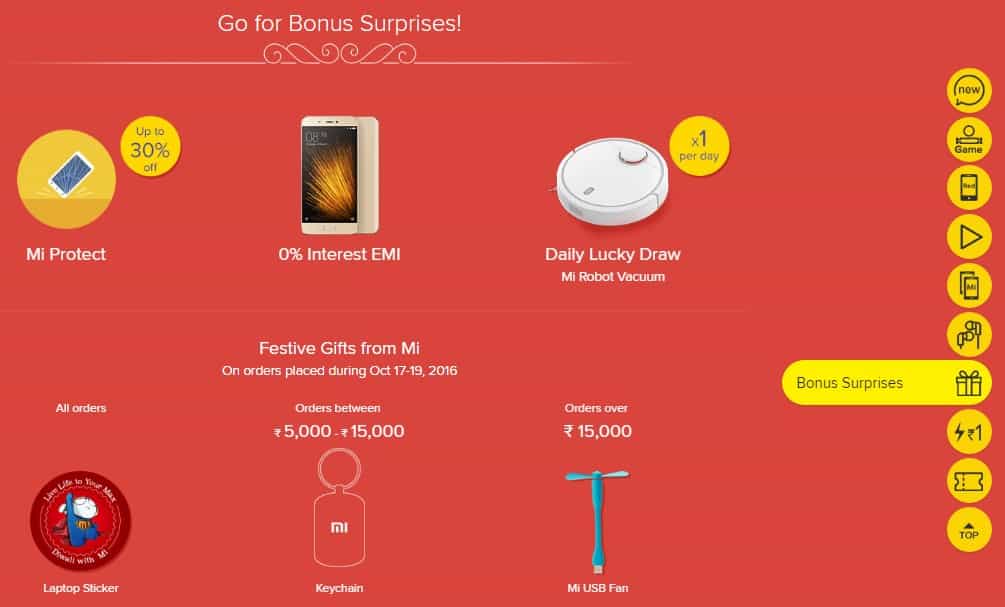
At the Xiaomi Diwali Sale, there is also a chance to enter the Daily Lucky Draw and win the Mi Robot Vacuum.

Free Gifts

For orders that happen to be placed between Rs. 5,000 – Rs. 15,000 customers get a free Mi-Keychain and for all orders above Rs. 15,000 your get a Mi USB Fan. A free laptop sticker is given out with all orders.

Xiaomi Diwali Sale Bonus Offers

Xiaomi products on other sales

Xiaomi claims to have sold over half a million devices in less than just three days between 1st and 3rd October 2016. According to Xiaomi, Redmi 3S model along with the Redmi 3S Prime was the top-selling products on Flipkart during their Big Billion Days Sale. While the Redmi Note 3 device was the best-selling smartphone of The Great Indian Festival Sale at Amazon.

Protect Plan

Xiaomi’s Mi Protect plan will now cover all the accidental losses and liquid damages. The plan also offers 30 percent off. It will provide free home pickup and drop. Additionally, a free second servicing within 1 year from the time of activation is also granted.

You can follow this “BUYING GUIDE” to gain more information regarding the Xiaomi Diwali Sale.

Reliance Jio’s Welcome Offer on Apple iPhone 7, iPhone 6s, 6 and SE

0

Reliance Communications Ltd. continues to tempt its customers for the newly launched Jio services. The company now decides to offer a “12-months of Jio Digital Services” package with the purchase of select iPhone models. This Welcome Offer from Jio will provide the customers with unlimited data and voice calling until 31st December 2016. And the offer is applicable on the purchase made from any Reliance Digital store or through select Apple Premium Resellers and Apple Authorised Resellers.

iPhone Devices

Reliance Jio’s Free Welcome Offer on iPhone Devices

Even if you are currently using an iPhone, you are still eligible to get the Reliance Jio’s Free Welcome Offer. And you too will receive the benefits of unlimited free data & voice calls until December 31st.

Reliance Jio has confirmed that this welcome offer will not be valid exclusively to the buyers of new iPhone 7 and iPhone 7 Plus, but also to the people who are planning to buy the iPhone 6, iPhone 6s, iPhone 6 Plus, iPhone 6s Plus and the iPhone SE devices.

Reliance Jio by Mukesh Ambani

Users can, later on, move to the 12-months complementary service with a plan of Rs. 1,499 plan. The 1499 plan includes unlimited local, STD, and national roaming calls along with unlimited 4G data at night. It offers 20 GB of 4G data, unlimited SMS, and a free subscription of Jio’s premium apps. Additionally, customers will also be getting free 40 GB Wi-Fi data at the Jio hotspots. According to Reliance, all these offers put together will translate to an amount of Rs. 18,000 for one year.

And basically, you are eligible to get 15 months of free benefit subscription.

Offers on iPhone 7 and 7 Plus by Airtel

Offers by Airtel are also fascinating the customers. They are offering 10 GB free 3G or 4G data for a month on the purchase of iPhone 7 and iPhone 7 Plus for one year. Yes, unlike the Reliance Jio offer, this offer is exclusively for the iPhone 7 and iPhone 7 Plus devices.

This offer works if the users already have the Airtel Infinity Postpaid plan. Mobile data will be over the benefits that the users are already getting with their Infinity postpaid plan. This Airtel offer makes for 120 GB of additional data for users in a period of one year. However, unlike the Reliance Jio offer, this is limited to iPhone 7 and iPhone 7 Plus only.

Airtel has recently announced an unrealistic yet amazing offer that they will offer the iPhone 7 at just Rs. 19,990 and the iPhone 7 Plus at just Rs. 30,792 downpayment only. Of course, there are certain terms and conditions and also that this offer is applicable only for the Airtel and HCL employees.

Airtel offers on iPhone devices

Reliance Jio’s offer on the iPhone devices seems to be a much better deal for the users. It covers not only the iPhone 7 & iPhone 7 Plus devices but also the older iPhone models.

Jio vs Airtel Offers on iPhone

Additionally, the older iPhone devices have received a significant price cut since the launch of the iPhone 7 model. The Apple iPhone 6s, 16GB variant, is now available at Rs. 38,999 and the iPhone SE, 16GB variant, is now available at Rs. 32,000 on the official website of Amazon.

Facebook launches a dedicated events app for iPhone users

Social media giant Facebook launched a mobile application on Friday this week, The Events App, for discovering the local happenings to enjoy with friends. For now, the app is tailored only for the iPhone users and has already hit Apple’s online shop. Though for the Google-backed Android smartphones, the version will be coming out soon. According to some sources, the developers are working on the Android version and it won’t be too late for the users to enjoy the app on their devices.

About Events App

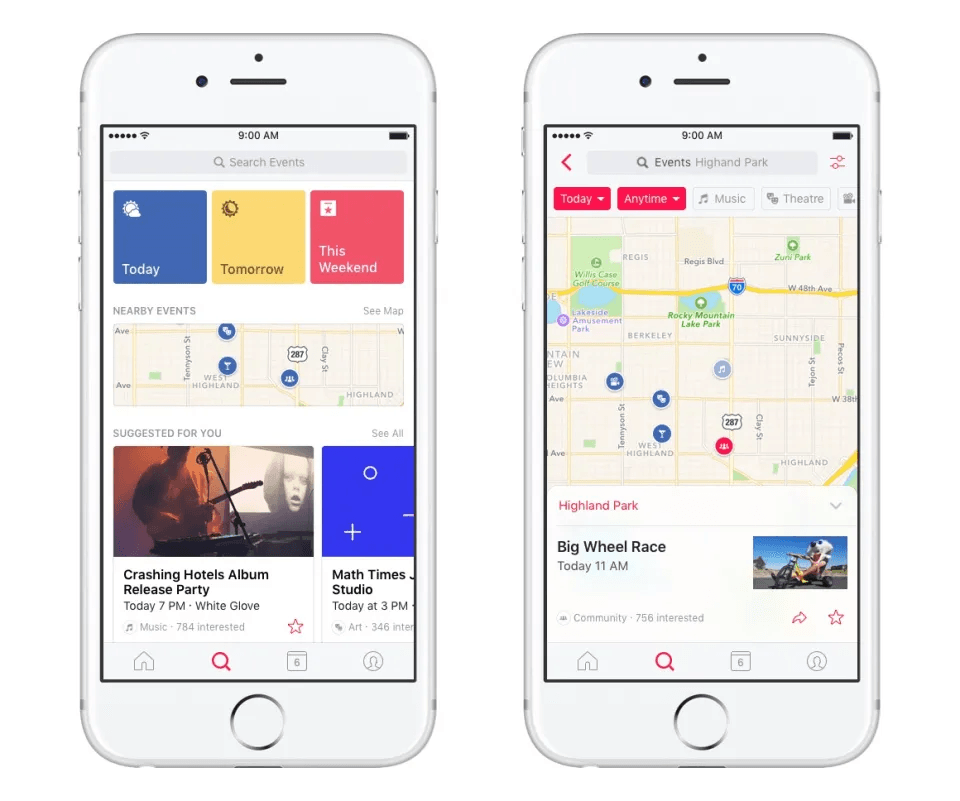
Events, is a standalone spin and a dedicated event app at the leading online social network. It lets people share their plans for concerts, poetry slams, plays, dining or any other type of events they are interested in. It will not ask you to sign into your FB account until and unless you want to share your listings.

“When you open the Events app, you can instantly catch up on the latest events your friends are interested in. You can also view the recently-announced events by the Pages you like. It even updates you on events you’re already connected to.” Facebook Product Manager Aditya Koolwal said.

facebook

According to Koolwal, more than 100 million Facebook account holders daily make use of the Facebook’s events section. They discover about the activities they can take part in along with their friends on the section.

Hence, Events app lets you browse through the recommended happenings based on factors like time, locations and / or your interests. It lets you explore the potential outing options with the help of interactive mapping facility.

Any plans that you make through the Events app are kept in an organizing manner on a calendar. These are also shared back with your Facebook friends. There’s just a plain old calendar helping you to keep track of all your upcoming events. And more importantly, you can even integrate your phone’s calendars to the app.

FAMILY OF MOBILE APPS BY FACEBOOK

California-based Facebook has been since a long time creating a big family of mobile applications. Facebook makes sure to stay in tune with the modern lifestyles of the people. They are catering to those living standards in which the smartphones are used to promptly connect & share with family, friends or colleagues.

A mobile application for the social network, Messenger & WhatsApp messaging services, Instagram for photo and video sharing – Facebook has it all. Facebook claims to have more than a billion users for the Messenger and Whatsapp mobile apps independently. And earlier this year, Instagram also topped the stats with a 500 million user base.

Events is a convenient way to have all your upcoming events, Facebook related or not, in one place. To learn more about The Events mobile app by Facebook Click Here.

iPhone 7 from Rs. 19, 990 onwards; offer by Airtel (T&C Apply)

0

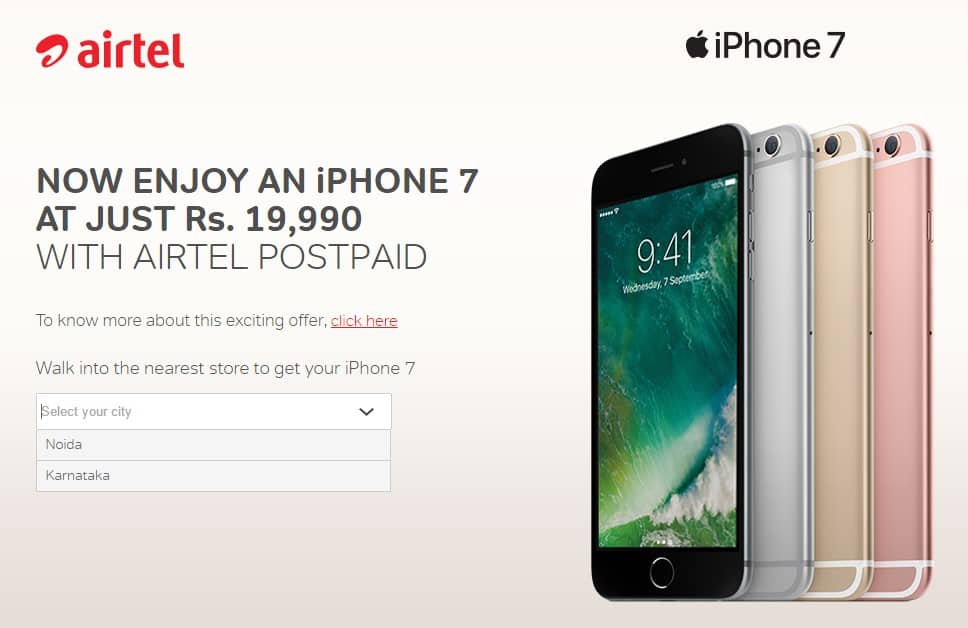
With the launch of iPhone 7 & iPhone 7 Plus in India, several online, as well as offline retailers, witnessed long queues across Mumbai and Delhi. Stores have been offering multiple exciting offers. One such unbelievable yet possible offer is being advertised by Airtel on their website. The offer is displayed on Airtel’s Apple page with the headline, “NOW ENJOY AN iPHONE 7 AT JUST Rs. 19, 990 WITH AIRTEL POSTPAID.” Of course, the offer comes with certain terms and conditions. For the moment, this offer is valid only in Noida & Karnataka and gradually will move to other cities.

iPhone 7 from Rs. 19,990 onwards; offer by Airtel (T&C Apply)

ELIGIBILITY FOR THE AIRTEL’S iPHONE 7 OFFER

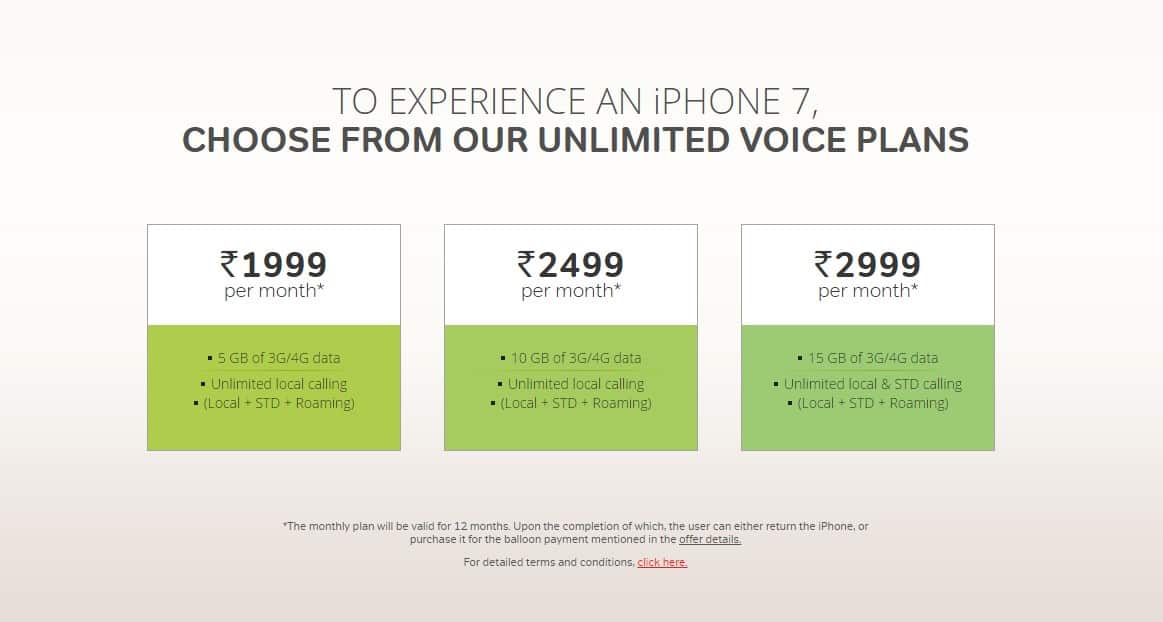
Airtel’s iPhone 7 and iPhone 7 Plus offer entitles you to get the iPhone at a fractional price as compared to its market price. You just need to choose one of yearly Airtel postpaid plans for at least 12 months after which you’ll also be eligible to return the device next year and upgrade to a latest model. The plans are as follows:

iPhone 7 from Rs. 19,990 onwards; offer by Airtel _ Annual Airtel Voice Plans

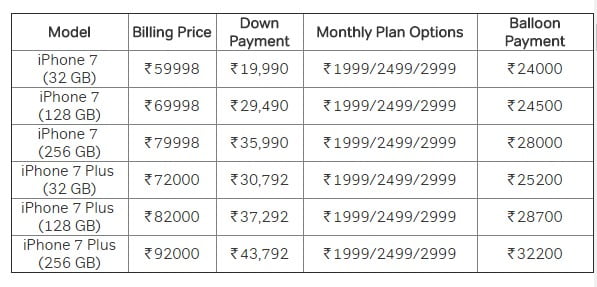
So basically, to purchase an iPhone 7, 32GB variant costing Rs. 59, 998 the buyers have to pay Rs. 19, 900 upfront as Down Payment and rest shall be paid for by your Bajaj Finance Ltd (BFL) EMI plans @ 0% interest. Then choose the yearly postpaid plans by Airtel (mentioned above) for the next 12 months.

iPhone 7 and iPhone 7 Plus Models on Airtel Offer

Following the expiry of 12 months validity, users can either return the iPhone 7 device to Airtel for upgradation to the next iPhone model or buy it completely at a lump sum balloon payment. Airtel would only take back those iPhone 7 devices which meet the listed physical condition criteria after 12 months. Airtel would take back only those iPhone 7 devices which meet the listed physical condition criteria after 12 months.

RESTRICTIONS APPLIED

During those 12 months, you will not be able to:

  • Switch your postpaid plans,
  • Port your mobile number to any other network,
  • Transfer the ownership to another user,
  • Migrate from postpaid to prepaid

WHY SHOULD YOU BUY THE iPHONE 7 and iPHONE 7 PLUS DEVICE FROM AIRTEL?

  • The primary advantage of availing this offer is that you can upgrade to the newest iPhone every year without having to pay for its full price.
  • And of course, this will require you to take extra care of your device to ensure it has no damages while upgrading.
  • To exit this offer at any point of time, you will have to pay the lump sum remaining Balloon Price and settle the EMI deal independently.
  • You can also enjoy unlimited calling along with data plans.
  • You get 0% interest rate affordability.

You may also like to read : Facebook launches a dedicated events app for iPhone users

FINANCING THE EMIs

In addition to signing up for this offer, you will have to avail a loan offer on your chosen iPhone device from Bajaj Finance Ltd. (BFL).

Either you can upgrade your device to the latest one after 12 months or you can end the contract. “The EMIs shall form a part of the bill amount under this Plan. Thereafter, BFL will debit the remaining outstanding amount (“Balloon Payment”) from your account and your contract with Airtel for the Plan will terminate and your loan with BFL will be closed,” says Airtel.

To know more about this offer you can log on to the official website at http://www.airtel.in/apple/

This is how you can display Battery Percentage on your Windows 10 Taskbar

With the Windows 10 Operating System now being available on more battery-powered devices, a need for additional tools & utilities also arises that allow the users to side by side keep a check on how much charge is available and how to best conserve it. Your Windows 10 OS displays the battery icon by default, providing you with a fair enough idea to know how much battery is left. So, you can simply move the cursor over that icon and view the exact percentage remaining. This system is okay and common, but it can become better!

Free Application for Windows 10 Battery Percentage

A free application called “BatteryBar” comes to the rescue to make things more appealing and accurate. It’s a compact and easy-to-use application for your Windows 10 PC/ Laptop. This app provides you with adequate and additional information about your computer’s battery. This also includes showing the remaining percentage on your taskbar at all times.

Here’s what you need to do to get the app running on your Windows 10 PC/ Laptop:

  • Carry on with the basic installation process on your PC or Laptop
  • You can reliably click on the “Next” button and not worry about any unwanted stuff being installed on your system

And this is it – Really easy!

After successful installation of the app, click on the battery bar icon in your toolbar on the system. The app will switch between the remaining time and the percentage.

Hence tell us how long does your PC/ laptop battery last? Let us know in the comments below! Also, share with us if you know about any such other exciting applications for the Windows 10 PC/ Laptop.