Home Blog Page 125

How to get a Refund for Steam Games Easily

0

Are you one of those who buy a game impulsively and later regret it? Well, if that happened with a Steam game, then fortunately there is an easy way to get a refund.

Steam is a storefront where you can buy and organize thousands of games for MacOS, Windows, and Linux. It comes as a desktop application where you can make purchases and chat with other active users.

As a community, Steam allows you to connect with your friends where you can play multiplayer games, share videos, and see what others are playing. You also get access to several game forums where you can explore new games and chat with players.

What is the Steam Refund Policy?

With over 90 million active users worldwide, people do buy quite a large number of games. And, with so many unique titles available in the database, there are a few games that may not work with your system or simple don’t seem fun once you try them.

The good news is that Steam follows a plain and fair return policy. If you are not happy with the game you bought or have any other reason for dissatisfaction, it’s pretty easy to request a refund for your purchase within a time frame of 14 days and less than 120 minutes of playtime after logging in for a particular game. As per Valve’s policy, you will get a refund without any questions asked if you follow these parameters. 

Also, in any situation if you are not able to meet these parameters and still want to place a request for refund; the company will still consider your case based on the reason for the request.

Which purchases are covered under the Steam refund policy?

  • Downloadable Content

You can claim for a refund on downloadable content bought from Steam by following the same above motioned parameters. But, the DLC should not be customized or transferred. 

  • In-Game Purchases

To get your money back for any in-game purchases for the Valve-developed games, you need to make a request within 48 hours post purchase. 

  • Pre-Purchased Titles

You are eligible to claim a refund for any pre-purchase game as long as you make a request before the title is released by the developers. Otherwise, if the title gets released, you need to follow the 14days/2 hour’s standard to refund the game.

  • Bundles

To get a refund on any Bundles bought on Steam, you need to ensure that it hasn’t been transferred and the overall usage doesn’t exceed more than 120 minutes. 

  • Steam Hardware

If you do not like any hardware purchased on Steam, you can claim a refund within a time period of 30 days. Once a refund request has been placed, you have to return the hardware to Valve within 14 days. To know more about the Steam Hardware Refund Policy, click here. 

Is it possible to get a refund for a gift on Steam?

In case if you are wondering whether you can get a refund for any game which has been gifted to you by other user, then yes, you can definitely request for a refund if you follow the standard parameters. However, the refunded money will be credited to the original buyer. You also need to know that once delivered, any gift has to be redeemed within 30 days period to subscribe it to your own account. 

Similarly, if you are the one who has gifted a game to someone else on Steam, then it is possible to claim for a refund if the other person hasn’t redeemed it yet.

To know more about the Steam refund policy head over here.

Is there a limit to steam refunds?

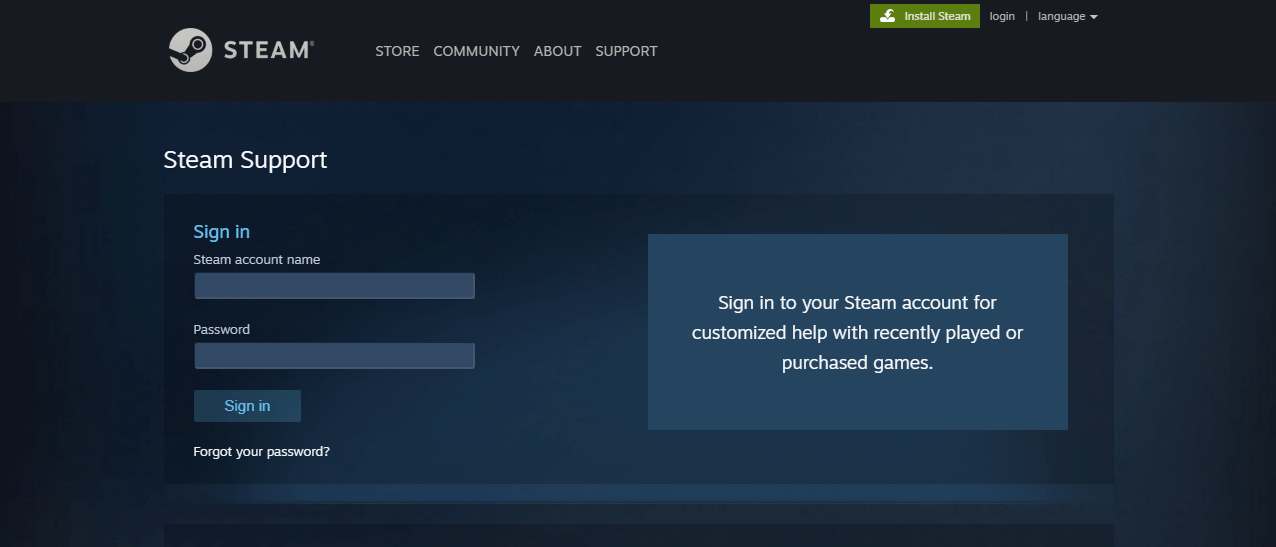
Now, if you are making a refund request within fourteen days and haven’t played the game for more than two hours, then here is what you need to do to get a guaranteed money-back for your Steam purchase:

Screenshot_1.png
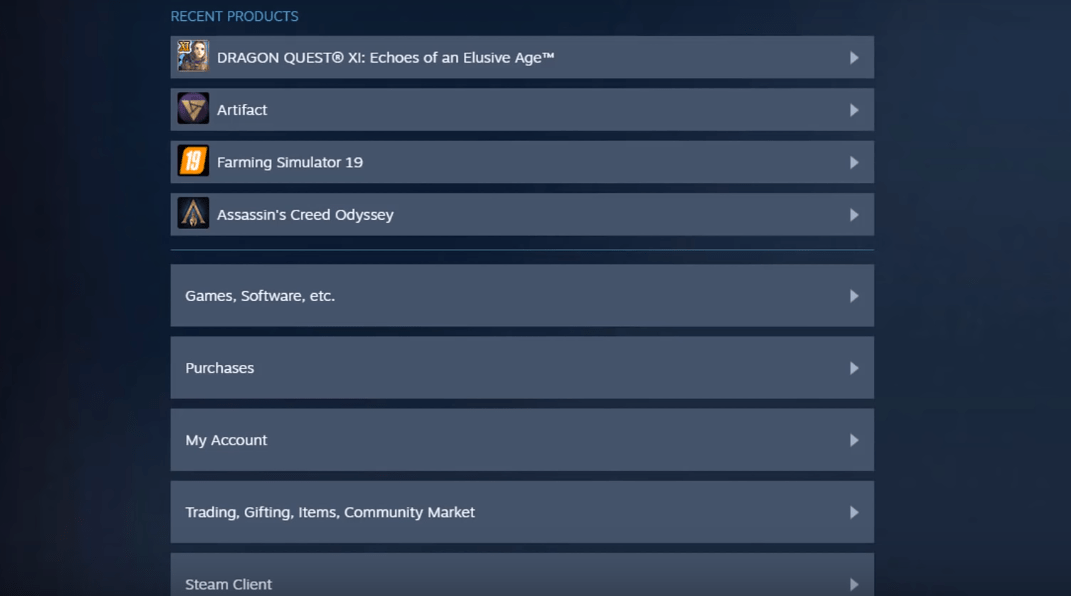
  • Head over to “Purchases” and select the game that you want a refund for.
Screenshot_2.png
  • Click on “I Would Like a Refund”
Screenshot_7.png
Screenshot_3.png
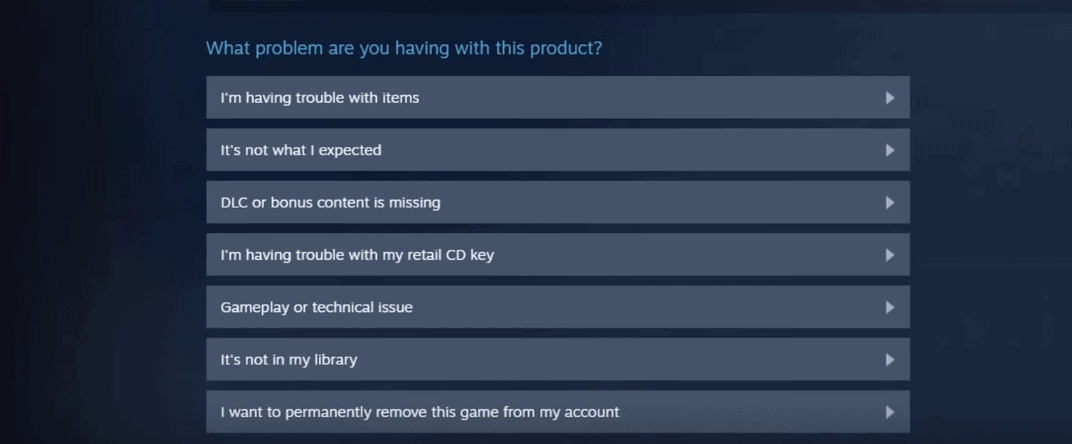
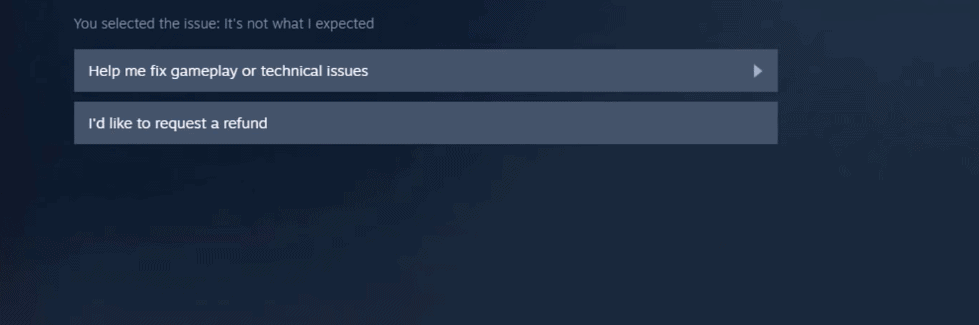
  • Here, you will be asked if you need any assistance in fixing technical problems instead of refunding the game. If you are sure about  the refund then click on “I’d like to request a refund”
Screenshot_4.png
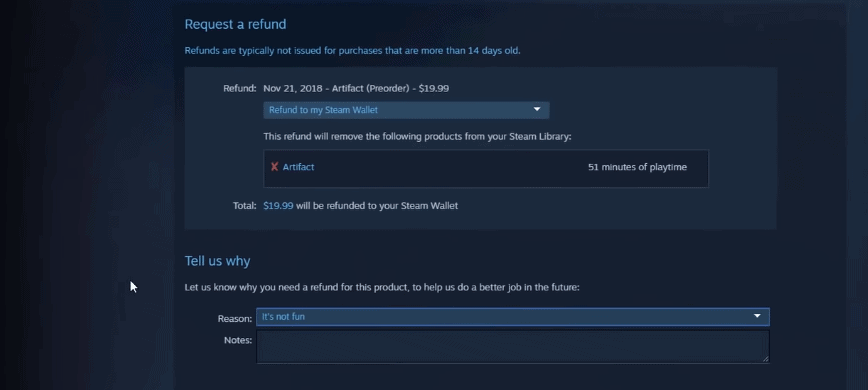
  • You will now be taken through the refund procedure. The team will verify if your are eligible for  a refund first. Post verifying, you can select the desired payment method where you want your money to be credited.
Screenshot_8.png
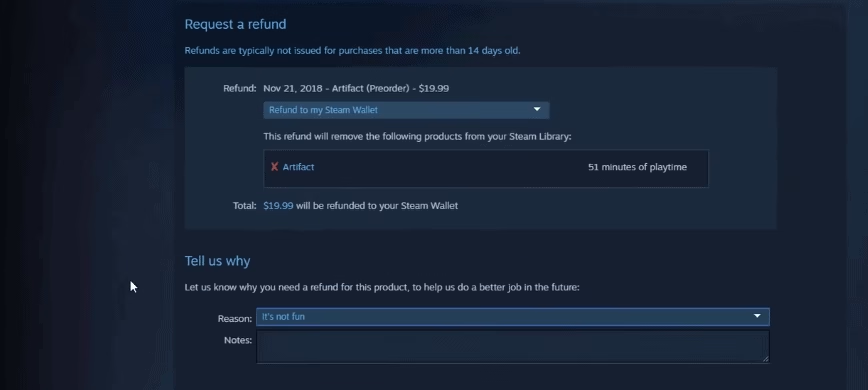
  • Finally, you will be asked to specify the reason for the refund. Select a reason from the scroll down box and leave a note to make the team understand your thoughts on the refund request. 
  • Once done, click on “Submit request” at the bottom of the page.

How long does it take to get the refund from Steam?

Once done, and as your refund request gets approved, you can get the full refund for your purchase within a week’s time. In case if your refund request doesn’t fall under the 14 days/120 minutes standard, then it will be manually assessed by the Valve Team.

The refund will be initiated according to the payment method that you had used at the time of purchase. However, if in any condition, if Steam is not able to make a refund in the original payment method, then it will credit your wallet with the entire amount. 

To make sure that your payment method is supported for refunding through Steam in your particular country, check here.

What can be done if the refund request has been denied?

If you think that your fair request for refund has been denied, then you issue a new request which will be evaluated by the Valve team again. A different team member will go through the request and ensure that the right decision is taken.

You should know that even though Steam follows a generous refund policy, but it is not designed for any user to get free games. 

If the Valve team observes that you had been making a lot of money-back requests, then they may stop offering any further refunds to your account as it will be considered as abuse of their policy. If you are found abusing the refund policy, then Steam has the authority to revoke your refund rights. There is no certain limit of how many games you can refund for, but typically if you had claimed for a refund of more than five refunds in the last six months, then Steam will send across a warning message. 

However, if you have bought a game before a sale for a higher price and wish to claim a refund in order to make another purchase at lower price, then Steam will approve your request as long as you have played it for less than 120 minutes.

That’s all! We hope this guide gave you enough information on how to successfully get a refund for your Steam purchase. As long as your request is authentic and falls under the parameters given by Valve, you will not face any issues in getting your money back.


Quick Fixes to Common Windows Errors

So, you’ve just purchased a brand spankin’ new Windows laptop and you feel like nothing can stop you. But then you quickly learn that there’s more than a few pesky bugs and error messages that can slow you down. What’s frustrating it’s a new piece of hardware. This shouldn’t be happening.

Yet, every laptop’s operating system, no matter how new, is going to have its share of bugs. Windows 10 is no different. Luckily, most Windows errors are easy fixes. Read on for solutions to some of the most common ones.

C:\Users\87-48CF\Downloads\shutterstock_1399100753.jpg

Updates That Won’t Install

Windows 10’s operating system is a real go-getter when it comes to making new updates available. But as for installing those updates? Download speeds can be sluggish at times, and in some cases fail to install entirely.

This is usually fixed by freeing up space. Start by downloading CleanMyPC, a free software that scans your computer for idle files you can uninstall.

Free up even more space by using Windows’s built-in “Disk Cleanup” feature. You can access Disk Cleanup by:

  • Click the “Start Menu” and select “All Programs”
  • Click “Accessories,” then “System Tools,” then “Disk Cleanup”
  • This brings up a panel labeled Files to Delete. You can click one at a time to review each file, then right click to uninstall the ones you don’t need

You can also try other software like CCleaner or PrivaZer.

Slow Boot Times

Some Windows users have complained about slow performance speeds right off the bat when they first power their computer on. If your computer has slow boot times, try the following:

  • Run a Scan with Windows Defender– Often, slow boot times are the result of a computer infected by malware. To run a full scan for malware, open the built-in anti-malware tool Windows Defender by simultaneously pressing the “Windows key” and “I,” then clicking “Updates and Security,” then “Windows Defender.”
  • Check for Updates – While you have that Updates and Security option open, check for new available updates.

Update and/or Clean Your Computer’s BIOS

Whenever you power on your computer, the first thing to load is its Basic Input/Output System, or BIOS. Slow boot times are sometimes caused by your BIOS needing either updating or cleaning, so knowing how to enter BIOS on Windows 10 is crucial.

You can enter your computer’s BIOS one of two ways:

  • Press the Hotkey – The good news is that every Windows laptop has a very brief window (no pun intended)—in between powering on and loading the startup screen—when you can access the BIOS by pressing a designated “hotkey.” The bad news is that there was never a consensus with all the laptop manufacturers to settle on one universal hotkey. Look up the hotkey for the manufacturer of your laptop.
  • Find it Through the Ole Start Menu – If you’re quick on the trigger, go through the Start Menu. Click “Settings,” then “Updates and Security,” then “Recovery,” followed by clicking “Restart Now,” then “Troubleshoot.”

Influx of Notifications

Windows 10 comes with a feature called Action Center, which conveniently organizes notifications about your apps in one place. But Action Center is programmed to update you on all of your apps, even the ones you never use. This makes messages pop up so frequently, it feels less like a helpful tool and more like a telemarketer that won’t stop calling.

You can fix this by:

  • Opening the Start Menu and clicking “Settings.”
  • Click “System,” then select “Notifications and Actions.”
  • From there, you can use the toggle switches to decide how often you’d like notifications to pop up, if at all.
C:\Users\87-48CF\Downloads\shutterstock_613400372.jpg

Restore System

Many loyal Windows users have found peace of mind over the years knowing that, were their computer to crash, they could easily recover any lost data with the System Restore feature. But for whatever reason, Windows 10 has it turned off by default.

To turn it back on:

  • Type “system restore” into your search bar.
  • Click “Create a Restore Point.”
  • This will prompt a panel labeled System Properties. Click on “System Protection.”
  • Select your C: drive and click “Configure.”
  • A panel entitled “Turn on System Protection” will come up. Click the Radio button right next to it.
  • Drag the slider somewhere between 5-10%.

Remember, before you try any of these fixes, back up your data and consider investing in an external hard drive.

A Few Clicks to Fix

Bugs and slowdowns on Windows can be annoying, but thankfully, quick and permanent fixes are rarely more than a few clicks away. Use the above tips to give your Windows computer and your user experience an instant upgrade.

Is It Time To Upgrade Your Wide Format Printer

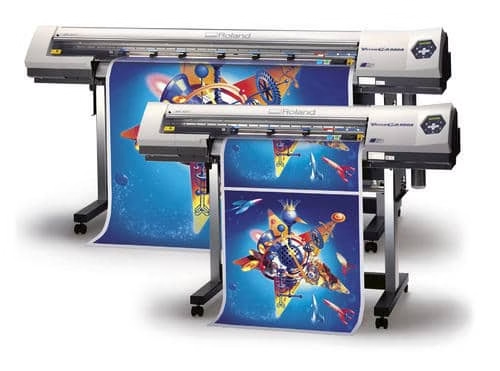
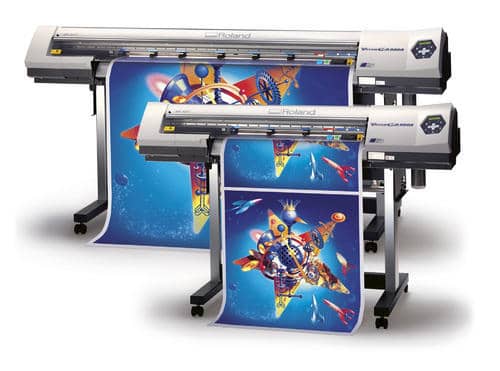
A wide format printer is a valuable tool for your business. While your old plotter may have served you well, it could be holding you back and affecting your productivity. In most cases, people overlook upgrading their printers because of the cost of acquiring a new one, and they think it can still go through the motions. But what many fail to realize is that they could be losing money with the current system, and a new printer would reduce costs significantly and greatly improve efficiency.

To help you know when to upgrade your wide format printer, we have compiled a list of the signs that you need to look out for.

Wide Format Printer

The printer has exceeded 8 years

While the lifespan of any machine depends on its use and maintenance, the average lifespan of an inkjet printer is 3-5 years. Although wide format printers are built to withstand heavy usage, any machine that’s eight years or older is harder to service and maintain and has reached the end of its useful life.

Driver and your new operating system not compatible

A new operating system is meant to make work easier and improve efficiency. However, if your printer cannot sync with the new operating system, it creates problems that affect your productivity. Therefore, if your plotter cannot communicate effectively with the new system, then it’s time to upgrade. 

The printer makes your work harder rather than easier

Business technology is supposed to make your work easier, not harder. If your printer is having a lot of downtimes, it’s no longer useful to your business. From crashing during projects to being slow that you cannot get jobs done in time, the printer can result in wasted time and lower productivity. 

Your current printer cannot meet your business needs

If your business has grown and your printer can no longer meet your needs, it’s time to get a new one. It could be your printer is not fast enough, does not meet the new quality standards, or is not efficient. For instance, how many rolls of paper can your current printer support? Does it have a built-in cutter? Newer functions can significantly improve speed and workflow. 

Unavailability of replacement parts 

As newer models are manufactured, manufacturers stop making replacement parts for older models. Therefore, if you find that it’s becoming hard to find replacement parts for ink and print heads or other supplies required to properly operate the printer, then it’s time to get an upgrade. 

Needs frequent service

Every machine, at some point, requires service to check and address any issues and improve functionality. However, if your wide format printer has more frequent recurring service issues, that’s a warning sign. Therefore, consider avoiding the looming repair or major breakdown with an upgrade that will save you time and money. 

Deciding when to upgrade your office equipment is always a challenging task. Generally, if you notice the above signs, consider if delaying the upgrade is affecting your bottom line and productivity.  Upgrading can help your firm lower production costs, improve quality, make printing easier, streamline workflow, and enhance efficiency. You also get advanced features and capabilities such as power saving modes, dual roll mode, and smart connectivity.  If you’re not sure which wide format printer to choose, check the best 11×17 printer @funphotocreator.com

Types Of Refrigerator You Can Rent

According to experts, an average person opens a refrigerator at least 15 to 20 times a day. With such a high activity rate, it is vital for you to get a refrigerator tailor made just for your needs. Do not fret! These days, based on your requirements and budget, you can easily get a fridge on rent.  

Types of Refrigerators

Often a no-brainer purchase, purchasing a refrigerator can help you accommodate all your needs with ease and also help save up a lot of money in the longer run.

So, what do you prefer? A top mount, bottom mount, side by side or french? Do not wrack your brain. We are here to help you decide!

Top Mount Refrigerator

Also known as top-freezer refrigerators, with its size being a major highlight, these have a larger fresh food section below a smaller freezer, rendering the ideal amount of storage for many households. Top mount refrigerators have broader doors and internal storage than other models. They come in an impressive range of sizes, styles and designs. They are also the least pricey in the market currently.

Bottom Mount Refrigerator

Also called bottom freezer fridges, they have a fresh food section on top and freezer on the bottom. As opposed to top mount models, they present much more comfortable access to fresh food and ingredients. Another exceptional advantage of these refrigerators is their capacious freezers, which are more spacious compared to top freezer ones. Due to the abundance of storage space and easy accessibility, bottom mount refrigerators are an exemplary choice for many homes. They are a little more pricier than top mount models. 

Side-by-side Refrigerator

A side by side refrigerator is precisely what it articulates, the compartments are side by side. They have separate full-height freezer and refrigerator sections with doors that open from the centre, making it a good choice for areas with space constraint. They normally include an ice and water dispenser on the left-hand door. A space-saving option, they make the most of your fridge space.

French door Refrigerator

On the more pricier side, they feature side-by-side refrigerator doors with a bottom freezer drawer and save the most space. Apart from giving a contemporary appeal to your kitchen, they ensure easy food access, energy efficiency, wider shelves and hassle-free organisation. 

Pro-Tip: Take a measurement of the space where the fridge will be placed. Take into consideration the different heights, widths, and depths available to ensure you have enough room. Another essential thing to note is to get ENERGY STAR®-certified refrigerators. This will help you save up quite a lot on energy bills.

Summarising, the fridge you finally opt for comes down to the budget. Many often go with the classic top mount or bottom mount models. But if you’ve got the budget and love a higher-end model offering more storage and some added features, no one’s stopping you! You can also get a good washing machine on rent!


5 Reasons to Use Crystal Instead of Using C language

The Crystal programming language is a successful combination of the best in other existing languages, namely being Ruby (thanks to its concise syntax and high code readability), C for its high-performance speed, and C++ (both languages are compiling). While Crystal is relatively young – it’s been around for a little over 7 years, it has already received praise among developers and started gaining traction.

While the programming language is, without a doubt, a success, let’s see if a developer has to dedicate his time and effort to mastering its basics instead of settling for commonplace alternatives like Java, Ruby, or Python?

What is Crystal Programming Language?

Crystal was born out of ambition of Manas Technology solutions to create a language that would be both compiled and easy-to-read. It entered the IT market with a slogan ‘Fast as C, slick as Ruby’.

Apparently, the experiment proved to be quite successful. Its tight, concise, yet compilable code made Crystal a perfect fit for microservices command-line interface tools, apps with high CPU usage, and tools that process Big Data.

Unfortunately, Crystal has mainly been used by startups in nascent stages while bigger companies prefer contacting a Ruby on Rails development company – that’s why the quality of its performance for high-scale software projects is still unclear. Aside from that, the language has a prosperous and actively growing community – there are over 11 thousand commits at the language’s GitHub repository along with more than 300 active contributors.

Pros and cons of Crystal

The programming language was relatively quick to generate hype around the web, with developers claiming it to be their ‘favorite language’, ‘the most promising language of the year’, and so on.

Why Crystal Lang is so special? Does this new language have any clear drawbacks compared to mature alternatives?

Pros of Crystal

As been mentioned above, Crystal has managed to combine the properties of more than a few programming languages. That allowed developers to create a flexible, readable, yet highly performing code.

Here are the main pros of Crystal:

  • Compiled – developers can catch a ton of code errors by running it through a compiler. Also, instead of deploying the entire repository at once, Crystal developers will be able to ship binaries.
  • Enforces types. Unlike most of its adversaries (Java, PHP, Python), Crystal allows developers to type definitions, supports union types, and enable type checking. That’s one of the language’s finest features as it allows developers to keep the code well-structured.
  • Has high speed. Crystal developers have taken C as an inspiration source and worked towards making Crystal as well as Amber, its web framework, just about as fast. The language is times faster than Ruby and is one of the only languages where a concise syntax is successfully combined with high speed of the performance.
  • Enables macros support. Crystal supports meta-programming (though only at the compiling stage). While macros are normally confusing to manage, the programming language developers have managed to incorporate the concept in a fairly straightforward way – getting the hang of Crystal macros wouldn’t be too challenging even for novice software engineers.

Cons of Crystal

After outlining all the pros of Crystal, the language seems perfect – fast, compiled, with beautiful syntax and meta-programming support. As a matter of fact, however, Crystal still has issues and drawbacks deriving from relatively little time it has been around.

Here are the main cons of Crystal:

  • Low Windows compatibility. While there are ways to run Crystal programming language on Windows OS using ports and Linux emulators, it’s still a far cry from native compatibility. Opting for Crystal, you are likely to have to go with Linux as your dominant OS.
  • The lack of development tools. As the Crystal user base is relatively young, the language is lacking in terms of libraries and supporting tools. That also makes it harder to master Crystal as a first programming language and narrows the circle of developers capable of getting the hang of it.
  • Communication issues. Another issue the Crystal community is repeatedly struggling with is that of communication. As the company behind Crystal is a relatively small technology provider from Argentina, it’s not capable of dedicating extensive funding, time, and effort to community support the way Google, for instance, pushes its GoLang.
  • Lack of wide-range adoption. That limits the number of cases developers can take pointers from – those who are eager to start a development project in Crystal, are pretty much among the pioneers in the language. In fact, according to an official survey, ‘The State of Crystal’, the language is mostly used to create projects with less than 1,000 code lines. As to the question of who uses crystal lang, it’s been stated the language was mostly adopted by startups and SMEs.

Crystal vs Ruby

Due to enormous syntax similarities, Ruby on Rails programming specialists tend to confuse the language with Crystal. Here’s why, however, Crystal deserves to be treated as a standalone creation.

  • There’s no need to run a compiler any time a developer wants to test the code. It’s been a typical workflow of a Ruby developer and quite a tedious one as it slowed down the development process tremendously. As Crystal is a compiled language, there’s no need to spend too much time in order to run chunks of code.
  • Crystal developers have to pay more attention to low-level elements. That’s a feature the language shares with C rather than Ruby. While it might be overwhelming and time-consuming at first, that’s something Crystal developers have no way around.
  • Macros instead of reflection. It’s already been mentioned that Crystal supports meta-programming through macros where Ruby had reflections. With macros, you’ll be able to generate code automatically during the late-stage development sessions. As both can be highly functional, it’s hard to break the tie between which feature is better.
  • Source code is written in Crystal. In Ruby, on the contrary, over 30% of the code is written in C. Crystal is more convenient this way as it allows developers to understand the source code of the language almost totally.

Crystal vs C

C developers are also often considering switching to Crystal due to the tempting ‘speed-and-syntax’ combo. However, compared to C, Crystal has both advantages and drawbacks.

  • Crystal is more concise in terms of syntax. Its code scores in readability and tightness compared to that of C. Also, with Crystal, a developer would basically get rid of redundant code, as, unlike C, it supports garbage code collection.
  • Crystal has a smoother learning curve. C is considered one of the most challenging languages for developers to learn, it’s not easy to read and maintain its code. Thanks to its Ruby-like syntax, Crystal feels more familiar to a novice developer.
  • Has a built-in binding with C libraries a developer can benefit from without having to write a single line of code.
  • Lacks wider adoption. It’s important to understand that Crystal may end up losing to C in terms of speed after the language scales and fully matures. As for now, Crystal lacks the range of adoption and is less reliable than Python that has proven its stability.

Why should you learn Crystal?

If a developer is wondering if the Crystal programming language is worth learning, the answer would be a confident ‘yes’. In case you are starting off as a Ruby developer, there’s basically no question as to whether or not you should look into Crystal as well as the learning curve is extremely smooth.

Even if that’s not the case, here are a few other reasons for a developer to consider Crystal worth learning:

  • You’ll be writing less code. As Crystal has a concise syntax and practically doesn’t include garbage code, you will end up spending less time coding than you, for instance, would with C.
  • Many of its features match with those of other languages as Crystal is an enhanced compilation of Ruby and C. This way, you’ll be laying a foundation to master these languages as well;
  • You can use Ruby materials as a foundation for Crystal. While it’s true that the programming language itself lacks documentation, as it shares most basics with Ruby, you can use shared learning resources as well.

It worth remembering, however, that Crystal lacks solid documentation so it will be pretty challenging for novice developers with no C or Ruby basics to learn.

Conclusion

Crystal is a powerful yet new programming language that, despite being introduced to the market just recently, has managed to gain popularity among developers and seems to be capable of fighting Python, C, and Ruby for a frontrunning position in the market.

Having said that, Crystal still has a long way ahead and, considering that its creators are not funded well enough to take on mature opponents by the means of advertising and promotion, it’s not clear for how long the language will persist. If it does, however, Crystal is worth betting on and will likely be a platform for high-scale products in the future.

Is the hoverboard trend dying or still going strong?

Call something a hoverboard, and it’s probably going to sell reasonably well for at least a little while. Heck, you could probably sell a math textbook with terminology like that. But when you get right down to it, the performance of a product, and not the name is what will ensure long term success.

hoverboard riding trend

When the hoverboard first hit the scene, it was enormous. Everyone that saw Back to the Future was stoked. Hoverboards: they are finally here.

As we all know, of course, we haven’t quite reached the point of gliding effortlessly through the air. But though our hoverboards don’t actually hover, they do facilitate a pretty good time.

The real question is, just how widespread is that good time? Is the hoverboard still going strong, or is it the modern equivalent of the rollerblade shoe?

Read on to find out how popular hoverboards are!

The Rise

Arguably, the hoverboard had its most significant moment in the spotlight when it first landed on the scene in a major way all the way back in 2015 at a tech expo by inventor Shane Chen. The “self-balancing scooter” (as it is sometimes called) was immediately a smash hit, not just by members of the tech community, but by social media, and celebrity endorsements.

On any given day, you could find rappers, athletes, comedians, even Martha Stewart posting videos of themselves on this cool piece of new technology.

Celebrities make a thing cool right? And the tech also spoke for itself. The novelty, as well as the potential to perform interesting skateboard-style tricks on the hoverboard,  made it an excellent fit for the social media/video sharing era. It’s so easy to find videos of famous folk and average Joes alike doing cool stuff with a hoverboard online.

What followed was several years of major sales and publicity. Did it last?

A Hurdle

As the product swelled before the public, disturbing reports circulated in the background. Chief among them? Some hoverboards explode. That’s right: explode.

The meteoric rise of this product meant the mass production of a technology that hadn’t experienced much oversite at all. As a result, safety measures were often lacking, which resulted both in accidents and in more severe problems, like spontaneous fires. Some people even lost their homes.

As these safety concerns became more well known, the popularity of the hoverboard did take a hit. The boards being produced today are (generally speaking) safer than those that were in circulation a couple of years ago. But the damage was done: hoverboards were no longer the darling of social media.

The State of Hoverboards as it Stands Today:

So, are hoverboards still cool? Of course, they are! They may not be as popular as they were a couple of years ago, but then that’s just the way that the world works (especially the world of technology).

Tech items can’t expect to claim the number one spot for too long, but there are plenty of reasons to suspect that the hoverboard has longevity on its side.

For one thing, they are just convenient. Fast, relatively lightweight with most boards averaging around 25 pounds and just fun to control, they are a good fit for a wide variety of users. Skateboarders and even college students can find much to like about hoverboards.
They are also just getting a lot better than they used to be. When the hoverboard initially hit the scene it was still in its infancy. Since then, the safety features have vastly improved. Fires and explosions are much less likely to occur with the major hoverboards currently on the market.

They also just perform better. Better sensors, faster speeds, more unique features, and settings. Like any technological concept, it is developing and improving over time. Is the hoverboard as big as it once was? Maybe not.

However, this doesn’t mean that the hoverboard is a thing of the past. In fact, as technology continues to improve, it’s safe to say that it will continue being a popular means of recreation for the foreseeable future.

AnyTrans Review: The Most Flexible iPhone Backup Tool You Need!

0
AnyTrans
AnyTrans

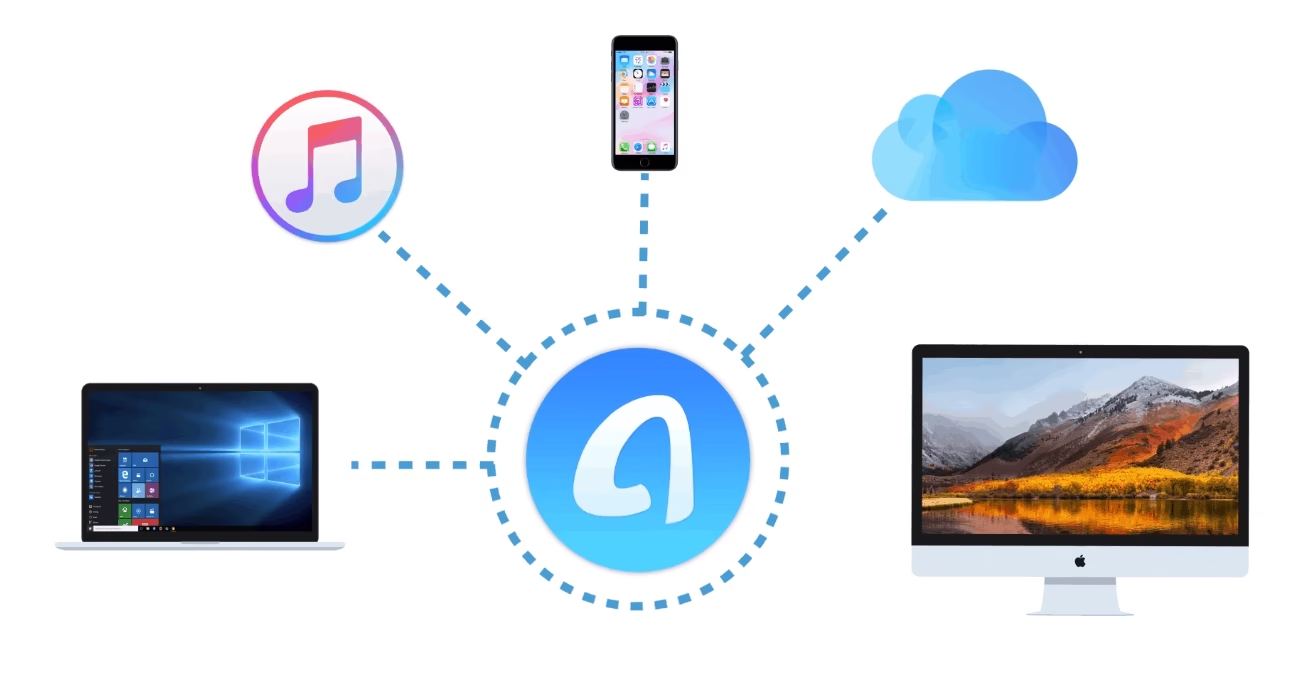
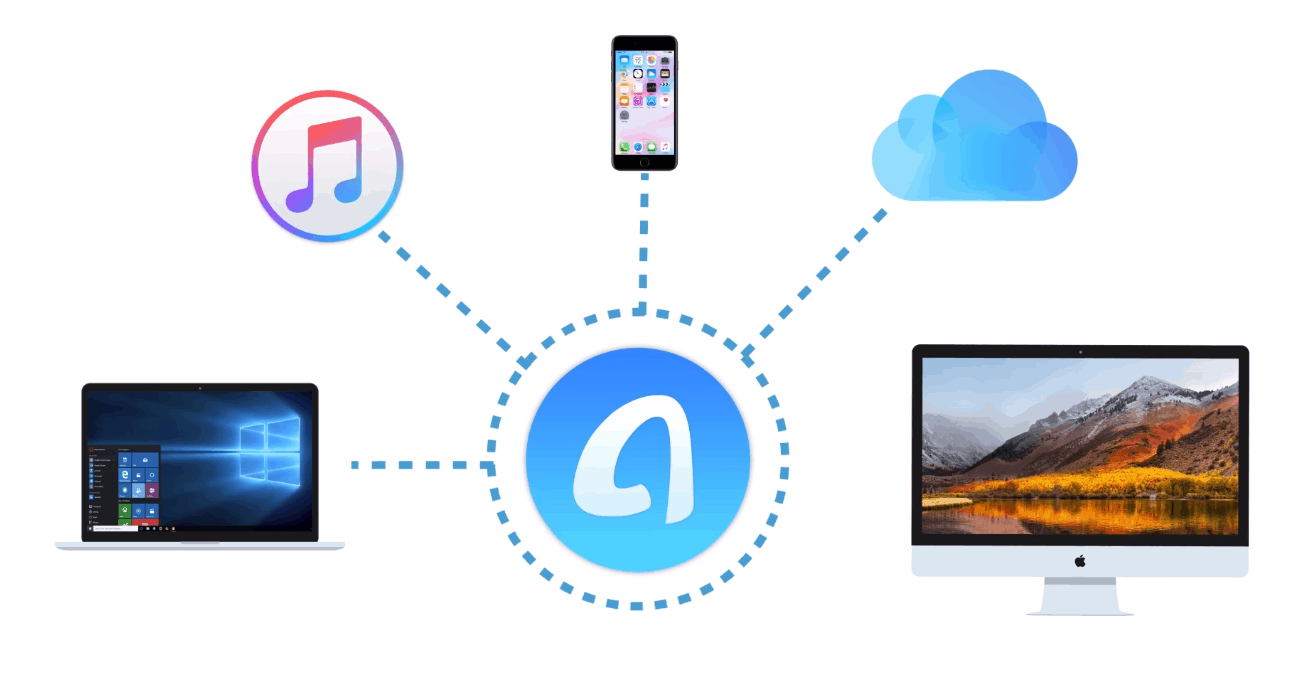
As an excellent alternative to iTunes, AnyTrans from iMobie is designed to bring an entirely new and hassle-free experience in iOS content management. Developed following the principles of precision and versatility, AnyTrans is one of the rare tools that covers all the basics and includes some pretty cool extras as well. Even though the iPhone is an exclusive device in its category out there, but transferring files from one device to another is not an easy task and not a lot of people appreciate that. Here, AnyTrans serves as an ultimate one-stop solution. In fact, to call it an alternative would be an understatement because with so many flawless features, this program has the potential to replace iTunes completely. This tool assembles all your Apple devices and fortifies access to all of your content at a single place.

AnyTrans integrates with your iCloud account and can easily transfer any type of media from your computer to the iOS device and vice-versa. With just a single click, you will be able to clone all your settings from one device to another. Also, it can create and manage backups for your iOS device automatically with a guide set in advance.

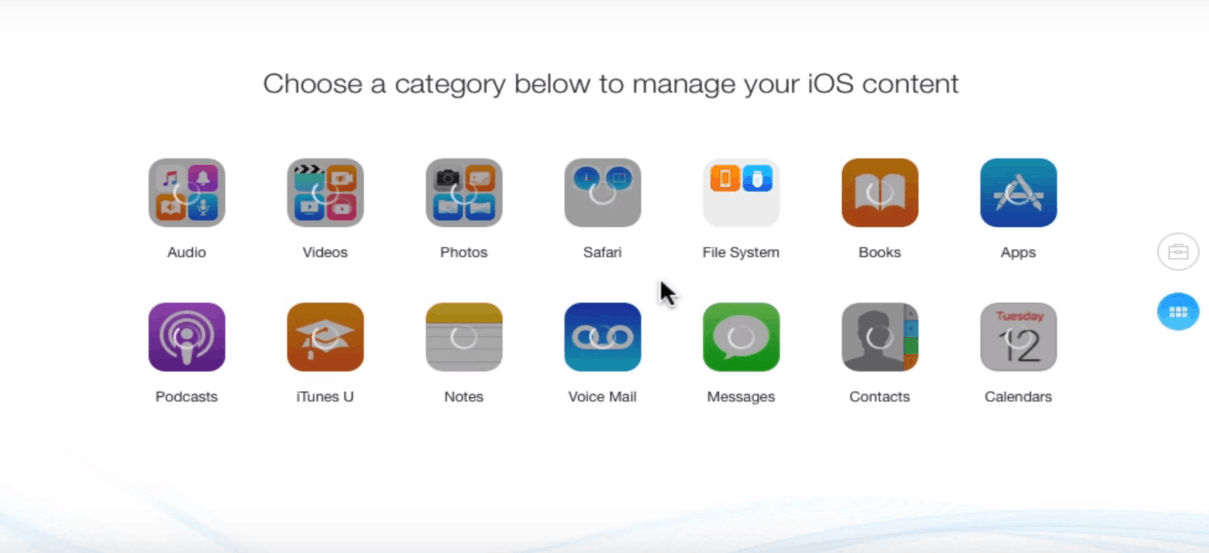
The program supports all of the standard iOS files types including audio files, video files, photos, applications, contacts, messages, voice memos, Safari history, eBooks, etc. In short, whatever the content is present in your Apple device, iTunes, iCloud or the computer, AnyTrans will provide an efficient control over all the data.

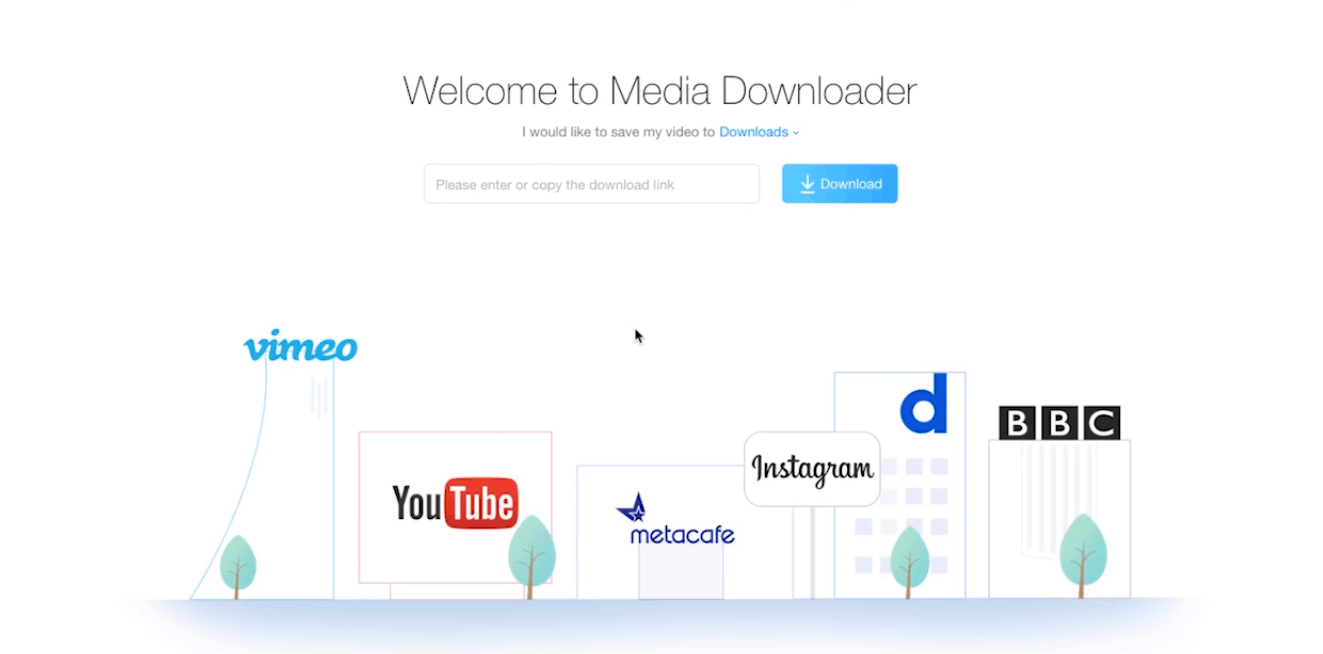
You can use this program to download videos to your iOS device from numerous popular websites such as Instagram, Dailymotion, YouTube, Vimeo, and more. The best part is that with AnyTrans, you can WhatsApp messages including pictures, videos, and music from one iPhone to another or backup WhatsApp chats and restore them with just one click.

Also Recommended: 5 Ways to Prevent Backup Failures and Improve Performance.

In terms of security as AnyTrans is downloaded from the official iMobie website directly, it is absolutely safe from any kind of virus or malware. Currently, AnyTrans is accessible in seven different languages: English, German, French, Spanish, Chinese, Arabic, and Japanese. Also, the support provided for the program is very comprehensive with various instructions and troubleshooting articles available online and within the program.

iMobie AnyTrans Features

Screenshot_6.png

Intuitive User-Interface

Let’s have a closer glance at AnyTrans starting with the interface. The plain and friendly user interface is highly impressive with a fast file loading and transferring speed. The program excels in making media management easy, whether it is syncing, transferring, or creating a backup.

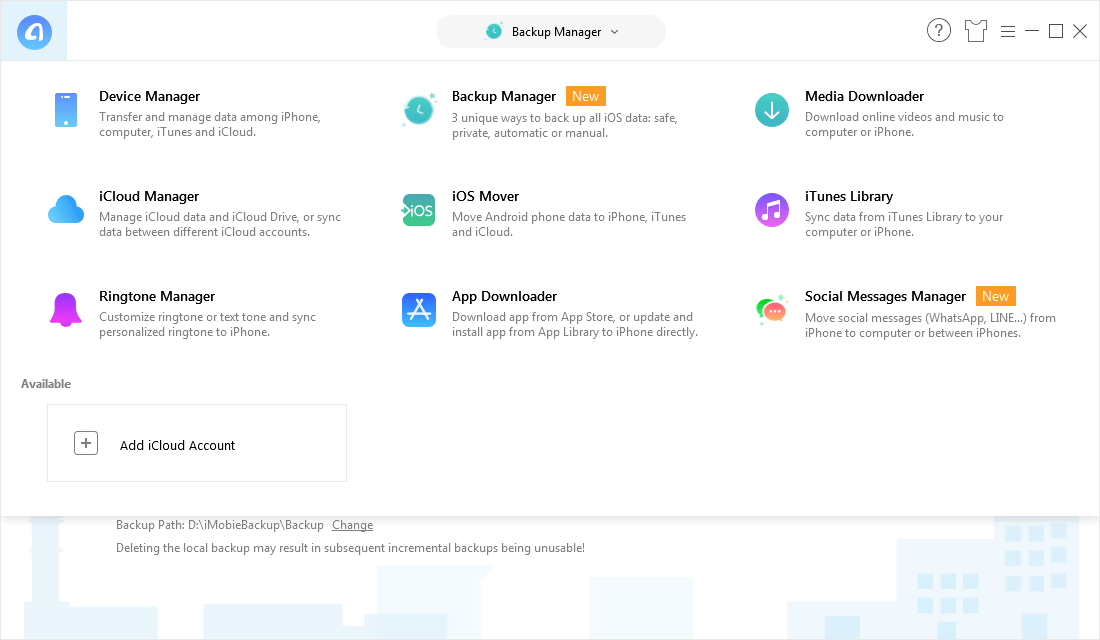
AnyTrans works for both Windows and Mac with minor difference in the user interface. Once you have downloaded and installed the program, you will be asked to connect your device. Post connecting your device, you will be taken to a new screen which as some shortcuts such as Add Content, Fast Drive, Connect to Mac, Merge Device, and more.

With the “Add Content” option, you will be able to add files from your computer. The “Connect to PC” option allows you to transfer files from different devices to your PC. You can use “Fast Drive” to utilize the free space in your iOS device to store files and clone them to other PCs. The other options such as Merge Device and Clone Device come handy when you are upgrading from an old iOS device to a newer one. The interface is indeed well presented and extremely easy-to-follow.

Merge devices

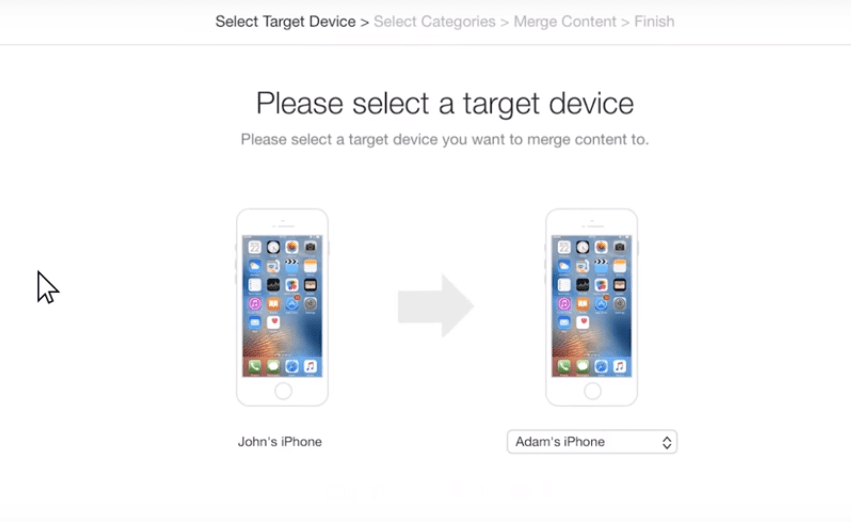
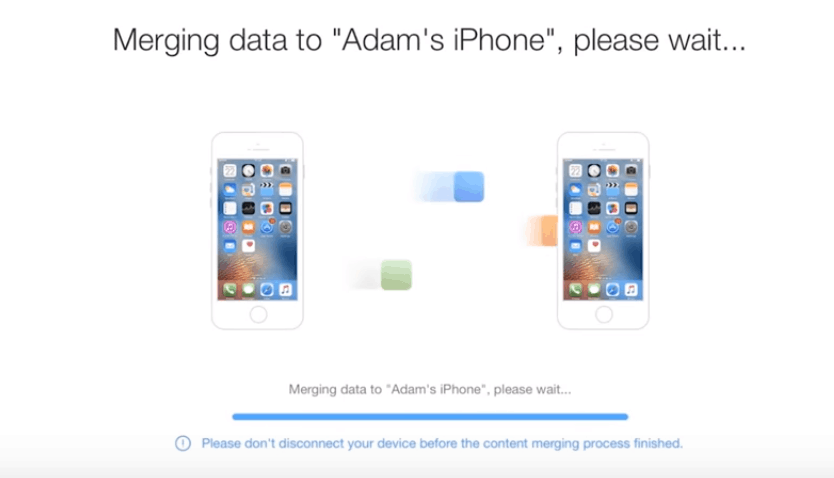
If you have just bought a new iPhone and wish to transfer all your data from the old iOS to the newer one, then this is the tool for you. With AnyTrans you can clone your new device in a way that you entire data from the old phone is transferred seamlessly and you end up saving a lot of your time.

To transfer the content between two iOS devices without erasing any existing data in the target device, all you need to do is select Merge Device option in the Device Content tab and choose the target device.

Screenshot_8.png

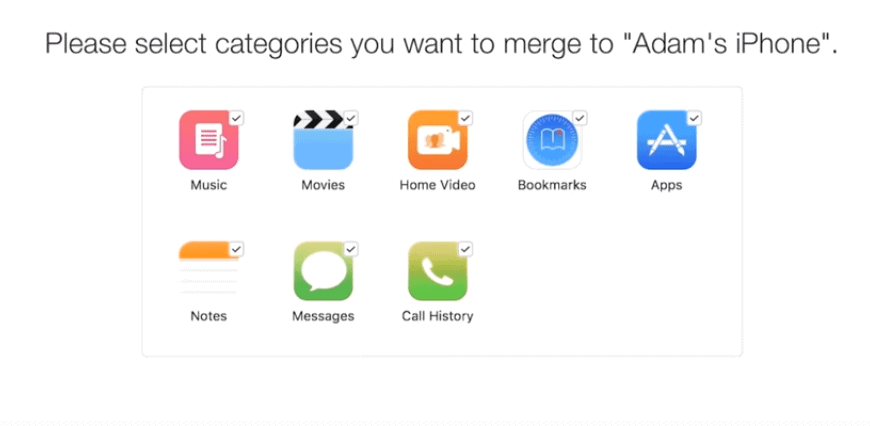
With just a simple click, you can transfer any file from the list of the categories.

Screenshot_9.png
Screenshot_10.png
  • Backup and Restore

Every iOS user will understand the pain of not being able to know what is stored in their iOS device backup. This is where AnyTrans comes for the rescue. With a robust back and restore system, the program allows you to not only to create and manage backups but also check what is stored in those backups easily.

You can look through the existing backup files and their contents including messages, contacts, and more. This makes it easy for you to have access to any particular file in the backup which is extremely useful if you want a message or a contact that has been deleted long time ago. Additionally, you can also create selective backup for specific applications and certain text messages.

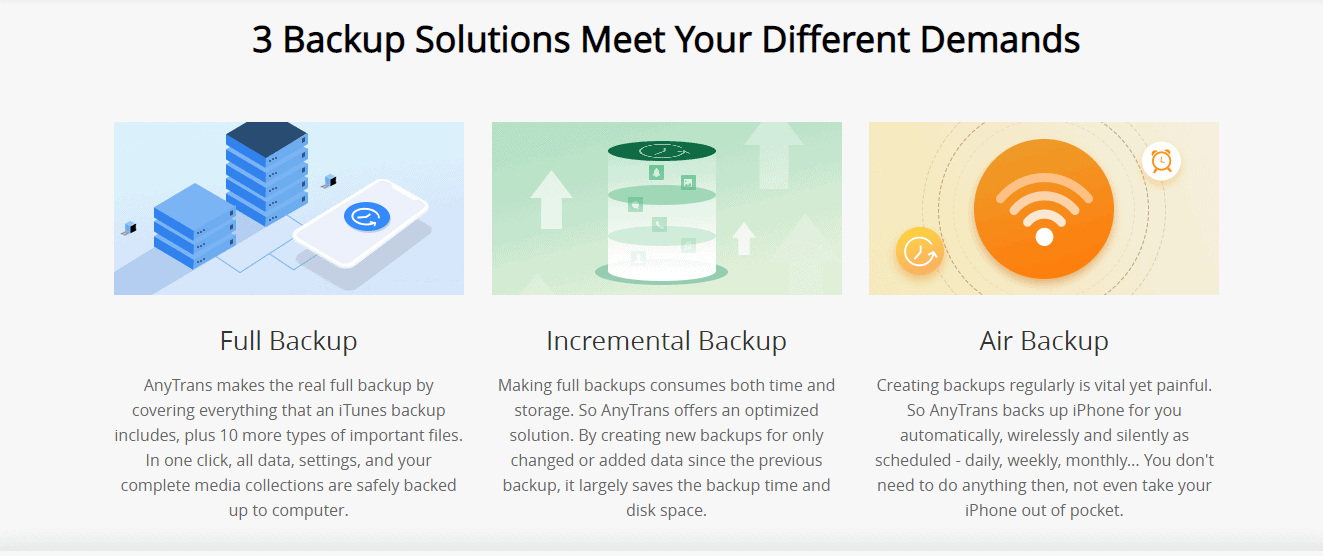
Three backup solutions for different needs:

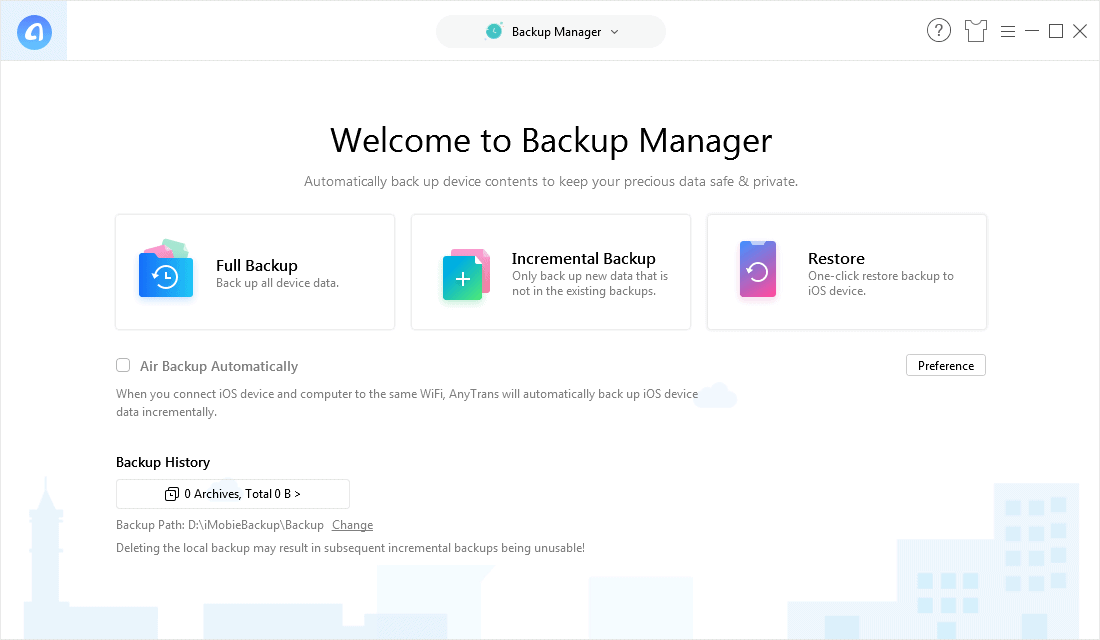
The program provides you with a flexible backup manager which offers three backup solutions for varied requirements: Full Backup, Incremental Backup, and Restore.

Screenshot_19.png

You can visit this post, for a detailed guide on how to transfer your iPhone data to iTunes/iCloud or Mac.

iCloud Explorer

One of the most unique features that AnyTrans provides is the iCloud Explorer. The program makes gives an easy way to access the backup which you have taken with iCloud and extract files from it. You can directly sync specific files on your iPhone to iCloud backup.

Application Management

It is coherent that no one would like to waste time on managing individual apps in their phone and this issue has been taken care of by AnyTrans. The program allows users to install/uninstall and update multiple applications simultaneously.

Your phone can be used as a storage drive where in you can carry files, however, it can be done by connecting the phone to a PC which has AnyTrans installed. You can get the details on the applications which are installed in your iOS device and also browse through the file system.

Screenshot_13.png

Sync and Transfer

Syncing your data with AnyTrans is pretty much similar to how iTunes works. However, with AnyTrans you get to add and remove files in your iOS device manually. It eradicates the concept of library and the program also prevents continuous re-syncing while transferring the data to the Apple device. These features aren’t available even in iTunes and definitely make AnyTrans stand out when compared to other alternatives in the market.

Transferring files including photos and other media between two iOS devices becomes a lot easier that you can expect with AnyTrans.

The Video Downloader

Screenshot_16.png

The Video Downloader in AnyTrans allows you to download videos from popular websites and converts them into video files which are watchable offline. It is not required to paste the URL into the program as it keeps monitoring the clipboard for an appropriate URL and fills it in automatically.

iMobie AnyTrans Licenses

Screenshot_2.png

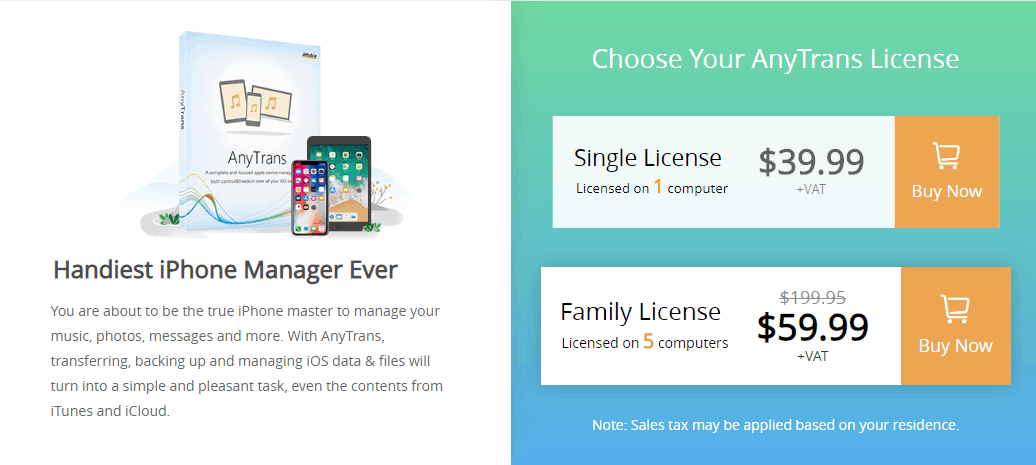
The tool is available for $39.99 for a personal lifetime license which can be used on a single computer and a family lifetime license which can be used by a maximum of 5 computers at once. The family lifetime licence comes with free premium support and can be purchased for $99.99 which is right now on sale for $59.99. With both personal and family licenses you will get lifetime product updates as well.

However, if you want to evaluate the program before purchasing it then you can download a free trial version which lasts for one week. The trial version offers you to transfer a maximum of 50 files per day, post which the transferability is suspended. To download the iMobie AnyTrans tool, you can visit the official website here.

Pros:

  • User-friendly and clean interface
  • Impressive file control
  • Doesn’t consume much of the system’s resources
  • Support for seven different languages
  • Ability to download videos from various sites directly to your device

Cons:

  • Files cannot be added to the iTunes library

Verdict:

iMobie AnyTrans is probably the most effective iTunes alternative when it comes down to managing the content on your iOS devices. The lightweight interface incorporates both necessary and unique features, so if you are tired of using iTunes for content management, then this is the solution for you. As the program passes through both Microsoft Security Essentials and Malwarebytes Anti-Malware scans, it promises extreme safety.