Home Blog Page 124

Using AI to filter cybersecurity alerts from noise

0

When there is a network or security incident in an organization, every second counts, as any downtime minute can translate into thousands of dollars lost. According to Gartner, the average downtime minute in IT generates losses of $5600, but this can go up to $14,000, depending on the organization’s size (Michael Copeland – The Cost of IT Downtime, Jun 18 2020 – full article at https://www.the20.com/blog/the-cost-of-it-downtime/).

AI filter alerts

Artificial intelligence (AI) is considered a viable solution to improve threat detection and reduce alert fatigue that would otherwise paralyze NOC and SOC teams. Early adopters of machine-learning algorithms are experiencing a reduction of more than 90% of the number of alerts and a sharp increase in efficiency.

Potential usages of this new technology include EPP, SOAR, and NTA.

Data analysis is not a new entry in cybersecurity. It has already been used as SIEM tools, but these require an entire team to work around the clock to classify alerts, create tickets and manage reports manually. Unfortunately, most organizations can’t afford a unit large enough to analyze all the signals generated by the automatic systems they use.

Monitor and review security operations

When a breach or issue occurs, putting together a team to firefight these issues takes time to get any help from an automated system in the meantime is crucial.

An AI-based threat detection system offers real-time alerts which empower the NOC team. Such a system only escalates high-priority alerts. The role of AI is to make a clear difference between real and consistent threats from false positives. The end goal is to defer to the security specialists those alerts which require their attention and knowledge.

A ticket-based service for alert management can be enhanced with keywords that fire context-based warnings depending on what they identify in tickets. Even more, systems like these create and automatically delegate the tickets to the right specialist, always making sure there is an equitable task distribution between team members.

Security operation center metrics

Without proper metrics and KPIs, an organization can’t evaluate how well they are doing, their success rate at handling issues, etc.

However, there is a real struggle for SOC teams to define the best metrics for each organization since there are no predefined best practices in a one-size-fits-all approach.

Each enterprise has specific needs and goals. They are also limited by the tools they use, the architecture of their IT infrastructure, and the daily processes.

Here are a few examples of possible SOC metrics, but these need customization and context to reflect the actual health of the system:

  • – As we have previously stated, the number of tickets, if this number is in the 10K-100K or more per day, means that the system can use some improvements.
  • – The severity of the alerts generating these tickets. In an ideal setting, tickets would only be created for high-severity incidents, while simple ones would be automatically solved and classified.
  • – Mean time to discovery/containment/resolution/recovery. Since every minute of attack, security breach, or downtime can cost an enterprise thousands of dollars, every second counts. The goal is to have a predictive system or a real-time response. Once the problem is identified, it matters how long it takes to contain it, minimize damage, solve it and restore the system to its original state.
  • – The number of threats detected/solved- Evaluates the system’s overall efficiency and could pinpoint ways to improve it.
  • – Percentage of false positives- This is one of the main KPIs that need to be reduced and can evaluate the efficiency of an AI-based alert triage system.

These are just a few general examples of metrics for the support teams. An organization will define their own after they map their processes.

The KPIs for monitoring tools should follow the entire process, from firewall alerts to closing the feedback loop after an attack or an attempt.

It makes sense to build metrics around the number of steps needed to fix an incident to see if there is any way to simplify it. Another metric that could be important is cost-related.

Some organizations can choose to have metrics attached to each member of their team to use as a way to evaluate their professional performance, although this subject can be controversial.

Enabling performant alert triage with AI

Enterprise-level security means filtering out risks while maintaining an appropriate level of vigilance. Top organizations face an alert overload and need to reduce noise alerts to avoid system paralysis.

They need exact alerts that are only escalated after being filtered by several automated systems, found threatening, and there is no standard procedure for that case.

AI tools like Arcanna.ai alert triage use big data to replicate the complex triage process performed by security specialists. The machine learning algorithm looks at millions of data points to understand the context of each alert, which is then classified based on both NLP (Natural Language Processing) on the alert text and on the learnings made based on the analyst’s feedback. Such a system should yield under 1% of events that are not automatically categorized since their pattern doesn’t match the pre-existing database. These are the real exciting cases.

One of the primary benefits of using an automated system is replacing reactiveness with a proactive approach. This also means that having an AI-powered alert triage system allows hunting for new threats instead of waiting for them to generate damage before being included on a red list.

Organizations looking to take some of the plates for their NOC and SOC teams should always look for solutions that automate incident response, especially for simple, mundane tasks.

What’s next?

Organizations waste about 25% of their time responding to false positives, according to a study by Ponemon Institute, which also evaluates the losses at about $1.27 million per year, on average.

The solution is to select a tool that makes the distinction between malware and actual attacks. The goals include reducing false positives drastically, adding context to each event, and consolidating different alerts related to the same event.

With the rise of IoT, adopting a solution powered by machine learning will become the only viable solution since the alerts will be characterized more and more by the 3 Vs. of big data: volume, velocity, and variety.


Top tips in game development

If you are reading these lines, you most likely had the idea to make your own game thanks to game development agency. Maybe you even tried to tackle it – but when you first saw the interface of the game engine, you said to yourself: “No”. And then they closed the engine and never touched it again.

game development

In fact, everything is not as scary as it seems. We advise you how to stop worrying and love making games due to game dev tips.

Do not strive for the ideal

Don’t repeat the mistake of those trying to make the game of their dreams right away.

Many take on development in the hope of bringing their brilliant ideas to life. Sometimes newbies come out with The Stanley Parable – but much more often their ideas die at the first stages of development, buried under the weight of ambition.

Not because you have no talent – it just requires experience, knowledge and, if we are talking about at least some big game, a team of professionals. Your goal at first should not be a good product, but something that you can quickly assemble and start testing just as quickly.

In other words, look at your first projects as learning exercises. After all, that’s what they are.

Choose the right tools

Find an engine to help you master the basics of development. At this stage, convenience and ease of learning are much more important than the power of the technology and the list of options – although they are also important.

With the help of specialist developers, we have sorted out the pros, cons, and features of three game engines that are suitable for beginners – GameMaker Studio 2, Unity and Unreal Engine.

Assemble a prototype and show it to your friends

“Don’t put off the practical part until later,” recommends Kirill Zolovkin. Once you have a little understanding of the engine, it’s time to make a prototype – a model of a future game designed to test game mechanics.

Build on the skills you learned when you got to know the engine so you don’t get stumped. Build something small – one level platformer or a track in a racing game. The main thing is that it can be played.

Such self-restraint will help to assemble a prototype in a week or two, which should then be shown to friends.

And you have to be prepared that it will not be appreciated: after all, your creation is far from the high-budget games they are used to. Any reaction is valuable in itself: firstly, your friends will give you feedback, which will help you avoid mistakes in the future, and secondly, it will save you from the feeling that you are doing table games.

Follow the principle “To each according to his ability”

Did you manage to torment your friends with your prototypes? Already managing to collect a whole level without getting tangled in the engine? It’s time to make a full-fledged game. And here it is important again not to drown in the sea of your own ambitions.

In game development (and not only), there is such a thing as a minimum viable product – that is, a set of mechanics that are enough to launch. In the case of a shooter, for example, these are shootouts. All other mechanics:

  • Stealth; 
  • Cutscenes; 
  • destructibility – can be added later.

Don’t try to do everything at once. Game development for beginners can really help.  Minecraft, too, was once just a virtual construction set – and look at what it has grown into.

Participate in game jams

Game jams are events aimed at developing new games within a limited time frame. As a rule, participants are given two days to create a prototype, and the topic and conditions are usually announced before the start of the jam.

Yulia Kozhemyako explains why these events are so important: “There is a limited period of time on the jam, [therefore] you will not sit for several months without results, but you will get it in two or three days … You will see what you can do, even if in a team with other guys. There is no way to procrastinate on jam. You need to fully concentrate on the game. “

Make a development schedule

Finishing the game is too big a task. Divide it into major stages – building a level, writing dialogs – and then break these stages into small tasks that you can complete in a week. More details on https://whimsygames.co/

Yes, even free artists need deadlines. The schedule will give you the ability to track your progress and feel like you are not standing still.

Reasons Why AI and Big Data are the Superstars of Customer Experience

“The biggest risk is not taking any risk. In a world that is changing really quickly, the only strategy that is guaranteed to fail is not taking risks.”

– Mark Zuckerberg

Customer experience is the key to business success and with new technologies emerging and getting popular; it has become imperative for us to stay on track and take risks. Because the only thing constant in the world of customers is change. A business needs to evolve, change, and grow to match customer demands and expectations.

We see data science and AI leaving their mark on almost every existing process; it is no longer a farfetched what we saw in those robots taking over the world movies. With the advancements in place right now, these technologies are helpful and no longer a burden or potential threat to humanity.

It is also crucial that we consider the changing world of customer expectations; since they are at an all-time high right now. Catering to these expectations is only possible with new technologies and processes. So, changing the way we function right now and improving our technology management should be the top priority for every business that needs to stay in the game.

Let’s see what these technologies are and how your business can be a superstar of change.

What Is Big Data?

Big data, like the term itself, implies a huge amount of data which could be in both structured and unstructured form and which arrives or overpowers the business on a day-to-day basis. There are three major V’s in the definition of big data.

Volume:

The volume of data is, of course, the most important aspect of big data. There is a massive amount of data being generated every day. The data can be of any unknown value and is mostly unstructured, low-density (sparsely populated) data. For example, Twitter feed data, the number of clicks/impressions on a website or an app, or the data recorded by a sensory device.

Velocity:

The velocity is the rate at which the data is received (or recorded) and also the rate at which the data is being acted upon by the business. The velocity of the incoming data stream can vary from one product to the other. Some internet-enabled smart products operate at speed close to real-time, but some require more time for action or evaluation.

Variety:

Variety refers to the types of data that is being generated. Traditionally, the data used to be structured and fitted the general database rules. With new abundant data coming in, we see a lot of unstructured data available in different data types such as audio, video, text, and more which in turn requires a higher level of pre-processing than the traditional structured data.

These three V’s define that increasing volumes of data come in a great variety with a high velocity. This definition was given by Gartner in 2001 and still is the most apt description for big data.

However, let’s not forget that data itself does not matter. What matters is how or when you decide to use that data for your business benefit.

What Is AI?

Back in the past, Artificial intelligence was defined as the ability of a machine or a program to perform a task which required human intelligence.

This definition is probably a good one if you want a basic understanding of AI. However, if we talk in a little more detail; Artificial intelligence is a machine/program acquired intelligence in which a machine learns from itself, i.e., Machine Learning. There are also one or more intelligence domains that an AI system can perform. For example, planning, problem-solving, learning, manipulation, motion, perception, knowledge representation. 

The modern-day AI systems and the ones we see fondly in movies, also have the capability to show creativity and social intelligence. Two qualities that can, in the future, help AI gain superiority over humans. (Well, maybe!)

Big Data as a Customer Experience Superstar

The competition to ace the customer experience race is at an all-time high right now. Big data helps you get closer to the finish line by assisting you with a more unobstructed view of the customer and digging deep into the customer insights. Big data gathers data from webpages, social media, customer calls, and from other data sources to enhance the customer conversation and maximize business profit. 

In a more specific context, let’s look at the top four ways how Big Data helps customer experience thrive.

Big Data Lets You Know Your Customers

Proper use of big data analysis can help a business understand their customers and connect with them on a more personalized level. The data collection and analysis can also reveal marketing strategy gaps, leading to better-tailored campaigns that connect with the customer on a personal level.

Big data ultimately leads to enhancement of customer experience by minimizing on customer support calls, targeting the right audience, continually improving their services, and more.

Big Data Helps Build Loyalty And Track Customer Journeys

Data analytics and big data can also collectively help in building and maintaining customer loyalty by pulling out significant market trends or addressing a problem before it even arises.

Accurate data can help create a quantitative as well as a qualitative analysis; thereby minimizing costs and efforts that an inefficient marketing campaign might require.

Big Data Helps You Get Up-Close And Personal

With the wide range of social media and contact means, it is essential to extract customer information and use it to your business advantage. Every customer interaction that comes into the support or sales department is an opportunity to acquire more insights about the customer.

These insights and the data collected through various social media and big data can be clubbed together to form a strong foundation; thereby enhancing the customer experience of the business.

Big Data Helps Understand And Track Customer Behaviour And Trends

Sometimes, the customer might not be explicit about everything. In such cases, big data comes to the rescue as big data can make use of records to analyze and understand a customer trend.

If a customer is canceling his/her subscription, the use of big data can figure out the underlying cause. This analysis then helps in systematically approaching the problem and making use of information to serve the customer better. 

All these aspects of big data ultimately help in identifying and eliminating customer problems and creating an environment where the customer feels valued and all the marketing campaigns directly connect with the customer. This environment leads to enhanced customer experience and customer satisfaction; which is the end goal for any business. 

Artificial Intelligence as a Customer Experience Superstar

Customer experience or customer service is one of the most important areas where AI is being applied and showing positive results. With the customer journey growing and becoming diverse with every day that passes, businesses require intelligence that is smart enough to track and analyze every aspect in minimum time duration.

Efficient use of AI can help make customer conversations and interactions more personal and comfortable, thereby increasing customer satisfaction and contributing to the overall success of the business.

Let’s look at the top four ways in which AI helps customer experience shine.

The Rise Of Chatbots And Virtual Assistants

Gartner predicts that “By 2020, customers will manage 85% of their relationship with an enterprise without interacting with the human.”

This statistic above shows how vital virtual assistants and chatbots are right now and what the future holds for them. Both these AI-powered customer service means are becoming increasingly popular as the customer now want an instant response to their queries and problems and do not like to wait.

Chatbots and virtual assistants are being used to understand customer issues, provide solutions, help a customer navigate certain pages or product, connect to a human in case of a complex problem and engage customers in a conversation.

Improved Personalization (More So With The Help Of Big Data)

Personalization is the one thing that helps businesses get close to their customers. We, as humans and social animals, are always seeking valuation, and a personalized touch in conversations help us connect and understand the business more. 

Artificial intelligence is like a powerful force that goes through a million lines of data and detects the needs and wants of each customer. This power creates a personalized environment, thereby increasing the customer satisfaction level of the business. 

Acting Human 

AI now is very different from what we used to imagine – A heartless robot with no feelings or sense of empathy. These days, AI is capable of understanding and comprehending customer emotions and acting human. This human nature of AI is possible because of technologies like NLP (Natural Language Processing) that helps an automated system understand your language and respond in the same. 

NLP finds patterns of sentiment and emotion, both positive and negative, to drive customer interaction. It extracts information and trends from customer conversations, documents, and articles supporting the subject to take action.

Psychologically, customers are more likely to trust a chatbot or a virtual assistant if it speaks in their natural language and with a personalized touch. So, this particular property of AI helps in creating more authentic and empathetic conversations that help the customer and create a positive image in his/her mind.

Making Predictions

Who does not want to know what the future holds? Making predictions and recognizing patterns is a crucial aspect of AI. The property of AI and machine learning where a business can foresee what is coming their way helps in identifying and outlining a future plan that yields a maximum benefit.

AI also helps in identifying and understanding the future needs of a customer for an in-depth analysis. This analysis also helps businesses in developing better products and services.

All these features and benefits of AI help in creating an environment that is customer centric and focusses on the betterment of the business through insights and analysis. AI and Big Data together can help in identifying customer issues and eliminating them before they even arise, which creates a positive customer experience.

Do We Really Need Humans Handling Customer Service Anymore?

Although the rise of AI and big data puts humans in the backseat, they are still not obsolete enough to ace customer service; eliminating humans.

The best combination to handle customer service is to have a combination of both human and automation. Combining equal parts human and equal parts automation along all digital channels will improve and enhance customer service—thereby enhancing the customer experience. 

However, AI taking over humans or the customer service industry being completely automated is still a far-fetched dream. AI and automation are the catalysts driving a positive change in the entire customer service industry; helping customers attain a maximum level of satisfaction from their business. 

With this, we can say that AI and Big Data are the superstars of the customer service industry, the leading technologies as of now. However, we can never be sure of the future! Can we?

About the Guest Author

Niharika Gupta is a technical writer at CallCenterHosting. She loves music and reading and has always been fascinated with technology. Writing about technology and other related topics give her the utmost happiness. She believes words have the power to change the world and is working on turning her ideas into words every day.
Email: [email protected]
Twitter: https://twitter.com/Niharikagupta23
Linkedin: https://www.linkedin.com/in/niharika-gupta-427b91179/

Best 5 iPhone X Battery Cases for 2020

0

Even though Apple has made some advances in their latest iPhone battery life and the iPhone X’s has stepped its game up as the battery can last almost a whole day with medium usage. But at some point of the day you may run into low battery if you are a heavy smartphone user. And, what if you are away from your charger for a while?

Fortunately, there is a simple solution to always keep your iPhone perpetually charged on the go and that is a battery case. Instead of carrying a power bank, you can just slip on a battery case on your iPhone X when it is running low on power and it will save your day.

While looking for iPhone battery case it is important that it should have a high energy capacity and shouldn’t look bulky at the same time. After going through a plethora of options, we have gathered a list of best five iPhone X battery cases ranging from slimmest to those with high capacity. These battery cases will increase your usage time and also provide protection to your iPhone.

The best iPhone X battery cases that you can get in 2019

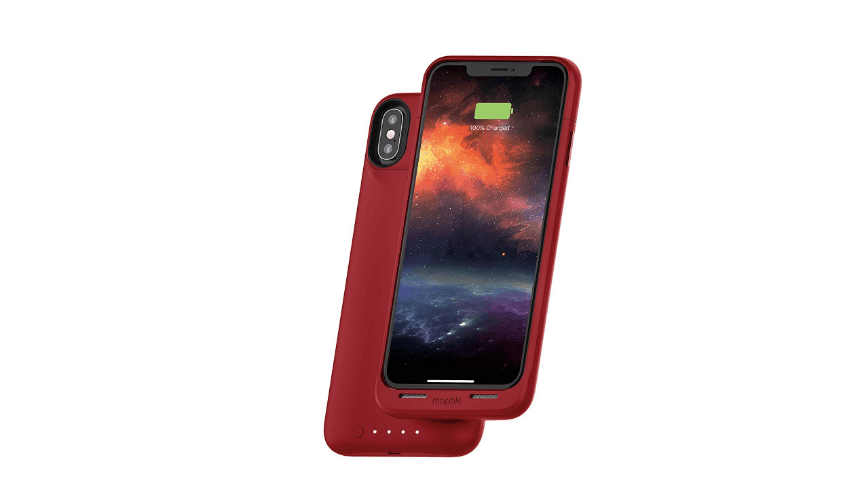
Mophie Juice Pack Air-A Reliable Brand

Screenshot_1.png

With a powerful 1720mAh battery, the Juice Pack Air battery case from Mophie gives the extra boost to your iPhone X battery that can last up to 30 hours. It supports QI-wireless charging so that you can recharge your phone along with the battery case whenever the option is available. The battery case is compatible with other wireless charging pads as well and while doing that it also maintains your iPhone’s wireless functionality.

The Juice Pack Air battery case flaunts a beautiful and light-weight design which fits snugly with your iPhone. It is available in four different colours-red, black, graphite, and rose gold. Even though the case looks extremely slim, but when it comes to the protection, the brand has surely made no compromises. The case has internal rubberised support pads and raised corners to prevent any damage to your iPhone from drops and falls.

You will get a USB cable along with the case to recharge the battery case. Once you connect with a power source, the Mophie Priority+ charging will allow the iPhone to get recharged first and then the battery case will recharge itself. Additionally, you can use your iPhone’s lightning cable to recharge the battery case.

Juice Pack Air comes with LED Status Indicator button which can be used to turn the battery case on/off or display the charging status.

Highlights:

  • Extends battery life for 30 hours
  • Qi wireless charging 
  • Priority+ Charge and Sync
  • Approved by Apple

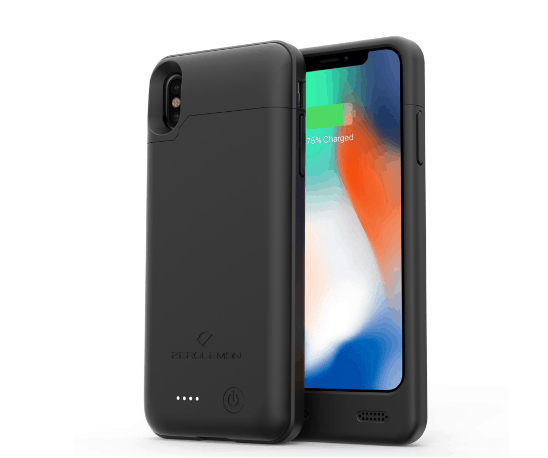
ZeroLemon iPhone X Battery Case-Sturdy and Robust

Screenshot_3.png

Priced at only $29.99, the ZeroLemon iPhone X Battery Case is definitely something that you should not miss if you have a limited budget.  The attractive yet sturdy case has everything that you will need from a battery case. It comes with a removable top where you can insert your iPhone. Just press the button at the back to begin charging your iPhone and the LED lights will show the current battery level and charging status of the battery case.

ZeroLemon battery case features a 4000mAh extended battery which gives your phone enough power to last for an entire day. You can charge your case with the USB-C cable that comes along with the pack.

Highlights:

  • 23 hours of talk time
  • 65 hours of music
  • 15 hours of movie watching
  • 14 hours of gameplay

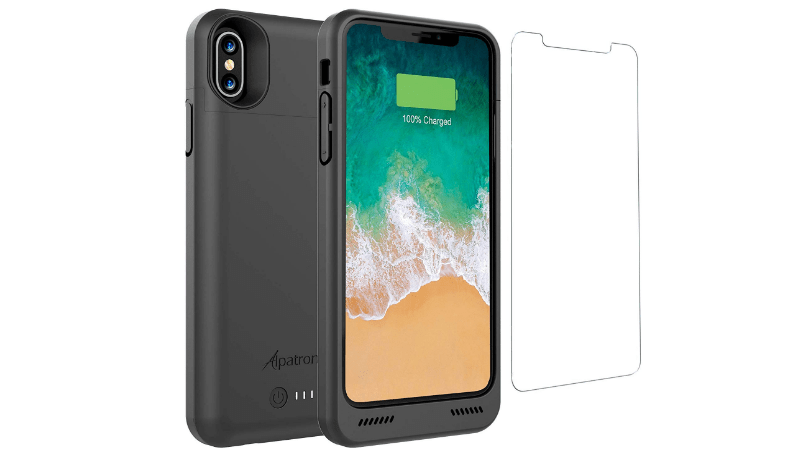
Alpatronix iPhone X Battery Case-Powerful Battery

Screenshot_1.png

The battery case from Alpatronix BXX boasts a remarkably light-weight design with a slim body. The case features a rechargeable 4200mAh battery which doesn’t add much of any weight to your iPhone. It comes with a removable top where you can slide in your iPhone and the four LED lights at the back of the case display the charging levels. The LED lights also show how much charge is left to be delivered to your iPhone and the battery case will automatically stop charging when your iPhone is fully charged. 

You can recharge the case using a USC-C cord; moreover, it is compatible with Qi wireless charging which means you can simultaneously charge your iPhone and battery case. It has opening for speaker grills at the bottom and slots for the camera, volume button, and power button.

With over 1300 reviews on Amazon, the case is certainly popular amount iPhone users. Additionally, Alpatronix BXX battery case is approved by Apple which makes it even more reliable. It is available in three colour variants-black, gold, and rose gold at approximately $24.95.

The only downside with this particular battery case is that it doesn’t support Lightning cable and 3.5mm earphones which means you can only use wireless headsets and Apple Airpods.

Highlights:

  • 12 hours of talk time
  • Comes with a free tempered glass screen protector

Apple Smart Battery Case- The best of the best

Screenshot_2.png

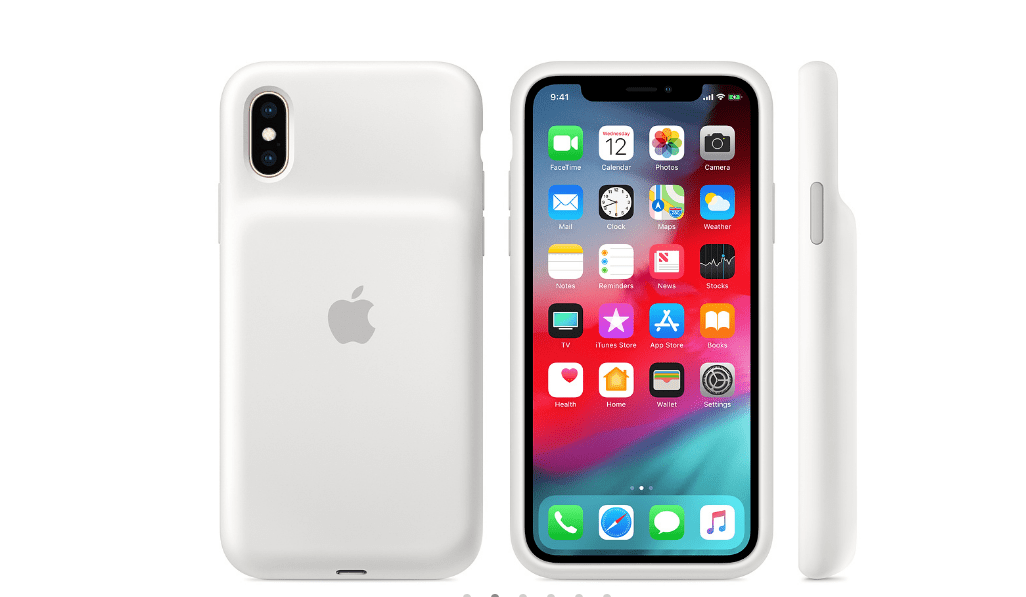
Apple ultimately decided to release its own battery cases after the launch of iPhone XS and iPhone XS Max. Although, the case is engineered for iPhone XS but it can fit that iPhone X too.

The battery case supports Qi wireless charging and once you encase your iPhone, it will use the battery charge of the case first and the fall back to its own. The 1,369mAh battery capacity is enough to charge a phone at one go. The status of batteries for the iPhone and the batter case is displayed on the iPhone lock screen. 

The case is made of silicone material with a microfiber lining. The outside design has a soft touch finish of silicone and is robust enough to provide protection to your iPhone from minor drops and goes on and off with little effort. 

Highlights:

  • 33 hours of talk time
  • 21 hours of internet usage
  • 25 hours of video playback
  • Supports lightning accessories

If you don’t mind spending an extra $129 dollars on an Apple certified product, then you can’t find anything better than this battery case.

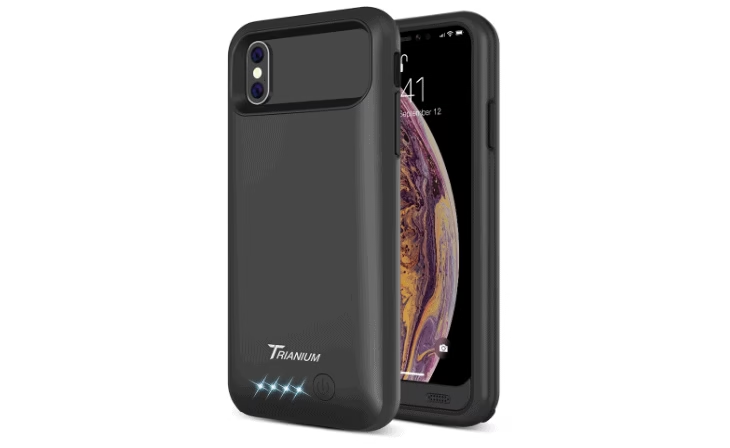
Trianium Atomic Pro- Ideal for Basic Requirements

Screenshot_2.png

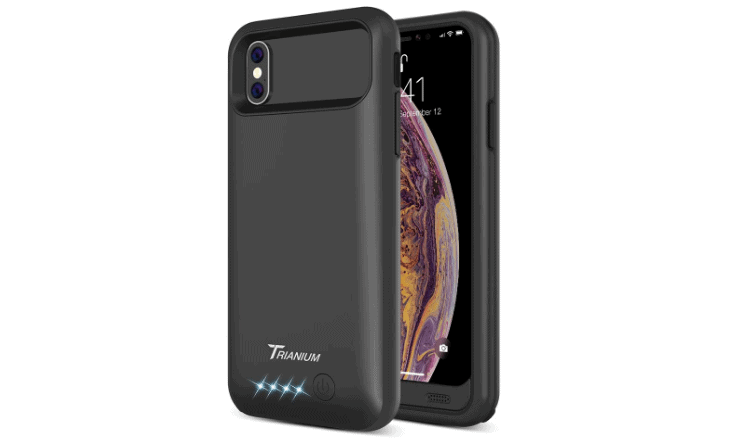
The last battery case in our list, Trianium Atomic Pro Battery Case is a trusted product which is completely efficient in charging an iPhone on the go. What makes Atomic Pro stand out is the amazing design. With the shock-absorbing frame, this battery case provides enough protection to your iPhone from falls and drops against hard surfaces.

Atomic Pro features a rechargeable 400mAh battery which provides more than 8 hours of talk time and approximately 11 hours of web-browsing time. With the sync-through technology, you will be able to sync your iPhone to a PC without removing the battery case and charge your phone along with the battery case using the micro USB cable that comes with the pack.

The case doesn’t support wireless charging, 3.5mm headphone jack, and Lightning Earpods. However, it is compatible with Bluetooth earphones and all other headphone accessories which can be connected wirelessly. 

Highlights:

  • 8+ hours of talk time 
  • 11+ hours of web browsing
  • Lifetime warranty

That’s it! These were our best five handpicked battery cases for iPhone X.

We hope this hand guide was helpful in letting you pick the perfect battery case for your new iPhone X.

Top 5 Bluetooth Adapters for PC: The 2020 Best Buy List

0

With the every growing importance of Bluetooth technology, it is imperative to have a computer that includes this feature. But what if you have an old computer that doesn’t have a Bluetooth and you need to connect your new wireless bluetooth adapter accessory to your system. 

Well fortunately, if you do not own a PC with an in-built Bluetooth, then the next best available option is to get a Bluetooth adapter. 

These Bluetooth adapters will make the transfer and other functions easy for you wherein you can easily connect your wireless keyboard, mouse, and headsets with your PC. The best part is that these Bluetooth adapters come in the form of a USB, which makes the overall process extremely simple for you. You don’t require plugging a device to your PC in order to make it Bluetooth enabled. Just insert the USB Bluetooth adapter and you are good to go!

Now, when you know that you have great alternatives if your PC is not Bluetooth enabled, you must be wondering which are the best USB Bluetooth adapters that you can get for yourself. To make it easy for you, we have gathered a list of best USB Bluetooth adapters which have good reviews online and wouldn’t dig a hole in your pocket. 

But before we dive into the list of the best USB Bluetooth adapters that can buy online, let’s have a glance at the all the features that you need to consider while buying Bluetooth adapter for your PC. 

Even though getting a Bluetooth adapter for your system is not that complicated but you need to know what will suit your needs the best. Here are a few factors that you should consider before making the purchase:

  • Bluetooth Version

You need to get a Bluetooth adapter which utilizes less energy and is backward compatible with those devices which have a previous version of Bluetooth. For the same, any adapter with Bluetooth version lower than Bluetooth version 4.0 will surely disappoint you.

Bluetooth ve4.0 will offer you better stability and more range to connect even those devices which are at a distance.

  • Maximum Bluetooth Range

The transmission range of a Bluetooth device is determined by the class of Bluetooth it belongs to. You can find both Class 1 and Class 2 Bluetooth adapters in the market which offer a range of 100 meters and 10 meters respectively. 

Class 2 Bluetooth adapters are perfect for use if you just need to connect your wireless keyboard, mouse, or a headphone.

Aside from these two main features, a USB Bluetooth adapter should support the wide range of Bluetooth accessories that are available out there. Also, it should be compatible with both PC and other devices with other operating systems.

Best USB Bluetooth Adapters for PC

Here is a list of 5 best Bluetooth adapters that you can buy for your PC today:

Avantree DG405- The best in budget USB Bluetooth Adapter for Windows PC

Screenshot_1.png

 (Supports only Windows Based PC/Laptop)

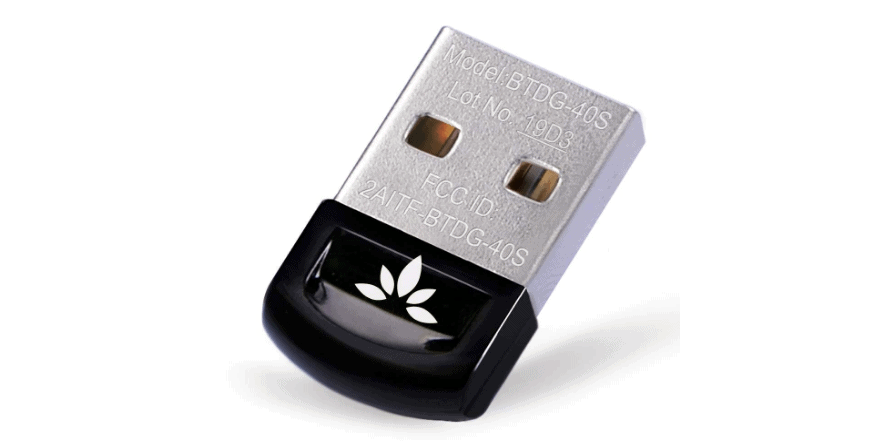
With almost 70% five start rating from more than three thousand user reviews, Avantree’s DG405 Bluetooth4.0 Adapter is the perfect choice for you if you are tight on a budget but still want versatile connection options.

It supports Windows 10/8/7/Vista/ XP powered computers and laptops. You can connect the adapter to wireless mouse devices, keyboards, printers, headphones, tablets, speakers, soundbars, PS4 controllers, and any other device which requires low Bluetooth range. You will get a good sound quality whether you are listening to some music or on a Skype/Hangouts call. For those who prefer gaming wirelessly, this adapter will surely serve the purpose. 

The best part is that the adapter comes with a plug-and-play compatibility for Windows 10 based computers. However for the older versions of Windows, you will need to install the driver from the CD or get it downloaded from Avantree’s support website.

Pros:

  • Affordable
  • Auto-installation for Windows 10 PCs

Cons:

  • Doesn’t support other operating systems aside from Windows.
  • Doesn’t support 2.4G devices
  • Not compatible with Nintendo consoles and Xbox One Controllers

ZEXMTE Bluetooth Adapter- Inexpensive and Reliable

Screenshot_2.png

(Supports only Windows Powered PC/Laptop)

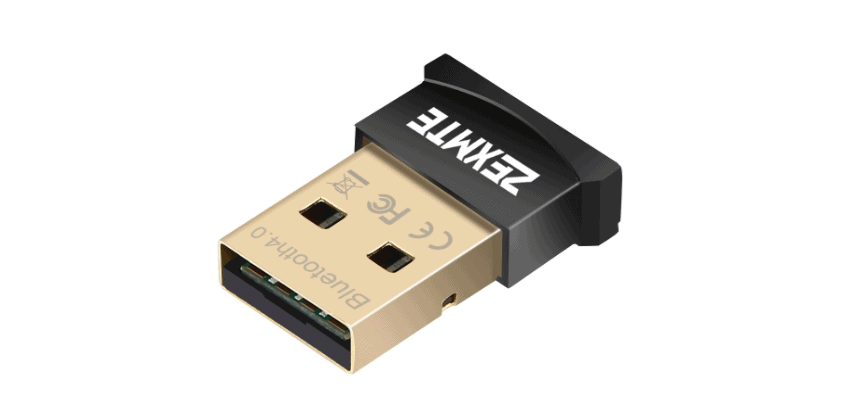
For a certainly cheap price, the ZEXMTE Bluetooth adapter offers a transfer speed of up to 3Mbps with Enhanced Data Rate support and a maximum of 10m operation range. The adapter comes with an auto installation for Windows 8 and 10 users, but any version lower than that needs a manual driver installation.

The bluetooth usb adapter uses the latest version of Bluetooth with BLE technology and is compatible with devices which use the previous versions of Bluetooth (V3.0/2.1/2.0/1.1). You can use this Bluetooth adapter to transfer files from your computer/laptop to an Android smartphone or wireless printer.

With the miniature size, ZEXMTE adapter blends with the computer without blocking the other USB ports. The bluetooth USB device is so compact that you wouldn’t even need to unplug it from the system. As far as the overall performance is considered, the adapter has decent reviews and provides decent range if you are looking for some casual use.

Pros:

  • Reasonably priced
  • Compact design that fits perfectly in the USB ports
  • LED indicator 

Cons:

  • Limited Bluetooth range

ASUS BT400- Designed to Save Energy

Top 5 Bluetooth Adapters for PC: The 2020 Best Buy List 1

(Supports only Windows Based PC/Laptop)

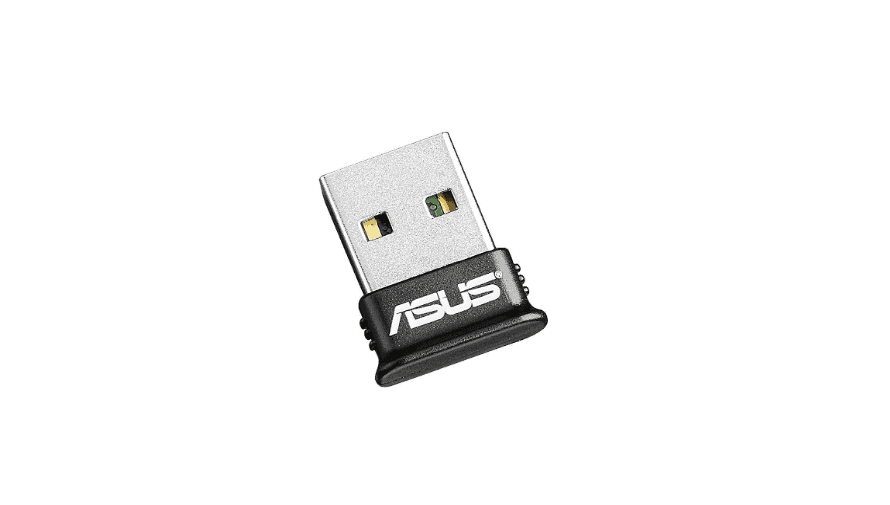
Asus is a brand popular for high performance devices and it doesn’t disappoint with BT-400 Bluetooth adapter. The adapter is designed for Bluetooth v4.0 accessories and is also backward compatible with the previous versions. The adapter has a simple plug-and-play installation and provides a 3Mbps data transfer rate. 

The powerful feature that sets this adapter from Asus aside from the other ones available in the market is that it allows you to connect multiple devices at once easily. It comes with Bluetooth Low Energy technology which lets you experience enhanced connectivity with low power consumption. 

Pros:

  • Automatic installation for Windows 8/10
  • Uses minimal energy

Cons:

  • Doesn’t support Mac and TV

Avantree Leaf- Class I- Best Bluetooth Adapter for Audio

Top 5 Bluetooth Adapters for PC: The 2020 Best Buy List 2

(Supports all Operating Systems)

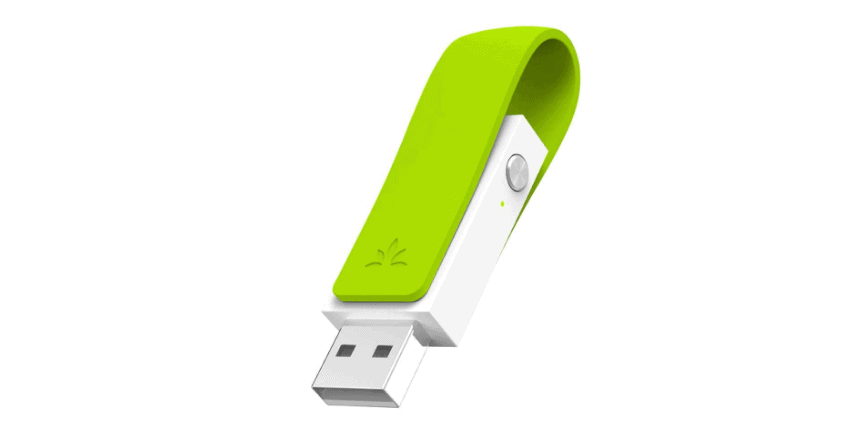
Yet another Bluetooth adapter from Avantree, this particular one is designed for headphones and speakers. Even though Avantree Leaf Bluetooth adapter doesn’t support wireless mouse, keyboards, and game controllers but it is considered the best in class for audio. 

Leaf Bluetooth adapter features an auto-installation for all the operating systems. All you need to do is plug-in the adapter to your computer and allow it to install the drivers in order to start working This long range adapter can has a range of up to 60 feet/20 meter without any interference. 

With aptX Low Latency technology, the adapter helps in delivering high quality audio. The brand claims that when paired with their headphones, Avantree Leaf allows you to play games without the audio and video going out of sync.

Pros:

  • Supports Windows, Mac, Linux, Nintendo Switch, and PS4 consoles
  • Bluetooth v4.1
  • Auto-installation for all devices
  • Ideal for gaming consoles

Cons:

  • Doesn’t support all wireless devices (apart from audio)
  • Little pricey

Kinivo BTD 400- Energy Efficient Bluetooth Adapter

Top 5 Bluetooth Adapters for PC: The 2020 Best Buy List 3

(Supports Windows, Linux, and Raspberry Pi)

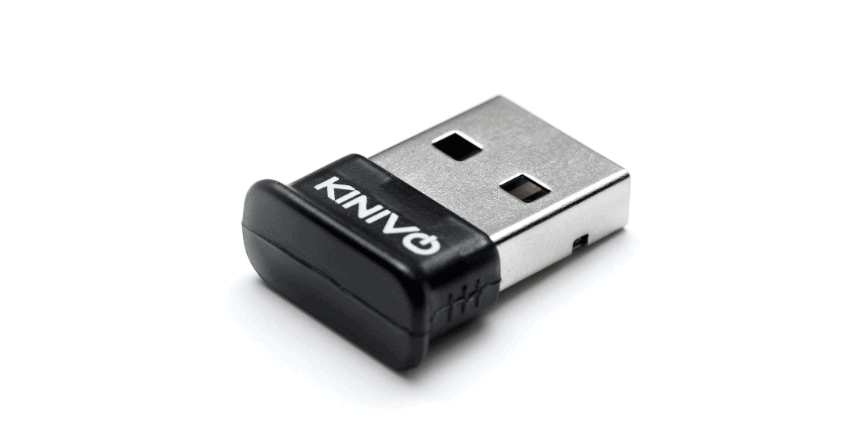
The last Bluetooth USB adapter that has made into our list is Kinivo BTD-400 which is highly compatible with Windows 10/8/7/Vista/XP, Raspberry Pi, and Linux. The adapter is ideal for battery powered PCs as it uses BLE technology to increase the efficiency and life of a system’s battery.

The standard 10m Bluetooth range is perfect for usual wireless accessories like mouse, keyboards, speakers, game controllers, etc. You will get an installation disk with a user guide or you can download the drivers from Kinivo’s website.

Pros:

  • Sleep design
  • Bluetooth v4.0 with backward compatibility

Cons:

  • Installation takes some time
  • Doesn’t support Mac

Wrapping up:

All the Bluetooth adapters mentioned in this post offer a stable connection and come with an ease to install. The list is definitely not exhaustive, but the ones above will surely give you a slack-free experience. 

How To Pick The Best Reading Software: An Ultimate Checklist

Switching from printed books to their e-versions is a great way to increase reading motivation and speed. Ebooks are generally cheaper, some can be downloaded for free from legal loyalty-free libraries. Also, reading software offers much broader customization possibilities than a printed alternative.

However, this only stays true for high-quality reading tools. Sometimes, reading software can distract from reading or even damage eyesight. If the tool doesn’t offer proper formatting, you’ll struggle with incredible small text size and blurry fonts, the sentences and words will be butchered, completely obscuring the message of the book. 

To take the most out of your ebook-reading experience, take some time to research the functionality, interface, customization options, and available add-ons. The easiest way to narrow the circle of possible choices is to establish clear criteria. 

We collected the ultimate checklist which will help with evaluation – you’ll eliminate unfit options in no time. 

An Ultimate Reading Software Checklist 

The criteria are located in their logical order, from the most important to the least significant ones. Thus, if a tool scores more points on higher-positioned characteristics, you can prefer that one. 

What formats does the tool support?

The most common formats are EPUB, PDF, MOBI, OEB, AZW, AZW3 (Amazon’s file extensions), IBA. To be able to access as many books as possible, download a reader that supports all these formats. PDF, EPUB, and MOBI are absolutely a must-have. 

What type of content do you prefer? 

Ebook is a general name for all kind of electronic literature. If you want to take the most out of your too, you need to be a lot more specific. Along with typical book formats, you might want to access magazines or comic books. 

If you are an avid comic book reader, you’ll have to do some research. The majority of comic book readers do not support other formats and general reading software usually is not compatible with comic book formats. So, the wisest solution is to download two tools and take the most out of both. 

What are the essential and additional features?

The must-have functionality of a professional reading software comprises of the following features:

  • The possibility to access files directly from storage simply b clicking the file icon as well as accessing a book from the tool;
  • You can use Adobe Reader offline installer if there is no Internet connection;
  • Text formatting (changing fonts, text colors);
  • Various background themes (classical sets include dark and light colors, book-like textures are also quite common);
  • Synchronization – software is connected to mobile phones, tablets, reading devices. 

Additional features can include:

  • Meta-information editor – users can upload and customize book covers, write descriptions and tags;
  • Night mode for reading in the dark;
  • Additional customization for users with eyesight problems;
  • Leaving bookmarks and making notes;
  • Citation and reference editor. 

Before you download a tool, go through these features and determine which ones would be the most useful to you. Usually, reading software targets a particular kind of audience: people who simply read books for fun. These would include a wide selection of background themes, and fun settings to play around with (changing page-turning animations or formatting notes). 

Those who use a tool for research (here you will usually find an elaborate text search, a comfortable citation system, and a rich library that can be accessed even offline). If you intend to use the tool for work, you want to download a clear and simple reader that will not distract you from comprehending important information. 

Does the program distract you or not?

Obviously, you are hoping to get a ‘no’ answer here. Ideally, a reading tool should be as simple as possible (Kindle or Adobe Acrobat are great examples of that) to keep your focus on the literature rather than on functionality.

However, even if the interface is clear and the features are not excessive, there are additional ‘hidden’ factors that might influence your ability to concentrate:

  • Slow page-turning animation. Fast readers don’t like wasting time, waiting for the next page to load. Make sure that the tool allows complete animation removal.
  • Advertising. The majority of free tools are sustained with ads, so you have to understand that there will be some notifications. However, they should be rare and of small size. 
  • The inability to display images. Even though pictures make book files heavier, they also are an essential part of the reading experience. It’s fine if you have the possibility to choose whether the media content should be displayed or ignored. However, if a tool doesn’t show pictures by default, this might become a problem later. 
  • Tools focused on speed-reading. Such software’s main goal is to get you to the last page of the book as soon as possible. If you are a fast reader, perhaps, you’ll be fine, but generally, speed reading software is very distracting. Such tools automatically turn pages and some don’t include the ‘Rewind’ feature. If you lost a phrase or didn’t grasp something from the first time, it’s over for you. So, fast-reading tools are fun as a challenge but usually inefficient for consistent reading. 
  • No GUI, like in Sumatra reader. Whenever you want to edit a text fragment, you have to go to the file itself and put the parameters manually. Chances are, you might accidentally delete important sentience or put a wrong parameter. Fine for experienced users, a big hurdle for beginners.

What to do after you picked the tool?

After you’ve chosen the software, download it on the official website of from a trusted software catalog. Just to be sure, examine user reviews and software ratings. Popular tools often have malicious clones – a user intends to download a reading software but ends up with a Trojan horse. Hence, choose only reputable file sources.

Now you are familiar with all main characteristics of a fine book reading tool. All you have to do is pick which factors matter the most to you and find a tool that responds to these requirements. Good luck!

STS Inks: A Great Source for Ultra-premium Quality Inks for Industrial Printers

Businesses are always pushing for lower cost solutions, but this often comes at a price. When it comes to printing, projects can suffer if there is little or no understanding of materials, and the inks compatible with them.

With its low cost of production and durability, wide format printers are the perfect tool to create advertising for your business, being a highly cost-effective medium to deliver your brand message to a large audience.

When compared with conventional printers, inkjet printers require less ink, can reproduce content in double-quick time, and benefit from the quick drying nature of the inks used. The last of these will continue to play an increasingly prominent role in the future demand for wide format inkjet printers.

The varieties of ink that can be used in wide format printing are many, and choosing the right one can be tricky for those unfamiliar with them. Generally speaking, inks fall into 5 broad categories, each with their own advantages and drawbacks:

  • Solvent inks
  • Eco-solvent inks
  • Aqueous inks
  • UV curable inks
  • Latex inks 

The basic formulation for water-based inks first emerged over 60 years ago, and produces bright colors. The major drawback is that these colors fade very quickly when exposed to sunlight. 

Eco solvent inks, on the other hand, are made from the by-product of the refining of petroleum. The popularity of these inks particularly as a wide format printer ink, has grown in recent times as they contain no volatile organic compounds, have a superior color quality and cost advantages over others types of inks and emit little or no toxic fumes or odor in the drying process.

One of the most efficient and effective inks suitable for wide format printers is Mutoh Eco Ultra Ink. This ink is extremely durable, adheres better with base substrates, is scratch resistant, provides vivid colors, dries quicker and emits almost no odor when compared with other eco solvent inks. STS Inks manufactures a compatible version which provides the same characteristics as the OEM but at a lower cost. 

These replacement inks are manufactured using cutting-edge technology, are GBL-free, and Prop 65 and EN71-3 compliant as well. Currently, no other ink manufacturer provides these qualifications. 

The quality of reproduced images will be apparent, and help communicate your brand message without having to worry if the materials used in the manufacturing process will stand the test of time.